

TD-Hearts
Displays the player's hearts above their username.
Автор: The_D1AMOND1,5 тыс.3обновлён 27 окт. 2026 г.
Механики игрыОбщениеУтилиты
Описание
🔵 DESCRIPTION
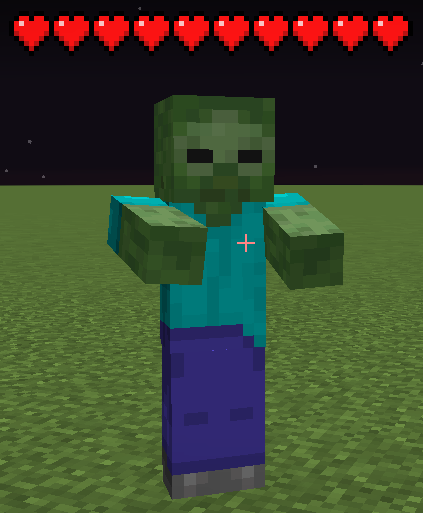
See how much health players and mobs have left, and customize how hearts look in your game.
🔵 FEATURES
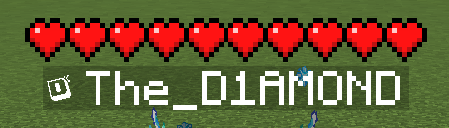
- Live health: display hearts above players and mobs, with a separate option to show hearts above your own character.
- Your health display: keep Minecraft's default hearts above the hotbar or use your selected TD-Hearts style.
- Mob filters: show health for all mobs, hostile mobs, passive mobs or animals. You can also disable mob hearts.
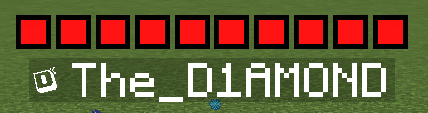
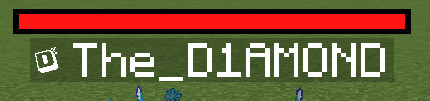
- Four styles: choose Vanilla, Square, Round or a health bar, with a selection of colors.
- Size options: choose small or large icons for Square and Round styles, or small, medium or large health bars.
- Adjustable layout: change the height above characters, the spacing between hearts and the distance between rows.
- Health animations: highlight missing health or damage from the last hit, add flashing outlines or turn blinking off.
- Golden and Hardcore hearts: supports absorption hearts, such as those from golden apples, and Hardcore heart designs.
- Configuration profiles: save different setups, switch between them, update them or delete them. The built-in Default profile lets you restore the original settings.
- Customizable settings menu: choose its theme, color and scrolling speed, and use search to find options.
- English and Polish: select either language or follow your Minecraft language setting.
- Optimized rendering: designed to reduce the performance impact when many mobs are visible.
🔵 COMMANDS
- /td-hearts » Opens the configuration screen.
- /td-hearts reload » Reloads the configuration without requiring a game restart.
🔵 SUPPORT
If you encounter an error or need assistance, please contact support on Discord.
DISCORD: https://discord.gg/M3FENPR9fN


Галерея
Последние версии
Все версии →release
TD-Hearts 1.3.1 - 26.3
1.3.127 окт. 2026 г.64Minecraft: 26.3fabric
Что нового
# MOD UPDATE » 1.3.1
## 🟢 NEW FEATURES
- **[ALL]** Added Panel Background in Settings: None, Blurred, Dimmed, and Blurred + Dimmed.
## 🟠 PERFORMANCE
- **[ALL]** We have optimized the rendering of hearts when a large number of players/mobs are present.
release
TD-Hearts 1.3.1 - 26.2
1.3.127 окт. 2026 г.17Minecraft: 26.2fabric
Что нового
# MOD UPDATE » 1.3.1
## 🟢 NEW FEATURES
- **[ALL]** Added Panel Background in Settings: None, Blurred, Dimmed, and Blurred + Dimmed.
## 🟠 PERFORMANCE
- **[ALL]** We have optimized the rendering of hearts when a large number of players/mobs are present.
release
TD-Hearts 1.3.1 - 26.1
1.3.127 окт. 2026 г.11Minecraft: 26.1fabric
Что нового
# MOD UPDATE » 1.3.1
## 🟢 NEW FEATURES
- **[ALL]** Added Panel Background in Settings: None, Blurred, Dimmed, and Blurred + Dimmed.
## 🟠 PERFORMANCE
- **[ALL]** We have optimized the rendering of hearts when a large number of players/mobs are present.
release
TD-Hearts 1.3.1 - 1.21.11
1.3.127 окт. 2026 г.19Minecraft: 1.21.11fabric
Что нового
# MOD UPDATE » 1.3.1
## 🟢 NEW FEATURES
- **[ALL]** Added Panel Background in Settings: None, Blurred, Dimmed, and Blurred + Dimmed.
## 🟠 PERFORMANCE
- **[ALL]** We have optimized the rendering of hearts when a large number of players/mobs are present.
release
TD-Hearts 1.3.1 - 1.21.4
1.3.127 окт. 2026 г.11Minecraft: 1.21.4fabric
Что нового
# MOD UPDATE » 1.3.1
## 🟢 NEW FEATURES
- **[ALL]** Added Panel Background in Settings: None, Blurred, Dimmed, and Blurred + Dimmed.
## 🟠 PERFORMANCE
- **[ALL]** We have optimized the rendering of hearts when a large number of players/mobs are present.
release
TD-Hearts 1.3 - 26.3
1.322 окт. 2026 г.58Minecraft: 26.3fabric
Что нового
# MOD UPDATE » 1.3
## 🟢 NEW FEATURES
- **[ALL]** Settings now take effect immediately and save in the background. One dedicated worker handles settings, profiles and configuration reloads.
## 🟡 CHANGES
- **[ALL]** Configuration loading accepts only the current format. Older profile metadata, field names and setting aliases are rejected without migration.
- **[ALL]** Saving a profile does not activate it. Success notifications appear after the operation completes; failures use the existing notification style.
- **[ALL]** Normal shutdown gives accepted writes up to five seconds to finish. Closing the configuration screen does not cancel them.
## 🟠 PERFORMANCE
- **[ALL]** File access and JSON processing now run outside interactive GUI actions. Profile lists use data already held in memory instead of scanning folders while rendering.
- **[ALL]** Automatic saves are queued immediately. Newer values replace pending saves that have not started, while explicit profile operations keep their click order.
- **[ALL]** Ordinary saves do not reload the mod, reset rendering caches or recreate the screen.
## 🔴 BUG FIXES
- **[1.21.4]** Fixed extra, misplaced hearts appearing with shaders. Hearts collected during the shadow pass are discarded before the main entity pass.
- **[ALL]** Hearts and health bars no longer render during the Iris shadow pass, including deferred drawing commands. Health indicators remain visible normally without casting shadows on the ground.
- **[ALL]** Configuration files are written completely as UTF-8 temporary files before replacing the previous file. Atomic replacement is used where supported, with a logged fallback on other file systems. Temporary files are cleaned up after successful and failed saves.
- **[ALL]** Delayed profile restores no longer overwrite settings edited after the restore was requested, even if a setting was changed and then returned to its previous value.
- **[ALL]** Consecutive profile operations no longer lose earlier changes. Saving also preserves text entered while an earlier operation is still running.
- **[ALL]** Closed or reopened screens no longer receive outdated notifications. An accepted profile restore still updates the active settings after its screen closes.
- **[ALL]** Invalid or ambiguous profile names cannot silently overwrite another profile. Built-in profiles and unexpected user files remain protected, and detected symbolic links or redirected directories are rejected.
- **[ALL]** Failed reloads and profile restores keep the previous active settings. Damaged configuration files are preserved instead of being automatically replaced with defaults.
release
TD-Hearts 1.3 - 26.2
1.322 окт. 2026 г.14Minecraft: 26.2fabric
Что нового
# MOD UPDATE » 1.3
## 🟢 NEW FEATURES
- **[ALL]** Settings now take effect immediately and save in the background. One dedicated worker handles settings, profiles and configuration reloads.
## 🟡 CHANGES
- **[ALL]** Configuration loading accepts only the current format. Older profile metadata, field names and setting aliases are rejected without migration.
- **[ALL]** Saving a profile does not activate it. Success notifications appear after the operation completes; failures use the existing notification style.
- **[ALL]** Normal shutdown gives accepted writes up to five seconds to finish. Closing the configuration screen does not cancel them.
## 🟠 PERFORMANCE
- **[ALL]** File access and JSON processing now run outside interactive GUI actions. Profile lists use data already held in memory instead of scanning folders while rendering.
- **[ALL]** Automatic saves are queued immediately. Newer values replace pending saves that have not started, while explicit profile operations keep their click order.
- **[ALL]** Ordinary saves do not reload the mod, reset rendering caches or recreate the screen.
## 🔴 BUG FIXES
- **[1.21.4]** Fixed extra, misplaced hearts appearing with shaders. Hearts collected during the shadow pass are discarded before the main entity pass.
- **[ALL]** Hearts and health bars no longer render during the Iris shadow pass, including deferred drawing commands. Health indicators remain visible normally without casting shadows on the ground.
- **[ALL]** Configuration files are written completely as UTF-8 temporary files before replacing the previous file. Atomic replacement is used where supported, with a logged fallback on other file systems. Temporary files are cleaned up after successful and failed saves.
- **[ALL]** Delayed profile restores no longer overwrite settings edited after the restore was requested, even if a setting was changed and then returned to its previous value.
- **[ALL]** Consecutive profile operations no longer lose earlier changes. Saving also preserves text entered while an earlier operation is still running.
- **[ALL]** Closed or reopened screens no longer receive outdated notifications. An accepted profile restore still updates the active settings after its screen closes.
- **[ALL]** Invalid or ambiguous profile names cannot silently overwrite another profile. Built-in profiles and unexpected user files remain protected, and detected symbolic links or redirected directories are rejected.
- **[ALL]** Failed reloads and profile restores keep the previous active settings. Damaged configuration files are preserved instead of being automatically replaced with defaults.
release
TD-Hearts 1.3 - 26.1
1.322 окт. 2026 г.16Minecraft: 26.1fabric
Что нового
# MOD UPDATE » 1.3
## 🟢 NEW FEATURES
- **[ALL]** Settings now take effect immediately and save in the background. One dedicated worker handles settings, profiles and configuration reloads.
## 🟡 CHANGES
- **[ALL]** Configuration loading accepts only the current format. Older profile metadata, field names and setting aliases are rejected without migration.
- **[ALL]** Saving a profile does not activate it. Success notifications appear after the operation completes; failures use the existing notification style.
- **[ALL]** Normal shutdown gives accepted writes up to five seconds to finish. Closing the configuration screen does not cancel them.
## 🟠 PERFORMANCE
- **[ALL]** File access and JSON processing now run outside interactive GUI actions. Profile lists use data already held in memory instead of scanning folders while rendering.
- **[ALL]** Automatic saves are queued immediately. Newer values replace pending saves that have not started, while explicit profile operations keep their click order.
- **[ALL]** Ordinary saves do not reload the mod, reset rendering caches or recreate the screen.
## 🔴 BUG FIXES
- **[1.21.4]** Fixed extra, misplaced hearts appearing with shaders. Hearts collected during the shadow pass are discarded before the main entity pass.
- **[ALL]** Hearts and health bars no longer render during the Iris shadow pass, including deferred drawing commands. Health indicators remain visible normally without casting shadows on the ground.
- **[ALL]** Configuration files are written completely as UTF-8 temporary files before replacing the previous file. Atomic replacement is used where supported, with a logged fallback on other file systems. Temporary files are cleaned up after successful and failed saves.
- **[ALL]** Delayed profile restores no longer overwrite settings edited after the restore was requested, even if a setting was changed and then returned to its previous value.
- **[ALL]** Consecutive profile operations no longer lose earlier changes. Saving also preserves text entered while an earlier operation is still running.
- **[ALL]** Closed or reopened screens no longer receive outdated notifications. An accepted profile restore still updates the active settings after its screen closes.
- **[ALL]** Invalid or ambiguous profile names cannot silently overwrite another profile. Built-in profiles and unexpected user files remain protected, and detected symbolic links or redirected directories are rejected.
- **[ALL]** Failed reloads and profile restores keep the previous active settings. Damaged configuration files are preserved instead of being automatically replaced with defaults.
release
TD-Hearts 1.3 - 1.21.11
1.322 окт. 2026 г.30Minecraft: 1.21.11fabric
Что нового
# MOD UPDATE » 1.3
## 🟢 NEW FEATURES
- **[ALL]** Settings now take effect immediately and save in the background. One dedicated worker handles settings, profiles and configuration reloads.
## 🟡 CHANGES
- **[ALL]** Configuration loading accepts only the current format. Older profile metadata, field names and setting aliases are rejected without migration.
- **[ALL]** Saving a profile does not activate it. Success notifications appear after the operation completes; failures use the existing notification style.
- **[ALL]** Normal shutdown gives accepted writes up to five seconds to finish. Closing the configuration screen does not cancel them.
## 🟠 PERFORMANCE
- **[ALL]** File access and JSON processing now run outside interactive GUI actions. Profile lists use data already held in memory instead of scanning folders while rendering.
- **[ALL]** Automatic saves are queued immediately. Newer values replace pending saves that have not started, while explicit profile operations keep their click order.
- **[ALL]** Ordinary saves do not reload the mod, reset rendering caches or recreate the screen.
## 🔴 BUG FIXES
- **[1.21.4]** Fixed extra, misplaced hearts appearing with shaders. Hearts collected during the shadow pass are discarded before the main entity pass.
- **[ALL]** Hearts and health bars no longer render during the Iris shadow pass, including deferred drawing commands. Health indicators remain visible normally without casting shadows on the ground.
- **[ALL]** Configuration files are written completely as UTF-8 temporary files before replacing the previous file. Atomic replacement is used where supported, with a logged fallback on other file systems. Temporary files are cleaned up after successful and failed saves.
- **[ALL]** Delayed profile restores no longer overwrite settings edited after the restore was requested, even if a setting was changed and then returned to its previous value.
- **[ALL]** Consecutive profile operations no longer lose earlier changes. Saving also preserves text entered while an earlier operation is still running.
- **[ALL]** Closed or reopened screens no longer receive outdated notifications. An accepted profile restore still updates the active settings after its screen closes.
- **[ALL]** Invalid or ambiguous profile names cannot silently overwrite another profile. Built-in profiles and unexpected user files remain protected, and detected symbolic links or redirected directories are rejected.
- **[ALL]** Failed reloads and profile restores keep the previous active settings. Damaged configuration files are preserved instead of being automatically replaced with defaults.
release
TD-Hearts 1.3 - 1.21.4
1.322 окт. 2026 г.8Minecraft: 1.21.4fabric
Что нового
# MOD UPDATE » 1.3
## 🟢 NEW FEATURES
- **[ALL]** Settings now take effect immediately and save in the background. One dedicated worker handles settings, profiles and configuration reloads.
## 🟡 CHANGES
- **[ALL]** Configuration loading accepts only the current format. Older profile metadata, field names and setting aliases are rejected without migration.
- **[ALL]** Saving a profile does not activate it. Success notifications appear after the operation completes; failures use the existing notification style.
- **[ALL]** Normal shutdown gives accepted writes up to five seconds to finish. Closing the configuration screen does not cancel them.
## 🟠 PERFORMANCE
- **[ALL]** File access and JSON processing now run outside interactive GUI actions. Profile lists use data already held in memory instead of scanning folders while rendering.
- **[ALL]** Automatic saves are queued immediately. Newer values replace pending saves that have not started, while explicit profile operations keep their click order.
- **[ALL]** Ordinary saves do not reload the mod, reset rendering caches or recreate the screen.
## 🔴 BUG FIXES
- **[1.21.4]** Fixed extra, misplaced hearts appearing with shaders. Hearts collected during the shadow pass are discarded before the main entity pass.
- **[ALL]** Hearts and health bars no longer render during the Iris shadow pass, including deferred drawing commands. Health indicators remain visible normally without casting shadows on the ground.
- **[ALL]** Configuration files are written completely as UTF-8 temporary files before replacing the previous file. Atomic replacement is used where supported, with a logged fallback on other file systems. Temporary files are cleaned up after successful and failed saves.
- **[ALL]** Delayed profile restores no longer overwrite settings edited after the restore was requested, even if a setting was changed and then returned to its previous value.
- **[ALL]** Consecutive profile operations no longer lose earlier changes. Saving also preserves text entered while an earlier operation is still running.
- **[ALL]** Closed or reopened screens no longer receive outdated notifications. An accepted profile restore still updates the active settings after its screen closes.
- **[ALL]** Invalid or ambiguous profile names cannot silently overwrite another profile. Built-in profiles and unexpected user files remain protected, and detected symbolic links or redirected directories are rejected.
- **[ALL]** Failed reloads and profile restores keep the previous active settings. Damaged configuration files are preserved instead of being automatically replaced with defaults.