

Survival Displays
Create display models directly in survival without mods and resource packs
Автор: Gm43,1 тыс.32обновлён 9 окт. 2026 г.
ДекорМеханики игрыУтилиты
Описание

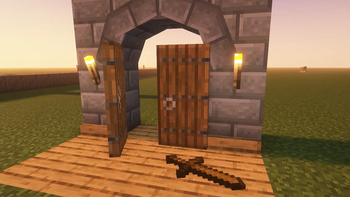
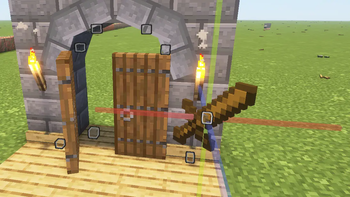
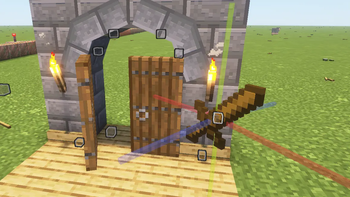
Survival Displays is a tool that allows you to create and edit item, block and text displays directly in survival.
- No third-party programs, no mods, no resource packs, and no creative mode!
- Multiplayer support
- All decorations created with Survival Displays will remain fully functional even after deleting the datapack.
To turn the Breeze rod into a tool, equip it in your hand and click the "Get Wand" button in the chat.
🎥 Watch some Videos
The lower = the newer
Галерея

Последние версии
Все версии →release
1.14
1.14-mod9 окт. 2026 г.145Minecraft: 26.3fabric, forge, neoforge, quilt
Что нового
### **🛠️Fixes**
- Fixed summoning 2-block tall block displays
- Fixed summoning 2-block long displays
- Fixed summoning multi-block displays
- Fixed switching parts of beds (blockstates)
### **🙏Special thanks to**
- **Steven the king** for bug reports!
release
1.14
1.14-datapack9 окт. 2026 г.43Minecraft: 26.3datapack
Что нового
### **🛠️Fixes**
- Fixed summoning 2-block tall block displays
- Fixed summoning 2-block long displays
- Fixed summoning multi-block displays
- Fixed switching parts of beds (blockstates)
### **🙏Special thanks to**
- **Steven the king** for bug reports!
release
1.13
1.13-mod4 окт. 2026 г.40Minecraft: 26.3fabric, forge, neoforge, quilt
Что нового
- Fixed blockstates parcer
release
1.13
1.13-datapack4 окт. 2026 г.16Minecraft: 26.3datapack
Что нового
- Fixed blockstates parcer
release
1.12
1.12-mod3 окт. 2026 г.16Minecraft: 26.3fabric, forge, neoforge, quilt
Что нового
### **⚙️Technical**
- Fixed "summon block display" not working (Thanks Steven the king for the report)
release
1.12
1.12-datapack3 окт. 2026 г.8Minecraft: 26.3datapack
Что нового
### **⚙️Technical**
- Fixed "summon block display" not working (Thanks Steven the king for the report)
release
1.11
1.11-mod19 сент. 2026 г.79Minecraft: 26.3-pre-3, 26.3-rc-1, 26.3-rc-2, 26.3-rc-3, 26.3fabric, forge, neoforge, quilt
Что нового
### **⚙️Technical**
- 26.3 Support
release
1.11
1.11-datapack19 сент. 2026 г.48Minecraft: 26.3-pre-3, 26.3-rc-1, 26.3-rc-2, 26.3-rc-3, 26.3datapack
Что нового
### **⚙️Technical**
- 26.3 Support
release
1.10
1.10-mod23 авг. 2026 г.405Minecraft: 1.21.9, 1.21.10, 1.21.11, 26.1, 26.1.1, 26.1.2, 26.2fabric, forge, neoforge, quilt
Что нового
### **⚙️Technical**
- Now, if another player within the entity modification range also attempts to modify displays, a warning appears on the screen, as well as the circle on the ground
- The datapack/mod must now support subsequent versions for which it was not originally intended by default (or at least attempt to run in them).
- "Display dots" now appear and disappear smoothly
### **🛠️Fixes**
- Players can no longer accidentally see other players' open chat menus.
- If another player changes the wand mode, the mode-switching animation no longer appears on the display controls for all other players in the world.
- You can now select and edit displays, even if another player (without the tool!) is standing closer to the display than you are.
- Editor arrows no longer disappear if another player (without the tool!) is standing within a radius of 16 to 20 blocks from the display.
### **🙏Special thanks to**
- Qwerty - for the reminder!
release
1.10
1.10-datapack23 авг. 2026 г.86Minecraft: 1.21.9, 1.21.10, 1.21.11, 26.1, 26.1.1, 26.1.2, 26.2datapack
Что нового
### **⚙️Technical**
- Now, if another player within the entity modification range also attempts to modify displays, a warning appears on the screen, as well as the circle on the ground
- The datapack/mod must now support subsequent versions for which it was not originally intended by default (or at least attempt to run in them).
- "Display dots" now appear and disappear smoothly
### **🛠️Fixes**
- Players can no longer accidentally see other players' open chat menus.
- If another player changes the wand mode, the mode-switching animation no longer appears on the display controls for all other players in the world.
- You can now select and edit displays, even if another player (without the tool!) is standing closer to the display than you are.
- Editor arrows no longer disappear if another player (without the tool!) is standing within a radius of 16 to 20 blocks from the display.
### **🙏Special thanks to**
- Qwerty - for the reminder!