COWMODSКаталог модов

Someone In The World

Friend?

Автор: lordmeww2060обновлён 13 мая 2025 г.
ПроклятыеМагияМобы

Описание

Versions

deleted 1.1.2 (ef100) archived 1.1.2 (ef102) archived 1.1.2 (ef103) archived 1.1.31 (ef104) archived 1.1.32 (ef105) now 1.1.33 (ef106)

Multiplayer - now 1.1.33 (Multiplayer2-ef107), acrhived 1.1.33 (Multiplayer-ef96)

About

SITW Assets: https://disk.yandex.ru/d/JXe299hiTQZVuw

Do you know what is living in your world?

Why your friend is offline? Anomalies? Know it.

Desc

You created an ordinary world. I played it with a friend, nothing unusual. Suddenly you found an artifact. No one had ever met him, and he wasn't in the game files either. The date "05/08/2008" was written on the artifact. You were surprised and scared, but you kept the artifact for yourself. But the next morning, the friend was not there, and the artifact itself was missing. After that, you started creating single worlds and playing in them, without friends.. But suddenly I entered one of your worlds (further along the plot)

How to install

Neoforge:(https://projects.neoforged.net/neoforged/neoforge)

Download version: 21.4.123 (1.24.4)

Step 1: Open file "neoforge-21.4.123-installer.jar" wait sometime and choose "Download client": "Proceed" then neoforge must be download in minecraft version (if you playing on tlauncher,legacylauncher,klauncher it be in your versions)

Step 2: Open your minecraft launcher (official, tlauncher, legacylauncher, klauncher) if you using official you need to open your .minecraft folder (by default its here: YourDisk:\Users\YourUser\AppData\Roaming.minecraft\mods).

Step 3: Choose file "Someoneintheworldremake-(modversion)(sub-class).jar" and drop its to "YourDisk:\Users\YourUser\AppData\Roaming.minecraft\mods".

Final step: Open launcher, choose version "version neoforge-21.4.123"

(You can download texturepack for atmosphere here:https://modrinth.com/resourcepack/nostalgia+/version/83)

Галерея
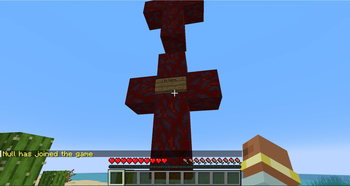
Event #1

Последние версии

Все версии →
release

Someone In The World Multiplayer

1.1.33
13 мая 2025 г.96Minecraft: 1.21.4neoforge
Скачать
Что нового
# Some bug fixes with null # Can unsync sounds/events/messages
beta

Someone In The World 1.1.33

1.1.33
13 мая 2025 г.26Minecraft: 1.21.4neoforge
Скачать
Что нового
# Beta # Idk work it or no
release

Someone In The World 1.1.32

1.1.32
12 мая 2025 г.17Minecraft: 1.21.4neoforge
Скачать
Что нового
# Bug fixes # New cool events # New interacts/bioms/books # First realese!!
beta

Someone In The World 1.1.31

1.1.31
12 мая 2025 г.23Minecraft: 1.21.4neoforge
Скачать
Что нового
# Sounds bug fix (idk what im really fixed, on test)
beta

Someone In The World 1.1.3

1.1.3
11 мая 2025 г.20Minecraft: 1.21.4neoforge
Скачать
Что нового
# Fixes # New events # New interacts
beta

Someone In The World 1.1.2

1.1.2
11 мая 2025 г.23Minecraft: 1.21.4neoforge
Скачать
Что нового
Neoforge:(https://projects.neoforged.net/neoforged/neoforge) Download version: 21.4.123 (1.24.4) ---HOW TO DOWNLOAD?--- Step 1: Open file "neoforge-21.4.123-installer.jar" wait sometime and choose "Download client": "Proceed" then neoforge must be download in minecraft version (if you playing on tlauncher,legacylauncher,klauncher it be in your versions) Step 2: Open your minecraft launcher (official, tlauncher, legacylauncher, klauncher) if you using official you need to open your .minecraft folder (by default its here: YourDisk:\Users\YourUser\AppData\Roaming\.minecraft\mods). Step 3: Choose file "Someoneintheworldremake-1.1.2(ef103).jar" and drop its to "YourDisk:\Users\YourUser\AppData\Roaming\.minecraft\mods". Final step: Open launcher, choose version "version neoforge-21.4.123" (You can download texturepack for atmosphere here:https://modrinth.com/resourcepack/nostalgia+/version/83)