SkyWars+
A highly customizable skywars plugin for newer minecraft versions
Описание


-
Map System – Just drop world folders into /plugins/SkyWarsPlus/maps and configure them easily
-
Custom Game Configs – Set up different modes (Solos, Duos, etc.)
-
Loot Editor – Add and customize loot in-game
-
Auto Chest Detection – No need to manually add island chests (need to manually add op chest locations)
-
Chest Refills - Add custom chest refill time for each game config
-
Map IDs - Choose which maps you need, just provide the map id for the config

Step 1: Adding Maps
Place your world folders inside: plugins/SkyWarsPlus/maps/
The folder name of each world will be treated as the map name.
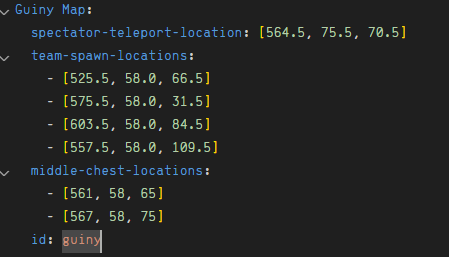
Next, define the map data in map_data.yml like this:
Map Name:
  spectator-teleport-location: [564.5, 55.5, 70.5]
  team-spawn-locations:
    - [525.5, 58.0, 67.5]
    - [559.5, 58.0, 108.5]
    - [559.5, 58.0, 108.5]
    - [559.5, 58.0, 108.5]
  op-chest-locations:
    - [561, 58, 65]
    - [567, 58, 75]
  id: mapid
Explanation:
waiting-area-location: Location where players wait before the game starts.
team-spawn-locations: Locations where each team will spawn at the start of the match.
chest-locations: Middle island chests only. These chests contain better loot. Must be integers (no decimal points).
Normal chest locations are detected automatically — you don't need to add them.
Step 2: Creating Game Configurations
Use this command to create a game configuration:
/swp create_config <name> <min_teams> <max_teams> <team_size> <max_armor_normal_chest> <max_armor_op_chest> <refill_cooldown> <map_ids>name: Name of the game setting (e.g., "Solos", "Duos").
min_teams: Minimum number of teams required to start.
max_teams: Maximum number of teams allowed.
team_size: Number of players per team.
refill_cooldown: Time in seconds between chest refills.
map_ids: IDs of maps to be used with this setting (e.g., waterfallSolos).
Step 3: Configuring Loot
Place items into any chest (for normal) or middle chest.
Look directly at the chest.
Run either:
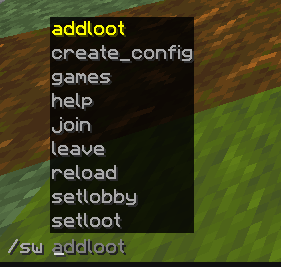
/swp setloot <normal/op>or
/swp addloot <normal/op>You can customize the loot further in loot-items.yml:
chance: The probability of an item appearing.
min-amount / max-amount
custom name, etc.
Step 4: Joining a Game
To join a game:
/swp join <id | config name>

SkyWars+ lets you fully customize its menus for a unique server experience.
IMPORTANT:
Menu customization requires correct YAML formatting. Incorrect spacing or syntax will break the menu.
Menu Files
skywars_menu.yml – Main SkyWars menu players can open

join_menu.yml – Game join selector menu for different modes/configs
skywars_menu.yml Guide
Layout
Example:
# ONE, TWO, THREE..., SIX rows: FIVE buttons: 0: name: "&b&lSkyWars+" material: BOOK glint: true lore: - "&7Welcome to &bSkyWars+&7!" - "&7Fast-paced PvP minigame with" - "&7custom maps and modes." - "" - "&eFight, loot & &ebe the last one standing!" actions: []rows: How many rows the menu has (values: ONE, TWO, THREE, FOUR, FIVE, SIX).
buttons: Each numbered key represents a slot in the menu.
name: The display name of the button (supports color codes).
material: The Minecraft item used for the button.
glint: true/false – whether the button should have an enchantment glow.
lore: List of text lines shown when hovering over the button.
actions: What happens when the player clicks the button.
Actions
Actions are added in [TYPE] format:
[CONSOLE] <command> – Runs a command as the console

[COMMAND] <command> – Runs a command as the player

[MESSAGE] <message> – Sends a chat message to the player
Example:
actions:
  - "[MESSAGE] &aYou opened the SkyWars menu!"
  - "[COMMAND] swp join solos"
  - "[CONSOLE] say You joined SkyWars!"
join_menu.yml Guide
Layout
Example:
# ONE, TWO, THREE..., SIX rows: THREE buttons: 10: name: "&7&lSkywars Solos" material: IRON_SWORD glint: false join-on-click: false config: null lore: - "&7Coming Soon!" - "&aGet ready for epic battles." actions: - "[MESSAGE] &cThis mode is coming soon!"rows: Number of rows in the menu(same values used in skywars-menu.yml)
join-on-click: true/false – Whether clicking the button should instantly join the game.
config: The game configuration name (used if join-on-click is true or when %config_player_count% is used).
lore: Lines of description text for the button.
actions: Optional extra actions to run when the button is clicked.
Using %config_player_count%
In join_menu.yml, you can use
%config_player_count%in the lore or name to show the number of players in that config’s games.Example:
lore:
  - "&7Players: %config_player_count%"
If
join-on-clickis true or want to use%config_player_count%, you must provide a valid config name. If you don’t want to set a config, you can leaveconfig: nullor empty and instead add a command action to join.
stats-menu.yml Guide
Layout
Example:
# ONE, TWO, THREE..., SIX rows: THREE buttons: 11: name: "&b&lMini Stats" material: DIAMOND_SWORD glint: true config: Mini lore: - "&7Kills: &f[KILLS]" - "&7Wins: &f[WINS]" - "&7Losses: &f[LOSSES]" - "&7Deaths: &f[DEATHS]" - "&7Winstreak: &f[WINSTREAK]" actions: - "[MESSAGE] &aYou opened Mini stats!" - "[COMMAND] stats mini" 15: name: "&a&l1v1 Stats" material: IRON_SWORD glint: false config: 1v1 lore: - "&7Kills: &f[KILLS]" - "&7Wins: &f[WINS]" - "&7Losses: &f[LOSSES]" - "&7Deaths: &f[DEATHS]" - "&7Winstreak: &f[WINSTREAK]" actions: - "[MESSAGE] &aYou opened 1v1 stats!" - "[COMMAND] stats 1v1"rows: How many rows the menu has (values: ONE, TWO, THREE, FOUR, FIVE, SIX).
buttons: Each numbered key represents a slot in the menu.
name: The display name of the button (supports color codes).
material: The Minecraft item used for the button.
glint: true/false – whether the button should have an enchantment glow.
config: The game configuration name (e.g.,
Mini,1v1).
Used to pull the player’s stats for that game mode.lore: List of text lines shown when hovering over the button.
You can use placeholders:
[KILLS]→ Player’s total kills in this config[WINS]→ Player’s total wins in this config[LOSSES]→ Player’s total losses in this config[DEATHS]→ Player’s total deaths in this config[WINSTREAK]→ Player’s current winstreak in this configactions: What happens when the player clicks the button.
Actions
Actions follow the same
[TYPE] <value>format shown in earlier menu customization tutorials in this description.
Галерея