COWMODSКаталог модов

skript-variables

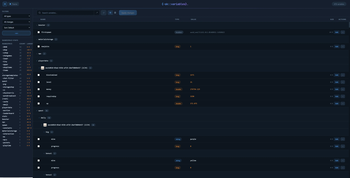
Skript addon for editting variables easily, allowing you to browse, edit, delete, clone, sort and do many more things to skript variables from a web UI.

Автор: cjh11265143обновлён 27 окт. 2026 г.
ТехнологииУтилиты

Описание

skript-variables

Ever forgotten exactly what you named a variable, then had to dig through all your code or inside variables.csv trying to work out which one it was? skript-variables opens every Skript variable on your server in a website. Look through them, fix them, and save them back live.

If you have used /lp editor from LuckPerms, this is the same idea, but for your Skript variables.

How it works

1. Install it. Put the jar in your plugins/ folder and restart. That is the whole setup.

2. Run /skv editor in game. You get a clickable link in chat. Click it and the editor opens with every variable already loaded.

3. Change what you want. Your edits are saved in the browser only. Your server has not changed yet.

4. Run /skv apply <sessionId> <code>. The editor gives you both of these when you are done. Run the command and your changes are written to the server straight away.

Your variables become folders

A variable like {playerdata::uuid::kills} is normally one long line of text. Here it turns into folders you can open and close, like files on your computer:

playerdata 4f9a-2b1c-... kills 148 balance 2,840.5 Replace this with a description
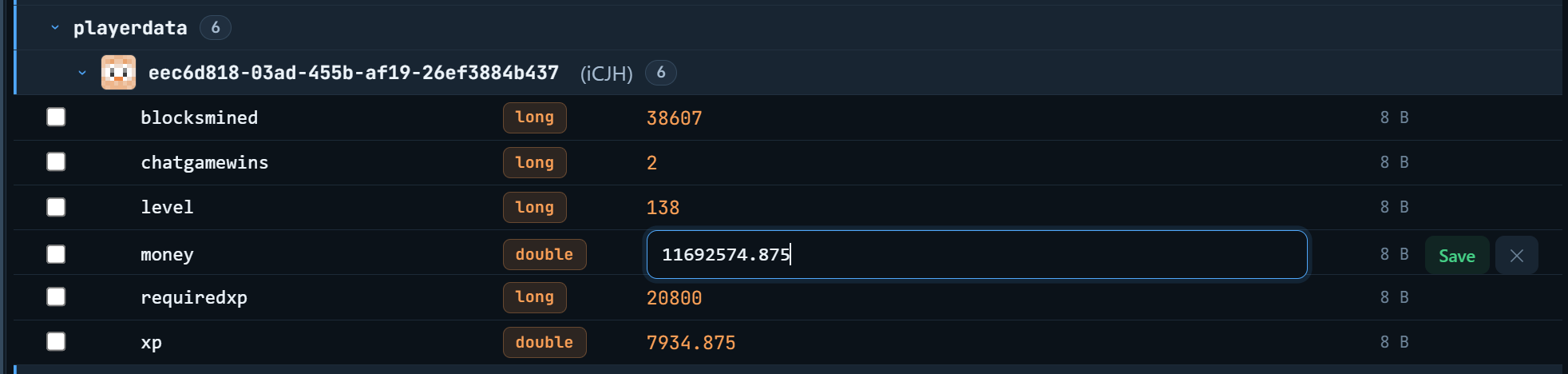
Much easier than scrolling through thousands of lines.

What you can edit

Almost everything Skript can store:

  • Text, numbers and true/false values
  • Locations, with separate boxes for world, X, Y, Z, yaw and pitch
  • Vectors, which show their length as you type and have a normalize button
  • Item types and block data
  • Text components (the fancy coloured text kind)
  • Dates and timespans
  • NBT compounds
  • skbee bounds
  • oopsk structs, where you can edit each field on its own
  • Lists inside lists inside lists

Tricky types like locations do not make you type raw text. You get proper boxes for each part, so it is hard to get wrong.

Finding what you need

  • Search by player name. Type Notch and it finds the variables saved under that player's UUID. A UUID is the long code Minecraft uses to identify a player, and you do not have to know it.
  • Regex mode if you want to do advanced pattern searching.
  • Filters to show only one type, or only the things you have changed.
  • Sidebar stats telling you how many variables each section holds, so you can see what is taking up all the space.

Doing a lot at once

  • Pick many variables and set them all to the same value in one go
  • Rename a variable, or copy it to a new name
  • Delete one variable, or wipe out a whole section at once

Is it safe?

Nothing changes until you say so. Everything you do in the browser sits there waiting. Your server is not touched until you run the apply command yourself.

The apply code only works once. After it is used it stops working, so nobody can replay it later. If you actually want to reuse it, add --force on the end.

Only ops can use it. Both permissions default to op, so a random player cannot open your variables.

Your own scripts can block it. VariablesApplyEvent fires before anything is saved, and you can cancel it from Skript if you want extra protection.

Nothing gets missed. Variables still sitting in memory that have not been saved to the file yet are included automatically. You do not have to flush anything first.

Commands

CommandWhat it does
/skv editorUploads your variables and gives you the editor link
/skv apply <sessionId> <code>Saves your changes to the server
/skv apply <sessionId> <code> --forceSame, but the code stays usable
/skv helpShows the commands

Permissions are skriptvariables.use and skriptvariables.editor. Both are op only by default.

What you need

  • Paper 1.21.4 or newer
  • Skript 2.14.x to 2.16.x
  • Java 21 or newer
  • oopsk is optional and only needed for editing structs

Extras

Three colour themes to pick from: Ocean, Slate and Ember. Anonymous usage stats are collected through bStats.

Links

Галерея

Website

Последние версии

Все версии →
beta

skript-variables 1.2.4-beta

1.2.4-beta
27 окт. 2026 г.21Minecraft: 1.21, 1.21.1, 1.21.2, 1.21.3, 1.21.4, 1.21.5, 1.21.6, 1.21.7, 1.21.8, 1.21.9, 1.21.10, 1.21.11, 26.1, 26.1.1, 26.1.2, 26.2, 26.3paper
Скачать
Что нового
### New: undo deleted variables When `/skv apply` deletes variables, their old values are saved first. After an apply that deleted something, you'll see `Undo with /skv restore last` in chat. - `/skv restore list [page]` shows recently deleted variables, who deleted them and when - `/skv restore <id>` restores one variable or a whole list, including nested entries - `/skv restore last` restores everything the most recent apply deleted A restore is refused if any of its variables has been set again since the delete, so newer data is never overwritten by accident. Add `--force` to overwrite anyway. All restore commands use the `skriptvariables.editor` permission. ### Good to know - Only deletes made through `/skv apply` can be restored. Deletes done by your scripts can't. - The history lives in memory, so it's cleared when the server restarts or the plugin reloads. - You can change the limits in `config.yml`:
beta

skript-variables 1.2.3-beta

1.2.3-beta
19 окт. 2026 г.68Minecraft: 1.21, 1.21.1, 1.21.2, 1.21.3, 1.21.4, 1.21.5, 1.21.6, 1.21.7, 1.21.8, 1.21.9, 1.21.10, 1.21.11, 26.1, 26.1.1, 26.1.2, 26.2, 26.3paper
Скачать
Что нового
**Fixes:** items with an amount over 99 no longer break /skv editor; no more Skript "Severe Error" spam for them; values with newlines or tabs no longer break the upload (this was the "0 variables" bug); a variable that fails to upload is skipped instead of failing the whole upload **Compatibility:** the variable apply event is registered through Skript's new syntax registry
beta

skript-variables 1.2.2-beta

1.2.2-beta
11 сент. 2026 г.132Minecraft: 1.21, 1.21.1, 1.21.2, 1.21.3, 1.21.4, 1.21.5, 1.21.6, 1.21.7, 1.21.8, 1.21.9, 1.21.10, 1.21.11, 26.1, 26.1.1, 26.1.2, 26.2paper
Скачать
Что нового
### Faster mass deletion - Deleting a whole list from the web editor now runs the same calls as Skript's own `delete {x::*}`: one per direct index and one for the list, instead of one call per variable, so it is as fast as deleting the list from a script - "Delete all" on a category in the website editor sends one list delete, so the apply diff stays small no matter how many variables are inside - Plain variable deletes in the same diff still delete only that variable ### Less work on the main thread - The apply diff is parsed once with Gson off the main thread. The main thread only writes the changes - Replaced the regex diff parser with Gson
beta

skript-variables 1.2.1-beta

1.2.1-beta
11 сент. 2026 г.10Minecraft: 1.21, 1.21.1, 1.21.2, 1.21.3, 1.21.4, 1.21.5, 1.21.6, 1.21.7, 1.21.8, 1.21.9, 1.21.10, 1.21.11, 26.1, 26.1.1, 26.1.2, 26.2paper
Скачать
Что нового
## 1.2.1-beta ### Profiler measures commands, functions and periodicals - Script commands, script functions, `every X` and `at HH:MM` triggers are now timed alongside event triggers - Each trigger reports self time as well as inclusive time. Self time excludes time spent in nested profiled triggers, so a slow function shows up once instead of inflating every caller - Profile payload is now version 2 with `kind` and `selfNs` per trigger. The website still renders version 1 profiles - Hooking commands, functions or periodicals uses reflection on Skript internals. If a hook fails on your Skript version the profiler logs a warning and records the other kinds
beta

skript-variables 1.2-beta

1.2-beta
7 сент. 2026 г.29Minecraft: 1.21, 1.21.1, 1.21.2, 1.21.3, 1.21.4, 1.21.5, 1.21.6, 1.21.7, 1.21.8, 1.21.9, 1.21.10, 1.21.11, 26.1, 26.1.1, 26.1.2, 26.2paper
Скачать
Что нового
### Works without variables.csv - `/skv editor` and the profiler no longer refuse to run when `plugins/Skript/variables.csv` is missing. Servers using MySQL or SQLite variable storage are now supported - Variables are read from Skript's in-memory map ### Preview before applying - `/skv apply <sessionId> <code> --preview` prints what would be set, deleted, or skipped, without writing anything. The apply code stays valid - Values that cannot be parsed are listed so you can fix them in the editor before applying - Tab completion offers `--preview` next to `--force` ### Skript syntax - Effect `start [a|the] skript profile [for %timespan%]` - Effect `stop [the] skript profile [and send [the] link to %commandsender%]` - Effect `open [the] variable editor for %commandsenders%` - Condition `[the] skript profiler is [not] recording` - Expression `[the] skript profiler elapsed time` (timespan) - Expression `[the] skript profiler execution count` (number) - Syntax is registered through Skript's addon registry introduced in 2.14
beta

skript-variables 1.1.1-beta

1.1.1-beta
19 авг. 2026 г.63Minecraft: 1.21, 1.21.1, 1.21.2, 1.21.3, 1.21.4, 1.21.5, 1.21.6, 1.21.7, 1.21.8, 1.21.9, 1.21.10, 1.21.11, 26.1, 26.1.1, 26.1.2, 26.2paper
Скачать
Что нового
Adds `/sv` as an alias of `/skv`
beta

skript-variables 1.1-beta

1.1-beta
17 авг. 2026 г.26Minecraft: 1.21, 1.21.1, 1.21.2, 1.21.3, 1.21.4, 1.21.5, 1.21.6, 1.21.7, 1.21.8, 1.21.9, 1.21.10, 1.21.11, 26.1, 26.1.1, 26.1.2, 26.2paper
Скачать
Что нового
New Profiler tab at `skript-variables.com` showing which of your scripts, triggers and events cost the most server time - Rank by script, by individual trigger, or by event, each with total time, share of the recorded window, run count, average and worst single run - Spikes list: the 50 slowest individual trigger executions in the window, with a timestamp so you can line them up against lag reports - Summary header with the recording duration, total measured time and the Skript version the profile was taken on ### Commands - `/skv profile start [seconds]`: begins recording. Defaults to 60 seconds, maximum 600. Recording stops itself when the duration elapses - `/skv profile stop`: stops early, then uploads the profile and gives you a clickable link that opens straight on the Profiler tab - `/skv profile status`: shows how long the current recording has been going and how many trigger executions have been measured so far - `/skv profile upload`: re-sends the last recorded profile. A failed upload no longer destroys the recording, and a profile cut short by a reload can still be sent - Starting a new recording cancels any pending auto stop from a previous one, so back to back recordings no longer stop each other early - `/skv editor` now attaches the last recorded profile to the session automatically, so the Profiler tab is populated without a second upload ### Safety and correctness - Recording stops automatically on `/sk reload` and `/skript reload` before Skript can rebuild its triggers underneath the profiler - Recording stops automatically on plugin disable and server shutdown - An early stop logs a console note telling you to run `/skv profile upload` to send the partial profile - If the trigger registry cannot be reached, the profiler still unwraps what it can and clears its own state instead of staying stuck in recording mode ### Privacy - Script source is never uploaded. The payload carries only script paths, line numbers, event descriptions and timings - Profiles are deleted when their editor session expires ### Notes - New permission `skriptvariables.profile` (default: op), separate from `skriptvariables.editor` - Commands, functions and periodicals are not measured in this version. Only event triggers are - Internals now covered by a JUnit 5 test suite
beta

skript-variables 1.0.0

1.0.0
14 авг. 2026 г.23Minecraft: 1.21, 1.21.1, 1.21.2, 1.21.3, 1.21.4, 1.21.5, 1.21.6, 1.21.7, 1.21.8, 1.21.9, 1.21.10, 1.21.11, 26.1, 26.1.1, 26.1.2, 26.2paper
Скачать
Что нового
No functional changes from 1.0-alpha, minor optimization changes. (Heavy website changes)
alpha

skript-variables 1.0.0

1.0.0-alpha
16 мая 2026 г.142Minecraft: 1.21, 1.21.1, 1.21.2, 1.21.3, 1.21.4, 1.21.5, 1.21.6, 1.21.7, 1.21.8, 1.21.9, 1.21.10, 1.21.11paper
Скачать
Что нового
# Changelog ## 1.0-alpha First release of skript-variables. - Variables are displayed in a collapsible namespace tree (e.g. `{playerdata::uuid::kills}` shows as nested folders) - Editing support for strings, numbers, booleans, item types, block data, locations, text components and oopsk structs! - Delete variables, rename them, or copy them to a new name - Batch-edit multiple selected variables to the same value at once - Option to delete an entire namespace - Search by name with username-to-UUID resolution, regex mode, and filters by type or pending change - Sidebar with per-namespace statistics and sort/filter controls - Seven colour themes - Variables held only in memory (not yet flushed to variables.csv) are automatically included when opening the editor - `/skv editor` uploads your variables and gives you a clickable editor link in chat - `/skv apply <sessionId> <code>` applies the changes you made in the editor to the live server - `--force` flag on apply keeps the code reusable instead of expiring after one use - `VariablesApplyEvent` fired before any changes are written so it's cancellable from Skript or another plugin