
Simplexity Simple Server Links
Easy way to add server links to your server accessible from the client's menu screen
Автор: Rhythmic2024обновлён 22 июл. 2025 г.
УправлениеУтилиты
Описание
Simple Server Links
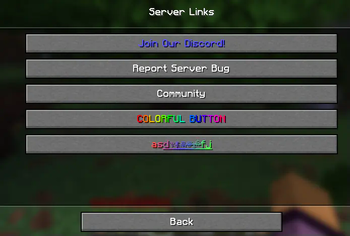
Simple way to add custom links to clients' menu.
Configuration looks like:
links:
  discord:
    type: none
    url: "https://127.0.0.1/"
    display-name: "<blue>Join Our Discord!</blue>"
    description: "Join the discord by clicking the link above"
  bug-reports:
    type: REPORT_BUG
    url: "https://127.0.0.1/"
    display-name: "<yellow>Report a Bug</yellow>"
    description: "Report a bug by clicking on the link above"
Type:
optional, can write 'none', or leave empty. If type is used, the display name will only show on the command readout, and not the menu buttons.
URL
Must be a valid url, with http:// and stuff before it
Display Name
The display name that will show on the button if a type is not used, and will be used in the command output. Uses MiniMessage formatting, buttons don't parse hover elements though.
Description
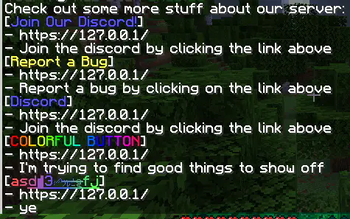
Description to show in the chat output.
The chat output can be customized in locale.yml
Commands/Permissions:
-
/links- Generates the output of the configured links to chat
- Permission:
server-links.links(default:true)
-
/linkreload- Reloads the link configuration
- Permission:
server-links.reload(default:op)
Галерея
Последние версии
Все версии →release
Simplexity Simple Server Links 1.0.1
1.0.122 июл. 2025 г.123Minecraft: 1.21, 1.21.1, 1.21.2, 1.21.3, 1.21.4, 1.21.5, 1.21.6, 1.21.7, 1.21.8paper, purpur
Что нового
- Prevent config from always adding 'discord' and 'bug reports' links
release
Simplexity Simple Server Links 1.0.0
1.0.05 мая 2025 г.78Minecraft: 1.21.5paper, purpur
Что нового
Initial Release