COWMODSКаталог модов

Simple Voice Chat Soundboard

Client-side soundboard for Simple Voice Chat to play custom sounds with keybinds.

Автор: Twyco126,6 тыс.37обновлён 12 окт. 2026 г.
ПриключенияОбщениеУтилиты

Описание

Simple Voice Chat Soundboard

A client-side soundboard mod for Simple Voice Chat. Play your own sounds through voice chat so everyone using Simple Voice Chat can hear them.

This is not an official Simple Voice Chat addon. Please do not ask for support in the Simple Voice Chat Discord server. Instead, use the GitHub issue tracker; I will try to help as soon as possible.

Features

  • Play any .mp3 file through Simple Voice Chat
  • Start and stop sounds with keybinds
  • Start and stop sounds directly from a customizable sound wheel
  • Multi-key keybinds (like Ctrl + Shift + 1)
  • Bind an unlimited number of sounds
  • See active playing sounds in an optional HUD element
  • Configure each sound individually:
    • Loop on or off
    • Amplifier (the volume sent to other players)
  • Play sounds while your microphone is muted
  • Adjust your local playback volume without changing how loud other players hear the sounds
  • Search, sort, and filter large sound collections
  • English and German interface

Dependencies

Quick Start

  1. Launch the game once so the sounds folder is created in your Minecraft instance.
  2. Put your .mp3 files into that folder.
  3. Open the Soundboard Config screen with O by default.
  4. Assign keybinds to your sounds and, optionally, to the sound wheel.
  5. Use the keybinds in singleplayer or multiplayer to start a sound; use the same keybind again to stop it.

GUI and Usage Guide

Currently Playing Sounds

All currently playing sounds are shown in a small HUD at the bottom-right of the screen. Looping sounds are marked accordingly. You can disable this indicator in the settings.

Currently Playing Sounds HUD

Sound Wheel

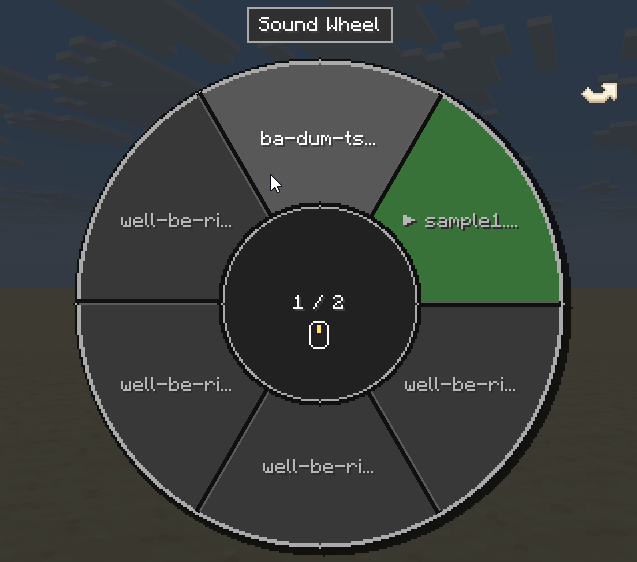
Assign a keybind to Open Sound Wheel in the General tab. By default, the wheel stays open while you hold the keybind. You can instead enable toggle mode and optionally close the wheel after playing a sound.

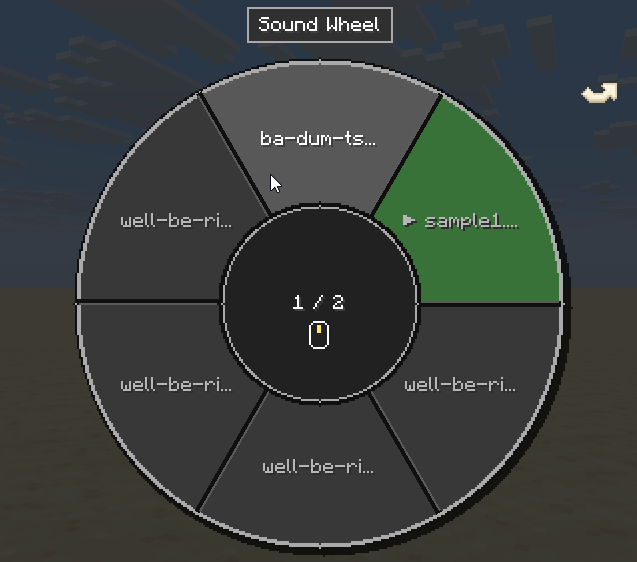
The wheel shows six alphabetically sorted sounds per page. Change pages with the mouse wheel, the left and right arrow keys, or the clickable page arrows. Hover over a sound and left-click it to start or stop it. Indicators show which sounds are currently playing or set to loop, and you can keep walking, jumping, sneaking, and sprinting while the wheel is open.
Sound Wheel

Local Soundboard Volume

Change how loud the soundboard is for you with the Soundboard category in Simple Voice Chat's Adjust Volumes menu. This only affects local playback and does not change the amplifier or how loud other players hear the sounds.

Adjust Soundboard Volume

Settings

Open the custom Minecraft-style config screen with O by default. You can change this key in Minecraft's Controls menu. Use Apply to save without closing the screen, or Done to save and close it.

General

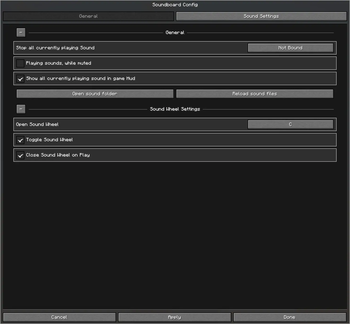
The General tab contains the global options and keybinds. Its persistent, collapsible sections let you:

  • Bind Stop all currently playing sounds
  • Allow sounds to play while your microphone is muted
  • Show or hide the currently playing sounds HUD
  • Open the sound folder or reload its files
  • Bind the sound wheel and configure its toggle and close-on-play behavior
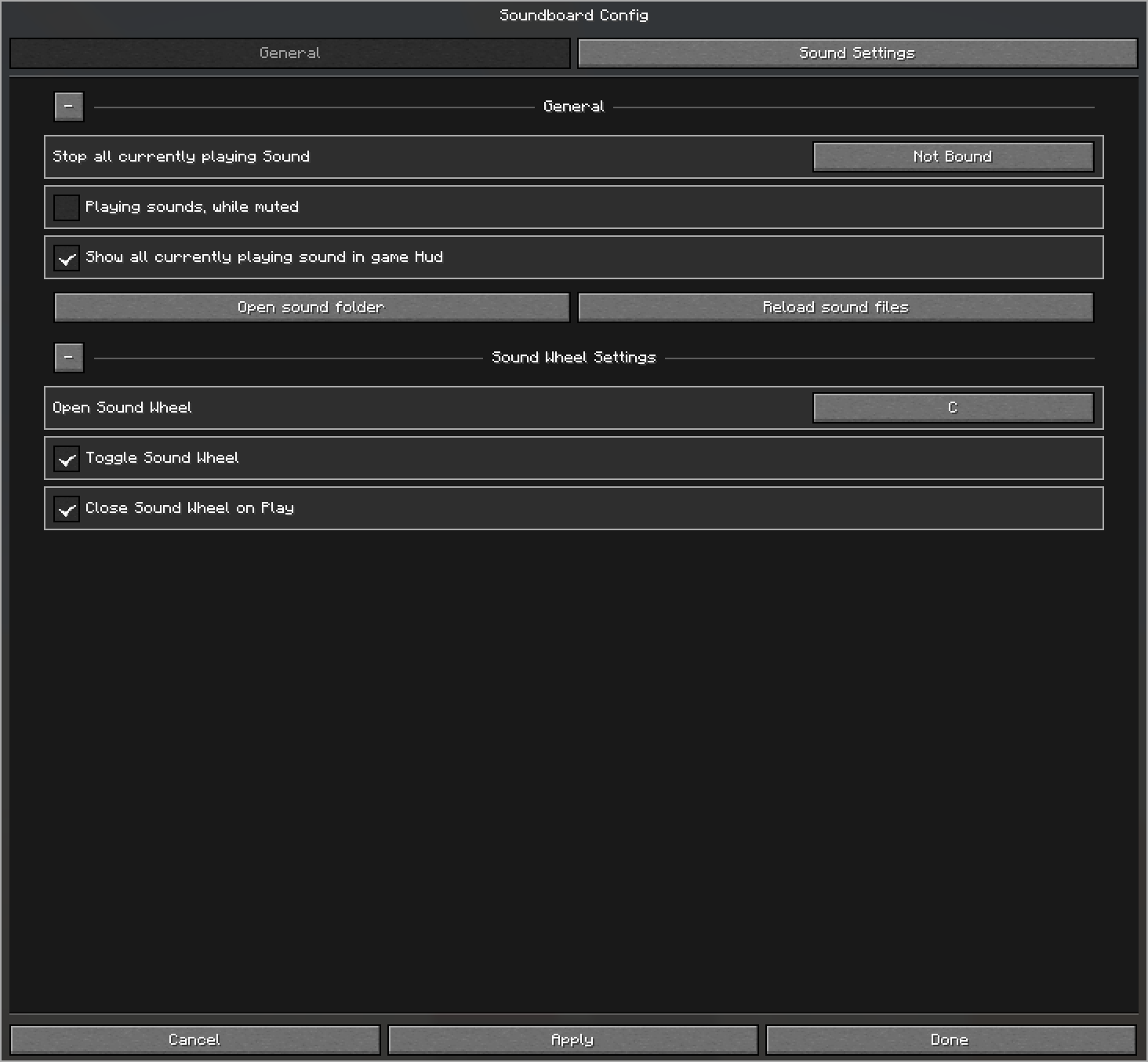
General Settings

Sound Settings

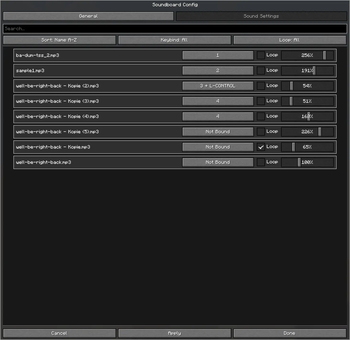
The Sound Settings tab lists all .mp3 files detected in your sounds folder. Search by name, sort from A-Z or Z-A, and filter sounds by whether they have a keybind or use looping.

Each sound can be customized individually:

  • Keybind (multiple keys supported)
  • Loop on or off
  • Amplifier (the volume sent to other players)
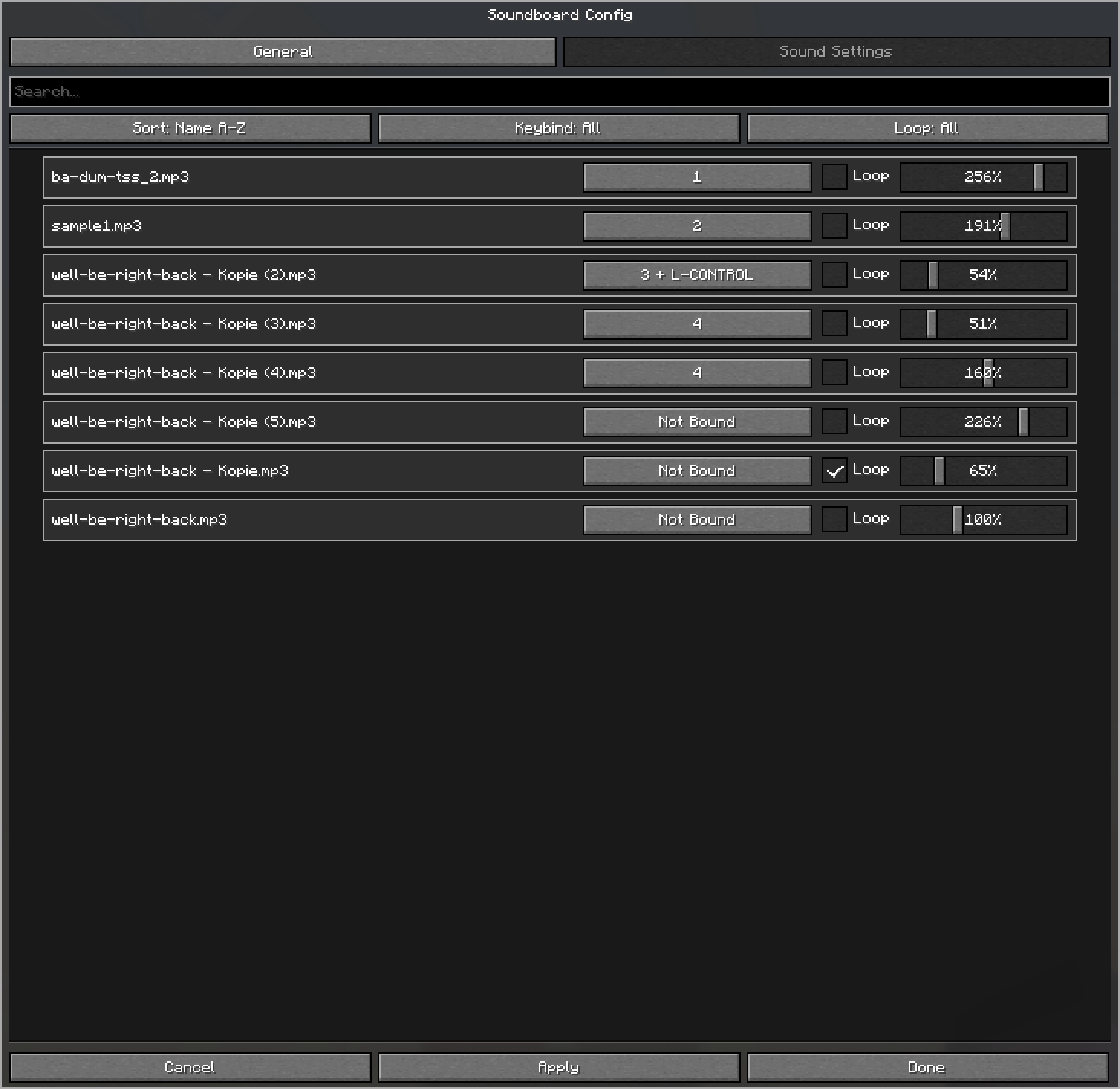
Sound Settings

Галерея

Sound settingsGeneral SettingsSound WheelCurrently playing sound GUI

Последние версии

Все версии →
release

Simple Voice Chat Soundboard fabric-0.4.1+26.3

fabric-0.4.1+26.3
12 окт. 2026 г.3,8 тыс.Minecraft: 26.3fabric
Скачать
Что нового
# Simple Voice Chat Soundboard 0.4.1 ## Fixed - The "Open sound folder" button opens the sound directory again on Minecraft 26.3.
release

Simple Voice Chat Soundboard fabric-0.4.0+26.3

fabric-0.4.0+26.3
12 окт. 2026 г.54Minecraft: 26.3fabric
Скачать
Что нового
# Simple Voice Chat Soundboard 0.4.0 ## Fixed - Soundboard key combinations now follow their original keys when moving between Minecraft 1.21.11, 26.1.x, 26.2, and 26.3 with Soundboard 0.4.0 installed. - Existing sound settings, favorites, and volume settings are preserved. ## Changed - Configurations record their keyboard format and are converted automatically in both directions when changing Minecraft versions. - A separate backup is saved before each format change. A combination containing an unsupported key is disabled, with details recorded in the game log. - Invalid configurations or unknown config versions are preserved instead of being overwritten with defaults. ## Compatibility - Available for Fabric on Minecraft 1.21.11, 26.1.x, 26.2, and 26.3. - Install Soundboard 0.4.0 on every Minecraft version sharing the configuration; older Soundboard releases cannot convert the new keyboard format. ## Known issues - F25 and other keys without an equivalent in the target version cannot be carried over. The original combinations remain available in the backup.
release

Simple Voice Chat Soundboard fabric-0.4.0+26.2

fabric-0.4.0+26.2
12 окт. 2026 г.2 тыс.Minecraft: 26.2fabric
Скачать
release

Simple Voice Chat Soundboard fabric-0.4.0+26.1.x

fabric-0.4.0+26.1.x
12 окт. 2026 г.424Minecraft: 26.1, 26.1.1, 26.1.2fabric
Скачать
release

Simple Voice Chat Soundboard fabric-0.4.0+1.21.11

fabric-0.4.0+1.21.11
12 окт. 2026 г.2,5 тыс.Minecraft: 1.21.11fabric
Скачать
release

Simple Voice Chat Soundboard fabric-0.3.1+26.2

fabric-0.3.1+26.2
20 июл. 2026 г.4,7 тыс.Minecraft: 26.2fabric
Скачать
Что нового
# Simple Voice Chat Soundboard 0.3.1 Status: Draft This release builds on 0.3.0. ## Added - Added a global Sound Amplifier to General Settings. It is multiplied with every sound's individual amplifier and defaults to 100 percent. - Added an interactive favorite star beside every sound and a favorite filter to Sound Settings. - Added a clear empty state when the sound wheel has no favorites to display. ## Changed - The sound wheel now displays only favorite sounds. ## Compatibility - Available for Fabric on Minecraft 26.2, 26.1.x, and 1.21.11. - Existing sound files and `config/soundboard.json` settings continue to be used.
release

Simple Voice Chat Soundboard fabric-0.3.1+26.1.x

fabric-0.3.1+26.1.x
20 июл. 2026 г.1,4 тыс.Minecraft: 26.1, 26.1.1, 26.1.2fabric
Скачать
release

Simple Voice Chat Soundboard fabric-0.3.1+1.21.11

fabric-0.3.1+1.21.11
20 июл. 2026 г.51,8 тыс.Minecraft: 1.21.11fabric
Скачать
release

Simple Voice Chat Soundboard fabric-0.3.0+26.2

fabric-0.3.0+26.2
19 июл. 2026 г.96Minecraft: 26.2fabric
Скачать
Что нового
# Simple Voice Chat Soundboard 0.3.0 ## Added - Added a configurable sound wheel that opens while its key combo is held. - Added six alphabetically sorted sounds per wheel page, mouse-wheel paging, keyboard paging, and clickable page arrows. - Added primary-click playback inside the open wheel, so several sounds can be started or stopped without closing it. - Added clear indicators for currently playing and looping sounds in the wheel. - Added movement forwarding while the wheel is open, including walking, jumping, sneaking, and sprinting. - Added optional toggle and close-on-play behavior for the sound wheel. - Added name sorting in ascending or descending order to Sound Settings. - Added filters for bound or unbound sounds and enabled or disabled loops. - Added a German translation. ## Changed - Replaced the Cloth Config screen with a custom Minecraft-style configuration screen. - Redesigned the config screen and sound wheel to share the same compact, Minecraft-inspired visual style. - Sound settings now support search, sorting, and filtering in one workflow. - Applying settings now keeps the screen open without leaving a persistent focus outline on the clicked control. - General settings are now grouped into persistent, collapsible General and Sound Wheel Settings sections. ## Fixed - Hid close-on-play outside toggle mode, where holding the opening combo already controls the wheel lifetime. - Made collapsible section separator lines and titles clickable. - Fixed missing padding around settings rows and controls. - Fixed doubled, inconsistent, and inverted panel borders. - Fixed long wheel labels reaching into sector edges or hiding the loop icon. - Fixed wheel icon sizing and page-control placement. - Fixed action and sort controls retaining unwanted selection outlines. ## Removed - Removed the Cloth Config dependency. ## Compatibility - Available for Fabric on Minecraft 26.2, 26.1.x, and 1.21.11. - Simple Voice Chat remains required. - Existing sound files and `config/soundboard.json` settings continue to be used. ## Gallery ![New General Settings](https://cdn.modrinth.com/data/cached_images/2d73ee956c29f67aa6c347c7d100a4227e865f9d.png) ![New Sounds Settings](https://cdn.modrinth.com/data/cached_images/05178304cde87770a5d89998015d88d6c289d3ca.png) ![New SoundWheel](https://cdn.modrinth.com/data/cached_images/29fc7790d6455f699ab0c9c847b8192558280507.png)
release

Simple Voice Chat Soundboard fabric-0.3.0+26.1.2

fabric-0.3.0+26.1.2
19 июл. 2026 г.70Minecraft: 26.1, 26.1.1, 26.1.2fabric
Скачать