COWMODSКаталог модов

SharedWorld

A free Minecraft server alternative with no queues and no waiting for your friend who has the world.

Автор: Bolido6,5 тыс.56обновлён 24 окт. 2026 г.
Механики игрыОбщениеУтилиты

Описание

SharedWorld

Play with your friends without a dedicated Minecraft server. The mod combines e4mc with Google Drive (or S3) sync to achieve "fake Minecraft servers" that feel like real Minecraft servers.

How it works

Behind the scenes, the world is synced on Google Drive or an S3 bucket. The first player to join a 'Shared World' becomes the 'host'. The following players are automatically redirected to the host via e4mc. When the host leaves the game, a new host across the online players is picked and all players automatically reconnect to the new host.

Pro Tip: S3 is better than Google Drive!

The mod now supports 'S3 buckets'. These are SO much better than hosting your world on Google Drive. A few advantages:

  • Much better performance. Google Drive is slow. You'll be able to join and leave a SharedWorld much faster.
  • Privacy. Google login is no longer required, sharing your email kind of sucks (and I have to put a ton of effort into protecting such information). With S3 buckets the mod no longer holds your email, or your Google Account name.
  • Not filling your Google Drive.
  • No logging in to Google Drive again every so often because the session expired.
  • Advanced users can self-host. Don't use any cloud provider if you don't want to!
  • It's still free :)

All you have to do when creating a Shared World is choosing the option 'S3 bucket' instead of Google Drive and put your S3 bucket details. I personally recommend using a 'Cloudflare R2 bucket'. It has 10GB for free, it's fast, and if somehow you need more storage Cloudflare charges $0.015 per GB/month, also known as very cheap. It does ask for a credit card even on the free plan. For the Cloudflare way here's a short tutorial: Create a Cloudflare account and login -> in the dashboard click 'storage & databases' -> R2 object storage -> Create bucket -> put any name and click create -> go back to R2 object storage, scroll to the bottom of the page, click 'Manage API Tokens' -> Click Create user API Token -> Put any name, select 'Object Read & Write', apply to specific buckets only (choose the one you just created), click create user API token -> copy the keys shown and paste them on Shared World when creating your world -> Enjoy!

There are also many other alternatives other than Cloudflare. If you don't have a credit card, which Cloudflare asks for, you can try Blackblaze B2. It also has 10GB of free storage and doesn't ask for it for the free plan.

Pro Tip 2: If e4mc gives you problems, you can use something else!

If you have connection problems, you can use Tailscale, Radmin VPN, port forwarding... All you have to do is go to the 'Advanced' tab on the SharedWorld settings (top left corner) and set there the IP where your friends can reach you with the method of your choice. I recommend Tailscale.

Google Drive permissions

The mod only requests permission to have a private folder where it stores data (that is, your shared worlds). This means that the mod never has access to your entire drive.

Data Privacy

The mod stores on a backend only the information it requires to function. That is data like your minecraft UUID and world data. Google Drive scopes always contain your name and email, this information is never used in any way. Both the mod and backend are fully opensource under a MIT license. Furthermore, it is possible to self-host the backend if you want. For more information see: https://sharedworld.net/privacy

Quick FAQ

  • Does the mod support 'offline players'? No. The minecraft UUID is used for safety, e.g. your account can't join Shared Worlds that it's not a member of.
  • S3 bucket support? Yes!
  • Using github for storage? No. You will get yourself flagged.
  • I see the code is AI assisted.. Does this really work well? I have put a TON of effort into the quality and robustness of this project. If you find any issue, please tell me so on GitHub!
  • But I really really don't like LLMs! That's cool and I respect that. The mod is free and open-source, you don't have to use it. Just please don't send me any hate. I have always been very passionate about AI from way before ChatGPT, we all have our own ways of looking at things.

Special thanks

Special thanks to vgskye for creating the e4mc mod. Without it I wouldn't have been able to figure out the networking to create this.

Галерея
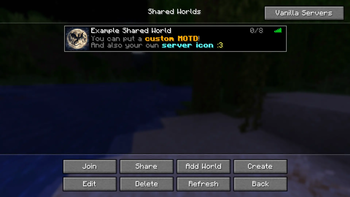
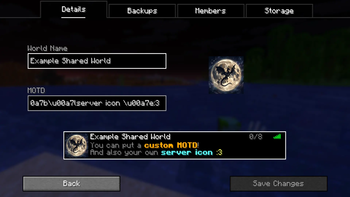
Shared Worlds Multiplayer ScreenEdit a Shared World

Последние версии

Все версии →
release

SharedWorld 0.5.4

0.5.4
24 окт. 2026 г.152Minecraft: 26.3fabric
Скачать
Что нового
## New - Added support for **Minecraft 26.3.** - **A heads-up before hosting.** If the world was last played on a different Minecraft version, or with mods you don't have installed, you get one screen that lists what changed before anything opens. Hosting on a newer version updates the world for good (friends still on the old version can't host it until they update); hosting on an older version can break parts of it; a missing mod takes its blocks and items out of the world. You decide: "Host anyway" or "Cancel". Hosting on an older Minecraft used to be refused outright; now it's your call. ## Fixed - On 26.x, cancelling hosting at the wrong moment and hosting again could leave the game stuck on the loading screen until you restarted it. - When Minecraft itself asks something before opening the world (for example "back up this world?" for a world from another version), pressing Cancel now takes you back to SharedWorld instead of leaving hosting half started. - The button you just clicked no longer stays outlined after a step changes (most visible in the create world screens on 26.x).
release

SharedWorld 0.5.4

0.5.4
24 окт. 2026 г.51Minecraft: 26.2fabric
Скачать
Что нового
## New - Added support for **Minecraft 26.3.** - **A heads-up before hosting.** If the world was last played on a different Minecraft version, or with mods you don't have installed, you get one screen that lists what changed before anything opens. Hosting on a newer version updates the world for good (friends still on the old version can't host it until they update); hosting on an older version can break parts of it; a missing mod takes its blocks and items out of the world. You decide: "Host anyway" or "Cancel". Hosting on an older Minecraft used to be refused outright; now it's your call. ## Fixed - On 26.x, cancelling hosting at the wrong moment and hosting again could leave the game stuck on the loading screen until you restarted it. - When Minecraft itself asks something before opening the world (for example "back up this world?" for a world from another version), pressing Cancel now takes you back to SharedWorld instead of leaving hosting half started. - The button you just clicked no longer stays outlined after a step changes (most visible in the create world screens on 26.x).
release

SharedWorld 0.5.4

0.5.4
24 окт. 2026 г.39Minecraft: 26.1, 26.1.1, 26.1.2fabric
Скачать
Что нового
## New - Added support for **Minecraft 26.3.** - **A heads-up before hosting.** If the world was last played on a different Minecraft version, or with mods you don't have installed, you get one screen that lists what changed before anything opens. Hosting on a newer version updates the world for good (friends still on the old version can't host it until they update); hosting on an older version can break parts of it; a missing mod takes its blocks and items out of the world. You decide: "Host anyway" or "Cancel". Hosting on an older Minecraft used to be refused outright; now it's your call. ## Fixed - On 26.x, cancelling hosting at the wrong moment and hosting again could leave the game stuck on the loading screen until you restarted it. - When Minecraft itself asks something before opening the world (for example "back up this world?" for a world from another version), pressing Cancel now takes you back to SharedWorld instead of leaving hosting half started. - The button you just clicked no longer stays outlined after a step changes (most visible in the create world screens on 26.x).
release

SharedWorld 0.5.4

0.5.4
24 окт. 2026 г.28Minecraft: 1.21.11fabric
Скачать
Что нового
## New - Added support for **Minecraft 26.3.** - **A heads-up before hosting.** If the world was last played on a different Minecraft version, or with mods you don't have installed, you get one screen that lists what changed before anything opens. Hosting on a newer version updates the world for good (friends still on the old version can't host it until they update); hosting on an older version can break parts of it; a missing mod takes its blocks and items out of the world. You decide: "Host anyway" or "Cancel". Hosting on an older Minecraft used to be refused outright; now it's your call. ## Fixed - On 26.x, cancelling hosting at the wrong moment and hosting again could leave the game stuck on the loading screen until you restarted it. - When Minecraft itself asks something before opening the world (for example "back up this world?" for a world from another version), pressing Cancel now takes you back to SharedWorld instead of leaving hosting half started. - The button you just clicked no longer stays outlined after a step changes (most visible in the create world screens on 26.x).
release

SharedWorld 0.5.4

0.5.4
24 окт. 2026 г.10Minecraft: 1.21.11neoforge
Скачать
Что нового
## New - Added support for **Minecraft 26.3.** - **A heads-up before hosting.** If the world was last played on a different Minecraft version, or with mods you don't have installed, you get one screen that lists what changed before anything opens. Hosting on a newer version updates the world for good (friends still on the old version can't host it until they update); hosting on an older version can break parts of it; a missing mod takes its blocks and items out of the world. You decide: "Host anyway" or "Cancel". Hosting on an older Minecraft used to be refused outright; now it's your call. ## Fixed - On 26.x, cancelling hosting at the wrong moment and hosting again could leave the game stuck on the loading screen until you restarted it. - When Minecraft itself asks something before opening the world (for example "back up this world?" for a world from another version), pressing Cancel now takes you back to SharedWorld instead of leaving hosting half started. - The button you just clicked no longer stays outlined after a step changes (most visible in the create world screens on 26.x).
release

SharedWorld 0.5.4

0.5.4
24 окт. 2026 г.14Minecraft: 1.21.9, 1.21.10fabric
Скачать
Что нового
## New - Added support for **Minecraft 26.3.** - **A heads-up before hosting.** If the world was last played on a different Minecraft version, or with mods you don't have installed, you get one screen that lists what changed before anything opens. Hosting on a newer version updates the world for good (friends still on the old version can't host it until they update); hosting on an older version can break parts of it; a missing mod takes its blocks and items out of the world. You decide: "Host anyway" or "Cancel". Hosting on an older Minecraft used to be refused outright; now it's your call. ## Fixed - On 26.x, cancelling hosting at the wrong moment and hosting again could leave the game stuck on the loading screen until you restarted it. - When Minecraft itself asks something before opening the world (for example "back up this world?" for a world from another version), pressing Cancel now takes you back to SharedWorld instead of leaving hosting half started. - The button you just clicked no longer stays outlined after a step changes (most visible in the create world screens on 26.x).
release

SharedWorld 0.5.4

0.5.4
24 окт. 2026 г.10Minecraft: 1.21.9, 1.21.10neoforge
Скачать
Что нового
## New - Added support for **Minecraft 26.3.** - **A heads-up before hosting.** If the world was last played on a different Minecraft version, or with mods you don't have installed, you get one screen that lists what changed before anything opens. Hosting on a newer version updates the world for good (friends still on the old version can't host it until they update); hosting on an older version can break parts of it; a missing mod takes its blocks and items out of the world. You decide: "Host anyway" or "Cancel". Hosting on an older Minecraft used to be refused outright; now it's your call. ## Fixed - On 26.x, cancelling hosting at the wrong moment and hosting again could leave the game stuck on the loading screen until you restarted it. - When Minecraft itself asks something before opening the world (for example "back up this world?" for a world from another version), pressing Cancel now takes you back to SharedWorld instead of leaving hosting half started. - The button you just clicked no longer stays outlined after a step changes (most visible in the create world screens on 26.x).
release

SharedWorld 0.5.4

0.5.4
24 окт. 2026 г.12Minecraft: 1.21.6, 1.21.7, 1.21.8fabric
Скачать
Что нового
## New - Added support for **Minecraft 26.3.** - **A heads-up before hosting.** If the world was last played on a different Minecraft version, or with mods you don't have installed, you get one screen that lists what changed before anything opens. Hosting on a newer version updates the world for good (friends still on the old version can't host it until they update); hosting on an older version can break parts of it; a missing mod takes its blocks and items out of the world. You decide: "Host anyway" or "Cancel". Hosting on an older Minecraft used to be refused outright; now it's your call. ## Fixed - On 26.x, cancelling hosting at the wrong moment and hosting again could leave the game stuck on the loading screen until you restarted it. - When Minecraft itself asks something before opening the world (for example "back up this world?" for a world from another version), pressing Cancel now takes you back to SharedWorld instead of leaving hosting half started. - The button you just clicked no longer stays outlined after a step changes (most visible in the create world screens on 26.x).
release

SharedWorld 0.5.4

0.5.4
24 окт. 2026 г.6Minecraft: 1.21.6, 1.21.7, 1.21.8neoforge
Скачать
Что нового
## New - Added support for **Minecraft 26.3.** - **A heads-up before hosting.** If the world was last played on a different Minecraft version, or with mods you don't have installed, you get one screen that lists what changed before anything opens. Hosting on a newer version updates the world for good (friends still on the old version can't host it until they update); hosting on an older version can break parts of it; a missing mod takes its blocks and items out of the world. You decide: "Host anyway" or "Cancel". Hosting on an older Minecraft used to be refused outright; now it's your call. ## Fixed - On 26.x, cancelling hosting at the wrong moment and hosting again could leave the game stuck on the loading screen until you restarted it. - When Minecraft itself asks something before opening the world (for example "back up this world?" for a world from another version), pressing Cancel now takes you back to SharedWorld instead of leaving hosting half started. - The button you just clicked no longer stays outlined after a step changes (most visible in the create world screens on 26.x).
release

SharedWorld 0.5.4

0.5.4
24 окт. 2026 г.37Minecraft: 1.21, 1.21.1fabric
Скачать
Что нового
## New - Added support for **Minecraft 26.3.** - **A heads-up before hosting.** If the world was last played on a different Minecraft version, or with mods you don't have installed, you get one screen that lists what changed before anything opens. Hosting on a newer version updates the world for good (friends still on the old version can't host it until they update); hosting on an older version can break parts of it; a missing mod takes its blocks and items out of the world. You decide: "Host anyway" or "Cancel". Hosting on an older Minecraft used to be refused outright; now it's your call. ## Fixed - On 26.x, cancelling hosting at the wrong moment and hosting again could leave the game stuck on the loading screen until you restarted it. - When Minecraft itself asks something before opening the world (for example "back up this world?" for a world from another version), pressing Cancel now takes you back to SharedWorld instead of leaving hosting half started. - The button you just clicked no longer stays outlined after a step changes (most visible in the create world screens on 26.x).