COWMODSКаталог модов

Set Homes

Simple set homes plugin with new GUI plus commands

Автор: YabaDabaDoo46633101обновлён 18 авг. 2026 г.

Описание

Set Homes

Set Homes gives every player a menu of their homes. Left-click one to teleport. Right-click it to rename it, move it, change its icon, or delete it.

Full documentation | Report a bug | Donate
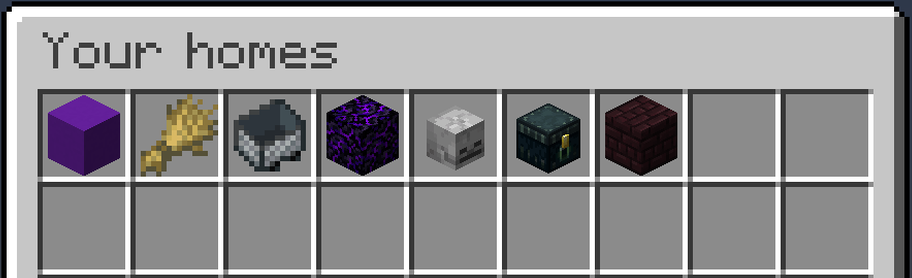
The homes menu, with each home shown as its own item

Why Set Homes

  • A menu, or a list of commands. Homes live in a chest-style GUI. Players open it with /homes or by right-clicking the configured "Home Item".
  • Every home gets its own icon. Pick any Minecraft item when you create a home, or change it later to whatever you are holding. A base, a mine and a farm stop looking identical.
  • Rename, move and delete in-game. Right-click any home to manage it. Deleting always asks first, so nobody loses a base to a misclick.
  • Teleports that do not kill you. Set Homes checks the destination and relocates you to the nearest safe spot rather than dropping you into blocks, lava, or a fall.
  • Switch without losing anything. /import-homes essentialsx brings every EssentialsX home across, and previews exactly what it will do before it does it. Then remove EssentialsX, since both plugins claim /sethome and /home.
  • Per-rank home limits. Give donors more homes than default players with LuckPerms groups, or set one server-wide limit.
  • Permissions you can change from the config. Every sh2.* node has a sensible default, and any of them can be moved in config.yml. No permissions plugin required.

Quick start

  1. Drop the jar into your plugins folder and restart the server.
  2. Run /sethome base where you are standing.
  3. Run /homes and click it.

That is genuinely the whole setup. Player permissions default to granted, so your players can create and use homes the moment the plugin loads.

Commands

CommandWhat it does
/sethome [name]Creates a home where you stand.
/home [name]Teleports you to a home.
/homesOpens the homes menu.
/delhome <name>Deletes a home.
/uhome <name>Moves one of your homes to where you are standing.

Names are optional on /sethome and /home. Leave the name off and both use a home called default.

Admins also get /set-max-homes, /blacklist, /import-homes, and commands to view, visit, move and delete other players' homes. The full command list, with long forms and aliases, is on GitHub.

Managing homes
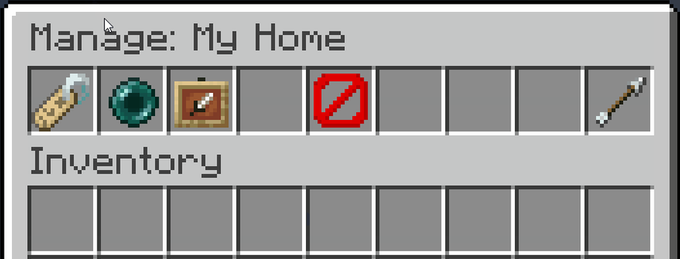
The per-home management menu

Open your homes with /homes, or right-click the homes item. Left-click a home to teleport, right-click it to rename it, move it to where you are standing, set its icon to the item you are holding, or delete it (with a confirmation).
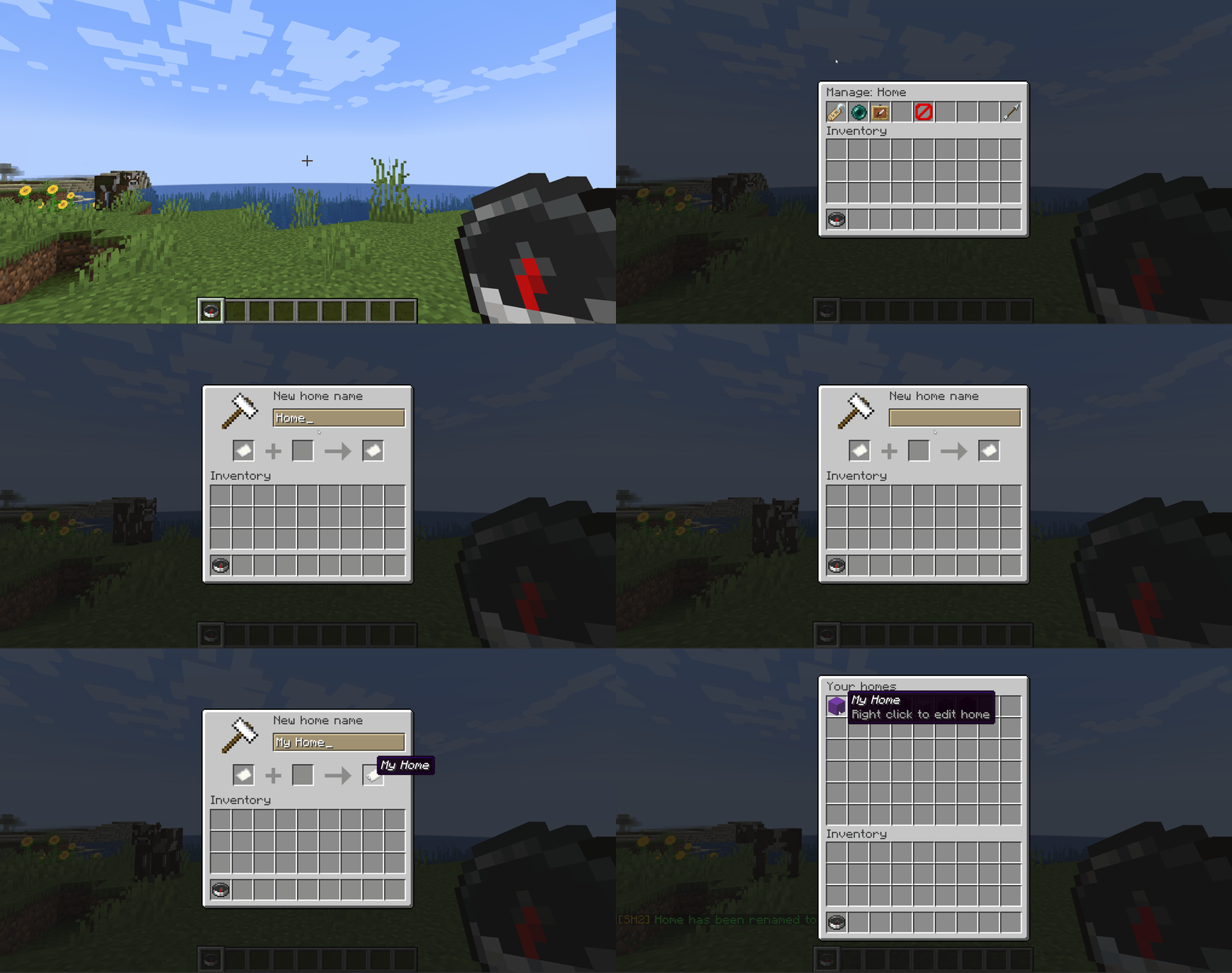
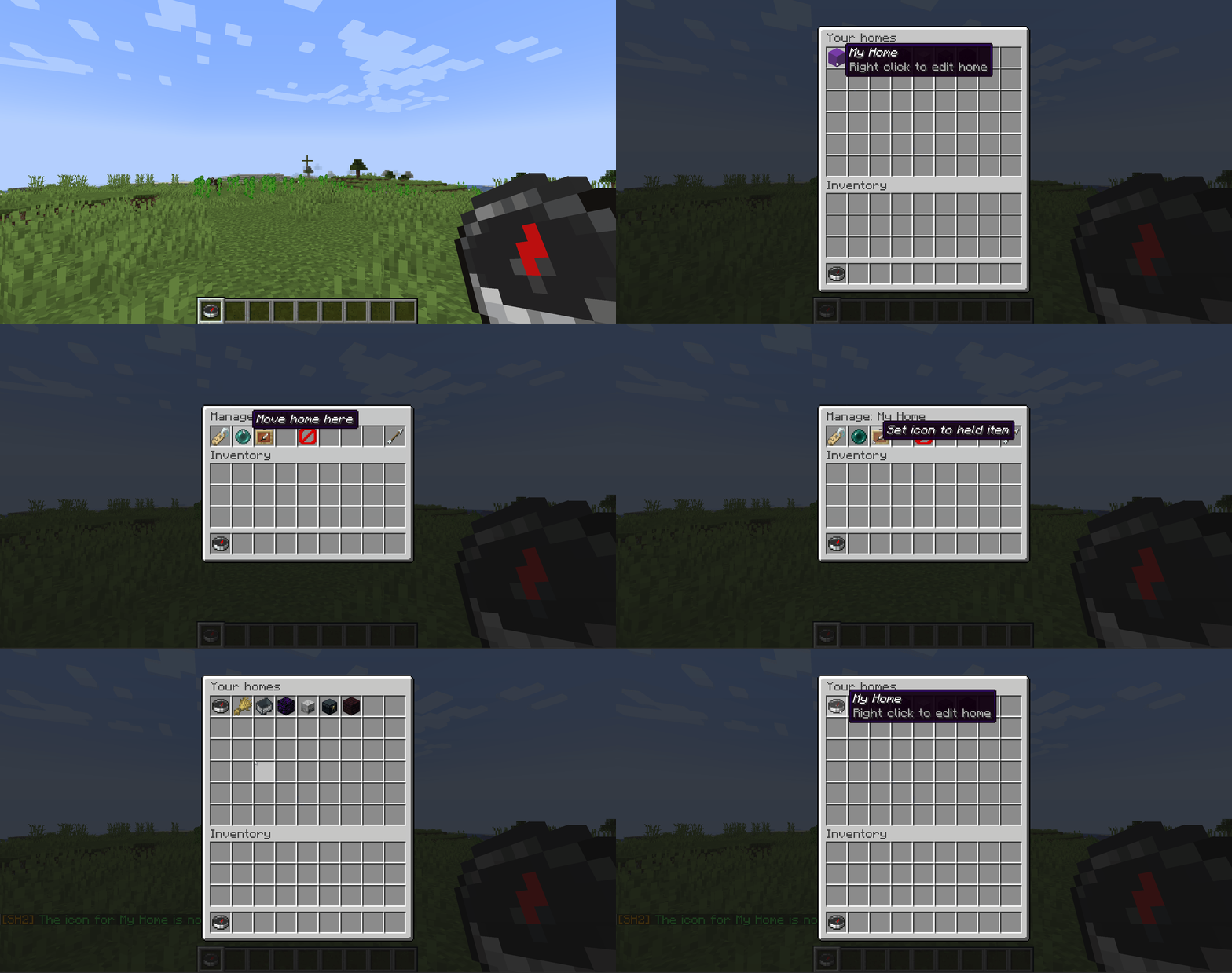
Right-clicking a home to rename it

Changing a home's icon to the item being held

Teleporting

By default players wait three seconds before a teleport fires, and moving cancels it, so a home is not a free escape from a fight. Set delay: 0 for instant teleports, or cancelOnMove: false to let players walk during the countdown.

Before it drops anyone anywhere, Set Homes checks the destination is safe to stand in. If a home has been built over, flooded with lava, or left hanging above a drop, the player is moved to the nearest safe spot instead. Turn it off with teleportSafety: false.

Permissions

Nothing here needs a permissions plugin. Out of the box, every player can create, list, teleport to and manage their own homes, and operators get everything else. Two bundles cover it:

BundleDefaultContains
sh2.playereveryoneEvery node an ordinary player needs
sh2.adminOPsh2.player, plus every admin and bypass node

To change a default without a permissions plugin, uncomment the permissions: block in config.yml:

permissions:
  sh2.manage-homes: false
  sh2.get-player-homes: true
  sh2.import-homes: op

Accepted values are true, false, op and not-op. If you run LuckPerms or similar, an explicit grant or deny there still wins. The full permission list is on GitHub.

Configuration

Settings live in plugins/SetHomesTwo/config.yml, written the first time the plugin starts. Edit it, save, then restart the server. The file is commented throughout, and every message the plugin sends can be rewritten in it. The settings most servers change:

SettingDefaultWhat it does
delay3Seconds you must stand still before teleporting. 0 is instant.
cancelOnMovetrueCancel the teleport if the player moves during the countdown.
teleportSafetytrueRelocate to the nearest safe spot instead of teleporting into danger.
maxHomeEnabledfalseTurn home limits on.
maxHomesTypegroupssingular for one server-wide limit, groups for per-rank limits.
openHomeItemcompassThe item players right-click to open the menu.

Per-rank limits need LuckPerms. Everything else is in default-config.yml, the file your config.yml is first written from.

Requirements

  • Paper or Spigot 1.21+
  • Java 21, which Minecraft 1.21 servers already require
  • Optional: LuckPerms, only for per-rank home limits

Support

The README on GitHub has the full command and permission lists, the EssentialsX import guide, an FAQ and the changelog.

Found a bug or want a feature? Open an issue on GitHub. It gets seen faster than a comment on this page.

Source | Report a bug | Donate

Последние версии

Все версии →
release

Set Homes 2.0.0

2.0.0
18 авг. 2026 г.310Minecraft: 1.21, 1.21.1, 1.21.2, 1.21.3, 1.21.4, 1.21.5, 1.21.6, 1.21.7, 1.21.8, 1.21.9, 1.21.10, 1.21.11, 26.1, 26.1.1, 26.1.2, 26.2bukkit, paper, spigot
Скачать
Что нового
#### 2.0.0 (2026-08-18) - Set Homes Two can now take over from Set Homes v1. /import-homes brings your homes and world blacklist across and lists any v1 config settings that have an equivalent here, the v1 commands and aliases work again, and the plugin tells you at startup when homes are still waiting to be imported. - Tab completion for /import-homes now offers the import sources and then confirm, instead of suggesting player names on every argument. Usage messages also name the command you actually typed, so /uhome-of now says Usage: /uhome-of rather than naming the full command behind the alias. - decrease generated jar file size - If Set Homes v1 homes are sitting in plugins/SetHomes/homes.yml and you have not imported them yet, the console now says so at startup, naming the file, how many homes are waiting and the command to run. Anyone with sh2.import-homes gets the same reminder in chat when they join. Both stop on their own as soon as any home exists here, so an upgraded server can no longer look empty without explanation. - Added the Set Homes v1 admin commands. /home-of teleports you to another player's home, /delhome-of deletes one, and /uhome-of moves one to where you are standing. /uhome moves one of your own homes. All of them work on players who are offline, as long as they have saved homes, and player and home names now match without regard to case. On a server upgrading from an earlier release, each player has to log in once before the offline lookup can find them. - /sethome and /home work with no arguments again, creating and finding a home called default, which is the name an unnamed Set Homes v1 home is imported under. /sethome also takes a description straight after the name as it did in v1, so a second word that names an item is read as the icon and the reply tells you which one it chose. Put d in the icon position to keep the whole phrase as the description. - Tab completion now matches anywhere in a name, not only from the start, so typing net completes to world_nether and ase finds a home called base. Names that start with what you typed are still listed first, so nothing you already do changes. - /import-homes sethomes now lists any v1 config.yml settings that have a Set Homes Two equivalent, and the key to set each one under, so a migrating admin does not have to discover a changed teleport delay or a vanished per-group home limit by accident. Nothing is written to config.yml automatically; the report just tells you what to paste in. - Importing from Set Homes v1 no longer loses a home whose name differs only in capitalisation. Set Homes v1 allowed one player to hold both 'base' and 'Base', while home names here ignore case, so the second one is now imported under the next free name such as 'Base2' instead of being silently dropped. The import report and the server log both name it, and the preview now reports the same numbers as the confirm that follows it. - Corrected the spelling in a few of the messages the plugin sends, so they read the same way as the rest of the plugin. The wording of the teleport and import messages is otherwise unchanged. An existing config.yml is not touched, so any message you have already customized stays exactly as you set it. - The plugin now sends anonymous usage counts to bStats, so the maintainers can see which commands, menu buttons and settings are used, and whether database errors are happening in the wild. Nothing personal is sent, and the bStats switch in plugins/bStats/config.yml turns it off. - Fixed the world blacklist only ever being enforced on the first three worlds of a server. Blacklisting any world beyond those reported success and then did nothing. It is enforced from this release on, so if you have blacklisted more than three worlds, run /blacklist list before you update. Homes in a world that starts being enforced stop being reachable by players who do not hold sh2.bypass-blacklist. - /blacklist add and /blacklist remove no longer report success when the database write actually failed. A failure now says so and the world is left as it was. Permission overrides in config.yml are also matched without regard to the case you write the node in, so a line like SH2.manage-homes now applies rather than being logged as applied and quietly ignored. - Set Homes now publishes to the original Set Homes project page, so servers running the older Set Homes are offered this as an update on the page they already watch. The download is named SetHomes rather than SetHomesTwo. The plugin folder and your existing config.yml are unaffected. - /set-max-homes now has the alias /setmax, matching Set Homes v1. Its usage message also names whichever form you typed, rather than always naming /set-max-homes. - Importing from Set Homes v1 or EssentialsX now resolves each player's name from the server's own player cache, so admin commands like /get-player-homes and /home-of work on a migrated player immediately instead of requiring them to log in first. A player the server has never seen still imports fine; they are picked up on their next join, same as before. - The Set Homes v1 import report no longer applies the colour codes found in v1 messages, so a coloured v1 message no longer turns the rest of the advice line red or unreadable. Codes are shown as an ampersand instead, and the note says where to copy the exact original from. Also, the "you have no homes yet" notice now uses the same wording and is shown as plain information rather than red from /homes, /list-homes and the homes menu alike. - Permission defaults can now be changed from config.yml with no permissions plugin installed. Uncomment the permissions block and set any sh2 node to true, false, op or not-op. Two bundles, sh2.player and sh2.admin, move a whole role at once, and three new bypass permissions were added for admins: sh2.bypass-max-homes, sh2.bypass-blacklist and sh2.bypass-teleport-delay. Operators hold those three by default, the same way Set Homes v1 granted homes.config_bypass through homes.*, so an operator is not held to the teleport delay, the world blacklist or the home limit. Set any of them to false in the permissions block if you would rather they were. - Set Homes now refuses to start when a Set Homes v1 jar is still in your plugins folder, and the console says which file to move and what to run next. Both plugins provide /sethome, /home and /delhome and v1 wins those names, so running the two side by side used to split your players' homes between them with nothing in the log to show for it. - /import-homes sethomes now brings across the Set Homes v1 world blacklist along with the homes, so a server that had worlds blocked in v1 does not silently lose that protection on migration. Re-running the import never blacklists a world twice. #### 1.2.2 (2026-08-15) - Fixed the update notice repeating on every join. An available release is now announced once and then held back for `updateReminderDays` (7 by default) before it is mentioned again; a newer release is still announced straight away. Set `updateReminderDays: 0` to announce each release exactly once. #### 1.2.1 (2026-08-14) - Added an update notice: the console at startup, and admins holding `sh2.update-notify` as they join, are told when a newer release is on GitHub. Set `checkForUpdates: false` to stop the plugin making the request at all. #### 1.2.0 (2026-08-12) Behaviour changes to be aware of before updating: - Home names are now unique per player without regard to case, so you can no longer create both `base` and `Base`. Homes you already have are untouched, including any existing duplicates. - `/delete-home` now deletes a single home. Previously it deleted every home whose name matched, so a player with duplicate names lost all of them at once. - The plugin now requires Java 21 to run (previously Java 9). Minecraft 1.21 servers already require Java 21, so most setups need no change. - Added a home management menu: right-click a home in the homes GUI to rename it, move it to where you are standing, set its icon to the item you are holding, or delete it. Deleting asks for confirmation first, and renaming opens an anvil prompt for the new name. - Added a "Right click to edit home" hint to homes in the list, shown only to players who are able to manage them. - Added the `sh2.manage-homes` permission, which controls the management menu and defaults to granted. - Added config keys for the management menu: `manageHomeTitle`, `renamePromptTitle`, `manageHomeHint`, `maxHomeNameLength`, the button item and name pairs, and the new success and error messages. See `default-config.yml`. - Fixed home updates and deletes not being scoped to the owning player. - Fixed the homes list hiding a home behind the previous-page button once a player had 46 or more homes, and showing an empty second page to a player with exactly 45 homes. #### 1.1.0 (2026-08-11) - Added `/sethome`, `/delhome`, and `/home` as classic aliases for `/create-home`, `/delete-home`, and `/go-home`. - Player permissions (create-home, go-home, list-homes, delete-home, teleport, give-homes-item) now default to granted for all players; admin permissions still default to OP. - Added the `/homes` command, which opens the homes GUI directly; `/list-homes` still prints the chat listing. - Added `/import-homes` to import homes from Set Homes v1 or EssentialsX (dry-run by default, pass `confirm` to apply). - Added a teleport safety check that relocates players to the nearest safe spot, or cancels the teleport, when a home would put them in blocks, lava, or a dangerous fall. - Teleport destination chunks are now loaded during the countdown, so arriving at a distant home is smoother. - Fixed stale teleport attempts surviving a server restart, which could block a player's next teleport (finishes #14). - Fixed error when maxHomesType is groups and LuckPerms is not installed. The limit is now skipped with a console warning instead. #### Earlier releases - Added go-home and list-homes commands. - Fixed issue where players missing sh2.teleport could not break blocks. - Fixed issue where a player who has an open homes gui has their inventory overwritten by the next person to open a homes gui.