COWMODSКаталог модов

Server Waypoint

Sync server waypoints to Xaero's maps and VoxelMap, and teleport to waypoints on other servers behind Velocity. Commands and navigation work without the client mod.

Автор: 267695943,1 тыс.41обновлён 15 окт. 2026 г.
УправлениеУтилиты

Описание

Server Waypoint

Fabric Forge NeoForge Paper Folia Velocity

discord-singular

Make your world easier to explore.

Share useful places with your community and help players find their way around your world.

Get started | Source code

Server Waypoint provides shared destinations, cross-server teleportation, navigation and clickable chat commands. Players can use the server features with a vanilla client. The optional client mod adds in-world markers, a waypoint manager and map integrations.

Across servers, closer together

The optional Velocity integration lets players browse shared waypoints on connected servers and teleport between them when permitted. Cross-server browsing and teleportation are available through clickable chat without the client mod.
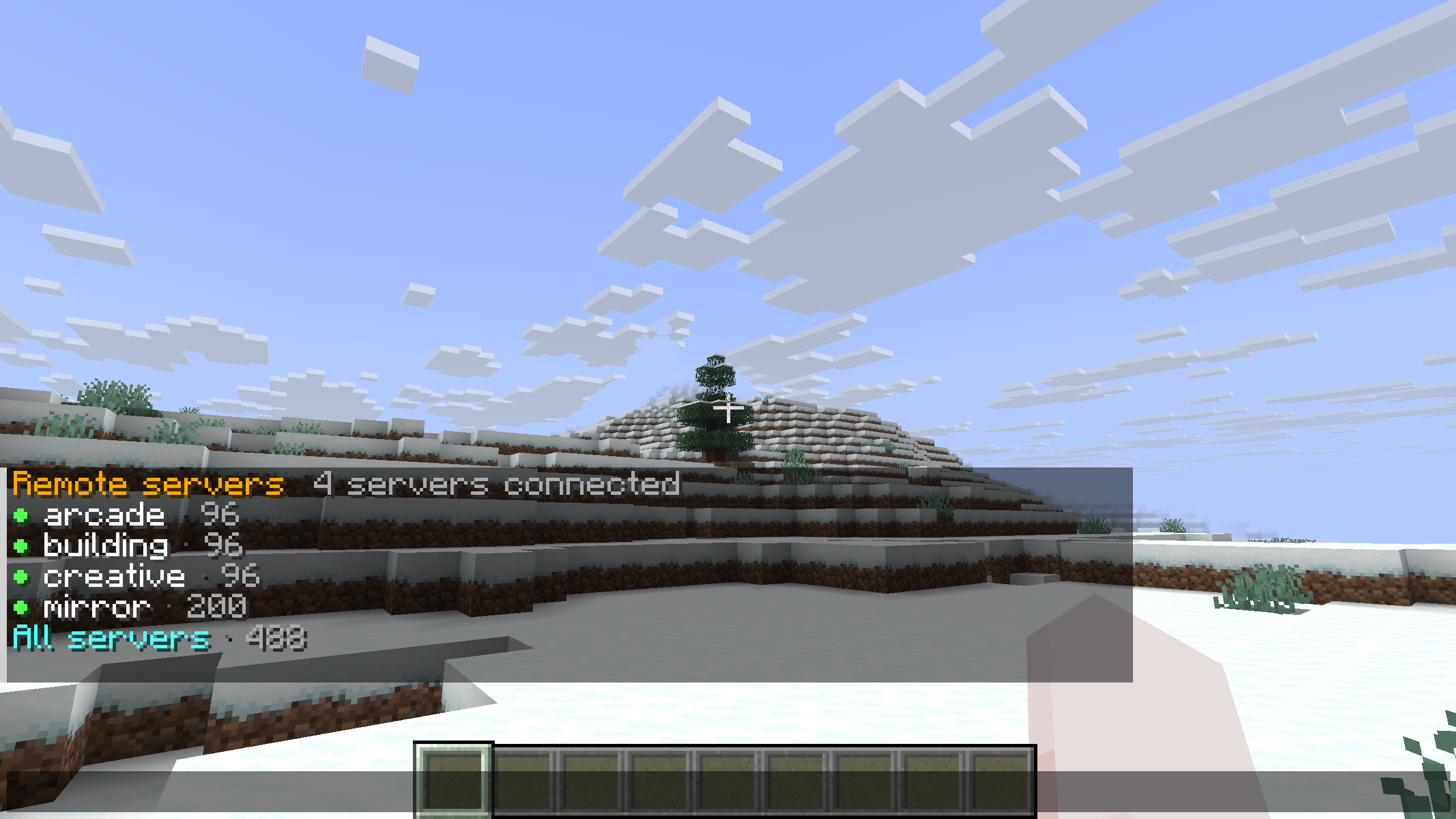
Clickable chat browser showing four connected remote servers

Use chat across the network. Run /wp remote to browse without the client mod. The chat view lists connected servers with availability indicators and waypoint counts, with an All servers option for browsing them together.
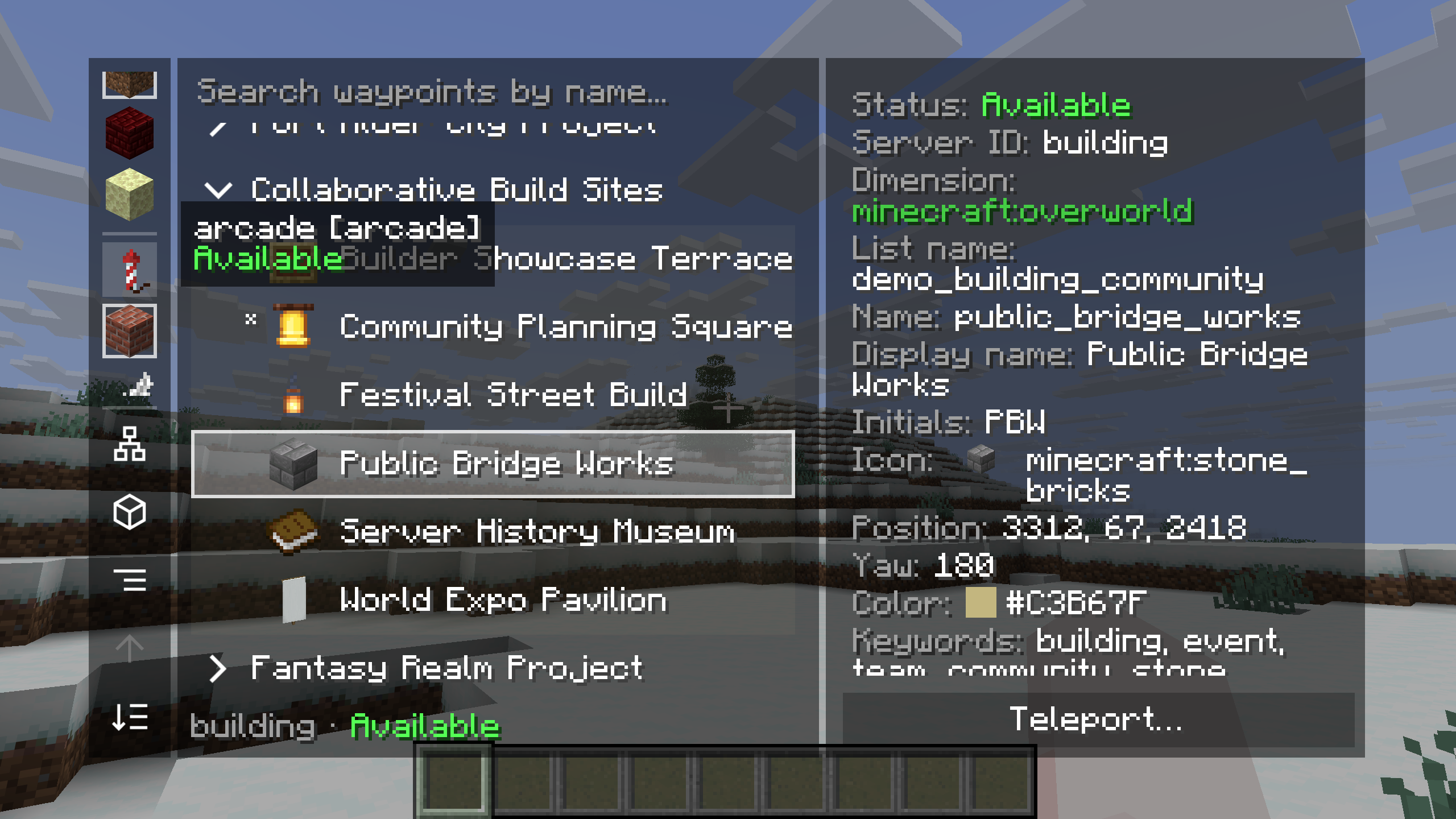
Cross-server waypoint manager showing the building server catalog and teleport action

Browse another server's places. In the client manager, choose a remote server and explore its lists. Here, the building server's Collaborative Build Sites list contains Public Bridge Works. The details panel shows the server's availability, the destination's properties and a Teleport action.

Cross-server teleportation follows the server's permissions. To edit a remote waypoint, join the server that owns it.

Set up cross-server waypoints

Follow the route your way

Choose the guidance that feels comfortable as you travel. The labeled example shows all five server navigation methods pointing to Festival Green at the same time.
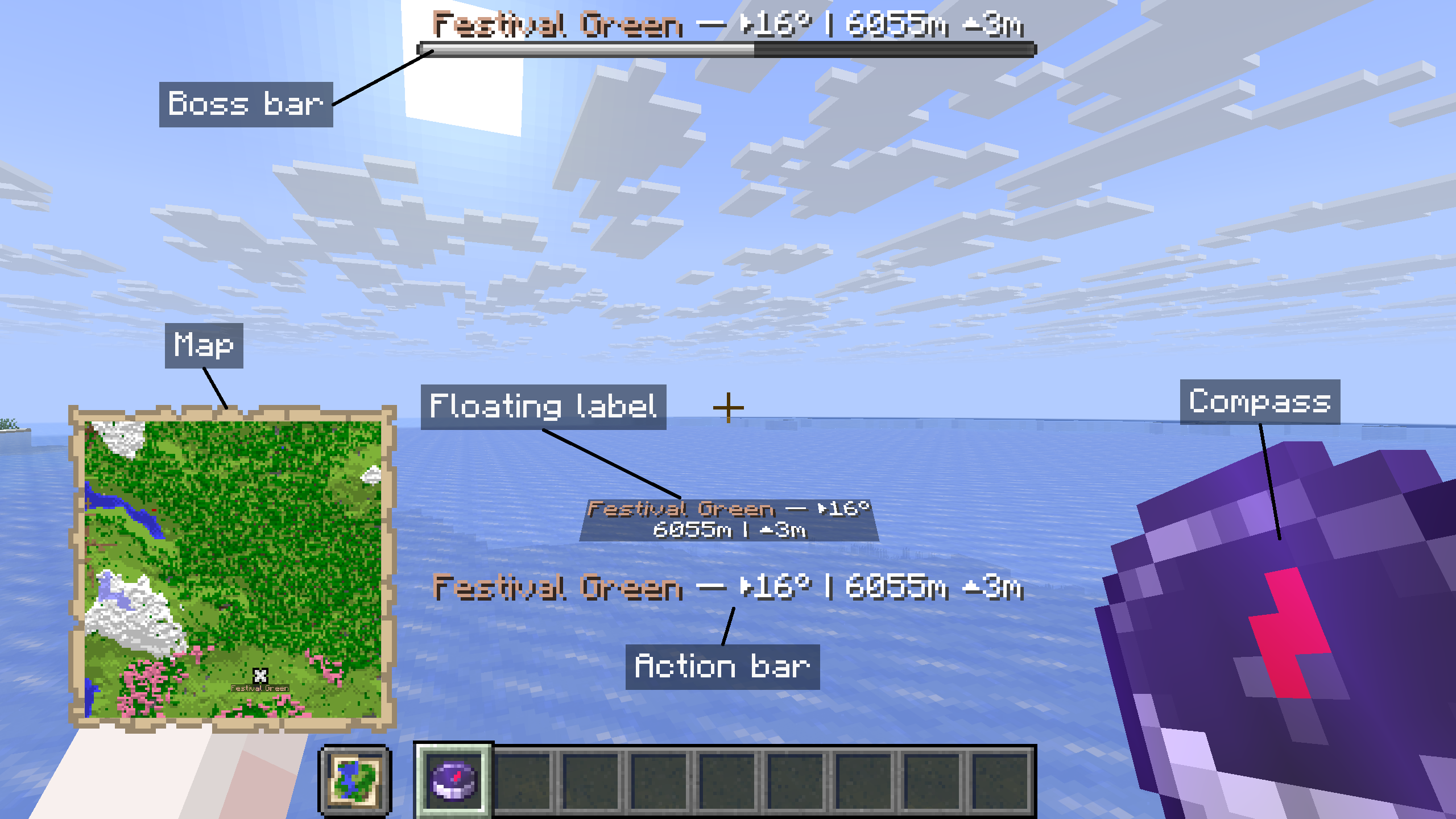
All five server navigation methods with labels for the compass, map, boss bar, action bar and floating label

  • Compass and map: follow the compass toward the destination or find its marker on the navigation map.
  • Boss bar and action bar: keep the destination's name, direction, distance and height difference on screen.
  • Floating label: see the destination's guidance within the world.

Use /wp navigate to change your navigation methods or stop navigation. All five methods are provided by the server and work without the client mod.

Browse and manage with clickable commands

Browse and manage waypoints from Minecraft's chat. The server provides clickable lists, hover details and waypoint actions, so players can get started with a vanilla client.
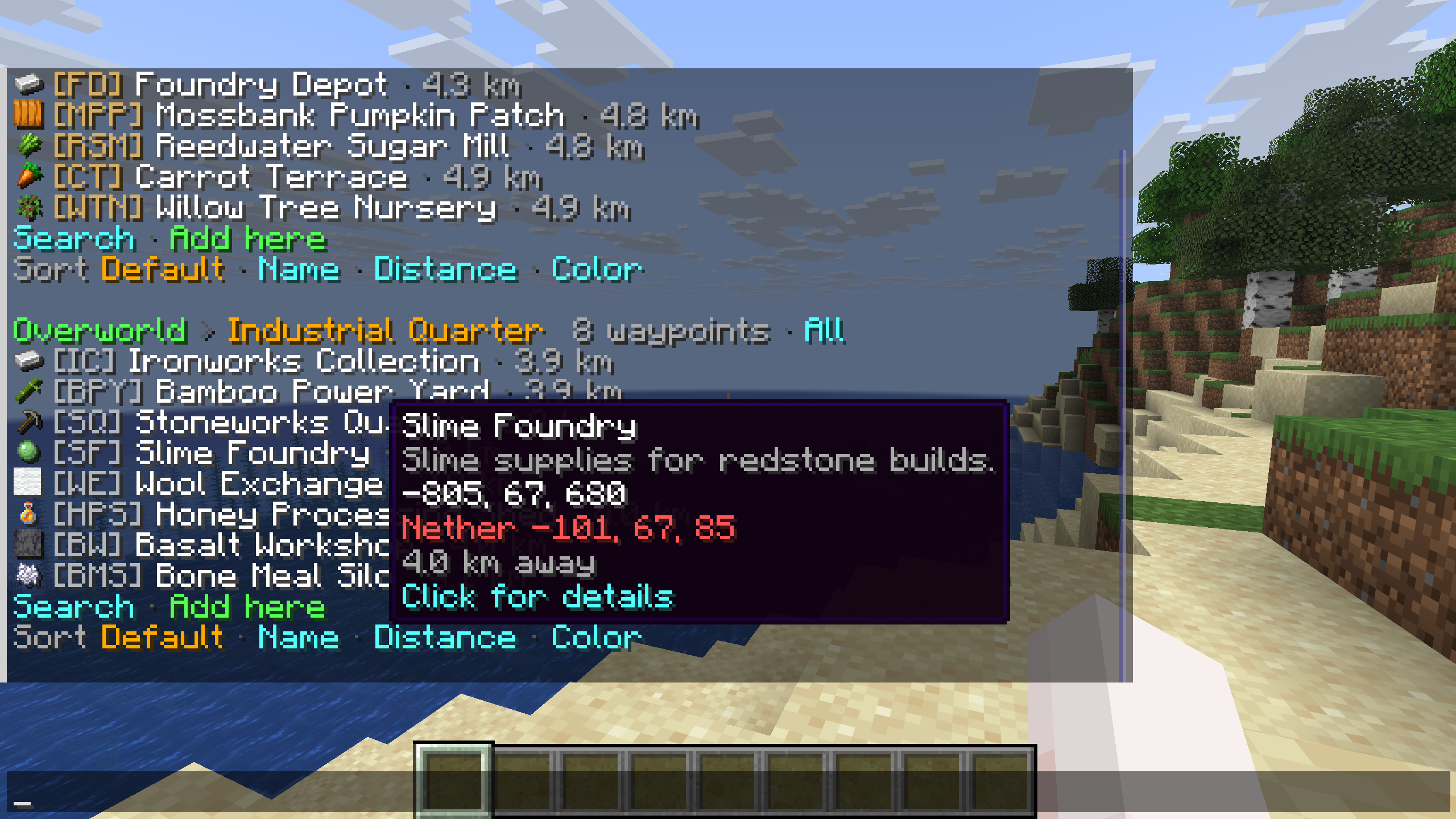
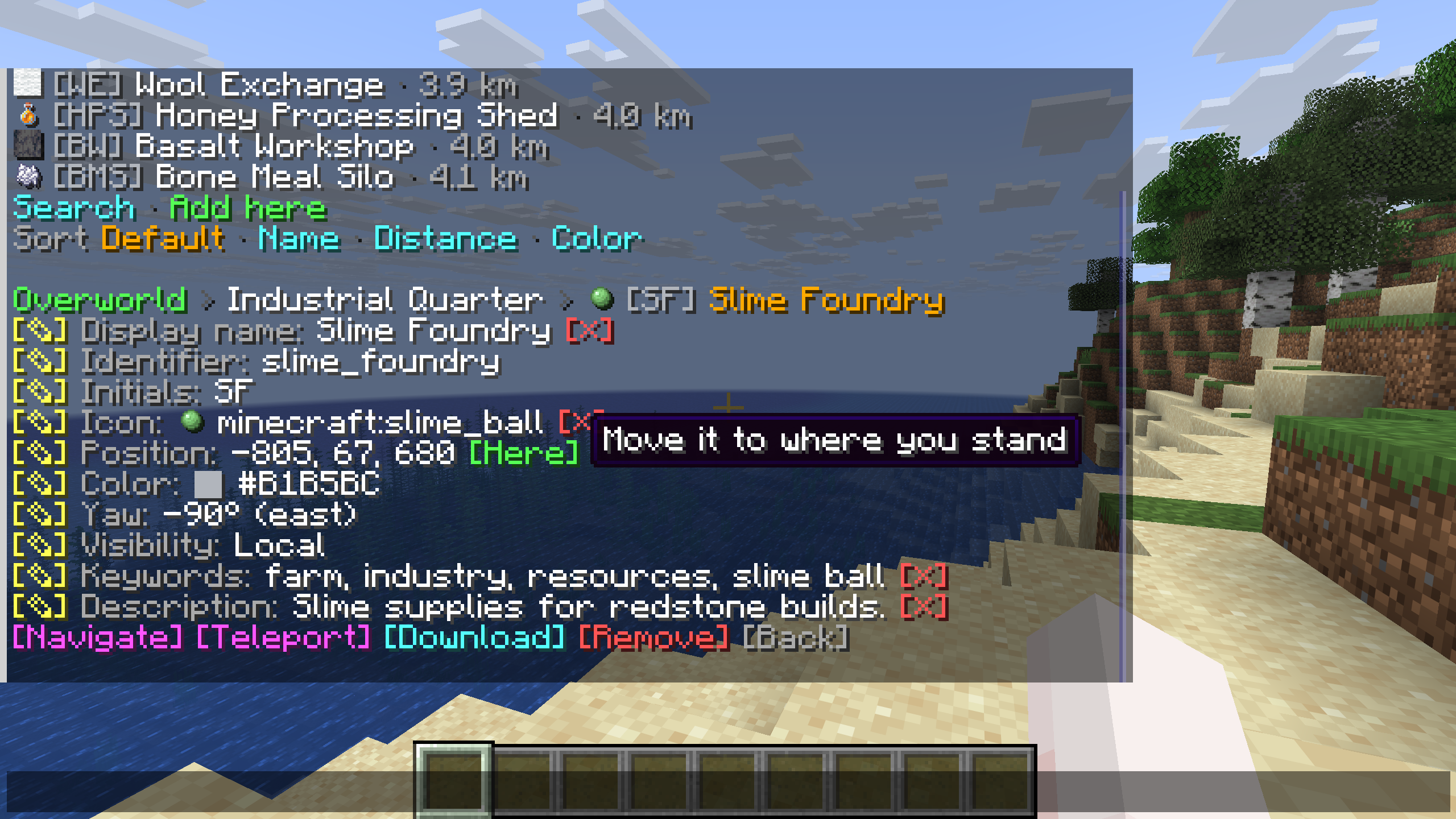
Interactive chat waypoint browser with a destination tooltip

Waypoint details with clickable edit, navigation and teleport controls

Browse before you travel. Open /wp to view waypoints grouped by dimension and list, with icons and distances beside their names. Search or change the sort order, and hover over a destination to read its description and coordinates. The example shows Slime Foundry in the Industrial Quarter list.

Details and actions in one place. Select a waypoint to see its properties and the available edit controls. The detail view includes actions to navigate, teleport, download or remove the waypoint. Hover hints explain controls such as Here, which moves the saved position to where you are standing.

The server's permissions determine which actions each player can use. Messages follow each player's Minecraft language setting.

Explore server commands

Give every destination its own style

Shared waypoint display names and descriptions support JSON text components, so you can combine colors and text styles for each destination. The screenshots show how the client mod displays that shared formatting in the manager and in-world markers.
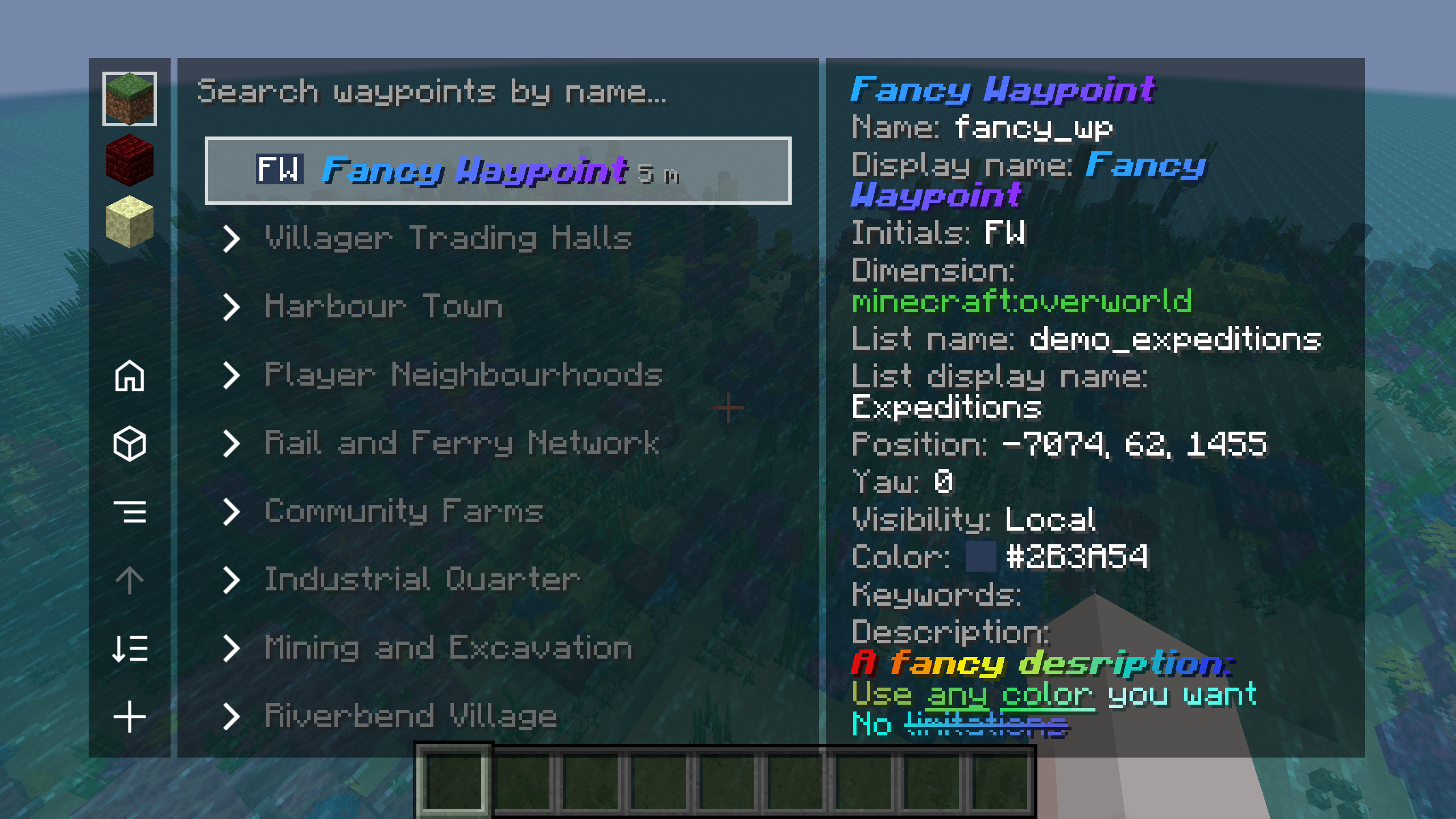
Waypoint manager with a JSON-styled display name and multicolored description

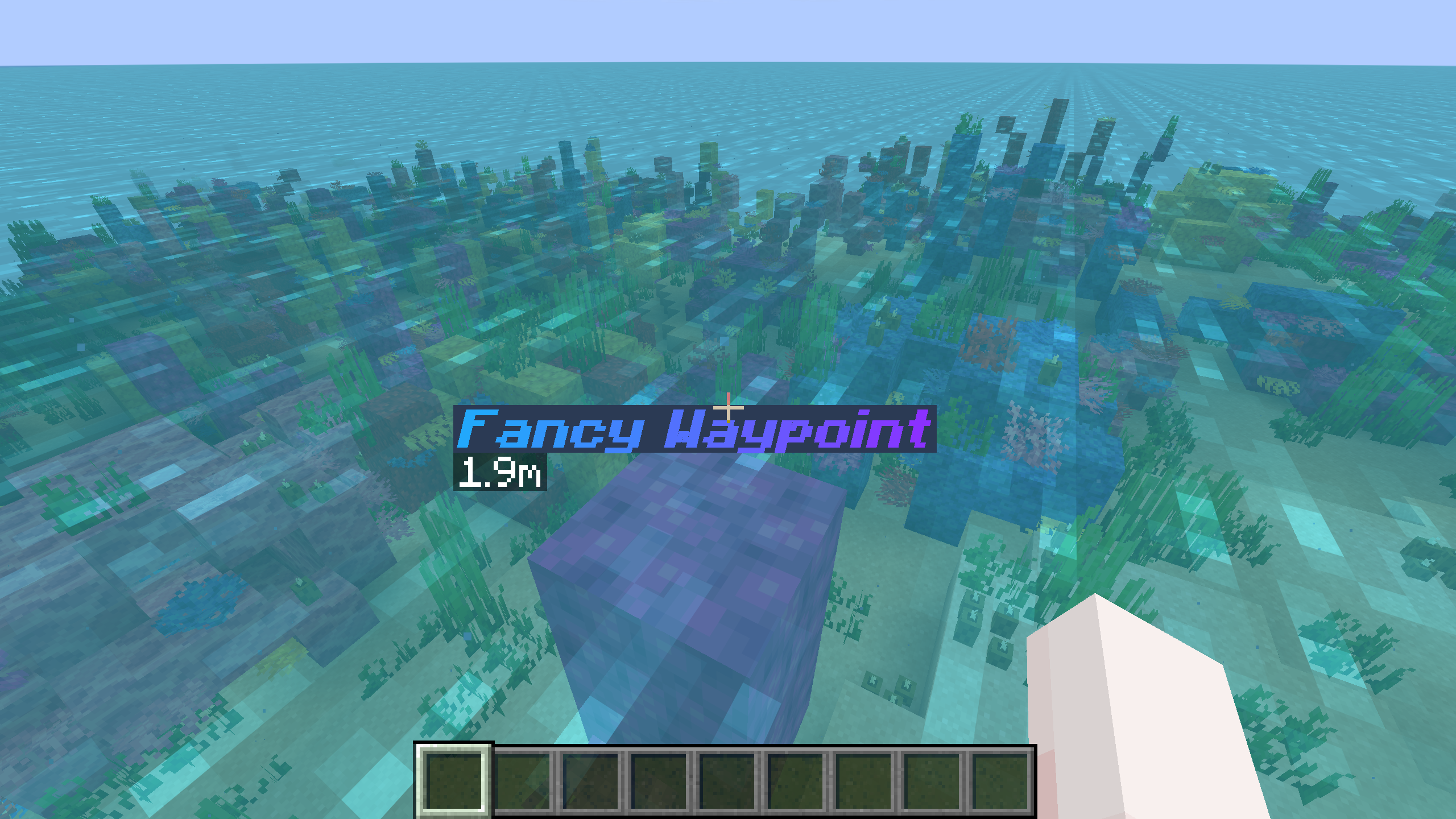
Colorful bold italic waypoint display name rendered in the world

Styled names in the manager and the world. The example uses Fancy Waypoint, with a blue-to-purple display name in bold italics. Its formatting appears in the waypoint list, the details panel and the in-world marker.

Descriptions with their own formatting. The details panel shows a multicolored description with several text styles. You can use the same format to highlight directions or add context about a place.

A separate identifier for commands. The styled display name belongs to the waypoint identified as fancy_wp. You can keep a simple identifier for commands while editing the display name and description through the waypoint's edit controls or /wp edit.

Learn about identifiers and display names

A whole world, neatly organized

The client manager brings waypoint lists and destination details into one view. Choose a dimension, search by name or expand a list to browse its places.
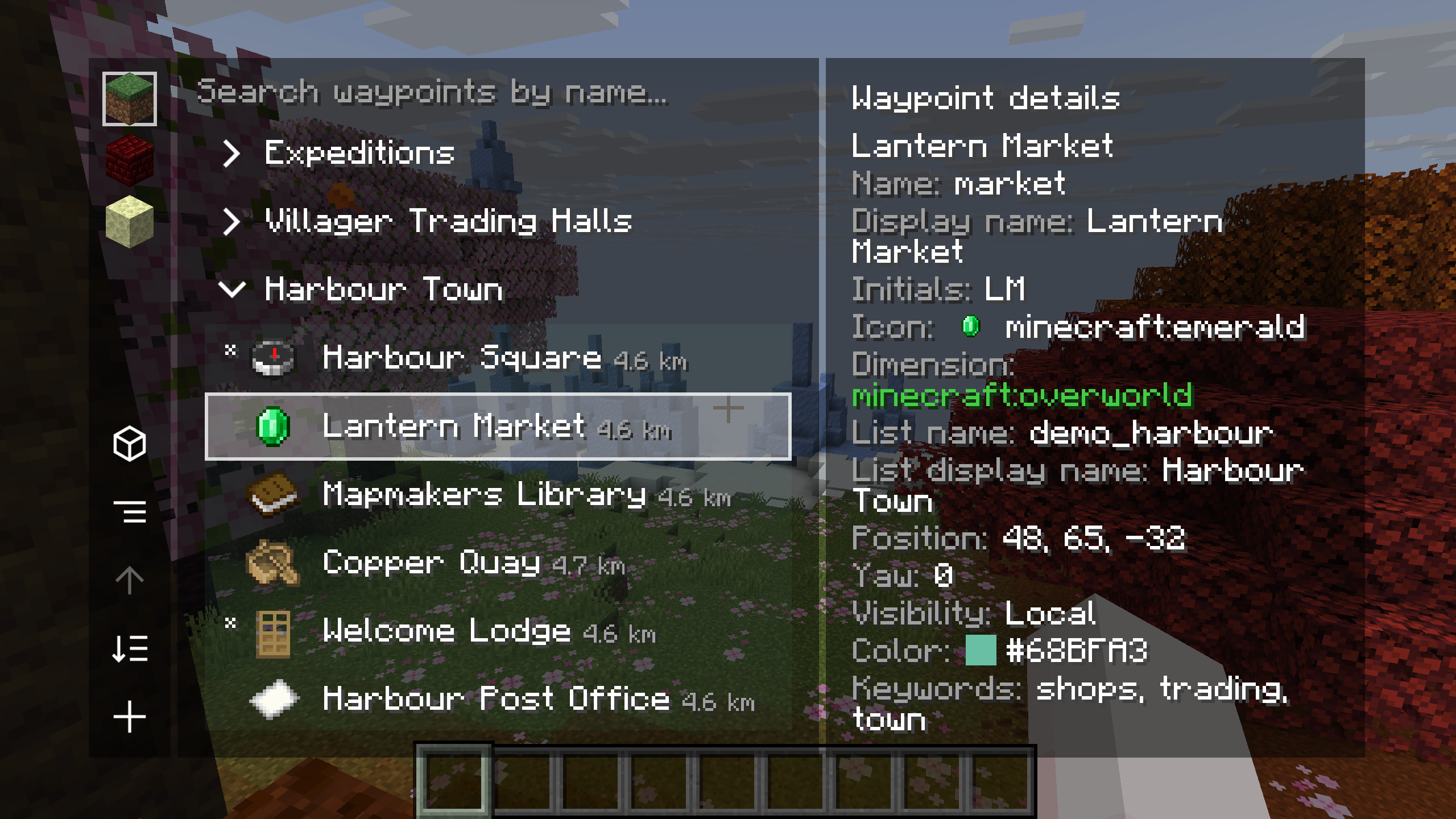
Waypoint manager with Harbour Town expanded and Lantern Market selected

Lists for the places you share. Harbour Town is expanded here, with Lantern Market selected alongside Harbour Square, Mapmakers Library and other destinations. Item icons and distances help distinguish entries. The details panel shows the selected waypoint's identifier, display name, initials, coordinates, visibility, color and keywords.

Open the manager with Right Shift or /wp_gui. Hover over a local waypoint and press T to teleport to it. Available actions, including editing, navigation and teleportation, follow the server's permissions.

Your waypoints. Your favorite map.

Use shared destinations with Xaero's Minimap or supported VoxelMap-Updated builds. The example shows Shared Waypoint in both minimaps alongside its in-world markers.
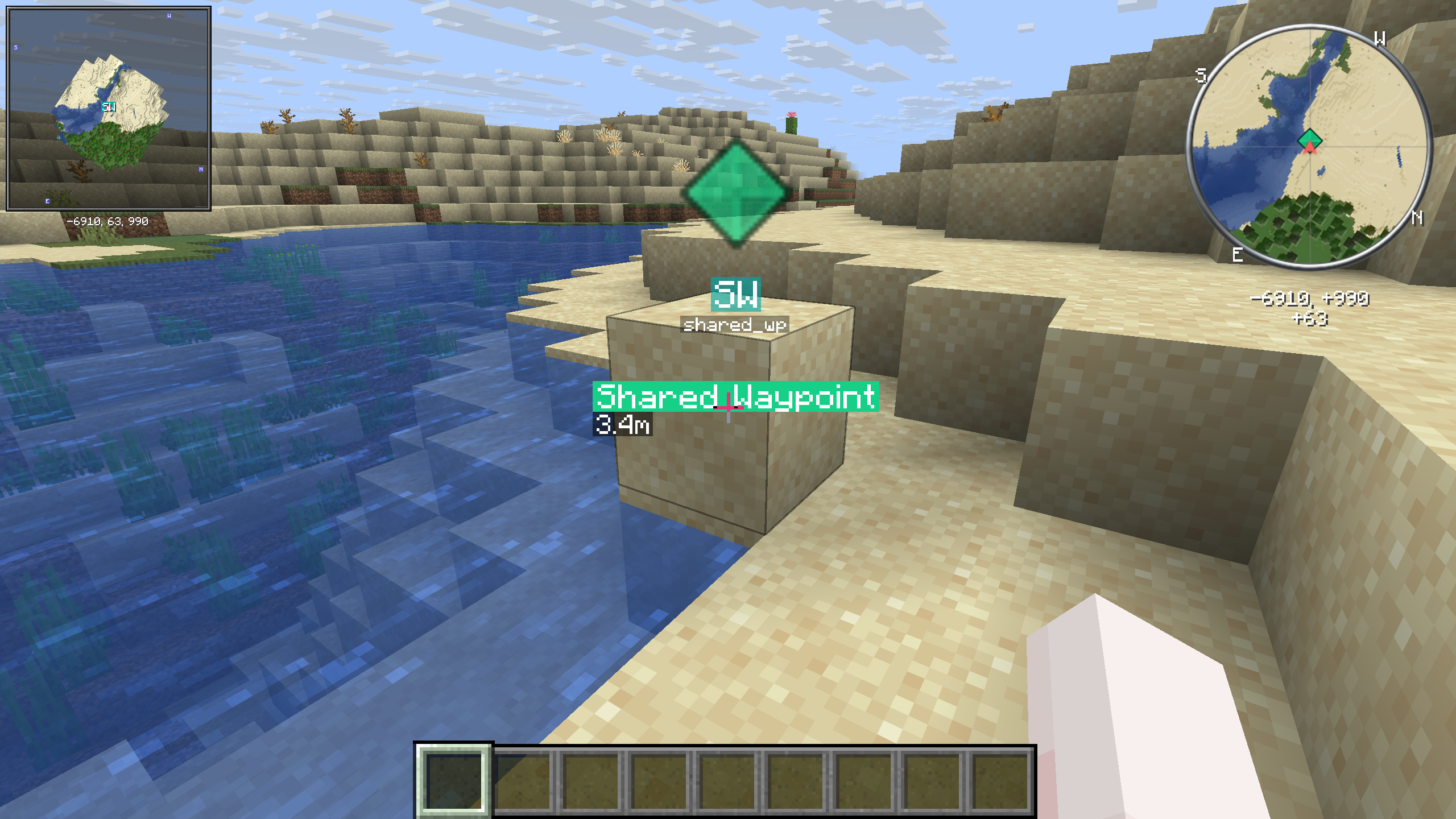
Shared waypoint displayed in the world and in Xaero and VoxelMap minimaps

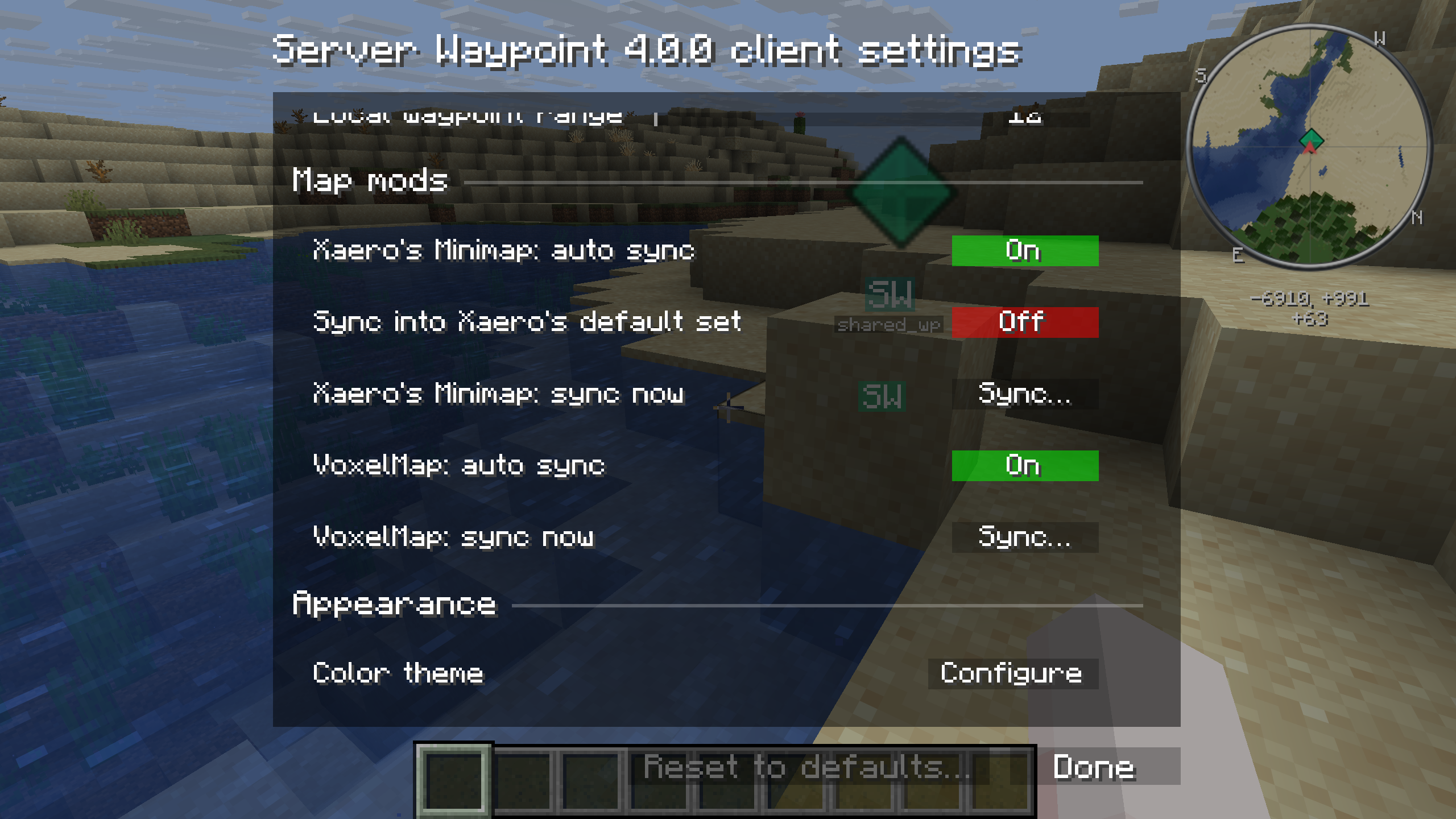
Client settings with Xaero and VoxelMap automatic and manual synchronization controls

Choose when to sync. Press C in the waypoint manager to open the client configuration screen. Client settings provide separate automatic synchronization toggles and manual Sync buttons for Xaero and VoxelMap. The screenshot has automatic sync enabled for both, while syncing into Xaero's default set is disabled.

You can also upload map waypoints when you have permission. Xaero's World Map offers actions for adding and editing server waypoints when installed alongside Xaero's Minimap.

Check map and version compatibility

Shared places, visible as you explore
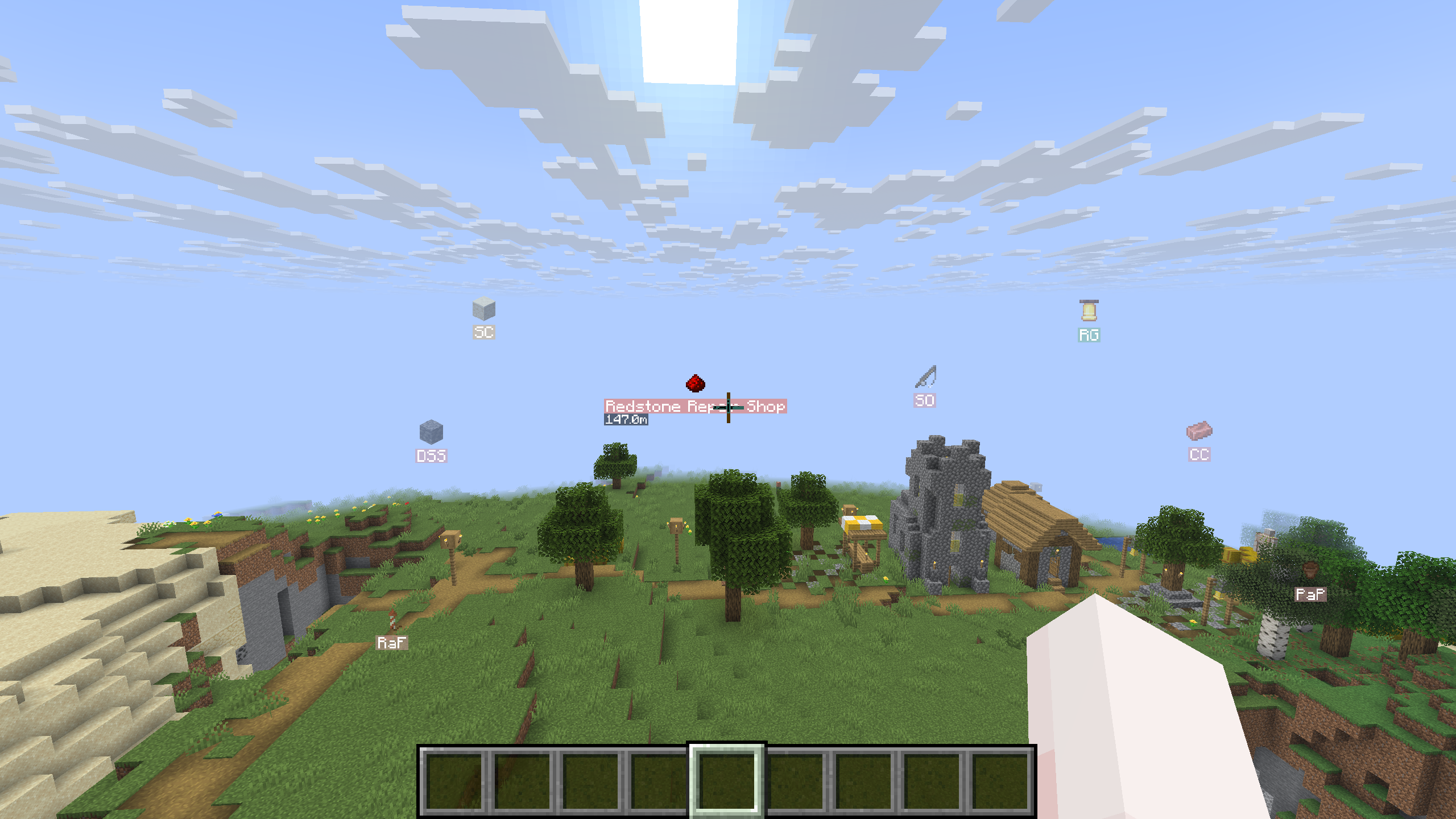
Server Waypoint in-world markers with item icons over a village

The client mod shows waypoints in the world with item icons, colors and initials. Look toward a marker to see its display name and distance.


Install it your way

For a server

Install the matching Fabric, Forge or NeoForge mod, or the Paper, Folia or Purpur plugin. Once you join, run /wp to browse waypoints and get started.

For a connected network

Install the optional Velocity plugin and configure the backend servers to share waypoints. Cross-server support is off by default and requires matching versions. The proxy plugin requires Java 25.

For client markers and the manager

Install the client mod with the dependencies listed for your download. Fabric requires Fabric API. You can also use the mod in singleplayer.

Server setup and permissions

Migrate your MCDR waypoints

Moving from the MCDReforged (MCDR) plugins Locations or LocationMarker? Use locations2waypoints.py to convert your locations.json. It requires Python 3 with no extra packages.

  1. Back up locations.json and your existing Server Waypoint files, then stop the server.

  2. Download the script, open a terminal in its folder and run:

    python3 locations2waypoints.py "/path/to/locations.json"
    

    Without a file argument, the script prompts you for the path.

  3. Review any messages about skipped entries. The script creates a waypoints/ folder beside your source file, with a locations list for each dimension in files such as minecraft$overworld.json. It keeps names and descriptions, rounds coordinates down to block positions and makes the waypoints shared with all players.

  4. Copy the generated JSON files into the appropriate folder under your server root:

    Server platformWaypoint folder
    Fabricconfig/server_waypoint/waypoints/
    Forge or NeoForgedefaultconfigs/server_waypoint/waypoints/
    Paper, Folia or Purpurplugins/ServerWaypoint/waypoints/

    If a destination file already exists, manually merge the generated locations list into its JSON array; choose another list name if locations is already taken. Replacing a dimension file removes its existing waypoint lists. The converter does not merge files and refuses to overwrite its own existing output files.

  5. Start the server and run /wp list to browse the imported lists. Waypoint files require a restart; /wp reload does not reload them.

Invalid entries and duplicate names within a dimension are skipped with a message. Keep your source file and review the conversion output before finishing.

Build somewhere worth finding

Community Discord | Report a bug

You're welcome to join the community, report an issue or help translate. Messages follow each player's Minecraft language setting; see the translation credits and review status for language coverage.

Галерея

Cross-server waypoint managerCross-server chat browserServer-side navigationInteractive chat waypoint browser

Последние версии

Все версии →
release

Server Waypoint 4.0.0 Forge (Minecraft 26.3)

4.0.0
15 окт. 2026 г.131Minecraft: 26.3forge
Скачать
release

Server Waypoint 4.0.0 Velocity

4.0.0
15 окт. 2026 г.50Minecraft: 1.20, 1.20.1, 1.20.2, 1.20.3, 1.20.4, 1.20.5, 1.20.6, 1.21, 1.21.1, 1.21.2, 1.21.3, 1.21.4, 1.21.5, 1.21.6, 1.21.7, 1.21.8, 1.21.9, 1.21.10, 1.21.11, 26.1, 26.1.1, 26.1.2, 26.2, 26.3velocity
Скачать
Что нового
# Changelog ## Server Waypoint 4.0.0 A major release: navigation that works without the client mod, waypoint icons, uploads from map mods, VoxelMap support, cross-server waypoints through Velocity, and redesigned commands and screens. ### Before you update - **Update servers and clients together.** 4.0.0 changes the network protocol and doesn't sync with 3.x. Use matching builds on Velocity and every participating backend too. - **`/wp edit` has a new syntax.** It changes one property at a time: `/wp edit waypoint <dimension> <list> <waypoint> set <property> [<value>]`, or `clear <property>` for an optional one. The 3.x form that took every property at once is gone, so update command blocks and scripts that use it. `/wp add` still accepts its 3.x syntax. - **Paper now applies the `CommandPermission` levels.** In 3.x, players without an explicit permission node needed operator status. They now get the level set in `config.json`, so with the defaults every player can use `/wp add`, `/wp edit`, `/wp remove` and `/wp navigate`. To limit these to operators again, set their levels to 2 or deny the nodes in your permission plugin. - **Xaero's Minimap sets synced by 3.x stay behind.** By default, Server Waypoint now marks the sets it creates and changes only those. Sets synced by 3.x have plain list names, so they remain next to the new ones as your own sets. Delete them in Xaero's Minimap if you don't need them. - **Direct sync into Xaero's Default set is optional and off by default.** Turning on **Sync into Xaero's default set** makes syncing the server list `gui.xaero_default` replace that set's contents, including personal waypoints. Leave it off to use a separate server-owned set. - **Custom translation files need updating.** Most server message keys were renamed, so language files made for 3.x no longer override them. Start a new file from the 4.0.0 `en_us.json`. - **Choose the Paper JAR for your Minecraft version.** The ranges are now 1.21–1.21.8, 1.21.9–1.21.10, 1.21.11 plus 26.1–26.1.2, and 26.2–26.3. The new 1.21.9 build provides native chat icons. - **NeoForge 1.21.6 and 1.21.7–1.21.8 have separate JARs.** Select the download for your exact version range. - Waypoint files, `config.json` and client settings from 3.x load as they are. ### Navigation - `/wp navigate <dimension> <list> <waypoint>` guides you to a waypoint with a compass, a map, the boss bar, the action bar or a floating label. It runs on the server, so it works without the client mod. - `/wp navigate` shows your target and switches methods on and off. `/wp navigate config text_display` moves, turns and resizes the floating label. - `defaultNavigationMethods` in `config.json` chooses the methods a new session starts with (default: `actionbar`). `CommandPermission.navigate` sets who can navigate (default: level 0). - Navigation resumes when you rejoin, and the compass, map and label follow edits to the waypoint. - Navigation maps remember explored terrain when you change targets or regions. Returning to a previously visited region restores its terrain, including after a server restart; unexplored regions start blank. - Compass and map tooltips show the waypoint and dimension with clearer formatting. ### Waypoints - Choose an item or a VoxelMap image as a waypoint's icon. Icons appear on in-world markers and in the waypoint manager. Supported VoxelMap images also sync to VoxelMap; item icons use its default waypoint image. - Waypoints have an optional display name, keywords and description. Lists can have a display name too. - `/wp remove` answers with a Restore link that works once within 10 minutes. ### Commands - `/wp` opens a menu: most features are a click away, and each reply links to the next steps. `/wp help [<topic>]` explains every command with usages you can click and examples. - The console, RCON and command blocks get the same information as plain text. - On Minecraft 1.21.9 and later, chat feedback shows supported vanilla item sprites and player heads without the client mod. Older versions and unsupported icons retain text or initials. - Commands run through `/execute as` send feedback to the executing player and a copy labelled **Viewed as** to the original sender. Teleport confirmations name the player who teleported. - `/wp list` can search, sort by name, distance or colour, change the page size, and show lists, a tree or flat rows. `/wp list dimensions` lists every dimension with its waypoint count. `defaultPageLimit` in `config.json` sets the default page size. - `/wp details` shows every property of a waypoint or list, with buttons to edit each one. - `/wp add` on its own picks a list for a waypoint where you stand. `/wp add <x y z> <list> <name>` fills in the initials, a random colour and your facing; put a dimension first to add it elsewhere. The full form also takes keywords, a description and an icon. - `/wp edit waypoint ... set color` and `set yaw` without a value open a colour picker and a facing picker. `set color random` picks a colour. - Errors explain the problem and link to a way to fix it. - `/wp reload` now applies `defaultPageLimit`, `defaultNavigationMethods`, `CommandPermission`, `addWaypointFromChatSharing` and `compressChunkedMessages` immediately. ### Map mods - **VoxelMap** (Fabric; Forge 1.21.11, 26.1-26.1.2 and 26.2; NeoForge 1.21.2-1.21.4, 1.21.11, 26.1-26.1.2, 26.2 and 26.3): server waypoints sync to VoxelMap. Its waypoint list marks them with a sync icon, and editing one opens Server Waypoint's manager. - **Upload:** `/wp upload <xaero|voxelmap>` imports waypoints from the map mod on your client. Add `force local` to overwrite conflicts with your copy, or `force local delete` to also remove what your map doesn't have. It also works in singleplayer and for the host of a LAN world. Uploading needs level 2 (`upload`) and deleting needs level 4 (`uploadDelete`). - **Xaero's World Map:** right-click the map to add a waypoint to the server at that spot, or right-click a waypoint to add it to the server or edit its server copy. - **Xaero's Minimap and VoxelMap:** editing a synced Minimap waypoint opens the server form. VoxelMap's map popup offers actions to add a waypoint to the server or edit its server copy. - Sharing a Xaero or VoxelMap waypoint in chat prompts the sender to add it to the server through a prefilled form. Waypoints already identified as server waypoints do not prompt again. - Xaero's Minimap and VoxelMap show synced sets and waypoints under their server names. - The server list `gui.xaero_default` syncs to a separate Xaero set by default. **Sync into Xaero's default set** applies on the next sync; other lists always use separate sets. - The client settings list each map mod with its auto sync setting and a **Sync now** button. - `/wp download` explicitly refreshes map-mod waypoints even when automatic sync is disabled or the server revision has not changed. Downloading one waypoint refreshes that waypoint without treating the rest of its list as synchronized. - VoxelMap reports synchronized waypoint updates in chat. - Opening a singleplayer or LAN host world no longer automatically replaces its saved map-mod waypoints. Use **Sync now** for a full refresh; normal waypoint changes still sync when auto sync is enabled. - World Map editing resolves the waypoint's own dimension and server-owned list, preserving display names, icons, keywords and descriptions. Unresolved VoxelMap markers keep their normal VoxelMap edit screen. - VoxelMap uploads generate initials from waypoint names and skip waypoints outside the active subworld. ### Cross-server waypoints (Velocity) - A new Velocity plugin, `server_waypoint-4.0.0-velocity.jar`, links the servers behind one proxy. It's disabled by default and requires Java 25. Get it from [Modrinth](https://modrinth.com/plugin/server_waypoint/versions?l=velocity) or the [GitHub releases](https://github.com/2676959/server_waypoint/releases) and follow the [setup guide](https://github.com/2676959/server_waypoint/blob/4.0.0/docs/tips/server-guide.md#cross-server-teleport-setup). - `/wp remote` shows the connected servers and their state. `/wp remote list` and `/wp remote details` browse the waypoints other servers share, and `/wp remote tp` teleports you to one. The destination checks the target and your permission before you switch and confirms your arrival. These commands work without the client mod. - With the client mod, the waypoint manager has a remote view with a server selector. - Servers connect over an encrypted channel authenticated with pinned public keys (`NOISE_KK`), or unencrypted over loopback on a single machine (`PLAINTEXT`). - Backend and proxy logs report specific connection failure reasons, including timeouts, protocol mismatches, authentication failures and duplicate server IDs. - `/serverwaypoint status` on Velocity reports the coordinator's state. `/sw-cross-server-keygen` on a backend console creates the backend's keys without a start-and-stop pass. `serverIconItem` sets the item a backend shows in the server selector. - New permissions: `remoteList` (default level 0) and `remoteTp` (default level 2). - Remote teleport checks `remote.tp` on the source player, independently of local `tp` and remote browsing permissions. The destination checks both its own `tp` and `remote.tp` before transfer and again on arrival. - Permission failures during destination preparation name the destination and show the separate `tp` and `remote.tp` results. Paper's offline checks honor LuckPerms decisions and each node's configured vanilla fallback level. ### Waypoint manager - New layout: a dimension rail, the waypoint list and a details panel. - Search by name; sort by name, distance or colour in either direction; group by list; show every dimension at once. Distances convert between Nether and Overworld coordinates. - The manager remembers its sorting, grouping and dimension view. - During the current server or world session, the manager also remembers scroll positions separately for each dimension and the all-dimensions view, restoring them when you switch views or reopen the screen. - Scrollbars in the waypoint list, details panel, client settings and theme variable list fade in on hover, stay visible while dragging and fade out after you leave. - Escape closes an open popup before the screen. Enter and Space press the focused button. - The current/remote scope control identifies which waypoints it shows and includes the current server name in its tooltip. Remote waypoints are read-only and show their server's availability. - In singleplayer, the manager keeps the world running; add, edit, client settings and theme screens pause it. ### Add and edit screens - A redesigned form with editable dimension and list comboboxes and suggestions for names, coordinates and facing. Initials follow the name until you type your own. - New fields for keywords, a description and an icon. Problems are marked on the field they belong to. ### Client settings and themes - A rebuilt settings screen: hover a row to see what it does and its default, ↺ resets one setting and **Reset to defaults…** resets them all. Mod Menu (Fabric) and the Mods screen (Forge and NeoForge) open it. - New setting: **Render waypoints under F1** (off by default). Waypoints are hidden on loading screens. - Colour themes: pick Classic (the default), Translucent Dark, Modern Dark, High Contrast or Light, with white glass surfaces and sky-blue accents, or edit the colours in game. The colour theme editor is a developer tool: it lists the theme's raw colour keys with their `#AARRGGBB` values, edits a key in an ARGB field, with the colour picker or with an Alpha slider, and shows an interactive preview of the mod's widgets that marks where the selected key is used. **Reset** undoes every change since you opened the editor, and **Save** is available only when something changed. - Themes can enable or disable text shadows, including in text fields and suggestions. GUI icons, matching-input feedback and On/Off toggles follow the selected theme's colours. Waypoint initials badges remain shadow-free for readability. - Tooltips in the mod's screens follow the colour theme. ### Action logging - Server consoles receive action logs with the player's name and UUID, the original command sender and UUID, and the outcome. Commands run through `/execute as` retain both identities through asynchronous completion. - Waypoint and list changes, restore, teleports, navigation, uploads, downloads, chat sharing and reload are logged. Save failures and partial uploads have distinct outcomes; browsing and routine synchronization do not produce action entries. ### Platforms - Minecraft 26.3 on Fabric, NeoForge and Paper. This branch's Forge builds cover versions through 26.2. - Folia support. - Waypoint sync, downloads and uploads use a new chunked network transport. `compressChunkedMessages` (default `true`) compresses its messages. - The Velocity plugin reports anonymous usage statistics to bStats, as the Paper plugin already does. - Release JARs include only the classes and resources their platform uses. Velocity packages the shared cross-server code and proxy services, reducing its size and removing backend code and translations. ### Translations - English and Simplified Chinese include all current server and client translation keys. Traditional Chinese, Hong Kong Chinese, Spanish and Hebrew fall back to English in the waypoint details panel, the manager's search, sort and grouping controls, and some navigation and networking messages. Help translate on [Crowdin](https://crowdin.com/project/server-waypoint). - Many 4.0.0 translations were generated by AI and may contain mistakes. Earlier community credits recognize past contributions; they do not imply review of these translations. Human review status is tracked in [the verification checklist](https://github.com/2676959/server_waypoint/blob/4.0.0/TRANSLATOR_CREDITS.md#human-verification-checklist-for-400). - Custom server translations use Java `MessageFormat` placeholders (`{0}`, `{1}`); literal apostrophes must be doubled (`''`). ### Fixes - In singleplayer, adding or editing waypoints could fail with "RenderSystem called from wrong thread", and some changes didn't refresh the markers, the waypoint manager or the map mods. - Players on Minecraft 1.21.2 and later receive interactive chat feedback instead of console-style output. - Movement keys work in waypoint screens on Forge and NeoForge while text entry is inactive. - Open colour pickers and combobox popups no longer leak hover to controls beneath them. - The waypoint details panel correctly handles its controls and lays out descriptions, including literal `\n` line breaks and formatted text. - Remote server status indicators keep their intended colours. Chat colour swatches have consistent sizes, and GUI icons use smoother filtering. - Paper destination preparation uses the configured `tp` and `remoteTp` levels for unset permissions, so allowing non-operators with level `0` works before transfer as well as on arrival. - NeoForge 1.21.7–1.21.8 registers client packet handling through the appropriate loader API, fixing startup failures. - VoxelMap icons load from the correct version-specific resources, preserve transparency and display decoded waypoint labels. Item waypoint icons on Minecraft 1.21 also preserve transparency. - Map-mod sync keeps waypoints in their correct dimensions and preserves personal map data. World Map actions retain the exact server waypoint identity and metadata. - Combobox selection on older Minecraft versions restores focus correctly. Saving a waypoint in singleplayer refreshes the waypoint manager and map integrations. - Suggestions and inline completions stay aligned when long input text scrolls horizontally. - On Minecraft 1.20.1, respawning preserves the player's language for server feedback and navigation. A failed chat broadcast to one player no longer prevents waypoint synchronization or delivery to other players. - A connection handshake with no waypoint updates no longer triggers an unnecessary full map-mod sync. - Hovered in-world waypoint icons render above overlapping markers so they remain visible. - Xaero dependency pins were aligned with the versions required by each map mod, including XaeroLib on Forge 1.20.1. - Language loading no longer closes a JAR filesystem owned by the mod loader. - Chat item icons resolve installed mod assets on supported Minecraft versions, so modded item sprites can appear alongside vanilla icons. - Text fields and comboboxes reset their horizontal view correctly when focus changes. Widget text alignment, waypoint initials contrast and disabled-icon visibility are more consistent. - The theme editor's preview supports its controls, popups, tooltips and confirmation dialogs interactively. ### Tools - `locations2waypoints.py` converts the waypoints of the MCDR plugins Locations and LocationMarker into Server Waypoint files. - Modrinth and CurseForge upload automation uses this changelog by default, while retaining explicit changelog overrides. Upload names identify the platform and Minecraft version range; Fabric uploads list Mod Menu as an optional integration. VoxelMap-Updated remains an optional Modrinth dependency only for targets with a supported build. - The README now provides installation and first-use instructions, with full command syntax and server setup in a separate reference. - A reusable live Minecraft verification runner supports disposable worlds, command checks and retained results.
release

Server Waypoint 4.0.0 Paper (Minecraft 26.2-26.3)

4.0.0
15 окт. 2026 г.626Minecraft: 26.2, 26.3folia, paper, purpur
Скачать
Что нового
# Changelog ## Server Waypoint 4.0.0 A major release: navigation that works without the client mod, waypoint icons, uploads from map mods, VoxelMap support, cross-server waypoints through Velocity, and redesigned commands and screens. ### Before you update - **Update servers and clients together.** 4.0.0 changes the network protocol and doesn't sync with 3.x. Use matching builds on Velocity and every participating backend too. - **`/wp edit` has a new syntax.** It changes one property at a time: `/wp edit waypoint <dimension> <list> <waypoint> set <property> [<value>]`, or `clear <property>` for an optional one. The 3.x form that took every property at once is gone, so update command blocks and scripts that use it. `/wp add` still accepts its 3.x syntax. - **Paper now applies the `CommandPermission` levels.** In 3.x, players without an explicit permission node needed operator status. They now get the level set in `config.json`, so with the defaults every player can use `/wp add`, `/wp edit`, `/wp remove` and `/wp navigate`. To limit these to operators again, set their levels to 2 or deny the nodes in your permission plugin. - **Xaero's Minimap sets synced by 3.x stay behind.** By default, Server Waypoint now marks the sets it creates and changes only those. Sets synced by 3.x have plain list names, so they remain next to the new ones as your own sets. Delete them in Xaero's Minimap if you don't need them. - **Direct sync into Xaero's Default set is optional and off by default.** Turning on **Sync into Xaero's default set** makes syncing the server list `gui.xaero_default` replace that set's contents, including personal waypoints. Leave it off to use a separate server-owned set. - **Custom translation files need updating.** Most server message keys were renamed, so language files made for 3.x no longer override them. Start a new file from the 4.0.0 `en_us.json`. - **Choose the Paper JAR for your Minecraft version.** The ranges are now 1.21–1.21.8, 1.21.9–1.21.10, 1.21.11 plus 26.1–26.1.2, and 26.2–26.3. The new 1.21.9 build provides native chat icons. - **NeoForge 1.21.6 and 1.21.7–1.21.8 have separate JARs.** Select the download for your exact version range. - Waypoint files, `config.json` and client settings from 3.x load as they are. ### Navigation - `/wp navigate <dimension> <list> <waypoint>` guides you to a waypoint with a compass, a map, the boss bar, the action bar or a floating label. It runs on the server, so it works without the client mod. - `/wp navigate` shows your target and switches methods on and off. `/wp navigate config text_display` moves, turns and resizes the floating label. - `defaultNavigationMethods` in `config.json` chooses the methods a new session starts with (default: `actionbar`). `CommandPermission.navigate` sets who can navigate (default: level 0). - Navigation resumes when you rejoin, and the compass, map and label follow edits to the waypoint. - Navigation maps remember explored terrain when you change targets or regions. Returning to a previously visited region restores its terrain, including after a server restart; unexplored regions start blank. - Compass and map tooltips show the waypoint and dimension with clearer formatting. ### Waypoints - Choose an item or a VoxelMap image as a waypoint's icon. Icons appear on in-world markers and in the waypoint manager. Supported VoxelMap images also sync to VoxelMap; item icons use its default waypoint image. - Waypoints have an optional display name, keywords and description. Lists can have a display name too. - `/wp remove` answers with a Restore link that works once within 10 minutes. ### Commands - `/wp` opens a menu: most features are a click away, and each reply links to the next steps. `/wp help [<topic>]` explains every command with usages you can click and examples. - The console, RCON and command blocks get the same information as plain text. - On Minecraft 1.21.9 and later, chat feedback shows supported vanilla item sprites and player heads without the client mod. Older versions and unsupported icons retain text or initials. - Commands run through `/execute as` send feedback to the executing player and a copy labelled **Viewed as** to the original sender. Teleport confirmations name the player who teleported. - `/wp list` can search, sort by name, distance or colour, change the page size, and show lists, a tree or flat rows. `/wp list dimensions` lists every dimension with its waypoint count. `defaultPageLimit` in `config.json` sets the default page size. - `/wp details` shows every property of a waypoint or list, with buttons to edit each one. - `/wp add` on its own picks a list for a waypoint where you stand. `/wp add <x y z> <list> <name>` fills in the initials, a random colour and your facing; put a dimension first to add it elsewhere. The full form also takes keywords, a description and an icon. - `/wp edit waypoint ... set color` and `set yaw` without a value open a colour picker and a facing picker. `set color random` picks a colour. - Errors explain the problem and link to a way to fix it. - `/wp reload` now applies `defaultPageLimit`, `defaultNavigationMethods`, `CommandPermission`, `addWaypointFromChatSharing` and `compressChunkedMessages` immediately. ### Map mods - **VoxelMap** (Fabric; Forge 1.21.11, 26.1-26.1.2 and 26.2; NeoForge 1.21.2-1.21.4, 1.21.11, 26.1-26.1.2, 26.2 and 26.3): server waypoints sync to VoxelMap. Its waypoint list marks them with a sync icon, and editing one opens Server Waypoint's manager. - **Upload:** `/wp upload <xaero|voxelmap>` imports waypoints from the map mod on your client. Add `force local` to overwrite conflicts with your copy, or `force local delete` to also remove what your map doesn't have. It also works in singleplayer and for the host of a LAN world. Uploading needs level 2 (`upload`) and deleting needs level 4 (`uploadDelete`). - **Xaero's World Map:** right-click the map to add a waypoint to the server at that spot, or right-click a waypoint to add it to the server or edit its server copy. - **Xaero's Minimap and VoxelMap:** editing a synced Minimap waypoint opens the server form. VoxelMap's map popup offers actions to add a waypoint to the server or edit its server copy. - Sharing a Xaero or VoxelMap waypoint in chat prompts the sender to add it to the server through a prefilled form. Waypoints already identified as server waypoints do not prompt again. - Xaero's Minimap and VoxelMap show synced sets and waypoints under their server names. - The server list `gui.xaero_default` syncs to a separate Xaero set by default. **Sync into Xaero's default set** applies on the next sync; other lists always use separate sets. - The client settings list each map mod with its auto sync setting and a **Sync now** button. - `/wp download` explicitly refreshes map-mod waypoints even when automatic sync is disabled or the server revision has not changed. Downloading one waypoint refreshes that waypoint without treating the rest of its list as synchronized. - VoxelMap reports synchronized waypoint updates in chat. - Opening a singleplayer or LAN host world no longer automatically replaces its saved map-mod waypoints. Use **Sync now** for a full refresh; normal waypoint changes still sync when auto sync is enabled. - World Map editing resolves the waypoint's own dimension and server-owned list, preserving display names, icons, keywords and descriptions. Unresolved VoxelMap markers keep their normal VoxelMap edit screen. - VoxelMap uploads generate initials from waypoint names and skip waypoints outside the active subworld. ### Cross-server waypoints (Velocity) - A new Velocity plugin, `server_waypoint-4.0.0-velocity.jar`, links the servers behind one proxy. It's disabled by default and requires Java 25. Get it from [Modrinth](https://modrinth.com/plugin/server_waypoint/versions?l=velocity) or the [GitHub releases](https://github.com/2676959/server_waypoint/releases) and follow the [setup guide](https://github.com/2676959/server_waypoint/blob/4.0.0/docs/tips/server-guide.md#cross-server-teleport-setup). - `/wp remote` shows the connected servers and their state. `/wp remote list` and `/wp remote details` browse the waypoints other servers share, and `/wp remote tp` teleports you to one. The destination checks the target and your permission before you switch and confirms your arrival. These commands work without the client mod. - With the client mod, the waypoint manager has a remote view with a server selector. - Servers connect over an encrypted channel authenticated with pinned public keys (`NOISE_KK`), or unencrypted over loopback on a single machine (`PLAINTEXT`). - Backend and proxy logs report specific connection failure reasons, including timeouts, protocol mismatches, authentication failures and duplicate server IDs. - `/serverwaypoint status` on Velocity reports the coordinator's state. `/sw-cross-server-keygen` on a backend console creates the backend's keys without a start-and-stop pass. `serverIconItem` sets the item a backend shows in the server selector. - New permissions: `remoteList` (default level 0) and `remoteTp` (default level 2). - Remote teleport checks `remote.tp` on the source player, independently of local `tp` and remote browsing permissions. The destination checks both its own `tp` and `remote.tp` before transfer and again on arrival. - Permission failures during destination preparation name the destination and show the separate `tp` and `remote.tp` results. Paper's offline checks honor LuckPerms decisions and each node's configured vanilla fallback level. ### Waypoint manager - New layout: a dimension rail, the waypoint list and a details panel. - Search by name; sort by name, distance or colour in either direction; group by list; show every dimension at once. Distances convert between Nether and Overworld coordinates. - The manager remembers its sorting, grouping and dimension view. - During the current server or world session, the manager also remembers scroll positions separately for each dimension and the all-dimensions view, restoring them when you switch views or reopen the screen. - Scrollbars in the waypoint list, details panel, client settings and theme variable list fade in on hover, stay visible while dragging and fade out after you leave. - Escape closes an open popup before the screen. Enter and Space press the focused button. - The current/remote scope control identifies which waypoints it shows and includes the current server name in its tooltip. Remote waypoints are read-only and show their server's availability. - In singleplayer, the manager keeps the world running; add, edit, client settings and theme screens pause it. ### Add and edit screens - A redesigned form with editable dimension and list comboboxes and suggestions for names, coordinates and facing. Initials follow the name until you type your own. - New fields for keywords, a description and an icon. Problems are marked on the field they belong to. ### Client settings and themes - A rebuilt settings screen: hover a row to see what it does and its default, ↺ resets one setting and **Reset to defaults…** resets them all. Mod Menu (Fabric) and the Mods screen (Forge and NeoForge) open it. - New setting: **Render waypoints under F1** (off by default). Waypoints are hidden on loading screens. - Colour themes: pick Classic (the default), Translucent Dark, Modern Dark, High Contrast or Light, with white glass surfaces and sky-blue accents, or edit the colours in game. The colour theme editor is a developer tool: it lists the theme's raw colour keys with their `#AARRGGBB` values, edits a key in an ARGB field, with the colour picker or with an Alpha slider, and shows an interactive preview of the mod's widgets that marks where the selected key is used. **Reset** undoes every change since you opened the editor, and **Save** is available only when something changed. - Themes can enable or disable text shadows, including in text fields and suggestions. GUI icons, matching-input feedback and On/Off toggles follow the selected theme's colours. Waypoint initials badges remain shadow-free for readability. - Tooltips in the mod's screens follow the colour theme. ### Action logging - Server consoles receive action logs with the player's name and UUID, the original command sender and UUID, and the outcome. Commands run through `/execute as` retain both identities through asynchronous completion. - Waypoint and list changes, restore, teleports, navigation, uploads, downloads, chat sharing and reload are logged. Save failures and partial uploads have distinct outcomes; browsing and routine synchronization do not produce action entries. ### Platforms - Minecraft 26.3 on Fabric, NeoForge and Paper. This branch's Forge builds cover versions through 26.2. - Folia support. - Waypoint sync, downloads and uploads use a new chunked network transport. `compressChunkedMessages` (default `true`) compresses its messages. - The Velocity plugin reports anonymous usage statistics to bStats, as the Paper plugin already does. - Release JARs include only the classes and resources their platform uses. Velocity packages the shared cross-server code and proxy services, reducing its size and removing backend code and translations. ### Translations - English and Simplified Chinese include all current server and client translation keys. Traditional Chinese, Hong Kong Chinese, Spanish and Hebrew fall back to English in the waypoint details panel, the manager's search, sort and grouping controls, and some navigation and networking messages. Help translate on [Crowdin](https://crowdin.com/project/server-waypoint). - Many 4.0.0 translations were generated by AI and may contain mistakes. Earlier community credits recognize past contributions; they do not imply review of these translations. Human review status is tracked in [the verification checklist](https://github.com/2676959/server_waypoint/blob/4.0.0/TRANSLATOR_CREDITS.md#human-verification-checklist-for-400). - Custom server translations use Java `MessageFormat` placeholders (`{0}`, `{1}`); literal apostrophes must be doubled (`''`). ### Fixes - In singleplayer, adding or editing waypoints could fail with "RenderSystem called from wrong thread", and some changes didn't refresh the markers, the waypoint manager or the map mods. - Players on Minecraft 1.21.2 and later receive interactive chat feedback instead of console-style output. - Movement keys work in waypoint screens on Forge and NeoForge while text entry is inactive. - Open colour pickers and combobox popups no longer leak hover to controls beneath them. - The waypoint details panel correctly handles its controls and lays out descriptions, including literal `\n` line breaks and formatted text. - Remote server status indicators keep their intended colours. Chat colour swatches have consistent sizes, and GUI icons use smoother filtering. - Paper destination preparation uses the configured `tp` and `remoteTp` levels for unset permissions, so allowing non-operators with level `0` works before transfer as well as on arrival. - NeoForge 1.21.7–1.21.8 registers client packet handling through the appropriate loader API, fixing startup failures. - VoxelMap icons load from the correct version-specific resources, preserve transparency and display decoded waypoint labels. Item waypoint icons on Minecraft 1.21 also preserve transparency. - Map-mod sync keeps waypoints in their correct dimensions and preserves personal map data. World Map actions retain the exact server waypoint identity and metadata. - Combobox selection on older Minecraft versions restores focus correctly. Saving a waypoint in singleplayer refreshes the waypoint manager and map integrations. - Suggestions and inline completions stay aligned when long input text scrolls horizontally. - On Minecraft 1.20.1, respawning preserves the player's language for server feedback and navigation. A failed chat broadcast to one player no longer prevents waypoint synchronization or delivery to other players. - A connection handshake with no waypoint updates no longer triggers an unnecessary full map-mod sync. - Hovered in-world waypoint icons render above overlapping markers so they remain visible. - Xaero dependency pins were aligned with the versions required by each map mod, including XaeroLib on Forge 1.20.1. - Language loading no longer closes a JAR filesystem owned by the mod loader. - Chat item icons resolve installed mod assets on supported Minecraft versions, so modded item sprites can appear alongside vanilla icons. - Text fields and comboboxes reset their horizontal view correctly when focus changes. Widget text alignment, waypoint initials contrast and disabled-icon visibility are more consistent. - The theme editor's preview supports its controls, popups, tooltips and confirmation dialogs interactively. ### Tools - `locations2waypoints.py` converts the waypoints of the MCDR plugins Locations and LocationMarker into Server Waypoint files. - Modrinth and CurseForge upload automation uses this changelog by default, while retaining explicit changelog overrides. Upload names identify the platform and Minecraft version range; Fabric uploads list Mod Menu as an optional integration. VoxelMap-Updated remains an optional Modrinth dependency only for targets with a supported build. - The README now provides installation and first-use instructions, with full command syntax and server setup in a separate reference. - A reusable live Minecraft verification runner supports disposable worlds, command checks and retained results.
release

Server Waypoint 4.0.0 Paper (Minecraft 1.21.9-1.21.10)

4.0.0
15 окт. 2026 г.14Minecraft: 1.21.9, 1.21.10folia, paper, purpur
Скачать
Что нового
# Changelog ## Server Waypoint 4.0.0 A major release: navigation that works without the client mod, waypoint icons, uploads from map mods, VoxelMap support, cross-server waypoints through Velocity, and redesigned commands and screens. ### Before you update - **Update servers and clients together.** 4.0.0 changes the network protocol and doesn't sync with 3.x. Use matching builds on Velocity and every participating backend too. - **`/wp edit` has a new syntax.** It changes one property at a time: `/wp edit waypoint <dimension> <list> <waypoint> set <property> [<value>]`, or `clear <property>` for an optional one. The 3.x form that took every property at once is gone, so update command blocks and scripts that use it. `/wp add` still accepts its 3.x syntax. - **Paper now applies the `CommandPermission` levels.** In 3.x, players without an explicit permission node needed operator status. They now get the level set in `config.json`, so with the defaults every player can use `/wp add`, `/wp edit`, `/wp remove` and `/wp navigate`. To limit these to operators again, set their levels to 2 or deny the nodes in your permission plugin. - **Xaero's Minimap sets synced by 3.x stay behind.** By default, Server Waypoint now marks the sets it creates and changes only those. Sets synced by 3.x have plain list names, so they remain next to the new ones as your own sets. Delete them in Xaero's Minimap if you don't need them. - **Direct sync into Xaero's Default set is optional and off by default.** Turning on **Sync into Xaero's default set** makes syncing the server list `gui.xaero_default` replace that set's contents, including personal waypoints. Leave it off to use a separate server-owned set. - **Custom translation files need updating.** Most server message keys were renamed, so language files made for 3.x no longer override them. Start a new file from the 4.0.0 `en_us.json`. - **Choose the Paper JAR for your Minecraft version.** The ranges are now 1.21–1.21.8, 1.21.9–1.21.10, 1.21.11 plus 26.1–26.1.2, and 26.2–26.3. The new 1.21.9 build provides native chat icons. - **NeoForge 1.21.6 and 1.21.7–1.21.8 have separate JARs.** Select the download for your exact version range. - Waypoint files, `config.json` and client settings from 3.x load as they are. ### Navigation - `/wp navigate <dimension> <list> <waypoint>` guides you to a waypoint with a compass, a map, the boss bar, the action bar or a floating label. It runs on the server, so it works without the client mod. - `/wp navigate` shows your target and switches methods on and off. `/wp navigate config text_display` moves, turns and resizes the floating label. - `defaultNavigationMethods` in `config.json` chooses the methods a new session starts with (default: `actionbar`). `CommandPermission.navigate` sets who can navigate (default: level 0). - Navigation resumes when you rejoin, and the compass, map and label follow edits to the waypoint. - Navigation maps remember explored terrain when you change targets or regions. Returning to a previously visited region restores its terrain, including after a server restart; unexplored regions start blank. - Compass and map tooltips show the waypoint and dimension with clearer formatting. ### Waypoints - Choose an item or a VoxelMap image as a waypoint's icon. Icons appear on in-world markers and in the waypoint manager. Supported VoxelMap images also sync to VoxelMap; item icons use its default waypoint image. - Waypoints have an optional display name, keywords and description. Lists can have a display name too. - `/wp remove` answers with a Restore link that works once within 10 minutes. ### Commands - `/wp` opens a menu: most features are a click away, and each reply links to the next steps. `/wp help [<topic>]` explains every command with usages you can click and examples. - The console, RCON and command blocks get the same information as plain text. - On Minecraft 1.21.9 and later, chat feedback shows supported vanilla item sprites and player heads without the client mod. Older versions and unsupported icons retain text or initials. - Commands run through `/execute as` send feedback to the executing player and a copy labelled **Viewed as** to the original sender. Teleport confirmations name the player who teleported. - `/wp list` can search, sort by name, distance or colour, change the page size, and show lists, a tree or flat rows. `/wp list dimensions` lists every dimension with its waypoint count. `defaultPageLimit` in `config.json` sets the default page size. - `/wp details` shows every property of a waypoint or list, with buttons to edit each one. - `/wp add` on its own picks a list for a waypoint where you stand. `/wp add <x y z> <list> <name>` fills in the initials, a random colour and your facing; put a dimension first to add it elsewhere. The full form also takes keywords, a description and an icon. - `/wp edit waypoint ... set color` and `set yaw` without a value open a colour picker and a facing picker. `set color random` picks a colour. - Errors explain the problem and link to a way to fix it. - `/wp reload` now applies `defaultPageLimit`, `defaultNavigationMethods`, `CommandPermission`, `addWaypointFromChatSharing` and `compressChunkedMessages` immediately. ### Map mods - **VoxelMap** (Fabric; Forge 1.21.11, 26.1-26.1.2 and 26.2; NeoForge 1.21.2-1.21.4, 1.21.11, 26.1-26.1.2, 26.2 and 26.3): server waypoints sync to VoxelMap. Its waypoint list marks them with a sync icon, and editing one opens Server Waypoint's manager. - **Upload:** `/wp upload <xaero|voxelmap>` imports waypoints from the map mod on your client. Add `force local` to overwrite conflicts with your copy, or `force local delete` to also remove what your map doesn't have. It also works in singleplayer and for the host of a LAN world. Uploading needs level 2 (`upload`) and deleting needs level 4 (`uploadDelete`). - **Xaero's World Map:** right-click the map to add a waypoint to the server at that spot, or right-click a waypoint to add it to the server or edit its server copy. - **Xaero's Minimap and VoxelMap:** editing a synced Minimap waypoint opens the server form. VoxelMap's map popup offers actions to add a waypoint to the server or edit its server copy. - Sharing a Xaero or VoxelMap waypoint in chat prompts the sender to add it to the server through a prefilled form. Waypoints already identified as server waypoints do not prompt again. - Xaero's Minimap and VoxelMap show synced sets and waypoints under their server names. - The server list `gui.xaero_default` syncs to a separate Xaero set by default. **Sync into Xaero's default set** applies on the next sync; other lists always use separate sets. - The client settings list each map mod with its auto sync setting and a **Sync now** button. - `/wp download` explicitly refreshes map-mod waypoints even when automatic sync is disabled or the server revision has not changed. Downloading one waypoint refreshes that waypoint without treating the rest of its list as synchronized. - VoxelMap reports synchronized waypoint updates in chat. - Opening a singleplayer or LAN host world no longer automatically replaces its saved map-mod waypoints. Use **Sync now** for a full refresh; normal waypoint changes still sync when auto sync is enabled. - World Map editing resolves the waypoint's own dimension and server-owned list, preserving display names, icons, keywords and descriptions. Unresolved VoxelMap markers keep their normal VoxelMap edit screen. - VoxelMap uploads generate initials from waypoint names and skip waypoints outside the active subworld. ### Cross-server waypoints (Velocity) - A new Velocity plugin, `server_waypoint-4.0.0-velocity.jar`, links the servers behind one proxy. It's disabled by default and requires Java 25. Get it from [Modrinth](https://modrinth.com/plugin/server_waypoint/versions?l=velocity) or the [GitHub releases](https://github.com/2676959/server_waypoint/releases) and follow the [setup guide](https://github.com/2676959/server_waypoint/blob/4.0.0/docs/tips/server-guide.md#cross-server-teleport-setup). - `/wp remote` shows the connected servers and their state. `/wp remote list` and `/wp remote details` browse the waypoints other servers share, and `/wp remote tp` teleports you to one. The destination checks the target and your permission before you switch and confirms your arrival. These commands work without the client mod. - With the client mod, the waypoint manager has a remote view with a server selector. - Servers connect over an encrypted channel authenticated with pinned public keys (`NOISE_KK`), or unencrypted over loopback on a single machine (`PLAINTEXT`). - Backend and proxy logs report specific connection failure reasons, including timeouts, protocol mismatches, authentication failures and duplicate server IDs. - `/serverwaypoint status` on Velocity reports the coordinator's state. `/sw-cross-server-keygen` on a backend console creates the backend's keys without a start-and-stop pass. `serverIconItem` sets the item a backend shows in the server selector. - New permissions: `remoteList` (default level 0) and `remoteTp` (default level 2). - Remote teleport checks `remote.tp` on the source player, independently of local `tp` and remote browsing permissions. The destination checks both its own `tp` and `remote.tp` before transfer and again on arrival. - Permission failures during destination preparation name the destination and show the separate `tp` and `remote.tp` results. Paper's offline checks honor LuckPerms decisions and each node's configured vanilla fallback level. ### Waypoint manager - New layout: a dimension rail, the waypoint list and a details panel. - Search by name; sort by name, distance or colour in either direction; group by list; show every dimension at once. Distances convert between Nether and Overworld coordinates. - The manager remembers its sorting, grouping and dimension view. - During the current server or world session, the manager also remembers scroll positions separately for each dimension and the all-dimensions view, restoring them when you switch views or reopen the screen. - Scrollbars in the waypoint list, details panel, client settings and theme variable list fade in on hover, stay visible while dragging and fade out after you leave. - Escape closes an open popup before the screen. Enter and Space press the focused button. - The current/remote scope control identifies which waypoints it shows and includes the current server name in its tooltip. Remote waypoints are read-only and show their server's availability. - In singleplayer, the manager keeps the world running; add, edit, client settings and theme screens pause it. ### Add and edit screens - A redesigned form with editable dimension and list comboboxes and suggestions for names, coordinates and facing. Initials follow the name until you type your own. - New fields for keywords, a description and an icon. Problems are marked on the field they belong to. ### Client settings and themes - A rebuilt settings screen: hover a row to see what it does and its default, ↺ resets one setting and **Reset to defaults…** resets them all. Mod Menu (Fabric) and the Mods screen (Forge and NeoForge) open it. - New setting: **Render waypoints under F1** (off by default). Waypoints are hidden on loading screens. - Colour themes: pick Classic (the default), Translucent Dark, Modern Dark, High Contrast or Light, with white glass surfaces and sky-blue accents, or edit the colours in game. The colour theme editor is a developer tool: it lists the theme's raw colour keys with their `#AARRGGBB` values, edits a key in an ARGB field, with the colour picker or with an Alpha slider, and shows an interactive preview of the mod's widgets that marks where the selected key is used. **Reset** undoes every change since you opened the editor, and **Save** is available only when something changed. - Themes can enable or disable text shadows, including in text fields and suggestions. GUI icons, matching-input feedback and On/Off toggles follow the selected theme's colours. Waypoint initials badges remain shadow-free for readability. - Tooltips in the mod's screens follow the colour theme. ### Action logging - Server consoles receive action logs with the player's name and UUID, the original command sender and UUID, and the outcome. Commands run through `/execute as` retain both identities through asynchronous completion. - Waypoint and list changes, restore, teleports, navigation, uploads, downloads, chat sharing and reload are logged. Save failures and partial uploads have distinct outcomes; browsing and routine synchronization do not produce action entries. ### Platforms - Minecraft 26.3 on Fabric, NeoForge and Paper. This branch's Forge builds cover versions through 26.2. - Folia support. - Waypoint sync, downloads and uploads use a new chunked network transport. `compressChunkedMessages` (default `true`) compresses its messages. - The Velocity plugin reports anonymous usage statistics to bStats, as the Paper plugin already does. - Release JARs include only the classes and resources their platform uses. Velocity packages the shared cross-server code and proxy services, reducing its size and removing backend code and translations. ### Translations - English and Simplified Chinese include all current server and client translation keys. Traditional Chinese, Hong Kong Chinese, Spanish and Hebrew fall back to English in the waypoint details panel, the manager's search, sort and grouping controls, and some navigation and networking messages. Help translate on [Crowdin](https://crowdin.com/project/server-waypoint). - Many 4.0.0 translations were generated by AI and may contain mistakes. Earlier community credits recognize past contributions; they do not imply review of these translations. Human review status is tracked in [the verification checklist](https://github.com/2676959/server_waypoint/blob/4.0.0/TRANSLATOR_CREDITS.md#human-verification-checklist-for-400). - Custom server translations use Java `MessageFormat` placeholders (`{0}`, `{1}`); literal apostrophes must be doubled (`''`). ### Fixes - In singleplayer, adding or editing waypoints could fail with "RenderSystem called from wrong thread", and some changes didn't refresh the markers, the waypoint manager or the map mods. - Players on Minecraft 1.21.2 and later receive interactive chat feedback instead of console-style output. - Movement keys work in waypoint screens on Forge and NeoForge while text entry is inactive. - Open colour pickers and combobox popups no longer leak hover to controls beneath them. - The waypoint details panel correctly handles its controls and lays out descriptions, including literal `\n` line breaks and formatted text. - Remote server status indicators keep their intended colours. Chat colour swatches have consistent sizes, and GUI icons use smoother filtering. - Paper destination preparation uses the configured `tp` and `remoteTp` levels for unset permissions, so allowing non-operators with level `0` works before transfer as well as on arrival. - NeoForge 1.21.7–1.21.8 registers client packet handling through the appropriate loader API, fixing startup failures. - VoxelMap icons load from the correct version-specific resources, preserve transparency and display decoded waypoint labels. Item waypoint icons on Minecraft 1.21 also preserve transparency. - Map-mod sync keeps waypoints in their correct dimensions and preserves personal map data. World Map actions retain the exact server waypoint identity and metadata. - Combobox selection on older Minecraft versions restores focus correctly. Saving a waypoint in singleplayer refreshes the waypoint manager and map integrations. - Suggestions and inline completions stay aligned when long input text scrolls horizontally. - On Minecraft 1.20.1, respawning preserves the player's language for server feedback and navigation. A failed chat broadcast to one player no longer prevents waypoint synchronization or delivery to other players. - A connection handshake with no waypoint updates no longer triggers an unnecessary full map-mod sync. - Hovered in-world waypoint icons render above overlapping markers so they remain visible. - Xaero dependency pins were aligned with the versions required by each map mod, including XaeroLib on Forge 1.20.1. - Language loading no longer closes a JAR filesystem owned by the mod loader. - Chat item icons resolve installed mod assets on supported Minecraft versions, so modded item sprites can appear alongside vanilla icons. - Text fields and comboboxes reset their horizontal view correctly when focus changes. Widget text alignment, waypoint initials contrast and disabled-icon visibility are more consistent. - The theme editor's preview supports its controls, popups, tooltips and confirmation dialogs interactively. ### Tools - `locations2waypoints.py` converts the waypoints of the MCDR plugins Locations and LocationMarker into Server Waypoint files. - Modrinth and CurseForge upload automation uses this changelog by default, while retaining explicit changelog overrides. Upload names identify the platform and Minecraft version range; Fabric uploads list Mod Menu as an optional integration. VoxelMap-Updated remains an optional Modrinth dependency only for targets with a supported build. - The README now provides installation and first-use instructions, with full command syntax and server setup in a separate reference. - A reusable live Minecraft verification runner supports disposable worlds, command checks and retained results.
release

Server Waypoint 4.0.0 Paper (Minecraft 1.21.11-26.1.2)

4.0.0
15 окт. 2026 г.90Minecraft: 1.21.11, 26.1, 26.1.1, 26.1.2folia, paper, purpur
Скачать
Что нового
# Changelog ## Server Waypoint 4.0.0 A major release: navigation that works without the client mod, waypoint icons, uploads from map mods, VoxelMap support, cross-server waypoints through Velocity, and redesigned commands and screens. ### Before you update - **Update servers and clients together.** 4.0.0 changes the network protocol and doesn't sync with 3.x. Use matching builds on Velocity and every participating backend too. - **`/wp edit` has a new syntax.** It changes one property at a time: `/wp edit waypoint <dimension> <list> <waypoint> set <property> [<value>]`, or `clear <property>` for an optional one. The 3.x form that took every property at once is gone, so update command blocks and scripts that use it. `/wp add` still accepts its 3.x syntax. - **Paper now applies the `CommandPermission` levels.** In 3.x, players without an explicit permission node needed operator status. They now get the level set in `config.json`, so with the defaults every player can use `/wp add`, `/wp edit`, `/wp remove` and `/wp navigate`. To limit these to operators again, set their levels to 2 or deny the nodes in your permission plugin. - **Xaero's Minimap sets synced by 3.x stay behind.** By default, Server Waypoint now marks the sets it creates and changes only those. Sets synced by 3.x have plain list names, so they remain next to the new ones as your own sets. Delete them in Xaero's Minimap if you don't need them. - **Direct sync into Xaero's Default set is optional and off by default.** Turning on **Sync into Xaero's default set** makes syncing the server list `gui.xaero_default` replace that set's contents, including personal waypoints. Leave it off to use a separate server-owned set. - **Custom translation files need updating.** Most server message keys were renamed, so language files made for 3.x no longer override them. Start a new file from the 4.0.0 `en_us.json`. - **Choose the Paper JAR for your Minecraft version.** The ranges are now 1.21–1.21.8, 1.21.9–1.21.10, 1.21.11 plus 26.1–26.1.2, and 26.2–26.3. The new 1.21.9 build provides native chat icons. - **NeoForge 1.21.6 and 1.21.7–1.21.8 have separate JARs.** Select the download for your exact version range. - Waypoint files, `config.json` and client settings from 3.x load as they are. ### Navigation - `/wp navigate <dimension> <list> <waypoint>` guides you to a waypoint with a compass, a map, the boss bar, the action bar or a floating label. It runs on the server, so it works without the client mod. - `/wp navigate` shows your target and switches methods on and off. `/wp navigate config text_display` moves, turns and resizes the floating label. - `defaultNavigationMethods` in `config.json` chooses the methods a new session starts with (default: `actionbar`). `CommandPermission.navigate` sets who can navigate (default: level 0). - Navigation resumes when you rejoin, and the compass, map and label follow edits to the waypoint. - Navigation maps remember explored terrain when you change targets or regions. Returning to a previously visited region restores its terrain, including after a server restart; unexplored regions start blank. - Compass and map tooltips show the waypoint and dimension with clearer formatting. ### Waypoints - Choose an item or a VoxelMap image as a waypoint's icon. Icons appear on in-world markers and in the waypoint manager. Supported VoxelMap images also sync to VoxelMap; item icons use its default waypoint image. - Waypoints have an optional display name, keywords and description. Lists can have a display name too. - `/wp remove` answers with a Restore link that works once within 10 minutes. ### Commands - `/wp` opens a menu: most features are a click away, and each reply links to the next steps. `/wp help [<topic>]` explains every command with usages you can click and examples. - The console, RCON and command blocks get the same information as plain text. - On Minecraft 1.21.9 and later, chat feedback shows supported vanilla item sprites and player heads without the client mod. Older versions and unsupported icons retain text or initials. - Commands run through `/execute as` send feedback to the executing player and a copy labelled **Viewed as** to the original sender. Teleport confirmations name the player who teleported. - `/wp list` can search, sort by name, distance or colour, change the page size, and show lists, a tree or flat rows. `/wp list dimensions` lists every dimension with its waypoint count. `defaultPageLimit` in `config.json` sets the default page size. - `/wp details` shows every property of a waypoint or list, with buttons to edit each one. - `/wp add` on its own picks a list for a waypoint where you stand. `/wp add <x y z> <list> <name>` fills in the initials, a random colour and your facing; put a dimension first to add it elsewhere. The full form also takes keywords, a description and an icon. - `/wp edit waypoint ... set color` and `set yaw` without a value open a colour picker and a facing picker. `set color random` picks a colour. - Errors explain the problem and link to a way to fix it. - `/wp reload` now applies `defaultPageLimit`, `defaultNavigationMethods`, `CommandPermission`, `addWaypointFromChatSharing` and `compressChunkedMessages` immediately. ### Map mods - **VoxelMap** (Fabric; Forge 1.21.11, 26.1-26.1.2 and 26.2; NeoForge 1.21.2-1.21.4, 1.21.11, 26.1-26.1.2, 26.2 and 26.3): server waypoints sync to VoxelMap. Its waypoint list marks them with a sync icon, and editing one opens Server Waypoint's manager. - **Upload:** `/wp upload <xaero|voxelmap>` imports waypoints from the map mod on your client. Add `force local` to overwrite conflicts with your copy, or `force local delete` to also remove what your map doesn't have. It also works in singleplayer and for the host of a LAN world. Uploading needs level 2 (`upload`) and deleting needs level 4 (`uploadDelete`). - **Xaero's World Map:** right-click the map to add a waypoint to the server at that spot, or right-click a waypoint to add it to the server or edit its server copy. - **Xaero's Minimap and VoxelMap:** editing a synced Minimap waypoint opens the server form. VoxelMap's map popup offers actions to add a waypoint to the server or edit its server copy. - Sharing a Xaero or VoxelMap waypoint in chat prompts the sender to add it to the server through a prefilled form. Waypoints already identified as server waypoints do not prompt again. - Xaero's Minimap and VoxelMap show synced sets and waypoints under their server names. - The server list `gui.xaero_default` syncs to a separate Xaero set by default. **Sync into Xaero's default set** applies on the next sync; other lists always use separate sets. - The client settings list each map mod with its auto sync setting and a **Sync now** button. - `/wp download` explicitly refreshes map-mod waypoints even when automatic sync is disabled or the server revision has not changed. Downloading one waypoint refreshes that waypoint without treating the rest of its list as synchronized. - VoxelMap reports synchronized waypoint updates in chat. - Opening a singleplayer or LAN host world no longer automatically replaces its saved map-mod waypoints. Use **Sync now** for a full refresh; normal waypoint changes still sync when auto sync is enabled. - World Map editing resolves the waypoint's own dimension and server-owned list, preserving display names, icons, keywords and descriptions. Unresolved VoxelMap markers keep their normal VoxelMap edit screen. - VoxelMap uploads generate initials from waypoint names and skip waypoints outside the active subworld. ### Cross-server waypoints (Velocity) - A new Velocity plugin, `server_waypoint-4.0.0-velocity.jar`, links the servers behind one proxy. It's disabled by default and requires Java 25. Get it from [Modrinth](https://modrinth.com/plugin/server_waypoint/versions?l=velocity) or the [GitHub releases](https://github.com/2676959/server_waypoint/releases) and follow the [setup guide](https://github.com/2676959/server_waypoint/blob/4.0.0/docs/tips/server-guide.md#cross-server-teleport-setup). - `/wp remote` shows the connected servers and their state. `/wp remote list` and `/wp remote details` browse the waypoints other servers share, and `/wp remote tp` teleports you to one. The destination checks the target and your permission before you switch and confirms your arrival. These commands work without the client mod. - With the client mod, the waypoint manager has a remote view with a server selector. - Servers connect over an encrypted channel authenticated with pinned public keys (`NOISE_KK`), or unencrypted over loopback on a single machine (`PLAINTEXT`). - Backend and proxy logs report specific connection failure reasons, including timeouts, protocol mismatches, authentication failures and duplicate server IDs. - `/serverwaypoint status` on Velocity reports the coordinator's state. `/sw-cross-server-keygen` on a backend console creates the backend's keys without a start-and-stop pass. `serverIconItem` sets the item a backend shows in the server selector. - New permissions: `remoteList` (default level 0) and `remoteTp` (default level 2). - Remote teleport checks `remote.tp` on the source player, independently of local `tp` and remote browsing permissions. The destination checks both its own `tp` and `remote.tp` before transfer and again on arrival. - Permission failures during destination preparation name the destination and show the separate `tp` and `remote.tp` results. Paper's offline checks honor LuckPerms decisions and each node's configured vanilla fallback level. ### Waypoint manager - New layout: a dimension rail, the waypoint list and a details panel. - Search by name; sort by name, distance or colour in either direction; group by list; show every dimension at once. Distances convert between Nether and Overworld coordinates. - The manager remembers its sorting, grouping and dimension view. - During the current server or world session, the manager also remembers scroll positions separately for each dimension and the all-dimensions view, restoring them when you switch views or reopen the screen. - Scrollbars in the waypoint list, details panel, client settings and theme variable list fade in on hover, stay visible while dragging and fade out after you leave. - Escape closes an open popup before the screen. Enter and Space press the focused button. - The current/remote scope control identifies which waypoints it shows and includes the current server name in its tooltip. Remote waypoints are read-only and show their server's availability. - In singleplayer, the manager keeps the world running; add, edit, client settings and theme screens pause it. ### Add and edit screens - A redesigned form with editable dimension and list comboboxes and suggestions for names, coordinates and facing. Initials follow the name until you type your own. - New fields for keywords, a description and an icon. Problems are marked on the field they belong to. ### Client settings and themes - A rebuilt settings screen: hover a row to see what it does and its default, ↺ resets one setting and **Reset to defaults…** resets them all. Mod Menu (Fabric) and the Mods screen (Forge and NeoForge) open it. - New setting: **Render waypoints under F1** (off by default). Waypoints are hidden on loading screens. - Colour themes: pick Classic (the default), Translucent Dark, Modern Dark, High Contrast or Light, with white glass surfaces and sky-blue accents, or edit the colours in game. The colour theme editor is a developer tool: it lists the theme's raw colour keys with their `#AARRGGBB` values, edits a key in an ARGB field, with the colour picker or with an Alpha slider, and shows an interactive preview of the mod's widgets that marks where the selected key is used. **Reset** undoes every change since you opened the editor, and **Save** is available only when something changed. - Themes can enable or disable text shadows, including in text fields and suggestions. GUI icons, matching-input feedback and On/Off toggles follow the selected theme's colours. Waypoint initials badges remain shadow-free for readability. - Tooltips in the mod's screens follow the colour theme. ### Action logging - Server consoles receive action logs with the player's name and UUID, the original command sender and UUID, and the outcome. Commands run through `/execute as` retain both identities through asynchronous completion. - Waypoint and list changes, restore, teleports, navigation, uploads, downloads, chat sharing and reload are logged. Save failures and partial uploads have distinct outcomes; browsing and routine synchronization do not produce action entries. ### Platforms - Minecraft 26.3 on Fabric, NeoForge and Paper. This branch's Forge builds cover versions through 26.2. - Folia support. - Waypoint sync, downloads and uploads use a new chunked network transport. `compressChunkedMessages` (default `true`) compresses its messages. - The Velocity plugin reports anonymous usage statistics to bStats, as the Paper plugin already does. - Release JARs include only the classes and resources their platform uses. Velocity packages the shared cross-server code and proxy services, reducing its size and removing backend code and translations. ### Translations - English and Simplified Chinese include all current server and client translation keys. Traditional Chinese, Hong Kong Chinese, Spanish and Hebrew fall back to English in the waypoint details panel, the manager's search, sort and grouping controls, and some navigation and networking messages. Help translate on [Crowdin](https://crowdin.com/project/server-waypoint). - Many 4.0.0 translations were generated by AI and may contain mistakes. Earlier community credits recognize past contributions; they do not imply review of these translations. Human review status is tracked in [the verification checklist](https://github.com/2676959/server_waypoint/blob/4.0.0/TRANSLATOR_CREDITS.md#human-verification-checklist-for-400). - Custom server translations use Java `MessageFormat` placeholders (`{0}`, `{1}`); literal apostrophes must be doubled (`''`). ### Fixes - In singleplayer, adding or editing waypoints could fail with "RenderSystem called from wrong thread", and some changes didn't refresh the markers, the waypoint manager or the map mods. - Players on Minecraft 1.21.2 and later receive interactive chat feedback instead of console-style output. - Movement keys work in waypoint screens on Forge and NeoForge while text entry is inactive. - Open colour pickers and combobox popups no longer leak hover to controls beneath them. - The waypoint details panel correctly handles its controls and lays out descriptions, including literal `\n` line breaks and formatted text. - Remote server status indicators keep their intended colours. Chat colour swatches have consistent sizes, and GUI icons use smoother filtering. - Paper destination preparation uses the configured `tp` and `remoteTp` levels for unset permissions, so allowing non-operators with level `0` works before transfer as well as on arrival. - NeoForge 1.21.7–1.21.8 registers client packet handling through the appropriate loader API, fixing startup failures. - VoxelMap icons load from the correct version-specific resources, preserve transparency and display decoded waypoint labels. Item waypoint icons on Minecraft 1.21 also preserve transparency. - Map-mod sync keeps waypoints in their correct dimensions and preserves personal map data. World Map actions retain the exact server waypoint identity and metadata. - Combobox selection on older Minecraft versions restores focus correctly. Saving a waypoint in singleplayer refreshes the waypoint manager and map integrations. - Suggestions and inline completions stay aligned when long input text scrolls horizontally. - On Minecraft 1.20.1, respawning preserves the player's language for server feedback and navigation. A failed chat broadcast to one player no longer prevents waypoint synchronization or delivery to other players. - A connection handshake with no waypoint updates no longer triggers an unnecessary full map-mod sync. - Hovered in-world waypoint icons render above overlapping markers so they remain visible. - Xaero dependency pins were aligned with the versions required by each map mod, including XaeroLib on Forge 1.20.1. - Language loading no longer closes a JAR filesystem owned by the mod loader. - Chat item icons resolve installed mod assets on supported Minecraft versions, so modded item sprites can appear alongside vanilla icons. - Text fields and comboboxes reset their horizontal view correctly when focus changes. Widget text alignment, waypoint initials contrast and disabled-icon visibility are more consistent. - The theme editor's preview supports its controls, popups, tooltips and confirmation dialogs interactively. ### Tools - `locations2waypoints.py` converts the waypoints of the MCDR plugins Locations and LocationMarker into Server Waypoint files. - Modrinth and CurseForge upload automation uses this changelog by default, while retaining explicit changelog overrides. Upload names identify the platform and Minecraft version range; Fabric uploads list Mod Menu as an optional integration. VoxelMap-Updated remains an optional Modrinth dependency only for targets with a supported build. - The README now provides installation and first-use instructions, with full command syntax and server setup in a separate reference. - A reusable live Minecraft verification runner supports disposable worlds, command checks and retained results.
release

Server Waypoint 4.0.0 Paper (Minecraft 1.21-1.21.8)

4.0.0
15 окт. 2026 г.31Minecraft: 1.21, 1.21.1, 1.21.2, 1.21.3, 1.21.4, 1.21.5, 1.21.6, 1.21.7, 1.21.8folia, paper, purpur
Скачать
Что нового
# Changelog ## Server Waypoint 4.0.0 A major release: navigation that works without the client mod, waypoint icons, uploads from map mods, VoxelMap support, cross-server waypoints through Velocity, and redesigned commands and screens. ### Before you update - **Update servers and clients together.** 4.0.0 changes the network protocol and doesn't sync with 3.x. Use matching builds on Velocity and every participating backend too. - **`/wp edit` has a new syntax.** It changes one property at a time: `/wp edit waypoint <dimension> <list> <waypoint> set <property> [<value>]`, or `clear <property>` for an optional one. The 3.x form that took every property at once is gone, so update command blocks and scripts that use it. `/wp add` still accepts its 3.x syntax. - **Paper now applies the `CommandPermission` levels.** In 3.x, players without an explicit permission node needed operator status. They now get the level set in `config.json`, so with the defaults every player can use `/wp add`, `/wp edit`, `/wp remove` and `/wp navigate`. To limit these to operators again, set their levels to 2 or deny the nodes in your permission plugin. - **Xaero's Minimap sets synced by 3.x stay behind.** By default, Server Waypoint now marks the sets it creates and changes only those. Sets synced by 3.x have plain list names, so they remain next to the new ones as your own sets. Delete them in Xaero's Minimap if you don't need them. - **Direct sync into Xaero's Default set is optional and off by default.** Turning on **Sync into Xaero's default set** makes syncing the server list `gui.xaero_default` replace that set's contents, including personal waypoints. Leave it off to use a separate server-owned set. - **Custom translation files need updating.** Most server message keys were renamed, so language files made for 3.x no longer override them. Start a new file from the 4.0.0 `en_us.json`. - **Choose the Paper JAR for your Minecraft version.** The ranges are now 1.21–1.21.8, 1.21.9–1.21.10, 1.21.11 plus 26.1–26.1.2, and 26.2–26.3. The new 1.21.9 build provides native chat icons. - **NeoForge 1.21.6 and 1.21.7–1.21.8 have separate JARs.** Select the download for your exact version range. - Waypoint files, `config.json` and client settings from 3.x load as they are. ### Navigation - `/wp navigate <dimension> <list> <waypoint>` guides you to a waypoint with a compass, a map, the boss bar, the action bar or a floating label. It runs on the server, so it works without the client mod. - `/wp navigate` shows your target and switches methods on and off. `/wp navigate config text_display` moves, turns and resizes the floating label. - `defaultNavigationMethods` in `config.json` chooses the methods a new session starts with (default: `actionbar`). `CommandPermission.navigate` sets who can navigate (default: level 0). - Navigation resumes when you rejoin, and the compass, map and label follow edits to the waypoint. - Navigation maps remember explored terrain when you change targets or regions. Returning to a previously visited region restores its terrain, including after a server restart; unexplored regions start blank. - Compass and map tooltips show the waypoint and dimension with clearer formatting. ### Waypoints - Choose an item or a VoxelMap image as a waypoint's icon. Icons appear on in-world markers and in the waypoint manager. Supported VoxelMap images also sync to VoxelMap; item icons use its default waypoint image. - Waypoints have an optional display name, keywords and description. Lists can have a display name too. - `/wp remove` answers with a Restore link that works once within 10 minutes. ### Commands - `/wp` opens a menu: most features are a click away, and each reply links to the next steps. `/wp help [<topic>]` explains every command with usages you can click and examples. - The console, RCON and command blocks get the same information as plain text. - On Minecraft 1.21.9 and later, chat feedback shows supported vanilla item sprites and player heads without the client mod. Older versions and unsupported icons retain text or initials. - Commands run through `/execute as` send feedback to the executing player and a copy labelled **Viewed as** to the original sender. Teleport confirmations name the player who teleported. - `/wp list` can search, sort by name, distance or colour, change the page size, and show lists, a tree or flat rows. `/wp list dimensions` lists every dimension with its waypoint count. `defaultPageLimit` in `config.json` sets the default page size. - `/wp details` shows every property of a waypoint or list, with buttons to edit each one. - `/wp add` on its own picks a list for a waypoint where you stand. `/wp add <x y z> <list> <name>` fills in the initials, a random colour and your facing; put a dimension first to add it elsewhere. The full form also takes keywords, a description and an icon. - `/wp edit waypoint ... set color` and `set yaw` without a value open a colour picker and a facing picker. `set color random` picks a colour. - Errors explain the problem and link to a way to fix it. - `/wp reload` now applies `defaultPageLimit`, `defaultNavigationMethods`, `CommandPermission`, `addWaypointFromChatSharing` and `compressChunkedMessages` immediately. ### Map mods - **VoxelMap** (Fabric; Forge 1.21.11, 26.1-26.1.2 and 26.2; NeoForge 1.21.2-1.21.4, 1.21.11, 26.1-26.1.2, 26.2 and 26.3): server waypoints sync to VoxelMap. Its waypoint list marks them with a sync icon, and editing one opens Server Waypoint's manager. - **Upload:** `/wp upload <xaero|voxelmap>` imports waypoints from the map mod on your client. Add `force local` to overwrite conflicts with your copy, or `force local delete` to also remove what your map doesn't have. It also works in singleplayer and for the host of a LAN world. Uploading needs level 2 (`upload`) and deleting needs level 4 (`uploadDelete`). - **Xaero's World Map:** right-click the map to add a waypoint to the server at that spot, or right-click a waypoint to add it to the server or edit its server copy. - **Xaero's Minimap and VoxelMap:** editing a synced Minimap waypoint opens the server form. VoxelMap's map popup offers actions to add a waypoint to the server or edit its server copy. - Sharing a Xaero or VoxelMap waypoint in chat prompts the sender to add it to the server through a prefilled form. Waypoints already identified as server waypoints do not prompt again. - Xaero's Minimap and VoxelMap show synced sets and waypoints under their server names. - The server list `gui.xaero_default` syncs to a separate Xaero set by default. **Sync into Xaero's default set** applies on the next sync; other lists always use separate sets. - The client settings list each map mod with its auto sync setting and a **Sync now** button. - `/wp download` explicitly refreshes map-mod waypoints even when automatic sync is disabled or the server revision has not changed. Downloading one waypoint refreshes that waypoint without treating the rest of its list as synchronized. - VoxelMap reports synchronized waypoint updates in chat. - Opening a singleplayer or LAN host world no longer automatically replaces its saved map-mod waypoints. Use **Sync now** for a full refresh; normal waypoint changes still sync when auto sync is enabled. - World Map editing resolves the waypoint's own dimension and server-owned list, preserving display names, icons, keywords and descriptions. Unresolved VoxelMap markers keep their normal VoxelMap edit screen. - VoxelMap uploads generate initials from waypoint names and skip waypoints outside the active subworld. ### Cross-server waypoints (Velocity) - A new Velocity plugin, `server_waypoint-4.0.0-velocity.jar`, links the servers behind one proxy. It's disabled by default and requires Java 25. Get it from [Modrinth](https://modrinth.com/plugin/server_waypoint/versions?l=velocity) or the [GitHub releases](https://github.com/2676959/server_waypoint/releases) and follow the [setup guide](https://github.com/2676959/server_waypoint/blob/4.0.0/docs/tips/server-guide.md#cross-server-teleport-setup). - `/wp remote` shows the connected servers and their state. `/wp remote list` and `/wp remote details` browse the waypoints other servers share, and `/wp remote tp` teleports you to one. The destination checks the target and your permission before you switch and confirms your arrival. These commands work without the client mod. - With the client mod, the waypoint manager has a remote view with a server selector. - Servers connect over an encrypted channel authenticated with pinned public keys (`NOISE_KK`), or unencrypted over loopback on a single machine (`PLAINTEXT`). - Backend and proxy logs report specific connection failure reasons, including timeouts, protocol mismatches, authentication failures and duplicate server IDs. - `/serverwaypoint status` on Velocity reports the coordinator's state. `/sw-cross-server-keygen` on a backend console creates the backend's keys without a start-and-stop pass. `serverIconItem` sets the item a backend shows in the server selector. - New permissions: `remoteList` (default level 0) and `remoteTp` (default level 2). - Remote teleport checks `remote.tp` on the source player, independently of local `tp` and remote browsing permissions. The destination checks both its own `tp` and `remote.tp` before transfer and again on arrival. - Permission failures during destination preparation name the destination and show the separate `tp` and `remote.tp` results. Paper's offline checks honor LuckPerms decisions and each node's configured vanilla fallback level. ### Waypoint manager - New layout: a dimension rail, the waypoint list and a details panel. - Search by name; sort by name, distance or colour in either direction; group by list; show every dimension at once. Distances convert between Nether and Overworld coordinates. - The manager remembers its sorting, grouping and dimension view. - During the current server or world session, the manager also remembers scroll positions separately for each dimension and the all-dimensions view, restoring them when you switch views or reopen the screen. - Scrollbars in the waypoint list, details panel, client settings and theme variable list fade in on hover, stay visible while dragging and fade out after you leave. - Escape closes an open popup before the screen. Enter and Space press the focused button. - The current/remote scope control identifies which waypoints it shows and includes the current server name in its tooltip. Remote waypoints are read-only and show their server's availability. - In singleplayer, the manager keeps the world running; add, edit, client settings and theme screens pause it. ### Add and edit screens - A redesigned form with editable dimension and list comboboxes and suggestions for names, coordinates and facing. Initials follow the name until you type your own. - New fields for keywords, a description and an icon. Problems are marked on the field they belong to. ### Client settings and themes - A rebuilt settings screen: hover a row to see what it does and its default, ↺ resets one setting and **Reset to defaults…** resets them all. Mod Menu (Fabric) and the Mods screen (Forge and NeoForge) open it. - New setting: **Render waypoints under F1** (off by default). Waypoints are hidden on loading screens. - Colour themes: pick Classic (the default), Translucent Dark, Modern Dark, High Contrast or Light, with white glass surfaces and sky-blue accents, or edit the colours in game. The colour theme editor is a developer tool: it lists the theme's raw colour keys with their `#AARRGGBB` values, edits a key in an ARGB field, with the colour picker or with an Alpha slider, and shows an interactive preview of the mod's widgets that marks where the selected key is used. **Reset** undoes every change since you opened the editor, and **Save** is available only when something changed. - Themes can enable or disable text shadows, including in text fields and suggestions. GUI icons, matching-input feedback and On/Off toggles follow the selected theme's colours. Waypoint initials badges remain shadow-free for readability. - Tooltips in the mod's screens follow the colour theme. ### Action logging - Server consoles receive action logs with the player's name and UUID, the original command sender and UUID, and the outcome. Commands run through `/execute as` retain both identities through asynchronous completion. - Waypoint and list changes, restore, teleports, navigation, uploads, downloads, chat sharing and reload are logged. Save failures and partial uploads have distinct outcomes; browsing and routine synchronization do not produce action entries. ### Platforms - Minecraft 26.3 on Fabric, NeoForge and Paper. This branch's Forge builds cover versions through 26.2. - Folia support. - Waypoint sync, downloads and uploads use a new chunked network transport. `compressChunkedMessages` (default `true`) compresses its messages. - The Velocity plugin reports anonymous usage statistics to bStats, as the Paper plugin already does. - Release JARs include only the classes and resources their platform uses. Velocity packages the shared cross-server code and proxy services, reducing its size and removing backend code and translations. ### Translations - English and Simplified Chinese include all current server and client translation keys. Traditional Chinese, Hong Kong Chinese, Spanish and Hebrew fall back to English in the waypoint details panel, the manager's search, sort and grouping controls, and some navigation and networking messages. Help translate on [Crowdin](https://crowdin.com/project/server-waypoint). - Many 4.0.0 translations were generated by AI and may contain mistakes. Earlier community credits recognize past contributions; they do not imply review of these translations. Human review status is tracked in [the verification checklist](https://github.com/2676959/server_waypoint/blob/4.0.0/TRANSLATOR_CREDITS.md#human-verification-checklist-for-400). - Custom server translations use Java `MessageFormat` placeholders (`{0}`, `{1}`); literal apostrophes must be doubled (`''`). ### Fixes - In singleplayer, adding or editing waypoints could fail with "RenderSystem called from wrong thread", and some changes didn't refresh the markers, the waypoint manager or the map mods. - Players on Minecraft 1.21.2 and later receive interactive chat feedback instead of console-style output. - Movement keys work in waypoint screens on Forge and NeoForge while text entry is inactive. - Open colour pickers and combobox popups no longer leak hover to controls beneath them. - The waypoint details panel correctly handles its controls and lays out descriptions, including literal `\n` line breaks and formatted text. - Remote server status indicators keep their intended colours. Chat colour swatches have consistent sizes, and GUI icons use smoother filtering. - Paper destination preparation uses the configured `tp` and `remoteTp` levels for unset permissions, so allowing non-operators with level `0` works before transfer as well as on arrival. - NeoForge 1.21.7–1.21.8 registers client packet handling through the appropriate loader API, fixing startup failures. - VoxelMap icons load from the correct version-specific resources, preserve transparency and display decoded waypoint labels. Item waypoint icons on Minecraft 1.21 also preserve transparency. - Map-mod sync keeps waypoints in their correct dimensions and preserves personal map data. World Map actions retain the exact server waypoint identity and metadata. - Combobox selection on older Minecraft versions restores focus correctly. Saving a waypoint in singleplayer refreshes the waypoint manager and map integrations. - Suggestions and inline completions stay aligned when long input text scrolls horizontally. - On Minecraft 1.20.1, respawning preserves the player's language for server feedback and navigation. A failed chat broadcast to one player no longer prevents waypoint synchronization or delivery to other players. - A connection handshake with no waypoint updates no longer triggers an unnecessary full map-mod sync. - Hovered in-world waypoint icons render above overlapping markers so they remain visible. - Xaero dependency pins were aligned with the versions required by each map mod, including XaeroLib on Forge 1.20.1. - Language loading no longer closes a JAR filesystem owned by the mod loader. - Chat item icons resolve installed mod assets on supported Minecraft versions, so modded item sprites can appear alongside vanilla icons. - Text fields and comboboxes reset their horizontal view correctly when focus changes. Widget text alignment, waypoint initials contrast and disabled-icon visibility are more consistent. - The theme editor's preview supports its controls, popups, tooltips and confirmation dialogs interactively. ### Tools - `locations2waypoints.py` converts the waypoints of the MCDR plugins Locations and LocationMarker into Server Waypoint files. - Modrinth and CurseForge upload automation uses this changelog by default, while retaining explicit changelog overrides. Upload names identify the platform and Minecraft version range; Fabric uploads list Mod Menu as an optional integration. VoxelMap-Updated remains an optional Modrinth dependency only for targets with a supported build. - The README now provides installation and first-use instructions, with full command syntax and server setup in a separate reference. - A reusable live Minecraft verification runner supports disposable worlds, command checks and retained results.
release

Server Waypoint 4.0.0 NeoForge (Minecraft 26.3)

4.0.0
15 окт. 2026 г.39Minecraft: 26.3neoforge
Скачать
Что нового
# Changelog ## Server Waypoint 4.0.0 A major release: navigation that works without the client mod, waypoint icons, uploads from map mods, VoxelMap support, cross-server waypoints through Velocity, and redesigned commands and screens. ### Before you update - **Update servers and clients together.** 4.0.0 changes the network protocol and doesn't sync with 3.x. Use matching builds on Velocity and every participating backend too. - **`/wp edit` has a new syntax.** It changes one property at a time: `/wp edit waypoint <dimension> <list> <waypoint> set <property> [<value>]`, or `clear <property>` for an optional one. The 3.x form that took every property at once is gone, so update command blocks and scripts that use it. `/wp add` still accepts its 3.x syntax. - **Paper now applies the `CommandPermission` levels.** In 3.x, players without an explicit permission node needed operator status. They now get the level set in `config.json`, so with the defaults every player can use `/wp add`, `/wp edit`, `/wp remove` and `/wp navigate`. To limit these to operators again, set their levels to 2 or deny the nodes in your permission plugin. - **Xaero's Minimap sets synced by 3.x stay behind.** By default, Server Waypoint now marks the sets it creates and changes only those. Sets synced by 3.x have plain list names, so they remain next to the new ones as your own sets. Delete them in Xaero's Minimap if you don't need them. - **Direct sync into Xaero's Default set is optional and off by default.** Turning on **Sync into Xaero's default set** makes syncing the server list `gui.xaero_default` replace that set's contents, including personal waypoints. Leave it off to use a separate server-owned set. - **Custom translation files need updating.** Most server message keys were renamed, so language files made for 3.x no longer override them. Start a new file from the 4.0.0 `en_us.json`. - **Choose the Paper JAR for your Minecraft version.** The ranges are now 1.21–1.21.8, 1.21.9–1.21.10, 1.21.11 plus 26.1–26.1.2, and 26.2–26.3. The new 1.21.9 build provides native chat icons. - **NeoForge 1.21.6 and 1.21.7–1.21.8 have separate JARs.** Select the download for your exact version range. - Waypoint files, `config.json` and client settings from 3.x load as they are. ### Navigation - `/wp navigate <dimension> <list> <waypoint>` guides you to a waypoint with a compass, a map, the boss bar, the action bar or a floating label. It runs on the server, so it works without the client mod. - `/wp navigate` shows your target and switches methods on and off. `/wp navigate config text_display` moves, turns and resizes the floating label. - `defaultNavigationMethods` in `config.json` chooses the methods a new session starts with (default: `actionbar`). `CommandPermission.navigate` sets who can navigate (default: level 0). - Navigation resumes when you rejoin, and the compass, map and label follow edits to the waypoint. - Navigation maps remember explored terrain when you change targets or regions. Returning to a previously visited region restores its terrain, including after a server restart; unexplored regions start blank. - Compass and map tooltips show the waypoint and dimension with clearer formatting. ### Waypoints - Choose an item or a VoxelMap image as a waypoint's icon. Icons appear on in-world markers and in the waypoint manager. Supported VoxelMap images also sync to VoxelMap; item icons use its default waypoint image. - Waypoints have an optional display name, keywords and description. Lists can have a display name too. - `/wp remove` answers with a Restore link that works once within 10 minutes. ### Commands - `/wp` opens a menu: most features are a click away, and each reply links to the next steps. `/wp help [<topic>]` explains every command with usages you can click and examples. - The console, RCON and command blocks get the same information as plain text. - On Minecraft 1.21.9 and later, chat feedback shows supported vanilla item sprites and player heads without the client mod. Older versions and unsupported icons retain text or initials. - Commands run through `/execute as` send feedback to the executing player and a copy labelled **Viewed as** to the original sender. Teleport confirmations name the player who teleported. - `/wp list` can search, sort by name, distance or colour, change the page size, and show lists, a tree or flat rows. `/wp list dimensions` lists every dimension with its waypoint count. `defaultPageLimit` in `config.json` sets the default page size. - `/wp details` shows every property of a waypoint or list, with buttons to edit each one. - `/wp add` on its own picks a list for a waypoint where you stand. `/wp add <x y z> <list> <name>` fills in the initials, a random colour and your facing; put a dimension first to add it elsewhere. The full form also takes keywords, a description and an icon. - `/wp edit waypoint ... set color` and `set yaw` without a value open a colour picker and a facing picker. `set color random` picks a colour. - Errors explain the problem and link to a way to fix it. - `/wp reload` now applies `defaultPageLimit`, `defaultNavigationMethods`, `CommandPermission`, `addWaypointFromChatSharing` and `compressChunkedMessages` immediately. ### Map mods - **VoxelMap** (Fabric; Forge 1.21.11, 26.1-26.1.2 and 26.2; NeoForge 1.21.2-1.21.4, 1.21.11, 26.1-26.1.2, 26.2 and 26.3): server waypoints sync to VoxelMap. Its waypoint list marks them with a sync icon, and editing one opens Server Waypoint's manager. - **Upload:** `/wp upload <xaero|voxelmap>` imports waypoints from the map mod on your client. Add `force local` to overwrite conflicts with your copy, or `force local delete` to also remove what your map doesn't have. It also works in singleplayer and for the host of a LAN world. Uploading needs level 2 (`upload`) and deleting needs level 4 (`uploadDelete`). - **Xaero's World Map:** right-click the map to add a waypoint to the server at that spot, or right-click a waypoint to add it to the server or edit its server copy. - **Xaero's Minimap and VoxelMap:** editing a synced Minimap waypoint opens the server form. VoxelMap's map popup offers actions to add a waypoint to the server or edit its server copy. - Sharing a Xaero or VoxelMap waypoint in chat prompts the sender to add it to the server through a prefilled form. Waypoints already identified as server waypoints do not prompt again. - Xaero's Minimap and VoxelMap show synced sets and waypoints under their server names. - The server list `gui.xaero_default` syncs to a separate Xaero set by default. **Sync into Xaero's default set** applies on the next sync; other lists always use separate sets. - The client settings list each map mod with its auto sync setting and a **Sync now** button. - `/wp download` explicitly refreshes map-mod waypoints even when automatic sync is disabled or the server revision has not changed. Downloading one waypoint refreshes that waypoint without treating the rest of its list as synchronized. - VoxelMap reports synchronized waypoint updates in chat. - Opening a singleplayer or LAN host world no longer automatically replaces its saved map-mod waypoints. Use **Sync now** for a full refresh; normal waypoint changes still sync when auto sync is enabled. - World Map editing resolves the waypoint's own dimension and server-owned list, preserving display names, icons, keywords and descriptions. Unresolved VoxelMap markers keep their normal VoxelMap edit screen. - VoxelMap uploads generate initials from waypoint names and skip waypoints outside the active subworld. ### Cross-server waypoints (Velocity) - A new Velocity plugin, `server_waypoint-4.0.0-velocity.jar`, links the servers behind one proxy. It's disabled by default and requires Java 25. Get it from [Modrinth](https://modrinth.com/plugin/server_waypoint/versions?l=velocity) or the [GitHub releases](https://github.com/2676959/server_waypoint/releases) and follow the [setup guide](https://github.com/2676959/server_waypoint/blob/4.0.0/docs/tips/server-guide.md#cross-server-teleport-setup). - `/wp remote` shows the connected servers and their state. `/wp remote list` and `/wp remote details` browse the waypoints other servers share, and `/wp remote tp` teleports you to one. The destination checks the target and your permission before you switch and confirms your arrival. These commands work without the client mod. - With the client mod, the waypoint manager has a remote view with a server selector. - Servers connect over an encrypted channel authenticated with pinned public keys (`NOISE_KK`), or unencrypted over loopback on a single machine (`PLAINTEXT`). - Backend and proxy logs report specific connection failure reasons, including timeouts, protocol mismatches, authentication failures and duplicate server IDs. - `/serverwaypoint status` on Velocity reports the coordinator's state. `/sw-cross-server-keygen` on a backend console creates the backend's keys without a start-and-stop pass. `serverIconItem` sets the item a backend shows in the server selector. - New permissions: `remoteList` (default level 0) and `remoteTp` (default level 2). - Remote teleport checks `remote.tp` on the source player, independently of local `tp` and remote browsing permissions. The destination checks both its own `tp` and `remote.tp` before transfer and again on arrival. - Permission failures during destination preparation name the destination and show the separate `tp` and `remote.tp` results. Paper's offline checks honor LuckPerms decisions and each node's configured vanilla fallback level. ### Waypoint manager - New layout: a dimension rail, the waypoint list and a details panel. - Search by name; sort by name, distance or colour in either direction; group by list; show every dimension at once. Distances convert between Nether and Overworld coordinates. - The manager remembers its sorting, grouping and dimension view. - During the current server or world session, the manager also remembers scroll positions separately for each dimension and the all-dimensions view, restoring them when you switch views or reopen the screen. - Scrollbars in the waypoint list, details panel, client settings and theme variable list fade in on hover, stay visible while dragging and fade out after you leave. - Escape closes an open popup before the screen. Enter and Space press the focused button. - The current/remote scope control identifies which waypoints it shows and includes the current server name in its tooltip. Remote waypoints are read-only and show their server's availability. - In singleplayer, the manager keeps the world running; add, edit, client settings and theme screens pause it. ### Add and edit screens - A redesigned form with editable dimension and list comboboxes and suggestions for names, coordinates and facing. Initials follow the name until you type your own. - New fields for keywords, a description and an icon. Problems are marked on the field they belong to. ### Client settings and themes - A rebuilt settings screen: hover a row to see what it does and its default, ↺ resets one setting and **Reset to defaults…** resets them all. Mod Menu (Fabric) and the Mods screen (Forge and NeoForge) open it. - New setting: **Render waypoints under F1** (off by default). Waypoints are hidden on loading screens. - Colour themes: pick Classic (the default), Translucent Dark, Modern Dark, High Contrast or Light, with white glass surfaces and sky-blue accents, or edit the colours in game. The colour theme editor is a developer tool: it lists the theme's raw colour keys with their `#AARRGGBB` values, edits a key in an ARGB field, with the colour picker or with an Alpha slider, and shows an interactive preview of the mod's widgets that marks where the selected key is used. **Reset** undoes every change since you opened the editor, and **Save** is available only when something changed. - Themes can enable or disable text shadows, including in text fields and suggestions. GUI icons, matching-input feedback and On/Off toggles follow the selected theme's colours. Waypoint initials badges remain shadow-free for readability. - Tooltips in the mod's screens follow the colour theme. ### Action logging - Server consoles receive action logs with the player's name and UUID, the original command sender and UUID, and the outcome. Commands run through `/execute as` retain both identities through asynchronous completion. - Waypoint and list changes, restore, teleports, navigation, uploads, downloads, chat sharing and reload are logged. Save failures and partial uploads have distinct outcomes; browsing and routine synchronization do not produce action entries. ### Platforms - Minecraft 26.3 on Fabric, NeoForge and Paper. This branch's Forge builds cover versions through 26.2. - Folia support. - Waypoint sync, downloads and uploads use a new chunked network transport. `compressChunkedMessages` (default `true`) compresses its messages. - The Velocity plugin reports anonymous usage statistics to bStats, as the Paper plugin already does. - Release JARs include only the classes and resources their platform uses. Velocity packages the shared cross-server code and proxy services, reducing its size and removing backend code and translations. ### Translations - English and Simplified Chinese include all current server and client translation keys. Traditional Chinese, Hong Kong Chinese, Spanish and Hebrew fall back to English in the waypoint details panel, the manager's search, sort and grouping controls, and some navigation and networking messages. Help translate on [Crowdin](https://crowdin.com/project/server-waypoint). - Many 4.0.0 translations were generated by AI and may contain mistakes. Earlier community credits recognize past contributions; they do not imply review of these translations. Human review status is tracked in [the verification checklist](https://github.com/2676959/server_waypoint/blob/4.0.0/TRANSLATOR_CREDITS.md#human-verification-checklist-for-400). - Custom server translations use Java `MessageFormat` placeholders (`{0}`, `{1}`); literal apostrophes must be doubled (`''`). ### Fixes - In singleplayer, adding or editing waypoints could fail with "RenderSystem called from wrong thread", and some changes didn't refresh the markers, the waypoint manager or the map mods. - Players on Minecraft 1.21.2 and later receive interactive chat feedback instead of console-style output. - Movement keys work in waypoint screens on Forge and NeoForge while text entry is inactive. - Open colour pickers and combobox popups no longer leak hover to controls beneath them. - The waypoint details panel correctly handles its controls and lays out descriptions, including literal `\n` line breaks and formatted text. - Remote server status indicators keep their intended colours. Chat colour swatches have consistent sizes, and GUI icons use smoother filtering. - Paper destination preparation uses the configured `tp` and `remoteTp` levels for unset permissions, so allowing non-operators with level `0` works before transfer as well as on arrival. - NeoForge 1.21.7–1.21.8 registers client packet handling through the appropriate loader API, fixing startup failures. - VoxelMap icons load from the correct version-specific resources, preserve transparency and display decoded waypoint labels. Item waypoint icons on Minecraft 1.21 also preserve transparency. - Map-mod sync keeps waypoints in their correct dimensions and preserves personal map data. World Map actions retain the exact server waypoint identity and metadata. - Combobox selection on older Minecraft versions restores focus correctly. Saving a waypoint in singleplayer refreshes the waypoint manager and map integrations. - Suggestions and inline completions stay aligned when long input text scrolls horizontally. - On Minecraft 1.20.1, respawning preserves the player's language for server feedback and navigation. A failed chat broadcast to one player no longer prevents waypoint synchronization or delivery to other players. - A connection handshake with no waypoint updates no longer triggers an unnecessary full map-mod sync. - Hovered in-world waypoint icons render above overlapping markers so they remain visible. - Xaero dependency pins were aligned with the versions required by each map mod, including XaeroLib on Forge 1.20.1. - Language loading no longer closes a JAR filesystem owned by the mod loader. - Chat item icons resolve installed mod assets on supported Minecraft versions, so modded item sprites can appear alongside vanilla icons. - Text fields and comboboxes reset their horizontal view correctly when focus changes. Widget text alignment, waypoint initials contrast and disabled-icon visibility are more consistent. - The theme editor's preview supports its controls, popups, tooltips and confirmation dialogs interactively. ### Tools - `locations2waypoints.py` converts the waypoints of the MCDR plugins Locations and LocationMarker into Server Waypoint files. - Modrinth and CurseForge upload automation uses this changelog by default, while retaining explicit changelog overrides. Upload names identify the platform and Minecraft version range; Fabric uploads list Mod Menu as an optional integration. VoxelMap-Updated remains an optional Modrinth dependency only for targets with a supported build. - The README now provides installation and first-use instructions, with full command syntax and server setup in a separate reference. - A reusable live Minecraft verification runner supports disposable worlds, command checks and retained results.
release

Server Waypoint 4.0.0 NeoForge (Minecraft 26.2)

4.0.0
15 окт. 2026 г.14Minecraft: 26.2neoforge
Скачать
Что нового
# Changelog ## Server Waypoint 4.0.0 A major release: navigation that works without the client mod, waypoint icons, uploads from map mods, VoxelMap support, cross-server waypoints through Velocity, and redesigned commands and screens. ### Before you update - **Update servers and clients together.** 4.0.0 changes the network protocol and doesn't sync with 3.x. Use matching builds on Velocity and every participating backend too. - **`/wp edit` has a new syntax.** It changes one property at a time: `/wp edit waypoint <dimension> <list> <waypoint> set <property> [<value>]`, or `clear <property>` for an optional one. The 3.x form that took every property at once is gone, so update command blocks and scripts that use it. `/wp add` still accepts its 3.x syntax. - **Paper now applies the `CommandPermission` levels.** In 3.x, players without an explicit permission node needed operator status. They now get the level set in `config.json`, so with the defaults every player can use `/wp add`, `/wp edit`, `/wp remove` and `/wp navigate`. To limit these to operators again, set their levels to 2 or deny the nodes in your permission plugin. - **Xaero's Minimap sets synced by 3.x stay behind.** By default, Server Waypoint now marks the sets it creates and changes only those. Sets synced by 3.x have plain list names, so they remain next to the new ones as your own sets. Delete them in Xaero's Minimap if you don't need them. - **Direct sync into Xaero's Default set is optional and off by default.** Turning on **Sync into Xaero's default set** makes syncing the server list `gui.xaero_default` replace that set's contents, including personal waypoints. Leave it off to use a separate server-owned set. - **Custom translation files need updating.** Most server message keys were renamed, so language files made for 3.x no longer override them. Start a new file from the 4.0.0 `en_us.json`. - **Choose the Paper JAR for your Minecraft version.** The ranges are now 1.21–1.21.8, 1.21.9–1.21.10, 1.21.11 plus 26.1–26.1.2, and 26.2–26.3. The new 1.21.9 build provides native chat icons. - **NeoForge 1.21.6 and 1.21.7–1.21.8 have separate JARs.** Select the download for your exact version range. - Waypoint files, `config.json` and client settings from 3.x load as they are. ### Navigation - `/wp navigate <dimension> <list> <waypoint>` guides you to a waypoint with a compass, a map, the boss bar, the action bar or a floating label. It runs on the server, so it works without the client mod. - `/wp navigate` shows your target and switches methods on and off. `/wp navigate config text_display` moves, turns and resizes the floating label. - `defaultNavigationMethods` in `config.json` chooses the methods a new session starts with (default: `actionbar`). `CommandPermission.navigate` sets who can navigate (default: level 0). - Navigation resumes when you rejoin, and the compass, map and label follow edits to the waypoint. - Navigation maps remember explored terrain when you change targets or regions. Returning to a previously visited region restores its terrain, including after a server restart; unexplored regions start blank. - Compass and map tooltips show the waypoint and dimension with clearer formatting. ### Waypoints - Choose an item or a VoxelMap image as a waypoint's icon. Icons appear on in-world markers and in the waypoint manager. Supported VoxelMap images also sync to VoxelMap; item icons use its default waypoint image. - Waypoints have an optional display name, keywords and description. Lists can have a display name too. - `/wp remove` answers with a Restore link that works once within 10 minutes. ### Commands - `/wp` opens a menu: most features are a click away, and each reply links to the next steps. `/wp help [<topic>]` explains every command with usages you can click and examples. - The console, RCON and command blocks get the same information as plain text. - On Minecraft 1.21.9 and later, chat feedback shows supported vanilla item sprites and player heads without the client mod. Older versions and unsupported icons retain text or initials. - Commands run through `/execute as` send feedback to the executing player and a copy labelled **Viewed as** to the original sender. Teleport confirmations name the player who teleported. - `/wp list` can search, sort by name, distance or colour, change the page size, and show lists, a tree or flat rows. `/wp list dimensions` lists every dimension with its waypoint count. `defaultPageLimit` in `config.json` sets the default page size. - `/wp details` shows every property of a waypoint or list, with buttons to edit each one. - `/wp add` on its own picks a list for a waypoint where you stand. `/wp add <x y z> <list> <name>` fills in the initials, a random colour and your facing; put a dimension first to add it elsewhere. The full form also takes keywords, a description and an icon. - `/wp edit waypoint ... set color` and `set yaw` without a value open a colour picker and a facing picker. `set color random` picks a colour. - Errors explain the problem and link to a way to fix it. - `/wp reload` now applies `defaultPageLimit`, `defaultNavigationMethods`, `CommandPermission`, `addWaypointFromChatSharing` and `compressChunkedMessages` immediately. ### Map mods - **VoxelMap** (Fabric; Forge 1.21.11, 26.1-26.1.2 and 26.2; NeoForge 1.21.2-1.21.4, 1.21.11, 26.1-26.1.2, 26.2 and 26.3): server waypoints sync to VoxelMap. Its waypoint list marks them with a sync icon, and editing one opens Server Waypoint's manager. - **Upload:** `/wp upload <xaero|voxelmap>` imports waypoints from the map mod on your client. Add `force local` to overwrite conflicts with your copy, or `force local delete` to also remove what your map doesn't have. It also works in singleplayer and for the host of a LAN world. Uploading needs level 2 (`upload`) and deleting needs level 4 (`uploadDelete`). - **Xaero's World Map:** right-click the map to add a waypoint to the server at that spot, or right-click a waypoint to add it to the server or edit its server copy. - **Xaero's Minimap and VoxelMap:** editing a synced Minimap waypoint opens the server form. VoxelMap's map popup offers actions to add a waypoint to the server or edit its server copy. - Sharing a Xaero or VoxelMap waypoint in chat prompts the sender to add it to the server through a prefilled form. Waypoints already identified as server waypoints do not prompt again. - Xaero's Minimap and VoxelMap show synced sets and waypoints under their server names. - The server list `gui.xaero_default` syncs to a separate Xaero set by default. **Sync into Xaero's default set** applies on the next sync; other lists always use separate sets. - The client settings list each map mod with its auto sync setting and a **Sync now** button. - `/wp download` explicitly refreshes map-mod waypoints even when automatic sync is disabled or the server revision has not changed. Downloading one waypoint refreshes that waypoint without treating the rest of its list as synchronized. - VoxelMap reports synchronized waypoint updates in chat. - Opening a singleplayer or LAN host world no longer automatically replaces its saved map-mod waypoints. Use **Sync now** for a full refresh; normal waypoint changes still sync when auto sync is enabled. - World Map editing resolves the waypoint's own dimension and server-owned list, preserving display names, icons, keywords and descriptions. Unresolved VoxelMap markers keep their normal VoxelMap edit screen. - VoxelMap uploads generate initials from waypoint names and skip waypoints outside the active subworld. ### Cross-server waypoints (Velocity) - A new Velocity plugin, `server_waypoint-4.0.0-velocity.jar`, links the servers behind one proxy. It's disabled by default and requires Java 25. Get it from [Modrinth](https://modrinth.com/plugin/server_waypoint/versions?l=velocity) or the [GitHub releases](https://github.com/2676959/server_waypoint/releases) and follow the [setup guide](https://github.com/2676959/server_waypoint/blob/4.0.0/docs/tips/server-guide.md#cross-server-teleport-setup). - `/wp remote` shows the connected servers and their state. `/wp remote list` and `/wp remote details` browse the waypoints other servers share, and `/wp remote tp` teleports you to one. The destination checks the target and your permission before you switch and confirms your arrival. These commands work without the client mod. - With the client mod, the waypoint manager has a remote view with a server selector. - Servers connect over an encrypted channel authenticated with pinned public keys (`NOISE_KK`), or unencrypted over loopback on a single machine (`PLAINTEXT`). - Backend and proxy logs report specific connection failure reasons, including timeouts, protocol mismatches, authentication failures and duplicate server IDs. - `/serverwaypoint status` on Velocity reports the coordinator's state. `/sw-cross-server-keygen` on a backend console creates the backend's keys without a start-and-stop pass. `serverIconItem` sets the item a backend shows in the server selector. - New permissions: `remoteList` (default level 0) and `remoteTp` (default level 2). - Remote teleport checks `remote.tp` on the source player, independently of local `tp` and remote browsing permissions. The destination checks both its own `tp` and `remote.tp` before transfer and again on arrival. - Permission failures during destination preparation name the destination and show the separate `tp` and `remote.tp` results. Paper's offline checks honor LuckPerms decisions and each node's configured vanilla fallback level. ### Waypoint manager - New layout: a dimension rail, the waypoint list and a details panel. - Search by name; sort by name, distance or colour in either direction; group by list; show every dimension at once. Distances convert between Nether and Overworld coordinates. - The manager remembers its sorting, grouping and dimension view. - During the current server or world session, the manager also remembers scroll positions separately for each dimension and the all-dimensions view, restoring them when you switch views or reopen the screen. - Scrollbars in the waypoint list, details panel, client settings and theme variable list fade in on hover, stay visible while dragging and fade out after you leave. - Escape closes an open popup before the screen. Enter and Space press the focused button. - The current/remote scope control identifies which waypoints it shows and includes the current server name in its tooltip. Remote waypoints are read-only and show their server's availability. - In singleplayer, the manager keeps the world running; add, edit, client settings and theme screens pause it. ### Add and edit screens - A redesigned form with editable dimension and list comboboxes and suggestions for names, coordinates and facing. Initials follow the name until you type your own. - New fields for keywords, a description and an icon. Problems are marked on the field they belong to. ### Client settings and themes - A rebuilt settings screen: hover a row to see what it does and its default, ↺ resets one setting and **Reset to defaults…** resets them all. Mod Menu (Fabric) and the Mods screen (Forge and NeoForge) open it. - New setting: **Render waypoints under F1** (off by default). Waypoints are hidden on loading screens. - Colour themes: pick Classic (the default), Translucent Dark, Modern Dark, High Contrast or Light, with white glass surfaces and sky-blue accents, or edit the colours in game. The colour theme editor is a developer tool: it lists the theme's raw colour keys with their `#AARRGGBB` values, edits a key in an ARGB field, with the colour picker or with an Alpha slider, and shows an interactive preview of the mod's widgets that marks where the selected key is used. **Reset** undoes every change since you opened the editor, and **Save** is available only when something changed. - Themes can enable or disable text shadows, including in text fields and suggestions. GUI icons, matching-input feedback and On/Off toggles follow the selected theme's colours. Waypoint initials badges remain shadow-free for readability. - Tooltips in the mod's screens follow the colour theme. ### Action logging - Server consoles receive action logs with the player's name and UUID, the original command sender and UUID, and the outcome. Commands run through `/execute as` retain both identities through asynchronous completion. - Waypoint and list changes, restore, teleports, navigation, uploads, downloads, chat sharing and reload are logged. Save failures and partial uploads have distinct outcomes; browsing and routine synchronization do not produce action entries. ### Platforms - Minecraft 26.3 on Fabric, NeoForge and Paper. This branch's Forge builds cover versions through 26.2. - Folia support. - Waypoint sync, downloads and uploads use a new chunked network transport. `compressChunkedMessages` (default `true`) compresses its messages. - The Velocity plugin reports anonymous usage statistics to bStats, as the Paper plugin already does. - Release JARs include only the classes and resources their platform uses. Velocity packages the shared cross-server code and proxy services, reducing its size and removing backend code and translations. ### Translations - English and Simplified Chinese include all current server and client translation keys. Traditional Chinese, Hong Kong Chinese, Spanish and Hebrew fall back to English in the waypoint details panel, the manager's search, sort and grouping controls, and some navigation and networking messages. Help translate on [Crowdin](https://crowdin.com/project/server-waypoint). - Many 4.0.0 translations were generated by AI and may contain mistakes. Earlier community credits recognize past contributions; they do not imply review of these translations. Human review status is tracked in [the verification checklist](https://github.com/2676959/server_waypoint/blob/4.0.0/TRANSLATOR_CREDITS.md#human-verification-checklist-for-400). - Custom server translations use Java `MessageFormat` placeholders (`{0}`, `{1}`); literal apostrophes must be doubled (`''`). ### Fixes - In singleplayer, adding or editing waypoints could fail with "RenderSystem called from wrong thread", and some changes didn't refresh the markers, the waypoint manager or the map mods. - Players on Minecraft 1.21.2 and later receive interactive chat feedback instead of console-style output. - Movement keys work in waypoint screens on Forge and NeoForge while text entry is inactive. - Open colour pickers and combobox popups no longer leak hover to controls beneath them. - The waypoint details panel correctly handles its controls and lays out descriptions, including literal `\n` line breaks and formatted text. - Remote server status indicators keep their intended colours. Chat colour swatches have consistent sizes, and GUI icons use smoother filtering. - Paper destination preparation uses the configured `tp` and `remoteTp` levels for unset permissions, so allowing non-operators with level `0` works before transfer as well as on arrival. - NeoForge 1.21.7–1.21.8 registers client packet handling through the appropriate loader API, fixing startup failures. - VoxelMap icons load from the correct version-specific resources, preserve transparency and display decoded waypoint labels. Item waypoint icons on Minecraft 1.21 also preserve transparency. - Map-mod sync keeps waypoints in their correct dimensions and preserves personal map data. World Map actions retain the exact server waypoint identity and metadata. - Combobox selection on older Minecraft versions restores focus correctly. Saving a waypoint in singleplayer refreshes the waypoint manager and map integrations. - Suggestions and inline completions stay aligned when long input text scrolls horizontally. - On Minecraft 1.20.1, respawning preserves the player's language for server feedback and navigation. A failed chat broadcast to one player no longer prevents waypoint synchronization or delivery to other players. - A connection handshake with no waypoint updates no longer triggers an unnecessary full map-mod sync. - Hovered in-world waypoint icons render above overlapping markers so they remain visible. - Xaero dependency pins were aligned with the versions required by each map mod, including XaeroLib on Forge 1.20.1. - Language loading no longer closes a JAR filesystem owned by the mod loader. - Chat item icons resolve installed mod assets on supported Minecraft versions, so modded item sprites can appear alongside vanilla icons. - Text fields and comboboxes reset their horizontal view correctly when focus changes. Widget text alignment, waypoint initials contrast and disabled-icon visibility are more consistent. - The theme editor's preview supports its controls, popups, tooltips and confirmation dialogs interactively. ### Tools - `locations2waypoints.py` converts the waypoints of the MCDR plugins Locations and LocationMarker into Server Waypoint files. - Modrinth and CurseForge upload automation uses this changelog by default, while retaining explicit changelog overrides. Upload names identify the platform and Minecraft version range; Fabric uploads list Mod Menu as an optional integration. VoxelMap-Updated remains an optional Modrinth dependency only for targets with a supported build. - The README now provides installation and first-use instructions, with full command syntax and server setup in a separate reference. - A reusable live Minecraft verification runner supports disposable worlds, command checks and retained results.
release

Server Waypoint 4.0.0 NeoForge (Minecraft 26.1-26.1.2)

4.0.0
15 окт. 2026 г.11Minecraft: 26.1, 26.1.1, 26.1.2neoforge
Скачать
Что нового
# Changelog ## Server Waypoint 4.0.0 A major release: navigation that works without the client mod, waypoint icons, uploads from map mods, VoxelMap support, cross-server waypoints through Velocity, and redesigned commands and screens. ### Before you update - **Update servers and clients together.** 4.0.0 changes the network protocol and doesn't sync with 3.x. Use matching builds on Velocity and every participating backend too. - **`/wp edit` has a new syntax.** It changes one property at a time: `/wp edit waypoint <dimension> <list> <waypoint> set <property> [<value>]`, or `clear <property>` for an optional one. The 3.x form that took every property at once is gone, so update command blocks and scripts that use it. `/wp add` still accepts its 3.x syntax. - **Paper now applies the `CommandPermission` levels.** In 3.x, players without an explicit permission node needed operator status. They now get the level set in `config.json`, so with the defaults every player can use `/wp add`, `/wp edit`, `/wp remove` and `/wp navigate`. To limit these to operators again, set their levels to 2 or deny the nodes in your permission plugin. - **Xaero's Minimap sets synced by 3.x stay behind.** By default, Server Waypoint now marks the sets it creates and changes only those. Sets synced by 3.x have plain list names, so they remain next to the new ones as your own sets. Delete them in Xaero's Minimap if you don't need them. - **Direct sync into Xaero's Default set is optional and off by default.** Turning on **Sync into Xaero's default set** makes syncing the server list `gui.xaero_default` replace that set's contents, including personal waypoints. Leave it off to use a separate server-owned set. - **Custom translation files need updating.** Most server message keys were renamed, so language files made for 3.x no longer override them. Start a new file from the 4.0.0 `en_us.json`. - **Choose the Paper JAR for your Minecraft version.** The ranges are now 1.21–1.21.8, 1.21.9–1.21.10, 1.21.11 plus 26.1–26.1.2, and 26.2–26.3. The new 1.21.9 build provides native chat icons. - **NeoForge 1.21.6 and 1.21.7–1.21.8 have separate JARs.** Select the download for your exact version range. - Waypoint files, `config.json` and client settings from 3.x load as they are. ### Navigation - `/wp navigate <dimension> <list> <waypoint>` guides you to a waypoint with a compass, a map, the boss bar, the action bar or a floating label. It runs on the server, so it works without the client mod. - `/wp navigate` shows your target and switches methods on and off. `/wp navigate config text_display` moves, turns and resizes the floating label. - `defaultNavigationMethods` in `config.json` chooses the methods a new session starts with (default: `actionbar`). `CommandPermission.navigate` sets who can navigate (default: level 0). - Navigation resumes when you rejoin, and the compass, map and label follow edits to the waypoint. - Navigation maps remember explored terrain when you change targets or regions. Returning to a previously visited region restores its terrain, including after a server restart; unexplored regions start blank. - Compass and map tooltips show the waypoint and dimension with clearer formatting. ### Waypoints - Choose an item or a VoxelMap image as a waypoint's icon. Icons appear on in-world markers and in the waypoint manager. Supported VoxelMap images also sync to VoxelMap; item icons use its default waypoint image. - Waypoints have an optional display name, keywords and description. Lists can have a display name too. - `/wp remove` answers with a Restore link that works once within 10 minutes. ### Commands - `/wp` opens a menu: most features are a click away, and each reply links to the next steps. `/wp help [<topic>]` explains every command with usages you can click and examples. - The console, RCON and command blocks get the same information as plain text. - On Minecraft 1.21.9 and later, chat feedback shows supported vanilla item sprites and player heads without the client mod. Older versions and unsupported icons retain text or initials. - Commands run through `/execute as` send feedback to the executing player and a copy labelled **Viewed as** to the original sender. Teleport confirmations name the player who teleported. - `/wp list` can search, sort by name, distance or colour, change the page size, and show lists, a tree or flat rows. `/wp list dimensions` lists every dimension with its waypoint count. `defaultPageLimit` in `config.json` sets the default page size. - `/wp details` shows every property of a waypoint or list, with buttons to edit each one. - `/wp add` on its own picks a list for a waypoint where you stand. `/wp add <x y z> <list> <name>` fills in the initials, a random colour and your facing; put a dimension first to add it elsewhere. The full form also takes keywords, a description and an icon. - `/wp edit waypoint ... set color` and `set yaw` without a value open a colour picker and a facing picker. `set color random` picks a colour. - Errors explain the problem and link to a way to fix it. - `/wp reload` now applies `defaultPageLimit`, `defaultNavigationMethods`, `CommandPermission`, `addWaypointFromChatSharing` and `compressChunkedMessages` immediately. ### Map mods - **VoxelMap** (Fabric; Forge 1.21.11, 26.1-26.1.2 and 26.2; NeoForge 1.21.2-1.21.4, 1.21.11, 26.1-26.1.2, 26.2 and 26.3): server waypoints sync to VoxelMap. Its waypoint list marks them with a sync icon, and editing one opens Server Waypoint's manager. - **Upload:** `/wp upload <xaero|voxelmap>` imports waypoints from the map mod on your client. Add `force local` to overwrite conflicts with your copy, or `force local delete` to also remove what your map doesn't have. It also works in singleplayer and for the host of a LAN world. Uploading needs level 2 (`upload`) and deleting needs level 4 (`uploadDelete`). - **Xaero's World Map:** right-click the map to add a waypoint to the server at that spot, or right-click a waypoint to add it to the server or edit its server copy. - **Xaero's Minimap and VoxelMap:** editing a synced Minimap waypoint opens the server form. VoxelMap's map popup offers actions to add a waypoint to the server or edit its server copy. - Sharing a Xaero or VoxelMap waypoint in chat prompts the sender to add it to the server through a prefilled form. Waypoints already identified as server waypoints do not prompt again. - Xaero's Minimap and VoxelMap show synced sets and waypoints under their server names. - The server list `gui.xaero_default` syncs to a separate Xaero set by default. **Sync into Xaero's default set** applies on the next sync; other lists always use separate sets. - The client settings list each map mod with its auto sync setting and a **Sync now** button. - `/wp download` explicitly refreshes map-mod waypoints even when automatic sync is disabled or the server revision has not changed. Downloading one waypoint refreshes that waypoint without treating the rest of its list as synchronized. - VoxelMap reports synchronized waypoint updates in chat. - Opening a singleplayer or LAN host world no longer automatically replaces its saved map-mod waypoints. Use **Sync now** for a full refresh; normal waypoint changes still sync when auto sync is enabled. - World Map editing resolves the waypoint's own dimension and server-owned list, preserving display names, icons, keywords and descriptions. Unresolved VoxelMap markers keep their normal VoxelMap edit screen. - VoxelMap uploads generate initials from waypoint names and skip waypoints outside the active subworld. ### Cross-server waypoints (Velocity) - A new Velocity plugin, `server_waypoint-4.0.0-velocity.jar`, links the servers behind one proxy. It's disabled by default and requires Java 25. Get it from [Modrinth](https://modrinth.com/plugin/server_waypoint/versions?l=velocity) or the [GitHub releases](https://github.com/2676959/server_waypoint/releases) and follow the [setup guide](https://github.com/2676959/server_waypoint/blob/4.0.0/docs/tips/server-guide.md#cross-server-teleport-setup). - `/wp remote` shows the connected servers and their state. `/wp remote list` and `/wp remote details` browse the waypoints other servers share, and `/wp remote tp` teleports you to one. The destination checks the target and your permission before you switch and confirms your arrival. These commands work without the client mod. - With the client mod, the waypoint manager has a remote view with a server selector. - Servers connect over an encrypted channel authenticated with pinned public keys (`NOISE_KK`), or unencrypted over loopback on a single machine (`PLAINTEXT`). - Backend and proxy logs report specific connection failure reasons, including timeouts, protocol mismatches, authentication failures and duplicate server IDs. - `/serverwaypoint status` on Velocity reports the coordinator's state. `/sw-cross-server-keygen` on a backend console creates the backend's keys without a start-and-stop pass. `serverIconItem` sets the item a backend shows in the server selector. - New permissions: `remoteList` (default level 0) and `remoteTp` (default level 2). - Remote teleport checks `remote.tp` on the source player, independently of local `tp` and remote browsing permissions. The destination checks both its own `tp` and `remote.tp` before transfer and again on arrival. - Permission failures during destination preparation name the destination and show the separate `tp` and `remote.tp` results. Paper's offline checks honor LuckPerms decisions and each node's configured vanilla fallback level. ### Waypoint manager - New layout: a dimension rail, the waypoint list and a details panel. - Search by name; sort by name, distance or colour in either direction; group by list; show every dimension at once. Distances convert between Nether and Overworld coordinates. - The manager remembers its sorting, grouping and dimension view. - During the current server or world session, the manager also remembers scroll positions separately for each dimension and the all-dimensions view, restoring them when you switch views or reopen the screen. - Scrollbars in the waypoint list, details panel, client settings and theme variable list fade in on hover, stay visible while dragging and fade out after you leave. - Escape closes an open popup before the screen. Enter and Space press the focused button. - The current/remote scope control identifies which waypoints it shows and includes the current server name in its tooltip. Remote waypoints are read-only and show their server's availability. - In singleplayer, the manager keeps the world running; add, edit, client settings and theme screens pause it. ### Add and edit screens - A redesigned form with editable dimension and list comboboxes and suggestions for names, coordinates and facing. Initials follow the name until you type your own. - New fields for keywords, a description and an icon. Problems are marked on the field they belong to. ### Client settings and themes - A rebuilt settings screen: hover a row to see what it does and its default, ↺ resets one setting and **Reset to defaults…** resets them all. Mod Menu (Fabric) and the Mods screen (Forge and NeoForge) open it. - New setting: **Render waypoints under F1** (off by default). Waypoints are hidden on loading screens. - Colour themes: pick Classic (the default), Translucent Dark, Modern Dark, High Contrast or Light, with white glass surfaces and sky-blue accents, or edit the colours in game. The colour theme editor is a developer tool: it lists the theme's raw colour keys with their `#AARRGGBB` values, edits a key in an ARGB field, with the colour picker or with an Alpha slider, and shows an interactive preview of the mod's widgets that marks where the selected key is used. **Reset** undoes every change since you opened the editor, and **Save** is available only when something changed. - Themes can enable or disable text shadows, including in text fields and suggestions. GUI icons, matching-input feedback and On/Off toggles follow the selected theme's colours. Waypoint initials badges remain shadow-free for readability. - Tooltips in the mod's screens follow the colour theme. ### Action logging - Server consoles receive action logs with the player's name and UUID, the original command sender and UUID, and the outcome. Commands run through `/execute as` retain both identities through asynchronous completion. - Waypoint and list changes, restore, teleports, navigation, uploads, downloads, chat sharing and reload are logged. Save failures and partial uploads have distinct outcomes; browsing and routine synchronization do not produce action entries. ### Platforms - Minecraft 26.3 on Fabric, NeoForge and Paper. This branch's Forge builds cover versions through 26.2. - Folia support. - Waypoint sync, downloads and uploads use a new chunked network transport. `compressChunkedMessages` (default `true`) compresses its messages. - The Velocity plugin reports anonymous usage statistics to bStats, as the Paper plugin already does. - Release JARs include only the classes and resources their platform uses. Velocity packages the shared cross-server code and proxy services, reducing its size and removing backend code and translations. ### Translations - English and Simplified Chinese include all current server and client translation keys. Traditional Chinese, Hong Kong Chinese, Spanish and Hebrew fall back to English in the waypoint details panel, the manager's search, sort and grouping controls, and some navigation and networking messages. Help translate on [Crowdin](https://crowdin.com/project/server-waypoint). - Many 4.0.0 translations were generated by AI and may contain mistakes. Earlier community credits recognize past contributions; they do not imply review of these translations. Human review status is tracked in [the verification checklist](https://github.com/2676959/server_waypoint/blob/4.0.0/TRANSLATOR_CREDITS.md#human-verification-checklist-for-400). - Custom server translations use Java `MessageFormat` placeholders (`{0}`, `{1}`); literal apostrophes must be doubled (`''`). ### Fixes - In singleplayer, adding or editing waypoints could fail with "RenderSystem called from wrong thread", and some changes didn't refresh the markers, the waypoint manager or the map mods. - Players on Minecraft 1.21.2 and later receive interactive chat feedback instead of console-style output. - Movement keys work in waypoint screens on Forge and NeoForge while text entry is inactive. - Open colour pickers and combobox popups no longer leak hover to controls beneath them. - The waypoint details panel correctly handles its controls and lays out descriptions, including literal `\n` line breaks and formatted text. - Remote server status indicators keep their intended colours. Chat colour swatches have consistent sizes, and GUI icons use smoother filtering. - Paper destination preparation uses the configured `tp` and `remoteTp` levels for unset permissions, so allowing non-operators with level `0` works before transfer as well as on arrival. - NeoForge 1.21.7–1.21.8 registers client packet handling through the appropriate loader API, fixing startup failures. - VoxelMap icons load from the correct version-specific resources, preserve transparency and display decoded waypoint labels. Item waypoint icons on Minecraft 1.21 also preserve transparency. - Map-mod sync keeps waypoints in their correct dimensions and preserves personal map data. World Map actions retain the exact server waypoint identity and metadata. - Combobox selection on older Minecraft versions restores focus correctly. Saving a waypoint in singleplayer refreshes the waypoint manager and map integrations. - Suggestions and inline completions stay aligned when long input text scrolls horizontally. - On Minecraft 1.20.1, respawning preserves the player's language for server feedback and navigation. A failed chat broadcast to one player no longer prevents waypoint synchronization or delivery to other players. - A connection handshake with no waypoint updates no longer triggers an unnecessary full map-mod sync. - Hovered in-world waypoint icons render above overlapping markers so they remain visible. - Xaero dependency pins were aligned with the versions required by each map mod, including XaeroLib on Forge 1.20.1. - Language loading no longer closes a JAR filesystem owned by the mod loader. - Chat item icons resolve installed mod assets on supported Minecraft versions, so modded item sprites can appear alongside vanilla icons. - Text fields and comboboxes reset their horizontal view correctly when focus changes. Widget text alignment, waypoint initials contrast and disabled-icon visibility are more consistent. - The theme editor's preview supports its controls, popups, tooltips and confirmation dialogs interactively. ### Tools - `locations2waypoints.py` converts the waypoints of the MCDR plugins Locations and LocationMarker into Server Waypoint files. - Modrinth and CurseForge upload automation uses this changelog by default, while retaining explicit changelog overrides. Upload names identify the platform and Minecraft version range; Fabric uploads list Mod Menu as an optional integration. VoxelMap-Updated remains an optional Modrinth dependency only for targets with a supported build. - The README now provides installation and first-use instructions, with full command syntax and server setup in a separate reference. - A reusable live Minecraft verification runner supports disposable worlds, command checks and retained results.
release

Server Waypoint 4.0.0 NeoForge (Minecraft 1.21.9-1.21.10)

4.0.0
15 окт. 2026 г.5Minecraft: 1.21.9, 1.21.10neoforge
Скачать
Что нового
# Changelog ## Server Waypoint 4.0.0 A major release: navigation that works without the client mod, waypoint icons, uploads from map mods, VoxelMap support, cross-server waypoints through Velocity, and redesigned commands and screens. ### Before you update - **Update servers and clients together.** 4.0.0 changes the network protocol and doesn't sync with 3.x. Use matching builds on Velocity and every participating backend too. - **`/wp edit` has a new syntax.** It changes one property at a time: `/wp edit waypoint <dimension> <list> <waypoint> set <property> [<value>]`, or `clear <property>` for an optional one. The 3.x form that took every property at once is gone, so update command blocks and scripts that use it. `/wp add` still accepts its 3.x syntax. - **Paper now applies the `CommandPermission` levels.** In 3.x, players without an explicit permission node needed operator status. They now get the level set in `config.json`, so with the defaults every player can use `/wp add`, `/wp edit`, `/wp remove` and `/wp navigate`. To limit these to operators again, set their levels to 2 or deny the nodes in your permission plugin. - **Xaero's Minimap sets synced by 3.x stay behind.** By default, Server Waypoint now marks the sets it creates and changes only those. Sets synced by 3.x have plain list names, so they remain next to the new ones as your own sets. Delete them in Xaero's Minimap if you don't need them. - **Direct sync into Xaero's Default set is optional and off by default.** Turning on **Sync into Xaero's default set** makes syncing the server list `gui.xaero_default` replace that set's contents, including personal waypoints. Leave it off to use a separate server-owned set. - **Custom translation files need updating.** Most server message keys were renamed, so language files made for 3.x no longer override them. Start a new file from the 4.0.0 `en_us.json`. - **Choose the Paper JAR for your Minecraft version.** The ranges are now 1.21–1.21.8, 1.21.9–1.21.10, 1.21.11 plus 26.1–26.1.2, and 26.2–26.3. The new 1.21.9 build provides native chat icons. - **NeoForge 1.21.6 and 1.21.7–1.21.8 have separate JARs.** Select the download for your exact version range. - Waypoint files, `config.json` and client settings from 3.x load as they are. ### Navigation - `/wp navigate <dimension> <list> <waypoint>` guides you to a waypoint with a compass, a map, the boss bar, the action bar or a floating label. It runs on the server, so it works without the client mod. - `/wp navigate` shows your target and switches methods on and off. `/wp navigate config text_display` moves, turns and resizes the floating label. - `defaultNavigationMethods` in `config.json` chooses the methods a new session starts with (default: `actionbar`). `CommandPermission.navigate` sets who can navigate (default: level 0). - Navigation resumes when you rejoin, and the compass, map and label follow edits to the waypoint. - Navigation maps remember explored terrain when you change targets or regions. Returning to a previously visited region restores its terrain, including after a server restart; unexplored regions start blank. - Compass and map tooltips show the waypoint and dimension with clearer formatting. ### Waypoints - Choose an item or a VoxelMap image as a waypoint's icon. Icons appear on in-world markers and in the waypoint manager. Supported VoxelMap images also sync to VoxelMap; item icons use its default waypoint image. - Waypoints have an optional display name, keywords and description. Lists can have a display name too. - `/wp remove` answers with a Restore link that works once within 10 minutes. ### Commands - `/wp` opens a menu: most features are a click away, and each reply links to the next steps. `/wp help [<topic>]` explains every command with usages you can click and examples. - The console, RCON and command blocks get the same information as plain text. - On Minecraft 1.21.9 and later, chat feedback shows supported vanilla item sprites and player heads without the client mod. Older versions and unsupported icons retain text or initials. - Commands run through `/execute as` send feedback to the executing player and a copy labelled **Viewed as** to the original sender. Teleport confirmations name the player who teleported. - `/wp list` can search, sort by name, distance or colour, change the page size, and show lists, a tree or flat rows. `/wp list dimensions` lists every dimension with its waypoint count. `defaultPageLimit` in `config.json` sets the default page size. - `/wp details` shows every property of a waypoint or list, with buttons to edit each one. - `/wp add` on its own picks a list for a waypoint where you stand. `/wp add <x y z> <list> <name>` fills in the initials, a random colour and your facing; put a dimension first to add it elsewhere. The full form also takes keywords, a description and an icon. - `/wp edit waypoint ... set color` and `set yaw` without a value open a colour picker and a facing picker. `set color random` picks a colour. - Errors explain the problem and link to a way to fix it. - `/wp reload` now applies `defaultPageLimit`, `defaultNavigationMethods`, `CommandPermission`, `addWaypointFromChatSharing` and `compressChunkedMessages` immediately. ### Map mods - **VoxelMap** (Fabric; Forge 1.21.11, 26.1-26.1.2 and 26.2; NeoForge 1.21.2-1.21.4, 1.21.11, 26.1-26.1.2, 26.2 and 26.3): server waypoints sync to VoxelMap. Its waypoint list marks them with a sync icon, and editing one opens Server Waypoint's manager. - **Upload:** `/wp upload <xaero|voxelmap>` imports waypoints from the map mod on your client. Add `force local` to overwrite conflicts with your copy, or `force local delete` to also remove what your map doesn't have. It also works in singleplayer and for the host of a LAN world. Uploading needs level 2 (`upload`) and deleting needs level 4 (`uploadDelete`). - **Xaero's World Map:** right-click the map to add a waypoint to the server at that spot, or right-click a waypoint to add it to the server or edit its server copy. - **Xaero's Minimap and VoxelMap:** editing a synced Minimap waypoint opens the server form. VoxelMap's map popup offers actions to add a waypoint to the server or edit its server copy. - Sharing a Xaero or VoxelMap waypoint in chat prompts the sender to add it to the server through a prefilled form. Waypoints already identified as server waypoints do not prompt again. - Xaero's Minimap and VoxelMap show synced sets and waypoints under their server names. - The server list `gui.xaero_default` syncs to a separate Xaero set by default. **Sync into Xaero's default set** applies on the next sync; other lists always use separate sets. - The client settings list each map mod with its auto sync setting and a **Sync now** button. - `/wp download` explicitly refreshes map-mod waypoints even when automatic sync is disabled or the server revision has not changed. Downloading one waypoint refreshes that waypoint without treating the rest of its list as synchronized. - VoxelMap reports synchronized waypoint updates in chat. - Opening a singleplayer or LAN host world no longer automatically replaces its saved map-mod waypoints. Use **Sync now** for a full refresh; normal waypoint changes still sync when auto sync is enabled. - World Map editing resolves the waypoint's own dimension and server-owned list, preserving display names, icons, keywords and descriptions. Unresolved VoxelMap markers keep their normal VoxelMap edit screen. - VoxelMap uploads generate initials from waypoint names and skip waypoints outside the active subworld. ### Cross-server waypoints (Velocity) - A new Velocity plugin, `server_waypoint-4.0.0-velocity.jar`, links the servers behind one proxy. It's disabled by default and requires Java 25. Get it from [Modrinth](https://modrinth.com/plugin/server_waypoint/versions?l=velocity) or the [GitHub releases](https://github.com/2676959/server_waypoint/releases) and follow the [setup guide](https://github.com/2676959/server_waypoint/blob/4.0.0/docs/tips/server-guide.md#cross-server-teleport-setup). - `/wp remote` shows the connected servers and their state. `/wp remote list` and `/wp remote details` browse the waypoints other servers share, and `/wp remote tp` teleports you to one. The destination checks the target and your permission before you switch and confirms your arrival. These commands work without the client mod. - With the client mod, the waypoint manager has a remote view with a server selector. - Servers connect over an encrypted channel authenticated with pinned public keys (`NOISE_KK`), or unencrypted over loopback on a single machine (`PLAINTEXT`). - Backend and proxy logs report specific connection failure reasons, including timeouts, protocol mismatches, authentication failures and duplicate server IDs. - `/serverwaypoint status` on Velocity reports the coordinator's state. `/sw-cross-server-keygen` on a backend console creates the backend's keys without a start-and-stop pass. `serverIconItem` sets the item a backend shows in the server selector. - New permissions: `remoteList` (default level 0) and `remoteTp` (default level 2). - Remote teleport checks `remote.tp` on the source player, independently of local `tp` and remote browsing permissions. The destination checks both its own `tp` and `remote.tp` before transfer and again on arrival. - Permission failures during destination preparation name the destination and show the separate `tp` and `remote.tp` results. Paper's offline checks honor LuckPerms decisions and each node's configured vanilla fallback level. ### Waypoint manager - New layout: a dimension rail, the waypoint list and a details panel. - Search by name; sort by name, distance or colour in either direction; group by list; show every dimension at once. Distances convert between Nether and Overworld coordinates. - The manager remembers its sorting, grouping and dimension view. - During the current server or world session, the manager also remembers scroll positions separately for each dimension and the all-dimensions view, restoring them when you switch views or reopen the screen. - Scrollbars in the waypoint list, details panel, client settings and theme variable list fade in on hover, stay visible while dragging and fade out after you leave. - Escape closes an open popup before the screen. Enter and Space press the focused button. - The current/remote scope control identifies which waypoints it shows and includes the current server name in its tooltip. Remote waypoints are read-only and show their server's availability. - In singleplayer, the manager keeps the world running; add, edit, client settings and theme screens pause it. ### Add and edit screens - A redesigned form with editable dimension and list comboboxes and suggestions for names, coordinates and facing. Initials follow the name until you type your own. - New fields for keywords, a description and an icon. Problems are marked on the field they belong to. ### Client settings and themes - A rebuilt settings screen: hover a row to see what it does and its default, ↺ resets one setting and **Reset to defaults…** resets them all. Mod Menu (Fabric) and the Mods screen (Forge and NeoForge) open it. - New setting: **Render waypoints under F1** (off by default). Waypoints are hidden on loading screens. - Colour themes: pick Classic (the default), Translucent Dark, Modern Dark, High Contrast or Light, with white glass surfaces and sky-blue accents, or edit the colours in game. The colour theme editor is a developer tool: it lists the theme's raw colour keys with their `#AARRGGBB` values, edits a key in an ARGB field, with the colour picker or with an Alpha slider, and shows an interactive preview of the mod's widgets that marks where the selected key is used. **Reset** undoes every change since you opened the editor, and **Save** is available only when something changed. - Themes can enable or disable text shadows, including in text fields and suggestions. GUI icons, matching-input feedback and On/Off toggles follow the selected theme's colours. Waypoint initials badges remain shadow-free for readability. - Tooltips in the mod's screens follow the colour theme. ### Action logging - Server consoles receive action logs with the player's name and UUID, the original command sender and UUID, and the outcome. Commands run through `/execute as` retain both identities through asynchronous completion. - Waypoint and list changes, restore, teleports, navigation, uploads, downloads, chat sharing and reload are logged. Save failures and partial uploads have distinct outcomes; browsing and routine synchronization do not produce action entries. ### Platforms - Minecraft 26.3 on Fabric, NeoForge and Paper. This branch's Forge builds cover versions through 26.2. - Folia support. - Waypoint sync, downloads and uploads use a new chunked network transport. `compressChunkedMessages` (default `true`) compresses its messages. - The Velocity plugin reports anonymous usage statistics to bStats, as the Paper plugin already does. - Release JARs include only the classes and resources their platform uses. Velocity packages the shared cross-server code and proxy services, reducing its size and removing backend code and translations. ### Translations - English and Simplified Chinese include all current server and client translation keys. Traditional Chinese, Hong Kong Chinese, Spanish and Hebrew fall back to English in the waypoint details panel, the manager's search, sort and grouping controls, and some navigation and networking messages. Help translate on [Crowdin](https://crowdin.com/project/server-waypoint). - Many 4.0.0 translations were generated by AI and may contain mistakes. Earlier community credits recognize past contributions; they do not imply review of these translations. Human review status is tracked in [the verification checklist](https://github.com/2676959/server_waypoint/blob/4.0.0/TRANSLATOR_CREDITS.md#human-verification-checklist-for-400). - Custom server translations use Java `MessageFormat` placeholders (`{0}`, `{1}`); literal apostrophes must be doubled (`''`). ### Fixes - In singleplayer, adding or editing waypoints could fail with "RenderSystem called from wrong thread", and some changes didn't refresh the markers, the waypoint manager or the map mods. - Players on Minecraft 1.21.2 and later receive interactive chat feedback instead of console-style output. - Movement keys work in waypoint screens on Forge and NeoForge while text entry is inactive. - Open colour pickers and combobox popups no longer leak hover to controls beneath them. - The waypoint details panel correctly handles its controls and lays out descriptions, including literal `\n` line breaks and formatted text. - Remote server status indicators keep their intended colours. Chat colour swatches have consistent sizes, and GUI icons use smoother filtering. - Paper destination preparation uses the configured `tp` and `remoteTp` levels for unset permissions, so allowing non-operators with level `0` works before transfer as well as on arrival. - NeoForge 1.21.7–1.21.8 registers client packet handling through the appropriate loader API, fixing startup failures. - VoxelMap icons load from the correct version-specific resources, preserve transparency and display decoded waypoint labels. Item waypoint icons on Minecraft 1.21 also preserve transparency. - Map-mod sync keeps waypoints in their correct dimensions and preserves personal map data. World Map actions retain the exact server waypoint identity and metadata. - Combobox selection on older Minecraft versions restores focus correctly. Saving a waypoint in singleplayer refreshes the waypoint manager and map integrations. - Suggestions and inline completions stay aligned when long input text scrolls horizontally. - On Minecraft 1.20.1, respawning preserves the player's language for server feedback and navigation. A failed chat broadcast to one player no longer prevents waypoint synchronization or delivery to other players. - A connection handshake with no waypoint updates no longer triggers an unnecessary full map-mod sync. - Hovered in-world waypoint icons render above overlapping markers so they remain visible. - Xaero dependency pins were aligned with the versions required by each map mod, including XaeroLib on Forge 1.20.1. - Language loading no longer closes a JAR filesystem owned by the mod loader. - Chat item icons resolve installed mod assets on supported Minecraft versions, so modded item sprites can appear alongside vanilla icons. - Text fields and comboboxes reset their horizontal view correctly when focus changes. Widget text alignment, waypoint initials contrast and disabled-icon visibility are more consistent. - The theme editor's preview supports its controls, popups, tooltips and confirmation dialogs interactively. ### Tools - `locations2waypoints.py` converts the waypoints of the MCDR plugins Locations and LocationMarker into Server Waypoint files. - Modrinth and CurseForge upload automation uses this changelog by default, while retaining explicit changelog overrides. Upload names identify the platform and Minecraft version range; Fabric uploads list Mod Menu as an optional integration. VoxelMap-Updated remains an optional Modrinth dependency only for targets with a supported build. - The README now provides installation and first-use instructions, with full command syntax and server setup in a separate reference. - A reusable live Minecraft verification runner supports disposable worlds, command checks and retained results.






