
COWMODSКаталог модов

Selectable Painting

Adds the Selectable Painting, with which the painting to be placed can be selected.

Автор: GeheimagentNr162,5 тыс.16обновлён 10 окт. 2026 г.
Декор

Описание

Version 4.X.X

For older versions of the mod, check the wiki.

Mod adds the Selectable Painting, that can select the painting, that should be placed.
The Mod is need on server and client side.


You need a server to play with friends? You don't know how to set up one? Just rent an already configured server!

BisectHosting Promotion Banner

Click on the picture above, select a plan (with recommended at least 6 GB),
use my code agent to get 25% off your first month and enjoy playing with your friends!


Support
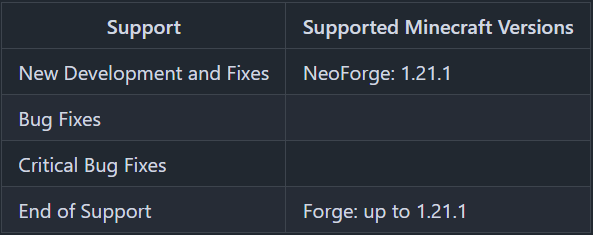
Supported Versions Image
Minecraft versions, for which the mod is not released, are not supported.
You can find a text version here.

How to use the Selectable Painting?

With a right-click on a block, you place the painting.
If you hang the painting down, you get the painting item with the size and painting selected, that you hang up.
With a right click into the air, you can open a GUI, where you can select the painting size and the painting.
If you tick "Random Painting", a random painting with the selected size will be placed.
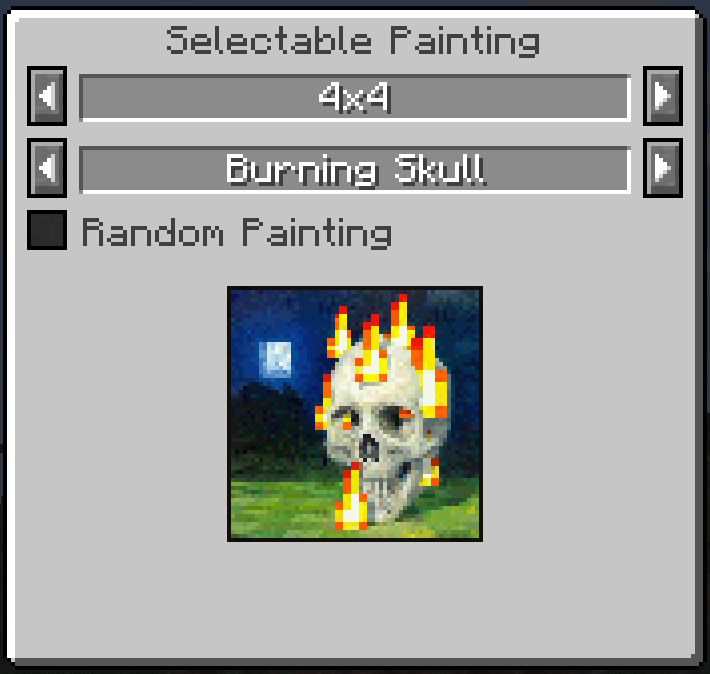
Selected Painting GUI

The current size and the selected painting is shown in the tooltip.
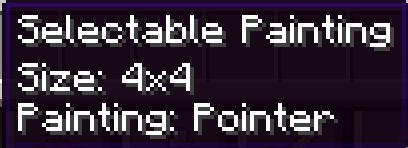
Selectable Painting Tooltip

If the painting is too big for the place to place on, you get an error message.

Selectable Painting Error Message

Recipes

Selectable Painting Recipe

Recipe: Painting in any slot of the crafting table
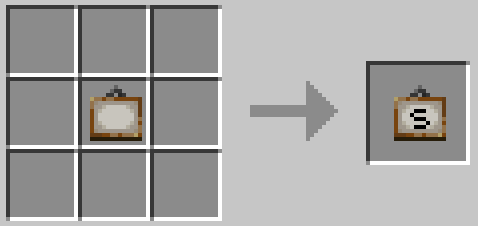
Selectable Painting Recipe

Painting Recipe

Recipe: Selectable Painting in any slot of the crafting table
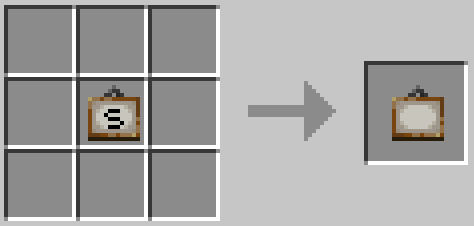
Painting Recipe


Thanks for the logo to Muse31.
You can use this mod in non-commercial modpacks without asking.
You can find more mods from me on CurseForge and Modrinth.

This is a Forge mod only until 1.21.1. This is a NeoForge mod only starting 1.21.1. There will be no Fabric version. It will not be backported.

Галерея

Painting RecipeSelectable Painting RecipeSelectable Painting Error MessageSelectable Painting Tooltip

Последние версии

Все версии →
release

Selectable Painting 26.2-4.0.2

26.2-4.0.2
10 окт. 2026 г.68Minecraft: 26.2, 26.3neoforge
Скачать
Что нового
Painting names in the selection now use the titles of Minecraft itself: all paintings (including the ones added since 1.21) are shown in every language Minecraft supports. Paintings from other mods or data packs show their own title or a readable name instead of a translation key. Long painting names scroll back and forth in the selection like the labels of Minecraft buttons instead of overflowing the selection field
release

Selectable Painting 26.1-4.0.2

26.1-4.0.2
10 окт. 2026 г.10Minecraft: 26.1, 26.1.1, 26.1.2neoforge
Скачать
Что нового
Painting names in the selection now use the titles of Minecraft itself: all paintings (including the ones added since 1.21) are shown in every language Minecraft supports. Paintings from other mods or data packs show their own title or a readable name instead of a translation key. Long painting names scroll back and forth in the selection like the labels of Minecraft buttons instead of overflowing the selection field
release

Selectable Painting 1.21.11-4.0.2

1.21.11-4.0.2
10 окт. 2026 г.10Minecraft: 1.21.11neoforge
Скачать
Что нового
Painting names in the selection now use the titles of Minecraft itself: all paintings (including the ones added since 1.21) are shown in every language Minecraft supports. Paintings from other mods or data packs show their own title or a readable name instead of a translation key. Long painting names scroll back and forth in the selection like the labels of Minecraft buttons instead of overflowing the selection field
release

Selectable Painting 1.21.9-4.0.2

1.21.9-4.0.2
10 окт. 2026 г.6Minecraft: 1.21.9, 1.21.10neoforge
Скачать
Что нового
Painting names in the selection now use the titles of Minecraft itself: all paintings (including the ones added since 1.21) are shown in every language Minecraft supports. Paintings from other mods or data packs show their own title or a readable name instead of a translation key. Long painting names scroll back and forth in the selection like the labels of Minecraft buttons instead of overflowing the selection field
release

Selectable Painting 1.21.6-4.0.2

1.21.6-4.0.2
10 окт. 2026 г.10Minecraft: 1.21.6, 1.21.7, 1.21.8neoforge
Скачать
Что нового
Painting names in the selection now use the titles of Minecraft itself: all paintings (including the ones added since 1.21) are shown in every language Minecraft supports. Paintings from other mods or data packs show their own title or a readable name instead of a translation key. Long painting names scroll back and forth in the selection like the labels of Minecraft buttons instead of overflowing the selection field
release

Selectable Painting 1.21.5-4.0.2

1.21.5-4.0.2
10 окт. 2026 г.8Minecraft: 1.21.5neoforge
Скачать
Что нового
Painting names in the selection now use the titles of Minecraft itself: all paintings (including the ones added since 1.21) are shown in every language Minecraft supports. Paintings from other mods or data packs show their own title or a readable name instead of a translation key. Long painting names scroll back and forth in the selection like the labels of Minecraft buttons instead of overflowing the selection field
release

Selectable Painting 1.21.2-4.0.2

1.21.2-4.0.2
10 окт. 2026 г.8Minecraft: 1.21.2, 1.21.3, 1.21.4neoforge
Скачать
Что нового
Painting names in the selection now use the titles of Minecraft itself: all paintings (including the ones added since 1.21) are shown in every language Minecraft supports. Paintings from other mods or data packs show their own title or a readable name instead of a translation key. Long painting names scroll back and forth in the selection like the labels of Minecraft buttons instead of overflowing the selection field
release

Selectable Painting 1.21.1-4.0.2

1.21.1-4.0.2
10 окт. 2026 г.220Minecraft: 1.21.1neoforge
Скачать
Что нового
Painting names in the selection now use the titles of Minecraft itself: all paintings (including the ones added since 1.21) are shown in every language Minecraft supports. Paintings from other mods or data packs show their own title or a readable name instead of a translation key. Long painting names scroll back and forth in the selection like the labels of Minecraft buttons instead of overflowing the selection field
release

Selectable Painting 1.20.1-2.0.4

1.20.1-2.0.4
10 окт. 2026 г.288Minecraft: 1.20.1forge
Скачать
Что нового
- Fix dedicated servers not starting with Forge 47.4.16 and newer ("Attempted to load class net/minecraft/client/multiplayer/MultiPlayerGameMode for invalid dist DEDICATED_SERVER")
release

Selectable Painting 26.2-4.0.1

26.2-4.0.1
2 окт. 2026 г.49Minecraft: 26.2, 26.3neoforge
Скачать
Что нового
Add compatibility for minecraft version 26.2, 26.3