

Searchable Packs
Adds a search bar to quickly filter resource packs.
Автор: Jakomi12,5 тыс.8обновлён 28 июл. 2025 г.
Механики игрыУправлениеУтилиты
Описание
Searchable Packs
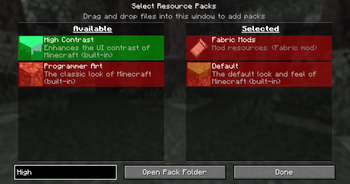
Find your favorite resource packs faster than ever with this sleek search bar added directly to the resource pack screen.
Features
- Integrated search bar in the resource pack menu
- Instant live filtering of resource packs by name
- Clear visual feedback: green highlight for matching packs, red for non-matching
- Lightweight, seamless, and easy to use
Installation
Simply place the mod into your mods folder and launch the client.
Why Use Searchable Packs?
If you have dozens of resource packs installed, scrolling can be tedious. This mod helps you quickly narrow down your options with a simple, intuitive search box — saving time and hassle.
Support & Contact
For questions or feedback, find me on Modrinth, GitHub, or Discord: jakomi123.
Галерея
Последние версии
Все версии →release
Searchable Packs 1.0.1
1.0.128 июл. 2025 г.2,4 тыс.Minecraft: 1.21.4, 1.21.5, 1.21.6, 1.21.7, 1.21.8fabric
Что нового
<p><strong>Replaced the use of Java Reflection</strong> with a direct method call to access the screen's child elements.
This change <em>improves compatibility and stability</em> across Minecraft versions and allows the search bar
to be dynamically repositioned alongside the <code>"Open Folder"</code> and <code>"Done"</code> buttons
without relying on potentially obfuscated field names.</p>
release
Searchable Packs 1.0.0
1.0.027 июл. 2025 г.67Minecraft: 1.21.4, 1.21.5, 1.21.6, 1.21.7, 1.21.8fabric
Что нового
<section style="font-family: Arial, sans-serif; max-width: 600px; margin: 0 auto;">
<ul style="list-style-type: disc; padding-left: 20px; color: #555; font-size: 1rem; line-height: 1.5;">
<li>Added a search bar to the resource pack screen</li>
<li>Live filtering of resource packs by name</li>
<li>
Visual highlights:
<ul style="list-style-type: circle; padding-left: 20px; color: #333;">
<li>Green background for matching packs</li>
<li>Red background for non-matching packs</li>
</ul>
</li>
<li>Responsive layout with search bar and buttons aligned at the bottom</li>
<li>Basic support for special characters and case-insensitive search</li>
</ul>
</section>