

Screenshot JPG
Re-save screenshot in JPG format after screenshot.
Автор: phoupraw2170обновлён 3 дек. 2025 г.
Оптимизация
Описание
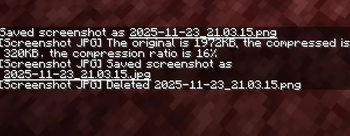
After the player takes a screenshot, re-save the screenshot in JPG format.
- Read the PNG file
- Convert it to JPG format
- Save the JPG file
- Delete the PNG file
If the converted JPG file is larger than the original PNG file, ignore this screenshot.
Support Sinytra Connector!
Галерея
Последние версии
Все версии →release
0.1.1
0.1.13 дек. 2025 г.140Minecraft: 1.21, 1.21.1fabric
Что нового
# 0.1.0
## Change
- Change message to dark gray
# 0.1.1
## Change
- Incorrect message color
release
0.0.1
0.0.123 нояб. 2025 г.77Minecraft: 1.21, 1.21.1fabric
Что нового
# 0.0.1
## New
- Re-save screenshot in JPG format