COWMODSКаталог модов

Screenshot Uploader

Upload your screenshots to a server / the server you're playing on.

Автор: TheCoolcraft113,3 тыс.17обновлён 23 июл. 2025 г.
ОбщениеХранениеУтилиты

Описание


ScreenshotUploader is a Minecraft mod that enhances your gameplay by allowing you to upload your in-game screenshots directly to a designated server. This feature enables you to share your creations and memorable moments with friends and the community effortlessly. It simplifies the process of sharing in-game screenshots, eliminating the need for external applications or manual uploads. Showcase of the mod
Features:

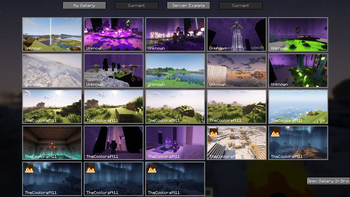
  • Ingame Screenshot Browser: View your own local or the screenshots of your friends on the webserver. (Press G to open)

  • Ingame Image Editor: press V before making your screenshot or click the edit button in your local gallery

  • Direct Uploads: Capture and upload your Minecraft screenshots to a specified server without leaving the game.

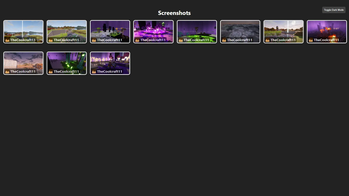
  • Integrated Webserver: Screenshots are uploaded to an integrated webserver, which displays them in a convenient web gallery.

  • Custom Server Support: Configure the mod to upload screenshots to your own server, providing flexibility and control over your shared content. The mod supports HTTP POST requests using multipart form data, making it compatible with custom servers or APIs.

  • Screenshot Collections: Organize your screenshots into collections for easier management.

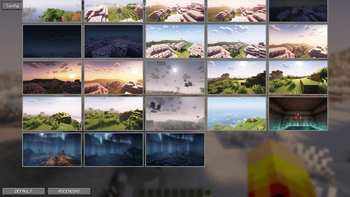
  • Customizable Settings: Adjust the mod's settings to suit your preferences, including upload paths and server configurations.

  • Screenshot Statistics: View statistics about your uploaded screenshots, such as the number of uploads or a heatmap of your most active screenshot areas.

  • Ingame Screenshot Editor: Edit your screenshots directly in-game before uploading them, allowing you to add text, annotations, or other modifications.

  • Local Gallery: View your own screenshots in a local gallery, making it easy to browse and manage your captured moments.

  • Web Gallery: Access a web gallery to view and share your uploaded screenshots with others.

  • Comments and Tags: Add comments and tags to your screenshots for better organization and sharing.

  • Screenshot Deletion Permissions: Screenshots can be deleted by the uploader, any player, server operators, or via a passphrase, configurable to match your servers needs

  • Screenshot Metadata: Optionally embed information such as world name, server IP, and coordinates. Displayed in the ingame gallery. Disabled by default.

  • Ask Before Uploading: Display a promt in which you can select what you want to do with the taken screenshot. (Save, Upload, Delete)

  • By default only screenshots made while the HUD is hidden (F1) are uploaded. Can be disabled in the config: requireNoHud

Requirements:

  • Requires Minecraft Fabric 1.21 - 1.21.5.
  • Requires a server that can handle HTTP POST requests and has public endpoints for uploads (if not using the integrated webserver).

1. Installation Guide

Client

Prerequisites: Minecraft Fabric 1.21 - 1.21.5

Steps:

  1. Download the mod file from here.
  2. Place the .jar in the mods folder of your Minecraft directory.
  3. Launch Minecraft with the mod installed.
  4. (Join a server with the mod installed)
  5. Take a screenshot
  6. You can open the Gallery by pressing G
  7. You can adjust the mod to your needs by opening the config Ingame Gallery -> Config

Server

Steps:

  1. Download the mod or plugin file from here.
  2. Place the .jar in the mods / plugins folder of your Server directory.
  3. Open the config (config/screenshotUploader/serverConfig.json, for Fabric; plugins/ScreenshotUploader/config.yml, for Paper, etc.)
  4. Change the entry websiteURL to the public url of the webserver (the url to open the screenshots gallery in the browser) e.g. "https://yourserverip.com:4567"
  5. Take a look at the Wiki or change the config

Галерея
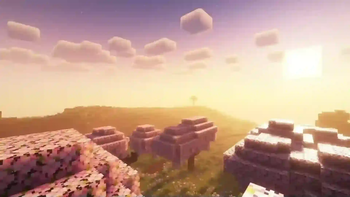
Mod DemoIngame Screenshot GalleryIngame Screenshot Gallery of Local ScreenshotsScreenshot Gallery

Последние версии

Все версии →
release

Screenshot Uploader 2.2.0

2.2.0
23 июл. 2025 г.268Minecraft: 1.21, 1.21.1, 1.21.2, 1.21.3, 1.21.4, 1.21.5, 1.21.6, 1.21.7, 1.21.8bukkit, paper, spigot
Скачать
Что нового
+ URL Shortener for Webserver + New Default Config Values + New CSS & JS
release

Screenshot Uploader 2.2.0-1.21.5

2.2.0-1.21.5
23 июл. 2025 г.237Minecraft: 1.21.5fabric
Скачать
Что нового
+ Ingame Screenshot Rendering above signs (with Custom Transformation) (Off by default) + URL Shortener for Webserver + New Default Config Values + Better Screenshot (Hanging) Sign Rendering
release

Screenshot Uploader 2.1.1-1.21.4

2.1.1-1.21.4
24 июн. 2025 г.176Minecraft: 1.21.4fabric
Скачать
Что нового
+ Backport from 1.21.5 to 1.21.4
release

Screenshot Uploader 2.1.1-1.21.5

2.1.1-1.21.5
21 июн. 2025 г.117Minecraft: 1.21.5fabric
Скачать
Что нового
+ Added Screenshot Caching Header for Web Gallery
release

Screenshot Uploader Paper 2.1.1

Paper-2.1.1
21 июн. 2025 г.71Minecraft: 1.21, 1.21.1, 1.21.2, 1.21.3, 1.21.4, 1.21.5, 1.21.6bukkit, paper, spigot
Скачать
Что нового
+ Added Screenshot Caching Header for Web Gallery
release

Screenshot Uploader Paper 2.1.0

Paper-2.1.0
20 июн. 2025 г.44Minecraft: 1.21, 1.21.1, 1.21.2, 1.21.3, 1.21.4, 1.21.5, 1.21.6bukkit, paper, spigot
Скачать
Что нового
+ Web Gallery Search + Upload to Server Button + Web Gallery UI Improvements + Main / Esc Menu Gallery Button
release

Screenshot Uploader 2.1.0-1.21.5

2.1.0-1.21.5
20 июн. 2025 г.48Minecraft: 1.21.5fabric
Скачать
Что нового
+ Support for 1.21.5 + Web Gallery Search + Upload to Server Button + Web Gallery UI Improvements + Main / Esc Menu Gallery Button
release

Screenshot Uploader Paper 2.0.0

Paper-2.0.0
7 июн. 2025 г.50Minecraft: 1.17, 1.17.1bukkit, paper, spigot
Скачать
Что нового
## Improved Web Gallery Behaviour and Look. ### The web gallery is now fully responsive, providing an optimized experience on mobile devices. + Added mobile support for web gallery. + Added new modern looking CSS for web gallery + Added a like feature for the web gallery + Added tag display support + Added metadata display ## Added Screenshot Statistics Screen for Client and Server ### Added a new Screenshots Statistics Screen, providing insights into screenshot metrics + Added global user statistics + Added per User Statistics + Added Storage Statistics + Added Screenshot Location Insights and Heatmap + Data is accessible via ```/statistics``` endpoint ## Discord Webhook Improvements ### Modified Discord Webhook Logic to set the embed color based of the screenshot + Add dominant color extraction and simplify image processing ## Bug Fixes + Fixed: Edited Screenshots Metadata / Album / Tags not working + Fixed Web Gallery only accessible from localhost
release

Screenshot Uploader Paper 2.0.0

Paper-2.0.0
7 июн. 2025 г.39Minecraft: 1.21, 1.21.1, 1.21.2, 1.21.3, 1.21.4, 1.21.5bukkit, paper, spigot
Скачать
Что нового
## Improved Web Gallery Behaviour and Look. ### The web gallery is now fully responsive, providing an optimized experience on mobile devices. + Added mobile support for web gallery. + Added new modern looking CSS for web gallery + Added a like feature for the web gallery + Added tag display support + Added metadata display ## Added Screenshot Statistics Screen for Client and Server ### Added a new Screenshots Statistics Screen, providing insights into screenshot metrics + Added global user statistics + Added per User Statistics + Added Storage Statistics + Added Screenshot Location Insights and Heatmap + Data is accessible via ```/statistics``` endpoint ## Discord Webhook Improvements ### Modified Discord Webhook Logic to set the embed color based of the screenshot + Add dominant color extraction and simplify image processing ## Bug Fixes + Fixed: Edited Screenshots Metadata / Album / Tags not working + Fixed Web Gallery only accessible from localhost
release

Screenshot Uploader 2.0.0-1.21.1

2.0.0-1.21.1
7 июн. 2025 г.207Minecraft: 1.21, 1.21.1, 1.21.2, 1.21.3fabric
Скачать
Что нового
## Improved Web Gallery Behaviour and Look. ### The web gallery is now fully responsive, providing an optimized experience on mobile devices. + Added mobile support for web gallery. + Added new modern looking CSS for web gallery + Added a like feature for the web gallery + Added tag display support + Added metadata display ## Added Screenshot Statistics Screen for Client and Server ### Added a new Screenshots Statistics Screen, providing insights into screenshot metrics + Added global user statistics + Added per User Statistics + Added Storage Statistics + Added Screenshot Location Insights and Heatmap + Data is accessible via ```/statistics``` endpoint ## Improved Ingame Editor ### Added a new Button to place a watermark in the bottom left corner with the player head and name + Added watermark button ## Discord Webhook Improvements ### Modified Discord Webhook Logic to set the embed color based of the screenshot + Add dominant color extraction and simplify image processing ## Bug Fixes + Fixed: Edited Screenshots Metadata / Album / Tags not working + Fixed Web Gallery only accessible from localhost