COWMODSКаталог модов

ScreenEffects

A small flexible library for showing animated screen overlays to the user.

Автор: Trplnr1,6 тыс.20обновлён 22 авг. 2025 г.
БиблиотекиУтилиты

Описание

ScreenEffects by Trplnr

A small flexible library for showing animated screen overlays to the user.

Demo

Usage

Making Screen Effects using the builder Deno file:

IMPORTANT: Using this method requires the following to be installed in your system: Deno, ffmpeg. After getting those, restart your computer.

A screen effect is composed of multiple font frames that the datapack uses to show the animation.

A utility Deno JS file is provided with the resource pack inside the screen_effects folder to make this process easier.

1. Making the animation

NOTE:

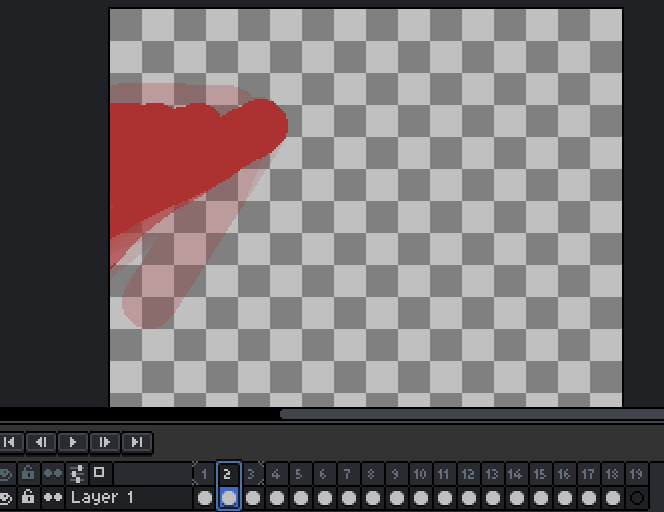
  • You can use any image editing software you like as long as it can export your animation into a spritesheet. Aseprite has this functionality.
  • It is recommended to make a 256x256 .png file for the best results.
  • Start by creating an animation.

  • Export your animation into a vertical spritesheet inside the screen_effects folder.


  • You can add more spritesheets inside the screen_effects folder if you want more screen effects.

2. Building the animations

  • To prepare for building the animations, go inside the buildScreenEffects.js folder and adjust these configs.
// -------------CONFIGS---------------
// Replace with the namespace you use!
const NAMESPACE = "trplnr";

// If you want the font JSON files to be formatted, make this boolean true.
const prettyPrintFontFiles = false;

// If you want to see the ffmpeg logs, make this boolean true.
const showFFMPEGLogs = false;
// -----------------------------------
  • To make your amazing animations usable by the datapack, You can run a command in your terminal to convert your spritesheets into frames!
  • Open your preferred terminal and make sure you are inside the screen_effects folder.
  • After that, run this command
deno run --allow-all .\buildScreenEffects.js

  • After running that, if everything is successful, it should look like this:
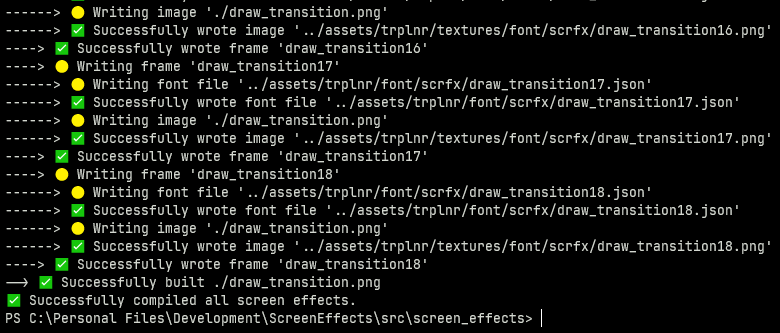
  • Congrats! You've successfully turned your wonderful animations into frames! :tada:

  • If you only want to to compile 1 spritesheet, simply run

deno run --allow-all .\buildScreenEffects.js filename.png

Registering the Screen Effects

The datapack needs to have data to know what a screen effect is so you have to register it.

Here is an example on how you can register one.

ScreenEffect schema shown below this section.

# To add your own screen effects to the global registry,
# simply copy what is shown here.
 
data modify storage example:scrfx_data screen_effects set value { \
   "examples:toast": { \
        tps: 1, \
        frame_count: 31, \
        path: "example:scrfx/exampletoast" \
    }, \
   "examples:transition": { \
        tps: 1, \
        frame_count: 69, \
        path: "example:scrfx/exampletransition", \
        callbacks: { \
            "26": "say This frame covers the whole screen" \
        } \
    }, \
}

function scrfx:add_screen_effects {storage: "example:scrfx_data", path: "screen_effects"}

The ScreenEffect Schema

This is the definition of a ScreenEffect.

{
    /**
     * The name of the screen effect, 
     * preferrably namespaced.
     */
    "ns:identifier": {
        /**
         * How fast each frame 
         * shows up measured in ticks.
         * 
         * Just like fps but well in ticks.
         * 
         * Must be above zero.
         */
        tps: <int>,

        /**
         * How many frames are in the animation.
         */
        frame_count: <int>,

        /**
         * The font resource location 
         * of the animation with the 
         * number at the end removed.
         */
        path: <resource_location>,
        /**
         * Defines what commands run in a certain frame.
         * 
         * Optional.
         */
        callback?: {
            "<frame_number>": "<command>",
            ...
        }
    }
}

Running the Screen Effects

  • Declare the animation to be played inside the scrfx:in id storage.
  • Then execute as a player and run scrfx:play!

Example:

data modify storage scrfx:in id set value "ns:identifier"
execute as Trplnr run function scrfx:play
  • You have successfully played a screen effect! 🎉

Галерея

Screen Effects Banner

Последние версии

Все версии →
release

v2.0.1

v2.0.1
22 авг. 2025 г.1 тыс.Minecraft: 1.21.1, 1.21.2, 1.21.3, 1.21.4, 1.21.5, 1.21.6, 1.21.7, 1.21.8datapack
Скачать
Что нового
- Fixes the success message for registering a screen effect group ignoring the `.disable_reload_message` flag.
release

v2.0.0

v2.0.0
17 авг. 2025 г.40Minecraft: 1.21.1, 1.21.2, 1.21.3, 1.21.4, 1.21.5, 1.21.6, 1.21.7, 1.21.8datapack
Скачать
Что нового
- Fixes [#1](https://github.com/Trioplane/ScreenEffects/issues/1) - ‼️ Replaced the public function `scrfx:add_screen_effect` with two new API functions. - Added API function `scrfx:api/register_screen_effect/register_group` which accepts two macro arguments `storage`, and `path` like the old function. * This registers all screen effect definitions in the list provided. * Throws an error message if the provided screen effect group does not exist. - Added API function `scrfx:api/register_screen_effect/register_definition` which accepts two macro arguments `storage`, and `path`. * This registers the screen effect definition provided. * Throws an error message if the provided screen effect group does not exist. * *Note: In the future, I might add data validation for easier debugging :).* - Changed screen effect definition and group schema, see the README for more info.
release

v1.3

v1.3
21 июл. 2025 г.90Minecraft: 1.21.1, 1.21.2, 1.21.3, 1.21.4, 1.21.5, 1.21.6, 1.21.7, 1.21.8datapack
Скачать
Что нового
- Support for 1.21.6-1.21.8 - Removed redundant `.dev_mode` flag from scoreboard `scrfx.zinternals.globals` - Added a better reload message. * You can disable this by setting the `.disable_reload_message` flag from scoreboard `scrfx.zinternals.globals` to 1. * There's also clickable text in the reload message that does this for you.
release

v1.2

v1.2
3 июн. 2025 г.82Minecraft: 1.21.1, 1.21.2, 1.21.3, 1.21.4, 1.21.5datapack
Скачать
Что нового
- Changed how datapacks register screen effects. * You will now define your own storage containing the screen effect definitions. * Once you have done that you can run the `scrfx:add_screen_effects` function which take in a `storage` and a `path` argument. - Changed callbacks. * Instead of having only two options on where to run commands, You can now run commands on any frame you like. * The `middle` and `end` fields have been replaced with one `callbacks` field because of this. * It is a compound which contains key value pairs, the key being the frame number and the value being the command. You can read more about this inside [README.md#registering-the-screen-effects](https://github.com/Trioplane/ScreenEffects?tab=readme-ov-file#registering-the-screen-effects).
release

v1.1.4

v1.1.4
13 апр. 2025 г.84Minecraft: 1.21.1, 1.21.2, 1.21.3, 1.21.4, 1.21.5datapack
Скачать
Что нового
- Backwards compatibility now works for 1.21.1. * ⚠️ 1.21.2 - 1.21.4 compatibility has not been tested yet. Please report bugs on the issues tab.
release

v1.1.3

v1.1.3
13 апр. 2025 г.56Minecraft: 1.21.1, 1.21.2, 1.21.3, 1.21.4, 1.21.5datapack
Скачать
Что нового
- Fixed some shader issues on selecting the text properly.
release

v1.1.2

v1.1.2
13 апр. 2025 г.54Minecraft: 1.21.1, 1.21.2, 1.21.3, 1.21.4, 1.21.5datapack
Скачать
Что нового
- Added support for backwards compatibility™️ for 1.21.1-1.21.4 * ⚠️ **Currently experimental**, not tested yet. Please report bugs in the issues tab.
release

v1.1.1

v1.1.1
6 апр. 2025 г.68Minecraft: 1.21.5datapack
Скачать
Что нового
- Removed unused font files that were meant for testing.
release

v1.1.0

v1.1.0
6 апр. 2025 г.55Minecraft: 1.21.5datapack
Скачать
Что нового
- Replaced screen effect `examples:draw_transition` with a better screen effect `examples:transition`. - Added function `scrfx:purge_running_screen_effects` which resets all player scoreboard data and running screen effect storage data. - Players now stop their running screen effect when rejoining. - Optimized build file. - Added more configs to build file. - You can now specify a specific file to build in the command arguments of the build file.
release

v1.0.0

1.0.0
5 апр. 2025 г.64Minecraft: 1.21.5datapack
Скачать
Что нового
- Released ScreenEffects 🎉