COWMODSКаталог модов

RP Engine

A free alternative to ItemsAdder, ModelEngine, Nexo, Oraxen, CraftEngine and BetterModel.

Автор: ResourcePackAI7,3 тыс.5обновлён 25 окт. 2026 г.
Механики игрыУтилиты

Описание

RP Engine: the resource pack engine for Spigot and Paper

Spigot and Paper 1.19.4 and newer · Java 17+ · Free and open source (GPL-3.0) · No client mods

Documentation · Discord · Source code · Addons

What is RP Engine?

RP Engine turns a folder of YAML on your own server into custom items, blocks, furniture, animated models, player emotes, vehicles, screens, HUDs, dialogs, sounds and recipes. Then it builds the resource pack and hands it to every player who joins.

You write the content. The engine writes the pack.

# plugins/RPEngine/content/mypack/items/gems.yml
ruby:
  material: DIAMOND
  name: "Ruby"

Drop ruby.png next to it, run /rp reload, then /rp give mypack:ruby. The model, the texture, the pack and the item component that ties them together are all worked out for you.

Features
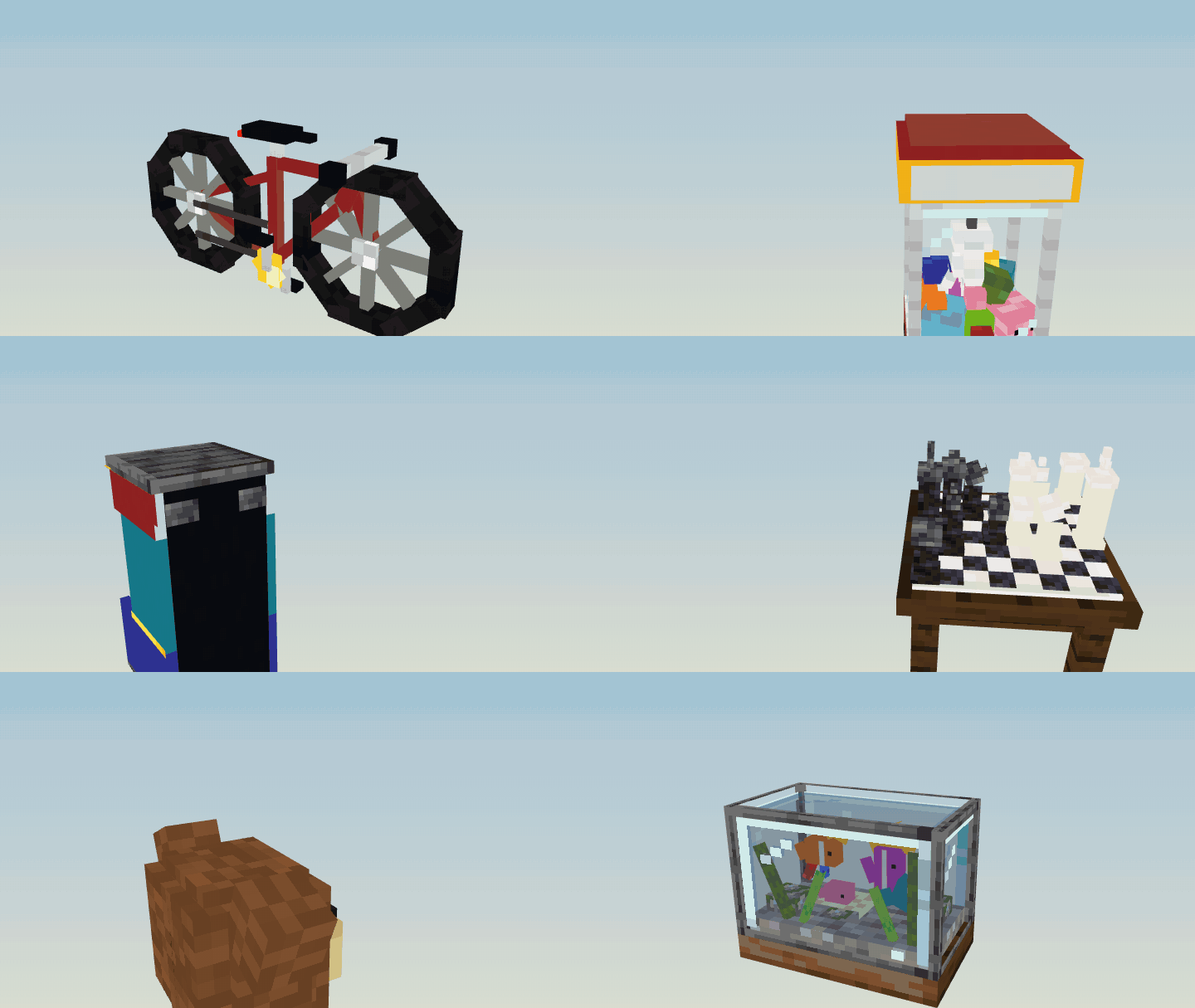
Models made for RP Engine, turning

  • ✔ Custom items: names, lore, enchantments, attributes, durability, food, and actions when they are used.
  • ✔ Custom blocks: hardness, the right tool, light and drops, plus stairs, slabs, doors, trapdoors, plants and lamps.
  • ✔ Furniture: place any Blockbench model. The hitbox is measured from the model, and pieces can be seats, lights or storage.
  • ✔ Animated models: drop in a .bbmodel and its bones and animations play as you made them. Place it in the world, or put it on a mob, including MythicMobs mobs and Citizens NPCs.
  • ✔ Player emotes: /emote wave, on your own or with a cast of friends who are asked first. Movement sets replace how a player walks.
  • ✔ Vehicles you drive: cars, bikes, boats, aeroplanes and helicopters, with real handling, passenger seats, sounds, particles and an animation for each state.
  • ✔ Custom mobs: your own entities with your own models.
  • ✔ Armour: any item can be worn with its own art.
  • ✔ GUI screens and HUD overlays: your own menu backgrounds and on-screen art.
  • ✔ Dialogs (1.21.6+): menus drawn your way, with sidebars and pages, switches, sliders and dropdowns that open, players' heads, progress bars, live placeholders and item slots. Every click makes the game's button sound.
  • ✔ Sounds and chat icons: type :mypack:heart: in chat and the picture appears.
  • ✔ Recipes: crafting, cooking, campfire, stonecutter, smithing and trims, anvil, and brewing on Paper.
  • ✔ Liquids: mark out a pool of acid, slime or anything else. It is real water or lava with your rules applied to whoever is in it.
  • ✔ The pack is built and hosted for you, with the right pack format for your server's version. Or switch the host off and serve the zip from your own web server.
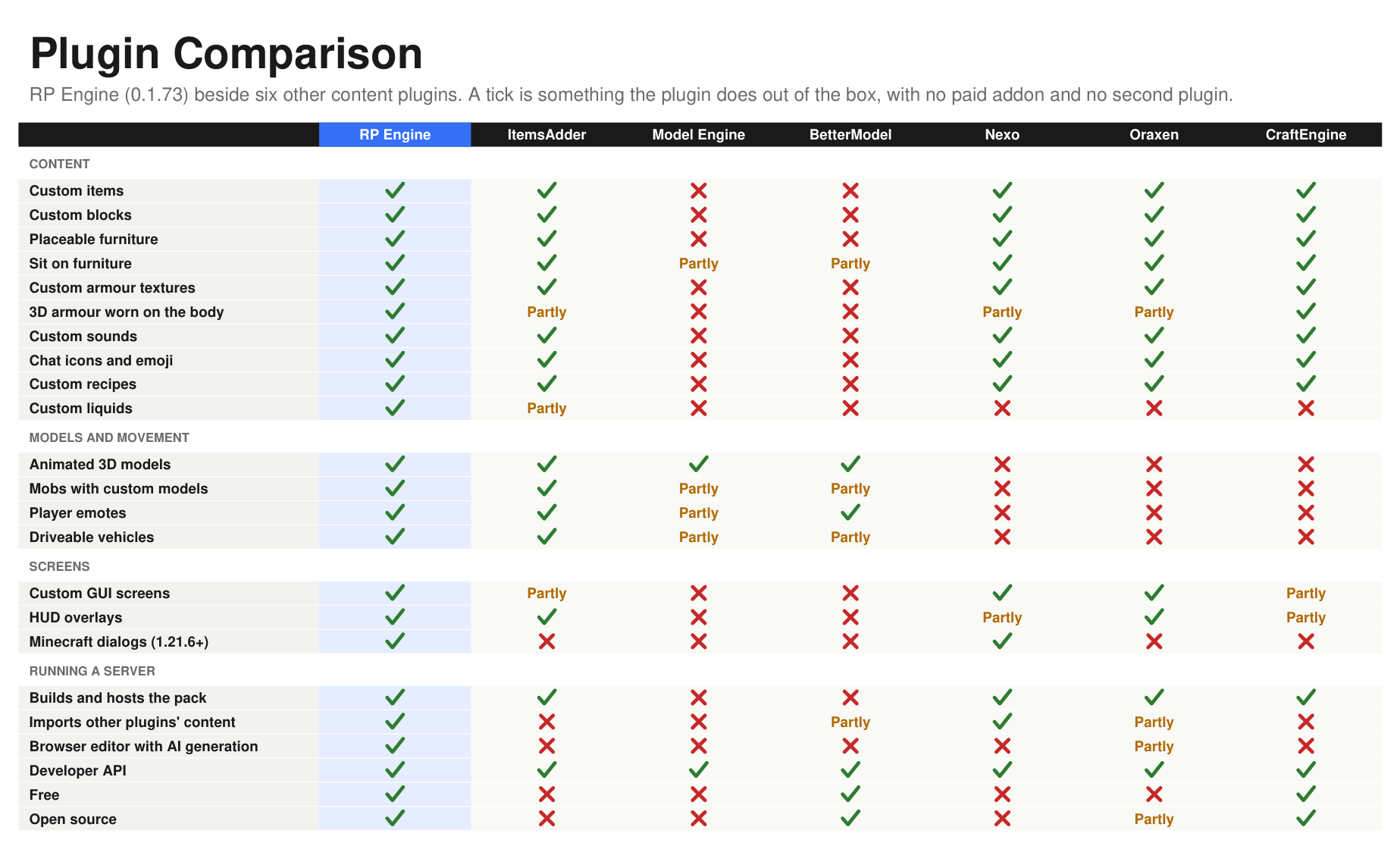
RP Engine beside six other content plugins, feature by feature

The comparison as a PDF, with notes and where each column was checked

Edit in your browser
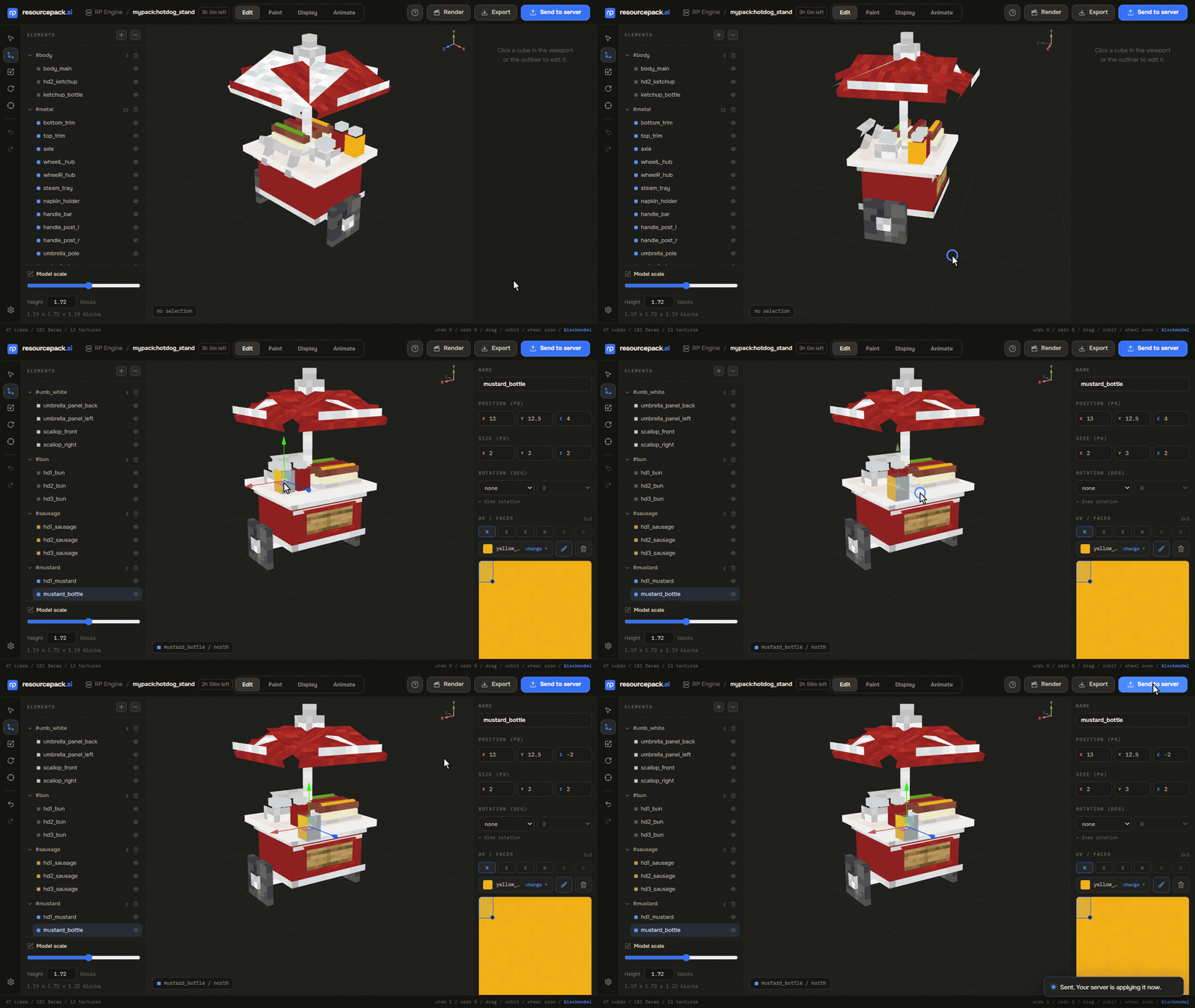
Editing a model in the browser and sending it back to the server

/rp edit mypack:chair gives you a link. It opens the model in a proper 3D editor in your browser: move the cubes, repaint it, then press Send to server. The file in your content folder changes and reloads. No account and no sign-in. The link works once and lasts three hours, and it carries only the one thing you named.

Moving from another plugin?

RP Engine reads ItemsAdder, Nexo, Oraxen, CraftEngine, Model Engine and BetterModel content folders as they are. Put the folder in, reload, and your items, furniture, blocks, models and recipes come across. Anything that cannot come across is named in a warning at load, with the reason, so nothing goes missing silently.
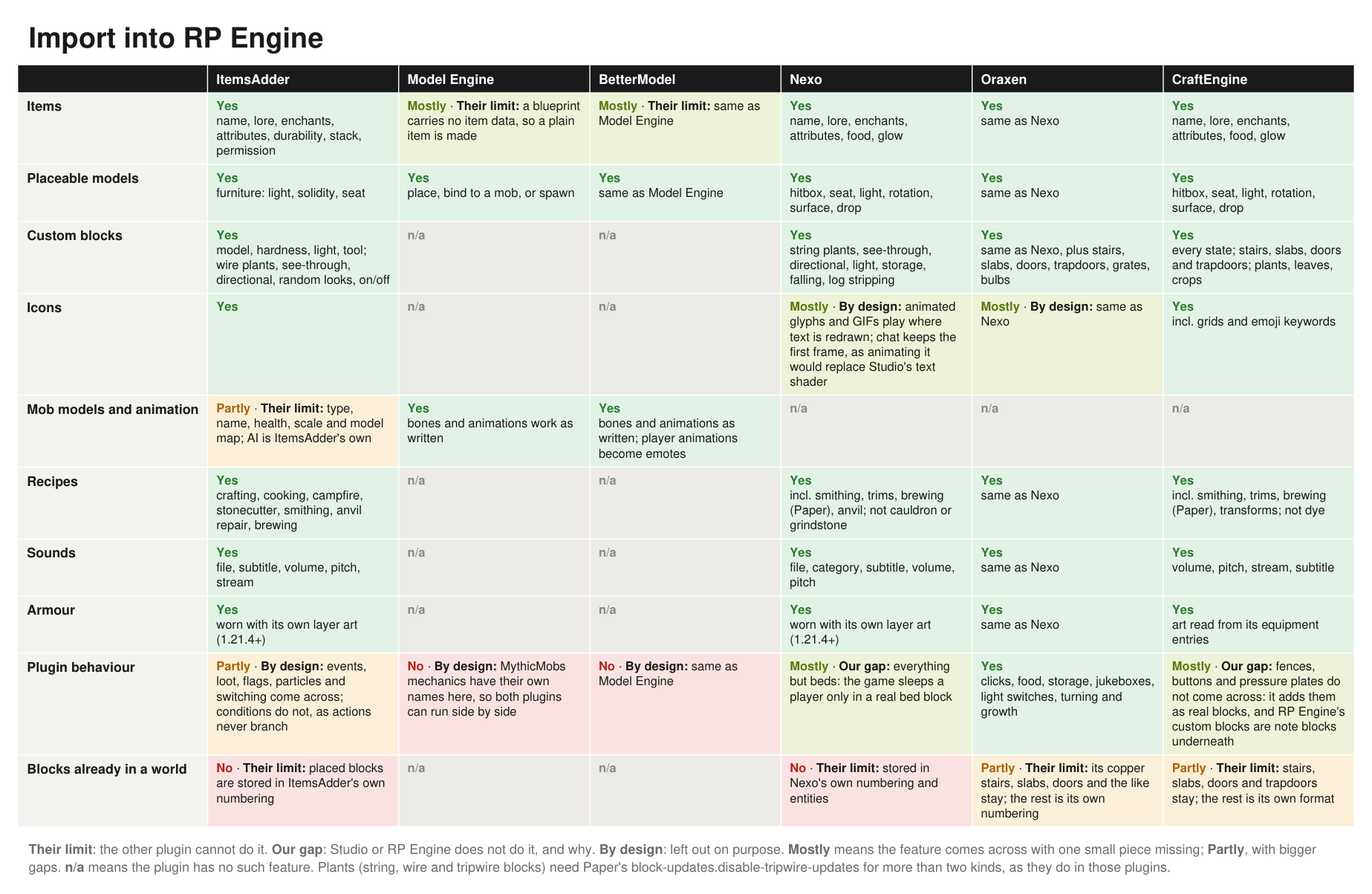
What RP Engine reads from each plugin's content folder

The full compatibility sheet, as a PDF

Works with

All optional. RP Engine runs fine without any of them.

  • PlaceholderAPI: RP Engine's own placeholders for scoreboards, menus and holograms, and any plugin's placeholders in HUD text and item actions.
  • MythicMobs and Citizens: put animated models on their mobs and NPCs.
  • WorldGuard: region flags for where models can be placed and custom items used.

Installing

  1. Drop RPEngine.jar into plugins/ and start the server.
  2. Add a content folder under plugins/RPEngine/content/ and run /rp reload.

Players get the pack with nothing to set up: it is uploaded to our free pack host by default. To serve it from your own server instead, set host.mode in config.yml.

Full guide: resourcepack.ai/docs/rp-engine/install

Requirements: Spigot, Paper or a fork of either, Minecraft 1.19.4 or newer, Java 17 or newer. Everything from 1.19.4 to the current version works. On an older server, the few features that need a newer game are switched off, and the startup log names each one.

Commands and permissions

Every subcommand has its own permission, rpengine.<subcommand>. rpengine.admin (default: op) grants all of them. /rp, /rpe and /rpengine are the same command.

CommandWhat it does
/rp reloadReread the content folder and rebuild the pack
/rp give <id> [player]Give a custom item
/rp items, /rp models, /rp entitiesList what the server holds
/rp spawn <id>Spawn a custom entity
/rp bind <id>, /rp unbindPut a model on the mob you are looking at, or take it off
/rp vehicle <id>Park a vehicle where you stand
/rp screen <id> [player]Open a GUI screen
/rp hud <id|clear> [player]Show or clear a HUD overlay
/rp dialog <id> [player]Open a dialog
/rp sound <id> [player]Play a custom sound
/rp liquid corner | fill <id> | clearMark out a liquid pool
/rp edit <id>Open it in the browser editor
/emote <name> [players...]Play an emote, alone or with others

Every command and permission: resourcepack.ai/docs/rp-engine/commands

Addons

Plugins built on RP Engine's public API, each a second jar you drop in beside it. The first is Skateboards: push, tuck, jump, flick it round, and try not to bail.

For developers: RP Engine has a full API for items, models, vehicles, emotes, screens and events. See API.md.

What it connects to

  • Usage count. Every 30 seconds the plugin sends resourcepack.ai a random id that it made up the first time it started, how many players are online (a single number), and the names of any installed plugins that depend on RP Engine (its addons), so we know how many servers and players use it and which addons. It is anonymous: no address, server name, version, player names or UUIDs, or content. It is on by default. Turn it off with telemetry.enabled: false in config.yml.
  • Update check. A few seconds after start and every six hours after, the plugin asks SpigotMC which version of RP Engine is current, and tells the console and ops if there is a newer one. It sends nothing about your server. Turn it off with update-check: false.
  • Browser editing only connects when you run /rp edit, and only sends the one file you named. Turn it off with edit.enabled: false.
  • Studio pushes and published packs only connect after you pair with /rp sync or /rp distribute.

With all of that off, the plugin talks to nothing but your own players.

Support

Ask on Discord or open an issue on GitHub. Please don't post bugs in the reviews; we can't reply there, and we would rather fix it.

RP Engine is free software under the GPL-3.0 licence. The source is on GitHub, and contributions are welcome.

Made by ResourcePack AI

RP Engine comes from resourcepack.ai, a web editor for resource packs that can generate models, textures, GUIs, emotes and vehicles and push them straight to your server for live testing. You never need it: a hand-written content folder gets the whole plugin.

Галерея

ModelsEdit in your browserRP EngineFeature comparison

Последние версии

Все версии →
release

RP Engine 0.2.33

0.2.33
25 окт. 2026 г.96Minecraft: 1.19.4, 1.20, 1.20.1, 1.20.2, 1.20.3, 1.20.4, 1.20.5, 1.20.6, 1.21, 1.21.1, 1.21.2, 1.21.3, 1.21.4, 1.21.5, 1.21.6, 1.21.7, 1.21.8, 1.21.9, 1.21.10, 1.21.11, 26.1, 26.1.1, 26.1.2, 26.2, 26.3bukkit, paper, purpur, spigot
Скачать
Что нового
### 3D hats on helmets show on the head - Fixed: an item on a helmet base (netherite, diamond and so on) with a model of its own drew the helmet's armour on the head, and the hat only showed in the inventory. It now wears its own model, on Minecraft 1.21.2 and newer, and keeps the helmet's armour points. `hat: true` on a helmet does the same. - ItemsAdder imports: an item's hat behaviour now becomes `hat: true` instead of being skipped.
release

RP Engine 0.2.32

0.2.32
25 окт. 2026 г.12Minecraft: 1.19.4, 1.20, 1.20.1, 1.20.2, 1.20.3, 1.20.4, 1.20.5, 1.20.6, 1.21, 1.21.1, 1.21.2, 1.21.3, 1.21.4, 1.21.5, 1.21.6, 1.21.7, 1.21.8, 1.21.9, 1.21.10, 1.21.11, 26.1, 26.1.1, 26.1.2, 26.2, 26.3bukkit, paper, purpur, spigot
Скачать
Что нового
### A clearer startup - New: a startup banner in the console. It shows the version, links to our Discord, the docs and Studio, and a short report of what started (pack hosting, content, dialogs, other plugins it hooks into), ending with how long it took and how many warnings there were. When a newer version is on SpigotMC, the banner says so. - Fixed: the note that dialogs were written to the world's datapack printed twice on every start.
release

RP Engine 0.2.31

0.2.31
24 окт. 2026 г.74Minecraft: 1.19.4, 1.20, 1.20.1, 1.20.2, 1.20.3, 1.20.4, 1.20.5, 1.20.6, 1.21, 1.21.1, 1.21.2, 1.21.3, 1.21.4, 1.21.5, 1.21.6, 1.21.7, 1.21.8, 1.21.9, 1.21.10, 1.21.11, 26.1, 26.1.1, 26.1.2, 26.2, 26.3bukkit, paper, purpur, spigot
Скачать
Что нового
### More model events, animation fixes, and chat text fixes **Integrations** - Model break events now identify the specific model copy and hitbox that was hit. - Model interaction events now work with Studio models and include the specific model copy and clicked position. - Custom actions can now run once a model is placed, with access to the placed model and its source item stack. - Model seat events now include the specific model copy and seat vehicle. - Entity death events now expose the killer and let integrations modify the drops. - Item use events now include the clicked block face. - Resource pack send events now include the built pack, with an ID that matches Bukkit's resource pack status events. **Fixed** - Models already in the world now animate when playback starts after an animation is added through Studio. - Fixed blank letters in chat text effects and incorrect rendering of animated rank tags. ### 0.2.29: The same, published twice - No changes from 0.2.28: the same `ModelPlaceEvent.stack()` was built twice on one evening and released under both numbers. ### 0.2.28: The item a model is placed from, for developers - For developers: `ModelPlaceEvent.stack()` is the stack in the player's hand a model, piece or vehicle is being placed from, so a listener can read what the item carries (its persistent data, name, lore) and move it onto the placement. Null when a plugin placed it with `Models.place`. ### 0.2.27: /rp models finds Studio models - Fixed: `/rp models` only listed models placed from a content folder, so a Studio model standing right beside you came back as "No models". Studio models are listed now too, as `studio:<id>`. - For developers: `Models.animate` is for a model put on an entity with `bind`, and answers false for a placed one. The javadoc now says so, and shows the call that plays on a placed model: `at(entity)` and `play` on the placement.
release

RP Engine 0.2.26

0.2.26
22 окт. 2026 г.102Minecraft: 1.19.4, 1.20, 1.20.1, 1.20.2, 1.20.3, 1.20.4, 1.20.5, 1.20.6, 1.21, 1.21.1, 1.21.2, 1.21.3, 1.21.4, 1.21.5, 1.21.6, 1.21.7, 1.21.8, 1.21.9, 1.21.10, 1.21.11, 26.1, 26.1.1, 26.1.2, 26.2, 26.3bukkit, paper, purpur, spigot
Скачать
Что нового
### Dialogs open on Spigot again - Fixed: on Spigot, dialogs never opened. The command RP Engine used to show one was refused by Minecraft, which takes no UUID for a dialog target; it now runs it as the player. Paper was unaffected. Thanks to Samu for this one.
release

RP Engine 0.2.25

0.2.25
21 окт. 2026 г.8Minecraft: 1.19.4, 1.20, 1.20.1, 1.20.2, 1.20.3, 1.20.4, 1.20.5, 1.20.6, 1.21, 1.21.1, 1.21.2, 1.21.3, 1.21.4, 1.21.5, 1.21.6, 1.21.7, 1.21.8, 1.21.9, 1.21.10, 1.21.11, 26.1, 26.1.1, 26.1.2, 26.2, 26.3bukkit, paper, purpur, spigot
Скачать
Что нового
### Bows and crossbows that draw back in your own art - New: an item can have a look for each stage of being drawn. `pull:` gives a bow or crossbow its drawing stages, the way vanilla's bow has three, and the game switches between them as the player draws, at vanilla's own timings unless `at:` says otherwise. - Crossbows get their loaded looks too: `charged:` for an arrow and `charged-firework:` for a rocket. - Each stage can be a model or a flat texture, the same as the item's own look. Works from Minecraft 1.19.4; on 1.21.4 and newer any item held in use (a trident, a shield) can have stages. - `first-person:` can now be a Blockbench project too. - Made in Studio: bows, crossbows, tridents, shields, fishing rods, goat horns and brushes have a States card, so a custom bow draws back in its own art there as well. - New: `host.fallback-on-download-failure`. With `upload` hosting, a player whose game can't reach the pack host gets the pack from your own server instead (set `host.port` and `host.public-address` and open the port, as for `own-port`). Thanks to cody and Samu for this one.
release

RP Engine 0.2.22

0.2.22
19 окт. 2026 г.112Minecraft: 1.19.4, 1.20, 1.20.1, 1.20.2, 1.20.3, 1.20.4, 1.20.5, 1.20.6, 1.21, 1.21.1, 1.21.2, 1.21.3, 1.21.4, 1.21.5, 1.21.6, 1.21.7, 1.21.8, 1.21.9, 1.21.10, 1.21.11, 26.1, 26.1.1, 26.1.2, 26.2, 26.3bukkit, paper, purpur, spigot
Скачать
Что нового
### VFX on a loop, until something happens, and every way to cast one - New: VFX can loop. `/rp cast aura Steve loop` plays until stopped, `loop:5m` for five minutes, `loop:3x` three times, and `until:{arena_state} == "ended"` or `while:{mana} > 0` until a condition says, using the same conditions as dialogs (placeholders, PlaceholderAPI, permissions). - Effects made in Studio can have a loop section: the build-up plays once, the middle repeats, and the fade plays when it stops. - New casting options: `speed:`, `scale:`, `turn:`, `offset:`, `follow` (moves with the player), `delay:`, `vary`, `seed:`, `quiet`, `volume:`, `only:caster`, `tag:` and `end:finish|cut`. - `/rp cast stop` can now stop one player's effects or one tag's: `/rp cast stop Steve`, `/rp cast stop tag:aura`. - For developers: `VfxOptions` holds all of it, plus `stopWhen` for a check of your own.
release

RP Engine 0.2.21

0.2.21
19 окт. 2026 г.18Minecraft: 1.19.4, 1.20, 1.20.1, 1.20.2, 1.20.3, 1.20.4, 1.20.5, 1.20.6, 1.21, 1.21.1, 1.21.2, 1.21.3, 1.21.4, 1.21.5, 1.21.6, 1.21.7, 1.21.8, 1.21.9, 1.21.10, 1.21.11, 26.1, 26.1.1, 26.1.2, 26.2, 26.3bukkit, paper, purpur, spigot
Скачать
Что нового
### Choose how many VFX can play at once - New setting: `vfx.max-sprites` in config.yml is how many VFX sprites may be alive at once across the whole server, 4,000 by default, 0 for no limit. When a new effect would go over it, the oldest effects end to make room, so a cast always plays. This replaces the fixed limit of 32 effects, so small effects can play many more at once. - The VFX docs page now has measurements of what sprites cost a server, and what we recommend for busy and quiet servers.
release

RP Engine 0.2.20

0.2.20
19 окт. 2026 г.32Minecraft: 1.19.4, 1.20, 1.20.1, 1.20.2, 1.20.3, 1.20.4, 1.20.5, 1.20.6, 1.21, 1.21.1, 1.21.2, 1.21.3, 1.21.4, 1.21.5, 1.21.6, 1.21.7, 1.21.8, 1.21.9, 1.21.10, 1.21.11, 26.1, 26.1.1, 26.1.2, 26.2, 26.3bukkit, paper, purpur, spigot
Скачать
Что нового
### VFX: spell effects drawn in the world - New: VFX, spell and ability effects drawn in the world out of glowing sprites: a slash, a ring of ice spikes, a lightning storm, a black hole. Needs Minecraft 1.21.4 or newer. - Make them in a content folder's new `vfx/` folder: `preset: frost_nova` picks one of 10 ready-made effects (`/rp vfx presets` lists them), or drop in a recipe exported from Studio as `.json`. RP Engine paints the sprites into your pack, so there are no images to ship. - VFX made in Studio play once the pack is synced: `/rp cast studio:<id>`, or Play in game on the VFX's page. Players without the pack don't see them. - New commands: `/rp vfx` lists every effect, `/rp cast <name> [player]` plays one where a player stands, and `/rp cast stop` ends them all. Permissions: `rpengine.vfx`, `rpengine.cast` and `rpengine.cast.others`, all op by default. - Sounds an effect starts stop when it ends. - For developers: `engine.vfx()` lists effects and plays one at a place or on a player, with a handle to stop it.
release

RP Engine 0.2.19

0.2.19
19 окт. 2026 г.12Minecraft: 1.19.4, 1.20, 1.20.1, 1.20.2, 1.20.3, 1.20.4, 1.20.5, 1.20.6, 1.21, 1.21.1, 1.21.2, 1.21.3, 1.21.4, 1.21.5, 1.21.6, 1.21.7, 1.21.8, 1.21.9, 1.21.10, 1.21.11, 26.1, 26.1.1, 26.1.2, 26.2, 26.3bukkit, paper, purpur, spigot
Скачать
Что нового
### Text Effects: text that waves, burns and shines - New: Text Effects. Write `<fx:fire>Flame Sword</fx>` in an item's name or lore, an action's message, a mob's name or a storage title, and the text moves, burns or shines for every player with the pack. Works on text drawn on the screen: item names and lore, chat, titles, scoreboards, menus. - Make them in a content folder's new `text-effects/` folder: `preset: blaze` picks one of 32 ready-made effects (`/rp effects presets` lists them), or write your own GLSL. RP Engine builds the shader into your pack for every Minecraft version. - Text Effects made in Studio work by name too, once the pack is synced or distributed: `<fx:studio:<id>>`. - Players can use them in chat: `rpengine.chat.effects.all` for every effect, or `rpengine.chat.effects.<name>` for one. Both default to op. `chat.text-effects: false` turns it off. - New commands: `/rp effects` lists every effect drawn in itself, and `/rp effect <name> [text]` sends you text in one. `/rp say` takes `<fx:...>` too. - For developers: `engine.textEffects()` gives each effect's colour, and `apply` and `format` write text in one. - Studio shader HUDs: a label, head, picture or bar can show only when a condition holds, change colour by a value, and a bar can take its length from a value. Push your pack from Studio again to use them.
release

RP Engine 0.2.18

0.2.18
18 окт. 2026 г.30Minecraft: 1.19.4, 1.20, 1.20.1, 1.20.2, 1.20.3, 1.20.4, 1.20.5, 1.20.6, 1.21, 1.21.1, 1.21.2, 1.21.3, 1.21.4, 1.21.5, 1.21.6, 1.21.7, 1.21.8, 1.21.9, 1.21.10, 1.21.11, 26.1, 26.1.1, 26.1.2, 26.2, 26.3bukkit, paper, purpur, spigot
Скачать
Что нового
### HUD values update on the next tick - HUD values a plugin sets through the API (`overlays().set`) now show on the next tick. Before, they waited for the HUD's redraw, up to a second and a half. Setting a value to what it already was sends nothing. - New setting: `overlays.refresh-ticks` (1 to 50, default 30) is how often a HUD is redrawn anyway, which is what updates placeholders the server works out itself, like `{health}` and PlaceholderAPI's.