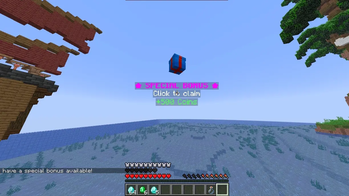
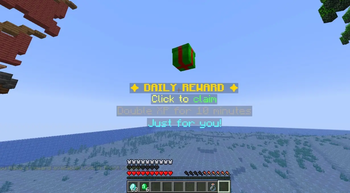
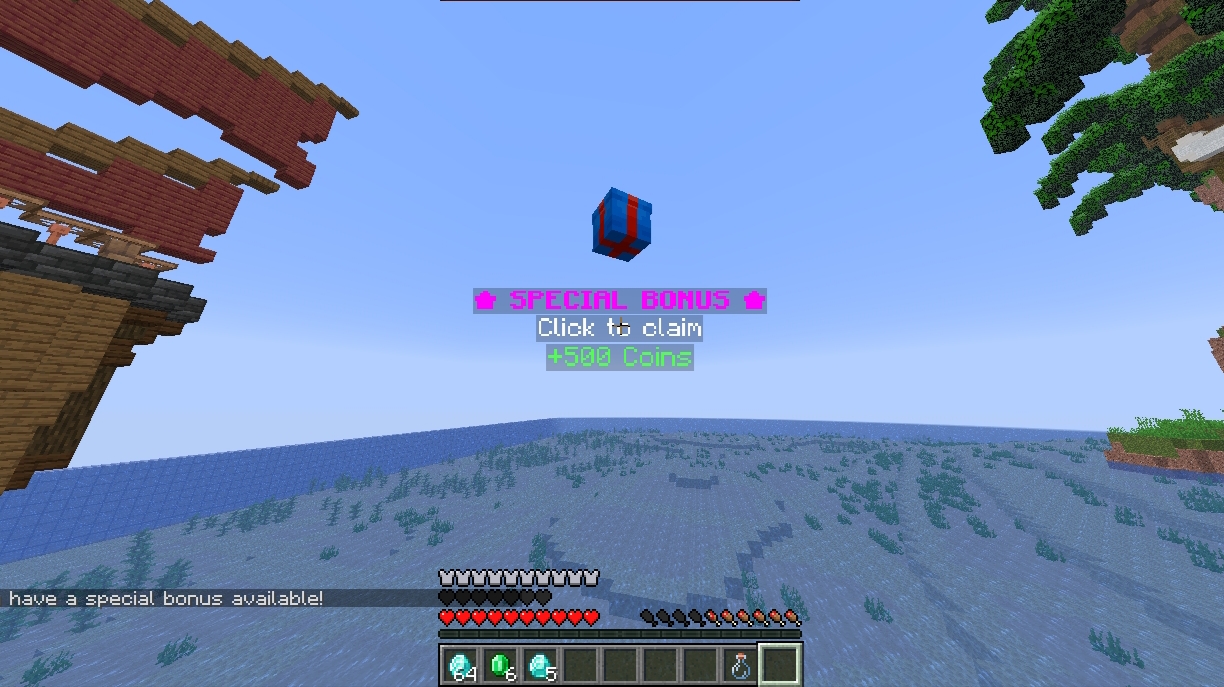
Reward Hologram
A hologram appears where the player is at regular intervals and with a certain probability
Описание
RewardHologram 🎁
A Paper +1.21.11 plugin that displays per-player floating reward holograms with bobbing animation, skull rotation, individual reward chances, and cooldowns that persist across server restarts.
✨ Features
- Per-player — each player sees their own hologram, protected from other players
- Dual renderer —
ARMOR_STAND(max compatibility, Java + Bedrock via Geyser) orDISPLAY(TextDisplay/ItemDisplay), selectable globally or per hologram - Bobbing animation — smooth up/down movement with configurable amplitude and speed
- Skull auto-rotation — the hologram's head can spin continuously
- Advanced skull effects (DISPLAY) — cartoon squash & stretch and left/right tilt sway
- Custom skull — Base64 texture with configurable height, scale and initial angle
- Smooth POP animations (DISPLAY) — scale-in on appear and scale-out on despawn
- Particles on appear/despawn — work with both renderers
- Billboard modes (DISPLAY) —
CENTER,VERTICAL,HORIZONTAL,FIXED - Global and per-line scale (DISPLAY) —
display.scaleplus the inline{line_scale:X}placeholder - Glow with color (DISPLAY) — configurable outline color
- Text styling (DISPLAY) — shadow, see-through and background style
- Reward list with chances — each reward has its own probability; use
pickto control how many are given - Hex color support — use
&#RRGGBBalongside classic&color codes - Configurable click type —
RIGHT,LEFT, orBOTHper hologram - Click cooldown — prevents reward spam
- Persistent cooldowns — intervals are respected across server restarts via
cooldowns.yml - World change cleanup — holograms are removed immediately when a player changes worlds
- No external dependencies — only requires Paper 1.21.11
- Auto cleanup — removes orphaned armor stands on startup, shutdown, and when players disconnect
- Admin commands — spawn/remove, active hologram list with coordinates, teleport to hologram, and more
📦 Dependencies
| Dependency | Type | Link |
|---|---|---|
| Paper +1.21.11 | Required | papermc.io |
No additional plugins required.
VIDEO (+display entities)
⚙️ Full Configuration
# ============================================================
#                   RewardHologram Config
# ============================================================
# Per-player reward holograms with bobbing animation.
# Create as many holograms as you want with unique IDs under
# the "holograms" section.
# ============================================================

settings:
  # Debug mode — logs extra information to the console.
  debug: false

  # Cooldown in milliseconds between allowed clicks per player.
  # Prevents spam-clicking a hologram to trigger rewards repeatedly.
  # 500 = half a second, 1000 = 1 second.
  click-cooldown-ms: 500

  # Default rendering engine used by holograms that have "renderer: DEFAULT".
  #   ARMOR_STAND — classic armor stand holograms. Maximum compatibility
  #                 (works for Java and Bedrock players via Geyser).
  #                 Ignores display.* options, per-line scale and smooth
  #                 pop-in/pop-out animations.
  #   DISPLAY     — TextDisplay/ItemDisplay entities (Minecraft 1.19.4+).
  #                 Enables billboard modes, global and per-line scale,
  #                 glow with color, text styling options, advanced skull
  #                 animations (squash, tilt) and smooth POP appear/despawn.
  #                 Bedrock (Geyser) support depends on your Geyser version —
  #                 use ARMOR_STAND if Bedrock compatibility matters.
  renderer: DISPLAY

# ============================================================
# Reward holograms
# ============================================================
holograms:

  daily_reward:
    # Renderer for THIS hologram only.
    #   DEFAULT     — uses settings.renderer from above
    #   ARMOR_STAND — forces armor stands for this hologram
    #   DISPLAY     — forces display entities for this hologram
    renderer: DEFAULT

    # Spawn probability (0.0 - 100.0). Evaluated once per second after
    # the interval has elapsed. 30.0 = 30% chance per second.
    chance: 30.0

    # Seconds between each spawn evaluation per player.
    # The hologram cannot spawn again until this interval has passed,
    # even after being claimed.
    interval: 600

    # Seconds until the hologram disappears if not claimed.
    despawn-after: 20

    # Position offset relative to the player.
    # z is "in front of the player" based on where they are looking.
    offset:
      # Horizontal shift left(-)/right(+) relative to player's facing.
      x: 0.0
      # Vertical shift up(+)/down(-).
      y: 1.5
      # Distance in front of the player.
      z: 2.5

    # Bobbing animation (up and down floating movement).
    bobbing:
      # Enable/disable the vertical movement.
      enabled: true
      # Amplitude in blocks — how high/low it moves from its base position.
      amplitude: 0.15
      # Oscillation speed — higher = faster bobbing.
      speed: 0.05

    # Spacing between hologram lines in blocks.
    line-spacing: 0.28

    # Click type required to claim the reward:
    #   RIGHT — right-click only
    #   LEFT  — left-click (attack) only
    #   BOTH  — either click works
    click-type: RIGHT

    # Hologram lines — supports & color codes and hex colors &#RRGGBB.
    #
    # Optional inline placeholder for per-line text scale
    # (DISPLAY renderer only — ignored on ARMOR_STAND):
    #   "{line_scale:1.2}your text here"
    # Lines without the placeholder use scale 1.0.
    #
    # WARNING: always put the line in quotes when using the placeholder —
    # YAML treats a leading { as a mapping and would break the config.
    lines:
      - "{line_scale:1.2}&#FFD700&l✦ DAILY REWARD ✦"
      - "&eClick to &aclaim"
      - "{line_scale:0.9}�BFFF&7Double XP for 10 minutes"
      - "&bJust for you!"

    # Reward list with individual chances.
    rewards:
      # How many rewards to pick from the list when claimed:
      #   -1 = evaluate ALL rewards, each one rolls its own chance
      #    1 = pick 1 at random and roll its chance
      #    2 = pick 2 at random and roll their chances
      #    N = pick N at random (capped at list size)
      pick: -1
      list:
        # %player% is replaced with the claiming player's name.
        - command: "give %player% diamond 3"
          chance: 100.0   # Always given
        - command: "effect give %player% speed 600 1"
          chance: 50.0    # 50% probability
        - command: "give %player% emerald 1"
          chance: 25.0    # 25% probability

    # Chat message when the hologram appears (%player% available).
    # Set to "" to disable.
    appear-message: "&6&l[Reward] &eYou have a reward available! Look in front of you."

    # Chat message when the player claims the reward.
    # Set to "" to disable.
    claim-message: "&a&l[Reward] &fYou claimed your daily reward! &7Come back in 10 minutes."

    # Title shown on screen when the hologram appears.
    title:
      # Enable/disable the title.
      enabled: true
      # Main title text (large, center of screen).
      title: "&6&l✦ REWARD ✦"
      # Subtitle text (smaller, below the title).
      subtitle: "&eA reward appeared in front of you"
      # All times in ticks (20 ticks = 1 second).
      fade-in: 10
      stay: 60
      fade-out: 20

    # Sound played when the hologram appears.
    # Sound list: https://hub.spigotmc.org/javadocs/spigot/org/bukkit/Sound.html
    sound:
      # Enable/disable the sound.
      enabled: true
      # Sound name (without the minecraft: prefix).
      name: "ENTITY_EXPERIENCE_ORB_PICKUP"
      # Volume (0.0 - 1.0+).
      volume: 1.0
      # Pitch (0.5 = low, 1.0 = normal, 2.0 = high).
      pitch: 1.2

    # ── DISPLAY-only options (ignored with ARMOR_STAND renderer) ─────────
    display:
      # Billboard mode — how the entities rotate to face viewers:
      #   CENTER     — rotates both horizontally and vertically (always faces the player)
      #   VERTICAL   — rotates only around the vertical axis (turns left/right)
      #   HORIZONTAL — rotates only around the horizontal axis (pitches up/down)
      #   FIXED      — no auto-rotation, stays in a fixed orientation
      billboard: CENTER

      # Global scale — multiplies every line and the skull.
      # 1.0 = normal size, 1.5 = 50% bigger, 0.5 = half size.
      scale: 1.0

      # Glowing outline around all hologram entities.
      glow:
        # Enable/disable the glow effect.
        enabled: false
        # Glow color: WHITE, RED, GOLD, YELLOW, GREEN, AQUA, BLUE,
        # LIGHT_PURPLE, DARK_* variants, BLACK, GRAY...
        color: YELLOW

      # Text styling for the hologram lines.
    text:
      shadowed: true
      see-through: false
      # Text background — accepts 3 formats:
      #   TRANSPARENT     — fully invisible (classic hologram look)
      #   DEFAULT         — vanilla dark panel (black at 25%)
      #   "#AARRGGBB"     — custom ARGB color (alpha + hex)
      #   "#RRGGBB"       — custom RGB color (fully opaque)
      # WARNING: hex values MUST be quoted, otherwise '#' starts a YAML comment
      background: "#40000000"
      # Examples:
      #   background: TRANSPARENT        # invisible (as it was until now)
      #   background: DEFAULT            # vanilla panel
      #   background: "#80000000"        # black at 50%
      #   background: "#80FF0000"        # red at 50%
      #   background: "FFD700"           # opaque gold (6 digits)

    # Effects when the hologram APPEARS.
    appear:
      # Animation on spawn (DISPLAY renderer only):
      #   NONE — entities appear instantly at full size
      #   POP  — entities scale up from ~0 to full size, smoothly interpolated
      animation: POP
      # Duration of the POP animation in ticks (higher = slower/bigger feel).
      duration-ticks: 6
      # Particles spawned at the hologram's center on appear.
      # These work with BOTH renderers (armor stand and display).
      particles:
        # Enable/disable appear particles.
        enabled: true
        # Particle type. Use types that don't require extra data —
        # avoid DUST, ITEM, BLOCK, FALLING_* etc. (they are skipped with a warning).
        type: TOTEM_OF_UNDYING
        # Number of particles spawned.
        count: 25
        # Spread radius on each axis (how far particles scatter).
        spread: 0.5
        # Particle motion speed.
        speed: 0.1

    # Effects when the hologram DESPAWNS (timeout or claim).
    despawn:
      # Animation on removal (DISPLAY renderer only):
      #   NONE — entities vanish instantly
      #   POP  — entities shrink down to ~0 before being removed
      # While animating out, the hologram can no longer be claimed.
      animation: POP
      # Duration of the POP-out animation in ticks.
      duration-ticks: 6
      # Particles spawned at the hologram's center on despawn.
      # These work with BOTH renderers (armor stand and display).
      particles:
        # Enable/disable despawn particles.
        enabled: true
        # Particle type (same restrictions as appear particles).
        type: CLOUD
        count: 15
        spread: 0.4
        speed: 0.05

    # Custom skull displayed at the top of the hologram.
    skull:
      # Enable/disable the skull.
      enabled: true
      # Base64 texture (get it from minecraft-heads.com — copy the "Value" field).
      texture: "eyJ0ZXh0dXJlcyI6eyJTS0lOIjp7InVybCI6Imh0dHA6Ly90ZXh0dXJlcy5taW5lY3JhZnQubmV0L3RleHR1cmUvMjhkYzNjODQ0OTFjNGZmMTAzZGU2ZWEwMTg4MGUyZDgzNDMyY2Q0ODc4Yjg0ZDZiNDMyNTNjYzUxZmQ5NzhlNyJ9fX0="
      # Initial head angle (0 = north, 90 = east, 180 = south, 270 = west).
      head-yaw: 0.0
      # Extra height above the last line.
      # Increase if the skull overlaps the lines, decrease if there's a gap.
      # Note: with DISPLAY the skull is centered on its position, so it may
      # need a different value than with ARMOR_STAND.
      height-offset: 0.7
      # Skull size with the DISPLAY renderer (1.0 = item size).
      # Try 1.5 - 2.0 for a bigger, more visible head.
      # Ignored with ARMOR_STAND.
      scale: 1.5
      # Automatic continuous Y rotation of the skull.
      rotation:
        # Enable/disable the spinning.
        enabled: true
        # Degrees per tick — at 2.0 a full 360° rotation takes ~9 seconds.
        speed: 2.0
      # Advanced skull animations — DISPLAY renderer only.
      effects:
        # Squash & stretch — the head squashes and stretches like a cartoon
        # (compresses on one axis while expanding on the others).
        squash:
          # Enable/disable the squash effect.
          enabled: true
          # Deformation intensity (0.1 = subtle, 0.3 = very cartoonish).
          amplitude: 0.10
          # Oscillation speed — higher = faster squash cycle.
          speed: 0.15
        # Sway — subtle left/right leaning of the head.
        tilt:
          # Enable/disable the tilt effect.
          enabled: true
          # Maximum lean in degrees each side (8 = subtle, 20 = dramatic).
          amplitude: 8.0
          # Oscillation speed — higher = faster swaying.
          speed: 0.06

    # Sound played when the reward is claimed.
    claim-sound:
      # Enable/disable the sound.
      enabled: true
      # Sound name (without the minecraft: prefix).
      name: "ENTITY_PLAYER_LEVELUP"
      # Volume (0.0 - 1.0+).
      volume: 1.0
      # Pitch (0.5 = low, 1.0 = normal, 2.0 = high).
      pitch: 1.5

  bonus_reward:
    renderer: DEFAULT

    chance: 10.0
    interval: 1800
    despawn-after: 15

    offset:
      x: 0.0
      y: 1.8
      z: 2.5

    bobbing:
      enabled: true
      amplitude: 0.20
      speed: 0.08

    line-spacing: 0.28

    # BOTH allows claiming with either right or left click.
    click-type: BOTH

    lines:
      - "{line_scale:1.3}&#FF00FF&l★ SPECIAL BONUS ★"
      - "&fClick to claim"
      - "�FF7F&a+500 Coins"

    rewards:
      # Pick 1 reward at random from the list and roll its chance.
      pick: 1
      list:
        - command: "eco give %player% 500"
          chance: 100.0
        - command: "eco give %player% 250"
          chance: 40.0
        - command: "broadcast &a%player% &fgot a special bonus!"
          chance: 100.0

    appear-message: "&d&l[Bonus] &fYou have a special bonus available!"
    claim-message: "&a&l[Bonus] &fYou claimed &a500 coins&f! Thanks for playing."

    title:
      enabled: true
      title: "&d&l★ SPECIAL BONUS ★"
      subtitle: "&fClick to claim 500 coins!"
      fade-in: 10
      stay: 60
      fade-out: 20

    sound:
      enabled: true
      name: "UI_TOAST_CHALLENGE_COMPLETE"
      volume: 1.0
      pitch: 1.0

    display:
      billboard: CENTER
      scale: 1.0
      glow:
        enabled: true
        color: LIGHT_PURPLE
      text:
        shadowed: false
        see-through: false
        background: TRANSPARENT

    appear:
      animation: POP
      duration-ticks: 8
      particles:
        enabled: true
        type: PORTAL
        count: 40
        spread: 0.7
        speed: 0.3

    despawn:
      animation: POP
      duration-ticks: 6
      particles:
        enabled: false
        type: CLOUD
        count: 15
        spread: 0.4
        speed: 0.05

    skull:
      enabled: true
      texture: "eyJ0ZXh0dXJlcyI6eyJTS0lOIjp7InVybCI6Imh0dHA6Ly90ZXh0dXJlcy5taW5lY3JhZnQubmV0L3RleHR1cmUvNWI4NWUyOWYyOWVjOWE5MGU0ODJlYTViODM5MWJjYjQ1NjBiYmFlMGRjZDE1ZDdjZTFkODYwMTZiNDM1NmU5OCJ9fX0="
      head-yaw: 45.0
      height-offset: 0.7
      scale: 1.2
      rotation:
        enabled: false
        speed: 3.0
      effects:
        squash:
          enabled: false
          amplitude: 0.12
          speed: 0.15
        tilt:
          enabled: false
          amplitude: 8.0
          speed: 0.06

    claim-sound:
      enabled: true
      name: "ENTITY_PLAYER_LEVELUP"
      volume: 1.0
      pitch: 1.0
🎨 Color Support
lines:
  - "&6Orange text"                           # Classic color code
  - "&#FF5733Hex red text"                    # Hex color
  - "&l�FFFFCyan bold text"                # Combined
  - "{line_scale:1.3}&#FF00FF&lBig magenta"   # Per-line scale (DISPLAY renderer only)
🏆 Reward System
rewards:
  pick: 1       # Pick 1 reward at random from the list
  list:
    - command: "give %player% diamond 5"
      chance: 30.0
    - command: "give %player% gold_ingot 10"
      chance: 60.0
    - command: "give %player% iron_ingot 20"
      chance: 100.0
With pick: 1, one reward is chosen at random and its chance is evaluated. With pick: -1, all rewards are evaluated independently. With pick: N, N rewards are chosen at random (capped at the list size) and each one is evaluated by its chance.
📁 Generated Files
plugins/RewardHologram/
├── config.yml       # Hologram configuration
└── cooldowns.yml    # Per-player persistent cooldowns (auto-generated)
📣 Important:
This plugin was created using AI, but I've conducted extensive testing to ensure that it is 100% functional, both in terms of its features and its performance. You can also view the plugin's code in the GitHub repository.
Галерея