

Resource Minion Mod
Love the Minions on Hypixel Skyblock but wish you could have them in your own single-player world or private server? This is the Mod.
Автор: Darkjustdark2720обновлён 13 июн. 2026 г.
Механики игрыТехнологииУтилиты
Описание
Resource Minion Mod
This mod introduces Minions inspired by the iconic mechanics of Hypixel Skyblock. I fell in love with them the first time I played on the server, but I wanted to take the concept a step further.
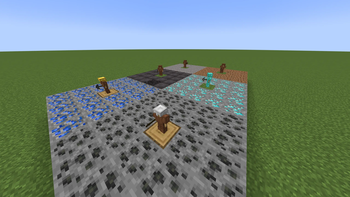
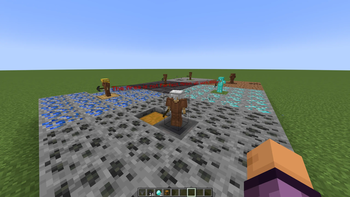
Currently, the mod implements the Mining Minion type for literally any block. It is highly customizable: you can easily add new minions via simple JSON files, allowing you to configure their armor, tools, resource blocks, action times, and scaling.
Галерея
Последние версии
Все версии →beta
Resource Minion Mod 0.0.1
0.0.113 июн. 2026 г.271Minecraft: 1.21.1fabric
Что нового
# Version 0.0.1
## Description
This mod introduces Minions inspired by the iconic mechanics of Hypixel Skyblock. I fell in love with them the first time I played on the server, but I wanted to take the concept a step further.
Currently, the mod implements the Mining Minion type for literally any block. It is highly customizable: you can easily add new minions via simple JSON files, allowing you to configure their armor, tools, resource blocks, action times, and scaling.
## Features
- Mining Minions, which can generate and mine any block in minecraft
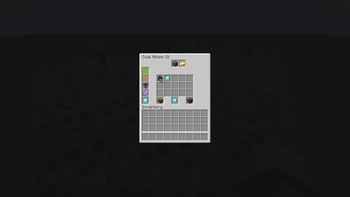
- Configurable values: Action Time, scaling, Armor, Tool, Target Resource
- A "enchanted" recipe will be automatically generated
- There is a "bulk-crafting-table" to craft the Minions and enchanted item forms
## Recipes
- The Recipe for the "bulk-crafting-table" is just a normal crafting table in any crafting grid
- The recipes for the Minions Scale, for an example look [here](https://wiki.hypixel.net/Cobblestone_Minion)
- The Recipe for an enchanted item is 5*32 the base item in any shape example [here](https://wiki.hypixel.net/Enchanted_Cobblestone)
## Small known issue
- The mod only works properly on a Server if the configs on Server and Client are equal. I am working on that tho.
## How to install
1. To use this mod you first need to create a fabric profile for Minecraft
- download the fabric installer [here](https://fabricmc.net/use/installer/)
- find the file in the download directory of your file explorer and open/start it
- Choose the Minecraft Version **1.21.1** and install it
2. Next you install the fabric API for Minecraft **1.21.1** [here](https://modrinth.com/mod/fabric-api/version/0.104.0+1.21.1)
3. Install all attached **.jar** files (Also the BRRP jar you can find [here](https://modrinth.com/mod/brrp/version/1.0.4-mc1.21.1-fabric)
4. Move the installed files to your Minecraft mods folder by following the next steps
- Open the download directory of your file explorer again
- Copy (Str + C) or Cut (Str + X) the installed files
- Go to the appdata directory on your computer (Windows + R and type in there "%appdata%")
- Open the .minecraft folder
- Search for the directory called "mods" - there is no? Create one called "mods" (except quotation marks)
- Paste the files in the "mods" directory
5. Start your modded Minecraft
- Open your Minecraft launcher
- Go to the Java edition window
- At the bottom left is the current version displayed; that's the one you start by pressing the start button
- Click at the version, search for the "fabric loader 1.21.1" and select it
- Now press **Play** and have fun
## Beta
I catogrized this as a beta, because i am not done with this mod yet.