COWMODSКаталог модов

Igrium's Replay Exporter

An addon to the Replay Mod that allows it to export into Blender and other 3D software.

Автор: Igrium24,8 тыс.233обновлён 20 окт. 2026 г.
ТехнологииУтилиты

Описание

An addon for the Replay Mod that allows you to export your replays into Blender.

This mod is designed for experienced Blender users! It is designed to export your Minecraft scene, and nothing more.

Example:

Usage

Exporting

To begin, open Minecraft and record the replay you wish to export. If you don't know how to do that, this mod is not for you. Then, open the replay editor and add at least two time and camera keyframes. These will determine the start and end points of your animation.

Warning: nether portals and other forms of cross-dimension travel are not supported. Use multiple exports you intend on doing that.

Once you're happy with your replay, open the render screen and click "Export Replay File":
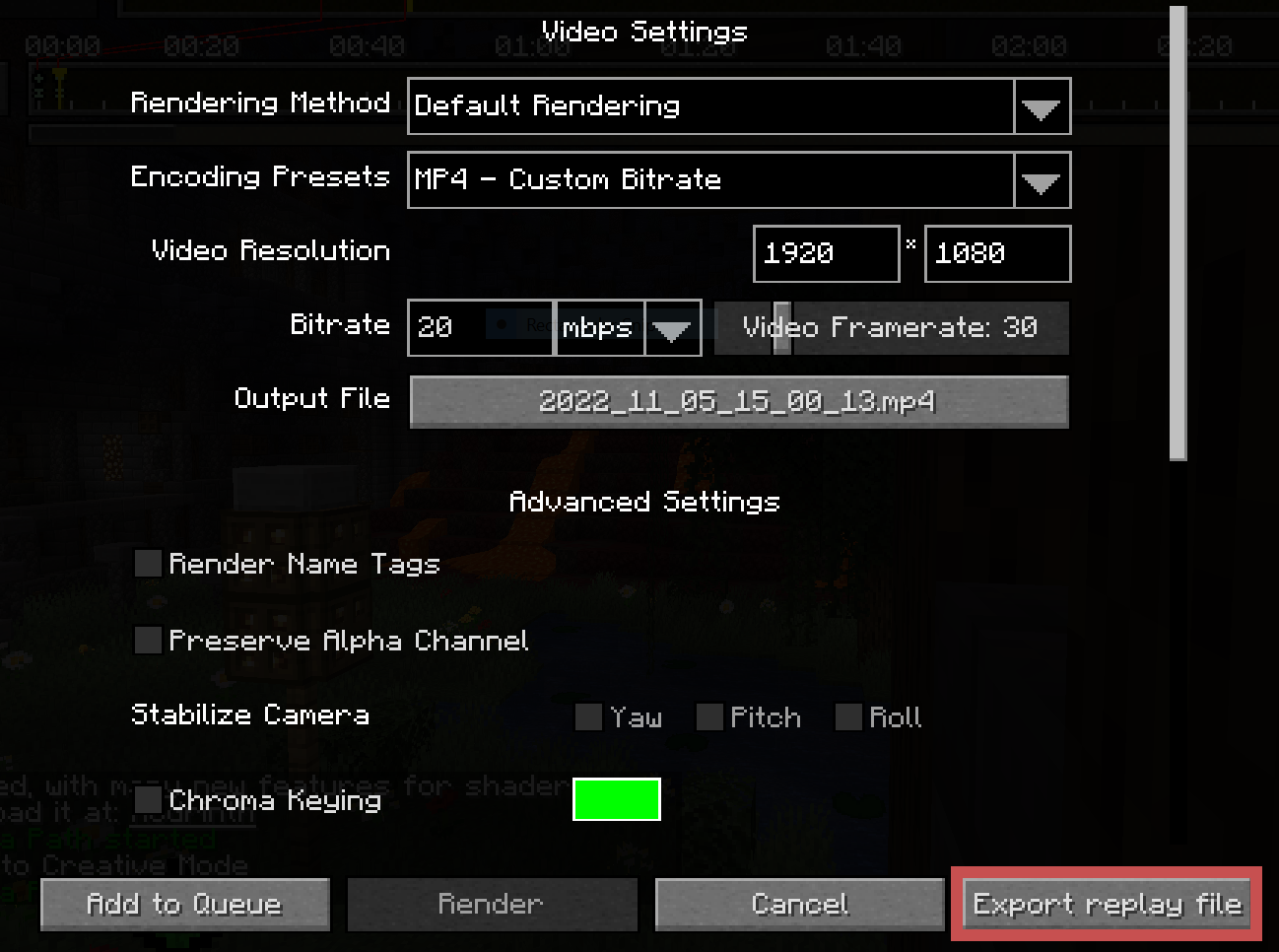
the Export Replay button

This will open a screen for you to select an output file and configure some replay settings. Adjust your bounds to be as tight as possible. Raise the lower depth as high as it will go before it cuts off the visible landscape, and reduce the perimeter depending on your planned shot.

The "Block Updates" and "Entities" regions add significantly more overhead than the "World" region, so it's recommended to tighten those even further.
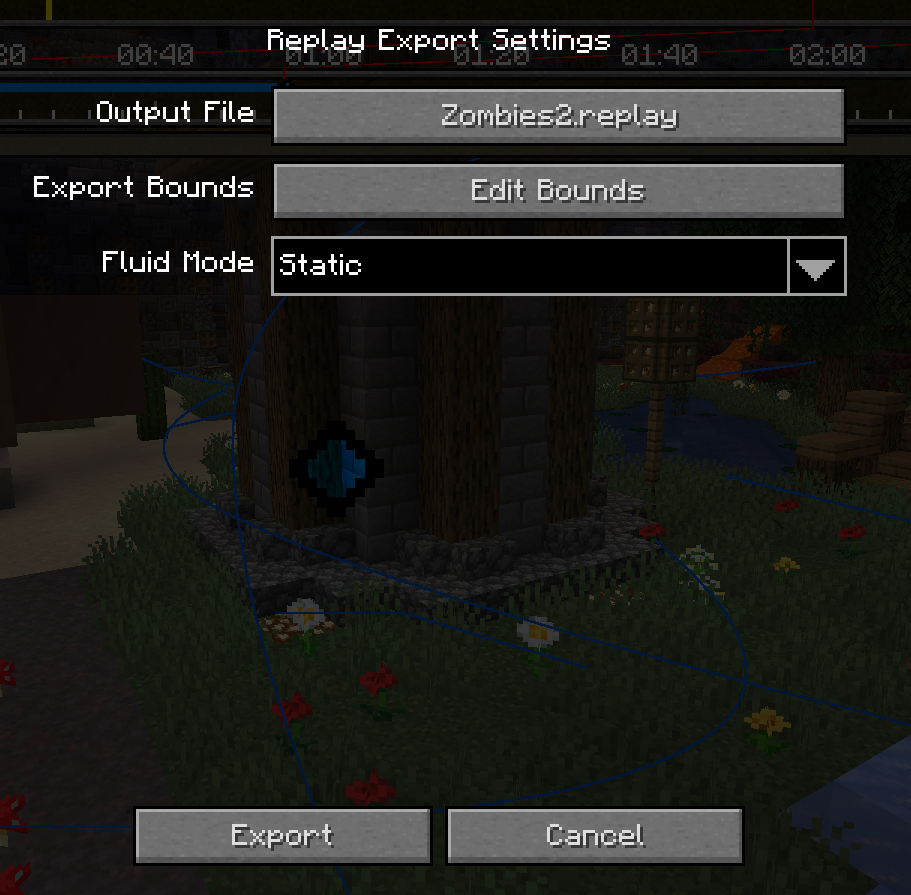
The Export Settings menu The Export Bounds menu

Once you're ready, click the "Export" button at the bottom left and wait for it to complete. It is common for the window to appear frozen while the initial block world is captured.

Importing

After exporting from Minecraft, you should be left with a .replay file, which can be imported into Blender using the provided addon.

Once you've ensured the addon is installed, create a new project and go to File > Import > Minecraft Replay File (.replay). Navigate to your file, but before you import it, note the settings on the right:
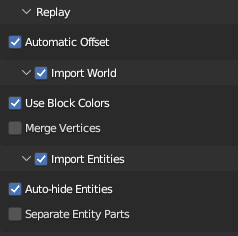
Replay Import Settings

The main two you need to worry about are World and Entities. While you usually want to import both, they each can take quite a bit of time, so it may be useful to disable one or the other.

Everything else can be left as default.

Once you're ready, click "Import Minecraft Replay" at the bottom. Blender will appear to hang for a few minutes. Don't worry; this is because the contents of a Minecraft world is quite large, and Blender provides no (reliable) way to update the UI while it is processing. (It might do to enable the system console to monitor progress.)

Once it is finished importing, you should have a Minecraft world and most of its entities in your scene! If something goes wrong, make sure to submit a bug report!

Последние версии

Все версии →
release

Igrium's Replay Exporter 1.5.1

1.5.1
20 окт. 2026 г.176Minecraft: 26.3fabric
Скачать
Что нового
Fixed a critical issue preventing standalone builds of the mod from launching (no changes have been made to the Blender addon)
release

Igrium's Replay Exporter 1.5.0

1.5.0
18 окт. 2026 г.76Minecraft: 26.3fabric
Скачать
Что нового
### 26.3 Support There isn't really any new content, but now that Replay Mod has been updated to support 26.3, Replay Exporter has been updated accordingly. You shouldn't need to update the Blender addon for this.
release

Igrium's Replay Exporter 1.4.0

1.4.0
1 сент. 2026 г.591Minecraft: 26.2fabric
Скачать
Что нового
Hopefully it's not as much of a disaster as 1.3.0. ### Changes * **Dynamic Block Entity Support!** Currently implemented: * Bell * Chest * Enchantment Table (book) * Shulker Box * Skull * **Animated texture interpolation shader** - This should make blocks like Prismarine look much better. * Added warning for known-incompatible mods during export * Optimized exporter to only remesh adjacent blocks when culling has changed * Fixed entity root rotations being imported improperly in Blender * Added mod list to exported replay files for debugging (should not affect importer semantics)
release

Igrium's Replay Exporter 1.3.2

1.3.2
25 авг. 2026 г.126Minecraft: 26.2fabric
Скачать
Что нового
Alright I fixed the animated texture exporting for real now. You'll need to update both the mod and the addon.
release

Igrium's Replay Exporter 1.3.1

1.3.1
25 авг. 2026 г.29Minecraft: 26.2fabric
Скачать
Что нового
Okay so it turns out that animated texture exporting is horribly broken, so I added a checkbox to turn it off until I can fix it properly.
release

Igrium's Replay Exporter 1.3.0

1.3.0
24 авг. 2026 г.12Minecraft: 26.2fabric
Скачать
Что нового
This update mainly comprised of under-the-hood changes to support: **Animated Textures!** You'll need to update both the mod *and* the addon to use these. ### Changes: * Made material properties use raw json instead of property struct in compiler * Material property definition for animated texture data. * Fixed slim skins not exporting properly > Note: although it's defined in the spec and exported, interpolated animated textures (prismarine, etc) are not yet supported in Blender.
release

Igrium's Replay Exporter 1.2.1

1.2.1
23 авг. 2026 г.43Minecraft: 26.2fabric
Скачать
Что нового
Minor bugfixes: - Blender can now recover from failed entity import - Entity filenames are sanitized in case servers (*cough hypixel cough*) create really weird entity names
release

Igrium's Replay Exporter 1.2.0

1.2.0
19 авг. 2026 г.63Minecraft: 26.2fabric
Скачать
Что нового
This update has a few minor quality-of-life changes which didn't make it into the initial release. You *will* need to update the Blender addon to see some of them, but nothing should break if you don't. ### General * Automatic enchantment glint shader * Wrote official "specification" for replay files (doc/ReplayFormat.md) * Certain materials (water, stained glass, etc) now use a "blended" alpha mode rather than "dithered" ### Minecraft * **Player skins now export properly** * Options to selectively disable exporting blocks, block updates, and entities * Optimized block tessellator when it comes to blocks with multiple materials * Added "saving to disk" stage label to export screen ### Blender * Warning when attempting to import a replay version greater than what the addon supports
release

Igrium's Replay Exporter: 26.2 Rewrite

1.1.0
12 авг. 2026 г.93Minecraft: 26.2fabric
Скачать
Что нового
Guess what: I'm not dead! I guess this is what having ADHD and your interest swinging around like crazy gets you... In recent months my interest has swung back in the direction of Replay Exporter. Now, it's no secret that the original codebase was a complete mess. The export format was terrible and hard to maintain; entities always came in broken, and it was unnecessarily slow. Therefore, with 26.2, comes a *complete rewrite!* The replay format has been revamped to properly store meshed terrain, entity exporting has been generalized to support more entities by default, and the importer better relies on Blender's internal systems to improve performance. Due to this, replays exported from older versions of the mod are *not* compatible with the latest addon, and new replays are not compatible with old versions of the addon. Make sure to download the new version in the release page. It requires Blender 4.4 or newer. Happy animating!
beta

Beta 0.9.1

0.9.1
26 мая 2024 г.3,4 тыс.Minecraft: 1.20.3, 1.20.4fabric
Скачать
Что нового
# 1.20.4 Update This patch is pretty straightforward -- a simple update to 1.20.4 MrNavaStar. I've also cleaned up some of the base build code. --- Not much has changed in the main repo for this update because I've been focused on re-writing the world exporter in a [separate repository](https://github.com/Igrium/CraftMesh).