COWMODSКаталог модов

RenderScale

Change resolution without affecting the UI

Автор: zolo1012,1 млн483обновлён 17 окт. 2026 г.
ОптимизацияУтилиты

Описание

RenderScale

RenderScale allows you to change Minecraft's resolution without affecting the UI. You can increase scale for antialiasing, or lower to improve performance. This is heavily recommended for laptops with retina displays!

This is a fork of ResolutionControl++, with added support for NeoForge.
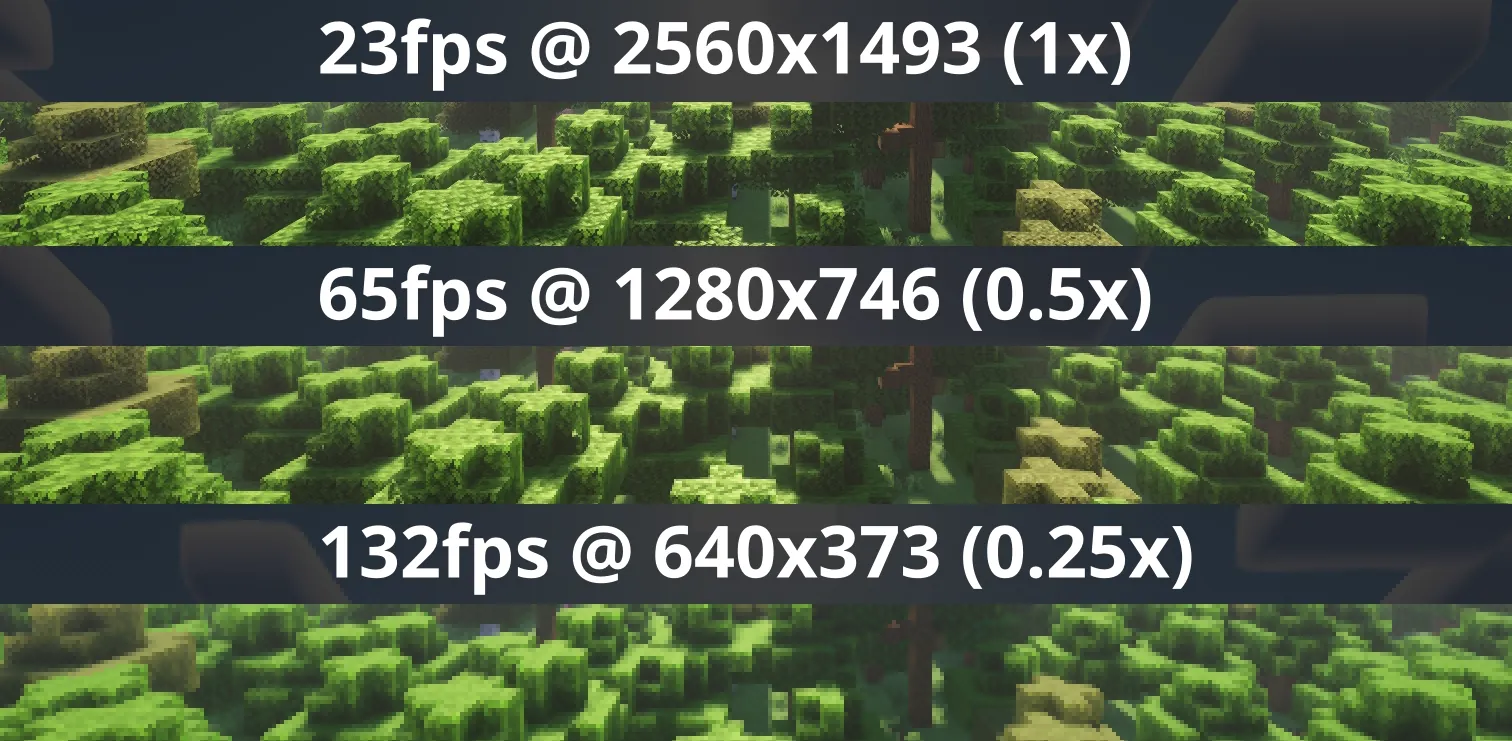
Comparison of FPS for each common render scale

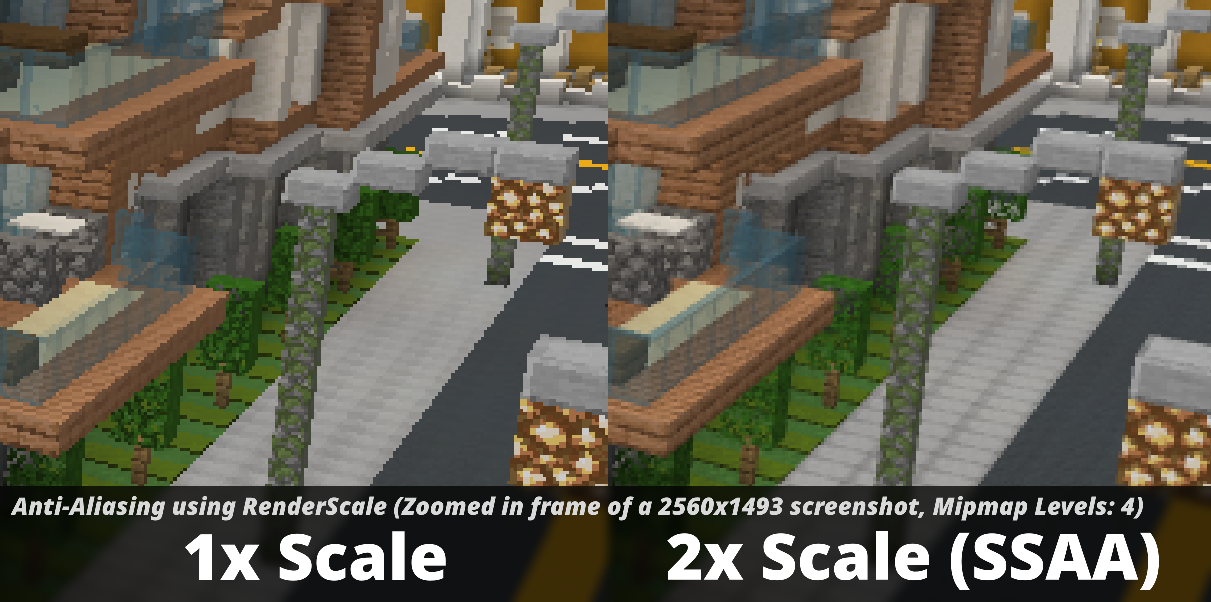
Comparison of anti-aliasing for 1x and 2x render scales

Check out Fabrishot if you also want the large screenshot feature that was in ResolutionControl.


How to use

Press U (sometimes O) or, use the mod menu config to control the render scale multiplier.

Other features

  • FSR 1 upscaling! Currently only available on 1.20.1, 1.21.1, and 1.21.11+. There are no plans to support DLSS or FSR 2+.
  • Dynamic Scaling, tries to keep the game at your targeted FPS by continuously changing the scale while you play.
  • Optional sharpening post-processing.

Compatibility

⚠️ This mod is NOT compatible with Lunar Client / Feather Client. It will break if you use them.

Aims to be compatible with any mod, including Sodium, Iris, etc. However, there can be mods that break RenderScale. Please report any issues here, or on my discord. Make sure to include your latest MC logs!

(26.2+) Works with Vulkan, including Iris Vulkan.

Dynamic scaling is unavailable while shaders are enabled due to issues with stuttering.


Supported Versions

MinecraftFabricNeoForgeForge
1.21.2 and above✅✅🚫
1.21.1✅ 1✅ 1🚫
1.20.1✅ 1🚫✅ 1

Check out the previous forks, ResolutionControl++, ResolutionControl+, ResolutionControl for older versions

Footnotes

  1. Does not support Fabulous graphics ↩ ↩2 ↩3 ↩4

Галерея

0.25x scale0.5x scale0.5x scale, no fsr0.5x scale, fsr

Последние версии

Все версии →
beta

RenderScale 2.0.0-beta.1 Neoforge 1.21.1

2.0.0-beta.1-neoforge+1.21.1
17 окт. 2026 г.2,9 тыс.Minecraft: 1.21, 1.21.1neoforge
Скачать
Что нового
# 2.0.0-beta.1 1.20.1 and 1.21.1 now support FSR 1 upscaling and Rotated Grid and Sparse Grid downsampling! Also added Russian translations, thanks to mpustovoi! ## Fixes - (26.3) Fixed issue with Iris shaders causing clouds to render in front of terrain [#111](https://github.com/Zolo101/RenderScale/issues/111) - (1.21.1) Fixed scales above 100% not being downscaled properly ## Changes - Improve FSR 1 performance by 30% for GPUs that support FP16 shaders. - More supersampling filters (RGSS, Sparse Grid). By default, RenderScale automatically chooses the best one for your scale. - Added optional image sharpening with RCAS. - (Parity) 1.20.1 Forge now allows setting a different scale for when shaders are enabled. ## Known Issues - You cannot use Dynamic Scaling with shaders due to issues with stuttering. - Please [open an issue](https://github.com/Zolo101/RenderScale/issues) if RenderScale has FSR1 listed as FP32 but your GPU supports FP16. Use F3 to check - I've changed the "Force Linear" setting internally, if you had it enabled in a previous version you'll have to enable it again.
beta

RenderScale 2.0.0-beta.1 Forge 1.20.1

2.0.0-beta.1-forge+1.20.1
17 окт. 2026 г.3,1 тыс.Minecraft: 1.20.1forge
Скачать
Что нового
# 2.0.0-beta.1 1.20.1 and 1.21.1 now support FSR 1 upscaling and Rotated Grid and Sparse Grid downsampling! Also added Russian translations, thanks to mpustovoi! ## Fixes - (26.3) Fixed issue with Iris shaders causing clouds to render in front of terrain [#111](https://github.com/Zolo101/RenderScale/issues/111) - (1.21.1) Fixed scales above 100% not being downscaled properly ## Changes - Improve FSR 1 performance by 30% for GPUs that support FP16 shaders. - More supersampling filters (RGSS, Sparse Grid). By default, RenderScale automatically chooses the best one for your scale. - Added optional image sharpening with RCAS. - (Parity) 1.20.1 Forge now allows setting a different scale for when shaders are enabled. ## Known Issues - You cannot use Dynamic Scaling with shaders due to issues with stuttering. - Please [open an issue](https://github.com/Zolo101/RenderScale/issues) if RenderScale has FSR1 listed as FP32 but your GPU supports FP16. Use F3 to check - I've changed the "Force Linear" setting internally, if you had it enabled in a previous version you'll have to enable it again.
beta

RenderScale 2.0.0-beta.1 Fabric 1.21.1

2.0.0-beta.1-fabric+1.21.1
17 окт. 2026 г.3,9 тыс.Minecraft: 1.21, 1.21.1fabric
Скачать
Что нового
# 2.0.0-beta.1 1.20.1 and 1.21.1 now support FSR 1 upscaling and Rotated Grid and Sparse Grid downsampling! Also added Russian translations, thanks to mpustovoi! ## Fixes - (26.3) Fixed issue with Iris shaders causing clouds to render in front of terrain [#111](https://github.com/Zolo101/RenderScale/issues/111) - (1.21.1) Fixed scales above 100% not being downscaled properly ## Changes - Improve FSR 1 performance by 30% for GPUs that support FP16 shaders. - More supersampling filters (RGSS, Sparse Grid). By default, RenderScale automatically chooses the best one for your scale. - Added optional image sharpening with RCAS. - (Parity) 1.20.1 Forge now allows setting a different scale for when shaders are enabled. ## Known Issues - You cannot use Dynamic Scaling with shaders due to issues with stuttering. - Please [open an issue](https://github.com/Zolo101/RenderScale/issues) if RenderScale has FSR1 listed as FP32 but your GPU supports FP16. Use F3 to check - I've changed the "Force Linear" setting internally, if you had it enabled in a previous version you'll have to enable it again.
beta

RenderScale 2.0.0-beta.1 Fabric 1.20.1

2.0.0-beta.1-fabric+1.20.1
17 окт. 2026 г.2,6 тыс.Minecraft: 1.20.1fabric
Скачать
Что нового
# 2.0.0-beta.1 1.20.1 and 1.21.1 now support FSR 1 upscaling and Rotated Grid and Sparse Grid downsampling! Also added Russian translations, thanks to mpustovoi! ## Fixes - (26.3) Fixed issue with Iris shaders causing clouds to render in front of terrain [#111](https://github.com/Zolo101/RenderScale/issues/111) - (1.21.1) Fixed scales above 100% not being downscaled properly ## Changes - Improve FSR 1 performance by 30% for GPUs that support FP16 shaders. - More supersampling filters (RGSS, Sparse Grid). By default, RenderScale automatically chooses the best one for your scale. - Added optional image sharpening with RCAS. - (Parity) 1.20.1 Forge now allows setting a different scale for when shaders are enabled. ## Known Issues - You cannot use Dynamic Scaling with shaders due to issues with stuttering. - Please [open an issue](https://github.com/Zolo101/RenderScale/issues) if RenderScale has FSR1 listed as FP32 but your GPU supports FP16. Use F3 to check - I've changed the "Force Linear" setting internally, if you had it enabled in a previous version you'll have to enable it again.
beta

RenderScale 2.0.0-beta.1 Neoforge 26.3

2.0.0-beta.1-neoforge+26.3
17 окт. 2026 г.406Minecraft: 26.3neoforge
Скачать
Что нового
# 2.0.0-beta.1 1.20.1 and 1.21.1 now support FSR 1 upscaling and Rotated Grid and Sparse Grid downsampling! Also added Russian translations, thanks to mpustovoi! ## Fixes - (26.3) Fixed issue with Iris shaders causing clouds to render in front of terrain [#111](https://github.com/Zolo101/RenderScale/issues/111) - (1.21.1) Fixed scales above 100% not being downscaled properly ## Changes - Improve FSR 1 performance by 30% for GPUs that support FP16 shaders. - More supersampling filters (RGSS, Sparse Grid). By default, RenderScale automatically chooses the best one for your scale. - Added optional image sharpening with RCAS. - (Parity) 1.20.1 Forge now allows setting a different scale for when shaders are enabled. ## Known Issues - You cannot use Dynamic Scaling with shaders due to issues with stuttering. - Please [open an issue](https://github.com/Zolo101/RenderScale/issues) if RenderScale has FSR1 listed as FP32 but your GPU supports FP16. Use F3 to check - I've changed the "Force Linear" setting internally, if you had it enabled in a previous version you'll have to enable it again.
beta

RenderScale 2.0.0-beta.1 Fabric 26.3

2.0.0-beta.1-fabric+26.3
16 окт. 2026 г.21,2 тыс.Minecraft: 26.3fabric
Скачать
Что нового
# 2.0.0-beta.1 1.20.1 and 1.21.1 now support FSR 1 upscaling and Rotated Grid and Sparse Grid downsampling! Also added Russian translations, thanks to mpustovoi! ## Fixes - (26.3) Fixed issue with Iris shaders causing clouds to render in front of terrain [#111](https://github.com/Zolo101/RenderScale/issues/111) - (1.21.1) Fixed scales above 100% not being downscaled properly ## Changes - Improve FSR 1 performance by 30% for GPUs that support FP16 shaders. - More supersampling filters (RGSS, Sparse Grid). By default, RenderScale automatically chooses the best one for your scale. - Added optional image sharpening with RCAS. - (Parity) 1.20.1 Forge now allows setting a different scale for when shaders are enabled. ## Known Issues - You cannot use Dynamic Scaling with shaders due to issues with stuttering. - Please [open an issue](https://github.com/Zolo101/RenderScale/issues) if RenderScale has FSR1 listed as FP32 but your GPU supports FP16. Use F3 to check - I've changed the "Force Linear" setting internally, if you had it enabled in a previous version you'll have to enable it again.
beta

RenderScale 1.4.0-alpha.6 Forge 1.20.1

1.4.0-alpha.6-forge+1.20.1
19 сент. 2026 г.7,8 тыс.Minecraft: 1.20.1forge
Скачать
Что нового
# 1.4.0-alpha.6 ## New versions - 26.3 (Fabric, NeoForge) ## Fixes A lot of work has been done on improving mod compatibility for 1.20.1 & 1.21.1. ### 1.20.1 - 1.20.1 Hardcore Revival incompatibility [#43](<https://github.com/Zolo101/RenderScale/issues/43>) - Weird Visual Bugs and Ghosting (Forge 1.20.1) [#82](<https://github.com/Zolo101/RenderScale/issues/82>) - 1.20.1 Forge Incompatibility with epic fight nightfall [#83](<https://github.com/Zolo101/RenderScale/issues/83>) - Incompatibility with various armour mods that add Night Vision goggles [#89](<https://github.com/Zolo101/RenderScale/issues/89>) - Incompatibility with Exposure (1.20.1 forge) [#91](<https://github.com/Zolo101/RenderScale/issues/91>) - Invisible everything and log spam with oculus and embeddium (1.20.1 only, 1.21.1 fix being worked on) [#95](<https://github.com/Zolo101/RenderScale/issues/95>) ### 1.21.1 - All the Mods 1.21.1 Small Hand [#24](<https://github.com/Zolo101/RenderScale/issues/24>) - 1.21.1 NeoForge key binds [#42](<https://github.com/Zolo101/RenderScale/issues/42>) - 1.21.1 Invisible with Iris shaders active [#47](<https://github.com/Zolo101/RenderScale/issues/47>) - Weird Visual Bugs and Ghosting (1.20.1) [#82](<https://github.com/Zolo101/RenderScale/issues/82>) - Incompatible with Punchy! [#85](<https://github.com/Zolo101/RenderScale/issues/85>) - Fixed 1.21.1 NeoForge crashing on launch. [#94](https://github.com/Zolo101/RenderScale/issues/94) ## Changes Experimental support for Dynamic Scaling! Set your target FPS, and it'll change the scale factor while you play. - F3 now shows your current scale factor. - (1.20.1) Embeddium video settings now has a RenderScale category - (1.21.11+) Improve FSR 1.0 performance on scales over 100%. ## Known Issues - In 1.20.1 and 1.21.1 you cannot use Dynamic Scaling with shaders due to issues with stuttering.
beta

RenderScale 1.4.0-alpha.6 Fabric 1.20.1

1.4.0-alpha.6-fabric+1.20.1
19 сент. 2026 г.11,5 тыс.Minecraft: 1.20.1fabric
Скачать
Что нового
# 1.4.0-alpha.6 ## New versions - 26.3 (Fabric, NeoForge) ## Fixes A lot of work has been done on improving mod compatibility for 1.20.1 & 1.21.1. ### 1.20.1 - 1.20.1 Hardcore Revival incompatibility [#43](<https://github.com/Zolo101/RenderScale/issues/43>) - Weird Visual Bugs and Ghosting (Forge 1.20.1) [#82](<https://github.com/Zolo101/RenderScale/issues/82>) - 1.20.1 Forge Incompatibility with epic fight nightfall [#83](<https://github.com/Zolo101/RenderScale/issues/83>) - Incompatibility with various armour mods that add Night Vision goggles [#89](<https://github.com/Zolo101/RenderScale/issues/89>) - Incompatibility with Exposure (1.20.1 forge) [#91](<https://github.com/Zolo101/RenderScale/issues/91>) - Invisible everything and log spam with oculus and embeddium (1.20.1 only, 1.21.1 fix being worked on) [#95](<https://github.com/Zolo101/RenderScale/issues/95>) ### 1.21.1 - All the Mods 1.21.1 Small Hand [#24](<https://github.com/Zolo101/RenderScale/issues/24>) - 1.21.1 NeoForge key binds [#42](<https://github.com/Zolo101/RenderScale/issues/42>) - 1.21.1 Invisible with Iris shaders active [#47](<https://github.com/Zolo101/RenderScale/issues/47>) - Weird Visual Bugs and Ghosting (1.20.1) [#82](<https://github.com/Zolo101/RenderScale/issues/82>) - Incompatible with Punchy! [#85](<https://github.com/Zolo101/RenderScale/issues/85>) - Fixed 1.21.1 NeoForge crashing on launch. [#94](https://github.com/Zolo101/RenderScale/issues/94) ## Changes Experimental support for Dynamic Scaling! Set your target FPS, and it'll change the scale factor while you play. - F3 now shows your current scale factor. - (1.20.1) Embeddium video settings now has a RenderScale category - (1.21.11+) Improve FSR 1.0 performance on scales over 100%. ## Known Issues - In 1.20.1 and 1.21.1 you cannot use Dynamic Scaling with shaders due to issues with stuttering.
beta

RenderScale 1.4.0-alpha.6 Neoforge 26.3

1.4.0-alpha.6-neoforge+26.3
18 сент. 2026 г.768Minecraft: 26.3neoforge
Скачать
Что нового
# 1.4.0-alpha.6 ## New versions - 26.3 (Fabric, NeoForge) ## Fixes - Fixed 1.21.1 NeoForge crashing on launch. [#94](https://github.com/Zolo101/RenderScale/issues/94) ## Changes Experimental support for Dynamic Scaling! Set your target FPS, and it'll change the scale factor while you play. - F3 now shows your current scale factor. - (1.21.11+) Improve FSR 1.0 performance on scales over 100%. ## Known Issues - In 1.21.1 you cannot use Dynamic Scaling with shaders due to issues with stuttering.
beta

RenderScale 1.4.0-alpha.6 Fabric 26.3

1.4.0-alpha.6-fabric+26.3
18 сент. 2026 г.83,8 тыс.Minecraft: 26.3fabric
Скачать
Что нового
# 1.4.0-alpha.6 ## New versions - 26.3 (Fabric, NeoForge) ## Fixes - Fixed 1.21.1 NeoForge crashing on launch. [#94](https://github.com/Zolo101/RenderScale/issues/94) ## Changes Experimental support for Dynamic Scaling! Set your target FPS, and it'll change the scale factor while you play. - F3 now shows your current scale factor. - (1.21.11+) Improve FSR 1.0 performance on scales over 100%. ## Known Issues - In 1.21.1 you cannot use Dynamic Scaling with shaders due to issues with stuttering.