RealScoreboard
Lightweight and efficient scoreboard manager.
Описание
RealScoreboard
Lightweight and efficient scoreboard manager.
Animated, per-world scoreboards with placeholders, conditions and HEX colours.
Discord | Source Code | Report a Bug
What is RealScoreboard?
RealScoreboard shows a sidebar scoreboard to your players. You write the scoreboards in scoreboards.yml: an animated title, lines with placeholders, the worlds they appear in and who can see them. A scoreboard can also have several boards that it cycles through. Players can turn their scoreboard on and off, and the choice is saved.
Features
- No flicker, built on FastBoard, with lines refreshed asynchronously
- No red numbers on the right side on 1.20.3+
- Animated titles, and scoreboards that cycle between several boards
- Per-world scoreboards, with a default scoreboard per world and a list of worlds where the scoreboard is hidden
- Permission scoreboards: give a scoreboard a permission and players who have it see that one instead of the default
- Built-in placeholders, plus every PlaceholderAPI placeholder
- Conditions: show one text or another depending on a placeholder's value
- HEX colours and gradients
- Announcements: show a message as a scoreboard to every player for a few seconds
- Hides the scoreboard while vanished, based on a list of vanish commands
- mcMMO support: steps aside while an mcMMO scoreboard is shown (turn on
mcMMO-Supportinconfig.yml) - Settings menu in game; on 1.21.6+ it uses native dialogs
- SQLite and MySQL storage for each player's on/off choice
- RealPermissions integration and a developer API
- Fully configurable YAML files
Scoreboards
Every scoreboard in scoreboards.yml has:
| Key | What it does |
|---|---|
Default | Whether it's the scoreboard players get in its world when no permission scoreboard applies |
Default-World, Other-Worlds | Where it shows; use '*' in Other-Worlds for every world |
Permission | The permission needed to see it, or none |
Display-Name | The name shown in menus |
Refresh | How often (in ticks) the lines update, the title changes frame, and the boards switch |
Title, Lines | The title frames and the lines, or a Boards section with several boards, each with its own title and lines |
Each line of the Title list is one animation frame.
Example scoreboard
Scoreboards:
  default:
    Default: true
    Default-World: world
    Other-Worlds:
      - '*'
    Display-Name: '&fDefault Board'
    Permission: none
    Refresh:
      Scoreboard: 5
      Title: 10
      Title-Loop-Delay: 5
      Board-Loop-Delay: 30
    Boards:
      Board1:
        Title:
          - '&bRealScoreBoard'
          - '&6> &9RealScoreBoard &6<'
        Lines:
          - '%blank%'
          - ' &7Name: &f%playername% &8| &f%ping%'
          - ' &7Money: &f%money% &8| &7XP: &f%xp%'
          - '%blank%'
      Board2:
        Title:
          - '&bStatistics &aBoard'
        Lines:
          - '%blank%'
          - '  &fKills: %kills% &7| &fKD: %kd%'
          - '%blank%'
Conditions
A condition shows one text when it's true and another when it's false. Define it in config.yml and put %cond:<name>% on a line, e.g. %cond:low_hp%.
A condition is value operator value, separated by spaces. Placeholders are filled in first, then the values are compared as whole numbers, decimals, booleans or text.
| Values | Operators |
|---|---|
| Numbers | == != > < >= <= |
| Text | == != contains startsWith endsWith |
Put $skip in the Met or Not-Met text to hide the whole line.
Example conditions
Conditions:
  xp:
    Condition: '%xp% > 3'
    Met: '%aXP is bigger than 3!'
    Not-Met: '&cYou need to get 3 XP!'
  low_hp:
    Condition: '%life% <= 5'
    Met: '&cWatch out!'
    Not-Met: '&aYou are fine!'
HEX Colours
- Single colour:
{#69ffde} - Gradient:
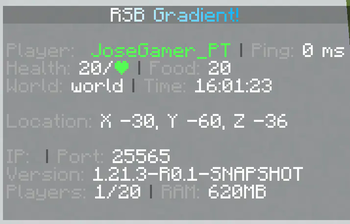
{#ffffff>}Gradient!{#00aeff<}
You can make gradients at rgb.birdflop.com.
Photos
Getting Started
- Install the plugin and join. You'll see the default scoreboard.
- Edit
plugins/RealScoreboard/scoreboards.ymlto change the title and lines, or add more scoreboards. - Set
Default-Worldto your main world, and give each world a default scoreboard. - For a rank scoreboard, set its
Permission(e.g.realscoreboard.testboard) and give that permission to the rank. - Run
/rsb reload. - Run
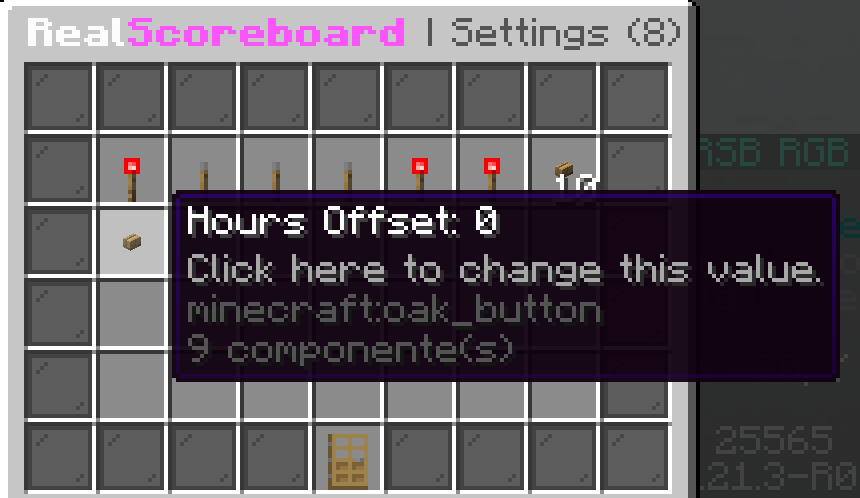
/rsbto open the settings menu for the rest ofconfig.yml.
Commands
Base commands: /realscoreboard, /rsb, /sb
| Command | Description | Permission |
|---|---|---|
/rsb | Opens the settings menu for admins; shows the plugin info to everyone else | realscoreboard.admin for the menu |
/rsb toggle (t) | Turns your scoreboard on or off | realscoreboard.toggle |
/rsb on, /rsb off | Turns your scoreboard on or off | realscoreboard.toggle |
/rsb reload | Reloads the config and scoreboards | realscoreboard.admin |
/rsb toggleother <player> (toggleo, to) | Turns another player's scoreboard on or off | realscoreboard.admin |
/rsb setscoreboard <name> <player|@a> (setsb) | Sets a player's scoreboard; @a sets it for everyone | realscoreboard.setscoreboard |
/rsb selectscoreboard <player> (selectsb) | Opens a menu for that player to pick a scoreboard | realscoreboard.selectscoreboard |
/rsb announce <seconds> <message> (broadcast) | Shows a message as a scoreboard to every player for that many seconds | realscoreboard.setscoreboard |
/rsb hooks | Lists the plugins that push their own boards through RealScoreboard | realscoreboard.admin |
/rsb debug | Shows plugin, server and config info to share with the developer | realscoreboard.admin |
Permissions
| Permission | Description |
|---|---|
realscoreboard.admin | Settings menu, reload, toggleother, hooks and debug |
realscoreboard.toggle | /rsb toggle, on and off |
realscoreboard.setscoreboard | /rsb setscoreboard and /rsb announce |
realscoreboard.selectscoreboard | /rsb selectscoreboard |
Each scoreboard's Permission | Sees that scoreboard |
Placeholders
These work in scoreboard lines. Any PlaceholderAPI placeholder works too. Titles use placeholders only when Use-Placeholders-In-Scoreboard-Titles is on.
All placeholders
| Placeholder | Value |
|---|---|
%blank% | An empty line |
%cond:<name>% | The result of a condition |
%rainbow% | A colour code that cycles through the rainbow |
%playername%, %displayname% | The player's name and display name |
%ping% | Ping in ms |
%life% | Health |
%lifeheart% | A heart coloured by health |
%playerfood% | Food level |
%xp% | Total experience |
%money%, %moneylong% | Balance, short (e.g. 1.5k) and in full (needs Vault) |
%group%, %prefix%, %suffix% | Primary group and its prefix and suffix (needs Vault) |
%kills%, %deaths%, %kd%, %mobkills%, %jumps% | Statistics |
%playtime% | Time played |
%x%, %y%, %z%, %loc% | Location |
%yaw%, %pitch% | Where the player is facing |
%world% | World name |
%worlddays% | Days passed in the world |
%time%, %day% | Current time and date (format and offset in config.yml) |
%online%, %maxplayers% | Online and maximum players |
%ram% | Memory in use |
%serverip%, %port% | Server IP and port |
%version% | Server version |
Requirements
- Java 16+
- Spigot or Paper 1.13+
- Optional: PlaceholderAPI, Vault (for money, group, prefix and suffix), mcMMO, RealPermissions
Installation
- Put the jar in your
pluginsfolder. - Restart the server.
- Edit
plugins/RealScoreboard/scoreboards.ymlandconfig.yml, then run/rsb reload. - To use MySQL, set the driver and login in
plugins/RealScoreboard/sql.ymland restart.
Need help or found a bug?
Please don't use the comments for bug reports. Get in touch through:
This plugin uses bStats to collect anonymous usage statistics. You can turn this off in plugins/bStats/config.yml.
Галерея