
ReAnimatedСкачатьСкачатьСкачатьСкачатьСкачатьСкачатьСкачатьСкачатьСкачатьСкачатьСкачатьСкачатьСкачатьСкачатьСкачатьСкачатьСкачатьСкачатьСкачатьСкачатьСкачатьСкачатьСкачатьСкачатьСкачатьСкачатьСкачатьСкачатьСкачатьСкачатьСкачатьСкачатьСкачатьСкачатьСкачатьСкачатьСкачатьСкачатьСкачатьСкачатьСкачатьСкачатьСкачатьСкачатьСкачатьСкачатьСкачатьСкачатьСкачатьСкачатьСкачатьСкачатьСкачатьСкачатьСкачатьСкачатьСкачатьСкачатьСкачатьСкачатьСкачатьСкачатьСкачатьСкачатьСкачатьСкачатьСкачатьСкачатьСкачатьСкачатьСкачатьСкачатьСкачатьСкачатьСкачатьСкачатьСкачатьСкачатьСкачатьСкачатьСкачатьСкачатьСкачатьСкачатьСкачатьСкачатьСкачатьСкачатьСкачатьСкачатьСкачатьСкачатьСкачатьСкачатьСкачатьСкачатьСкачатьСкачатьСкачатьСкачатьСкачатьСкачатьСкачатьСкачатьСкачатьСкачатьСкачатьСкачатьСкачатьСкачатьСкачатьСкачатьСкачатьСкачатьСкачатьСкачатьСкачатьСкачатьСкачатьСкачатьСкачатьСкачатьСкачатьСкачатьСкачатьСкачатьСкачатьСкачатьСкачатьСкачатьСкачатьСкачатьСкачатьСкачатьСкачатьСкачатьСкачатьСкачатьСкачатьСкачатьСкачатьСкачатьСкачатьСкачатьСкачатьСкачатьСкачатьСкачатьСкачатьСкачатьСкачатьСкачатьСкачатьСкачатьСкачатьСкачатьСкачатьСкачатьСкачатьСкачатьСкачатьСкачатьСкачатьСкачатьСкачатьСкачатьСкачатьСкачатьСкачатьСкачатьСкачатьСкачатьСкачатьСкачатьСкачатьСкачатьСкачатьСкачатьСкачатьСкачатьСкачатьСкачатьСкачатьСкачатьСкачатьСкачатьСкачатьСкачатьСкачатьСкачатьСкачатьСкачатьСкачатьСкачатьСкачатьСкачать
ВЕРСИИ (196)
release
ReAnimated 1.8 (26.3)
1.821 окт. 2026 г.1,5 тыс.Minecraft: 26.3fabric, quilt
Что нового
# ReAnimated 1.8
Every screen can now be set up on its own, there is a PvP mode, and the mod animates the hotbar, tabs and the small controls inside menus.
---
## 🇬🇧 English
### Every screen your way
Each screen can now have its own settings, not just a preset and speed:
- distance and easing of the opening animation;
- closing animation, background dim and transitions, on or off for this screen only;
- its own button cascade, made in the profile editor with a live preview.
Everything starts at "As general", so nothing changes until you touch it.
Press **F7** on any screen to open its settings right there (you can rebind it in Controls). You can also set one rule for all screens of a mod; a screen's own settings win over it.
### PvP mode
A new switch at the top of the settings. With it on, the inventory, chests and other containers, and the death screen open and close instantly. The slot highlight and the hotbar frame snap into place instead of sliding, and tooltips and the recipe book appear right away. Other menus stay animated.
### Hotbar
- When you scroll or press a number key, the selection frame slides over to the new slot instead of jumping there.
- The item name above the hotbar rises up a little and fades in when you switch items.
Both can be turned off separately in the settings, and the frame speed is adjustable.
### Tabs
On screens with vanilla tabs (world creation, statistics and so on), the new tab slides in from the side you switched towards. Going back slides it in from the other side. Duration, distance and curve are adjustable.
### Sliders, checkboxes, text fields
- When you click somewhere on a slider, the handle slides to that spot instead of jumping. While you drag it, it follows the cursor exactly, with no lag.
- A checkbox gives a little bounce when you tick or untick it.
- A text field's frame lights up smoothly when you click into it, and fades back out when you click away.
### Fixed
- In the normal (non-dev) game on 1.21.x, the mod sometimes didn't recognize the pause menu, the chat, and loading screens, and handled them like regular menus. They're recognized properly again.
- The title screen logo animation plays when the logo actually shows up. At game start it used to finish under the loading screen, so you never saw it.
- On 1.21.8 and newer, a menu you go back to (for example with "Done" in Options) slides in again instead of popping into place, and the next menu you open no longer comes in from the side for no reason.
- The game log no longer shows the "Invalid path in mod resource-pack reanimated" error at startup.
- The smooth slot highlight no longer draws a second white square on top of the game's own highlight. You see exactly the highlight of the game or your resource pack (OreUI-style frames included), and that highlight is what glides between slots.
### Versions
- Fabric / Quilt with Fabric API: 1.21.1 – 1.21.11, 26.1.2, 26.2, 26.3
- Client-side only. Your config carries over; the new animations are on by default.
---
## 🇷🇺 Русский
### Каждый экран по-своему
У каждого экрана теперь свои настройки, а не только пресет и скорость:
- дистанция и траектория появления;
- анимация закрытия, затемнение фона и переходы: включить или выключить только для этого экрана;
- свой каскад кнопок, который настраивается в редакторе профиля с живым превью.
Всё по умолчанию стоит «Как в общих», так что ничего не меняется, пока вы сами не поменяете.
Нажмите **F7** на любом экране, и откроются его настройки (клавишу можно сменить в «Управлении»). Ещё можно задать одно правило сразу на все экраны мода; настройки отдельного экрана сильнее.
### PvP-режим
Новый переключатель в самом верху настроек. Когда он включён, инвентарь, сундуки и другие контейнеры, а также экран смерти открываются и закрываются мгновенно. Подсветка слота и рамка хотбара сразу встают на место, а не доезжают, подсказки и книга рецептов появляются без задержки. Остальные меню анимируются как обычно.
### Хотбар
- Когда вы крутите колёсико или жмёте цифру, рамка выбранного слота переезжает к новому слоту, а не перескакивает.
- Название предмета над хотбаром при смене немного приподнимается и проявляется.
И то и другое выключается в настройках отдельно, скорость рамки настраивается.
### Вкладки
На экранах с ванильными вкладками (создание мира, статистика и другие) новая вкладка въезжает с той стороны, куда вы переключились. При возврате назад она въезжает с другой стороны. Длительность, дистанция и траектория настраиваются.
### Ползунки, чекбоксы, поля ввода
- Если кликнуть в любое место ползунка, ручка доезжает туда, а не перескакивает. Когда тащите её мышью, она идёт ровно за курсором, без отставания.
- Чекбокс слегка отскакивает, когда его ставите или снимаете.
- Рамка поля ввода плавно загорается, когда в него кликаете, и плавно гаснет, когда уходите из него.
### Исправлено
- В обычной (не dev) игре на 1.21.x мод иногда не узнавал меню паузы, чат и экраны загрузки и обрабатывал их как обычные меню. Теперь он снова их узнаёт.
- Анимация логотипа на главном экране играет, когда логотип действительно появляется. При запуске игры она раньше доигрывала под экраном загрузки, и её не было видно.
- На 1.21.8 и новее меню, на которое вы возвращаетесь (например, кнопкой «Готово» в настройках), снова въезжает, а не встаёт на место рывком. Следующее открытое меню больше не въезжает сбоку без причины.
- В логе игры при запуске больше нет ошибки «Invalid path in mod resource-pack reanimated».
- Плавная подсветка слота больше не рисует второй белый квадрат поверх подсветки игры. Видна ровно подсветка игры или ресурспака (в том числе рамки в стиле OreUI), и между слотами плавно переезжает именно она.
### Версии
- Fabric / Quilt с Fabric API: 1.21.1 – 1.21.11, 26.1.2, 26.2, 26.3
- Мод только клиентский. Конфиг переносится, новые анимации включены по умолчанию.
release
ReAnimated 1.8 (26.2)
1.821 окт. 2026 г.936Minecraft: 26.2fabric, quilt
Что нового
# ReAnimated 1.8
Every screen can now be set up on its own, there is a PvP mode, and the mod animates the hotbar, tabs and the small controls inside menus.
---
## 🇬🇧 English
### Every screen your way
Each screen can now have its own settings, not just a preset and speed:
- distance and easing of the opening animation;
- closing animation, background dim and transitions, on or off for this screen only;
- its own button cascade, made in the profile editor with a live preview.
Everything starts at "As general", so nothing changes until you touch it.
Press **F7** on any screen to open its settings right there (you can rebind it in Controls). You can also set one rule for all screens of a mod; a screen's own settings win over it.
### PvP mode
A new switch at the top of the settings. With it on, the inventory, chests and other containers, and the death screen open and close instantly. The slot highlight and the hotbar frame snap into place instead of sliding, and tooltips and the recipe book appear right away. Other menus stay animated.
### Hotbar
- When you scroll or press a number key, the selection frame slides over to the new slot instead of jumping there.
- The item name above the hotbar rises up a little and fades in when you switch items.
Both can be turned off separately in the settings, and the frame speed is adjustable.
### Tabs
On screens with vanilla tabs (world creation, statistics and so on), the new tab slides in from the side you switched towards. Going back slides it in from the other side. Duration, distance and curve are adjustable.
### Sliders, checkboxes, text fields
- When you click somewhere on a slider, the handle slides to that spot instead of jumping. While you drag it, it follows the cursor exactly, with no lag.
- A checkbox gives a little bounce when you tick or untick it.
- A text field's frame lights up smoothly when you click into it, and fades back out when you click away.
### Fixed
- In the normal (non-dev) game on 1.21.x, the mod sometimes didn't recognize the pause menu, the chat, and loading screens, and handled them like regular menus. They're recognized properly again.
- The title screen logo animation plays when the logo actually shows up. At game start it used to finish under the loading screen, so you never saw it.
- On 1.21.8 and newer, a menu you go back to (for example with "Done" in Options) slides in again instead of popping into place, and the next menu you open no longer comes in from the side for no reason.
- The game log no longer shows the "Invalid path in mod resource-pack reanimated" error at startup.
- The smooth slot highlight no longer draws a second white square on top of the game's own highlight. You see exactly the highlight of the game or your resource pack (OreUI-style frames included), and that highlight is what glides between slots.
### Versions
- Fabric / Quilt with Fabric API: 1.21.1 – 1.21.11, 26.1.2, 26.2, 26.3
- Client-side only. Your config carries over; the new animations are on by default.
---
## 🇷🇺 Русский
### Каждый экран по-своему
У каждого экрана теперь свои настройки, а не только пресет и скорость:
- дистанция и траектория появления;
- анимация закрытия, затемнение фона и переходы: включить или выключить только для этого экрана;
- свой каскад кнопок, который настраивается в редакторе профиля с живым превью.
Всё по умолчанию стоит «Как в общих», так что ничего не меняется, пока вы сами не поменяете.
Нажмите **F7** на любом экране, и откроются его настройки (клавишу можно сменить в «Управлении»). Ещё можно задать одно правило сразу на все экраны мода; настройки отдельного экрана сильнее.
### PvP-режим
Новый переключатель в самом верху настроек. Когда он включён, инвентарь, сундуки и другие контейнеры, а также экран смерти открываются и закрываются мгновенно. Подсветка слота и рамка хотбара сразу встают на место, а не доезжают, подсказки и книга рецептов появляются без задержки. Остальные меню анимируются как обычно.
### Хотбар
- Когда вы крутите колёсико или жмёте цифру, рамка выбранного слота переезжает к новому слоту, а не перескакивает.
- Название предмета над хотбаром при смене немного приподнимается и проявляется.
И то и другое выключается в настройках отдельно, скорость рамки настраивается.
### Вкладки
На экранах с ванильными вкладками (создание мира, статистика и другие) новая вкладка въезжает с той стороны, куда вы переключились. При возврате назад она въезжает с другой стороны. Длительность, дистанция и траектория настраиваются.
### Ползунки, чекбоксы, поля ввода
- Если кликнуть в любое место ползунка, ручка доезжает туда, а не перескакивает. Когда тащите её мышью, она идёт ровно за курсором, без отставания.
- Чекбокс слегка отскакивает, когда его ставите или снимаете.
- Рамка поля ввода плавно загорается, когда в него кликаете, и плавно гаснет, когда уходите из него.
### Исправлено
- В обычной (не dev) игре на 1.21.x мод иногда не узнавал меню паузы, чат и экраны загрузки и обрабатывал их как обычные меню. Теперь он снова их узнаёт.
- Анимация логотипа на главном экране играет, когда логотип действительно появляется. При запуске игры она раньше доигрывала под экраном загрузки, и её не было видно.
- На 1.21.8 и новее меню, на которое вы возвращаетесь (например, кнопкой «Готово» в настройках), снова въезжает, а не встаёт на место рывком. Следующее открытое меню больше не въезжает сбоку без причины.
- В логе игры при запуске больше нет ошибки «Invalid path in mod resource-pack reanimated».
- Плавная подсветка слота больше не рисует второй белый квадрат поверх подсветки игры. Видна ровно подсветка игры или ресурспака (в том числе рамки в стиле OreUI), и между слотами плавно переезжает именно она.
### Версии
- Fabric / Quilt с Fabric API: 1.21.1 – 1.21.11, 26.1.2, 26.2, 26.3
- Мод только клиентский. Конфиг переносится, новые анимации включены по умолчанию.
release
ReAnimated 1.8 (26.1.2)
1.821 окт. 2026 г.346Minecraft: 26.1, 26.1.1, 26.1.2fabric, quilt
Что нового
# ReAnimated 1.8
Every screen can now be set up on its own, there is a PvP mode, and the mod animates the hotbar, tabs and the small controls inside menus.
---
## 🇬🇧 English
### Every screen your way
Each screen can now have its own settings, not just a preset and speed:
- distance and easing of the opening animation;
- closing animation, background dim and transitions, on or off for this screen only;
- its own button cascade, made in the profile editor with a live preview.
Everything starts at "As general", so nothing changes until you touch it.
Press **F7** on any screen to open its settings right there (you can rebind it in Controls). You can also set one rule for all screens of a mod; a screen's own settings win over it.
### PvP mode
A new switch at the top of the settings. With it on, the inventory, chests and other containers, and the death screen open and close instantly. The slot highlight and the hotbar frame snap into place instead of sliding, and tooltips and the recipe book appear right away. Other menus stay animated.
### Hotbar
- When you scroll or press a number key, the selection frame slides over to the new slot instead of jumping there.
- The item name above the hotbar rises up a little and fades in when you switch items.
Both can be turned off separately in the settings, and the frame speed is adjustable.
### Tabs
On screens with vanilla tabs (world creation, statistics and so on), the new tab slides in from the side you switched towards. Going back slides it in from the other side. Duration, distance and curve are adjustable.
### Sliders, checkboxes, text fields
- When you click somewhere on a slider, the handle slides to that spot instead of jumping. While you drag it, it follows the cursor exactly, with no lag.
- A checkbox gives a little bounce when you tick or untick it.
- A text field's frame lights up smoothly when you click into it, and fades back out when you click away.
### Fixed
- In the normal (non-dev) game on 1.21.x, the mod sometimes didn't recognize the pause menu, the chat, and loading screens, and handled them like regular menus. They're recognized properly again.
- The title screen logo animation plays when the logo actually shows up. At game start it used to finish under the loading screen, so you never saw it.
- On 1.21.8 and newer, a menu you go back to (for example with "Done" in Options) slides in again instead of popping into place, and the next menu you open no longer comes in from the side for no reason.
- The game log no longer shows the "Invalid path in mod resource-pack reanimated" error at startup.
- The smooth slot highlight no longer draws a second white square on top of the game's own highlight. You see exactly the highlight of the game or your resource pack (OreUI-style frames included), and that highlight is what glides between slots.
### Versions
- Fabric / Quilt with Fabric API: 1.21.1 – 1.21.11, 26.1.2, 26.2, 26.3
- Client-side only. Your config carries over; the new animations are on by default.
---
## 🇷🇺 Русский
### Каждый экран по-своему
У каждого экрана теперь свои настройки, а не только пресет и скорость:
- дистанция и траектория появления;
- анимация закрытия, затемнение фона и переходы: включить или выключить только для этого экрана;
- свой каскад кнопок, который настраивается в редакторе профиля с живым превью.
Всё по умолчанию стоит «Как в общих», так что ничего не меняется, пока вы сами не поменяете.
Нажмите **F7** на любом экране, и откроются его настройки (клавишу можно сменить в «Управлении»). Ещё можно задать одно правило сразу на все экраны мода; настройки отдельного экрана сильнее.
### PvP-режим
Новый переключатель в самом верху настроек. Когда он включён, инвентарь, сундуки и другие контейнеры, а также экран смерти открываются и закрываются мгновенно. Подсветка слота и рамка хотбара сразу встают на место, а не доезжают, подсказки и книга рецептов появляются без задержки. Остальные меню анимируются как обычно.
### Хотбар
- Когда вы крутите колёсико или жмёте цифру, рамка выбранного слота переезжает к новому слоту, а не перескакивает.
- Название предмета над хотбаром при смене немного приподнимается и проявляется.
И то и другое выключается в настройках отдельно, скорость рамки настраивается.
### Вкладки
На экранах с ванильными вкладками (создание мира, статистика и другие) новая вкладка въезжает с той стороны, куда вы переключились. При возврате назад она въезжает с другой стороны. Длительность, дистанция и траектория настраиваются.
### Ползунки, чекбоксы, поля ввода
- Если кликнуть в любое место ползунка, ручка доезжает туда, а не перескакивает. Когда тащите её мышью, она идёт ровно за курсором, без отставания.
- Чекбокс слегка отскакивает, когда его ставите или снимаете.
- Рамка поля ввода плавно загорается, когда в него кликаете, и плавно гаснет, когда уходите из него.
### Исправлено
- В обычной (не dev) игре на 1.21.x мод иногда не узнавал меню паузы, чат и экраны загрузки и обрабатывал их как обычные меню. Теперь он снова их узнаёт.
- Анимация логотипа на главном экране играет, когда логотип действительно появляется. При запуске игры она раньше доигрывала под экраном загрузки, и её не было видно.
- На 1.21.8 и новее меню, на которое вы возвращаетесь (например, кнопкой «Готово» в настройках), снова въезжает, а не встаёт на место рывком. Следующее открытое меню больше не въезжает сбоку без причины.
- В логе игры при запуске больше нет ошибки «Invalid path in mod resource-pack reanimated».
- Плавная подсветка слота больше не рисует второй белый квадрат поверх подсветки игры. Видна ровно подсветка игры или ресурспака (в том числе рамки в стиле OreUI), и между слотами плавно переезжает именно она.
### Версии
- Fabric / Quilt с Fabric API: 1.21.1 – 1.21.11, 26.1.2, 26.2, 26.3
- Мод только клиентский. Конфиг переносится, новые анимации включены по умолчанию.
release
ReAnimated 1.8 (1.21.11)
1.821 окт. 2026 г.1,1 тыс.Minecraft: 1.21.11fabric, quilt
Что нового
# ReAnimated 1.8
Every screen can now be set up on its own, there is a PvP mode, and the mod animates the hotbar, tabs and the small controls inside menus.
---
## 🇬🇧 English
### Every screen your way
Each screen can now have its own settings, not just a preset and speed:
- distance and easing of the opening animation;
- closing animation, background dim and transitions, on or off for this screen only;
- its own button cascade, made in the profile editor with a live preview.
Everything starts at "As general", so nothing changes until you touch it.
Press **F7** on any screen to open its settings right there (you can rebind it in Controls). You can also set one rule for all screens of a mod; a screen's own settings win over it.
### PvP mode
A new switch at the top of the settings. With it on, the inventory, chests and other containers, and the death screen open and close instantly. The slot highlight and the hotbar frame snap into place instead of sliding, and tooltips and the recipe book appear right away. Other menus stay animated.
### Hotbar
- When you scroll or press a number key, the selection frame slides over to the new slot instead of jumping there.
- The item name above the hotbar rises up a little and fades in when you switch items.
Both can be turned off separately in the settings, and the frame speed is adjustable.
### Tabs
On screens with vanilla tabs (world creation, statistics and so on), the new tab slides in from the side you switched towards. Going back slides it in from the other side. Duration, distance and curve are adjustable.
### Sliders, checkboxes, text fields
- When you click somewhere on a slider, the handle slides to that spot instead of jumping. While you drag it, it follows the cursor exactly, with no lag.
- A checkbox gives a little bounce when you tick or untick it.
- A text field's frame lights up smoothly when you click into it, and fades back out when you click away.
### Fixed
- In the normal (non-dev) game on 1.21.x, the mod sometimes didn't recognize the pause menu, the chat, and loading screens, and handled them like regular menus. They're recognized properly again.
- The title screen logo animation plays when the logo actually shows up. At game start it used to finish under the loading screen, so you never saw it.
- On 1.21.8 and newer, a menu you go back to (for example with "Done" in Options) slides in again instead of popping into place, and the next menu you open no longer comes in from the side for no reason.
- The game log no longer shows the "Invalid path in mod resource-pack reanimated" error at startup.
- The smooth slot highlight no longer draws a second white square on top of the game's own highlight. You see exactly the highlight of the game or your resource pack (OreUI-style frames included), and that highlight is what glides between slots.
### Versions
- Fabric / Quilt with Fabric API: 1.21.1 – 1.21.11, 26.1.2, 26.2, 26.3
- Client-side only. Your config carries over; the new animations are on by default.
---
## 🇷🇺 Русский
### Каждый экран по-своему
У каждого экрана теперь свои настройки, а не только пресет и скорость:
- дистанция и траектория появления;
- анимация закрытия, затемнение фона и переходы: включить или выключить только для этого экрана;
- свой каскад кнопок, который настраивается в редакторе профиля с живым превью.
Всё по умолчанию стоит «Как в общих», так что ничего не меняется, пока вы сами не поменяете.
Нажмите **F7** на любом экране, и откроются его настройки (клавишу можно сменить в «Управлении»). Ещё можно задать одно правило сразу на все экраны мода; настройки отдельного экрана сильнее.
### PvP-режим
Новый переключатель в самом верху настроек. Когда он включён, инвентарь, сундуки и другие контейнеры, а также экран смерти открываются и закрываются мгновенно. Подсветка слота и рамка хотбара сразу встают на место, а не доезжают, подсказки и книга рецептов появляются без задержки. Остальные меню анимируются как обычно.
### Хотбар
- Когда вы крутите колёсико или жмёте цифру, рамка выбранного слота переезжает к новому слоту, а не перескакивает.
- Название предмета над хотбаром при смене немного приподнимается и проявляется.
И то и другое выключается в настройках отдельно, скорость рамки настраивается.
### Вкладки
На экранах с ванильными вкладками (создание мира, статистика и другие) новая вкладка въезжает с той стороны, куда вы переключились. При возврате назад она въезжает с другой стороны. Длительность, дистанция и траектория настраиваются.
### Ползунки, чекбоксы, поля ввода
- Если кликнуть в любое место ползунка, ручка доезжает туда, а не перескакивает. Когда тащите её мышью, она идёт ровно за курсором, без отставания.
- Чекбокс слегка отскакивает, когда его ставите или снимаете.
- Рамка поля ввода плавно загорается, когда в него кликаете, и плавно гаснет, когда уходите из него.
### Исправлено
- В обычной (не dev) игре на 1.21.x мод иногда не узнавал меню паузы, чат и экраны загрузки и обрабатывал их как обычные меню. Теперь он снова их узнаёт.
- Анимация логотипа на главном экране играет, когда логотип действительно появляется. При запуске игры она раньше доигрывала под экраном загрузки, и её не было видно.
- На 1.21.8 и новее меню, на которое вы возвращаетесь (например, кнопкой «Готово» в настройках), снова въезжает, а не встаёт на место рывком. Следующее открытое меню больше не въезжает сбоку без причины.
- В логе игры при запуске больше нет ошибки «Invalid path in mod resource-pack reanimated».
- Плавная подсветка слота больше не рисует второй белый квадрат поверх подсветки игры. Видна ровно подсветка игры или ресурспака (в том числе рамки в стиле OreUI), и между слотами плавно переезжает именно она.
### Версии
- Fabric / Quilt с Fabric API: 1.21.1 – 1.21.11, 26.1.2, 26.2, 26.3
- Мод только клиентский. Конфиг переносится, новые анимации включены по умолчанию.
release
ReAnimated 1.8 (1.21.10)
1.821 окт. 2026 г.26Minecraft: 1.21.10fabric, quilt
Что нового
# ReAnimated 1.8
Every screen can now be set up on its own, there is a PvP mode, and the mod animates the hotbar, tabs and the small controls inside menus.
---
## 🇬🇧 English
### Every screen your way
Each screen can now have its own settings, not just a preset and speed:
- distance and easing of the opening animation;
- closing animation, background dim and transitions, on or off for this screen only;
- its own button cascade, made in the profile editor with a live preview.
Everything starts at "As general", so nothing changes until you touch it.
Press **F7** on any screen to open its settings right there (you can rebind it in Controls). You can also set one rule for all screens of a mod; a screen's own settings win over it.
### PvP mode
A new switch at the top of the settings. With it on, the inventory, chests and other containers, and the death screen open and close instantly. The slot highlight and the hotbar frame snap into place instead of sliding, and tooltips and the recipe book appear right away. Other menus stay animated.
### Hotbar
- When you scroll or press a number key, the selection frame slides over to the new slot instead of jumping there.
- The item name above the hotbar rises up a little and fades in when you switch items.
Both can be turned off separately in the settings, and the frame speed is adjustable.
### Tabs
On screens with vanilla tabs (world creation, statistics and so on), the new tab slides in from the side you switched towards. Going back slides it in from the other side. Duration, distance and curve are adjustable.
### Sliders, checkboxes, text fields
- When you click somewhere on a slider, the handle slides to that spot instead of jumping. While you drag it, it follows the cursor exactly, with no lag.
- A checkbox gives a little bounce when you tick or untick it.
- A text field's frame lights up smoothly when you click into it, and fades back out when you click away.
### Fixed
- In the normal (non-dev) game on 1.21.x, the mod sometimes didn't recognize the pause menu, the chat, and loading screens, and handled them like regular menus. They're recognized properly again.
- The title screen logo animation plays when the logo actually shows up. At game start it used to finish under the loading screen, so you never saw it.
- On 1.21.8 and newer, a menu you go back to (for example with "Done" in Options) slides in again instead of popping into place, and the next menu you open no longer comes in from the side for no reason.
- The game log no longer shows the "Invalid path in mod resource-pack reanimated" error at startup.
- The smooth slot highlight no longer draws a second white square on top of the game's own highlight. You see exactly the highlight of the game or your resource pack (OreUI-style frames included), and that highlight is what glides between slots.
### Versions
- Fabric / Quilt with Fabric API: 1.21.1 – 1.21.11, 26.1.2, 26.2, 26.3
- Client-side only. Your config carries over; the new animations are on by default.
---
## 🇷🇺 Русский
### Каждый экран по-своему
У каждого экрана теперь свои настройки, а не только пресет и скорость:
- дистанция и траектория появления;
- анимация закрытия, затемнение фона и переходы: включить или выключить только для этого экрана;
- свой каскад кнопок, который настраивается в редакторе профиля с живым превью.
Всё по умолчанию стоит «Как в общих», так что ничего не меняется, пока вы сами не поменяете.
Нажмите **F7** на любом экране, и откроются его настройки (клавишу можно сменить в «Управлении»). Ещё можно задать одно правило сразу на все экраны мода; настройки отдельного экрана сильнее.
### PvP-режим
Новый переключатель в самом верху настроек. Когда он включён, инвентарь, сундуки и другие контейнеры, а также экран смерти открываются и закрываются мгновенно. Подсветка слота и рамка хотбара сразу встают на место, а не доезжают, подсказки и книга рецептов появляются без задержки. Остальные меню анимируются как обычно.
### Хотбар
- Когда вы крутите колёсико или жмёте цифру, рамка выбранного слота переезжает к новому слоту, а не перескакивает.
- Название предмета над хотбаром при смене немного приподнимается и проявляется.
И то и другое выключается в настройках отдельно, скорость рамки настраивается.
### Вкладки
На экранах с ванильными вкладками (создание мира, статистика и другие) новая вкладка въезжает с той стороны, куда вы переключились. При возврате назад она въезжает с другой стороны. Длительность, дистанция и траектория настраиваются.
### Ползунки, чекбоксы, поля ввода
- Если кликнуть в любое место ползунка, ручка доезжает туда, а не перескакивает. Когда тащите её мышью, она идёт ровно за курсором, без отставания.
- Чекбокс слегка отскакивает, когда его ставите или снимаете.
- Рамка поля ввода плавно загорается, когда в него кликаете, и плавно гаснет, когда уходите из него.
### Исправлено
- В обычной (не dev) игре на 1.21.x мод иногда не узнавал меню паузы, чат и экраны загрузки и обрабатывал их как обычные меню. Теперь он снова их узнаёт.
- Анимация логотипа на главном экране играет, когда логотип действительно появляется. При запуске игры она раньше доигрывала под экраном загрузки, и её не было видно.
- На 1.21.8 и новее меню, на которое вы возвращаетесь (например, кнопкой «Готово» в настройках), снова въезжает, а не встаёт на место рывком. Следующее открытое меню больше не въезжает сбоку без причины.
- В логе игры при запуске больше нет ошибки «Invalid path in mod resource-pack reanimated».
- Плавная подсветка слота больше не рисует второй белый квадрат поверх подсветки игры. Видна ровно подсветка игры или ресурспака (в том числе рамки в стиле OreUI), и между слотами плавно переезжает именно она.
### Версии
- Fabric / Quilt с Fabric API: 1.21.1 – 1.21.11, 26.1.2, 26.2, 26.3
- Мод только клиентский. Конфиг переносится, новые анимации включены по умолчанию.
release
ReAnimated 1.8 (1.21.9)
1.821 окт. 2026 г.10Minecraft: 1.21.9fabric, quilt
Что нового
# ReAnimated 1.8
Every screen can now be set up on its own, there is a PvP mode, and the mod animates the hotbar, tabs and the small controls inside menus.
---
## 🇬🇧 English
### Every screen your way
Each screen can now have its own settings, not just a preset and speed:
- distance and easing of the opening animation;
- closing animation, background dim and transitions, on or off for this screen only;
- its own button cascade, made in the profile editor with a live preview.
Everything starts at "As general", so nothing changes until you touch it.
Press **F7** on any screen to open its settings right there (you can rebind it in Controls). You can also set one rule for all screens of a mod; a screen's own settings win over it.
### PvP mode
A new switch at the top of the settings. With it on, the inventory, chests and other containers, and the death screen open and close instantly. The slot highlight and the hotbar frame snap into place instead of sliding, and tooltips and the recipe book appear right away. Other menus stay animated.
### Hotbar
- When you scroll or press a number key, the selection frame slides over to the new slot instead of jumping there.
- The item name above the hotbar rises up a little and fades in when you switch items.
Both can be turned off separately in the settings, and the frame speed is adjustable.
### Tabs
On screens with vanilla tabs (world creation, statistics and so on), the new tab slides in from the side you switched towards. Going back slides it in from the other side. Duration, distance and curve are adjustable.
### Sliders, checkboxes, text fields
- When you click somewhere on a slider, the handle slides to that spot instead of jumping. While you drag it, it follows the cursor exactly, with no lag.
- A checkbox gives a little bounce when you tick or untick it.
- A text field's frame lights up smoothly when you click into it, and fades back out when you click away.
### Fixed
- In the normal (non-dev) game on 1.21.x, the mod sometimes didn't recognize the pause menu, the chat, and loading screens, and handled them like regular menus. They're recognized properly again.
- The title screen logo animation plays when the logo actually shows up. At game start it used to finish under the loading screen, so you never saw it.
- On 1.21.8 and newer, a menu you go back to (for example with "Done" in Options) slides in again instead of popping into place, and the next menu you open no longer comes in from the side for no reason.
- The game log no longer shows the "Invalid path in mod resource-pack reanimated" error at startup.
- The smooth slot highlight no longer draws a second white square on top of the game's own highlight. You see exactly the highlight of the game or your resource pack (OreUI-style frames included), and that highlight is what glides between slots.
### Versions
- Fabric / Quilt with Fabric API: 1.21.1 – 1.21.11, 26.1.2, 26.2, 26.3
- Client-side only. Your config carries over; the new animations are on by default.
---
## 🇷🇺 Русский
### Каждый экран по-своему
У каждого экрана теперь свои настройки, а не только пресет и скорость:
- дистанция и траектория появления;
- анимация закрытия, затемнение фона и переходы: включить или выключить только для этого экрана;
- свой каскад кнопок, который настраивается в редакторе профиля с живым превью.
Всё по умолчанию стоит «Как в общих», так что ничего не меняется, пока вы сами не поменяете.
Нажмите **F7** на любом экране, и откроются его настройки (клавишу можно сменить в «Управлении»). Ещё можно задать одно правило сразу на все экраны мода; настройки отдельного экрана сильнее.
### PvP-режим
Новый переключатель в самом верху настроек. Когда он включён, инвентарь, сундуки и другие контейнеры, а также экран смерти открываются и закрываются мгновенно. Подсветка слота и рамка хотбара сразу встают на место, а не доезжают, подсказки и книга рецептов появляются без задержки. Остальные меню анимируются как обычно.
### Хотбар
- Когда вы крутите колёсико или жмёте цифру, рамка выбранного слота переезжает к новому слоту, а не перескакивает.
- Название предмета над хотбаром при смене немного приподнимается и проявляется.
И то и другое выключается в настройках отдельно, скорость рамки настраивается.
### Вкладки
На экранах с ванильными вкладками (создание мира, статистика и другие) новая вкладка въезжает с той стороны, куда вы переключились. При возврате назад она въезжает с другой стороны. Длительность, дистанция и траектория настраиваются.
### Ползунки, чекбоксы, поля ввода
- Если кликнуть в любое место ползунка, ручка доезжает туда, а не перескакивает. Когда тащите её мышью, она идёт ровно за курсором, без отставания.
- Чекбокс слегка отскакивает, когда его ставите или снимаете.
- Рамка поля ввода плавно загорается, когда в него кликаете, и плавно гаснет, когда уходите из него.
### Исправлено
- В обычной (не dev) игре на 1.21.x мод иногда не узнавал меню паузы, чат и экраны загрузки и обрабатывал их как обычные меню. Теперь он снова их узнаёт.
- Анимация логотипа на главном экране играет, когда логотип действительно появляется. При запуске игры она раньше доигрывала под экраном загрузки, и её не было видно.
- На 1.21.8 и новее меню, на которое вы возвращаетесь (например, кнопкой «Готово» в настройках), снова въезжает, а не встаёт на место рывком. Следующее открытое меню больше не въезжает сбоку без причины.
- В логе игры при запуске больше нет ошибки «Invalid path in mod resource-pack reanimated».
- Плавная подсветка слота больше не рисует второй белый квадрат поверх подсветки игры. Видна ровно подсветка игры или ресурспака (в том числе рамки в стиле OreUI), и между слотами плавно переезжает именно она.
### Версии
- Fabric / Quilt с Fabric API: 1.21.1 – 1.21.11, 26.1.2, 26.2, 26.3
- Мод только клиентский. Конфиг переносится, новые анимации включены по умолчанию.
release
ReAnimated 1.8 (1.21.8)
1.821 окт. 2026 г.18Minecraft: 1.21.8fabric, quilt
Что нового
# ReAnimated 1.8
Every screen can now be set up on its own, there is a PvP mode, and the mod animates the hotbar, tabs and the small controls inside menus.
---
## 🇬🇧 English
### Every screen your way
Each screen can now have its own settings, not just a preset and speed:
- distance and easing of the opening animation;
- closing animation, background dim and transitions, on or off for this screen only;
- its own button cascade, made in the profile editor with a live preview.
Everything starts at "As general", so nothing changes until you touch it.
Press **F7** on any screen to open its settings right there (you can rebind it in Controls). You can also set one rule for all screens of a mod; a screen's own settings win over it.
### PvP mode
A new switch at the top of the settings. With it on, the inventory, chests and other containers, and the death screen open and close instantly. The slot highlight and the hotbar frame snap into place instead of sliding, and tooltips and the recipe book appear right away. Other menus stay animated.
### Hotbar
- When you scroll or press a number key, the selection frame slides over to the new slot instead of jumping there.
- The item name above the hotbar rises up a little and fades in when you switch items.
Both can be turned off separately in the settings, and the frame speed is adjustable.
### Tabs
On screens with vanilla tabs (world creation, statistics and so on), the new tab slides in from the side you switched towards. Going back slides it in from the other side. Duration, distance and curve are adjustable.
### Sliders, checkboxes, text fields
- When you click somewhere on a slider, the handle slides to that spot instead of jumping. While you drag it, it follows the cursor exactly, with no lag.
- A checkbox gives a little bounce when you tick or untick it.
- A text field's frame lights up smoothly when you click into it, and fades back out when you click away.
### Fixed
- In the normal (non-dev) game on 1.21.x, the mod sometimes didn't recognize the pause menu, the chat, and loading screens, and handled them like regular menus. They're recognized properly again.
- The title screen logo animation plays when the logo actually shows up. At game start it used to finish under the loading screen, so you never saw it.
- On 1.21.8 and newer, a menu you go back to (for example with "Done" in Options) slides in again instead of popping into place, and the next menu you open no longer comes in from the side for no reason.
- The game log no longer shows the "Invalid path in mod resource-pack reanimated" error at startup.
- The smooth slot highlight no longer draws a second white square on top of the game's own highlight. You see exactly the highlight of the game or your resource pack (OreUI-style frames included), and that highlight is what glides between slots.
### Versions
- Fabric / Quilt with Fabric API: 1.21.1 – 1.21.11, 26.1.2, 26.2, 26.3
- Client-side only. Your config carries over; the new animations are on by default.
---
## 🇷🇺 Русский
### Каждый экран по-своему
У каждого экрана теперь свои настройки, а не только пресет и скорость:
- дистанция и траектория появления;
- анимация закрытия, затемнение фона и переходы: включить или выключить только для этого экрана;
- свой каскад кнопок, который настраивается в редакторе профиля с живым превью.
Всё по умолчанию стоит «Как в общих», так что ничего не меняется, пока вы сами не поменяете.
Нажмите **F7** на любом экране, и откроются его настройки (клавишу можно сменить в «Управлении»). Ещё можно задать одно правило сразу на все экраны мода; настройки отдельного экрана сильнее.
### PvP-режим
Новый переключатель в самом верху настроек. Когда он включён, инвентарь, сундуки и другие контейнеры, а также экран смерти открываются и закрываются мгновенно. Подсветка слота и рамка хотбара сразу встают на место, а не доезжают, подсказки и книга рецептов появляются без задержки. Остальные меню анимируются как обычно.
### Хотбар
- Когда вы крутите колёсико или жмёте цифру, рамка выбранного слота переезжает к новому слоту, а не перескакивает.
- Название предмета над хотбаром при смене немного приподнимается и проявляется.
И то и другое выключается в настройках отдельно, скорость рамки настраивается.
### Вкладки
На экранах с ванильными вкладками (создание мира, статистика и другие) новая вкладка въезжает с той стороны, куда вы переключились. При возврате назад она въезжает с другой стороны. Длительность, дистанция и траектория настраиваются.
### Ползунки, чекбоксы, поля ввода
- Если кликнуть в любое место ползунка, ручка доезжает туда, а не перескакивает. Когда тащите её мышью, она идёт ровно за курсором, без отставания.
- Чекбокс слегка отскакивает, когда его ставите или снимаете.
- Рамка поля ввода плавно загорается, когда в него кликаете, и плавно гаснет, когда уходите из него.
### Исправлено
- В обычной (не dev) игре на 1.21.x мод иногда не узнавал меню паузы, чат и экраны загрузки и обрабатывал их как обычные меню. Теперь он снова их узнаёт.
- Анимация логотипа на главном экране играет, когда логотип действительно появляется. При запуске игры она раньше доигрывала под экраном загрузки, и её не было видно.
- На 1.21.8 и новее меню, на которое вы возвращаетесь (например, кнопкой «Готово» в настройках), снова въезжает, а не встаёт на место рывком. Следующее открытое меню больше не въезжает сбоку без причины.
- В логе игры при запуске больше нет ошибки «Invalid path in mod resource-pack reanimated».
- Плавная подсветка слота больше не рисует второй белый квадрат поверх подсветки игры. Видна ровно подсветка игры или ресурспака (в том числе рамки в стиле OreUI), и между слотами плавно переезжает именно она.
### Версии
- Fabric / Quilt с Fabric API: 1.21.1 – 1.21.11, 26.1.2, 26.2, 26.3
- Мод только клиентский. Конфиг переносится, новые анимации включены по умолчанию.
release
ReAnimated 1.8 (1.21.7)
1.821 окт. 2026 г.2Minecraft: 1.21.7fabric, quilt
Что нового
# ReAnimated 1.8
Every screen can now be set up on its own, there is a PvP mode, and the mod animates the hotbar, tabs and the small controls inside menus.
---
## 🇬🇧 English
### Every screen your way
Each screen can now have its own settings, not just a preset and speed:
- distance and easing of the opening animation;
- closing animation, background dim and transitions, on or off for this screen only;
- its own button cascade, made in the profile editor with a live preview.
Everything starts at "As general", so nothing changes until you touch it.
Press **F7** on any screen to open its settings right there (you can rebind it in Controls). You can also set one rule for all screens of a mod; a screen's own settings win over it.
### PvP mode
A new switch at the top of the settings. With it on, the inventory, chests and other containers, and the death screen open and close instantly. The slot highlight and the hotbar frame snap into place instead of sliding, and tooltips and the recipe book appear right away. Other menus stay animated.
### Hotbar
- When you scroll or press a number key, the selection frame slides over to the new slot instead of jumping there.
- The item name above the hotbar rises up a little and fades in when you switch items.
Both can be turned off separately in the settings, and the frame speed is adjustable.
### Tabs
On screens with vanilla tabs (world creation, statistics and so on), the new tab slides in from the side you switched towards. Going back slides it in from the other side. Duration, distance and curve are adjustable.
### Sliders, checkboxes, text fields
- When you click somewhere on a slider, the handle slides to that spot instead of jumping. While you drag it, it follows the cursor exactly, with no lag.
- A checkbox gives a little bounce when you tick or untick it.
- A text field's frame lights up smoothly when you click into it, and fades back out when you click away.
### Fixed
- In the normal (non-dev) game on 1.21.x, the mod sometimes didn't recognize the pause menu, the chat, and loading screens, and handled them like regular menus. They're recognized properly again.
- The title screen logo animation plays when the logo actually shows up. At game start it used to finish under the loading screen, so you never saw it.
- On 1.21.8 and newer, a menu you go back to (for example with "Done" in Options) slides in again instead of popping into place, and the next menu you open no longer comes in from the side for no reason.
- The game log no longer shows the "Invalid path in mod resource-pack reanimated" error at startup.
- The smooth slot highlight no longer draws a second white square on top of the game's own highlight. You see exactly the highlight of the game or your resource pack (OreUI-style frames included), and that highlight is what glides between slots.
### Versions
- Fabric / Quilt with Fabric API: 1.21.1 – 1.21.11, 26.1.2, 26.2, 26.3
- Client-side only. Your config carries over; the new animations are on by default.
---
## 🇷🇺 Русский
### Каждый экран по-своему
У каждого экрана теперь свои настройки, а не только пресет и скорость:
- дистанция и траектория появления;
- анимация закрытия, затемнение фона и переходы: включить или выключить только для этого экрана;
- свой каскад кнопок, который настраивается в редакторе профиля с живым превью.
Всё по умолчанию стоит «Как в общих», так что ничего не меняется, пока вы сами не поменяете.
Нажмите **F7** на любом экране, и откроются его настройки (клавишу можно сменить в «Управлении»). Ещё можно задать одно правило сразу на все экраны мода; настройки отдельного экрана сильнее.
### PvP-режим
Новый переключатель в самом верху настроек. Когда он включён, инвентарь, сундуки и другие контейнеры, а также экран смерти открываются и закрываются мгновенно. Подсветка слота и рамка хотбара сразу встают на место, а не доезжают, подсказки и книга рецептов появляются без задержки. Остальные меню анимируются как обычно.
### Хотбар
- Когда вы крутите колёсико или жмёте цифру, рамка выбранного слота переезжает к новому слоту, а не перескакивает.
- Название предмета над хотбаром при смене немного приподнимается и проявляется.
И то и другое выключается в настройках отдельно, скорость рамки настраивается.
### Вкладки
На экранах с ванильными вкладками (создание мира, статистика и другие) новая вкладка въезжает с той стороны, куда вы переключились. При возврате назад она въезжает с другой стороны. Длительность, дистанция и траектория настраиваются.
### Ползунки, чекбоксы, поля ввода
- Если кликнуть в любое место ползунка, ручка доезжает туда, а не перескакивает. Когда тащите её мышью, она идёт ровно за курсором, без отставания.
- Чекбокс слегка отскакивает, когда его ставите или снимаете.
- Рамка поля ввода плавно загорается, когда в него кликаете, и плавно гаснет, когда уходите из него.
### Исправлено
- В обычной (не dev) игре на 1.21.x мод иногда не узнавал меню паузы, чат и экраны загрузки и обрабатывал их как обычные меню. Теперь он снова их узнаёт.
- Анимация логотипа на главном экране играет, когда логотип действительно появляется. При запуске игры она раньше доигрывала под экраном загрузки, и её не было видно.
- На 1.21.8 и новее меню, на которое вы возвращаетесь (например, кнопкой «Готово» в настройках), снова въезжает, а не встаёт на место рывком. Следующее открытое меню больше не въезжает сбоку без причины.
- В логе игры при запуске больше нет ошибки «Invalid path in mod resource-pack reanimated».
- Плавная подсветка слота больше не рисует второй белый квадрат поверх подсветки игры. Видна ровно подсветка игры или ресурспака (в том числе рамки в стиле OreUI), и между слотами плавно переезжает именно она.
### Версии
- Fabric / Quilt с Fabric API: 1.21.1 – 1.21.11, 26.1.2, 26.2, 26.3
- Мод только клиентский. Конфиг переносится, новые анимации включены по умолчанию.
release
ReAnimated 1.8 (1.21.6)
1.821 окт. 2026 г.14Minecraft: 1.21.6fabric, quilt
Что нового
# ReAnimated 1.8
Every screen can now be set up on its own, there is a PvP mode, and the mod animates the hotbar, tabs and the small controls inside menus.
---
## 🇬🇧 English
### Every screen your way
Each screen can now have its own settings, not just a preset and speed:
- distance and easing of the opening animation;
- closing animation, background dim and transitions, on or off for this screen only;
- its own button cascade, made in the profile editor with a live preview.
Everything starts at "As general", so nothing changes until you touch it.
Press **F7** on any screen to open its settings right there (you can rebind it in Controls). You can also set one rule for all screens of a mod; a screen's own settings win over it.
### PvP mode
A new switch at the top of the settings. With it on, the inventory, chests and other containers, and the death screen open and close instantly. The slot highlight and the hotbar frame snap into place instead of sliding, and tooltips and the recipe book appear right away. Other menus stay animated.
### Hotbar
- When you scroll or press a number key, the selection frame slides over to the new slot instead of jumping there.
- The item name above the hotbar rises up a little and fades in when you switch items.
Both can be turned off separately in the settings, and the frame speed is adjustable.
### Tabs
On screens with vanilla tabs (world creation, statistics and so on), the new tab slides in from the side you switched towards. Going back slides it in from the other side. Duration, distance and curve are adjustable.
### Sliders, checkboxes, text fields
- When you click somewhere on a slider, the handle slides to that spot instead of jumping. While you drag it, it follows the cursor exactly, with no lag.
- A checkbox gives a little bounce when you tick or untick it.
- A text field's frame lights up smoothly when you click into it, and fades back out when you click away.
### Fixed
- In the normal (non-dev) game on 1.21.x, the mod sometimes didn't recognize the pause menu, the chat, and loading screens, and handled them like regular menus. They're recognized properly again.
- The title screen logo animation plays when the logo actually shows up. At game start it used to finish under the loading screen, so you never saw it.
- On 1.21.8 and newer, a menu you go back to (for example with "Done" in Options) slides in again instead of popping into place, and the next menu you open no longer comes in from the side for no reason.
- The game log no longer shows the "Invalid path in mod resource-pack reanimated" error at startup.
- The smooth slot highlight no longer draws a second white square on top of the game's own highlight. You see exactly the highlight of the game or your resource pack (OreUI-style frames included), and that highlight is what glides between slots.
### Versions
- Fabric / Quilt with Fabric API: 1.21.1 – 1.21.11, 26.1.2, 26.2, 26.3
- Client-side only. Your config carries over; the new animations are on by default.
---
## 🇷🇺 Русский
### Каждый экран по-своему
У каждого экрана теперь свои настройки, а не только пресет и скорость:
- дистанция и траектория появления;
- анимация закрытия, затемнение фона и переходы: включить или выключить только для этого экрана;
- свой каскад кнопок, который настраивается в редакторе профиля с живым превью.
Всё по умолчанию стоит «Как в общих», так что ничего не меняется, пока вы сами не поменяете.
Нажмите **F7** на любом экране, и откроются его настройки (клавишу можно сменить в «Управлении»). Ещё можно задать одно правило сразу на все экраны мода; настройки отдельного экрана сильнее.
### PvP-режим
Новый переключатель в самом верху настроек. Когда он включён, инвентарь, сундуки и другие контейнеры, а также экран смерти открываются и закрываются мгновенно. Подсветка слота и рамка хотбара сразу встают на место, а не доезжают, подсказки и книга рецептов появляются без задержки. Остальные меню анимируются как обычно.
### Хотбар
- Когда вы крутите колёсико или жмёте цифру, рамка выбранного слота переезжает к новому слоту, а не перескакивает.
- Название предмета над хотбаром при смене немного приподнимается и проявляется.
И то и другое выключается в настройках отдельно, скорость рамки настраивается.
### Вкладки
На экранах с ванильными вкладками (создание мира, статистика и другие) новая вкладка въезжает с той стороны, куда вы переключились. При возврате назад она въезжает с другой стороны. Длительность, дистанция и траектория настраиваются.
### Ползунки, чекбоксы, поля ввода
- Если кликнуть в любое место ползунка, ручка доезжает туда, а не перескакивает. Когда тащите её мышью, она идёт ровно за курсором, без отставания.
- Чекбокс слегка отскакивает, когда его ставите или снимаете.
- Рамка поля ввода плавно загорается, когда в него кликаете, и плавно гаснет, когда уходите из него.
### Исправлено
- В обычной (не dev) игре на 1.21.x мод иногда не узнавал меню паузы, чат и экраны загрузки и обрабатывал их как обычные меню. Теперь он снова их узнаёт.
- Анимация логотипа на главном экране играет, когда логотип действительно появляется. При запуске игры она раньше доигрывала под экраном загрузки, и её не было видно.
- На 1.21.8 и новее меню, на которое вы возвращаетесь (например, кнопкой «Готово» в настройках), снова въезжает, а не встаёт на место рывком. Следующее открытое меню больше не въезжает сбоку без причины.
- В логе игры при запуске больше нет ошибки «Invalid path in mod resource-pack reanimated».
- Плавная подсветка слота больше не рисует второй белый квадрат поверх подсветки игры. Видна ровно подсветка игры или ресурспака (в том числе рамки в стиле OreUI), и между слотами плавно переезжает именно она.
### Версии
- Fabric / Quilt с Fabric API: 1.21.1 – 1.21.11, 26.1.2, 26.2, 26.3
- Мод только клиентский. Конфиг переносится, новые анимации включены по умолчанию.
release
ReAnimated 1.8 (1.21.5)
1.821 окт. 2026 г.14Minecraft: 1.21.5fabric, quilt
Что нового
# ReAnimated 1.8
Every screen can now be set up on its own, there is a PvP mode, and the mod animates the hotbar, tabs and the small controls inside menus.
---
## 🇬🇧 English
### Every screen your way
Each screen can now have its own settings, not just a preset and speed:
- distance and easing of the opening animation;
- closing animation, background dim and transitions, on or off for this screen only;
- its own button cascade, made in the profile editor with a live preview.
Everything starts at "As general", so nothing changes until you touch it.
Press **F7** on any screen to open its settings right there (you can rebind it in Controls). You can also set one rule for all screens of a mod; a screen's own settings win over it.
### PvP mode
A new switch at the top of the settings. With it on, the inventory, chests and other containers, and the death screen open and close instantly. The slot highlight and the hotbar frame snap into place instead of sliding, and tooltips and the recipe book appear right away. Other menus stay animated.
### Hotbar
- When you scroll or press a number key, the selection frame slides over to the new slot instead of jumping there.
- The item name above the hotbar rises up a little and fades in when you switch items.
Both can be turned off separately in the settings, and the frame speed is adjustable.
### Tabs
On screens with vanilla tabs (world creation, statistics and so on), the new tab slides in from the side you switched towards. Going back slides it in from the other side. Duration, distance and curve are adjustable.
### Sliders, checkboxes, text fields
- When you click somewhere on a slider, the handle slides to that spot instead of jumping. While you drag it, it follows the cursor exactly, with no lag.
- A checkbox gives a little bounce when you tick or untick it.
- A text field's frame lights up smoothly when you click into it, and fades back out when you click away.
### Fixed
- In the normal (non-dev) game on 1.21.x, the mod sometimes didn't recognize the pause menu, the chat, and loading screens, and handled them like regular menus. They're recognized properly again.
- The title screen logo animation plays when the logo actually shows up. At game start it used to finish under the loading screen, so you never saw it.
- On 1.21.8 and newer, a menu you go back to (for example with "Done" in Options) slides in again instead of popping into place, and the next menu you open no longer comes in from the side for no reason.
- The game log no longer shows the "Invalid path in mod resource-pack reanimated" error at startup.
- The smooth slot highlight no longer draws a second white square on top of the game's own highlight. You see exactly the highlight of the game or your resource pack (OreUI-style frames included), and that highlight is what glides between slots.
### Versions
- Fabric / Quilt with Fabric API: 1.21.1 – 1.21.11, 26.1.2, 26.2, 26.3
- Client-side only. Your config carries over; the new animations are on by default.
---
## 🇷🇺 Русский
### Каждый экран по-своему
У каждого экрана теперь свои настройки, а не только пресет и скорость:
- дистанция и траектория появления;
- анимация закрытия, затемнение фона и переходы: включить или выключить только для этого экрана;
- свой каскад кнопок, который настраивается в редакторе профиля с живым превью.
Всё по умолчанию стоит «Как в общих», так что ничего не меняется, пока вы сами не поменяете.
Нажмите **F7** на любом экране, и откроются его настройки (клавишу можно сменить в «Управлении»). Ещё можно задать одно правило сразу на все экраны мода; настройки отдельного экрана сильнее.
### PvP-режим
Новый переключатель в самом верху настроек. Когда он включён, инвентарь, сундуки и другие контейнеры, а также экран смерти открываются и закрываются мгновенно. Подсветка слота и рамка хотбара сразу встают на место, а не доезжают, подсказки и книга рецептов появляются без задержки. Остальные меню анимируются как обычно.
### Хотбар
- Когда вы крутите колёсико или жмёте цифру, рамка выбранного слота переезжает к новому слоту, а не перескакивает.
- Название предмета над хотбаром при смене немного приподнимается и проявляется.
И то и другое выключается в настройках отдельно, скорость рамки настраивается.
### Вкладки
На экранах с ванильными вкладками (создание мира, статистика и другие) новая вкладка въезжает с той стороны, куда вы переключились. При возврате назад она въезжает с другой стороны. Длительность, дистанция и траектория настраиваются.
### Ползунки, чекбоксы, поля ввода
- Если кликнуть в любое место ползунка, ручка доезжает туда, а не перескакивает. Когда тащите её мышью, она идёт ровно за курсором, без отставания.
- Чекбокс слегка отскакивает, когда его ставите или снимаете.
- Рамка поля ввода плавно загорается, когда в него кликаете, и плавно гаснет, когда уходите из него.
### Исправлено
- В обычной (не dev) игре на 1.21.x мод иногда не узнавал меню паузы, чат и экраны загрузки и обрабатывал их как обычные меню. Теперь он снова их узнаёт.
- Анимация логотипа на главном экране играет, когда логотип действительно появляется. При запуске игры она раньше доигрывала под экраном загрузки, и её не было видно.
- На 1.21.8 и новее меню, на которое вы возвращаетесь (например, кнопкой «Готово» в настройках), снова въезжает, а не встаёт на место рывком. Следующее открытое меню больше не въезжает сбоку без причины.
- В логе игры при запуске больше нет ошибки «Invalid path in mod resource-pack reanimated».
- Плавная подсветка слота больше не рисует второй белый квадрат поверх подсветки игры. Видна ровно подсветка игры или ресурспака (в том числе рамки в стиле OreUI), и между слотами плавно переезжает именно она.
### Версии
- Fabric / Quilt с Fabric API: 1.21.1 – 1.21.11, 26.1.2, 26.2, 26.3
- Мод только клиентский. Конфиг переносится, новые анимации включены по умолчанию.
release
ReAnimated 1.8 (1.21.4)
1.821 окт. 2026 г.46Minecraft: 1.21.4fabric, quilt
Что нового
# ReAnimated 1.8
Every screen can now be set up on its own, there is a PvP mode, and the mod animates the hotbar, tabs and the small controls inside menus.
---
## 🇬🇧 English
### Every screen your way
Each screen can now have its own settings, not just a preset and speed:
- distance and easing of the opening animation;
- closing animation, background dim and transitions, on or off for this screen only;
- its own button cascade, made in the profile editor with a live preview.
Everything starts at "As general", so nothing changes until you touch it.
Press **F7** on any screen to open its settings right there (you can rebind it in Controls). You can also set one rule for all screens of a mod; a screen's own settings win over it.
### PvP mode
A new switch at the top of the settings. With it on, the inventory, chests and other containers, and the death screen open and close instantly. The slot highlight and the hotbar frame snap into place instead of sliding, and tooltips and the recipe book appear right away. Other menus stay animated.
### Hotbar
- When you scroll or press a number key, the selection frame slides over to the new slot instead of jumping there.
- The item name above the hotbar rises up a little and fades in when you switch items.
Both can be turned off separately in the settings, and the frame speed is adjustable.
### Tabs
On screens with vanilla tabs (world creation, statistics and so on), the new tab slides in from the side you switched towards. Going back slides it in from the other side. Duration, distance and curve are adjustable.
### Sliders, checkboxes, text fields
- When you click somewhere on a slider, the handle slides to that spot instead of jumping. While you drag it, it follows the cursor exactly, with no lag.
- A checkbox gives a little bounce when you tick or untick it.
- A text field's frame lights up smoothly when you click into it, and fades back out when you click away.
### Fixed
- In the normal (non-dev) game on 1.21.x, the mod sometimes didn't recognize the pause menu, the chat, and loading screens, and handled them like regular menus. They're recognized properly again.
- The title screen logo animation plays when the logo actually shows up. At game start it used to finish under the loading screen, so you never saw it.
- On 1.21.8 and newer, a menu you go back to (for example with "Done" in Options) slides in again instead of popping into place, and the next menu you open no longer comes in from the side for no reason.
- The game log no longer shows the "Invalid path in mod resource-pack reanimated" error at startup.
- The smooth slot highlight no longer draws a second white square on top of the game's own highlight. You see exactly the highlight of the game or your resource pack (OreUI-style frames included), and that highlight is what glides between slots.
### Versions
- Fabric / Quilt with Fabric API: 1.21.1 – 1.21.11, 26.1.2, 26.2, 26.3
- Client-side only. Your config carries over; the new animations are on by default.
---
## 🇷🇺 Русский
### Каждый экран по-своему
У каждого экрана теперь свои настройки, а не только пресет и скорость:
- дистанция и траектория появления;
- анимация закрытия, затемнение фона и переходы: включить или выключить только для этого экрана;
- свой каскад кнопок, который настраивается в редакторе профиля с живым превью.
Всё по умолчанию стоит «Как в общих», так что ничего не меняется, пока вы сами не поменяете.
Нажмите **F7** на любом экране, и откроются его настройки (клавишу можно сменить в «Управлении»). Ещё можно задать одно правило сразу на все экраны мода; настройки отдельного экрана сильнее.
### PvP-режим
Новый переключатель в самом верху настроек. Когда он включён, инвентарь, сундуки и другие контейнеры, а также экран смерти открываются и закрываются мгновенно. Подсветка слота и рамка хотбара сразу встают на место, а не доезжают, подсказки и книга рецептов появляются без задержки. Остальные меню анимируются как обычно.
### Хотбар
- Когда вы крутите колёсико или жмёте цифру, рамка выбранного слота переезжает к новому слоту, а не перескакивает.
- Название предмета над хотбаром при смене немного приподнимается и проявляется.
И то и другое выключается в настройках отдельно, скорость рамки настраивается.
### Вкладки
На экранах с ванильными вкладками (создание мира, статистика и другие) новая вкладка въезжает с той стороны, куда вы переключились. При возврате назад она въезжает с другой стороны. Длительность, дистанция и траектория настраиваются.
### Ползунки, чекбоксы, поля ввода
- Если кликнуть в любое место ползунка, ручка доезжает туда, а не перескакивает. Когда тащите её мышью, она идёт ровно за курсором, без отставания.
- Чекбокс слегка отскакивает, когда его ставите или снимаете.
- Рамка поля ввода плавно загорается, когда в него кликаете, и плавно гаснет, когда уходите из него.
### Исправлено
- В обычной (не dev) игре на 1.21.x мод иногда не узнавал меню паузы, чат и экраны загрузки и обрабатывал их как обычные меню. Теперь он снова их узнаёт.
- Анимация логотипа на главном экране играет, когда логотип действительно появляется. При запуске игры она раньше доигрывала под экраном загрузки, и её не было видно.
- На 1.21.8 и новее меню, на которое вы возвращаетесь (например, кнопкой «Готово» в настройках), снова въезжает, а не встаёт на место рывком. Следующее открытое меню больше не въезжает сбоку без причины.
- В логе игры при запуске больше нет ошибки «Invalid path in mod resource-pack reanimated».
- Плавная подсветка слота больше не рисует второй белый квадрат поверх подсветки игры. Видна ровно подсветка игры или ресурспака (в том числе рамки в стиле OreUI), и между слотами плавно переезжает именно она.
### Версии
- Fabric / Quilt с Fabric API: 1.21.1 – 1.21.11, 26.1.2, 26.2, 26.3
- Мод только клиентский. Конфиг переносится, новые анимации включены по умолчанию.
release
ReAnimated 1.8 (1.21.3)
1.821 окт. 2026 г.10Minecraft: 1.21.3fabric, quilt
Что нового
# ReAnimated 1.8
Every screen can now be set up on its own, there is a PvP mode, and the mod animates the hotbar, tabs and the small controls inside menus.
---
## 🇬🇧 English
### Every screen your way
Each screen can now have its own settings, not just a preset and speed:
- distance and easing of the opening animation;
- closing animation, background dim and transitions, on or off for this screen only;
- its own button cascade, made in the profile editor with a live preview.
Everything starts at "As general", so nothing changes until you touch it.
Press **F7** on any screen to open its settings right there (you can rebind it in Controls). You can also set one rule for all screens of a mod; a screen's own settings win over it.
### PvP mode
A new switch at the top of the settings. With it on, the inventory, chests and other containers, and the death screen open and close instantly. The slot highlight and the hotbar frame snap into place instead of sliding, and tooltips and the recipe book appear right away. Other menus stay animated.
### Hotbar
- When you scroll or press a number key, the selection frame slides over to the new slot instead of jumping there.
- The item name above the hotbar rises up a little and fades in when you switch items.
Both can be turned off separately in the settings, and the frame speed is adjustable.
### Tabs
On screens with vanilla tabs (world creation, statistics and so on), the new tab slides in from the side you switched towards. Going back slides it in from the other side. Duration, distance and curve are adjustable.
### Sliders, checkboxes, text fields
- When you click somewhere on a slider, the handle slides to that spot instead of jumping. While you drag it, it follows the cursor exactly, with no lag.
- A checkbox gives a little bounce when you tick or untick it.
- A text field's frame lights up smoothly when you click into it, and fades back out when you click away.
### Fixed
- In the normal (non-dev) game on 1.21.x, the mod sometimes didn't recognize the pause menu, the chat, and loading screens, and handled them like regular menus. They're recognized properly again.
- The title screen logo animation plays when the logo actually shows up. At game start it used to finish under the loading screen, so you never saw it.
- On 1.21.8 and newer, a menu you go back to (for example with "Done" in Options) slides in again instead of popping into place, and the next menu you open no longer comes in from the side for no reason.
- The game log no longer shows the "Invalid path in mod resource-pack reanimated" error at startup.
- The smooth slot highlight no longer draws a second white square on top of the game's own highlight. You see exactly the highlight of the game or your resource pack (OreUI-style frames included), and that highlight is what glides between slots.
### Versions
- Fabric / Quilt with Fabric API: 1.21.1 – 1.21.11, 26.1.2, 26.2, 26.3
- Client-side only. Your config carries over; the new animations are on by default.
---
## 🇷🇺 Русский
### Каждый экран по-своему
У каждого экрана теперь свои настройки, а не только пресет и скорость:
- дистанция и траектория появления;
- анимация закрытия, затемнение фона и переходы: включить или выключить только для этого экрана;
- свой каскад кнопок, который настраивается в редакторе профиля с живым превью.
Всё по умолчанию стоит «Как в общих», так что ничего не меняется, пока вы сами не поменяете.
Нажмите **F7** на любом экране, и откроются его настройки (клавишу можно сменить в «Управлении»). Ещё можно задать одно правило сразу на все экраны мода; настройки отдельного экрана сильнее.
### PvP-режим
Новый переключатель в самом верху настроек. Когда он включён, инвентарь, сундуки и другие контейнеры, а также экран смерти открываются и закрываются мгновенно. Подсветка слота и рамка хотбара сразу встают на место, а не доезжают, подсказки и книга рецептов появляются без задержки. Остальные меню анимируются как обычно.
### Хотбар
- Когда вы крутите колёсико или жмёте цифру, рамка выбранного слота переезжает к новому слоту, а не перескакивает.
- Название предмета над хотбаром при смене немного приподнимается и проявляется.
И то и другое выключается в настройках отдельно, скорость рамки настраивается.
### Вкладки
На экранах с ванильными вкладками (создание мира, статистика и другие) новая вкладка въезжает с той стороны, куда вы переключились. При возврате назад она въезжает с другой стороны. Длительность, дистанция и траектория настраиваются.
### Ползунки, чекбоксы, поля ввода
- Если кликнуть в любое место ползунка, ручка доезжает туда, а не перескакивает. Когда тащите её мышью, она идёт ровно за курсором, без отставания.
- Чекбокс слегка отскакивает, когда его ставите или снимаете.
- Рамка поля ввода плавно загорается, когда в него кликаете, и плавно гаснет, когда уходите из него.
### Исправлено
- В обычной (не dev) игре на 1.21.x мод иногда не узнавал меню паузы, чат и экраны загрузки и обрабатывал их как обычные меню. Теперь он снова их узнаёт.
- Анимация логотипа на главном экране играет, когда логотип действительно появляется. При запуске игры она раньше доигрывала под экраном загрузки, и её не было видно.
- На 1.21.8 и новее меню, на которое вы возвращаетесь (например, кнопкой «Готово» в настройках), снова въезжает, а не встаёт на место рывком. Следующее открытое меню больше не въезжает сбоку без причины.
- В логе игры при запуске больше нет ошибки «Invalid path in mod resource-pack reanimated».
- Плавная подсветка слота больше не рисует второй белый квадрат поверх подсветки игры. Видна ровно подсветка игры или ресурспака (в том числе рамки в стиле OreUI), и между слотами плавно переезжает именно она.
### Версии
- Fabric / Quilt с Fabric API: 1.21.1 – 1.21.11, 26.1.2, 26.2, 26.3
- Мод только клиентский. Конфиг переносится, новые анимации включены по умолчанию.
release
ReAnimated 1.8 (1.21.2)
1.821 окт. 2026 г.6Minecraft: 1.21.2fabric, quilt
Что нового
# ReAnimated 1.8
Every screen can now be set up on its own, there is a PvP mode, and the mod animates the hotbar, tabs and the small controls inside menus.
---
## 🇬🇧 English
### Every screen your way
Each screen can now have its own settings, not just a preset and speed:
- distance and easing of the opening animation;
- closing animation, background dim and transitions, on or off for this screen only;
- its own button cascade, made in the profile editor with a live preview.
Everything starts at "As general", so nothing changes until you touch it.
Press **F7** on any screen to open its settings right there (you can rebind it in Controls). You can also set one rule for all screens of a mod; a screen's own settings win over it.
### PvP mode
A new switch at the top of the settings. With it on, the inventory, chests and other containers, and the death screen open and close instantly. The slot highlight and the hotbar frame snap into place instead of sliding, and tooltips and the recipe book appear right away. Other menus stay animated.
### Hotbar
- When you scroll or press a number key, the selection frame slides over to the new slot instead of jumping there.
- The item name above the hotbar rises up a little and fades in when you switch items.
Both can be turned off separately in the settings, and the frame speed is adjustable.
### Tabs
On screens with vanilla tabs (world creation, statistics and so on), the new tab slides in from the side you switched towards. Going back slides it in from the other side. Duration, distance and curve are adjustable.
### Sliders, checkboxes, text fields
- When you click somewhere on a slider, the handle slides to that spot instead of jumping. While you drag it, it follows the cursor exactly, with no lag.
- A checkbox gives a little bounce when you tick or untick it.
- A text field's frame lights up smoothly when you click into it, and fades back out when you click away.
### Fixed
- In the normal (non-dev) game on 1.21.x, the mod sometimes didn't recognize the pause menu, the chat, and loading screens, and handled them like regular menus. They're recognized properly again.
- The title screen logo animation plays when the logo actually shows up. At game start it used to finish under the loading screen, so you never saw it.
- On 1.21.8 and newer, a menu you go back to (for example with "Done" in Options) slides in again instead of popping into place, and the next menu you open no longer comes in from the side for no reason.
- The game log no longer shows the "Invalid path in mod resource-pack reanimated" error at startup.
- The smooth slot highlight no longer draws a second white square on top of the game's own highlight. You see exactly the highlight of the game or your resource pack (OreUI-style frames included), and that highlight is what glides between slots.
### Versions
- Fabric / Quilt with Fabric API: 1.21.1 – 1.21.11, 26.1.2, 26.2, 26.3
- Client-side only. Your config carries over; the new animations are on by default.
---
## 🇷🇺 Русский
### Каждый экран по-своему
У каждого экрана теперь свои настройки, а не только пресет и скорость:
- дистанция и траектория появления;
- анимация закрытия, затемнение фона и переходы: включить или выключить только для этого экрана;
- свой каскад кнопок, который настраивается в редакторе профиля с живым превью.
Всё по умолчанию стоит «Как в общих», так что ничего не меняется, пока вы сами не поменяете.
Нажмите **F7** на любом экране, и откроются его настройки (клавишу можно сменить в «Управлении»). Ещё можно задать одно правило сразу на все экраны мода; настройки отдельного экрана сильнее.
### PvP-режим
Новый переключатель в самом верху настроек. Когда он включён, инвентарь, сундуки и другие контейнеры, а также экран смерти открываются и закрываются мгновенно. Подсветка слота и рамка хотбара сразу встают на место, а не доезжают, подсказки и книга рецептов появляются без задержки. Остальные меню анимируются как обычно.
### Хотбар
- Когда вы крутите колёсико или жмёте цифру, рамка выбранного слота переезжает к новому слоту, а не перескакивает.
- Название предмета над хотбаром при смене немного приподнимается и проявляется.
И то и другое выключается в настройках отдельно, скорость рамки настраивается.
### Вкладки
На экранах с ванильными вкладками (создание мира, статистика и другие) новая вкладка въезжает с той стороны, куда вы переключились. При возврате назад она въезжает с другой стороны. Длительность, дистанция и траектория настраиваются.
### Ползунки, чекбоксы, поля ввода
- Если кликнуть в любое место ползунка, ручка доезжает туда, а не перескакивает. Когда тащите её мышью, она идёт ровно за курсором, без отставания.
- Чекбокс слегка отскакивает, когда его ставите или снимаете.
- Рамка поля ввода плавно загорается, когда в него кликаете, и плавно гаснет, когда уходите из него.
### Исправлено
- В обычной (не dev) игре на 1.21.x мод иногда не узнавал меню паузы, чат и экраны загрузки и обрабатывал их как обычные меню. Теперь он снова их узнаёт.
- Анимация логотипа на главном экране играет, когда логотип действительно появляется. При запуске игры она раньше доигрывала под экраном загрузки, и её не было видно.
- На 1.21.8 и новее меню, на которое вы возвращаетесь (например, кнопкой «Готово» в настройках), снова въезжает, а не встаёт на место рывком. Следующее открытое меню больше не въезжает сбоку без причины.
- В логе игры при запуске больше нет ошибки «Invalid path in mod resource-pack reanimated».
- Плавная подсветка слота больше не рисует второй белый квадрат поверх подсветки игры. Видна ровно подсветка игры или ресурспака (в том числе рамки в стиле OreUI), и между слотами плавно переезжает именно она.
### Версии
- Fabric / Quilt с Fabric API: 1.21.1 – 1.21.11, 26.1.2, 26.2, 26.3
- Мод только клиентский. Конфиг переносится, новые анимации включены по умолчанию.
release
ReAnimated 1.8 (1.21.1)
1.821 окт. 2026 г.286Minecraft: 1.21.1fabric, quilt
Что нового
# ReAnimated 1.8
Every screen can now be set up on its own, there is a PvP mode, and the mod animates the hotbar, tabs and the small controls inside menus.
---
## 🇬🇧 English
### Every screen your way
Each screen can now have its own settings, not just a preset and speed:
- distance and easing of the opening animation;
- closing animation, background dim and transitions, on or off for this screen only;
- its own button cascade, made in the profile editor with a live preview.
Everything starts at "As general", so nothing changes until you touch it.
Press **F7** on any screen to open its settings right there (you can rebind it in Controls). You can also set one rule for all screens of a mod; a screen's own settings win over it.
### PvP mode
A new switch at the top of the settings. With it on, the inventory, chests and other containers, and the death screen open and close instantly. The slot highlight and the hotbar frame snap into place instead of sliding, and tooltips and the recipe book appear right away. Other menus stay animated.
### Hotbar
- When you scroll or press a number key, the selection frame slides over to the new slot instead of jumping there.
- The item name above the hotbar rises up a little and fades in when you switch items.
Both can be turned off separately in the settings, and the frame speed is adjustable.
### Tabs
On screens with vanilla tabs (world creation, statistics and so on), the new tab slides in from the side you switched towards. Going back slides it in from the other side. Duration, distance and curve are adjustable.
### Sliders, checkboxes, text fields
- When you click somewhere on a slider, the handle slides to that spot instead of jumping. While you drag it, it follows the cursor exactly, with no lag.
- A checkbox gives a little bounce when you tick or untick it.
- A text field's frame lights up smoothly when you click into it, and fades back out when you click away.
### Fixed
- In the normal (non-dev) game on 1.21.x, the mod sometimes didn't recognize the pause menu, the chat, and loading screens, and handled them like regular menus. They're recognized properly again.
- The title screen logo animation plays when the logo actually shows up. At game start it used to finish under the loading screen, so you never saw it.
- On 1.21.8 and newer, a menu you go back to (for example with "Done" in Options) slides in again instead of popping into place, and the next menu you open no longer comes in from the side for no reason.
- The game log no longer shows the "Invalid path in mod resource-pack reanimated" error at startup.
- The smooth slot highlight no longer draws a second white square on top of the game's own highlight. You see exactly the highlight of the game or your resource pack (OreUI-style frames included), and that highlight is what glides between slots.
### Versions
- Fabric / Quilt with Fabric API: 1.21.1 – 1.21.11, 26.1.2, 26.2, 26.3
- Client-side only. Your config carries over; the new animations are on by default.
---
## 🇷🇺 Русский
### Каждый экран по-своему
У каждого экрана теперь свои настройки, а не только пресет и скорость:
- дистанция и траектория появления;
- анимация закрытия, затемнение фона и переходы: включить или выключить только для этого экрана;
- свой каскад кнопок, который настраивается в редакторе профиля с живым превью.
Всё по умолчанию стоит «Как в общих», так что ничего не меняется, пока вы сами не поменяете.
Нажмите **F7** на любом экране, и откроются его настройки (клавишу можно сменить в «Управлении»). Ещё можно задать одно правило сразу на все экраны мода; настройки отдельного экрана сильнее.
### PvP-режим
Новый переключатель в самом верху настроек. Когда он включён, инвентарь, сундуки и другие контейнеры, а также экран смерти открываются и закрываются мгновенно. Подсветка слота и рамка хотбара сразу встают на место, а не доезжают, подсказки и книга рецептов появляются без задержки. Остальные меню анимируются как обычно.
### Хотбар
- Когда вы крутите колёсико или жмёте цифру, рамка выбранного слота переезжает к новому слоту, а не перескакивает.
- Название предмета над хотбаром при смене немного приподнимается и проявляется.
И то и другое выключается в настройках отдельно, скорость рамки настраивается.
### Вкладки
На экранах с ванильными вкладками (создание мира, статистика и другие) новая вкладка въезжает с той стороны, куда вы переключились. При возврате назад она въезжает с другой стороны. Длительность, дистанция и траектория настраиваются.
### Ползунки, чекбоксы, поля ввода
- Если кликнуть в любое место ползунка, ручка доезжает туда, а не перескакивает. Когда тащите её мышью, она идёт ровно за курсором, без отставания.
- Чекбокс слегка отскакивает, когда его ставите или снимаете.
- Рамка поля ввода плавно загорается, когда в него кликаете, и плавно гаснет, когда уходите из него.
### Исправлено
- В обычной (не dev) игре на 1.21.x мод иногда не узнавал меню паузы, чат и экраны загрузки и обрабатывал их как обычные меню. Теперь он снова их узнаёт.
- Анимация логотипа на главном экране играет, когда логотип действительно появляется. При запуске игры она раньше доигрывала под экраном загрузки, и её не было видно.
- На 1.21.8 и новее меню, на которое вы возвращаетесь (например, кнопкой «Готово» в настройках), снова въезжает, а не встаёт на место рывком. Следующее открытое меню больше не въезжает сбоку без причины.
- В логе игры при запуске больше нет ошибки «Invalid path in mod resource-pack reanimated».
- Плавная подсветка слота больше не рисует второй белый квадрат поверх подсветки игры. Видна ровно подсветка игры или ресурспака (в том числе рамки в стиле OreUI), и между слотами плавно переезжает именно она.
### Версии
- Fabric / Quilt с Fabric API: 1.21.1 – 1.21.11, 26.1.2, 26.2, 26.3
- Мод только клиентский. Конфиг переносится, новые анимации включены по умолчанию.
beta
ReAnimated 1.8 (26.3)
1.816 окт. 2026 г.630Minecraft: 26.3fabric, quilt
Что нового
# ReAnimated 1.8
Every screen can now be set up on its own, there is a PvP mode, and the mod animates the hotbar, tabs and the small controls inside menus.
---
## 🇬🇧 English
### Every screen your way
Each screen can now have its own settings, not just a preset and speed:
- distance and easing of the opening animation;
- closing animation, background dim and transitions, on or off for this screen only;
- its own button cascade, made in the profile editor with a live preview.
Everything starts at "As general", so nothing changes until you touch it.
Press **F7** on any screen to open its settings right there (you can rebind it in Controls). You can also set one rule for all screens of a mod; a screen's own settings win over it.
### PvP mode
A new switch at the top of the settings. With it on, the inventory, chests and other containers, and the death screen open and close instantly. The slot highlight and the hotbar frame snap into place instead of sliding, and tooltips and the recipe book appear right away. Other menus stay animated.
### Hotbar
- When you scroll or press a number key, the selection frame slides over to the new slot instead of jumping there.
- The item name above the hotbar rises up a little and fades in when you switch items.
Both can be turned off separately in the settings, and the frame speed is adjustable.
### Tabs
On screens with vanilla tabs (world creation, statistics and so on), the new tab slides in from the side you switched towards. Going back slides it in from the other side. Duration, distance and curve are adjustable.
### Sliders, checkboxes, text fields
- When you click somewhere on a slider, the handle slides to that spot instead of jumping. While you drag it, it follows the cursor exactly, with no lag.
- A checkbox gives a little bounce when you tick or untick it.
- A text field's frame lights up smoothly when you click into it, and fades back out when you click away.
### Fixed
In the normal (non-dev) game on 1.21.x, the mod sometimes didn't recognize the pause menu, the chat, and loading screens, and handled them like regular menus. They're recognized properly again.
### Versions
- Fabric / Quilt with Fabric API: 1.21.1 – 1.21.11, 26.1.2, 26.2, 26.3
- Client-side only. Your config carries over; the new animations are on by default.
---
## 🇷🇺 Русский
### Каждый экран по-своему
У каждого экрана теперь свои настройки, а не только пресет и скорость:
- дистанция и траектория появления;
- анимация закрытия, затемнение фона и переходы: включить или выключить только для этого экрана;
- свой каскад кнопок, который настраивается в редакторе профиля с живым превью.
Всё по умолчанию стоит «Как в общих», так что ничего не меняется, пока вы сами не поменяете.
Нажмите **F7** на любом экране, и откроются его настройки (клавишу можно сменить в «Управлении»). Ещё можно задать одно правило сразу на все экраны мода; настройки отдельного экрана сильнее.
### PvP-режим
Новый переключатель в самом верху настроек. Когда он включён, инвентарь, сундуки и другие контейнеры, а также экран смерти открываются и закрываются мгновенно. Подсветка слота и рамка хотбара сразу встают на место, а не доезжают, подсказки и книга рецептов появляются без задержки. Остальные меню анимируются как обычно.
### Хотбар
- Когда вы крутите колёсико или жмёте цифру, рамка выбранного слота переезжает к новому слоту, а не перескакивает.
- Название предмета над хотбаром при смене немного приподнимается и проявляется.
И то и другое выключается в настройках отдельно, скорость рамки настраивается.
### Вкладки
На экранах с ванильными вкладками (создание мира, статистика и другие) новая вкладка въезжает с той стороны, куда вы переключились. При возврате назад она въезжает с другой стороны. Длительность, дистанция и траектория настраиваются.
### Ползунки, чекбоксы, поля ввода
- Если кликнуть в любое место ползунка, ручка доезжает туда, а не перескакивает. Когда тащите её мышью, она идёт ровно за курсором, без отставания.
- Чекбокс слегка отскакивает, когда его ставите или снимаете.
- Рамка поля ввода плавно загорается, когда в него кликаете, и плавно гаснет, когда уходите из него.
### Исправлено
В обычной (не dev) игре на 1.21.x мод иногда не узнавал меню паузы, чат и экраны загрузки и обрабатывал их как обычные меню. Теперь он снова их узнаёт.
### Версии
- Fabric / Quilt с Fabric API: 1.21.1 – 1.21.11, 26.1.2, 26.2, 26.3
- Мод только клиентский. Конфиг переносится, новые анимации включены по умолчанию.
beta
ReAnimated 1.8 (26.2)
1.816 окт. 2026 г.572Minecraft: 26.2fabric, quilt
Что нового
# ReAnimated 1.8
Every screen can now be set up on its own, there is a PvP mode, and the mod animates the hotbar, tabs and the small controls inside menus.
---
## 🇬🇧 English
### Every screen your way
Each screen can now have its own settings, not just a preset and speed:
- distance and easing of the opening animation;
- closing animation, background dim and transitions, on or off for this screen only;
- its own button cascade, made in the profile editor with a live preview.
Everything starts at "As general", so nothing changes until you touch it.
Press **F7** on any screen to open its settings right there (you can rebind it in Controls). You can also set one rule for all screens of a mod; a screen's own settings win over it.
### PvP mode
A new switch at the top of the settings. With it on, the inventory, chests and other containers, and the death screen open and close instantly. The slot highlight and the hotbar frame snap into place instead of sliding, and tooltips and the recipe book appear right away. Other menus stay animated.
### Hotbar
- When you scroll or press a number key, the selection frame slides over to the new slot instead of jumping there.
- The item name above the hotbar rises up a little and fades in when you switch items.
Both can be turned off separately in the settings, and the frame speed is adjustable.
### Tabs
On screens with vanilla tabs (world creation, statistics and so on), the new tab slides in from the side you switched towards. Going back slides it in from the other side. Duration, distance and curve are adjustable.
### Sliders, checkboxes, text fields
- When you click somewhere on a slider, the handle slides to that spot instead of jumping. While you drag it, it follows the cursor exactly, with no lag.
- A checkbox gives a little bounce when you tick or untick it.
- A text field's frame lights up smoothly when you click into it, and fades back out when you click away.
### Fixed
In the normal (non-dev) game on 1.21.x, the mod sometimes didn't recognize the pause menu, the chat, and loading screens, and handled them like regular menus. They're recognized properly again.
### Versions
- Fabric / Quilt with Fabric API: 1.21.1 – 1.21.11, 26.1.2, 26.2, 26.3
- Client-side only. Your config carries over; the new animations are on by default.
---
## 🇷🇺 Русский
### Каждый экран по-своему
У каждого экрана теперь свои настройки, а не только пресет и скорость:
- дистанция и траектория появления;
- анимация закрытия, затемнение фона и переходы: включить или выключить только для этого экрана;
- свой каскад кнопок, который настраивается в редакторе профиля с живым превью.
Всё по умолчанию стоит «Как в общих», так что ничего не меняется, пока вы сами не поменяете.
Нажмите **F7** на любом экране, и откроются его настройки (клавишу можно сменить в «Управлении»). Ещё можно задать одно правило сразу на все экраны мода; настройки отдельного экрана сильнее.
### PvP-режим
Новый переключатель в самом верху настроек. Когда он включён, инвентарь, сундуки и другие контейнеры, а также экран смерти открываются и закрываются мгновенно. Подсветка слота и рамка хотбара сразу встают на место, а не доезжают, подсказки и книга рецептов появляются без задержки. Остальные меню анимируются как обычно.
### Хотбар
- Когда вы крутите колёсико или жмёте цифру, рамка выбранного слота переезжает к новому слоту, а не перескакивает.
- Название предмета над хотбаром при смене немного приподнимается и проявляется.
И то и другое выключается в настройках отдельно, скорость рамки настраивается.
### Вкладки
На экранах с ванильными вкладками (создание мира, статистика и другие) новая вкладка въезжает с той стороны, куда вы переключились. При возврате назад она въезжает с другой стороны. Длительность, дистанция и траектория настраиваются.
### Ползунки, чекбоксы, поля ввода
- Если кликнуть в любое место ползунка, ручка доезжает туда, а не перескакивает. Когда тащите её мышью, она идёт ровно за курсором, без отставания.
- Чекбокс слегка отскакивает, когда его ставите или снимаете.
- Рамка поля ввода плавно загорается, когда в него кликаете, и плавно гаснет, когда уходите из него.
### Исправлено
В обычной (не dev) игре на 1.21.x мод иногда не узнавал меню паузы, чат и экраны загрузки и обрабатывал их как обычные меню. Теперь он снова их узнаёт.
### Версии
- Fabric / Quilt с Fabric API: 1.21.1 – 1.21.11, 26.1.2, 26.2, 26.3
- Мод только клиентский. Конфиг переносится, новые анимации включены по умолчанию.
beta
ReAnimated 1.8 (26.1.2)
1.816 окт. 2026 г.180Minecraft: 26.1, 26.1.1, 26.1.2fabric, quilt
Что нового
# ReAnimated 1.8
Every screen can now be set up on its own, there is a PvP mode, and the mod animates the hotbar, tabs and the small controls inside menus.
---
## 🇬🇧 English
### Every screen your way
Each screen can now have its own settings, not just a preset and speed:
- distance and easing of the opening animation;
- closing animation, background dim and transitions, on or off for this screen only;
- its own button cascade, made in the profile editor with a live preview.
Everything starts at "As general", so nothing changes until you touch it.
Press **F7** on any screen to open its settings right there (you can rebind it in Controls). You can also set one rule for all screens of a mod; a screen's own settings win over it.
### PvP mode
A new switch at the top of the settings. With it on, the inventory, chests and other containers, and the death screen open and close instantly. The slot highlight and the hotbar frame snap into place instead of sliding, and tooltips and the recipe book appear right away. Other menus stay animated.
### Hotbar
- When you scroll or press a number key, the selection frame slides over to the new slot instead of jumping there.
- The item name above the hotbar rises up a little and fades in when you switch items.
Both can be turned off separately in the settings, and the frame speed is adjustable.
### Tabs
On screens with vanilla tabs (world creation, statistics and so on), the new tab slides in from the side you switched towards. Going back slides it in from the other side. Duration, distance and curve are adjustable.
### Sliders, checkboxes, text fields
- When you click somewhere on a slider, the handle slides to that spot instead of jumping. While you drag it, it follows the cursor exactly, with no lag.
- A checkbox gives a little bounce when you tick or untick it.
- A text field's frame lights up smoothly when you click into it, and fades back out when you click away.
### Fixed
In the normal (non-dev) game on 1.21.x, the mod sometimes didn't recognize the pause menu, the chat, and loading screens, and handled them like regular menus. They're recognized properly again.
### Versions
- Fabric / Quilt with Fabric API: 1.21.1 – 1.21.11, 26.1.2, 26.2, 26.3
- Client-side only. Your config carries over; the new animations are on by default.
---
## 🇷🇺 Русский
### Каждый экран по-своему
У каждого экрана теперь свои настройки, а не только пресет и скорость:
- дистанция и траектория появления;
- анимация закрытия, затемнение фона и переходы: включить или выключить только для этого экрана;
- свой каскад кнопок, который настраивается в редакторе профиля с живым превью.
Всё по умолчанию стоит «Как в общих», так что ничего не меняется, пока вы сами не поменяете.
Нажмите **F7** на любом экране, и откроются его настройки (клавишу можно сменить в «Управлении»). Ещё можно задать одно правило сразу на все экраны мода; настройки отдельного экрана сильнее.
### PvP-режим
Новый переключатель в самом верху настроек. Когда он включён, инвентарь, сундуки и другие контейнеры, а также экран смерти открываются и закрываются мгновенно. Подсветка слота и рамка хотбара сразу встают на место, а не доезжают, подсказки и книга рецептов появляются без задержки. Остальные меню анимируются как обычно.
### Хотбар
- Когда вы крутите колёсико или жмёте цифру, рамка выбранного слота переезжает к новому слоту, а не перескакивает.
- Название предмета над хотбаром при смене немного приподнимается и проявляется.
И то и другое выключается в настройках отдельно, скорость рамки настраивается.
### Вкладки
На экранах с ванильными вкладками (создание мира, статистика и другие) новая вкладка въезжает с той стороны, куда вы переключились. При возврате назад она въезжает с другой стороны. Длительность, дистанция и траектория настраиваются.
### Ползунки, чекбоксы, поля ввода
- Если кликнуть в любое место ползунка, ручка доезжает туда, а не перескакивает. Когда тащите её мышью, она идёт ровно за курсором, без отставания.
- Чекбокс слегка отскакивает, когда его ставите или снимаете.
- Рамка поля ввода плавно загорается, когда в него кликаете, и плавно гаснет, когда уходите из него.
### Исправлено
В обычной (не dev) игре на 1.21.x мод иногда не узнавал меню паузы, чат и экраны загрузки и обрабатывал их как обычные меню. Теперь он снова их узнаёт.
### Версии
- Fabric / Quilt с Fabric API: 1.21.1 – 1.21.11, 26.1.2, 26.2, 26.3
- Мод только клиентский. Конфиг переносится, новые анимации включены по умолчанию.
beta
ReAnimated 1.8 (1.21.11)
1.816 окт. 2026 г.368Minecraft: 1.21.11fabric, quilt
Что нового
# ReAnimated 1.8
Every screen can now be set up on its own, there is a PvP mode, and the mod animates the hotbar, tabs and the small controls inside menus.
---
## 🇬🇧 English
### Every screen your way
Each screen can now have its own settings, not just a preset and speed:
- distance and easing of the opening animation;
- closing animation, background dim and transitions, on or off for this screen only;
- its own button cascade, made in the profile editor with a live preview.
Everything starts at "As general", so nothing changes until you touch it.
Press **F7** on any screen to open its settings right there (you can rebind it in Controls). You can also set one rule for all screens of a mod; a screen's own settings win over it.
### PvP mode
A new switch at the top of the settings. With it on, the inventory, chests and other containers, and the death screen open and close instantly. The slot highlight and the hotbar frame snap into place instead of sliding, and tooltips and the recipe book appear right away. Other menus stay animated.
### Hotbar
- When you scroll or press a number key, the selection frame slides over to the new slot instead of jumping there.
- The item name above the hotbar rises up a little and fades in when you switch items.
Both can be turned off separately in the settings, and the frame speed is adjustable.
### Tabs
On screens with vanilla tabs (world creation, statistics and so on), the new tab slides in from the side you switched towards. Going back slides it in from the other side. Duration, distance and curve are adjustable.
### Sliders, checkboxes, text fields
- When you click somewhere on a slider, the handle slides to that spot instead of jumping. While you drag it, it follows the cursor exactly, with no lag.
- A checkbox gives a little bounce when you tick or untick it.
- A text field's frame lights up smoothly when you click into it, and fades back out when you click away.
### Fixed
In the normal (non-dev) game on 1.21.x, the mod sometimes didn't recognize the pause menu, the chat, and loading screens, and handled them like regular menus. They're recognized properly again.
### Versions
- Fabric / Quilt with Fabric API: 1.21.1 – 1.21.11, 26.1.2, 26.2, 26.3
- Client-side only. Your config carries over; the new animations are on by default.
---
## 🇷🇺 Русский
### Каждый экран по-своему
У каждого экрана теперь свои настройки, а не только пресет и скорость:
- дистанция и траектория появления;
- анимация закрытия, затемнение фона и переходы: включить или выключить только для этого экрана;
- свой каскад кнопок, который настраивается в редакторе профиля с живым превью.
Всё по умолчанию стоит «Как в общих», так что ничего не меняется, пока вы сами не поменяете.
Нажмите **F7** на любом экране, и откроются его настройки (клавишу можно сменить в «Управлении»). Ещё можно задать одно правило сразу на все экраны мода; настройки отдельного экрана сильнее.
### PvP-режим
Новый переключатель в самом верху настроек. Когда он включён, инвентарь, сундуки и другие контейнеры, а также экран смерти открываются и закрываются мгновенно. Подсветка слота и рамка хотбара сразу встают на место, а не доезжают, подсказки и книга рецептов появляются без задержки. Остальные меню анимируются как обычно.
### Хотбар
- Когда вы крутите колёсико или жмёте цифру, рамка выбранного слота переезжает к новому слоту, а не перескакивает.
- Название предмета над хотбаром при смене немного приподнимается и проявляется.
И то и другое выключается в настройках отдельно, скорость рамки настраивается.
### Вкладки
На экранах с ванильными вкладками (создание мира, статистика и другие) новая вкладка въезжает с той стороны, куда вы переключились. При возврате назад она въезжает с другой стороны. Длительность, дистанция и траектория настраиваются.
### Ползунки, чекбоксы, поля ввода
- Если кликнуть в любое место ползунка, ручка доезжает туда, а не перескакивает. Когда тащите её мышью, она идёт ровно за курсором, без отставания.
- Чекбокс слегка отскакивает, когда его ставите или снимаете.
- Рамка поля ввода плавно загорается, когда в него кликаете, и плавно гаснет, когда уходите из него.
### Исправлено
В обычной (не dev) игре на 1.21.x мод иногда не узнавал меню паузы, чат и экраны загрузки и обрабатывал их как обычные меню. Теперь он снова их узнаёт.
### Версии
- Fabric / Quilt с Fabric API: 1.21.1 – 1.21.11, 26.1.2, 26.2, 26.3
- Мод только клиентский. Конфиг переносится, новые анимации включены по умолчанию.
beta
ReAnimated 1.8 (1.21.5)
1.816 окт. 2026 г.10Minecraft: 1.21.5fabric, quilt
Что нового
# ReAnimated 1.8
Every screen can now be set up on its own, there is a PvP mode, and the mod animates the hotbar, tabs and the small controls inside menus.
---
## 🇬🇧 English
### Every screen your way
Each screen can now have its own settings, not just a preset and speed:
- distance and easing of the opening animation;
- closing animation, background dim and transitions, on or off for this screen only;
- its own button cascade, made in the profile editor with a live preview.
Everything starts at "As general", so nothing changes until you touch it.
Press **F7** on any screen to open its settings right there (you can rebind it in Controls). You can also set one rule for all screens of a mod; a screen's own settings win over it.
### PvP mode
A new switch at the top of the settings. With it on, the inventory, chests and other containers, and the death screen open and close instantly. The slot highlight and the hotbar frame snap into place instead of sliding, and tooltips and the recipe book appear right away. Other menus stay animated.
### Hotbar
- When you scroll or press a number key, the selection frame slides over to the new slot instead of jumping there.
- The item name above the hotbar rises up a little and fades in when you switch items.
Both can be turned off separately in the settings, and the frame speed is adjustable.
### Tabs
On screens with vanilla tabs (world creation, statistics and so on), the new tab slides in from the side you switched towards. Going back slides it in from the other side. Duration, distance and curve are adjustable.
### Sliders, checkboxes, text fields
- When you click somewhere on a slider, the handle slides to that spot instead of jumping. While you drag it, it follows the cursor exactly, with no lag.
- A checkbox gives a little bounce when you tick or untick it.
- A text field's frame lights up smoothly when you click into it, and fades back out when you click away.
### Fixed
In the normal (non-dev) game on 1.21.x, the mod sometimes didn't recognize the pause menu, the chat, and loading screens, and handled them like regular menus. They're recognized properly again.
### Versions
- Fabric / Quilt with Fabric API: 1.21.1 – 1.21.11, 26.1.2, 26.2, 26.3
- Client-side only. Your config carries over; the new animations are on by default.
---
## 🇷🇺 Русский
### Каждый экран по-своему
У каждого экрана теперь свои настройки, а не только пресет и скорость:
- дистанция и траектория появления;
- анимация закрытия, затемнение фона и переходы: включить или выключить только для этого экрана;
- свой каскад кнопок, который настраивается в редакторе профиля с живым превью.
Всё по умолчанию стоит «Как в общих», так что ничего не меняется, пока вы сами не поменяете.
Нажмите **F7** на любом экране, и откроются его настройки (клавишу можно сменить в «Управлении»). Ещё можно задать одно правило сразу на все экраны мода; настройки отдельного экрана сильнее.
### PvP-режим
Новый переключатель в самом верху настроек. Когда он включён, инвентарь, сундуки и другие контейнеры, а также экран смерти открываются и закрываются мгновенно. Подсветка слота и рамка хотбара сразу встают на место, а не доезжают, подсказки и книга рецептов появляются без задержки. Остальные меню анимируются как обычно.
### Хотбар
- Когда вы крутите колёсико или жмёте цифру, рамка выбранного слота переезжает к новому слоту, а не перескакивает.
- Название предмета над хотбаром при смене немного приподнимается и проявляется.
И то и другое выключается в настройках отдельно, скорость рамки настраивается.
### Вкладки
На экранах с ванильными вкладками (создание мира, статистика и другие) новая вкладка въезжает с той стороны, куда вы переключились. При возврате назад она въезжает с другой стороны. Длительность, дистанция и траектория настраиваются.
### Ползунки, чекбоксы, поля ввода
- Если кликнуть в любое место ползунка, ручка доезжает туда, а не перескакивает. Когда тащите её мышью, она идёт ровно за курсором, без отставания.
- Чекбокс слегка отскакивает, когда его ставите или снимаете.
- Рамка поля ввода плавно загорается, когда в него кликаете, и плавно гаснет, когда уходите из него.
### Исправлено
В обычной (не dev) игре на 1.21.x мод иногда не узнавал меню паузы, чат и экраны загрузки и обрабатывал их как обычные меню. Теперь он снова их узнаёт.
### Версии
- Fabric / Quilt с Fabric API: 1.21.1 – 1.21.11, 26.1.2, 26.2, 26.3
- Мод только клиентский. Конфиг переносится, новые анимации включены по умолчанию.
beta
ReAnimated 1.8 (1.21.1)
1.816 окт. 2026 г.108Minecraft: 1.21.1fabric, quilt
Что нового
# ReAnimated 1.8
Every screen can now be set up on its own, there is a PvP mode, and the mod animates the hotbar, tabs and the small controls inside menus.
---
## 🇬🇧 English
### Every screen your way
Each screen can now have its own settings, not just a preset and speed:
- distance and easing of the opening animation;
- closing animation, background dim and transitions, on or off for this screen only;
- its own button cascade, made in the profile editor with a live preview.
Everything starts at "As general", so nothing changes until you touch it.
Press **F7** on any screen to open its settings right there (you can rebind it in Controls). You can also set one rule for all screens of a mod; a screen's own settings win over it.
### PvP mode
A new switch at the top of the settings. With it on, the inventory, chests and other containers, and the death screen open and close instantly. The slot highlight and the hotbar frame snap into place instead of sliding, and tooltips and the recipe book appear right away. Other menus stay animated.
### Hotbar
- When you scroll or press a number key, the selection frame slides over to the new slot instead of jumping there.
- The item name above the hotbar rises up a little and fades in when you switch items.
Both can be turned off separately in the settings, and the frame speed is adjustable.
### Tabs
On screens with vanilla tabs (world creation, statistics and so on), the new tab slides in from the side you switched towards. Going back slides it in from the other side. Duration, distance and curve are adjustable.
### Sliders, checkboxes, text fields
- When you click somewhere on a slider, the handle slides to that spot instead of jumping. While you drag it, it follows the cursor exactly, with no lag.
- A checkbox gives a little bounce when you tick or untick it.
- A text field's frame lights up smoothly when you click into it, and fades back out when you click away.
### Fixed
In the normal (non-dev) game on 1.21.x, the mod sometimes didn't recognize the pause menu, the chat, and loading screens, and handled them like regular menus. They're recognized properly again.
### Versions
- Fabric / Quilt with Fabric API: 1.21.1 – 1.21.11, 26.1.2, 26.2, 26.3
- Client-side only. Your config carries over; the new animations are on by default.
---
## 🇷🇺 Русский
### Каждый экран по-своему
У каждого экрана теперь свои настройки, а не только пресет и скорость:
- дистанция и траектория появления;
- анимация закрытия, затемнение фона и переходы: включить или выключить только для этого экрана;
- свой каскад кнопок, который настраивается в редакторе профиля с живым превью.
Всё по умолчанию стоит «Как в общих», так что ничего не меняется, пока вы сами не поменяете.
Нажмите **F7** на любом экране, и откроются его настройки (клавишу можно сменить в «Управлении»). Ещё можно задать одно правило сразу на все экраны мода; настройки отдельного экрана сильнее.
### PvP-режим
Новый переключатель в самом верху настроек. Когда он включён, инвентарь, сундуки и другие контейнеры, а также экран смерти открываются и закрываются мгновенно. Подсветка слота и рамка хотбара сразу встают на место, а не доезжают, подсказки и книга рецептов появляются без задержки. Остальные меню анимируются как обычно.
### Хотбар
- Когда вы крутите колёсико или жмёте цифру, рамка выбранного слота переезжает к новому слоту, а не перескакивает.
- Название предмета над хотбаром при смене немного приподнимается и проявляется.
И то и другое выключается в настройках отдельно, скорость рамки настраивается.
### Вкладки
На экранах с ванильными вкладками (создание мира, статистика и другие) новая вкладка въезжает с той стороны, куда вы переключились. При возврате назад она въезжает с другой стороны. Длительность, дистанция и траектория настраиваются.
### Ползунки, чекбоксы, поля ввода
- Если кликнуть в любое место ползунка, ручка доезжает туда, а не перескакивает. Когда тащите её мышью, она идёт ровно за курсором, без отставания.
- Чекбокс слегка отскакивает, когда его ставите или снимаете.
- Рамка поля ввода плавно загорается, когда в него кликаете, и плавно гаснет, когда уходите из него.
### Исправлено
В обычной (не dev) игре на 1.21.x мод иногда не узнавал меню паузы, чат и экраны загрузки и обрабатывал их как обычные меню. Теперь он снова их узнаёт.
### Версии
- Fabric / Quilt с Fabric API: 1.21.1 – 1.21.11, 26.1.2, 26.2, 26.3
- Мод только клиентский. Конфиг переносится, новые анимации включены по умолчанию.
release
ReAnimated 1.7.1 (1.21.11 for Neoforge)
1.7.16 окт. 2026 г.112Minecraft: 1.21.11neoforge
Что нового
# ReAnimated 1.7.1 — NeoForge
A fix-up release. Closing screens feels right again, the mod is lighter, and it now plays nicely with Blur+. From this release NeoForge and Fabric share one version number, so after 1.6 comes 1.7.1.
---
## 🇬🇧 English
### Closing no longer hangs
Someone reported that after closing a menu it would just sit there for about half a second after the animation and then vanish all at once. Fair complaint, and there were actually two things behind it:
- The close animation barely moved at the start and did almost all of its movement in the last few frames, so it looked frozen.
- The close waited for the slowest part of the screen, and with the button cascade on, that could add a lot of dead time on screens with many buttons.
Both are fixed. The panel starts moving right away, everything finishes together, and the screen closes the moment the animation ends. Screens the mod doesn't animate at all (chat, for example) now close instantly instead of lingering for a moment.
### Lighter
With a screen open the mod was doing the same work several times per frame. Now it works it out once per frame and reuses it. You should see less of an FPS hit with menus and the inventory open.
### Works with Blur+
With Blur+ the blurred background stayed at full strength while the menu closed and only started fading afterwards, with a short dark flash at the end. Now the blur fades out together with the menu and there's no flash.
### One version number for both loaders
NeoForge used to run one release behind Fabric. Now both are 1.7.1, so it's easier to tell which build has what. Feature-wise NeoForge 1.6 already matched Fabric 1.7, and this release adds the fixes above.
### Versions
- NeoForge: 1.21.1, 1.21.3, 1.21.4, 1.21.5, 1.21.8, 1.21.10, 1.21.11
- Client-side only. Your config carries over as is.
---
## 🇷🇺 Русский
### Закрытие больше не зависает
Мне написали, что после закрытия меню оно ещё примерно полсекунды висит после анимации, а потом резко пропадает. Так и было, и причин оказалось две:
- Анимация закрытия почти не двигалась в начале и делала почти всё движение в последние кадры, поэтому казалось, что всё застыло.
- Закрытие ждало самую медленную часть экрана, и с каскадом кнопок на экранах с большим количеством кнопок набегала заметная пауза.
Оба исправлены. Панель начинает уезжать сразу, всё заканчивается одновременно, и экран закрывается ровно тогда, когда заканчивается анимация. Экраны, которые мод не анимирует (например, чат), теперь закрываются сразу, а не висят лишний момент.
### Легче
Пока открыт экран, мод делал одну и ту же работу по несколько раз за кадр. Теперь он считает всё один раз за кадр. С открытыми меню и инвентарём FPS должен проседать меньше.
### Совместимость с Blur+
С Blur+ размытый фон держался в полную силу, пока меню закрывалось, начинал гаснуть только после этого, и в конце была короткая тёмная вспышка. Теперь размытие гаснет вместе с меню, и вспышки нет.
### Один номер версии для обоих загрузчиков
Раньше NeoForge отставал от Fabric на один номер. Теперь у обоих 1.7.1, так проще понять, в какой сборке что есть. По возможностям NeoForge 1.6 уже совпадал с Fabric 1.7, а в этом релизе к нему добавились исправления выше.
### Версии
- NeoForge: 1.21.1, 1.21.3, 1.21.4, 1.21.5, 1.21.8, 1.21.10, 1.21.11
- Мод только клиентский. Конфиг переносится как есть.
release
ReAnimated 1.7.1 (1.21.10 for Neoforge)
1.7.16 окт. 2026 г.22Minecraft: 1.21.10neoforge
Что нового
# ReAnimated 1.7.1 — NeoForge
A fix-up release. Closing screens feels right again, the mod is lighter, and it now plays nicely with Blur+. From this release NeoForge and Fabric share one version number, so after 1.6 comes 1.7.1.
---
## 🇬🇧 English
### Closing no longer hangs
Someone reported that after closing a menu it would just sit there for about half a second after the animation and then vanish all at once. Fair complaint, and there were actually two things behind it:
- The close animation barely moved at the start and did almost all of its movement in the last few frames, so it looked frozen.
- The close waited for the slowest part of the screen, and with the button cascade on, that could add a lot of dead time on screens with many buttons.
Both are fixed. The panel starts moving right away, everything finishes together, and the screen closes the moment the animation ends. Screens the mod doesn't animate at all (chat, for example) now close instantly instead of lingering for a moment.
### Lighter
With a screen open the mod was doing the same work several times per frame. Now it works it out once per frame and reuses it. You should see less of an FPS hit with menus and the inventory open.
### Works with Blur+
With Blur+ the blurred background stayed at full strength while the menu closed and only started fading afterwards, with a short dark flash at the end. Now the blur fades out together with the menu and there's no flash.
### One version number for both loaders
NeoForge used to run one release behind Fabric. Now both are 1.7.1, so it's easier to tell which build has what. Feature-wise NeoForge 1.6 already matched Fabric 1.7, and this release adds the fixes above.
### Versions
- NeoForge: 1.21.1, 1.21.3, 1.21.4, 1.21.5, 1.21.8, 1.21.10, 1.21.11
- Client-side only. Your config carries over as is.
---
## 🇷🇺 Русский
### Закрытие больше не зависает
Мне написали, что после закрытия меню оно ещё примерно полсекунды висит после анимации, а потом резко пропадает. Так и было, и причин оказалось две:
- Анимация закрытия почти не двигалась в начале и делала почти всё движение в последние кадры, поэтому казалось, что всё застыло.
- Закрытие ждало самую медленную часть экрана, и с каскадом кнопок на экранах с большим количеством кнопок набегала заметная пауза.
Оба исправлены. Панель начинает уезжать сразу, всё заканчивается одновременно, и экран закрывается ровно тогда, когда заканчивается анимация. Экраны, которые мод не анимирует (например, чат), теперь закрываются сразу, а не висят лишний момент.
### Легче
Пока открыт экран, мод делал одну и ту же работу по несколько раз за кадр. Теперь он считает всё один раз за кадр. С открытыми меню и инвентарём FPS должен проседать меньше.
### Совместимость с Blur+
С Blur+ размытый фон держался в полную силу, пока меню закрывалось, начинал гаснуть только после этого, и в конце была короткая тёмная вспышка. Теперь размытие гаснет вместе с меню, и вспышки нет.
### Один номер версии для обоих загрузчиков
Раньше NeoForge отставал от Fabric на один номер. Теперь у обоих 1.7.1, так проще понять, в какой сборке что есть. По возможностям NeoForge 1.6 уже совпадал с Fabric 1.7, а в этом релизе к нему добавились исправления выше.
### Версии
- NeoForge: 1.21.1, 1.21.3, 1.21.4, 1.21.5, 1.21.8, 1.21.10, 1.21.11
- Мод только клиентский. Конфиг переносится как есть.
release
ReAnimated 1.7.1 (1.21.8 for Neoforge)
1.7.16 окт. 2026 г.12Minecraft: 1.21.8neoforge
Что нового
# ReAnimated 1.7.1 — NeoForge
A fix-up release. Closing screens feels right again, the mod is lighter, and it now plays nicely with Blur+. From this release NeoForge and Fabric share one version number, so after 1.6 comes 1.7.1.
---
## 🇬🇧 English
### Closing no longer hangs
Someone reported that after closing a menu it would just sit there for about half a second after the animation and then vanish all at once. Fair complaint, and there were actually two things behind it:
- The close animation barely moved at the start and did almost all of its movement in the last few frames, so it looked frozen.
- The close waited for the slowest part of the screen, and with the button cascade on, that could add a lot of dead time on screens with many buttons.
Both are fixed. The panel starts moving right away, everything finishes together, and the screen closes the moment the animation ends. Screens the mod doesn't animate at all (chat, for example) now close instantly instead of lingering for a moment.
### Lighter
With a screen open the mod was doing the same work several times per frame. Now it works it out once per frame and reuses it. You should see less of an FPS hit with menus and the inventory open.
### Works with Blur+
With Blur+ the blurred background stayed at full strength while the menu closed and only started fading afterwards, with a short dark flash at the end. Now the blur fades out together with the menu and there's no flash.
### One version number for both loaders
NeoForge used to run one release behind Fabric. Now both are 1.7.1, so it's easier to tell which build has what. Feature-wise NeoForge 1.6 already matched Fabric 1.7, and this release adds the fixes above.
### Versions
- NeoForge: 1.21.1, 1.21.3, 1.21.4, 1.21.5, 1.21.8, 1.21.10, 1.21.11
- Client-side only. Your config carries over as is.
---
## 🇷🇺 Русский
### Закрытие больше не зависает
Мне написали, что после закрытия меню оно ещё примерно полсекунды висит после анимации, а потом резко пропадает. Так и было, и причин оказалось две:
- Анимация закрытия почти не двигалась в начале и делала почти всё движение в последние кадры, поэтому казалось, что всё застыло.
- Закрытие ждало самую медленную часть экрана, и с каскадом кнопок на экранах с большим количеством кнопок набегала заметная пауза.
Оба исправлены. Панель начинает уезжать сразу, всё заканчивается одновременно, и экран закрывается ровно тогда, когда заканчивается анимация. Экраны, которые мод не анимирует (например, чат), теперь закрываются сразу, а не висят лишний момент.
### Легче
Пока открыт экран, мод делал одну и ту же работу по несколько раз за кадр. Теперь он считает всё один раз за кадр. С открытыми меню и инвентарём FPS должен проседать меньше.
### Совместимость с Blur+
С Blur+ размытый фон держался в полную силу, пока меню закрывалось, начинал гаснуть только после этого, и в конце была короткая тёмная вспышка. Теперь размытие гаснет вместе с меню, и вспышки нет.
### Один номер версии для обоих загрузчиков
Раньше NeoForge отставал от Fabric на один номер. Теперь у обоих 1.7.1, так проще понять, в какой сборке что есть. По возможностям NeoForge 1.6 уже совпадал с Fabric 1.7, а в этом релизе к нему добавились исправления выше.
### Версии
- NeoForge: 1.21.1, 1.21.3, 1.21.4, 1.21.5, 1.21.8, 1.21.10, 1.21.11
- Мод только клиентский. Конфиг переносится как есть.
release
ReAnimated 1.7.1 (1.21.5 for Neoforge)
1.7.16 окт. 2026 г.8Minecraft: 1.21.5neoforge
Что нового
# ReAnimated 1.7.1 — NeoForge
A fix-up release. Closing screens feels right again, the mod is lighter, and it now plays nicely with Blur+. From this release NeoForge and Fabric share one version number, so after 1.6 comes 1.7.1.
---
## 🇬🇧 English
### Closing no longer hangs
Someone reported that after closing a menu it would just sit there for about half a second after the animation and then vanish all at once. Fair complaint, and there were actually two things behind it:
- The close animation barely moved at the start and did almost all of its movement in the last few frames, so it looked frozen.
- The close waited for the slowest part of the screen, and with the button cascade on, that could add a lot of dead time on screens with many buttons.
Both are fixed. The panel starts moving right away, everything finishes together, and the screen closes the moment the animation ends. Screens the mod doesn't animate at all (chat, for example) now close instantly instead of lingering for a moment.
### Lighter
With a screen open the mod was doing the same work several times per frame. Now it works it out once per frame and reuses it. You should see less of an FPS hit with menus and the inventory open.
### Works with Blur+
With Blur+ the blurred background stayed at full strength while the menu closed and only started fading afterwards, with a short dark flash at the end. Now the blur fades out together with the menu and there's no flash.
### One version number for both loaders
NeoForge used to run one release behind Fabric. Now both are 1.7.1, so it's easier to tell which build has what. Feature-wise NeoForge 1.6 already matched Fabric 1.7, and this release adds the fixes above.
### Versions
- NeoForge: 1.21.1, 1.21.3, 1.21.4, 1.21.5, 1.21.8, 1.21.10, 1.21.11
- Client-side only. Your config carries over as is.
---
## 🇷🇺 Русский
### Закрытие больше не зависает
Мне написали, что после закрытия меню оно ещё примерно полсекунды висит после анимации, а потом резко пропадает. Так и было, и причин оказалось две:
- Анимация закрытия почти не двигалась в начале и делала почти всё движение в последние кадры, поэтому казалось, что всё застыло.
- Закрытие ждало самую медленную часть экрана, и с каскадом кнопок на экранах с большим количеством кнопок набегала заметная пауза.
Оба исправлены. Панель начинает уезжать сразу, всё заканчивается одновременно, и экран закрывается ровно тогда, когда заканчивается анимация. Экраны, которые мод не анимирует (например, чат), теперь закрываются сразу, а не висят лишний момент.
### Легче
Пока открыт экран, мод делал одну и ту же работу по несколько раз за кадр. Теперь он считает всё один раз за кадр. С открытыми меню и инвентарём FPS должен проседать меньше.
### Совместимость с Blur+
С Blur+ размытый фон держался в полную силу, пока меню закрывалось, начинал гаснуть только после этого, и в конце была короткая тёмная вспышка. Теперь размытие гаснет вместе с меню, и вспышки нет.
### Один номер версии для обоих загрузчиков
Раньше NeoForge отставал от Fabric на один номер. Теперь у обоих 1.7.1, так проще понять, в какой сборке что есть. По возможностям NeoForge 1.6 уже совпадал с Fabric 1.7, а в этом релизе к нему добавились исправления выше.
### Версии
- NeoForge: 1.21.1, 1.21.3, 1.21.4, 1.21.5, 1.21.8, 1.21.10, 1.21.11
- Мод только клиентский. Конфиг переносится как есть.
release
ReAnimated 1.7.1 (1.21.4 for Neoforge)
1.7.16 окт. 2026 г.28Minecraft: 1.21.4neoforge
Что нового
# ReAnimated 1.7.1 — NeoForge
A fix-up release. Closing screens feels right again, the mod is lighter, and it now plays nicely with Blur+. From this release NeoForge and Fabric share one version number, so after 1.6 comes 1.7.1.
---
## 🇬🇧 English
### Closing no longer hangs
Someone reported that after closing a menu it would just sit there for about half a second after the animation and then vanish all at once. Fair complaint, and there were actually two things behind it:
- The close animation barely moved at the start and did almost all of its movement in the last few frames, so it looked frozen.
- The close waited for the slowest part of the screen, and with the button cascade on, that could add a lot of dead time on screens with many buttons.
Both are fixed. The panel starts moving right away, everything finishes together, and the screen closes the moment the animation ends. Screens the mod doesn't animate at all (chat, for example) now close instantly instead of lingering for a moment.
### Lighter
With a screen open the mod was doing the same work several times per frame. Now it works it out once per frame and reuses it. You should see less of an FPS hit with menus and the inventory open.
### Works with Blur+
With Blur+ the blurred background stayed at full strength while the menu closed and only started fading afterwards, with a short dark flash at the end. Now the blur fades out together with the menu and there's no flash.
### One version number for both loaders
NeoForge used to run one release behind Fabric. Now both are 1.7.1, so it's easier to tell which build has what. Feature-wise NeoForge 1.6 already matched Fabric 1.7, and this release adds the fixes above.
### Versions
- NeoForge: 1.21.1, 1.21.3, 1.21.4, 1.21.5, 1.21.8, 1.21.10, 1.21.11
- Client-side only. Your config carries over as is.
---
## 🇷🇺 Русский
### Закрытие больше не зависает
Мне написали, что после закрытия меню оно ещё примерно полсекунды висит после анимации, а потом резко пропадает. Так и было, и причин оказалось две:
- Анимация закрытия почти не двигалась в начале и делала почти всё движение в последние кадры, поэтому казалось, что всё застыло.
- Закрытие ждало самую медленную часть экрана, и с каскадом кнопок на экранах с большим количеством кнопок набегала заметная пауза.
Оба исправлены. Панель начинает уезжать сразу, всё заканчивается одновременно, и экран закрывается ровно тогда, когда заканчивается анимация. Экраны, которые мод не анимирует (например, чат), теперь закрываются сразу, а не висят лишний момент.
### Легче
Пока открыт экран, мод делал одну и ту же работу по несколько раз за кадр. Теперь он считает всё один раз за кадр. С открытыми меню и инвентарём FPS должен проседать меньше.
### Совместимость с Blur+
С Blur+ размытый фон держался в полную силу, пока меню закрывалось, начинал гаснуть только после этого, и в конце была короткая тёмная вспышка. Теперь размытие гаснет вместе с меню, и вспышки нет.
### Один номер версии для обоих загрузчиков
Раньше NeoForge отставал от Fabric на один номер. Теперь у обоих 1.7.1, так проще понять, в какой сборке что есть. По возможностям NeoForge 1.6 уже совпадал с Fabric 1.7, а в этом релизе к нему добавились исправления выше.
### Версии
- NeoForge: 1.21.1, 1.21.3, 1.21.4, 1.21.5, 1.21.8, 1.21.10, 1.21.11
- Мод только клиентский. Конфиг переносится как есть.
release
ReAnimated 1.7.1 (1.21.3 for Neoforge)
1.7.16 окт. 2026 г.8Minecraft: 1.21.3neoforge
Что нового
# ReAnimated 1.7.1 — NeoForge
A fix-up release. Closing screens feels right again, the mod is lighter, and it now plays nicely with Blur+. From this release NeoForge and Fabric share one version number, so after 1.6 comes 1.7.1.
---
## 🇬🇧 English
### Closing no longer hangs
Someone reported that after closing a menu it would just sit there for about half a second after the animation and then vanish all at once. Fair complaint, and there were actually two things behind it:
- The close animation barely moved at the start and did almost all of its movement in the last few frames, so it looked frozen.
- The close waited for the slowest part of the screen, and with the button cascade on, that could add a lot of dead time on screens with many buttons.
Both are fixed. The panel starts moving right away, everything finishes together, and the screen closes the moment the animation ends. Screens the mod doesn't animate at all (chat, for example) now close instantly instead of lingering for a moment.
### Lighter
With a screen open the mod was doing the same work several times per frame. Now it works it out once per frame and reuses it. You should see less of an FPS hit with menus and the inventory open.
### Works with Blur+
With Blur+ the blurred background stayed at full strength while the menu closed and only started fading afterwards, with a short dark flash at the end. Now the blur fades out together with the menu and there's no flash.
### One version number for both loaders
NeoForge used to run one release behind Fabric. Now both are 1.7.1, so it's easier to tell which build has what. Feature-wise NeoForge 1.6 already matched Fabric 1.7, and this release adds the fixes above.
### Versions
- NeoForge: 1.21.1, 1.21.3, 1.21.4, 1.21.5, 1.21.8, 1.21.10, 1.21.11
- Client-side only. Your config carries over as is.
---
## 🇷🇺 Русский
### Закрытие больше не зависает
Мне написали, что после закрытия меню оно ещё примерно полсекунды висит после анимации, а потом резко пропадает. Так и было, и причин оказалось две:
- Анимация закрытия почти не двигалась в начале и делала почти всё движение в последние кадры, поэтому казалось, что всё застыло.
- Закрытие ждало самую медленную часть экрана, и с каскадом кнопок на экранах с большим количеством кнопок набегала заметная пауза.
Оба исправлены. Панель начинает уезжать сразу, всё заканчивается одновременно, и экран закрывается ровно тогда, когда заканчивается анимация. Экраны, которые мод не анимирует (например, чат), теперь закрываются сразу, а не висят лишний момент.
### Легче
Пока открыт экран, мод делал одну и ту же работу по несколько раз за кадр. Теперь он считает всё один раз за кадр. С открытыми меню и инвентарём FPS должен проседать меньше.
### Совместимость с Blur+
С Blur+ размытый фон держался в полную силу, пока меню закрывалось, начинал гаснуть только после этого, и в конце была короткая тёмная вспышка. Теперь размытие гаснет вместе с меню, и вспышки нет.
### Один номер версии для обоих загрузчиков
Раньше NeoForge отставал от Fabric на один номер. Теперь у обоих 1.7.1, так проще понять, в какой сборке что есть. По возможностям NeoForge 1.6 уже совпадал с Fabric 1.7, а в этом релизе к нему добавились исправления выше.
### Версии
- NeoForge: 1.21.1, 1.21.3, 1.21.4, 1.21.5, 1.21.8, 1.21.10, 1.21.11
- Мод только клиентский. Конфиг переносится как есть.
release
ReAnimated 1.7.1 (1.21.1 for Neoforge)
1.7.16 окт. 2026 г.888Minecraft: 1.21.1neoforge
Что нового
# ReAnimated 1.7.1 — NeoForge
A fix-up release. Closing screens feels right again, the mod is lighter, and it now plays nicely with Blur+. From this release NeoForge and Fabric share one version number, so after 1.6 comes 1.7.1.
---
## 🇬🇧 English
### Closing no longer hangs
Someone reported that after closing a menu it would just sit there for about half a second after the animation and then vanish all at once. Fair complaint, and there were actually two things behind it:
- The close animation barely moved at the start and did almost all of its movement in the last few frames, so it looked frozen.
- The close waited for the slowest part of the screen, and with the button cascade on, that could add a lot of dead time on screens with many buttons.
Both are fixed. The panel starts moving right away, everything finishes together, and the screen closes the moment the animation ends. Screens the mod doesn't animate at all (chat, for example) now close instantly instead of lingering for a moment.
### Lighter
With a screen open the mod was doing the same work several times per frame. Now it works it out once per frame and reuses it. You should see less of an FPS hit with menus and the inventory open.
### Works with Blur+
With Blur+ the blurred background stayed at full strength while the menu closed and only started fading afterwards, with a short dark flash at the end. Now the blur fades out together with the menu and there's no flash.
### One version number for both loaders
NeoForge used to run one release behind Fabric. Now both are 1.7.1, so it's easier to tell which build has what. Feature-wise NeoForge 1.6 already matched Fabric 1.7, and this release adds the fixes above.
### Versions
- NeoForge: 1.21.1, 1.21.3, 1.21.4, 1.21.5, 1.21.8, 1.21.10, 1.21.11
- Client-side only. Your config carries over as is.
---
## 🇷🇺 Русский
### Закрытие больше не зависает
Мне написали, что после закрытия меню оно ещё примерно полсекунды висит после анимации, а потом резко пропадает. Так и было, и причин оказалось две:
- Анимация закрытия почти не двигалась в начале и делала почти всё движение в последние кадры, поэтому казалось, что всё застыло.
- Закрытие ждало самую медленную часть экрана, и с каскадом кнопок на экранах с большим количеством кнопок набегала заметная пауза.
Оба исправлены. Панель начинает уезжать сразу, всё заканчивается одновременно, и экран закрывается ровно тогда, когда заканчивается анимация. Экраны, которые мод не анимирует (например, чат), теперь закрываются сразу, а не висят лишний момент.
### Легче
Пока открыт экран, мод делал одну и ту же работу по несколько раз за кадр. Теперь он считает всё один раз за кадр. С открытыми меню и инвентарём FPS должен проседать меньше.
### Совместимость с Blur+
С Blur+ размытый фон держался в полную силу, пока меню закрывалось, начинал гаснуть только после этого, и в конце была короткая тёмная вспышка. Теперь размытие гаснет вместе с меню, и вспышки нет.
### Один номер версии для обоих загрузчиков
Раньше NeoForge отставал от Fabric на один номер. Теперь у обоих 1.7.1, так проще понять, в какой сборке что есть. По возможностям NeoForge 1.6 уже совпадал с Fabric 1.7, а в этом релизе к нему добавились исправления выше.
### Версии
- NeoForge: 1.21.1, 1.21.3, 1.21.4, 1.21.5, 1.21.8, 1.21.10, 1.21.11
- Мод только клиентский. Конфиг переносится как есть.
release
ReAnimated 1.7.1 (26.3)
1.7.130 сент. 2026 г.2,3 тыс.Minecraft: 26.3fabric, quilt
Что нового
# ReAnimated 1.7.1
Mostly a fix-up release. Closing screens feels right again, the mod is lighter, the settings are less of a wall of sliders, and there's a build for 26.3.
---
## 🇬🇧 English
### Closing no longer hangs
Someone reported that after closing a menu it would just sit there for about half a second after the animation and then vanish all at once. Fair complaint, and there were actually two things behind it:
- The close animation barely moved at the start and did almost all of its movement in the last few frames, so it looked frozen.
- The close waited for the slowest part of the screen, and with the button cascade on, that could add a lot of dead time on screens with many buttons.
Both are fixed. The panel starts moving right away, everything finishes together, and the screen closes the moment the animation ends. Screens the mod doesn't animate at all (chat, for example) now close instantly instead of lingering for a moment.
### Lighter
With a screen open the mod was doing the same work several times per frame. Now it works it out once per frame and reuses it. You should see less of an FPS hit with menus and the inventory open.
### Cleaner settings
The settings list had grown to around sixty sliders. Now the things you actually change come first: preset, speed, close animation, background dimming, and a simple on/off list of what to animate. All the fine-tuning is still there, just folded away under **Show all settings** at the bottom. On 26.x the settings are split into tabs with **General** first.
### Works with Smooth Scrolling
With Smooth Scrolling installed, the slot highlight in the creative inventory was drawn in the wrong spot while scrolling, so it looked like items were in the wrong slots. The highlight now scrolls along with the items.
### Works with Blur+
With Blur+ the blurred background stayed at full strength while the menu closed and only started fading afterwards, with a short dark flash at the end. Now the blur fades out together with the menu and there's no flash.
### Minecraft 26.3
New build for 26.3. It's a fresh version and its renderer changed quite a bit, so if something looks off (especially with Sodium or Iris), please let me know.
### Versions
- Fabric / Quilt with Fabric API: 1.21.1 – 1.21.11, 26.1.2, 26.2, 26.3
- Client-side only. Your config carries over as is.
---
## 🇷🇺 Русский
### Закрытие больше не зависает
Мне написали, что после закрытия меню оно ещё примерно полсекунды висит после анимации, а потом резко пропадает. Так и было, и причин оказалось две:
- Анимация закрытия почти не двигалась в начале и делала почти всё движение в последние кадры, поэтому казалось, что всё застыло.
- Закрытие ждало самую медленную часть экрана, и с каскадом кнопок на экранах с большим количеством кнопок набегала заметная пауза.
Оба исправлены. Панель начинает уезжать сразу, всё заканчивается одновременно, и экран закрывается ровно тогда, когда заканчивается анимация. Экраны, которые мод не анимирует (например, чат), теперь закрываются сразу, а не висят лишний момент.
### Легче
Пока открыт экран, мод делал одну и ту же работу по несколько раз за кадр. Теперь он считает всё один раз за кадр. С открытыми меню и инвентарём FPS должен проседать меньше.
### Настройки стали проще
Настроек набралось около шестидесяти ползунков. Теперь сверху то, что реально меняют: пресет, скорость, анимация закрытия, затемнение фона и простой список того, что анимировать. Всё остальное никуда не делось, оно спрятано за переключателем **Показывать все настройки** внизу. На 26.x настройки разбиты на вкладки, и первая из них **Общее**.
### Совместимость со Smooth Scrolling
Со Smooth Scrolling при прокрутке креативного инвентаря подсветка слота рисовалась не там, и казалось, что предметы лежат не в тех слотах. Теперь подсветка прокручивается вместе с предметами.
### Совместимость с Blur+
С Blur+ размытый фон держался в полную силу, пока меню закрывалось, начинал гаснуть только после этого, и в конце была короткая тёмная вспышка. Теперь размытие гаснет вместе с меню, и вспышки нет.
### Minecraft 26.3
Новая сборка под 26.3. Версия свежая, и рендер в ней сильно поменялся, так что если что-то выглядит не так (особенно с Sodium или Iris), напишите мне.
### Версии
- Fabric / Quilt с Fabric API: 1.21.1 – 1.21.11, 26.1.2, 26.2, 26.3
- Мод только клиентский. Конфиг переносится как есть.
release
ReAnimated 1.7.1 (26.2)
1.7.130 сент. 2026 г.4,5 тыс.Minecraft: 26.2fabric, quilt
Что нового
# ReAnimated 1.7.1
Mostly a fix-up release. Closing screens feels right again, the mod is lighter, the settings are less of a wall of sliders, and there's a build for 26.3.
---
## 🇬🇧 English
### Closing no longer hangs
Someone reported that after closing a menu it would just sit there for about half a second after the animation and then vanish all at once. Fair complaint, and there were actually two things behind it:
- The close animation barely moved at the start and did almost all of its movement in the last few frames, so it looked frozen.
- The close waited for the slowest part of the screen, and with the button cascade on, that could add a lot of dead time on screens with many buttons.
Both are fixed. The panel starts moving right away, everything finishes together, and the screen closes the moment the animation ends. Screens the mod doesn't animate at all (chat, for example) now close instantly instead of lingering for a moment.
### Lighter
With a screen open the mod was doing the same work several times per frame. Now it works it out once per frame and reuses it. You should see less of an FPS hit with menus and the inventory open.
### Cleaner settings
The settings list had grown to around sixty sliders. Now the things you actually change come first: preset, speed, close animation, background dimming, and a simple on/off list of what to animate. All the fine-tuning is still there, just folded away under **Show all settings** at the bottom. On 26.x the settings are split into tabs with **General** first.
### Works with Smooth Scrolling
With Smooth Scrolling installed, the slot highlight in the creative inventory was drawn in the wrong spot while scrolling, so it looked like items were in the wrong slots. The highlight now scrolls along with the items.
### Works with Blur+
With Blur+ the blurred background stayed at full strength while the menu closed and only started fading afterwards, with a short dark flash at the end. Now the blur fades out together with the menu and there's no flash.
### Minecraft 26.3
New build for 26.3. It's a fresh version and its renderer changed quite a bit, so if something looks off (especially with Sodium or Iris), please let me know.
### Versions
- Fabric / Quilt with Fabric API: 1.21.1 – 1.21.11, 26.1.2, 26.2, 26.3
- Client-side only. Your config carries over as is.
---
## 🇷🇺 Русский
### Закрытие больше не зависает
Мне написали, что после закрытия меню оно ещё примерно полсекунды висит после анимации, а потом резко пропадает. Так и было, и причин оказалось две:
- Анимация закрытия почти не двигалась в начале и делала почти всё движение в последние кадры, поэтому казалось, что всё застыло.
- Закрытие ждало самую медленную часть экрана, и с каскадом кнопок на экранах с большим количеством кнопок набегала заметная пауза.
Оба исправлены. Панель начинает уезжать сразу, всё заканчивается одновременно, и экран закрывается ровно тогда, когда заканчивается анимация. Экраны, которые мод не анимирует (например, чат), теперь закрываются сразу, а не висят лишний момент.
### Легче
Пока открыт экран, мод делал одну и ту же работу по несколько раз за кадр. Теперь он считает всё один раз за кадр. С открытыми меню и инвентарём FPS должен проседать меньше.
### Настройки стали проще
Настроек набралось около шестидесяти ползунков. Теперь сверху то, что реально меняют: пресет, скорость, анимация закрытия, затемнение фона и простой список того, что анимировать. Всё остальное никуда не делось, оно спрятано за переключателем **Показывать все настройки** внизу. На 26.x настройки разбиты на вкладки, и первая из них **Общее**.
### Совместимость со Smooth Scrolling
Со Smooth Scrolling при прокрутке креативного инвентаря подсветка слота рисовалась не там, и казалось, что предметы лежат не в тех слотах. Теперь подсветка прокручивается вместе с предметами.
### Совместимость с Blur+
С Blur+ размытый фон держался в полную силу, пока меню закрывалось, начинал гаснуть только после этого, и в конце была короткая тёмная вспышка. Теперь размытие гаснет вместе с меню, и вспышки нет.
### Minecraft 26.3
Новая сборка под 26.3. Версия свежая, и рендер в ней сильно поменялся, так что если что-то выглядит не так (особенно с Sodium или Iris), напишите мне.
### Версии
- Fabric / Quilt с Fabric API: 1.21.1 – 1.21.11, 26.1.2, 26.2, 26.3
- Мод только клиентский. Конфиг переносится как есть.
release
ReAnimated 1.7.1 (26.1.2)
1.7.130 сент. 2026 г.1,8 тыс.Minecraft: 26.1, 26.1.1, 26.1.2fabric, quilt
Что нового
# ReAnimated 1.7.1
Mostly a fix-up release. Closing screens feels right again, the mod is lighter, the settings are less of a wall of sliders, and there's a build for 26.3.
---
## 🇬🇧 English
### Closing no longer hangs
Someone reported that after closing a menu it would just sit there for about half a second after the animation and then vanish all at once. Fair complaint, and there were actually two things behind it:
- The close animation barely moved at the start and did almost all of its movement in the last few frames, so it looked frozen.
- The close waited for the slowest part of the screen, and with the button cascade on, that could add a lot of dead time on screens with many buttons.
Both are fixed. The panel starts moving right away, everything finishes together, and the screen closes the moment the animation ends. Screens the mod doesn't animate at all (chat, for example) now close instantly instead of lingering for a moment.
### Lighter
With a screen open the mod was doing the same work several times per frame. Now it works it out once per frame and reuses it. You should see less of an FPS hit with menus and the inventory open.
### Cleaner settings
The settings list had grown to around sixty sliders. Now the things you actually change come first: preset, speed, close animation, background dimming, and a simple on/off list of what to animate. All the fine-tuning is still there, just folded away under **Show all settings** at the bottom. On 26.x the settings are split into tabs with **General** first.
### Works with Smooth Scrolling
With Smooth Scrolling installed, the slot highlight in the creative inventory was drawn in the wrong spot while scrolling, so it looked like items were in the wrong slots. The highlight now scrolls along with the items.
### Works with Blur+
With Blur+ the blurred background stayed at full strength while the menu closed and only started fading afterwards, with a short dark flash at the end. Now the blur fades out together with the menu and there's no flash.
### Minecraft 26.3
New build for 26.3. It's a fresh version and its renderer changed quite a bit, so if something looks off (especially with Sodium or Iris), please let me know.
### Versions
- Fabric / Quilt with Fabric API: 1.21.1 – 1.21.11, 26.1.2, 26.2, 26.3
- Client-side only. Your config carries over as is.
---
## 🇷🇺 Русский
### Закрытие больше не зависает
Мне написали, что после закрытия меню оно ещё примерно полсекунды висит после анимации, а потом резко пропадает. Так и было, и причин оказалось две:
- Анимация закрытия почти не двигалась в начале и делала почти всё движение в последние кадры, поэтому казалось, что всё застыло.
- Закрытие ждало самую медленную часть экрана, и с каскадом кнопок на экранах с большим количеством кнопок набегала заметная пауза.
Оба исправлены. Панель начинает уезжать сразу, всё заканчивается одновременно, и экран закрывается ровно тогда, когда заканчивается анимация. Экраны, которые мод не анимирует (например, чат), теперь закрываются сразу, а не висят лишний момент.
### Легче
Пока открыт экран, мод делал одну и ту же работу по несколько раз за кадр. Теперь он считает всё один раз за кадр. С открытыми меню и инвентарём FPS должен проседать меньше.
### Настройки стали проще
Настроек набралось около шестидесяти ползунков. Теперь сверху то, что реально меняют: пресет, скорость, анимация закрытия, затемнение фона и простой список того, что анимировать. Всё остальное никуда не делось, оно спрятано за переключателем **Показывать все настройки** внизу. На 26.x настройки разбиты на вкладки, и первая из них **Общее**.
### Совместимость со Smooth Scrolling
Со Smooth Scrolling при прокрутке креативного инвентаря подсветка слота рисовалась не там, и казалось, что предметы лежат не в тех слотах. Теперь подсветка прокручивается вместе с предметами.
### Совместимость с Blur+
С Blur+ размытый фон держался в полную силу, пока меню закрывалось, начинал гаснуть только после этого, и в конце была короткая тёмная вспышка. Теперь размытие гаснет вместе с меню, и вспышки нет.
### Minecraft 26.3
Новая сборка под 26.3. Версия свежая, и рендер в ней сильно поменялся, так что если что-то выглядит не так (особенно с Sodium или Iris), напишите мне.
### Версии
- Fabric / Quilt с Fabric API: 1.21.1 – 1.21.11, 26.1.2, 26.2, 26.3
- Мод только клиентский. Конфиг переносится как есть.
release
ReAnimated 1.7.1 (1.21.11)
1.7.130 сент. 2026 г.2,8 тыс.Minecraft: 1.21.11fabric, quilt
Что нового
# ReAnimated 1.7.1
Mostly a fix-up release. Closing screens feels right again, the mod is lighter, the settings are less of a wall of sliders, and there's a build for 26.3.
---
## 🇬🇧 English
### Closing no longer hangs
Someone reported that after closing a menu it would just sit there for about half a second after the animation and then vanish all at once. Fair complaint, and there were actually two things behind it:
- The close animation barely moved at the start and did almost all of its movement in the last few frames, so it looked frozen.
- The close waited for the slowest part of the screen, and with the button cascade on, that could add a lot of dead time on screens with many buttons.
Both are fixed. The panel starts moving right away, everything finishes together, and the screen closes the moment the animation ends. Screens the mod doesn't animate at all (chat, for example) now close instantly instead of lingering for a moment.
### Lighter
With a screen open the mod was doing the same work several times per frame. Now it works it out once per frame and reuses it. You should see less of an FPS hit with menus and the inventory open.
### Cleaner settings
The settings list had grown to around sixty sliders. Now the things you actually change come first: preset, speed, close animation, background dimming, and a simple on/off list of what to animate. All the fine-tuning is still there, just folded away under **Show all settings** at the bottom. On 26.x the settings are split into tabs with **General** first.
### Works with Smooth Scrolling
With Smooth Scrolling installed, the slot highlight in the creative inventory was drawn in the wrong spot while scrolling, so it looked like items were in the wrong slots. The highlight now scrolls along with the items.
### Works with Blur+
With Blur+ the blurred background stayed at full strength while the menu closed and only started fading afterwards, with a short dark flash at the end. Now the blur fades out together with the menu and there's no flash.
### Minecraft 26.3
New build for 26.3. It's a fresh version and its renderer changed quite a bit, so if something looks off (especially with Sodium or Iris), please let me know.
### Versions
- Fabric / Quilt with Fabric API: 1.21.1 – 1.21.11, 26.1.2, 26.2, 26.3
- Client-side only. Your config carries over as is.
---
## 🇷🇺 Русский
### Закрытие больше не зависает
Мне написали, что после закрытия меню оно ещё примерно полсекунды висит после анимации, а потом резко пропадает. Так и было, и причин оказалось две:
- Анимация закрытия почти не двигалась в начале и делала почти всё движение в последние кадры, поэтому казалось, что всё застыло.
- Закрытие ждало самую медленную часть экрана, и с каскадом кнопок на экранах с большим количеством кнопок набегала заметная пауза.
Оба исправлены. Панель начинает уезжать сразу, всё заканчивается одновременно, и экран закрывается ровно тогда, когда заканчивается анимация. Экраны, которые мод не анимирует (например, чат), теперь закрываются сразу, а не висят лишний момент.
### Легче
Пока открыт экран, мод делал одну и ту же работу по несколько раз за кадр. Теперь он считает всё один раз за кадр. С открытыми меню и инвентарём FPS должен проседать меньше.
### Настройки стали проще
Настроек набралось около шестидесяти ползунков. Теперь сверху то, что реально меняют: пресет, скорость, анимация закрытия, затемнение фона и простой список того, что анимировать. Всё остальное никуда не делось, оно спрятано за переключателем **Показывать все настройки** внизу. На 26.x настройки разбиты на вкладки, и первая из них **Общее**.
### Совместимость со Smooth Scrolling
Со Smooth Scrolling при прокрутке креативного инвентаря подсветка слота рисовалась не там, и казалось, что предметы лежат не в тех слотах. Теперь подсветка прокручивается вместе с предметами.
### Совместимость с Blur+
С Blur+ размытый фон держался в полную силу, пока меню закрывалось, начинал гаснуть только после этого, и в конце была короткая тёмная вспышка. Теперь размытие гаснет вместе с меню, и вспышки нет.
### Minecraft 26.3
Новая сборка под 26.3. Версия свежая, и рендер в ней сильно поменялся, так что если что-то выглядит не так (особенно с Sodium или Iris), напишите мне.
### Версии
- Fabric / Quilt с Fabric API: 1.21.1 – 1.21.11, 26.1.2, 26.2, 26.3
- Мод только клиентский. Конфиг переносится как есть.
release
ReAnimated 1.7.1 (1.21.10)
1.7.130 сент. 2026 г.78Minecraft: 1.21.10fabric, quilt
Что нового
# ReAnimated 1.7.1
Mostly a fix-up release. Closing screens feels right again, the mod is lighter, the settings are less of a wall of sliders, and there's a build for 26.3.
---
## 🇬🇧 English
### Closing no longer hangs
Someone reported that after closing a menu it would just sit there for about half a second after the animation and then vanish all at once. Fair complaint, and there were actually two things behind it:
- The close animation barely moved at the start and did almost all of its movement in the last few frames, so it looked frozen.
- The close waited for the slowest part of the screen, and with the button cascade on, that could add a lot of dead time on screens with many buttons.
Both are fixed. The panel starts moving right away, everything finishes together, and the screen closes the moment the animation ends. Screens the mod doesn't animate at all (chat, for example) now close instantly instead of lingering for a moment.
### Lighter
With a screen open the mod was doing the same work several times per frame. Now it works it out once per frame and reuses it. You should see less of an FPS hit with menus and the inventory open.
### Cleaner settings
The settings list had grown to around sixty sliders. Now the things you actually change come first: preset, speed, close animation, background dimming, and a simple on/off list of what to animate. All the fine-tuning is still there, just folded away under **Show all settings** at the bottom. On 26.x the settings are split into tabs with **General** first.
### Works with Smooth Scrolling
With Smooth Scrolling installed, the slot highlight in the creative inventory was drawn in the wrong spot while scrolling, so it looked like items were in the wrong slots. The highlight now scrolls along with the items.
### Works with Blur+
With Blur+ the blurred background stayed at full strength while the menu closed and only started fading afterwards, with a short dark flash at the end. Now the blur fades out together with the menu and there's no flash.
### Minecraft 26.3
New build for 26.3. It's a fresh version and its renderer changed quite a bit, so if something looks off (especially with Sodium or Iris), please let me know.
### Versions
- Fabric / Quilt with Fabric API: 1.21.1 – 1.21.11, 26.1.2, 26.2, 26.3
- Client-side only. Your config carries over as is.
---
## 🇷🇺 Русский
### Закрытие больше не зависает
Мне написали, что после закрытия меню оно ещё примерно полсекунды висит после анимации, а потом резко пропадает. Так и было, и причин оказалось две:
- Анимация закрытия почти не двигалась в начале и делала почти всё движение в последние кадры, поэтому казалось, что всё застыло.
- Закрытие ждало самую медленную часть экрана, и с каскадом кнопок на экранах с большим количеством кнопок набегала заметная пауза.
Оба исправлены. Панель начинает уезжать сразу, всё заканчивается одновременно, и экран закрывается ровно тогда, когда заканчивается анимация. Экраны, которые мод не анимирует (например, чат), теперь закрываются сразу, а не висят лишний момент.
### Легче
Пока открыт экран, мод делал одну и ту же работу по несколько раз за кадр. Теперь он считает всё один раз за кадр. С открытыми меню и инвентарём FPS должен проседать меньше.
### Настройки стали проще
Настроек набралось около шестидесяти ползунков. Теперь сверху то, что реально меняют: пресет, скорость, анимация закрытия, затемнение фона и простой список того, что анимировать. Всё остальное никуда не делось, оно спрятано за переключателем **Показывать все настройки** внизу. На 26.x настройки разбиты на вкладки, и первая из них **Общее**.
### Совместимость со Smooth Scrolling
Со Smooth Scrolling при прокрутке креативного инвентаря подсветка слота рисовалась не там, и казалось, что предметы лежат не в тех слотах. Теперь подсветка прокручивается вместе с предметами.
### Совместимость с Blur+
С Blur+ размытый фон держался в полную силу, пока меню закрывалось, начинал гаснуть только после этого, и в конце была короткая тёмная вспышка. Теперь размытие гаснет вместе с меню, и вспышки нет.
### Minecraft 26.3
Новая сборка под 26.3. Версия свежая, и рендер в ней сильно поменялся, так что если что-то выглядит не так (особенно с Sodium или Iris), напишите мне.
### Версии
- Fabric / Quilt с Fabric API: 1.21.1 – 1.21.11, 26.1.2, 26.2, 26.3
- Мод только клиентский. Конфиг переносится как есть.
release
ReAnimated 1.7.1 (1.21.9)
1.7.130 сент. 2026 г.12Minecraft: 1.21.9fabric, quilt
Что нового
# ReAnimated 1.7.1
Mostly a fix-up release. Closing screens feels right again, the mod is lighter, the settings are less of a wall of sliders, and there's a build for 26.3.
---
## 🇬🇧 English
### Closing no longer hangs
Someone reported that after closing a menu it would just sit there for about half a second after the animation and then vanish all at once. Fair complaint, and there were actually two things behind it:
- The close animation barely moved at the start and did almost all of its movement in the last few frames, so it looked frozen.
- The close waited for the slowest part of the screen, and with the button cascade on, that could add a lot of dead time on screens with many buttons.
Both are fixed. The panel starts moving right away, everything finishes together, and the screen closes the moment the animation ends. Screens the mod doesn't animate at all (chat, for example) now close instantly instead of lingering for a moment.
### Lighter
With a screen open the mod was doing the same work several times per frame. Now it works it out once per frame and reuses it. You should see less of an FPS hit with menus and the inventory open.
### Cleaner settings
The settings list had grown to around sixty sliders. Now the things you actually change come first: preset, speed, close animation, background dimming, and a simple on/off list of what to animate. All the fine-tuning is still there, just folded away under **Show all settings** at the bottom. On 26.x the settings are split into tabs with **General** first.
### Works with Smooth Scrolling
With Smooth Scrolling installed, the slot highlight in the creative inventory was drawn in the wrong spot while scrolling, so it looked like items were in the wrong slots. The highlight now scrolls along with the items.
### Works with Blur+
With Blur+ the blurred background stayed at full strength while the menu closed and only started fading afterwards, with a short dark flash at the end. Now the blur fades out together with the menu and there's no flash.
### Minecraft 26.3
New build for 26.3. It's a fresh version and its renderer changed quite a bit, so if something looks off (especially with Sodium or Iris), please let me know.
### Versions
- Fabric / Quilt with Fabric API: 1.21.1 – 1.21.11, 26.1.2, 26.2, 26.3
- Client-side only. Your config carries over as is.
---
## 🇷🇺 Русский
### Закрытие больше не зависает
Мне написали, что после закрытия меню оно ещё примерно полсекунды висит после анимации, а потом резко пропадает. Так и было, и причин оказалось две:
- Анимация закрытия почти не двигалась в начале и делала почти всё движение в последние кадры, поэтому казалось, что всё застыло.
- Закрытие ждало самую медленную часть экрана, и с каскадом кнопок на экранах с большим количеством кнопок набегала заметная пауза.
Оба исправлены. Панель начинает уезжать сразу, всё заканчивается одновременно, и экран закрывается ровно тогда, когда заканчивается анимация. Экраны, которые мод не анимирует (например, чат), теперь закрываются сразу, а не висят лишний момент.
### Легче
Пока открыт экран, мод делал одну и ту же работу по несколько раз за кадр. Теперь он считает всё один раз за кадр. С открытыми меню и инвентарём FPS должен проседать меньше.
### Настройки стали проще
Настроек набралось около шестидесяти ползунков. Теперь сверху то, что реально меняют: пресет, скорость, анимация закрытия, затемнение фона и простой список того, что анимировать. Всё остальное никуда не делось, оно спрятано за переключателем **Показывать все настройки** внизу. На 26.x настройки разбиты на вкладки, и первая из них **Общее**.
### Совместимость со Smooth Scrolling
Со Smooth Scrolling при прокрутке креативного инвентаря подсветка слота рисовалась не там, и казалось, что предметы лежат не в тех слотах. Теперь подсветка прокручивается вместе с предметами.
### Совместимость с Blur+
С Blur+ размытый фон держался в полную силу, пока меню закрывалось, начинал гаснуть только после этого, и в конце была короткая тёмная вспышка. Теперь размытие гаснет вместе с меню, и вспышки нет.
### Minecraft 26.3
Новая сборка под 26.3. Версия свежая, и рендер в ней сильно поменялся, так что если что-то выглядит не так (особенно с Sodium или Iris), напишите мне.
### Версии
- Fabric / Quilt с Fabric API: 1.21.1 – 1.21.11, 26.1.2, 26.2, 26.3
- Мод только клиентский. Конфиг переносится как есть.
release
ReAnimated 1.7.1 (1.21.8)
1.7.130 сент. 2026 г.53Minecraft: 1.21.8fabric, quilt
Что нового
# ReAnimated 1.7.1
Mostly a fix-up release. Closing screens feels right again, the mod is lighter, the settings are less of a wall of sliders, and there's a build for 26.3.
---
## 🇬🇧 English
### Closing no longer hangs
Someone reported that after closing a menu it would just sit there for about half a second after the animation and then vanish all at once. Fair complaint, and there were actually two things behind it:
- The close animation barely moved at the start and did almost all of its movement in the last few frames, so it looked frozen.
- The close waited for the slowest part of the screen, and with the button cascade on, that could add a lot of dead time on screens with many buttons.
Both are fixed. The panel starts moving right away, everything finishes together, and the screen closes the moment the animation ends. Screens the mod doesn't animate at all (chat, for example) now close instantly instead of lingering for a moment.
### Lighter
With a screen open the mod was doing the same work several times per frame. Now it works it out once per frame and reuses it. You should see less of an FPS hit with menus and the inventory open.
### Cleaner settings
The settings list had grown to around sixty sliders. Now the things you actually change come first: preset, speed, close animation, background dimming, and a simple on/off list of what to animate. All the fine-tuning is still there, just folded away under **Show all settings** at the bottom. On 26.x the settings are split into tabs with **General** first.
### Works with Smooth Scrolling
With Smooth Scrolling installed, the slot highlight in the creative inventory was drawn in the wrong spot while scrolling, so it looked like items were in the wrong slots. The highlight now scrolls along with the items.
### Works with Blur+
With Blur+ the blurred background stayed at full strength while the menu closed and only started fading afterwards, with a short dark flash at the end. Now the blur fades out together with the menu and there's no flash.
### Minecraft 26.3
New build for 26.3. It's a fresh version and its renderer changed quite a bit, so if something looks off (especially with Sodium or Iris), please let me know.
### Versions
- Fabric / Quilt with Fabric API: 1.21.1 – 1.21.11, 26.1.2, 26.2, 26.3
- Client-side only. Your config carries over as is.
---
## 🇷🇺 Русский
### Закрытие больше не зависает
Мне написали, что после закрытия меню оно ещё примерно полсекунды висит после анимации, а потом резко пропадает. Так и было, и причин оказалось две:
- Анимация закрытия почти не двигалась в начале и делала почти всё движение в последние кадры, поэтому казалось, что всё застыло.
- Закрытие ждало самую медленную часть экрана, и с каскадом кнопок на экранах с большим количеством кнопок набегала заметная пауза.
Оба исправлены. Панель начинает уезжать сразу, всё заканчивается одновременно, и экран закрывается ровно тогда, когда заканчивается анимация. Экраны, которые мод не анимирует (например, чат), теперь закрываются сразу, а не висят лишний момент.
### Легче
Пока открыт экран, мод делал одну и ту же работу по несколько раз за кадр. Теперь он считает всё один раз за кадр. С открытыми меню и инвентарём FPS должен проседать меньше.
### Настройки стали проще
Настроек набралось около шестидесяти ползунков. Теперь сверху то, что реально меняют: пресет, скорость, анимация закрытия, затемнение фона и простой список того, что анимировать. Всё остальное никуда не делось, оно спрятано за переключателем **Показывать все настройки** внизу. На 26.x настройки разбиты на вкладки, и первая из них **Общее**.
### Совместимость со Smooth Scrolling
Со Smooth Scrolling при прокрутке креативного инвентаря подсветка слота рисовалась не там, и казалось, что предметы лежат не в тех слотах. Теперь подсветка прокручивается вместе с предметами.
### Совместимость с Blur+
С Blur+ размытый фон держался в полную силу, пока меню закрывалось, начинал гаснуть только после этого, и в конце была короткая тёмная вспышка. Теперь размытие гаснет вместе с меню, и вспышки нет.
### Minecraft 26.3
Новая сборка под 26.3. Версия свежая, и рендер в ней сильно поменялся, так что если что-то выглядит не так (особенно с Sodium или Iris), напишите мне.
### Версии
- Fabric / Quilt с Fabric API: 1.21.1 – 1.21.11, 26.1.2, 26.2, 26.3
- Мод только клиентский. Конфиг переносится как есть.
release
ReAnimated 1.7.1 (1.21.7)
1.7.130 сент. 2026 г.6Minecraft: 1.21.7fabric, quilt
Что нового
# ReAnimated 1.7.1
Mostly a fix-up release. Closing screens feels right again, the mod is lighter, the settings are less of a wall of sliders, and there's a build for 26.3.
---
## 🇬🇧 English
### Closing no longer hangs
Someone reported that after closing a menu it would just sit there for about half a second after the animation and then vanish all at once. Fair complaint, and there were actually two things behind it:
- The close animation barely moved at the start and did almost all of its movement in the last few frames, so it looked frozen.
- The close waited for the slowest part of the screen, and with the button cascade on, that could add a lot of dead time on screens with many buttons.
Both are fixed. The panel starts moving right away, everything finishes together, and the screen closes the moment the animation ends. Screens the mod doesn't animate at all (chat, for example) now close instantly instead of lingering for a moment.
### Lighter
With a screen open the mod was doing the same work several times per frame. Now it works it out once per frame and reuses it. You should see less of an FPS hit with menus and the inventory open.
### Cleaner settings
The settings list had grown to around sixty sliders. Now the things you actually change come first: preset, speed, close animation, background dimming, and a simple on/off list of what to animate. All the fine-tuning is still there, just folded away under **Show all settings** at the bottom. On 26.x the settings are split into tabs with **General** first.
### Works with Smooth Scrolling
With Smooth Scrolling installed, the slot highlight in the creative inventory was drawn in the wrong spot while scrolling, so it looked like items were in the wrong slots. The highlight now scrolls along with the items.
### Works with Blur+
With Blur+ the blurred background stayed at full strength while the menu closed and only started fading afterwards, with a short dark flash at the end. Now the blur fades out together with the menu and there's no flash.
### Minecraft 26.3
New build for 26.3. It's a fresh version and its renderer changed quite a bit, so if something looks off (especially with Sodium or Iris), please let me know.
### Versions
- Fabric / Quilt with Fabric API: 1.21.1 – 1.21.11, 26.1.2, 26.2, 26.3
- Client-side only. Your config carries over as is.
---
## 🇷🇺 Русский
### Закрытие больше не зависает
Мне написали, что после закрытия меню оно ещё примерно полсекунды висит после анимации, а потом резко пропадает. Так и было, и причин оказалось две:
- Анимация закрытия почти не двигалась в начале и делала почти всё движение в последние кадры, поэтому казалось, что всё застыло.
- Закрытие ждало самую медленную часть экрана, и с каскадом кнопок на экранах с большим количеством кнопок набегала заметная пауза.
Оба исправлены. Панель начинает уезжать сразу, всё заканчивается одновременно, и экран закрывается ровно тогда, когда заканчивается анимация. Экраны, которые мод не анимирует (например, чат), теперь закрываются сразу, а не висят лишний момент.
### Легче
Пока открыт экран, мод делал одну и ту же работу по несколько раз за кадр. Теперь он считает всё один раз за кадр. С открытыми меню и инвентарём FPS должен проседать меньше.
### Настройки стали проще
Настроек набралось около шестидесяти ползунков. Теперь сверху то, что реально меняют: пресет, скорость, анимация закрытия, затемнение фона и простой список того, что анимировать. Всё остальное никуда не делось, оно спрятано за переключателем **Показывать все настройки** внизу. На 26.x настройки разбиты на вкладки, и первая из них **Общее**.
### Совместимость со Smooth Scrolling
Со Smooth Scrolling при прокрутке креативного инвентаря подсветка слота рисовалась не там, и казалось, что предметы лежат не в тех слотах. Теперь подсветка прокручивается вместе с предметами.
### Совместимость с Blur+
С Blur+ размытый фон держался в полную силу, пока меню закрывалось, начинал гаснуть только после этого, и в конце была короткая тёмная вспышка. Теперь размытие гаснет вместе с меню, и вспышки нет.
### Minecraft 26.3
Новая сборка под 26.3. Версия свежая, и рендер в ней сильно поменялся, так что если что-то выглядит не так (особенно с Sodium или Iris), напишите мне.
### Версии
- Fabric / Quilt с Fabric API: 1.21.1 – 1.21.11, 26.1.2, 26.2, 26.3
- Мод только клиентский. Конфиг переносится как есть.
release
ReAnimated 1.7.1 (1.21.6)
1.7.130 сент. 2026 г.10Minecraft: 1.21.6fabric, quilt
Что нового
# ReAnimated 1.7.1
Mostly a fix-up release. Closing screens feels right again, the mod is lighter, the settings are less of a wall of sliders, and there's a build for 26.3.
---
## 🇬🇧 English
### Closing no longer hangs
Someone reported that after closing a menu it would just sit there for about half a second after the animation and then vanish all at once. Fair complaint, and there were actually two things behind it:
- The close animation barely moved at the start and did almost all of its movement in the last few frames, so it looked frozen.
- The close waited for the slowest part of the screen, and with the button cascade on, that could add a lot of dead time on screens with many buttons.
Both are fixed. The panel starts moving right away, everything finishes together, and the screen closes the moment the animation ends. Screens the mod doesn't animate at all (chat, for example) now close instantly instead of lingering for a moment.
### Lighter
With a screen open the mod was doing the same work several times per frame. Now it works it out once per frame and reuses it. You should see less of an FPS hit with menus and the inventory open.
### Cleaner settings
The settings list had grown to around sixty sliders. Now the things you actually change come first: preset, speed, close animation, background dimming, and a simple on/off list of what to animate. All the fine-tuning is still there, just folded away under **Show all settings** at the bottom. On 26.x the settings are split into tabs with **General** first.
### Works with Smooth Scrolling
With Smooth Scrolling installed, the slot highlight in the creative inventory was drawn in the wrong spot while scrolling, so it looked like items were in the wrong slots. The highlight now scrolls along with the items.
### Works with Blur+
With Blur+ the blurred background stayed at full strength while the menu closed and only started fading afterwards, with a short dark flash at the end. Now the blur fades out together with the menu and there's no flash.
### Minecraft 26.3
New build for 26.3. It's a fresh version and its renderer changed quite a bit, so if something looks off (especially with Sodium or Iris), please let me know.
### Versions
- Fabric / Quilt with Fabric API: 1.21.1 – 1.21.11, 26.1.2, 26.2, 26.3
- Client-side only. Your config carries over as is.
---
## 🇷🇺 Русский
### Закрытие больше не зависает
Мне написали, что после закрытия меню оно ещё примерно полсекунды висит после анимации, а потом резко пропадает. Так и было, и причин оказалось две:
- Анимация закрытия почти не двигалась в начале и делала почти всё движение в последние кадры, поэтому казалось, что всё застыло.
- Закрытие ждало самую медленную часть экрана, и с каскадом кнопок на экранах с большим количеством кнопок набегала заметная пауза.
Оба исправлены. Панель начинает уезжать сразу, всё заканчивается одновременно, и экран закрывается ровно тогда, когда заканчивается анимация. Экраны, которые мод не анимирует (например, чат), теперь закрываются сразу, а не висят лишний момент.
### Легче
Пока открыт экран, мод делал одну и ту же работу по несколько раз за кадр. Теперь он считает всё один раз за кадр. С открытыми меню и инвентарём FPS должен проседать меньше.
### Настройки стали проще
Настроек набралось около шестидесяти ползунков. Теперь сверху то, что реально меняют: пресет, скорость, анимация закрытия, затемнение фона и простой список того, что анимировать. Всё остальное никуда не делось, оно спрятано за переключателем **Показывать все настройки** внизу. На 26.x настройки разбиты на вкладки, и первая из них **Общее**.
### Совместимость со Smooth Scrolling
Со Smooth Scrolling при прокрутке креативного инвентаря подсветка слота рисовалась не там, и казалось, что предметы лежат не в тех слотах. Теперь подсветка прокручивается вместе с предметами.
### Совместимость с Blur+
С Blur+ размытый фон держался в полную силу, пока меню закрывалось, начинал гаснуть только после этого, и в конце была короткая тёмная вспышка. Теперь размытие гаснет вместе с меню, и вспышки нет.
### Minecraft 26.3
Новая сборка под 26.3. Версия свежая, и рендер в ней сильно поменялся, так что если что-то выглядит не так (особенно с Sodium или Iris), напишите мне.
### Версии
- Fabric / Quilt с Fabric API: 1.21.1 – 1.21.11, 26.1.2, 26.2, 26.3
- Мод только клиентский. Конфиг переносится как есть.
release
ReAnimated 1.7.1 (1.21.5)
1.7.130 сент. 2026 г.46Minecraft: 1.21.5fabric, quilt
Что нового
# ReAnimated 1.7.1
Mostly a fix-up release. Closing screens feels right again, the mod is lighter, the settings are less of a wall of sliders, and there's a build for 26.3.
---
## 🇬🇧 English
### Closing no longer hangs
Someone reported that after closing a menu it would just sit there for about half a second after the animation and then vanish all at once. Fair complaint, and there were actually two things behind it:
- The close animation barely moved at the start and did almost all of its movement in the last few frames, so it looked frozen.
- The close waited for the slowest part of the screen, and with the button cascade on, that could add a lot of dead time on screens with many buttons.
Both are fixed. The panel starts moving right away, everything finishes together, and the screen closes the moment the animation ends. Screens the mod doesn't animate at all (chat, for example) now close instantly instead of lingering for a moment.
### Lighter
With a screen open the mod was doing the same work several times per frame. Now it works it out once per frame and reuses it. You should see less of an FPS hit with menus and the inventory open.
### Cleaner settings
The settings list had grown to around sixty sliders. Now the things you actually change come first: preset, speed, close animation, background dimming, and a simple on/off list of what to animate. All the fine-tuning is still there, just folded away under **Show all settings** at the bottom. On 26.x the settings are split into tabs with **General** first.
### Works with Smooth Scrolling
With Smooth Scrolling installed, the slot highlight in the creative inventory was drawn in the wrong spot while scrolling, so it looked like items were in the wrong slots. The highlight now scrolls along with the items.
### Works with Blur+
With Blur+ the blurred background stayed at full strength while the menu closed and only started fading afterwards, with a short dark flash at the end. Now the blur fades out together with the menu and there's no flash.
### Minecraft 26.3
New build for 26.3. It's a fresh version and its renderer changed quite a bit, so if something looks off (especially with Sodium or Iris), please let me know.
### Versions
- Fabric / Quilt with Fabric API: 1.21.1 – 1.21.11, 26.1.2, 26.2, 26.3
- Client-side only. Your config carries over as is.
---
## 🇷🇺 Русский
### Закрытие больше не зависает
Мне написали, что после закрытия меню оно ещё примерно полсекунды висит после анимации, а потом резко пропадает. Так и было, и причин оказалось две:
- Анимация закрытия почти не двигалась в начале и делала почти всё движение в последние кадры, поэтому казалось, что всё застыло.
- Закрытие ждало самую медленную часть экрана, и с каскадом кнопок на экранах с большим количеством кнопок набегала заметная пауза.
Оба исправлены. Панель начинает уезжать сразу, всё заканчивается одновременно, и экран закрывается ровно тогда, когда заканчивается анимация. Экраны, которые мод не анимирует (например, чат), теперь закрываются сразу, а не висят лишний момент.
### Легче
Пока открыт экран, мод делал одну и ту же работу по несколько раз за кадр. Теперь он считает всё один раз за кадр. С открытыми меню и инвентарём FPS должен проседать меньше.
### Настройки стали проще
Настроек набралось около шестидесяти ползунков. Теперь сверху то, что реально меняют: пресет, скорость, анимация закрытия, затемнение фона и простой список того, что анимировать. Всё остальное никуда не делось, оно спрятано за переключателем **Показывать все настройки** внизу. На 26.x настройки разбиты на вкладки, и первая из них **Общее**.
### Совместимость со Smooth Scrolling
Со Smooth Scrolling при прокрутке креативного инвентаря подсветка слота рисовалась не там, и казалось, что предметы лежат не в тех слотах. Теперь подсветка прокручивается вместе с предметами.
### Совместимость с Blur+
С Blur+ размытый фон держался в полную силу, пока меню закрывалось, начинал гаснуть только после этого, и в конце была короткая тёмная вспышка. Теперь размытие гаснет вместе с меню, и вспышки нет.
### Minecraft 26.3
Новая сборка под 26.3. Версия свежая, и рендер в ней сильно поменялся, так что если что-то выглядит не так (особенно с Sodium или Iris), напишите мне.
### Версии
- Fabric / Quilt с Fabric API: 1.21.1 – 1.21.11, 26.1.2, 26.2, 26.3
- Мод только клиентский. Конфиг переносится как есть.
release
ReAnimated 1.7.1 (1.21.4)
1.7.130 сент. 2026 г.84Minecraft: 1.21.4fabric, quilt
Что нового
# ReAnimated 1.7.1
Mostly a fix-up release. Closing screens feels right again, the mod is lighter, the settings are less of a wall of sliders, and there's a build for 26.3.
---
## 🇬🇧 English
### Closing no longer hangs
Someone reported that after closing a menu it would just sit there for about half a second after the animation and then vanish all at once. Fair complaint, and there were actually two things behind it:
- The close animation barely moved at the start and did almost all of its movement in the last few frames, so it looked frozen.
- The close waited for the slowest part of the screen, and with the button cascade on, that could add a lot of dead time on screens with many buttons.
Both are fixed. The panel starts moving right away, everything finishes together, and the screen closes the moment the animation ends. Screens the mod doesn't animate at all (chat, for example) now close instantly instead of lingering for a moment.
### Lighter
With a screen open the mod was doing the same work several times per frame. Now it works it out once per frame and reuses it. You should see less of an FPS hit with menus and the inventory open.
### Cleaner settings
The settings list had grown to around sixty sliders. Now the things you actually change come first: preset, speed, close animation, background dimming, and a simple on/off list of what to animate. All the fine-tuning is still there, just folded away under **Show all settings** at the bottom. On 26.x the settings are split into tabs with **General** first.
### Works with Smooth Scrolling
With Smooth Scrolling installed, the slot highlight in the creative inventory was drawn in the wrong spot while scrolling, so it looked like items were in the wrong slots. The highlight now scrolls along with the items.
### Works with Blur+
With Blur+ the blurred background stayed at full strength while the menu closed and only started fading afterwards, with a short dark flash at the end. Now the blur fades out together with the menu and there's no flash.
### Minecraft 26.3
New build for 26.3. It's a fresh version and its renderer changed quite a bit, so if something looks off (especially with Sodium or Iris), please let me know.
### Versions
- Fabric / Quilt with Fabric API: 1.21.1 – 1.21.11, 26.1.2, 26.2, 26.3
- Client-side only. Your config carries over as is.
---
## 🇷🇺 Русский
### Закрытие больше не зависает
Мне написали, что после закрытия меню оно ещё примерно полсекунды висит после анимации, а потом резко пропадает. Так и было, и причин оказалось две:
- Анимация закрытия почти не двигалась в начале и делала почти всё движение в последние кадры, поэтому казалось, что всё застыло.
- Закрытие ждало самую медленную часть экрана, и с каскадом кнопок на экранах с большим количеством кнопок набегала заметная пауза.
Оба исправлены. Панель начинает уезжать сразу, всё заканчивается одновременно, и экран закрывается ровно тогда, когда заканчивается анимация. Экраны, которые мод не анимирует (например, чат), теперь закрываются сразу, а не висят лишний момент.
### Легче
Пока открыт экран, мод делал одну и ту же работу по несколько раз за кадр. Теперь он считает всё один раз за кадр. С открытыми меню и инвентарём FPS должен проседать меньше.
### Настройки стали проще
Настроек набралось около шестидесяти ползунков. Теперь сверху то, что реально меняют: пресет, скорость, анимация закрытия, затемнение фона и простой список того, что анимировать. Всё остальное никуда не делось, оно спрятано за переключателем **Показывать все настройки** внизу. На 26.x настройки разбиты на вкладки, и первая из них **Общее**.
### Совместимость со Smooth Scrolling
Со Smooth Scrolling при прокрутке креативного инвентаря подсветка слота рисовалась не там, и казалось, что предметы лежат не в тех слотах. Теперь подсветка прокручивается вместе с предметами.
### Совместимость с Blur+
С Blur+ размытый фон держался в полную силу, пока меню закрывалось, начинал гаснуть только после этого, и в конце была короткая тёмная вспышка. Теперь размытие гаснет вместе с меню, и вспышки нет.
### Minecraft 26.3
Новая сборка под 26.3. Версия свежая, и рендер в ней сильно поменялся, так что если что-то выглядит не так (особенно с Sodium или Iris), напишите мне.
### Версии
- Fabric / Quilt с Fabric API: 1.21.1 – 1.21.11, 26.1.2, 26.2, 26.3
- Мод только клиентский. Конфиг переносится как есть.
release
ReAnimated 1.7.1 (1.21.3)
1.7.130 сент. 2026 г.13Minecraft: 1.21.3fabric, quilt
Что нового
# ReAnimated 1.7.1
Mostly a fix-up release. Closing screens feels right again, the mod is lighter, the settings are less of a wall of sliders, and there's a build for 26.3.
---
## 🇬🇧 English
### Closing no longer hangs
Someone reported that after closing a menu it would just sit there for about half a second after the animation and then vanish all at once. Fair complaint, and there were actually two things behind it:
- The close animation barely moved at the start and did almost all of its movement in the last few frames, so it looked frozen.
- The close waited for the slowest part of the screen, and with the button cascade on, that could add a lot of dead time on screens with many buttons.
Both are fixed. The panel starts moving right away, everything finishes together, and the screen closes the moment the animation ends. Screens the mod doesn't animate at all (chat, for example) now close instantly instead of lingering for a moment.
### Lighter
With a screen open the mod was doing the same work several times per frame. Now it works it out once per frame and reuses it. You should see less of an FPS hit with menus and the inventory open.
### Cleaner settings
The settings list had grown to around sixty sliders. Now the things you actually change come first: preset, speed, close animation, background dimming, and a simple on/off list of what to animate. All the fine-tuning is still there, just folded away under **Show all settings** at the bottom. On 26.x the settings are split into tabs with **General** first.
### Works with Smooth Scrolling
With Smooth Scrolling installed, the slot highlight in the creative inventory was drawn in the wrong spot while scrolling, so it looked like items were in the wrong slots. The highlight now scrolls along with the items.
### Works with Blur+
With Blur+ the blurred background stayed at full strength while the menu closed and only started fading afterwards, with a short dark flash at the end. Now the blur fades out together with the menu and there's no flash.
### Minecraft 26.3
New build for 26.3. It's a fresh version and its renderer changed quite a bit, so if something looks off (especially with Sodium or Iris), please let me know.
### Versions
- Fabric / Quilt with Fabric API: 1.21.1 – 1.21.11, 26.1.2, 26.2, 26.3
- Client-side only. Your config carries over as is.
---
## 🇷🇺 Русский
### Закрытие больше не зависает
Мне написали, что после закрытия меню оно ещё примерно полсекунды висит после анимации, а потом резко пропадает. Так и было, и причин оказалось две:
- Анимация закрытия почти не двигалась в начале и делала почти всё движение в последние кадры, поэтому казалось, что всё застыло.
- Закрытие ждало самую медленную часть экрана, и с каскадом кнопок на экранах с большим количеством кнопок набегала заметная пауза.
Оба исправлены. Панель начинает уезжать сразу, всё заканчивается одновременно, и экран закрывается ровно тогда, когда заканчивается анимация. Экраны, которые мод не анимирует (например, чат), теперь закрываются сразу, а не висят лишний момент.
### Легче
Пока открыт экран, мод делал одну и ту же работу по несколько раз за кадр. Теперь он считает всё один раз за кадр. С открытыми меню и инвентарём FPS должен проседать меньше.
### Настройки стали проще
Настроек набралось около шестидесяти ползунков. Теперь сверху то, что реально меняют: пресет, скорость, анимация закрытия, затемнение фона и простой список того, что анимировать. Всё остальное никуда не делось, оно спрятано за переключателем **Показывать все настройки** внизу. На 26.x настройки разбиты на вкладки, и первая из них **Общее**.
### Совместимость со Smooth Scrolling
Со Smooth Scrolling при прокрутке креативного инвентаря подсветка слота рисовалась не там, и казалось, что предметы лежат не в тех слотах. Теперь подсветка прокручивается вместе с предметами.
### Совместимость с Blur+
С Blur+ размытый фон держался в полную силу, пока меню закрывалось, начинал гаснуть только после этого, и в конце была короткая тёмная вспышка. Теперь размытие гаснет вместе с меню, и вспышки нет.
### Minecraft 26.3
Новая сборка под 26.3. Версия свежая, и рендер в ней сильно поменялся, так что если что-то выглядит не так (особенно с Sodium или Iris), напишите мне.
### Версии
- Fabric / Quilt с Fabric API: 1.21.1 – 1.21.11, 26.1.2, 26.2, 26.3
- Мод только клиентский. Конфиг переносится как есть.
release
ReAnimated 1.7.1 (1.21.2)
1.7.130 сент. 2026 г.14Minecraft: 1.21.2fabric, quilt
Что нового
# ReAnimated 1.7.1
Mostly a fix-up release. Closing screens feels right again, the mod is lighter, the settings are less of a wall of sliders, and there's a build for 26.3.
---
## 🇬🇧 English
### Closing no longer hangs
Someone reported that after closing a menu it would just sit there for about half a second after the animation and then vanish all at once. Fair complaint, and there were actually two things behind it:
- The close animation barely moved at the start and did almost all of its movement in the last few frames, so it looked frozen.
- The close waited for the slowest part of the screen, and with the button cascade on, that could add a lot of dead time on screens with many buttons.
Both are fixed. The panel starts moving right away, everything finishes together, and the screen closes the moment the animation ends. Screens the mod doesn't animate at all (chat, for example) now close instantly instead of lingering for a moment.
### Lighter
With a screen open the mod was doing the same work several times per frame. Now it works it out once per frame and reuses it. You should see less of an FPS hit with menus and the inventory open.
### Cleaner settings
The settings list had grown to around sixty sliders. Now the things you actually change come first: preset, speed, close animation, background dimming, and a simple on/off list of what to animate. All the fine-tuning is still there, just folded away under **Show all settings** at the bottom. On 26.x the settings are split into tabs with **General** first.
### Works with Smooth Scrolling
With Smooth Scrolling installed, the slot highlight in the creative inventory was drawn in the wrong spot while scrolling, so it looked like items were in the wrong slots. The highlight now scrolls along with the items.
### Works with Blur+
With Blur+ the blurred background stayed at full strength while the menu closed and only started fading afterwards, with a short dark flash at the end. Now the blur fades out together with the menu and there's no flash.
### Minecraft 26.3
New build for 26.3. It's a fresh version and its renderer changed quite a bit, so if something looks off (especially with Sodium or Iris), please let me know.
### Versions
- Fabric / Quilt with Fabric API: 1.21.1 – 1.21.11, 26.1.2, 26.2, 26.3
- Client-side only. Your config carries over as is.
---
## 🇷🇺 Русский
### Закрытие больше не зависает
Мне написали, что после закрытия меню оно ещё примерно полсекунды висит после анимации, а потом резко пропадает. Так и было, и причин оказалось две:
- Анимация закрытия почти не двигалась в начале и делала почти всё движение в последние кадры, поэтому казалось, что всё застыло.
- Закрытие ждало самую медленную часть экрана, и с каскадом кнопок на экранах с большим количеством кнопок набегала заметная пауза.
Оба исправлены. Панель начинает уезжать сразу, всё заканчивается одновременно, и экран закрывается ровно тогда, когда заканчивается анимация. Экраны, которые мод не анимирует (например, чат), теперь закрываются сразу, а не висят лишний момент.
### Легче
Пока открыт экран, мод делал одну и ту же работу по несколько раз за кадр. Теперь он считает всё один раз за кадр. С открытыми меню и инвентарём FPS должен проседать меньше.
### Настройки стали проще
Настроек набралось около шестидесяти ползунков. Теперь сверху то, что реально меняют: пресет, скорость, анимация закрытия, затемнение фона и простой список того, что анимировать. Всё остальное никуда не делось, оно спрятано за переключателем **Показывать все настройки** внизу. На 26.x настройки разбиты на вкладки, и первая из них **Общее**.
### Совместимость со Smooth Scrolling
Со Smooth Scrolling при прокрутке креативного инвентаря подсветка слота рисовалась не там, и казалось, что предметы лежат не в тех слотах. Теперь подсветка прокручивается вместе с предметами.
### Совместимость с Blur+
С Blur+ размытый фон держался в полную силу, пока меню закрывалось, начинал гаснуть только после этого, и в конце была короткая тёмная вспышка. Теперь размытие гаснет вместе с меню, и вспышки нет.
### Minecraft 26.3
Новая сборка под 26.3. Версия свежая, и рендер в ней сильно поменялся, так что если что-то выглядит не так (особенно с Sodium или Iris), напишите мне.
### Версии
- Fabric / Quilt с Fabric API: 1.21.1 – 1.21.11, 26.1.2, 26.2, 26.3
- Мод только клиентский. Конфиг переносится как есть.
release
ReAnimated 1.7.1 (1.21.1)
1.7.130 сент. 2026 г.619Minecraft: 1.21.1fabric, quilt
Что нового
# ReAnimated 1.7.1
Mostly a fix-up release. Closing screens feels right again, the mod is lighter, the settings are less of a wall of sliders, and there's a build for 26.3.
---
## 🇬🇧 English
### Closing no longer hangs
Someone reported that after closing a menu it would just sit there for about half a second after the animation and then vanish all at once. Fair complaint, and there were actually two things behind it:
- The close animation barely moved at the start and did almost all of its movement in the last few frames, so it looked frozen.
- The close waited for the slowest part of the screen, and with the button cascade on, that could add a lot of dead time on screens with many buttons.
Both are fixed. The panel starts moving right away, everything finishes together, and the screen closes the moment the animation ends. Screens the mod doesn't animate at all (chat, for example) now close instantly instead of lingering for a moment.
### Lighter
With a screen open the mod was doing the same work several times per frame. Now it works it out once per frame and reuses it. You should see less of an FPS hit with menus and the inventory open.
### Cleaner settings
The settings list had grown to around sixty sliders. Now the things you actually change come first: preset, speed, close animation, background dimming, and a simple on/off list of what to animate. All the fine-tuning is still there, just folded away under **Show all settings** at the bottom. On 26.x the settings are split into tabs with **General** first.
### Works with Smooth Scrolling
With Smooth Scrolling installed, the slot highlight in the creative inventory was drawn in the wrong spot while scrolling, so it looked like items were in the wrong slots. The highlight now scrolls along with the items.
### Works with Blur+
With Blur+ the blurred background stayed at full strength while the menu closed and only started fading afterwards, with a short dark flash at the end. Now the blur fades out together with the menu and there's no flash.
### Minecraft 26.3
New build for 26.3. It's a fresh version and its renderer changed quite a bit, so if something looks off (especially with Sodium or Iris), please let me know.
### Versions
- Fabric / Quilt with Fabric API: 1.21.1 – 1.21.11, 26.1.2, 26.2, 26.3
- Client-side only. Your config carries over as is.
---
## 🇷🇺 Русский
### Закрытие больше не зависает
Мне написали, что после закрытия меню оно ещё примерно полсекунды висит после анимации, а потом резко пропадает. Так и было, и причин оказалось две:
- Анимация закрытия почти не двигалась в начале и делала почти всё движение в последние кадры, поэтому казалось, что всё застыло.
- Закрытие ждало самую медленную часть экрана, и с каскадом кнопок на экранах с большим количеством кнопок набегала заметная пауза.
Оба исправлены. Панель начинает уезжать сразу, всё заканчивается одновременно, и экран закрывается ровно тогда, когда заканчивается анимация. Экраны, которые мод не анимирует (например, чат), теперь закрываются сразу, а не висят лишний момент.
### Легче
Пока открыт экран, мод делал одну и ту же работу по несколько раз за кадр. Теперь он считает всё один раз за кадр. С открытыми меню и инвентарём FPS должен проседать меньше.
### Настройки стали проще
Настроек набралось около шестидесяти ползунков. Теперь сверху то, что реально меняют: пресет, скорость, анимация закрытия, затемнение фона и простой список того, что анимировать. Всё остальное никуда не делось, оно спрятано за переключателем **Показывать все настройки** внизу. На 26.x настройки разбиты на вкладки, и первая из них **Общее**.
### Совместимость со Smooth Scrolling
Со Smooth Scrolling при прокрутке креативного инвентаря подсветка слота рисовалась не там, и казалось, что предметы лежат не в тех слотах. Теперь подсветка прокручивается вместе с предметами.
### Совместимость с Blur+
С Blur+ размытый фон держался в полную силу, пока меню закрывалось, начинал гаснуть только после этого, и в конце была короткая тёмная вспышка. Теперь размытие гаснет вместе с меню, и вспышки нет.
### Minecraft 26.3
Новая сборка под 26.3. Версия свежая, и рендер в ней сильно поменялся, так что если что-то выглядит не так (особенно с Sodium или Iris), напишите мне.
### Версии
- Fabric / Quilt с Fabric API: 1.21.1 – 1.21.11, 26.1.2, 26.2, 26.3
- Мод только клиентский. Конфиг переносится как есть.
release
ReAnimated 1.6 (1.21.11 for Neoforge)
1.615 сент. 2026 г.91Minecraft: 1.21.11neoforge
Что нового
# ReAnimated 1.6 — NeoForge
The NeoForge line stays one release number behind Fabric (1.5.0 never shipped for it), so **NeoForge 1.6 is the same update as Fabric 1.7** — feature for feature.
Three moments the mod never touched before: **switching from one screen to another**, **tooltips** and **toasts**. Plus settings for a single screen, so one menu can behave differently from all the rest.
---
## 🇬🇧 English
### 🔀 Screens hand over to each other
Vanilla swaps screens instantly: the main menu disappears, Settings appears. Now the screen you are leaving **slides out to the side** (and/or steps back), and the new one **arrives from the opposite side**. Going back plays it the other way round.
Direction comes from where you actually are: the mod keeps a short history of screens you opened, because `Screen` has no common "parent" field to read.
- **Styles:** *Slide sideways*, *Zoom*, *Slide + zoom*, or *No transition*.
- **Speed, distance and trajectory** are separate from the general animation. Out of the box: **3 ticks, 24 px, Out Cubic**.
- **While a transition plays, the rest of the closing animation stays quiet** — the preset, the button cascade and the background dimming. Otherwise walking through menus would cost the full close plus the transition, and you would see the unfinished reverse animation jump at the hand-off.
- **Where a transition deliberately never starts:** containers, screens that appear while connecting to a world, and screens that clean up after themselves in `close()`.
- A safety limit ends any deferred change after 2.5 s, whatever the settings say.
### 📖 The recipe book grows out from under the panel
- **The recipe book grows out from under the panel.** Vanilla pops it into place; now it scales up from the panel's left edge with a short sideways offset — both when you open it with the button and when a screen opens with the book already unfolded. It works in every screen that has one: inventory, crafting table, furnace, smoker, blast furnace. Duration, starting size, starting offset and curve live under **Popup windows**, and the whole thing can be switched off there.
### 💬 Tooltips grow in
A tooltip now **eases out of the point it is attached to** — the cursor — instead of blinking into place. The hook sits at the lowest point of tooltip drawing, so item tooltips, plain text and tooltips **from other mods** are all covered by it.
Because a tooltip is the result of drawing the current frame rather than an object with a lifecycle, "it just appeared" is worked out from gaps between frames: moving from one item to another lets the tooltip flow across, while a different number of lines restarts it.
**Settings:** on/off, duration (**130 ms**), start scale (**0.92**), start offset (**5 px**), trajectory.
### 🔔 Toasts slide on your curve
Advancements, recipes and system notifications already slide in — along a fixed curve over 600 ms. The mod **does not add a timer of its own**: it re-maps the same point on vanilla's timeline through the trajectory you pick, so the moment a toast appears and the moment it leaves stay exactly vanilla.
With **Out Back** (the default) a toast slides a touch past its resting place and comes back; the overshoot is capped. **Duration** is adjustable between 100 and 600 ms — longer is not possible, since vanilla's own timer is reused rather than replaced.
On **1.21.1** that curve is calculated fresh every frame instead of being stored, so the mod substitutes the value on the way out; the result is the same.
### 🎛️ Settings for a single screen
Any screen can get **its own preset, its own speed, or no animation at all**.
- Screens are stored by class name and **entries are created lazily** — while a screen's values match the general ones, nothing is written to the config.
- The list contains screens **you have opened this session**, plus any that already have settings: there is nowhere to get a list of every screen in a modpack in advance. Screens from mods are marked.
- The editor is a paginated list: one button per screen cycling through *as general → presets → off*, and a second one for its speed. Open it from the **General** tab.
### ⚙️ Where the new settings live
Two new tabs in the mod's settings screen: **Transitions** and **Popups**. The layout logic is unchanged — one section at a time, the grid picked to fit the window down to 320×240.
### 🧩 An API for extensions
Other mods can now add their own opening animation, tell ReAnimated to leave a screen alone (or to animate it anyway), read where the interface is right now, and put their own button into the settings. The full guide with examples is in [`API.md`](API.md).
- **Your own animation.** An extension describes not frames but *where the screen is* at a given progress — offset and scale. It shows up in the settings as **Extension animation**, and the choice survives the extension being away: while its mod is missing, screens open with the default preset, and putting it back brings the animation back too.
- **A "should this screen animate" rule.** For screens ReAnimated cannot know anything about: ones that draw their own animation, hold a framebuffer, break on a shifted matrix — or, the other way round, want to be animated even though the player turned modded screens off. The player's own per-screen setting still wins over any rule.
- **Live state and events.** `ReAnimatedApi.state()` returns the current offset, scale and progress, so another mod's overlay can travel with the screen instead of beside it; open / close / finish events are there too.
- **A button in the settings**, so an extension can host its own screen inside ReAnimated's.
`com.pycodder.reanimated.api` pulls in neither game nor loader classes, so the same calls work on Fabric, Quilt and NeoForge across every supported version. Extensions are isolated: an exception from someone else's code is logged and swallowed, rather than crashing the game or breaking the animation of every other screen.
### 🎬 Four more presets, three more curves
- **Slide down** — the mirror of the default: the screen arrives from above.
- **Slide from left** and **Slide from right** — sideways entrances, independent of the screen-to-screen transitions.
- **Pop** — the screen jumps out of a point with a strong overshoot.
- New trajectories: **In-Out Cubic**, **Out Elastic (spring)** and **Out Bounce**, available everywhere a trajectory is picked — menus, containers, the pause menu, transitions, tooltips, toasts, the logo, tabs and lists.
### ⚡ Less work per frame
- **List rows.** In one of vanilla's signatures the row number isn't passed, so the mod looked it up by scanning the list — for every visible row, every frame, for as long as the screen stayed open. On the Mod Menu list that is hundreds of comparisons per row per frame long after the cascade has finished. The scan now happens only while the cascade is actually playing.
- **Screen properties** — chat, vanilla or modded, pause menu, short-lived loading screen — were re-derived every frame by walking the class hierarchy and comparing names. They depend only on the class, so they are now worked out once per class and cached.
- **"Now" is read once per frame** instead of dozens of times, which also makes every layer inside a frame exactly synchronised rather than a fraction of a millisecond apart.
### 🐞 Fixes
- **EMI's sidebar columns no longer come apart while a screen animates.** For speed EMI bakes the item models of its side panels into one buffer and draws it straight through `RenderSystem`'s model-view matrix — a different matrix from the one interface transforms live in, so the slot frames, the highlight and the panel background travelled with the screen while the models themselves stayed put, and the tooltip appeared where the item really was rather than where it was drawn. EMI already has an unbatched path that goes through the draw context and honours the matrix; for the length of the animation the mod switches it over to that one, and hands batching straight back when the screen settles.
- **The blur behind a container no longer travels with the panel.** The background was put back in place by a counter-transform that repeated the screen's own maths in reverse, and on 1.21.6+ that copy had lost its horizontal term: the moment an animation gained a sideways component — a screen transition, a preset that slides in from the side — the blur slid along with the window. There is no counter-transform any more. The matrix is remembered at the start of the frame, before the screen is transformed, and the background simply gets it back: nothing to repeat, nothing to invert, nothing to get wrong.
- **A cancelled transition no longer hands its direction to an unrelated screen.** Pressing Esc while a menu was on its way out left the direction hanging around, and the next screen you opened slid in from the side for no reason.
- **Clicking through menus faster than they animate no longer jumps.** The unfinished entry animation is now carried into the outgoing motion and dissolves over the transition, instead of being cut off at whatever position it had reached.
- **An animation that disappears together with its extension** falls back to the default preset instead of leaving the screen standing still.
- **Everything drawn as a "picture in picture" now travels with the panel.** Since 1.21.6 the game draws such inserts through separate calls that take raw screen coordinates and ignore the interface matrix, while their clipping rectangle *does* follow it. Only the first of those calls — the inventory player model — was intercepted, so the **book in the enchanting table**, the **banner in the loom**, the **sign in its editor** and the **skin preview in the settings** stayed in place and got clipped in half while the panel travelled towards them. All six calls now go through the same matrix as the panel, position and size alike.
- **The recipe book now travels with the container panel.** Vanilla draws the book inside the screen's own render pass, so it normally rides along — but interface mods can lift that drawing into a layer of their own with a clean matrix, and then the inventory slides away while the book stands still (which is exactly what a review of a 250-mod pack showed). The mod now notices an identity matrix where its own transform should have been and re-applies it; when the transform is already in place, or somebody else's is, nothing is touched.
### Versions
There's a **separate download for each Minecraft version**. Jars are `reanimated-1.6-MC<version>-neoforge.jar`, built against Mojang official mappings — drop straight into `mods/`.
| | |
|---|---|
| Minecraft | 1.21.1, 1.21.3, 1.21.4, 1.21.5, 1.21.8, 1.21.10, 1.21.11 |
| Loader | **NeoForge** |
Client-side only — not required on servers. Your config carries over untouched: the new keys (`transition*`, `tooltip*`, `toast*`, `recipeBook*`, `screenOverrides`) appear with their defaults on first launch, and the file is interchangeable with the Fabric builds through **Export / Import**.
Everything from 1.5 is unchanged: button press, the pause menu's own settings, config sharing, the background dim fade, animated lists, the settings screen layout, and the mod's button staying off Sodium's screen.
### 💬 What's planned in future updates:
- 1. Add support for most mods
- 2. Performance update
- 3. Bug fixes.
---
## 🇷🇺 Русский
Линейка NeoForge отстаёт от Fabric на один номер (версия 1.5.0 для неё не выходила), поэтому **NeoForge 1.6 — это то же обновление, что Fabric 1.7**, возможность в возможность.
Три момента, которых мод раньше не касался: **смена одного экрана другим**, **подсказки** и **уведомления**. Плюс настройки для отдельного экрана — чтобы одно меню вело себя не так, как все остальные.
### 🔀 Экраны передают друг другу эстафету
Ваниль меняет экран мгновенно: главное меню исчезло, настройки появились. Теперь экран, из которого вы уходите, **уезжает в сторону** (и/или отступает вглубь), а новый **приходит с противоположной**. На возврате всё зеркально.
Направление берётся из того, где вы находитесь на самом деле: мод ведёт короткую историю открытых экранов — общего поля «родитель» у `Screen` нет.
- **Стили:** *сдвиг вбок*, *масштаб*, *сдвиг + масштаб* или *без перехода*.
- **Скорость, дистанция и траектория** отдельные от общей анимации. По умолчанию — **3 тика, 24 px, Out Cubic**.
- **Пока играет переход, остальная анимация ухода молчит** — пресет, каскад кнопок и затемнение фона. Иначе проход по меню стоил бы полной длительности закрытия плюс перехода, а на стыке был бы виден скачок недоигранной обратной анимации.
- **Где перехода намеренно не будет:** контейнеры, экраны подключения к миру и экраны, которые прибираются за собой в `close()`.
- Страховка: отложенная смена в любом случае завершается через 2.5 с.
### 📖 Книга рецептов вырастает из-под панели
- **Окно книги рецептов вырастает из-под панели.** Ваниль показывает его разом; теперь оно масштабируется от левого края панели с коротким сдвигом вбок — и когда книгу раскрывают кнопкой, и когда экран открылся с уже раскрытой книгой. Работает в каждом окне, где книга есть: инвентарь, верстак, печь, коптильня, плавильня. Длительность, стартовый размер, стартовый сдвиг и кривая — в разделе **Всплывающие окна**, там же анимация выключается целиком.
### 💬 Подсказки вырастают
Подсказка теперь **плавно вырастает из точки, к которой привязана** — из-под курсора, — а не возникает рывком. Хук стоит в самой нижней точке отрисовки подсказок, поэтому подсказки предметов, простой текст и подсказки **из других модов** покрыты одним хуком.
Подсказка — результат отрисовки текущего кадра, а не объект с жизненным циклом, поэтому «она только что появилась» определяется по разрывам между кадрами: переход с предмета на предмет даёт ей перетечь, а смена числа строк перезапускает анимацию.
**Настройки:** вкл/выкл, длительность (**130 мс**), начальный масштаб (**0.92**), начальный сдвиг (**5 px**), траектория.
### 🔔 Уведомления выезжают по вашей кривой
Достижения, рецепты и системные сообщения выезжают и в ванили — по жёсткой кривой за 600 мс. Мод **не заводит своего таймера**: он перекладывает ту же точку ванильного таймлайна на выбранную траекторию, поэтому момент появления и момент ухода остаются ванильными.
На **Out Back** (по умолчанию) уведомление чуть перелетает точку покоя и возвращается; перелёт ограничен. **Длительность** настраивается от 100 до 600 мс — дольше нельзя, ванильный таймер переиспользуется, а не подменяется.
На **1.21.1** эта доля не хранится, а считается каждый кадр заново, поэтому там мод подменяет значение на выходе — результат тот же.
### 🎛️ Настройки отдельного экрана
Любому экрану можно задать **свой пресет, свою скорость или отсутствие анимации**.
- Экраны хранятся по имени класса, **записи заводятся лениво** — пока значения совпадают с общими, в конфиг ничего не пишется.
- В списке — экраны, **которые вы открывали в этом запуске**, плюс те, для которых настройки уже заданы: перечислить все экраны сборки заранее неоткуда. Экраны из модов помечены.
- Редактор — постраничный список: на каждый экран кнопка, перебирающая *как общее → пресеты → выключено*, и вторая кнопка для скорости. Открывается со вкладки **Общее**.
### ⚙️ Где лежат новые настройки
Две новые вкладки в экране настроек: **Переходы** и **Всплывающее**. Логика раскладки прежняя — одна секция за раз, сетка подбирается под размер окна вплоть до 320×240.
### 🧩 API для расширений
Другие моды теперь могут добавить свою анимацию появления, подсказать ReAnimated не трогать конкретный экран (или, наоборот, анимировать его), узнать, куда прямо сейчас сдвинут интерфейс, и повесить свою кнопку в настройки. Полное руководство с примерами — в [`API.md`](API.md).
- **Своя анимация.** Расширение описывает не кадры, а *положение экрана* в произвольный момент — сдвиг и масштаб. Она появляется в настройках строкой **«Анимация расширения»**, а выбор переживает отсутствие расширения: пока его мода нет, экраны открываются пресетом по умолчанию, вернут мод — вернётся и анимация.
- **Правило «анимировать ли этот экран».** Для экранов, о которых ReAnimated не может знать: они рисуют свою анимацию, держат кадровый буфер, ломаются от смещённой матрицы — или, наоборот, хотят анимироваться, хотя игрок отключил анимацию модовых экранов. Настройка конкретного экрана, сделанная игроком, всё равно сильнее любого правила.
- **Состояние и события.** `ReAnimatedApi.state()` отдаёт текущий сдвиг, масштаб и прогресс — оверлей другого мода может ехать вместе с экраном, а не рядом с ним; события открытия, закрытия и завершения тоже есть.
- **Кнопка в настройках**, чтобы расширение могло держать свой экран внутри настроек ReAnimated.
Пакет `com.pycodder.reanimated.api` не тянет за собой ни классов игры, ни классов загрузчика: одни и те же вызовы работают на Fabric, Quilt и NeoForge и на всех поддерживаемых версиях. Расширения изолированы: исключение из чужого кода логируется и гасится, а не роняет игру и не ломает анимацию остальных экранов.
### 🎬 Ещё четыре пресета и три кривые
- **Выезд сверху** — зеркало обычного: экран приходит сверху.
- **Выезд слева** и **выезд справа** — боковые появления, независимые от переходов между экранами.
- **Pop** — экран выскакивает из точки с сильным отскоком.
- Новые траектории: **In-Out Cubic**, **Out Elastic (пружина)** и **Out Bounce**. Доступны везде, где выбирается траектория, — меню, контейнеры, меню паузы, переходы, подсказки, уведомления, логотип, вкладки и списки.
### ⚡ Меньше работы на кадр
- **Строки списков.** В одной из ванильных сигнатур номера строки нет, и мод искал его перебором по списку — для каждой видимой строки, каждый кадр, всё время, пока экран открыт. На списке модов это сотни сравнений на строку в кадре спустя долгое время после того, как каскад доиграл. Теперь перебор идёт только пока каскад действительно играет.
- **Свойства экрана** — чат, ванильный или модовый, меню паузы, экран-«однодневка» — выяснялись каждый кадр обходом иерархии классов со сравнением имён. Они зависят только от класса, поэтому теперь считаются один раз на класс и кэшируются.
- **«Сейчас» читается один раз на кадр**, а не десятки; заодно все слои внутри кадра считаются от одного момента, а не расползаются на доли миллисекунды.
### 🐞 Исправления
- **Колонки EMI больше не разъезжаются во время анимации экрана.** Ради скорости EMI запекает модели предметов боковых панелей в один буфер и рисует его напрямую матрицей `RenderSystem` — а это другая матрица, не та, в которой живут трансформации интерфейса. Из-за этого рамки слотов, подсветка и фон панели ехали вместе с экраном, а сами модели оставались стоять, и подсказка появлялась там, где предмет на самом деле, а не там, где он нарисован. Непакетный путь у EMI уже есть — он рисует через контекст отрисовки и матрицу учитывает; на время анимации мод переключает EMI на него и возвращает пакетную отрисовку, как только экран встал на место.
- **Блюр за панелью контейнера больше не уезжает вместе с ней.** Фон возвращали на место встречной трансформацией, которая повторяла математику экрана в обратном порядке, — и на 1.21.6+ в этой копии потерялся горизонтальный сдвиг: как только у анимации появлялась составляющая вбок (переход между экранами, пресет со сдвигом), блюр ехал вместе с окном. Встречной трансформации больше нет вовсе: матрица запоминается в начале кадра, до трансформации экрана, и фон просто получает её обратно — повторять и обращать нечего, ошибиться негде.
- **Отменённый переход больше не передаёт направление постороннему экрану.** Если нажать Esc, пока меню уезжало, направление оставалось висеть, и следующий открытый экран без причины въезжал сбоку.
- **Быстрые клики по меню больше не дают скачка.** Недоигранная анимация входа теперь подхватывается уходом и плавно рассасывается за время перехода, а не обрывается на той точке, где её застали.
- **Анимация, исчезнувшая вместе с расширением**, откатывается к пресету по умолчанию, а не оставляет экран стоять на месте.
- **Всё, что рисуется «картинкой в картинке», едет вместе с панелью.** С 1.21.6 игра рисует такие вставки отдельными вызовами, которые принимают сырые экранные координаты и игнорируют матрицу интерфейса, а вот обрезку по матрице прогоняют. Перехвачен был только первый такой вызов — модель игрока в инвентаре, — поэтому **книга в столе зачарований**, **знамя в ткацком станке**, **табличка в редакторе** и **превью скина в настройках** оставались стоять на месте и обрезались наполовину, пока панель до них ехала. Теперь через ту же матрицу, что и панель, проходят все шесть вызовов — и положение, и размер.
- **Книга рецептов едет вместе с панелью контейнера.** Ваниль рисует её внутри отрисовки экрана, то есть под общим трансформом, — но моды на интерфейс умеют выносить эту отрисовку в свой слой с чистой матрицей, и тогда инвентарь уезжает, а книга остаётся стоять (ровно это видно в обзоре сборки на 250+ модов). Теперь мод замечает единичную матрицу там, где должен был лежать его трансформ, и накладывает его сам; если трансформ на месте или его подменил другой мод, ничего не трогается.
### Версии
Для **каждой версии Minecraft — свой файл**. Файлы называются `reanimated-1.6-MC<версия>-neoforge.jar`, собраны под официальные маппинги Mojang — кладите прямо в `mods/`.
| | |
|---|---|
| Minecraft | 1.21.1, 1.21.3, 1.21.4, 1.21.5, 1.21.8, 1.21.10, 1.21.11 |
| Загрузчик | **NeoForge** |
Мод клиентский, на сервере не нужен. Конфиг переносится как есть — новые ключи (`transition*`, `tooltip*`, `toast*`, `recipeBook*`, `screenOverrides`) при первом запуске получают значения по умолчанию, а сам файл взаимозаменяем со сборками Fabric через **Копировать / Вставить**.
Всё из 1.5 на месте: нажатие кнопок, свои настройки меню паузы, обмен конфигом, плавное затемнение фона, анимация списков, раскладка экрана настроек и кнопка мода, не наезжающая на экран Sodium.
### 💬 Что запланировано в следующих обновлениях:
- 1. Добавление поддержки кучи модов
- 2. Улучшение производительности
- 3. Фикс багов
release
ReAnimated 1.6 (1.21.10 for Neoforge)
1.615 сент. 2026 г.15Minecraft: 1.21.10neoforge
Что нового
# ReAnimated 1.6 — NeoForge
The NeoForge line stays one release number behind Fabric (1.5.0 never shipped for it), so **NeoForge 1.6 is the same update as Fabric 1.7** — feature for feature.
Three moments the mod never touched before: **switching from one screen to another**, **tooltips** and **toasts**. Plus settings for a single screen, so one menu can behave differently from all the rest.
---
## 🇬🇧 English
### 🔀 Screens hand over to each other
Vanilla swaps screens instantly: the main menu disappears, Settings appears. Now the screen you are leaving **slides out to the side** (and/or steps back), and the new one **arrives from the opposite side**. Going back plays it the other way round.
Direction comes from where you actually are: the mod keeps a short history of screens you opened, because `Screen` has no common "parent" field to read.
- **Styles:** *Slide sideways*, *Zoom*, *Slide + zoom*, or *No transition*.
- **Speed, distance and trajectory** are separate from the general animation. Out of the box: **3 ticks, 24 px, Out Cubic**.
- **While a transition plays, the rest of the closing animation stays quiet** — the preset, the button cascade and the background dimming. Otherwise walking through menus would cost the full close plus the transition, and you would see the unfinished reverse animation jump at the hand-off.
- **Where a transition deliberately never starts:** containers, screens that appear while connecting to a world, and screens that clean up after themselves in `close()`.
- A safety limit ends any deferred change after 2.5 s, whatever the settings say.
### 📖 The recipe book grows out from under the panel
- **The recipe book grows out from under the panel.** Vanilla pops it into place; now it scales up from the panel's left edge with a short sideways offset — both when you open it with the button and when a screen opens with the book already unfolded. It works in every screen that has one: inventory, crafting table, furnace, smoker, blast furnace. Duration, starting size, starting offset and curve live under **Popup windows**, and the whole thing can be switched off there.
### 💬 Tooltips grow in
A tooltip now **eases out of the point it is attached to** — the cursor — instead of blinking into place. The hook sits at the lowest point of tooltip drawing, so item tooltips, plain text and tooltips **from other mods** are all covered by it.
Because a tooltip is the result of drawing the current frame rather than an object with a lifecycle, "it just appeared" is worked out from gaps between frames: moving from one item to another lets the tooltip flow across, while a different number of lines restarts it.
**Settings:** on/off, duration (**130 ms**), start scale (**0.92**), start offset (**5 px**), trajectory.
### 🔔 Toasts slide on your curve
Advancements, recipes and system notifications already slide in — along a fixed curve over 600 ms. The mod **does not add a timer of its own**: it re-maps the same point on vanilla's timeline through the trajectory you pick, so the moment a toast appears and the moment it leaves stay exactly vanilla.
With **Out Back** (the default) a toast slides a touch past its resting place and comes back; the overshoot is capped. **Duration** is adjustable between 100 and 600 ms — longer is not possible, since vanilla's own timer is reused rather than replaced.
On **1.21.1** that curve is calculated fresh every frame instead of being stored, so the mod substitutes the value on the way out; the result is the same.
### 🎛️ Settings for a single screen
Any screen can get **its own preset, its own speed, or no animation at all**.
- Screens are stored by class name and **entries are created lazily** — while a screen's values match the general ones, nothing is written to the config.
- The list contains screens **you have opened this session**, plus any that already have settings: there is nowhere to get a list of every screen in a modpack in advance. Screens from mods are marked.
- The editor is a paginated list: one button per screen cycling through *as general → presets → off*, and a second one for its speed. Open it from the **General** tab.
### ⚙️ Where the new settings live
Two new tabs in the mod's settings screen: **Transitions** and **Popups**. The layout logic is unchanged — one section at a time, the grid picked to fit the window down to 320×240.
### 🧩 An API for extensions
Other mods can now add their own opening animation, tell ReAnimated to leave a screen alone (or to animate it anyway), read where the interface is right now, and put their own button into the settings. The full guide with examples is in [`API.md`](API.md).
- **Your own animation.** An extension describes not frames but *where the screen is* at a given progress — offset and scale. It shows up in the settings as **Extension animation**, and the choice survives the extension being away: while its mod is missing, screens open with the default preset, and putting it back brings the animation back too.
- **A "should this screen animate" rule.** For screens ReAnimated cannot know anything about: ones that draw their own animation, hold a framebuffer, break on a shifted matrix — or, the other way round, want to be animated even though the player turned modded screens off. The player's own per-screen setting still wins over any rule.
- **Live state and events.** `ReAnimatedApi.state()` returns the current offset, scale and progress, so another mod's overlay can travel with the screen instead of beside it; open / close / finish events are there too.
- **A button in the settings**, so an extension can host its own screen inside ReAnimated's.
`com.pycodder.reanimated.api` pulls in neither game nor loader classes, so the same calls work on Fabric, Quilt and NeoForge across every supported version. Extensions are isolated: an exception from someone else's code is logged and swallowed, rather than crashing the game or breaking the animation of every other screen.
### 🎬 Four more presets, three more curves
- **Slide down** — the mirror of the default: the screen arrives from above.
- **Slide from left** and **Slide from right** — sideways entrances, independent of the screen-to-screen transitions.
- **Pop** — the screen jumps out of a point with a strong overshoot.
- New trajectories: **In-Out Cubic**, **Out Elastic (spring)** and **Out Bounce**, available everywhere a trajectory is picked — menus, containers, the pause menu, transitions, tooltips, toasts, the logo, tabs and lists.
### ⚡ Less work per frame
- **List rows.** In one of vanilla's signatures the row number isn't passed, so the mod looked it up by scanning the list — for every visible row, every frame, for as long as the screen stayed open. On the Mod Menu list that is hundreds of comparisons per row per frame long after the cascade has finished. The scan now happens only while the cascade is actually playing.
- **Screen properties** — chat, vanilla or modded, pause menu, short-lived loading screen — were re-derived every frame by walking the class hierarchy and comparing names. They depend only on the class, so they are now worked out once per class and cached.
- **"Now" is read once per frame** instead of dozens of times, which also makes every layer inside a frame exactly synchronised rather than a fraction of a millisecond apart.
### 🐞 Fixes
- **EMI's sidebar columns no longer come apart while a screen animates.** For speed EMI bakes the item models of its side panels into one buffer and draws it straight through `RenderSystem`'s model-view matrix — a different matrix from the one interface transforms live in, so the slot frames, the highlight and the panel background travelled with the screen while the models themselves stayed put, and the tooltip appeared where the item really was rather than where it was drawn. EMI already has an unbatched path that goes through the draw context and honours the matrix; for the length of the animation the mod switches it over to that one, and hands batching straight back when the screen settles.
- **The blur behind a container no longer travels with the panel.** The background was put back in place by a counter-transform that repeated the screen's own maths in reverse, and on 1.21.6+ that copy had lost its horizontal term: the moment an animation gained a sideways component — a screen transition, a preset that slides in from the side — the blur slid along with the window. There is no counter-transform any more. The matrix is remembered at the start of the frame, before the screen is transformed, and the background simply gets it back: nothing to repeat, nothing to invert, nothing to get wrong.
- **A cancelled transition no longer hands its direction to an unrelated screen.** Pressing Esc while a menu was on its way out left the direction hanging around, and the next screen you opened slid in from the side for no reason.
- **Clicking through menus faster than they animate no longer jumps.** The unfinished entry animation is now carried into the outgoing motion and dissolves over the transition, instead of being cut off at whatever position it had reached.
- **An animation that disappears together with its extension** falls back to the default preset instead of leaving the screen standing still.
- **Everything drawn as a "picture in picture" now travels with the panel.** Since 1.21.6 the game draws such inserts through separate calls that take raw screen coordinates and ignore the interface matrix, while their clipping rectangle *does* follow it. Only the first of those calls — the inventory player model — was intercepted, so the **book in the enchanting table**, the **banner in the loom**, the **sign in its editor** and the **skin preview in the settings** stayed in place and got clipped in half while the panel travelled towards them. All six calls now go through the same matrix as the panel, position and size alike.
- **The recipe book now travels with the container panel.** Vanilla draws the book inside the screen's own render pass, so it normally rides along — but interface mods can lift that drawing into a layer of their own with a clean matrix, and then the inventory slides away while the book stands still (which is exactly what a review of a 250-mod pack showed). The mod now notices an identity matrix where its own transform should have been and re-applies it; when the transform is already in place, or somebody else's is, nothing is touched.
### Versions
There's a **separate download for each Minecraft version**. Jars are `reanimated-1.6-MC<version>-neoforge.jar`, built against Mojang official mappings — drop straight into `mods/`.
| | |
|---|---|
| Minecraft | 1.21.1, 1.21.3, 1.21.4, 1.21.5, 1.21.8, 1.21.10, 1.21.11 |
| Loader | **NeoForge** |
Client-side only — not required on servers. Your config carries over untouched: the new keys (`transition*`, `tooltip*`, `toast*`, `recipeBook*`, `screenOverrides`) appear with their defaults on first launch, and the file is interchangeable with the Fabric builds through **Export / Import**.
Everything from 1.5 is unchanged: button press, the pause menu's own settings, config sharing, the background dim fade, animated lists, the settings screen layout, and the mod's button staying off Sodium's screen.
### 💬 What's planned in future updates:
- 1. Add support for most mods
- 2. Performance update
- 3. Bug fixes.
---
## 🇷🇺 Русский
Линейка NeoForge отстаёт от Fabric на один номер (версия 1.5.0 для неё не выходила), поэтому **NeoForge 1.6 — это то же обновление, что Fabric 1.7**, возможность в возможность.
Три момента, которых мод раньше не касался: **смена одного экрана другим**, **подсказки** и **уведомления**. Плюс настройки для отдельного экрана — чтобы одно меню вело себя не так, как все остальные.
### 🔀 Экраны передают друг другу эстафету
Ваниль меняет экран мгновенно: главное меню исчезло, настройки появились. Теперь экран, из которого вы уходите, **уезжает в сторону** (и/или отступает вглубь), а новый **приходит с противоположной**. На возврате всё зеркально.
Направление берётся из того, где вы находитесь на самом деле: мод ведёт короткую историю открытых экранов — общего поля «родитель» у `Screen` нет.
- **Стили:** *сдвиг вбок*, *масштаб*, *сдвиг + масштаб* или *без перехода*.
- **Скорость, дистанция и траектория** отдельные от общей анимации. По умолчанию — **3 тика, 24 px, Out Cubic**.
- **Пока играет переход, остальная анимация ухода молчит** — пресет, каскад кнопок и затемнение фона. Иначе проход по меню стоил бы полной длительности закрытия плюс перехода, а на стыке был бы виден скачок недоигранной обратной анимации.
- **Где перехода намеренно не будет:** контейнеры, экраны подключения к миру и экраны, которые прибираются за собой в `close()`.
- Страховка: отложенная смена в любом случае завершается через 2.5 с.
### 📖 Книга рецептов вырастает из-под панели
- **Окно книги рецептов вырастает из-под панели.** Ваниль показывает его разом; теперь оно масштабируется от левого края панели с коротким сдвигом вбок — и когда книгу раскрывают кнопкой, и когда экран открылся с уже раскрытой книгой. Работает в каждом окне, где книга есть: инвентарь, верстак, печь, коптильня, плавильня. Длительность, стартовый размер, стартовый сдвиг и кривая — в разделе **Всплывающие окна**, там же анимация выключается целиком.
### 💬 Подсказки вырастают
Подсказка теперь **плавно вырастает из точки, к которой привязана** — из-под курсора, — а не возникает рывком. Хук стоит в самой нижней точке отрисовки подсказок, поэтому подсказки предметов, простой текст и подсказки **из других модов** покрыты одним хуком.
Подсказка — результат отрисовки текущего кадра, а не объект с жизненным циклом, поэтому «она только что появилась» определяется по разрывам между кадрами: переход с предмета на предмет даёт ей перетечь, а смена числа строк перезапускает анимацию.
**Настройки:** вкл/выкл, длительность (**130 мс**), начальный масштаб (**0.92**), начальный сдвиг (**5 px**), траектория.
### 🔔 Уведомления выезжают по вашей кривой
Достижения, рецепты и системные сообщения выезжают и в ванили — по жёсткой кривой за 600 мс. Мод **не заводит своего таймера**: он перекладывает ту же точку ванильного таймлайна на выбранную траекторию, поэтому момент появления и момент ухода остаются ванильными.
На **Out Back** (по умолчанию) уведомление чуть перелетает точку покоя и возвращается; перелёт ограничен. **Длительность** настраивается от 100 до 600 мс — дольше нельзя, ванильный таймер переиспользуется, а не подменяется.
На **1.21.1** эта доля не хранится, а считается каждый кадр заново, поэтому там мод подменяет значение на выходе — результат тот же.
### 🎛️ Настройки отдельного экрана
Любому экрану можно задать **свой пресет, свою скорость или отсутствие анимации**.
- Экраны хранятся по имени класса, **записи заводятся лениво** — пока значения совпадают с общими, в конфиг ничего не пишется.
- В списке — экраны, **которые вы открывали в этом запуске**, плюс те, для которых настройки уже заданы: перечислить все экраны сборки заранее неоткуда. Экраны из модов помечены.
- Редактор — постраничный список: на каждый экран кнопка, перебирающая *как общее → пресеты → выключено*, и вторая кнопка для скорости. Открывается со вкладки **Общее**.
### ⚙️ Где лежат новые настройки
Две новые вкладки в экране настроек: **Переходы** и **Всплывающее**. Логика раскладки прежняя — одна секция за раз, сетка подбирается под размер окна вплоть до 320×240.
### 🧩 API для расширений
Другие моды теперь могут добавить свою анимацию появления, подсказать ReAnimated не трогать конкретный экран (или, наоборот, анимировать его), узнать, куда прямо сейчас сдвинут интерфейс, и повесить свою кнопку в настройки. Полное руководство с примерами — в [`API.md`](API.md).
- **Своя анимация.** Расширение описывает не кадры, а *положение экрана* в произвольный момент — сдвиг и масштаб. Она появляется в настройках строкой **«Анимация расширения»**, а выбор переживает отсутствие расширения: пока его мода нет, экраны открываются пресетом по умолчанию, вернут мод — вернётся и анимация.
- **Правило «анимировать ли этот экран».** Для экранов, о которых ReAnimated не может знать: они рисуют свою анимацию, держат кадровый буфер, ломаются от смещённой матрицы — или, наоборот, хотят анимироваться, хотя игрок отключил анимацию модовых экранов. Настройка конкретного экрана, сделанная игроком, всё равно сильнее любого правила.
- **Состояние и события.** `ReAnimatedApi.state()` отдаёт текущий сдвиг, масштаб и прогресс — оверлей другого мода может ехать вместе с экраном, а не рядом с ним; события открытия, закрытия и завершения тоже есть.
- **Кнопка в настройках**, чтобы расширение могло держать свой экран внутри настроек ReAnimated.
Пакет `com.pycodder.reanimated.api` не тянет за собой ни классов игры, ни классов загрузчика: одни и те же вызовы работают на Fabric, Quilt и NeoForge и на всех поддерживаемых версиях. Расширения изолированы: исключение из чужого кода логируется и гасится, а не роняет игру и не ломает анимацию остальных экранов.
### 🎬 Ещё четыре пресета и три кривые
- **Выезд сверху** — зеркало обычного: экран приходит сверху.
- **Выезд слева** и **выезд справа** — боковые появления, независимые от переходов между экранами.
- **Pop** — экран выскакивает из точки с сильным отскоком.
- Новые траектории: **In-Out Cubic**, **Out Elastic (пружина)** и **Out Bounce**. Доступны везде, где выбирается траектория, — меню, контейнеры, меню паузы, переходы, подсказки, уведомления, логотип, вкладки и списки.
### ⚡ Меньше работы на кадр
- **Строки списков.** В одной из ванильных сигнатур номера строки нет, и мод искал его перебором по списку — для каждой видимой строки, каждый кадр, всё время, пока экран открыт. На списке модов это сотни сравнений на строку в кадре спустя долгое время после того, как каскад доиграл. Теперь перебор идёт только пока каскад действительно играет.
- **Свойства экрана** — чат, ванильный или модовый, меню паузы, экран-«однодневка» — выяснялись каждый кадр обходом иерархии классов со сравнением имён. Они зависят только от класса, поэтому теперь считаются один раз на класс и кэшируются.
- **«Сейчас» читается один раз на кадр**, а не десятки; заодно все слои внутри кадра считаются от одного момента, а не расползаются на доли миллисекунды.
### 🐞 Исправления
- **Колонки EMI больше не разъезжаются во время анимации экрана.** Ради скорости EMI запекает модели предметов боковых панелей в один буфер и рисует его напрямую матрицей `RenderSystem` — а это другая матрица, не та, в которой живут трансформации интерфейса. Из-за этого рамки слотов, подсветка и фон панели ехали вместе с экраном, а сами модели оставались стоять, и подсказка появлялась там, где предмет на самом деле, а не там, где он нарисован. Непакетный путь у EMI уже есть — он рисует через контекст отрисовки и матрицу учитывает; на время анимации мод переключает EMI на него и возвращает пакетную отрисовку, как только экран встал на место.
- **Блюр за панелью контейнера больше не уезжает вместе с ней.** Фон возвращали на место встречной трансформацией, которая повторяла математику экрана в обратном порядке, — и на 1.21.6+ в этой копии потерялся горизонтальный сдвиг: как только у анимации появлялась составляющая вбок (переход между экранами, пресет со сдвигом), блюр ехал вместе с окном. Встречной трансформации больше нет вовсе: матрица запоминается в начале кадра, до трансформации экрана, и фон просто получает её обратно — повторять и обращать нечего, ошибиться негде.
- **Отменённый переход больше не передаёт направление постороннему экрану.** Если нажать Esc, пока меню уезжало, направление оставалось висеть, и следующий открытый экран без причины въезжал сбоку.
- **Быстрые клики по меню больше не дают скачка.** Недоигранная анимация входа теперь подхватывается уходом и плавно рассасывается за время перехода, а не обрывается на той точке, где её застали.
- **Анимация, исчезнувшая вместе с расширением**, откатывается к пресету по умолчанию, а не оставляет экран стоять на месте.
- **Всё, что рисуется «картинкой в картинке», едет вместе с панелью.** С 1.21.6 игра рисует такие вставки отдельными вызовами, которые принимают сырые экранные координаты и игнорируют матрицу интерфейса, а вот обрезку по матрице прогоняют. Перехвачен был только первый такой вызов — модель игрока в инвентаре, — поэтому **книга в столе зачарований**, **знамя в ткацком станке**, **табличка в редакторе** и **превью скина в настройках** оставались стоять на месте и обрезались наполовину, пока панель до них ехала. Теперь через ту же матрицу, что и панель, проходят все шесть вызовов — и положение, и размер.
- **Книга рецептов едет вместе с панелью контейнера.** Ваниль рисует её внутри отрисовки экрана, то есть под общим трансформом, — но моды на интерфейс умеют выносить эту отрисовку в свой слой с чистой матрицей, и тогда инвентарь уезжает, а книга остаётся стоять (ровно это видно в обзоре сборки на 250+ модов). Теперь мод замечает единичную матрицу там, где должен был лежать его трансформ, и накладывает его сам; если трансформ на месте или его подменил другой мод, ничего не трогается.
### Версии
Для **каждой версии Minecraft — свой файл**. Файлы называются `reanimated-1.6-MC<версия>-neoforge.jar`, собраны под официальные маппинги Mojang — кладите прямо в `mods/`.
| | |
|---|---|
| Minecraft | 1.21.1, 1.21.3, 1.21.4, 1.21.5, 1.21.8, 1.21.10, 1.21.11 |
| Загрузчик | **NeoForge** |
Мод клиентский, на сервере не нужен. Конфиг переносится как есть — новые ключи (`transition*`, `tooltip*`, `toast*`, `recipeBook*`, `screenOverrides`) при первом запуске получают значения по умолчанию, а сам файл взаимозаменяем со сборками Fabric через **Копировать / Вставить**.
Всё из 1.5 на месте: нажатие кнопок, свои настройки меню паузы, обмен конфигом, плавное затемнение фона, анимация списков, раскладка экрана настроек и кнопка мода, не наезжающая на экран Sodium.
### 💬 Что запланировано в следующих обновлениях:
- 1. Добавление поддержки кучи модов
- 2. Улучшение производительности
- 3. Фикс багов
release
ReAnimated 1.6 (1.21.8 for Neoforge)
1.615 сент. 2026 г.9Minecraft: 1.21.8neoforge
Что нового
# ReAnimated 1.6 — NeoForge
The NeoForge line stays one release number behind Fabric (1.5.0 never shipped for it), so **NeoForge 1.6 is the same update as Fabric 1.7** — feature for feature.
Three moments the mod never touched before: **switching from one screen to another**, **tooltips** and **toasts**. Plus settings for a single screen, so one menu can behave differently from all the rest.
---
## 🇬🇧 English
### 🔀 Screens hand over to each other
Vanilla swaps screens instantly: the main menu disappears, Settings appears. Now the screen you are leaving **slides out to the side** (and/or steps back), and the new one **arrives from the opposite side**. Going back plays it the other way round.
Direction comes from where you actually are: the mod keeps a short history of screens you opened, because `Screen` has no common "parent" field to read.
- **Styles:** *Slide sideways*, *Zoom*, *Slide + zoom*, or *No transition*.
- **Speed, distance and trajectory** are separate from the general animation. Out of the box: **3 ticks, 24 px, Out Cubic**.
- **While a transition plays, the rest of the closing animation stays quiet** — the preset, the button cascade and the background dimming. Otherwise walking through menus would cost the full close plus the transition, and you would see the unfinished reverse animation jump at the hand-off.
- **Where a transition deliberately never starts:** containers, screens that appear while connecting to a world, and screens that clean up after themselves in `close()`.
- A safety limit ends any deferred change after 2.5 s, whatever the settings say.
### 📖 The recipe book grows out from under the panel
- **The recipe book grows out from under the panel.** Vanilla pops it into place; now it scales up from the panel's left edge with a short sideways offset — both when you open it with the button and when a screen opens with the book already unfolded. It works in every screen that has one: inventory, crafting table, furnace, smoker, blast furnace. Duration, starting size, starting offset and curve live under **Popup windows**, and the whole thing can be switched off there.
### 💬 Tooltips grow in
A tooltip now **eases out of the point it is attached to** — the cursor — instead of blinking into place. The hook sits at the lowest point of tooltip drawing, so item tooltips, plain text and tooltips **from other mods** are all covered by it.
Because a tooltip is the result of drawing the current frame rather than an object with a lifecycle, "it just appeared" is worked out from gaps between frames: moving from one item to another lets the tooltip flow across, while a different number of lines restarts it.
**Settings:** on/off, duration (**130 ms**), start scale (**0.92**), start offset (**5 px**), trajectory.
### 🔔 Toasts slide on your curve
Advancements, recipes and system notifications already slide in — along a fixed curve over 600 ms. The mod **does not add a timer of its own**: it re-maps the same point on vanilla's timeline through the trajectory you pick, so the moment a toast appears and the moment it leaves stay exactly vanilla.
With **Out Back** (the default) a toast slides a touch past its resting place and comes back; the overshoot is capped. **Duration** is adjustable between 100 and 600 ms — longer is not possible, since vanilla's own timer is reused rather than replaced.
On **1.21.1** that curve is calculated fresh every frame instead of being stored, so the mod substitutes the value on the way out; the result is the same.
### 🎛️ Settings for a single screen
Any screen can get **its own preset, its own speed, or no animation at all**.
- Screens are stored by class name and **entries are created lazily** — while a screen's values match the general ones, nothing is written to the config.
- The list contains screens **you have opened this session**, plus any that already have settings: there is nowhere to get a list of every screen in a modpack in advance. Screens from mods are marked.
- The editor is a paginated list: one button per screen cycling through *as general → presets → off*, and a second one for its speed. Open it from the **General** tab.
### ⚙️ Where the new settings live
Two new tabs in the mod's settings screen: **Transitions** and **Popups**. The layout logic is unchanged — one section at a time, the grid picked to fit the window down to 320×240.
### 🧩 An API for extensions
Other mods can now add their own opening animation, tell ReAnimated to leave a screen alone (or to animate it anyway), read where the interface is right now, and put their own button into the settings. The full guide with examples is in [`API.md`](API.md).
- **Your own animation.** An extension describes not frames but *where the screen is* at a given progress — offset and scale. It shows up in the settings as **Extension animation**, and the choice survives the extension being away: while its mod is missing, screens open with the default preset, and putting it back brings the animation back too.
- **A "should this screen animate" rule.** For screens ReAnimated cannot know anything about: ones that draw their own animation, hold a framebuffer, break on a shifted matrix — or, the other way round, want to be animated even though the player turned modded screens off. The player's own per-screen setting still wins over any rule.
- **Live state and events.** `ReAnimatedApi.state()` returns the current offset, scale and progress, so another mod's overlay can travel with the screen instead of beside it; open / close / finish events are there too.
- **A button in the settings**, so an extension can host its own screen inside ReAnimated's.
`com.pycodder.reanimated.api` pulls in neither game nor loader classes, so the same calls work on Fabric, Quilt and NeoForge across every supported version. Extensions are isolated: an exception from someone else's code is logged and swallowed, rather than crashing the game or breaking the animation of every other screen.
### 🎬 Four more presets, three more curves
- **Slide down** — the mirror of the default: the screen arrives from above.
- **Slide from left** and **Slide from right** — sideways entrances, independent of the screen-to-screen transitions.
- **Pop** — the screen jumps out of a point with a strong overshoot.
- New trajectories: **In-Out Cubic**, **Out Elastic (spring)** and **Out Bounce**, available everywhere a trajectory is picked — menus, containers, the pause menu, transitions, tooltips, toasts, the logo, tabs and lists.
### ⚡ Less work per frame
- **List rows.** In one of vanilla's signatures the row number isn't passed, so the mod looked it up by scanning the list — for every visible row, every frame, for as long as the screen stayed open. On the Mod Menu list that is hundreds of comparisons per row per frame long after the cascade has finished. The scan now happens only while the cascade is actually playing.
- **Screen properties** — chat, vanilla or modded, pause menu, short-lived loading screen — were re-derived every frame by walking the class hierarchy and comparing names. They depend only on the class, so they are now worked out once per class and cached.
- **"Now" is read once per frame** instead of dozens of times, which also makes every layer inside a frame exactly synchronised rather than a fraction of a millisecond apart.
### 🐞 Fixes
- **EMI's sidebar columns no longer come apart while a screen animates.** For speed EMI bakes the item models of its side panels into one buffer and draws it straight through `RenderSystem`'s model-view matrix — a different matrix from the one interface transforms live in, so the slot frames, the highlight and the panel background travelled with the screen while the models themselves stayed put, and the tooltip appeared where the item really was rather than where it was drawn. EMI already has an unbatched path that goes through the draw context and honours the matrix; for the length of the animation the mod switches it over to that one, and hands batching straight back when the screen settles.
- **The blur behind a container no longer travels with the panel.** The background was put back in place by a counter-transform that repeated the screen's own maths in reverse, and on 1.21.6+ that copy had lost its horizontal term: the moment an animation gained a sideways component — a screen transition, a preset that slides in from the side — the blur slid along with the window. There is no counter-transform any more. The matrix is remembered at the start of the frame, before the screen is transformed, and the background simply gets it back: nothing to repeat, nothing to invert, nothing to get wrong.
- **A cancelled transition no longer hands its direction to an unrelated screen.** Pressing Esc while a menu was on its way out left the direction hanging around, and the next screen you opened slid in from the side for no reason.
- **Clicking through menus faster than they animate no longer jumps.** The unfinished entry animation is now carried into the outgoing motion and dissolves over the transition, instead of being cut off at whatever position it had reached.
- **An animation that disappears together with its extension** falls back to the default preset instead of leaving the screen standing still.
- **Everything drawn as a "picture in picture" now travels with the panel.** Since 1.21.6 the game draws such inserts through separate calls that take raw screen coordinates and ignore the interface matrix, while their clipping rectangle *does* follow it. Only the first of those calls — the inventory player model — was intercepted, so the **book in the enchanting table**, the **banner in the loom**, the **sign in its editor** and the **skin preview in the settings** stayed in place and got clipped in half while the panel travelled towards them. All six calls now go through the same matrix as the panel, position and size alike.
- **The recipe book now travels with the container panel.** Vanilla draws the book inside the screen's own render pass, so it normally rides along — but interface mods can lift that drawing into a layer of their own with a clean matrix, and then the inventory slides away while the book stands still (which is exactly what a review of a 250-mod pack showed). The mod now notices an identity matrix where its own transform should have been and re-applies it; when the transform is already in place, or somebody else's is, nothing is touched.
### Versions
There's a **separate download for each Minecraft version**. Jars are `reanimated-1.6-MC<version>-neoforge.jar`, built against Mojang official mappings — drop straight into `mods/`.
| | |
|---|---|
| Minecraft | 1.21.1, 1.21.3, 1.21.4, 1.21.5, 1.21.8, 1.21.10, 1.21.11 |
| Loader | **NeoForge** |
Client-side only — not required on servers. Your config carries over untouched: the new keys (`transition*`, `tooltip*`, `toast*`, `recipeBook*`, `screenOverrides`) appear with their defaults on first launch, and the file is interchangeable with the Fabric builds through **Export / Import**.
Everything from 1.5 is unchanged: button press, the pause menu's own settings, config sharing, the background dim fade, animated lists, the settings screen layout, and the mod's button staying off Sodium's screen.
### 💬 What's planned in future updates:
- 1. Add support for most mods
- 2. Performance update
- 3. Bug fixes.
---
## 🇷🇺 Русский
Линейка NeoForge отстаёт от Fabric на один номер (версия 1.5.0 для неё не выходила), поэтому **NeoForge 1.6 — это то же обновление, что Fabric 1.7**, возможность в возможность.
Три момента, которых мод раньше не касался: **смена одного экрана другим**, **подсказки** и **уведомления**. Плюс настройки для отдельного экрана — чтобы одно меню вело себя не так, как все остальные.
### 🔀 Экраны передают друг другу эстафету
Ваниль меняет экран мгновенно: главное меню исчезло, настройки появились. Теперь экран, из которого вы уходите, **уезжает в сторону** (и/или отступает вглубь), а новый **приходит с противоположной**. На возврате всё зеркально.
Направление берётся из того, где вы находитесь на самом деле: мод ведёт короткую историю открытых экранов — общего поля «родитель» у `Screen` нет.
- **Стили:** *сдвиг вбок*, *масштаб*, *сдвиг + масштаб* или *без перехода*.
- **Скорость, дистанция и траектория** отдельные от общей анимации. По умолчанию — **3 тика, 24 px, Out Cubic**.
- **Пока играет переход, остальная анимация ухода молчит** — пресет, каскад кнопок и затемнение фона. Иначе проход по меню стоил бы полной длительности закрытия плюс перехода, а на стыке был бы виден скачок недоигранной обратной анимации.
- **Где перехода намеренно не будет:** контейнеры, экраны подключения к миру и экраны, которые прибираются за собой в `close()`.
- Страховка: отложенная смена в любом случае завершается через 2.5 с.
### 📖 Книга рецептов вырастает из-под панели
- **Окно книги рецептов вырастает из-под панели.** Ваниль показывает его разом; теперь оно масштабируется от левого края панели с коротким сдвигом вбок — и когда книгу раскрывают кнопкой, и когда экран открылся с уже раскрытой книгой. Работает в каждом окне, где книга есть: инвентарь, верстак, печь, коптильня, плавильня. Длительность, стартовый размер, стартовый сдвиг и кривая — в разделе **Всплывающие окна**, там же анимация выключается целиком.
### 💬 Подсказки вырастают
Подсказка теперь **плавно вырастает из точки, к которой привязана** — из-под курсора, — а не возникает рывком. Хук стоит в самой нижней точке отрисовки подсказок, поэтому подсказки предметов, простой текст и подсказки **из других модов** покрыты одним хуком.
Подсказка — результат отрисовки текущего кадра, а не объект с жизненным циклом, поэтому «она только что появилась» определяется по разрывам между кадрами: переход с предмета на предмет даёт ей перетечь, а смена числа строк перезапускает анимацию.
**Настройки:** вкл/выкл, длительность (**130 мс**), начальный масштаб (**0.92**), начальный сдвиг (**5 px**), траектория.
### 🔔 Уведомления выезжают по вашей кривой
Достижения, рецепты и системные сообщения выезжают и в ванили — по жёсткой кривой за 600 мс. Мод **не заводит своего таймера**: он перекладывает ту же точку ванильного таймлайна на выбранную траекторию, поэтому момент появления и момент ухода остаются ванильными.
На **Out Back** (по умолчанию) уведомление чуть перелетает точку покоя и возвращается; перелёт ограничен. **Длительность** настраивается от 100 до 600 мс — дольше нельзя, ванильный таймер переиспользуется, а не подменяется.
На **1.21.1** эта доля не хранится, а считается каждый кадр заново, поэтому там мод подменяет значение на выходе — результат тот же.
### 🎛️ Настройки отдельного экрана
Любому экрану можно задать **свой пресет, свою скорость или отсутствие анимации**.
- Экраны хранятся по имени класса, **записи заводятся лениво** — пока значения совпадают с общими, в конфиг ничего не пишется.
- В списке — экраны, **которые вы открывали в этом запуске**, плюс те, для которых настройки уже заданы: перечислить все экраны сборки заранее неоткуда. Экраны из модов помечены.
- Редактор — постраничный список: на каждый экран кнопка, перебирающая *как общее → пресеты → выключено*, и вторая кнопка для скорости. Открывается со вкладки **Общее**.
### ⚙️ Где лежат новые настройки
Две новые вкладки в экране настроек: **Переходы** и **Всплывающее**. Логика раскладки прежняя — одна секция за раз, сетка подбирается под размер окна вплоть до 320×240.
### 🧩 API для расширений
Другие моды теперь могут добавить свою анимацию появления, подсказать ReAnimated не трогать конкретный экран (или, наоборот, анимировать его), узнать, куда прямо сейчас сдвинут интерфейс, и повесить свою кнопку в настройки. Полное руководство с примерами — в [`API.md`](API.md).
- **Своя анимация.** Расширение описывает не кадры, а *положение экрана* в произвольный момент — сдвиг и масштаб. Она появляется в настройках строкой **«Анимация расширения»**, а выбор переживает отсутствие расширения: пока его мода нет, экраны открываются пресетом по умолчанию, вернут мод — вернётся и анимация.
- **Правило «анимировать ли этот экран».** Для экранов, о которых ReAnimated не может знать: они рисуют свою анимацию, держат кадровый буфер, ломаются от смещённой матрицы — или, наоборот, хотят анимироваться, хотя игрок отключил анимацию модовых экранов. Настройка конкретного экрана, сделанная игроком, всё равно сильнее любого правила.
- **Состояние и события.** `ReAnimatedApi.state()` отдаёт текущий сдвиг, масштаб и прогресс — оверлей другого мода может ехать вместе с экраном, а не рядом с ним; события открытия, закрытия и завершения тоже есть.
- **Кнопка в настройках**, чтобы расширение могло держать свой экран внутри настроек ReAnimated.
Пакет `com.pycodder.reanimated.api` не тянет за собой ни классов игры, ни классов загрузчика: одни и те же вызовы работают на Fabric, Quilt и NeoForge и на всех поддерживаемых версиях. Расширения изолированы: исключение из чужого кода логируется и гасится, а не роняет игру и не ломает анимацию остальных экранов.
### 🎬 Ещё четыре пресета и три кривые
- **Выезд сверху** — зеркало обычного: экран приходит сверху.
- **Выезд слева** и **выезд справа** — боковые появления, независимые от переходов между экранами.
- **Pop** — экран выскакивает из точки с сильным отскоком.
- Новые траектории: **In-Out Cubic**, **Out Elastic (пружина)** и **Out Bounce**. Доступны везде, где выбирается траектория, — меню, контейнеры, меню паузы, переходы, подсказки, уведомления, логотип, вкладки и списки.
### ⚡ Меньше работы на кадр
- **Строки списков.** В одной из ванильных сигнатур номера строки нет, и мод искал его перебором по списку — для каждой видимой строки, каждый кадр, всё время, пока экран открыт. На списке модов это сотни сравнений на строку в кадре спустя долгое время после того, как каскад доиграл. Теперь перебор идёт только пока каскад действительно играет.
- **Свойства экрана** — чат, ванильный или модовый, меню паузы, экран-«однодневка» — выяснялись каждый кадр обходом иерархии классов со сравнением имён. Они зависят только от класса, поэтому теперь считаются один раз на класс и кэшируются.
- **«Сейчас» читается один раз на кадр**, а не десятки; заодно все слои внутри кадра считаются от одного момента, а не расползаются на доли миллисекунды.
### 🐞 Исправления
- **Колонки EMI больше не разъезжаются во время анимации экрана.** Ради скорости EMI запекает модели предметов боковых панелей в один буфер и рисует его напрямую матрицей `RenderSystem` — а это другая матрица, не та, в которой живут трансформации интерфейса. Из-за этого рамки слотов, подсветка и фон панели ехали вместе с экраном, а сами модели оставались стоять, и подсказка появлялась там, где предмет на самом деле, а не там, где он нарисован. Непакетный путь у EMI уже есть — он рисует через контекст отрисовки и матрицу учитывает; на время анимации мод переключает EMI на него и возвращает пакетную отрисовку, как только экран встал на место.
- **Блюр за панелью контейнера больше не уезжает вместе с ней.** Фон возвращали на место встречной трансформацией, которая повторяла математику экрана в обратном порядке, — и на 1.21.6+ в этой копии потерялся горизонтальный сдвиг: как только у анимации появлялась составляющая вбок (переход между экранами, пресет со сдвигом), блюр ехал вместе с окном. Встречной трансформации больше нет вовсе: матрица запоминается в начале кадра, до трансформации экрана, и фон просто получает её обратно — повторять и обращать нечего, ошибиться негде.
- **Отменённый переход больше не передаёт направление постороннему экрану.** Если нажать Esc, пока меню уезжало, направление оставалось висеть, и следующий открытый экран без причины въезжал сбоку.
- **Быстрые клики по меню больше не дают скачка.** Недоигранная анимация входа теперь подхватывается уходом и плавно рассасывается за время перехода, а не обрывается на той точке, где её застали.
- **Анимация, исчезнувшая вместе с расширением**, откатывается к пресету по умолчанию, а не оставляет экран стоять на месте.
- **Всё, что рисуется «картинкой в картинке», едет вместе с панелью.** С 1.21.6 игра рисует такие вставки отдельными вызовами, которые принимают сырые экранные координаты и игнорируют матрицу интерфейса, а вот обрезку по матрице прогоняют. Перехвачен был только первый такой вызов — модель игрока в инвентаре, — поэтому **книга в столе зачарований**, **знамя в ткацком станке**, **табличка в редакторе** и **превью скина в настройках** оставались стоять на месте и обрезались наполовину, пока панель до них ехала. Теперь через ту же матрицу, что и панель, проходят все шесть вызовов — и положение, и размер.
- **Книга рецептов едет вместе с панелью контейнера.** Ваниль рисует её внутри отрисовки экрана, то есть под общим трансформом, — но моды на интерфейс умеют выносить эту отрисовку в свой слой с чистой матрицей, и тогда инвентарь уезжает, а книга остаётся стоять (ровно это видно в обзоре сборки на 250+ модов). Теперь мод замечает единичную матрицу там, где должен был лежать его трансформ, и накладывает его сам; если трансформ на месте или его подменил другой мод, ничего не трогается.
### Версии
Для **каждой версии Minecraft — свой файл**. Файлы называются `reanimated-1.6-MC<версия>-neoforge.jar`, собраны под официальные маппинги Mojang — кладите прямо в `mods/`.
| | |
|---|---|
| Minecraft | 1.21.1, 1.21.3, 1.21.4, 1.21.5, 1.21.8, 1.21.10, 1.21.11 |
| Загрузчик | **NeoForge** |
Мод клиентский, на сервере не нужен. Конфиг переносится как есть — новые ключи (`transition*`, `tooltip*`, `toast*`, `recipeBook*`, `screenOverrides`) при первом запуске получают значения по умолчанию, а сам файл взаимозаменяем со сборками Fabric через **Копировать / Вставить**.
Всё из 1.5 на месте: нажатие кнопок, свои настройки меню паузы, обмен конфигом, плавное затемнение фона, анимация списков, раскладка экрана настроек и кнопка мода, не наезжающая на экран Sodium.
### 💬 Что запланировано в следующих обновлениях:
- 1. Добавление поддержки кучи модов
- 2. Улучшение производительности
- 3. Фикс багов
release
ReAnimated 1.6 (1.21.5 for Neoforge)
1.615 сент. 2026 г.6Minecraft: 1.21.5neoforge
Что нового
# ReAnimated 1.6 — NeoForge
The NeoForge line stays one release number behind Fabric (1.5.0 never shipped for it), so **NeoForge 1.6 is the same update as Fabric 1.7** — feature for feature.
Three moments the mod never touched before: **switching from one screen to another**, **tooltips** and **toasts**. Plus settings for a single screen, so one menu can behave differently from all the rest.
---
## 🇬🇧 English
### 🔀 Screens hand over to each other
Vanilla swaps screens instantly: the main menu disappears, Settings appears. Now the screen you are leaving **slides out to the side** (and/or steps back), and the new one **arrives from the opposite side**. Going back plays it the other way round.
Direction comes from where you actually are: the mod keeps a short history of screens you opened, because `Screen` has no common "parent" field to read.
- **Styles:** *Slide sideways*, *Zoom*, *Slide + zoom*, or *No transition*.
- **Speed, distance and trajectory** are separate from the general animation. Out of the box: **3 ticks, 24 px, Out Cubic**.
- **While a transition plays, the rest of the closing animation stays quiet** — the preset, the button cascade and the background dimming. Otherwise walking through menus would cost the full close plus the transition, and you would see the unfinished reverse animation jump at the hand-off.
- **Where a transition deliberately never starts:** containers, screens that appear while connecting to a world, and screens that clean up after themselves in `close()`.
- A safety limit ends any deferred change after 2.5 s, whatever the settings say.
### 📖 The recipe book grows out from under the panel
- **The recipe book grows out from under the panel.** Vanilla pops it into place; now it scales up from the panel's left edge with a short sideways offset — both when you open it with the button and when a screen opens with the book already unfolded. It works in every screen that has one: inventory, crafting table, furnace, smoker, blast furnace. Duration, starting size, starting offset and curve live under **Popup windows**, and the whole thing can be switched off there.
### 💬 Tooltips grow in
A tooltip now **eases out of the point it is attached to** — the cursor — instead of blinking into place. The hook sits at the lowest point of tooltip drawing, so item tooltips, plain text and tooltips **from other mods** are all covered by it.
Because a tooltip is the result of drawing the current frame rather than an object with a lifecycle, "it just appeared" is worked out from gaps between frames: moving from one item to another lets the tooltip flow across, while a different number of lines restarts it.
**Settings:** on/off, duration (**130 ms**), start scale (**0.92**), start offset (**5 px**), trajectory.
### 🔔 Toasts slide on your curve
Advancements, recipes and system notifications already slide in — along a fixed curve over 600 ms. The mod **does not add a timer of its own**: it re-maps the same point on vanilla's timeline through the trajectory you pick, so the moment a toast appears and the moment it leaves stay exactly vanilla.
With **Out Back** (the default) a toast slides a touch past its resting place and comes back; the overshoot is capped. **Duration** is adjustable between 100 and 600 ms — longer is not possible, since vanilla's own timer is reused rather than replaced.
On **1.21.1** that curve is calculated fresh every frame instead of being stored, so the mod substitutes the value on the way out; the result is the same.
### 🎛️ Settings for a single screen
Any screen can get **its own preset, its own speed, or no animation at all**.
- Screens are stored by class name and **entries are created lazily** — while a screen's values match the general ones, nothing is written to the config.
- The list contains screens **you have opened this session**, plus any that already have settings: there is nowhere to get a list of every screen in a modpack in advance. Screens from mods are marked.
- The editor is a paginated list: one button per screen cycling through *as general → presets → off*, and a second one for its speed. Open it from the **General** tab.
### ⚙️ Where the new settings live
Two new tabs in the mod's settings screen: **Transitions** and **Popups**. The layout logic is unchanged — one section at a time, the grid picked to fit the window down to 320×240.
### 🧩 An API for extensions
Other mods can now add their own opening animation, tell ReAnimated to leave a screen alone (or to animate it anyway), read where the interface is right now, and put their own button into the settings. The full guide with examples is in [`API.md`](API.md).
- **Your own animation.** An extension describes not frames but *where the screen is* at a given progress — offset and scale. It shows up in the settings as **Extension animation**, and the choice survives the extension being away: while its mod is missing, screens open with the default preset, and putting it back brings the animation back too.
- **A "should this screen animate" rule.** For screens ReAnimated cannot know anything about: ones that draw their own animation, hold a framebuffer, break on a shifted matrix — or, the other way round, want to be animated even though the player turned modded screens off. The player's own per-screen setting still wins over any rule.
- **Live state and events.** `ReAnimatedApi.state()` returns the current offset, scale and progress, so another mod's overlay can travel with the screen instead of beside it; open / close / finish events are there too.
- **A button in the settings**, so an extension can host its own screen inside ReAnimated's.
`com.pycodder.reanimated.api` pulls in neither game nor loader classes, so the same calls work on Fabric, Quilt and NeoForge across every supported version. Extensions are isolated: an exception from someone else's code is logged and swallowed, rather than crashing the game or breaking the animation of every other screen.
### 🎬 Four more presets, three more curves
- **Slide down** — the mirror of the default: the screen arrives from above.
- **Slide from left** and **Slide from right** — sideways entrances, independent of the screen-to-screen transitions.
- **Pop** — the screen jumps out of a point with a strong overshoot.
- New trajectories: **In-Out Cubic**, **Out Elastic (spring)** and **Out Bounce**, available everywhere a trajectory is picked — menus, containers, the pause menu, transitions, tooltips, toasts, the logo, tabs and lists.
### ⚡ Less work per frame
- **List rows.** In one of vanilla's signatures the row number isn't passed, so the mod looked it up by scanning the list — for every visible row, every frame, for as long as the screen stayed open. On the Mod Menu list that is hundreds of comparisons per row per frame long after the cascade has finished. The scan now happens only while the cascade is actually playing.
- **Screen properties** — chat, vanilla or modded, pause menu, short-lived loading screen — were re-derived every frame by walking the class hierarchy and comparing names. They depend only on the class, so they are now worked out once per class and cached.
- **"Now" is read once per frame** instead of dozens of times, which also makes every layer inside a frame exactly synchronised rather than a fraction of a millisecond apart.
### 🐞 Fixes
- **EMI's sidebar columns no longer come apart while a screen animates.** For speed EMI bakes the item models of its side panels into one buffer and draws it straight through `RenderSystem`'s model-view matrix — a different matrix from the one interface transforms live in, so the slot frames, the highlight and the panel background travelled with the screen while the models themselves stayed put, and the tooltip appeared where the item really was rather than where it was drawn. EMI already has an unbatched path that goes through the draw context and honours the matrix; for the length of the animation the mod switches it over to that one, and hands batching straight back when the screen settles.
- **The blur behind a container no longer travels with the panel.** The background was put back in place by a counter-transform that repeated the screen's own maths in reverse, and on 1.21.6+ that copy had lost its horizontal term: the moment an animation gained a sideways component — a screen transition, a preset that slides in from the side — the blur slid along with the window. There is no counter-transform any more. The matrix is remembered at the start of the frame, before the screen is transformed, and the background simply gets it back: nothing to repeat, nothing to invert, nothing to get wrong.
- **A cancelled transition no longer hands its direction to an unrelated screen.** Pressing Esc while a menu was on its way out left the direction hanging around, and the next screen you opened slid in from the side for no reason.
- **Clicking through menus faster than they animate no longer jumps.** The unfinished entry animation is now carried into the outgoing motion and dissolves over the transition, instead of being cut off at whatever position it had reached.
- **An animation that disappears together with its extension** falls back to the default preset instead of leaving the screen standing still.
- **Everything drawn as a "picture in picture" now travels with the panel.** Since 1.21.6 the game draws such inserts through separate calls that take raw screen coordinates and ignore the interface matrix, while their clipping rectangle *does* follow it. Only the first of those calls — the inventory player model — was intercepted, so the **book in the enchanting table**, the **banner in the loom**, the **sign in its editor** and the **skin preview in the settings** stayed in place and got clipped in half while the panel travelled towards them. All six calls now go through the same matrix as the panel, position and size alike.
- **The recipe book now travels with the container panel.** Vanilla draws the book inside the screen's own render pass, so it normally rides along — but interface mods can lift that drawing into a layer of their own with a clean matrix, and then the inventory slides away while the book stands still (which is exactly what a review of a 250-mod pack showed). The mod now notices an identity matrix where its own transform should have been and re-applies it; when the transform is already in place, or somebody else's is, nothing is touched.
### Versions
There's a **separate download for each Minecraft version**. Jars are `reanimated-1.6-MC<version>-neoforge.jar`, built against Mojang official mappings — drop straight into `mods/`.
| | |
|---|---|
| Minecraft | 1.21.1, 1.21.3, 1.21.4, 1.21.5, 1.21.8, 1.21.10, 1.21.11 |
| Loader | **NeoForge** |
Client-side only — not required on servers. Your config carries over untouched: the new keys (`transition*`, `tooltip*`, `toast*`, `recipeBook*`, `screenOverrides`) appear with their defaults on first launch, and the file is interchangeable with the Fabric builds through **Export / Import**.
Everything from 1.5 is unchanged: button press, the pause menu's own settings, config sharing, the background dim fade, animated lists, the settings screen layout, and the mod's button staying off Sodium's screen.
### 💬 What's planned in future updates:
- 1. Add support for most mods
- 2. Performance update
- 3. Bug fixes.
---
## 🇷🇺 Русский
Линейка NeoForge отстаёт от Fabric на один номер (версия 1.5.0 для неё не выходила), поэтому **NeoForge 1.6 — это то же обновление, что Fabric 1.7**, возможность в возможность.
Три момента, которых мод раньше не касался: **смена одного экрана другим**, **подсказки** и **уведомления**. Плюс настройки для отдельного экрана — чтобы одно меню вело себя не так, как все остальные.
### 🔀 Экраны передают друг другу эстафету
Ваниль меняет экран мгновенно: главное меню исчезло, настройки появились. Теперь экран, из которого вы уходите, **уезжает в сторону** (и/или отступает вглубь), а новый **приходит с противоположной**. На возврате всё зеркально.
Направление берётся из того, где вы находитесь на самом деле: мод ведёт короткую историю открытых экранов — общего поля «родитель» у `Screen` нет.
- **Стили:** *сдвиг вбок*, *масштаб*, *сдвиг + масштаб* или *без перехода*.
- **Скорость, дистанция и траектория** отдельные от общей анимации. По умолчанию — **3 тика, 24 px, Out Cubic**.
- **Пока играет переход, остальная анимация ухода молчит** — пресет, каскад кнопок и затемнение фона. Иначе проход по меню стоил бы полной длительности закрытия плюс перехода, а на стыке был бы виден скачок недоигранной обратной анимации.
- **Где перехода намеренно не будет:** контейнеры, экраны подключения к миру и экраны, которые прибираются за собой в `close()`.
- Страховка: отложенная смена в любом случае завершается через 2.5 с.
### 📖 Книга рецептов вырастает из-под панели
- **Окно книги рецептов вырастает из-под панели.** Ваниль показывает его разом; теперь оно масштабируется от левого края панели с коротким сдвигом вбок — и когда книгу раскрывают кнопкой, и когда экран открылся с уже раскрытой книгой. Работает в каждом окне, где книга есть: инвентарь, верстак, печь, коптильня, плавильня. Длительность, стартовый размер, стартовый сдвиг и кривая — в разделе **Всплывающие окна**, там же анимация выключается целиком.
### 💬 Подсказки вырастают
Подсказка теперь **плавно вырастает из точки, к которой привязана** — из-под курсора, — а не возникает рывком. Хук стоит в самой нижней точке отрисовки подсказок, поэтому подсказки предметов, простой текст и подсказки **из других модов** покрыты одним хуком.
Подсказка — результат отрисовки текущего кадра, а не объект с жизненным циклом, поэтому «она только что появилась» определяется по разрывам между кадрами: переход с предмета на предмет даёт ей перетечь, а смена числа строк перезапускает анимацию.
**Настройки:** вкл/выкл, длительность (**130 мс**), начальный масштаб (**0.92**), начальный сдвиг (**5 px**), траектория.
### 🔔 Уведомления выезжают по вашей кривой
Достижения, рецепты и системные сообщения выезжают и в ванили — по жёсткой кривой за 600 мс. Мод **не заводит своего таймера**: он перекладывает ту же точку ванильного таймлайна на выбранную траекторию, поэтому момент появления и момент ухода остаются ванильными.
На **Out Back** (по умолчанию) уведомление чуть перелетает точку покоя и возвращается; перелёт ограничен. **Длительность** настраивается от 100 до 600 мс — дольше нельзя, ванильный таймер переиспользуется, а не подменяется.
На **1.21.1** эта доля не хранится, а считается каждый кадр заново, поэтому там мод подменяет значение на выходе — результат тот же.
### 🎛️ Настройки отдельного экрана
Любому экрану можно задать **свой пресет, свою скорость или отсутствие анимации**.
- Экраны хранятся по имени класса, **записи заводятся лениво** — пока значения совпадают с общими, в конфиг ничего не пишется.
- В списке — экраны, **которые вы открывали в этом запуске**, плюс те, для которых настройки уже заданы: перечислить все экраны сборки заранее неоткуда. Экраны из модов помечены.
- Редактор — постраничный список: на каждый экран кнопка, перебирающая *как общее → пресеты → выключено*, и вторая кнопка для скорости. Открывается со вкладки **Общее**.
### ⚙️ Где лежат новые настройки
Две новые вкладки в экране настроек: **Переходы** и **Всплывающее**. Логика раскладки прежняя — одна секция за раз, сетка подбирается под размер окна вплоть до 320×240.
### 🧩 API для расширений
Другие моды теперь могут добавить свою анимацию появления, подсказать ReAnimated не трогать конкретный экран (или, наоборот, анимировать его), узнать, куда прямо сейчас сдвинут интерфейс, и повесить свою кнопку в настройки. Полное руководство с примерами — в [`API.md`](API.md).
- **Своя анимация.** Расширение описывает не кадры, а *положение экрана* в произвольный момент — сдвиг и масштаб. Она появляется в настройках строкой **«Анимация расширения»**, а выбор переживает отсутствие расширения: пока его мода нет, экраны открываются пресетом по умолчанию, вернут мод — вернётся и анимация.
- **Правило «анимировать ли этот экран».** Для экранов, о которых ReAnimated не может знать: они рисуют свою анимацию, держат кадровый буфер, ломаются от смещённой матрицы — или, наоборот, хотят анимироваться, хотя игрок отключил анимацию модовых экранов. Настройка конкретного экрана, сделанная игроком, всё равно сильнее любого правила.
- **Состояние и события.** `ReAnimatedApi.state()` отдаёт текущий сдвиг, масштаб и прогресс — оверлей другого мода может ехать вместе с экраном, а не рядом с ним; события открытия, закрытия и завершения тоже есть.
- **Кнопка в настройках**, чтобы расширение могло держать свой экран внутри настроек ReAnimated.
Пакет `com.pycodder.reanimated.api` не тянет за собой ни классов игры, ни классов загрузчика: одни и те же вызовы работают на Fabric, Quilt и NeoForge и на всех поддерживаемых версиях. Расширения изолированы: исключение из чужого кода логируется и гасится, а не роняет игру и не ломает анимацию остальных экранов.
### 🎬 Ещё четыре пресета и три кривые
- **Выезд сверху** — зеркало обычного: экран приходит сверху.
- **Выезд слева** и **выезд справа** — боковые появления, независимые от переходов между экранами.
- **Pop** — экран выскакивает из точки с сильным отскоком.
- Новые траектории: **In-Out Cubic**, **Out Elastic (пружина)** и **Out Bounce**. Доступны везде, где выбирается траектория, — меню, контейнеры, меню паузы, переходы, подсказки, уведомления, логотип, вкладки и списки.
### ⚡ Меньше работы на кадр
- **Строки списков.** В одной из ванильных сигнатур номера строки нет, и мод искал его перебором по списку — для каждой видимой строки, каждый кадр, всё время, пока экран открыт. На списке модов это сотни сравнений на строку в кадре спустя долгое время после того, как каскад доиграл. Теперь перебор идёт только пока каскад действительно играет.
- **Свойства экрана** — чат, ванильный или модовый, меню паузы, экран-«однодневка» — выяснялись каждый кадр обходом иерархии классов со сравнением имён. Они зависят только от класса, поэтому теперь считаются один раз на класс и кэшируются.
- **«Сейчас» читается один раз на кадр**, а не десятки; заодно все слои внутри кадра считаются от одного момента, а не расползаются на доли миллисекунды.
### 🐞 Исправления
- **Колонки EMI больше не разъезжаются во время анимации экрана.** Ради скорости EMI запекает модели предметов боковых панелей в один буфер и рисует его напрямую матрицей `RenderSystem` — а это другая матрица, не та, в которой живут трансформации интерфейса. Из-за этого рамки слотов, подсветка и фон панели ехали вместе с экраном, а сами модели оставались стоять, и подсказка появлялась там, где предмет на самом деле, а не там, где он нарисован. Непакетный путь у EMI уже есть — он рисует через контекст отрисовки и матрицу учитывает; на время анимации мод переключает EMI на него и возвращает пакетную отрисовку, как только экран встал на место.
- **Блюр за панелью контейнера больше не уезжает вместе с ней.** Фон возвращали на место встречной трансформацией, которая повторяла математику экрана в обратном порядке, — и на 1.21.6+ в этой копии потерялся горизонтальный сдвиг: как только у анимации появлялась составляющая вбок (переход между экранами, пресет со сдвигом), блюр ехал вместе с окном. Встречной трансформации больше нет вовсе: матрица запоминается в начале кадра, до трансформации экрана, и фон просто получает её обратно — повторять и обращать нечего, ошибиться негде.
- **Отменённый переход больше не передаёт направление постороннему экрану.** Если нажать Esc, пока меню уезжало, направление оставалось висеть, и следующий открытый экран без причины въезжал сбоку.
- **Быстрые клики по меню больше не дают скачка.** Недоигранная анимация входа теперь подхватывается уходом и плавно рассасывается за время перехода, а не обрывается на той точке, где её застали.
- **Анимация, исчезнувшая вместе с расширением**, откатывается к пресету по умолчанию, а не оставляет экран стоять на месте.
- **Всё, что рисуется «картинкой в картинке», едет вместе с панелью.** С 1.21.6 игра рисует такие вставки отдельными вызовами, которые принимают сырые экранные координаты и игнорируют матрицу интерфейса, а вот обрезку по матрице прогоняют. Перехвачен был только первый такой вызов — модель игрока в инвентаре, — поэтому **книга в столе зачарований**, **знамя в ткацком станке**, **табличка в редакторе** и **превью скина в настройках** оставались стоять на месте и обрезались наполовину, пока панель до них ехала. Теперь через ту же матрицу, что и панель, проходят все шесть вызовов — и положение, и размер.
- **Книга рецептов едет вместе с панелью контейнера.** Ваниль рисует её внутри отрисовки экрана, то есть под общим трансформом, — но моды на интерфейс умеют выносить эту отрисовку в свой слой с чистой матрицей, и тогда инвентарь уезжает, а книга остаётся стоять (ровно это видно в обзоре сборки на 250+ модов). Теперь мод замечает единичную матрицу там, где должен был лежать его трансформ, и накладывает его сам; если трансформ на месте или его подменил другой мод, ничего не трогается.
### Версии
Для **каждой версии Minecraft — свой файл**. Файлы называются `reanimated-1.6-MC<версия>-neoforge.jar`, собраны под официальные маппинги Mojang — кладите прямо в `mods/`.
| | |
|---|---|
| Minecraft | 1.21.1, 1.21.3, 1.21.4, 1.21.5, 1.21.8, 1.21.10, 1.21.11 |
| Загрузчик | **NeoForge** |
Мод клиентский, на сервере не нужен. Конфиг переносится как есть — новые ключи (`transition*`, `tooltip*`, `toast*`, `recipeBook*`, `screenOverrides`) при первом запуске получают значения по умолчанию, а сам файл взаимозаменяем со сборками Fabric через **Копировать / Вставить**.
Всё из 1.5 на месте: нажатие кнопок, свои настройки меню паузы, обмен конфигом, плавное затемнение фона, анимация списков, раскладка экрана настроек и кнопка мода, не наезжающая на экран Sodium.
### 💬 Что запланировано в следующих обновлениях:
- 1. Добавление поддержки кучи модов
- 2. Улучшение производительности
- 3. Фикс багов
release
ReAnimated 1.6 (1.21.4 for Neoforge)
1.615 сент. 2026 г.4Minecraft: 1.21.4neoforge
Что нового
# ReAnimated 1.6 — NeoForge
The NeoForge line stays one release number behind Fabric (1.5.0 never shipped for it), so **NeoForge 1.6 is the same update as Fabric 1.7** — feature for feature.
Three moments the mod never touched before: **switching from one screen to another**, **tooltips** and **toasts**. Plus settings for a single screen, so one menu can behave differently from all the rest.
---
## 🇬🇧 English
### 🔀 Screens hand over to each other
Vanilla swaps screens instantly: the main menu disappears, Settings appears. Now the screen you are leaving **slides out to the side** (and/or steps back), and the new one **arrives from the opposite side**. Going back plays it the other way round.
Direction comes from where you actually are: the mod keeps a short history of screens you opened, because `Screen` has no common "parent" field to read.
- **Styles:** *Slide sideways*, *Zoom*, *Slide + zoom*, or *No transition*.
- **Speed, distance and trajectory** are separate from the general animation. Out of the box: **3 ticks, 24 px, Out Cubic**.
- **While a transition plays, the rest of the closing animation stays quiet** — the preset, the button cascade and the background dimming. Otherwise walking through menus would cost the full close plus the transition, and you would see the unfinished reverse animation jump at the hand-off.
- **Where a transition deliberately never starts:** containers, screens that appear while connecting to a world, and screens that clean up after themselves in `close()`.
- A safety limit ends any deferred change after 2.5 s, whatever the settings say.
### 📖 The recipe book grows out from under the panel
- **The recipe book grows out from under the panel.** Vanilla pops it into place; now it scales up from the panel's left edge with a short sideways offset — both when you open it with the button and when a screen opens with the book already unfolded. It works in every screen that has one: inventory, crafting table, furnace, smoker, blast furnace. Duration, starting size, starting offset and curve live under **Popup windows**, and the whole thing can be switched off there.
### 💬 Tooltips grow in
A tooltip now **eases out of the point it is attached to** — the cursor — instead of blinking into place. The hook sits at the lowest point of tooltip drawing, so item tooltips, plain text and tooltips **from other mods** are all covered by it.
Because a tooltip is the result of drawing the current frame rather than an object with a lifecycle, "it just appeared" is worked out from gaps between frames: moving from one item to another lets the tooltip flow across, while a different number of lines restarts it.
**Settings:** on/off, duration (**130 ms**), start scale (**0.92**), start offset (**5 px**), trajectory.
### 🔔 Toasts slide on your curve
Advancements, recipes and system notifications already slide in — along a fixed curve over 600 ms. The mod **does not add a timer of its own**: it re-maps the same point on vanilla's timeline through the trajectory you pick, so the moment a toast appears and the moment it leaves stay exactly vanilla.
With **Out Back** (the default) a toast slides a touch past its resting place and comes back; the overshoot is capped. **Duration** is adjustable between 100 and 600 ms — longer is not possible, since vanilla's own timer is reused rather than replaced.
On **1.21.1** that curve is calculated fresh every frame instead of being stored, so the mod substitutes the value on the way out; the result is the same.
### 🎛️ Settings for a single screen
Any screen can get **its own preset, its own speed, or no animation at all**.
- Screens are stored by class name and **entries are created lazily** — while a screen's values match the general ones, nothing is written to the config.
- The list contains screens **you have opened this session**, plus any that already have settings: there is nowhere to get a list of every screen in a modpack in advance. Screens from mods are marked.
- The editor is a paginated list: one button per screen cycling through *as general → presets → off*, and a second one for its speed. Open it from the **General** tab.
### ⚙️ Where the new settings live
Two new tabs in the mod's settings screen: **Transitions** and **Popups**. The layout logic is unchanged — one section at a time, the grid picked to fit the window down to 320×240.
### 🧩 An API for extensions
Other mods can now add their own opening animation, tell ReAnimated to leave a screen alone (or to animate it anyway), read where the interface is right now, and put their own button into the settings. The full guide with examples is in [`API.md`](API.md).
- **Your own animation.** An extension describes not frames but *where the screen is* at a given progress — offset and scale. It shows up in the settings as **Extension animation**, and the choice survives the extension being away: while its mod is missing, screens open with the default preset, and putting it back brings the animation back too.
- **A "should this screen animate" rule.** For screens ReAnimated cannot know anything about: ones that draw their own animation, hold a framebuffer, break on a shifted matrix — or, the other way round, want to be animated even though the player turned modded screens off. The player's own per-screen setting still wins over any rule.
- **Live state and events.** `ReAnimatedApi.state()` returns the current offset, scale and progress, so another mod's overlay can travel with the screen instead of beside it; open / close / finish events are there too.
- **A button in the settings**, so an extension can host its own screen inside ReAnimated's.
`com.pycodder.reanimated.api` pulls in neither game nor loader classes, so the same calls work on Fabric, Quilt and NeoForge across every supported version. Extensions are isolated: an exception from someone else's code is logged and swallowed, rather than crashing the game or breaking the animation of every other screen.
### 🎬 Four more presets, three more curves
- **Slide down** — the mirror of the default: the screen arrives from above.
- **Slide from left** and **Slide from right** — sideways entrances, independent of the screen-to-screen transitions.
- **Pop** — the screen jumps out of a point with a strong overshoot.
- New trajectories: **In-Out Cubic**, **Out Elastic (spring)** and **Out Bounce**, available everywhere a trajectory is picked — menus, containers, the pause menu, transitions, tooltips, toasts, the logo, tabs and lists.
### ⚡ Less work per frame
- **List rows.** In one of vanilla's signatures the row number isn't passed, so the mod looked it up by scanning the list — for every visible row, every frame, for as long as the screen stayed open. On the Mod Menu list that is hundreds of comparisons per row per frame long after the cascade has finished. The scan now happens only while the cascade is actually playing.
- **Screen properties** — chat, vanilla or modded, pause menu, short-lived loading screen — were re-derived every frame by walking the class hierarchy and comparing names. They depend only on the class, so they are now worked out once per class and cached.
- **"Now" is read once per frame** instead of dozens of times, which also makes every layer inside a frame exactly synchronised rather than a fraction of a millisecond apart.
### 🐞 Fixes
- **EMI's sidebar columns no longer come apart while a screen animates.** For speed EMI bakes the item models of its side panels into one buffer and draws it straight through `RenderSystem`'s model-view matrix — a different matrix from the one interface transforms live in, so the slot frames, the highlight and the panel background travelled with the screen while the models themselves stayed put, and the tooltip appeared where the item really was rather than where it was drawn. EMI already has an unbatched path that goes through the draw context and honours the matrix; for the length of the animation the mod switches it over to that one, and hands batching straight back when the screen settles.
- **The blur behind a container no longer travels with the panel.** The background was put back in place by a counter-transform that repeated the screen's own maths in reverse, and on 1.21.6+ that copy had lost its horizontal term: the moment an animation gained a sideways component — a screen transition, a preset that slides in from the side — the blur slid along with the window. There is no counter-transform any more. The matrix is remembered at the start of the frame, before the screen is transformed, and the background simply gets it back: nothing to repeat, nothing to invert, nothing to get wrong.
- **A cancelled transition no longer hands its direction to an unrelated screen.** Pressing Esc while a menu was on its way out left the direction hanging around, and the next screen you opened slid in from the side for no reason.
- **Clicking through menus faster than they animate no longer jumps.** The unfinished entry animation is now carried into the outgoing motion and dissolves over the transition, instead of being cut off at whatever position it had reached.
- **An animation that disappears together with its extension** falls back to the default preset instead of leaving the screen standing still.
- **Everything drawn as a "picture in picture" now travels with the panel.** Since 1.21.6 the game draws such inserts through separate calls that take raw screen coordinates and ignore the interface matrix, while their clipping rectangle *does* follow it. Only the first of those calls — the inventory player model — was intercepted, so the **book in the enchanting table**, the **banner in the loom**, the **sign in its editor** and the **skin preview in the settings** stayed in place and got clipped in half while the panel travelled towards them. All six calls now go through the same matrix as the panel, position and size alike.
- **The recipe book now travels with the container panel.** Vanilla draws the book inside the screen's own render pass, so it normally rides along — but interface mods can lift that drawing into a layer of their own with a clean matrix, and then the inventory slides away while the book stands still (which is exactly what a review of a 250-mod pack showed). The mod now notices an identity matrix where its own transform should have been and re-applies it; when the transform is already in place, or somebody else's is, nothing is touched.
### Versions
There's a **separate download for each Minecraft version**. Jars are `reanimated-1.6-MC<version>-neoforge.jar`, built against Mojang official mappings — drop straight into `mods/`.
| | |
|---|---|
| Minecraft | 1.21.1, 1.21.3, 1.21.4, 1.21.5, 1.21.8, 1.21.10, 1.21.11 |
| Loader | **NeoForge** |
Client-side only — not required on servers. Your config carries over untouched: the new keys (`transition*`, `tooltip*`, `toast*`, `recipeBook*`, `screenOverrides`) appear with their defaults on first launch, and the file is interchangeable with the Fabric builds through **Export / Import**.
Everything from 1.5 is unchanged: button press, the pause menu's own settings, config sharing, the background dim fade, animated lists, the settings screen layout, and the mod's button staying off Sodium's screen.
### 💬 What's planned in future updates:
- 1. Add support for most mods
- 2. Performance update
- 3. Bug fixes.
---
## 🇷🇺 Русский
Линейка NeoForge отстаёт от Fabric на один номер (версия 1.5.0 для неё не выходила), поэтому **NeoForge 1.6 — это то же обновление, что Fabric 1.7**, возможность в возможность.
Три момента, которых мод раньше не касался: **смена одного экрана другим**, **подсказки** и **уведомления**. Плюс настройки для отдельного экрана — чтобы одно меню вело себя не так, как все остальные.
### 🔀 Экраны передают друг другу эстафету
Ваниль меняет экран мгновенно: главное меню исчезло, настройки появились. Теперь экран, из которого вы уходите, **уезжает в сторону** (и/или отступает вглубь), а новый **приходит с противоположной**. На возврате всё зеркально.
Направление берётся из того, где вы находитесь на самом деле: мод ведёт короткую историю открытых экранов — общего поля «родитель» у `Screen` нет.
- **Стили:** *сдвиг вбок*, *масштаб*, *сдвиг + масштаб* или *без перехода*.
- **Скорость, дистанция и траектория** отдельные от общей анимации. По умолчанию — **3 тика, 24 px, Out Cubic**.
- **Пока играет переход, остальная анимация ухода молчит** — пресет, каскад кнопок и затемнение фона. Иначе проход по меню стоил бы полной длительности закрытия плюс перехода, а на стыке был бы виден скачок недоигранной обратной анимации.
- **Где перехода намеренно не будет:** контейнеры, экраны подключения к миру и экраны, которые прибираются за собой в `close()`.
- Страховка: отложенная смена в любом случае завершается через 2.5 с.
### 📖 Книга рецептов вырастает из-под панели
- **Окно книги рецептов вырастает из-под панели.** Ваниль показывает его разом; теперь оно масштабируется от левого края панели с коротким сдвигом вбок — и когда книгу раскрывают кнопкой, и когда экран открылся с уже раскрытой книгой. Работает в каждом окне, где книга есть: инвентарь, верстак, печь, коптильня, плавильня. Длительность, стартовый размер, стартовый сдвиг и кривая — в разделе **Всплывающие окна**, там же анимация выключается целиком.
### 💬 Подсказки вырастают
Подсказка теперь **плавно вырастает из точки, к которой привязана** — из-под курсора, — а не возникает рывком. Хук стоит в самой нижней точке отрисовки подсказок, поэтому подсказки предметов, простой текст и подсказки **из других модов** покрыты одним хуком.
Подсказка — результат отрисовки текущего кадра, а не объект с жизненным циклом, поэтому «она только что появилась» определяется по разрывам между кадрами: переход с предмета на предмет даёт ей перетечь, а смена числа строк перезапускает анимацию.
**Настройки:** вкл/выкл, длительность (**130 мс**), начальный масштаб (**0.92**), начальный сдвиг (**5 px**), траектория.
### 🔔 Уведомления выезжают по вашей кривой
Достижения, рецепты и системные сообщения выезжают и в ванили — по жёсткой кривой за 600 мс. Мод **не заводит своего таймера**: он перекладывает ту же точку ванильного таймлайна на выбранную траекторию, поэтому момент появления и момент ухода остаются ванильными.
На **Out Back** (по умолчанию) уведомление чуть перелетает точку покоя и возвращается; перелёт ограничен. **Длительность** настраивается от 100 до 600 мс — дольше нельзя, ванильный таймер переиспользуется, а не подменяется.
На **1.21.1** эта доля не хранится, а считается каждый кадр заново, поэтому там мод подменяет значение на выходе — результат тот же.
### 🎛️ Настройки отдельного экрана
Любому экрану можно задать **свой пресет, свою скорость или отсутствие анимации**.
- Экраны хранятся по имени класса, **записи заводятся лениво** — пока значения совпадают с общими, в конфиг ничего не пишется.
- В списке — экраны, **которые вы открывали в этом запуске**, плюс те, для которых настройки уже заданы: перечислить все экраны сборки заранее неоткуда. Экраны из модов помечены.
- Редактор — постраничный список: на каждый экран кнопка, перебирающая *как общее → пресеты → выключено*, и вторая кнопка для скорости. Открывается со вкладки **Общее**.
### ⚙️ Где лежат новые настройки
Две новые вкладки в экране настроек: **Переходы** и **Всплывающее**. Логика раскладки прежняя — одна секция за раз, сетка подбирается под размер окна вплоть до 320×240.
### 🧩 API для расширений
Другие моды теперь могут добавить свою анимацию появления, подсказать ReAnimated не трогать конкретный экран (или, наоборот, анимировать его), узнать, куда прямо сейчас сдвинут интерфейс, и повесить свою кнопку в настройки. Полное руководство с примерами — в [`API.md`](API.md).
- **Своя анимация.** Расширение описывает не кадры, а *положение экрана* в произвольный момент — сдвиг и масштаб. Она появляется в настройках строкой **«Анимация расширения»**, а выбор переживает отсутствие расширения: пока его мода нет, экраны открываются пресетом по умолчанию, вернут мод — вернётся и анимация.
- **Правило «анимировать ли этот экран».** Для экранов, о которых ReAnimated не может знать: они рисуют свою анимацию, держат кадровый буфер, ломаются от смещённой матрицы — или, наоборот, хотят анимироваться, хотя игрок отключил анимацию модовых экранов. Настройка конкретного экрана, сделанная игроком, всё равно сильнее любого правила.
- **Состояние и события.** `ReAnimatedApi.state()` отдаёт текущий сдвиг, масштаб и прогресс — оверлей другого мода может ехать вместе с экраном, а не рядом с ним; события открытия, закрытия и завершения тоже есть.
- **Кнопка в настройках**, чтобы расширение могло держать свой экран внутри настроек ReAnimated.
Пакет `com.pycodder.reanimated.api` не тянет за собой ни классов игры, ни классов загрузчика: одни и те же вызовы работают на Fabric, Quilt и NeoForge и на всех поддерживаемых версиях. Расширения изолированы: исключение из чужого кода логируется и гасится, а не роняет игру и не ломает анимацию остальных экранов.
### 🎬 Ещё четыре пресета и три кривые
- **Выезд сверху** — зеркало обычного: экран приходит сверху.
- **Выезд слева** и **выезд справа** — боковые появления, независимые от переходов между экранами.
- **Pop** — экран выскакивает из точки с сильным отскоком.
- Новые траектории: **In-Out Cubic**, **Out Elastic (пружина)** и **Out Bounce**. Доступны везде, где выбирается траектория, — меню, контейнеры, меню паузы, переходы, подсказки, уведомления, логотип, вкладки и списки.
### ⚡ Меньше работы на кадр
- **Строки списков.** В одной из ванильных сигнатур номера строки нет, и мод искал его перебором по списку — для каждой видимой строки, каждый кадр, всё время, пока экран открыт. На списке модов это сотни сравнений на строку в кадре спустя долгое время после того, как каскад доиграл. Теперь перебор идёт только пока каскад действительно играет.
- **Свойства экрана** — чат, ванильный или модовый, меню паузы, экран-«однодневка» — выяснялись каждый кадр обходом иерархии классов со сравнением имён. Они зависят только от класса, поэтому теперь считаются один раз на класс и кэшируются.
- **«Сейчас» читается один раз на кадр**, а не десятки; заодно все слои внутри кадра считаются от одного момента, а не расползаются на доли миллисекунды.
### 🐞 Исправления
- **Колонки EMI больше не разъезжаются во время анимации экрана.** Ради скорости EMI запекает модели предметов боковых панелей в один буфер и рисует его напрямую матрицей `RenderSystem` — а это другая матрица, не та, в которой живут трансформации интерфейса. Из-за этого рамки слотов, подсветка и фон панели ехали вместе с экраном, а сами модели оставались стоять, и подсказка появлялась там, где предмет на самом деле, а не там, где он нарисован. Непакетный путь у EMI уже есть — он рисует через контекст отрисовки и матрицу учитывает; на время анимации мод переключает EMI на него и возвращает пакетную отрисовку, как только экран встал на место.
- **Блюр за панелью контейнера больше не уезжает вместе с ней.** Фон возвращали на место встречной трансформацией, которая повторяла математику экрана в обратном порядке, — и на 1.21.6+ в этой копии потерялся горизонтальный сдвиг: как только у анимации появлялась составляющая вбок (переход между экранами, пресет со сдвигом), блюр ехал вместе с окном. Встречной трансформации больше нет вовсе: матрица запоминается в начале кадра, до трансформации экрана, и фон просто получает её обратно — повторять и обращать нечего, ошибиться негде.
- **Отменённый переход больше не передаёт направление постороннему экрану.** Если нажать Esc, пока меню уезжало, направление оставалось висеть, и следующий открытый экран без причины въезжал сбоку.
- **Быстрые клики по меню больше не дают скачка.** Недоигранная анимация входа теперь подхватывается уходом и плавно рассасывается за время перехода, а не обрывается на той точке, где её застали.
- **Анимация, исчезнувшая вместе с расширением**, откатывается к пресету по умолчанию, а не оставляет экран стоять на месте.
- **Всё, что рисуется «картинкой в картинке», едет вместе с панелью.** С 1.21.6 игра рисует такие вставки отдельными вызовами, которые принимают сырые экранные координаты и игнорируют матрицу интерфейса, а вот обрезку по матрице прогоняют. Перехвачен был только первый такой вызов — модель игрока в инвентаре, — поэтому **книга в столе зачарований**, **знамя в ткацком станке**, **табличка в редакторе** и **превью скина в настройках** оставались стоять на месте и обрезались наполовину, пока панель до них ехала. Теперь через ту же матрицу, что и панель, проходят все шесть вызовов — и положение, и размер.
- **Книга рецептов едет вместе с панелью контейнера.** Ваниль рисует её внутри отрисовки экрана, то есть под общим трансформом, — но моды на интерфейс умеют выносить эту отрисовку в свой слой с чистой матрицей, и тогда инвентарь уезжает, а книга остаётся стоять (ровно это видно в обзоре сборки на 250+ модов). Теперь мод замечает единичную матрицу там, где должен был лежать его трансформ, и накладывает его сам; если трансформ на месте или его подменил другой мод, ничего не трогается.
### Версии
Для **каждой версии Minecraft — свой файл**. Файлы называются `reanimated-1.6-MC<версия>-neoforge.jar`, собраны под официальные маппинги Mojang — кладите прямо в `mods/`.
| | |
|---|---|
| Minecraft | 1.21.1, 1.21.3, 1.21.4, 1.21.5, 1.21.8, 1.21.10, 1.21.11 |
| Загрузчик | **NeoForge** |
Мод клиентский, на сервере не нужен. Конфиг переносится как есть — новые ключи (`transition*`, `tooltip*`, `toast*`, `recipeBook*`, `screenOverrides`) при первом запуске получают значения по умолчанию, а сам файл взаимозаменяем со сборками Fabric через **Копировать / Вставить**.
Всё из 1.5 на месте: нажатие кнопок, свои настройки меню паузы, обмен конфигом, плавное затемнение фона, анимация списков, раскладка экрана настроек и кнопка мода, не наезжающая на экран Sodium.
### 💬 Что запланировано в следующих обновлениях:
- 1. Добавление поддержки кучи модов
- 2. Улучшение производительности
- 3. Фикс багов
release
ReAnimated 1.6 (1.21.3 for Neoforge)
1.615 сент. 2026 г.4Minecraft: 1.21.3neoforge
Что нового
# ReAnimated 1.6 — NeoForge
The NeoForge line stays one release number behind Fabric (1.5.0 never shipped for it), so **NeoForge 1.6 is the same update as Fabric 1.7** — feature for feature.
Three moments the mod never touched before: **switching from one screen to another**, **tooltips** and **toasts**. Plus settings for a single screen, so one menu can behave differently from all the rest.
---
## 🇬🇧 English
### 🔀 Screens hand over to each other
Vanilla swaps screens instantly: the main menu disappears, Settings appears. Now the screen you are leaving **slides out to the side** (and/or steps back), and the new one **arrives from the opposite side**. Going back plays it the other way round.
Direction comes from where you actually are: the mod keeps a short history of screens you opened, because `Screen` has no common "parent" field to read.
- **Styles:** *Slide sideways*, *Zoom*, *Slide + zoom*, or *No transition*.
- **Speed, distance and trajectory** are separate from the general animation. Out of the box: **3 ticks, 24 px, Out Cubic**.
- **While a transition plays, the rest of the closing animation stays quiet** — the preset, the button cascade and the background dimming. Otherwise walking through menus would cost the full close plus the transition, and you would see the unfinished reverse animation jump at the hand-off.
- **Where a transition deliberately never starts:** containers, screens that appear while connecting to a world, and screens that clean up after themselves in `close()`.
- A safety limit ends any deferred change after 2.5 s, whatever the settings say.
### 📖 The recipe book grows out from under the panel
- **The recipe book grows out from under the panel.** Vanilla pops it into place; now it scales up from the panel's left edge with a short sideways offset — both when you open it with the button and when a screen opens with the book already unfolded. It works in every screen that has one: inventory, crafting table, furnace, smoker, blast furnace. Duration, starting size, starting offset and curve live under **Popup windows**, and the whole thing can be switched off there.
### 💬 Tooltips grow in
A tooltip now **eases out of the point it is attached to** — the cursor — instead of blinking into place. The hook sits at the lowest point of tooltip drawing, so item tooltips, plain text and tooltips **from other mods** are all covered by it.
Because a tooltip is the result of drawing the current frame rather than an object with a lifecycle, "it just appeared" is worked out from gaps between frames: moving from one item to another lets the tooltip flow across, while a different number of lines restarts it.
**Settings:** on/off, duration (**130 ms**), start scale (**0.92**), start offset (**5 px**), trajectory.
### 🔔 Toasts slide on your curve
Advancements, recipes and system notifications already slide in — along a fixed curve over 600 ms. The mod **does not add a timer of its own**: it re-maps the same point on vanilla's timeline through the trajectory you pick, so the moment a toast appears and the moment it leaves stay exactly vanilla.
With **Out Back** (the default) a toast slides a touch past its resting place and comes back; the overshoot is capped. **Duration** is adjustable between 100 and 600 ms — longer is not possible, since vanilla's own timer is reused rather than replaced.
On **1.21.1** that curve is calculated fresh every frame instead of being stored, so the mod substitutes the value on the way out; the result is the same.
### 🎛️ Settings for a single screen
Any screen can get **its own preset, its own speed, or no animation at all**.
- Screens are stored by class name and **entries are created lazily** — while a screen's values match the general ones, nothing is written to the config.
- The list contains screens **you have opened this session**, plus any that already have settings: there is nowhere to get a list of every screen in a modpack in advance. Screens from mods are marked.
- The editor is a paginated list: one button per screen cycling through *as general → presets → off*, and a second one for its speed. Open it from the **General** tab.
### ⚙️ Where the new settings live
Two new tabs in the mod's settings screen: **Transitions** and **Popups**. The layout logic is unchanged — one section at a time, the grid picked to fit the window down to 320×240.
### 🧩 An API for extensions
Other mods can now add their own opening animation, tell ReAnimated to leave a screen alone (or to animate it anyway), read where the interface is right now, and put their own button into the settings. The full guide with examples is in [`API.md`](API.md).
- **Your own animation.** An extension describes not frames but *where the screen is* at a given progress — offset and scale. It shows up in the settings as **Extension animation**, and the choice survives the extension being away: while its mod is missing, screens open with the default preset, and putting it back brings the animation back too.
- **A "should this screen animate" rule.** For screens ReAnimated cannot know anything about: ones that draw their own animation, hold a framebuffer, break on a shifted matrix — or, the other way round, want to be animated even though the player turned modded screens off. The player's own per-screen setting still wins over any rule.
- **Live state and events.** `ReAnimatedApi.state()` returns the current offset, scale and progress, so another mod's overlay can travel with the screen instead of beside it; open / close / finish events are there too.
- **A button in the settings**, so an extension can host its own screen inside ReAnimated's.
`com.pycodder.reanimated.api` pulls in neither game nor loader classes, so the same calls work on Fabric, Quilt and NeoForge across every supported version. Extensions are isolated: an exception from someone else's code is logged and swallowed, rather than crashing the game or breaking the animation of every other screen.
### 🎬 Four more presets, three more curves
- **Slide down** — the mirror of the default: the screen arrives from above.
- **Slide from left** and **Slide from right** — sideways entrances, independent of the screen-to-screen transitions.
- **Pop** — the screen jumps out of a point with a strong overshoot.
- New trajectories: **In-Out Cubic**, **Out Elastic (spring)** and **Out Bounce**, available everywhere a trajectory is picked — menus, containers, the pause menu, transitions, tooltips, toasts, the logo, tabs and lists.
### ⚡ Less work per frame
- **List rows.** In one of vanilla's signatures the row number isn't passed, so the mod looked it up by scanning the list — for every visible row, every frame, for as long as the screen stayed open. On the Mod Menu list that is hundreds of comparisons per row per frame long after the cascade has finished. The scan now happens only while the cascade is actually playing.
- **Screen properties** — chat, vanilla or modded, pause menu, short-lived loading screen — were re-derived every frame by walking the class hierarchy and comparing names. They depend only on the class, so they are now worked out once per class and cached.
- **"Now" is read once per frame** instead of dozens of times, which also makes every layer inside a frame exactly synchronised rather than a fraction of a millisecond apart.
### 🐞 Fixes
- **EMI's sidebar columns no longer come apart while a screen animates.** For speed EMI bakes the item models of its side panels into one buffer and draws it straight through `RenderSystem`'s model-view matrix — a different matrix from the one interface transforms live in, so the slot frames, the highlight and the panel background travelled with the screen while the models themselves stayed put, and the tooltip appeared where the item really was rather than where it was drawn. EMI already has an unbatched path that goes through the draw context and honours the matrix; for the length of the animation the mod switches it over to that one, and hands batching straight back when the screen settles.
- **The blur behind a container no longer travels with the panel.** The background was put back in place by a counter-transform that repeated the screen's own maths in reverse, and on 1.21.6+ that copy had lost its horizontal term: the moment an animation gained a sideways component — a screen transition, a preset that slides in from the side — the blur slid along with the window. There is no counter-transform any more. The matrix is remembered at the start of the frame, before the screen is transformed, and the background simply gets it back: nothing to repeat, nothing to invert, nothing to get wrong.
- **A cancelled transition no longer hands its direction to an unrelated screen.** Pressing Esc while a menu was on its way out left the direction hanging around, and the next screen you opened slid in from the side for no reason.
- **Clicking through menus faster than they animate no longer jumps.** The unfinished entry animation is now carried into the outgoing motion and dissolves over the transition, instead of being cut off at whatever position it had reached.
- **An animation that disappears together with its extension** falls back to the default preset instead of leaving the screen standing still.
- **Everything drawn as a "picture in picture" now travels with the panel.** Since 1.21.6 the game draws such inserts through separate calls that take raw screen coordinates and ignore the interface matrix, while their clipping rectangle *does* follow it. Only the first of those calls — the inventory player model — was intercepted, so the **book in the enchanting table**, the **banner in the loom**, the **sign in its editor** and the **skin preview in the settings** stayed in place and got clipped in half while the panel travelled towards them. All six calls now go through the same matrix as the panel, position and size alike.
- **The recipe book now travels with the container panel.** Vanilla draws the book inside the screen's own render pass, so it normally rides along — but interface mods can lift that drawing into a layer of their own with a clean matrix, and then the inventory slides away while the book stands still (which is exactly what a review of a 250-mod pack showed). The mod now notices an identity matrix where its own transform should have been and re-applies it; when the transform is already in place, or somebody else's is, nothing is touched.
### Versions
There's a **separate download for each Minecraft version**. Jars are `reanimated-1.6-MC<version>-neoforge.jar`, built against Mojang official mappings — drop straight into `mods/`.
| | |
|---|---|
| Minecraft | 1.21.1, 1.21.3, 1.21.4, 1.21.5, 1.21.8, 1.21.10, 1.21.11 |
| Loader | **NeoForge** |
Client-side only — not required on servers. Your config carries over untouched: the new keys (`transition*`, `tooltip*`, `toast*`, `recipeBook*`, `screenOverrides`) appear with their defaults on first launch, and the file is interchangeable with the Fabric builds through **Export / Import**.
Everything from 1.5 is unchanged: button press, the pause menu's own settings, config sharing, the background dim fade, animated lists, the settings screen layout, and the mod's button staying off Sodium's screen.
### 💬 What's planned in future updates:
- 1. Add support for most mods
- 2. Performance update
- 3. Bug fixes.
---
## 🇷🇺 Русский
Линейка NeoForge отстаёт от Fabric на один номер (версия 1.5.0 для неё не выходила), поэтому **NeoForge 1.6 — это то же обновление, что Fabric 1.7**, возможность в возможность.
Три момента, которых мод раньше не касался: **смена одного экрана другим**, **подсказки** и **уведомления**. Плюс настройки для отдельного экрана — чтобы одно меню вело себя не так, как все остальные.
### 🔀 Экраны передают друг другу эстафету
Ваниль меняет экран мгновенно: главное меню исчезло, настройки появились. Теперь экран, из которого вы уходите, **уезжает в сторону** (и/или отступает вглубь), а новый **приходит с противоположной**. На возврате всё зеркально.
Направление берётся из того, где вы находитесь на самом деле: мод ведёт короткую историю открытых экранов — общего поля «родитель» у `Screen` нет.
- **Стили:** *сдвиг вбок*, *масштаб*, *сдвиг + масштаб* или *без перехода*.
- **Скорость, дистанция и траектория** отдельные от общей анимации. По умолчанию — **3 тика, 24 px, Out Cubic**.
- **Пока играет переход, остальная анимация ухода молчит** — пресет, каскад кнопок и затемнение фона. Иначе проход по меню стоил бы полной длительности закрытия плюс перехода, а на стыке был бы виден скачок недоигранной обратной анимации.
- **Где перехода намеренно не будет:** контейнеры, экраны подключения к миру и экраны, которые прибираются за собой в `close()`.
- Страховка: отложенная смена в любом случае завершается через 2.5 с.
### 📖 Книга рецептов вырастает из-под панели
- **Окно книги рецептов вырастает из-под панели.** Ваниль показывает его разом; теперь оно масштабируется от левого края панели с коротким сдвигом вбок — и когда книгу раскрывают кнопкой, и когда экран открылся с уже раскрытой книгой. Работает в каждом окне, где книга есть: инвентарь, верстак, печь, коптильня, плавильня. Длительность, стартовый размер, стартовый сдвиг и кривая — в разделе **Всплывающие окна**, там же анимация выключается целиком.
### 💬 Подсказки вырастают
Подсказка теперь **плавно вырастает из точки, к которой привязана** — из-под курсора, — а не возникает рывком. Хук стоит в самой нижней точке отрисовки подсказок, поэтому подсказки предметов, простой текст и подсказки **из других модов** покрыты одним хуком.
Подсказка — результат отрисовки текущего кадра, а не объект с жизненным циклом, поэтому «она только что появилась» определяется по разрывам между кадрами: переход с предмета на предмет даёт ей перетечь, а смена числа строк перезапускает анимацию.
**Настройки:** вкл/выкл, длительность (**130 мс**), начальный масштаб (**0.92**), начальный сдвиг (**5 px**), траектория.
### 🔔 Уведомления выезжают по вашей кривой
Достижения, рецепты и системные сообщения выезжают и в ванили — по жёсткой кривой за 600 мс. Мод **не заводит своего таймера**: он перекладывает ту же точку ванильного таймлайна на выбранную траекторию, поэтому момент появления и момент ухода остаются ванильными.
На **Out Back** (по умолчанию) уведомление чуть перелетает точку покоя и возвращается; перелёт ограничен. **Длительность** настраивается от 100 до 600 мс — дольше нельзя, ванильный таймер переиспользуется, а не подменяется.
На **1.21.1** эта доля не хранится, а считается каждый кадр заново, поэтому там мод подменяет значение на выходе — результат тот же.
### 🎛️ Настройки отдельного экрана
Любому экрану можно задать **свой пресет, свою скорость или отсутствие анимации**.
- Экраны хранятся по имени класса, **записи заводятся лениво** — пока значения совпадают с общими, в конфиг ничего не пишется.
- В списке — экраны, **которые вы открывали в этом запуске**, плюс те, для которых настройки уже заданы: перечислить все экраны сборки заранее неоткуда. Экраны из модов помечены.
- Редактор — постраничный список: на каждый экран кнопка, перебирающая *как общее → пресеты → выключено*, и вторая кнопка для скорости. Открывается со вкладки **Общее**.
### ⚙️ Где лежат новые настройки
Две новые вкладки в экране настроек: **Переходы** и **Всплывающее**. Логика раскладки прежняя — одна секция за раз, сетка подбирается под размер окна вплоть до 320×240.
### 🧩 API для расширений
Другие моды теперь могут добавить свою анимацию появления, подсказать ReAnimated не трогать конкретный экран (или, наоборот, анимировать его), узнать, куда прямо сейчас сдвинут интерфейс, и повесить свою кнопку в настройки. Полное руководство с примерами — в [`API.md`](API.md).
- **Своя анимация.** Расширение описывает не кадры, а *положение экрана* в произвольный момент — сдвиг и масштаб. Она появляется в настройках строкой **«Анимация расширения»**, а выбор переживает отсутствие расширения: пока его мода нет, экраны открываются пресетом по умолчанию, вернут мод — вернётся и анимация.
- **Правило «анимировать ли этот экран».** Для экранов, о которых ReAnimated не может знать: они рисуют свою анимацию, держат кадровый буфер, ломаются от смещённой матрицы — или, наоборот, хотят анимироваться, хотя игрок отключил анимацию модовых экранов. Настройка конкретного экрана, сделанная игроком, всё равно сильнее любого правила.
- **Состояние и события.** `ReAnimatedApi.state()` отдаёт текущий сдвиг, масштаб и прогресс — оверлей другого мода может ехать вместе с экраном, а не рядом с ним; события открытия, закрытия и завершения тоже есть.
- **Кнопка в настройках**, чтобы расширение могло держать свой экран внутри настроек ReAnimated.
Пакет `com.pycodder.reanimated.api` не тянет за собой ни классов игры, ни классов загрузчика: одни и те же вызовы работают на Fabric, Quilt и NeoForge и на всех поддерживаемых версиях. Расширения изолированы: исключение из чужого кода логируется и гасится, а не роняет игру и не ломает анимацию остальных экранов.
### 🎬 Ещё четыре пресета и три кривые
- **Выезд сверху** — зеркало обычного: экран приходит сверху.
- **Выезд слева** и **выезд справа** — боковые появления, независимые от переходов между экранами.
- **Pop** — экран выскакивает из точки с сильным отскоком.
- Новые траектории: **In-Out Cubic**, **Out Elastic (пружина)** и **Out Bounce**. Доступны везде, где выбирается траектория, — меню, контейнеры, меню паузы, переходы, подсказки, уведомления, логотип, вкладки и списки.
### ⚡ Меньше работы на кадр
- **Строки списков.** В одной из ванильных сигнатур номера строки нет, и мод искал его перебором по списку — для каждой видимой строки, каждый кадр, всё время, пока экран открыт. На списке модов это сотни сравнений на строку в кадре спустя долгое время после того, как каскад доиграл. Теперь перебор идёт только пока каскад действительно играет.
- **Свойства экрана** — чат, ванильный или модовый, меню паузы, экран-«однодневка» — выяснялись каждый кадр обходом иерархии классов со сравнением имён. Они зависят только от класса, поэтому теперь считаются один раз на класс и кэшируются.
- **«Сейчас» читается один раз на кадр**, а не десятки; заодно все слои внутри кадра считаются от одного момента, а не расползаются на доли миллисекунды.
### 🐞 Исправления
- **Колонки EMI больше не разъезжаются во время анимации экрана.** Ради скорости EMI запекает модели предметов боковых панелей в один буфер и рисует его напрямую матрицей `RenderSystem` — а это другая матрица, не та, в которой живут трансформации интерфейса. Из-за этого рамки слотов, подсветка и фон панели ехали вместе с экраном, а сами модели оставались стоять, и подсказка появлялась там, где предмет на самом деле, а не там, где он нарисован. Непакетный путь у EMI уже есть — он рисует через контекст отрисовки и матрицу учитывает; на время анимации мод переключает EMI на него и возвращает пакетную отрисовку, как только экран встал на место.
- **Блюр за панелью контейнера больше не уезжает вместе с ней.** Фон возвращали на место встречной трансформацией, которая повторяла математику экрана в обратном порядке, — и на 1.21.6+ в этой копии потерялся горизонтальный сдвиг: как только у анимации появлялась составляющая вбок (переход между экранами, пресет со сдвигом), блюр ехал вместе с окном. Встречной трансформации больше нет вовсе: матрица запоминается в начале кадра, до трансформации экрана, и фон просто получает её обратно — повторять и обращать нечего, ошибиться негде.
- **Отменённый переход больше не передаёт направление постороннему экрану.** Если нажать Esc, пока меню уезжало, направление оставалось висеть, и следующий открытый экран без причины въезжал сбоку.
- **Быстрые клики по меню больше не дают скачка.** Недоигранная анимация входа теперь подхватывается уходом и плавно рассасывается за время перехода, а не обрывается на той точке, где её застали.
- **Анимация, исчезнувшая вместе с расширением**, откатывается к пресету по умолчанию, а не оставляет экран стоять на месте.
- **Всё, что рисуется «картинкой в картинке», едет вместе с панелью.** С 1.21.6 игра рисует такие вставки отдельными вызовами, которые принимают сырые экранные координаты и игнорируют матрицу интерфейса, а вот обрезку по матрице прогоняют. Перехвачен был только первый такой вызов — модель игрока в инвентаре, — поэтому **книга в столе зачарований**, **знамя в ткацком станке**, **табличка в редакторе** и **превью скина в настройках** оставались стоять на месте и обрезались наполовину, пока панель до них ехала. Теперь через ту же матрицу, что и панель, проходят все шесть вызовов — и положение, и размер.
- **Книга рецептов едет вместе с панелью контейнера.** Ваниль рисует её внутри отрисовки экрана, то есть под общим трансформом, — но моды на интерфейс умеют выносить эту отрисовку в свой слой с чистой матрицей, и тогда инвентарь уезжает, а книга остаётся стоять (ровно это видно в обзоре сборки на 250+ модов). Теперь мод замечает единичную матрицу там, где должен был лежать его трансформ, и накладывает его сам; если трансформ на месте или его подменил другой мод, ничего не трогается.
### Версии
Для **каждой версии Minecraft — свой файл**. Файлы называются `reanimated-1.6-MC<версия>-neoforge.jar`, собраны под официальные маппинги Mojang — кладите прямо в `mods/`.
| | |
|---|---|
| Minecraft | 1.21.1, 1.21.3, 1.21.4, 1.21.5, 1.21.8, 1.21.10, 1.21.11 |
| Загрузчик | **NeoForge** |
Мод клиентский, на сервере не нужен. Конфиг переносится как есть — новые ключи (`transition*`, `tooltip*`, `toast*`, `recipeBook*`, `screenOverrides`) при первом запуске получают значения по умолчанию, а сам файл взаимозаменяем со сборками Fabric через **Копировать / Вставить**.
Всё из 1.5 на месте: нажатие кнопок, свои настройки меню паузы, обмен конфигом, плавное затемнение фона, анимация списков, раскладка экрана настроек и кнопка мода, не наезжающая на экран Sodium.
### 💬 Что запланировано в следующих обновлениях:
- 1. Добавление поддержки кучи модов
- 2. Улучшение производительности
- 3. Фикс багов
release
ReAnimated 1.6 (1.21.1 for Neoforge)
1.615 сент. 2026 г.708Minecraft: 1.21.1neoforge
Что нового
# ReAnimated 1.6 — NeoForge
The NeoForge line stays one release number behind Fabric (1.5.0 never shipped for it), so **NeoForge 1.6 is the same update as Fabric 1.7** — feature for feature.
Three moments the mod never touched before: **switching from one screen to another**, **tooltips** and **toasts**. Plus settings for a single screen, so one menu can behave differently from all the rest.
---
## 🇬🇧 English
### 🔀 Screens hand over to each other
Vanilla swaps screens instantly: the main menu disappears, Settings appears. Now the screen you are leaving **slides out to the side** (and/or steps back), and the new one **arrives from the opposite side**. Going back plays it the other way round.
Direction comes from where you actually are: the mod keeps a short history of screens you opened, because `Screen` has no common "parent" field to read.
- **Styles:** *Slide sideways*, *Zoom*, *Slide + zoom*, or *No transition*.
- **Speed, distance and trajectory** are separate from the general animation. Out of the box: **3 ticks, 24 px, Out Cubic**.
- **While a transition plays, the rest of the closing animation stays quiet** — the preset, the button cascade and the background dimming. Otherwise walking through menus would cost the full close plus the transition, and you would see the unfinished reverse animation jump at the hand-off.
- **Where a transition deliberately never starts:** containers, screens that appear while connecting to a world, and screens that clean up after themselves in `close()`.
- A safety limit ends any deferred change after 2.5 s, whatever the settings say.
### 📖 The recipe book grows out from under the panel
- **The recipe book grows out from under the panel.** Vanilla pops it into place; now it scales up from the panel's left edge with a short sideways offset — both when you open it with the button and when a screen opens with the book already unfolded. It works in every screen that has one: inventory, crafting table, furnace, smoker, blast furnace. Duration, starting size, starting offset and curve live under **Popup windows**, and the whole thing can be switched off there.
### 💬 Tooltips grow in
A tooltip now **eases out of the point it is attached to** — the cursor — instead of blinking into place. The hook sits at the lowest point of tooltip drawing, so item tooltips, plain text and tooltips **from other mods** are all covered by it.
Because a tooltip is the result of drawing the current frame rather than an object with a lifecycle, "it just appeared" is worked out from gaps between frames: moving from one item to another lets the tooltip flow across, while a different number of lines restarts it.
**Settings:** on/off, duration (**130 ms**), start scale (**0.92**), start offset (**5 px**), trajectory.
### 🔔 Toasts slide on your curve
Advancements, recipes and system notifications already slide in — along a fixed curve over 600 ms. The mod **does not add a timer of its own**: it re-maps the same point on vanilla's timeline through the trajectory you pick, so the moment a toast appears and the moment it leaves stay exactly vanilla.
With **Out Back** (the default) a toast slides a touch past its resting place and comes back; the overshoot is capped. **Duration** is adjustable between 100 and 600 ms — longer is not possible, since vanilla's own timer is reused rather than replaced.
On **1.21.1** that curve is calculated fresh every frame instead of being stored, so the mod substitutes the value on the way out; the result is the same.
### 🎛️ Settings for a single screen
Any screen can get **its own preset, its own speed, or no animation at all**.
- Screens are stored by class name and **entries are created lazily** — while a screen's values match the general ones, nothing is written to the config.
- The list contains screens **you have opened this session**, plus any that already have settings: there is nowhere to get a list of every screen in a modpack in advance. Screens from mods are marked.
- The editor is a paginated list: one button per screen cycling through *as general → presets → off*, and a second one for its speed. Open it from the **General** tab.
### ⚙️ Where the new settings live
Two new tabs in the mod's settings screen: **Transitions** and **Popups**. The layout logic is unchanged — one section at a time, the grid picked to fit the window down to 320×240.
### 🧩 An API for extensions
Other mods can now add their own opening animation, tell ReAnimated to leave a screen alone (or to animate it anyway), read where the interface is right now, and put their own button into the settings. The full guide with examples is in [`API.md`](API.md).
- **Your own animation.** An extension describes not frames but *where the screen is* at a given progress — offset and scale. It shows up in the settings as **Extension animation**, and the choice survives the extension being away: while its mod is missing, screens open with the default preset, and putting it back brings the animation back too.
- **A "should this screen animate" rule.** For screens ReAnimated cannot know anything about: ones that draw their own animation, hold a framebuffer, break on a shifted matrix — or, the other way round, want to be animated even though the player turned modded screens off. The player's own per-screen setting still wins over any rule.
- **Live state and events.** `ReAnimatedApi.state()` returns the current offset, scale and progress, so another mod's overlay can travel with the screen instead of beside it; open / close / finish events are there too.
- **A button in the settings**, so an extension can host its own screen inside ReAnimated's.
`com.pycodder.reanimated.api` pulls in neither game nor loader classes, so the same calls work on Fabric, Quilt and NeoForge across every supported version. Extensions are isolated: an exception from someone else's code is logged and swallowed, rather than crashing the game or breaking the animation of every other screen.
### 🎬 Four more presets, three more curves
- **Slide down** — the mirror of the default: the screen arrives from above.
- **Slide from left** and **Slide from right** — sideways entrances, independent of the screen-to-screen transitions.
- **Pop** — the screen jumps out of a point with a strong overshoot.
- New trajectories: **In-Out Cubic**, **Out Elastic (spring)** and **Out Bounce**, available everywhere a trajectory is picked — menus, containers, the pause menu, transitions, tooltips, toasts, the logo, tabs and lists.
### ⚡ Less work per frame
- **List rows.** In one of vanilla's signatures the row number isn't passed, so the mod looked it up by scanning the list — for every visible row, every frame, for as long as the screen stayed open. On the Mod Menu list that is hundreds of comparisons per row per frame long after the cascade has finished. The scan now happens only while the cascade is actually playing.
- **Screen properties** — chat, vanilla or modded, pause menu, short-lived loading screen — were re-derived every frame by walking the class hierarchy and comparing names. They depend only on the class, so they are now worked out once per class and cached.
- **"Now" is read once per frame** instead of dozens of times, which also makes every layer inside a frame exactly synchronised rather than a fraction of a millisecond apart.
### 🐞 Fixes
- **EMI's sidebar columns no longer come apart while a screen animates.** For speed EMI bakes the item models of its side panels into one buffer and draws it straight through `RenderSystem`'s model-view matrix — a different matrix from the one interface transforms live in, so the slot frames, the highlight and the panel background travelled with the screen while the models themselves stayed put, and the tooltip appeared where the item really was rather than where it was drawn. EMI already has an unbatched path that goes through the draw context and honours the matrix; for the length of the animation the mod switches it over to that one, and hands batching straight back when the screen settles.
- **The blur behind a container no longer travels with the panel.** The background was put back in place by a counter-transform that repeated the screen's own maths in reverse, and on 1.21.6+ that copy had lost its horizontal term: the moment an animation gained a sideways component — a screen transition, a preset that slides in from the side — the blur slid along with the window. There is no counter-transform any more. The matrix is remembered at the start of the frame, before the screen is transformed, and the background simply gets it back: nothing to repeat, nothing to invert, nothing to get wrong.
- **A cancelled transition no longer hands its direction to an unrelated screen.** Pressing Esc while a menu was on its way out left the direction hanging around, and the next screen you opened slid in from the side for no reason.
- **Clicking through menus faster than they animate no longer jumps.** The unfinished entry animation is now carried into the outgoing motion and dissolves over the transition, instead of being cut off at whatever position it had reached.
- **An animation that disappears together with its extension** falls back to the default preset instead of leaving the screen standing still.
- **Everything drawn as a "picture in picture" now travels with the panel.** Since 1.21.6 the game draws such inserts through separate calls that take raw screen coordinates and ignore the interface matrix, while their clipping rectangle *does* follow it. Only the first of those calls — the inventory player model — was intercepted, so the **book in the enchanting table**, the **banner in the loom**, the **sign in its editor** and the **skin preview in the settings** stayed in place and got clipped in half while the panel travelled towards them. All six calls now go through the same matrix as the panel, position and size alike.
- **The recipe book now travels with the container panel.** Vanilla draws the book inside the screen's own render pass, so it normally rides along — but interface mods can lift that drawing into a layer of their own with a clean matrix, and then the inventory slides away while the book stands still (which is exactly what a review of a 250-mod pack showed). The mod now notices an identity matrix where its own transform should have been and re-applies it; when the transform is already in place, or somebody else's is, nothing is touched.
### Versions
There's a **separate download for each Minecraft version**. Jars are `reanimated-1.6-MC<version>-neoforge.jar`, built against Mojang official mappings — drop straight into `mods/`.
| | |
|---|---|
| Minecraft | 1.21.1, 1.21.3, 1.21.4, 1.21.5, 1.21.8, 1.21.10, 1.21.11 |
| Loader | **NeoForge** |
Client-side only — not required on servers. Your config carries over untouched: the new keys (`transition*`, `tooltip*`, `toast*`, `recipeBook*`, `screenOverrides`) appear with their defaults on first launch, and the file is interchangeable with the Fabric builds through **Export / Import**.
Everything from 1.5 is unchanged: button press, the pause menu's own settings, config sharing, the background dim fade, animated lists, the settings screen layout, and the mod's button staying off Sodium's screen.
### 💬 What's planned in future updates:
- 1. Add support for most mods
- 2. Performance update
- 3. Bug fixes.
---
## 🇷🇺 Русский
Линейка NeoForge отстаёт от Fabric на один номер (версия 1.5.0 для неё не выходила), поэтому **NeoForge 1.6 — это то же обновление, что Fabric 1.7**, возможность в возможность.
Три момента, которых мод раньше не касался: **смена одного экрана другим**, **подсказки** и **уведомления**. Плюс настройки для отдельного экрана — чтобы одно меню вело себя не так, как все остальные.
### 🔀 Экраны передают друг другу эстафету
Ваниль меняет экран мгновенно: главное меню исчезло, настройки появились. Теперь экран, из которого вы уходите, **уезжает в сторону** (и/или отступает вглубь), а новый **приходит с противоположной**. На возврате всё зеркально.
Направление берётся из того, где вы находитесь на самом деле: мод ведёт короткую историю открытых экранов — общего поля «родитель» у `Screen` нет.
- **Стили:** *сдвиг вбок*, *масштаб*, *сдвиг + масштаб* или *без перехода*.
- **Скорость, дистанция и траектория** отдельные от общей анимации. По умолчанию — **3 тика, 24 px, Out Cubic**.
- **Пока играет переход, остальная анимация ухода молчит** — пресет, каскад кнопок и затемнение фона. Иначе проход по меню стоил бы полной длительности закрытия плюс перехода, а на стыке был бы виден скачок недоигранной обратной анимации.
- **Где перехода намеренно не будет:** контейнеры, экраны подключения к миру и экраны, которые прибираются за собой в `close()`.
- Страховка: отложенная смена в любом случае завершается через 2.5 с.
### 📖 Книга рецептов вырастает из-под панели
- **Окно книги рецептов вырастает из-под панели.** Ваниль показывает его разом; теперь оно масштабируется от левого края панели с коротким сдвигом вбок — и когда книгу раскрывают кнопкой, и когда экран открылся с уже раскрытой книгой. Работает в каждом окне, где книга есть: инвентарь, верстак, печь, коптильня, плавильня. Длительность, стартовый размер, стартовый сдвиг и кривая — в разделе **Всплывающие окна**, там же анимация выключается целиком.
### 💬 Подсказки вырастают
Подсказка теперь **плавно вырастает из точки, к которой привязана** — из-под курсора, — а не возникает рывком. Хук стоит в самой нижней точке отрисовки подсказок, поэтому подсказки предметов, простой текст и подсказки **из других модов** покрыты одним хуком.
Подсказка — результат отрисовки текущего кадра, а не объект с жизненным циклом, поэтому «она только что появилась» определяется по разрывам между кадрами: переход с предмета на предмет даёт ей перетечь, а смена числа строк перезапускает анимацию.
**Настройки:** вкл/выкл, длительность (**130 мс**), начальный масштаб (**0.92**), начальный сдвиг (**5 px**), траектория.
### 🔔 Уведомления выезжают по вашей кривой
Достижения, рецепты и системные сообщения выезжают и в ванили — по жёсткой кривой за 600 мс. Мод **не заводит своего таймера**: он перекладывает ту же точку ванильного таймлайна на выбранную траекторию, поэтому момент появления и момент ухода остаются ванильными.
На **Out Back** (по умолчанию) уведомление чуть перелетает точку покоя и возвращается; перелёт ограничен. **Длительность** настраивается от 100 до 600 мс — дольше нельзя, ванильный таймер переиспользуется, а не подменяется.
На **1.21.1** эта доля не хранится, а считается каждый кадр заново, поэтому там мод подменяет значение на выходе — результат тот же.
### 🎛️ Настройки отдельного экрана
Любому экрану можно задать **свой пресет, свою скорость или отсутствие анимации**.
- Экраны хранятся по имени класса, **записи заводятся лениво** — пока значения совпадают с общими, в конфиг ничего не пишется.
- В списке — экраны, **которые вы открывали в этом запуске**, плюс те, для которых настройки уже заданы: перечислить все экраны сборки заранее неоткуда. Экраны из модов помечены.
- Редактор — постраничный список: на каждый экран кнопка, перебирающая *как общее → пресеты → выключено*, и вторая кнопка для скорости. Открывается со вкладки **Общее**.
### ⚙️ Где лежат новые настройки
Две новые вкладки в экране настроек: **Переходы** и **Всплывающее**. Логика раскладки прежняя — одна секция за раз, сетка подбирается под размер окна вплоть до 320×240.
### 🧩 API для расширений
Другие моды теперь могут добавить свою анимацию появления, подсказать ReAnimated не трогать конкретный экран (или, наоборот, анимировать его), узнать, куда прямо сейчас сдвинут интерфейс, и повесить свою кнопку в настройки. Полное руководство с примерами — в [`API.md`](API.md).
- **Своя анимация.** Расширение описывает не кадры, а *положение экрана* в произвольный момент — сдвиг и масштаб. Она появляется в настройках строкой **«Анимация расширения»**, а выбор переживает отсутствие расширения: пока его мода нет, экраны открываются пресетом по умолчанию, вернут мод — вернётся и анимация.
- **Правило «анимировать ли этот экран».** Для экранов, о которых ReAnimated не может знать: они рисуют свою анимацию, держат кадровый буфер, ломаются от смещённой матрицы — или, наоборот, хотят анимироваться, хотя игрок отключил анимацию модовых экранов. Настройка конкретного экрана, сделанная игроком, всё равно сильнее любого правила.
- **Состояние и события.** `ReAnimatedApi.state()` отдаёт текущий сдвиг, масштаб и прогресс — оверлей другого мода может ехать вместе с экраном, а не рядом с ним; события открытия, закрытия и завершения тоже есть.
- **Кнопка в настройках**, чтобы расширение могло держать свой экран внутри настроек ReAnimated.
Пакет `com.pycodder.reanimated.api` не тянет за собой ни классов игры, ни классов загрузчика: одни и те же вызовы работают на Fabric, Quilt и NeoForge и на всех поддерживаемых версиях. Расширения изолированы: исключение из чужого кода логируется и гасится, а не роняет игру и не ломает анимацию остальных экранов.
### 🎬 Ещё четыре пресета и три кривые
- **Выезд сверху** — зеркало обычного: экран приходит сверху.
- **Выезд слева** и **выезд справа** — боковые появления, независимые от переходов между экранами.
- **Pop** — экран выскакивает из точки с сильным отскоком.
- Новые траектории: **In-Out Cubic**, **Out Elastic (пружина)** и **Out Bounce**. Доступны везде, где выбирается траектория, — меню, контейнеры, меню паузы, переходы, подсказки, уведомления, логотип, вкладки и списки.
### ⚡ Меньше работы на кадр
- **Строки списков.** В одной из ванильных сигнатур номера строки нет, и мод искал его перебором по списку — для каждой видимой строки, каждый кадр, всё время, пока экран открыт. На списке модов это сотни сравнений на строку в кадре спустя долгое время после того, как каскад доиграл. Теперь перебор идёт только пока каскад действительно играет.
- **Свойства экрана** — чат, ванильный или модовый, меню паузы, экран-«однодневка» — выяснялись каждый кадр обходом иерархии классов со сравнением имён. Они зависят только от класса, поэтому теперь считаются один раз на класс и кэшируются.
- **«Сейчас» читается один раз на кадр**, а не десятки; заодно все слои внутри кадра считаются от одного момента, а не расползаются на доли миллисекунды.
### 🐞 Исправления
- **Колонки EMI больше не разъезжаются во время анимации экрана.** Ради скорости EMI запекает модели предметов боковых панелей в один буфер и рисует его напрямую матрицей `RenderSystem` — а это другая матрица, не та, в которой живут трансформации интерфейса. Из-за этого рамки слотов, подсветка и фон панели ехали вместе с экраном, а сами модели оставались стоять, и подсказка появлялась там, где предмет на самом деле, а не там, где он нарисован. Непакетный путь у EMI уже есть — он рисует через контекст отрисовки и матрицу учитывает; на время анимации мод переключает EMI на него и возвращает пакетную отрисовку, как только экран встал на место.
- **Блюр за панелью контейнера больше не уезжает вместе с ней.** Фон возвращали на место встречной трансформацией, которая повторяла математику экрана в обратном порядке, — и на 1.21.6+ в этой копии потерялся горизонтальный сдвиг: как только у анимации появлялась составляющая вбок (переход между экранами, пресет со сдвигом), блюр ехал вместе с окном. Встречной трансформации больше нет вовсе: матрица запоминается в начале кадра, до трансформации экрана, и фон просто получает её обратно — повторять и обращать нечего, ошибиться негде.
- **Отменённый переход больше не передаёт направление постороннему экрану.** Если нажать Esc, пока меню уезжало, направление оставалось висеть, и следующий открытый экран без причины въезжал сбоку.
- **Быстрые клики по меню больше не дают скачка.** Недоигранная анимация входа теперь подхватывается уходом и плавно рассасывается за время перехода, а не обрывается на той точке, где её застали.
- **Анимация, исчезнувшая вместе с расширением**, откатывается к пресету по умолчанию, а не оставляет экран стоять на месте.
- **Всё, что рисуется «картинкой в картинке», едет вместе с панелью.** С 1.21.6 игра рисует такие вставки отдельными вызовами, которые принимают сырые экранные координаты и игнорируют матрицу интерфейса, а вот обрезку по матрице прогоняют. Перехвачен был только первый такой вызов — модель игрока в инвентаре, — поэтому **книга в столе зачарований**, **знамя в ткацком станке**, **табличка в редакторе** и **превью скина в настройках** оставались стоять на месте и обрезались наполовину, пока панель до них ехала. Теперь через ту же матрицу, что и панель, проходят все шесть вызовов — и положение, и размер.
- **Книга рецептов едет вместе с панелью контейнера.** Ваниль рисует её внутри отрисовки экрана, то есть под общим трансформом, — но моды на интерфейс умеют выносить эту отрисовку в свой слой с чистой матрицей, и тогда инвентарь уезжает, а книга остаётся стоять (ровно это видно в обзоре сборки на 250+ модов). Теперь мод замечает единичную матрицу там, где должен был лежать его трансформ, и накладывает его сам; если трансформ на месте или его подменил другой мод, ничего не трогается.
### Версии
Для **каждой версии Minecraft — свой файл**. Файлы называются `reanimated-1.6-MC<версия>-neoforge.jar`, собраны под официальные маппинги Mojang — кладите прямо в `mods/`.
| | |
|---|---|
| Minecraft | 1.21.1, 1.21.3, 1.21.4, 1.21.5, 1.21.8, 1.21.10, 1.21.11 |
| Загрузчик | **NeoForge** |
Мод клиентский, на сервере не нужен. Конфиг переносится как есть — новые ключи (`transition*`, `tooltip*`, `toast*`, `recipeBook*`, `screenOverrides`) при первом запуске получают значения по умолчанию, а сам файл взаимозаменяем со сборками Fabric через **Копировать / Вставить**.
Всё из 1.5 на месте: нажатие кнопок, свои настройки меню паузы, обмен конфигом, плавное затемнение фона, анимация списков, раскладка экрана настроек и кнопка мода, не наезжающая на экран Sodium.
### 💬 Что запланировано в следующих обновлениях:
- 1. Добавление поддержки кучи модов
- 2. Улучшение производительности
- 3. Фикс багов
release
ReAnimated 1.7 (26.2)
1.712 сент. 2026 г.4 тыс.Minecraft: 26.2fabric, quilt
Что нового
# ReAnimated 1.7 — Fabric / Quilt
Four moments the mod never touched before: **switching from one screen to another**, **the recipe book**, **tooltips** and **toasts**. Plus settings for a single screen, so one menu can behave differently from all the rest.
---
## 🇬🇧 English
### 🔀 Screens hand over to each other
Vanilla swaps screens instantly: the main menu disappears, Settings appears. Now the screen you are leaving **slides out to the side** (and/or steps back), and the new one **arrives from the opposite side**. Going back plays it the other way round — Settings leaves to the right, the main menu returns from the left.
Direction comes from where you actually are: the mod keeps a short history of screens you opened, because `Screen` has no common "parent" field to read — some screens have one, mod screens may have anything.
- **Styles:** *Slide sideways*, *Zoom*, *Slide + zoom*, or *No transition*.
- **Speed, distance and trajectory** are separate from the general animation, so navigation can stay quick while menus themselves open slowly. Out of the box: **3 ticks, 24 px, Out Cubic**.
- **While a transition plays, the rest of the closing animation stays quiet** — the preset, the button cascade and the background dimming. Otherwise walking through menus would cost the full close plus the transition, and you would see the unfinished reverse animation jump at the hand-off. The dimming also stays where it is on the screen that arrives: the previous one had already drawn it, and fading it in again read as a flicker.
- **Where a transition deliberately never starts:** containers (chests, the inventory), screens that appear while connecting to a world — they live for a fraction of a second and replace each other on their own — and screens that clean up after themselves in `close()`. There a screen change happens exactly as before.
- A safety limit ends any deferred change after 2.5 s, whatever the settings say.
### 📖 The recipe book grows out from under the panel
Vanilla pops the book into place: the panel is already there and a second one simply appears beside it. Now it **scales up from the panel's left edge** with a short sideways offset and settles.
- It plays both when you open the book with the button and when a screen opens with the book already unfolded: the widget is created along with the screen, so either way it is an appearance as far as the player is concerned.
- It works in **every screen that has one** — inventory, crafting table, furnace, smoker, blast furnace: the hook sits on the shared book widget rather than on individual screens.
- **Settings:** on/off, duration (**170 ms**), starting size (**0.85**), starting offset (**12 px**), trajectory.
### 💬 Tooltips grow in
A tooltip used to blink into place. Now it **eases out of the point it is attached to** — the cursor — and settles.
- The hook sits at the lowest point of tooltip drawing, where every overload converges: item tooltips, plain text, and tooltips **from other mods** are all covered by it.
- A tooltip is not an object with a lifecycle — it is the result of drawing the current frame — so "it just appeared" is worked out from gaps between frames. Moving the cursor from one item to another without a gap lets the tooltip flow across; a different number of lines restarts it, because that is clearly a different tooltip.
- **Settings:** on/off, duration (**130 ms**), start scale (**0.92**), start offset (**5 px**), trajectory.
### 🔔 Toasts slide on your curve
Advancements, recipes and system notifications already slide in — along a fixed curve, the square of time over 600 ms, with a slow start and an abrupt stop.
- The mod **does not add a timer of its own**. It takes the same point on vanilla's timeline and re-maps it through the trajectory you pick, so the moment a toast appears and the moment it leaves stay exactly vanilla — only the character of the movement changes.
- With **Out Back** (the default) a toast slides a touch past its resting place and comes back. The overshoot is capped so wide toasts don't sail off into the middle of the screen.
- **Duration** is adjustable between 100 and 600 ms. Longer is not possible: the mod reuses vanilla's own timer rather than replacing it.
### 🎛️ Settings for a single screen
Any screen can get **its own preset, its own speed, or no animation at all** — the main menu one way, the inventory another, a noisy mod screen not animated at all.
- Screens are stored by class name and **entries are created lazily**: while a screen's values match the general ones, nothing is written, so the config does not grow just because you opened the editor.
- The list contains screens **you have opened this session**, plus any that already have settings — there is nowhere to get a list of every screen in a modpack in advance, they only exist once the game or a mod creates them. Screens from mods are marked.
- Open it from **Tools → Per-screen settings…**, or from the *Tools* group inside Sodium's screen.
### ⚙️ Where the new settings live
- **The mod's own screen** (1.21.1 – 1.21.11): sections *General · Menu · Pause · **Screen transitions** · Containers · Cursor · **Popup windows** · Logo · Tabs*.
- **Sodium 0.8+**: two new pages — *Transitions* and *Popups* (recipe book, tooltips, toasts).
- **26.1 / 26.2**: two new tabs, and the per-screen editor is a paginated list — one button per screen cycling through *as general → presets → off*, and a second one for its speed.
### 🧩 An API for extensions
Other mods can now add their own opening animation, tell ReAnimated to leave a screen alone (or to animate it anyway), read where the interface is right now, and put their own button into the settings. The full guide with examples is in [`API.md`](API.md).
- **Your own animation.** An extension describes not frames but *where the screen is* at a given progress — offset and scale. It shows up in the settings as **Extension animation**, and the choice survives the extension being away: while its mod is missing, screens open with the default preset, and putting it back brings the animation back too.
- **A "should this screen animate" rule.** For screens ReAnimated cannot know anything about: ones that draw their own animation, hold a framebuffer, break on a shifted matrix — or, the other way round, want to be animated even though the player turned modded screens off. The player's own per-screen setting still wins over any rule.
- **Live state and events.** `ReAnimatedApi.state()` returns the current offset, scale and progress, so another mod's overlay can travel with the screen instead of beside it; open / close / finish events are there too.
- **A button in the settings**, so an extension can host its own screen inside ReAnimated's.
`com.pycodder.reanimated.api` pulls in neither game nor loader classes, so the same calls work on Fabric, Quilt and NeoForge across every supported version. Extensions are isolated: an exception from someone else's code is logged and swallowed, rather than crashing the game or breaking the animation of every other screen.
### 🎬 Four more presets, three more curves
- **Slide down** — the mirror of the default: the screen arrives from above.
- **Slide from left** and **Slide from right** — sideways entrances, independent of the screen-to-screen transitions.
- **Pop** — the screen jumps out of a point with a strong overshoot.
- New trajectories: **In-Out Cubic**, **Out Elastic (spring)** and **Out Bounce**, available everywhere a trajectory is picked — menus, containers, the pause menu, transitions, tooltips, toasts, the logo, tabs and lists.
### ⚡ Less work per frame
- **List rows.** In one of vanilla's signatures the row number isn't passed, so the mod looked it up by scanning the list — for every visible row, every frame, for as long as the screen stayed open. On the Mod Menu list that is hundreds of comparisons per row per frame long after the cascade has finished. The scan now happens only while the cascade is actually playing.
- **Screen properties** — chat, vanilla or modded, pause menu, short-lived loading screen — were re-derived every frame by walking the class hierarchy and comparing names. They depend only on the class, so they are now worked out once per class and cached.
- **"Now" is read once per frame** instead of dozens of times, which also makes every layer inside a frame exactly synchronised rather than a fraction of a millisecond apart.
### 🐞 Fixes
- **EMI's sidebar columns no longer come apart while a screen animates.** For speed EMI bakes the item models of its side panels into one buffer and draws it straight through `RenderSystem`'s model-view matrix — a different matrix from the one interface transforms live in, so the slot frames, the highlight and the panel background travelled with the screen while the models themselves stayed put, and the tooltip appeared where the item really was rather than where it was drawn. EMI already has an unbatched path that goes through the draw context and honours the matrix; for the length of the animation the mod switches it over to that one, and hands batching straight back when the screen settles.
- **The blur behind a container no longer travels with the panel.** The background was put back in place by a counter-transform that repeated the screen's own maths in reverse, and on 1.21.6+ that copy had lost its horizontal term: the moment an animation gained a sideways component — a screen transition, a preset that slides in from the side — the blur slid along with the window. There is no counter-transform any more. The matrix is remembered at the start of the frame, before the screen is transformed, and the background simply gets it back: nothing to repeat, nothing to invert, nothing to get wrong.
- **A cancelled transition no longer hands its direction to an unrelated screen.** Pressing Esc while a menu was on its way out left the direction hanging around, and the next screen you opened slid in from the side for no reason.
- **Clicking through menus faster than they animate no longer jumps.** The unfinished entry animation is now carried into the outgoing motion and dissolves over the transition, instead of being cut off at whatever position it had reached.
- **An animation that disappears together with its extension** falls back to the default preset instead of leaving the screen standing still.
- **Everything drawn as a "picture in picture" now travels with the panel.** Since 1.21.6 the game draws such inserts through separate calls that take raw screen coordinates and ignore the interface matrix, while their clipping rectangle *does* follow it. Only the first of those calls — the inventory player model — was intercepted, so the **book in the enchanting table**, the **banner in the loom**, the **sign in its editor** and the **skin preview in the settings** stayed in place and got clipped in half while the panel travelled towards them. All six calls now go through the same matrix as the panel, position and size alike.
- **The recipe book now travels with the container panel.** Vanilla draws the book inside the screen's own render pass, so it normally rides along — but interface mods can lift that drawing into a layer of their own with a clean matrix, and then the inventory slides away while the book stands still (which is exactly what a review of a 250-mod pack showed). The mod now notices an identity matrix where its own transform should have been and re-applies it; when the transform is already in place, or somebody else's is, nothing is touched.
### Versions
There's a **separate download for each Minecraft version** — GUI rendering changed a fair amount across 1.21.x and again in 26.x. File names look like `reanimated-<Minecraft version>+1.7.jar`.
| | |
|---|---|
| Minecraft | 1.21.1 – 1.21.11, 26.1.2, 26.2 |
| Loader | **Fabric** or **Quilt**, plus **[Fabric API](https://modrinth.com/mod/fabric-api)** |
Client-side only — not required on servers, and players without it won't notice anything different. Your config carries over untouched: the new keys (`transition*`, `tooltip*`, `toast*`, `recipeBook*`, `screenOverrides`) appear with their defaults on first launch.
Everything from 1.6 is unchanged: the settings screen layout, animated lists, the Sodium page, clipping that leaves other mods' GUIs alone, and the inventory player model keeping up with the panel.
### 💬 What's planned in future updates:
- 1. Add support for most mods
- 2. Performance update
- 3. Bug fixes.
---
## 🇷🇺 Русский
Четыре момента, которых мод раньше не касался: **смена одного экрана другим**, **книга рецептов**, **подсказки** и **уведомления**. Плюс настройки для отдельного экрана — чтобы одно меню вело себя не так, как все остальные.
### 🔀 Экраны передают друг другу эстафету
Ваниль меняет экран мгновенно: главное меню исчезло, настройки появились. Теперь экран, из которого вы уходите, **уезжает в сторону** (и/или отступает вглубь), а новый **приходит с противоположной**. На возврате всё зеркально: настройки уезжают вправо, главное меню возвращается слева.
Направление берётся из того, где вы находитесь на самом деле: мод ведёт короткую историю открытых экранов — общего поля «родитель» у `Screen` нет, у одних экранов оно есть, у модовых бывает какое угодно.
- **Стили:** *сдвиг вбок*, *масштаб*, *сдвиг + масштаб* или *без перехода*.
- **Скорость, дистанция и траектория** отдельные от общей анимации: навигация может оставаться быстрой, даже если сами меню открываются неспешно. По умолчанию — **3 тика, 24 px, Out Cubic**.
- **Пока играет переход, остальная анимация ухода молчит** — пресет, каскад кнопок и затемнение фона. Иначе проход по меню стоил бы полной длительности закрытия плюс перехода, а на стыке был бы виден скачок недоигранной обратной анимации. Затемнение по той же причине не набирается заново на пришедшем экране: его уже нарисовал предыдущий, и повторное нарастание читалось бы как моргание.
- **Где перехода намеренно не будет:** контейнеры (сундуки, инвентарь), экраны подключения к миру — они живут доли секунды и сами меняют друг друга — и экраны, которые прибираются за собой в `close()`. Там смена экрана происходит ровно как раньше.
- Страховка: отложенная смена в любом случае завершается через 2.5 с, что бы ни было в настройках.
### 📖 Книга рецептов вырастает из-под панели
Ваниль показывает окно книги разом: панель уже стоит, и рядом просто возникает вторая. Теперь оно **масштабируется от левого края панели** с коротким сдвигом вбок и встаёт на место.
- Играет и когда книгу раскрывают кнопкой, и когда экран открылся с уже раскрытой книгой: виджет создаётся вместе с экраном, так что для игрока это в обоих случаях появление.
- Работает в **каждом окне, где книга есть** — инвентарь, верстак, печь, коптильня, плавильня: хук стоит на общем виджете книги, а не на отдельных экранах.
- **Настройки:** вкл/выкл, длительность (**170 мс**), начальный масштаб (**0.85**), начальный сдвиг (**12 px**), траектория.
### 💬 Подсказки вырастают
Раньше подсказка возникала рывком. Теперь она **плавно вырастает из точки, к которой привязана** — из-под курсора — и встаёт на место.
- Хук стоит в самой нижней точке отрисовки подсказок, куда сходятся все перегрузки: подсказки предметов, простой текст и подсказки **из других модов** покрыты одним хуком.
- Подсказка — не объект с жизненным циклом, а результат отрисовки текущего кадра, поэтому «она только что появилась» определяется по разрывам между кадрами. Переход курсора с предмета на предмет без разрыва даёт подсказке перетечь, а смена числа строк перезапускает анимацию: это уже явно другая подсказка.
- **Настройки:** вкл/выкл, длительность (**130 мс**), начальный масштаб (**0.92**), начальный сдвиг (**5 px**), траектория.
### 🔔 Уведомления выезжают по вашей кривой
Достижения, рецепты и системные сообщения выезжают и в ванили — но по жёсткой кривой: квадрат времени за 600 мс, с медленным стартом и резкой остановкой.
- Мод **не заводит своего таймера**. Он берёт ту же точку ванильного таймлайна и перекладывает её на выбранную траекторию, поэтому момент появления и момент ухода уведомления остаются ванильными — меняется только характер движения.
- На **Out Back** (по умолчанию) уведомление чуть перелетает точку покоя и возвращается. Перелёт ограничен, чтобы широкие уведомления не уезжали к середине экрана.
- **Длительность** настраивается от 100 до 600 мс. Дольше нельзя: мод переиспользует ванильный таймер, а не подменяет его.
### 🎛️ Настройки отдельного экрана
Любому экрану можно задать **свой пресет, свою скорость или отсутствие анимации** — главному меню одно, инвентарю другое, шумному модовому экрану ничего.
- Экраны хранятся по имени класса, а **записи заводятся лениво**: пока значения совпадают с общими, в конфиг ничего не пишется — от одного захода в редактор он не растёт.
- В списке — экраны, **которые вы открывали в этом запуске**, плюс те, для которых настройки уже заданы: перечислить все экраны сборки заранее неоткуда, они появляются только когда их создаёт игра или мод. Экраны из модов помечены.
- Открывается из **Инструменты → Настройки экранов…**, а также из группы *Инструменты* внутри экрана Sodium.
### ⚙️ Где лежат новые настройки
- **Свой экран мода** (1.21.1 – 1.21.11): секции *Общее · Экраны меню · Меню паузы · **Переходы** · Контейнеры · Курсор · **Всплывающие окна** · Логотип · Вкладки*.
- **Sodium 0.8+**: две новые страницы — *Переходы* и *Всплывающее* (книга рецептов, подсказки, уведомления).
- **26.1 / 26.2**: две новые вкладки, а редактор экранов — постраничный список: на каждый экран кнопка, перебирающая *как общее → пресеты → выключено*, и вторая кнопка для скорости.
### 🧩 API для расширений
Другие моды теперь могут добавить свою анимацию появления, подсказать ReAnimated не трогать конкретный экран (или, наоборот, анимировать его), узнать, куда прямо сейчас сдвинут интерфейс, и повесить свою кнопку в настройки. Полное руководство с примерами — в [`API.md`](API.md).
- **Своя анимация.** Расширение описывает не кадры, а *положение экрана* в произвольный момент — сдвиг и масштаб. Она появляется в настройках строкой **«Анимация расширения»**, а выбор переживает отсутствие расширения: пока его мода нет, экраны открываются пресетом по умолчанию, вернут мод — вернётся и анимация.
- **Правило «анимировать ли этот экран».** Для экранов, о которых ReAnimated не может знать: они рисуют свою анимацию, держат кадровый буфер, ломаются от смещённой матрицы — или, наоборот, хотят анимироваться, хотя игрок отключил анимацию модовых экранов. Настройка конкретного экрана, сделанная игроком, всё равно сильнее любого правила.
- **Состояние и события.** `ReAnimatedApi.state()` отдаёт текущий сдвиг, масштаб и прогресс — оверлей другого мода может ехать вместе с экраном, а не рядом с ним; события открытия, закрытия и завершения тоже есть.
- **Кнопка в настройках**, чтобы расширение могло держать свой экран внутри настроек ReAnimated.
Пакет `com.pycodder.reanimated.api` не тянет за собой ни классов игры, ни классов загрузчика: одни и те же вызовы работают на Fabric, Quilt и NeoForge и на всех поддерживаемых версиях. Расширения изолированы: исключение из чужого кода логируется и гасится, а не роняет игру и не ломает анимацию остальных экранов.
### 🎬 Ещё четыре пресета и три кривые
- **Выезд сверху** — зеркало обычного: экран приходит сверху.
- **Выезд слева** и **выезд справа** — боковые появления, независимые от переходов между экранами.
- **Pop** — экран выскакивает из точки с сильным отскоком.
- Новые траектории: **In-Out Cubic**, **Out Elastic (пружина)** и **Out Bounce**. Доступны везде, где выбирается траектория, — меню, контейнеры, меню паузы, переходы, подсказки, уведомления, логотип, вкладки и списки.
### ⚡ Меньше работы на кадр
- **Строки списков.** В одной из ванильных сигнатур номера строки нет, и мод искал его перебором по списку — для каждой видимой строки, каждый кадр, всё время, пока экран открыт. На списке модов это сотни сравнений на строку в кадре спустя долгое время после того, как каскад доиграл. Теперь перебор идёт только пока каскад действительно играет.
- **Свойства экрана** — чат, ванильный или модовый, меню паузы, экран-«однодневка» — выяснялись каждый кадр обходом иерархии классов со сравнением имён. Они зависят только от класса, поэтому теперь считаются один раз на класс и кэшируются.
- **«Сейчас» читается один раз на кадр**, а не десятки; заодно все слои внутри кадра считаются от одного момента, а не расползаются на доли миллисекунды.
### 🐞 Исправления
- **Колонки EMI больше не разъезжаются во время анимации экрана.** Ради скорости EMI запекает модели предметов боковых панелей в один буфер и рисует его напрямую матрицей `RenderSystem` — а это другая матрица, не та, в которой живут трансформации интерфейса. Из-за этого рамки слотов, подсветка и фон панели ехали вместе с экраном, а сами модели оставались стоять, и подсказка появлялась там, где предмет на самом деле, а не там, где он нарисован. Непакетный путь у EMI уже есть — он рисует через контекст отрисовки и матрицу учитывает; на время анимации мод переключает EMI на него и возвращает пакетную отрисовку, как только экран встал на место.
- **Блюр за панелью контейнера больше не уезжает вместе с ней.** Фон возвращали на место встречной трансформацией, которая повторяла математику экрана в обратном порядке, — и на 1.21.6+ в этой копии потерялся горизонтальный сдвиг: как только у анимации появлялась составляющая вбок (переход между экранами, пресет со сдвигом), блюр ехал вместе с окном. Встречной трансформации больше нет вовсе: матрица запоминается в начале кадра, до трансформации экрана, и фон просто получает её обратно — повторять и обращать нечего, ошибиться негде.
- **Отменённый переход больше не передаёт направление постороннему экрану.** Если нажать Esc, пока меню уезжало, направление оставалось висеть, и следующий открытый экран без причины въезжал сбоку.
- **Быстрые клики по меню больше не дают скачка.** Недоигранная анимация входа теперь подхватывается уходом и плавно рассасывается за время перехода, а не обрывается на той точке, где её застали.
- **Анимация, исчезнувшая вместе с расширением**, откатывается к пресету по умолчанию, а не оставляет экран стоять на месте.
- **Всё, что рисуется «картинкой в картинке», едет вместе с панелью.** С 1.21.6 игра рисует такие вставки отдельными вызовами, которые принимают сырые экранные координаты и игнорируют матрицу интерфейса, а вот обрезку по матрице прогоняют. Перехвачен был только первый такой вызов — модель игрока в инвентаре, — поэтому **книга в столе зачарований**, **знамя в ткацком станке**, **табличка в редакторе** и **превью скина в настройках** оставались стоять на месте и обрезались наполовину, пока панель до них ехала. Теперь через ту же матрицу, что и панель, проходят все шесть вызовов — и положение, и размер.
- **Книга рецептов едет вместе с панелью контейнера.** Ваниль рисует её внутри отрисовки экрана, то есть под общим трансформом, — но моды на интерфейс умеют выносить эту отрисовку в свой слой с чистой матрицей, и тогда инвентарь уезжает, а книга остаётся стоять (ровно это видно в обзоре сборки на 250+ модов). Теперь мод замечает единичную матрицу там, где должен был лежать его трансформ, и накладывает его сам; если трансформ на месте или его подменил другой мод, ничего не трогается.
### Версии
Для **каждой версии Minecraft — свой файл**: отрисовка интерфейса заметно менялась внутри 1.21.x и ещё раз в 26.x. Имя файла выглядит как `reanimated-<версия Minecraft>+1.7.jar`.
| | |
|---|---|
| Minecraft | 1.21.1 – 1.21.11, 26.1.2, 26.2 |
| Загрузчик | **Fabric** или **Quilt** плюс **[Fabric API](https://modrinth.com/mod/fabric-api)** |
Мод клиентский: на сервере не нужен, игроки без него ничего не заметят. Конфиг переносится как есть — новые ключи (`transition*`, `tooltip*`, `toast*`, `recipeBook*`, `screenOverrides`) при первом запуске получают значения по умолчанию.
Всё из 1.6 на месте: раскладка экрана настроек, анимация списков, страница в Sodium, обрезка, не мешающая интерфейсам других модов, и модель игрока, не отстающая от панели.
### 💬 Что запланировано в следующих обновлениях:
- 1. Добавление поддержки кучи модов
- 2. Улучшение производительности
- 3. Фикс багов
release
ReAnimated 1.7 (26.1.2)
1.712 сент. 2026 г.613Minecraft: 26.1, 26.1.1, 26.1.2fabric, quilt
Что нового
# ReAnimated 1.7 — Fabric / Quilt
Four moments the mod never touched before: **switching from one screen to another**, **the recipe book**, **tooltips** and **toasts**. Plus settings for a single screen, so one menu can behave differently from all the rest.
---
## 🇬🇧 English
### 🔀 Screens hand over to each other
Vanilla swaps screens instantly: the main menu disappears, Settings appears. Now the screen you are leaving **slides out to the side** (and/or steps back), and the new one **arrives from the opposite side**. Going back plays it the other way round — Settings leaves to the right, the main menu returns from the left.
Direction comes from where you actually are: the mod keeps a short history of screens you opened, because `Screen` has no common "parent" field to read — some screens have one, mod screens may have anything.
- **Styles:** *Slide sideways*, *Zoom*, *Slide + zoom*, or *No transition*.
- **Speed, distance and trajectory** are separate from the general animation, so navigation can stay quick while menus themselves open slowly. Out of the box: **3 ticks, 24 px, Out Cubic**.
- **While a transition plays, the rest of the closing animation stays quiet** — the preset, the button cascade and the background dimming. Otherwise walking through menus would cost the full close plus the transition, and you would see the unfinished reverse animation jump at the hand-off. The dimming also stays where it is on the screen that arrives: the previous one had already drawn it, and fading it in again read as a flicker.
- **Where a transition deliberately never starts:** containers (chests, the inventory), screens that appear while connecting to a world — they live for a fraction of a second and replace each other on their own — and screens that clean up after themselves in `close()`. There a screen change happens exactly as before.
- A safety limit ends any deferred change after 2.5 s, whatever the settings say.
### 📖 The recipe book grows out from under the panel
Vanilla pops the book into place: the panel is already there and a second one simply appears beside it. Now it **scales up from the panel's left edge** with a short sideways offset and settles.
- It plays both when you open the book with the button and when a screen opens with the book already unfolded: the widget is created along with the screen, so either way it is an appearance as far as the player is concerned.
- It works in **every screen that has one** — inventory, crafting table, furnace, smoker, blast furnace: the hook sits on the shared book widget rather than on individual screens.
- **Settings:** on/off, duration (**170 ms**), starting size (**0.85**), starting offset (**12 px**), trajectory.
### 💬 Tooltips grow in
A tooltip used to blink into place. Now it **eases out of the point it is attached to** — the cursor — and settles.
- The hook sits at the lowest point of tooltip drawing, where every overload converges: item tooltips, plain text, and tooltips **from other mods** are all covered by it.
- A tooltip is not an object with a lifecycle — it is the result of drawing the current frame — so "it just appeared" is worked out from gaps between frames. Moving the cursor from one item to another without a gap lets the tooltip flow across; a different number of lines restarts it, because that is clearly a different tooltip.
- **Settings:** on/off, duration (**130 ms**), start scale (**0.92**), start offset (**5 px**), trajectory.
### 🔔 Toasts slide on your curve
Advancements, recipes and system notifications already slide in — along a fixed curve, the square of time over 600 ms, with a slow start and an abrupt stop.
- The mod **does not add a timer of its own**. It takes the same point on vanilla's timeline and re-maps it through the trajectory you pick, so the moment a toast appears and the moment it leaves stay exactly vanilla — only the character of the movement changes.
- With **Out Back** (the default) a toast slides a touch past its resting place and comes back. The overshoot is capped so wide toasts don't sail off into the middle of the screen.
- **Duration** is adjustable between 100 and 600 ms. Longer is not possible: the mod reuses vanilla's own timer rather than replacing it.
### 🎛️ Settings for a single screen
Any screen can get **its own preset, its own speed, or no animation at all** — the main menu one way, the inventory another, a noisy mod screen not animated at all.
- Screens are stored by class name and **entries are created lazily**: while a screen's values match the general ones, nothing is written, so the config does not grow just because you opened the editor.
- The list contains screens **you have opened this session**, plus any that already have settings — there is nowhere to get a list of every screen in a modpack in advance, they only exist once the game or a mod creates them. Screens from mods are marked.
- Open it from **Tools → Per-screen settings…**, or from the *Tools* group inside Sodium's screen.
### ⚙️ Where the new settings live
- **The mod's own screen** (1.21.1 – 1.21.11): sections *General · Menu · Pause · **Screen transitions** · Containers · Cursor · **Popup windows** · Logo · Tabs*.
- **Sodium 0.8+**: two new pages — *Transitions* and *Popups* (recipe book, tooltips, toasts).
- **26.1 / 26.2**: two new tabs, and the per-screen editor is a paginated list — one button per screen cycling through *as general → presets → off*, and a second one for its speed.
### 🧩 An API for extensions
Other mods can now add their own opening animation, tell ReAnimated to leave a screen alone (or to animate it anyway), read where the interface is right now, and put their own button into the settings. The full guide with examples is in [`API.md`](API.md).
- **Your own animation.** An extension describes not frames but *where the screen is* at a given progress — offset and scale. It shows up in the settings as **Extension animation**, and the choice survives the extension being away: while its mod is missing, screens open with the default preset, and putting it back brings the animation back too.
- **A "should this screen animate" rule.** For screens ReAnimated cannot know anything about: ones that draw their own animation, hold a framebuffer, break on a shifted matrix — or, the other way round, want to be animated even though the player turned modded screens off. The player's own per-screen setting still wins over any rule.
- **Live state and events.** `ReAnimatedApi.state()` returns the current offset, scale and progress, so another mod's overlay can travel with the screen instead of beside it; open / close / finish events are there too.
- **A button in the settings**, so an extension can host its own screen inside ReAnimated's.
`com.pycodder.reanimated.api` pulls in neither game nor loader classes, so the same calls work on Fabric, Quilt and NeoForge across every supported version. Extensions are isolated: an exception from someone else's code is logged and swallowed, rather than crashing the game or breaking the animation of every other screen.
### 🎬 Four more presets, three more curves
- **Slide down** — the mirror of the default: the screen arrives from above.
- **Slide from left** and **Slide from right** — sideways entrances, independent of the screen-to-screen transitions.
- **Pop** — the screen jumps out of a point with a strong overshoot.
- New trajectories: **In-Out Cubic**, **Out Elastic (spring)** and **Out Bounce**, available everywhere a trajectory is picked — menus, containers, the pause menu, transitions, tooltips, toasts, the logo, tabs and lists.
### ⚡ Less work per frame
- **List rows.** In one of vanilla's signatures the row number isn't passed, so the mod looked it up by scanning the list — for every visible row, every frame, for as long as the screen stayed open. On the Mod Menu list that is hundreds of comparisons per row per frame long after the cascade has finished. The scan now happens only while the cascade is actually playing.
- **Screen properties** — chat, vanilla or modded, pause menu, short-lived loading screen — were re-derived every frame by walking the class hierarchy and comparing names. They depend only on the class, so they are now worked out once per class and cached.
- **"Now" is read once per frame** instead of dozens of times, which also makes every layer inside a frame exactly synchronised rather than a fraction of a millisecond apart.
### 🐞 Fixes
- **EMI's sidebar columns no longer come apart while a screen animates.** For speed EMI bakes the item models of its side panels into one buffer and draws it straight through `RenderSystem`'s model-view matrix — a different matrix from the one interface transforms live in, so the slot frames, the highlight and the panel background travelled with the screen while the models themselves stayed put, and the tooltip appeared where the item really was rather than where it was drawn. EMI already has an unbatched path that goes through the draw context and honours the matrix; for the length of the animation the mod switches it over to that one, and hands batching straight back when the screen settles.
- **The blur behind a container no longer travels with the panel.** The background was put back in place by a counter-transform that repeated the screen's own maths in reverse, and on 1.21.6+ that copy had lost its horizontal term: the moment an animation gained a sideways component — a screen transition, a preset that slides in from the side — the blur slid along with the window. There is no counter-transform any more. The matrix is remembered at the start of the frame, before the screen is transformed, and the background simply gets it back: nothing to repeat, nothing to invert, nothing to get wrong.
- **A cancelled transition no longer hands its direction to an unrelated screen.** Pressing Esc while a menu was on its way out left the direction hanging around, and the next screen you opened slid in from the side for no reason.
- **Clicking through menus faster than they animate no longer jumps.** The unfinished entry animation is now carried into the outgoing motion and dissolves over the transition, instead of being cut off at whatever position it had reached.
- **An animation that disappears together with its extension** falls back to the default preset instead of leaving the screen standing still.
- **Everything drawn as a "picture in picture" now travels with the panel.** Since 1.21.6 the game draws such inserts through separate calls that take raw screen coordinates and ignore the interface matrix, while their clipping rectangle *does* follow it. Only the first of those calls — the inventory player model — was intercepted, so the **book in the enchanting table**, the **banner in the loom**, the **sign in its editor** and the **skin preview in the settings** stayed in place and got clipped in half while the panel travelled towards them. All six calls now go through the same matrix as the panel, position and size alike.
- **The recipe book now travels with the container panel.** Vanilla draws the book inside the screen's own render pass, so it normally rides along — but interface mods can lift that drawing into a layer of their own with a clean matrix, and then the inventory slides away while the book stands still (which is exactly what a review of a 250-mod pack showed). The mod now notices an identity matrix where its own transform should have been and re-applies it; when the transform is already in place, or somebody else's is, nothing is touched.
### Versions
There's a **separate download for each Minecraft version** — GUI rendering changed a fair amount across 1.21.x and again in 26.x. File names look like `reanimated-<Minecraft version>+1.7.jar`.
| | |
|---|---|
| Minecraft | 1.21.1 – 1.21.11, 26.1.2, 26.2 |
| Loader | **Fabric** or **Quilt**, plus **[Fabric API](https://modrinth.com/mod/fabric-api)** |
Client-side only — not required on servers, and players without it won't notice anything different. Your config carries over untouched: the new keys (`transition*`, `tooltip*`, `toast*`, `recipeBook*`, `screenOverrides`) appear with their defaults on first launch.
Everything from 1.6 is unchanged: the settings screen layout, animated lists, the Sodium page, clipping that leaves other mods' GUIs alone, and the inventory player model keeping up with the panel.
### 💬 What's planned in future updates:
- 1. Add support for most mods
- 2. Performance update
- 3. Bug fixes.
---
## 🇷🇺 Русский
Четыре момента, которых мод раньше не касался: **смена одного экрана другим**, **книга рецептов**, **подсказки** и **уведомления**. Плюс настройки для отдельного экрана — чтобы одно меню вело себя не так, как все остальные.
### 🔀 Экраны передают друг другу эстафету
Ваниль меняет экран мгновенно: главное меню исчезло, настройки появились. Теперь экран, из которого вы уходите, **уезжает в сторону** (и/или отступает вглубь), а новый **приходит с противоположной**. На возврате всё зеркально: настройки уезжают вправо, главное меню возвращается слева.
Направление берётся из того, где вы находитесь на самом деле: мод ведёт короткую историю открытых экранов — общего поля «родитель» у `Screen` нет, у одних экранов оно есть, у модовых бывает какое угодно.
- **Стили:** *сдвиг вбок*, *масштаб*, *сдвиг + масштаб* или *без перехода*.
- **Скорость, дистанция и траектория** отдельные от общей анимации: навигация может оставаться быстрой, даже если сами меню открываются неспешно. По умолчанию — **3 тика, 24 px, Out Cubic**.
- **Пока играет переход, остальная анимация ухода молчит** — пресет, каскад кнопок и затемнение фона. Иначе проход по меню стоил бы полной длительности закрытия плюс перехода, а на стыке был бы виден скачок недоигранной обратной анимации. Затемнение по той же причине не набирается заново на пришедшем экране: его уже нарисовал предыдущий, и повторное нарастание читалось бы как моргание.
- **Где перехода намеренно не будет:** контейнеры (сундуки, инвентарь), экраны подключения к миру — они живут доли секунды и сами меняют друг друга — и экраны, которые прибираются за собой в `close()`. Там смена экрана происходит ровно как раньше.
- Страховка: отложенная смена в любом случае завершается через 2.5 с, что бы ни было в настройках.
### 📖 Книга рецептов вырастает из-под панели
Ваниль показывает окно книги разом: панель уже стоит, и рядом просто возникает вторая. Теперь оно **масштабируется от левого края панели** с коротким сдвигом вбок и встаёт на место.
- Играет и когда книгу раскрывают кнопкой, и когда экран открылся с уже раскрытой книгой: виджет создаётся вместе с экраном, так что для игрока это в обоих случаях появление.
- Работает в **каждом окне, где книга есть** — инвентарь, верстак, печь, коптильня, плавильня: хук стоит на общем виджете книги, а не на отдельных экранах.
- **Настройки:** вкл/выкл, длительность (**170 мс**), начальный масштаб (**0.85**), начальный сдвиг (**12 px**), траектория.
### 💬 Подсказки вырастают
Раньше подсказка возникала рывком. Теперь она **плавно вырастает из точки, к которой привязана** — из-под курсора — и встаёт на место.
- Хук стоит в самой нижней точке отрисовки подсказок, куда сходятся все перегрузки: подсказки предметов, простой текст и подсказки **из других модов** покрыты одним хуком.
- Подсказка — не объект с жизненным циклом, а результат отрисовки текущего кадра, поэтому «она только что появилась» определяется по разрывам между кадрами. Переход курсора с предмета на предмет без разрыва даёт подсказке перетечь, а смена числа строк перезапускает анимацию: это уже явно другая подсказка.
- **Настройки:** вкл/выкл, длительность (**130 мс**), начальный масштаб (**0.92**), начальный сдвиг (**5 px**), траектория.
### 🔔 Уведомления выезжают по вашей кривой
Достижения, рецепты и системные сообщения выезжают и в ванили — но по жёсткой кривой: квадрат времени за 600 мс, с медленным стартом и резкой остановкой.
- Мод **не заводит своего таймера**. Он берёт ту же точку ванильного таймлайна и перекладывает её на выбранную траекторию, поэтому момент появления и момент ухода уведомления остаются ванильными — меняется только характер движения.
- На **Out Back** (по умолчанию) уведомление чуть перелетает точку покоя и возвращается. Перелёт ограничен, чтобы широкие уведомления не уезжали к середине экрана.
- **Длительность** настраивается от 100 до 600 мс. Дольше нельзя: мод переиспользует ванильный таймер, а не подменяет его.
### 🎛️ Настройки отдельного экрана
Любому экрану можно задать **свой пресет, свою скорость или отсутствие анимации** — главному меню одно, инвентарю другое, шумному модовому экрану ничего.
- Экраны хранятся по имени класса, а **записи заводятся лениво**: пока значения совпадают с общими, в конфиг ничего не пишется — от одного захода в редактор он не растёт.
- В списке — экраны, **которые вы открывали в этом запуске**, плюс те, для которых настройки уже заданы: перечислить все экраны сборки заранее неоткуда, они появляются только когда их создаёт игра или мод. Экраны из модов помечены.
- Открывается из **Инструменты → Настройки экранов…**, а также из группы *Инструменты* внутри экрана Sodium.
### ⚙️ Где лежат новые настройки
- **Свой экран мода** (1.21.1 – 1.21.11): секции *Общее · Экраны меню · Меню паузы · **Переходы** · Контейнеры · Курсор · **Всплывающие окна** · Логотип · Вкладки*.
- **Sodium 0.8+**: две новые страницы — *Переходы* и *Всплывающее* (книга рецептов, подсказки, уведомления).
- **26.1 / 26.2**: две новые вкладки, а редактор экранов — постраничный список: на каждый экран кнопка, перебирающая *как общее → пресеты → выключено*, и вторая кнопка для скорости.
### 🧩 API для расширений
Другие моды теперь могут добавить свою анимацию появления, подсказать ReAnimated не трогать конкретный экран (или, наоборот, анимировать его), узнать, куда прямо сейчас сдвинут интерфейс, и повесить свою кнопку в настройки. Полное руководство с примерами — в [`API.md`](API.md).
- **Своя анимация.** Расширение описывает не кадры, а *положение экрана* в произвольный момент — сдвиг и масштаб. Она появляется в настройках строкой **«Анимация расширения»**, а выбор переживает отсутствие расширения: пока его мода нет, экраны открываются пресетом по умолчанию, вернут мод — вернётся и анимация.
- **Правило «анимировать ли этот экран».** Для экранов, о которых ReAnimated не может знать: они рисуют свою анимацию, держат кадровый буфер, ломаются от смещённой матрицы — или, наоборот, хотят анимироваться, хотя игрок отключил анимацию модовых экранов. Настройка конкретного экрана, сделанная игроком, всё равно сильнее любого правила.
- **Состояние и события.** `ReAnimatedApi.state()` отдаёт текущий сдвиг, масштаб и прогресс — оверлей другого мода может ехать вместе с экраном, а не рядом с ним; события открытия, закрытия и завершения тоже есть.
- **Кнопка в настройках**, чтобы расширение могло держать свой экран внутри настроек ReAnimated.
Пакет `com.pycodder.reanimated.api` не тянет за собой ни классов игры, ни классов загрузчика: одни и те же вызовы работают на Fabric, Quilt и NeoForge и на всех поддерживаемых версиях. Расширения изолированы: исключение из чужого кода логируется и гасится, а не роняет игру и не ломает анимацию остальных экранов.
### 🎬 Ещё четыре пресета и три кривые
- **Выезд сверху** — зеркало обычного: экран приходит сверху.
- **Выезд слева** и **выезд справа** — боковые появления, независимые от переходов между экранами.
- **Pop** — экран выскакивает из точки с сильным отскоком.
- Новые траектории: **In-Out Cubic**, **Out Elastic (пружина)** и **Out Bounce**. Доступны везде, где выбирается траектория, — меню, контейнеры, меню паузы, переходы, подсказки, уведомления, логотип, вкладки и списки.
### ⚡ Меньше работы на кадр
- **Строки списков.** В одной из ванильных сигнатур номера строки нет, и мод искал его перебором по списку — для каждой видимой строки, каждый кадр, всё время, пока экран открыт. На списке модов это сотни сравнений на строку в кадре спустя долгое время после того, как каскад доиграл. Теперь перебор идёт только пока каскад действительно играет.
- **Свойства экрана** — чат, ванильный или модовый, меню паузы, экран-«однодневка» — выяснялись каждый кадр обходом иерархии классов со сравнением имён. Они зависят только от класса, поэтому теперь считаются один раз на класс и кэшируются.
- **«Сейчас» читается один раз на кадр**, а не десятки; заодно все слои внутри кадра считаются от одного момента, а не расползаются на доли миллисекунды.
### 🐞 Исправления
- **Колонки EMI больше не разъезжаются во время анимации экрана.** Ради скорости EMI запекает модели предметов боковых панелей в один буфер и рисует его напрямую матрицей `RenderSystem` — а это другая матрица, не та, в которой живут трансформации интерфейса. Из-за этого рамки слотов, подсветка и фон панели ехали вместе с экраном, а сами модели оставались стоять, и подсказка появлялась там, где предмет на самом деле, а не там, где он нарисован. Непакетный путь у EMI уже есть — он рисует через контекст отрисовки и матрицу учитывает; на время анимации мод переключает EMI на него и возвращает пакетную отрисовку, как только экран встал на место.
- **Блюр за панелью контейнера больше не уезжает вместе с ней.** Фон возвращали на место встречной трансформацией, которая повторяла математику экрана в обратном порядке, — и на 1.21.6+ в этой копии потерялся горизонтальный сдвиг: как только у анимации появлялась составляющая вбок (переход между экранами, пресет со сдвигом), блюр ехал вместе с окном. Встречной трансформации больше нет вовсе: матрица запоминается в начале кадра, до трансформации экрана, и фон просто получает её обратно — повторять и обращать нечего, ошибиться негде.
- **Отменённый переход больше не передаёт направление постороннему экрану.** Если нажать Esc, пока меню уезжало, направление оставалось висеть, и следующий открытый экран без причины въезжал сбоку.
- **Быстрые клики по меню больше не дают скачка.** Недоигранная анимация входа теперь подхватывается уходом и плавно рассасывается за время перехода, а не обрывается на той точке, где её застали.
- **Анимация, исчезнувшая вместе с расширением**, откатывается к пресету по умолчанию, а не оставляет экран стоять на месте.
- **Всё, что рисуется «картинкой в картинке», едет вместе с панелью.** С 1.21.6 игра рисует такие вставки отдельными вызовами, которые принимают сырые экранные координаты и игнорируют матрицу интерфейса, а вот обрезку по матрице прогоняют. Перехвачен был только первый такой вызов — модель игрока в инвентаре, — поэтому **книга в столе зачарований**, **знамя в ткацком станке**, **табличка в редакторе** и **превью скина в настройках** оставались стоять на месте и обрезались наполовину, пока панель до них ехала. Теперь через ту же матрицу, что и панель, проходят все шесть вызовов — и положение, и размер.
- **Книга рецептов едет вместе с панелью контейнера.** Ваниль рисует её внутри отрисовки экрана, то есть под общим трансформом, — но моды на интерфейс умеют выносить эту отрисовку в свой слой с чистой матрицей, и тогда инвентарь уезжает, а книга остаётся стоять (ровно это видно в обзоре сборки на 250+ модов). Теперь мод замечает единичную матрицу там, где должен был лежать его трансформ, и накладывает его сам; если трансформ на месте или его подменил другой мод, ничего не трогается.
### Версии
Для **каждой версии Minecraft — свой файл**: отрисовка интерфейса заметно менялась внутри 1.21.x и ещё раз в 26.x. Имя файла выглядит как `reanimated-<версия Minecraft>+1.7.jar`.
| | |
|---|---|
| Minecraft | 1.21.1 – 1.21.11, 26.1.2, 26.2 |
| Загрузчик | **Fabric** или **Quilt** плюс **[Fabric API](https://modrinth.com/mod/fabric-api)** |
Мод клиентский: на сервере не нужен, игроки без него ничего не заметят. Конфиг переносится как есть — новые ключи (`transition*`, `tooltip*`, `toast*`, `recipeBook*`, `screenOverrides`) при первом запуске получают значения по умолчанию.
Всё из 1.6 на месте: раскладка экрана настроек, анимация списков, страница в Sodium, обрезка, не мешающая интерфейсам других модов, и модель игрока, не отстающая от панели.
### 💬 Что запланировано в следующих обновлениях:
- 1. Добавление поддержки кучи модов
- 2. Улучшение производительности
- 3. Фикс багов
release
ReAnimated 1.7 (1.21.11)
1.712 сент. 2026 г.10,7 тыс.Minecraft: 1.21.11fabric, quilt
Что нового
# ReAnimated 1.7 — Fabric / Quilt
Four moments the mod never touched before: **switching from one screen to another**, **the recipe book**, **tooltips** and **toasts**. Plus settings for a single screen, so one menu can behave differently from all the rest.
---
## 🇬🇧 English
### 🔀 Screens hand over to each other
Vanilla swaps screens instantly: the main menu disappears, Settings appears. Now the screen you are leaving **slides out to the side** (and/or steps back), and the new one **arrives from the opposite side**. Going back plays it the other way round — Settings leaves to the right, the main menu returns from the left.
Direction comes from where you actually are: the mod keeps a short history of screens you opened, because `Screen` has no common "parent" field to read — some screens have one, mod screens may have anything.
- **Styles:** *Slide sideways*, *Zoom*, *Slide + zoom*, or *No transition*.
- **Speed, distance and trajectory** are separate from the general animation, so navigation can stay quick while menus themselves open slowly. Out of the box: **3 ticks, 24 px, Out Cubic**.
- **While a transition plays, the rest of the closing animation stays quiet** — the preset, the button cascade and the background dimming. Otherwise walking through menus would cost the full close plus the transition, and you would see the unfinished reverse animation jump at the hand-off. The dimming also stays where it is on the screen that arrives: the previous one had already drawn it, and fading it in again read as a flicker.
- **Where a transition deliberately never starts:** containers (chests, the inventory), screens that appear while connecting to a world — they live for a fraction of a second and replace each other on their own — and screens that clean up after themselves in `close()`. There a screen change happens exactly as before.
- A safety limit ends any deferred change after 2.5 s, whatever the settings say.
### 📖 The recipe book grows out from under the panel
Vanilla pops the book into place: the panel is already there and a second one simply appears beside it. Now it **scales up from the panel's left edge** with a short sideways offset and settles.
- It plays both when you open the book with the button and when a screen opens with the book already unfolded: the widget is created along with the screen, so either way it is an appearance as far as the player is concerned.
- It works in **every screen that has one** — inventory, crafting table, furnace, smoker, blast furnace: the hook sits on the shared book widget rather than on individual screens.
- **Settings:** on/off, duration (**170 ms**), starting size (**0.85**), starting offset (**12 px**), trajectory.
### 💬 Tooltips grow in
A tooltip used to blink into place. Now it **eases out of the point it is attached to** — the cursor — and settles.
- The hook sits at the lowest point of tooltip drawing, where every overload converges: item tooltips, plain text, and tooltips **from other mods** are all covered by it.
- A tooltip is not an object with a lifecycle — it is the result of drawing the current frame — so "it just appeared" is worked out from gaps between frames. Moving the cursor from one item to another without a gap lets the tooltip flow across; a different number of lines restarts it, because that is clearly a different tooltip.
- **Settings:** on/off, duration (**130 ms**), start scale (**0.92**), start offset (**5 px**), trajectory.
### 🔔 Toasts slide on your curve
Advancements, recipes and system notifications already slide in — along a fixed curve, the square of time over 600 ms, with a slow start and an abrupt stop.
- The mod **does not add a timer of its own**. It takes the same point on vanilla's timeline and re-maps it through the trajectory you pick, so the moment a toast appears and the moment it leaves stay exactly vanilla — only the character of the movement changes.
- With **Out Back** (the default) a toast slides a touch past its resting place and comes back. The overshoot is capped so wide toasts don't sail off into the middle of the screen.
- **Duration** is adjustable between 100 and 600 ms. Longer is not possible: the mod reuses vanilla's own timer rather than replacing it.
### 🎛️ Settings for a single screen
Any screen can get **its own preset, its own speed, or no animation at all** — the main menu one way, the inventory another, a noisy mod screen not animated at all.
- Screens are stored by class name and **entries are created lazily**: while a screen's values match the general ones, nothing is written, so the config does not grow just because you opened the editor.
- The list contains screens **you have opened this session**, plus any that already have settings — there is nowhere to get a list of every screen in a modpack in advance, they only exist once the game or a mod creates them. Screens from mods are marked.
- Open it from **Tools → Per-screen settings…**, or from the *Tools* group inside Sodium's screen.
### ⚙️ Where the new settings live
- **The mod's own screen** (1.21.1 – 1.21.11): sections *General · Menu · Pause · **Screen transitions** · Containers · Cursor · **Popup windows** · Logo · Tabs*.
- **Sodium 0.8+**: two new pages — *Transitions* and *Popups* (recipe book, tooltips, toasts).
- **26.1 / 26.2**: two new tabs, and the per-screen editor is a paginated list — one button per screen cycling through *as general → presets → off*, and a second one for its speed.
### 🧩 An API for extensions
Other mods can now add their own opening animation, tell ReAnimated to leave a screen alone (or to animate it anyway), read where the interface is right now, and put their own button into the settings. The full guide with examples is in [`API.md`](API.md).
- **Your own animation.** An extension describes not frames but *where the screen is* at a given progress — offset and scale. It shows up in the settings as **Extension animation**, and the choice survives the extension being away: while its mod is missing, screens open with the default preset, and putting it back brings the animation back too.
- **A "should this screen animate" rule.** For screens ReAnimated cannot know anything about: ones that draw their own animation, hold a framebuffer, break on a shifted matrix — or, the other way round, want to be animated even though the player turned modded screens off. The player's own per-screen setting still wins over any rule.
- **Live state and events.** `ReAnimatedApi.state()` returns the current offset, scale and progress, so another mod's overlay can travel with the screen instead of beside it; open / close / finish events are there too.
- **A button in the settings**, so an extension can host its own screen inside ReAnimated's.
`com.pycodder.reanimated.api` pulls in neither game nor loader classes, so the same calls work on Fabric, Quilt and NeoForge across every supported version. Extensions are isolated: an exception from someone else's code is logged and swallowed, rather than crashing the game or breaking the animation of every other screen.
### 🎬 Four more presets, three more curves
- **Slide down** — the mirror of the default: the screen arrives from above.
- **Slide from left** and **Slide from right** — sideways entrances, independent of the screen-to-screen transitions.
- **Pop** — the screen jumps out of a point with a strong overshoot.
- New trajectories: **In-Out Cubic**, **Out Elastic (spring)** and **Out Bounce**, available everywhere a trajectory is picked — menus, containers, the pause menu, transitions, tooltips, toasts, the logo, tabs and lists.
### ⚡ Less work per frame
- **List rows.** In one of vanilla's signatures the row number isn't passed, so the mod looked it up by scanning the list — for every visible row, every frame, for as long as the screen stayed open. On the Mod Menu list that is hundreds of comparisons per row per frame long after the cascade has finished. The scan now happens only while the cascade is actually playing.
- **Screen properties** — chat, vanilla or modded, pause menu, short-lived loading screen — were re-derived every frame by walking the class hierarchy and comparing names. They depend only on the class, so they are now worked out once per class and cached.
- **"Now" is read once per frame** instead of dozens of times, which also makes every layer inside a frame exactly synchronised rather than a fraction of a millisecond apart.
### 🐞 Fixes
- **EMI's sidebar columns no longer come apart while a screen animates.** For speed EMI bakes the item models of its side panels into one buffer and draws it straight through `RenderSystem`'s model-view matrix — a different matrix from the one interface transforms live in, so the slot frames, the highlight and the panel background travelled with the screen while the models themselves stayed put, and the tooltip appeared where the item really was rather than where it was drawn. EMI already has an unbatched path that goes through the draw context and honours the matrix; for the length of the animation the mod switches it over to that one, and hands batching straight back when the screen settles.
- **The blur behind a container no longer travels with the panel.** The background was put back in place by a counter-transform that repeated the screen's own maths in reverse, and on 1.21.6+ that copy had lost its horizontal term: the moment an animation gained a sideways component — a screen transition, a preset that slides in from the side — the blur slid along with the window. There is no counter-transform any more. The matrix is remembered at the start of the frame, before the screen is transformed, and the background simply gets it back: nothing to repeat, nothing to invert, nothing to get wrong.
- **A cancelled transition no longer hands its direction to an unrelated screen.** Pressing Esc while a menu was on its way out left the direction hanging around, and the next screen you opened slid in from the side for no reason.
- **Clicking through menus faster than they animate no longer jumps.** The unfinished entry animation is now carried into the outgoing motion and dissolves over the transition, instead of being cut off at whatever position it had reached.
- **An animation that disappears together with its extension** falls back to the default preset instead of leaving the screen standing still.
- **Everything drawn as a "picture in picture" now travels with the panel.** Since 1.21.6 the game draws such inserts through separate calls that take raw screen coordinates and ignore the interface matrix, while their clipping rectangle *does* follow it. Only the first of those calls — the inventory player model — was intercepted, so the **book in the enchanting table**, the **banner in the loom**, the **sign in its editor** and the **skin preview in the settings** stayed in place and got clipped in half while the panel travelled towards them. All six calls now go through the same matrix as the panel, position and size alike.
- **The recipe book now travels with the container panel.** Vanilla draws the book inside the screen's own render pass, so it normally rides along — but interface mods can lift that drawing into a layer of their own with a clean matrix, and then the inventory slides away while the book stands still (which is exactly what a review of a 250-mod pack showed). The mod now notices an identity matrix where its own transform should have been and re-applies it; when the transform is already in place, or somebody else's is, nothing is touched.
### Versions
There's a **separate download for each Minecraft version** — GUI rendering changed a fair amount across 1.21.x and again in 26.x. File names look like `reanimated-<Minecraft version>+1.7.jar`.
| | |
|---|---|
| Minecraft | 1.21.1 – 1.21.11, 26.1.2, 26.2 |
| Loader | **Fabric** or **Quilt**, plus **[Fabric API](https://modrinth.com/mod/fabric-api)** |
Client-side only — not required on servers, and players without it won't notice anything different. Your config carries over untouched: the new keys (`transition*`, `tooltip*`, `toast*`, `recipeBook*`, `screenOverrides`) appear with their defaults on first launch.
Everything from 1.6 is unchanged: the settings screen layout, animated lists, the Sodium page, clipping that leaves other mods' GUIs alone, and the inventory player model keeping up with the panel.
### 💬 What's planned in future updates:
- 1. Add support for most mods
- 2. Performance update
- 3. Bug fixes.
---
## 🇷🇺 Русский
Четыре момента, которых мод раньше не касался: **смена одного экрана другим**, **книга рецептов**, **подсказки** и **уведомления**. Плюс настройки для отдельного экрана — чтобы одно меню вело себя не так, как все остальные.
### 🔀 Экраны передают друг другу эстафету
Ваниль меняет экран мгновенно: главное меню исчезло, настройки появились. Теперь экран, из которого вы уходите, **уезжает в сторону** (и/или отступает вглубь), а новый **приходит с противоположной**. На возврате всё зеркально: настройки уезжают вправо, главное меню возвращается слева.
Направление берётся из того, где вы находитесь на самом деле: мод ведёт короткую историю открытых экранов — общего поля «родитель» у `Screen` нет, у одних экранов оно есть, у модовых бывает какое угодно.
- **Стили:** *сдвиг вбок*, *масштаб*, *сдвиг + масштаб* или *без перехода*.
- **Скорость, дистанция и траектория** отдельные от общей анимации: навигация может оставаться быстрой, даже если сами меню открываются неспешно. По умолчанию — **3 тика, 24 px, Out Cubic**.
- **Пока играет переход, остальная анимация ухода молчит** — пресет, каскад кнопок и затемнение фона. Иначе проход по меню стоил бы полной длительности закрытия плюс перехода, а на стыке был бы виден скачок недоигранной обратной анимации. Затемнение по той же причине не набирается заново на пришедшем экране: его уже нарисовал предыдущий, и повторное нарастание читалось бы как моргание.
- **Где перехода намеренно не будет:** контейнеры (сундуки, инвентарь), экраны подключения к миру — они живут доли секунды и сами меняют друг друга — и экраны, которые прибираются за собой в `close()`. Там смена экрана происходит ровно как раньше.
- Страховка: отложенная смена в любом случае завершается через 2.5 с, что бы ни было в настройках.
### 📖 Книга рецептов вырастает из-под панели
Ваниль показывает окно книги разом: панель уже стоит, и рядом просто возникает вторая. Теперь оно **масштабируется от левого края панели** с коротким сдвигом вбок и встаёт на место.
- Играет и когда книгу раскрывают кнопкой, и когда экран открылся с уже раскрытой книгой: виджет создаётся вместе с экраном, так что для игрока это в обоих случаях появление.
- Работает в **каждом окне, где книга есть** — инвентарь, верстак, печь, коптильня, плавильня: хук стоит на общем виджете книги, а не на отдельных экранах.
- **Настройки:** вкл/выкл, длительность (**170 мс**), начальный масштаб (**0.85**), начальный сдвиг (**12 px**), траектория.
### 💬 Подсказки вырастают
Раньше подсказка возникала рывком. Теперь она **плавно вырастает из точки, к которой привязана** — из-под курсора — и встаёт на место.
- Хук стоит в самой нижней точке отрисовки подсказок, куда сходятся все перегрузки: подсказки предметов, простой текст и подсказки **из других модов** покрыты одним хуком.
- Подсказка — не объект с жизненным циклом, а результат отрисовки текущего кадра, поэтому «она только что появилась» определяется по разрывам между кадрами. Переход курсора с предмета на предмет без разрыва даёт подсказке перетечь, а смена числа строк перезапускает анимацию: это уже явно другая подсказка.
- **Настройки:** вкл/выкл, длительность (**130 мс**), начальный масштаб (**0.92**), начальный сдвиг (**5 px**), траектория.
### 🔔 Уведомления выезжают по вашей кривой
Достижения, рецепты и системные сообщения выезжают и в ванили — но по жёсткой кривой: квадрат времени за 600 мс, с медленным стартом и резкой остановкой.
- Мод **не заводит своего таймера**. Он берёт ту же точку ванильного таймлайна и перекладывает её на выбранную траекторию, поэтому момент появления и момент ухода уведомления остаются ванильными — меняется только характер движения.
- На **Out Back** (по умолчанию) уведомление чуть перелетает точку покоя и возвращается. Перелёт ограничен, чтобы широкие уведомления не уезжали к середине экрана.
- **Длительность** настраивается от 100 до 600 мс. Дольше нельзя: мод переиспользует ванильный таймер, а не подменяет его.
### 🎛️ Настройки отдельного экрана
Любому экрану можно задать **свой пресет, свою скорость или отсутствие анимации** — главному меню одно, инвентарю другое, шумному модовому экрану ничего.
- Экраны хранятся по имени класса, а **записи заводятся лениво**: пока значения совпадают с общими, в конфиг ничего не пишется — от одного захода в редактор он не растёт.
- В списке — экраны, **которые вы открывали в этом запуске**, плюс те, для которых настройки уже заданы: перечислить все экраны сборки заранее неоткуда, они появляются только когда их создаёт игра или мод. Экраны из модов помечены.
- Открывается из **Инструменты → Настройки экранов…**, а также из группы *Инструменты* внутри экрана Sodium.
### ⚙️ Где лежат новые настройки
- **Свой экран мода** (1.21.1 – 1.21.11): секции *Общее · Экраны меню · Меню паузы · **Переходы** · Контейнеры · Курсор · **Всплывающие окна** · Логотип · Вкладки*.
- **Sodium 0.8+**: две новые страницы — *Переходы* и *Всплывающее* (книга рецептов, подсказки, уведомления).
- **26.1 / 26.2**: две новые вкладки, а редактор экранов — постраничный список: на каждый экран кнопка, перебирающая *как общее → пресеты → выключено*, и вторая кнопка для скорости.
### 🧩 API для расширений
Другие моды теперь могут добавить свою анимацию появления, подсказать ReAnimated не трогать конкретный экран (или, наоборот, анимировать его), узнать, куда прямо сейчас сдвинут интерфейс, и повесить свою кнопку в настройки. Полное руководство с примерами — в [`API.md`](API.md).
- **Своя анимация.** Расширение описывает не кадры, а *положение экрана* в произвольный момент — сдвиг и масштаб. Она появляется в настройках строкой **«Анимация расширения»**, а выбор переживает отсутствие расширения: пока его мода нет, экраны открываются пресетом по умолчанию, вернут мод — вернётся и анимация.
- **Правило «анимировать ли этот экран».** Для экранов, о которых ReAnimated не может знать: они рисуют свою анимацию, держат кадровый буфер, ломаются от смещённой матрицы — или, наоборот, хотят анимироваться, хотя игрок отключил анимацию модовых экранов. Настройка конкретного экрана, сделанная игроком, всё равно сильнее любого правила.
- **Состояние и события.** `ReAnimatedApi.state()` отдаёт текущий сдвиг, масштаб и прогресс — оверлей другого мода может ехать вместе с экраном, а не рядом с ним; события открытия, закрытия и завершения тоже есть.
- **Кнопка в настройках**, чтобы расширение могло держать свой экран внутри настроек ReAnimated.
Пакет `com.pycodder.reanimated.api` не тянет за собой ни классов игры, ни классов загрузчика: одни и те же вызовы работают на Fabric, Quilt и NeoForge и на всех поддерживаемых версиях. Расширения изолированы: исключение из чужого кода логируется и гасится, а не роняет игру и не ломает анимацию остальных экранов.
### 🎬 Ещё четыре пресета и три кривые
- **Выезд сверху** — зеркало обычного: экран приходит сверху.
- **Выезд слева** и **выезд справа** — боковые появления, независимые от переходов между экранами.
- **Pop** — экран выскакивает из точки с сильным отскоком.
- Новые траектории: **In-Out Cubic**, **Out Elastic (пружина)** и **Out Bounce**. Доступны везде, где выбирается траектория, — меню, контейнеры, меню паузы, переходы, подсказки, уведомления, логотип, вкладки и списки.
### ⚡ Меньше работы на кадр
- **Строки списков.** В одной из ванильных сигнатур номера строки нет, и мод искал его перебором по списку — для каждой видимой строки, каждый кадр, всё время, пока экран открыт. На списке модов это сотни сравнений на строку в кадре спустя долгое время после того, как каскад доиграл. Теперь перебор идёт только пока каскад действительно играет.
- **Свойства экрана** — чат, ванильный или модовый, меню паузы, экран-«однодневка» — выяснялись каждый кадр обходом иерархии классов со сравнением имён. Они зависят только от класса, поэтому теперь считаются один раз на класс и кэшируются.
- **«Сейчас» читается один раз на кадр**, а не десятки; заодно все слои внутри кадра считаются от одного момента, а не расползаются на доли миллисекунды.
### 🐞 Исправления
- **Колонки EMI больше не разъезжаются во время анимации экрана.** Ради скорости EMI запекает модели предметов боковых панелей в один буфер и рисует его напрямую матрицей `RenderSystem` — а это другая матрица, не та, в которой живут трансформации интерфейса. Из-за этого рамки слотов, подсветка и фон панели ехали вместе с экраном, а сами модели оставались стоять, и подсказка появлялась там, где предмет на самом деле, а не там, где он нарисован. Непакетный путь у EMI уже есть — он рисует через контекст отрисовки и матрицу учитывает; на время анимации мод переключает EMI на него и возвращает пакетную отрисовку, как только экран встал на место.
- **Блюр за панелью контейнера больше не уезжает вместе с ней.** Фон возвращали на место встречной трансформацией, которая повторяла математику экрана в обратном порядке, — и на 1.21.6+ в этой копии потерялся горизонтальный сдвиг: как только у анимации появлялась составляющая вбок (переход между экранами, пресет со сдвигом), блюр ехал вместе с окном. Встречной трансформации больше нет вовсе: матрица запоминается в начале кадра, до трансформации экрана, и фон просто получает её обратно — повторять и обращать нечего, ошибиться негде.
- **Отменённый переход больше не передаёт направление постороннему экрану.** Если нажать Esc, пока меню уезжало, направление оставалось висеть, и следующий открытый экран без причины въезжал сбоку.
- **Быстрые клики по меню больше не дают скачка.** Недоигранная анимация входа теперь подхватывается уходом и плавно рассасывается за время перехода, а не обрывается на той точке, где её застали.
- **Анимация, исчезнувшая вместе с расширением**, откатывается к пресету по умолчанию, а не оставляет экран стоять на месте.
- **Всё, что рисуется «картинкой в картинке», едет вместе с панелью.** С 1.21.6 игра рисует такие вставки отдельными вызовами, которые принимают сырые экранные координаты и игнорируют матрицу интерфейса, а вот обрезку по матрице прогоняют. Перехвачен был только первый такой вызов — модель игрока в инвентаре, — поэтому **книга в столе зачарований**, **знамя в ткацком станке**, **табличка в редакторе** и **превью скина в настройках** оставались стоять на месте и обрезались наполовину, пока панель до них ехала. Теперь через ту же матрицу, что и панель, проходят все шесть вызовов — и положение, и размер.
- **Книга рецептов едет вместе с панелью контейнера.** Ваниль рисует её внутри отрисовки экрана, то есть под общим трансформом, — но моды на интерфейс умеют выносить эту отрисовку в свой слой с чистой матрицей, и тогда инвентарь уезжает, а книга остаётся стоять (ровно это видно в обзоре сборки на 250+ модов). Теперь мод замечает единичную матрицу там, где должен был лежать его трансформ, и накладывает его сам; если трансформ на месте или его подменил другой мод, ничего не трогается.
### Версии
Для **каждой версии Minecraft — свой файл**: отрисовка интерфейса заметно менялась внутри 1.21.x и ещё раз в 26.x. Имя файла выглядит как `reanimated-<версия Minecraft>+1.7.jar`.
| | |
|---|---|
| Minecraft | 1.21.1 – 1.21.11, 26.1.2, 26.2 |
| Загрузчик | **Fabric** или **Quilt** плюс **[Fabric API](https://modrinth.com/mod/fabric-api)** |
Мод клиентский: на сервере не нужен, игроки без него ничего не заметят. Конфиг переносится как есть — новые ключи (`transition*`, `tooltip*`, `toast*`, `recipeBook*`, `screenOverrides`) при первом запуске получают значения по умолчанию.
Всё из 1.6 на месте: раскладка экрана настроек, анимация списков, страница в Sodium, обрезка, не мешающая интерфейсам других модов, и модель игрока, не отстающая от панели.
### 💬 Что запланировано в следующих обновлениях:
- 1. Добавление поддержки кучи модов
- 2. Улучшение производительности
- 3. Фикс багов
release
ReAnimated 1.7 (1.21.10)
1.712 сент. 2026 г.46Minecraft: 1.21.10fabric, quilt
Что нового
# ReAnimated 1.7 — Fabric / Quilt
Four moments the mod never touched before: **switching from one screen to another**, **the recipe book**, **tooltips** and **toasts**. Plus settings for a single screen, so one menu can behave differently from all the rest.
---
## 🇬🇧 English
### 🔀 Screens hand over to each other
Vanilla swaps screens instantly: the main menu disappears, Settings appears. Now the screen you are leaving **slides out to the side** (and/or steps back), and the new one **arrives from the opposite side**. Going back plays it the other way round — Settings leaves to the right, the main menu returns from the left.
Direction comes from where you actually are: the mod keeps a short history of screens you opened, because `Screen` has no common "parent" field to read — some screens have one, mod screens may have anything.
- **Styles:** *Slide sideways*, *Zoom*, *Slide + zoom*, or *No transition*.
- **Speed, distance and trajectory** are separate from the general animation, so navigation can stay quick while menus themselves open slowly. Out of the box: **3 ticks, 24 px, Out Cubic**.
- **While a transition plays, the rest of the closing animation stays quiet** — the preset, the button cascade and the background dimming. Otherwise walking through menus would cost the full close plus the transition, and you would see the unfinished reverse animation jump at the hand-off. The dimming also stays where it is on the screen that arrives: the previous one had already drawn it, and fading it in again read as a flicker.
- **Where a transition deliberately never starts:** containers (chests, the inventory), screens that appear while connecting to a world — they live for a fraction of a second and replace each other on their own — and screens that clean up after themselves in `close()`. There a screen change happens exactly as before.
- A safety limit ends any deferred change after 2.5 s, whatever the settings say.
### 📖 The recipe book grows out from under the panel
Vanilla pops the book into place: the panel is already there and a second one simply appears beside it. Now it **scales up from the panel's left edge** with a short sideways offset and settles.
- It plays both when you open the book with the button and when a screen opens with the book already unfolded: the widget is created along with the screen, so either way it is an appearance as far as the player is concerned.
- It works in **every screen that has one** — inventory, crafting table, furnace, smoker, blast furnace: the hook sits on the shared book widget rather than on individual screens.
- **Settings:** on/off, duration (**170 ms**), starting size (**0.85**), starting offset (**12 px**), trajectory.
### 💬 Tooltips grow in
A tooltip used to blink into place. Now it **eases out of the point it is attached to** — the cursor — and settles.
- The hook sits at the lowest point of tooltip drawing, where every overload converges: item tooltips, plain text, and tooltips **from other mods** are all covered by it.
- A tooltip is not an object with a lifecycle — it is the result of drawing the current frame — so "it just appeared" is worked out from gaps between frames. Moving the cursor from one item to another without a gap lets the tooltip flow across; a different number of lines restarts it, because that is clearly a different tooltip.
- **Settings:** on/off, duration (**130 ms**), start scale (**0.92**), start offset (**5 px**), trajectory.
### 🔔 Toasts slide on your curve
Advancements, recipes and system notifications already slide in — along a fixed curve, the square of time over 600 ms, with a slow start and an abrupt stop.
- The mod **does not add a timer of its own**. It takes the same point on vanilla's timeline and re-maps it through the trajectory you pick, so the moment a toast appears and the moment it leaves stay exactly vanilla — only the character of the movement changes.
- With **Out Back** (the default) a toast slides a touch past its resting place and comes back. The overshoot is capped so wide toasts don't sail off into the middle of the screen.
- **Duration** is adjustable between 100 and 600 ms. Longer is not possible: the mod reuses vanilla's own timer rather than replacing it.
### 🎛️ Settings for a single screen
Any screen can get **its own preset, its own speed, or no animation at all** — the main menu one way, the inventory another, a noisy mod screen not animated at all.
- Screens are stored by class name and **entries are created lazily**: while a screen's values match the general ones, nothing is written, so the config does not grow just because you opened the editor.
- The list contains screens **you have opened this session**, plus any that already have settings — there is nowhere to get a list of every screen in a modpack in advance, they only exist once the game or a mod creates them. Screens from mods are marked.
- Open it from **Tools → Per-screen settings…**, or from the *Tools* group inside Sodium's screen.
### ⚙️ Where the new settings live
- **The mod's own screen** (1.21.1 – 1.21.11): sections *General · Menu · Pause · **Screen transitions** · Containers · Cursor · **Popup windows** · Logo · Tabs*.
- **Sodium 0.8+**: two new pages — *Transitions* and *Popups* (recipe book, tooltips, toasts).
- **26.1 / 26.2**: two new tabs, and the per-screen editor is a paginated list — one button per screen cycling through *as general → presets → off*, and a second one for its speed.
### 🧩 An API for extensions
Other mods can now add their own opening animation, tell ReAnimated to leave a screen alone (or to animate it anyway), read where the interface is right now, and put their own button into the settings. The full guide with examples is in [`API.md`](API.md).
- **Your own animation.** An extension describes not frames but *where the screen is* at a given progress — offset and scale. It shows up in the settings as **Extension animation**, and the choice survives the extension being away: while its mod is missing, screens open with the default preset, and putting it back brings the animation back too.
- **A "should this screen animate" rule.** For screens ReAnimated cannot know anything about: ones that draw their own animation, hold a framebuffer, break on a shifted matrix — or, the other way round, want to be animated even though the player turned modded screens off. The player's own per-screen setting still wins over any rule.
- **Live state and events.** `ReAnimatedApi.state()` returns the current offset, scale and progress, so another mod's overlay can travel with the screen instead of beside it; open / close / finish events are there too.
- **A button in the settings**, so an extension can host its own screen inside ReAnimated's.
`com.pycodder.reanimated.api` pulls in neither game nor loader classes, so the same calls work on Fabric, Quilt and NeoForge across every supported version. Extensions are isolated: an exception from someone else's code is logged and swallowed, rather than crashing the game or breaking the animation of every other screen.
### 🎬 Four more presets, three more curves
- **Slide down** — the mirror of the default: the screen arrives from above.
- **Slide from left** and **Slide from right** — sideways entrances, independent of the screen-to-screen transitions.
- **Pop** — the screen jumps out of a point with a strong overshoot.
- New trajectories: **In-Out Cubic**, **Out Elastic (spring)** and **Out Bounce**, available everywhere a trajectory is picked — menus, containers, the pause menu, transitions, tooltips, toasts, the logo, tabs and lists.
### ⚡ Less work per frame
- **List rows.** In one of vanilla's signatures the row number isn't passed, so the mod looked it up by scanning the list — for every visible row, every frame, for as long as the screen stayed open. On the Mod Menu list that is hundreds of comparisons per row per frame long after the cascade has finished. The scan now happens only while the cascade is actually playing.
- **Screen properties** — chat, vanilla or modded, pause menu, short-lived loading screen — were re-derived every frame by walking the class hierarchy and comparing names. They depend only on the class, so they are now worked out once per class and cached.
- **"Now" is read once per frame** instead of dozens of times, which also makes every layer inside a frame exactly synchronised rather than a fraction of a millisecond apart.
### 🐞 Fixes
- **EMI's sidebar columns no longer come apart while a screen animates.** For speed EMI bakes the item models of its side panels into one buffer and draws it straight through `RenderSystem`'s model-view matrix — a different matrix from the one interface transforms live in, so the slot frames, the highlight and the panel background travelled with the screen while the models themselves stayed put, and the tooltip appeared where the item really was rather than where it was drawn. EMI already has an unbatched path that goes through the draw context and honours the matrix; for the length of the animation the mod switches it over to that one, and hands batching straight back when the screen settles.
- **The blur behind a container no longer travels with the panel.** The background was put back in place by a counter-transform that repeated the screen's own maths in reverse, and on 1.21.6+ that copy had lost its horizontal term: the moment an animation gained a sideways component — a screen transition, a preset that slides in from the side — the blur slid along with the window. There is no counter-transform any more. The matrix is remembered at the start of the frame, before the screen is transformed, and the background simply gets it back: nothing to repeat, nothing to invert, nothing to get wrong.
- **A cancelled transition no longer hands its direction to an unrelated screen.** Pressing Esc while a menu was on its way out left the direction hanging around, and the next screen you opened slid in from the side for no reason.
- **Clicking through menus faster than they animate no longer jumps.** The unfinished entry animation is now carried into the outgoing motion and dissolves over the transition, instead of being cut off at whatever position it had reached.
- **An animation that disappears together with its extension** falls back to the default preset instead of leaving the screen standing still.
- **Everything drawn as a "picture in picture" now travels with the panel.** Since 1.21.6 the game draws such inserts through separate calls that take raw screen coordinates and ignore the interface matrix, while their clipping rectangle *does* follow it. Only the first of those calls — the inventory player model — was intercepted, so the **book in the enchanting table**, the **banner in the loom**, the **sign in its editor** and the **skin preview in the settings** stayed in place and got clipped in half while the panel travelled towards them. All six calls now go through the same matrix as the panel, position and size alike.
- **The recipe book now travels with the container panel.** Vanilla draws the book inside the screen's own render pass, so it normally rides along — but interface mods can lift that drawing into a layer of their own with a clean matrix, and then the inventory slides away while the book stands still (which is exactly what a review of a 250-mod pack showed). The mod now notices an identity matrix where its own transform should have been and re-applies it; when the transform is already in place, or somebody else's is, nothing is touched.
### Versions
There's a **separate download for each Minecraft version** — GUI rendering changed a fair amount across 1.21.x and again in 26.x. File names look like `reanimated-<Minecraft version>+1.7.jar`.
| | |
|---|---|
| Minecraft | 1.21.1 – 1.21.11, 26.1.2, 26.2 |
| Loader | **Fabric** or **Quilt**, plus **[Fabric API](https://modrinth.com/mod/fabric-api)** |
Client-side only — not required on servers, and players without it won't notice anything different. Your config carries over untouched: the new keys (`transition*`, `tooltip*`, `toast*`, `recipeBook*`, `screenOverrides`) appear with their defaults on first launch.
Everything from 1.6 is unchanged: the settings screen layout, animated lists, the Sodium page, clipping that leaves other mods' GUIs alone, and the inventory player model keeping up with the panel.
### 💬 What's planned in future updates:
- 1. Add support for most mods
- 2. Performance update
- 3. Bug fixes.
---
## 🇷🇺 Русский
Четыре момента, которых мод раньше не касался: **смена одного экрана другим**, **книга рецептов**, **подсказки** и **уведомления**. Плюс настройки для отдельного экрана — чтобы одно меню вело себя не так, как все остальные.
### 🔀 Экраны передают друг другу эстафету
Ваниль меняет экран мгновенно: главное меню исчезло, настройки появились. Теперь экран, из которого вы уходите, **уезжает в сторону** (и/или отступает вглубь), а новый **приходит с противоположной**. На возврате всё зеркально: настройки уезжают вправо, главное меню возвращается слева.
Направление берётся из того, где вы находитесь на самом деле: мод ведёт короткую историю открытых экранов — общего поля «родитель» у `Screen` нет, у одних экранов оно есть, у модовых бывает какое угодно.
- **Стили:** *сдвиг вбок*, *масштаб*, *сдвиг + масштаб* или *без перехода*.
- **Скорость, дистанция и траектория** отдельные от общей анимации: навигация может оставаться быстрой, даже если сами меню открываются неспешно. По умолчанию — **3 тика, 24 px, Out Cubic**.
- **Пока играет переход, остальная анимация ухода молчит** — пресет, каскад кнопок и затемнение фона. Иначе проход по меню стоил бы полной длительности закрытия плюс перехода, а на стыке был бы виден скачок недоигранной обратной анимации. Затемнение по той же причине не набирается заново на пришедшем экране: его уже нарисовал предыдущий, и повторное нарастание читалось бы как моргание.
- **Где перехода намеренно не будет:** контейнеры (сундуки, инвентарь), экраны подключения к миру — они живут доли секунды и сами меняют друг друга — и экраны, которые прибираются за собой в `close()`. Там смена экрана происходит ровно как раньше.
- Страховка: отложенная смена в любом случае завершается через 2.5 с, что бы ни было в настройках.
### 📖 Книга рецептов вырастает из-под панели
Ваниль показывает окно книги разом: панель уже стоит, и рядом просто возникает вторая. Теперь оно **масштабируется от левого края панели** с коротким сдвигом вбок и встаёт на место.
- Играет и когда книгу раскрывают кнопкой, и когда экран открылся с уже раскрытой книгой: виджет создаётся вместе с экраном, так что для игрока это в обоих случаях появление.
- Работает в **каждом окне, где книга есть** — инвентарь, верстак, печь, коптильня, плавильня: хук стоит на общем виджете книги, а не на отдельных экранах.
- **Настройки:** вкл/выкл, длительность (**170 мс**), начальный масштаб (**0.85**), начальный сдвиг (**12 px**), траектория.
### 💬 Подсказки вырастают
Раньше подсказка возникала рывком. Теперь она **плавно вырастает из точки, к которой привязана** — из-под курсора — и встаёт на место.
- Хук стоит в самой нижней точке отрисовки подсказок, куда сходятся все перегрузки: подсказки предметов, простой текст и подсказки **из других модов** покрыты одним хуком.
- Подсказка — не объект с жизненным циклом, а результат отрисовки текущего кадра, поэтому «она только что появилась» определяется по разрывам между кадрами. Переход курсора с предмета на предмет без разрыва даёт подсказке перетечь, а смена числа строк перезапускает анимацию: это уже явно другая подсказка.
- **Настройки:** вкл/выкл, длительность (**130 мс**), начальный масштаб (**0.92**), начальный сдвиг (**5 px**), траектория.
### 🔔 Уведомления выезжают по вашей кривой
Достижения, рецепты и системные сообщения выезжают и в ванили — но по жёсткой кривой: квадрат времени за 600 мс, с медленным стартом и резкой остановкой.
- Мод **не заводит своего таймера**. Он берёт ту же точку ванильного таймлайна и перекладывает её на выбранную траекторию, поэтому момент появления и момент ухода уведомления остаются ванильными — меняется только характер движения.
- На **Out Back** (по умолчанию) уведомление чуть перелетает точку покоя и возвращается. Перелёт ограничен, чтобы широкие уведомления не уезжали к середине экрана.
- **Длительность** настраивается от 100 до 600 мс. Дольше нельзя: мод переиспользует ванильный таймер, а не подменяет его.
### 🎛️ Настройки отдельного экрана
Любому экрану можно задать **свой пресет, свою скорость или отсутствие анимации** — главному меню одно, инвентарю другое, шумному модовому экрану ничего.
- Экраны хранятся по имени класса, а **записи заводятся лениво**: пока значения совпадают с общими, в конфиг ничего не пишется — от одного захода в редактор он не растёт.
- В списке — экраны, **которые вы открывали в этом запуске**, плюс те, для которых настройки уже заданы: перечислить все экраны сборки заранее неоткуда, они появляются только когда их создаёт игра или мод. Экраны из модов помечены.
- Открывается из **Инструменты → Настройки экранов…**, а также из группы *Инструменты* внутри экрана Sodium.
### ⚙️ Где лежат новые настройки
- **Свой экран мода** (1.21.1 – 1.21.11): секции *Общее · Экраны меню · Меню паузы · **Переходы** · Контейнеры · Курсор · **Всплывающие окна** · Логотип · Вкладки*.
- **Sodium 0.8+**: две новые страницы — *Переходы* и *Всплывающее* (книга рецептов, подсказки, уведомления).
- **26.1 / 26.2**: две новые вкладки, а редактор экранов — постраничный список: на каждый экран кнопка, перебирающая *как общее → пресеты → выключено*, и вторая кнопка для скорости.
### 🧩 API для расширений
Другие моды теперь могут добавить свою анимацию появления, подсказать ReAnimated не трогать конкретный экран (или, наоборот, анимировать его), узнать, куда прямо сейчас сдвинут интерфейс, и повесить свою кнопку в настройки. Полное руководство с примерами — в [`API.md`](API.md).
- **Своя анимация.** Расширение описывает не кадры, а *положение экрана* в произвольный момент — сдвиг и масштаб. Она появляется в настройках строкой **«Анимация расширения»**, а выбор переживает отсутствие расширения: пока его мода нет, экраны открываются пресетом по умолчанию, вернут мод — вернётся и анимация.
- **Правило «анимировать ли этот экран».** Для экранов, о которых ReAnimated не может знать: они рисуют свою анимацию, держат кадровый буфер, ломаются от смещённой матрицы — или, наоборот, хотят анимироваться, хотя игрок отключил анимацию модовых экранов. Настройка конкретного экрана, сделанная игроком, всё равно сильнее любого правила.
- **Состояние и события.** `ReAnimatedApi.state()` отдаёт текущий сдвиг, масштаб и прогресс — оверлей другого мода может ехать вместе с экраном, а не рядом с ним; события открытия, закрытия и завершения тоже есть.
- **Кнопка в настройках**, чтобы расширение могло держать свой экран внутри настроек ReAnimated.
Пакет `com.pycodder.reanimated.api` не тянет за собой ни классов игры, ни классов загрузчика: одни и те же вызовы работают на Fabric, Quilt и NeoForge и на всех поддерживаемых версиях. Расширения изолированы: исключение из чужого кода логируется и гасится, а не роняет игру и не ломает анимацию остальных экранов.
### 🎬 Ещё четыре пресета и три кривые
- **Выезд сверху** — зеркало обычного: экран приходит сверху.
- **Выезд слева** и **выезд справа** — боковые появления, независимые от переходов между экранами.
- **Pop** — экран выскакивает из точки с сильным отскоком.
- Новые траектории: **In-Out Cubic**, **Out Elastic (пружина)** и **Out Bounce**. Доступны везде, где выбирается траектория, — меню, контейнеры, меню паузы, переходы, подсказки, уведомления, логотип, вкладки и списки.
### ⚡ Меньше работы на кадр
- **Строки списков.** В одной из ванильных сигнатур номера строки нет, и мод искал его перебором по списку — для каждой видимой строки, каждый кадр, всё время, пока экран открыт. На списке модов это сотни сравнений на строку в кадре спустя долгое время после того, как каскад доиграл. Теперь перебор идёт только пока каскад действительно играет.
- **Свойства экрана** — чат, ванильный или модовый, меню паузы, экран-«однодневка» — выяснялись каждый кадр обходом иерархии классов со сравнением имён. Они зависят только от класса, поэтому теперь считаются один раз на класс и кэшируются.
- **«Сейчас» читается один раз на кадр**, а не десятки; заодно все слои внутри кадра считаются от одного момента, а не расползаются на доли миллисекунды.
### 🐞 Исправления
- **Колонки EMI больше не разъезжаются во время анимации экрана.** Ради скорости EMI запекает модели предметов боковых панелей в один буфер и рисует его напрямую матрицей `RenderSystem` — а это другая матрица, не та, в которой живут трансформации интерфейса. Из-за этого рамки слотов, подсветка и фон панели ехали вместе с экраном, а сами модели оставались стоять, и подсказка появлялась там, где предмет на самом деле, а не там, где он нарисован. Непакетный путь у EMI уже есть — он рисует через контекст отрисовки и матрицу учитывает; на время анимации мод переключает EMI на него и возвращает пакетную отрисовку, как только экран встал на место.
- **Блюр за панелью контейнера больше не уезжает вместе с ней.** Фон возвращали на место встречной трансформацией, которая повторяла математику экрана в обратном порядке, — и на 1.21.6+ в этой копии потерялся горизонтальный сдвиг: как только у анимации появлялась составляющая вбок (переход между экранами, пресет со сдвигом), блюр ехал вместе с окном. Встречной трансформации больше нет вовсе: матрица запоминается в начале кадра, до трансформации экрана, и фон просто получает её обратно — повторять и обращать нечего, ошибиться негде.
- **Отменённый переход больше не передаёт направление постороннему экрану.** Если нажать Esc, пока меню уезжало, направление оставалось висеть, и следующий открытый экран без причины въезжал сбоку.
- **Быстрые клики по меню больше не дают скачка.** Недоигранная анимация входа теперь подхватывается уходом и плавно рассасывается за время перехода, а не обрывается на той точке, где её застали.
- **Анимация, исчезнувшая вместе с расширением**, откатывается к пресету по умолчанию, а не оставляет экран стоять на месте.
- **Всё, что рисуется «картинкой в картинке», едет вместе с панелью.** С 1.21.6 игра рисует такие вставки отдельными вызовами, которые принимают сырые экранные координаты и игнорируют матрицу интерфейса, а вот обрезку по матрице прогоняют. Перехвачен был только первый такой вызов — модель игрока в инвентаре, — поэтому **книга в столе зачарований**, **знамя в ткацком станке**, **табличка в редакторе** и **превью скина в настройках** оставались стоять на месте и обрезались наполовину, пока панель до них ехала. Теперь через ту же матрицу, что и панель, проходят все шесть вызовов — и положение, и размер.
- **Книга рецептов едет вместе с панелью контейнера.** Ваниль рисует её внутри отрисовки экрана, то есть под общим трансформом, — но моды на интерфейс умеют выносить эту отрисовку в свой слой с чистой матрицей, и тогда инвентарь уезжает, а книга остаётся стоять (ровно это видно в обзоре сборки на 250+ модов). Теперь мод замечает единичную матрицу там, где должен был лежать его трансформ, и накладывает его сам; если трансформ на месте или его подменил другой мод, ничего не трогается.
### Версии
Для **каждой версии Minecraft — свой файл**: отрисовка интерфейса заметно менялась внутри 1.21.x и ещё раз в 26.x. Имя файла выглядит как `reanimated-<версия Minecraft>+1.7.jar`.
| | |
|---|---|
| Minecraft | 1.21.1 – 1.21.11, 26.1.2, 26.2 |
| Загрузчик | **Fabric** или **Quilt** плюс **[Fabric API](https://modrinth.com/mod/fabric-api)** |
Мод клиентский: на сервере не нужен, игроки без него ничего не заметят. Конфиг переносится как есть — новые ключи (`transition*`, `tooltip*`, `toast*`, `recipeBook*`, `screenOverrides`) при первом запуске получают значения по умолчанию.
Всё из 1.6 на месте: раскладка экрана настроек, анимация списков, страница в Sodium, обрезка, не мешающая интерфейсам других модов, и модель игрока, не отстающая от панели.
### 💬 Что запланировано в следующих обновлениях:
- 1. Добавление поддержки кучи модов
- 2. Улучшение производительности
- 3. Фикс багов
release
ReAnimated 1.7 (1.21.9)
1.712 сент. 2026 г.10Minecraft: 1.21.9fabric, quilt
Что нового
# ReAnimated 1.7 — Fabric / Quilt
Four moments the mod never touched before: **switching from one screen to another**, **the recipe book**, **tooltips** and **toasts**. Plus settings for a single screen, so one menu can behave differently from all the rest.
---
## 🇬🇧 English
### 🔀 Screens hand over to each other
Vanilla swaps screens instantly: the main menu disappears, Settings appears. Now the screen you are leaving **slides out to the side** (and/or steps back), and the new one **arrives from the opposite side**. Going back plays it the other way round — Settings leaves to the right, the main menu returns from the left.
Direction comes from where you actually are: the mod keeps a short history of screens you opened, because `Screen` has no common "parent" field to read — some screens have one, mod screens may have anything.
- **Styles:** *Slide sideways*, *Zoom*, *Slide + zoom*, or *No transition*.
- **Speed, distance and trajectory** are separate from the general animation, so navigation can stay quick while menus themselves open slowly. Out of the box: **3 ticks, 24 px, Out Cubic**.
- **While a transition plays, the rest of the closing animation stays quiet** — the preset, the button cascade and the background dimming. Otherwise walking through menus would cost the full close plus the transition, and you would see the unfinished reverse animation jump at the hand-off. The dimming also stays where it is on the screen that arrives: the previous one had already drawn it, and fading it in again read as a flicker.
- **Where a transition deliberately never starts:** containers (chests, the inventory), screens that appear while connecting to a world — they live for a fraction of a second and replace each other on their own — and screens that clean up after themselves in `close()`. There a screen change happens exactly as before.
- A safety limit ends any deferred change after 2.5 s, whatever the settings say.
### 📖 The recipe book grows out from under the panel
Vanilla pops the book into place: the panel is already there and a second one simply appears beside it. Now it **scales up from the panel's left edge** with a short sideways offset and settles.
- It plays both when you open the book with the button and when a screen opens with the book already unfolded: the widget is created along with the screen, so either way it is an appearance as far as the player is concerned.
- It works in **every screen that has one** — inventory, crafting table, furnace, smoker, blast furnace: the hook sits on the shared book widget rather than on individual screens.
- **Settings:** on/off, duration (**170 ms**), starting size (**0.85**), starting offset (**12 px**), trajectory.
### 💬 Tooltips grow in
A tooltip used to blink into place. Now it **eases out of the point it is attached to** — the cursor — and settles.
- The hook sits at the lowest point of tooltip drawing, where every overload converges: item tooltips, plain text, and tooltips **from other mods** are all covered by it.
- A tooltip is not an object with a lifecycle — it is the result of drawing the current frame — so "it just appeared" is worked out from gaps between frames. Moving the cursor from one item to another without a gap lets the tooltip flow across; a different number of lines restarts it, because that is clearly a different tooltip.
- **Settings:** on/off, duration (**130 ms**), start scale (**0.92**), start offset (**5 px**), trajectory.
### 🔔 Toasts slide on your curve
Advancements, recipes and system notifications already slide in — along a fixed curve, the square of time over 600 ms, with a slow start and an abrupt stop.
- The mod **does not add a timer of its own**. It takes the same point on vanilla's timeline and re-maps it through the trajectory you pick, so the moment a toast appears and the moment it leaves stay exactly vanilla — only the character of the movement changes.
- With **Out Back** (the default) a toast slides a touch past its resting place and comes back. The overshoot is capped so wide toasts don't sail off into the middle of the screen.
- **Duration** is adjustable between 100 and 600 ms. Longer is not possible: the mod reuses vanilla's own timer rather than replacing it.
### 🎛️ Settings for a single screen
Any screen can get **its own preset, its own speed, or no animation at all** — the main menu one way, the inventory another, a noisy mod screen not animated at all.
- Screens are stored by class name and **entries are created lazily**: while a screen's values match the general ones, nothing is written, so the config does not grow just because you opened the editor.
- The list contains screens **you have opened this session**, plus any that already have settings — there is nowhere to get a list of every screen in a modpack in advance, they only exist once the game or a mod creates them. Screens from mods are marked.
- Open it from **Tools → Per-screen settings…**, or from the *Tools* group inside Sodium's screen.
### ⚙️ Where the new settings live
- **The mod's own screen** (1.21.1 – 1.21.11): sections *General · Menu · Pause · **Screen transitions** · Containers · Cursor · **Popup windows** · Logo · Tabs*.
- **Sodium 0.8+**: two new pages — *Transitions* and *Popups* (recipe book, tooltips, toasts).
- **26.1 / 26.2**: two new tabs, and the per-screen editor is a paginated list — one button per screen cycling through *as general → presets → off*, and a second one for its speed.
### 🧩 An API for extensions
Other mods can now add their own opening animation, tell ReAnimated to leave a screen alone (or to animate it anyway), read where the interface is right now, and put their own button into the settings. The full guide with examples is in [`API.md`](API.md).
- **Your own animation.** An extension describes not frames but *where the screen is* at a given progress — offset and scale. It shows up in the settings as **Extension animation**, and the choice survives the extension being away: while its mod is missing, screens open with the default preset, and putting it back brings the animation back too.
- **A "should this screen animate" rule.** For screens ReAnimated cannot know anything about: ones that draw their own animation, hold a framebuffer, break on a shifted matrix — or, the other way round, want to be animated even though the player turned modded screens off. The player's own per-screen setting still wins over any rule.
- **Live state and events.** `ReAnimatedApi.state()` returns the current offset, scale and progress, so another mod's overlay can travel with the screen instead of beside it; open / close / finish events are there too.
- **A button in the settings**, so an extension can host its own screen inside ReAnimated's.
`com.pycodder.reanimated.api` pulls in neither game nor loader classes, so the same calls work on Fabric, Quilt and NeoForge across every supported version. Extensions are isolated: an exception from someone else's code is logged and swallowed, rather than crashing the game or breaking the animation of every other screen.
### 🎬 Four more presets, three more curves
- **Slide down** — the mirror of the default: the screen arrives from above.
- **Slide from left** and **Slide from right** — sideways entrances, independent of the screen-to-screen transitions.
- **Pop** — the screen jumps out of a point with a strong overshoot.
- New trajectories: **In-Out Cubic**, **Out Elastic (spring)** and **Out Bounce**, available everywhere a trajectory is picked — menus, containers, the pause menu, transitions, tooltips, toasts, the logo, tabs and lists.
### ⚡ Less work per frame
- **List rows.** In one of vanilla's signatures the row number isn't passed, so the mod looked it up by scanning the list — for every visible row, every frame, for as long as the screen stayed open. On the Mod Menu list that is hundreds of comparisons per row per frame long after the cascade has finished. The scan now happens only while the cascade is actually playing.
- **Screen properties** — chat, vanilla or modded, pause menu, short-lived loading screen — were re-derived every frame by walking the class hierarchy and comparing names. They depend only on the class, so they are now worked out once per class and cached.
- **"Now" is read once per frame** instead of dozens of times, which also makes every layer inside a frame exactly synchronised rather than a fraction of a millisecond apart.
### 🐞 Fixes
- **EMI's sidebar columns no longer come apart while a screen animates.** For speed EMI bakes the item models of its side panels into one buffer and draws it straight through `RenderSystem`'s model-view matrix — a different matrix from the one interface transforms live in, so the slot frames, the highlight and the panel background travelled with the screen while the models themselves stayed put, and the tooltip appeared where the item really was rather than where it was drawn. EMI already has an unbatched path that goes through the draw context and honours the matrix; for the length of the animation the mod switches it over to that one, and hands batching straight back when the screen settles.
- **The blur behind a container no longer travels with the panel.** The background was put back in place by a counter-transform that repeated the screen's own maths in reverse, and on 1.21.6+ that copy had lost its horizontal term: the moment an animation gained a sideways component — a screen transition, a preset that slides in from the side — the blur slid along with the window. There is no counter-transform any more. The matrix is remembered at the start of the frame, before the screen is transformed, and the background simply gets it back: nothing to repeat, nothing to invert, nothing to get wrong.
- **A cancelled transition no longer hands its direction to an unrelated screen.** Pressing Esc while a menu was on its way out left the direction hanging around, and the next screen you opened slid in from the side for no reason.
- **Clicking through menus faster than they animate no longer jumps.** The unfinished entry animation is now carried into the outgoing motion and dissolves over the transition, instead of being cut off at whatever position it had reached.
- **An animation that disappears together with its extension** falls back to the default preset instead of leaving the screen standing still.
- **Everything drawn as a "picture in picture" now travels with the panel.** Since 1.21.6 the game draws such inserts through separate calls that take raw screen coordinates and ignore the interface matrix, while their clipping rectangle *does* follow it. Only the first of those calls — the inventory player model — was intercepted, so the **book in the enchanting table**, the **banner in the loom**, the **sign in its editor** and the **skin preview in the settings** stayed in place and got clipped in half while the panel travelled towards them. All six calls now go through the same matrix as the panel, position and size alike.
- **The recipe book now travels with the container panel.** Vanilla draws the book inside the screen's own render pass, so it normally rides along — but interface mods can lift that drawing into a layer of their own with a clean matrix, and then the inventory slides away while the book stands still (which is exactly what a review of a 250-mod pack showed). The mod now notices an identity matrix where its own transform should have been and re-applies it; when the transform is already in place, or somebody else's is, nothing is touched.
### Versions
There's a **separate download for each Minecraft version** — GUI rendering changed a fair amount across 1.21.x and again in 26.x. File names look like `reanimated-<Minecraft version>+1.7.jar`.
| | |
|---|---|
| Minecraft | 1.21.1 – 1.21.11, 26.1.2, 26.2 |
| Loader | **Fabric** or **Quilt**, plus **[Fabric API](https://modrinth.com/mod/fabric-api)** |
Client-side only — not required on servers, and players without it won't notice anything different. Your config carries over untouched: the new keys (`transition*`, `tooltip*`, `toast*`, `recipeBook*`, `screenOverrides`) appear with their defaults on first launch.
Everything from 1.6 is unchanged: the settings screen layout, animated lists, the Sodium page, clipping that leaves other mods' GUIs alone, and the inventory player model keeping up with the panel.
### 💬 What's planned in future updates:
- 1. Add support for most mods
- 2. Performance update
- 3. Bug fixes.
---
## 🇷🇺 Русский
Четыре момента, которых мод раньше не касался: **смена одного экрана другим**, **книга рецептов**, **подсказки** и **уведомления**. Плюс настройки для отдельного экрана — чтобы одно меню вело себя не так, как все остальные.
### 🔀 Экраны передают друг другу эстафету
Ваниль меняет экран мгновенно: главное меню исчезло, настройки появились. Теперь экран, из которого вы уходите, **уезжает в сторону** (и/или отступает вглубь), а новый **приходит с противоположной**. На возврате всё зеркально: настройки уезжают вправо, главное меню возвращается слева.
Направление берётся из того, где вы находитесь на самом деле: мод ведёт короткую историю открытых экранов — общего поля «родитель» у `Screen` нет, у одних экранов оно есть, у модовых бывает какое угодно.
- **Стили:** *сдвиг вбок*, *масштаб*, *сдвиг + масштаб* или *без перехода*.
- **Скорость, дистанция и траектория** отдельные от общей анимации: навигация может оставаться быстрой, даже если сами меню открываются неспешно. По умолчанию — **3 тика, 24 px, Out Cubic**.
- **Пока играет переход, остальная анимация ухода молчит** — пресет, каскад кнопок и затемнение фона. Иначе проход по меню стоил бы полной длительности закрытия плюс перехода, а на стыке был бы виден скачок недоигранной обратной анимации. Затемнение по той же причине не набирается заново на пришедшем экране: его уже нарисовал предыдущий, и повторное нарастание читалось бы как моргание.
- **Где перехода намеренно не будет:** контейнеры (сундуки, инвентарь), экраны подключения к миру — они живут доли секунды и сами меняют друг друга — и экраны, которые прибираются за собой в `close()`. Там смена экрана происходит ровно как раньше.
- Страховка: отложенная смена в любом случае завершается через 2.5 с, что бы ни было в настройках.
### 📖 Книга рецептов вырастает из-под панели
Ваниль показывает окно книги разом: панель уже стоит, и рядом просто возникает вторая. Теперь оно **масштабируется от левого края панели** с коротким сдвигом вбок и встаёт на место.
- Играет и когда книгу раскрывают кнопкой, и когда экран открылся с уже раскрытой книгой: виджет создаётся вместе с экраном, так что для игрока это в обоих случаях появление.
- Работает в **каждом окне, где книга есть** — инвентарь, верстак, печь, коптильня, плавильня: хук стоит на общем виджете книги, а не на отдельных экранах.
- **Настройки:** вкл/выкл, длительность (**170 мс**), начальный масштаб (**0.85**), начальный сдвиг (**12 px**), траектория.
### 💬 Подсказки вырастают
Раньше подсказка возникала рывком. Теперь она **плавно вырастает из точки, к которой привязана** — из-под курсора — и встаёт на место.
- Хук стоит в самой нижней точке отрисовки подсказок, куда сходятся все перегрузки: подсказки предметов, простой текст и подсказки **из других модов** покрыты одним хуком.
- Подсказка — не объект с жизненным циклом, а результат отрисовки текущего кадра, поэтому «она только что появилась» определяется по разрывам между кадрами. Переход курсора с предмета на предмет без разрыва даёт подсказке перетечь, а смена числа строк перезапускает анимацию: это уже явно другая подсказка.
- **Настройки:** вкл/выкл, длительность (**130 мс**), начальный масштаб (**0.92**), начальный сдвиг (**5 px**), траектория.
### 🔔 Уведомления выезжают по вашей кривой
Достижения, рецепты и системные сообщения выезжают и в ванили — но по жёсткой кривой: квадрат времени за 600 мс, с медленным стартом и резкой остановкой.
- Мод **не заводит своего таймера**. Он берёт ту же точку ванильного таймлайна и перекладывает её на выбранную траекторию, поэтому момент появления и момент ухода уведомления остаются ванильными — меняется только характер движения.
- На **Out Back** (по умолчанию) уведомление чуть перелетает точку покоя и возвращается. Перелёт ограничен, чтобы широкие уведомления не уезжали к середине экрана.
- **Длительность** настраивается от 100 до 600 мс. Дольше нельзя: мод переиспользует ванильный таймер, а не подменяет его.
### 🎛️ Настройки отдельного экрана
Любому экрану можно задать **свой пресет, свою скорость или отсутствие анимации** — главному меню одно, инвентарю другое, шумному модовому экрану ничего.
- Экраны хранятся по имени класса, а **записи заводятся лениво**: пока значения совпадают с общими, в конфиг ничего не пишется — от одного захода в редактор он не растёт.
- В списке — экраны, **которые вы открывали в этом запуске**, плюс те, для которых настройки уже заданы: перечислить все экраны сборки заранее неоткуда, они появляются только когда их создаёт игра или мод. Экраны из модов помечены.
- Открывается из **Инструменты → Настройки экранов…**, а также из группы *Инструменты* внутри экрана Sodium.
### ⚙️ Где лежат новые настройки
- **Свой экран мода** (1.21.1 – 1.21.11): секции *Общее · Экраны меню · Меню паузы · **Переходы** · Контейнеры · Курсор · **Всплывающие окна** · Логотип · Вкладки*.
- **Sodium 0.8+**: две новые страницы — *Переходы* и *Всплывающее* (книга рецептов, подсказки, уведомления).
- **26.1 / 26.2**: две новые вкладки, а редактор экранов — постраничный список: на каждый экран кнопка, перебирающая *как общее → пресеты → выключено*, и вторая кнопка для скорости.
### 🧩 API для расширений
Другие моды теперь могут добавить свою анимацию появления, подсказать ReAnimated не трогать конкретный экран (или, наоборот, анимировать его), узнать, куда прямо сейчас сдвинут интерфейс, и повесить свою кнопку в настройки. Полное руководство с примерами — в [`API.md`](API.md).
- **Своя анимация.** Расширение описывает не кадры, а *положение экрана* в произвольный момент — сдвиг и масштаб. Она появляется в настройках строкой **«Анимация расширения»**, а выбор переживает отсутствие расширения: пока его мода нет, экраны открываются пресетом по умолчанию, вернут мод — вернётся и анимация.
- **Правило «анимировать ли этот экран».** Для экранов, о которых ReAnimated не может знать: они рисуют свою анимацию, держат кадровый буфер, ломаются от смещённой матрицы — или, наоборот, хотят анимироваться, хотя игрок отключил анимацию модовых экранов. Настройка конкретного экрана, сделанная игроком, всё равно сильнее любого правила.
- **Состояние и события.** `ReAnimatedApi.state()` отдаёт текущий сдвиг, масштаб и прогресс — оверлей другого мода может ехать вместе с экраном, а не рядом с ним; события открытия, закрытия и завершения тоже есть.
- **Кнопка в настройках**, чтобы расширение могло держать свой экран внутри настроек ReAnimated.
Пакет `com.pycodder.reanimated.api` не тянет за собой ни классов игры, ни классов загрузчика: одни и те же вызовы работают на Fabric, Quilt и NeoForge и на всех поддерживаемых версиях. Расширения изолированы: исключение из чужого кода логируется и гасится, а не роняет игру и не ломает анимацию остальных экранов.
### 🎬 Ещё четыре пресета и три кривые
- **Выезд сверху** — зеркало обычного: экран приходит сверху.
- **Выезд слева** и **выезд справа** — боковые появления, независимые от переходов между экранами.
- **Pop** — экран выскакивает из точки с сильным отскоком.
- Новые траектории: **In-Out Cubic**, **Out Elastic (пружина)** и **Out Bounce**. Доступны везде, где выбирается траектория, — меню, контейнеры, меню паузы, переходы, подсказки, уведомления, логотип, вкладки и списки.
### ⚡ Меньше работы на кадр
- **Строки списков.** В одной из ванильных сигнатур номера строки нет, и мод искал его перебором по списку — для каждой видимой строки, каждый кадр, всё время, пока экран открыт. На списке модов это сотни сравнений на строку в кадре спустя долгое время после того, как каскад доиграл. Теперь перебор идёт только пока каскад действительно играет.
- **Свойства экрана** — чат, ванильный или модовый, меню паузы, экран-«однодневка» — выяснялись каждый кадр обходом иерархии классов со сравнением имён. Они зависят только от класса, поэтому теперь считаются один раз на класс и кэшируются.
- **«Сейчас» читается один раз на кадр**, а не десятки; заодно все слои внутри кадра считаются от одного момента, а не расползаются на доли миллисекунды.
### 🐞 Исправления
- **Колонки EMI больше не разъезжаются во время анимации экрана.** Ради скорости EMI запекает модели предметов боковых панелей в один буфер и рисует его напрямую матрицей `RenderSystem` — а это другая матрица, не та, в которой живут трансформации интерфейса. Из-за этого рамки слотов, подсветка и фон панели ехали вместе с экраном, а сами модели оставались стоять, и подсказка появлялась там, где предмет на самом деле, а не там, где он нарисован. Непакетный путь у EMI уже есть — он рисует через контекст отрисовки и матрицу учитывает; на время анимации мод переключает EMI на него и возвращает пакетную отрисовку, как только экран встал на место.
- **Блюр за панелью контейнера больше не уезжает вместе с ней.** Фон возвращали на место встречной трансформацией, которая повторяла математику экрана в обратном порядке, — и на 1.21.6+ в этой копии потерялся горизонтальный сдвиг: как только у анимации появлялась составляющая вбок (переход между экранами, пресет со сдвигом), блюр ехал вместе с окном. Встречной трансформации больше нет вовсе: матрица запоминается в начале кадра, до трансформации экрана, и фон просто получает её обратно — повторять и обращать нечего, ошибиться негде.
- **Отменённый переход больше не передаёт направление постороннему экрану.** Если нажать Esc, пока меню уезжало, направление оставалось висеть, и следующий открытый экран без причины въезжал сбоку.
- **Быстрые клики по меню больше не дают скачка.** Недоигранная анимация входа теперь подхватывается уходом и плавно рассасывается за время перехода, а не обрывается на той точке, где её застали.
- **Анимация, исчезнувшая вместе с расширением**, откатывается к пресету по умолчанию, а не оставляет экран стоять на месте.
- **Всё, что рисуется «картинкой в картинке», едет вместе с панелью.** С 1.21.6 игра рисует такие вставки отдельными вызовами, которые принимают сырые экранные координаты и игнорируют матрицу интерфейса, а вот обрезку по матрице прогоняют. Перехвачен был только первый такой вызов — модель игрока в инвентаре, — поэтому **книга в столе зачарований**, **знамя в ткацком станке**, **табличка в редакторе** и **превью скина в настройках** оставались стоять на месте и обрезались наполовину, пока панель до них ехала. Теперь через ту же матрицу, что и панель, проходят все шесть вызовов — и положение, и размер.
- **Книга рецептов едет вместе с панелью контейнера.** Ваниль рисует её внутри отрисовки экрана, то есть под общим трансформом, — но моды на интерфейс умеют выносить эту отрисовку в свой слой с чистой матрицей, и тогда инвентарь уезжает, а книга остаётся стоять (ровно это видно в обзоре сборки на 250+ модов). Теперь мод замечает единичную матрицу там, где должен был лежать его трансформ, и накладывает его сам; если трансформ на месте или его подменил другой мод, ничего не трогается.
### Версии
Для **каждой версии Minecraft — свой файл**: отрисовка интерфейса заметно менялась внутри 1.21.x и ещё раз в 26.x. Имя файла выглядит как `reanimated-<версия Minecraft>+1.7.jar`.
| | |
|---|---|
| Minecraft | 1.21.1 – 1.21.11, 26.1.2, 26.2 |
| Загрузчик | **Fabric** или **Quilt** плюс **[Fabric API](https://modrinth.com/mod/fabric-api)** |
Мод клиентский: на сервере не нужен, игроки без него ничего не заметят. Конфиг переносится как есть — новые ключи (`transition*`, `tooltip*`, `toast*`, `recipeBook*`, `screenOverrides`) при первом запуске получают значения по умолчанию.
Всё из 1.6 на месте: раскладка экрана настроек, анимация списков, страница в Sodium, обрезка, не мешающая интерфейсам других модов, и модель игрока, не отстающая от панели.
### 💬 Что запланировано в следующих обновлениях:
- 1. Добавление поддержки кучи модов
- 2. Улучшение производительности
- 3. Фикс багов
release
ReAnimated 1.7 (1.21.8)
1.712 сент. 2026 г.44Minecraft: 1.21.8fabric, quilt
Что нового
# ReAnimated 1.7 — Fabric / Quilt
Four moments the mod never touched before: **switching from one screen to another**, **the recipe book**, **tooltips** and **toasts**. Plus settings for a single screen, so one menu can behave differently from all the rest.
---
## 🇬🇧 English
### 🔀 Screens hand over to each other
Vanilla swaps screens instantly: the main menu disappears, Settings appears. Now the screen you are leaving **slides out to the side** (and/or steps back), and the new one **arrives from the opposite side**. Going back plays it the other way round — Settings leaves to the right, the main menu returns from the left.
Direction comes from where you actually are: the mod keeps a short history of screens you opened, because `Screen` has no common "parent" field to read — some screens have one, mod screens may have anything.
- **Styles:** *Slide sideways*, *Zoom*, *Slide + zoom*, or *No transition*.
- **Speed, distance and trajectory** are separate from the general animation, so navigation can stay quick while menus themselves open slowly. Out of the box: **3 ticks, 24 px, Out Cubic**.
- **While a transition plays, the rest of the closing animation stays quiet** — the preset, the button cascade and the background dimming. Otherwise walking through menus would cost the full close plus the transition, and you would see the unfinished reverse animation jump at the hand-off. The dimming also stays where it is on the screen that arrives: the previous one had already drawn it, and fading it in again read as a flicker.
- **Where a transition deliberately never starts:** containers (chests, the inventory), screens that appear while connecting to a world — they live for a fraction of a second and replace each other on their own — and screens that clean up after themselves in `close()`. There a screen change happens exactly as before.
- A safety limit ends any deferred change after 2.5 s, whatever the settings say.
### 📖 The recipe book grows out from under the panel
Vanilla pops the book into place: the panel is already there and a second one simply appears beside it. Now it **scales up from the panel's left edge** with a short sideways offset and settles.
- It plays both when you open the book with the button and when a screen opens with the book already unfolded: the widget is created along with the screen, so either way it is an appearance as far as the player is concerned.
- It works in **every screen that has one** — inventory, crafting table, furnace, smoker, blast furnace: the hook sits on the shared book widget rather than on individual screens.
- **Settings:** on/off, duration (**170 ms**), starting size (**0.85**), starting offset (**12 px**), trajectory.
### 💬 Tooltips grow in
A tooltip used to blink into place. Now it **eases out of the point it is attached to** — the cursor — and settles.
- The hook sits at the lowest point of tooltip drawing, where every overload converges: item tooltips, plain text, and tooltips **from other mods** are all covered by it.
- A tooltip is not an object with a lifecycle — it is the result of drawing the current frame — so "it just appeared" is worked out from gaps between frames. Moving the cursor from one item to another without a gap lets the tooltip flow across; a different number of lines restarts it, because that is clearly a different tooltip.
- **Settings:** on/off, duration (**130 ms**), start scale (**0.92**), start offset (**5 px**), trajectory.
### 🔔 Toasts slide on your curve
Advancements, recipes and system notifications already slide in — along a fixed curve, the square of time over 600 ms, with a slow start and an abrupt stop.
- The mod **does not add a timer of its own**. It takes the same point on vanilla's timeline and re-maps it through the trajectory you pick, so the moment a toast appears and the moment it leaves stay exactly vanilla — only the character of the movement changes.
- With **Out Back** (the default) a toast slides a touch past its resting place and comes back. The overshoot is capped so wide toasts don't sail off into the middle of the screen.
- **Duration** is adjustable between 100 and 600 ms. Longer is not possible: the mod reuses vanilla's own timer rather than replacing it.
### 🎛️ Settings for a single screen
Any screen can get **its own preset, its own speed, or no animation at all** — the main menu one way, the inventory another, a noisy mod screen not animated at all.
- Screens are stored by class name and **entries are created lazily**: while a screen's values match the general ones, nothing is written, so the config does not grow just because you opened the editor.
- The list contains screens **you have opened this session**, plus any that already have settings — there is nowhere to get a list of every screen in a modpack in advance, they only exist once the game or a mod creates them. Screens from mods are marked.
- Open it from **Tools → Per-screen settings…**, or from the *Tools* group inside Sodium's screen.
### ⚙️ Where the new settings live
- **The mod's own screen** (1.21.1 – 1.21.11): sections *General · Menu · Pause · **Screen transitions** · Containers · Cursor · **Popup windows** · Logo · Tabs*.
- **Sodium 0.8+**: two new pages — *Transitions* and *Popups* (recipe book, tooltips, toasts).
- **26.1 / 26.2**: two new tabs, and the per-screen editor is a paginated list — one button per screen cycling through *as general → presets → off*, and a second one for its speed.
### 🧩 An API for extensions
Other mods can now add their own opening animation, tell ReAnimated to leave a screen alone (or to animate it anyway), read where the interface is right now, and put their own button into the settings. The full guide with examples is in [`API.md`](API.md).
- **Your own animation.** An extension describes not frames but *where the screen is* at a given progress — offset and scale. It shows up in the settings as **Extension animation**, and the choice survives the extension being away: while its mod is missing, screens open with the default preset, and putting it back brings the animation back too.
- **A "should this screen animate" rule.** For screens ReAnimated cannot know anything about: ones that draw their own animation, hold a framebuffer, break on a shifted matrix — or, the other way round, want to be animated even though the player turned modded screens off. The player's own per-screen setting still wins over any rule.
- **Live state and events.** `ReAnimatedApi.state()` returns the current offset, scale and progress, so another mod's overlay can travel with the screen instead of beside it; open / close / finish events are there too.
- **A button in the settings**, so an extension can host its own screen inside ReAnimated's.
`com.pycodder.reanimated.api` pulls in neither game nor loader classes, so the same calls work on Fabric, Quilt and NeoForge across every supported version. Extensions are isolated: an exception from someone else's code is logged and swallowed, rather than crashing the game or breaking the animation of every other screen.
### 🎬 Four more presets, three more curves
- **Slide down** — the mirror of the default: the screen arrives from above.
- **Slide from left** and **Slide from right** — sideways entrances, independent of the screen-to-screen transitions.
- **Pop** — the screen jumps out of a point with a strong overshoot.
- New trajectories: **In-Out Cubic**, **Out Elastic (spring)** and **Out Bounce**, available everywhere a trajectory is picked — menus, containers, the pause menu, transitions, tooltips, toasts, the logo, tabs and lists.
### ⚡ Less work per frame
- **List rows.** In one of vanilla's signatures the row number isn't passed, so the mod looked it up by scanning the list — for every visible row, every frame, for as long as the screen stayed open. On the Mod Menu list that is hundreds of comparisons per row per frame long after the cascade has finished. The scan now happens only while the cascade is actually playing.
- **Screen properties** — chat, vanilla or modded, pause menu, short-lived loading screen — were re-derived every frame by walking the class hierarchy and comparing names. They depend only on the class, so they are now worked out once per class and cached.
- **"Now" is read once per frame** instead of dozens of times, which also makes every layer inside a frame exactly synchronised rather than a fraction of a millisecond apart.
### 🐞 Fixes
- **EMI's sidebar columns no longer come apart while a screen animates.** For speed EMI bakes the item models of its side panels into one buffer and draws it straight through `RenderSystem`'s model-view matrix — a different matrix from the one interface transforms live in, so the slot frames, the highlight and the panel background travelled with the screen while the models themselves stayed put, and the tooltip appeared where the item really was rather than where it was drawn. EMI already has an unbatched path that goes through the draw context and honours the matrix; for the length of the animation the mod switches it over to that one, and hands batching straight back when the screen settles.
- **The blur behind a container no longer travels with the panel.** The background was put back in place by a counter-transform that repeated the screen's own maths in reverse, and on 1.21.6+ that copy had lost its horizontal term: the moment an animation gained a sideways component — a screen transition, a preset that slides in from the side — the blur slid along with the window. There is no counter-transform any more. The matrix is remembered at the start of the frame, before the screen is transformed, and the background simply gets it back: nothing to repeat, nothing to invert, nothing to get wrong.
- **A cancelled transition no longer hands its direction to an unrelated screen.** Pressing Esc while a menu was on its way out left the direction hanging around, and the next screen you opened slid in from the side for no reason.
- **Clicking through menus faster than they animate no longer jumps.** The unfinished entry animation is now carried into the outgoing motion and dissolves over the transition, instead of being cut off at whatever position it had reached.
- **An animation that disappears together with its extension** falls back to the default preset instead of leaving the screen standing still.
- **Everything drawn as a "picture in picture" now travels with the panel.** Since 1.21.6 the game draws such inserts through separate calls that take raw screen coordinates and ignore the interface matrix, while their clipping rectangle *does* follow it. Only the first of those calls — the inventory player model — was intercepted, so the **book in the enchanting table**, the **banner in the loom**, the **sign in its editor** and the **skin preview in the settings** stayed in place and got clipped in half while the panel travelled towards them. All six calls now go through the same matrix as the panel, position and size alike.
- **The recipe book now travels with the container panel.** Vanilla draws the book inside the screen's own render pass, so it normally rides along — but interface mods can lift that drawing into a layer of their own with a clean matrix, and then the inventory slides away while the book stands still (which is exactly what a review of a 250-mod pack showed). The mod now notices an identity matrix where its own transform should have been and re-applies it; when the transform is already in place, or somebody else's is, nothing is touched.
### Versions
There's a **separate download for each Minecraft version** — GUI rendering changed a fair amount across 1.21.x and again in 26.x. File names look like `reanimated-<Minecraft version>+1.7.jar`.
| | |
|---|---|
| Minecraft | 1.21.1 – 1.21.11, 26.1.2, 26.2 |
| Loader | **Fabric** or **Quilt**, plus **[Fabric API](https://modrinth.com/mod/fabric-api)** |
Client-side only — not required on servers, and players without it won't notice anything different. Your config carries over untouched: the new keys (`transition*`, `tooltip*`, `toast*`, `recipeBook*`, `screenOverrides`) appear with their defaults on first launch.
Everything from 1.6 is unchanged: the settings screen layout, animated lists, the Sodium page, clipping that leaves other mods' GUIs alone, and the inventory player model keeping up with the panel.
### 💬 What's planned in future updates:
- 1. Add support for most mods
- 2. Performance update
- 3. Bug fixes.
---
## 🇷🇺 Русский
Четыре момента, которых мод раньше не касался: **смена одного экрана другим**, **книга рецептов**, **подсказки** и **уведомления**. Плюс настройки для отдельного экрана — чтобы одно меню вело себя не так, как все остальные.
### 🔀 Экраны передают друг другу эстафету
Ваниль меняет экран мгновенно: главное меню исчезло, настройки появились. Теперь экран, из которого вы уходите, **уезжает в сторону** (и/или отступает вглубь), а новый **приходит с противоположной**. На возврате всё зеркально: настройки уезжают вправо, главное меню возвращается слева.
Направление берётся из того, где вы находитесь на самом деле: мод ведёт короткую историю открытых экранов — общего поля «родитель» у `Screen` нет, у одних экранов оно есть, у модовых бывает какое угодно.
- **Стили:** *сдвиг вбок*, *масштаб*, *сдвиг + масштаб* или *без перехода*.
- **Скорость, дистанция и траектория** отдельные от общей анимации: навигация может оставаться быстрой, даже если сами меню открываются неспешно. По умолчанию — **3 тика, 24 px, Out Cubic**.
- **Пока играет переход, остальная анимация ухода молчит** — пресет, каскад кнопок и затемнение фона. Иначе проход по меню стоил бы полной длительности закрытия плюс перехода, а на стыке был бы виден скачок недоигранной обратной анимации. Затемнение по той же причине не набирается заново на пришедшем экране: его уже нарисовал предыдущий, и повторное нарастание читалось бы как моргание.
- **Где перехода намеренно не будет:** контейнеры (сундуки, инвентарь), экраны подключения к миру — они живут доли секунды и сами меняют друг друга — и экраны, которые прибираются за собой в `close()`. Там смена экрана происходит ровно как раньше.
- Страховка: отложенная смена в любом случае завершается через 2.5 с, что бы ни было в настройках.
### 📖 Книга рецептов вырастает из-под панели
Ваниль показывает окно книги разом: панель уже стоит, и рядом просто возникает вторая. Теперь оно **масштабируется от левого края панели** с коротким сдвигом вбок и встаёт на место.
- Играет и когда книгу раскрывают кнопкой, и когда экран открылся с уже раскрытой книгой: виджет создаётся вместе с экраном, так что для игрока это в обоих случаях появление.
- Работает в **каждом окне, где книга есть** — инвентарь, верстак, печь, коптильня, плавильня: хук стоит на общем виджете книги, а не на отдельных экранах.
- **Настройки:** вкл/выкл, длительность (**170 мс**), начальный масштаб (**0.85**), начальный сдвиг (**12 px**), траектория.
### 💬 Подсказки вырастают
Раньше подсказка возникала рывком. Теперь она **плавно вырастает из точки, к которой привязана** — из-под курсора — и встаёт на место.
- Хук стоит в самой нижней точке отрисовки подсказок, куда сходятся все перегрузки: подсказки предметов, простой текст и подсказки **из других модов** покрыты одним хуком.
- Подсказка — не объект с жизненным циклом, а результат отрисовки текущего кадра, поэтому «она только что появилась» определяется по разрывам между кадрами. Переход курсора с предмета на предмет без разрыва даёт подсказке перетечь, а смена числа строк перезапускает анимацию: это уже явно другая подсказка.
- **Настройки:** вкл/выкл, длительность (**130 мс**), начальный масштаб (**0.92**), начальный сдвиг (**5 px**), траектория.
### 🔔 Уведомления выезжают по вашей кривой
Достижения, рецепты и системные сообщения выезжают и в ванили — но по жёсткой кривой: квадрат времени за 600 мс, с медленным стартом и резкой остановкой.
- Мод **не заводит своего таймера**. Он берёт ту же точку ванильного таймлайна и перекладывает её на выбранную траекторию, поэтому момент появления и момент ухода уведомления остаются ванильными — меняется только характер движения.
- На **Out Back** (по умолчанию) уведомление чуть перелетает точку покоя и возвращается. Перелёт ограничен, чтобы широкие уведомления не уезжали к середине экрана.
- **Длительность** настраивается от 100 до 600 мс. Дольше нельзя: мод переиспользует ванильный таймер, а не подменяет его.
### 🎛️ Настройки отдельного экрана
Любому экрану можно задать **свой пресет, свою скорость или отсутствие анимации** — главному меню одно, инвентарю другое, шумному модовому экрану ничего.
- Экраны хранятся по имени класса, а **записи заводятся лениво**: пока значения совпадают с общими, в конфиг ничего не пишется — от одного захода в редактор он не растёт.
- В списке — экраны, **которые вы открывали в этом запуске**, плюс те, для которых настройки уже заданы: перечислить все экраны сборки заранее неоткуда, они появляются только когда их создаёт игра или мод. Экраны из модов помечены.
- Открывается из **Инструменты → Настройки экранов…**, а также из группы *Инструменты* внутри экрана Sodium.
### ⚙️ Где лежат новые настройки
- **Свой экран мода** (1.21.1 – 1.21.11): секции *Общее · Экраны меню · Меню паузы · **Переходы** · Контейнеры · Курсор · **Всплывающие окна** · Логотип · Вкладки*.
- **Sodium 0.8+**: две новые страницы — *Переходы* и *Всплывающее* (книга рецептов, подсказки, уведомления).
- **26.1 / 26.2**: две новые вкладки, а редактор экранов — постраничный список: на каждый экран кнопка, перебирающая *как общее → пресеты → выключено*, и вторая кнопка для скорости.
### 🧩 API для расширений
Другие моды теперь могут добавить свою анимацию появления, подсказать ReAnimated не трогать конкретный экран (или, наоборот, анимировать его), узнать, куда прямо сейчас сдвинут интерфейс, и повесить свою кнопку в настройки. Полное руководство с примерами — в [`API.md`](API.md).
- **Своя анимация.** Расширение описывает не кадры, а *положение экрана* в произвольный момент — сдвиг и масштаб. Она появляется в настройках строкой **«Анимация расширения»**, а выбор переживает отсутствие расширения: пока его мода нет, экраны открываются пресетом по умолчанию, вернут мод — вернётся и анимация.
- **Правило «анимировать ли этот экран».** Для экранов, о которых ReAnimated не может знать: они рисуют свою анимацию, держат кадровый буфер, ломаются от смещённой матрицы — или, наоборот, хотят анимироваться, хотя игрок отключил анимацию модовых экранов. Настройка конкретного экрана, сделанная игроком, всё равно сильнее любого правила.
- **Состояние и события.** `ReAnimatedApi.state()` отдаёт текущий сдвиг, масштаб и прогресс — оверлей другого мода может ехать вместе с экраном, а не рядом с ним; события открытия, закрытия и завершения тоже есть.
- **Кнопка в настройках**, чтобы расширение могло держать свой экран внутри настроек ReAnimated.
Пакет `com.pycodder.reanimated.api` не тянет за собой ни классов игры, ни классов загрузчика: одни и те же вызовы работают на Fabric, Quilt и NeoForge и на всех поддерживаемых версиях. Расширения изолированы: исключение из чужого кода логируется и гасится, а не роняет игру и не ломает анимацию остальных экранов.
### 🎬 Ещё четыре пресета и три кривые
- **Выезд сверху** — зеркало обычного: экран приходит сверху.
- **Выезд слева** и **выезд справа** — боковые появления, независимые от переходов между экранами.
- **Pop** — экран выскакивает из точки с сильным отскоком.
- Новые траектории: **In-Out Cubic**, **Out Elastic (пружина)** и **Out Bounce**. Доступны везде, где выбирается траектория, — меню, контейнеры, меню паузы, переходы, подсказки, уведомления, логотип, вкладки и списки.
### ⚡ Меньше работы на кадр
- **Строки списков.** В одной из ванильных сигнатур номера строки нет, и мод искал его перебором по списку — для каждой видимой строки, каждый кадр, всё время, пока экран открыт. На списке модов это сотни сравнений на строку в кадре спустя долгое время после того, как каскад доиграл. Теперь перебор идёт только пока каскад действительно играет.
- **Свойства экрана** — чат, ванильный или модовый, меню паузы, экран-«однодневка» — выяснялись каждый кадр обходом иерархии классов со сравнением имён. Они зависят только от класса, поэтому теперь считаются один раз на класс и кэшируются.
- **«Сейчас» читается один раз на кадр**, а не десятки; заодно все слои внутри кадра считаются от одного момента, а не расползаются на доли миллисекунды.
### 🐞 Исправления
- **Колонки EMI больше не разъезжаются во время анимации экрана.** Ради скорости EMI запекает модели предметов боковых панелей в один буфер и рисует его напрямую матрицей `RenderSystem` — а это другая матрица, не та, в которой живут трансформации интерфейса. Из-за этого рамки слотов, подсветка и фон панели ехали вместе с экраном, а сами модели оставались стоять, и подсказка появлялась там, где предмет на самом деле, а не там, где он нарисован. Непакетный путь у EMI уже есть — он рисует через контекст отрисовки и матрицу учитывает; на время анимации мод переключает EMI на него и возвращает пакетную отрисовку, как только экран встал на место.
- **Блюр за панелью контейнера больше не уезжает вместе с ней.** Фон возвращали на место встречной трансформацией, которая повторяла математику экрана в обратном порядке, — и на 1.21.6+ в этой копии потерялся горизонтальный сдвиг: как только у анимации появлялась составляющая вбок (переход между экранами, пресет со сдвигом), блюр ехал вместе с окном. Встречной трансформации больше нет вовсе: матрица запоминается в начале кадра, до трансформации экрана, и фон просто получает её обратно — повторять и обращать нечего, ошибиться негде.
- **Отменённый переход больше не передаёт направление постороннему экрану.** Если нажать Esc, пока меню уезжало, направление оставалось висеть, и следующий открытый экран без причины въезжал сбоку.
- **Быстрые клики по меню больше не дают скачка.** Недоигранная анимация входа теперь подхватывается уходом и плавно рассасывается за время перехода, а не обрывается на той точке, где её застали.
- **Анимация, исчезнувшая вместе с расширением**, откатывается к пресету по умолчанию, а не оставляет экран стоять на месте.
- **Всё, что рисуется «картинкой в картинке», едет вместе с панелью.** С 1.21.6 игра рисует такие вставки отдельными вызовами, которые принимают сырые экранные координаты и игнорируют матрицу интерфейса, а вот обрезку по матрице прогоняют. Перехвачен был только первый такой вызов — модель игрока в инвентаре, — поэтому **книга в столе зачарований**, **знамя в ткацком станке**, **табличка в редакторе** и **превью скина в настройках** оставались стоять на месте и обрезались наполовину, пока панель до них ехала. Теперь через ту же матрицу, что и панель, проходят все шесть вызовов — и положение, и размер.
- **Книга рецептов едет вместе с панелью контейнера.** Ваниль рисует её внутри отрисовки экрана, то есть под общим трансформом, — но моды на интерфейс умеют выносить эту отрисовку в свой слой с чистой матрицей, и тогда инвентарь уезжает, а книга остаётся стоять (ровно это видно в обзоре сборки на 250+ модов). Теперь мод замечает единичную матрицу там, где должен был лежать его трансформ, и накладывает его сам; если трансформ на месте или его подменил другой мод, ничего не трогается.
### Версии
Для **каждой версии Minecraft — свой файл**: отрисовка интерфейса заметно менялась внутри 1.21.x и ещё раз в 26.x. Имя файла выглядит как `reanimated-<версия Minecraft>+1.7.jar`.
| | |
|---|---|
| Minecraft | 1.21.1 – 1.21.11, 26.1.2, 26.2 |
| Загрузчик | **Fabric** или **Quilt** плюс **[Fabric API](https://modrinth.com/mod/fabric-api)** |
Мод клиентский: на сервере не нужен, игроки без него ничего не заметят. Конфиг переносится как есть — новые ключи (`transition*`, `tooltip*`, `toast*`, `recipeBook*`, `screenOverrides`) при первом запуске получают значения по умолчанию.
Всё из 1.6 на месте: раскладка экрана настроек, анимация списков, страница в Sodium, обрезка, не мешающая интерфейсам других модов, и модель игрока, не отстающая от панели.
### 💬 Что запланировано в следующих обновлениях:
- 1. Добавление поддержки кучи модов
- 2. Улучшение производительности
- 3. Фикс багов
release
ReAnimated 1.7 (1.21.7)
1.712 сент. 2026 г.4Minecraft: 1.21.7fabric, quilt
Что нового
# ReAnimated 1.7 — Fabric / Quilt
Four moments the mod never touched before: **switching from one screen to another**, **the recipe book**, **tooltips** and **toasts**. Plus settings for a single screen, so one menu can behave differently from all the rest.
---
## 🇬🇧 English
### 🔀 Screens hand over to each other
Vanilla swaps screens instantly: the main menu disappears, Settings appears. Now the screen you are leaving **slides out to the side** (and/or steps back), and the new one **arrives from the opposite side**. Going back plays it the other way round — Settings leaves to the right, the main menu returns from the left.
Direction comes from where you actually are: the mod keeps a short history of screens you opened, because `Screen` has no common "parent" field to read — some screens have one, mod screens may have anything.
- **Styles:** *Slide sideways*, *Zoom*, *Slide + zoom*, or *No transition*.
- **Speed, distance and trajectory** are separate from the general animation, so navigation can stay quick while menus themselves open slowly. Out of the box: **3 ticks, 24 px, Out Cubic**.
- **While a transition plays, the rest of the closing animation stays quiet** — the preset, the button cascade and the background dimming. Otherwise walking through menus would cost the full close plus the transition, and you would see the unfinished reverse animation jump at the hand-off. The dimming also stays where it is on the screen that arrives: the previous one had already drawn it, and fading it in again read as a flicker.
- **Where a transition deliberately never starts:** containers (chests, the inventory), screens that appear while connecting to a world — they live for a fraction of a second and replace each other on their own — and screens that clean up after themselves in `close()`. There a screen change happens exactly as before.
- A safety limit ends any deferred change after 2.5 s, whatever the settings say.
### 📖 The recipe book grows out from under the panel
Vanilla pops the book into place: the panel is already there and a second one simply appears beside it. Now it **scales up from the panel's left edge** with a short sideways offset and settles.
- It plays both when you open the book with the button and when a screen opens with the book already unfolded: the widget is created along with the screen, so either way it is an appearance as far as the player is concerned.
- It works in **every screen that has one** — inventory, crafting table, furnace, smoker, blast furnace: the hook sits on the shared book widget rather than on individual screens.
- **Settings:** on/off, duration (**170 ms**), starting size (**0.85**), starting offset (**12 px**), trajectory.
### 💬 Tooltips grow in
A tooltip used to blink into place. Now it **eases out of the point it is attached to** — the cursor — and settles.
- The hook sits at the lowest point of tooltip drawing, where every overload converges: item tooltips, plain text, and tooltips **from other mods** are all covered by it.
- A tooltip is not an object with a lifecycle — it is the result of drawing the current frame — so "it just appeared" is worked out from gaps between frames. Moving the cursor from one item to another without a gap lets the tooltip flow across; a different number of lines restarts it, because that is clearly a different tooltip.
- **Settings:** on/off, duration (**130 ms**), start scale (**0.92**), start offset (**5 px**), trajectory.
### 🔔 Toasts slide on your curve
Advancements, recipes and system notifications already slide in — along a fixed curve, the square of time over 600 ms, with a slow start and an abrupt stop.
- The mod **does not add a timer of its own**. It takes the same point on vanilla's timeline and re-maps it through the trajectory you pick, so the moment a toast appears and the moment it leaves stay exactly vanilla — only the character of the movement changes.
- With **Out Back** (the default) a toast slides a touch past its resting place and comes back. The overshoot is capped so wide toasts don't sail off into the middle of the screen.
- **Duration** is adjustable between 100 and 600 ms. Longer is not possible: the mod reuses vanilla's own timer rather than replacing it.
### 🎛️ Settings for a single screen
Any screen can get **its own preset, its own speed, or no animation at all** — the main menu one way, the inventory another, a noisy mod screen not animated at all.
- Screens are stored by class name and **entries are created lazily**: while a screen's values match the general ones, nothing is written, so the config does not grow just because you opened the editor.
- The list contains screens **you have opened this session**, plus any that already have settings — there is nowhere to get a list of every screen in a modpack in advance, they only exist once the game or a mod creates them. Screens from mods are marked.
- Open it from **Tools → Per-screen settings…**, or from the *Tools* group inside Sodium's screen.
### ⚙️ Where the new settings live
- **The mod's own screen** (1.21.1 – 1.21.11): sections *General · Menu · Pause · **Screen transitions** · Containers · Cursor · **Popup windows** · Logo · Tabs*.
- **Sodium 0.8+**: two new pages — *Transitions* and *Popups* (recipe book, tooltips, toasts).
- **26.1 / 26.2**: two new tabs, and the per-screen editor is a paginated list — one button per screen cycling through *as general → presets → off*, and a second one for its speed.
### 🧩 An API for extensions
Other mods can now add their own opening animation, tell ReAnimated to leave a screen alone (or to animate it anyway), read where the interface is right now, and put their own button into the settings. The full guide with examples is in [`API.md`](API.md).
- **Your own animation.** An extension describes not frames but *where the screen is* at a given progress — offset and scale. It shows up in the settings as **Extension animation**, and the choice survives the extension being away: while its mod is missing, screens open with the default preset, and putting it back brings the animation back too.
- **A "should this screen animate" rule.** For screens ReAnimated cannot know anything about: ones that draw their own animation, hold a framebuffer, break on a shifted matrix — or, the other way round, want to be animated even though the player turned modded screens off. The player's own per-screen setting still wins over any rule.
- **Live state and events.** `ReAnimatedApi.state()` returns the current offset, scale and progress, so another mod's overlay can travel with the screen instead of beside it; open / close / finish events are there too.
- **A button in the settings**, so an extension can host its own screen inside ReAnimated's.
`com.pycodder.reanimated.api` pulls in neither game nor loader classes, so the same calls work on Fabric, Quilt and NeoForge across every supported version. Extensions are isolated: an exception from someone else's code is logged and swallowed, rather than crashing the game or breaking the animation of every other screen.
### 🎬 Four more presets, three more curves
- **Slide down** — the mirror of the default: the screen arrives from above.
- **Slide from left** and **Slide from right** — sideways entrances, independent of the screen-to-screen transitions.
- **Pop** — the screen jumps out of a point with a strong overshoot.
- New trajectories: **In-Out Cubic**, **Out Elastic (spring)** and **Out Bounce**, available everywhere a trajectory is picked — menus, containers, the pause menu, transitions, tooltips, toasts, the logo, tabs and lists.
### ⚡ Less work per frame
- **List rows.** In one of vanilla's signatures the row number isn't passed, so the mod looked it up by scanning the list — for every visible row, every frame, for as long as the screen stayed open. On the Mod Menu list that is hundreds of comparisons per row per frame long after the cascade has finished. The scan now happens only while the cascade is actually playing.
- **Screen properties** — chat, vanilla or modded, pause menu, short-lived loading screen — were re-derived every frame by walking the class hierarchy and comparing names. They depend only on the class, so they are now worked out once per class and cached.
- **"Now" is read once per frame** instead of dozens of times, which also makes every layer inside a frame exactly synchronised rather than a fraction of a millisecond apart.
### 🐞 Fixes
- **EMI's sidebar columns no longer come apart while a screen animates.** For speed EMI bakes the item models of its side panels into one buffer and draws it straight through `RenderSystem`'s model-view matrix — a different matrix from the one interface transforms live in, so the slot frames, the highlight and the panel background travelled with the screen while the models themselves stayed put, and the tooltip appeared where the item really was rather than where it was drawn. EMI already has an unbatched path that goes through the draw context and honours the matrix; for the length of the animation the mod switches it over to that one, and hands batching straight back when the screen settles.
- **The blur behind a container no longer travels with the panel.** The background was put back in place by a counter-transform that repeated the screen's own maths in reverse, and on 1.21.6+ that copy had lost its horizontal term: the moment an animation gained a sideways component — a screen transition, a preset that slides in from the side — the blur slid along with the window. There is no counter-transform any more. The matrix is remembered at the start of the frame, before the screen is transformed, and the background simply gets it back: nothing to repeat, nothing to invert, nothing to get wrong.
- **A cancelled transition no longer hands its direction to an unrelated screen.** Pressing Esc while a menu was on its way out left the direction hanging around, and the next screen you opened slid in from the side for no reason.
- **Clicking through menus faster than they animate no longer jumps.** The unfinished entry animation is now carried into the outgoing motion and dissolves over the transition, instead of being cut off at whatever position it had reached.
- **An animation that disappears together with its extension** falls back to the default preset instead of leaving the screen standing still.
- **Everything drawn as a "picture in picture" now travels with the panel.** Since 1.21.6 the game draws such inserts through separate calls that take raw screen coordinates and ignore the interface matrix, while their clipping rectangle *does* follow it. Only the first of those calls — the inventory player model — was intercepted, so the **book in the enchanting table**, the **banner in the loom**, the **sign in its editor** and the **skin preview in the settings** stayed in place and got clipped in half while the panel travelled towards them. All six calls now go through the same matrix as the panel, position and size alike.
- **The recipe book now travels with the container panel.** Vanilla draws the book inside the screen's own render pass, so it normally rides along — but interface mods can lift that drawing into a layer of their own with a clean matrix, and then the inventory slides away while the book stands still (which is exactly what a review of a 250-mod pack showed). The mod now notices an identity matrix where its own transform should have been and re-applies it; when the transform is already in place, or somebody else's is, nothing is touched.
### Versions
There's a **separate download for each Minecraft version** — GUI rendering changed a fair amount across 1.21.x and again in 26.x. File names look like `reanimated-<Minecraft version>+1.7.jar`.
| | |
|---|---|
| Minecraft | 1.21.1 – 1.21.11, 26.1.2, 26.2 |
| Loader | **Fabric** or **Quilt**, plus **[Fabric API](https://modrinth.com/mod/fabric-api)** |
Client-side only — not required on servers, and players without it won't notice anything different. Your config carries over untouched: the new keys (`transition*`, `tooltip*`, `toast*`, `recipeBook*`, `screenOverrides`) appear with their defaults on first launch.
Everything from 1.6 is unchanged: the settings screen layout, animated lists, the Sodium page, clipping that leaves other mods' GUIs alone, and the inventory player model keeping up with the panel.
### 💬 What's planned in future updates:
- 1. Add support for most mods
- 2. Performance update
- 3. Bug fixes.
---
## 🇷🇺 Русский
Четыре момента, которых мод раньше не касался: **смена одного экрана другим**, **книга рецептов**, **подсказки** и **уведомления**. Плюс настройки для отдельного экрана — чтобы одно меню вело себя не так, как все остальные.
### 🔀 Экраны передают друг другу эстафету
Ваниль меняет экран мгновенно: главное меню исчезло, настройки появились. Теперь экран, из которого вы уходите, **уезжает в сторону** (и/или отступает вглубь), а новый **приходит с противоположной**. На возврате всё зеркально: настройки уезжают вправо, главное меню возвращается слева.
Направление берётся из того, где вы находитесь на самом деле: мод ведёт короткую историю открытых экранов — общего поля «родитель» у `Screen` нет, у одних экранов оно есть, у модовых бывает какое угодно.
- **Стили:** *сдвиг вбок*, *масштаб*, *сдвиг + масштаб* или *без перехода*.
- **Скорость, дистанция и траектория** отдельные от общей анимации: навигация может оставаться быстрой, даже если сами меню открываются неспешно. По умолчанию — **3 тика, 24 px, Out Cubic**.
- **Пока играет переход, остальная анимация ухода молчит** — пресет, каскад кнопок и затемнение фона. Иначе проход по меню стоил бы полной длительности закрытия плюс перехода, а на стыке был бы виден скачок недоигранной обратной анимации. Затемнение по той же причине не набирается заново на пришедшем экране: его уже нарисовал предыдущий, и повторное нарастание читалось бы как моргание.
- **Где перехода намеренно не будет:** контейнеры (сундуки, инвентарь), экраны подключения к миру — они живут доли секунды и сами меняют друг друга — и экраны, которые прибираются за собой в `close()`. Там смена экрана происходит ровно как раньше.
- Страховка: отложенная смена в любом случае завершается через 2.5 с, что бы ни было в настройках.
### 📖 Книга рецептов вырастает из-под панели
Ваниль показывает окно книги разом: панель уже стоит, и рядом просто возникает вторая. Теперь оно **масштабируется от левого края панели** с коротким сдвигом вбок и встаёт на место.
- Играет и когда книгу раскрывают кнопкой, и когда экран открылся с уже раскрытой книгой: виджет создаётся вместе с экраном, так что для игрока это в обоих случаях появление.
- Работает в **каждом окне, где книга есть** — инвентарь, верстак, печь, коптильня, плавильня: хук стоит на общем виджете книги, а не на отдельных экранах.
- **Настройки:** вкл/выкл, длительность (**170 мс**), начальный масштаб (**0.85**), начальный сдвиг (**12 px**), траектория.
### 💬 Подсказки вырастают
Раньше подсказка возникала рывком. Теперь она **плавно вырастает из точки, к которой привязана** — из-под курсора — и встаёт на место.
- Хук стоит в самой нижней точке отрисовки подсказок, куда сходятся все перегрузки: подсказки предметов, простой текст и подсказки **из других модов** покрыты одним хуком.
- Подсказка — не объект с жизненным циклом, а результат отрисовки текущего кадра, поэтому «она только что появилась» определяется по разрывам между кадрами. Переход курсора с предмета на предмет без разрыва даёт подсказке перетечь, а смена числа строк перезапускает анимацию: это уже явно другая подсказка.
- **Настройки:** вкл/выкл, длительность (**130 мс**), начальный масштаб (**0.92**), начальный сдвиг (**5 px**), траектория.
### 🔔 Уведомления выезжают по вашей кривой
Достижения, рецепты и системные сообщения выезжают и в ванили — но по жёсткой кривой: квадрат времени за 600 мс, с медленным стартом и резкой остановкой.
- Мод **не заводит своего таймера**. Он берёт ту же точку ванильного таймлайна и перекладывает её на выбранную траекторию, поэтому момент появления и момент ухода уведомления остаются ванильными — меняется только характер движения.
- На **Out Back** (по умолчанию) уведомление чуть перелетает точку покоя и возвращается. Перелёт ограничен, чтобы широкие уведомления не уезжали к середине экрана.
- **Длительность** настраивается от 100 до 600 мс. Дольше нельзя: мод переиспользует ванильный таймер, а не подменяет его.
### 🎛️ Настройки отдельного экрана
Любому экрану можно задать **свой пресет, свою скорость или отсутствие анимации** — главному меню одно, инвентарю другое, шумному модовому экрану ничего.
- Экраны хранятся по имени класса, а **записи заводятся лениво**: пока значения совпадают с общими, в конфиг ничего не пишется — от одного захода в редактор он не растёт.
- В списке — экраны, **которые вы открывали в этом запуске**, плюс те, для которых настройки уже заданы: перечислить все экраны сборки заранее неоткуда, они появляются только когда их создаёт игра или мод. Экраны из модов помечены.
- Открывается из **Инструменты → Настройки экранов…**, а также из группы *Инструменты* внутри экрана Sodium.
### ⚙️ Где лежат новые настройки
- **Свой экран мода** (1.21.1 – 1.21.11): секции *Общее · Экраны меню · Меню паузы · **Переходы** · Контейнеры · Курсор · **Всплывающие окна** · Логотип · Вкладки*.
- **Sodium 0.8+**: две новые страницы — *Переходы* и *Всплывающее* (книга рецептов, подсказки, уведомления).
- **26.1 / 26.2**: две новые вкладки, а редактор экранов — постраничный список: на каждый экран кнопка, перебирающая *как общее → пресеты → выключено*, и вторая кнопка для скорости.
### 🧩 API для расширений
Другие моды теперь могут добавить свою анимацию появления, подсказать ReAnimated не трогать конкретный экран (или, наоборот, анимировать его), узнать, куда прямо сейчас сдвинут интерфейс, и повесить свою кнопку в настройки. Полное руководство с примерами — в [`API.md`](API.md).
- **Своя анимация.** Расширение описывает не кадры, а *положение экрана* в произвольный момент — сдвиг и масштаб. Она появляется в настройках строкой **«Анимация расширения»**, а выбор переживает отсутствие расширения: пока его мода нет, экраны открываются пресетом по умолчанию, вернут мод — вернётся и анимация.
- **Правило «анимировать ли этот экран».** Для экранов, о которых ReAnimated не может знать: они рисуют свою анимацию, держат кадровый буфер, ломаются от смещённой матрицы — или, наоборот, хотят анимироваться, хотя игрок отключил анимацию модовых экранов. Настройка конкретного экрана, сделанная игроком, всё равно сильнее любого правила.
- **Состояние и события.** `ReAnimatedApi.state()` отдаёт текущий сдвиг, масштаб и прогресс — оверлей другого мода может ехать вместе с экраном, а не рядом с ним; события открытия, закрытия и завершения тоже есть.
- **Кнопка в настройках**, чтобы расширение могло держать свой экран внутри настроек ReAnimated.
Пакет `com.pycodder.reanimated.api` не тянет за собой ни классов игры, ни классов загрузчика: одни и те же вызовы работают на Fabric, Quilt и NeoForge и на всех поддерживаемых версиях. Расширения изолированы: исключение из чужого кода логируется и гасится, а не роняет игру и не ломает анимацию остальных экранов.
### 🎬 Ещё четыре пресета и три кривые
- **Выезд сверху** — зеркало обычного: экран приходит сверху.
- **Выезд слева** и **выезд справа** — боковые появления, независимые от переходов между экранами.
- **Pop** — экран выскакивает из точки с сильным отскоком.
- Новые траектории: **In-Out Cubic**, **Out Elastic (пружина)** и **Out Bounce**. Доступны везде, где выбирается траектория, — меню, контейнеры, меню паузы, переходы, подсказки, уведомления, логотип, вкладки и списки.
### ⚡ Меньше работы на кадр
- **Строки списков.** В одной из ванильных сигнатур номера строки нет, и мод искал его перебором по списку — для каждой видимой строки, каждый кадр, всё время, пока экран открыт. На списке модов это сотни сравнений на строку в кадре спустя долгое время после того, как каскад доиграл. Теперь перебор идёт только пока каскад действительно играет.
- **Свойства экрана** — чат, ванильный или модовый, меню паузы, экран-«однодневка» — выяснялись каждый кадр обходом иерархии классов со сравнением имён. Они зависят только от класса, поэтому теперь считаются один раз на класс и кэшируются.
- **«Сейчас» читается один раз на кадр**, а не десятки; заодно все слои внутри кадра считаются от одного момента, а не расползаются на доли миллисекунды.
### 🐞 Исправления
- **Колонки EMI больше не разъезжаются во время анимации экрана.** Ради скорости EMI запекает модели предметов боковых панелей в один буфер и рисует его напрямую матрицей `RenderSystem` — а это другая матрица, не та, в которой живут трансформации интерфейса. Из-за этого рамки слотов, подсветка и фон панели ехали вместе с экраном, а сами модели оставались стоять, и подсказка появлялась там, где предмет на самом деле, а не там, где он нарисован. Непакетный путь у EMI уже есть — он рисует через контекст отрисовки и матрицу учитывает; на время анимации мод переключает EMI на него и возвращает пакетную отрисовку, как только экран встал на место.
- **Блюр за панелью контейнера больше не уезжает вместе с ней.** Фон возвращали на место встречной трансформацией, которая повторяла математику экрана в обратном порядке, — и на 1.21.6+ в этой копии потерялся горизонтальный сдвиг: как только у анимации появлялась составляющая вбок (переход между экранами, пресет со сдвигом), блюр ехал вместе с окном. Встречной трансформации больше нет вовсе: матрица запоминается в начале кадра, до трансформации экрана, и фон просто получает её обратно — повторять и обращать нечего, ошибиться негде.
- **Отменённый переход больше не передаёт направление постороннему экрану.** Если нажать Esc, пока меню уезжало, направление оставалось висеть, и следующий открытый экран без причины въезжал сбоку.
- **Быстрые клики по меню больше не дают скачка.** Недоигранная анимация входа теперь подхватывается уходом и плавно рассасывается за время перехода, а не обрывается на той точке, где её застали.
- **Анимация, исчезнувшая вместе с расширением**, откатывается к пресету по умолчанию, а не оставляет экран стоять на месте.
- **Всё, что рисуется «картинкой в картинке», едет вместе с панелью.** С 1.21.6 игра рисует такие вставки отдельными вызовами, которые принимают сырые экранные координаты и игнорируют матрицу интерфейса, а вот обрезку по матрице прогоняют. Перехвачен был только первый такой вызов — модель игрока в инвентаре, — поэтому **книга в столе зачарований**, **знамя в ткацком станке**, **табличка в редакторе** и **превью скина в настройках** оставались стоять на месте и обрезались наполовину, пока панель до них ехала. Теперь через ту же матрицу, что и панель, проходят все шесть вызовов — и положение, и размер.
- **Книга рецептов едет вместе с панелью контейнера.** Ваниль рисует её внутри отрисовки экрана, то есть под общим трансформом, — но моды на интерфейс умеют выносить эту отрисовку в свой слой с чистой матрицей, и тогда инвентарь уезжает, а книга остаётся стоять (ровно это видно в обзоре сборки на 250+ модов). Теперь мод замечает единичную матрицу там, где должен был лежать его трансформ, и накладывает его сам; если трансформ на месте или его подменил другой мод, ничего не трогается.
### Версии
Для **каждой версии Minecraft — свой файл**: отрисовка интерфейса заметно менялась внутри 1.21.x и ещё раз в 26.x. Имя файла выглядит как `reanimated-<версия Minecraft>+1.7.jar`.
| | |
|---|---|
| Minecraft | 1.21.1 – 1.21.11, 26.1.2, 26.2 |
| Загрузчик | **Fabric** или **Quilt** плюс **[Fabric API](https://modrinth.com/mod/fabric-api)** |
Мод клиентский: на сервере не нужен, игроки без него ничего не заметят. Конфиг переносится как есть — новые ключи (`transition*`, `tooltip*`, `toast*`, `recipeBook*`, `screenOverrides`) при первом запуске получают значения по умолчанию.
Всё из 1.6 на месте: раскладка экрана настроек, анимация списков, страница в Sodium, обрезка, не мешающая интерфейсам других модов, и модель игрока, не отстающая от панели.
### 💬 Что запланировано в следующих обновлениях:
- 1. Добавление поддержки кучи модов
- 2. Улучшение производительности
- 3. Фикс багов
release
ReAnimated 1.7 (1.21.6)
1.712 сент. 2026 г.6Minecraft: 1.21.6fabric, quilt
Что нового
# ReAnimated 1.7 — Fabric / Quilt
Four moments the mod never touched before: **switching from one screen to another**, **the recipe book**, **tooltips** and **toasts**. Plus settings for a single screen, so one menu can behave differently from all the rest.
---
## 🇬🇧 English
### 🔀 Screens hand over to each other
Vanilla swaps screens instantly: the main menu disappears, Settings appears. Now the screen you are leaving **slides out to the side** (and/or steps back), and the new one **arrives from the opposite side**. Going back plays it the other way round — Settings leaves to the right, the main menu returns from the left.
Direction comes from where you actually are: the mod keeps a short history of screens you opened, because `Screen` has no common "parent" field to read — some screens have one, mod screens may have anything.
- **Styles:** *Slide sideways*, *Zoom*, *Slide + zoom*, or *No transition*.
- **Speed, distance and trajectory** are separate from the general animation, so navigation can stay quick while menus themselves open slowly. Out of the box: **3 ticks, 24 px, Out Cubic**.
- **While a transition plays, the rest of the closing animation stays quiet** — the preset, the button cascade and the background dimming. Otherwise walking through menus would cost the full close plus the transition, and you would see the unfinished reverse animation jump at the hand-off. The dimming also stays where it is on the screen that arrives: the previous one had already drawn it, and fading it in again read as a flicker.
- **Where a transition deliberately never starts:** containers (chests, the inventory), screens that appear while connecting to a world — they live for a fraction of a second and replace each other on their own — and screens that clean up after themselves in `close()`. There a screen change happens exactly as before.
- A safety limit ends any deferred change after 2.5 s, whatever the settings say.
### 📖 The recipe book grows out from under the panel
Vanilla pops the book into place: the panel is already there and a second one simply appears beside it. Now it **scales up from the panel's left edge** with a short sideways offset and settles.
- It plays both when you open the book with the button and when a screen opens with the book already unfolded: the widget is created along with the screen, so either way it is an appearance as far as the player is concerned.
- It works in **every screen that has one** — inventory, crafting table, furnace, smoker, blast furnace: the hook sits on the shared book widget rather than on individual screens.
- **Settings:** on/off, duration (**170 ms**), starting size (**0.85**), starting offset (**12 px**), trajectory.
### 💬 Tooltips grow in
A tooltip used to blink into place. Now it **eases out of the point it is attached to** — the cursor — and settles.
- The hook sits at the lowest point of tooltip drawing, where every overload converges: item tooltips, plain text, and tooltips **from other mods** are all covered by it.
- A tooltip is not an object with a lifecycle — it is the result of drawing the current frame — so "it just appeared" is worked out from gaps between frames. Moving the cursor from one item to another without a gap lets the tooltip flow across; a different number of lines restarts it, because that is clearly a different tooltip.
- **Settings:** on/off, duration (**130 ms**), start scale (**0.92**), start offset (**5 px**), trajectory.
### 🔔 Toasts slide on your curve
Advancements, recipes and system notifications already slide in — along a fixed curve, the square of time over 600 ms, with a slow start and an abrupt stop.
- The mod **does not add a timer of its own**. It takes the same point on vanilla's timeline and re-maps it through the trajectory you pick, so the moment a toast appears and the moment it leaves stay exactly vanilla — only the character of the movement changes.
- With **Out Back** (the default) a toast slides a touch past its resting place and comes back. The overshoot is capped so wide toasts don't sail off into the middle of the screen.
- **Duration** is adjustable between 100 and 600 ms. Longer is not possible: the mod reuses vanilla's own timer rather than replacing it.
### 🎛️ Settings for a single screen
Any screen can get **its own preset, its own speed, or no animation at all** — the main menu one way, the inventory another, a noisy mod screen not animated at all.
- Screens are stored by class name and **entries are created lazily**: while a screen's values match the general ones, nothing is written, so the config does not grow just because you opened the editor.
- The list contains screens **you have opened this session**, plus any that already have settings — there is nowhere to get a list of every screen in a modpack in advance, they only exist once the game or a mod creates them. Screens from mods are marked.
- Open it from **Tools → Per-screen settings…**, or from the *Tools* group inside Sodium's screen.
### ⚙️ Where the new settings live
- **The mod's own screen** (1.21.1 – 1.21.11): sections *General · Menu · Pause · **Screen transitions** · Containers · Cursor · **Popup windows** · Logo · Tabs*.
- **Sodium 0.8+**: two new pages — *Transitions* and *Popups* (recipe book, tooltips, toasts).
- **26.1 / 26.2**: two new tabs, and the per-screen editor is a paginated list — one button per screen cycling through *as general → presets → off*, and a second one for its speed.
### 🧩 An API for extensions
Other mods can now add their own opening animation, tell ReAnimated to leave a screen alone (or to animate it anyway), read where the interface is right now, and put their own button into the settings. The full guide with examples is in [`API.md`](API.md).
- **Your own animation.** An extension describes not frames but *where the screen is* at a given progress — offset and scale. It shows up in the settings as **Extension animation**, and the choice survives the extension being away: while its mod is missing, screens open with the default preset, and putting it back brings the animation back too.
- **A "should this screen animate" rule.** For screens ReAnimated cannot know anything about: ones that draw their own animation, hold a framebuffer, break on a shifted matrix — or, the other way round, want to be animated even though the player turned modded screens off. The player's own per-screen setting still wins over any rule.
- **Live state and events.** `ReAnimatedApi.state()` returns the current offset, scale and progress, so another mod's overlay can travel with the screen instead of beside it; open / close / finish events are there too.
- **A button in the settings**, so an extension can host its own screen inside ReAnimated's.
`com.pycodder.reanimated.api` pulls in neither game nor loader classes, so the same calls work on Fabric, Quilt and NeoForge across every supported version. Extensions are isolated: an exception from someone else's code is logged and swallowed, rather than crashing the game or breaking the animation of every other screen.
### 🎬 Four more presets, three more curves
- **Slide down** — the mirror of the default: the screen arrives from above.
- **Slide from left** and **Slide from right** — sideways entrances, independent of the screen-to-screen transitions.
- **Pop** — the screen jumps out of a point with a strong overshoot.
- New trajectories: **In-Out Cubic**, **Out Elastic (spring)** and **Out Bounce**, available everywhere a trajectory is picked — menus, containers, the pause menu, transitions, tooltips, toasts, the logo, tabs and lists.
### ⚡ Less work per frame
- **List rows.** In one of vanilla's signatures the row number isn't passed, so the mod looked it up by scanning the list — for every visible row, every frame, for as long as the screen stayed open. On the Mod Menu list that is hundreds of comparisons per row per frame long after the cascade has finished. The scan now happens only while the cascade is actually playing.
- **Screen properties** — chat, vanilla or modded, pause menu, short-lived loading screen — were re-derived every frame by walking the class hierarchy and comparing names. They depend only on the class, so they are now worked out once per class and cached.
- **"Now" is read once per frame** instead of dozens of times, which also makes every layer inside a frame exactly synchronised rather than a fraction of a millisecond apart.
### 🐞 Fixes
- **EMI's sidebar columns no longer come apart while a screen animates.** For speed EMI bakes the item models of its side panels into one buffer and draws it straight through `RenderSystem`'s model-view matrix — a different matrix from the one interface transforms live in, so the slot frames, the highlight and the panel background travelled with the screen while the models themselves stayed put, and the tooltip appeared where the item really was rather than where it was drawn. EMI already has an unbatched path that goes through the draw context and honours the matrix; for the length of the animation the mod switches it over to that one, and hands batching straight back when the screen settles.
- **The blur behind a container no longer travels with the panel.** The background was put back in place by a counter-transform that repeated the screen's own maths in reverse, and on 1.21.6+ that copy had lost its horizontal term: the moment an animation gained a sideways component — a screen transition, a preset that slides in from the side — the blur slid along with the window. There is no counter-transform any more. The matrix is remembered at the start of the frame, before the screen is transformed, and the background simply gets it back: nothing to repeat, nothing to invert, nothing to get wrong.
- **A cancelled transition no longer hands its direction to an unrelated screen.** Pressing Esc while a menu was on its way out left the direction hanging around, and the next screen you opened slid in from the side for no reason.
- **Clicking through menus faster than they animate no longer jumps.** The unfinished entry animation is now carried into the outgoing motion and dissolves over the transition, instead of being cut off at whatever position it had reached.
- **An animation that disappears together with its extension** falls back to the default preset instead of leaving the screen standing still.
- **Everything drawn as a "picture in picture" now travels with the panel.** Since 1.21.6 the game draws such inserts through separate calls that take raw screen coordinates and ignore the interface matrix, while their clipping rectangle *does* follow it. Only the first of those calls — the inventory player model — was intercepted, so the **book in the enchanting table**, the **banner in the loom**, the **sign in its editor** and the **skin preview in the settings** stayed in place and got clipped in half while the panel travelled towards them. All six calls now go through the same matrix as the panel, position and size alike.
- **The recipe book now travels with the container panel.** Vanilla draws the book inside the screen's own render pass, so it normally rides along — but interface mods can lift that drawing into a layer of their own with a clean matrix, and then the inventory slides away while the book stands still (which is exactly what a review of a 250-mod pack showed). The mod now notices an identity matrix where its own transform should have been and re-applies it; when the transform is already in place, or somebody else's is, nothing is touched.
### Versions
There's a **separate download for each Minecraft version** — GUI rendering changed a fair amount across 1.21.x and again in 26.x. File names look like `reanimated-<Minecraft version>+1.7.jar`.
| | |
|---|---|
| Minecraft | 1.21.1 – 1.21.11, 26.1.2, 26.2 |
| Loader | **Fabric** or **Quilt**, plus **[Fabric API](https://modrinth.com/mod/fabric-api)** |
Client-side only — not required on servers, and players without it won't notice anything different. Your config carries over untouched: the new keys (`transition*`, `tooltip*`, `toast*`, `recipeBook*`, `screenOverrides`) appear with their defaults on first launch.
Everything from 1.6 is unchanged: the settings screen layout, animated lists, the Sodium page, clipping that leaves other mods' GUIs alone, and the inventory player model keeping up with the panel.
### 💬 What's planned in future updates:
- 1. Add support for most mods
- 2. Performance update
- 3. Bug fixes.
---
## 🇷🇺 Русский
Четыре момента, которых мод раньше не касался: **смена одного экрана другим**, **книга рецептов**, **подсказки** и **уведомления**. Плюс настройки для отдельного экрана — чтобы одно меню вело себя не так, как все остальные.
### 🔀 Экраны передают друг другу эстафету
Ваниль меняет экран мгновенно: главное меню исчезло, настройки появились. Теперь экран, из которого вы уходите, **уезжает в сторону** (и/или отступает вглубь), а новый **приходит с противоположной**. На возврате всё зеркально: настройки уезжают вправо, главное меню возвращается слева.
Направление берётся из того, где вы находитесь на самом деле: мод ведёт короткую историю открытых экранов — общего поля «родитель» у `Screen` нет, у одних экранов оно есть, у модовых бывает какое угодно.
- **Стили:** *сдвиг вбок*, *масштаб*, *сдвиг + масштаб* или *без перехода*.
- **Скорость, дистанция и траектория** отдельные от общей анимации: навигация может оставаться быстрой, даже если сами меню открываются неспешно. По умолчанию — **3 тика, 24 px, Out Cubic**.
- **Пока играет переход, остальная анимация ухода молчит** — пресет, каскад кнопок и затемнение фона. Иначе проход по меню стоил бы полной длительности закрытия плюс перехода, а на стыке был бы виден скачок недоигранной обратной анимации. Затемнение по той же причине не набирается заново на пришедшем экране: его уже нарисовал предыдущий, и повторное нарастание читалось бы как моргание.
- **Где перехода намеренно не будет:** контейнеры (сундуки, инвентарь), экраны подключения к миру — они живут доли секунды и сами меняют друг друга — и экраны, которые прибираются за собой в `close()`. Там смена экрана происходит ровно как раньше.
- Страховка: отложенная смена в любом случае завершается через 2.5 с, что бы ни было в настройках.
### 📖 Книга рецептов вырастает из-под панели
Ваниль показывает окно книги разом: панель уже стоит, и рядом просто возникает вторая. Теперь оно **масштабируется от левого края панели** с коротким сдвигом вбок и встаёт на место.
- Играет и когда книгу раскрывают кнопкой, и когда экран открылся с уже раскрытой книгой: виджет создаётся вместе с экраном, так что для игрока это в обоих случаях появление.
- Работает в **каждом окне, где книга есть** — инвентарь, верстак, печь, коптильня, плавильня: хук стоит на общем виджете книги, а не на отдельных экранах.
- **Настройки:** вкл/выкл, длительность (**170 мс**), начальный масштаб (**0.85**), начальный сдвиг (**12 px**), траектория.
### 💬 Подсказки вырастают
Раньше подсказка возникала рывком. Теперь она **плавно вырастает из точки, к которой привязана** — из-под курсора — и встаёт на место.
- Хук стоит в самой нижней точке отрисовки подсказок, куда сходятся все перегрузки: подсказки предметов, простой текст и подсказки **из других модов** покрыты одним хуком.
- Подсказка — не объект с жизненным циклом, а результат отрисовки текущего кадра, поэтому «она только что появилась» определяется по разрывам между кадрами. Переход курсора с предмета на предмет без разрыва даёт подсказке перетечь, а смена числа строк перезапускает анимацию: это уже явно другая подсказка.
- **Настройки:** вкл/выкл, длительность (**130 мс**), начальный масштаб (**0.92**), начальный сдвиг (**5 px**), траектория.
### 🔔 Уведомления выезжают по вашей кривой
Достижения, рецепты и системные сообщения выезжают и в ванили — но по жёсткой кривой: квадрат времени за 600 мс, с медленным стартом и резкой остановкой.
- Мод **не заводит своего таймера**. Он берёт ту же точку ванильного таймлайна и перекладывает её на выбранную траекторию, поэтому момент появления и момент ухода уведомления остаются ванильными — меняется только характер движения.
- На **Out Back** (по умолчанию) уведомление чуть перелетает точку покоя и возвращается. Перелёт ограничен, чтобы широкие уведомления не уезжали к середине экрана.
- **Длительность** настраивается от 100 до 600 мс. Дольше нельзя: мод переиспользует ванильный таймер, а не подменяет его.
### 🎛️ Настройки отдельного экрана
Любому экрану можно задать **свой пресет, свою скорость или отсутствие анимации** — главному меню одно, инвентарю другое, шумному модовому экрану ничего.
- Экраны хранятся по имени класса, а **записи заводятся лениво**: пока значения совпадают с общими, в конфиг ничего не пишется — от одного захода в редактор он не растёт.
- В списке — экраны, **которые вы открывали в этом запуске**, плюс те, для которых настройки уже заданы: перечислить все экраны сборки заранее неоткуда, они появляются только когда их создаёт игра или мод. Экраны из модов помечены.
- Открывается из **Инструменты → Настройки экранов…**, а также из группы *Инструменты* внутри экрана Sodium.
### ⚙️ Где лежат новые настройки
- **Свой экран мода** (1.21.1 – 1.21.11): секции *Общее · Экраны меню · Меню паузы · **Переходы** · Контейнеры · Курсор · **Всплывающие окна** · Логотип · Вкладки*.
- **Sodium 0.8+**: две новые страницы — *Переходы* и *Всплывающее* (книга рецептов, подсказки, уведомления).
- **26.1 / 26.2**: две новые вкладки, а редактор экранов — постраничный список: на каждый экран кнопка, перебирающая *как общее → пресеты → выключено*, и вторая кнопка для скорости.
### 🧩 API для расширений
Другие моды теперь могут добавить свою анимацию появления, подсказать ReAnimated не трогать конкретный экран (или, наоборот, анимировать его), узнать, куда прямо сейчас сдвинут интерфейс, и повесить свою кнопку в настройки. Полное руководство с примерами — в [`API.md`](API.md).
- **Своя анимация.** Расширение описывает не кадры, а *положение экрана* в произвольный момент — сдвиг и масштаб. Она появляется в настройках строкой **«Анимация расширения»**, а выбор переживает отсутствие расширения: пока его мода нет, экраны открываются пресетом по умолчанию, вернут мод — вернётся и анимация.
- **Правило «анимировать ли этот экран».** Для экранов, о которых ReAnimated не может знать: они рисуют свою анимацию, держат кадровый буфер, ломаются от смещённой матрицы — или, наоборот, хотят анимироваться, хотя игрок отключил анимацию модовых экранов. Настройка конкретного экрана, сделанная игроком, всё равно сильнее любого правила.
- **Состояние и события.** `ReAnimatedApi.state()` отдаёт текущий сдвиг, масштаб и прогресс — оверлей другого мода может ехать вместе с экраном, а не рядом с ним; события открытия, закрытия и завершения тоже есть.
- **Кнопка в настройках**, чтобы расширение могло держать свой экран внутри настроек ReAnimated.
Пакет `com.pycodder.reanimated.api` не тянет за собой ни классов игры, ни классов загрузчика: одни и те же вызовы работают на Fabric, Quilt и NeoForge и на всех поддерживаемых версиях. Расширения изолированы: исключение из чужого кода логируется и гасится, а не роняет игру и не ломает анимацию остальных экранов.
### 🎬 Ещё четыре пресета и три кривые
- **Выезд сверху** — зеркало обычного: экран приходит сверху.
- **Выезд слева** и **выезд справа** — боковые появления, независимые от переходов между экранами.
- **Pop** — экран выскакивает из точки с сильным отскоком.
- Новые траектории: **In-Out Cubic**, **Out Elastic (пружина)** и **Out Bounce**. Доступны везде, где выбирается траектория, — меню, контейнеры, меню паузы, переходы, подсказки, уведомления, логотип, вкладки и списки.
### ⚡ Меньше работы на кадр
- **Строки списков.** В одной из ванильных сигнатур номера строки нет, и мод искал его перебором по списку — для каждой видимой строки, каждый кадр, всё время, пока экран открыт. На списке модов это сотни сравнений на строку в кадре спустя долгое время после того, как каскад доиграл. Теперь перебор идёт только пока каскад действительно играет.
- **Свойства экрана** — чат, ванильный или модовый, меню паузы, экран-«однодневка» — выяснялись каждый кадр обходом иерархии классов со сравнением имён. Они зависят только от класса, поэтому теперь считаются один раз на класс и кэшируются.
- **«Сейчас» читается один раз на кадр**, а не десятки; заодно все слои внутри кадра считаются от одного момента, а не расползаются на доли миллисекунды.
### 🐞 Исправления
- **Колонки EMI больше не разъезжаются во время анимации экрана.** Ради скорости EMI запекает модели предметов боковых панелей в один буфер и рисует его напрямую матрицей `RenderSystem` — а это другая матрица, не та, в которой живут трансформации интерфейса. Из-за этого рамки слотов, подсветка и фон панели ехали вместе с экраном, а сами модели оставались стоять, и подсказка появлялась там, где предмет на самом деле, а не там, где он нарисован. Непакетный путь у EMI уже есть — он рисует через контекст отрисовки и матрицу учитывает; на время анимации мод переключает EMI на него и возвращает пакетную отрисовку, как только экран встал на место.
- **Блюр за панелью контейнера больше не уезжает вместе с ней.** Фон возвращали на место встречной трансформацией, которая повторяла математику экрана в обратном порядке, — и на 1.21.6+ в этой копии потерялся горизонтальный сдвиг: как только у анимации появлялась составляющая вбок (переход между экранами, пресет со сдвигом), блюр ехал вместе с окном. Встречной трансформации больше нет вовсе: матрица запоминается в начале кадра, до трансформации экрана, и фон просто получает её обратно — повторять и обращать нечего, ошибиться негде.
- **Отменённый переход больше не передаёт направление постороннему экрану.** Если нажать Esc, пока меню уезжало, направление оставалось висеть, и следующий открытый экран без причины въезжал сбоку.
- **Быстрые клики по меню больше не дают скачка.** Недоигранная анимация входа теперь подхватывается уходом и плавно рассасывается за время перехода, а не обрывается на той точке, где её застали.
- **Анимация, исчезнувшая вместе с расширением**, откатывается к пресету по умолчанию, а не оставляет экран стоять на месте.
- **Всё, что рисуется «картинкой в картинке», едет вместе с панелью.** С 1.21.6 игра рисует такие вставки отдельными вызовами, которые принимают сырые экранные координаты и игнорируют матрицу интерфейса, а вот обрезку по матрице прогоняют. Перехвачен был только первый такой вызов — модель игрока в инвентаре, — поэтому **книга в столе зачарований**, **знамя в ткацком станке**, **табличка в редакторе** и **превью скина в настройках** оставались стоять на месте и обрезались наполовину, пока панель до них ехала. Теперь через ту же матрицу, что и панель, проходят все шесть вызовов — и положение, и размер.
- **Книга рецептов едет вместе с панелью контейнера.** Ваниль рисует её внутри отрисовки экрана, то есть под общим трансформом, — но моды на интерфейс умеют выносить эту отрисовку в свой слой с чистой матрицей, и тогда инвентарь уезжает, а книга остаётся стоять (ровно это видно в обзоре сборки на 250+ модов). Теперь мод замечает единичную матрицу там, где должен был лежать его трансформ, и накладывает его сам; если трансформ на месте или его подменил другой мод, ничего не трогается.
### Версии
Для **каждой версии Minecraft — свой файл**: отрисовка интерфейса заметно менялась внутри 1.21.x и ещё раз в 26.x. Имя файла выглядит как `reanimated-<версия Minecraft>+1.7.jar`.
| | |
|---|---|
| Minecraft | 1.21.1 – 1.21.11, 26.1.2, 26.2 |
| Загрузчик | **Fabric** или **Quilt** плюс **[Fabric API](https://modrinth.com/mod/fabric-api)** |
Мод клиентский: на сервере не нужен, игроки без него ничего не заметят. Конфиг переносится как есть — новые ключи (`transition*`, `tooltip*`, `toast*`, `recipeBook*`, `screenOverrides`) при первом запуске получают значения по умолчанию.
Всё из 1.6 на месте: раскладка экрана настроек, анимация списков, страница в Sodium, обрезка, не мешающая интерфейсам других модов, и модель игрока, не отстающая от панели.
### 💬 Что запланировано в следующих обновлениях:
- 1. Добавление поддержки кучи модов
- 2. Улучшение производительности
- 3. Фикс багов
release
ReAnimated 1.7 (1.21.5)
1.712 сент. 2026 г.26Minecraft: 1.21.5fabric, quilt
Что нового
# ReAnimated 1.7 — Fabric / Quilt
Four moments the mod never touched before: **switching from one screen to another**, **the recipe book**, **tooltips** and **toasts**. Plus settings for a single screen, so one menu can behave differently from all the rest.
---
## 🇬🇧 English
### 🔀 Screens hand over to each other
Vanilla swaps screens instantly: the main menu disappears, Settings appears. Now the screen you are leaving **slides out to the side** (and/or steps back), and the new one **arrives from the opposite side**. Going back plays it the other way round — Settings leaves to the right, the main menu returns from the left.
Direction comes from where you actually are: the mod keeps a short history of screens you opened, because `Screen` has no common "parent" field to read — some screens have one, mod screens may have anything.
- **Styles:** *Slide sideways*, *Zoom*, *Slide + zoom*, or *No transition*.
- **Speed, distance and trajectory** are separate from the general animation, so navigation can stay quick while menus themselves open slowly. Out of the box: **3 ticks, 24 px, Out Cubic**.
- **While a transition plays, the rest of the closing animation stays quiet** — the preset, the button cascade and the background dimming. Otherwise walking through menus would cost the full close plus the transition, and you would see the unfinished reverse animation jump at the hand-off. The dimming also stays where it is on the screen that arrives: the previous one had already drawn it, and fading it in again read as a flicker.
- **Where a transition deliberately never starts:** containers (chests, the inventory), screens that appear while connecting to a world — they live for a fraction of a second and replace each other on their own — and screens that clean up after themselves in `close()`. There a screen change happens exactly as before.
- A safety limit ends any deferred change after 2.5 s, whatever the settings say.
### 📖 The recipe book grows out from under the panel
Vanilla pops the book into place: the panel is already there and a second one simply appears beside it. Now it **scales up from the panel's left edge** with a short sideways offset and settles.
- It plays both when you open the book with the button and when a screen opens with the book already unfolded: the widget is created along with the screen, so either way it is an appearance as far as the player is concerned.
- It works in **every screen that has one** — inventory, crafting table, furnace, smoker, blast furnace: the hook sits on the shared book widget rather than on individual screens.
- **Settings:** on/off, duration (**170 ms**), starting size (**0.85**), starting offset (**12 px**), trajectory.
### 💬 Tooltips grow in
A tooltip used to blink into place. Now it **eases out of the point it is attached to** — the cursor — and settles.
- The hook sits at the lowest point of tooltip drawing, where every overload converges: item tooltips, plain text, and tooltips **from other mods** are all covered by it.
- A tooltip is not an object with a lifecycle — it is the result of drawing the current frame — so "it just appeared" is worked out from gaps between frames. Moving the cursor from one item to another without a gap lets the tooltip flow across; a different number of lines restarts it, because that is clearly a different tooltip.
- **Settings:** on/off, duration (**130 ms**), start scale (**0.92**), start offset (**5 px**), trajectory.
### 🔔 Toasts slide on your curve
Advancements, recipes and system notifications already slide in — along a fixed curve, the square of time over 600 ms, with a slow start and an abrupt stop.
- The mod **does not add a timer of its own**. It takes the same point on vanilla's timeline and re-maps it through the trajectory you pick, so the moment a toast appears and the moment it leaves stay exactly vanilla — only the character of the movement changes.
- With **Out Back** (the default) a toast slides a touch past its resting place and comes back. The overshoot is capped so wide toasts don't sail off into the middle of the screen.
- **Duration** is adjustable between 100 and 600 ms. Longer is not possible: the mod reuses vanilla's own timer rather than replacing it.
### 🎛️ Settings for a single screen
Any screen can get **its own preset, its own speed, or no animation at all** — the main menu one way, the inventory another, a noisy mod screen not animated at all.
- Screens are stored by class name and **entries are created lazily**: while a screen's values match the general ones, nothing is written, so the config does not grow just because you opened the editor.
- The list contains screens **you have opened this session**, plus any that already have settings — there is nowhere to get a list of every screen in a modpack in advance, they only exist once the game or a mod creates them. Screens from mods are marked.
- Open it from **Tools → Per-screen settings…**, or from the *Tools* group inside Sodium's screen.
### ⚙️ Where the new settings live
- **The mod's own screen** (1.21.1 – 1.21.11): sections *General · Menu · Pause · **Screen transitions** · Containers · Cursor · **Popup windows** · Logo · Tabs*.
- **Sodium 0.8+**: two new pages — *Transitions* and *Popups* (recipe book, tooltips, toasts).
- **26.1 / 26.2**: two new tabs, and the per-screen editor is a paginated list — one button per screen cycling through *as general → presets → off*, and a second one for its speed.
### 🧩 An API for extensions
Other mods can now add their own opening animation, tell ReAnimated to leave a screen alone (or to animate it anyway), read where the interface is right now, and put their own button into the settings. The full guide with examples is in [`API.md`](API.md).
- **Your own animation.** An extension describes not frames but *where the screen is* at a given progress — offset and scale. It shows up in the settings as **Extension animation**, and the choice survives the extension being away: while its mod is missing, screens open with the default preset, and putting it back brings the animation back too.
- **A "should this screen animate" rule.** For screens ReAnimated cannot know anything about: ones that draw their own animation, hold a framebuffer, break on a shifted matrix — or, the other way round, want to be animated even though the player turned modded screens off. The player's own per-screen setting still wins over any rule.
- **Live state and events.** `ReAnimatedApi.state()` returns the current offset, scale and progress, so another mod's overlay can travel with the screen instead of beside it; open / close / finish events are there too.
- **A button in the settings**, so an extension can host its own screen inside ReAnimated's.
`com.pycodder.reanimated.api` pulls in neither game nor loader classes, so the same calls work on Fabric, Quilt and NeoForge across every supported version. Extensions are isolated: an exception from someone else's code is logged and swallowed, rather than crashing the game or breaking the animation of every other screen.
### 🎬 Four more presets, three more curves
- **Slide down** — the mirror of the default: the screen arrives from above.
- **Slide from left** and **Slide from right** — sideways entrances, independent of the screen-to-screen transitions.
- **Pop** — the screen jumps out of a point with a strong overshoot.
- New trajectories: **In-Out Cubic**, **Out Elastic (spring)** and **Out Bounce**, available everywhere a trajectory is picked — menus, containers, the pause menu, transitions, tooltips, toasts, the logo, tabs and lists.
### ⚡ Less work per frame
- **List rows.** In one of vanilla's signatures the row number isn't passed, so the mod looked it up by scanning the list — for every visible row, every frame, for as long as the screen stayed open. On the Mod Menu list that is hundreds of comparisons per row per frame long after the cascade has finished. The scan now happens only while the cascade is actually playing.
- **Screen properties** — chat, vanilla or modded, pause menu, short-lived loading screen — were re-derived every frame by walking the class hierarchy and comparing names. They depend only on the class, so they are now worked out once per class and cached.
- **"Now" is read once per frame** instead of dozens of times, which also makes every layer inside a frame exactly synchronised rather than a fraction of a millisecond apart.
### 🐞 Fixes
- **EMI's sidebar columns no longer come apart while a screen animates.** For speed EMI bakes the item models of its side panels into one buffer and draws it straight through `RenderSystem`'s model-view matrix — a different matrix from the one interface transforms live in, so the slot frames, the highlight and the panel background travelled with the screen while the models themselves stayed put, and the tooltip appeared where the item really was rather than where it was drawn. EMI already has an unbatched path that goes through the draw context and honours the matrix; for the length of the animation the mod switches it over to that one, and hands batching straight back when the screen settles.
- **The blur behind a container no longer travels with the panel.** The background was put back in place by a counter-transform that repeated the screen's own maths in reverse, and on 1.21.6+ that copy had lost its horizontal term: the moment an animation gained a sideways component — a screen transition, a preset that slides in from the side — the blur slid along with the window. There is no counter-transform any more. The matrix is remembered at the start of the frame, before the screen is transformed, and the background simply gets it back: nothing to repeat, nothing to invert, nothing to get wrong.
- **A cancelled transition no longer hands its direction to an unrelated screen.** Pressing Esc while a menu was on its way out left the direction hanging around, and the next screen you opened slid in from the side for no reason.
- **Clicking through menus faster than they animate no longer jumps.** The unfinished entry animation is now carried into the outgoing motion and dissolves over the transition, instead of being cut off at whatever position it had reached.
- **An animation that disappears together with its extension** falls back to the default preset instead of leaving the screen standing still.
- **Everything drawn as a "picture in picture" now travels with the panel.** Since 1.21.6 the game draws such inserts through separate calls that take raw screen coordinates and ignore the interface matrix, while their clipping rectangle *does* follow it. Only the first of those calls — the inventory player model — was intercepted, so the **book in the enchanting table**, the **banner in the loom**, the **sign in its editor** and the **skin preview in the settings** stayed in place and got clipped in half while the panel travelled towards them. All six calls now go through the same matrix as the panel, position and size alike.
- **The recipe book now travels with the container panel.** Vanilla draws the book inside the screen's own render pass, so it normally rides along — but interface mods can lift that drawing into a layer of their own with a clean matrix, and then the inventory slides away while the book stands still (which is exactly what a review of a 250-mod pack showed). The mod now notices an identity matrix where its own transform should have been and re-applies it; when the transform is already in place, or somebody else's is, nothing is touched.
### Versions
There's a **separate download for each Minecraft version** — GUI rendering changed a fair amount across 1.21.x and again in 26.x. File names look like `reanimated-<Minecraft version>+1.7.jar`.
| | |
|---|---|
| Minecraft | 1.21.1 – 1.21.11, 26.1.2, 26.2 |
| Loader | **Fabric** or **Quilt**, plus **[Fabric API](https://modrinth.com/mod/fabric-api)** |
Client-side only — not required on servers, and players without it won't notice anything different. Your config carries over untouched: the new keys (`transition*`, `tooltip*`, `toast*`, `recipeBook*`, `screenOverrides`) appear with their defaults on first launch.
Everything from 1.6 is unchanged: the settings screen layout, animated lists, the Sodium page, clipping that leaves other mods' GUIs alone, and the inventory player model keeping up with the panel.
### 💬 What's planned in future updates:
- 1. Add support for most mods
- 2. Performance update
- 3. Bug fixes.
---
## 🇷🇺 Русский
Четыре момента, которых мод раньше не касался: **смена одного экрана другим**, **книга рецептов**, **подсказки** и **уведомления**. Плюс настройки для отдельного экрана — чтобы одно меню вело себя не так, как все остальные.
### 🔀 Экраны передают друг другу эстафету
Ваниль меняет экран мгновенно: главное меню исчезло, настройки появились. Теперь экран, из которого вы уходите, **уезжает в сторону** (и/или отступает вглубь), а новый **приходит с противоположной**. На возврате всё зеркально: настройки уезжают вправо, главное меню возвращается слева.
Направление берётся из того, где вы находитесь на самом деле: мод ведёт короткую историю открытых экранов — общего поля «родитель» у `Screen` нет, у одних экранов оно есть, у модовых бывает какое угодно.
- **Стили:** *сдвиг вбок*, *масштаб*, *сдвиг + масштаб* или *без перехода*.
- **Скорость, дистанция и траектория** отдельные от общей анимации: навигация может оставаться быстрой, даже если сами меню открываются неспешно. По умолчанию — **3 тика, 24 px, Out Cubic**.
- **Пока играет переход, остальная анимация ухода молчит** — пресет, каскад кнопок и затемнение фона. Иначе проход по меню стоил бы полной длительности закрытия плюс перехода, а на стыке был бы виден скачок недоигранной обратной анимации. Затемнение по той же причине не набирается заново на пришедшем экране: его уже нарисовал предыдущий, и повторное нарастание читалось бы как моргание.
- **Где перехода намеренно не будет:** контейнеры (сундуки, инвентарь), экраны подключения к миру — они живут доли секунды и сами меняют друг друга — и экраны, которые прибираются за собой в `close()`. Там смена экрана происходит ровно как раньше.
- Страховка: отложенная смена в любом случае завершается через 2.5 с, что бы ни было в настройках.
### 📖 Книга рецептов вырастает из-под панели
Ваниль показывает окно книги разом: панель уже стоит, и рядом просто возникает вторая. Теперь оно **масштабируется от левого края панели** с коротким сдвигом вбок и встаёт на место.
- Играет и когда книгу раскрывают кнопкой, и когда экран открылся с уже раскрытой книгой: виджет создаётся вместе с экраном, так что для игрока это в обоих случаях появление.
- Работает в **каждом окне, где книга есть** — инвентарь, верстак, печь, коптильня, плавильня: хук стоит на общем виджете книги, а не на отдельных экранах.
- **Настройки:** вкл/выкл, длительность (**170 мс**), начальный масштаб (**0.85**), начальный сдвиг (**12 px**), траектория.
### 💬 Подсказки вырастают
Раньше подсказка возникала рывком. Теперь она **плавно вырастает из точки, к которой привязана** — из-под курсора — и встаёт на место.
- Хук стоит в самой нижней точке отрисовки подсказок, куда сходятся все перегрузки: подсказки предметов, простой текст и подсказки **из других модов** покрыты одним хуком.
- Подсказка — не объект с жизненным циклом, а результат отрисовки текущего кадра, поэтому «она только что появилась» определяется по разрывам между кадрами. Переход курсора с предмета на предмет без разрыва даёт подсказке перетечь, а смена числа строк перезапускает анимацию: это уже явно другая подсказка.
- **Настройки:** вкл/выкл, длительность (**130 мс**), начальный масштаб (**0.92**), начальный сдвиг (**5 px**), траектория.
### 🔔 Уведомления выезжают по вашей кривой
Достижения, рецепты и системные сообщения выезжают и в ванили — но по жёсткой кривой: квадрат времени за 600 мс, с медленным стартом и резкой остановкой.
- Мод **не заводит своего таймера**. Он берёт ту же точку ванильного таймлайна и перекладывает её на выбранную траекторию, поэтому момент появления и момент ухода уведомления остаются ванильными — меняется только характер движения.
- На **Out Back** (по умолчанию) уведомление чуть перелетает точку покоя и возвращается. Перелёт ограничен, чтобы широкие уведомления не уезжали к середине экрана.
- **Длительность** настраивается от 100 до 600 мс. Дольше нельзя: мод переиспользует ванильный таймер, а не подменяет его.
### 🎛️ Настройки отдельного экрана
Любому экрану можно задать **свой пресет, свою скорость или отсутствие анимации** — главному меню одно, инвентарю другое, шумному модовому экрану ничего.
- Экраны хранятся по имени класса, а **записи заводятся лениво**: пока значения совпадают с общими, в конфиг ничего не пишется — от одного захода в редактор он не растёт.
- В списке — экраны, **которые вы открывали в этом запуске**, плюс те, для которых настройки уже заданы: перечислить все экраны сборки заранее неоткуда, они появляются только когда их создаёт игра или мод. Экраны из модов помечены.
- Открывается из **Инструменты → Настройки экранов…**, а также из группы *Инструменты* внутри экрана Sodium.
### ⚙️ Где лежат новые настройки
- **Свой экран мода** (1.21.1 – 1.21.11): секции *Общее · Экраны меню · Меню паузы · **Переходы** · Контейнеры · Курсор · **Всплывающие окна** · Логотип · Вкладки*.
- **Sodium 0.8+**: две новые страницы — *Переходы* и *Всплывающее* (книга рецептов, подсказки, уведомления).
- **26.1 / 26.2**: две новые вкладки, а редактор экранов — постраничный список: на каждый экран кнопка, перебирающая *как общее → пресеты → выключено*, и вторая кнопка для скорости.
### 🧩 API для расширений
Другие моды теперь могут добавить свою анимацию появления, подсказать ReAnimated не трогать конкретный экран (или, наоборот, анимировать его), узнать, куда прямо сейчас сдвинут интерфейс, и повесить свою кнопку в настройки. Полное руководство с примерами — в [`API.md`](API.md).
- **Своя анимация.** Расширение описывает не кадры, а *положение экрана* в произвольный момент — сдвиг и масштаб. Она появляется в настройках строкой **«Анимация расширения»**, а выбор переживает отсутствие расширения: пока его мода нет, экраны открываются пресетом по умолчанию, вернут мод — вернётся и анимация.
- **Правило «анимировать ли этот экран».** Для экранов, о которых ReAnimated не может знать: они рисуют свою анимацию, держат кадровый буфер, ломаются от смещённой матрицы — или, наоборот, хотят анимироваться, хотя игрок отключил анимацию модовых экранов. Настройка конкретного экрана, сделанная игроком, всё равно сильнее любого правила.
- **Состояние и события.** `ReAnimatedApi.state()` отдаёт текущий сдвиг, масштаб и прогресс — оверлей другого мода может ехать вместе с экраном, а не рядом с ним; события открытия, закрытия и завершения тоже есть.
- **Кнопка в настройках**, чтобы расширение могло держать свой экран внутри настроек ReAnimated.
Пакет `com.pycodder.reanimated.api` не тянет за собой ни классов игры, ни классов загрузчика: одни и те же вызовы работают на Fabric, Quilt и NeoForge и на всех поддерживаемых версиях. Расширения изолированы: исключение из чужого кода логируется и гасится, а не роняет игру и не ломает анимацию остальных экранов.
### 🎬 Ещё четыре пресета и три кривые
- **Выезд сверху** — зеркало обычного: экран приходит сверху.
- **Выезд слева** и **выезд справа** — боковые появления, независимые от переходов между экранами.
- **Pop** — экран выскакивает из точки с сильным отскоком.
- Новые траектории: **In-Out Cubic**, **Out Elastic (пружина)** и **Out Bounce**. Доступны везде, где выбирается траектория, — меню, контейнеры, меню паузы, переходы, подсказки, уведомления, логотип, вкладки и списки.
### ⚡ Меньше работы на кадр
- **Строки списков.** В одной из ванильных сигнатур номера строки нет, и мод искал его перебором по списку — для каждой видимой строки, каждый кадр, всё время, пока экран открыт. На списке модов это сотни сравнений на строку в кадре спустя долгое время после того, как каскад доиграл. Теперь перебор идёт только пока каскад действительно играет.
- **Свойства экрана** — чат, ванильный или модовый, меню паузы, экран-«однодневка» — выяснялись каждый кадр обходом иерархии классов со сравнением имён. Они зависят только от класса, поэтому теперь считаются один раз на класс и кэшируются.
- **«Сейчас» читается один раз на кадр**, а не десятки; заодно все слои внутри кадра считаются от одного момента, а не расползаются на доли миллисекунды.
### 🐞 Исправления
- **Колонки EMI больше не разъезжаются во время анимации экрана.** Ради скорости EMI запекает модели предметов боковых панелей в один буфер и рисует его напрямую матрицей `RenderSystem` — а это другая матрица, не та, в которой живут трансформации интерфейса. Из-за этого рамки слотов, подсветка и фон панели ехали вместе с экраном, а сами модели оставались стоять, и подсказка появлялась там, где предмет на самом деле, а не там, где он нарисован. Непакетный путь у EMI уже есть — он рисует через контекст отрисовки и матрицу учитывает; на время анимации мод переключает EMI на него и возвращает пакетную отрисовку, как только экран встал на место.
- **Блюр за панелью контейнера больше не уезжает вместе с ней.** Фон возвращали на место встречной трансформацией, которая повторяла математику экрана в обратном порядке, — и на 1.21.6+ в этой копии потерялся горизонтальный сдвиг: как только у анимации появлялась составляющая вбок (переход между экранами, пресет со сдвигом), блюр ехал вместе с окном. Встречной трансформации больше нет вовсе: матрица запоминается в начале кадра, до трансформации экрана, и фон просто получает её обратно — повторять и обращать нечего, ошибиться негде.
- **Отменённый переход больше не передаёт направление постороннему экрану.** Если нажать Esc, пока меню уезжало, направление оставалось висеть, и следующий открытый экран без причины въезжал сбоку.
- **Быстрые клики по меню больше не дают скачка.** Недоигранная анимация входа теперь подхватывается уходом и плавно рассасывается за время перехода, а не обрывается на той точке, где её застали.
- **Анимация, исчезнувшая вместе с расширением**, откатывается к пресету по умолчанию, а не оставляет экран стоять на месте.
- **Всё, что рисуется «картинкой в картинке», едет вместе с панелью.** С 1.21.6 игра рисует такие вставки отдельными вызовами, которые принимают сырые экранные координаты и игнорируют матрицу интерфейса, а вот обрезку по матрице прогоняют. Перехвачен был только первый такой вызов — модель игрока в инвентаре, — поэтому **книга в столе зачарований**, **знамя в ткацком станке**, **табличка в редакторе** и **превью скина в настройках** оставались стоять на месте и обрезались наполовину, пока панель до них ехала. Теперь через ту же матрицу, что и панель, проходят все шесть вызовов — и положение, и размер.
- **Книга рецептов едет вместе с панелью контейнера.** Ваниль рисует её внутри отрисовки экрана, то есть под общим трансформом, — но моды на интерфейс умеют выносить эту отрисовку в свой слой с чистой матрицей, и тогда инвентарь уезжает, а книга остаётся стоять (ровно это видно в обзоре сборки на 250+ модов). Теперь мод замечает единичную матрицу там, где должен был лежать его трансформ, и накладывает его сам; если трансформ на месте или его подменил другой мод, ничего не трогается.
### Версии
Для **каждой версии Minecraft — свой файл**: отрисовка интерфейса заметно менялась внутри 1.21.x и ещё раз в 26.x. Имя файла выглядит как `reanimated-<версия Minecraft>+1.7.jar`.
| | |
|---|---|
| Minecraft | 1.21.1 – 1.21.11, 26.1.2, 26.2 |
| Загрузчик | **Fabric** или **Quilt** плюс **[Fabric API](https://modrinth.com/mod/fabric-api)** |
Мод клиентский: на сервере не нужен, игроки без него ничего не заметят. Конфиг переносится как есть — новые ключи (`transition*`, `tooltip*`, `toast*`, `recipeBook*`, `screenOverrides`) при первом запуске получают значения по умолчанию.
Всё из 1.6 на месте: раскладка экрана настроек, анимация списков, страница в Sodium, обрезка, не мешающая интерфейсам других модов, и модель игрока, не отстающая от панели.
### 💬 Что запланировано в следующих обновлениях:
- 1. Добавление поддержки кучи модов
- 2. Улучшение производительности
- 3. Фикс багов
release
ReAnimated 1.7 (1.21.4)
1.712 сент. 2026 г.54Minecraft: 1.21.4fabric, quilt
Что нового
# ReAnimated 1.7 — Fabric / Quilt
Four moments the mod never touched before: **switching from one screen to another**, **the recipe book**, **tooltips** and **toasts**. Plus settings for a single screen, so one menu can behave differently from all the rest.
---
## 🇬🇧 English
### 🔀 Screens hand over to each other
Vanilla swaps screens instantly: the main menu disappears, Settings appears. Now the screen you are leaving **slides out to the side** (and/or steps back), and the new one **arrives from the opposite side**. Going back plays it the other way round — Settings leaves to the right, the main menu returns from the left.
Direction comes from where you actually are: the mod keeps a short history of screens you opened, because `Screen` has no common "parent" field to read — some screens have one, mod screens may have anything.
- **Styles:** *Slide sideways*, *Zoom*, *Slide + zoom*, or *No transition*.
- **Speed, distance and trajectory** are separate from the general animation, so navigation can stay quick while menus themselves open slowly. Out of the box: **3 ticks, 24 px, Out Cubic**.
- **While a transition plays, the rest of the closing animation stays quiet** — the preset, the button cascade and the background dimming. Otherwise walking through menus would cost the full close plus the transition, and you would see the unfinished reverse animation jump at the hand-off. The dimming also stays where it is on the screen that arrives: the previous one had already drawn it, and fading it in again read as a flicker.
- **Where a transition deliberately never starts:** containers (chests, the inventory), screens that appear while connecting to a world — they live for a fraction of a second and replace each other on their own — and screens that clean up after themselves in `close()`. There a screen change happens exactly as before.
- A safety limit ends any deferred change after 2.5 s, whatever the settings say.
### 📖 The recipe book grows out from under the panel
Vanilla pops the book into place: the panel is already there and a second one simply appears beside it. Now it **scales up from the panel's left edge** with a short sideways offset and settles.
- It plays both when you open the book with the button and when a screen opens with the book already unfolded: the widget is created along with the screen, so either way it is an appearance as far as the player is concerned.
- It works in **every screen that has one** — inventory, crafting table, furnace, smoker, blast furnace: the hook sits on the shared book widget rather than on individual screens.
- **Settings:** on/off, duration (**170 ms**), starting size (**0.85**), starting offset (**12 px**), trajectory.
### 💬 Tooltips grow in
A tooltip used to blink into place. Now it **eases out of the point it is attached to** — the cursor — and settles.
- The hook sits at the lowest point of tooltip drawing, where every overload converges: item tooltips, plain text, and tooltips **from other mods** are all covered by it.
- A tooltip is not an object with a lifecycle — it is the result of drawing the current frame — so "it just appeared" is worked out from gaps between frames. Moving the cursor from one item to another without a gap lets the tooltip flow across; a different number of lines restarts it, because that is clearly a different tooltip.
- **Settings:** on/off, duration (**130 ms**), start scale (**0.92**), start offset (**5 px**), trajectory.
### 🔔 Toasts slide on your curve
Advancements, recipes and system notifications already slide in — along a fixed curve, the square of time over 600 ms, with a slow start and an abrupt stop.
- The mod **does not add a timer of its own**. It takes the same point on vanilla's timeline and re-maps it through the trajectory you pick, so the moment a toast appears and the moment it leaves stay exactly vanilla — only the character of the movement changes.
- With **Out Back** (the default) a toast slides a touch past its resting place and comes back. The overshoot is capped so wide toasts don't sail off into the middle of the screen.
- **Duration** is adjustable between 100 and 600 ms. Longer is not possible: the mod reuses vanilla's own timer rather than replacing it.
### 🎛️ Settings for a single screen
Any screen can get **its own preset, its own speed, or no animation at all** — the main menu one way, the inventory another, a noisy mod screen not animated at all.
- Screens are stored by class name and **entries are created lazily**: while a screen's values match the general ones, nothing is written, so the config does not grow just because you opened the editor.
- The list contains screens **you have opened this session**, plus any that already have settings — there is nowhere to get a list of every screen in a modpack in advance, they only exist once the game or a mod creates them. Screens from mods are marked.
- Open it from **Tools → Per-screen settings…**, or from the *Tools* group inside Sodium's screen.
### ⚙️ Where the new settings live
- **The mod's own screen** (1.21.1 – 1.21.11): sections *General · Menu · Pause · **Screen transitions** · Containers · Cursor · **Popup windows** · Logo · Tabs*.
- **Sodium 0.8+**: two new pages — *Transitions* and *Popups* (recipe book, tooltips, toasts).
- **26.1 / 26.2**: two new tabs, and the per-screen editor is a paginated list — one button per screen cycling through *as general → presets → off*, and a second one for its speed.
### 🧩 An API for extensions
Other mods can now add their own opening animation, tell ReAnimated to leave a screen alone (or to animate it anyway), read where the interface is right now, and put their own button into the settings. The full guide with examples is in [`API.md`](API.md).
- **Your own animation.** An extension describes not frames but *where the screen is* at a given progress — offset and scale. It shows up in the settings as **Extension animation**, and the choice survives the extension being away: while its mod is missing, screens open with the default preset, and putting it back brings the animation back too.
- **A "should this screen animate" rule.** For screens ReAnimated cannot know anything about: ones that draw their own animation, hold a framebuffer, break on a shifted matrix — or, the other way round, want to be animated even though the player turned modded screens off. The player's own per-screen setting still wins over any rule.
- **Live state and events.** `ReAnimatedApi.state()` returns the current offset, scale and progress, so another mod's overlay can travel with the screen instead of beside it; open / close / finish events are there too.
- **A button in the settings**, so an extension can host its own screen inside ReAnimated's.
`com.pycodder.reanimated.api` pulls in neither game nor loader classes, so the same calls work on Fabric, Quilt and NeoForge across every supported version. Extensions are isolated: an exception from someone else's code is logged and swallowed, rather than crashing the game or breaking the animation of every other screen.
### 🎬 Four more presets, three more curves
- **Slide down** — the mirror of the default: the screen arrives from above.
- **Slide from left** and **Slide from right** — sideways entrances, independent of the screen-to-screen transitions.
- **Pop** — the screen jumps out of a point with a strong overshoot.
- New trajectories: **In-Out Cubic**, **Out Elastic (spring)** and **Out Bounce**, available everywhere a trajectory is picked — menus, containers, the pause menu, transitions, tooltips, toasts, the logo, tabs and lists.
### ⚡ Less work per frame
- **List rows.** In one of vanilla's signatures the row number isn't passed, so the mod looked it up by scanning the list — for every visible row, every frame, for as long as the screen stayed open. On the Mod Menu list that is hundreds of comparisons per row per frame long after the cascade has finished. The scan now happens only while the cascade is actually playing.
- **Screen properties** — chat, vanilla or modded, pause menu, short-lived loading screen — were re-derived every frame by walking the class hierarchy and comparing names. They depend only on the class, so they are now worked out once per class and cached.
- **"Now" is read once per frame** instead of dozens of times, which also makes every layer inside a frame exactly synchronised rather than a fraction of a millisecond apart.
### 🐞 Fixes
- **EMI's sidebar columns no longer come apart while a screen animates.** For speed EMI bakes the item models of its side panels into one buffer and draws it straight through `RenderSystem`'s model-view matrix — a different matrix from the one interface transforms live in, so the slot frames, the highlight and the panel background travelled with the screen while the models themselves stayed put, and the tooltip appeared where the item really was rather than where it was drawn. EMI already has an unbatched path that goes through the draw context and honours the matrix; for the length of the animation the mod switches it over to that one, and hands batching straight back when the screen settles.
- **The blur behind a container no longer travels with the panel.** The background was put back in place by a counter-transform that repeated the screen's own maths in reverse, and on 1.21.6+ that copy had lost its horizontal term: the moment an animation gained a sideways component — a screen transition, a preset that slides in from the side — the blur slid along with the window. There is no counter-transform any more. The matrix is remembered at the start of the frame, before the screen is transformed, and the background simply gets it back: nothing to repeat, nothing to invert, nothing to get wrong.
- **A cancelled transition no longer hands its direction to an unrelated screen.** Pressing Esc while a menu was on its way out left the direction hanging around, and the next screen you opened slid in from the side for no reason.
- **Clicking through menus faster than they animate no longer jumps.** The unfinished entry animation is now carried into the outgoing motion and dissolves over the transition, instead of being cut off at whatever position it had reached.
- **An animation that disappears together with its extension** falls back to the default preset instead of leaving the screen standing still.
- **Everything drawn as a "picture in picture" now travels with the panel.** Since 1.21.6 the game draws such inserts through separate calls that take raw screen coordinates and ignore the interface matrix, while their clipping rectangle *does* follow it. Only the first of those calls — the inventory player model — was intercepted, so the **book in the enchanting table**, the **banner in the loom**, the **sign in its editor** and the **skin preview in the settings** stayed in place and got clipped in half while the panel travelled towards them. All six calls now go through the same matrix as the panel, position and size alike.
- **The recipe book now travels with the container panel.** Vanilla draws the book inside the screen's own render pass, so it normally rides along — but interface mods can lift that drawing into a layer of their own with a clean matrix, and then the inventory slides away while the book stands still (which is exactly what a review of a 250-mod pack showed). The mod now notices an identity matrix where its own transform should have been and re-applies it; when the transform is already in place, or somebody else's is, nothing is touched.
### Versions
There's a **separate download for each Minecraft version** — GUI rendering changed a fair amount across 1.21.x and again in 26.x. File names look like `reanimated-<Minecraft version>+1.7.jar`.
| | |
|---|---|
| Minecraft | 1.21.1 – 1.21.11, 26.1.2, 26.2 |
| Loader | **Fabric** or **Quilt**, plus **[Fabric API](https://modrinth.com/mod/fabric-api)** |
Client-side only — not required on servers, and players without it won't notice anything different. Your config carries over untouched: the new keys (`transition*`, `tooltip*`, `toast*`, `recipeBook*`, `screenOverrides`) appear with their defaults on first launch.
Everything from 1.6 is unchanged: the settings screen layout, animated lists, the Sodium page, clipping that leaves other mods' GUIs alone, and the inventory player model keeping up with the panel.
### 💬 What's planned in future updates:
- 1. Add support for most mods
- 2. Performance update
- 3. Bug fixes.
---
## 🇷🇺 Русский
Четыре момента, которых мод раньше не касался: **смена одного экрана другим**, **книга рецептов**, **подсказки** и **уведомления**. Плюс настройки для отдельного экрана — чтобы одно меню вело себя не так, как все остальные.
### 🔀 Экраны передают друг другу эстафету
Ваниль меняет экран мгновенно: главное меню исчезло, настройки появились. Теперь экран, из которого вы уходите, **уезжает в сторону** (и/или отступает вглубь), а новый **приходит с противоположной**. На возврате всё зеркально: настройки уезжают вправо, главное меню возвращается слева.
Направление берётся из того, где вы находитесь на самом деле: мод ведёт короткую историю открытых экранов — общего поля «родитель» у `Screen` нет, у одних экранов оно есть, у модовых бывает какое угодно.
- **Стили:** *сдвиг вбок*, *масштаб*, *сдвиг + масштаб* или *без перехода*.
- **Скорость, дистанция и траектория** отдельные от общей анимации: навигация может оставаться быстрой, даже если сами меню открываются неспешно. По умолчанию — **3 тика, 24 px, Out Cubic**.
- **Пока играет переход, остальная анимация ухода молчит** — пресет, каскад кнопок и затемнение фона. Иначе проход по меню стоил бы полной длительности закрытия плюс перехода, а на стыке был бы виден скачок недоигранной обратной анимации. Затемнение по той же причине не набирается заново на пришедшем экране: его уже нарисовал предыдущий, и повторное нарастание читалось бы как моргание.
- **Где перехода намеренно не будет:** контейнеры (сундуки, инвентарь), экраны подключения к миру — они живут доли секунды и сами меняют друг друга — и экраны, которые прибираются за собой в `close()`. Там смена экрана происходит ровно как раньше.
- Страховка: отложенная смена в любом случае завершается через 2.5 с, что бы ни было в настройках.
### 📖 Книга рецептов вырастает из-под панели
Ваниль показывает окно книги разом: панель уже стоит, и рядом просто возникает вторая. Теперь оно **масштабируется от левого края панели** с коротким сдвигом вбок и встаёт на место.
- Играет и когда книгу раскрывают кнопкой, и когда экран открылся с уже раскрытой книгой: виджет создаётся вместе с экраном, так что для игрока это в обоих случаях появление.
- Работает в **каждом окне, где книга есть** — инвентарь, верстак, печь, коптильня, плавильня: хук стоит на общем виджете книги, а не на отдельных экранах.
- **Настройки:** вкл/выкл, длительность (**170 мс**), начальный масштаб (**0.85**), начальный сдвиг (**12 px**), траектория.
### 💬 Подсказки вырастают
Раньше подсказка возникала рывком. Теперь она **плавно вырастает из точки, к которой привязана** — из-под курсора — и встаёт на место.
- Хук стоит в самой нижней точке отрисовки подсказок, куда сходятся все перегрузки: подсказки предметов, простой текст и подсказки **из других модов** покрыты одним хуком.
- Подсказка — не объект с жизненным циклом, а результат отрисовки текущего кадра, поэтому «она только что появилась» определяется по разрывам между кадрами. Переход курсора с предмета на предмет без разрыва даёт подсказке перетечь, а смена числа строк перезапускает анимацию: это уже явно другая подсказка.
- **Настройки:** вкл/выкл, длительность (**130 мс**), начальный масштаб (**0.92**), начальный сдвиг (**5 px**), траектория.
### 🔔 Уведомления выезжают по вашей кривой
Достижения, рецепты и системные сообщения выезжают и в ванили — но по жёсткой кривой: квадрат времени за 600 мс, с медленным стартом и резкой остановкой.
- Мод **не заводит своего таймера**. Он берёт ту же точку ванильного таймлайна и перекладывает её на выбранную траекторию, поэтому момент появления и момент ухода уведомления остаются ванильными — меняется только характер движения.
- На **Out Back** (по умолчанию) уведомление чуть перелетает точку покоя и возвращается. Перелёт ограничен, чтобы широкие уведомления не уезжали к середине экрана.
- **Длительность** настраивается от 100 до 600 мс. Дольше нельзя: мод переиспользует ванильный таймер, а не подменяет его.
### 🎛️ Настройки отдельного экрана
Любому экрану можно задать **свой пресет, свою скорость или отсутствие анимации** — главному меню одно, инвентарю другое, шумному модовому экрану ничего.
- Экраны хранятся по имени класса, а **записи заводятся лениво**: пока значения совпадают с общими, в конфиг ничего не пишется — от одного захода в редактор он не растёт.
- В списке — экраны, **которые вы открывали в этом запуске**, плюс те, для которых настройки уже заданы: перечислить все экраны сборки заранее неоткуда, они появляются только когда их создаёт игра или мод. Экраны из модов помечены.
- Открывается из **Инструменты → Настройки экранов…**, а также из группы *Инструменты* внутри экрана Sodium.
### ⚙️ Где лежат новые настройки
- **Свой экран мода** (1.21.1 – 1.21.11): секции *Общее · Экраны меню · Меню паузы · **Переходы** · Контейнеры · Курсор · **Всплывающие окна** · Логотип · Вкладки*.
- **Sodium 0.8+**: две новые страницы — *Переходы* и *Всплывающее* (книга рецептов, подсказки, уведомления).
- **26.1 / 26.2**: две новые вкладки, а редактор экранов — постраничный список: на каждый экран кнопка, перебирающая *как общее → пресеты → выключено*, и вторая кнопка для скорости.
### 🧩 API для расширений
Другие моды теперь могут добавить свою анимацию появления, подсказать ReAnimated не трогать конкретный экран (или, наоборот, анимировать его), узнать, куда прямо сейчас сдвинут интерфейс, и повесить свою кнопку в настройки. Полное руководство с примерами — в [`API.md`](API.md).
- **Своя анимация.** Расширение описывает не кадры, а *положение экрана* в произвольный момент — сдвиг и масштаб. Она появляется в настройках строкой **«Анимация расширения»**, а выбор переживает отсутствие расширения: пока его мода нет, экраны открываются пресетом по умолчанию, вернут мод — вернётся и анимация.
- **Правило «анимировать ли этот экран».** Для экранов, о которых ReAnimated не может знать: они рисуют свою анимацию, держат кадровый буфер, ломаются от смещённой матрицы — или, наоборот, хотят анимироваться, хотя игрок отключил анимацию модовых экранов. Настройка конкретного экрана, сделанная игроком, всё равно сильнее любого правила.
- **Состояние и события.** `ReAnimatedApi.state()` отдаёт текущий сдвиг, масштаб и прогресс — оверлей другого мода может ехать вместе с экраном, а не рядом с ним; события открытия, закрытия и завершения тоже есть.
- **Кнопка в настройках**, чтобы расширение могло держать свой экран внутри настроек ReAnimated.
Пакет `com.pycodder.reanimated.api` не тянет за собой ни классов игры, ни классов загрузчика: одни и те же вызовы работают на Fabric, Quilt и NeoForge и на всех поддерживаемых версиях. Расширения изолированы: исключение из чужого кода логируется и гасится, а не роняет игру и не ломает анимацию остальных экранов.
### 🎬 Ещё четыре пресета и три кривые
- **Выезд сверху** — зеркало обычного: экран приходит сверху.
- **Выезд слева** и **выезд справа** — боковые появления, независимые от переходов между экранами.
- **Pop** — экран выскакивает из точки с сильным отскоком.
- Новые траектории: **In-Out Cubic**, **Out Elastic (пружина)** и **Out Bounce**. Доступны везде, где выбирается траектория, — меню, контейнеры, меню паузы, переходы, подсказки, уведомления, логотип, вкладки и списки.
### ⚡ Меньше работы на кадр
- **Строки списков.** В одной из ванильных сигнатур номера строки нет, и мод искал его перебором по списку — для каждой видимой строки, каждый кадр, всё время, пока экран открыт. На списке модов это сотни сравнений на строку в кадре спустя долгое время после того, как каскад доиграл. Теперь перебор идёт только пока каскад действительно играет.
- **Свойства экрана** — чат, ванильный или модовый, меню паузы, экран-«однодневка» — выяснялись каждый кадр обходом иерархии классов со сравнением имён. Они зависят только от класса, поэтому теперь считаются один раз на класс и кэшируются.
- **«Сейчас» читается один раз на кадр**, а не десятки; заодно все слои внутри кадра считаются от одного момента, а не расползаются на доли миллисекунды.
### 🐞 Исправления
- **Колонки EMI больше не разъезжаются во время анимации экрана.** Ради скорости EMI запекает модели предметов боковых панелей в один буфер и рисует его напрямую матрицей `RenderSystem` — а это другая матрица, не та, в которой живут трансформации интерфейса. Из-за этого рамки слотов, подсветка и фон панели ехали вместе с экраном, а сами модели оставались стоять, и подсказка появлялась там, где предмет на самом деле, а не там, где он нарисован. Непакетный путь у EMI уже есть — он рисует через контекст отрисовки и матрицу учитывает; на время анимации мод переключает EMI на него и возвращает пакетную отрисовку, как только экран встал на место.
- **Блюр за панелью контейнера больше не уезжает вместе с ней.** Фон возвращали на место встречной трансформацией, которая повторяла математику экрана в обратном порядке, — и на 1.21.6+ в этой копии потерялся горизонтальный сдвиг: как только у анимации появлялась составляющая вбок (переход между экранами, пресет со сдвигом), блюр ехал вместе с окном. Встречной трансформации больше нет вовсе: матрица запоминается в начале кадра, до трансформации экрана, и фон просто получает её обратно — повторять и обращать нечего, ошибиться негде.
- **Отменённый переход больше не передаёт направление постороннему экрану.** Если нажать Esc, пока меню уезжало, направление оставалось висеть, и следующий открытый экран без причины въезжал сбоку.
- **Быстрые клики по меню больше не дают скачка.** Недоигранная анимация входа теперь подхватывается уходом и плавно рассасывается за время перехода, а не обрывается на той точке, где её застали.
- **Анимация, исчезнувшая вместе с расширением**, откатывается к пресету по умолчанию, а не оставляет экран стоять на месте.
- **Всё, что рисуется «картинкой в картинке», едет вместе с панелью.** С 1.21.6 игра рисует такие вставки отдельными вызовами, которые принимают сырые экранные координаты и игнорируют матрицу интерфейса, а вот обрезку по матрице прогоняют. Перехвачен был только первый такой вызов — модель игрока в инвентаре, — поэтому **книга в столе зачарований**, **знамя в ткацком станке**, **табличка в редакторе** и **превью скина в настройках** оставались стоять на месте и обрезались наполовину, пока панель до них ехала. Теперь через ту же матрицу, что и панель, проходят все шесть вызовов — и положение, и размер.
- **Книга рецептов едет вместе с панелью контейнера.** Ваниль рисует её внутри отрисовки экрана, то есть под общим трансформом, — но моды на интерфейс умеют выносить эту отрисовку в свой слой с чистой матрицей, и тогда инвентарь уезжает, а книга остаётся стоять (ровно это видно в обзоре сборки на 250+ модов). Теперь мод замечает единичную матрицу там, где должен был лежать его трансформ, и накладывает его сам; если трансформ на месте или его подменил другой мод, ничего не трогается.
### Версии
Для **каждой версии Minecraft — свой файл**: отрисовка интерфейса заметно менялась внутри 1.21.x и ещё раз в 26.x. Имя файла выглядит как `reanimated-<версия Minecraft>+1.7.jar`.
| | |
|---|---|
| Minecraft | 1.21.1 – 1.21.11, 26.1.2, 26.2 |
| Загрузчик | **Fabric** или **Quilt** плюс **[Fabric API](https://modrinth.com/mod/fabric-api)** |
Мод клиентский: на сервере не нужен, игроки без него ничего не заметят. Конфиг переносится как есть — новые ключи (`transition*`, `tooltip*`, `toast*`, `recipeBook*`, `screenOverrides`) при первом запуске получают значения по умолчанию.
Всё из 1.6 на месте: раскладка экрана настроек, анимация списков, страница в Sodium, обрезка, не мешающая интерфейсам других модов, и модель игрока, не отстающая от панели.
### 💬 Что запланировано в следующих обновлениях:
- 1. Добавление поддержки кучи модов
- 2. Улучшение производительности
- 3. Фикс багов
release
ReAnimated 1.7 (1.21.3)
1.712 сент. 2026 г.1Minecraft: 1.21.3fabric, quilt
Что нового
# ReAnimated 1.7 — Fabric / Quilt
Four moments the mod never touched before: **switching from one screen to another**, **the recipe book**, **tooltips** and **toasts**. Plus settings for a single screen, so one menu can behave differently from all the rest.
---
## 🇬🇧 English
### 🔀 Screens hand over to each other
Vanilla swaps screens instantly: the main menu disappears, Settings appears. Now the screen you are leaving **slides out to the side** (and/or steps back), and the new one **arrives from the opposite side**. Going back plays it the other way round — Settings leaves to the right, the main menu returns from the left.
Direction comes from where you actually are: the mod keeps a short history of screens you opened, because `Screen` has no common "parent" field to read — some screens have one, mod screens may have anything.
- **Styles:** *Slide sideways*, *Zoom*, *Slide + zoom*, or *No transition*.
- **Speed, distance and trajectory** are separate from the general animation, so navigation can stay quick while menus themselves open slowly. Out of the box: **3 ticks, 24 px, Out Cubic**.
- **While a transition plays, the rest of the closing animation stays quiet** — the preset, the button cascade and the background dimming. Otherwise walking through menus would cost the full close plus the transition, and you would see the unfinished reverse animation jump at the hand-off. The dimming also stays where it is on the screen that arrives: the previous one had already drawn it, and fading it in again read as a flicker.
- **Where a transition deliberately never starts:** containers (chests, the inventory), screens that appear while connecting to a world — they live for a fraction of a second and replace each other on their own — and screens that clean up after themselves in `close()`. There a screen change happens exactly as before.
- A safety limit ends any deferred change after 2.5 s, whatever the settings say.
### 📖 The recipe book grows out from under the panel
Vanilla pops the book into place: the panel is already there and a second one simply appears beside it. Now it **scales up from the panel's left edge** with a short sideways offset and settles.
- It plays both when you open the book with the button and when a screen opens with the book already unfolded: the widget is created along with the screen, so either way it is an appearance as far as the player is concerned.
- It works in **every screen that has one** — inventory, crafting table, furnace, smoker, blast furnace: the hook sits on the shared book widget rather than on individual screens.
- **Settings:** on/off, duration (**170 ms**), starting size (**0.85**), starting offset (**12 px**), trajectory.
### 💬 Tooltips grow in
A tooltip used to blink into place. Now it **eases out of the point it is attached to** — the cursor — and settles.
- The hook sits at the lowest point of tooltip drawing, where every overload converges: item tooltips, plain text, and tooltips **from other mods** are all covered by it.
- A tooltip is not an object with a lifecycle — it is the result of drawing the current frame — so "it just appeared" is worked out from gaps between frames. Moving the cursor from one item to another without a gap lets the tooltip flow across; a different number of lines restarts it, because that is clearly a different tooltip.
- **Settings:** on/off, duration (**130 ms**), start scale (**0.92**), start offset (**5 px**), trajectory.
### 🔔 Toasts slide on your curve
Advancements, recipes and system notifications already slide in — along a fixed curve, the square of time over 600 ms, with a slow start and an abrupt stop.
- The mod **does not add a timer of its own**. It takes the same point on vanilla's timeline and re-maps it through the trajectory you pick, so the moment a toast appears and the moment it leaves stay exactly vanilla — only the character of the movement changes.
- With **Out Back** (the default) a toast slides a touch past its resting place and comes back. The overshoot is capped so wide toasts don't sail off into the middle of the screen.
- **Duration** is adjustable between 100 and 600 ms. Longer is not possible: the mod reuses vanilla's own timer rather than replacing it.
### 🎛️ Settings for a single screen
Any screen can get **its own preset, its own speed, or no animation at all** — the main menu one way, the inventory another, a noisy mod screen not animated at all.
- Screens are stored by class name and **entries are created lazily**: while a screen's values match the general ones, nothing is written, so the config does not grow just because you opened the editor.
- The list contains screens **you have opened this session**, plus any that already have settings — there is nowhere to get a list of every screen in a modpack in advance, they only exist once the game or a mod creates them. Screens from mods are marked.
- Open it from **Tools → Per-screen settings…**, or from the *Tools* group inside Sodium's screen.
### ⚙️ Where the new settings live
- **The mod's own screen** (1.21.1 – 1.21.11): sections *General · Menu · Pause · **Screen transitions** · Containers · Cursor · **Popup windows** · Logo · Tabs*.
- **Sodium 0.8+**: two new pages — *Transitions* and *Popups* (recipe book, tooltips, toasts).
- **26.1 / 26.2**: two new tabs, and the per-screen editor is a paginated list — one button per screen cycling through *as general → presets → off*, and a second one for its speed.
### 🧩 An API for extensions
Other mods can now add their own opening animation, tell ReAnimated to leave a screen alone (or to animate it anyway), read where the interface is right now, and put their own button into the settings. The full guide with examples is in [`API.md`](API.md).
- **Your own animation.** An extension describes not frames but *where the screen is* at a given progress — offset and scale. It shows up in the settings as **Extension animation**, and the choice survives the extension being away: while its mod is missing, screens open with the default preset, and putting it back brings the animation back too.
- **A "should this screen animate" rule.** For screens ReAnimated cannot know anything about: ones that draw their own animation, hold a framebuffer, break on a shifted matrix — or, the other way round, want to be animated even though the player turned modded screens off. The player's own per-screen setting still wins over any rule.
- **Live state and events.** `ReAnimatedApi.state()` returns the current offset, scale and progress, so another mod's overlay can travel with the screen instead of beside it; open / close / finish events are there too.
- **A button in the settings**, so an extension can host its own screen inside ReAnimated's.
`com.pycodder.reanimated.api` pulls in neither game nor loader classes, so the same calls work on Fabric, Quilt and NeoForge across every supported version. Extensions are isolated: an exception from someone else's code is logged and swallowed, rather than crashing the game or breaking the animation of every other screen.
### 🎬 Four more presets, three more curves
- **Slide down** — the mirror of the default: the screen arrives from above.
- **Slide from left** and **Slide from right** — sideways entrances, independent of the screen-to-screen transitions.
- **Pop** — the screen jumps out of a point with a strong overshoot.
- New trajectories: **In-Out Cubic**, **Out Elastic (spring)** and **Out Bounce**, available everywhere a trajectory is picked — menus, containers, the pause menu, transitions, tooltips, toasts, the logo, tabs and lists.
### ⚡ Less work per frame
- **List rows.** In one of vanilla's signatures the row number isn't passed, so the mod looked it up by scanning the list — for every visible row, every frame, for as long as the screen stayed open. On the Mod Menu list that is hundreds of comparisons per row per frame long after the cascade has finished. The scan now happens only while the cascade is actually playing.
- **Screen properties** — chat, vanilla or modded, pause menu, short-lived loading screen — were re-derived every frame by walking the class hierarchy and comparing names. They depend only on the class, so they are now worked out once per class and cached.
- **"Now" is read once per frame** instead of dozens of times, which also makes every layer inside a frame exactly synchronised rather than a fraction of a millisecond apart.
### 🐞 Fixes
- **EMI's sidebar columns no longer come apart while a screen animates.** For speed EMI bakes the item models of its side panels into one buffer and draws it straight through `RenderSystem`'s model-view matrix — a different matrix from the one interface transforms live in, so the slot frames, the highlight and the panel background travelled with the screen while the models themselves stayed put, and the tooltip appeared where the item really was rather than where it was drawn. EMI already has an unbatched path that goes through the draw context and honours the matrix; for the length of the animation the mod switches it over to that one, and hands batching straight back when the screen settles.
- **The blur behind a container no longer travels with the panel.** The background was put back in place by a counter-transform that repeated the screen's own maths in reverse, and on 1.21.6+ that copy had lost its horizontal term: the moment an animation gained a sideways component — a screen transition, a preset that slides in from the side — the blur slid along with the window. There is no counter-transform any more. The matrix is remembered at the start of the frame, before the screen is transformed, and the background simply gets it back: nothing to repeat, nothing to invert, nothing to get wrong.
- **A cancelled transition no longer hands its direction to an unrelated screen.** Pressing Esc while a menu was on its way out left the direction hanging around, and the next screen you opened slid in from the side for no reason.
- **Clicking through menus faster than they animate no longer jumps.** The unfinished entry animation is now carried into the outgoing motion and dissolves over the transition, instead of being cut off at whatever position it had reached.
- **An animation that disappears together with its extension** falls back to the default preset instead of leaving the screen standing still.
- **Everything drawn as a "picture in picture" now travels with the panel.** Since 1.21.6 the game draws such inserts through separate calls that take raw screen coordinates and ignore the interface matrix, while their clipping rectangle *does* follow it. Only the first of those calls — the inventory player model — was intercepted, so the **book in the enchanting table**, the **banner in the loom**, the **sign in its editor** and the **skin preview in the settings** stayed in place and got clipped in half while the panel travelled towards them. All six calls now go through the same matrix as the panel, position and size alike.
- **The recipe book now travels with the container panel.** Vanilla draws the book inside the screen's own render pass, so it normally rides along — but interface mods can lift that drawing into a layer of their own with a clean matrix, and then the inventory slides away while the book stands still (which is exactly what a review of a 250-mod pack showed). The mod now notices an identity matrix where its own transform should have been and re-applies it; when the transform is already in place, or somebody else's is, nothing is touched.
### Versions
There's a **separate download for each Minecraft version** — GUI rendering changed a fair amount across 1.21.x and again in 26.x. File names look like `reanimated-<Minecraft version>+1.7.jar`.
| | |
|---|---|
| Minecraft | 1.21.1 – 1.21.11, 26.1.2, 26.2 |
| Loader | **Fabric** or **Quilt**, plus **[Fabric API](https://modrinth.com/mod/fabric-api)** |
Client-side only — not required on servers, and players without it won't notice anything different. Your config carries over untouched: the new keys (`transition*`, `tooltip*`, `toast*`, `recipeBook*`, `screenOverrides`) appear with their defaults on first launch.
Everything from 1.6 is unchanged: the settings screen layout, animated lists, the Sodium page, clipping that leaves other mods' GUIs alone, and the inventory player model keeping up with the panel.
### 💬 What's planned in future updates:
- 1. Add support for most mods
- 2. Performance update
- 3. Bug fixes.
---
## 🇷🇺 Русский
Четыре момента, которых мод раньше не касался: **смена одного экрана другим**, **книга рецептов**, **подсказки** и **уведомления**. Плюс настройки для отдельного экрана — чтобы одно меню вело себя не так, как все остальные.
### 🔀 Экраны передают друг другу эстафету
Ваниль меняет экран мгновенно: главное меню исчезло, настройки появились. Теперь экран, из которого вы уходите, **уезжает в сторону** (и/или отступает вглубь), а новый **приходит с противоположной**. На возврате всё зеркально: настройки уезжают вправо, главное меню возвращается слева.
Направление берётся из того, где вы находитесь на самом деле: мод ведёт короткую историю открытых экранов — общего поля «родитель» у `Screen` нет, у одних экранов оно есть, у модовых бывает какое угодно.
- **Стили:** *сдвиг вбок*, *масштаб*, *сдвиг + масштаб* или *без перехода*.
- **Скорость, дистанция и траектория** отдельные от общей анимации: навигация может оставаться быстрой, даже если сами меню открываются неспешно. По умолчанию — **3 тика, 24 px, Out Cubic**.
- **Пока играет переход, остальная анимация ухода молчит** — пресет, каскад кнопок и затемнение фона. Иначе проход по меню стоил бы полной длительности закрытия плюс перехода, а на стыке был бы виден скачок недоигранной обратной анимации. Затемнение по той же причине не набирается заново на пришедшем экране: его уже нарисовал предыдущий, и повторное нарастание читалось бы как моргание.
- **Где перехода намеренно не будет:** контейнеры (сундуки, инвентарь), экраны подключения к миру — они живут доли секунды и сами меняют друг друга — и экраны, которые прибираются за собой в `close()`. Там смена экрана происходит ровно как раньше.
- Страховка: отложенная смена в любом случае завершается через 2.5 с, что бы ни было в настройках.
### 📖 Книга рецептов вырастает из-под панели
Ваниль показывает окно книги разом: панель уже стоит, и рядом просто возникает вторая. Теперь оно **масштабируется от левого края панели** с коротким сдвигом вбок и встаёт на место.
- Играет и когда книгу раскрывают кнопкой, и когда экран открылся с уже раскрытой книгой: виджет создаётся вместе с экраном, так что для игрока это в обоих случаях появление.
- Работает в **каждом окне, где книга есть** — инвентарь, верстак, печь, коптильня, плавильня: хук стоит на общем виджете книги, а не на отдельных экранах.
- **Настройки:** вкл/выкл, длительность (**170 мс**), начальный масштаб (**0.85**), начальный сдвиг (**12 px**), траектория.
### 💬 Подсказки вырастают
Раньше подсказка возникала рывком. Теперь она **плавно вырастает из точки, к которой привязана** — из-под курсора — и встаёт на место.
- Хук стоит в самой нижней точке отрисовки подсказок, куда сходятся все перегрузки: подсказки предметов, простой текст и подсказки **из других модов** покрыты одним хуком.
- Подсказка — не объект с жизненным циклом, а результат отрисовки текущего кадра, поэтому «она только что появилась» определяется по разрывам между кадрами. Переход курсора с предмета на предмет без разрыва даёт подсказке перетечь, а смена числа строк перезапускает анимацию: это уже явно другая подсказка.
- **Настройки:** вкл/выкл, длительность (**130 мс**), начальный масштаб (**0.92**), начальный сдвиг (**5 px**), траектория.
### 🔔 Уведомления выезжают по вашей кривой
Достижения, рецепты и системные сообщения выезжают и в ванили — но по жёсткой кривой: квадрат времени за 600 мс, с медленным стартом и резкой остановкой.
- Мод **не заводит своего таймера**. Он берёт ту же точку ванильного таймлайна и перекладывает её на выбранную траекторию, поэтому момент появления и момент ухода уведомления остаются ванильными — меняется только характер движения.
- На **Out Back** (по умолчанию) уведомление чуть перелетает точку покоя и возвращается. Перелёт ограничен, чтобы широкие уведомления не уезжали к середине экрана.
- **Длительность** настраивается от 100 до 600 мс. Дольше нельзя: мод переиспользует ванильный таймер, а не подменяет его.
### 🎛️ Настройки отдельного экрана
Любому экрану можно задать **свой пресет, свою скорость или отсутствие анимации** — главному меню одно, инвентарю другое, шумному модовому экрану ничего.
- Экраны хранятся по имени класса, а **записи заводятся лениво**: пока значения совпадают с общими, в конфиг ничего не пишется — от одного захода в редактор он не растёт.
- В списке — экраны, **которые вы открывали в этом запуске**, плюс те, для которых настройки уже заданы: перечислить все экраны сборки заранее неоткуда, они появляются только когда их создаёт игра или мод. Экраны из модов помечены.
- Открывается из **Инструменты → Настройки экранов…**, а также из группы *Инструменты* внутри экрана Sodium.
### ⚙️ Где лежат новые настройки
- **Свой экран мода** (1.21.1 – 1.21.11): секции *Общее · Экраны меню · Меню паузы · **Переходы** · Контейнеры · Курсор · **Всплывающие окна** · Логотип · Вкладки*.
- **Sodium 0.8+**: две новые страницы — *Переходы* и *Всплывающее* (книга рецептов, подсказки, уведомления).
- **26.1 / 26.2**: две новые вкладки, а редактор экранов — постраничный список: на каждый экран кнопка, перебирающая *как общее → пресеты → выключено*, и вторая кнопка для скорости.
### 🧩 API для расширений
Другие моды теперь могут добавить свою анимацию появления, подсказать ReAnimated не трогать конкретный экран (или, наоборот, анимировать его), узнать, куда прямо сейчас сдвинут интерфейс, и повесить свою кнопку в настройки. Полное руководство с примерами — в [`API.md`](API.md).
- **Своя анимация.** Расширение описывает не кадры, а *положение экрана* в произвольный момент — сдвиг и масштаб. Она появляется в настройках строкой **«Анимация расширения»**, а выбор переживает отсутствие расширения: пока его мода нет, экраны открываются пресетом по умолчанию, вернут мод — вернётся и анимация.
- **Правило «анимировать ли этот экран».** Для экранов, о которых ReAnimated не может знать: они рисуют свою анимацию, держат кадровый буфер, ломаются от смещённой матрицы — или, наоборот, хотят анимироваться, хотя игрок отключил анимацию модовых экранов. Настройка конкретного экрана, сделанная игроком, всё равно сильнее любого правила.
- **Состояние и события.** `ReAnimatedApi.state()` отдаёт текущий сдвиг, масштаб и прогресс — оверлей другого мода может ехать вместе с экраном, а не рядом с ним; события открытия, закрытия и завершения тоже есть.
- **Кнопка в настройках**, чтобы расширение могло держать свой экран внутри настроек ReAnimated.
Пакет `com.pycodder.reanimated.api` не тянет за собой ни классов игры, ни классов загрузчика: одни и те же вызовы работают на Fabric, Quilt и NeoForge и на всех поддерживаемых версиях. Расширения изолированы: исключение из чужого кода логируется и гасится, а не роняет игру и не ломает анимацию остальных экранов.
### 🎬 Ещё четыре пресета и три кривые
- **Выезд сверху** — зеркало обычного: экран приходит сверху.
- **Выезд слева** и **выезд справа** — боковые появления, независимые от переходов между экранами.
- **Pop** — экран выскакивает из точки с сильным отскоком.
- Новые траектории: **In-Out Cubic**, **Out Elastic (пружина)** и **Out Bounce**. Доступны везде, где выбирается траектория, — меню, контейнеры, меню паузы, переходы, подсказки, уведомления, логотип, вкладки и списки.
### ⚡ Меньше работы на кадр
- **Строки списков.** В одной из ванильных сигнатур номера строки нет, и мод искал его перебором по списку — для каждой видимой строки, каждый кадр, всё время, пока экран открыт. На списке модов это сотни сравнений на строку в кадре спустя долгое время после того, как каскад доиграл. Теперь перебор идёт только пока каскад действительно играет.
- **Свойства экрана** — чат, ванильный или модовый, меню паузы, экран-«однодневка» — выяснялись каждый кадр обходом иерархии классов со сравнением имён. Они зависят только от класса, поэтому теперь считаются один раз на класс и кэшируются.
- **«Сейчас» читается один раз на кадр**, а не десятки; заодно все слои внутри кадра считаются от одного момента, а не расползаются на доли миллисекунды.
### 🐞 Исправления
- **Колонки EMI больше не разъезжаются во время анимации экрана.** Ради скорости EMI запекает модели предметов боковых панелей в один буфер и рисует его напрямую матрицей `RenderSystem` — а это другая матрица, не та, в которой живут трансформации интерфейса. Из-за этого рамки слотов, подсветка и фон панели ехали вместе с экраном, а сами модели оставались стоять, и подсказка появлялась там, где предмет на самом деле, а не там, где он нарисован. Непакетный путь у EMI уже есть — он рисует через контекст отрисовки и матрицу учитывает; на время анимации мод переключает EMI на него и возвращает пакетную отрисовку, как только экран встал на место.
- **Блюр за панелью контейнера больше не уезжает вместе с ней.** Фон возвращали на место встречной трансформацией, которая повторяла математику экрана в обратном порядке, — и на 1.21.6+ в этой копии потерялся горизонтальный сдвиг: как только у анимации появлялась составляющая вбок (переход между экранами, пресет со сдвигом), блюр ехал вместе с окном. Встречной трансформации больше нет вовсе: матрица запоминается в начале кадра, до трансформации экрана, и фон просто получает её обратно — повторять и обращать нечего, ошибиться негде.
- **Отменённый переход больше не передаёт направление постороннему экрану.** Если нажать Esc, пока меню уезжало, направление оставалось висеть, и следующий открытый экран без причины въезжал сбоку.
- **Быстрые клики по меню больше не дают скачка.** Недоигранная анимация входа теперь подхватывается уходом и плавно рассасывается за время перехода, а не обрывается на той точке, где её застали.
- **Анимация, исчезнувшая вместе с расширением**, откатывается к пресету по умолчанию, а не оставляет экран стоять на месте.
- **Всё, что рисуется «картинкой в картинке», едет вместе с панелью.** С 1.21.6 игра рисует такие вставки отдельными вызовами, которые принимают сырые экранные координаты и игнорируют матрицу интерфейса, а вот обрезку по матрице прогоняют. Перехвачен был только первый такой вызов — модель игрока в инвентаре, — поэтому **книга в столе зачарований**, **знамя в ткацком станке**, **табличка в редакторе** и **превью скина в настройках** оставались стоять на месте и обрезались наполовину, пока панель до них ехала. Теперь через ту же матрицу, что и панель, проходят все шесть вызовов — и положение, и размер.
- **Книга рецептов едет вместе с панелью контейнера.** Ваниль рисует её внутри отрисовки экрана, то есть под общим трансформом, — но моды на интерфейс умеют выносить эту отрисовку в свой слой с чистой матрицей, и тогда инвентарь уезжает, а книга остаётся стоять (ровно это видно в обзоре сборки на 250+ модов). Теперь мод замечает единичную матрицу там, где должен был лежать его трансформ, и накладывает его сам; если трансформ на месте или его подменил другой мод, ничего не трогается.
### Версии
Для **каждой версии Minecraft — свой файл**: отрисовка интерфейса заметно менялась внутри 1.21.x и ещё раз в 26.x. Имя файла выглядит как `reanimated-<версия Minecraft>+1.7.jar`.
| | |
|---|---|
| Minecraft | 1.21.1 – 1.21.11, 26.1.2, 26.2 |
| Загрузчик | **Fabric** или **Quilt** плюс **[Fabric API](https://modrinth.com/mod/fabric-api)** |
Мод клиентский: на сервере не нужен, игроки без него ничего не заметят. Конфиг переносится как есть — новые ключи (`transition*`, `tooltip*`, `toast*`, `recipeBook*`, `screenOverrides`) при первом запуске получают значения по умолчанию.
Всё из 1.6 на месте: раскладка экрана настроек, анимация списков, страница в Sodium, обрезка, не мешающая интерфейсам других модов, и модель игрока, не отстающая от панели.
### 💬 Что запланировано в следующих обновлениях:
- 1. Добавление поддержки кучи модов
- 2. Улучшение производительности
- 3. Фикс багов
release
ReAnimated 1.7 (1.21.2)
1.712 сент. 2026 г.1Minecraft: 1.21.2fabric, quilt
Что нового
# ReAnimated 1.7 — Fabric / Quilt
Four moments the mod never touched before: **switching from one screen to another**, **the recipe book**, **tooltips** and **toasts**. Plus settings for a single screen, so one menu can behave differently from all the rest.
---
## 🇬🇧 English
### 🔀 Screens hand over to each other
Vanilla swaps screens instantly: the main menu disappears, Settings appears. Now the screen you are leaving **slides out to the side** (and/or steps back), and the new one **arrives from the opposite side**. Going back plays it the other way round — Settings leaves to the right, the main menu returns from the left.
Direction comes from where you actually are: the mod keeps a short history of screens you opened, because `Screen` has no common "parent" field to read — some screens have one, mod screens may have anything.
- **Styles:** *Slide sideways*, *Zoom*, *Slide + zoom*, or *No transition*.
- **Speed, distance and trajectory** are separate from the general animation, so navigation can stay quick while menus themselves open slowly. Out of the box: **3 ticks, 24 px, Out Cubic**.
- **While a transition plays, the rest of the closing animation stays quiet** — the preset, the button cascade and the background dimming. Otherwise walking through menus would cost the full close plus the transition, and you would see the unfinished reverse animation jump at the hand-off. The dimming also stays where it is on the screen that arrives: the previous one had already drawn it, and fading it in again read as a flicker.
- **Where a transition deliberately never starts:** containers (chests, the inventory), screens that appear while connecting to a world — they live for a fraction of a second and replace each other on their own — and screens that clean up after themselves in `close()`. There a screen change happens exactly as before.
- A safety limit ends any deferred change after 2.5 s, whatever the settings say.
### 📖 The recipe book grows out from under the panel
Vanilla pops the book into place: the panel is already there and a second one simply appears beside it. Now it **scales up from the panel's left edge** with a short sideways offset and settles.
- It plays both when you open the book with the button and when a screen opens with the book already unfolded: the widget is created along with the screen, so either way it is an appearance as far as the player is concerned.
- It works in **every screen that has one** — inventory, crafting table, furnace, smoker, blast furnace: the hook sits on the shared book widget rather than on individual screens.
- **Settings:** on/off, duration (**170 ms**), starting size (**0.85**), starting offset (**12 px**), trajectory.
### 💬 Tooltips grow in
A tooltip used to blink into place. Now it **eases out of the point it is attached to** — the cursor — and settles.
- The hook sits at the lowest point of tooltip drawing, where every overload converges: item tooltips, plain text, and tooltips **from other mods** are all covered by it.
- A tooltip is not an object with a lifecycle — it is the result of drawing the current frame — so "it just appeared" is worked out from gaps between frames. Moving the cursor from one item to another without a gap lets the tooltip flow across; a different number of lines restarts it, because that is clearly a different tooltip.
- **Settings:** on/off, duration (**130 ms**), start scale (**0.92**), start offset (**5 px**), trajectory.
### 🔔 Toasts slide on your curve
Advancements, recipes and system notifications already slide in — along a fixed curve, the square of time over 600 ms, with a slow start and an abrupt stop.
- The mod **does not add a timer of its own**. It takes the same point on vanilla's timeline and re-maps it through the trajectory you pick, so the moment a toast appears and the moment it leaves stay exactly vanilla — only the character of the movement changes.
- With **Out Back** (the default) a toast slides a touch past its resting place and comes back. The overshoot is capped so wide toasts don't sail off into the middle of the screen.
- **Duration** is adjustable between 100 and 600 ms. Longer is not possible: the mod reuses vanilla's own timer rather than replacing it.
### 🎛️ Settings for a single screen
Any screen can get **its own preset, its own speed, or no animation at all** — the main menu one way, the inventory another, a noisy mod screen not animated at all.
- Screens are stored by class name and **entries are created lazily**: while a screen's values match the general ones, nothing is written, so the config does not grow just because you opened the editor.
- The list contains screens **you have opened this session**, plus any that already have settings — there is nowhere to get a list of every screen in a modpack in advance, they only exist once the game or a mod creates them. Screens from mods are marked.
- Open it from **Tools → Per-screen settings…**, or from the *Tools* group inside Sodium's screen.
### ⚙️ Where the new settings live
- **The mod's own screen** (1.21.1 – 1.21.11): sections *General · Menu · Pause · **Screen transitions** · Containers · Cursor · **Popup windows** · Logo · Tabs*.
- **Sodium 0.8+**: two new pages — *Transitions* and *Popups* (recipe book, tooltips, toasts).
- **26.1 / 26.2**: two new tabs, and the per-screen editor is a paginated list — one button per screen cycling through *as general → presets → off*, and a second one for its speed.
### 🧩 An API for extensions
Other mods can now add their own opening animation, tell ReAnimated to leave a screen alone (or to animate it anyway), read where the interface is right now, and put their own button into the settings. The full guide with examples is in [`API.md`](API.md).
- **Your own animation.** An extension describes not frames but *where the screen is* at a given progress — offset and scale. It shows up in the settings as **Extension animation**, and the choice survives the extension being away: while its mod is missing, screens open with the default preset, and putting it back brings the animation back too.
- **A "should this screen animate" rule.** For screens ReAnimated cannot know anything about: ones that draw their own animation, hold a framebuffer, break on a shifted matrix — or, the other way round, want to be animated even though the player turned modded screens off. The player's own per-screen setting still wins over any rule.
- **Live state and events.** `ReAnimatedApi.state()` returns the current offset, scale and progress, so another mod's overlay can travel with the screen instead of beside it; open / close / finish events are there too.
- **A button in the settings**, so an extension can host its own screen inside ReAnimated's.
`com.pycodder.reanimated.api` pulls in neither game nor loader classes, so the same calls work on Fabric, Quilt and NeoForge across every supported version. Extensions are isolated: an exception from someone else's code is logged and swallowed, rather than crashing the game or breaking the animation of every other screen.
### 🎬 Four more presets, three more curves
- **Slide down** — the mirror of the default: the screen arrives from above.
- **Slide from left** and **Slide from right** — sideways entrances, independent of the screen-to-screen transitions.
- **Pop** — the screen jumps out of a point with a strong overshoot.
- New trajectories: **In-Out Cubic**, **Out Elastic (spring)** and **Out Bounce**, available everywhere a trajectory is picked — menus, containers, the pause menu, transitions, tooltips, toasts, the logo, tabs and lists.
### ⚡ Less work per frame
- **List rows.** In one of vanilla's signatures the row number isn't passed, so the mod looked it up by scanning the list — for every visible row, every frame, for as long as the screen stayed open. On the Mod Menu list that is hundreds of comparisons per row per frame long after the cascade has finished. The scan now happens only while the cascade is actually playing.
- **Screen properties** — chat, vanilla or modded, pause menu, short-lived loading screen — were re-derived every frame by walking the class hierarchy and comparing names. They depend only on the class, so they are now worked out once per class and cached.
- **"Now" is read once per frame** instead of dozens of times, which also makes every layer inside a frame exactly synchronised rather than a fraction of a millisecond apart.
### 🐞 Fixes
- **EMI's sidebar columns no longer come apart while a screen animates.** For speed EMI bakes the item models of its side panels into one buffer and draws it straight through `RenderSystem`'s model-view matrix — a different matrix from the one interface transforms live in, so the slot frames, the highlight and the panel background travelled with the screen while the models themselves stayed put, and the tooltip appeared where the item really was rather than where it was drawn. EMI already has an unbatched path that goes through the draw context and honours the matrix; for the length of the animation the mod switches it over to that one, and hands batching straight back when the screen settles.
- **The blur behind a container no longer travels with the panel.** The background was put back in place by a counter-transform that repeated the screen's own maths in reverse, and on 1.21.6+ that copy had lost its horizontal term: the moment an animation gained a sideways component — a screen transition, a preset that slides in from the side — the blur slid along with the window. There is no counter-transform any more. The matrix is remembered at the start of the frame, before the screen is transformed, and the background simply gets it back: nothing to repeat, nothing to invert, nothing to get wrong.
- **A cancelled transition no longer hands its direction to an unrelated screen.** Pressing Esc while a menu was on its way out left the direction hanging around, and the next screen you opened slid in from the side for no reason.
- **Clicking through menus faster than they animate no longer jumps.** The unfinished entry animation is now carried into the outgoing motion and dissolves over the transition, instead of being cut off at whatever position it had reached.
- **An animation that disappears together with its extension** falls back to the default preset instead of leaving the screen standing still.
- **Everything drawn as a "picture in picture" now travels with the panel.** Since 1.21.6 the game draws such inserts through separate calls that take raw screen coordinates and ignore the interface matrix, while their clipping rectangle *does* follow it. Only the first of those calls — the inventory player model — was intercepted, so the **book in the enchanting table**, the **banner in the loom**, the **sign in its editor** and the **skin preview in the settings** stayed in place and got clipped in half while the panel travelled towards them. All six calls now go through the same matrix as the panel, position and size alike.
- **The recipe book now travels with the container panel.** Vanilla draws the book inside the screen's own render pass, so it normally rides along — but interface mods can lift that drawing into a layer of their own with a clean matrix, and then the inventory slides away while the book stands still (which is exactly what a review of a 250-mod pack showed). The mod now notices an identity matrix where its own transform should have been and re-applies it; when the transform is already in place, or somebody else's is, nothing is touched.
### Versions
There's a **separate download for each Minecraft version** — GUI rendering changed a fair amount across 1.21.x and again in 26.x. File names look like `reanimated-<Minecraft version>+1.7.jar`.
| | |
|---|---|
| Minecraft | 1.21.1 – 1.21.11, 26.1.2, 26.2 |
| Loader | **Fabric** or **Quilt**, plus **[Fabric API](https://modrinth.com/mod/fabric-api)** |
Client-side only — not required on servers, and players without it won't notice anything different. Your config carries over untouched: the new keys (`transition*`, `tooltip*`, `toast*`, `recipeBook*`, `screenOverrides`) appear with their defaults on first launch.
Everything from 1.6 is unchanged: the settings screen layout, animated lists, the Sodium page, clipping that leaves other mods' GUIs alone, and the inventory player model keeping up with the panel.
### 💬 What's planned in future updates:
- 1. Add support for most mods
- 2. Performance update
- 3. Bug fixes.
---
## 🇷🇺 Русский
Четыре момента, которых мод раньше не касался: **смена одного экрана другим**, **книга рецептов**, **подсказки** и **уведомления**. Плюс настройки для отдельного экрана — чтобы одно меню вело себя не так, как все остальные.
### 🔀 Экраны передают друг другу эстафету
Ваниль меняет экран мгновенно: главное меню исчезло, настройки появились. Теперь экран, из которого вы уходите, **уезжает в сторону** (и/или отступает вглубь), а новый **приходит с противоположной**. На возврате всё зеркально: настройки уезжают вправо, главное меню возвращается слева.
Направление берётся из того, где вы находитесь на самом деле: мод ведёт короткую историю открытых экранов — общего поля «родитель» у `Screen` нет, у одних экранов оно есть, у модовых бывает какое угодно.
- **Стили:** *сдвиг вбок*, *масштаб*, *сдвиг + масштаб* или *без перехода*.
- **Скорость, дистанция и траектория** отдельные от общей анимации: навигация может оставаться быстрой, даже если сами меню открываются неспешно. По умолчанию — **3 тика, 24 px, Out Cubic**.
- **Пока играет переход, остальная анимация ухода молчит** — пресет, каскад кнопок и затемнение фона. Иначе проход по меню стоил бы полной длительности закрытия плюс перехода, а на стыке был бы виден скачок недоигранной обратной анимации. Затемнение по той же причине не набирается заново на пришедшем экране: его уже нарисовал предыдущий, и повторное нарастание читалось бы как моргание.
- **Где перехода намеренно не будет:** контейнеры (сундуки, инвентарь), экраны подключения к миру — они живут доли секунды и сами меняют друг друга — и экраны, которые прибираются за собой в `close()`. Там смена экрана происходит ровно как раньше.
- Страховка: отложенная смена в любом случае завершается через 2.5 с, что бы ни было в настройках.
### 📖 Книга рецептов вырастает из-под панели
Ваниль показывает окно книги разом: панель уже стоит, и рядом просто возникает вторая. Теперь оно **масштабируется от левого края панели** с коротким сдвигом вбок и встаёт на место.
- Играет и когда книгу раскрывают кнопкой, и когда экран открылся с уже раскрытой книгой: виджет создаётся вместе с экраном, так что для игрока это в обоих случаях появление.
- Работает в **каждом окне, где книга есть** — инвентарь, верстак, печь, коптильня, плавильня: хук стоит на общем виджете книги, а не на отдельных экранах.
- **Настройки:** вкл/выкл, длительность (**170 мс**), начальный масштаб (**0.85**), начальный сдвиг (**12 px**), траектория.
### 💬 Подсказки вырастают
Раньше подсказка возникала рывком. Теперь она **плавно вырастает из точки, к которой привязана** — из-под курсора — и встаёт на место.
- Хук стоит в самой нижней точке отрисовки подсказок, куда сходятся все перегрузки: подсказки предметов, простой текст и подсказки **из других модов** покрыты одним хуком.
- Подсказка — не объект с жизненным циклом, а результат отрисовки текущего кадра, поэтому «она только что появилась» определяется по разрывам между кадрами. Переход курсора с предмета на предмет без разрыва даёт подсказке перетечь, а смена числа строк перезапускает анимацию: это уже явно другая подсказка.
- **Настройки:** вкл/выкл, длительность (**130 мс**), начальный масштаб (**0.92**), начальный сдвиг (**5 px**), траектория.
### 🔔 Уведомления выезжают по вашей кривой
Достижения, рецепты и системные сообщения выезжают и в ванили — но по жёсткой кривой: квадрат времени за 600 мс, с медленным стартом и резкой остановкой.
- Мод **не заводит своего таймера**. Он берёт ту же точку ванильного таймлайна и перекладывает её на выбранную траекторию, поэтому момент появления и момент ухода уведомления остаются ванильными — меняется только характер движения.
- На **Out Back** (по умолчанию) уведомление чуть перелетает точку покоя и возвращается. Перелёт ограничен, чтобы широкие уведомления не уезжали к середине экрана.
- **Длительность** настраивается от 100 до 600 мс. Дольше нельзя: мод переиспользует ванильный таймер, а не подменяет его.
### 🎛️ Настройки отдельного экрана
Любому экрану можно задать **свой пресет, свою скорость или отсутствие анимации** — главному меню одно, инвентарю другое, шумному модовому экрану ничего.
- Экраны хранятся по имени класса, а **записи заводятся лениво**: пока значения совпадают с общими, в конфиг ничего не пишется — от одного захода в редактор он не растёт.
- В списке — экраны, **которые вы открывали в этом запуске**, плюс те, для которых настройки уже заданы: перечислить все экраны сборки заранее неоткуда, они появляются только когда их создаёт игра или мод. Экраны из модов помечены.
- Открывается из **Инструменты → Настройки экранов…**, а также из группы *Инструменты* внутри экрана Sodium.
### ⚙️ Где лежат новые настройки
- **Свой экран мода** (1.21.1 – 1.21.11): секции *Общее · Экраны меню · Меню паузы · **Переходы** · Контейнеры · Курсор · **Всплывающие окна** · Логотип · Вкладки*.
- **Sodium 0.8+**: две новые страницы — *Переходы* и *Всплывающее* (книга рецептов, подсказки, уведомления).
- **26.1 / 26.2**: две новые вкладки, а редактор экранов — постраничный список: на каждый экран кнопка, перебирающая *как общее → пресеты → выключено*, и вторая кнопка для скорости.
### 🧩 API для расширений
Другие моды теперь могут добавить свою анимацию появления, подсказать ReAnimated не трогать конкретный экран (или, наоборот, анимировать его), узнать, куда прямо сейчас сдвинут интерфейс, и повесить свою кнопку в настройки. Полное руководство с примерами — в [`API.md`](API.md).
- **Своя анимация.** Расширение описывает не кадры, а *положение экрана* в произвольный момент — сдвиг и масштаб. Она появляется в настройках строкой **«Анимация расширения»**, а выбор переживает отсутствие расширения: пока его мода нет, экраны открываются пресетом по умолчанию, вернут мод — вернётся и анимация.
- **Правило «анимировать ли этот экран».** Для экранов, о которых ReAnimated не может знать: они рисуют свою анимацию, держат кадровый буфер, ломаются от смещённой матрицы — или, наоборот, хотят анимироваться, хотя игрок отключил анимацию модовых экранов. Настройка конкретного экрана, сделанная игроком, всё равно сильнее любого правила.
- **Состояние и события.** `ReAnimatedApi.state()` отдаёт текущий сдвиг, масштаб и прогресс — оверлей другого мода может ехать вместе с экраном, а не рядом с ним; события открытия, закрытия и завершения тоже есть.
- **Кнопка в настройках**, чтобы расширение могло держать свой экран внутри настроек ReAnimated.
Пакет `com.pycodder.reanimated.api` не тянет за собой ни классов игры, ни классов загрузчика: одни и те же вызовы работают на Fabric, Quilt и NeoForge и на всех поддерживаемых версиях. Расширения изолированы: исключение из чужого кода логируется и гасится, а не роняет игру и не ломает анимацию остальных экранов.
### 🎬 Ещё четыре пресета и три кривые
- **Выезд сверху** — зеркало обычного: экран приходит сверху.
- **Выезд слева** и **выезд справа** — боковые появления, независимые от переходов между экранами.
- **Pop** — экран выскакивает из точки с сильным отскоком.
- Новые траектории: **In-Out Cubic**, **Out Elastic (пружина)** и **Out Bounce**. Доступны везде, где выбирается траектория, — меню, контейнеры, меню паузы, переходы, подсказки, уведомления, логотип, вкладки и списки.
### ⚡ Меньше работы на кадр
- **Строки списков.** В одной из ванильных сигнатур номера строки нет, и мод искал его перебором по списку — для каждой видимой строки, каждый кадр, всё время, пока экран открыт. На списке модов это сотни сравнений на строку в кадре спустя долгое время после того, как каскад доиграл. Теперь перебор идёт только пока каскад действительно играет.
- **Свойства экрана** — чат, ванильный или модовый, меню паузы, экран-«однодневка» — выяснялись каждый кадр обходом иерархии классов со сравнением имён. Они зависят только от класса, поэтому теперь считаются один раз на класс и кэшируются.
- **«Сейчас» читается один раз на кадр**, а не десятки; заодно все слои внутри кадра считаются от одного момента, а не расползаются на доли миллисекунды.
### 🐞 Исправления
- **Колонки EMI больше не разъезжаются во время анимации экрана.** Ради скорости EMI запекает модели предметов боковых панелей в один буфер и рисует его напрямую матрицей `RenderSystem` — а это другая матрица, не та, в которой живут трансформации интерфейса. Из-за этого рамки слотов, подсветка и фон панели ехали вместе с экраном, а сами модели оставались стоять, и подсказка появлялась там, где предмет на самом деле, а не там, где он нарисован. Непакетный путь у EMI уже есть — он рисует через контекст отрисовки и матрицу учитывает; на время анимации мод переключает EMI на него и возвращает пакетную отрисовку, как только экран встал на место.
- **Блюр за панелью контейнера больше не уезжает вместе с ней.** Фон возвращали на место встречной трансформацией, которая повторяла математику экрана в обратном порядке, — и на 1.21.6+ в этой копии потерялся горизонтальный сдвиг: как только у анимации появлялась составляющая вбок (переход между экранами, пресет со сдвигом), блюр ехал вместе с окном. Встречной трансформации больше нет вовсе: матрица запоминается в начале кадра, до трансформации экрана, и фон просто получает её обратно — повторять и обращать нечего, ошибиться негде.
- **Отменённый переход больше не передаёт направление постороннему экрану.** Если нажать Esc, пока меню уезжало, направление оставалось висеть, и следующий открытый экран без причины въезжал сбоку.
- **Быстрые клики по меню больше не дают скачка.** Недоигранная анимация входа теперь подхватывается уходом и плавно рассасывается за время перехода, а не обрывается на той точке, где её застали.
- **Анимация, исчезнувшая вместе с расширением**, откатывается к пресету по умолчанию, а не оставляет экран стоять на месте.
- **Всё, что рисуется «картинкой в картинке», едет вместе с панелью.** С 1.21.6 игра рисует такие вставки отдельными вызовами, которые принимают сырые экранные координаты и игнорируют матрицу интерфейса, а вот обрезку по матрице прогоняют. Перехвачен был только первый такой вызов — модель игрока в инвентаре, — поэтому **книга в столе зачарований**, **знамя в ткацком станке**, **табличка в редакторе** и **превью скина в настройках** оставались стоять на месте и обрезались наполовину, пока панель до них ехала. Теперь через ту же матрицу, что и панель, проходят все шесть вызовов — и положение, и размер.
- **Книга рецептов едет вместе с панелью контейнера.** Ваниль рисует её внутри отрисовки экрана, то есть под общим трансформом, — но моды на интерфейс умеют выносить эту отрисовку в свой слой с чистой матрицей, и тогда инвентарь уезжает, а книга остаётся стоять (ровно это видно в обзоре сборки на 250+ модов). Теперь мод замечает единичную матрицу там, где должен был лежать его трансформ, и накладывает его сам; если трансформ на месте или его подменил другой мод, ничего не трогается.
### Версии
Для **каждой версии Minecraft — свой файл**: отрисовка интерфейса заметно менялась внутри 1.21.x и ещё раз в 26.x. Имя файла выглядит как `reanimated-<версия Minecraft>+1.7.jar`.
| | |
|---|---|
| Minecraft | 1.21.1 – 1.21.11, 26.1.2, 26.2 |
| Загрузчик | **Fabric** или **Quilt** плюс **[Fabric API](https://modrinth.com/mod/fabric-api)** |
Мод клиентский: на сервере не нужен, игроки без него ничего не заметят. Конфиг переносится как есть — новые ключи (`transition*`, `tooltip*`, `toast*`, `recipeBook*`, `screenOverrides`) при первом запуске получают значения по умолчанию.
Всё из 1.6 на месте: раскладка экрана настроек, анимация списков, страница в Sodium, обрезка, не мешающая интерфейсам других модов, и модель игрока, не отстающая от панели.
### 💬 Что запланировано в следующих обновлениях:
- 1. Добавление поддержки кучи модов
- 2. Улучшение производительности
- 3. Фикс багов
release
ReAnimated 1.7 (1.21.1)
1.712 сент. 2026 г.504Minecraft: 1.21.1fabric, quilt
Что нового
# ReAnimated 1.7 — Fabric / Quilt
Four moments the mod never touched before: **switching from one screen to another**, **the recipe book**, **tooltips** and **toasts**. Plus settings for a single screen, so one menu can behave differently from all the rest.
---
## 🇬🇧 English
### 🔀 Screens hand over to each other
Vanilla swaps screens instantly: the main menu disappears, Settings appears. Now the screen you are leaving **slides out to the side** (and/or steps back), and the new one **arrives from the opposite side**. Going back plays it the other way round — Settings leaves to the right, the main menu returns from the left.
Direction comes from where you actually are: the mod keeps a short history of screens you opened, because `Screen` has no common "parent" field to read — some screens have one, mod screens may have anything.
- **Styles:** *Slide sideways*, *Zoom*, *Slide + zoom*, or *No transition*.
- **Speed, distance and trajectory** are separate from the general animation, so navigation can stay quick while menus themselves open slowly. Out of the box: **3 ticks, 24 px, Out Cubic**.
- **While a transition plays, the rest of the closing animation stays quiet** — the preset, the button cascade and the background dimming. Otherwise walking through menus would cost the full close plus the transition, and you would see the unfinished reverse animation jump at the hand-off. The dimming also stays where it is on the screen that arrives: the previous one had already drawn it, and fading it in again read as a flicker.
- **Where a transition deliberately never starts:** containers (chests, the inventory), screens that appear while connecting to a world — they live for a fraction of a second and replace each other on their own — and screens that clean up after themselves in `close()`. There a screen change happens exactly as before.
- A safety limit ends any deferred change after 2.5 s, whatever the settings say.
### 📖 The recipe book grows out from under the panel
Vanilla pops the book into place: the panel is already there and a second one simply appears beside it. Now it **scales up from the panel's left edge** with a short sideways offset and settles.
- It plays both when you open the book with the button and when a screen opens with the book already unfolded: the widget is created along with the screen, so either way it is an appearance as far as the player is concerned.
- It works in **every screen that has one** — inventory, crafting table, furnace, smoker, blast furnace: the hook sits on the shared book widget rather than on individual screens.
- **Settings:** on/off, duration (**170 ms**), starting size (**0.85**), starting offset (**12 px**), trajectory.
### 💬 Tooltips grow in
A tooltip used to blink into place. Now it **eases out of the point it is attached to** — the cursor — and settles.
- The hook sits at the lowest point of tooltip drawing, where every overload converges: item tooltips, plain text, and tooltips **from other mods** are all covered by it.
- A tooltip is not an object with a lifecycle — it is the result of drawing the current frame — so "it just appeared" is worked out from gaps between frames. Moving the cursor from one item to another without a gap lets the tooltip flow across; a different number of lines restarts it, because that is clearly a different tooltip.
- **Settings:** on/off, duration (**130 ms**), start scale (**0.92**), start offset (**5 px**), trajectory.
### 🔔 Toasts slide on your curve
Advancements, recipes and system notifications already slide in — along a fixed curve, the square of time over 600 ms, with a slow start and an abrupt stop.
- The mod **does not add a timer of its own**. It takes the same point on vanilla's timeline and re-maps it through the trajectory you pick, so the moment a toast appears and the moment it leaves stay exactly vanilla — only the character of the movement changes.
- With **Out Back** (the default) a toast slides a touch past its resting place and comes back. The overshoot is capped so wide toasts don't sail off into the middle of the screen.
- **Duration** is adjustable between 100 and 600 ms. Longer is not possible: the mod reuses vanilla's own timer rather than replacing it.
### 🎛️ Settings for a single screen
Any screen can get **its own preset, its own speed, or no animation at all** — the main menu one way, the inventory another, a noisy mod screen not animated at all.
- Screens are stored by class name and **entries are created lazily**: while a screen's values match the general ones, nothing is written, so the config does not grow just because you opened the editor.
- The list contains screens **you have opened this session**, plus any that already have settings — there is nowhere to get a list of every screen in a modpack in advance, they only exist once the game or a mod creates them. Screens from mods are marked.
- Open it from **Tools → Per-screen settings…**, or from the *Tools* group inside Sodium's screen.
### ⚙️ Where the new settings live
- **The mod's own screen** (1.21.1 – 1.21.11): sections *General · Menu · Pause · **Screen transitions** · Containers · Cursor · **Popup windows** · Logo · Tabs*.
- **Sodium 0.8+**: two new pages — *Transitions* and *Popups* (recipe book, tooltips, toasts).
- **26.1 / 26.2**: two new tabs, and the per-screen editor is a paginated list — one button per screen cycling through *as general → presets → off*, and a second one for its speed.
### 🧩 An API for extensions
Other mods can now add their own opening animation, tell ReAnimated to leave a screen alone (or to animate it anyway), read where the interface is right now, and put their own button into the settings. The full guide with examples is in [`API.md`](API.md).
- **Your own animation.** An extension describes not frames but *where the screen is* at a given progress — offset and scale. It shows up in the settings as **Extension animation**, and the choice survives the extension being away: while its mod is missing, screens open with the default preset, and putting it back brings the animation back too.
- **A "should this screen animate" rule.** For screens ReAnimated cannot know anything about: ones that draw their own animation, hold a framebuffer, break on a shifted matrix — or, the other way round, want to be animated even though the player turned modded screens off. The player's own per-screen setting still wins over any rule.
- **Live state and events.** `ReAnimatedApi.state()` returns the current offset, scale and progress, so another mod's overlay can travel with the screen instead of beside it; open / close / finish events are there too.
- **A button in the settings**, so an extension can host its own screen inside ReAnimated's.
`com.pycodder.reanimated.api` pulls in neither game nor loader classes, so the same calls work on Fabric, Quilt and NeoForge across every supported version. Extensions are isolated: an exception from someone else's code is logged and swallowed, rather than crashing the game or breaking the animation of every other screen.
### 🎬 Four more presets, three more curves
- **Slide down** — the mirror of the default: the screen arrives from above.
- **Slide from left** and **Slide from right** — sideways entrances, independent of the screen-to-screen transitions.
- **Pop** — the screen jumps out of a point with a strong overshoot.
- New trajectories: **In-Out Cubic**, **Out Elastic (spring)** and **Out Bounce**, available everywhere a trajectory is picked — menus, containers, the pause menu, transitions, tooltips, toasts, the logo, tabs and lists.
### ⚡ Less work per frame
- **List rows.** In one of vanilla's signatures the row number isn't passed, so the mod looked it up by scanning the list — for every visible row, every frame, for as long as the screen stayed open. On the Mod Menu list that is hundreds of comparisons per row per frame long after the cascade has finished. The scan now happens only while the cascade is actually playing.
- **Screen properties** — chat, vanilla or modded, pause menu, short-lived loading screen — were re-derived every frame by walking the class hierarchy and comparing names. They depend only on the class, so they are now worked out once per class and cached.
- **"Now" is read once per frame** instead of dozens of times, which also makes every layer inside a frame exactly synchronised rather than a fraction of a millisecond apart.
### 🐞 Fixes
- **EMI's sidebar columns no longer come apart while a screen animates.** For speed EMI bakes the item models of its side panels into one buffer and draws it straight through `RenderSystem`'s model-view matrix — a different matrix from the one interface transforms live in, so the slot frames, the highlight and the panel background travelled with the screen while the models themselves stayed put, and the tooltip appeared where the item really was rather than where it was drawn. EMI already has an unbatched path that goes through the draw context and honours the matrix; for the length of the animation the mod switches it over to that one, and hands batching straight back when the screen settles.
- **The blur behind a container no longer travels with the panel.** The background was put back in place by a counter-transform that repeated the screen's own maths in reverse, and on 1.21.6+ that copy had lost its horizontal term: the moment an animation gained a sideways component — a screen transition, a preset that slides in from the side — the blur slid along with the window. There is no counter-transform any more. The matrix is remembered at the start of the frame, before the screen is transformed, and the background simply gets it back: nothing to repeat, nothing to invert, nothing to get wrong.
- **A cancelled transition no longer hands its direction to an unrelated screen.** Pressing Esc while a menu was on its way out left the direction hanging around, and the next screen you opened slid in from the side for no reason.
- **Clicking through menus faster than they animate no longer jumps.** The unfinished entry animation is now carried into the outgoing motion and dissolves over the transition, instead of being cut off at whatever position it had reached.
- **An animation that disappears together with its extension** falls back to the default preset instead of leaving the screen standing still.
- **Everything drawn as a "picture in picture" now travels with the panel.** Since 1.21.6 the game draws such inserts through separate calls that take raw screen coordinates and ignore the interface matrix, while their clipping rectangle *does* follow it. Only the first of those calls — the inventory player model — was intercepted, so the **book in the enchanting table**, the **banner in the loom**, the **sign in its editor** and the **skin preview in the settings** stayed in place and got clipped in half while the panel travelled towards them. All six calls now go through the same matrix as the panel, position and size alike.
- **The recipe book now travels with the container panel.** Vanilla draws the book inside the screen's own render pass, so it normally rides along — but interface mods can lift that drawing into a layer of their own with a clean matrix, and then the inventory slides away while the book stands still (which is exactly what a review of a 250-mod pack showed). The mod now notices an identity matrix where its own transform should have been and re-applies it; when the transform is already in place, or somebody else's is, nothing is touched.
### Versions
There's a **separate download for each Minecraft version** — GUI rendering changed a fair amount across 1.21.x and again in 26.x. File names look like `reanimated-<Minecraft version>+1.7.jar`.
| | |
|---|---|
| Minecraft | 1.21.1 – 1.21.11, 26.1.2, 26.2 |
| Loader | **Fabric** or **Quilt**, plus **[Fabric API](https://modrinth.com/mod/fabric-api)** |
Client-side only — not required on servers, and players without it won't notice anything different. Your config carries over untouched: the new keys (`transition*`, `tooltip*`, `toast*`, `recipeBook*`, `screenOverrides`) appear with their defaults on first launch.
Everything from 1.6 is unchanged: the settings screen layout, animated lists, the Sodium page, clipping that leaves other mods' GUIs alone, and the inventory player model keeping up with the panel.
### 💬 What's planned in future updates:
- 1. Add support for most mods
- 2. Performance update
- 3. Bug fixes.
---
## 🇷🇺 Русский
Четыре момента, которых мод раньше не касался: **смена одного экрана другим**, **книга рецептов**, **подсказки** и **уведомления**. Плюс настройки для отдельного экрана — чтобы одно меню вело себя не так, как все остальные.
### 🔀 Экраны передают друг другу эстафету
Ваниль меняет экран мгновенно: главное меню исчезло, настройки появились. Теперь экран, из которого вы уходите, **уезжает в сторону** (и/или отступает вглубь), а новый **приходит с противоположной**. На возврате всё зеркально: настройки уезжают вправо, главное меню возвращается слева.
Направление берётся из того, где вы находитесь на самом деле: мод ведёт короткую историю открытых экранов — общего поля «родитель» у `Screen` нет, у одних экранов оно есть, у модовых бывает какое угодно.
- **Стили:** *сдвиг вбок*, *масштаб*, *сдвиг + масштаб* или *без перехода*.
- **Скорость, дистанция и траектория** отдельные от общей анимации: навигация может оставаться быстрой, даже если сами меню открываются неспешно. По умолчанию — **3 тика, 24 px, Out Cubic**.
- **Пока играет переход, остальная анимация ухода молчит** — пресет, каскад кнопок и затемнение фона. Иначе проход по меню стоил бы полной длительности закрытия плюс перехода, а на стыке был бы виден скачок недоигранной обратной анимации. Затемнение по той же причине не набирается заново на пришедшем экране: его уже нарисовал предыдущий, и повторное нарастание читалось бы как моргание.
- **Где перехода намеренно не будет:** контейнеры (сундуки, инвентарь), экраны подключения к миру — они живут доли секунды и сами меняют друг друга — и экраны, которые прибираются за собой в `close()`. Там смена экрана происходит ровно как раньше.
- Страховка: отложенная смена в любом случае завершается через 2.5 с, что бы ни было в настройках.
### 📖 Книга рецептов вырастает из-под панели
Ваниль показывает окно книги разом: панель уже стоит, и рядом просто возникает вторая. Теперь оно **масштабируется от левого края панели** с коротким сдвигом вбок и встаёт на место.
- Играет и когда книгу раскрывают кнопкой, и когда экран открылся с уже раскрытой книгой: виджет создаётся вместе с экраном, так что для игрока это в обоих случаях появление.
- Работает в **каждом окне, где книга есть** — инвентарь, верстак, печь, коптильня, плавильня: хук стоит на общем виджете книги, а не на отдельных экранах.
- **Настройки:** вкл/выкл, длительность (**170 мс**), начальный масштаб (**0.85**), начальный сдвиг (**12 px**), траектория.
### 💬 Подсказки вырастают
Раньше подсказка возникала рывком. Теперь она **плавно вырастает из точки, к которой привязана** — из-под курсора — и встаёт на место.
- Хук стоит в самой нижней точке отрисовки подсказок, куда сходятся все перегрузки: подсказки предметов, простой текст и подсказки **из других модов** покрыты одним хуком.
- Подсказка — не объект с жизненным циклом, а результат отрисовки текущего кадра, поэтому «она только что появилась» определяется по разрывам между кадрами. Переход курсора с предмета на предмет без разрыва даёт подсказке перетечь, а смена числа строк перезапускает анимацию: это уже явно другая подсказка.
- **Настройки:** вкл/выкл, длительность (**130 мс**), начальный масштаб (**0.92**), начальный сдвиг (**5 px**), траектория.
### 🔔 Уведомления выезжают по вашей кривой
Достижения, рецепты и системные сообщения выезжают и в ванили — но по жёсткой кривой: квадрат времени за 600 мс, с медленным стартом и резкой остановкой.
- Мод **не заводит своего таймера**. Он берёт ту же точку ванильного таймлайна и перекладывает её на выбранную траекторию, поэтому момент появления и момент ухода уведомления остаются ванильными — меняется только характер движения.
- На **Out Back** (по умолчанию) уведомление чуть перелетает точку покоя и возвращается. Перелёт ограничен, чтобы широкие уведомления не уезжали к середине экрана.
- **Длительность** настраивается от 100 до 600 мс. Дольше нельзя: мод переиспользует ванильный таймер, а не подменяет его.
### 🎛️ Настройки отдельного экрана
Любому экрану можно задать **свой пресет, свою скорость или отсутствие анимации** — главному меню одно, инвентарю другое, шумному модовому экрану ничего.
- Экраны хранятся по имени класса, а **записи заводятся лениво**: пока значения совпадают с общими, в конфиг ничего не пишется — от одного захода в редактор он не растёт.
- В списке — экраны, **которые вы открывали в этом запуске**, плюс те, для которых настройки уже заданы: перечислить все экраны сборки заранее неоткуда, они появляются только когда их создаёт игра или мод. Экраны из модов помечены.
- Открывается из **Инструменты → Настройки экранов…**, а также из группы *Инструменты* внутри экрана Sodium.
### ⚙️ Где лежат новые настройки
- **Свой экран мода** (1.21.1 – 1.21.11): секции *Общее · Экраны меню · Меню паузы · **Переходы** · Контейнеры · Курсор · **Всплывающие окна** · Логотип · Вкладки*.
- **Sodium 0.8+**: две новые страницы — *Переходы* и *Всплывающее* (книга рецептов, подсказки, уведомления).
- **26.1 / 26.2**: две новые вкладки, а редактор экранов — постраничный список: на каждый экран кнопка, перебирающая *как общее → пресеты → выключено*, и вторая кнопка для скорости.
### 🧩 API для расширений
Другие моды теперь могут добавить свою анимацию появления, подсказать ReAnimated не трогать конкретный экран (или, наоборот, анимировать его), узнать, куда прямо сейчас сдвинут интерфейс, и повесить свою кнопку в настройки. Полное руководство с примерами — в [`API.md`](API.md).
- **Своя анимация.** Расширение описывает не кадры, а *положение экрана* в произвольный момент — сдвиг и масштаб. Она появляется в настройках строкой **«Анимация расширения»**, а выбор переживает отсутствие расширения: пока его мода нет, экраны открываются пресетом по умолчанию, вернут мод — вернётся и анимация.
- **Правило «анимировать ли этот экран».** Для экранов, о которых ReAnimated не может знать: они рисуют свою анимацию, держат кадровый буфер, ломаются от смещённой матрицы — или, наоборот, хотят анимироваться, хотя игрок отключил анимацию модовых экранов. Настройка конкретного экрана, сделанная игроком, всё равно сильнее любого правила.
- **Состояние и события.** `ReAnimatedApi.state()` отдаёт текущий сдвиг, масштаб и прогресс — оверлей другого мода может ехать вместе с экраном, а не рядом с ним; события открытия, закрытия и завершения тоже есть.
- **Кнопка в настройках**, чтобы расширение могло держать свой экран внутри настроек ReAnimated.
Пакет `com.pycodder.reanimated.api` не тянет за собой ни классов игры, ни классов загрузчика: одни и те же вызовы работают на Fabric, Quilt и NeoForge и на всех поддерживаемых версиях. Расширения изолированы: исключение из чужого кода логируется и гасится, а не роняет игру и не ломает анимацию остальных экранов.
### 🎬 Ещё четыре пресета и три кривые
- **Выезд сверху** — зеркало обычного: экран приходит сверху.
- **Выезд слева** и **выезд справа** — боковые появления, независимые от переходов между экранами.
- **Pop** — экран выскакивает из точки с сильным отскоком.
- Новые траектории: **In-Out Cubic**, **Out Elastic (пружина)** и **Out Bounce**. Доступны везде, где выбирается траектория, — меню, контейнеры, меню паузы, переходы, подсказки, уведомления, логотип, вкладки и списки.
### ⚡ Меньше работы на кадр
- **Строки списков.** В одной из ванильных сигнатур номера строки нет, и мод искал его перебором по списку — для каждой видимой строки, каждый кадр, всё время, пока экран открыт. На списке модов это сотни сравнений на строку в кадре спустя долгое время после того, как каскад доиграл. Теперь перебор идёт только пока каскад действительно играет.
- **Свойства экрана** — чат, ванильный или модовый, меню паузы, экран-«однодневка» — выяснялись каждый кадр обходом иерархии классов со сравнением имён. Они зависят только от класса, поэтому теперь считаются один раз на класс и кэшируются.
- **«Сейчас» читается один раз на кадр**, а не десятки; заодно все слои внутри кадра считаются от одного момента, а не расползаются на доли миллисекунды.
### 🐞 Исправления
- **Колонки EMI больше не разъезжаются во время анимации экрана.** Ради скорости EMI запекает модели предметов боковых панелей в один буфер и рисует его напрямую матрицей `RenderSystem` — а это другая матрица, не та, в которой живут трансформации интерфейса. Из-за этого рамки слотов, подсветка и фон панели ехали вместе с экраном, а сами модели оставались стоять, и подсказка появлялась там, где предмет на самом деле, а не там, где он нарисован. Непакетный путь у EMI уже есть — он рисует через контекст отрисовки и матрицу учитывает; на время анимации мод переключает EMI на него и возвращает пакетную отрисовку, как только экран встал на место.
- **Блюр за панелью контейнера больше не уезжает вместе с ней.** Фон возвращали на место встречной трансформацией, которая повторяла математику экрана в обратном порядке, — и на 1.21.6+ в этой копии потерялся горизонтальный сдвиг: как только у анимации появлялась составляющая вбок (переход между экранами, пресет со сдвигом), блюр ехал вместе с окном. Встречной трансформации больше нет вовсе: матрица запоминается в начале кадра, до трансформации экрана, и фон просто получает её обратно — повторять и обращать нечего, ошибиться негде.
- **Отменённый переход больше не передаёт направление постороннему экрану.** Если нажать Esc, пока меню уезжало, направление оставалось висеть, и следующий открытый экран без причины въезжал сбоку.
- **Быстрые клики по меню больше не дают скачка.** Недоигранная анимация входа теперь подхватывается уходом и плавно рассасывается за время перехода, а не обрывается на той точке, где её застали.
- **Анимация, исчезнувшая вместе с расширением**, откатывается к пресету по умолчанию, а не оставляет экран стоять на месте.
- **Всё, что рисуется «картинкой в картинке», едет вместе с панелью.** С 1.21.6 игра рисует такие вставки отдельными вызовами, которые принимают сырые экранные координаты и игнорируют матрицу интерфейса, а вот обрезку по матрице прогоняют. Перехвачен был только первый такой вызов — модель игрока в инвентаре, — поэтому **книга в столе зачарований**, **знамя в ткацком станке**, **табличка в редакторе** и **превью скина в настройках** оставались стоять на месте и обрезались наполовину, пока панель до них ехала. Теперь через ту же матрицу, что и панель, проходят все шесть вызовов — и положение, и размер.
- **Книга рецептов едет вместе с панелью контейнера.** Ваниль рисует её внутри отрисовки экрана, то есть под общим трансформом, — но моды на интерфейс умеют выносить эту отрисовку в свой слой с чистой матрицей, и тогда инвентарь уезжает, а книга остаётся стоять (ровно это видно в обзоре сборки на 250+ модов). Теперь мод замечает единичную матрицу там, где должен был лежать его трансформ, и накладывает его сам; если трансформ на месте или его подменил другой мод, ничего не трогается.
### Версии
Для **каждой версии Minecraft — свой файл**: отрисовка интерфейса заметно менялась внутри 1.21.x и ещё раз в 26.x. Имя файла выглядит как `reanimated-<версия Minecraft>+1.7.jar`.
| | |
|---|---|
| Minecraft | 1.21.1 – 1.21.11, 26.1.2, 26.2 |
| Загрузчик | **Fabric** или **Quilt** плюс **[Fabric API](https://modrinth.com/mod/fabric-api)** |
Мод клиентский: на сервере не нужен, игроки без него ничего не заметят. Конфиг переносится как есть — новые ключи (`transition*`, `tooltip*`, `toast*`, `recipeBook*`, `screenOverrides`) при первом запуске получают значения по умолчанию.
Всё из 1.6 на месте: раскладка экрана настроек, анимация списков, страница в Sodium, обрезка, не мешающая интерфейсам других модов, и модель игрока, не отстающая от панели.
### 💬 Что запланировано в следующих обновлениях:
- 1. Добавление поддержки кучи модов
- 2. Улучшение производительности
- 3. Фикс багов
release
ReAnimated 1.5.1 (1.21.11 Neoforge)
1.5.15 сент. 2026 г.43Minecraft: 1.21.11neoforge
Что нового
# ReAnimated 1.5.1 — NeoForge
A hotfix on top of 1.5: the dimming behind container screens is back from the very first frame.
---
## 🇬🇧 English
### 🌘 The background dims again the moment a container opens
1.5 taught the dimming behind a screen to **fade in along the animation's curve** instead of snapping on. On container screens — chests, barrels, furnaces, your inventory — that fade started from nothing, so for the length of the opening animation the world behind the panel stayed fully lit and only caught up at the end. It read as if the dimming had gone missing altogether.
Container screens now keep the dimming at full strength from the first frame. The reasoning is the same one behind the 1.2 fix that stopped it sliding along with the panel: the dimming belongs to the world *behind* the screen, not to the panel in front of it — so it should neither move nor fade while the panel travels. The panel's own animation is untouched.
The fade itself stays where it was designed to be: on the screens that animate as a whole.
### 🐛 The dim fade ignored the "off" switch
1.5 promised that Minecraft would draw the dimming untouched while no animation is playing. That check was never actually written, so the fade ran even with **Container animation** switched off — you turned the animation off and still got a background that faded in from nothing. Now, when nothing on the screen is animating (preset off or *None*, and the widget profile off), the dimming is handed back to vanilla exactly as it was.
### Versions
Jars are `reanimated-1.5.1-MC<version>-neoforge.jar`, built against Mojang official mappings — drop straight into `mods/`.
| Minecraft | NeoForge |
|---|---|
| 1.21.1, 1.21.3, 1.21.4, 1.21.5, 1.21.8, 1.21.10, 1.21.11 | ✅ |
| 1.21.2, 1.21.6, 1.21.7, 1.21.9 | — the port to these doesn't work yet; Fabric only |
| 26.1, 26.2 | — no NeoForge build of the mod yet; Fabric only |
Everything else is exactly as in 1.5, and your config carries over untouched.
### 💬 What's planned in future updates:
- Add support for most mods
- Performance update
---
## 🇷🇺 Русский
Хотфикс к 1.5: затемнение за экранами контейнеров возвращается с первого же кадра.
### 🌘 Фон снова темнеет сразу при открытии контейнера
В 1.5 затемнение за экраном стало **набираться по кривой анимации**, а не включаться мгновенно. На экранах контейнеров — сундуки, бочки, печи, инвентарь — это появление стартовало с нуля, и всё время, пока панель выезжала, мир за ней оставался полностью светлым, темнея только к концу. Со стороны выглядело так, будто затемнения нет вообще.
Теперь контейнеры держат затемнение на полную с первого кадра. Логика та же, что и у починки из 1.2, которая перестала возить его вместе с панелью: затемнение относится к миру *за* экраном, а не к панели перед ним — значит, пока панель едет, оно не должно ни двигаться, ни проявляться. Саму анимацию панели это не трогает.
Плавное появление осталось там, где и задумывалось: на экранах, которые анимируются целиком.
### 🐛 Плавное затемнение не слушалось выключателя
В 1.5 было заявлено: пока анимация не идёт, затемнение рисует сам Minecraft, нетронутым. Такой проверки в коде на самом деле не было, и появление с нуля работало даже с **выключенной анимацией контейнеров** — вы отключали анимацию, а фон всё равно проявлялся с нуля. Теперь, если на экране ничего не анимируется (пресет выключен или *Нет*, профиль виджетов выключен), затемнение отдаётся ванили ровно в прежнем виде.
### Версии
Файлы называются `reanimated-1.5.1-MC<версия>-neoforge.jar`, собраны под официальные маппинги Mojang — кладите прямо в `mods/`.
| Minecraft | NeoForge |
|---|---|
| 1.21.1, 1.21.3, 1.21.4, 1.21.5, 1.21.8, 1.21.10, 1.21.11 | ✅ |
| 1.21.2, 1.21.6, 1.21.7, 1.21.9 | — порт на них пока не работает; только Fabric |
| 26.1, 26.2 | — сборки мода под NeoForge пока нет; только Fabric |
Всё остальное — ровно как в 1.5, конфиг переносится как есть.
### 💬 Что запланировано в следующих обновлениях:
- Добавление поддержки кучи модов
- Улучшение производительности
release
ReAnimated 1.5.1 (1.21.10 Neoforge)
1.5.15 сент. 2026 г.14Minecraft: 1.21.10neoforge
Что нового
# ReAnimated 1.5.1 — NeoForge
A hotfix on top of 1.5: the dimming behind container screens is back from the very first frame.
---
## 🇬🇧 English
### 🌘 The background dims again the moment a container opens
1.5 taught the dimming behind a screen to **fade in along the animation's curve** instead of snapping on. On container screens — chests, barrels, furnaces, your inventory — that fade started from nothing, so for the length of the opening animation the world behind the panel stayed fully lit and only caught up at the end. It read as if the dimming had gone missing altogether.
Container screens now keep the dimming at full strength from the first frame. The reasoning is the same one behind the 1.2 fix that stopped it sliding along with the panel: the dimming belongs to the world *behind* the screen, not to the panel in front of it — so it should neither move nor fade while the panel travels. The panel's own animation is untouched.
The fade itself stays where it was designed to be: on the screens that animate as a whole.
### 🐛 The dim fade ignored the "off" switch
1.5 promised that Minecraft would draw the dimming untouched while no animation is playing. That check was never actually written, so the fade ran even with **Container animation** switched off — you turned the animation off and still got a background that faded in from nothing. Now, when nothing on the screen is animating (preset off or *None*, and the widget profile off), the dimming is handed back to vanilla exactly as it was.
### Versions
Jars are `reanimated-1.5.1-MC<version>-neoforge.jar`, built against Mojang official mappings — drop straight into `mods/`.
| Minecraft | NeoForge |
|---|---|
| 1.21.1, 1.21.3, 1.21.4, 1.21.5, 1.21.8, 1.21.10, 1.21.11 | ✅ |
| 1.21.2, 1.21.6, 1.21.7, 1.21.9 | — the port to these doesn't work yet; Fabric only |
| 26.1, 26.2 | — no NeoForge build of the mod yet; Fabric only |
Everything else is exactly as in 1.5, and your config carries over untouched.
### 💬 What's planned in future updates:
- Add support for most mods
- Performance update
---
## 🇷🇺 Русский
Хотфикс к 1.5: затемнение за экранами контейнеров возвращается с первого же кадра.
### 🌘 Фон снова темнеет сразу при открытии контейнера
В 1.5 затемнение за экраном стало **набираться по кривой анимации**, а не включаться мгновенно. На экранах контейнеров — сундуки, бочки, печи, инвентарь — это появление стартовало с нуля, и всё время, пока панель выезжала, мир за ней оставался полностью светлым, темнея только к концу. Со стороны выглядело так, будто затемнения нет вообще.
Теперь контейнеры держат затемнение на полную с первого кадра. Логика та же, что и у починки из 1.2, которая перестала возить его вместе с панелью: затемнение относится к миру *за* экраном, а не к панели перед ним — значит, пока панель едет, оно не должно ни двигаться, ни проявляться. Саму анимацию панели это не трогает.
Плавное появление осталось там, где и задумывалось: на экранах, которые анимируются целиком.
### 🐛 Плавное затемнение не слушалось выключателя
В 1.5 было заявлено: пока анимация не идёт, затемнение рисует сам Minecraft, нетронутым. Такой проверки в коде на самом деле не было, и появление с нуля работало даже с **выключенной анимацией контейнеров** — вы отключали анимацию, а фон всё равно проявлялся с нуля. Теперь, если на экране ничего не анимируется (пресет выключен или *Нет*, профиль виджетов выключен), затемнение отдаётся ванили ровно в прежнем виде.
### Версии
Файлы называются `reanimated-1.5.1-MC<версия>-neoforge.jar`, собраны под официальные маппинги Mojang — кладите прямо в `mods/`.
| Minecraft | NeoForge |
|---|---|
| 1.21.1, 1.21.3, 1.21.4, 1.21.5, 1.21.8, 1.21.10, 1.21.11 | ✅ |
| 1.21.2, 1.21.6, 1.21.7, 1.21.9 | — порт на них пока не работает; только Fabric |
| 26.1, 26.2 | — сборки мода под NeoForge пока нет; только Fabric |
Всё остальное — ровно как в 1.5, конфиг переносится как есть.
### 💬 Что запланировано в следующих обновлениях:
- Добавление поддержки кучи модов
- Улучшение производительности
release
ReAnimated 1.5.1 (1.21.8 Neoforge)
1.5.15 сент. 2026 г.22Minecraft: 1.21.8neoforge
Что нового
# ReAnimated 1.5.1 — NeoForge
A hotfix on top of 1.5: the dimming behind container screens is back from the very first frame.
---
## 🇬🇧 English
### 🌘 The background dims again the moment a container opens
1.5 taught the dimming behind a screen to **fade in along the animation's curve** instead of snapping on. On container screens — chests, barrels, furnaces, your inventory — that fade started from nothing, so for the length of the opening animation the world behind the panel stayed fully lit and only caught up at the end. It read as if the dimming had gone missing altogether.
Container screens now keep the dimming at full strength from the first frame. The reasoning is the same one behind the 1.2 fix that stopped it sliding along with the panel: the dimming belongs to the world *behind* the screen, not to the panel in front of it — so it should neither move nor fade while the panel travels. The panel's own animation is untouched.
The fade itself stays where it was designed to be: on the screens that animate as a whole.
### 🐛 The dim fade ignored the "off" switch
1.5 promised that Minecraft would draw the dimming untouched while no animation is playing. That check was never actually written, so the fade ran even with **Container animation** switched off — you turned the animation off and still got a background that faded in from nothing. Now, when nothing on the screen is animating (preset off or *None*, and the widget profile off), the dimming is handed back to vanilla exactly as it was.
### Versions
Jars are `reanimated-1.5.1-MC<version>-neoforge.jar`, built against Mojang official mappings — drop straight into `mods/`.
| Minecraft | NeoForge |
|---|---|
| 1.21.1, 1.21.3, 1.21.4, 1.21.5, 1.21.8, 1.21.10, 1.21.11 | ✅ |
| 1.21.2, 1.21.6, 1.21.7, 1.21.9 | — the port to these doesn't work yet; Fabric only |
| 26.1, 26.2 | — no NeoForge build of the mod yet; Fabric only |
Everything else is exactly as in 1.5, and your config carries over untouched.
### 💬 What's planned in future updates:
- Add support for most mods
- Performance update
---
## 🇷🇺 Русский
Хотфикс к 1.5: затемнение за экранами контейнеров возвращается с первого же кадра.
### 🌘 Фон снова темнеет сразу при открытии контейнера
В 1.5 затемнение за экраном стало **набираться по кривой анимации**, а не включаться мгновенно. На экранах контейнеров — сундуки, бочки, печи, инвентарь — это появление стартовало с нуля, и всё время, пока панель выезжала, мир за ней оставался полностью светлым, темнея только к концу. Со стороны выглядело так, будто затемнения нет вообще.
Теперь контейнеры держат затемнение на полную с первого кадра. Логика та же, что и у починки из 1.2, которая перестала возить его вместе с панелью: затемнение относится к миру *за* экраном, а не к панели перед ним — значит, пока панель едет, оно не должно ни двигаться, ни проявляться. Саму анимацию панели это не трогает.
Плавное появление осталось там, где и задумывалось: на экранах, которые анимируются целиком.
### 🐛 Плавное затемнение не слушалось выключателя
В 1.5 было заявлено: пока анимация не идёт, затемнение рисует сам Minecraft, нетронутым. Такой проверки в коде на самом деле не было, и появление с нуля работало даже с **выключенной анимацией контейнеров** — вы отключали анимацию, а фон всё равно проявлялся с нуля. Теперь, если на экране ничего не анимируется (пресет выключен или *Нет*, профиль виджетов выключен), затемнение отдаётся ванили ровно в прежнем виде.
### Версии
Файлы называются `reanimated-1.5.1-MC<версия>-neoforge.jar`, собраны под официальные маппинги Mojang — кладите прямо в `mods/`.
| Minecraft | NeoForge |
|---|---|
| 1.21.1, 1.21.3, 1.21.4, 1.21.5, 1.21.8, 1.21.10, 1.21.11 | ✅ |
| 1.21.2, 1.21.6, 1.21.7, 1.21.9 | — порт на них пока не работает; только Fabric |
| 26.1, 26.2 | — сборки мода под NeoForge пока нет; только Fabric |
Всё остальное — ровно как в 1.5, конфиг переносится как есть.
### 💬 Что запланировано в следующих обновлениях:
- Добавление поддержки кучи модов
- Улучшение производительности
release
ReAnimated 1.5.1 (1.21.5 Neoforge)
1.5.15 сент. 2026 г.11Minecraft: 1.21.5neoforge
Что нового
# ReAnimated 1.5.1 — NeoForge
A hotfix on top of 1.5: the dimming behind container screens is back from the very first frame.
---
## 🇬🇧 English
### 🌘 The background dims again the moment a container opens
1.5 taught the dimming behind a screen to **fade in along the animation's curve** instead of snapping on. On container screens — chests, barrels, furnaces, your inventory — that fade started from nothing, so for the length of the opening animation the world behind the panel stayed fully lit and only caught up at the end. It read as if the dimming had gone missing altogether.
Container screens now keep the dimming at full strength from the first frame. The reasoning is the same one behind the 1.2 fix that stopped it sliding along with the panel: the dimming belongs to the world *behind* the screen, not to the panel in front of it — so it should neither move nor fade while the panel travels. The panel's own animation is untouched.
The fade itself stays where it was designed to be: on the screens that animate as a whole.
### 🐛 The dim fade ignored the "off" switch
1.5 promised that Minecraft would draw the dimming untouched while no animation is playing. That check was never actually written, so the fade ran even with **Container animation** switched off — you turned the animation off and still got a background that faded in from nothing. Now, when nothing on the screen is animating (preset off or *None*, and the widget profile off), the dimming is handed back to vanilla exactly as it was.
### Versions
Jars are `reanimated-1.5.1-MC<version>-neoforge.jar`, built against Mojang official mappings — drop straight into `mods/`.
| Minecraft | NeoForge |
|---|---|
| 1.21.1, 1.21.3, 1.21.4, 1.21.5, 1.21.8, 1.21.10, 1.21.11 | ✅ |
| 1.21.2, 1.21.6, 1.21.7, 1.21.9 | — the port to these doesn't work yet; Fabric only |
| 26.1, 26.2 | — no NeoForge build of the mod yet; Fabric only |
Everything else is exactly as in 1.5, and your config carries over untouched.
### 💬 What's planned in future updates:
- Add support for most mods
- Performance update
---
## 🇷🇺 Русский
Хотфикс к 1.5: затемнение за экранами контейнеров возвращается с первого же кадра.
### 🌘 Фон снова темнеет сразу при открытии контейнера
В 1.5 затемнение за экраном стало **набираться по кривой анимации**, а не включаться мгновенно. На экранах контейнеров — сундуки, бочки, печи, инвентарь — это появление стартовало с нуля, и всё время, пока панель выезжала, мир за ней оставался полностью светлым, темнея только к концу. Со стороны выглядело так, будто затемнения нет вообще.
Теперь контейнеры держат затемнение на полную с первого кадра. Логика та же, что и у починки из 1.2, которая перестала возить его вместе с панелью: затемнение относится к миру *за* экраном, а не к панели перед ним — значит, пока панель едет, оно не должно ни двигаться, ни проявляться. Саму анимацию панели это не трогает.
Плавное появление осталось там, где и задумывалось: на экранах, которые анимируются целиком.
### 🐛 Плавное затемнение не слушалось выключателя
В 1.5 было заявлено: пока анимация не идёт, затемнение рисует сам Minecraft, нетронутым. Такой проверки в коде на самом деле не было, и появление с нуля работало даже с **выключенной анимацией контейнеров** — вы отключали анимацию, а фон всё равно проявлялся с нуля. Теперь, если на экране ничего не анимируется (пресет выключен или *Нет*, профиль виджетов выключен), затемнение отдаётся ванили ровно в прежнем виде.
### Версии
Файлы называются `reanimated-1.5.1-MC<версия>-neoforge.jar`, собраны под официальные маппинги Mojang — кладите прямо в `mods/`.
| Minecraft | NeoForge |
|---|---|
| 1.21.1, 1.21.3, 1.21.4, 1.21.5, 1.21.8, 1.21.10, 1.21.11 | ✅ |
| 1.21.2, 1.21.6, 1.21.7, 1.21.9 | — порт на них пока не работает; только Fabric |
| 26.1, 26.2 | — сборки мода под NeoForge пока нет; только Fabric |
Всё остальное — ровно как в 1.5, конфиг переносится как есть.
### 💬 Что запланировано в следующих обновлениях:
- Добавление поддержки кучи модов
- Улучшение производительности
release
ReAnimated 1.5.1 (1.21.4 Neoforge)
1.5.15 сент. 2026 г.5Minecraft: 1.21.4neoforge
Что нового
# ReAnimated 1.5.1 — NeoForge
A hotfix on top of 1.5: the dimming behind container screens is back from the very first frame.
---
## 🇬🇧 English
### 🌘 The background dims again the moment a container opens
1.5 taught the dimming behind a screen to **fade in along the animation's curve** instead of snapping on. On container screens — chests, barrels, furnaces, your inventory — that fade started from nothing, so for the length of the opening animation the world behind the panel stayed fully lit and only caught up at the end. It read as if the dimming had gone missing altogether.
Container screens now keep the dimming at full strength from the first frame. The reasoning is the same one behind the 1.2 fix that stopped it sliding along with the panel: the dimming belongs to the world *behind* the screen, not to the panel in front of it — so it should neither move nor fade while the panel travels. The panel's own animation is untouched.
The fade itself stays where it was designed to be: on the screens that animate as a whole.
### 🐛 The dim fade ignored the "off" switch
1.5 promised that Minecraft would draw the dimming untouched while no animation is playing. That check was never actually written, so the fade ran even with **Container animation** switched off — you turned the animation off and still got a background that faded in from nothing. Now, when nothing on the screen is animating (preset off or *None*, and the widget profile off), the dimming is handed back to vanilla exactly as it was.
### Versions
Jars are `reanimated-1.5.1-MC<version>-neoforge.jar`, built against Mojang official mappings — drop straight into `mods/`.
| Minecraft | NeoForge |
|---|---|
| 1.21.1, 1.21.3, 1.21.4, 1.21.5, 1.21.8, 1.21.10, 1.21.11 | ✅ |
| 1.21.2, 1.21.6, 1.21.7, 1.21.9 | — the port to these doesn't work yet; Fabric only |
| 26.1, 26.2 | — no NeoForge build of the mod yet; Fabric only |
Everything else is exactly as in 1.5, and your config carries over untouched.
### 💬 What's planned in future updates:
- Add support for most mods
- Performance update
---
## 🇷🇺 Русский
Хотфикс к 1.5: затемнение за экранами контейнеров возвращается с первого же кадра.
### 🌘 Фон снова темнеет сразу при открытии контейнера
В 1.5 затемнение за экраном стало **набираться по кривой анимации**, а не включаться мгновенно. На экранах контейнеров — сундуки, бочки, печи, инвентарь — это появление стартовало с нуля, и всё время, пока панель выезжала, мир за ней оставался полностью светлым, темнея только к концу. Со стороны выглядело так, будто затемнения нет вообще.
Теперь контейнеры держат затемнение на полную с первого кадра. Логика та же, что и у починки из 1.2, которая перестала возить его вместе с панелью: затемнение относится к миру *за* экраном, а не к панели перед ним — значит, пока панель едет, оно не должно ни двигаться, ни проявляться. Саму анимацию панели это не трогает.
Плавное появление осталось там, где и задумывалось: на экранах, которые анимируются целиком.
### 🐛 Плавное затемнение не слушалось выключателя
В 1.5 было заявлено: пока анимация не идёт, затемнение рисует сам Minecraft, нетронутым. Такой проверки в коде на самом деле не было, и появление с нуля работало даже с **выключенной анимацией контейнеров** — вы отключали анимацию, а фон всё равно проявлялся с нуля. Теперь, если на экране ничего не анимируется (пресет выключен или *Нет*, профиль виджетов выключен), затемнение отдаётся ванили ровно в прежнем виде.
### Версии
Файлы называются `reanimated-1.5.1-MC<версия>-neoforge.jar`, собраны под официальные маппинги Mojang — кладите прямо в `mods/`.
| Minecraft | NeoForge |
|---|---|
| 1.21.1, 1.21.3, 1.21.4, 1.21.5, 1.21.8, 1.21.10, 1.21.11 | ✅ |
| 1.21.2, 1.21.6, 1.21.7, 1.21.9 | — порт на них пока не работает; только Fabric |
| 26.1, 26.2 | — сборки мода под NeoForge пока нет; только Fabric |
Всё остальное — ровно как в 1.5, конфиг переносится как есть.
### 💬 Что запланировано в следующих обновлениях:
- Добавление поддержки кучи модов
- Улучшение производительности
release
ReAnimated 1.5.1 (1.21.3 Neoforge)
1.5.15 сент. 2026 г.9Minecraft: 1.21.3neoforge
Что нового
# ReAnimated 1.5.1 — NeoForge
A hotfix on top of 1.5: the dimming behind container screens is back from the very first frame.
---
## 🇬🇧 English
### 🌘 The background dims again the moment a container opens
1.5 taught the dimming behind a screen to **fade in along the animation's curve** instead of snapping on. On container screens — chests, barrels, furnaces, your inventory — that fade started from nothing, so for the length of the opening animation the world behind the panel stayed fully lit and only caught up at the end. It read as if the dimming had gone missing altogether.
Container screens now keep the dimming at full strength from the first frame. The reasoning is the same one behind the 1.2 fix that stopped it sliding along with the panel: the dimming belongs to the world *behind* the screen, not to the panel in front of it — so it should neither move nor fade while the panel travels. The panel's own animation is untouched.
The fade itself stays where it was designed to be: on the screens that animate as a whole.
### 🐛 The dim fade ignored the "off" switch
1.5 promised that Minecraft would draw the dimming untouched while no animation is playing. That check was never actually written, so the fade ran even with **Container animation** switched off — you turned the animation off and still got a background that faded in from nothing. Now, when nothing on the screen is animating (preset off or *None*, and the widget profile off), the dimming is handed back to vanilla exactly as it was.
### Versions
Jars are `reanimated-1.5.1-MC<version>-neoforge.jar`, built against Mojang official mappings — drop straight into `mods/`.
| Minecraft | NeoForge |
|---|---|
| 1.21.1, 1.21.3, 1.21.4, 1.21.5, 1.21.8, 1.21.10, 1.21.11 | ✅ |
| 1.21.2, 1.21.6, 1.21.7, 1.21.9 | — the port to these doesn't work yet; Fabric only |
| 26.1, 26.2 | — no NeoForge build of the mod yet; Fabric only |
Everything else is exactly as in 1.5, and your config carries over untouched.
### 💬 What's planned in future updates:
- Add support for most mods
- Performance update
---
## 🇷🇺 Русский
Хотфикс к 1.5: затемнение за экранами контейнеров возвращается с первого же кадра.
### 🌘 Фон снова темнеет сразу при открытии контейнера
В 1.5 затемнение за экраном стало **набираться по кривой анимации**, а не включаться мгновенно. На экранах контейнеров — сундуки, бочки, печи, инвентарь — это появление стартовало с нуля, и всё время, пока панель выезжала, мир за ней оставался полностью светлым, темнея только к концу. Со стороны выглядело так, будто затемнения нет вообще.
Теперь контейнеры держат затемнение на полную с первого кадра. Логика та же, что и у починки из 1.2, которая перестала возить его вместе с панелью: затемнение относится к миру *за* экраном, а не к панели перед ним — значит, пока панель едет, оно не должно ни двигаться, ни проявляться. Саму анимацию панели это не трогает.
Плавное появление осталось там, где и задумывалось: на экранах, которые анимируются целиком.
### 🐛 Плавное затемнение не слушалось выключателя
В 1.5 было заявлено: пока анимация не идёт, затемнение рисует сам Minecraft, нетронутым. Такой проверки в коде на самом деле не было, и появление с нуля работало даже с **выключенной анимацией контейнеров** — вы отключали анимацию, а фон всё равно проявлялся с нуля. Теперь, если на экране ничего не анимируется (пресет выключен или *Нет*, профиль виджетов выключен), затемнение отдаётся ванили ровно в прежнем виде.
### Версии
Файлы называются `reanimated-1.5.1-MC<версия>-neoforge.jar`, собраны под официальные маппинги Mojang — кладите прямо в `mods/`.
| Minecraft | NeoForge |
|---|---|
| 1.21.1, 1.21.3, 1.21.4, 1.21.5, 1.21.8, 1.21.10, 1.21.11 | ✅ |
| 1.21.2, 1.21.6, 1.21.7, 1.21.9 | — порт на них пока не работает; только Fabric |
| 26.1, 26.2 | — сборки мода под NeoForge пока нет; только Fabric |
Всё остальное — ровно как в 1.5, конфиг переносится как есть.
### 💬 Что запланировано в следующих обновлениях:
- Добавление поддержки кучи модов
- Улучшение производительности
release
ReAnimated 1.5.1 (1.21.1 Neoforge)
1.5.15 сент. 2026 г.348Minecraft: 1.21.1neoforge
Что нового
# ReAnimated 1.5.1 — NeoForge
A hotfix on top of 1.5: the dimming behind container screens is back from the very first frame.
---
## 🇬🇧 English
### 🌘 The background dims again the moment a container opens
1.5 taught the dimming behind a screen to **fade in along the animation's curve** instead of snapping on. On container screens — chests, barrels, furnaces, your inventory — that fade started from nothing, so for the length of the opening animation the world behind the panel stayed fully lit and only caught up at the end. It read as if the dimming had gone missing altogether.
Container screens now keep the dimming at full strength from the first frame. The reasoning is the same one behind the 1.2 fix that stopped it sliding along with the panel: the dimming belongs to the world *behind* the screen, not to the panel in front of it — so it should neither move nor fade while the panel travels. The panel's own animation is untouched.
The fade itself stays where it was designed to be: on the screens that animate as a whole.
### 🐛 The dim fade ignored the "off" switch
1.5 promised that Minecraft would draw the dimming untouched while no animation is playing. That check was never actually written, so the fade ran even with **Container animation** switched off — you turned the animation off and still got a background that faded in from nothing. Now, when nothing on the screen is animating (preset off or *None*, and the widget profile off), the dimming is handed back to vanilla exactly as it was.
### Versions
Jars are `reanimated-1.5.1-MC<version>-neoforge.jar`, built against Mojang official mappings — drop straight into `mods/`.
| Minecraft | NeoForge |
|---|---|
| 1.21.1, 1.21.3, 1.21.4, 1.21.5, 1.21.8, 1.21.10, 1.21.11 | ✅ |
| 1.21.2, 1.21.6, 1.21.7, 1.21.9 | — the port to these doesn't work yet; Fabric only |
| 26.1, 26.2 | — no NeoForge build of the mod yet; Fabric only |
Everything else is exactly as in 1.5, and your config carries over untouched.
### 💬 What's planned in future updates:
- Add support for most mods
- Performance update
---
## 🇷🇺 Русский
Хотфикс к 1.5: затемнение за экранами контейнеров возвращается с первого же кадра.
### 🌘 Фон снова темнеет сразу при открытии контейнера
В 1.5 затемнение за экраном стало **набираться по кривой анимации**, а не включаться мгновенно. На экранах контейнеров — сундуки, бочки, печи, инвентарь — это появление стартовало с нуля, и всё время, пока панель выезжала, мир за ней оставался полностью светлым, темнея только к концу. Со стороны выглядело так, будто затемнения нет вообще.
Теперь контейнеры держат затемнение на полную с первого кадра. Логика та же, что и у починки из 1.2, которая перестала возить его вместе с панелью: затемнение относится к миру *за* экраном, а не к панели перед ним — значит, пока панель едет, оно не должно ни двигаться, ни проявляться. Саму анимацию панели это не трогает.
Плавное появление осталось там, где и задумывалось: на экранах, которые анимируются целиком.
### 🐛 Плавное затемнение не слушалось выключателя
В 1.5 было заявлено: пока анимация не идёт, затемнение рисует сам Minecraft, нетронутым. Такой проверки в коде на самом деле не было, и появление с нуля работало даже с **выключенной анимацией контейнеров** — вы отключали анимацию, а фон всё равно проявлялся с нуля. Теперь, если на экране ничего не анимируется (пресет выключен или *Нет*, профиль виджетов выключен), затемнение отдаётся ванили ровно в прежнем виде.
### Версии
Файлы называются `reanimated-1.5.1-MC<версия>-neoforge.jar`, собраны под официальные маппинги Mojang — кладите прямо в `mods/`.
| Minecraft | NeoForge |
|---|---|
| 1.21.1, 1.21.3, 1.21.4, 1.21.5, 1.21.8, 1.21.10, 1.21.11 | ✅ |
| 1.21.2, 1.21.6, 1.21.7, 1.21.9 | — порт на них пока не работает; только Fabric |
| 26.1, 26.2 | — сборки мода под NeoForge пока нет; только Fabric |
Всё остальное — ровно как в 1.5, конфиг переносится как есть.
### 💬 Что запланировано в следующих обновлениях:
- Добавление поддержки кучи модов
- Улучшение производительности
release
ReAnimated 1.6 (26.2)
1.629 авг. 2026 г.3 тыс.Minecraft: 26.2fabric, quilt
Что нового
# ReAnimated 1.6 — Fabric / Quilt
Everything here comes from player feedback on 1.5.0: the settings screen was cramped and partly unreachable, lists sat still while everything around them moved, the player model in the inventory waited for the panel to catch up, and clipping got in the way of other mods' GUIs.
---
## 🇬🇧 English
### ⚙️ The settings screen is readable again
On **26.1 / 26.2** every option lived in one fixed two-column grid about 605 px tall. Anything below the bottom of your screen was simply unreachable — the screen had no scrolling — and five buttons pinned to the corners overlapped the first rows.
- **Sections are now tabs.** One section at a time: *General · Menu · Pause · Containers · Cursor · Logo · Tabs*. The tallest one is four rows, so everything fits even at 320×240.
- The corner buttons are gone; **Export / Import / Studio / Profile Editor** now live inside the **General** tab.
On **1.21.1 – 1.21.11** the list already scrolled, but the same five corner buttons overlapped the option rows at GUI scale 3–4, where the screen gets narrower than 558 px. They've moved into a **Tools** section at the top of the scrolling list.
On the same versions the **Animate** row also read `Animate: Animate: All UI` — the button prefixes the option name itself, and the mod was adding it a second time. It now reads `Animate: All UI`.
### 📜 Lists animate with the screen
Frames with rows in them — **the mod list in Mod Menu**, servers, worlds, resource packs, data packs — used to be deliberately frozen in place while the rest of the screen slid in. That was a workaround for an old clipping problem, and it is no longer needed.
- The list travels with the screen like everything else.
- **Rows arrive one after another**, top to bottom, sliding up out of the list frame.
- Can be turned off in **General → Animate lists** (the old frozen behaviour comes back).
- Fine-tuning (duration, row delay, distance, easing) lives in `config/reanimated.json` under `profileLists`.
### 🧪 Settings inside Sodium
If you run **Sodium 0.8 or newer**, ReAnimated now appears as its own entry in Sodium's settings screen — pages in the list on the left, options drawn with Sodium's own controls, covered by its search and applied with its Apply button. The floating button over Sodium's screen disappears on its own once the page is there.
- Pages mirror the mod's sections: *General · Menu · Pause · Containers · Cursor · Logo · Tabs*.
- Animation Studio, Profile Editor and the mod's own settings screen open straight from the *Tools* group.
- Sodium has no fractional sliders, so scales are shown as percentages and durations in milliseconds — the config file keeps them as they were.
- Available on **1.21.1, 1.21.11, 26.1 and 26.2** — the only versions Sodium 0.8+ exists for. On every other version, and on older Sodium, the usual button stays.
### 🧭 The mod's button stays off other mods' screens
The video settings screen gets a **ReAnimated settings** button, and the mod was supposed to look for a free corner to put it in. It never really looked: the button always went to the top-left corner.
With **Sodium 0.8+** that never showed, because the settings already live as a page inside Sodium. But **Sodium 0.6** — the only branch that exists for 1.21.2 – 1.21.9 — has no config API, so the page cannot be built and the button does appear. It landed straight on Sodium's `General / Quality / Performance / Advanced` tab row, right on top of the labels. **Iris, VulkanMod and Embeddium** replace that screen the same way.
The spot is now chosen from the widgets that are actually on the screen, and the button shrinks to the gap it has. Bounds come from the widget itself where it exposes them, otherwise from `getNavigationFocus()`. Sodium 0.6 offers neither — its widgets implement only `isMouseOver` — so as a last resort the candidate rectangle is probed point by point. When nothing fits, no button is drawn at all and the settings stay one click away through the mods list.
The vanilla video settings screen is untouched: the button sits exactly where it always did.
### 🧩 Clipping no longer breaks other mods' GUIs
On **1.21.1 – 1.21.3** the mod shifted every clipping rectangle by whatever was in the drawing matrix at that moment — including transforms other mods had just applied. Those mods write clipping in their own coordinates and count on the vanilla behaviour of those versions, where the matrix is ignored, so their content was clipped away.
That's why **items disappeared while scrolling the creative inventory with Smooth Scrolling installed**, and why the block list in Rechiseled used to render empty. Clipping now moves with ReAnimated's own animation only, and never with someone else's transform. On 1.21.4 and newer the game does this itself, so those versions were never affected.
### 🖼️ Overlays from other UI mods travel with the screen
Mods like **EMI, JEI and REI** draw their item panel from a hook on the same method ReAnimated wraps. Which hook ran first was up to chance, and ours usually won — so the panel stood still while the screen behind it slid into place.
ReAnimated's wrapper now has a higher mixin priority, which makes it the outermost one: everything other mods add to a screen is drawn inside the animation and moves with it.
### 🧍 The inventory player model keeps up
Since 1.21.6 the game draws the player model in your inventory — the one that follows your cursor — outside the interface transform, with raw screen coordinates, while its clipping rectangle *did* follow the animation. The model stood still and got cut in half while the panel travelled towards it.
Its rectangle and size now go through the same transform as the panel, so it rides along and scales with presets like *From background*. Affects **1.21.6 – 1.21.11, 26.1 and 26.2**; on 1.21.1 – 1.21.5 the model was already drawn through the interface transform.
### 🤝 Support for the mods you actually run
1.6 was checked against a full modpack rather than a bare client. On **Fabric 1.21.1, 1.21.11 and 26.2** every screen the mod touches was opened with **Sodium, Sodium Extra, Reese's Sodium Options, Xaero's World Map, Simple Voice Chat, FancyMenu, Essential, Better F3, Better Advancements, Puzzle, Polymorph** and **Mod Menu** installed at once.
Nothing in the logs points at a conflict with ReAnimated, and a screen travels as one piece: Sodium's panel with its search and page list, Mod Menu's list together with its rows, and the vanilla menus. FancyMenu's toolbar stays put, because it is drawn as an overlay above the screen rather than inside it. What that pass did turn up is fixed below.
### 🐛 Fixed in this release
- Options no longer hide below the bottom of the screen on **26.1 / 26.2**, and the corner buttons no longer sit on the first rows.
- The **Animate** row read `Animate: Animate: All UI`; it now reads `Animate: All UI`.
- The mod's button no longer lands on the tab row of **Sodium 0.6, Iris, VulkanMod and Embeddium**.
- Clipping no longer eats other mods' GUI content on **1.21.1 – 1.21.3** — the cause behind the vanishing items with **Smooth Scrolling** and the empty block list in **Rechiseled**.
- The item panel of **EMI, JEI and REI** no longer stands still while the screen slides in.
- The inventory player model no longer lags behind the panel on **1.21.6+**.
### Versions
There's a **separate download for each Minecraft version** — GUI rendering changed a fair amount across 1.21.x and again in 26.x. File names look like `reanimated-<Minecraft version>+1.6.jar`.
| | |
|---|---|
| Minecraft | 1.21.1 – 1.21.11, 26.1.2, 26.2 |
| Loader | **Fabric** or **Quilt**, plus **[Fabric API](https://modrinth.com/mod/fabric-api)** |
Client-side only — not required on servers, and players without it won't notice anything different. Your config carries over untouched: `listsEnabled` and `profileLists` appear with their defaults on first launch.
Everything from 1.5.0 is unchanged: button press, the pause menu's own settings, config sharing through the clipboard, and the background dim fade.
### 💬 What's planned in future updates:
- Performance update
---
## 🇷🇺 Русский
Всё, что здесь есть, пришло из отзывов игроков на 1.5.0: экран настроек оказался тесным и частично недоступным, списки стояли на месте, пока всё вокруг ехало, модель игрока в инвентаре дожидалась панель, а обрезка мешала интерфейсам других модов.
### ⚙️ Экран настроек снова читается
На **26.1 / 26.2** все опции лежали одной жёсткой сеткой в два столбца высотой около 605 px. Всё, что не помещалось в высоту экрана, было просто недоступно — прокрутки у экрана не было, — а пять кнопок по углам наезжали на первые ряды.
- **Секции стали вкладками.** По одной за раз: *Общее · Меню · Пауза · Контейнеры · Курсор · Логотип · Вкладки*. Самая высокая — четыре ряда, помещается даже в 320×240.
- Угловых кнопок больше нет: **Копировать / Вставить / Студия / Редактор профиля** переехали во вкладку **Общее**.
На **1.21.1 – 1.21.11** список и раньше прокручивался, но те же пять кнопок по углам наезжали на строки при GUI scale 3–4, где ширина экрана падает ниже 558 px. Теперь они — секция **Инструменты** в начале самого списка.
Там же строка **Анимировать** показывала `Анимировать: Анимировать: Весь интерфейс` — кнопка сама подставляет имя опции, а мод добавлял его второй раз. Теперь там `Анимировать: Весь интерфейс`.
### 📜 Списки едут вместе с экраном
Фреймы со строками — **список модов в Mod Menu**, сервера, миры, ресурспаки, наборы данных — намеренно стояли на месте, пока остальной экран выезжал. Это был обход старой проблемы с обрезкой, и он больше не нужен.
- Список едет вместе с экраном, как и всё остальное.
- **Строки появляются по очереди** сверху вниз, выезжая из рамки списка.
- Отключается в **Общее → Анимация списков** (вернётся прежнее поведение).
- Тонкая настройка (длительность, задержка между строками, дистанция, траектория) — в `config/reanimated.json`, раздел `profileLists`.
### 🧪 Настройки внутри Sodium
На **Sodium 0.8 и новее** ReAnimated появляется отдельным пунктом в экране Sodium — страницы в списке слева, элементы управления его же, вместе с его поиском и кнопкой «Применить». Отдельная кнопка поверх его экрана убирается сама, когда страница есть.
- Страницы повторяют секции мода: *Общее · Меню · Пауза · Контейнеры · Курсор · Логотип · Вкладки*.
- Студия анимаций, редактор профиля и полный экран настроек открываются прямо из группы *Инструменты*.
- Дробных ползунков у Sodium нет, поэтому масштабы показаны в процентах, а длительности в миллисекундах — в файле конфига всё осталось как было.
- Доступно на **1.21.1, 1.21.11, 26.1 и 26.2** — только для этих версий существует Sodium 0.8+. На остальных версиях и на старом Sodium остаётся привычная кнопка.
### 🧭 Кнопка мода больше не ложится на чужие экраны
На экране настроек графики появляется кнопка **Настройки ReAnimated**, и мод должен был искать под неё свободный угол. На деле не искал: кнопка всегда вставала в левый верхний угол.
С **Sodium 0.8+** это не было видно — там кнопка не показывается вовсе, потому что настройки уже лежат страницей внутри Sodium. Но у **Sodium 0.6** — единственной ветки, существующей для 1.21.2 – 1.21.9, — config API нет, страницу собрать не из чего, и кнопка появляется. Она ложилась прямо на ряд вкладок `General / Quality / Performance / Advanced`, поверх подписей. **Iris, VulkanMod и Embeddium** подменяют этот экран точно так же.
Теперь место выбирается по виджетам, которые реально есть на экране, а ширина кнопки ужимается под свободный зазор. Границы берутся у самого виджета, если он их отдаёт, иначе — через `getNavigationFocus()`. Sodium 0.6 не отдаёт ни того, ни другого: его виджеты реализуют только `isMouseOver`, — поэтому в последнюю очередь прямоугольник-кандидат проверяется по точкам. Если не помещается ничего, кнопка не рисуется вовсе, а настройки остаются в одном клике через список модов.
Ванильный экран настроек графики не затронут — кнопка там на прежнем месте.
### 🧩 Обрезка больше не ломает чужие интерфейсы
На **1.21.1 – 1.21.3** мод сдвигал любой прямоугольник обрезки на всё, что оказалось в матрице отрисовки, — включая трансформации, наложенные другими модами. А они задают обрезку в своих координатах и рассчитывают на ванильное поведение этих версий, где матрица не учитывается: их содержимое уезжало под обрезку и пропадало.
Отсюда и **пропадающие предметы при прокрутке креативного инвентаря с модом Smooth Scrolling**, и пустой список блоков в Rechiseled. Теперь обрезка едет только на собственную анимацию ReAnimated и никогда — на чужую. С 1.21.4 это делает сама игра, поэтому те версии никогда не были затронуты.
### 🖼️ Оверлеи других UI-модов едут вместе с экраном
**EMI, JEI, REI** и подобные рисуют свою панель предметов из хука на том же методе, который оборачивает ReAnimated. Чей хук отработает первым — было делом случая, и обычно выигрывал наш: панель стояла на месте, пока экран за ней выезжал.
Теперь у нашей обёртки выше приоритет миксина, и она стала самой внешней: всё, что моды дорисовывают к экрану, попадает внутрь анимации и едет вместе с ним.
### 🧍 Модель игрока в инвентаре не отстаёт
С 1.21.6 игра рисует модель игрока — ту, что следит за курсором, — мимо трансформации интерфейса, по сырым экранным координатам, а прямоугольник обрезки при этом за анимацией следовал. Модель стояла на месте и обрезалась наполовину, пока панель до неё ехала.
Теперь прямоугольник и размер модели проходят через ту же матрицу, что и панель: она едет вместе с ней и масштабируется на пресетах вроде «Из фона». Касается **1.21.6 – 1.21.11, 26.1 и 26.2**; на 1.21.1 – 1.21.5 модель и так рисовалась через трансформацию интерфейса.
### 🤝 Поддержка модов, с которыми реально играют
1.6 проверялась не на голом клиенте, а на полноценной сборке. На **Fabric 1.21.1, 1.21.11 и 26.2** каждый экран, которого касается мод, открывался с одновременно установленными **Sodium, Sodium Extra, Reese's Sodium Options, Xaero's World Map, Simple Voice Chat, FancyMenu, Essential, Better F3, Better Advancements, Puzzle, Polymorph** и **Mod Menu**.
В логах нет ни одного конфликта с ReAnimated, а экран едет единым целым: панель Sodium с её поиском и списком страниц, список Mod Menu вместе со строками, ванильные меню. Тулбар FancyMenu остаётся на месте — он рисуется оверлеем поверх экрана, а не внутри него. То, что этот прогон всё-таки выявил, исправлено ниже.
### 🐛 Что исправлено в этой версии
- На **26.1 / 26.2** опции больше не прячутся за нижним краем экрана, а угловые кнопки не лежат на первых рядах.
- Строка **Анимировать** показывала `Анимировать: Анимировать: Весь интерфейс` — теперь `Анимировать: Весь интерфейс`.
- Кнопка мода больше не ложится на ряд вкладок **Sodium 0.6, Iris, VulkanMod и Embeddium**.
- Обрезка больше не съедает содержимое чужих интерфейсов на **1.21.1 – 1.21.3** — это и была причина пропадающих предметов со **Smooth Scrolling** и пустого списка блоков в **Rechiseled**.
- Панель предметов **EMI, JEI и REI** больше не стоит на месте, пока экран выезжает.
- Модель игрока в инвентаре больше не отстаёт от панели на **1.21.6+**.
### Версии
Для **каждой версии Minecraft — свой файл**: отрисовка интерфейса заметно менялась внутри 1.21.x и ещё раз в 26.x. Имя файла выглядит как `reanimated-<версия Minecraft>+1.6.jar`.
| | |
|---|---|
| Minecraft | 1.21.1 – 1.21.11, 26.1.2, 26.2 |
| Загрузчик | **Fabric** или **Quilt** плюс **[Fabric API](https://modrinth.com/mod/fabric-api)** |
Мод клиентский: на сервере не нужен, игроки без него ничего не заметят. Конфиг переносится как есть — `listsEnabled` и `profileLists` при первом запуске получают значения по умолчанию.
Всё из 1.5.0 на месте: нажатие кнопок, свои настройки меню паузы, обмен конфигом через буфер и плавное затемнение фона.
### 💬 Что запланировано в следующих обновлениях:
- Улучшение производительности
release
ReAnimated 1.6 (26.1.2)
1.629 авг. 2026 г.499Minecraft: 26.1, 26.1.1, 26.1.2fabric, quilt
Что нового
# ReAnimated 1.6 — Fabric / Quilt
Everything here comes from player feedback on 1.5.0: the settings screen was cramped and partly unreachable, lists sat still while everything around them moved, the player model in the inventory waited for the panel to catch up, and clipping got in the way of other mods' GUIs.
---
## 🇬🇧 English
### ⚙️ The settings screen is readable again
On **26.1 / 26.2** every option lived in one fixed two-column grid about 605 px tall. Anything below the bottom of your screen was simply unreachable — the screen had no scrolling — and five buttons pinned to the corners overlapped the first rows.
- **Sections are now tabs.** One section at a time: *General · Menu · Pause · Containers · Cursor · Logo · Tabs*. The tallest one is four rows, so everything fits even at 320×240.
- The corner buttons are gone; **Export / Import / Studio / Profile Editor** now live inside the **General** tab.
On **1.21.1 – 1.21.11** the list already scrolled, but the same five corner buttons overlapped the option rows at GUI scale 3–4, where the screen gets narrower than 558 px. They've moved into a **Tools** section at the top of the scrolling list.
On the same versions the **Animate** row also read `Animate: Animate: All UI` — the button prefixes the option name itself, and the mod was adding it a second time. It now reads `Animate: All UI`.
### 📜 Lists animate with the screen
Frames with rows in them — **the mod list in Mod Menu**, servers, worlds, resource packs, data packs — used to be deliberately frozen in place while the rest of the screen slid in. That was a workaround for an old clipping problem, and it is no longer needed.
- The list travels with the screen like everything else.
- **Rows arrive one after another**, top to bottom, sliding up out of the list frame.
- Can be turned off in **General → Animate lists** (the old frozen behaviour comes back).
- Fine-tuning (duration, row delay, distance, easing) lives in `config/reanimated.json` under `profileLists`.
### 🧪 Settings inside Sodium
If you run **Sodium 0.8 or newer**, ReAnimated now appears as its own entry in Sodium's settings screen — pages in the list on the left, options drawn with Sodium's own controls, covered by its search and applied with its Apply button. The floating button over Sodium's screen disappears on its own once the page is there.
- Pages mirror the mod's sections: *General · Menu · Pause · Containers · Cursor · Logo · Tabs*.
- Animation Studio, Profile Editor and the mod's own settings screen open straight from the *Tools* group.
- Sodium has no fractional sliders, so scales are shown as percentages and durations in milliseconds — the config file keeps them as they were.
- Available on **1.21.1, 1.21.11, 26.1 and 26.2** — the only versions Sodium 0.8+ exists for. On every other version, and on older Sodium, the usual button stays.
### 🧭 The mod's button stays off other mods' screens
The video settings screen gets a **ReAnimated settings** button, and the mod was supposed to look for a free corner to put it in. It never really looked: the button always went to the top-left corner.
With **Sodium 0.8+** that never showed, because the settings already live as a page inside Sodium. But **Sodium 0.6** — the only branch that exists for 1.21.2 – 1.21.9 — has no config API, so the page cannot be built and the button does appear. It landed straight on Sodium's `General / Quality / Performance / Advanced` tab row, right on top of the labels. **Iris, VulkanMod and Embeddium** replace that screen the same way.
The spot is now chosen from the widgets that are actually on the screen, and the button shrinks to the gap it has. Bounds come from the widget itself where it exposes them, otherwise from `getNavigationFocus()`. Sodium 0.6 offers neither — its widgets implement only `isMouseOver` — so as a last resort the candidate rectangle is probed point by point. When nothing fits, no button is drawn at all and the settings stay one click away through the mods list.
The vanilla video settings screen is untouched: the button sits exactly where it always did.
### 🧩 Clipping no longer breaks other mods' GUIs
On **1.21.1 – 1.21.3** the mod shifted every clipping rectangle by whatever was in the drawing matrix at that moment — including transforms other mods had just applied. Those mods write clipping in their own coordinates and count on the vanilla behaviour of those versions, where the matrix is ignored, so their content was clipped away.
That's why **items disappeared while scrolling the creative inventory with Smooth Scrolling installed**, and why the block list in Rechiseled used to render empty. Clipping now moves with ReAnimated's own animation only, and never with someone else's transform. On 1.21.4 and newer the game does this itself, so those versions were never affected.
### 🖼️ Overlays from other UI mods travel with the screen
Mods like **EMI, JEI and REI** draw their item panel from a hook on the same method ReAnimated wraps. Which hook ran first was up to chance, and ours usually won — so the panel stood still while the screen behind it slid into place.
ReAnimated's wrapper now has a higher mixin priority, which makes it the outermost one: everything other mods add to a screen is drawn inside the animation and moves with it.
### 🧍 The inventory player model keeps up
Since 1.21.6 the game draws the player model in your inventory — the one that follows your cursor — outside the interface transform, with raw screen coordinates, while its clipping rectangle *did* follow the animation. The model stood still and got cut in half while the panel travelled towards it.
Its rectangle and size now go through the same transform as the panel, so it rides along and scales with presets like *From background*. Affects **1.21.6 – 1.21.11, 26.1 and 26.2**; on 1.21.1 – 1.21.5 the model was already drawn through the interface transform.
### 🤝 Support for the mods you actually run
1.6 was checked against a full modpack rather than a bare client. On **Fabric 1.21.1, 1.21.11 and 26.2** every screen the mod touches was opened with **Sodium, Sodium Extra, Reese's Sodium Options, Xaero's World Map, Simple Voice Chat, FancyMenu, Essential, Better F3, Better Advancements, Puzzle, Polymorph** and **Mod Menu** installed at once.
Nothing in the logs points at a conflict with ReAnimated, and a screen travels as one piece: Sodium's panel with its search and page list, Mod Menu's list together with its rows, and the vanilla menus. FancyMenu's toolbar stays put, because it is drawn as an overlay above the screen rather than inside it. What that pass did turn up is fixed below.
### 🐛 Fixed in this release
- Options no longer hide below the bottom of the screen on **26.1 / 26.2**, and the corner buttons no longer sit on the first rows.
- The **Animate** row read `Animate: Animate: All UI`; it now reads `Animate: All UI`.
- The mod's button no longer lands on the tab row of **Sodium 0.6, Iris, VulkanMod and Embeddium**.
- Clipping no longer eats other mods' GUI content on **1.21.1 – 1.21.3** — the cause behind the vanishing items with **Smooth Scrolling** and the empty block list in **Rechiseled**.
- The item panel of **EMI, JEI and REI** no longer stands still while the screen slides in.
- The inventory player model no longer lags behind the panel on **1.21.6+**.
### Versions
There's a **separate download for each Minecraft version** — GUI rendering changed a fair amount across 1.21.x and again in 26.x. File names look like `reanimated-<Minecraft version>+1.6.jar`.
| | |
|---|---|
| Minecraft | 1.21.1 – 1.21.11, 26.1.2, 26.2 |
| Loader | **Fabric** or **Quilt**, plus **[Fabric API](https://modrinth.com/mod/fabric-api)** |
Client-side only — not required on servers, and players without it won't notice anything different. Your config carries over untouched: `listsEnabled` and `profileLists` appear with their defaults on first launch.
Everything from 1.5.0 is unchanged: button press, the pause menu's own settings, config sharing through the clipboard, and the background dim fade.
### 💬 What's planned in future updates:
- Performance update
---
## 🇷🇺 Русский
Всё, что здесь есть, пришло из отзывов игроков на 1.5.0: экран настроек оказался тесным и частично недоступным, списки стояли на месте, пока всё вокруг ехало, модель игрока в инвентаре дожидалась панель, а обрезка мешала интерфейсам других модов.
### ⚙️ Экран настроек снова читается
На **26.1 / 26.2** все опции лежали одной жёсткой сеткой в два столбца высотой около 605 px. Всё, что не помещалось в высоту экрана, было просто недоступно — прокрутки у экрана не было, — а пять кнопок по углам наезжали на первые ряды.
- **Секции стали вкладками.** По одной за раз: *Общее · Меню · Пауза · Контейнеры · Курсор · Логотип · Вкладки*. Самая высокая — четыре ряда, помещается даже в 320×240.
- Угловых кнопок больше нет: **Копировать / Вставить / Студия / Редактор профиля** переехали во вкладку **Общее**.
На **1.21.1 – 1.21.11** список и раньше прокручивался, но те же пять кнопок по углам наезжали на строки при GUI scale 3–4, где ширина экрана падает ниже 558 px. Теперь они — секция **Инструменты** в начале самого списка.
Там же строка **Анимировать** показывала `Анимировать: Анимировать: Весь интерфейс` — кнопка сама подставляет имя опции, а мод добавлял его второй раз. Теперь там `Анимировать: Весь интерфейс`.
### 📜 Списки едут вместе с экраном
Фреймы со строками — **список модов в Mod Menu**, сервера, миры, ресурспаки, наборы данных — намеренно стояли на месте, пока остальной экран выезжал. Это был обход старой проблемы с обрезкой, и он больше не нужен.
- Список едет вместе с экраном, как и всё остальное.
- **Строки появляются по очереди** сверху вниз, выезжая из рамки списка.
- Отключается в **Общее → Анимация списков** (вернётся прежнее поведение).
- Тонкая настройка (длительность, задержка между строками, дистанция, траектория) — в `config/reanimated.json`, раздел `profileLists`.
### 🧪 Настройки внутри Sodium
На **Sodium 0.8 и новее** ReAnimated появляется отдельным пунктом в экране Sodium — страницы в списке слева, элементы управления его же, вместе с его поиском и кнопкой «Применить». Отдельная кнопка поверх его экрана убирается сама, когда страница есть.
- Страницы повторяют секции мода: *Общее · Меню · Пауза · Контейнеры · Курсор · Логотип · Вкладки*.
- Студия анимаций, редактор профиля и полный экран настроек открываются прямо из группы *Инструменты*.
- Дробных ползунков у Sodium нет, поэтому масштабы показаны в процентах, а длительности в миллисекундах — в файле конфига всё осталось как было.
- Доступно на **1.21.1, 1.21.11, 26.1 и 26.2** — только для этих версий существует Sodium 0.8+. На остальных версиях и на старом Sodium остаётся привычная кнопка.
### 🧭 Кнопка мода больше не ложится на чужие экраны
На экране настроек графики появляется кнопка **Настройки ReAnimated**, и мод должен был искать под неё свободный угол. На деле не искал: кнопка всегда вставала в левый верхний угол.
С **Sodium 0.8+** это не было видно — там кнопка не показывается вовсе, потому что настройки уже лежат страницей внутри Sodium. Но у **Sodium 0.6** — единственной ветки, существующей для 1.21.2 – 1.21.9, — config API нет, страницу собрать не из чего, и кнопка появляется. Она ложилась прямо на ряд вкладок `General / Quality / Performance / Advanced`, поверх подписей. **Iris, VulkanMod и Embeddium** подменяют этот экран точно так же.
Теперь место выбирается по виджетам, которые реально есть на экране, а ширина кнопки ужимается под свободный зазор. Границы берутся у самого виджета, если он их отдаёт, иначе — через `getNavigationFocus()`. Sodium 0.6 не отдаёт ни того, ни другого: его виджеты реализуют только `isMouseOver`, — поэтому в последнюю очередь прямоугольник-кандидат проверяется по точкам. Если не помещается ничего, кнопка не рисуется вовсе, а настройки остаются в одном клике через список модов.
Ванильный экран настроек графики не затронут — кнопка там на прежнем месте.
### 🧩 Обрезка больше не ломает чужие интерфейсы
На **1.21.1 – 1.21.3** мод сдвигал любой прямоугольник обрезки на всё, что оказалось в матрице отрисовки, — включая трансформации, наложенные другими модами. А они задают обрезку в своих координатах и рассчитывают на ванильное поведение этих версий, где матрица не учитывается: их содержимое уезжало под обрезку и пропадало.
Отсюда и **пропадающие предметы при прокрутке креативного инвентаря с модом Smooth Scrolling**, и пустой список блоков в Rechiseled. Теперь обрезка едет только на собственную анимацию ReAnimated и никогда — на чужую. С 1.21.4 это делает сама игра, поэтому те версии никогда не были затронуты.
### 🖼️ Оверлеи других UI-модов едут вместе с экраном
**EMI, JEI, REI** и подобные рисуют свою панель предметов из хука на том же методе, который оборачивает ReAnimated. Чей хук отработает первым — было делом случая, и обычно выигрывал наш: панель стояла на месте, пока экран за ней выезжал.
Теперь у нашей обёртки выше приоритет миксина, и она стала самой внешней: всё, что моды дорисовывают к экрану, попадает внутрь анимации и едет вместе с ним.
### 🧍 Модель игрока в инвентаре не отстаёт
С 1.21.6 игра рисует модель игрока — ту, что следит за курсором, — мимо трансформации интерфейса, по сырым экранным координатам, а прямоугольник обрезки при этом за анимацией следовал. Модель стояла на месте и обрезалась наполовину, пока панель до неё ехала.
Теперь прямоугольник и размер модели проходят через ту же матрицу, что и панель: она едет вместе с ней и масштабируется на пресетах вроде «Из фона». Касается **1.21.6 – 1.21.11, 26.1 и 26.2**; на 1.21.1 – 1.21.5 модель и так рисовалась через трансформацию интерфейса.
### 🤝 Поддержка модов, с которыми реально играют
1.6 проверялась не на голом клиенте, а на полноценной сборке. На **Fabric 1.21.1, 1.21.11 и 26.2** каждый экран, которого касается мод, открывался с одновременно установленными **Sodium, Sodium Extra, Reese's Sodium Options, Xaero's World Map, Simple Voice Chat, FancyMenu, Essential, Better F3, Better Advancements, Puzzle, Polymorph** и **Mod Menu**.
В логах нет ни одного конфликта с ReAnimated, а экран едет единым целым: панель Sodium с её поиском и списком страниц, список Mod Menu вместе со строками, ванильные меню. Тулбар FancyMenu остаётся на месте — он рисуется оверлеем поверх экрана, а не внутри него. То, что этот прогон всё-таки выявил, исправлено ниже.
### 🐛 Что исправлено в этой версии
- На **26.1 / 26.2** опции больше не прячутся за нижним краем экрана, а угловые кнопки не лежат на первых рядах.
- Строка **Анимировать** показывала `Анимировать: Анимировать: Весь интерфейс` — теперь `Анимировать: Весь интерфейс`.
- Кнопка мода больше не ложится на ряд вкладок **Sodium 0.6, Iris, VulkanMod и Embeddium**.
- Обрезка больше не съедает содержимое чужих интерфейсов на **1.21.1 – 1.21.3** — это и была причина пропадающих предметов со **Smooth Scrolling** и пустого списка блоков в **Rechiseled**.
- Панель предметов **EMI, JEI и REI** больше не стоит на месте, пока экран выезжает.
- Модель игрока в инвентаре больше не отстаёт от панели на **1.21.6+**.
### Версии
Для **каждой версии Minecraft — свой файл**: отрисовка интерфейса заметно менялась внутри 1.21.x и ещё раз в 26.x. Имя файла выглядит как `reanimated-<версия Minecraft>+1.6.jar`.
| | |
|---|---|
| Minecraft | 1.21.1 – 1.21.11, 26.1.2, 26.2 |
| Загрузчик | **Fabric** или **Quilt** плюс **[Fabric API](https://modrinth.com/mod/fabric-api)** |
Мод клиентский: на сервере не нужен, игроки без него ничего не заметят. Конфиг переносится как есть — `listsEnabled` и `profileLists` при первом запуске получают значения по умолчанию.
Всё из 1.5.0 на месте: нажатие кнопок, свои настройки меню паузы, обмен конфигом через буфер и плавное затемнение фона.
### 💬 Что запланировано в следующих обновлениях:
- Улучшение производительности
release
ReAnimated 1.6 (1.21.11)
1.629 авг. 2026 г.1,4 тыс.Minecraft: 1.21.11fabric, quilt
Что нового
# ReAnimated 1.6 — Fabric / Quilt
Everything here comes from player feedback on 1.5.0: the settings screen was cramped and partly unreachable, lists sat still while everything around them moved, the player model in the inventory waited for the panel to catch up, and clipping got in the way of other mods' GUIs.
---
## 🇬🇧 English
### ⚙️ The settings screen is readable again
On **26.1 / 26.2** every option lived in one fixed two-column grid about 605 px tall. Anything below the bottom of your screen was simply unreachable — the screen had no scrolling — and five buttons pinned to the corners overlapped the first rows.
- **Sections are now tabs.** One section at a time: *General · Menu · Pause · Containers · Cursor · Logo · Tabs*. The tallest one is four rows, so everything fits even at 320×240.
- The corner buttons are gone; **Export / Import / Studio / Profile Editor** now live inside the **General** tab.
On **1.21.1 – 1.21.11** the list already scrolled, but the same five corner buttons overlapped the option rows at GUI scale 3–4, where the screen gets narrower than 558 px. They've moved into a **Tools** section at the top of the scrolling list.
On the same versions the **Animate** row also read `Animate: Animate: All UI` — the button prefixes the option name itself, and the mod was adding it a second time. It now reads `Animate: All UI`.
### 📜 Lists animate with the screen
Frames with rows in them — **the mod list in Mod Menu**, servers, worlds, resource packs, data packs — used to be deliberately frozen in place while the rest of the screen slid in. That was a workaround for an old clipping problem, and it is no longer needed.
- The list travels with the screen like everything else.
- **Rows arrive one after another**, top to bottom, sliding up out of the list frame.
- Can be turned off in **General → Animate lists** (the old frozen behaviour comes back).
- Fine-tuning (duration, row delay, distance, easing) lives in `config/reanimated.json` under `profileLists`.
### 🧪 Settings inside Sodium
If you run **Sodium 0.8 or newer**, ReAnimated now appears as its own entry in Sodium's settings screen — pages in the list on the left, options drawn with Sodium's own controls, covered by its search and applied with its Apply button. The floating button over Sodium's screen disappears on its own once the page is there.
- Pages mirror the mod's sections: *General · Menu · Pause · Containers · Cursor · Logo · Tabs*.
- Animation Studio, Profile Editor and the mod's own settings screen open straight from the *Tools* group.
- Sodium has no fractional sliders, so scales are shown as percentages and durations in milliseconds — the config file keeps them as they were.
- Available on **1.21.1, 1.21.11, 26.1 and 26.2** — the only versions Sodium 0.8+ exists for. On every other version, and on older Sodium, the usual button stays.
### 🧭 The mod's button stays off other mods' screens
The video settings screen gets a **ReAnimated settings** button, and the mod was supposed to look for a free corner to put it in. It never really looked: the button always went to the top-left corner.
With **Sodium 0.8+** that never showed, because the settings already live as a page inside Sodium. But **Sodium 0.6** — the only branch that exists for 1.21.2 – 1.21.9 — has no config API, so the page cannot be built and the button does appear. It landed straight on Sodium's `General / Quality / Performance / Advanced` tab row, right on top of the labels. **Iris, VulkanMod and Embeddium** replace that screen the same way.
The spot is now chosen from the widgets that are actually on the screen, and the button shrinks to the gap it has. Bounds come from the widget itself where it exposes them, otherwise from `getNavigationFocus()`. Sodium 0.6 offers neither — its widgets implement only `isMouseOver` — so as a last resort the candidate rectangle is probed point by point. When nothing fits, no button is drawn at all and the settings stay one click away through the mods list.
The vanilla video settings screen is untouched: the button sits exactly where it always did.
### 🧩 Clipping no longer breaks other mods' GUIs
On **1.21.1 – 1.21.3** the mod shifted every clipping rectangle by whatever was in the drawing matrix at that moment — including transforms other mods had just applied. Those mods write clipping in their own coordinates and count on the vanilla behaviour of those versions, where the matrix is ignored, so their content was clipped away.
That's why **items disappeared while scrolling the creative inventory with Smooth Scrolling installed**, and why the block list in Rechiseled used to render empty. Clipping now moves with ReAnimated's own animation only, and never with someone else's transform. On 1.21.4 and newer the game does this itself, so those versions were never affected.
### 🖼️ Overlays from other UI mods travel with the screen
Mods like **EMI, JEI and REI** draw their item panel from a hook on the same method ReAnimated wraps. Which hook ran first was up to chance, and ours usually won — so the panel stood still while the screen behind it slid into place.
ReAnimated's wrapper now has a higher mixin priority, which makes it the outermost one: everything other mods add to a screen is drawn inside the animation and moves with it.
### 🧍 The inventory player model keeps up
Since 1.21.6 the game draws the player model in your inventory — the one that follows your cursor — outside the interface transform, with raw screen coordinates, while its clipping rectangle *did* follow the animation. The model stood still and got cut in half while the panel travelled towards it.
Its rectangle and size now go through the same transform as the panel, so it rides along and scales with presets like *From background*. Affects **1.21.6 – 1.21.11, 26.1 and 26.2**; on 1.21.1 – 1.21.5 the model was already drawn through the interface transform.
### 🤝 Support for the mods you actually run
1.6 was checked against a full modpack rather than a bare client. On **Fabric 1.21.1, 1.21.11 and 26.2** every screen the mod touches was opened with **Sodium, Sodium Extra, Reese's Sodium Options, Xaero's World Map, Simple Voice Chat, FancyMenu, Essential, Better F3, Better Advancements, Puzzle, Polymorph** and **Mod Menu** installed at once.
Nothing in the logs points at a conflict with ReAnimated, and a screen travels as one piece: Sodium's panel with its search and page list, Mod Menu's list together with its rows, and the vanilla menus. FancyMenu's toolbar stays put, because it is drawn as an overlay above the screen rather than inside it. What that pass did turn up is fixed below.
### 🐛 Fixed in this release
- Options no longer hide below the bottom of the screen on **26.1 / 26.2**, and the corner buttons no longer sit on the first rows.
- The **Animate** row read `Animate: Animate: All UI`; it now reads `Animate: All UI`.
- The mod's button no longer lands on the tab row of **Sodium 0.6, Iris, VulkanMod and Embeddium**.
- Clipping no longer eats other mods' GUI content on **1.21.1 – 1.21.3** — the cause behind the vanishing items with **Smooth Scrolling** and the empty block list in **Rechiseled**.
- The item panel of **EMI, JEI and REI** no longer stands still while the screen slides in.
- The inventory player model no longer lags behind the panel on **1.21.6+**.
### Versions
There's a **separate download for each Minecraft version** — GUI rendering changed a fair amount across 1.21.x and again in 26.x. File names look like `reanimated-<Minecraft version>+1.6.jar`.
| | |
|---|---|
| Minecraft | 1.21.1 – 1.21.11, 26.1.2, 26.2 |
| Loader | **Fabric** or **Quilt**, plus **[Fabric API](https://modrinth.com/mod/fabric-api)** |
Client-side only — not required on servers, and players without it won't notice anything different. Your config carries over untouched: `listsEnabled` and `profileLists` appear with their defaults on first launch.
Everything from 1.5.0 is unchanged: button press, the pause menu's own settings, config sharing through the clipboard, and the background dim fade.
### 💬 What's planned in future updates:
- Performance update
---
## 🇷🇺 Русский
Всё, что здесь есть, пришло из отзывов игроков на 1.5.0: экран настроек оказался тесным и частично недоступным, списки стояли на месте, пока всё вокруг ехало, модель игрока в инвентаре дожидалась панель, а обрезка мешала интерфейсам других модов.
### ⚙️ Экран настроек снова читается
На **26.1 / 26.2** все опции лежали одной жёсткой сеткой в два столбца высотой около 605 px. Всё, что не помещалось в высоту экрана, было просто недоступно — прокрутки у экрана не было, — а пять кнопок по углам наезжали на первые ряды.
- **Секции стали вкладками.** По одной за раз: *Общее · Меню · Пауза · Контейнеры · Курсор · Логотип · Вкладки*. Самая высокая — четыре ряда, помещается даже в 320×240.
- Угловых кнопок больше нет: **Копировать / Вставить / Студия / Редактор профиля** переехали во вкладку **Общее**.
На **1.21.1 – 1.21.11** список и раньше прокручивался, но те же пять кнопок по углам наезжали на строки при GUI scale 3–4, где ширина экрана падает ниже 558 px. Теперь они — секция **Инструменты** в начале самого списка.
Там же строка **Анимировать** показывала `Анимировать: Анимировать: Весь интерфейс` — кнопка сама подставляет имя опции, а мод добавлял его второй раз. Теперь там `Анимировать: Весь интерфейс`.
### 📜 Списки едут вместе с экраном
Фреймы со строками — **список модов в Mod Menu**, сервера, миры, ресурспаки, наборы данных — намеренно стояли на месте, пока остальной экран выезжал. Это был обход старой проблемы с обрезкой, и он больше не нужен.
- Список едет вместе с экраном, как и всё остальное.
- **Строки появляются по очереди** сверху вниз, выезжая из рамки списка.
- Отключается в **Общее → Анимация списков** (вернётся прежнее поведение).
- Тонкая настройка (длительность, задержка между строками, дистанция, траектория) — в `config/reanimated.json`, раздел `profileLists`.
### 🧪 Настройки внутри Sodium
На **Sodium 0.8 и новее** ReAnimated появляется отдельным пунктом в экране Sodium — страницы в списке слева, элементы управления его же, вместе с его поиском и кнопкой «Применить». Отдельная кнопка поверх его экрана убирается сама, когда страница есть.
- Страницы повторяют секции мода: *Общее · Меню · Пауза · Контейнеры · Курсор · Логотип · Вкладки*.
- Студия анимаций, редактор профиля и полный экран настроек открываются прямо из группы *Инструменты*.
- Дробных ползунков у Sodium нет, поэтому масштабы показаны в процентах, а длительности в миллисекундах — в файле конфига всё осталось как было.
- Доступно на **1.21.1, 1.21.11, 26.1 и 26.2** — только для этих версий существует Sodium 0.8+. На остальных версиях и на старом Sodium остаётся привычная кнопка.
### 🧭 Кнопка мода больше не ложится на чужие экраны
На экране настроек графики появляется кнопка **Настройки ReAnimated**, и мод должен был искать под неё свободный угол. На деле не искал: кнопка всегда вставала в левый верхний угол.
С **Sodium 0.8+** это не было видно — там кнопка не показывается вовсе, потому что настройки уже лежат страницей внутри Sodium. Но у **Sodium 0.6** — единственной ветки, существующей для 1.21.2 – 1.21.9, — config API нет, страницу собрать не из чего, и кнопка появляется. Она ложилась прямо на ряд вкладок `General / Quality / Performance / Advanced`, поверх подписей. **Iris, VulkanMod и Embeddium** подменяют этот экран точно так же.
Теперь место выбирается по виджетам, которые реально есть на экране, а ширина кнопки ужимается под свободный зазор. Границы берутся у самого виджета, если он их отдаёт, иначе — через `getNavigationFocus()`. Sodium 0.6 не отдаёт ни того, ни другого: его виджеты реализуют только `isMouseOver`, — поэтому в последнюю очередь прямоугольник-кандидат проверяется по точкам. Если не помещается ничего, кнопка не рисуется вовсе, а настройки остаются в одном клике через список модов.
Ванильный экран настроек графики не затронут — кнопка там на прежнем месте.
### 🧩 Обрезка больше не ломает чужие интерфейсы
На **1.21.1 – 1.21.3** мод сдвигал любой прямоугольник обрезки на всё, что оказалось в матрице отрисовки, — включая трансформации, наложенные другими модами. А они задают обрезку в своих координатах и рассчитывают на ванильное поведение этих версий, где матрица не учитывается: их содержимое уезжало под обрезку и пропадало.
Отсюда и **пропадающие предметы при прокрутке креативного инвентаря с модом Smooth Scrolling**, и пустой список блоков в Rechiseled. Теперь обрезка едет только на собственную анимацию ReAnimated и никогда — на чужую. С 1.21.4 это делает сама игра, поэтому те версии никогда не были затронуты.
### 🖼️ Оверлеи других UI-модов едут вместе с экраном
**EMI, JEI, REI** и подобные рисуют свою панель предметов из хука на том же методе, который оборачивает ReAnimated. Чей хук отработает первым — было делом случая, и обычно выигрывал наш: панель стояла на месте, пока экран за ней выезжал.
Теперь у нашей обёртки выше приоритет миксина, и она стала самой внешней: всё, что моды дорисовывают к экрану, попадает внутрь анимации и едет вместе с ним.
### 🧍 Модель игрока в инвентаре не отстаёт
С 1.21.6 игра рисует модель игрока — ту, что следит за курсором, — мимо трансформации интерфейса, по сырым экранным координатам, а прямоугольник обрезки при этом за анимацией следовал. Модель стояла на месте и обрезалась наполовину, пока панель до неё ехала.
Теперь прямоугольник и размер модели проходят через ту же матрицу, что и панель: она едет вместе с ней и масштабируется на пресетах вроде «Из фона». Касается **1.21.6 – 1.21.11, 26.1 и 26.2**; на 1.21.1 – 1.21.5 модель и так рисовалась через трансформацию интерфейса.
### 🤝 Поддержка модов, с которыми реально играют
1.6 проверялась не на голом клиенте, а на полноценной сборке. На **Fabric 1.21.1, 1.21.11 и 26.2** каждый экран, которого касается мод, открывался с одновременно установленными **Sodium, Sodium Extra, Reese's Sodium Options, Xaero's World Map, Simple Voice Chat, FancyMenu, Essential, Better F3, Better Advancements, Puzzle, Polymorph** и **Mod Menu**.
В логах нет ни одного конфликта с ReAnimated, а экран едет единым целым: панель Sodium с её поиском и списком страниц, список Mod Menu вместе со строками, ванильные меню. Тулбар FancyMenu остаётся на месте — он рисуется оверлеем поверх экрана, а не внутри него. То, что этот прогон всё-таки выявил, исправлено ниже.
### 🐛 Что исправлено в этой версии
- На **26.1 / 26.2** опции больше не прячутся за нижним краем экрана, а угловые кнопки не лежат на первых рядах.
- Строка **Анимировать** показывала `Анимировать: Анимировать: Весь интерфейс` — теперь `Анимировать: Весь интерфейс`.
- Кнопка мода больше не ложится на ряд вкладок **Sodium 0.6, Iris, VulkanMod и Embeddium**.
- Обрезка больше не съедает содержимое чужих интерфейсов на **1.21.1 – 1.21.3** — это и была причина пропадающих предметов со **Smooth Scrolling** и пустого списка блоков в **Rechiseled**.
- Панель предметов **EMI, JEI и REI** больше не стоит на месте, пока экран выезжает.
- Модель игрока в инвентаре больше не отстаёт от панели на **1.21.6+**.
### Версии
Для **каждой версии Minecraft — свой файл**: отрисовка интерфейса заметно менялась внутри 1.21.x и ещё раз в 26.x. Имя файла выглядит как `reanimated-<версия Minecraft>+1.6.jar`.
| | |
|---|---|
| Minecraft | 1.21.1 – 1.21.11, 26.1.2, 26.2 |
| Загрузчик | **Fabric** или **Quilt** плюс **[Fabric API](https://modrinth.com/mod/fabric-api)** |
Мод клиентский: на сервере не нужен, игроки без него ничего не заметят. Конфиг переносится как есть — `listsEnabled` и `profileLists` при первом запуске получают значения по умолчанию.
Всё из 1.5.0 на месте: нажатие кнопок, свои настройки меню паузы, обмен конфигом через буфер и плавное затемнение фона.
### 💬 Что запланировано в следующих обновлениях:
- Улучшение производительности
release
ReAnimated 1.6 (1.21.10)
1.629 авг. 2026 г.49Minecraft: 1.21.10fabric, quilt
Что нового
# ReAnimated 1.6 — Fabric / Quilt
Everything here comes from player feedback on 1.5.0: the settings screen was cramped and partly unreachable, lists sat still while everything around them moved, the player model in the inventory waited for the panel to catch up, and clipping got in the way of other mods' GUIs.
---
## 🇬🇧 English
### ⚙️ The settings screen is readable again
On **26.1 / 26.2** every option lived in one fixed two-column grid about 605 px tall. Anything below the bottom of your screen was simply unreachable — the screen had no scrolling — and five buttons pinned to the corners overlapped the first rows.
- **Sections are now tabs.** One section at a time: *General · Menu · Pause · Containers · Cursor · Logo · Tabs*. The tallest one is four rows, so everything fits even at 320×240.
- The corner buttons are gone; **Export / Import / Studio / Profile Editor** now live inside the **General** tab.
On **1.21.1 – 1.21.11** the list already scrolled, but the same five corner buttons overlapped the option rows at GUI scale 3–4, where the screen gets narrower than 558 px. They've moved into a **Tools** section at the top of the scrolling list.
On the same versions the **Animate** row also read `Animate: Animate: All UI` — the button prefixes the option name itself, and the mod was adding it a second time. It now reads `Animate: All UI`.
### 📜 Lists animate with the screen
Frames with rows in them — **the mod list in Mod Menu**, servers, worlds, resource packs, data packs — used to be deliberately frozen in place while the rest of the screen slid in. That was a workaround for an old clipping problem, and it is no longer needed.
- The list travels with the screen like everything else.
- **Rows arrive one after another**, top to bottom, sliding up out of the list frame.
- Can be turned off in **General → Animate lists** (the old frozen behaviour comes back).
- Fine-tuning (duration, row delay, distance, easing) lives in `config/reanimated.json` under `profileLists`.
### 🧪 Settings inside Sodium
If you run **Sodium 0.8 or newer**, ReAnimated now appears as its own entry in Sodium's settings screen — pages in the list on the left, options drawn with Sodium's own controls, covered by its search and applied with its Apply button. The floating button over Sodium's screen disappears on its own once the page is there.
- Pages mirror the mod's sections: *General · Menu · Pause · Containers · Cursor · Logo · Tabs*.
- Animation Studio, Profile Editor and the mod's own settings screen open straight from the *Tools* group.
- Sodium has no fractional sliders, so scales are shown as percentages and durations in milliseconds — the config file keeps them as they were.
- Available on **1.21.1, 1.21.11, 26.1 and 26.2** — the only versions Sodium 0.8+ exists for. On every other version, and on older Sodium, the usual button stays.
### 🧭 The mod's button stays off other mods' screens
The video settings screen gets a **ReAnimated settings** button, and the mod was supposed to look for a free corner to put it in. It never really looked: the button always went to the top-left corner.
With **Sodium 0.8+** that never showed, because the settings already live as a page inside Sodium. But **Sodium 0.6** — the only branch that exists for 1.21.2 – 1.21.9 — has no config API, so the page cannot be built and the button does appear. It landed straight on Sodium's `General / Quality / Performance / Advanced` tab row, right on top of the labels. **Iris, VulkanMod and Embeddium** replace that screen the same way.
The spot is now chosen from the widgets that are actually on the screen, and the button shrinks to the gap it has. Bounds come from the widget itself where it exposes them, otherwise from `getNavigationFocus()`. Sodium 0.6 offers neither — its widgets implement only `isMouseOver` — so as a last resort the candidate rectangle is probed point by point. When nothing fits, no button is drawn at all and the settings stay one click away through the mods list.
The vanilla video settings screen is untouched: the button sits exactly where it always did.
### 🧩 Clipping no longer breaks other mods' GUIs
On **1.21.1 – 1.21.3** the mod shifted every clipping rectangle by whatever was in the drawing matrix at that moment — including transforms other mods had just applied. Those mods write clipping in their own coordinates and count on the vanilla behaviour of those versions, where the matrix is ignored, so their content was clipped away.
That's why **items disappeared while scrolling the creative inventory with Smooth Scrolling installed**, and why the block list in Rechiseled used to render empty. Clipping now moves with ReAnimated's own animation only, and never with someone else's transform. On 1.21.4 and newer the game does this itself, so those versions were never affected.
### 🖼️ Overlays from other UI mods travel with the screen
Mods like **EMI, JEI and REI** draw their item panel from a hook on the same method ReAnimated wraps. Which hook ran first was up to chance, and ours usually won — so the panel stood still while the screen behind it slid into place.
ReAnimated's wrapper now has a higher mixin priority, which makes it the outermost one: everything other mods add to a screen is drawn inside the animation and moves with it.
### 🧍 The inventory player model keeps up
Since 1.21.6 the game draws the player model in your inventory — the one that follows your cursor — outside the interface transform, with raw screen coordinates, while its clipping rectangle *did* follow the animation. The model stood still and got cut in half while the panel travelled towards it.
Its rectangle and size now go through the same transform as the panel, so it rides along and scales with presets like *From background*. Affects **1.21.6 – 1.21.11, 26.1 and 26.2**; on 1.21.1 – 1.21.5 the model was already drawn through the interface transform.
### 🤝 Support for the mods you actually run
1.6 was checked against a full modpack rather than a bare client. On **Fabric 1.21.1, 1.21.11 and 26.2** every screen the mod touches was opened with **Sodium, Sodium Extra, Reese's Sodium Options, Xaero's World Map, Simple Voice Chat, FancyMenu, Essential, Better F3, Better Advancements, Puzzle, Polymorph** and **Mod Menu** installed at once.
Nothing in the logs points at a conflict with ReAnimated, and a screen travels as one piece: Sodium's panel with its search and page list, Mod Menu's list together with its rows, and the vanilla menus. FancyMenu's toolbar stays put, because it is drawn as an overlay above the screen rather than inside it. What that pass did turn up is fixed below.
### 🐛 Fixed in this release
- Options no longer hide below the bottom of the screen on **26.1 / 26.2**, and the corner buttons no longer sit on the first rows.
- The **Animate** row read `Animate: Animate: All UI`; it now reads `Animate: All UI`.
- The mod's button no longer lands on the tab row of **Sodium 0.6, Iris, VulkanMod and Embeddium**.
- Clipping no longer eats other mods' GUI content on **1.21.1 – 1.21.3** — the cause behind the vanishing items with **Smooth Scrolling** and the empty block list in **Rechiseled**.
- The item panel of **EMI, JEI and REI** no longer stands still while the screen slides in.
- The inventory player model no longer lags behind the panel on **1.21.6+**.
### Versions
There's a **separate download for each Minecraft version** — GUI rendering changed a fair amount across 1.21.x and again in 26.x. File names look like `reanimated-<Minecraft version>+1.6.jar`.
| | |
|---|---|
| Minecraft | 1.21.1 – 1.21.11, 26.1.2, 26.2 |
| Loader | **Fabric** or **Quilt**, plus **[Fabric API](https://modrinth.com/mod/fabric-api)** |
Client-side only — not required on servers, and players without it won't notice anything different. Your config carries over untouched: `listsEnabled` and `profileLists` appear with their defaults on first launch.
Everything from 1.5.0 is unchanged: button press, the pause menu's own settings, config sharing through the clipboard, and the background dim fade.
### 💬 What's planned in future updates:
- Performance update
---
## 🇷🇺 Русский
Всё, что здесь есть, пришло из отзывов игроков на 1.5.0: экран настроек оказался тесным и частично недоступным, списки стояли на месте, пока всё вокруг ехало, модель игрока в инвентаре дожидалась панель, а обрезка мешала интерфейсам других модов.
### ⚙️ Экран настроек снова читается
На **26.1 / 26.2** все опции лежали одной жёсткой сеткой в два столбца высотой около 605 px. Всё, что не помещалось в высоту экрана, было просто недоступно — прокрутки у экрана не было, — а пять кнопок по углам наезжали на первые ряды.
- **Секции стали вкладками.** По одной за раз: *Общее · Меню · Пауза · Контейнеры · Курсор · Логотип · Вкладки*. Самая высокая — четыре ряда, помещается даже в 320×240.
- Угловых кнопок больше нет: **Копировать / Вставить / Студия / Редактор профиля** переехали во вкладку **Общее**.
На **1.21.1 – 1.21.11** список и раньше прокручивался, но те же пять кнопок по углам наезжали на строки при GUI scale 3–4, где ширина экрана падает ниже 558 px. Теперь они — секция **Инструменты** в начале самого списка.
Там же строка **Анимировать** показывала `Анимировать: Анимировать: Весь интерфейс` — кнопка сама подставляет имя опции, а мод добавлял его второй раз. Теперь там `Анимировать: Весь интерфейс`.
### 📜 Списки едут вместе с экраном
Фреймы со строками — **список модов в Mod Menu**, сервера, миры, ресурспаки, наборы данных — намеренно стояли на месте, пока остальной экран выезжал. Это был обход старой проблемы с обрезкой, и он больше не нужен.
- Список едет вместе с экраном, как и всё остальное.
- **Строки появляются по очереди** сверху вниз, выезжая из рамки списка.
- Отключается в **Общее → Анимация списков** (вернётся прежнее поведение).
- Тонкая настройка (длительность, задержка между строками, дистанция, траектория) — в `config/reanimated.json`, раздел `profileLists`.
### 🧪 Настройки внутри Sodium
На **Sodium 0.8 и новее** ReAnimated появляется отдельным пунктом в экране Sodium — страницы в списке слева, элементы управления его же, вместе с его поиском и кнопкой «Применить». Отдельная кнопка поверх его экрана убирается сама, когда страница есть.
- Страницы повторяют секции мода: *Общее · Меню · Пауза · Контейнеры · Курсор · Логотип · Вкладки*.
- Студия анимаций, редактор профиля и полный экран настроек открываются прямо из группы *Инструменты*.
- Дробных ползунков у Sodium нет, поэтому масштабы показаны в процентах, а длительности в миллисекундах — в файле конфига всё осталось как было.
- Доступно на **1.21.1, 1.21.11, 26.1 и 26.2** — только для этих версий существует Sodium 0.8+. На остальных версиях и на старом Sodium остаётся привычная кнопка.
### 🧭 Кнопка мода больше не ложится на чужие экраны
На экране настроек графики появляется кнопка **Настройки ReAnimated**, и мод должен был искать под неё свободный угол. На деле не искал: кнопка всегда вставала в левый верхний угол.
С **Sodium 0.8+** это не было видно — там кнопка не показывается вовсе, потому что настройки уже лежат страницей внутри Sodium. Но у **Sodium 0.6** — единственной ветки, существующей для 1.21.2 – 1.21.9, — config API нет, страницу собрать не из чего, и кнопка появляется. Она ложилась прямо на ряд вкладок `General / Quality / Performance / Advanced`, поверх подписей. **Iris, VulkanMod и Embeddium** подменяют этот экран точно так же.
Теперь место выбирается по виджетам, которые реально есть на экране, а ширина кнопки ужимается под свободный зазор. Границы берутся у самого виджета, если он их отдаёт, иначе — через `getNavigationFocus()`. Sodium 0.6 не отдаёт ни того, ни другого: его виджеты реализуют только `isMouseOver`, — поэтому в последнюю очередь прямоугольник-кандидат проверяется по точкам. Если не помещается ничего, кнопка не рисуется вовсе, а настройки остаются в одном клике через список модов.
Ванильный экран настроек графики не затронут — кнопка там на прежнем месте.
### 🧩 Обрезка больше не ломает чужие интерфейсы
На **1.21.1 – 1.21.3** мод сдвигал любой прямоугольник обрезки на всё, что оказалось в матрице отрисовки, — включая трансформации, наложенные другими модами. А они задают обрезку в своих координатах и рассчитывают на ванильное поведение этих версий, где матрица не учитывается: их содержимое уезжало под обрезку и пропадало.
Отсюда и **пропадающие предметы при прокрутке креативного инвентаря с модом Smooth Scrolling**, и пустой список блоков в Rechiseled. Теперь обрезка едет только на собственную анимацию ReAnimated и никогда — на чужую. С 1.21.4 это делает сама игра, поэтому те версии никогда не были затронуты.
### 🖼️ Оверлеи других UI-модов едут вместе с экраном
**EMI, JEI, REI** и подобные рисуют свою панель предметов из хука на том же методе, который оборачивает ReAnimated. Чей хук отработает первым — было делом случая, и обычно выигрывал наш: панель стояла на месте, пока экран за ней выезжал.
Теперь у нашей обёртки выше приоритет миксина, и она стала самой внешней: всё, что моды дорисовывают к экрану, попадает внутрь анимации и едет вместе с ним.
### 🧍 Модель игрока в инвентаре не отстаёт
С 1.21.6 игра рисует модель игрока — ту, что следит за курсором, — мимо трансформации интерфейса, по сырым экранным координатам, а прямоугольник обрезки при этом за анимацией следовал. Модель стояла на месте и обрезалась наполовину, пока панель до неё ехала.
Теперь прямоугольник и размер модели проходят через ту же матрицу, что и панель: она едет вместе с ней и масштабируется на пресетах вроде «Из фона». Касается **1.21.6 – 1.21.11, 26.1 и 26.2**; на 1.21.1 – 1.21.5 модель и так рисовалась через трансформацию интерфейса.
### 🤝 Поддержка модов, с которыми реально играют
1.6 проверялась не на голом клиенте, а на полноценной сборке. На **Fabric 1.21.1, 1.21.11 и 26.2** каждый экран, которого касается мод, открывался с одновременно установленными **Sodium, Sodium Extra, Reese's Sodium Options, Xaero's World Map, Simple Voice Chat, FancyMenu, Essential, Better F3, Better Advancements, Puzzle, Polymorph** и **Mod Menu**.
В логах нет ни одного конфликта с ReAnimated, а экран едет единым целым: панель Sodium с её поиском и списком страниц, список Mod Menu вместе со строками, ванильные меню. Тулбар FancyMenu остаётся на месте — он рисуется оверлеем поверх экрана, а не внутри него. То, что этот прогон всё-таки выявил, исправлено ниже.
### 🐛 Что исправлено в этой версии
- На **26.1 / 26.2** опции больше не прячутся за нижним краем экрана, а угловые кнопки не лежат на первых рядах.
- Строка **Анимировать** показывала `Анимировать: Анимировать: Весь интерфейс` — теперь `Анимировать: Весь интерфейс`.
- Кнопка мода больше не ложится на ряд вкладок **Sodium 0.6, Iris, VulkanMod и Embeddium**.
- Обрезка больше не съедает содержимое чужих интерфейсов на **1.21.1 – 1.21.3** — это и была причина пропадающих предметов со **Smooth Scrolling** и пустого списка блоков в **Rechiseled**.
- Панель предметов **EMI, JEI и REI** больше не стоит на месте, пока экран выезжает.
- Модель игрока в инвентаре больше не отстаёт от панели на **1.21.6+**.
### Версии
Для **каждой версии Minecraft — свой файл**: отрисовка интерфейса заметно менялась внутри 1.21.x и ещё раз в 26.x. Имя файла выглядит как `reanimated-<версия Minecraft>+1.6.jar`.
| | |
|---|---|
| Minecraft | 1.21.1 – 1.21.11, 26.1.2, 26.2 |
| Загрузчик | **Fabric** или **Quilt** плюс **[Fabric API](https://modrinth.com/mod/fabric-api)** |
Мод клиентский: на сервере не нужен, игроки без него ничего не заметят. Конфиг переносится как есть — `listsEnabled` и `profileLists` при первом запуске получают значения по умолчанию.
Всё из 1.5.0 на месте: нажатие кнопок, свои настройки меню паузы, обмен конфигом через буфер и плавное затемнение фона.
### 💬 Что запланировано в следующих обновлениях:
- Улучшение производительности
release
ReAnimated 1.6 (1.21.9)
1.629 авг. 2026 г.22Minecraft: 1.21.9fabric, quilt
Что нового
# ReAnimated 1.6 — Fabric / Quilt
Everything here comes from player feedback on 1.5.0: the settings screen was cramped and partly unreachable, lists sat still while everything around them moved, the player model in the inventory waited for the panel to catch up, and clipping got in the way of other mods' GUIs.
---
## 🇬🇧 English
### ⚙️ The settings screen is readable again
On **26.1 / 26.2** every option lived in one fixed two-column grid about 605 px tall. Anything below the bottom of your screen was simply unreachable — the screen had no scrolling — and five buttons pinned to the corners overlapped the first rows.
- **Sections are now tabs.** One section at a time: *General · Menu · Pause · Containers · Cursor · Logo · Tabs*. The tallest one is four rows, so everything fits even at 320×240.
- The corner buttons are gone; **Export / Import / Studio / Profile Editor** now live inside the **General** tab.
On **1.21.1 – 1.21.11** the list already scrolled, but the same five corner buttons overlapped the option rows at GUI scale 3–4, where the screen gets narrower than 558 px. They've moved into a **Tools** section at the top of the scrolling list.
On the same versions the **Animate** row also read `Animate: Animate: All UI` — the button prefixes the option name itself, and the mod was adding it a second time. It now reads `Animate: All UI`.
### 📜 Lists animate with the screen
Frames with rows in them — **the mod list in Mod Menu**, servers, worlds, resource packs, data packs — used to be deliberately frozen in place while the rest of the screen slid in. That was a workaround for an old clipping problem, and it is no longer needed.
- The list travels with the screen like everything else.
- **Rows arrive one after another**, top to bottom, sliding up out of the list frame.
- Can be turned off in **General → Animate lists** (the old frozen behaviour comes back).
- Fine-tuning (duration, row delay, distance, easing) lives in `config/reanimated.json` under `profileLists`.
### 🧪 Settings inside Sodium
If you run **Sodium 0.8 or newer**, ReAnimated now appears as its own entry in Sodium's settings screen — pages in the list on the left, options drawn with Sodium's own controls, covered by its search and applied with its Apply button. The floating button over Sodium's screen disappears on its own once the page is there.
- Pages mirror the mod's sections: *General · Menu · Pause · Containers · Cursor · Logo · Tabs*.
- Animation Studio, Profile Editor and the mod's own settings screen open straight from the *Tools* group.
- Sodium has no fractional sliders, so scales are shown as percentages and durations in milliseconds — the config file keeps them as they were.
- Available on **1.21.1, 1.21.11, 26.1 and 26.2** — the only versions Sodium 0.8+ exists for. On every other version, and on older Sodium, the usual button stays.
### 🧭 The mod's button stays off other mods' screens
The video settings screen gets a **ReAnimated settings** button, and the mod was supposed to look for a free corner to put it in. It never really looked: the button always went to the top-left corner.
With **Sodium 0.8+** that never showed, because the settings already live as a page inside Sodium. But **Sodium 0.6** — the only branch that exists for 1.21.2 – 1.21.9 — has no config API, so the page cannot be built and the button does appear. It landed straight on Sodium's `General / Quality / Performance / Advanced` tab row, right on top of the labels. **Iris, VulkanMod and Embeddium** replace that screen the same way.
The spot is now chosen from the widgets that are actually on the screen, and the button shrinks to the gap it has. Bounds come from the widget itself where it exposes them, otherwise from `getNavigationFocus()`. Sodium 0.6 offers neither — its widgets implement only `isMouseOver` — so as a last resort the candidate rectangle is probed point by point. When nothing fits, no button is drawn at all and the settings stay one click away through the mods list.
The vanilla video settings screen is untouched: the button sits exactly where it always did.
### 🧩 Clipping no longer breaks other mods' GUIs
On **1.21.1 – 1.21.3** the mod shifted every clipping rectangle by whatever was in the drawing matrix at that moment — including transforms other mods had just applied. Those mods write clipping in their own coordinates and count on the vanilla behaviour of those versions, where the matrix is ignored, so their content was clipped away.
That's why **items disappeared while scrolling the creative inventory with Smooth Scrolling installed**, and why the block list in Rechiseled used to render empty. Clipping now moves with ReAnimated's own animation only, and never with someone else's transform. On 1.21.4 and newer the game does this itself, so those versions were never affected.
### 🖼️ Overlays from other UI mods travel with the screen
Mods like **EMI, JEI and REI** draw their item panel from a hook on the same method ReAnimated wraps. Which hook ran first was up to chance, and ours usually won — so the panel stood still while the screen behind it slid into place.
ReAnimated's wrapper now has a higher mixin priority, which makes it the outermost one: everything other mods add to a screen is drawn inside the animation and moves with it.
### 🧍 The inventory player model keeps up
Since 1.21.6 the game draws the player model in your inventory — the one that follows your cursor — outside the interface transform, with raw screen coordinates, while its clipping rectangle *did* follow the animation. The model stood still and got cut in half while the panel travelled towards it.
Its rectangle and size now go through the same transform as the panel, so it rides along and scales with presets like *From background*. Affects **1.21.6 – 1.21.11, 26.1 and 26.2**; on 1.21.1 – 1.21.5 the model was already drawn through the interface transform.
### 🤝 Support for the mods you actually run
1.6 was checked against a full modpack rather than a bare client. On **Fabric 1.21.1, 1.21.11 and 26.2** every screen the mod touches was opened with **Sodium, Sodium Extra, Reese's Sodium Options, Xaero's World Map, Simple Voice Chat, FancyMenu, Essential, Better F3, Better Advancements, Puzzle, Polymorph** and **Mod Menu** installed at once.
Nothing in the logs points at a conflict with ReAnimated, and a screen travels as one piece: Sodium's panel with its search and page list, Mod Menu's list together with its rows, and the vanilla menus. FancyMenu's toolbar stays put, because it is drawn as an overlay above the screen rather than inside it. What that pass did turn up is fixed below.
### 🐛 Fixed in this release
- Options no longer hide below the bottom of the screen on **26.1 / 26.2**, and the corner buttons no longer sit on the first rows.
- The **Animate** row read `Animate: Animate: All UI`; it now reads `Animate: All UI`.
- The mod's button no longer lands on the tab row of **Sodium 0.6, Iris, VulkanMod and Embeddium**.
- Clipping no longer eats other mods' GUI content on **1.21.1 – 1.21.3** — the cause behind the vanishing items with **Smooth Scrolling** and the empty block list in **Rechiseled**.
- The item panel of **EMI, JEI and REI** no longer stands still while the screen slides in.
- The inventory player model no longer lags behind the panel on **1.21.6+**.
### Versions
There's a **separate download for each Minecraft version** — GUI rendering changed a fair amount across 1.21.x and again in 26.x. File names look like `reanimated-<Minecraft version>+1.6.jar`.
| | |
|---|---|
| Minecraft | 1.21.1 – 1.21.11, 26.1.2, 26.2 |
| Loader | **Fabric** or **Quilt**, plus **[Fabric API](https://modrinth.com/mod/fabric-api)** |
Client-side only — not required on servers, and players without it won't notice anything different. Your config carries over untouched: `listsEnabled` and `profileLists` appear with their defaults on first launch.
Everything from 1.5.0 is unchanged: button press, the pause menu's own settings, config sharing through the clipboard, and the background dim fade.
### 💬 What's planned in future updates:
- Performance update
---
## 🇷🇺 Русский
Всё, что здесь есть, пришло из отзывов игроков на 1.5.0: экран настроек оказался тесным и частично недоступным, списки стояли на месте, пока всё вокруг ехало, модель игрока в инвентаре дожидалась панель, а обрезка мешала интерфейсам других модов.
### ⚙️ Экран настроек снова читается
На **26.1 / 26.2** все опции лежали одной жёсткой сеткой в два столбца высотой около 605 px. Всё, что не помещалось в высоту экрана, было просто недоступно — прокрутки у экрана не было, — а пять кнопок по углам наезжали на первые ряды.
- **Секции стали вкладками.** По одной за раз: *Общее · Меню · Пауза · Контейнеры · Курсор · Логотип · Вкладки*. Самая высокая — четыре ряда, помещается даже в 320×240.
- Угловых кнопок больше нет: **Копировать / Вставить / Студия / Редактор профиля** переехали во вкладку **Общее**.
На **1.21.1 – 1.21.11** список и раньше прокручивался, но те же пять кнопок по углам наезжали на строки при GUI scale 3–4, где ширина экрана падает ниже 558 px. Теперь они — секция **Инструменты** в начале самого списка.
Там же строка **Анимировать** показывала `Анимировать: Анимировать: Весь интерфейс` — кнопка сама подставляет имя опции, а мод добавлял его второй раз. Теперь там `Анимировать: Весь интерфейс`.
### 📜 Списки едут вместе с экраном
Фреймы со строками — **список модов в Mod Menu**, сервера, миры, ресурспаки, наборы данных — намеренно стояли на месте, пока остальной экран выезжал. Это был обход старой проблемы с обрезкой, и он больше не нужен.
- Список едет вместе с экраном, как и всё остальное.
- **Строки появляются по очереди** сверху вниз, выезжая из рамки списка.
- Отключается в **Общее → Анимация списков** (вернётся прежнее поведение).
- Тонкая настройка (длительность, задержка между строками, дистанция, траектория) — в `config/reanimated.json`, раздел `profileLists`.
### 🧪 Настройки внутри Sodium
На **Sodium 0.8 и новее** ReAnimated появляется отдельным пунктом в экране Sodium — страницы в списке слева, элементы управления его же, вместе с его поиском и кнопкой «Применить». Отдельная кнопка поверх его экрана убирается сама, когда страница есть.
- Страницы повторяют секции мода: *Общее · Меню · Пауза · Контейнеры · Курсор · Логотип · Вкладки*.
- Студия анимаций, редактор профиля и полный экран настроек открываются прямо из группы *Инструменты*.
- Дробных ползунков у Sodium нет, поэтому масштабы показаны в процентах, а длительности в миллисекундах — в файле конфига всё осталось как было.
- Доступно на **1.21.1, 1.21.11, 26.1 и 26.2** — только для этих версий существует Sodium 0.8+. На остальных версиях и на старом Sodium остаётся привычная кнопка.
### 🧭 Кнопка мода больше не ложится на чужие экраны
На экране настроек графики появляется кнопка **Настройки ReAnimated**, и мод должен был искать под неё свободный угол. На деле не искал: кнопка всегда вставала в левый верхний угол.
С **Sodium 0.8+** это не было видно — там кнопка не показывается вовсе, потому что настройки уже лежат страницей внутри Sodium. Но у **Sodium 0.6** — единственной ветки, существующей для 1.21.2 – 1.21.9, — config API нет, страницу собрать не из чего, и кнопка появляется. Она ложилась прямо на ряд вкладок `General / Quality / Performance / Advanced`, поверх подписей. **Iris, VulkanMod и Embeddium** подменяют этот экран точно так же.
Теперь место выбирается по виджетам, которые реально есть на экране, а ширина кнопки ужимается под свободный зазор. Границы берутся у самого виджета, если он их отдаёт, иначе — через `getNavigationFocus()`. Sodium 0.6 не отдаёт ни того, ни другого: его виджеты реализуют только `isMouseOver`, — поэтому в последнюю очередь прямоугольник-кандидат проверяется по точкам. Если не помещается ничего, кнопка не рисуется вовсе, а настройки остаются в одном клике через список модов.
Ванильный экран настроек графики не затронут — кнопка там на прежнем месте.
### 🧩 Обрезка больше не ломает чужие интерфейсы
На **1.21.1 – 1.21.3** мод сдвигал любой прямоугольник обрезки на всё, что оказалось в матрице отрисовки, — включая трансформации, наложенные другими модами. А они задают обрезку в своих координатах и рассчитывают на ванильное поведение этих версий, где матрица не учитывается: их содержимое уезжало под обрезку и пропадало.
Отсюда и **пропадающие предметы при прокрутке креативного инвентаря с модом Smooth Scrolling**, и пустой список блоков в Rechiseled. Теперь обрезка едет только на собственную анимацию ReAnimated и никогда — на чужую. С 1.21.4 это делает сама игра, поэтому те версии никогда не были затронуты.
### 🖼️ Оверлеи других UI-модов едут вместе с экраном
**EMI, JEI, REI** и подобные рисуют свою панель предметов из хука на том же методе, который оборачивает ReAnimated. Чей хук отработает первым — было делом случая, и обычно выигрывал наш: панель стояла на месте, пока экран за ней выезжал.
Теперь у нашей обёртки выше приоритет миксина, и она стала самой внешней: всё, что моды дорисовывают к экрану, попадает внутрь анимации и едет вместе с ним.
### 🧍 Модель игрока в инвентаре не отстаёт
С 1.21.6 игра рисует модель игрока — ту, что следит за курсором, — мимо трансформации интерфейса, по сырым экранным координатам, а прямоугольник обрезки при этом за анимацией следовал. Модель стояла на месте и обрезалась наполовину, пока панель до неё ехала.
Теперь прямоугольник и размер модели проходят через ту же матрицу, что и панель: она едет вместе с ней и масштабируется на пресетах вроде «Из фона». Касается **1.21.6 – 1.21.11, 26.1 и 26.2**; на 1.21.1 – 1.21.5 модель и так рисовалась через трансформацию интерфейса.
### 🤝 Поддержка модов, с которыми реально играют
1.6 проверялась не на голом клиенте, а на полноценной сборке. На **Fabric 1.21.1, 1.21.11 и 26.2** каждый экран, которого касается мод, открывался с одновременно установленными **Sodium, Sodium Extra, Reese's Sodium Options, Xaero's World Map, Simple Voice Chat, FancyMenu, Essential, Better F3, Better Advancements, Puzzle, Polymorph** и **Mod Menu**.
В логах нет ни одного конфликта с ReAnimated, а экран едет единым целым: панель Sodium с её поиском и списком страниц, список Mod Menu вместе со строками, ванильные меню. Тулбар FancyMenu остаётся на месте — он рисуется оверлеем поверх экрана, а не внутри него. То, что этот прогон всё-таки выявил, исправлено ниже.
### 🐛 Что исправлено в этой версии
- На **26.1 / 26.2** опции больше не прячутся за нижним краем экрана, а угловые кнопки не лежат на первых рядах.
- Строка **Анимировать** показывала `Анимировать: Анимировать: Весь интерфейс` — теперь `Анимировать: Весь интерфейс`.
- Кнопка мода больше не ложится на ряд вкладок **Sodium 0.6, Iris, VulkanMod и Embeddium**.
- Обрезка больше не съедает содержимое чужих интерфейсов на **1.21.1 – 1.21.3** — это и была причина пропадающих предметов со **Smooth Scrolling** и пустого списка блоков в **Rechiseled**.
- Панель предметов **EMI, JEI и REI** больше не стоит на месте, пока экран выезжает.
- Модель игрока в инвентаре больше не отстаёт от панели на **1.21.6+**.
### Версии
Для **каждой версии Minecraft — свой файл**: отрисовка интерфейса заметно менялась внутри 1.21.x и ещё раз в 26.x. Имя файла выглядит как `reanimated-<версия Minecraft>+1.6.jar`.
| | |
|---|---|
| Minecraft | 1.21.1 – 1.21.11, 26.1.2, 26.2 |
| Загрузчик | **Fabric** или **Quilt** плюс **[Fabric API](https://modrinth.com/mod/fabric-api)** |
Мод клиентский: на сервере не нужен, игроки без него ничего не заметят. Конфиг переносится как есть — `listsEnabled` и `profileLists` при первом запуске получают значения по умолчанию.
Всё из 1.5.0 на месте: нажатие кнопок, свои настройки меню паузы, обмен конфигом через буфер и плавное затемнение фона.
### 💬 Что запланировано в следующих обновлениях:
- Улучшение производительности
release
ReAnimated 1.6 (1.21.8)
1.629 авг. 2026 г.39Minecraft: 1.21.8fabric, quilt
Что нового
# ReAnimated 1.6 — Fabric / Quilt
Everything here comes from player feedback on 1.5.0: the settings screen was cramped and partly unreachable, lists sat still while everything around them moved, the player model in the inventory waited for the panel to catch up, and clipping got in the way of other mods' GUIs.
---
## 🇬🇧 English
### ⚙️ The settings screen is readable again
On **26.1 / 26.2** every option lived in one fixed two-column grid about 605 px tall. Anything below the bottom of your screen was simply unreachable — the screen had no scrolling — and five buttons pinned to the corners overlapped the first rows.
- **Sections are now tabs.** One section at a time: *General · Menu · Pause · Containers · Cursor · Logo · Tabs*. The tallest one is four rows, so everything fits even at 320×240.
- The corner buttons are gone; **Export / Import / Studio / Profile Editor** now live inside the **General** tab.
On **1.21.1 – 1.21.11** the list already scrolled, but the same five corner buttons overlapped the option rows at GUI scale 3–4, where the screen gets narrower than 558 px. They've moved into a **Tools** section at the top of the scrolling list.
On the same versions the **Animate** row also read `Animate: Animate: All UI` — the button prefixes the option name itself, and the mod was adding it a second time. It now reads `Animate: All UI`.
### 📜 Lists animate with the screen
Frames with rows in them — **the mod list in Mod Menu**, servers, worlds, resource packs, data packs — used to be deliberately frozen in place while the rest of the screen slid in. That was a workaround for an old clipping problem, and it is no longer needed.
- The list travels with the screen like everything else.
- **Rows arrive one after another**, top to bottom, sliding up out of the list frame.
- Can be turned off in **General → Animate lists** (the old frozen behaviour comes back).
- Fine-tuning (duration, row delay, distance, easing) lives in `config/reanimated.json` under `profileLists`.
### 🧪 Settings inside Sodium
If you run **Sodium 0.8 or newer**, ReAnimated now appears as its own entry in Sodium's settings screen — pages in the list on the left, options drawn with Sodium's own controls, covered by its search and applied with its Apply button. The floating button over Sodium's screen disappears on its own once the page is there.
- Pages mirror the mod's sections: *General · Menu · Pause · Containers · Cursor · Logo · Tabs*.
- Animation Studio, Profile Editor and the mod's own settings screen open straight from the *Tools* group.
- Sodium has no fractional sliders, so scales are shown as percentages and durations in milliseconds — the config file keeps them as they were.
- Available on **1.21.1, 1.21.11, 26.1 and 26.2** — the only versions Sodium 0.8+ exists for. On every other version, and on older Sodium, the usual button stays.
### 🧭 The mod's button stays off other mods' screens
The video settings screen gets a **ReAnimated settings** button, and the mod was supposed to look for a free corner to put it in. It never really looked: the button always went to the top-left corner.
With **Sodium 0.8+** that never showed, because the settings already live as a page inside Sodium. But **Sodium 0.6** — the only branch that exists for 1.21.2 – 1.21.9 — has no config API, so the page cannot be built and the button does appear. It landed straight on Sodium's `General / Quality / Performance / Advanced` tab row, right on top of the labels. **Iris, VulkanMod and Embeddium** replace that screen the same way.
The spot is now chosen from the widgets that are actually on the screen, and the button shrinks to the gap it has. Bounds come from the widget itself where it exposes them, otherwise from `getNavigationFocus()`. Sodium 0.6 offers neither — its widgets implement only `isMouseOver` — so as a last resort the candidate rectangle is probed point by point. When nothing fits, no button is drawn at all and the settings stay one click away through the mods list.
The vanilla video settings screen is untouched: the button sits exactly where it always did.
### 🧩 Clipping no longer breaks other mods' GUIs
On **1.21.1 – 1.21.3** the mod shifted every clipping rectangle by whatever was in the drawing matrix at that moment — including transforms other mods had just applied. Those mods write clipping in their own coordinates and count on the vanilla behaviour of those versions, where the matrix is ignored, so their content was clipped away.
That's why **items disappeared while scrolling the creative inventory with Smooth Scrolling installed**, and why the block list in Rechiseled used to render empty. Clipping now moves with ReAnimated's own animation only, and never with someone else's transform. On 1.21.4 and newer the game does this itself, so those versions were never affected.
### 🖼️ Overlays from other UI mods travel with the screen
Mods like **EMI, JEI and REI** draw their item panel from a hook on the same method ReAnimated wraps. Which hook ran first was up to chance, and ours usually won — so the panel stood still while the screen behind it slid into place.
ReAnimated's wrapper now has a higher mixin priority, which makes it the outermost one: everything other mods add to a screen is drawn inside the animation and moves with it.
### 🧍 The inventory player model keeps up
Since 1.21.6 the game draws the player model in your inventory — the one that follows your cursor — outside the interface transform, with raw screen coordinates, while its clipping rectangle *did* follow the animation. The model stood still and got cut in half while the panel travelled towards it.
Its rectangle and size now go through the same transform as the panel, so it rides along and scales with presets like *From background*. Affects **1.21.6 – 1.21.11, 26.1 and 26.2**; on 1.21.1 – 1.21.5 the model was already drawn through the interface transform.
### 🤝 Support for the mods you actually run
1.6 was checked against a full modpack rather than a bare client. On **Fabric 1.21.1, 1.21.11 and 26.2** every screen the mod touches was opened with **Sodium, Sodium Extra, Reese's Sodium Options, Xaero's World Map, Simple Voice Chat, FancyMenu, Essential, Better F3, Better Advancements, Puzzle, Polymorph** and **Mod Menu** installed at once.
Nothing in the logs points at a conflict with ReAnimated, and a screen travels as one piece: Sodium's panel with its search and page list, Mod Menu's list together with its rows, and the vanilla menus. FancyMenu's toolbar stays put, because it is drawn as an overlay above the screen rather than inside it. What that pass did turn up is fixed below.
### 🐛 Fixed in this release
- Options no longer hide below the bottom of the screen on **26.1 / 26.2**, and the corner buttons no longer sit on the first rows.
- The **Animate** row read `Animate: Animate: All UI`; it now reads `Animate: All UI`.
- The mod's button no longer lands on the tab row of **Sodium 0.6, Iris, VulkanMod and Embeddium**.
- Clipping no longer eats other mods' GUI content on **1.21.1 – 1.21.3** — the cause behind the vanishing items with **Smooth Scrolling** and the empty block list in **Rechiseled**.
- The item panel of **EMI, JEI and REI** no longer stands still while the screen slides in.
- The inventory player model no longer lags behind the panel on **1.21.6+**.
### Versions
There's a **separate download for each Minecraft version** — GUI rendering changed a fair amount across 1.21.x and again in 26.x. File names look like `reanimated-<Minecraft version>+1.6.jar`.
| | |
|---|---|
| Minecraft | 1.21.1 – 1.21.11, 26.1.2, 26.2 |
| Loader | **Fabric** or **Quilt**, plus **[Fabric API](https://modrinth.com/mod/fabric-api)** |
Client-side only — not required on servers, and players without it won't notice anything different. Your config carries over untouched: `listsEnabled` and `profileLists` appear with their defaults on first launch.
Everything from 1.5.0 is unchanged: button press, the pause menu's own settings, config sharing through the clipboard, and the background dim fade.
### 💬 What's planned in future updates:
- Performance update
---
## 🇷🇺 Русский
Всё, что здесь есть, пришло из отзывов игроков на 1.5.0: экран настроек оказался тесным и частично недоступным, списки стояли на месте, пока всё вокруг ехало, модель игрока в инвентаре дожидалась панель, а обрезка мешала интерфейсам других модов.
### ⚙️ Экран настроек снова читается
На **26.1 / 26.2** все опции лежали одной жёсткой сеткой в два столбца высотой около 605 px. Всё, что не помещалось в высоту экрана, было просто недоступно — прокрутки у экрана не было, — а пять кнопок по углам наезжали на первые ряды.
- **Секции стали вкладками.** По одной за раз: *Общее · Меню · Пауза · Контейнеры · Курсор · Логотип · Вкладки*. Самая высокая — четыре ряда, помещается даже в 320×240.
- Угловых кнопок больше нет: **Копировать / Вставить / Студия / Редактор профиля** переехали во вкладку **Общее**.
На **1.21.1 – 1.21.11** список и раньше прокручивался, но те же пять кнопок по углам наезжали на строки при GUI scale 3–4, где ширина экрана падает ниже 558 px. Теперь они — секция **Инструменты** в начале самого списка.
Там же строка **Анимировать** показывала `Анимировать: Анимировать: Весь интерфейс` — кнопка сама подставляет имя опции, а мод добавлял его второй раз. Теперь там `Анимировать: Весь интерфейс`.
### 📜 Списки едут вместе с экраном
Фреймы со строками — **список модов в Mod Menu**, сервера, миры, ресурспаки, наборы данных — намеренно стояли на месте, пока остальной экран выезжал. Это был обход старой проблемы с обрезкой, и он больше не нужен.
- Список едет вместе с экраном, как и всё остальное.
- **Строки появляются по очереди** сверху вниз, выезжая из рамки списка.
- Отключается в **Общее → Анимация списков** (вернётся прежнее поведение).
- Тонкая настройка (длительность, задержка между строками, дистанция, траектория) — в `config/reanimated.json`, раздел `profileLists`.
### 🧪 Настройки внутри Sodium
На **Sodium 0.8 и новее** ReAnimated появляется отдельным пунктом в экране Sodium — страницы в списке слева, элементы управления его же, вместе с его поиском и кнопкой «Применить». Отдельная кнопка поверх его экрана убирается сама, когда страница есть.
- Страницы повторяют секции мода: *Общее · Меню · Пауза · Контейнеры · Курсор · Логотип · Вкладки*.
- Студия анимаций, редактор профиля и полный экран настроек открываются прямо из группы *Инструменты*.
- Дробных ползунков у Sodium нет, поэтому масштабы показаны в процентах, а длительности в миллисекундах — в файле конфига всё осталось как было.
- Доступно на **1.21.1, 1.21.11, 26.1 и 26.2** — только для этих версий существует Sodium 0.8+. На остальных версиях и на старом Sodium остаётся привычная кнопка.
### 🧭 Кнопка мода больше не ложится на чужие экраны
На экране настроек графики появляется кнопка **Настройки ReAnimated**, и мод должен был искать под неё свободный угол. На деле не искал: кнопка всегда вставала в левый верхний угол.
С **Sodium 0.8+** это не было видно — там кнопка не показывается вовсе, потому что настройки уже лежат страницей внутри Sodium. Но у **Sodium 0.6** — единственной ветки, существующей для 1.21.2 – 1.21.9, — config API нет, страницу собрать не из чего, и кнопка появляется. Она ложилась прямо на ряд вкладок `General / Quality / Performance / Advanced`, поверх подписей. **Iris, VulkanMod и Embeddium** подменяют этот экран точно так же.
Теперь место выбирается по виджетам, которые реально есть на экране, а ширина кнопки ужимается под свободный зазор. Границы берутся у самого виджета, если он их отдаёт, иначе — через `getNavigationFocus()`. Sodium 0.6 не отдаёт ни того, ни другого: его виджеты реализуют только `isMouseOver`, — поэтому в последнюю очередь прямоугольник-кандидат проверяется по точкам. Если не помещается ничего, кнопка не рисуется вовсе, а настройки остаются в одном клике через список модов.
Ванильный экран настроек графики не затронут — кнопка там на прежнем месте.
### 🧩 Обрезка больше не ломает чужие интерфейсы
На **1.21.1 – 1.21.3** мод сдвигал любой прямоугольник обрезки на всё, что оказалось в матрице отрисовки, — включая трансформации, наложенные другими модами. А они задают обрезку в своих координатах и рассчитывают на ванильное поведение этих версий, где матрица не учитывается: их содержимое уезжало под обрезку и пропадало.
Отсюда и **пропадающие предметы при прокрутке креативного инвентаря с модом Smooth Scrolling**, и пустой список блоков в Rechiseled. Теперь обрезка едет только на собственную анимацию ReAnimated и никогда — на чужую. С 1.21.4 это делает сама игра, поэтому те версии никогда не были затронуты.
### 🖼️ Оверлеи других UI-модов едут вместе с экраном
**EMI, JEI, REI** и подобные рисуют свою панель предметов из хука на том же методе, который оборачивает ReAnimated. Чей хук отработает первым — было делом случая, и обычно выигрывал наш: панель стояла на месте, пока экран за ней выезжал.
Теперь у нашей обёртки выше приоритет миксина, и она стала самой внешней: всё, что моды дорисовывают к экрану, попадает внутрь анимации и едет вместе с ним.
### 🧍 Модель игрока в инвентаре не отстаёт
С 1.21.6 игра рисует модель игрока — ту, что следит за курсором, — мимо трансформации интерфейса, по сырым экранным координатам, а прямоугольник обрезки при этом за анимацией следовал. Модель стояла на месте и обрезалась наполовину, пока панель до неё ехала.
Теперь прямоугольник и размер модели проходят через ту же матрицу, что и панель: она едет вместе с ней и масштабируется на пресетах вроде «Из фона». Касается **1.21.6 – 1.21.11, 26.1 и 26.2**; на 1.21.1 – 1.21.5 модель и так рисовалась через трансформацию интерфейса.
### 🤝 Поддержка модов, с которыми реально играют
1.6 проверялась не на голом клиенте, а на полноценной сборке. На **Fabric 1.21.1, 1.21.11 и 26.2** каждый экран, которого касается мод, открывался с одновременно установленными **Sodium, Sodium Extra, Reese's Sodium Options, Xaero's World Map, Simple Voice Chat, FancyMenu, Essential, Better F3, Better Advancements, Puzzle, Polymorph** и **Mod Menu**.
В логах нет ни одного конфликта с ReAnimated, а экран едет единым целым: панель Sodium с её поиском и списком страниц, список Mod Menu вместе со строками, ванильные меню. Тулбар FancyMenu остаётся на месте — он рисуется оверлеем поверх экрана, а не внутри него. То, что этот прогон всё-таки выявил, исправлено ниже.
### 🐛 Что исправлено в этой версии
- На **26.1 / 26.2** опции больше не прячутся за нижним краем экрана, а угловые кнопки не лежат на первых рядах.
- Строка **Анимировать** показывала `Анимировать: Анимировать: Весь интерфейс` — теперь `Анимировать: Весь интерфейс`.
- Кнопка мода больше не ложится на ряд вкладок **Sodium 0.6, Iris, VulkanMod и Embeddium**.
- Обрезка больше не съедает содержимое чужих интерфейсов на **1.21.1 – 1.21.3** — это и была причина пропадающих предметов со **Smooth Scrolling** и пустого списка блоков в **Rechiseled**.
- Панель предметов **EMI, JEI и REI** больше не стоит на месте, пока экран выезжает.
- Модель игрока в инвентаре больше не отстаёт от панели на **1.21.6+**.
### Версии
Для **каждой версии Minecraft — свой файл**: отрисовка интерфейса заметно менялась внутри 1.21.x и ещё раз в 26.x. Имя файла выглядит как `reanimated-<версия Minecraft>+1.6.jar`.
| | |
|---|---|
| Minecraft | 1.21.1 – 1.21.11, 26.1.2, 26.2 |
| Загрузчик | **Fabric** или **Quilt** плюс **[Fabric API](https://modrinth.com/mod/fabric-api)** |
Мод клиентский: на сервере не нужен, игроки без него ничего не заметят. Конфиг переносится как есть — `listsEnabled` и `profileLists` при первом запуске получают значения по умолчанию.
Всё из 1.5.0 на месте: нажатие кнопок, свои настройки меню паузы, обмен конфигом через буфер и плавное затемнение фона.
### 💬 Что запланировано в следующих обновлениях:
- Улучшение производительности
release
ReAnimated 1.6 (1.21.7)
1.629 авг. 2026 г.8Minecraft: 1.21.7fabric, quilt
Что нового
# ReAnimated 1.6 — Fabric / Quilt
Everything here comes from player feedback on 1.5.0: the settings screen was cramped and partly unreachable, lists sat still while everything around them moved, the player model in the inventory waited for the panel to catch up, and clipping got in the way of other mods' GUIs.
---
## 🇬🇧 English
### ⚙️ The settings screen is readable again
On **26.1 / 26.2** every option lived in one fixed two-column grid about 605 px tall. Anything below the bottom of your screen was simply unreachable — the screen had no scrolling — and five buttons pinned to the corners overlapped the first rows.
- **Sections are now tabs.** One section at a time: *General · Menu · Pause · Containers · Cursor · Logo · Tabs*. The tallest one is four rows, so everything fits even at 320×240.
- The corner buttons are gone; **Export / Import / Studio / Profile Editor** now live inside the **General** tab.
On **1.21.1 – 1.21.11** the list already scrolled, but the same five corner buttons overlapped the option rows at GUI scale 3–4, where the screen gets narrower than 558 px. They've moved into a **Tools** section at the top of the scrolling list.
On the same versions the **Animate** row also read `Animate: Animate: All UI` — the button prefixes the option name itself, and the mod was adding it a second time. It now reads `Animate: All UI`.
### 📜 Lists animate with the screen
Frames with rows in them — **the mod list in Mod Menu**, servers, worlds, resource packs, data packs — used to be deliberately frozen in place while the rest of the screen slid in. That was a workaround for an old clipping problem, and it is no longer needed.
- The list travels with the screen like everything else.
- **Rows arrive one after another**, top to bottom, sliding up out of the list frame.
- Can be turned off in **General → Animate lists** (the old frozen behaviour comes back).
- Fine-tuning (duration, row delay, distance, easing) lives in `config/reanimated.json` under `profileLists`.
### 🧪 Settings inside Sodium
If you run **Sodium 0.8 or newer**, ReAnimated now appears as its own entry in Sodium's settings screen — pages in the list on the left, options drawn with Sodium's own controls, covered by its search and applied with its Apply button. The floating button over Sodium's screen disappears on its own once the page is there.
- Pages mirror the mod's sections: *General · Menu · Pause · Containers · Cursor · Logo · Tabs*.
- Animation Studio, Profile Editor and the mod's own settings screen open straight from the *Tools* group.
- Sodium has no fractional sliders, so scales are shown as percentages and durations in milliseconds — the config file keeps them as they were.
- Available on **1.21.1, 1.21.11, 26.1 and 26.2** — the only versions Sodium 0.8+ exists for. On every other version, and on older Sodium, the usual button stays.
### 🧭 The mod's button stays off other mods' screens
The video settings screen gets a **ReAnimated settings** button, and the mod was supposed to look for a free corner to put it in. It never really looked: the button always went to the top-left corner.
With **Sodium 0.8+** that never showed, because the settings already live as a page inside Sodium. But **Sodium 0.6** — the only branch that exists for 1.21.2 – 1.21.9 — has no config API, so the page cannot be built and the button does appear. It landed straight on Sodium's `General / Quality / Performance / Advanced` tab row, right on top of the labels. **Iris, VulkanMod and Embeddium** replace that screen the same way.
The spot is now chosen from the widgets that are actually on the screen, and the button shrinks to the gap it has. Bounds come from the widget itself where it exposes them, otherwise from `getNavigationFocus()`. Sodium 0.6 offers neither — its widgets implement only `isMouseOver` — so as a last resort the candidate rectangle is probed point by point. When nothing fits, no button is drawn at all and the settings stay one click away through the mods list.
The vanilla video settings screen is untouched: the button sits exactly where it always did.
### 🧩 Clipping no longer breaks other mods' GUIs
On **1.21.1 – 1.21.3** the mod shifted every clipping rectangle by whatever was in the drawing matrix at that moment — including transforms other mods had just applied. Those mods write clipping in their own coordinates and count on the vanilla behaviour of those versions, where the matrix is ignored, so their content was clipped away.
That's why **items disappeared while scrolling the creative inventory with Smooth Scrolling installed**, and why the block list in Rechiseled used to render empty. Clipping now moves with ReAnimated's own animation only, and never with someone else's transform. On 1.21.4 and newer the game does this itself, so those versions were never affected.
### 🖼️ Overlays from other UI mods travel with the screen
Mods like **EMI, JEI and REI** draw their item panel from a hook on the same method ReAnimated wraps. Which hook ran first was up to chance, and ours usually won — so the panel stood still while the screen behind it slid into place.
ReAnimated's wrapper now has a higher mixin priority, which makes it the outermost one: everything other mods add to a screen is drawn inside the animation and moves with it.
### 🧍 The inventory player model keeps up
Since 1.21.6 the game draws the player model in your inventory — the one that follows your cursor — outside the interface transform, with raw screen coordinates, while its clipping rectangle *did* follow the animation. The model stood still and got cut in half while the panel travelled towards it.
Its rectangle and size now go through the same transform as the panel, so it rides along and scales with presets like *From background*. Affects **1.21.6 – 1.21.11, 26.1 and 26.2**; on 1.21.1 – 1.21.5 the model was already drawn through the interface transform.
### 🤝 Support for the mods you actually run
1.6 was checked against a full modpack rather than a bare client. On **Fabric 1.21.1, 1.21.11 and 26.2** every screen the mod touches was opened with **Sodium, Sodium Extra, Reese's Sodium Options, Xaero's World Map, Simple Voice Chat, FancyMenu, Essential, Better F3, Better Advancements, Puzzle, Polymorph** and **Mod Menu** installed at once.
Nothing in the logs points at a conflict with ReAnimated, and a screen travels as one piece: Sodium's panel with its search and page list, Mod Menu's list together with its rows, and the vanilla menus. FancyMenu's toolbar stays put, because it is drawn as an overlay above the screen rather than inside it. What that pass did turn up is fixed below.
### 🐛 Fixed in this release
- Options no longer hide below the bottom of the screen on **26.1 / 26.2**, and the corner buttons no longer sit on the first rows.
- The **Animate** row read `Animate: Animate: All UI`; it now reads `Animate: All UI`.
- The mod's button no longer lands on the tab row of **Sodium 0.6, Iris, VulkanMod and Embeddium**.
- Clipping no longer eats other mods' GUI content on **1.21.1 – 1.21.3** — the cause behind the vanishing items with **Smooth Scrolling** and the empty block list in **Rechiseled**.
- The item panel of **EMI, JEI and REI** no longer stands still while the screen slides in.
- The inventory player model no longer lags behind the panel on **1.21.6+**.
### Versions
There's a **separate download for each Minecraft version** — GUI rendering changed a fair amount across 1.21.x and again in 26.x. File names look like `reanimated-<Minecraft version>+1.6.jar`.
| | |
|---|---|
| Minecraft | 1.21.1 – 1.21.11, 26.1.2, 26.2 |
| Loader | **Fabric** or **Quilt**, plus **[Fabric API](https://modrinth.com/mod/fabric-api)** |
Client-side only — not required on servers, and players without it won't notice anything different. Your config carries over untouched: `listsEnabled` and `profileLists` appear with their defaults on first launch.
Everything from 1.5.0 is unchanged: button press, the pause menu's own settings, config sharing through the clipboard, and the background dim fade.
### 💬 What's planned in future updates:
- Performance update
---
## 🇷🇺 Русский
Всё, что здесь есть, пришло из отзывов игроков на 1.5.0: экран настроек оказался тесным и частично недоступным, списки стояли на месте, пока всё вокруг ехало, модель игрока в инвентаре дожидалась панель, а обрезка мешала интерфейсам других модов.
### ⚙️ Экран настроек снова читается
На **26.1 / 26.2** все опции лежали одной жёсткой сеткой в два столбца высотой около 605 px. Всё, что не помещалось в высоту экрана, было просто недоступно — прокрутки у экрана не было, — а пять кнопок по углам наезжали на первые ряды.
- **Секции стали вкладками.** По одной за раз: *Общее · Меню · Пауза · Контейнеры · Курсор · Логотип · Вкладки*. Самая высокая — четыре ряда, помещается даже в 320×240.
- Угловых кнопок больше нет: **Копировать / Вставить / Студия / Редактор профиля** переехали во вкладку **Общее**.
На **1.21.1 – 1.21.11** список и раньше прокручивался, но те же пять кнопок по углам наезжали на строки при GUI scale 3–4, где ширина экрана падает ниже 558 px. Теперь они — секция **Инструменты** в начале самого списка.
Там же строка **Анимировать** показывала `Анимировать: Анимировать: Весь интерфейс` — кнопка сама подставляет имя опции, а мод добавлял его второй раз. Теперь там `Анимировать: Весь интерфейс`.
### 📜 Списки едут вместе с экраном
Фреймы со строками — **список модов в Mod Menu**, сервера, миры, ресурспаки, наборы данных — намеренно стояли на месте, пока остальной экран выезжал. Это был обход старой проблемы с обрезкой, и он больше не нужен.
- Список едет вместе с экраном, как и всё остальное.
- **Строки появляются по очереди** сверху вниз, выезжая из рамки списка.
- Отключается в **Общее → Анимация списков** (вернётся прежнее поведение).
- Тонкая настройка (длительность, задержка между строками, дистанция, траектория) — в `config/reanimated.json`, раздел `profileLists`.
### 🧪 Настройки внутри Sodium
На **Sodium 0.8 и новее** ReAnimated появляется отдельным пунктом в экране Sodium — страницы в списке слева, элементы управления его же, вместе с его поиском и кнопкой «Применить». Отдельная кнопка поверх его экрана убирается сама, когда страница есть.
- Страницы повторяют секции мода: *Общее · Меню · Пауза · Контейнеры · Курсор · Логотип · Вкладки*.
- Студия анимаций, редактор профиля и полный экран настроек открываются прямо из группы *Инструменты*.
- Дробных ползунков у Sodium нет, поэтому масштабы показаны в процентах, а длительности в миллисекундах — в файле конфига всё осталось как было.
- Доступно на **1.21.1, 1.21.11, 26.1 и 26.2** — только для этих версий существует Sodium 0.8+. На остальных версиях и на старом Sodium остаётся привычная кнопка.
### 🧭 Кнопка мода больше не ложится на чужие экраны
На экране настроек графики появляется кнопка **Настройки ReAnimated**, и мод должен был искать под неё свободный угол. На деле не искал: кнопка всегда вставала в левый верхний угол.
С **Sodium 0.8+** это не было видно — там кнопка не показывается вовсе, потому что настройки уже лежат страницей внутри Sodium. Но у **Sodium 0.6** — единственной ветки, существующей для 1.21.2 – 1.21.9, — config API нет, страницу собрать не из чего, и кнопка появляется. Она ложилась прямо на ряд вкладок `General / Quality / Performance / Advanced`, поверх подписей. **Iris, VulkanMod и Embeddium** подменяют этот экран точно так же.
Теперь место выбирается по виджетам, которые реально есть на экране, а ширина кнопки ужимается под свободный зазор. Границы берутся у самого виджета, если он их отдаёт, иначе — через `getNavigationFocus()`. Sodium 0.6 не отдаёт ни того, ни другого: его виджеты реализуют только `isMouseOver`, — поэтому в последнюю очередь прямоугольник-кандидат проверяется по точкам. Если не помещается ничего, кнопка не рисуется вовсе, а настройки остаются в одном клике через список модов.
Ванильный экран настроек графики не затронут — кнопка там на прежнем месте.
### 🧩 Обрезка больше не ломает чужие интерфейсы
На **1.21.1 – 1.21.3** мод сдвигал любой прямоугольник обрезки на всё, что оказалось в матрице отрисовки, — включая трансформации, наложенные другими модами. А они задают обрезку в своих координатах и рассчитывают на ванильное поведение этих версий, где матрица не учитывается: их содержимое уезжало под обрезку и пропадало.
Отсюда и **пропадающие предметы при прокрутке креативного инвентаря с модом Smooth Scrolling**, и пустой список блоков в Rechiseled. Теперь обрезка едет только на собственную анимацию ReAnimated и никогда — на чужую. С 1.21.4 это делает сама игра, поэтому те версии никогда не были затронуты.
### 🖼️ Оверлеи других UI-модов едут вместе с экраном
**EMI, JEI, REI** и подобные рисуют свою панель предметов из хука на том же методе, который оборачивает ReAnimated. Чей хук отработает первым — было делом случая, и обычно выигрывал наш: панель стояла на месте, пока экран за ней выезжал.
Теперь у нашей обёртки выше приоритет миксина, и она стала самой внешней: всё, что моды дорисовывают к экрану, попадает внутрь анимации и едет вместе с ним.
### 🧍 Модель игрока в инвентаре не отстаёт
С 1.21.6 игра рисует модель игрока — ту, что следит за курсором, — мимо трансформации интерфейса, по сырым экранным координатам, а прямоугольник обрезки при этом за анимацией следовал. Модель стояла на месте и обрезалась наполовину, пока панель до неё ехала.
Теперь прямоугольник и размер модели проходят через ту же матрицу, что и панель: она едет вместе с ней и масштабируется на пресетах вроде «Из фона». Касается **1.21.6 – 1.21.11, 26.1 и 26.2**; на 1.21.1 – 1.21.5 модель и так рисовалась через трансформацию интерфейса.
### 🤝 Поддержка модов, с которыми реально играют
1.6 проверялась не на голом клиенте, а на полноценной сборке. На **Fabric 1.21.1, 1.21.11 и 26.2** каждый экран, которого касается мод, открывался с одновременно установленными **Sodium, Sodium Extra, Reese's Sodium Options, Xaero's World Map, Simple Voice Chat, FancyMenu, Essential, Better F3, Better Advancements, Puzzle, Polymorph** и **Mod Menu**.
В логах нет ни одного конфликта с ReAnimated, а экран едет единым целым: панель Sodium с её поиском и списком страниц, список Mod Menu вместе со строками, ванильные меню. Тулбар FancyMenu остаётся на месте — он рисуется оверлеем поверх экрана, а не внутри него. То, что этот прогон всё-таки выявил, исправлено ниже.
### 🐛 Что исправлено в этой версии
- На **26.1 / 26.2** опции больше не прячутся за нижним краем экрана, а угловые кнопки не лежат на первых рядах.
- Строка **Анимировать** показывала `Анимировать: Анимировать: Весь интерфейс` — теперь `Анимировать: Весь интерфейс`.
- Кнопка мода больше не ложится на ряд вкладок **Sodium 0.6, Iris, VulkanMod и Embeddium**.
- Обрезка больше не съедает содержимое чужих интерфейсов на **1.21.1 – 1.21.3** — это и была причина пропадающих предметов со **Smooth Scrolling** и пустого списка блоков в **Rechiseled**.
- Панель предметов **EMI, JEI и REI** больше не стоит на месте, пока экран выезжает.
- Модель игрока в инвентаре больше не отстаёт от панели на **1.21.6+**.
### Версии
Для **каждой версии Minecraft — свой файл**: отрисовка интерфейса заметно менялась внутри 1.21.x и ещё раз в 26.x. Имя файла выглядит как `reanimated-<версия Minecraft>+1.6.jar`.
| | |
|---|---|
| Minecraft | 1.21.1 – 1.21.11, 26.1.2, 26.2 |
| Загрузчик | **Fabric** или **Quilt** плюс **[Fabric API](https://modrinth.com/mod/fabric-api)** |
Мод клиентский: на сервере не нужен, игроки без него ничего не заметят. Конфиг переносится как есть — `listsEnabled` и `profileLists` при первом запуске получают значения по умолчанию.
Всё из 1.5.0 на месте: нажатие кнопок, свои настройки меню паузы, обмен конфигом через буфер и плавное затемнение фона.
### 💬 Что запланировано в следующих обновлениях:
- Улучшение производительности
release
ReAnimated 1.6 (1.21.6)
1.629 авг. 2026 г.9Minecraft: 1.21.6fabric, quilt
Что нового
# ReAnimated 1.6 — Fabric / Quilt
Everything here comes from player feedback on 1.5.0: the settings screen was cramped and partly unreachable, lists sat still while everything around them moved, the player model in the inventory waited for the panel to catch up, and clipping got in the way of other mods' GUIs.
---
## 🇬🇧 English
### ⚙️ The settings screen is readable again
On **26.1 / 26.2** every option lived in one fixed two-column grid about 605 px tall. Anything below the bottom of your screen was simply unreachable — the screen had no scrolling — and five buttons pinned to the corners overlapped the first rows.
- **Sections are now tabs.** One section at a time: *General · Menu · Pause · Containers · Cursor · Logo · Tabs*. The tallest one is four rows, so everything fits even at 320×240.
- The corner buttons are gone; **Export / Import / Studio / Profile Editor** now live inside the **General** tab.
On **1.21.1 – 1.21.11** the list already scrolled, but the same five corner buttons overlapped the option rows at GUI scale 3–4, where the screen gets narrower than 558 px. They've moved into a **Tools** section at the top of the scrolling list.
On the same versions the **Animate** row also read `Animate: Animate: All UI` — the button prefixes the option name itself, and the mod was adding it a second time. It now reads `Animate: All UI`.
### 📜 Lists animate with the screen
Frames with rows in them — **the mod list in Mod Menu**, servers, worlds, resource packs, data packs — used to be deliberately frozen in place while the rest of the screen slid in. That was a workaround for an old clipping problem, and it is no longer needed.
- The list travels with the screen like everything else.
- **Rows arrive one after another**, top to bottom, sliding up out of the list frame.
- Can be turned off in **General → Animate lists** (the old frozen behaviour comes back).
- Fine-tuning (duration, row delay, distance, easing) lives in `config/reanimated.json` under `profileLists`.
### 🧪 Settings inside Sodium
If you run **Sodium 0.8 or newer**, ReAnimated now appears as its own entry in Sodium's settings screen — pages in the list on the left, options drawn with Sodium's own controls, covered by its search and applied with its Apply button. The floating button over Sodium's screen disappears on its own once the page is there.
- Pages mirror the mod's sections: *General · Menu · Pause · Containers · Cursor · Logo · Tabs*.
- Animation Studio, Profile Editor and the mod's own settings screen open straight from the *Tools* group.
- Sodium has no fractional sliders, so scales are shown as percentages and durations in milliseconds — the config file keeps them as they were.
- Available on **1.21.1, 1.21.11, 26.1 and 26.2** — the only versions Sodium 0.8+ exists for. On every other version, and on older Sodium, the usual button stays.
### 🧭 The mod's button stays off other mods' screens
The video settings screen gets a **ReAnimated settings** button, and the mod was supposed to look for a free corner to put it in. It never really looked: the button always went to the top-left corner.
With **Sodium 0.8+** that never showed, because the settings already live as a page inside Sodium. But **Sodium 0.6** — the only branch that exists for 1.21.2 – 1.21.9 — has no config API, so the page cannot be built and the button does appear. It landed straight on Sodium's `General / Quality / Performance / Advanced` tab row, right on top of the labels. **Iris, VulkanMod and Embeddium** replace that screen the same way.
The spot is now chosen from the widgets that are actually on the screen, and the button shrinks to the gap it has. Bounds come from the widget itself where it exposes them, otherwise from `getNavigationFocus()`. Sodium 0.6 offers neither — its widgets implement only `isMouseOver` — so as a last resort the candidate rectangle is probed point by point. When nothing fits, no button is drawn at all and the settings stay one click away through the mods list.
The vanilla video settings screen is untouched: the button sits exactly where it always did.
### 🧩 Clipping no longer breaks other mods' GUIs
On **1.21.1 – 1.21.3** the mod shifted every clipping rectangle by whatever was in the drawing matrix at that moment — including transforms other mods had just applied. Those mods write clipping in their own coordinates and count on the vanilla behaviour of those versions, where the matrix is ignored, so their content was clipped away.
That's why **items disappeared while scrolling the creative inventory with Smooth Scrolling installed**, and why the block list in Rechiseled used to render empty. Clipping now moves with ReAnimated's own animation only, and never with someone else's transform. On 1.21.4 and newer the game does this itself, so those versions were never affected.
### 🖼️ Overlays from other UI mods travel with the screen
Mods like **EMI, JEI and REI** draw their item panel from a hook on the same method ReAnimated wraps. Which hook ran first was up to chance, and ours usually won — so the panel stood still while the screen behind it slid into place.
ReAnimated's wrapper now has a higher mixin priority, which makes it the outermost one: everything other mods add to a screen is drawn inside the animation and moves with it.
### 🧍 The inventory player model keeps up
Since 1.21.6 the game draws the player model in your inventory — the one that follows your cursor — outside the interface transform, with raw screen coordinates, while its clipping rectangle *did* follow the animation. The model stood still and got cut in half while the panel travelled towards it.
Its rectangle and size now go through the same transform as the panel, so it rides along and scales with presets like *From background*. Affects **1.21.6 – 1.21.11, 26.1 and 26.2**; on 1.21.1 – 1.21.5 the model was already drawn through the interface transform.
### 🤝 Support for the mods you actually run
1.6 was checked against a full modpack rather than a bare client. On **Fabric 1.21.1, 1.21.11 and 26.2** every screen the mod touches was opened with **Sodium, Sodium Extra, Reese's Sodium Options, Xaero's World Map, Simple Voice Chat, FancyMenu, Essential, Better F3, Better Advancements, Puzzle, Polymorph** and **Mod Menu** installed at once.
Nothing in the logs points at a conflict with ReAnimated, and a screen travels as one piece: Sodium's panel with its search and page list, Mod Menu's list together with its rows, and the vanilla menus. FancyMenu's toolbar stays put, because it is drawn as an overlay above the screen rather than inside it. What that pass did turn up is fixed below.
### 🐛 Fixed in this release
- Options no longer hide below the bottom of the screen on **26.1 / 26.2**, and the corner buttons no longer sit on the first rows.
- The **Animate** row read `Animate: Animate: All UI`; it now reads `Animate: All UI`.
- The mod's button no longer lands on the tab row of **Sodium 0.6, Iris, VulkanMod and Embeddium**.
- Clipping no longer eats other mods' GUI content on **1.21.1 – 1.21.3** — the cause behind the vanishing items with **Smooth Scrolling** and the empty block list in **Rechiseled**.
- The item panel of **EMI, JEI and REI** no longer stands still while the screen slides in.
- The inventory player model no longer lags behind the panel on **1.21.6+**.
### Versions
There's a **separate download for each Minecraft version** — GUI rendering changed a fair amount across 1.21.x and again in 26.x. File names look like `reanimated-<Minecraft version>+1.6.jar`.
| | |
|---|---|
| Minecraft | 1.21.1 – 1.21.11, 26.1.2, 26.2 |
| Loader | **Fabric** or **Quilt**, plus **[Fabric API](https://modrinth.com/mod/fabric-api)** |
Client-side only — not required on servers, and players without it won't notice anything different. Your config carries over untouched: `listsEnabled` and `profileLists` appear with their defaults on first launch.
Everything from 1.5.0 is unchanged: button press, the pause menu's own settings, config sharing through the clipboard, and the background dim fade.
### 💬 What's planned in future updates:
- Performance update
---
## 🇷🇺 Русский
Всё, что здесь есть, пришло из отзывов игроков на 1.5.0: экран настроек оказался тесным и частично недоступным, списки стояли на месте, пока всё вокруг ехало, модель игрока в инвентаре дожидалась панель, а обрезка мешала интерфейсам других модов.
### ⚙️ Экран настроек снова читается
На **26.1 / 26.2** все опции лежали одной жёсткой сеткой в два столбца высотой около 605 px. Всё, что не помещалось в высоту экрана, было просто недоступно — прокрутки у экрана не было, — а пять кнопок по углам наезжали на первые ряды.
- **Секции стали вкладками.** По одной за раз: *Общее · Меню · Пауза · Контейнеры · Курсор · Логотип · Вкладки*. Самая высокая — четыре ряда, помещается даже в 320×240.
- Угловых кнопок больше нет: **Копировать / Вставить / Студия / Редактор профиля** переехали во вкладку **Общее**.
На **1.21.1 – 1.21.11** список и раньше прокручивался, но те же пять кнопок по углам наезжали на строки при GUI scale 3–4, где ширина экрана падает ниже 558 px. Теперь они — секция **Инструменты** в начале самого списка.
Там же строка **Анимировать** показывала `Анимировать: Анимировать: Весь интерфейс` — кнопка сама подставляет имя опции, а мод добавлял его второй раз. Теперь там `Анимировать: Весь интерфейс`.
### 📜 Списки едут вместе с экраном
Фреймы со строками — **список модов в Mod Menu**, сервера, миры, ресурспаки, наборы данных — намеренно стояли на месте, пока остальной экран выезжал. Это был обход старой проблемы с обрезкой, и он больше не нужен.
- Список едет вместе с экраном, как и всё остальное.
- **Строки появляются по очереди** сверху вниз, выезжая из рамки списка.
- Отключается в **Общее → Анимация списков** (вернётся прежнее поведение).
- Тонкая настройка (длительность, задержка между строками, дистанция, траектория) — в `config/reanimated.json`, раздел `profileLists`.
### 🧪 Настройки внутри Sodium
На **Sodium 0.8 и новее** ReAnimated появляется отдельным пунктом в экране Sodium — страницы в списке слева, элементы управления его же, вместе с его поиском и кнопкой «Применить». Отдельная кнопка поверх его экрана убирается сама, когда страница есть.
- Страницы повторяют секции мода: *Общее · Меню · Пауза · Контейнеры · Курсор · Логотип · Вкладки*.
- Студия анимаций, редактор профиля и полный экран настроек открываются прямо из группы *Инструменты*.
- Дробных ползунков у Sodium нет, поэтому масштабы показаны в процентах, а длительности в миллисекундах — в файле конфига всё осталось как было.
- Доступно на **1.21.1, 1.21.11, 26.1 и 26.2** — только для этих версий существует Sodium 0.8+. На остальных версиях и на старом Sodium остаётся привычная кнопка.
### 🧭 Кнопка мода больше не ложится на чужие экраны
На экране настроек графики появляется кнопка **Настройки ReAnimated**, и мод должен был искать под неё свободный угол. На деле не искал: кнопка всегда вставала в левый верхний угол.
С **Sodium 0.8+** это не было видно — там кнопка не показывается вовсе, потому что настройки уже лежат страницей внутри Sodium. Но у **Sodium 0.6** — единственной ветки, существующей для 1.21.2 – 1.21.9, — config API нет, страницу собрать не из чего, и кнопка появляется. Она ложилась прямо на ряд вкладок `General / Quality / Performance / Advanced`, поверх подписей. **Iris, VulkanMod и Embeddium** подменяют этот экран точно так же.
Теперь место выбирается по виджетам, которые реально есть на экране, а ширина кнопки ужимается под свободный зазор. Границы берутся у самого виджета, если он их отдаёт, иначе — через `getNavigationFocus()`. Sodium 0.6 не отдаёт ни того, ни другого: его виджеты реализуют только `isMouseOver`, — поэтому в последнюю очередь прямоугольник-кандидат проверяется по точкам. Если не помещается ничего, кнопка не рисуется вовсе, а настройки остаются в одном клике через список модов.
Ванильный экран настроек графики не затронут — кнопка там на прежнем месте.
### 🧩 Обрезка больше не ломает чужие интерфейсы
На **1.21.1 – 1.21.3** мод сдвигал любой прямоугольник обрезки на всё, что оказалось в матрице отрисовки, — включая трансформации, наложенные другими модами. А они задают обрезку в своих координатах и рассчитывают на ванильное поведение этих версий, где матрица не учитывается: их содержимое уезжало под обрезку и пропадало.
Отсюда и **пропадающие предметы при прокрутке креативного инвентаря с модом Smooth Scrolling**, и пустой список блоков в Rechiseled. Теперь обрезка едет только на собственную анимацию ReAnimated и никогда — на чужую. С 1.21.4 это делает сама игра, поэтому те версии никогда не были затронуты.
### 🖼️ Оверлеи других UI-модов едут вместе с экраном
**EMI, JEI, REI** и подобные рисуют свою панель предметов из хука на том же методе, который оборачивает ReAnimated. Чей хук отработает первым — было делом случая, и обычно выигрывал наш: панель стояла на месте, пока экран за ней выезжал.
Теперь у нашей обёртки выше приоритет миксина, и она стала самой внешней: всё, что моды дорисовывают к экрану, попадает внутрь анимации и едет вместе с ним.
### 🧍 Модель игрока в инвентаре не отстаёт
С 1.21.6 игра рисует модель игрока — ту, что следит за курсором, — мимо трансформации интерфейса, по сырым экранным координатам, а прямоугольник обрезки при этом за анимацией следовал. Модель стояла на месте и обрезалась наполовину, пока панель до неё ехала.
Теперь прямоугольник и размер модели проходят через ту же матрицу, что и панель: она едет вместе с ней и масштабируется на пресетах вроде «Из фона». Касается **1.21.6 – 1.21.11, 26.1 и 26.2**; на 1.21.1 – 1.21.5 модель и так рисовалась через трансформацию интерфейса.
### 🤝 Поддержка модов, с которыми реально играют
1.6 проверялась не на голом клиенте, а на полноценной сборке. На **Fabric 1.21.1, 1.21.11 и 26.2** каждый экран, которого касается мод, открывался с одновременно установленными **Sodium, Sodium Extra, Reese's Sodium Options, Xaero's World Map, Simple Voice Chat, FancyMenu, Essential, Better F3, Better Advancements, Puzzle, Polymorph** и **Mod Menu**.
В логах нет ни одного конфликта с ReAnimated, а экран едет единым целым: панель Sodium с её поиском и списком страниц, список Mod Menu вместе со строками, ванильные меню. Тулбар FancyMenu остаётся на месте — он рисуется оверлеем поверх экрана, а не внутри него. То, что этот прогон всё-таки выявил, исправлено ниже.
### 🐛 Что исправлено в этой версии
- На **26.1 / 26.2** опции больше не прячутся за нижним краем экрана, а угловые кнопки не лежат на первых рядах.
- Строка **Анимировать** показывала `Анимировать: Анимировать: Весь интерфейс` — теперь `Анимировать: Весь интерфейс`.
- Кнопка мода больше не ложится на ряд вкладок **Sodium 0.6, Iris, VulkanMod и Embeddium**.
- Обрезка больше не съедает содержимое чужих интерфейсов на **1.21.1 – 1.21.3** — это и была причина пропадающих предметов со **Smooth Scrolling** и пустого списка блоков в **Rechiseled**.
- Панель предметов **EMI, JEI и REI** больше не стоит на месте, пока экран выезжает.
- Модель игрока в инвентаре больше не отстаёт от панели на **1.21.6+**.
### Версии
Для **каждой версии Minecraft — свой файл**: отрисовка интерфейса заметно менялась внутри 1.21.x и ещё раз в 26.x. Имя файла выглядит как `reanimated-<версия Minecraft>+1.6.jar`.
| | |
|---|---|
| Minecraft | 1.21.1 – 1.21.11, 26.1.2, 26.2 |
| Загрузчик | **Fabric** или **Quilt** плюс **[Fabric API](https://modrinth.com/mod/fabric-api)** |
Мод клиентский: на сервере не нужен, игроки без него ничего не заметят. Конфиг переносится как есть — `listsEnabled` и `profileLists` при первом запуске получают значения по умолчанию.
Всё из 1.5.0 на месте: нажатие кнопок, свои настройки меню паузы, обмен конфигом через буфер и плавное затемнение фона.
### 💬 Что запланировано в следующих обновлениях:
- Улучшение производительности
release
ReAnimated 1.6 (1.21.5)
1.629 авг. 2026 г.16Minecraft: 1.21.5fabric, quilt
Что нового
# ReAnimated 1.6 — Fabric / Quilt
Everything here comes from player feedback on 1.5.0: the settings screen was cramped and partly unreachable, lists sat still while everything around them moved, the player model in the inventory waited for the panel to catch up, and clipping got in the way of other mods' GUIs.
---
## 🇬🇧 English
### ⚙️ The settings screen is readable again
On **26.1 / 26.2** every option lived in one fixed two-column grid about 605 px tall. Anything below the bottom of your screen was simply unreachable — the screen had no scrolling — and five buttons pinned to the corners overlapped the first rows.
- **Sections are now tabs.** One section at a time: *General · Menu · Pause · Containers · Cursor · Logo · Tabs*. The tallest one is four rows, so everything fits even at 320×240.
- The corner buttons are gone; **Export / Import / Studio / Profile Editor** now live inside the **General** tab.
On **1.21.1 – 1.21.11** the list already scrolled, but the same five corner buttons overlapped the option rows at GUI scale 3–4, where the screen gets narrower than 558 px. They've moved into a **Tools** section at the top of the scrolling list.
On the same versions the **Animate** row also read `Animate: Animate: All UI` — the button prefixes the option name itself, and the mod was adding it a second time. It now reads `Animate: All UI`.
### 📜 Lists animate with the screen
Frames with rows in them — **the mod list in Mod Menu**, servers, worlds, resource packs, data packs — used to be deliberately frozen in place while the rest of the screen slid in. That was a workaround for an old clipping problem, and it is no longer needed.
- The list travels with the screen like everything else.
- **Rows arrive one after another**, top to bottom, sliding up out of the list frame.
- Can be turned off in **General → Animate lists** (the old frozen behaviour comes back).
- Fine-tuning (duration, row delay, distance, easing) lives in `config/reanimated.json` under `profileLists`.
### 🧪 Settings inside Sodium
If you run **Sodium 0.8 or newer**, ReAnimated now appears as its own entry in Sodium's settings screen — pages in the list on the left, options drawn with Sodium's own controls, covered by its search and applied with its Apply button. The floating button over Sodium's screen disappears on its own once the page is there.
- Pages mirror the mod's sections: *General · Menu · Pause · Containers · Cursor · Logo · Tabs*.
- Animation Studio, Profile Editor and the mod's own settings screen open straight from the *Tools* group.
- Sodium has no fractional sliders, so scales are shown as percentages and durations in milliseconds — the config file keeps them as they were.
- Available on **1.21.1, 1.21.11, 26.1 and 26.2** — the only versions Sodium 0.8+ exists for. On every other version, and on older Sodium, the usual button stays.
### 🧭 The mod's button stays off other mods' screens
The video settings screen gets a **ReAnimated settings** button, and the mod was supposed to look for a free corner to put it in. It never really looked: the button always went to the top-left corner.
With **Sodium 0.8+** that never showed, because the settings already live as a page inside Sodium. But **Sodium 0.6** — the only branch that exists for 1.21.2 – 1.21.9 — has no config API, so the page cannot be built and the button does appear. It landed straight on Sodium's `General / Quality / Performance / Advanced` tab row, right on top of the labels. **Iris, VulkanMod and Embeddium** replace that screen the same way.
The spot is now chosen from the widgets that are actually on the screen, and the button shrinks to the gap it has. Bounds come from the widget itself where it exposes them, otherwise from `getNavigationFocus()`. Sodium 0.6 offers neither — its widgets implement only `isMouseOver` — so as a last resort the candidate rectangle is probed point by point. When nothing fits, no button is drawn at all and the settings stay one click away through the mods list.
The vanilla video settings screen is untouched: the button sits exactly where it always did.
### 🧩 Clipping no longer breaks other mods' GUIs
On **1.21.1 – 1.21.3** the mod shifted every clipping rectangle by whatever was in the drawing matrix at that moment — including transforms other mods had just applied. Those mods write clipping in their own coordinates and count on the vanilla behaviour of those versions, where the matrix is ignored, so their content was clipped away.
That's why **items disappeared while scrolling the creative inventory with Smooth Scrolling installed**, and why the block list in Rechiseled used to render empty. Clipping now moves with ReAnimated's own animation only, and never with someone else's transform. On 1.21.4 and newer the game does this itself, so those versions were never affected.
### 🖼️ Overlays from other UI mods travel with the screen
Mods like **EMI, JEI and REI** draw their item panel from a hook on the same method ReAnimated wraps. Which hook ran first was up to chance, and ours usually won — so the panel stood still while the screen behind it slid into place.
ReAnimated's wrapper now has a higher mixin priority, which makes it the outermost one: everything other mods add to a screen is drawn inside the animation and moves with it.
### 🧍 The inventory player model keeps up
Since 1.21.6 the game draws the player model in your inventory — the one that follows your cursor — outside the interface transform, with raw screen coordinates, while its clipping rectangle *did* follow the animation. The model stood still and got cut in half while the panel travelled towards it.
Its rectangle and size now go through the same transform as the panel, so it rides along and scales with presets like *From background*. Affects **1.21.6 – 1.21.11, 26.1 and 26.2**; on 1.21.1 – 1.21.5 the model was already drawn through the interface transform.
### 🤝 Support for the mods you actually run
1.6 was checked against a full modpack rather than a bare client. On **Fabric 1.21.1, 1.21.11 and 26.2** every screen the mod touches was opened with **Sodium, Sodium Extra, Reese's Sodium Options, Xaero's World Map, Simple Voice Chat, FancyMenu, Essential, Better F3, Better Advancements, Puzzle, Polymorph** and **Mod Menu** installed at once.
Nothing in the logs points at a conflict with ReAnimated, and a screen travels as one piece: Sodium's panel with its search and page list, Mod Menu's list together with its rows, and the vanilla menus. FancyMenu's toolbar stays put, because it is drawn as an overlay above the screen rather than inside it. What that pass did turn up is fixed below.
### 🐛 Fixed in this release
- Options no longer hide below the bottom of the screen on **26.1 / 26.2**, and the corner buttons no longer sit on the first rows.
- The **Animate** row read `Animate: Animate: All UI`; it now reads `Animate: All UI`.
- The mod's button no longer lands on the tab row of **Sodium 0.6, Iris, VulkanMod and Embeddium**.
- Clipping no longer eats other mods' GUI content on **1.21.1 – 1.21.3** — the cause behind the vanishing items with **Smooth Scrolling** and the empty block list in **Rechiseled**.
- The item panel of **EMI, JEI and REI** no longer stands still while the screen slides in.
- The inventory player model no longer lags behind the panel on **1.21.6+**.
### Versions
There's a **separate download for each Minecraft version** — GUI rendering changed a fair amount across 1.21.x and again in 26.x. File names look like `reanimated-<Minecraft version>+1.6.jar`.
| | |
|---|---|
| Minecraft | 1.21.1 – 1.21.11, 26.1.2, 26.2 |
| Loader | **Fabric** or **Quilt**, plus **[Fabric API](https://modrinth.com/mod/fabric-api)** |
Client-side only — not required on servers, and players without it won't notice anything different. Your config carries over untouched: `listsEnabled` and `profileLists` appear with their defaults on first launch.
Everything from 1.5.0 is unchanged: button press, the pause menu's own settings, config sharing through the clipboard, and the background dim fade.
### 💬 What's planned in future updates:
- Performance update
---
## 🇷🇺 Русский
Всё, что здесь есть, пришло из отзывов игроков на 1.5.0: экран настроек оказался тесным и частично недоступным, списки стояли на месте, пока всё вокруг ехало, модель игрока в инвентаре дожидалась панель, а обрезка мешала интерфейсам других модов.
### ⚙️ Экран настроек снова читается
На **26.1 / 26.2** все опции лежали одной жёсткой сеткой в два столбца высотой около 605 px. Всё, что не помещалось в высоту экрана, было просто недоступно — прокрутки у экрана не было, — а пять кнопок по углам наезжали на первые ряды.
- **Секции стали вкладками.** По одной за раз: *Общее · Меню · Пауза · Контейнеры · Курсор · Логотип · Вкладки*. Самая высокая — четыре ряда, помещается даже в 320×240.
- Угловых кнопок больше нет: **Копировать / Вставить / Студия / Редактор профиля** переехали во вкладку **Общее**.
На **1.21.1 – 1.21.11** список и раньше прокручивался, но те же пять кнопок по углам наезжали на строки при GUI scale 3–4, где ширина экрана падает ниже 558 px. Теперь они — секция **Инструменты** в начале самого списка.
Там же строка **Анимировать** показывала `Анимировать: Анимировать: Весь интерфейс` — кнопка сама подставляет имя опции, а мод добавлял его второй раз. Теперь там `Анимировать: Весь интерфейс`.
### 📜 Списки едут вместе с экраном
Фреймы со строками — **список модов в Mod Menu**, сервера, миры, ресурспаки, наборы данных — намеренно стояли на месте, пока остальной экран выезжал. Это был обход старой проблемы с обрезкой, и он больше не нужен.
- Список едет вместе с экраном, как и всё остальное.
- **Строки появляются по очереди** сверху вниз, выезжая из рамки списка.
- Отключается в **Общее → Анимация списков** (вернётся прежнее поведение).
- Тонкая настройка (длительность, задержка между строками, дистанция, траектория) — в `config/reanimated.json`, раздел `profileLists`.
### 🧪 Настройки внутри Sodium
На **Sodium 0.8 и новее** ReAnimated появляется отдельным пунктом в экране Sodium — страницы в списке слева, элементы управления его же, вместе с его поиском и кнопкой «Применить». Отдельная кнопка поверх его экрана убирается сама, когда страница есть.
- Страницы повторяют секции мода: *Общее · Меню · Пауза · Контейнеры · Курсор · Логотип · Вкладки*.
- Студия анимаций, редактор профиля и полный экран настроек открываются прямо из группы *Инструменты*.
- Дробных ползунков у Sodium нет, поэтому масштабы показаны в процентах, а длительности в миллисекундах — в файле конфига всё осталось как было.
- Доступно на **1.21.1, 1.21.11, 26.1 и 26.2** — только для этих версий существует Sodium 0.8+. На остальных версиях и на старом Sodium остаётся привычная кнопка.
### 🧭 Кнопка мода больше не ложится на чужие экраны
На экране настроек графики появляется кнопка **Настройки ReAnimated**, и мод должен был искать под неё свободный угол. На деле не искал: кнопка всегда вставала в левый верхний угол.
С **Sodium 0.8+** это не было видно — там кнопка не показывается вовсе, потому что настройки уже лежат страницей внутри Sodium. Но у **Sodium 0.6** — единственной ветки, существующей для 1.21.2 – 1.21.9, — config API нет, страницу собрать не из чего, и кнопка появляется. Она ложилась прямо на ряд вкладок `General / Quality / Performance / Advanced`, поверх подписей. **Iris, VulkanMod и Embeddium** подменяют этот экран точно так же.
Теперь место выбирается по виджетам, которые реально есть на экране, а ширина кнопки ужимается под свободный зазор. Границы берутся у самого виджета, если он их отдаёт, иначе — через `getNavigationFocus()`. Sodium 0.6 не отдаёт ни того, ни другого: его виджеты реализуют только `isMouseOver`, — поэтому в последнюю очередь прямоугольник-кандидат проверяется по точкам. Если не помещается ничего, кнопка не рисуется вовсе, а настройки остаются в одном клике через список модов.
Ванильный экран настроек графики не затронут — кнопка там на прежнем месте.
### 🧩 Обрезка больше не ломает чужие интерфейсы
На **1.21.1 – 1.21.3** мод сдвигал любой прямоугольник обрезки на всё, что оказалось в матрице отрисовки, — включая трансформации, наложенные другими модами. А они задают обрезку в своих координатах и рассчитывают на ванильное поведение этих версий, где матрица не учитывается: их содержимое уезжало под обрезку и пропадало.
Отсюда и **пропадающие предметы при прокрутке креативного инвентаря с модом Smooth Scrolling**, и пустой список блоков в Rechiseled. Теперь обрезка едет только на собственную анимацию ReAnimated и никогда — на чужую. С 1.21.4 это делает сама игра, поэтому те версии никогда не были затронуты.
### 🖼️ Оверлеи других UI-модов едут вместе с экраном
**EMI, JEI, REI** и подобные рисуют свою панель предметов из хука на том же методе, который оборачивает ReAnimated. Чей хук отработает первым — было делом случая, и обычно выигрывал наш: панель стояла на месте, пока экран за ней выезжал.
Теперь у нашей обёртки выше приоритет миксина, и она стала самой внешней: всё, что моды дорисовывают к экрану, попадает внутрь анимации и едет вместе с ним.
### 🧍 Модель игрока в инвентаре не отстаёт
С 1.21.6 игра рисует модель игрока — ту, что следит за курсором, — мимо трансформации интерфейса, по сырым экранным координатам, а прямоугольник обрезки при этом за анимацией следовал. Модель стояла на месте и обрезалась наполовину, пока панель до неё ехала.
Теперь прямоугольник и размер модели проходят через ту же матрицу, что и панель: она едет вместе с ней и масштабируется на пресетах вроде «Из фона». Касается **1.21.6 – 1.21.11, 26.1 и 26.2**; на 1.21.1 – 1.21.5 модель и так рисовалась через трансформацию интерфейса.
### 🤝 Поддержка модов, с которыми реально играют
1.6 проверялась не на голом клиенте, а на полноценной сборке. На **Fabric 1.21.1, 1.21.11 и 26.2** каждый экран, которого касается мод, открывался с одновременно установленными **Sodium, Sodium Extra, Reese's Sodium Options, Xaero's World Map, Simple Voice Chat, FancyMenu, Essential, Better F3, Better Advancements, Puzzle, Polymorph** и **Mod Menu**.
В логах нет ни одного конфликта с ReAnimated, а экран едет единым целым: панель Sodium с её поиском и списком страниц, список Mod Menu вместе со строками, ванильные меню. Тулбар FancyMenu остаётся на месте — он рисуется оверлеем поверх экрана, а не внутри него. То, что этот прогон всё-таки выявил, исправлено ниже.
### 🐛 Что исправлено в этой версии
- На **26.1 / 26.2** опции больше не прячутся за нижним краем экрана, а угловые кнопки не лежат на первых рядах.
- Строка **Анимировать** показывала `Анимировать: Анимировать: Весь интерфейс` — теперь `Анимировать: Весь интерфейс`.
- Кнопка мода больше не ложится на ряд вкладок **Sodium 0.6, Iris, VulkanMod и Embeddium**.
- Обрезка больше не съедает содержимое чужих интерфейсов на **1.21.1 – 1.21.3** — это и была причина пропадающих предметов со **Smooth Scrolling** и пустого списка блоков в **Rechiseled**.
- Панель предметов **EMI, JEI и REI** больше не стоит на месте, пока экран выезжает.
- Модель игрока в инвентаре больше не отстаёт от панели на **1.21.6+**.
### Версии
Для **каждой версии Minecraft — свой файл**: отрисовка интерфейса заметно менялась внутри 1.21.x и ещё раз в 26.x. Имя файла выглядит как `reanimated-<версия Minecraft>+1.6.jar`.
| | |
|---|---|
| Minecraft | 1.21.1 – 1.21.11, 26.1.2, 26.2 |
| Загрузчик | **Fabric** или **Quilt** плюс **[Fabric API](https://modrinth.com/mod/fabric-api)** |
Мод клиентский: на сервере не нужен, игроки без него ничего не заметят. Конфиг переносится как есть — `listsEnabled` и `profileLists` при первом запуске получают значения по умолчанию.
Всё из 1.5.0 на месте: нажатие кнопок, свои настройки меню паузы, обмен конфигом через буфер и плавное затемнение фона.
### 💬 Что запланировано в следующих обновлениях:
- Улучшение производительности
release
ReAnimated 1.6 (1.21.4)
1.629 авг. 2026 г.109Minecraft: 1.21.4fabric, quilt
Что нового
# ReAnimated 1.6 — Fabric / Quilt
Everything here comes from player feedback on 1.5.0: the settings screen was cramped and partly unreachable, lists sat still while everything around them moved, the player model in the inventory waited for the panel to catch up, and clipping got in the way of other mods' GUIs.
---
## 🇬🇧 English
### ⚙️ The settings screen is readable again
On **26.1 / 26.2** every option lived in one fixed two-column grid about 605 px tall. Anything below the bottom of your screen was simply unreachable — the screen had no scrolling — and five buttons pinned to the corners overlapped the first rows.
- **Sections are now tabs.** One section at a time: *General · Menu · Pause · Containers · Cursor · Logo · Tabs*. The tallest one is four rows, so everything fits even at 320×240.
- The corner buttons are gone; **Export / Import / Studio / Profile Editor** now live inside the **General** tab.
On **1.21.1 – 1.21.11** the list already scrolled, but the same five corner buttons overlapped the option rows at GUI scale 3–4, where the screen gets narrower than 558 px. They've moved into a **Tools** section at the top of the scrolling list.
On the same versions the **Animate** row also read `Animate: Animate: All UI` — the button prefixes the option name itself, and the mod was adding it a second time. It now reads `Animate: All UI`.
### 📜 Lists animate with the screen
Frames with rows in them — **the mod list in Mod Menu**, servers, worlds, resource packs, data packs — used to be deliberately frozen in place while the rest of the screen slid in. That was a workaround for an old clipping problem, and it is no longer needed.
- The list travels with the screen like everything else.
- **Rows arrive one after another**, top to bottom, sliding up out of the list frame.
- Can be turned off in **General → Animate lists** (the old frozen behaviour comes back).
- Fine-tuning (duration, row delay, distance, easing) lives in `config/reanimated.json` under `profileLists`.
### 🧪 Settings inside Sodium
If you run **Sodium 0.8 or newer**, ReAnimated now appears as its own entry in Sodium's settings screen — pages in the list on the left, options drawn with Sodium's own controls, covered by its search and applied with its Apply button. The floating button over Sodium's screen disappears on its own once the page is there.
- Pages mirror the mod's sections: *General · Menu · Pause · Containers · Cursor · Logo · Tabs*.
- Animation Studio, Profile Editor and the mod's own settings screen open straight from the *Tools* group.
- Sodium has no fractional sliders, so scales are shown as percentages and durations in milliseconds — the config file keeps them as they were.
- Available on **1.21.1, 1.21.11, 26.1 and 26.2** — the only versions Sodium 0.8+ exists for. On every other version, and on older Sodium, the usual button stays.
### 🧭 The mod's button stays off other mods' screens
The video settings screen gets a **ReAnimated settings** button, and the mod was supposed to look for a free corner to put it in. It never really looked: the button always went to the top-left corner.
With **Sodium 0.8+** that never showed, because the settings already live as a page inside Sodium. But **Sodium 0.6** — the only branch that exists for 1.21.2 – 1.21.9 — has no config API, so the page cannot be built and the button does appear. It landed straight on Sodium's `General / Quality / Performance / Advanced` tab row, right on top of the labels. **Iris, VulkanMod and Embeddium** replace that screen the same way.
The spot is now chosen from the widgets that are actually on the screen, and the button shrinks to the gap it has. Bounds come from the widget itself where it exposes them, otherwise from `getNavigationFocus()`. Sodium 0.6 offers neither — its widgets implement only `isMouseOver` — so as a last resort the candidate rectangle is probed point by point. When nothing fits, no button is drawn at all and the settings stay one click away through the mods list.
The vanilla video settings screen is untouched: the button sits exactly where it always did.
### 🧩 Clipping no longer breaks other mods' GUIs
On **1.21.1 – 1.21.3** the mod shifted every clipping rectangle by whatever was in the drawing matrix at that moment — including transforms other mods had just applied. Those mods write clipping in their own coordinates and count on the vanilla behaviour of those versions, where the matrix is ignored, so their content was clipped away.
That's why **items disappeared while scrolling the creative inventory with Smooth Scrolling installed**, and why the block list in Rechiseled used to render empty. Clipping now moves with ReAnimated's own animation only, and never with someone else's transform. On 1.21.4 and newer the game does this itself, so those versions were never affected.
### 🖼️ Overlays from other UI mods travel with the screen
Mods like **EMI, JEI and REI** draw their item panel from a hook on the same method ReAnimated wraps. Which hook ran first was up to chance, and ours usually won — so the panel stood still while the screen behind it slid into place.
ReAnimated's wrapper now has a higher mixin priority, which makes it the outermost one: everything other mods add to a screen is drawn inside the animation and moves with it.
### 🧍 The inventory player model keeps up
Since 1.21.6 the game draws the player model in your inventory — the one that follows your cursor — outside the interface transform, with raw screen coordinates, while its clipping rectangle *did* follow the animation. The model stood still and got cut in half while the panel travelled towards it.
Its rectangle and size now go through the same transform as the panel, so it rides along and scales with presets like *From background*. Affects **1.21.6 – 1.21.11, 26.1 and 26.2**; on 1.21.1 – 1.21.5 the model was already drawn through the interface transform.
### 🤝 Support for the mods you actually run
1.6 was checked against a full modpack rather than a bare client. On **Fabric 1.21.1, 1.21.11 and 26.2** every screen the mod touches was opened with **Sodium, Sodium Extra, Reese's Sodium Options, Xaero's World Map, Simple Voice Chat, FancyMenu, Essential, Better F3, Better Advancements, Puzzle, Polymorph** and **Mod Menu** installed at once.
Nothing in the logs points at a conflict with ReAnimated, and a screen travels as one piece: Sodium's panel with its search and page list, Mod Menu's list together with its rows, and the vanilla menus. FancyMenu's toolbar stays put, because it is drawn as an overlay above the screen rather than inside it. What that pass did turn up is fixed below.
### 🐛 Fixed in this release
- Options no longer hide below the bottom of the screen on **26.1 / 26.2**, and the corner buttons no longer sit on the first rows.
- The **Animate** row read `Animate: Animate: All UI`; it now reads `Animate: All UI`.
- The mod's button no longer lands on the tab row of **Sodium 0.6, Iris, VulkanMod and Embeddium**.
- Clipping no longer eats other mods' GUI content on **1.21.1 – 1.21.3** — the cause behind the vanishing items with **Smooth Scrolling** and the empty block list in **Rechiseled**.
- The item panel of **EMI, JEI and REI** no longer stands still while the screen slides in.
- The inventory player model no longer lags behind the panel on **1.21.6+**.
### Versions
There's a **separate download for each Minecraft version** — GUI rendering changed a fair amount across 1.21.x and again in 26.x. File names look like `reanimated-<Minecraft version>+1.6.jar`.
| | |
|---|---|
| Minecraft | 1.21.1 – 1.21.11, 26.1.2, 26.2 |
| Loader | **Fabric** or **Quilt**, plus **[Fabric API](https://modrinth.com/mod/fabric-api)** |
Client-side only — not required on servers, and players without it won't notice anything different. Your config carries over untouched: `listsEnabled` and `profileLists` appear with their defaults on first launch.
Everything from 1.5.0 is unchanged: button press, the pause menu's own settings, config sharing through the clipboard, and the background dim fade.
### 💬 What's planned in future updates:
- Performance update
---
## 🇷🇺 Русский
Всё, что здесь есть, пришло из отзывов игроков на 1.5.0: экран настроек оказался тесным и частично недоступным, списки стояли на месте, пока всё вокруг ехало, модель игрока в инвентаре дожидалась панель, а обрезка мешала интерфейсам других модов.
### ⚙️ Экран настроек снова читается
На **26.1 / 26.2** все опции лежали одной жёсткой сеткой в два столбца высотой около 605 px. Всё, что не помещалось в высоту экрана, было просто недоступно — прокрутки у экрана не было, — а пять кнопок по углам наезжали на первые ряды.
- **Секции стали вкладками.** По одной за раз: *Общее · Меню · Пауза · Контейнеры · Курсор · Логотип · Вкладки*. Самая высокая — четыре ряда, помещается даже в 320×240.
- Угловых кнопок больше нет: **Копировать / Вставить / Студия / Редактор профиля** переехали во вкладку **Общее**.
На **1.21.1 – 1.21.11** список и раньше прокручивался, но те же пять кнопок по углам наезжали на строки при GUI scale 3–4, где ширина экрана падает ниже 558 px. Теперь они — секция **Инструменты** в начале самого списка.
Там же строка **Анимировать** показывала `Анимировать: Анимировать: Весь интерфейс` — кнопка сама подставляет имя опции, а мод добавлял его второй раз. Теперь там `Анимировать: Весь интерфейс`.
### 📜 Списки едут вместе с экраном
Фреймы со строками — **список модов в Mod Menu**, сервера, миры, ресурспаки, наборы данных — намеренно стояли на месте, пока остальной экран выезжал. Это был обход старой проблемы с обрезкой, и он больше не нужен.
- Список едет вместе с экраном, как и всё остальное.
- **Строки появляются по очереди** сверху вниз, выезжая из рамки списка.
- Отключается в **Общее → Анимация списков** (вернётся прежнее поведение).
- Тонкая настройка (длительность, задержка между строками, дистанция, траектория) — в `config/reanimated.json`, раздел `profileLists`.
### 🧪 Настройки внутри Sodium
На **Sodium 0.8 и новее** ReAnimated появляется отдельным пунктом в экране Sodium — страницы в списке слева, элементы управления его же, вместе с его поиском и кнопкой «Применить». Отдельная кнопка поверх его экрана убирается сама, когда страница есть.
- Страницы повторяют секции мода: *Общее · Меню · Пауза · Контейнеры · Курсор · Логотип · Вкладки*.
- Студия анимаций, редактор профиля и полный экран настроек открываются прямо из группы *Инструменты*.
- Дробных ползунков у Sodium нет, поэтому масштабы показаны в процентах, а длительности в миллисекундах — в файле конфига всё осталось как было.
- Доступно на **1.21.1, 1.21.11, 26.1 и 26.2** — только для этих версий существует Sodium 0.8+. На остальных версиях и на старом Sodium остаётся привычная кнопка.
### 🧭 Кнопка мода больше не ложится на чужие экраны
На экране настроек графики появляется кнопка **Настройки ReAnimated**, и мод должен был искать под неё свободный угол. На деле не искал: кнопка всегда вставала в левый верхний угол.
С **Sodium 0.8+** это не было видно — там кнопка не показывается вовсе, потому что настройки уже лежат страницей внутри Sodium. Но у **Sodium 0.6** — единственной ветки, существующей для 1.21.2 – 1.21.9, — config API нет, страницу собрать не из чего, и кнопка появляется. Она ложилась прямо на ряд вкладок `General / Quality / Performance / Advanced`, поверх подписей. **Iris, VulkanMod и Embeddium** подменяют этот экран точно так же.
Теперь место выбирается по виджетам, которые реально есть на экране, а ширина кнопки ужимается под свободный зазор. Границы берутся у самого виджета, если он их отдаёт, иначе — через `getNavigationFocus()`. Sodium 0.6 не отдаёт ни того, ни другого: его виджеты реализуют только `isMouseOver`, — поэтому в последнюю очередь прямоугольник-кандидат проверяется по точкам. Если не помещается ничего, кнопка не рисуется вовсе, а настройки остаются в одном клике через список модов.
Ванильный экран настроек графики не затронут — кнопка там на прежнем месте.
### 🧩 Обрезка больше не ломает чужие интерфейсы
На **1.21.1 – 1.21.3** мод сдвигал любой прямоугольник обрезки на всё, что оказалось в матрице отрисовки, — включая трансформации, наложенные другими модами. А они задают обрезку в своих координатах и рассчитывают на ванильное поведение этих версий, где матрица не учитывается: их содержимое уезжало под обрезку и пропадало.
Отсюда и **пропадающие предметы при прокрутке креативного инвентаря с модом Smooth Scrolling**, и пустой список блоков в Rechiseled. Теперь обрезка едет только на собственную анимацию ReAnimated и никогда — на чужую. С 1.21.4 это делает сама игра, поэтому те версии никогда не были затронуты.
### 🖼️ Оверлеи других UI-модов едут вместе с экраном
**EMI, JEI, REI** и подобные рисуют свою панель предметов из хука на том же методе, который оборачивает ReAnimated. Чей хук отработает первым — было делом случая, и обычно выигрывал наш: панель стояла на месте, пока экран за ней выезжал.
Теперь у нашей обёртки выше приоритет миксина, и она стала самой внешней: всё, что моды дорисовывают к экрану, попадает внутрь анимации и едет вместе с ним.
### 🧍 Модель игрока в инвентаре не отстаёт
С 1.21.6 игра рисует модель игрока — ту, что следит за курсором, — мимо трансформации интерфейса, по сырым экранным координатам, а прямоугольник обрезки при этом за анимацией следовал. Модель стояла на месте и обрезалась наполовину, пока панель до неё ехала.
Теперь прямоугольник и размер модели проходят через ту же матрицу, что и панель: она едет вместе с ней и масштабируется на пресетах вроде «Из фона». Касается **1.21.6 – 1.21.11, 26.1 и 26.2**; на 1.21.1 – 1.21.5 модель и так рисовалась через трансформацию интерфейса.
### 🤝 Поддержка модов, с которыми реально играют
1.6 проверялась не на голом клиенте, а на полноценной сборке. На **Fabric 1.21.1, 1.21.11 и 26.2** каждый экран, которого касается мод, открывался с одновременно установленными **Sodium, Sodium Extra, Reese's Sodium Options, Xaero's World Map, Simple Voice Chat, FancyMenu, Essential, Better F3, Better Advancements, Puzzle, Polymorph** и **Mod Menu**.
В логах нет ни одного конфликта с ReAnimated, а экран едет единым целым: панель Sodium с её поиском и списком страниц, список Mod Menu вместе со строками, ванильные меню. Тулбар FancyMenu остаётся на месте — он рисуется оверлеем поверх экрана, а не внутри него. То, что этот прогон всё-таки выявил, исправлено ниже.
### 🐛 Что исправлено в этой версии
- На **26.1 / 26.2** опции больше не прячутся за нижним краем экрана, а угловые кнопки не лежат на первых рядах.
- Строка **Анимировать** показывала `Анимировать: Анимировать: Весь интерфейс` — теперь `Анимировать: Весь интерфейс`.
- Кнопка мода больше не ложится на ряд вкладок **Sodium 0.6, Iris, VulkanMod и Embeddium**.
- Обрезка больше не съедает содержимое чужих интерфейсов на **1.21.1 – 1.21.3** — это и была причина пропадающих предметов со **Smooth Scrolling** и пустого списка блоков в **Rechiseled**.
- Панель предметов **EMI, JEI и REI** больше не стоит на месте, пока экран выезжает.
- Модель игрока в инвентаре больше не отстаёт от панели на **1.21.6+**.
### Версии
Для **каждой версии Minecraft — свой файл**: отрисовка интерфейса заметно менялась внутри 1.21.x и ещё раз в 26.x. Имя файла выглядит как `reanimated-<версия Minecraft>+1.6.jar`.
| | |
|---|---|
| Minecraft | 1.21.1 – 1.21.11, 26.1.2, 26.2 |
| Загрузчик | **Fabric** или **Quilt** плюс **[Fabric API](https://modrinth.com/mod/fabric-api)** |
Мод клиентский: на сервере не нужен, игроки без него ничего не заметят. Конфиг переносится как есть — `listsEnabled` и `profileLists` при первом запуске получают значения по умолчанию.
Всё из 1.5.0 на месте: нажатие кнопок, свои настройки меню паузы, обмен конфигом через буфер и плавное затемнение фона.
### 💬 Что запланировано в следующих обновлениях:
- Улучшение производительности
release
ReAnimated 1.6 (1.21.3)
1.629 авг. 2026 г.13Minecraft: 1.21.3fabric, quilt
Что нового
# ReAnimated 1.6 — Fabric / Quilt
Everything here comes from player feedback on 1.5.0: the settings screen was cramped and partly unreachable, lists sat still while everything around them moved, the player model in the inventory waited for the panel to catch up, and clipping got in the way of other mods' GUIs.
---
## 🇬🇧 English
### ⚙️ The settings screen is readable again
On **26.1 / 26.2** every option lived in one fixed two-column grid about 605 px tall. Anything below the bottom of your screen was simply unreachable — the screen had no scrolling — and five buttons pinned to the corners overlapped the first rows.
- **Sections are now tabs.** One section at a time: *General · Menu · Pause · Containers · Cursor · Logo · Tabs*. The tallest one is four rows, so everything fits even at 320×240.
- The corner buttons are gone; **Export / Import / Studio / Profile Editor** now live inside the **General** tab.
On **1.21.1 – 1.21.11** the list already scrolled, but the same five corner buttons overlapped the option rows at GUI scale 3–4, where the screen gets narrower than 558 px. They've moved into a **Tools** section at the top of the scrolling list.
On the same versions the **Animate** row also read `Animate: Animate: All UI` — the button prefixes the option name itself, and the mod was adding it a second time. It now reads `Animate: All UI`.
### 📜 Lists animate with the screen
Frames with rows in them — **the mod list in Mod Menu**, servers, worlds, resource packs, data packs — used to be deliberately frozen in place while the rest of the screen slid in. That was a workaround for an old clipping problem, and it is no longer needed.
- The list travels with the screen like everything else.
- **Rows arrive one after another**, top to bottom, sliding up out of the list frame.
- Can be turned off in **General → Animate lists** (the old frozen behaviour comes back).
- Fine-tuning (duration, row delay, distance, easing) lives in `config/reanimated.json` under `profileLists`.
### 🧪 Settings inside Sodium
If you run **Sodium 0.8 or newer**, ReAnimated now appears as its own entry in Sodium's settings screen — pages in the list on the left, options drawn with Sodium's own controls, covered by its search and applied with its Apply button. The floating button over Sodium's screen disappears on its own once the page is there.
- Pages mirror the mod's sections: *General · Menu · Pause · Containers · Cursor · Logo · Tabs*.
- Animation Studio, Profile Editor and the mod's own settings screen open straight from the *Tools* group.
- Sodium has no fractional sliders, so scales are shown as percentages and durations in milliseconds — the config file keeps them as they were.
- Available on **1.21.1, 1.21.11, 26.1 and 26.2** — the only versions Sodium 0.8+ exists for. On every other version, and on older Sodium, the usual button stays.
### 🧭 The mod's button stays off other mods' screens
The video settings screen gets a **ReAnimated settings** button, and the mod was supposed to look for a free corner to put it in. It never really looked: the button always went to the top-left corner.
With **Sodium 0.8+** that never showed, because the settings already live as a page inside Sodium. But **Sodium 0.6** — the only branch that exists for 1.21.2 – 1.21.9 — has no config API, so the page cannot be built and the button does appear. It landed straight on Sodium's `General / Quality / Performance / Advanced` tab row, right on top of the labels. **Iris, VulkanMod and Embeddium** replace that screen the same way.
The spot is now chosen from the widgets that are actually on the screen, and the button shrinks to the gap it has. Bounds come from the widget itself where it exposes them, otherwise from `getNavigationFocus()`. Sodium 0.6 offers neither — its widgets implement only `isMouseOver` — so as a last resort the candidate rectangle is probed point by point. When nothing fits, no button is drawn at all and the settings stay one click away through the mods list.
The vanilla video settings screen is untouched: the button sits exactly where it always did.
### 🧩 Clipping no longer breaks other mods' GUIs
On **1.21.1 – 1.21.3** the mod shifted every clipping rectangle by whatever was in the drawing matrix at that moment — including transforms other mods had just applied. Those mods write clipping in their own coordinates and count on the vanilla behaviour of those versions, where the matrix is ignored, so their content was clipped away.
That's why **items disappeared while scrolling the creative inventory with Smooth Scrolling installed**, and why the block list in Rechiseled used to render empty. Clipping now moves with ReAnimated's own animation only, and never with someone else's transform. On 1.21.4 and newer the game does this itself, so those versions were never affected.
### 🖼️ Overlays from other UI mods travel with the screen
Mods like **EMI, JEI and REI** draw their item panel from a hook on the same method ReAnimated wraps. Which hook ran first was up to chance, and ours usually won — so the panel stood still while the screen behind it slid into place.
ReAnimated's wrapper now has a higher mixin priority, which makes it the outermost one: everything other mods add to a screen is drawn inside the animation and moves with it.
### 🧍 The inventory player model keeps up
Since 1.21.6 the game draws the player model in your inventory — the one that follows your cursor — outside the interface transform, with raw screen coordinates, while its clipping rectangle *did* follow the animation. The model stood still and got cut in half while the panel travelled towards it.
Its rectangle and size now go through the same transform as the panel, so it rides along and scales with presets like *From background*. Affects **1.21.6 – 1.21.11, 26.1 and 26.2**; on 1.21.1 – 1.21.5 the model was already drawn through the interface transform.
### 🤝 Support for the mods you actually run
1.6 was checked against a full modpack rather than a bare client. On **Fabric 1.21.1, 1.21.11 and 26.2** every screen the mod touches was opened with **Sodium, Sodium Extra, Reese's Sodium Options, Xaero's World Map, Simple Voice Chat, FancyMenu, Essential, Better F3, Better Advancements, Puzzle, Polymorph** and **Mod Menu** installed at once.
Nothing in the logs points at a conflict with ReAnimated, and a screen travels as one piece: Sodium's panel with its search and page list, Mod Menu's list together with its rows, and the vanilla menus. FancyMenu's toolbar stays put, because it is drawn as an overlay above the screen rather than inside it. What that pass did turn up is fixed below.
### 🐛 Fixed in this release
- Options no longer hide below the bottom of the screen on **26.1 / 26.2**, and the corner buttons no longer sit on the first rows.
- The **Animate** row read `Animate: Animate: All UI`; it now reads `Animate: All UI`.
- The mod's button no longer lands on the tab row of **Sodium 0.6, Iris, VulkanMod and Embeddium**.
- Clipping no longer eats other mods' GUI content on **1.21.1 – 1.21.3** — the cause behind the vanishing items with **Smooth Scrolling** and the empty block list in **Rechiseled**.
- The item panel of **EMI, JEI and REI** no longer stands still while the screen slides in.
- The inventory player model no longer lags behind the panel on **1.21.6+**.
### Versions
There's a **separate download for each Minecraft version** — GUI rendering changed a fair amount across 1.21.x and again in 26.x. File names look like `reanimated-<Minecraft version>+1.6.jar`.
| | |
|---|---|
| Minecraft | 1.21.1 – 1.21.11, 26.1.2, 26.2 |
| Loader | **Fabric** or **Quilt**, plus **[Fabric API](https://modrinth.com/mod/fabric-api)** |
Client-side only — not required on servers, and players without it won't notice anything different. Your config carries over untouched: `listsEnabled` and `profileLists` appear with their defaults on first launch.
Everything from 1.5.0 is unchanged: button press, the pause menu's own settings, config sharing through the clipboard, and the background dim fade.
### 💬 What's planned in future updates:
- Performance update
---
## 🇷🇺 Русский
Всё, что здесь есть, пришло из отзывов игроков на 1.5.0: экран настроек оказался тесным и частично недоступным, списки стояли на месте, пока всё вокруг ехало, модель игрока в инвентаре дожидалась панель, а обрезка мешала интерфейсам других модов.
### ⚙️ Экран настроек снова читается
На **26.1 / 26.2** все опции лежали одной жёсткой сеткой в два столбца высотой около 605 px. Всё, что не помещалось в высоту экрана, было просто недоступно — прокрутки у экрана не было, — а пять кнопок по углам наезжали на первые ряды.
- **Секции стали вкладками.** По одной за раз: *Общее · Меню · Пауза · Контейнеры · Курсор · Логотип · Вкладки*. Самая высокая — четыре ряда, помещается даже в 320×240.
- Угловых кнопок больше нет: **Копировать / Вставить / Студия / Редактор профиля** переехали во вкладку **Общее**.
На **1.21.1 – 1.21.11** список и раньше прокручивался, но те же пять кнопок по углам наезжали на строки при GUI scale 3–4, где ширина экрана падает ниже 558 px. Теперь они — секция **Инструменты** в начале самого списка.
Там же строка **Анимировать** показывала `Анимировать: Анимировать: Весь интерфейс` — кнопка сама подставляет имя опции, а мод добавлял его второй раз. Теперь там `Анимировать: Весь интерфейс`.
### 📜 Списки едут вместе с экраном
Фреймы со строками — **список модов в Mod Menu**, сервера, миры, ресурспаки, наборы данных — намеренно стояли на месте, пока остальной экран выезжал. Это был обход старой проблемы с обрезкой, и он больше не нужен.
- Список едет вместе с экраном, как и всё остальное.
- **Строки появляются по очереди** сверху вниз, выезжая из рамки списка.
- Отключается в **Общее → Анимация списков** (вернётся прежнее поведение).
- Тонкая настройка (длительность, задержка между строками, дистанция, траектория) — в `config/reanimated.json`, раздел `profileLists`.
### 🧪 Настройки внутри Sodium
На **Sodium 0.8 и новее** ReAnimated появляется отдельным пунктом в экране Sodium — страницы в списке слева, элементы управления его же, вместе с его поиском и кнопкой «Применить». Отдельная кнопка поверх его экрана убирается сама, когда страница есть.
- Страницы повторяют секции мода: *Общее · Меню · Пауза · Контейнеры · Курсор · Логотип · Вкладки*.
- Студия анимаций, редактор профиля и полный экран настроек открываются прямо из группы *Инструменты*.
- Дробных ползунков у Sodium нет, поэтому масштабы показаны в процентах, а длительности в миллисекундах — в файле конфига всё осталось как было.
- Доступно на **1.21.1, 1.21.11, 26.1 и 26.2** — только для этих версий существует Sodium 0.8+. На остальных версиях и на старом Sodium остаётся привычная кнопка.
### 🧭 Кнопка мода больше не ложится на чужие экраны
На экране настроек графики появляется кнопка **Настройки ReAnimated**, и мод должен был искать под неё свободный угол. На деле не искал: кнопка всегда вставала в левый верхний угол.
С **Sodium 0.8+** это не было видно — там кнопка не показывается вовсе, потому что настройки уже лежат страницей внутри Sodium. Но у **Sodium 0.6** — единственной ветки, существующей для 1.21.2 – 1.21.9, — config API нет, страницу собрать не из чего, и кнопка появляется. Она ложилась прямо на ряд вкладок `General / Quality / Performance / Advanced`, поверх подписей. **Iris, VulkanMod и Embeddium** подменяют этот экран точно так же.
Теперь место выбирается по виджетам, которые реально есть на экране, а ширина кнопки ужимается под свободный зазор. Границы берутся у самого виджета, если он их отдаёт, иначе — через `getNavigationFocus()`. Sodium 0.6 не отдаёт ни того, ни другого: его виджеты реализуют только `isMouseOver`, — поэтому в последнюю очередь прямоугольник-кандидат проверяется по точкам. Если не помещается ничего, кнопка не рисуется вовсе, а настройки остаются в одном клике через список модов.
Ванильный экран настроек графики не затронут — кнопка там на прежнем месте.
### 🧩 Обрезка больше не ломает чужие интерфейсы
На **1.21.1 – 1.21.3** мод сдвигал любой прямоугольник обрезки на всё, что оказалось в матрице отрисовки, — включая трансформации, наложенные другими модами. А они задают обрезку в своих координатах и рассчитывают на ванильное поведение этих версий, где матрица не учитывается: их содержимое уезжало под обрезку и пропадало.
Отсюда и **пропадающие предметы при прокрутке креативного инвентаря с модом Smooth Scrolling**, и пустой список блоков в Rechiseled. Теперь обрезка едет только на собственную анимацию ReAnimated и никогда — на чужую. С 1.21.4 это делает сама игра, поэтому те версии никогда не были затронуты.
### 🖼️ Оверлеи других UI-модов едут вместе с экраном
**EMI, JEI, REI** и подобные рисуют свою панель предметов из хука на том же методе, который оборачивает ReAnimated. Чей хук отработает первым — было делом случая, и обычно выигрывал наш: панель стояла на месте, пока экран за ней выезжал.
Теперь у нашей обёртки выше приоритет миксина, и она стала самой внешней: всё, что моды дорисовывают к экрану, попадает внутрь анимации и едет вместе с ним.
### 🧍 Модель игрока в инвентаре не отстаёт
С 1.21.6 игра рисует модель игрока — ту, что следит за курсором, — мимо трансформации интерфейса, по сырым экранным координатам, а прямоугольник обрезки при этом за анимацией следовал. Модель стояла на месте и обрезалась наполовину, пока панель до неё ехала.
Теперь прямоугольник и размер модели проходят через ту же матрицу, что и панель: она едет вместе с ней и масштабируется на пресетах вроде «Из фона». Касается **1.21.6 – 1.21.11, 26.1 и 26.2**; на 1.21.1 – 1.21.5 модель и так рисовалась через трансформацию интерфейса.
### 🤝 Поддержка модов, с которыми реально играют
1.6 проверялась не на голом клиенте, а на полноценной сборке. На **Fabric 1.21.1, 1.21.11 и 26.2** каждый экран, которого касается мод, открывался с одновременно установленными **Sodium, Sodium Extra, Reese's Sodium Options, Xaero's World Map, Simple Voice Chat, FancyMenu, Essential, Better F3, Better Advancements, Puzzle, Polymorph** и **Mod Menu**.
В логах нет ни одного конфликта с ReAnimated, а экран едет единым целым: панель Sodium с её поиском и списком страниц, список Mod Menu вместе со строками, ванильные меню. Тулбар FancyMenu остаётся на месте — он рисуется оверлеем поверх экрана, а не внутри него. То, что этот прогон всё-таки выявил, исправлено ниже.
### 🐛 Что исправлено в этой версии
- На **26.1 / 26.2** опции больше не прячутся за нижним краем экрана, а угловые кнопки не лежат на первых рядах.
- Строка **Анимировать** показывала `Анимировать: Анимировать: Весь интерфейс` — теперь `Анимировать: Весь интерфейс`.
- Кнопка мода больше не ложится на ряд вкладок **Sodium 0.6, Iris, VulkanMod и Embeddium**.
- Обрезка больше не съедает содержимое чужих интерфейсов на **1.21.1 – 1.21.3** — это и была причина пропадающих предметов со **Smooth Scrolling** и пустого списка блоков в **Rechiseled**.
- Панель предметов **EMI, JEI и REI** больше не стоит на месте, пока экран выезжает.
- Модель игрока в инвентаре больше не отстаёт от панели на **1.21.6+**.
### Версии
Для **каждой версии Minecraft — свой файл**: отрисовка интерфейса заметно менялась внутри 1.21.x и ещё раз в 26.x. Имя файла выглядит как `reanimated-<версия Minecraft>+1.6.jar`.
| | |
|---|---|
| Minecraft | 1.21.1 – 1.21.11, 26.1.2, 26.2 |
| Загрузчик | **Fabric** или **Quilt** плюс **[Fabric API](https://modrinth.com/mod/fabric-api)** |
Мод клиентский: на сервере не нужен, игроки без него ничего не заметят. Конфиг переносится как есть — `listsEnabled` и `profileLists` при первом запуске получают значения по умолчанию.
Всё из 1.5.0 на месте: нажатие кнопок, свои настройки меню паузы, обмен конфигом через буфер и плавное затемнение фона.
### 💬 Что запланировано в следующих обновлениях:
- Улучшение производительности
release
ReAnimated 1.6 (1.21.2)
1.629 авг. 2026 г.11Minecraft: 1.21.2fabric, quilt
Что нового
# ReAnimated 1.6 — Fabric / Quilt
Everything here comes from player feedback on 1.5.0: the settings screen was cramped and partly unreachable, lists sat still while everything around them moved, the player model in the inventory waited for the panel to catch up, and clipping got in the way of other mods' GUIs.
---
## 🇬🇧 English
### ⚙️ The settings screen is readable again
On **26.1 / 26.2** every option lived in one fixed two-column grid about 605 px tall. Anything below the bottom of your screen was simply unreachable — the screen had no scrolling — and five buttons pinned to the corners overlapped the first rows.
- **Sections are now tabs.** One section at a time: *General · Menu · Pause · Containers · Cursor · Logo · Tabs*. The tallest one is four rows, so everything fits even at 320×240.
- The corner buttons are gone; **Export / Import / Studio / Profile Editor** now live inside the **General** tab.
On **1.21.1 – 1.21.11** the list already scrolled, but the same five corner buttons overlapped the option rows at GUI scale 3–4, where the screen gets narrower than 558 px. They've moved into a **Tools** section at the top of the scrolling list.
On the same versions the **Animate** row also read `Animate: Animate: All UI` — the button prefixes the option name itself, and the mod was adding it a second time. It now reads `Animate: All UI`.
### 📜 Lists animate with the screen
Frames with rows in them — **the mod list in Mod Menu**, servers, worlds, resource packs, data packs — used to be deliberately frozen in place while the rest of the screen slid in. That was a workaround for an old clipping problem, and it is no longer needed.
- The list travels with the screen like everything else.
- **Rows arrive one after another**, top to bottom, sliding up out of the list frame.
- Can be turned off in **General → Animate lists** (the old frozen behaviour comes back).
- Fine-tuning (duration, row delay, distance, easing) lives in `config/reanimated.json` under `profileLists`.
### 🧪 Settings inside Sodium
If you run **Sodium 0.8 or newer**, ReAnimated now appears as its own entry in Sodium's settings screen — pages in the list on the left, options drawn with Sodium's own controls, covered by its search and applied with its Apply button. The floating button over Sodium's screen disappears on its own once the page is there.
- Pages mirror the mod's sections: *General · Menu · Pause · Containers · Cursor · Logo · Tabs*.
- Animation Studio, Profile Editor and the mod's own settings screen open straight from the *Tools* group.
- Sodium has no fractional sliders, so scales are shown as percentages and durations in milliseconds — the config file keeps them as they were.
- Available on **1.21.1, 1.21.11, 26.1 and 26.2** — the only versions Sodium 0.8+ exists for. On every other version, and on older Sodium, the usual button stays.
### 🧭 The mod's button stays off other mods' screens
The video settings screen gets a **ReAnimated settings** button, and the mod was supposed to look for a free corner to put it in. It never really looked: the button always went to the top-left corner.
With **Sodium 0.8+** that never showed, because the settings already live as a page inside Sodium. But **Sodium 0.6** — the only branch that exists for 1.21.2 – 1.21.9 — has no config API, so the page cannot be built and the button does appear. It landed straight on Sodium's `General / Quality / Performance / Advanced` tab row, right on top of the labels. **Iris, VulkanMod and Embeddium** replace that screen the same way.
The spot is now chosen from the widgets that are actually on the screen, and the button shrinks to the gap it has. Bounds come from the widget itself where it exposes them, otherwise from `getNavigationFocus()`. Sodium 0.6 offers neither — its widgets implement only `isMouseOver` — so as a last resort the candidate rectangle is probed point by point. When nothing fits, no button is drawn at all and the settings stay one click away through the mods list.
The vanilla video settings screen is untouched: the button sits exactly where it always did.
### 🧩 Clipping no longer breaks other mods' GUIs
On **1.21.1 – 1.21.3** the mod shifted every clipping rectangle by whatever was in the drawing matrix at that moment — including transforms other mods had just applied. Those mods write clipping in their own coordinates and count on the vanilla behaviour of those versions, where the matrix is ignored, so their content was clipped away.
That's why **items disappeared while scrolling the creative inventory with Smooth Scrolling installed**, and why the block list in Rechiseled used to render empty. Clipping now moves with ReAnimated's own animation only, and never with someone else's transform. On 1.21.4 and newer the game does this itself, so those versions were never affected.
### 🖼️ Overlays from other UI mods travel with the screen
Mods like **EMI, JEI and REI** draw their item panel from a hook on the same method ReAnimated wraps. Which hook ran first was up to chance, and ours usually won — so the panel stood still while the screen behind it slid into place.
ReAnimated's wrapper now has a higher mixin priority, which makes it the outermost one: everything other mods add to a screen is drawn inside the animation and moves with it.
### 🧍 The inventory player model keeps up
Since 1.21.6 the game draws the player model in your inventory — the one that follows your cursor — outside the interface transform, with raw screen coordinates, while its clipping rectangle *did* follow the animation. The model stood still and got cut in half while the panel travelled towards it.
Its rectangle and size now go through the same transform as the panel, so it rides along and scales with presets like *From background*. Affects **1.21.6 – 1.21.11, 26.1 and 26.2**; on 1.21.1 – 1.21.5 the model was already drawn through the interface transform.
### 🤝 Support for the mods you actually run
1.6 was checked against a full modpack rather than a bare client. On **Fabric 1.21.1, 1.21.11 and 26.2** every screen the mod touches was opened with **Sodium, Sodium Extra, Reese's Sodium Options, Xaero's World Map, Simple Voice Chat, FancyMenu, Essential, Better F3, Better Advancements, Puzzle, Polymorph** and **Mod Menu** installed at once.
Nothing in the logs points at a conflict with ReAnimated, and a screen travels as one piece: Sodium's panel with its search and page list, Mod Menu's list together with its rows, and the vanilla menus. FancyMenu's toolbar stays put, because it is drawn as an overlay above the screen rather than inside it. What that pass did turn up is fixed below.
### 🐛 Fixed in this release
- Options no longer hide below the bottom of the screen on **26.1 / 26.2**, and the corner buttons no longer sit on the first rows.
- The **Animate** row read `Animate: Animate: All UI`; it now reads `Animate: All UI`.
- The mod's button no longer lands on the tab row of **Sodium 0.6, Iris, VulkanMod and Embeddium**.
- Clipping no longer eats other mods' GUI content on **1.21.1 – 1.21.3** — the cause behind the vanishing items with **Smooth Scrolling** and the empty block list in **Rechiseled**.
- The item panel of **EMI, JEI and REI** no longer stands still while the screen slides in.
- The inventory player model no longer lags behind the panel on **1.21.6+**.
### Versions
There's a **separate download for each Minecraft version** — GUI rendering changed a fair amount across 1.21.x and again in 26.x. File names look like `reanimated-<Minecraft version>+1.6.jar`.
| | |
|---|---|
| Minecraft | 1.21.1 – 1.21.11, 26.1.2, 26.2 |
| Loader | **Fabric** or **Quilt**, plus **[Fabric API](https://modrinth.com/mod/fabric-api)** |
Client-side only — not required on servers, and players without it won't notice anything different. Your config carries over untouched: `listsEnabled` and `profileLists` appear with their defaults on first launch.
Everything from 1.5.0 is unchanged: button press, the pause menu's own settings, config sharing through the clipboard, and the background dim fade.
### 💬 What's planned in future updates:
- Performance update
---
## 🇷🇺 Русский
Всё, что здесь есть, пришло из отзывов игроков на 1.5.0: экран настроек оказался тесным и частично недоступным, списки стояли на месте, пока всё вокруг ехало, модель игрока в инвентаре дожидалась панель, а обрезка мешала интерфейсам других модов.
### ⚙️ Экран настроек снова читается
На **26.1 / 26.2** все опции лежали одной жёсткой сеткой в два столбца высотой около 605 px. Всё, что не помещалось в высоту экрана, было просто недоступно — прокрутки у экрана не было, — а пять кнопок по углам наезжали на первые ряды.
- **Секции стали вкладками.** По одной за раз: *Общее · Меню · Пауза · Контейнеры · Курсор · Логотип · Вкладки*. Самая высокая — четыре ряда, помещается даже в 320×240.
- Угловых кнопок больше нет: **Копировать / Вставить / Студия / Редактор профиля** переехали во вкладку **Общее**.
На **1.21.1 – 1.21.11** список и раньше прокручивался, но те же пять кнопок по углам наезжали на строки при GUI scale 3–4, где ширина экрана падает ниже 558 px. Теперь они — секция **Инструменты** в начале самого списка.
Там же строка **Анимировать** показывала `Анимировать: Анимировать: Весь интерфейс` — кнопка сама подставляет имя опции, а мод добавлял его второй раз. Теперь там `Анимировать: Весь интерфейс`.
### 📜 Списки едут вместе с экраном
Фреймы со строками — **список модов в Mod Menu**, сервера, миры, ресурспаки, наборы данных — намеренно стояли на месте, пока остальной экран выезжал. Это был обход старой проблемы с обрезкой, и он больше не нужен.
- Список едет вместе с экраном, как и всё остальное.
- **Строки появляются по очереди** сверху вниз, выезжая из рамки списка.
- Отключается в **Общее → Анимация списков** (вернётся прежнее поведение).
- Тонкая настройка (длительность, задержка между строками, дистанция, траектория) — в `config/reanimated.json`, раздел `profileLists`.
### 🧪 Настройки внутри Sodium
На **Sodium 0.8 и новее** ReAnimated появляется отдельным пунктом в экране Sodium — страницы в списке слева, элементы управления его же, вместе с его поиском и кнопкой «Применить». Отдельная кнопка поверх его экрана убирается сама, когда страница есть.
- Страницы повторяют секции мода: *Общее · Меню · Пауза · Контейнеры · Курсор · Логотип · Вкладки*.
- Студия анимаций, редактор профиля и полный экран настроек открываются прямо из группы *Инструменты*.
- Дробных ползунков у Sodium нет, поэтому масштабы показаны в процентах, а длительности в миллисекундах — в файле конфига всё осталось как было.
- Доступно на **1.21.1, 1.21.11, 26.1 и 26.2** — только для этих версий существует Sodium 0.8+. На остальных версиях и на старом Sodium остаётся привычная кнопка.
### 🧭 Кнопка мода больше не ложится на чужие экраны
На экране настроек графики появляется кнопка **Настройки ReAnimated**, и мод должен был искать под неё свободный угол. На деле не искал: кнопка всегда вставала в левый верхний угол.
С **Sodium 0.8+** это не было видно — там кнопка не показывается вовсе, потому что настройки уже лежат страницей внутри Sodium. Но у **Sodium 0.6** — единственной ветки, существующей для 1.21.2 – 1.21.9, — config API нет, страницу собрать не из чего, и кнопка появляется. Она ложилась прямо на ряд вкладок `General / Quality / Performance / Advanced`, поверх подписей. **Iris, VulkanMod и Embeddium** подменяют этот экран точно так же.
Теперь место выбирается по виджетам, которые реально есть на экране, а ширина кнопки ужимается под свободный зазор. Границы берутся у самого виджета, если он их отдаёт, иначе — через `getNavigationFocus()`. Sodium 0.6 не отдаёт ни того, ни другого: его виджеты реализуют только `isMouseOver`, — поэтому в последнюю очередь прямоугольник-кандидат проверяется по точкам. Если не помещается ничего, кнопка не рисуется вовсе, а настройки остаются в одном клике через список модов.
Ванильный экран настроек графики не затронут — кнопка там на прежнем месте.
### 🧩 Обрезка больше не ломает чужие интерфейсы
На **1.21.1 – 1.21.3** мод сдвигал любой прямоугольник обрезки на всё, что оказалось в матрице отрисовки, — включая трансформации, наложенные другими модами. А они задают обрезку в своих координатах и рассчитывают на ванильное поведение этих версий, где матрица не учитывается: их содержимое уезжало под обрезку и пропадало.
Отсюда и **пропадающие предметы при прокрутке креативного инвентаря с модом Smooth Scrolling**, и пустой список блоков в Rechiseled. Теперь обрезка едет только на собственную анимацию ReAnimated и никогда — на чужую. С 1.21.4 это делает сама игра, поэтому те версии никогда не были затронуты.
### 🖼️ Оверлеи других UI-модов едут вместе с экраном
**EMI, JEI, REI** и подобные рисуют свою панель предметов из хука на том же методе, который оборачивает ReAnimated. Чей хук отработает первым — было делом случая, и обычно выигрывал наш: панель стояла на месте, пока экран за ней выезжал.
Теперь у нашей обёртки выше приоритет миксина, и она стала самой внешней: всё, что моды дорисовывают к экрану, попадает внутрь анимации и едет вместе с ним.
### 🧍 Модель игрока в инвентаре не отстаёт
С 1.21.6 игра рисует модель игрока — ту, что следит за курсором, — мимо трансформации интерфейса, по сырым экранным координатам, а прямоугольник обрезки при этом за анимацией следовал. Модель стояла на месте и обрезалась наполовину, пока панель до неё ехала.
Теперь прямоугольник и размер модели проходят через ту же матрицу, что и панель: она едет вместе с ней и масштабируется на пресетах вроде «Из фона». Касается **1.21.6 – 1.21.11, 26.1 и 26.2**; на 1.21.1 – 1.21.5 модель и так рисовалась через трансформацию интерфейса.
### 🤝 Поддержка модов, с которыми реально играют
1.6 проверялась не на голом клиенте, а на полноценной сборке. На **Fabric 1.21.1, 1.21.11 и 26.2** каждый экран, которого касается мод, открывался с одновременно установленными **Sodium, Sodium Extra, Reese's Sodium Options, Xaero's World Map, Simple Voice Chat, FancyMenu, Essential, Better F3, Better Advancements, Puzzle, Polymorph** и **Mod Menu**.
В логах нет ни одного конфликта с ReAnimated, а экран едет единым целым: панель Sodium с её поиском и списком страниц, список Mod Menu вместе со строками, ванильные меню. Тулбар FancyMenu остаётся на месте — он рисуется оверлеем поверх экрана, а не внутри него. То, что этот прогон всё-таки выявил, исправлено ниже.
### 🐛 Что исправлено в этой версии
- На **26.1 / 26.2** опции больше не прячутся за нижним краем экрана, а угловые кнопки не лежат на первых рядах.
- Строка **Анимировать** показывала `Анимировать: Анимировать: Весь интерфейс` — теперь `Анимировать: Весь интерфейс`.
- Кнопка мода больше не ложится на ряд вкладок **Sodium 0.6, Iris, VulkanMod и Embeddium**.
- Обрезка больше не съедает содержимое чужих интерфейсов на **1.21.1 – 1.21.3** — это и была причина пропадающих предметов со **Smooth Scrolling** и пустого списка блоков в **Rechiseled**.
- Панель предметов **EMI, JEI и REI** больше не стоит на месте, пока экран выезжает.
- Модель игрока в инвентаре больше не отстаёт от панели на **1.21.6+**.
### Версии
Для **каждой версии Minecraft — свой файл**: отрисовка интерфейса заметно менялась внутри 1.21.x и ещё раз в 26.x. Имя файла выглядит как `reanimated-<версия Minecraft>+1.6.jar`.
| | |
|---|---|
| Minecraft | 1.21.1 – 1.21.11, 26.1.2, 26.2 |
| Загрузчик | **Fabric** или **Quilt** плюс **[Fabric API](https://modrinth.com/mod/fabric-api)** |
Мод клиентский: на сервере не нужен, игроки без него ничего не заметят. Конфиг переносится как есть — `listsEnabled` и `profileLists` при первом запуске получают значения по умолчанию.
Всё из 1.5.0 на месте: нажатие кнопок, свои настройки меню паузы, обмен конфигом через буфер и плавное затемнение фона.
### 💬 Что запланировано в следующих обновлениях:
- Улучшение производительности
release
ReAnimated 1.6 (1.21.1)
1.629 авг. 2026 г.195Minecraft: 1.21.1fabric, quilt
Что нового
# ReAnimated 1.6 — Fabric / Quilt
Everything here comes from player feedback on 1.5.0: the settings screen was cramped and partly unreachable, lists sat still while everything around them moved, the player model in the inventory waited for the panel to catch up, and clipping got in the way of other mods' GUIs.
---
## 🇬🇧 English
### ⚙️ The settings screen is readable again
On **26.1 / 26.2** every option lived in one fixed two-column grid about 605 px tall. Anything below the bottom of your screen was simply unreachable — the screen had no scrolling — and five buttons pinned to the corners overlapped the first rows.
- **Sections are now tabs.** One section at a time: *General · Menu · Pause · Containers · Cursor · Logo · Tabs*. The tallest one is four rows, so everything fits even at 320×240.
- The corner buttons are gone; **Export / Import / Studio / Profile Editor** now live inside the **General** tab.
On **1.21.1 – 1.21.11** the list already scrolled, but the same five corner buttons overlapped the option rows at GUI scale 3–4, where the screen gets narrower than 558 px. They've moved into a **Tools** section at the top of the scrolling list.
On the same versions the **Animate** row also read `Animate: Animate: All UI` — the button prefixes the option name itself, and the mod was adding it a second time. It now reads `Animate: All UI`.
### 📜 Lists animate with the screen
Frames with rows in them — **the mod list in Mod Menu**, servers, worlds, resource packs, data packs — used to be deliberately frozen in place while the rest of the screen slid in. That was a workaround for an old clipping problem, and it is no longer needed.
- The list travels with the screen like everything else.
- **Rows arrive one after another**, top to bottom, sliding up out of the list frame.
- Can be turned off in **General → Animate lists** (the old frozen behaviour comes back).
- Fine-tuning (duration, row delay, distance, easing) lives in `config/reanimated.json` under `profileLists`.
### 🧪 Settings inside Sodium
If you run **Sodium 0.8 or newer**, ReAnimated now appears as its own entry in Sodium's settings screen — pages in the list on the left, options drawn with Sodium's own controls, covered by its search and applied with its Apply button. The floating button over Sodium's screen disappears on its own once the page is there.
- Pages mirror the mod's sections: *General · Menu · Pause · Containers · Cursor · Logo · Tabs*.
- Animation Studio, Profile Editor and the mod's own settings screen open straight from the *Tools* group.
- Sodium has no fractional sliders, so scales are shown as percentages and durations in milliseconds — the config file keeps them as they were.
- Available on **1.21.1, 1.21.11, 26.1 and 26.2** — the only versions Sodium 0.8+ exists for. On every other version, and on older Sodium, the usual button stays.
### 🧭 The mod's button stays off other mods' screens
The video settings screen gets a **ReAnimated settings** button, and the mod was supposed to look for a free corner to put it in. It never really looked: the button always went to the top-left corner.
With **Sodium 0.8+** that never showed, because the settings already live as a page inside Sodium. But **Sodium 0.6** — the only branch that exists for 1.21.2 – 1.21.9 — has no config API, so the page cannot be built and the button does appear. It landed straight on Sodium's `General / Quality / Performance / Advanced` tab row, right on top of the labels. **Iris, VulkanMod and Embeddium** replace that screen the same way.
The spot is now chosen from the widgets that are actually on the screen, and the button shrinks to the gap it has. Bounds come from the widget itself where it exposes them, otherwise from `getNavigationFocus()`. Sodium 0.6 offers neither — its widgets implement only `isMouseOver` — so as a last resort the candidate rectangle is probed point by point. When nothing fits, no button is drawn at all and the settings stay one click away through the mods list.
The vanilla video settings screen is untouched: the button sits exactly where it always did.
### 🧩 Clipping no longer breaks other mods' GUIs
On **1.21.1 – 1.21.3** the mod shifted every clipping rectangle by whatever was in the drawing matrix at that moment — including transforms other mods had just applied. Those mods write clipping in their own coordinates and count on the vanilla behaviour of those versions, where the matrix is ignored, so their content was clipped away.
That's why **items disappeared while scrolling the creative inventory with Smooth Scrolling installed**, and why the block list in Rechiseled used to render empty. Clipping now moves with ReAnimated's own animation only, and never with someone else's transform. On 1.21.4 and newer the game does this itself, so those versions were never affected.
### 🖼️ Overlays from other UI mods travel with the screen
Mods like **EMI, JEI and REI** draw their item panel from a hook on the same method ReAnimated wraps. Which hook ran first was up to chance, and ours usually won — so the panel stood still while the screen behind it slid into place.
ReAnimated's wrapper now has a higher mixin priority, which makes it the outermost one: everything other mods add to a screen is drawn inside the animation and moves with it.
### 🧍 The inventory player model keeps up
Since 1.21.6 the game draws the player model in your inventory — the one that follows your cursor — outside the interface transform, with raw screen coordinates, while its clipping rectangle *did* follow the animation. The model stood still and got cut in half while the panel travelled towards it.
Its rectangle and size now go through the same transform as the panel, so it rides along and scales with presets like *From background*. Affects **1.21.6 – 1.21.11, 26.1 and 26.2**; on 1.21.1 – 1.21.5 the model was already drawn through the interface transform.
### 🤝 Support for the mods you actually run
1.6 was checked against a full modpack rather than a bare client. On **Fabric 1.21.1, 1.21.11 and 26.2** every screen the mod touches was opened with **Sodium, Sodium Extra, Reese's Sodium Options, Xaero's World Map, Simple Voice Chat, FancyMenu, Essential, Better F3, Better Advancements, Puzzle, Polymorph** and **Mod Menu** installed at once.
Nothing in the logs points at a conflict with ReAnimated, and a screen travels as one piece: Sodium's panel with its search and page list, Mod Menu's list together with its rows, and the vanilla menus. FancyMenu's toolbar stays put, because it is drawn as an overlay above the screen rather than inside it. What that pass did turn up is fixed below.
### 🐛 Fixed in this release
- Options no longer hide below the bottom of the screen on **26.1 / 26.2**, and the corner buttons no longer sit on the first rows.
- The **Animate** row read `Animate: Animate: All UI`; it now reads `Animate: All UI`.
- The mod's button no longer lands on the tab row of **Sodium 0.6, Iris, VulkanMod and Embeddium**.
- Clipping no longer eats other mods' GUI content on **1.21.1 – 1.21.3** — the cause behind the vanishing items with **Smooth Scrolling** and the empty block list in **Rechiseled**.
- The item panel of **EMI, JEI and REI** no longer stands still while the screen slides in.
- The inventory player model no longer lags behind the panel on **1.21.6+**.
### Versions
There's a **separate download for each Minecraft version** — GUI rendering changed a fair amount across 1.21.x and again in 26.x. File names look like `reanimated-<Minecraft version>+1.6.jar`.
| | |
|---|---|
| Minecraft | 1.21.1 – 1.21.11, 26.1.2, 26.2 |
| Loader | **Fabric** or **Quilt**, plus **[Fabric API](https://modrinth.com/mod/fabric-api)** |
Client-side only — not required on servers, and players without it won't notice anything different. Your config carries over untouched: `listsEnabled` and `profileLists` appear with their defaults on first launch.
Everything from 1.5.0 is unchanged: button press, the pause menu's own settings, config sharing through the clipboard, and the background dim fade.
### 💬 What's planned in future updates:
- Performance update
---
## 🇷🇺 Русский
Всё, что здесь есть, пришло из отзывов игроков на 1.5.0: экран настроек оказался тесным и частично недоступным, списки стояли на месте, пока всё вокруг ехало, модель игрока в инвентаре дожидалась панель, а обрезка мешала интерфейсам других модов.
### ⚙️ Экран настроек снова читается
На **26.1 / 26.2** все опции лежали одной жёсткой сеткой в два столбца высотой около 605 px. Всё, что не помещалось в высоту экрана, было просто недоступно — прокрутки у экрана не было, — а пять кнопок по углам наезжали на первые ряды.
- **Секции стали вкладками.** По одной за раз: *Общее · Меню · Пауза · Контейнеры · Курсор · Логотип · Вкладки*. Самая высокая — четыре ряда, помещается даже в 320×240.
- Угловых кнопок больше нет: **Копировать / Вставить / Студия / Редактор профиля** переехали во вкладку **Общее**.
На **1.21.1 – 1.21.11** список и раньше прокручивался, но те же пять кнопок по углам наезжали на строки при GUI scale 3–4, где ширина экрана падает ниже 558 px. Теперь они — секция **Инструменты** в начале самого списка.
Там же строка **Анимировать** показывала `Анимировать: Анимировать: Весь интерфейс` — кнопка сама подставляет имя опции, а мод добавлял его второй раз. Теперь там `Анимировать: Весь интерфейс`.
### 📜 Списки едут вместе с экраном
Фреймы со строками — **список модов в Mod Menu**, сервера, миры, ресурспаки, наборы данных — намеренно стояли на месте, пока остальной экран выезжал. Это был обход старой проблемы с обрезкой, и он больше не нужен.
- Список едет вместе с экраном, как и всё остальное.
- **Строки появляются по очереди** сверху вниз, выезжая из рамки списка.
- Отключается в **Общее → Анимация списков** (вернётся прежнее поведение).
- Тонкая настройка (длительность, задержка между строками, дистанция, траектория) — в `config/reanimated.json`, раздел `profileLists`.
### 🧪 Настройки внутри Sodium
На **Sodium 0.8 и новее** ReAnimated появляется отдельным пунктом в экране Sodium — страницы в списке слева, элементы управления его же, вместе с его поиском и кнопкой «Применить». Отдельная кнопка поверх его экрана убирается сама, когда страница есть.
- Страницы повторяют секции мода: *Общее · Меню · Пауза · Контейнеры · Курсор · Логотип · Вкладки*.
- Студия анимаций, редактор профиля и полный экран настроек открываются прямо из группы *Инструменты*.
- Дробных ползунков у Sodium нет, поэтому масштабы показаны в процентах, а длительности в миллисекундах — в файле конфига всё осталось как было.
- Доступно на **1.21.1, 1.21.11, 26.1 и 26.2** — только для этих версий существует Sodium 0.8+. На остальных версиях и на старом Sodium остаётся привычная кнопка.
### 🧭 Кнопка мода больше не ложится на чужие экраны
На экране настроек графики появляется кнопка **Настройки ReAnimated**, и мод должен был искать под неё свободный угол. На деле не искал: кнопка всегда вставала в левый верхний угол.
С **Sodium 0.8+** это не было видно — там кнопка не показывается вовсе, потому что настройки уже лежат страницей внутри Sodium. Но у **Sodium 0.6** — единственной ветки, существующей для 1.21.2 – 1.21.9, — config API нет, страницу собрать не из чего, и кнопка появляется. Она ложилась прямо на ряд вкладок `General / Quality / Performance / Advanced`, поверх подписей. **Iris, VulkanMod и Embeddium** подменяют этот экран точно так же.
Теперь место выбирается по виджетам, которые реально есть на экране, а ширина кнопки ужимается под свободный зазор. Границы берутся у самого виджета, если он их отдаёт, иначе — через `getNavigationFocus()`. Sodium 0.6 не отдаёт ни того, ни другого: его виджеты реализуют только `isMouseOver`, — поэтому в последнюю очередь прямоугольник-кандидат проверяется по точкам. Если не помещается ничего, кнопка не рисуется вовсе, а настройки остаются в одном клике через список модов.
Ванильный экран настроек графики не затронут — кнопка там на прежнем месте.
### 🧩 Обрезка больше не ломает чужие интерфейсы
На **1.21.1 – 1.21.3** мод сдвигал любой прямоугольник обрезки на всё, что оказалось в матрице отрисовки, — включая трансформации, наложенные другими модами. А они задают обрезку в своих координатах и рассчитывают на ванильное поведение этих версий, где матрица не учитывается: их содержимое уезжало под обрезку и пропадало.
Отсюда и **пропадающие предметы при прокрутке креативного инвентаря с модом Smooth Scrolling**, и пустой список блоков в Rechiseled. Теперь обрезка едет только на собственную анимацию ReAnimated и никогда — на чужую. С 1.21.4 это делает сама игра, поэтому те версии никогда не были затронуты.
### 🖼️ Оверлеи других UI-модов едут вместе с экраном
**EMI, JEI, REI** и подобные рисуют свою панель предметов из хука на том же методе, который оборачивает ReAnimated. Чей хук отработает первым — было делом случая, и обычно выигрывал наш: панель стояла на месте, пока экран за ней выезжал.
Теперь у нашей обёртки выше приоритет миксина, и она стала самой внешней: всё, что моды дорисовывают к экрану, попадает внутрь анимации и едет вместе с ним.
### 🧍 Модель игрока в инвентаре не отстаёт
С 1.21.6 игра рисует модель игрока — ту, что следит за курсором, — мимо трансформации интерфейса, по сырым экранным координатам, а прямоугольник обрезки при этом за анимацией следовал. Модель стояла на месте и обрезалась наполовину, пока панель до неё ехала.
Теперь прямоугольник и размер модели проходят через ту же матрицу, что и панель: она едет вместе с ней и масштабируется на пресетах вроде «Из фона». Касается **1.21.6 – 1.21.11, 26.1 и 26.2**; на 1.21.1 – 1.21.5 модель и так рисовалась через трансформацию интерфейса.
### 🤝 Поддержка модов, с которыми реально играют
1.6 проверялась не на голом клиенте, а на полноценной сборке. На **Fabric 1.21.1, 1.21.11 и 26.2** каждый экран, которого касается мод, открывался с одновременно установленными **Sodium, Sodium Extra, Reese's Sodium Options, Xaero's World Map, Simple Voice Chat, FancyMenu, Essential, Better F3, Better Advancements, Puzzle, Polymorph** и **Mod Menu**.
В логах нет ни одного конфликта с ReAnimated, а экран едет единым целым: панель Sodium с её поиском и списком страниц, список Mod Menu вместе со строками, ванильные меню. Тулбар FancyMenu остаётся на месте — он рисуется оверлеем поверх экрана, а не внутри него. То, что этот прогон всё-таки выявил, исправлено ниже.
### 🐛 Что исправлено в этой версии
- На **26.1 / 26.2** опции больше не прячутся за нижним краем экрана, а угловые кнопки не лежат на первых рядах.
- Строка **Анимировать** показывала `Анимировать: Анимировать: Весь интерфейс` — теперь `Анимировать: Весь интерфейс`.
- Кнопка мода больше не ложится на ряд вкладок **Sodium 0.6, Iris, VulkanMod и Embeddium**.
- Обрезка больше не съедает содержимое чужих интерфейсов на **1.21.1 – 1.21.3** — это и была причина пропадающих предметов со **Smooth Scrolling** и пустого списка блоков в **Rechiseled**.
- Панель предметов **EMI, JEI и REI** больше не стоит на месте, пока экран выезжает.
- Модель игрока в инвентаре больше не отстаёт от панели на **1.21.6+**.
### Версии
Для **каждой версии Minecraft — свой файл**: отрисовка интерфейса заметно менялась внутри 1.21.x и ещё раз в 26.x. Имя файла выглядит как `reanimated-<версия Minecraft>+1.6.jar`.
| | |
|---|---|
| Minecraft | 1.21.1 – 1.21.11, 26.1.2, 26.2 |
| Загрузчик | **Fabric** или **Quilt** плюс **[Fabric API](https://modrinth.com/mod/fabric-api)** |
Мод клиентский: на сервере не нужен, игроки без него ничего не заметят. Конфиг переносится как есть — `listsEnabled` и `profileLists` при первом запуске получают значения по умолчанию.
Всё из 1.5.0 на месте: нажатие кнопок, свои настройки меню паузы, обмен конфигом через буфер и плавное затемнение фона.
### 💬 Что запланировано в следующих обновлениях:
- Улучшение производительности
release
ReAnimated 1.5 (1.21.11 Neoforge)
1.519 авг. 2026 г.32Minecraft: 1.21.11neoforge
Что нового
# ReAnimated 1.5 — NeoForge
The NeoForge line jumps straight from 1.4.1 to 1.5: it picks up everything the Fabric builds got in 1.5.0 (which never shipped for NeoForge) plus everything added since from player feedback.
---
## 🇬🇧 English
### 🖱️ Buttons press in
Click a button — or hit Enter on the one you've selected — and it now **dips inward and springs back**, instead of only playing a sound. It rides on top of the hover scaling, so a button under the cursor stays enlarged and presses down from there.
- Configurable: **on/off**, **depth** and **duration**.
- Fires only when the widget actually takes the click — a dead click on a disabled button leaves it alone.
- Works on ordinary buttons, cycling options and **sliders** alike.
- **Text fields are left out on purpose** — of the press *and* of the hover scaling. The scaling is purely visual, while the game still counts clicks and the caret at the unscaled position, so a scaled-up field drifts under the mouse.
### ⏸️ The pause menu has its own settings
Esc is the screen you open most often, and the timing that suits a settings menu feels sluggish there. The pause menu now has **its own tab**: on/off, speed, slide distance and trajectory, plus **its own preset** or *Same as general* if you'd rather it follow the main one. Out of the box it's a touch faster than the rest of the UI (4 ticks against 6).
### 📋 Export and import your settings
Two buttons in the **General** tab: **Export** puts your whole configuration into the clipboard as a single line, **Import** reads it back and applies it immediately. Handy for carrying a setup to another instance or sharing an animation you tuned in the Studio. The format matches `config/reanimated.json`, so pasting the file's contents works too; anything unreadable is rejected and your current settings stay untouched.
### 🌘 Background dimming fades in
Vanilla switches the dimming behind a screen on instantly, so the panel used to slide in over a background that had already snapped dark. Now that dimming **fades in along the same curve as the screen** and fades back out on close. Visible in-game (inventory, chests, the pause menu); while no animation is playing, Minecraft draws the dimming itself exactly as before, so mods that change it are unaffected. Can be switched off in **General**.
### 📜 Lists animate with the screen
Frames with rows in them — servers, worlds, resource packs, data packs, mod lists — used to be deliberately frozen in place while the rest of the screen slid in. That was a workaround for an old clipping problem, and it is no longer needed.
- The list travels with the screen like everything else.
- **Rows arrive one after another**, top to bottom, sliding up out of the list frame.
- Can be turned off in **General → Animate lists**.
- Fine-tuning (duration, row delay, distance, easing) lives in `config/reanimated.json` under `profileLists`.
### ⚙️ Settings screen fixes
- The **seventh tab no longer sits on top of the first row of options**. Seven tabs need three rows, but the options started at a fixed height that only allowed for two.
- **"Tested mods" is no longer cut off** mid-word — the link buttons are now as wide as their label instead of a fixed 116 px.
- **The screen now fits the window it is given.** The layout was hard-wired: three columns of tabs, two columns of rows 20 px tall and 158 px wide. At 427×240 the **General** section — eleven rows — did not fit at all: the bottom row slid under the **Done** button and off the edge of the screen, and most labels were cut down to scrolling text. The number of tab columns, the row grid and the column width are now picked to match the window, so a whole section always sits between the tabs and **Done**, down to 320×240. The block of options is centred in the space it has, a half-filled row of tabs is centred on its own, and rows may now be up to 240 px wide instead of 158, so far fewer labels have to scroll.
### 🧭 The mod's button stays off Sodium's screen
On the video settings screen ReAnimated adds a **ReAnimated settings** button and hunts for a free corner to put it in. That hunt only ever counted vanilla widgets — and Sodium's search box, page list and buttons are not vanilla widgets, they are Sodium's own. The screen looked empty, so the button went to the top-left corner, straight on top of Sodium's search field and version panel. **Iris, Embeddium and VulkanMod** are built the same way.
The check now measures every widget on the screen, whichever mod it belongs to, and the button shrinks to the gap it actually has — or stays away entirely when there is none, in which case the settings are still one click away through the mods list. Verified against Sodium 0.6.13 and 0.8.12 / 0.8.13 on 1.21.1, 1.21.3, 1.21.5 and 1.21.11. The vanilla video settings screen is untouched — the button sits exactly where it always did.
### 🧩 Clipping no longer breaks other mods' GUIs
On **1.21.1 and 1.21.3** the mod shifted every clipping rectangle by whatever was in the drawing matrix at that moment — including transforms other mods had just applied. Those mods write clipping in their own coordinates and count on the vanilla behaviour of those versions, where the matrix is ignored, so their content was clipped away: items disappeared while scrolling the creative inventory with **Smooth Scrolling** installed, and the block list in **Rechiseled** rendered empty. Clipping now moves with ReAnimated's own animation only, never with someone else's. On 1.21.4 and newer the game does this itself, so those versions were never affected.
### 🖼️ Overlays from other UI mods travel with the screen
Mods like **EMI, JEI and REI** draw their item panel from a hook on the same method ReAnimated wraps. Which hook ran first was up to chance, and ours usually won — so the panel stood still while the screen behind it slid into place. ReAnimated's wrapper now has a higher mixin priority, which makes it the outermost one: everything other mods add to a screen is drawn inside the animation and moves with it.
### 🧍 The inventory player model keeps up
Since 1.21.6 the game draws the player model in your inventory — the one that follows your cursor — outside the interface transform, with raw screen coordinates, while its clipping rectangle *did* follow the animation. The model stood still and got cut in half while the panel travelled towards it. Its rectangle and size now go through the same transform as the panel, so it rides along and scales with presets like *From background*. Affects **1.21.8, 1.21.10 and 1.21.11**; on 1.21.1 – 1.21.5 the model was already drawn through the interface transform.
### Versions
Jars are `reanimated-1.5-MC<version>-neoforge.jar`, built against Mojang official mappings — drop straight into `mods/`.
| Minecraft | NeoForge |
|---|---|
| 1.21.1, 1.21.3, 1.21.4, 1.21.5, 1.21.8, 1.21.10, 1.21.11 | ✅ |
| 1.21.2, 1.21.6, 1.21.7, 1.21.9 | — NeoForge only ever put out beta builds there; Fabric only |
| 26.1, 26.2 | — no NeoForge build of the mod yet; Fabric only |
Your config carries over untouched — new settings get sensible defaults on first launch.
One thing the Fabric builds have and these don't: a settings page **inside Sodium's own screen**. It is built on Sodium's config API through a Fabric entry point; the NeoForge side needs a separate registration and hasn't been done yet. Everything else is identical between the two loaders.
### 💬 What's planned in future updates:
- 1. Add support for most mods
- 2. Performance update
- 3. Bug fixes.
---
## 🇷🇺 Русский
Ветка NeoForge шагает сразу с 1.4.1 на 1.5: в неё входит всё, что Fabric получил в 1.5.0 (для NeoForge та версия так и не выходила), плюс всё, что добавилось после — по отзывам игроков.
### 🖱️ Кнопки вдавливаются
Нажмите кнопку мышью — или Enter на выбранной — и она теперь **проседает и упруго возвращается**, а не только щёлкает звуком. Эффект складывается с увеличением под курсором: наведённая кнопка остаётся увеличенной и проседает уже из этого состояния.
- Настраивается: **вкл/выкл**, **глубина** и **длительность**.
- Срабатывает, только если виджет действительно принял клик — «мёртвый» клик по неактивной кнопке ничего не запускает.
- Работает на обычных кнопках, переключателях и **ползунках**.
- **Поля ввода намеренно исключены** — и из нажатия, и из увеличения под курсором: масштаб чисто визуальный, а клики и курсор игра считает по исходным координатам, поэтому увеличенное поле «плывёт» под мышью.
### ⏸️ У меню паузы свои настройки
Esc открывают чаще любого другого экрана, и длительность, уместная для меню настроек, там ощущается затянутой. Теперь у меню паузы **своя вкладка**: вкл/выкл, скорость, дистанция выезда и траектория, плюс **свой пресет** или вариант «Как общий». По умолчанию оно немного быстрее остального интерфейса (4 тика против 6).
### 📋 Экспорт и импорт настроек
Две кнопки во вкладке **Общее**: **Копировать** кладёт всю конфигурацию в буфер обмена одной строкой, **Вставить** читает её обратно и применяет сразу. Удобно перенести настройку в другую сборку или поделиться анимацией, собранной в Студии. Формат тот же, что у `config/reanimated.json`, так что содержимое файла тоже подойдёт; нечитаемая строка отклоняется, текущие настройки не трогаются.
### 🌘 Затемнение фона появляется плавно
Ваниль включает затемнение за экраном мгновенно — панель выезжала на фоне, который уже «щёлкнул» тёмным. Теперь затемнение **набирается по той же кривой, что и экран**, а на закрытии гаснет обратно. Видно в игре (инвентарь, сундуки, меню паузы); пока анимация не идёт, затемнение рисует сам Minecraft ровно как раньше, и моды, которые его меняют, не затрагиваются. Отключается в секции **Общее**.
### 📜 Списки едут вместе с экраном
Фреймы со строками — сервера, миры, ресурспаки, наборы данных, списки модов — намеренно стояли на месте, пока остальной экран выезжал. Это был обход старой проблемы с обрезкой, и он больше не нужен.
- Список едет вместе с экраном, как и всё остальное.
- **Строки появляются по очереди** сверху вниз, выезжая из рамки списка.
- Отключается в **Общее → Анимация списков**.
- Тонкая настройка (длительность, задержка между строками, дистанция, траектория) — в `config/reanimated.json`, раздел `profileLists`.
### ⚙️ Починки экрана настроек
- **Седьмая вкладка больше не лежит на первой строке опций.** Семь вкладок занимают три ряда, а строки настроек начинались с фиксированной высоты, рассчитанной на два.
- **«Протестированные моды» больше не обрезается** посреди слова — кнопки-ссылки теперь по ширине надписи, а не фиксированные 116 px.
- **Экран подстраивается под размер окна.** Раскладка была зашита намертво: три колонки вкладок, два столбца строк высотой 20 px и шириной 158 px. На экране 427×240 секция **Общее** — одиннадцать строк — не помещалась вовсе: нижний ряд уезжал под кнопку **Готово** и за край экрана, а большинство подписей превращалось в бегущую строку. Теперь число колонок вкладок, сетка строк и ширина столбца подбираются под окно, и секция целиком всегда укладывается между вкладками и **Готово** — вплоть до 320×240. Блок настроек центрируется в отведённой полосе, неполный ряд вкладок центрируется отдельно, а строки стали шире — до 240 px вместо 158, так что прокручивать приходится куда меньше подписей.
### 🧭 Кнопка мода больше не ложится на экран Sodium
На экране настроек графики ReAnimated добавляет кнопку **Настройки ReAnimated** и ищет для неё свободный угол. Поиск учитывал только ванильные виджеты — а строка поиска, список страниц и кнопки Sodium ванильными виджетами не являются, они свои собственные. Экран выглядел пустым, и кнопка вставала в левый верхний угол, прямо поверх поля поиска и панели версии Sodium. **Iris, Embeddium и VulkanMod** устроены так же.
Теперь проверка меряет каждый виджет на экране, какому бы моду он ни принадлежал, а кнопка ужимается под реально свободный зазор — или не рисуется вовсе, если места нет; настройки в этом случае по-прежнему в одном клике через список модов. Проверено с Sodium 0.6.13 и 0.8.12 / 0.8.13 на 1.21.1, 1.21.3, 1.21.5 и 1.21.11. Ванильный экран настроек графики не затронут — кнопка там на прежнем месте.
### 🧩 Обрезка больше не ломает чужие интерфейсы
На **1.21.1 и 1.21.3** мод сдвигал любой прямоугольник обрезки на всё, что оказалось в матрице отрисовки, — включая трансформации других модов. А они задают обрезку в своих координатах и рассчитывают на ванильное поведение этих версий, где матрица не учитывается: их содержимое уезжало под обрезку и пропадало. Отсюда пропадающие предметы при прокрутке креативного инвентаря с модом **Smooth Scrolling** и пустой список блоков в **Rechiseled**. Теперь обрезка едет только на собственную анимацию ReAnimated и никогда — на чужую. С 1.21.4 это делает сама игра, поэтому те версии не были затронуты.
### 🖼️ Оверлеи других UI-модов едут вместе с экраном
**EMI, JEI, REI** и подобные рисуют свою панель предметов из хука на том же методе, который оборачивает ReAnimated. Чей хук отработает первым — было делом случая, и обычно выигрывал наш: панель стояла на месте, пока экран за ней выезжал. Теперь у нашей обёртки выше приоритет миксина, и она стала самой внешней: всё, что моды дорисовывают к экрану, попадает внутрь анимации и едет вместе с ним.
### 🧍 Модель игрока в инвентаре не отстаёт
С 1.21.6 игра рисует модель игрока — ту, что следит за курсором, — мимо трансформации интерфейса, по сырым экранным координатам, а прямоугольник обрезки при этом за анимацией следовал. Модель стояла на месте и обрезалась наполовину, пока панель до неё ехала. Теперь прямоугольник и размер модели проходят через ту же матрицу, что и панель: она едет вместе с ней и масштабируется на пресетах вроде «Из фона». Касается **1.21.8, 1.21.10 и 1.21.11**; на 1.21.1 – 1.21.5 модель и так рисовалась через трансформацию интерфейса.
### Версии
Файлы называются `reanimated-1.5-MC<версия>-neoforge.jar`, собраны под официальные маппинги Mojang — кладите прямо в `mods/`.
| Minecraft | NeoForge |
|---|---|
| 1.21.1, 1.21.3, 1.21.4, 1.21.5, 1.21.8, 1.21.10, 1.21.11 | ✅ |
| 1.21.2, 1.21.6, 1.21.7, 1.21.9 | — NeoForge там выпускал только бета-сборки; только Fabric |
| 26.1, 26.2 | — сборки мода под NeoForge пока нет; только Fabric |
Конфиг переносится как есть — новые настройки при первом запуске получают значения по умолчанию.
Одно отличие от Fabric-сборок: там есть страница настроек **внутри экрана Sodium**. Она сделана на config API Sodium через точку входа Fabric, для NeoForge нужна отдельная регистрация — её пока нет. Всё остальное у обоих загрузчиков одинаково.
### 💬 Что запланировано в следующих обновлениях:
- 1. Добавление поддержки кучи модов
- 2. Улучшение производительности
- 3. Фикс багов
release
ReAnimated 1.5 (1.21.10 Neoforge)
1.519 авг. 2026 г.10Minecraft: 1.21.10neoforge
Что нового
# ReAnimated 1.5 — NeoForge
The NeoForge line jumps straight from 1.4.1 to 1.5: it picks up everything the Fabric builds got in 1.5.0 (which never shipped for NeoForge) plus everything added since from player feedback.
---
## 🇬🇧 English
### 🖱️ Buttons press in
Click a button — or hit Enter on the one you've selected — and it now **dips inward and springs back**, instead of only playing a sound. It rides on top of the hover scaling, so a button under the cursor stays enlarged and presses down from there.
- Configurable: **on/off**, **depth** and **duration**.
- Fires only when the widget actually takes the click — a dead click on a disabled button leaves it alone.
- Works on ordinary buttons, cycling options and **sliders** alike.
- **Text fields are left out on purpose** — of the press *and* of the hover scaling. The scaling is purely visual, while the game still counts clicks and the caret at the unscaled position, so a scaled-up field drifts under the mouse.
### ⏸️ The pause menu has its own settings
Esc is the screen you open most often, and the timing that suits a settings menu feels sluggish there. The pause menu now has **its own tab**: on/off, speed, slide distance and trajectory, plus **its own preset** or *Same as general* if you'd rather it follow the main one. Out of the box it's a touch faster than the rest of the UI (4 ticks against 6).
### 📋 Export and import your settings
Two buttons in the **General** tab: **Export** puts your whole configuration into the clipboard as a single line, **Import** reads it back and applies it immediately. Handy for carrying a setup to another instance or sharing an animation you tuned in the Studio. The format matches `config/reanimated.json`, so pasting the file's contents works too; anything unreadable is rejected and your current settings stay untouched.
### 🌘 Background dimming fades in
Vanilla switches the dimming behind a screen on instantly, so the panel used to slide in over a background that had already snapped dark. Now that dimming **fades in along the same curve as the screen** and fades back out on close. Visible in-game (inventory, chests, the pause menu); while no animation is playing, Minecraft draws the dimming itself exactly as before, so mods that change it are unaffected. Can be switched off in **General**.
### 📜 Lists animate with the screen
Frames with rows in them — servers, worlds, resource packs, data packs, mod lists — used to be deliberately frozen in place while the rest of the screen slid in. That was a workaround for an old clipping problem, and it is no longer needed.
- The list travels with the screen like everything else.
- **Rows arrive one after another**, top to bottom, sliding up out of the list frame.
- Can be turned off in **General → Animate lists**.
- Fine-tuning (duration, row delay, distance, easing) lives in `config/reanimated.json` under `profileLists`.
### ⚙️ Settings screen fixes
- The **seventh tab no longer sits on top of the first row of options**. Seven tabs need three rows, but the options started at a fixed height that only allowed for two.
- **"Tested mods" is no longer cut off** mid-word — the link buttons are now as wide as their label instead of a fixed 116 px.
- **The screen now fits the window it is given.** The layout was hard-wired: three columns of tabs, two columns of rows 20 px tall and 158 px wide. At 427×240 the **General** section — eleven rows — did not fit at all: the bottom row slid under the **Done** button and off the edge of the screen, and most labels were cut down to scrolling text. The number of tab columns, the row grid and the column width are now picked to match the window, so a whole section always sits between the tabs and **Done**, down to 320×240. The block of options is centred in the space it has, a half-filled row of tabs is centred on its own, and rows may now be up to 240 px wide instead of 158, so far fewer labels have to scroll.
### 🧭 The mod's button stays off Sodium's screen
On the video settings screen ReAnimated adds a **ReAnimated settings** button and hunts for a free corner to put it in. That hunt only ever counted vanilla widgets — and Sodium's search box, page list and buttons are not vanilla widgets, they are Sodium's own. The screen looked empty, so the button went to the top-left corner, straight on top of Sodium's search field and version panel. **Iris, Embeddium and VulkanMod** are built the same way.
The check now measures every widget on the screen, whichever mod it belongs to, and the button shrinks to the gap it actually has — or stays away entirely when there is none, in which case the settings are still one click away through the mods list. Verified against Sodium 0.6.13 and 0.8.12 / 0.8.13 on 1.21.1, 1.21.3, 1.21.5 and 1.21.11. The vanilla video settings screen is untouched — the button sits exactly where it always did.
### 🧩 Clipping no longer breaks other mods' GUIs
On **1.21.1 and 1.21.3** the mod shifted every clipping rectangle by whatever was in the drawing matrix at that moment — including transforms other mods had just applied. Those mods write clipping in their own coordinates and count on the vanilla behaviour of those versions, where the matrix is ignored, so their content was clipped away: items disappeared while scrolling the creative inventory with **Smooth Scrolling** installed, and the block list in **Rechiseled** rendered empty. Clipping now moves with ReAnimated's own animation only, never with someone else's. On 1.21.4 and newer the game does this itself, so those versions were never affected.
### 🖼️ Overlays from other UI mods travel with the screen
Mods like **EMI, JEI and REI** draw their item panel from a hook on the same method ReAnimated wraps. Which hook ran first was up to chance, and ours usually won — so the panel stood still while the screen behind it slid into place. ReAnimated's wrapper now has a higher mixin priority, which makes it the outermost one: everything other mods add to a screen is drawn inside the animation and moves with it.
### 🧍 The inventory player model keeps up
Since 1.21.6 the game draws the player model in your inventory — the one that follows your cursor — outside the interface transform, with raw screen coordinates, while its clipping rectangle *did* follow the animation. The model stood still and got cut in half while the panel travelled towards it. Its rectangle and size now go through the same transform as the panel, so it rides along and scales with presets like *From background*. Affects **1.21.8, 1.21.10 and 1.21.11**; on 1.21.1 – 1.21.5 the model was already drawn through the interface transform.
### Versions
Jars are `reanimated-1.5-MC<version>-neoforge.jar`, built against Mojang official mappings — drop straight into `mods/`.
| Minecraft | NeoForge |
|---|---|
| 1.21.1, 1.21.3, 1.21.4, 1.21.5, 1.21.8, 1.21.10, 1.21.11 | ✅ |
| 1.21.2, 1.21.6, 1.21.7, 1.21.9 | — NeoForge only ever put out beta builds there; Fabric only |
| 26.1, 26.2 | — no NeoForge build of the mod yet; Fabric only |
Your config carries over untouched — new settings get sensible defaults on first launch.
One thing the Fabric builds have and these don't: a settings page **inside Sodium's own screen**. It is built on Sodium's config API through a Fabric entry point; the NeoForge side needs a separate registration and hasn't been done yet. Everything else is identical between the two loaders.
### 💬 What's planned in future updates:
- 1. Add support for most mods
- 2. Performance update
- 3. Bug fixes.
---
## 🇷🇺 Русский
Ветка NeoForge шагает сразу с 1.4.1 на 1.5: в неё входит всё, что Fabric получил в 1.5.0 (для NeoForge та версия так и не выходила), плюс всё, что добавилось после — по отзывам игроков.
### 🖱️ Кнопки вдавливаются
Нажмите кнопку мышью — или Enter на выбранной — и она теперь **проседает и упруго возвращается**, а не только щёлкает звуком. Эффект складывается с увеличением под курсором: наведённая кнопка остаётся увеличенной и проседает уже из этого состояния.
- Настраивается: **вкл/выкл**, **глубина** и **длительность**.
- Срабатывает, только если виджет действительно принял клик — «мёртвый» клик по неактивной кнопке ничего не запускает.
- Работает на обычных кнопках, переключателях и **ползунках**.
- **Поля ввода намеренно исключены** — и из нажатия, и из увеличения под курсором: масштаб чисто визуальный, а клики и курсор игра считает по исходным координатам, поэтому увеличенное поле «плывёт» под мышью.
### ⏸️ У меню паузы свои настройки
Esc открывают чаще любого другого экрана, и длительность, уместная для меню настроек, там ощущается затянутой. Теперь у меню паузы **своя вкладка**: вкл/выкл, скорость, дистанция выезда и траектория, плюс **свой пресет** или вариант «Как общий». По умолчанию оно немного быстрее остального интерфейса (4 тика против 6).
### 📋 Экспорт и импорт настроек
Две кнопки во вкладке **Общее**: **Копировать** кладёт всю конфигурацию в буфер обмена одной строкой, **Вставить** читает её обратно и применяет сразу. Удобно перенести настройку в другую сборку или поделиться анимацией, собранной в Студии. Формат тот же, что у `config/reanimated.json`, так что содержимое файла тоже подойдёт; нечитаемая строка отклоняется, текущие настройки не трогаются.
### 🌘 Затемнение фона появляется плавно
Ваниль включает затемнение за экраном мгновенно — панель выезжала на фоне, который уже «щёлкнул» тёмным. Теперь затемнение **набирается по той же кривой, что и экран**, а на закрытии гаснет обратно. Видно в игре (инвентарь, сундуки, меню паузы); пока анимация не идёт, затемнение рисует сам Minecraft ровно как раньше, и моды, которые его меняют, не затрагиваются. Отключается в секции **Общее**.
### 📜 Списки едут вместе с экраном
Фреймы со строками — сервера, миры, ресурспаки, наборы данных, списки модов — намеренно стояли на месте, пока остальной экран выезжал. Это был обход старой проблемы с обрезкой, и он больше не нужен.
- Список едет вместе с экраном, как и всё остальное.
- **Строки появляются по очереди** сверху вниз, выезжая из рамки списка.
- Отключается в **Общее → Анимация списков**.
- Тонкая настройка (длительность, задержка между строками, дистанция, траектория) — в `config/reanimated.json`, раздел `profileLists`.
### ⚙️ Починки экрана настроек
- **Седьмая вкладка больше не лежит на первой строке опций.** Семь вкладок занимают три ряда, а строки настроек начинались с фиксированной высоты, рассчитанной на два.
- **«Протестированные моды» больше не обрезается** посреди слова — кнопки-ссылки теперь по ширине надписи, а не фиксированные 116 px.
- **Экран подстраивается под размер окна.** Раскладка была зашита намертво: три колонки вкладок, два столбца строк высотой 20 px и шириной 158 px. На экране 427×240 секция **Общее** — одиннадцать строк — не помещалась вовсе: нижний ряд уезжал под кнопку **Готово** и за край экрана, а большинство подписей превращалось в бегущую строку. Теперь число колонок вкладок, сетка строк и ширина столбца подбираются под окно, и секция целиком всегда укладывается между вкладками и **Готово** — вплоть до 320×240. Блок настроек центрируется в отведённой полосе, неполный ряд вкладок центрируется отдельно, а строки стали шире — до 240 px вместо 158, так что прокручивать приходится куда меньше подписей.
### 🧭 Кнопка мода больше не ложится на экран Sodium
На экране настроек графики ReAnimated добавляет кнопку **Настройки ReAnimated** и ищет для неё свободный угол. Поиск учитывал только ванильные виджеты — а строка поиска, список страниц и кнопки Sodium ванильными виджетами не являются, они свои собственные. Экран выглядел пустым, и кнопка вставала в левый верхний угол, прямо поверх поля поиска и панели версии Sodium. **Iris, Embeddium и VulkanMod** устроены так же.
Теперь проверка меряет каждый виджет на экране, какому бы моду он ни принадлежал, а кнопка ужимается под реально свободный зазор — или не рисуется вовсе, если места нет; настройки в этом случае по-прежнему в одном клике через список модов. Проверено с Sodium 0.6.13 и 0.8.12 / 0.8.13 на 1.21.1, 1.21.3, 1.21.5 и 1.21.11. Ванильный экран настроек графики не затронут — кнопка там на прежнем месте.
### 🧩 Обрезка больше не ломает чужие интерфейсы
На **1.21.1 и 1.21.3** мод сдвигал любой прямоугольник обрезки на всё, что оказалось в матрице отрисовки, — включая трансформации других модов. А они задают обрезку в своих координатах и рассчитывают на ванильное поведение этих версий, где матрица не учитывается: их содержимое уезжало под обрезку и пропадало. Отсюда пропадающие предметы при прокрутке креативного инвентаря с модом **Smooth Scrolling** и пустой список блоков в **Rechiseled**. Теперь обрезка едет только на собственную анимацию ReAnimated и никогда — на чужую. С 1.21.4 это делает сама игра, поэтому те версии не были затронуты.
### 🖼️ Оверлеи других UI-модов едут вместе с экраном
**EMI, JEI, REI** и подобные рисуют свою панель предметов из хука на том же методе, который оборачивает ReAnimated. Чей хук отработает первым — было делом случая, и обычно выигрывал наш: панель стояла на месте, пока экран за ней выезжал. Теперь у нашей обёртки выше приоритет миксина, и она стала самой внешней: всё, что моды дорисовывают к экрану, попадает внутрь анимации и едет вместе с ним.
### 🧍 Модель игрока в инвентаре не отстаёт
С 1.21.6 игра рисует модель игрока — ту, что следит за курсором, — мимо трансформации интерфейса, по сырым экранным координатам, а прямоугольник обрезки при этом за анимацией следовал. Модель стояла на месте и обрезалась наполовину, пока панель до неё ехала. Теперь прямоугольник и размер модели проходят через ту же матрицу, что и панель: она едет вместе с ней и масштабируется на пресетах вроде «Из фона». Касается **1.21.8, 1.21.10 и 1.21.11**; на 1.21.1 – 1.21.5 модель и так рисовалась через трансформацию интерфейса.
### Версии
Файлы называются `reanimated-1.5-MC<версия>-neoforge.jar`, собраны под официальные маппинги Mojang — кладите прямо в `mods/`.
| Minecraft | NeoForge |
|---|---|
| 1.21.1, 1.21.3, 1.21.4, 1.21.5, 1.21.8, 1.21.10, 1.21.11 | ✅ |
| 1.21.2, 1.21.6, 1.21.7, 1.21.9 | — NeoForge там выпускал только бета-сборки; только Fabric |
| 26.1, 26.2 | — сборки мода под NeoForge пока нет; только Fabric |
Конфиг переносится как есть — новые настройки при первом запуске получают значения по умолчанию.
Одно отличие от Fabric-сборок: там есть страница настроек **внутри экрана Sodium**. Она сделана на config API Sodium через точку входа Fabric, для NeoForge нужна отдельная регистрация — её пока нет. Всё остальное у обоих загрузчиков одинаково.
### 💬 Что запланировано в следующих обновлениях:
- 1. Добавление поддержки кучи модов
- 2. Улучшение производительности
- 3. Фикс багов
release
ReAnimated 1.5 (1.21.8 Neoforge)
1.519 авг. 2026 г.19Minecraft: 1.21.8neoforge
Что нового
# ReAnimated 1.5 — NeoForge
The NeoForge line jumps straight from 1.4.1 to 1.5: it picks up everything the Fabric builds got in 1.5.0 (which never shipped for NeoForge) plus everything added since from player feedback.
---
## 🇬🇧 English
### 🖱️ Buttons press in
Click a button — or hit Enter on the one you've selected — and it now **dips inward and springs back**, instead of only playing a sound. It rides on top of the hover scaling, so a button under the cursor stays enlarged and presses down from there.
- Configurable: **on/off**, **depth** and **duration**.
- Fires only when the widget actually takes the click — a dead click on a disabled button leaves it alone.
- Works on ordinary buttons, cycling options and **sliders** alike.
- **Text fields are left out on purpose** — of the press *and* of the hover scaling. The scaling is purely visual, while the game still counts clicks and the caret at the unscaled position, so a scaled-up field drifts under the mouse.
### ⏸️ The pause menu has its own settings
Esc is the screen you open most often, and the timing that suits a settings menu feels sluggish there. The pause menu now has **its own tab**: on/off, speed, slide distance and trajectory, plus **its own preset** or *Same as general* if you'd rather it follow the main one. Out of the box it's a touch faster than the rest of the UI (4 ticks against 6).
### 📋 Export and import your settings
Two buttons in the **General** tab: **Export** puts your whole configuration into the clipboard as a single line, **Import** reads it back and applies it immediately. Handy for carrying a setup to another instance or sharing an animation you tuned in the Studio. The format matches `config/reanimated.json`, so pasting the file's contents works too; anything unreadable is rejected and your current settings stay untouched.
### 🌘 Background dimming fades in
Vanilla switches the dimming behind a screen on instantly, so the panel used to slide in over a background that had already snapped dark. Now that dimming **fades in along the same curve as the screen** and fades back out on close. Visible in-game (inventory, chests, the pause menu); while no animation is playing, Minecraft draws the dimming itself exactly as before, so mods that change it are unaffected. Can be switched off in **General**.
### 📜 Lists animate with the screen
Frames with rows in them — servers, worlds, resource packs, data packs, mod lists — used to be deliberately frozen in place while the rest of the screen slid in. That was a workaround for an old clipping problem, and it is no longer needed.
- The list travels with the screen like everything else.
- **Rows arrive one after another**, top to bottom, sliding up out of the list frame.
- Can be turned off in **General → Animate lists**.
- Fine-tuning (duration, row delay, distance, easing) lives in `config/reanimated.json` under `profileLists`.
### ⚙️ Settings screen fixes
- The **seventh tab no longer sits on top of the first row of options**. Seven tabs need three rows, but the options started at a fixed height that only allowed for two.
- **"Tested mods" is no longer cut off** mid-word — the link buttons are now as wide as their label instead of a fixed 116 px.
- **The screen now fits the window it is given.** The layout was hard-wired: three columns of tabs, two columns of rows 20 px tall and 158 px wide. At 427×240 the **General** section — eleven rows — did not fit at all: the bottom row slid under the **Done** button and off the edge of the screen, and most labels were cut down to scrolling text. The number of tab columns, the row grid and the column width are now picked to match the window, so a whole section always sits between the tabs and **Done**, down to 320×240. The block of options is centred in the space it has, a half-filled row of tabs is centred on its own, and rows may now be up to 240 px wide instead of 158, so far fewer labels have to scroll.
### 🧭 The mod's button stays off Sodium's screen
On the video settings screen ReAnimated adds a **ReAnimated settings** button and hunts for a free corner to put it in. That hunt only ever counted vanilla widgets — and Sodium's search box, page list and buttons are not vanilla widgets, they are Sodium's own. The screen looked empty, so the button went to the top-left corner, straight on top of Sodium's search field and version panel. **Iris, Embeddium and VulkanMod** are built the same way.
The check now measures every widget on the screen, whichever mod it belongs to, and the button shrinks to the gap it actually has — or stays away entirely when there is none, in which case the settings are still one click away through the mods list. Verified against Sodium 0.6.13 and 0.8.12 / 0.8.13 on 1.21.1, 1.21.3, 1.21.5 and 1.21.11. The vanilla video settings screen is untouched — the button sits exactly where it always did.
### 🧩 Clipping no longer breaks other mods' GUIs
On **1.21.1 and 1.21.3** the mod shifted every clipping rectangle by whatever was in the drawing matrix at that moment — including transforms other mods had just applied. Those mods write clipping in their own coordinates and count on the vanilla behaviour of those versions, where the matrix is ignored, so their content was clipped away: items disappeared while scrolling the creative inventory with **Smooth Scrolling** installed, and the block list in **Rechiseled** rendered empty. Clipping now moves with ReAnimated's own animation only, never with someone else's. On 1.21.4 and newer the game does this itself, so those versions were never affected.
### 🖼️ Overlays from other UI mods travel with the screen
Mods like **EMI, JEI and REI** draw their item panel from a hook on the same method ReAnimated wraps. Which hook ran first was up to chance, and ours usually won — so the panel stood still while the screen behind it slid into place. ReAnimated's wrapper now has a higher mixin priority, which makes it the outermost one: everything other mods add to a screen is drawn inside the animation and moves with it.
### 🧍 The inventory player model keeps up
Since 1.21.6 the game draws the player model in your inventory — the one that follows your cursor — outside the interface transform, with raw screen coordinates, while its clipping rectangle *did* follow the animation. The model stood still and got cut in half while the panel travelled towards it. Its rectangle and size now go through the same transform as the panel, so it rides along and scales with presets like *From background*. Affects **1.21.8, 1.21.10 and 1.21.11**; on 1.21.1 – 1.21.5 the model was already drawn through the interface transform.
### Versions
Jars are `reanimated-1.5-MC<version>-neoforge.jar`, built against Mojang official mappings — drop straight into `mods/`.
| Minecraft | NeoForge |
|---|---|
| 1.21.1, 1.21.3, 1.21.4, 1.21.5, 1.21.8, 1.21.10, 1.21.11 | ✅ |
| 1.21.2, 1.21.6, 1.21.7, 1.21.9 | — NeoForge only ever put out beta builds there; Fabric only |
| 26.1, 26.2 | — no NeoForge build of the mod yet; Fabric only |
Your config carries over untouched — new settings get sensible defaults on first launch.
One thing the Fabric builds have and these don't: a settings page **inside Sodium's own screen**. It is built on Sodium's config API through a Fabric entry point; the NeoForge side needs a separate registration and hasn't been done yet. Everything else is identical between the two loaders.
### 💬 What's planned in future updates:
- 1. Add support for most mods
- 2. Performance update
- 3. Bug fixes.
---
## 🇷🇺 Русский
Ветка NeoForge шагает сразу с 1.4.1 на 1.5: в неё входит всё, что Fabric получил в 1.5.0 (для NeoForge та версия так и не выходила), плюс всё, что добавилось после — по отзывам игроков.
### 🖱️ Кнопки вдавливаются
Нажмите кнопку мышью — или Enter на выбранной — и она теперь **проседает и упруго возвращается**, а не только щёлкает звуком. Эффект складывается с увеличением под курсором: наведённая кнопка остаётся увеличенной и проседает уже из этого состояния.
- Настраивается: **вкл/выкл**, **глубина** и **длительность**.
- Срабатывает, только если виджет действительно принял клик — «мёртвый» клик по неактивной кнопке ничего не запускает.
- Работает на обычных кнопках, переключателях и **ползунках**.
- **Поля ввода намеренно исключены** — и из нажатия, и из увеличения под курсором: масштаб чисто визуальный, а клики и курсор игра считает по исходным координатам, поэтому увеличенное поле «плывёт» под мышью.
### ⏸️ У меню паузы свои настройки
Esc открывают чаще любого другого экрана, и длительность, уместная для меню настроек, там ощущается затянутой. Теперь у меню паузы **своя вкладка**: вкл/выкл, скорость, дистанция выезда и траектория, плюс **свой пресет** или вариант «Как общий». По умолчанию оно немного быстрее остального интерфейса (4 тика против 6).
### 📋 Экспорт и импорт настроек
Две кнопки во вкладке **Общее**: **Копировать** кладёт всю конфигурацию в буфер обмена одной строкой, **Вставить** читает её обратно и применяет сразу. Удобно перенести настройку в другую сборку или поделиться анимацией, собранной в Студии. Формат тот же, что у `config/reanimated.json`, так что содержимое файла тоже подойдёт; нечитаемая строка отклоняется, текущие настройки не трогаются.
### 🌘 Затемнение фона появляется плавно
Ваниль включает затемнение за экраном мгновенно — панель выезжала на фоне, который уже «щёлкнул» тёмным. Теперь затемнение **набирается по той же кривой, что и экран**, а на закрытии гаснет обратно. Видно в игре (инвентарь, сундуки, меню паузы); пока анимация не идёт, затемнение рисует сам Minecraft ровно как раньше, и моды, которые его меняют, не затрагиваются. Отключается в секции **Общее**.
### 📜 Списки едут вместе с экраном
Фреймы со строками — сервера, миры, ресурспаки, наборы данных, списки модов — намеренно стояли на месте, пока остальной экран выезжал. Это был обход старой проблемы с обрезкой, и он больше не нужен.
- Список едет вместе с экраном, как и всё остальное.
- **Строки появляются по очереди** сверху вниз, выезжая из рамки списка.
- Отключается в **Общее → Анимация списков**.
- Тонкая настройка (длительность, задержка между строками, дистанция, траектория) — в `config/reanimated.json`, раздел `profileLists`.
### ⚙️ Починки экрана настроек
- **Седьмая вкладка больше не лежит на первой строке опций.** Семь вкладок занимают три ряда, а строки настроек начинались с фиксированной высоты, рассчитанной на два.
- **«Протестированные моды» больше не обрезается** посреди слова — кнопки-ссылки теперь по ширине надписи, а не фиксированные 116 px.
- **Экран подстраивается под размер окна.** Раскладка была зашита намертво: три колонки вкладок, два столбца строк высотой 20 px и шириной 158 px. На экране 427×240 секция **Общее** — одиннадцать строк — не помещалась вовсе: нижний ряд уезжал под кнопку **Готово** и за край экрана, а большинство подписей превращалось в бегущую строку. Теперь число колонок вкладок, сетка строк и ширина столбца подбираются под окно, и секция целиком всегда укладывается между вкладками и **Готово** — вплоть до 320×240. Блок настроек центрируется в отведённой полосе, неполный ряд вкладок центрируется отдельно, а строки стали шире — до 240 px вместо 158, так что прокручивать приходится куда меньше подписей.
### 🧭 Кнопка мода больше не ложится на экран Sodium
На экране настроек графики ReAnimated добавляет кнопку **Настройки ReAnimated** и ищет для неё свободный угол. Поиск учитывал только ванильные виджеты — а строка поиска, список страниц и кнопки Sodium ванильными виджетами не являются, они свои собственные. Экран выглядел пустым, и кнопка вставала в левый верхний угол, прямо поверх поля поиска и панели версии Sodium. **Iris, Embeddium и VulkanMod** устроены так же.
Теперь проверка меряет каждый виджет на экране, какому бы моду он ни принадлежал, а кнопка ужимается под реально свободный зазор — или не рисуется вовсе, если места нет; настройки в этом случае по-прежнему в одном клике через список модов. Проверено с Sodium 0.6.13 и 0.8.12 / 0.8.13 на 1.21.1, 1.21.3, 1.21.5 и 1.21.11. Ванильный экран настроек графики не затронут — кнопка там на прежнем месте.
### 🧩 Обрезка больше не ломает чужие интерфейсы
На **1.21.1 и 1.21.3** мод сдвигал любой прямоугольник обрезки на всё, что оказалось в матрице отрисовки, — включая трансформации других модов. А они задают обрезку в своих координатах и рассчитывают на ванильное поведение этих версий, где матрица не учитывается: их содержимое уезжало под обрезку и пропадало. Отсюда пропадающие предметы при прокрутке креативного инвентаря с модом **Smooth Scrolling** и пустой список блоков в **Rechiseled**. Теперь обрезка едет только на собственную анимацию ReAnimated и никогда — на чужую. С 1.21.4 это делает сама игра, поэтому те версии не были затронуты.
### 🖼️ Оверлеи других UI-модов едут вместе с экраном
**EMI, JEI, REI** и подобные рисуют свою панель предметов из хука на том же методе, который оборачивает ReAnimated. Чей хук отработает первым — было делом случая, и обычно выигрывал наш: панель стояла на месте, пока экран за ней выезжал. Теперь у нашей обёртки выше приоритет миксина, и она стала самой внешней: всё, что моды дорисовывают к экрану, попадает внутрь анимации и едет вместе с ним.
### 🧍 Модель игрока в инвентаре не отстаёт
С 1.21.6 игра рисует модель игрока — ту, что следит за курсором, — мимо трансформации интерфейса, по сырым экранным координатам, а прямоугольник обрезки при этом за анимацией следовал. Модель стояла на месте и обрезалась наполовину, пока панель до неё ехала. Теперь прямоугольник и размер модели проходят через ту же матрицу, что и панель: она едет вместе с ней и масштабируется на пресетах вроде «Из фона». Касается **1.21.8, 1.21.10 и 1.21.11**; на 1.21.1 – 1.21.5 модель и так рисовалась через трансформацию интерфейса.
### Версии
Файлы называются `reanimated-1.5-MC<версия>-neoforge.jar`, собраны под официальные маппинги Mojang — кладите прямо в `mods/`.
| Minecraft | NeoForge |
|---|---|
| 1.21.1, 1.21.3, 1.21.4, 1.21.5, 1.21.8, 1.21.10, 1.21.11 | ✅ |
| 1.21.2, 1.21.6, 1.21.7, 1.21.9 | — NeoForge там выпускал только бета-сборки; только Fabric |
| 26.1, 26.2 | — сборки мода под NeoForge пока нет; только Fabric |
Конфиг переносится как есть — новые настройки при первом запуске получают значения по умолчанию.
Одно отличие от Fabric-сборок: там есть страница настроек **внутри экрана Sodium**. Она сделана на config API Sodium через точку входа Fabric, для NeoForge нужна отдельная регистрация — её пока нет. Всё остальное у обоих загрузчиков одинаково.
### 💬 Что запланировано в следующих обновлениях:
- 1. Добавление поддержки кучи модов
- 2. Улучшение производительности
- 3. Фикс багов
release
ReAnimated 1.5 (1.21.5 Neoforge)
1.519 авг. 2026 г.9Minecraft: 1.21.5neoforge
Что нового
# ReAnimated 1.5 — NeoForge
The NeoForge line jumps straight from 1.4.1 to 1.5: it picks up everything the Fabric builds got in 1.5.0 (which never shipped for NeoForge) plus everything added since from player feedback.
---
## 🇬🇧 English
### 🖱️ Buttons press in
Click a button — or hit Enter on the one you've selected — and it now **dips inward and springs back**, instead of only playing a sound. It rides on top of the hover scaling, so a button under the cursor stays enlarged and presses down from there.
- Configurable: **on/off**, **depth** and **duration**.
- Fires only when the widget actually takes the click — a dead click on a disabled button leaves it alone.
- Works on ordinary buttons, cycling options and **sliders** alike.
- **Text fields are left out on purpose** — of the press *and* of the hover scaling. The scaling is purely visual, while the game still counts clicks and the caret at the unscaled position, so a scaled-up field drifts under the mouse.
### ⏸️ The pause menu has its own settings
Esc is the screen you open most often, and the timing that suits a settings menu feels sluggish there. The pause menu now has **its own tab**: on/off, speed, slide distance and trajectory, plus **its own preset** or *Same as general* if you'd rather it follow the main one. Out of the box it's a touch faster than the rest of the UI (4 ticks against 6).
### 📋 Export and import your settings
Two buttons in the **General** tab: **Export** puts your whole configuration into the clipboard as a single line, **Import** reads it back and applies it immediately. Handy for carrying a setup to another instance or sharing an animation you tuned in the Studio. The format matches `config/reanimated.json`, so pasting the file's contents works too; anything unreadable is rejected and your current settings stay untouched.
### 🌘 Background dimming fades in
Vanilla switches the dimming behind a screen on instantly, so the panel used to slide in over a background that had already snapped dark. Now that dimming **fades in along the same curve as the screen** and fades back out on close. Visible in-game (inventory, chests, the pause menu); while no animation is playing, Minecraft draws the dimming itself exactly as before, so mods that change it are unaffected. Can be switched off in **General**.
### 📜 Lists animate with the screen
Frames with rows in them — servers, worlds, resource packs, data packs, mod lists — used to be deliberately frozen in place while the rest of the screen slid in. That was a workaround for an old clipping problem, and it is no longer needed.
- The list travels with the screen like everything else.
- **Rows arrive one after another**, top to bottom, sliding up out of the list frame.
- Can be turned off in **General → Animate lists**.
- Fine-tuning (duration, row delay, distance, easing) lives in `config/reanimated.json` under `profileLists`.
### ⚙️ Settings screen fixes
- The **seventh tab no longer sits on top of the first row of options**. Seven tabs need three rows, but the options started at a fixed height that only allowed for two.
- **"Tested mods" is no longer cut off** mid-word — the link buttons are now as wide as their label instead of a fixed 116 px.
- **The screen now fits the window it is given.** The layout was hard-wired: three columns of tabs, two columns of rows 20 px tall and 158 px wide. At 427×240 the **General** section — eleven rows — did not fit at all: the bottom row slid under the **Done** button and off the edge of the screen, and most labels were cut down to scrolling text. The number of tab columns, the row grid and the column width are now picked to match the window, so a whole section always sits between the tabs and **Done**, down to 320×240. The block of options is centred in the space it has, a half-filled row of tabs is centred on its own, and rows may now be up to 240 px wide instead of 158, so far fewer labels have to scroll.
### 🧭 The mod's button stays off Sodium's screen
On the video settings screen ReAnimated adds a **ReAnimated settings** button and hunts for a free corner to put it in. That hunt only ever counted vanilla widgets — and Sodium's search box, page list and buttons are not vanilla widgets, they are Sodium's own. The screen looked empty, so the button went to the top-left corner, straight on top of Sodium's search field and version panel. **Iris, Embeddium and VulkanMod** are built the same way.
The check now measures every widget on the screen, whichever mod it belongs to, and the button shrinks to the gap it actually has — or stays away entirely when there is none, in which case the settings are still one click away through the mods list. Verified against Sodium 0.6.13 and 0.8.12 / 0.8.13 on 1.21.1, 1.21.3, 1.21.5 and 1.21.11. The vanilla video settings screen is untouched — the button sits exactly where it always did.
### 🧩 Clipping no longer breaks other mods' GUIs
On **1.21.1 and 1.21.3** the mod shifted every clipping rectangle by whatever was in the drawing matrix at that moment — including transforms other mods had just applied. Those mods write clipping in their own coordinates and count on the vanilla behaviour of those versions, where the matrix is ignored, so their content was clipped away: items disappeared while scrolling the creative inventory with **Smooth Scrolling** installed, and the block list in **Rechiseled** rendered empty. Clipping now moves with ReAnimated's own animation only, never with someone else's. On 1.21.4 and newer the game does this itself, so those versions were never affected.
### 🖼️ Overlays from other UI mods travel with the screen
Mods like **EMI, JEI and REI** draw their item panel from a hook on the same method ReAnimated wraps. Which hook ran first was up to chance, and ours usually won — so the panel stood still while the screen behind it slid into place. ReAnimated's wrapper now has a higher mixin priority, which makes it the outermost one: everything other mods add to a screen is drawn inside the animation and moves with it.
### 🧍 The inventory player model keeps up
Since 1.21.6 the game draws the player model in your inventory — the one that follows your cursor — outside the interface transform, with raw screen coordinates, while its clipping rectangle *did* follow the animation. The model stood still and got cut in half while the panel travelled towards it. Its rectangle and size now go through the same transform as the panel, so it rides along and scales with presets like *From background*. Affects **1.21.8, 1.21.10 and 1.21.11**; on 1.21.1 – 1.21.5 the model was already drawn through the interface transform.
### Versions
Jars are `reanimated-1.5-MC<version>-neoforge.jar`, built against Mojang official mappings — drop straight into `mods/`.
| Minecraft | NeoForge |
|---|---|
| 1.21.1, 1.21.3, 1.21.4, 1.21.5, 1.21.8, 1.21.10, 1.21.11 | ✅ |
| 1.21.2, 1.21.6, 1.21.7, 1.21.9 | — NeoForge only ever put out beta builds there; Fabric only |
| 26.1, 26.2 | — no NeoForge build of the mod yet; Fabric only |
Your config carries over untouched — new settings get sensible defaults on first launch.
One thing the Fabric builds have and these don't: a settings page **inside Sodium's own screen**. It is built on Sodium's config API through a Fabric entry point; the NeoForge side needs a separate registration and hasn't been done yet. Everything else is identical between the two loaders.
### 💬 What's planned in future updates:
- 1. Add support for most mods
- 2. Performance update
- 3. Bug fixes.
---
## 🇷🇺 Русский
Ветка NeoForge шагает сразу с 1.4.1 на 1.5: в неё входит всё, что Fabric получил в 1.5.0 (для NeoForge та версия так и не выходила), плюс всё, что добавилось после — по отзывам игроков.
### 🖱️ Кнопки вдавливаются
Нажмите кнопку мышью — или Enter на выбранной — и она теперь **проседает и упруго возвращается**, а не только щёлкает звуком. Эффект складывается с увеличением под курсором: наведённая кнопка остаётся увеличенной и проседает уже из этого состояния.
- Настраивается: **вкл/выкл**, **глубина** и **длительность**.
- Срабатывает, только если виджет действительно принял клик — «мёртвый» клик по неактивной кнопке ничего не запускает.
- Работает на обычных кнопках, переключателях и **ползунках**.
- **Поля ввода намеренно исключены** — и из нажатия, и из увеличения под курсором: масштаб чисто визуальный, а клики и курсор игра считает по исходным координатам, поэтому увеличенное поле «плывёт» под мышью.
### ⏸️ У меню паузы свои настройки
Esc открывают чаще любого другого экрана, и длительность, уместная для меню настроек, там ощущается затянутой. Теперь у меню паузы **своя вкладка**: вкл/выкл, скорость, дистанция выезда и траектория, плюс **свой пресет** или вариант «Как общий». По умолчанию оно немного быстрее остального интерфейса (4 тика против 6).
### 📋 Экспорт и импорт настроек
Две кнопки во вкладке **Общее**: **Копировать** кладёт всю конфигурацию в буфер обмена одной строкой, **Вставить** читает её обратно и применяет сразу. Удобно перенести настройку в другую сборку или поделиться анимацией, собранной в Студии. Формат тот же, что у `config/reanimated.json`, так что содержимое файла тоже подойдёт; нечитаемая строка отклоняется, текущие настройки не трогаются.
### 🌘 Затемнение фона появляется плавно
Ваниль включает затемнение за экраном мгновенно — панель выезжала на фоне, который уже «щёлкнул» тёмным. Теперь затемнение **набирается по той же кривой, что и экран**, а на закрытии гаснет обратно. Видно в игре (инвентарь, сундуки, меню паузы); пока анимация не идёт, затемнение рисует сам Minecraft ровно как раньше, и моды, которые его меняют, не затрагиваются. Отключается в секции **Общее**.
### 📜 Списки едут вместе с экраном
Фреймы со строками — сервера, миры, ресурспаки, наборы данных, списки модов — намеренно стояли на месте, пока остальной экран выезжал. Это был обход старой проблемы с обрезкой, и он больше не нужен.
- Список едет вместе с экраном, как и всё остальное.
- **Строки появляются по очереди** сверху вниз, выезжая из рамки списка.
- Отключается в **Общее → Анимация списков**.
- Тонкая настройка (длительность, задержка между строками, дистанция, траектория) — в `config/reanimated.json`, раздел `profileLists`.
### ⚙️ Починки экрана настроек
- **Седьмая вкладка больше не лежит на первой строке опций.** Семь вкладок занимают три ряда, а строки настроек начинались с фиксированной высоты, рассчитанной на два.
- **«Протестированные моды» больше не обрезается** посреди слова — кнопки-ссылки теперь по ширине надписи, а не фиксированные 116 px.
- **Экран подстраивается под размер окна.** Раскладка была зашита намертво: три колонки вкладок, два столбца строк высотой 20 px и шириной 158 px. На экране 427×240 секция **Общее** — одиннадцать строк — не помещалась вовсе: нижний ряд уезжал под кнопку **Готово** и за край экрана, а большинство подписей превращалось в бегущую строку. Теперь число колонок вкладок, сетка строк и ширина столбца подбираются под окно, и секция целиком всегда укладывается между вкладками и **Готово** — вплоть до 320×240. Блок настроек центрируется в отведённой полосе, неполный ряд вкладок центрируется отдельно, а строки стали шире — до 240 px вместо 158, так что прокручивать приходится куда меньше подписей.
### 🧭 Кнопка мода больше не ложится на экран Sodium
На экране настроек графики ReAnimated добавляет кнопку **Настройки ReAnimated** и ищет для неё свободный угол. Поиск учитывал только ванильные виджеты — а строка поиска, список страниц и кнопки Sodium ванильными виджетами не являются, они свои собственные. Экран выглядел пустым, и кнопка вставала в левый верхний угол, прямо поверх поля поиска и панели версии Sodium. **Iris, Embeddium и VulkanMod** устроены так же.
Теперь проверка меряет каждый виджет на экране, какому бы моду он ни принадлежал, а кнопка ужимается под реально свободный зазор — или не рисуется вовсе, если места нет; настройки в этом случае по-прежнему в одном клике через список модов. Проверено с Sodium 0.6.13 и 0.8.12 / 0.8.13 на 1.21.1, 1.21.3, 1.21.5 и 1.21.11. Ванильный экран настроек графики не затронут — кнопка там на прежнем месте.
### 🧩 Обрезка больше не ломает чужие интерфейсы
На **1.21.1 и 1.21.3** мод сдвигал любой прямоугольник обрезки на всё, что оказалось в матрице отрисовки, — включая трансформации других модов. А они задают обрезку в своих координатах и рассчитывают на ванильное поведение этих версий, где матрица не учитывается: их содержимое уезжало под обрезку и пропадало. Отсюда пропадающие предметы при прокрутке креативного инвентаря с модом **Smooth Scrolling** и пустой список блоков в **Rechiseled**. Теперь обрезка едет только на собственную анимацию ReAnimated и никогда — на чужую. С 1.21.4 это делает сама игра, поэтому те версии не были затронуты.
### 🖼️ Оверлеи других UI-модов едут вместе с экраном
**EMI, JEI, REI** и подобные рисуют свою панель предметов из хука на том же методе, который оборачивает ReAnimated. Чей хук отработает первым — было делом случая, и обычно выигрывал наш: панель стояла на месте, пока экран за ней выезжал. Теперь у нашей обёртки выше приоритет миксина, и она стала самой внешней: всё, что моды дорисовывают к экрану, попадает внутрь анимации и едет вместе с ним.
### 🧍 Модель игрока в инвентаре не отстаёт
С 1.21.6 игра рисует модель игрока — ту, что следит за курсором, — мимо трансформации интерфейса, по сырым экранным координатам, а прямоугольник обрезки при этом за анимацией следовал. Модель стояла на месте и обрезалась наполовину, пока панель до неё ехала. Теперь прямоугольник и размер модели проходят через ту же матрицу, что и панель: она едет вместе с ней и масштабируется на пресетах вроде «Из фона». Касается **1.21.8, 1.21.10 и 1.21.11**; на 1.21.1 – 1.21.5 модель и так рисовалась через трансформацию интерфейса.
### Версии
Файлы называются `reanimated-1.5-MC<версия>-neoforge.jar`, собраны под официальные маппинги Mojang — кладите прямо в `mods/`.
| Minecraft | NeoForge |
|---|---|
| 1.21.1, 1.21.3, 1.21.4, 1.21.5, 1.21.8, 1.21.10, 1.21.11 | ✅ |
| 1.21.2, 1.21.6, 1.21.7, 1.21.9 | — NeoForge там выпускал только бета-сборки; только Fabric |
| 26.1, 26.2 | — сборки мода под NeoForge пока нет; только Fabric |
Конфиг переносится как есть — новые настройки при первом запуске получают значения по умолчанию.
Одно отличие от Fabric-сборок: там есть страница настроек **внутри экрана Sodium**. Она сделана на config API Sodium через точку входа Fabric, для NeoForge нужна отдельная регистрация — её пока нет. Всё остальное у обоих загрузчиков одинаково.
### 💬 Что запланировано в следующих обновлениях:
- 1. Добавление поддержки кучи модов
- 2. Улучшение производительности
- 3. Фикс багов
release
ReAnimated 1.5 (1.21.4 Neoforge)
1.519 авг. 2026 г.13Minecraft: 1.21.4neoforge
Что нового
# ReAnimated 1.5 — NeoForge
The NeoForge line jumps straight from 1.4.1 to 1.5: it picks up everything the Fabric builds got in 1.5.0 (which never shipped for NeoForge) plus everything added since from player feedback.
---
## 🇬🇧 English
### 🖱️ Buttons press in
Click a button — or hit Enter on the one you've selected — and it now **dips inward and springs back**, instead of only playing a sound. It rides on top of the hover scaling, so a button under the cursor stays enlarged and presses down from there.
- Configurable: **on/off**, **depth** and **duration**.
- Fires only when the widget actually takes the click — a dead click on a disabled button leaves it alone.
- Works on ordinary buttons, cycling options and **sliders** alike.
- **Text fields are left out on purpose** — of the press *and* of the hover scaling. The scaling is purely visual, while the game still counts clicks and the caret at the unscaled position, so a scaled-up field drifts under the mouse.
### ⏸️ The pause menu has its own settings
Esc is the screen you open most often, and the timing that suits a settings menu feels sluggish there. The pause menu now has **its own tab**: on/off, speed, slide distance and trajectory, plus **its own preset** or *Same as general* if you'd rather it follow the main one. Out of the box it's a touch faster than the rest of the UI (4 ticks against 6).
### 📋 Export and import your settings
Two buttons in the **General** tab: **Export** puts your whole configuration into the clipboard as a single line, **Import** reads it back and applies it immediately. Handy for carrying a setup to another instance or sharing an animation you tuned in the Studio. The format matches `config/reanimated.json`, so pasting the file's contents works too; anything unreadable is rejected and your current settings stay untouched.
### 🌘 Background dimming fades in
Vanilla switches the dimming behind a screen on instantly, so the panel used to slide in over a background that had already snapped dark. Now that dimming **fades in along the same curve as the screen** and fades back out on close. Visible in-game (inventory, chests, the pause menu); while no animation is playing, Minecraft draws the dimming itself exactly as before, so mods that change it are unaffected. Can be switched off in **General**.
### 📜 Lists animate with the screen
Frames with rows in them — servers, worlds, resource packs, data packs, mod lists — used to be deliberately frozen in place while the rest of the screen slid in. That was a workaround for an old clipping problem, and it is no longer needed.
- The list travels with the screen like everything else.
- **Rows arrive one after another**, top to bottom, sliding up out of the list frame.
- Can be turned off in **General → Animate lists**.
- Fine-tuning (duration, row delay, distance, easing) lives in `config/reanimated.json` under `profileLists`.
### ⚙️ Settings screen fixes
- The **seventh tab no longer sits on top of the first row of options**. Seven tabs need three rows, but the options started at a fixed height that only allowed for two.
- **"Tested mods" is no longer cut off** mid-word — the link buttons are now as wide as their label instead of a fixed 116 px.
- **The screen now fits the window it is given.** The layout was hard-wired: three columns of tabs, two columns of rows 20 px tall and 158 px wide. At 427×240 the **General** section — eleven rows — did not fit at all: the bottom row slid under the **Done** button and off the edge of the screen, and most labels were cut down to scrolling text. The number of tab columns, the row grid and the column width are now picked to match the window, so a whole section always sits between the tabs and **Done**, down to 320×240. The block of options is centred in the space it has, a half-filled row of tabs is centred on its own, and rows may now be up to 240 px wide instead of 158, so far fewer labels have to scroll.
### 🧭 The mod's button stays off Sodium's screen
On the video settings screen ReAnimated adds a **ReAnimated settings** button and hunts for a free corner to put it in. That hunt only ever counted vanilla widgets — and Sodium's search box, page list and buttons are not vanilla widgets, they are Sodium's own. The screen looked empty, so the button went to the top-left corner, straight on top of Sodium's search field and version panel. **Iris, Embeddium and VulkanMod** are built the same way.
The check now measures every widget on the screen, whichever mod it belongs to, and the button shrinks to the gap it actually has — or stays away entirely when there is none, in which case the settings are still one click away through the mods list. Verified against Sodium 0.6.13 and 0.8.12 / 0.8.13 on 1.21.1, 1.21.3, 1.21.5 and 1.21.11. The vanilla video settings screen is untouched — the button sits exactly where it always did.
### 🧩 Clipping no longer breaks other mods' GUIs
On **1.21.1 and 1.21.3** the mod shifted every clipping rectangle by whatever was in the drawing matrix at that moment — including transforms other mods had just applied. Those mods write clipping in their own coordinates and count on the vanilla behaviour of those versions, where the matrix is ignored, so their content was clipped away: items disappeared while scrolling the creative inventory with **Smooth Scrolling** installed, and the block list in **Rechiseled** rendered empty. Clipping now moves with ReAnimated's own animation only, never with someone else's. On 1.21.4 and newer the game does this itself, so those versions were never affected.
### 🖼️ Overlays from other UI mods travel with the screen
Mods like **EMI, JEI and REI** draw their item panel from a hook on the same method ReAnimated wraps. Which hook ran first was up to chance, and ours usually won — so the panel stood still while the screen behind it slid into place. ReAnimated's wrapper now has a higher mixin priority, which makes it the outermost one: everything other mods add to a screen is drawn inside the animation and moves with it.
### 🧍 The inventory player model keeps up
Since 1.21.6 the game draws the player model in your inventory — the one that follows your cursor — outside the interface transform, with raw screen coordinates, while its clipping rectangle *did* follow the animation. The model stood still and got cut in half while the panel travelled towards it. Its rectangle and size now go through the same transform as the panel, so it rides along and scales with presets like *From background*. Affects **1.21.8, 1.21.10 and 1.21.11**; on 1.21.1 – 1.21.5 the model was already drawn through the interface transform.
### Versions
Jars are `reanimated-1.5-MC<version>-neoforge.jar`, built against Mojang official mappings — drop straight into `mods/`.
| Minecraft | NeoForge |
|---|---|
| 1.21.1, 1.21.3, 1.21.4, 1.21.5, 1.21.8, 1.21.10, 1.21.11 | ✅ |
| 1.21.2, 1.21.6, 1.21.7, 1.21.9 | — NeoForge only ever put out beta builds there; Fabric only |
| 26.1, 26.2 | — no NeoForge build of the mod yet; Fabric only |
Your config carries over untouched — new settings get sensible defaults on first launch.
One thing the Fabric builds have and these don't: a settings page **inside Sodium's own screen**. It is built on Sodium's config API through a Fabric entry point; the NeoForge side needs a separate registration and hasn't been done yet. Everything else is identical between the two loaders.
### 💬 What's planned in future updates:
- 1. Add support for most mods
- 2. Performance update
- 3. Bug fixes.
---
## 🇷🇺 Русский
Ветка NeoForge шагает сразу с 1.4.1 на 1.5: в неё входит всё, что Fabric получил в 1.5.0 (для NeoForge та версия так и не выходила), плюс всё, что добавилось после — по отзывам игроков.
### 🖱️ Кнопки вдавливаются
Нажмите кнопку мышью — или Enter на выбранной — и она теперь **проседает и упруго возвращается**, а не только щёлкает звуком. Эффект складывается с увеличением под курсором: наведённая кнопка остаётся увеличенной и проседает уже из этого состояния.
- Настраивается: **вкл/выкл**, **глубина** и **длительность**.
- Срабатывает, только если виджет действительно принял клик — «мёртвый» клик по неактивной кнопке ничего не запускает.
- Работает на обычных кнопках, переключателях и **ползунках**.
- **Поля ввода намеренно исключены** — и из нажатия, и из увеличения под курсором: масштаб чисто визуальный, а клики и курсор игра считает по исходным координатам, поэтому увеличенное поле «плывёт» под мышью.
### ⏸️ У меню паузы свои настройки
Esc открывают чаще любого другого экрана, и длительность, уместная для меню настроек, там ощущается затянутой. Теперь у меню паузы **своя вкладка**: вкл/выкл, скорость, дистанция выезда и траектория, плюс **свой пресет** или вариант «Как общий». По умолчанию оно немного быстрее остального интерфейса (4 тика против 6).
### 📋 Экспорт и импорт настроек
Две кнопки во вкладке **Общее**: **Копировать** кладёт всю конфигурацию в буфер обмена одной строкой, **Вставить** читает её обратно и применяет сразу. Удобно перенести настройку в другую сборку или поделиться анимацией, собранной в Студии. Формат тот же, что у `config/reanimated.json`, так что содержимое файла тоже подойдёт; нечитаемая строка отклоняется, текущие настройки не трогаются.
### 🌘 Затемнение фона появляется плавно
Ваниль включает затемнение за экраном мгновенно — панель выезжала на фоне, который уже «щёлкнул» тёмным. Теперь затемнение **набирается по той же кривой, что и экран**, а на закрытии гаснет обратно. Видно в игре (инвентарь, сундуки, меню паузы); пока анимация не идёт, затемнение рисует сам Minecraft ровно как раньше, и моды, которые его меняют, не затрагиваются. Отключается в секции **Общее**.
### 📜 Списки едут вместе с экраном
Фреймы со строками — сервера, миры, ресурспаки, наборы данных, списки модов — намеренно стояли на месте, пока остальной экран выезжал. Это был обход старой проблемы с обрезкой, и он больше не нужен.
- Список едет вместе с экраном, как и всё остальное.
- **Строки появляются по очереди** сверху вниз, выезжая из рамки списка.
- Отключается в **Общее → Анимация списков**.
- Тонкая настройка (длительность, задержка между строками, дистанция, траектория) — в `config/reanimated.json`, раздел `profileLists`.
### ⚙️ Починки экрана настроек
- **Седьмая вкладка больше не лежит на первой строке опций.** Семь вкладок занимают три ряда, а строки настроек начинались с фиксированной высоты, рассчитанной на два.
- **«Протестированные моды» больше не обрезается** посреди слова — кнопки-ссылки теперь по ширине надписи, а не фиксированные 116 px.
- **Экран подстраивается под размер окна.** Раскладка была зашита намертво: три колонки вкладок, два столбца строк высотой 20 px и шириной 158 px. На экране 427×240 секция **Общее** — одиннадцать строк — не помещалась вовсе: нижний ряд уезжал под кнопку **Готово** и за край экрана, а большинство подписей превращалось в бегущую строку. Теперь число колонок вкладок, сетка строк и ширина столбца подбираются под окно, и секция целиком всегда укладывается между вкладками и **Готово** — вплоть до 320×240. Блок настроек центрируется в отведённой полосе, неполный ряд вкладок центрируется отдельно, а строки стали шире — до 240 px вместо 158, так что прокручивать приходится куда меньше подписей.
### 🧭 Кнопка мода больше не ложится на экран Sodium
На экране настроек графики ReAnimated добавляет кнопку **Настройки ReAnimated** и ищет для неё свободный угол. Поиск учитывал только ванильные виджеты — а строка поиска, список страниц и кнопки Sodium ванильными виджетами не являются, они свои собственные. Экран выглядел пустым, и кнопка вставала в левый верхний угол, прямо поверх поля поиска и панели версии Sodium. **Iris, Embeddium и VulkanMod** устроены так же.
Теперь проверка меряет каждый виджет на экране, какому бы моду он ни принадлежал, а кнопка ужимается под реально свободный зазор — или не рисуется вовсе, если места нет; настройки в этом случае по-прежнему в одном клике через список модов. Проверено с Sodium 0.6.13 и 0.8.12 / 0.8.13 на 1.21.1, 1.21.3, 1.21.5 и 1.21.11. Ванильный экран настроек графики не затронут — кнопка там на прежнем месте.
### 🧩 Обрезка больше не ломает чужие интерфейсы
На **1.21.1 и 1.21.3** мод сдвигал любой прямоугольник обрезки на всё, что оказалось в матрице отрисовки, — включая трансформации других модов. А они задают обрезку в своих координатах и рассчитывают на ванильное поведение этих версий, где матрица не учитывается: их содержимое уезжало под обрезку и пропадало. Отсюда пропадающие предметы при прокрутке креативного инвентаря с модом **Smooth Scrolling** и пустой список блоков в **Rechiseled**. Теперь обрезка едет только на собственную анимацию ReAnimated и никогда — на чужую. С 1.21.4 это делает сама игра, поэтому те версии не были затронуты.
### 🖼️ Оверлеи других UI-модов едут вместе с экраном
**EMI, JEI, REI** и подобные рисуют свою панель предметов из хука на том же методе, который оборачивает ReAnimated. Чей хук отработает первым — было делом случая, и обычно выигрывал наш: панель стояла на месте, пока экран за ней выезжал. Теперь у нашей обёртки выше приоритет миксина, и она стала самой внешней: всё, что моды дорисовывают к экрану, попадает внутрь анимации и едет вместе с ним.
### 🧍 Модель игрока в инвентаре не отстаёт
С 1.21.6 игра рисует модель игрока — ту, что следит за курсором, — мимо трансформации интерфейса, по сырым экранным координатам, а прямоугольник обрезки при этом за анимацией следовал. Модель стояла на месте и обрезалась наполовину, пока панель до неё ехала. Теперь прямоугольник и размер модели проходят через ту же матрицу, что и панель: она едет вместе с ней и масштабируется на пресетах вроде «Из фона». Касается **1.21.8, 1.21.10 и 1.21.11**; на 1.21.1 – 1.21.5 модель и так рисовалась через трансформацию интерфейса.
### Версии
Файлы называются `reanimated-1.5-MC<версия>-neoforge.jar`, собраны под официальные маппинги Mojang — кладите прямо в `mods/`.
| Minecraft | NeoForge |
|---|---|
| 1.21.1, 1.21.3, 1.21.4, 1.21.5, 1.21.8, 1.21.10, 1.21.11 | ✅ |
| 1.21.2, 1.21.6, 1.21.7, 1.21.9 | — NeoForge там выпускал только бета-сборки; только Fabric |
| 26.1, 26.2 | — сборки мода под NeoForge пока нет; только Fabric |
Конфиг переносится как есть — новые настройки при первом запуске получают значения по умолчанию.
Одно отличие от Fabric-сборок: там есть страница настроек **внутри экрана Sodium**. Она сделана на config API Sodium через точку входа Fabric, для NeoForge нужна отдельная регистрация — её пока нет. Всё остальное у обоих загрузчиков одинаково.
### 💬 Что запланировано в следующих обновлениях:
- 1. Добавление поддержки кучи модов
- 2. Улучшение производительности
- 3. Фикс багов
release
ReAnimated 1.5 (1.21.3 Neoforge)
1.519 авг. 2026 г.14Minecraft: 1.21.3neoforge
Что нового
# ReAnimated 1.5 — NeoForge
The NeoForge line jumps straight from 1.4.1 to 1.5: it picks up everything the Fabric builds got in 1.5.0 (which never shipped for NeoForge) plus everything added since from player feedback.
---
## 🇬🇧 English
### 🖱️ Buttons press in
Click a button — or hit Enter on the one you've selected — and it now **dips inward and springs back**, instead of only playing a sound. It rides on top of the hover scaling, so a button under the cursor stays enlarged and presses down from there.
- Configurable: **on/off**, **depth** and **duration**.
- Fires only when the widget actually takes the click — a dead click on a disabled button leaves it alone.
- Works on ordinary buttons, cycling options and **sliders** alike.
- **Text fields are left out on purpose** — of the press *and* of the hover scaling. The scaling is purely visual, while the game still counts clicks and the caret at the unscaled position, so a scaled-up field drifts under the mouse.
### ⏸️ The pause menu has its own settings
Esc is the screen you open most often, and the timing that suits a settings menu feels sluggish there. The pause menu now has **its own tab**: on/off, speed, slide distance and trajectory, plus **its own preset** or *Same as general* if you'd rather it follow the main one. Out of the box it's a touch faster than the rest of the UI (4 ticks against 6).
### 📋 Export and import your settings
Two buttons in the **General** tab: **Export** puts your whole configuration into the clipboard as a single line, **Import** reads it back and applies it immediately. Handy for carrying a setup to another instance or sharing an animation you tuned in the Studio. The format matches `config/reanimated.json`, so pasting the file's contents works too; anything unreadable is rejected and your current settings stay untouched.
### 🌘 Background dimming fades in
Vanilla switches the dimming behind a screen on instantly, so the panel used to slide in over a background that had already snapped dark. Now that dimming **fades in along the same curve as the screen** and fades back out on close. Visible in-game (inventory, chests, the pause menu); while no animation is playing, Minecraft draws the dimming itself exactly as before, so mods that change it are unaffected. Can be switched off in **General**.
### 📜 Lists animate with the screen
Frames with rows in them — servers, worlds, resource packs, data packs, mod lists — used to be deliberately frozen in place while the rest of the screen slid in. That was a workaround for an old clipping problem, and it is no longer needed.
- The list travels with the screen like everything else.
- **Rows arrive one after another**, top to bottom, sliding up out of the list frame.
- Can be turned off in **General → Animate lists**.
- Fine-tuning (duration, row delay, distance, easing) lives in `config/reanimated.json` under `profileLists`.
### ⚙️ Settings screen fixes
- The **seventh tab no longer sits on top of the first row of options**. Seven tabs need three rows, but the options started at a fixed height that only allowed for two.
- **"Tested mods" is no longer cut off** mid-word — the link buttons are now as wide as their label instead of a fixed 116 px.
- **The screen now fits the window it is given.** The layout was hard-wired: three columns of tabs, two columns of rows 20 px tall and 158 px wide. At 427×240 the **General** section — eleven rows — did not fit at all: the bottom row slid under the **Done** button and off the edge of the screen, and most labels were cut down to scrolling text. The number of tab columns, the row grid and the column width are now picked to match the window, so a whole section always sits between the tabs and **Done**, down to 320×240. The block of options is centred in the space it has, a half-filled row of tabs is centred on its own, and rows may now be up to 240 px wide instead of 158, so far fewer labels have to scroll.
### 🧭 The mod's button stays off Sodium's screen
On the video settings screen ReAnimated adds a **ReAnimated settings** button and hunts for a free corner to put it in. That hunt only ever counted vanilla widgets — and Sodium's search box, page list and buttons are not vanilla widgets, they are Sodium's own. The screen looked empty, so the button went to the top-left corner, straight on top of Sodium's search field and version panel. **Iris, Embeddium and VulkanMod** are built the same way.
The check now measures every widget on the screen, whichever mod it belongs to, and the button shrinks to the gap it actually has — or stays away entirely when there is none, in which case the settings are still one click away through the mods list. Verified against Sodium 0.6.13 and 0.8.12 / 0.8.13 on 1.21.1, 1.21.3, 1.21.5 and 1.21.11. The vanilla video settings screen is untouched — the button sits exactly where it always did.
### 🧩 Clipping no longer breaks other mods' GUIs
On **1.21.1 and 1.21.3** the mod shifted every clipping rectangle by whatever was in the drawing matrix at that moment — including transforms other mods had just applied. Those mods write clipping in their own coordinates and count on the vanilla behaviour of those versions, where the matrix is ignored, so their content was clipped away: items disappeared while scrolling the creative inventory with **Smooth Scrolling** installed, and the block list in **Rechiseled** rendered empty. Clipping now moves with ReAnimated's own animation only, never with someone else's. On 1.21.4 and newer the game does this itself, so those versions were never affected.
### 🖼️ Overlays from other UI mods travel with the screen
Mods like **EMI, JEI and REI** draw their item panel from a hook on the same method ReAnimated wraps. Which hook ran first was up to chance, and ours usually won — so the panel stood still while the screen behind it slid into place. ReAnimated's wrapper now has a higher mixin priority, which makes it the outermost one: everything other mods add to a screen is drawn inside the animation and moves with it.
### 🧍 The inventory player model keeps up
Since 1.21.6 the game draws the player model in your inventory — the one that follows your cursor — outside the interface transform, with raw screen coordinates, while its clipping rectangle *did* follow the animation. The model stood still and got cut in half while the panel travelled towards it. Its rectangle and size now go through the same transform as the panel, so it rides along and scales with presets like *From background*. Affects **1.21.8, 1.21.10 and 1.21.11**; on 1.21.1 – 1.21.5 the model was already drawn through the interface transform.
### Versions
Jars are `reanimated-1.5-MC<version>-neoforge.jar`, built against Mojang official mappings — drop straight into `mods/`.
| Minecraft | NeoForge |
|---|---|
| 1.21.1, 1.21.3, 1.21.4, 1.21.5, 1.21.8, 1.21.10, 1.21.11 | ✅ |
| 1.21.2, 1.21.6, 1.21.7, 1.21.9 | — NeoForge only ever put out beta builds there; Fabric only |
| 26.1, 26.2 | — no NeoForge build of the mod yet; Fabric only |
Your config carries over untouched — new settings get sensible defaults on first launch.
One thing the Fabric builds have and these don't: a settings page **inside Sodium's own screen**. It is built on Sodium's config API through a Fabric entry point; the NeoForge side needs a separate registration and hasn't been done yet. Everything else is identical between the two loaders.
### 💬 What's planned in future updates:
- 1. Add support for most mods
- 2. Performance update
- 3. Bug fixes.
---
## 🇷🇺 Русский
Ветка NeoForge шагает сразу с 1.4.1 на 1.5: в неё входит всё, что Fabric получил в 1.5.0 (для NeoForge та версия так и не выходила), плюс всё, что добавилось после — по отзывам игроков.
### 🖱️ Кнопки вдавливаются
Нажмите кнопку мышью — или Enter на выбранной — и она теперь **проседает и упруго возвращается**, а не только щёлкает звуком. Эффект складывается с увеличением под курсором: наведённая кнопка остаётся увеличенной и проседает уже из этого состояния.
- Настраивается: **вкл/выкл**, **глубина** и **длительность**.
- Срабатывает, только если виджет действительно принял клик — «мёртвый» клик по неактивной кнопке ничего не запускает.
- Работает на обычных кнопках, переключателях и **ползунках**.
- **Поля ввода намеренно исключены** — и из нажатия, и из увеличения под курсором: масштаб чисто визуальный, а клики и курсор игра считает по исходным координатам, поэтому увеличенное поле «плывёт» под мышью.
### ⏸️ У меню паузы свои настройки
Esc открывают чаще любого другого экрана, и длительность, уместная для меню настроек, там ощущается затянутой. Теперь у меню паузы **своя вкладка**: вкл/выкл, скорость, дистанция выезда и траектория, плюс **свой пресет** или вариант «Как общий». По умолчанию оно немного быстрее остального интерфейса (4 тика против 6).
### 📋 Экспорт и импорт настроек
Две кнопки во вкладке **Общее**: **Копировать** кладёт всю конфигурацию в буфер обмена одной строкой, **Вставить** читает её обратно и применяет сразу. Удобно перенести настройку в другую сборку или поделиться анимацией, собранной в Студии. Формат тот же, что у `config/reanimated.json`, так что содержимое файла тоже подойдёт; нечитаемая строка отклоняется, текущие настройки не трогаются.
### 🌘 Затемнение фона появляется плавно
Ваниль включает затемнение за экраном мгновенно — панель выезжала на фоне, который уже «щёлкнул» тёмным. Теперь затемнение **набирается по той же кривой, что и экран**, а на закрытии гаснет обратно. Видно в игре (инвентарь, сундуки, меню паузы); пока анимация не идёт, затемнение рисует сам Minecraft ровно как раньше, и моды, которые его меняют, не затрагиваются. Отключается в секции **Общее**.
### 📜 Списки едут вместе с экраном
Фреймы со строками — сервера, миры, ресурспаки, наборы данных, списки модов — намеренно стояли на месте, пока остальной экран выезжал. Это был обход старой проблемы с обрезкой, и он больше не нужен.
- Список едет вместе с экраном, как и всё остальное.
- **Строки появляются по очереди** сверху вниз, выезжая из рамки списка.
- Отключается в **Общее → Анимация списков**.
- Тонкая настройка (длительность, задержка между строками, дистанция, траектория) — в `config/reanimated.json`, раздел `profileLists`.
### ⚙️ Починки экрана настроек
- **Седьмая вкладка больше не лежит на первой строке опций.** Семь вкладок занимают три ряда, а строки настроек начинались с фиксированной высоты, рассчитанной на два.
- **«Протестированные моды» больше не обрезается** посреди слова — кнопки-ссылки теперь по ширине надписи, а не фиксированные 116 px.
- **Экран подстраивается под размер окна.** Раскладка была зашита намертво: три колонки вкладок, два столбца строк высотой 20 px и шириной 158 px. На экране 427×240 секция **Общее** — одиннадцать строк — не помещалась вовсе: нижний ряд уезжал под кнопку **Готово** и за край экрана, а большинство подписей превращалось в бегущую строку. Теперь число колонок вкладок, сетка строк и ширина столбца подбираются под окно, и секция целиком всегда укладывается между вкладками и **Готово** — вплоть до 320×240. Блок настроек центрируется в отведённой полосе, неполный ряд вкладок центрируется отдельно, а строки стали шире — до 240 px вместо 158, так что прокручивать приходится куда меньше подписей.
### 🧭 Кнопка мода больше не ложится на экран Sodium
На экране настроек графики ReAnimated добавляет кнопку **Настройки ReAnimated** и ищет для неё свободный угол. Поиск учитывал только ванильные виджеты — а строка поиска, список страниц и кнопки Sodium ванильными виджетами не являются, они свои собственные. Экран выглядел пустым, и кнопка вставала в левый верхний угол, прямо поверх поля поиска и панели версии Sodium. **Iris, Embeddium и VulkanMod** устроены так же.
Теперь проверка меряет каждый виджет на экране, какому бы моду он ни принадлежал, а кнопка ужимается под реально свободный зазор — или не рисуется вовсе, если места нет; настройки в этом случае по-прежнему в одном клике через список модов. Проверено с Sodium 0.6.13 и 0.8.12 / 0.8.13 на 1.21.1, 1.21.3, 1.21.5 и 1.21.11. Ванильный экран настроек графики не затронут — кнопка там на прежнем месте.
### 🧩 Обрезка больше не ломает чужие интерфейсы
На **1.21.1 и 1.21.3** мод сдвигал любой прямоугольник обрезки на всё, что оказалось в матрице отрисовки, — включая трансформации других модов. А они задают обрезку в своих координатах и рассчитывают на ванильное поведение этих версий, где матрица не учитывается: их содержимое уезжало под обрезку и пропадало. Отсюда пропадающие предметы при прокрутке креативного инвентаря с модом **Smooth Scrolling** и пустой список блоков в **Rechiseled**. Теперь обрезка едет только на собственную анимацию ReAnimated и никогда — на чужую. С 1.21.4 это делает сама игра, поэтому те версии не были затронуты.
### 🖼️ Оверлеи других UI-модов едут вместе с экраном
**EMI, JEI, REI** и подобные рисуют свою панель предметов из хука на том же методе, который оборачивает ReAnimated. Чей хук отработает первым — было делом случая, и обычно выигрывал наш: панель стояла на месте, пока экран за ней выезжал. Теперь у нашей обёртки выше приоритет миксина, и она стала самой внешней: всё, что моды дорисовывают к экрану, попадает внутрь анимации и едет вместе с ним.
### 🧍 Модель игрока в инвентаре не отстаёт
С 1.21.6 игра рисует модель игрока — ту, что следит за курсором, — мимо трансформации интерфейса, по сырым экранным координатам, а прямоугольник обрезки при этом за анимацией следовал. Модель стояла на месте и обрезалась наполовину, пока панель до неё ехала. Теперь прямоугольник и размер модели проходят через ту же матрицу, что и панель: она едет вместе с ней и масштабируется на пресетах вроде «Из фона». Касается **1.21.8, 1.21.10 и 1.21.11**; на 1.21.1 – 1.21.5 модель и так рисовалась через трансформацию интерфейса.
### Версии
Файлы называются `reanimated-1.5-MC<версия>-neoforge.jar`, собраны под официальные маппинги Mojang — кладите прямо в `mods/`.
| Minecraft | NeoForge |
|---|---|
| 1.21.1, 1.21.3, 1.21.4, 1.21.5, 1.21.8, 1.21.10, 1.21.11 | ✅ |
| 1.21.2, 1.21.6, 1.21.7, 1.21.9 | — NeoForge там выпускал только бета-сборки; только Fabric |
| 26.1, 26.2 | — сборки мода под NeoForge пока нет; только Fabric |
Конфиг переносится как есть — новые настройки при первом запуске получают значения по умолчанию.
Одно отличие от Fabric-сборок: там есть страница настроек **внутри экрана Sodium**. Она сделана на config API Sodium через точку входа Fabric, для NeoForge нужна отдельная регистрация — её пока нет. Всё остальное у обоих загрузчиков одинаково.
### 💬 Что запланировано в следующих обновлениях:
- 1. Добавление поддержки кучи модов
- 2. Улучшение производительности
- 3. Фикс багов
release
ReAnimated 1.5 (1.21.1 Neoforge)
1.519 авг. 2026 г.295Minecraft: 1.21.1neoforge
Что нового
# ReAnimated 1.5 — NeoForge
The NeoForge line jumps straight from 1.4.1 to 1.5: it picks up everything the Fabric builds got in 1.5.0 (which never shipped for NeoForge) plus everything added since from player feedback.
---
## 🇬🇧 English
### 🖱️ Buttons press in
Click a button — or hit Enter on the one you've selected — and it now **dips inward and springs back**, instead of only playing a sound. It rides on top of the hover scaling, so a button under the cursor stays enlarged and presses down from there.
- Configurable: **on/off**, **depth** and **duration**.
- Fires only when the widget actually takes the click — a dead click on a disabled button leaves it alone.
- Works on ordinary buttons, cycling options and **sliders** alike.
- **Text fields are left out on purpose** — of the press *and* of the hover scaling. The scaling is purely visual, while the game still counts clicks and the caret at the unscaled position, so a scaled-up field drifts under the mouse.
### ⏸️ The pause menu has its own settings
Esc is the screen you open most often, and the timing that suits a settings menu feels sluggish there. The pause menu now has **its own tab**: on/off, speed, slide distance and trajectory, plus **its own preset** or *Same as general* if you'd rather it follow the main one. Out of the box it's a touch faster than the rest of the UI (4 ticks against 6).
### 📋 Export and import your settings
Two buttons in the **General** tab: **Export** puts your whole configuration into the clipboard as a single line, **Import** reads it back and applies it immediately. Handy for carrying a setup to another instance or sharing an animation you tuned in the Studio. The format matches `config/reanimated.json`, so pasting the file's contents works too; anything unreadable is rejected and your current settings stay untouched.
### 🌘 Background dimming fades in
Vanilla switches the dimming behind a screen on instantly, so the panel used to slide in over a background that had already snapped dark. Now that dimming **fades in along the same curve as the screen** and fades back out on close. Visible in-game (inventory, chests, the pause menu); while no animation is playing, Minecraft draws the dimming itself exactly as before, so mods that change it are unaffected. Can be switched off in **General**.
### 📜 Lists animate with the screen
Frames with rows in them — servers, worlds, resource packs, data packs, mod lists — used to be deliberately frozen in place while the rest of the screen slid in. That was a workaround for an old clipping problem, and it is no longer needed.
- The list travels with the screen like everything else.
- **Rows arrive one after another**, top to bottom, sliding up out of the list frame.
- Can be turned off in **General → Animate lists**.
- Fine-tuning (duration, row delay, distance, easing) lives in `config/reanimated.json` under `profileLists`.
### ⚙️ Settings screen fixes
- The **seventh tab no longer sits on top of the first row of options**. Seven tabs need three rows, but the options started at a fixed height that only allowed for two.
- **"Tested mods" is no longer cut off** mid-word — the link buttons are now as wide as their label instead of a fixed 116 px.
- **The screen now fits the window it is given.** The layout was hard-wired: three columns of tabs, two columns of rows 20 px tall and 158 px wide. At 427×240 the **General** section — eleven rows — did not fit at all: the bottom row slid under the **Done** button and off the edge of the screen, and most labels were cut down to scrolling text. The number of tab columns, the row grid and the column width are now picked to match the window, so a whole section always sits between the tabs and **Done**, down to 320×240. The block of options is centred in the space it has, a half-filled row of tabs is centred on its own, and rows may now be up to 240 px wide instead of 158, so far fewer labels have to scroll.
### 🧭 The mod's button stays off Sodium's screen
On the video settings screen ReAnimated adds a **ReAnimated settings** button and hunts for a free corner to put it in. That hunt only ever counted vanilla widgets — and Sodium's search box, page list and buttons are not vanilla widgets, they are Sodium's own. The screen looked empty, so the button went to the top-left corner, straight on top of Sodium's search field and version panel. **Iris, Embeddium and VulkanMod** are built the same way.
The check now measures every widget on the screen, whichever mod it belongs to, and the button shrinks to the gap it actually has — or stays away entirely when there is none, in which case the settings are still one click away through the mods list. Verified against Sodium 0.6.13 and 0.8.12 / 0.8.13 on 1.21.1, 1.21.3, 1.21.5 and 1.21.11. The vanilla video settings screen is untouched — the button sits exactly where it always did.
### 🧩 Clipping no longer breaks other mods' GUIs
On **1.21.1 and 1.21.3** the mod shifted every clipping rectangle by whatever was in the drawing matrix at that moment — including transforms other mods had just applied. Those mods write clipping in their own coordinates and count on the vanilla behaviour of those versions, where the matrix is ignored, so their content was clipped away: items disappeared while scrolling the creative inventory with **Smooth Scrolling** installed, and the block list in **Rechiseled** rendered empty. Clipping now moves with ReAnimated's own animation only, never with someone else's. On 1.21.4 and newer the game does this itself, so those versions were never affected.
### 🖼️ Overlays from other UI mods travel with the screen
Mods like **EMI, JEI and REI** draw their item panel from a hook on the same method ReAnimated wraps. Which hook ran first was up to chance, and ours usually won — so the panel stood still while the screen behind it slid into place. ReAnimated's wrapper now has a higher mixin priority, which makes it the outermost one: everything other mods add to a screen is drawn inside the animation and moves with it.
### 🧍 The inventory player model keeps up
Since 1.21.6 the game draws the player model in your inventory — the one that follows your cursor — outside the interface transform, with raw screen coordinates, while its clipping rectangle *did* follow the animation. The model stood still and got cut in half while the panel travelled towards it. Its rectangle and size now go through the same transform as the panel, so it rides along and scales with presets like *From background*. Affects **1.21.8, 1.21.10 and 1.21.11**; on 1.21.1 – 1.21.5 the model was already drawn through the interface transform.
### Versions
Jars are `reanimated-1.5-MC<version>-neoforge.jar`, built against Mojang official mappings — drop straight into `mods/`.
| Minecraft | NeoForge |
|---|---|
| 1.21.1, 1.21.3, 1.21.4, 1.21.5, 1.21.8, 1.21.10, 1.21.11 | ✅ |
| 1.21.2, 1.21.6, 1.21.7, 1.21.9 | — NeoForge only ever put out beta builds there; Fabric only |
| 26.1, 26.2 | — no NeoForge build of the mod yet; Fabric only |
Your config carries over untouched — new settings get sensible defaults on first launch.
One thing the Fabric builds have and these don't: a settings page **inside Sodium's own screen**. It is built on Sodium's config API through a Fabric entry point; the NeoForge side needs a separate registration and hasn't been done yet. Everything else is identical between the two loaders.
### 💬 What's planned in future updates:
- 1. Add support for most mods
- 2. Performance update
- 3. Bug fixes.
---
## 🇷🇺 Русский
Ветка NeoForge шагает сразу с 1.4.1 на 1.5: в неё входит всё, что Fabric получил в 1.5.0 (для NeoForge та версия так и не выходила), плюс всё, что добавилось после — по отзывам игроков.
### 🖱️ Кнопки вдавливаются
Нажмите кнопку мышью — или Enter на выбранной — и она теперь **проседает и упруго возвращается**, а не только щёлкает звуком. Эффект складывается с увеличением под курсором: наведённая кнопка остаётся увеличенной и проседает уже из этого состояния.
- Настраивается: **вкл/выкл**, **глубина** и **длительность**.
- Срабатывает, только если виджет действительно принял клик — «мёртвый» клик по неактивной кнопке ничего не запускает.
- Работает на обычных кнопках, переключателях и **ползунках**.
- **Поля ввода намеренно исключены** — и из нажатия, и из увеличения под курсором: масштаб чисто визуальный, а клики и курсор игра считает по исходным координатам, поэтому увеличенное поле «плывёт» под мышью.
### ⏸️ У меню паузы свои настройки
Esc открывают чаще любого другого экрана, и длительность, уместная для меню настроек, там ощущается затянутой. Теперь у меню паузы **своя вкладка**: вкл/выкл, скорость, дистанция выезда и траектория, плюс **свой пресет** или вариант «Как общий». По умолчанию оно немного быстрее остального интерфейса (4 тика против 6).
### 📋 Экспорт и импорт настроек
Две кнопки во вкладке **Общее**: **Копировать** кладёт всю конфигурацию в буфер обмена одной строкой, **Вставить** читает её обратно и применяет сразу. Удобно перенести настройку в другую сборку или поделиться анимацией, собранной в Студии. Формат тот же, что у `config/reanimated.json`, так что содержимое файла тоже подойдёт; нечитаемая строка отклоняется, текущие настройки не трогаются.
### 🌘 Затемнение фона появляется плавно
Ваниль включает затемнение за экраном мгновенно — панель выезжала на фоне, который уже «щёлкнул» тёмным. Теперь затемнение **набирается по той же кривой, что и экран**, а на закрытии гаснет обратно. Видно в игре (инвентарь, сундуки, меню паузы); пока анимация не идёт, затемнение рисует сам Minecraft ровно как раньше, и моды, которые его меняют, не затрагиваются. Отключается в секции **Общее**.
### 📜 Списки едут вместе с экраном
Фреймы со строками — сервера, миры, ресурспаки, наборы данных, списки модов — намеренно стояли на месте, пока остальной экран выезжал. Это был обход старой проблемы с обрезкой, и он больше не нужен.
- Список едет вместе с экраном, как и всё остальное.
- **Строки появляются по очереди** сверху вниз, выезжая из рамки списка.
- Отключается в **Общее → Анимация списков**.
- Тонкая настройка (длительность, задержка между строками, дистанция, траектория) — в `config/reanimated.json`, раздел `profileLists`.
### ⚙️ Починки экрана настроек
- **Седьмая вкладка больше не лежит на первой строке опций.** Семь вкладок занимают три ряда, а строки настроек начинались с фиксированной высоты, рассчитанной на два.
- **«Протестированные моды» больше не обрезается** посреди слова — кнопки-ссылки теперь по ширине надписи, а не фиксированные 116 px.
- **Экран подстраивается под размер окна.** Раскладка была зашита намертво: три колонки вкладок, два столбца строк высотой 20 px и шириной 158 px. На экране 427×240 секция **Общее** — одиннадцать строк — не помещалась вовсе: нижний ряд уезжал под кнопку **Готово** и за край экрана, а большинство подписей превращалось в бегущую строку. Теперь число колонок вкладок, сетка строк и ширина столбца подбираются под окно, и секция целиком всегда укладывается между вкладками и **Готово** — вплоть до 320×240. Блок настроек центрируется в отведённой полосе, неполный ряд вкладок центрируется отдельно, а строки стали шире — до 240 px вместо 158, так что прокручивать приходится куда меньше подписей.
### 🧭 Кнопка мода больше не ложится на экран Sodium
На экране настроек графики ReAnimated добавляет кнопку **Настройки ReAnimated** и ищет для неё свободный угол. Поиск учитывал только ванильные виджеты — а строка поиска, список страниц и кнопки Sodium ванильными виджетами не являются, они свои собственные. Экран выглядел пустым, и кнопка вставала в левый верхний угол, прямо поверх поля поиска и панели версии Sodium. **Iris, Embeddium и VulkanMod** устроены так же.
Теперь проверка меряет каждый виджет на экране, какому бы моду он ни принадлежал, а кнопка ужимается под реально свободный зазор — или не рисуется вовсе, если места нет; настройки в этом случае по-прежнему в одном клике через список модов. Проверено с Sodium 0.6.13 и 0.8.12 / 0.8.13 на 1.21.1, 1.21.3, 1.21.5 и 1.21.11. Ванильный экран настроек графики не затронут — кнопка там на прежнем месте.
### 🧩 Обрезка больше не ломает чужие интерфейсы
На **1.21.1 и 1.21.3** мод сдвигал любой прямоугольник обрезки на всё, что оказалось в матрице отрисовки, — включая трансформации других модов. А они задают обрезку в своих координатах и рассчитывают на ванильное поведение этих версий, где матрица не учитывается: их содержимое уезжало под обрезку и пропадало. Отсюда пропадающие предметы при прокрутке креативного инвентаря с модом **Smooth Scrolling** и пустой список блоков в **Rechiseled**. Теперь обрезка едет только на собственную анимацию ReAnimated и никогда — на чужую. С 1.21.4 это делает сама игра, поэтому те версии не были затронуты.
### 🖼️ Оверлеи других UI-модов едут вместе с экраном
**EMI, JEI, REI** и подобные рисуют свою панель предметов из хука на том же методе, который оборачивает ReAnimated. Чей хук отработает первым — было делом случая, и обычно выигрывал наш: панель стояла на месте, пока экран за ней выезжал. Теперь у нашей обёртки выше приоритет миксина, и она стала самой внешней: всё, что моды дорисовывают к экрану, попадает внутрь анимации и едет вместе с ним.
### 🧍 Модель игрока в инвентаре не отстаёт
С 1.21.6 игра рисует модель игрока — ту, что следит за курсором, — мимо трансформации интерфейса, по сырым экранным координатам, а прямоугольник обрезки при этом за анимацией следовал. Модель стояла на месте и обрезалась наполовину, пока панель до неё ехала. Теперь прямоугольник и размер модели проходят через ту же матрицу, что и панель: она едет вместе с ней и масштабируется на пресетах вроде «Из фона». Касается **1.21.8, 1.21.10 и 1.21.11**; на 1.21.1 – 1.21.5 модель и так рисовалась через трансформацию интерфейса.
### Версии
Файлы называются `reanimated-1.5-MC<версия>-neoforge.jar`, собраны под официальные маппинги Mojang — кладите прямо в `mods/`.
| Minecraft | NeoForge |
|---|---|
| 1.21.1, 1.21.3, 1.21.4, 1.21.5, 1.21.8, 1.21.10, 1.21.11 | ✅ |
| 1.21.2, 1.21.6, 1.21.7, 1.21.9 | — NeoForge там выпускал только бета-сборки; только Fabric |
| 26.1, 26.2 | — сборки мода под NeoForge пока нет; только Fabric |
Конфиг переносится как есть — новые настройки при первом запуске получают значения по умолчанию.
Одно отличие от Fabric-сборок: там есть страница настроек **внутри экрана Sodium**. Она сделана на config API Sodium через точку входа Fabric, для NeoForge нужна отдельная регистрация — её пока нет. Всё остальное у обоих загрузчиков одинаково.
### 💬 Что запланировано в следующих обновлениях:
- 1. Добавление поддержки кучи модов
- 2. Улучшение производительности
- 3. Фикс багов
release
ReAnimated 1.5.0 (26.2)
1.5.06 авг. 2026 г.503Minecraft: 26.2fabric, quilt
Что нового
# ReAnimated 1.5.0 — buttons press in, the pause menu gets its own timing, and settings travel between players
Four additions: a press animation for every button, a separate set of knobs for the Esc menu, one-click sharing of your whole config, and background dimming that fades in with the panel instead of snapping on.
---
## 🇬🇧 English
### 🖱️ Buttons press in
Click a button — or hit Enter on the one you've selected — and it now **dips inward and springs back**, instead of only playing a sound. It rides on top of the hover scaling, so a button under the cursor stays enlarged and presses down from there.
- Configurable: **on/off**, **depth** (how far it sinks) and **duration**.
- Fires only when the widget actually takes the click — a dead click on a disabled button leaves it alone.
- Works on every widget you can press: ordinary buttons, cycling options and **sliders** alike.
- **Text fields are left out on purpose** — of the press *and* of the hover scaling. The scaling is purely visual, while the game still counts clicks, the caret and text selection at the unscaled position, so a scaled-up field drifts under the mouse and hitting the right character becomes guesswork.
### ⏸️ The pause menu has its own settings
Esc is the screen you open most often, and the timing that suits a settings menu feels sluggish there. The pause menu now has **its own section**:
- **on/off**, **speed (ticks)**, **slide distance** and **trajectory** — independent of the general menu settings;
- **its own preset**, or **Same as general** if you'd rather it follow the main one.
Out of the box it's set a touch faster than the rest of the UI (4 ticks against 6).
### 📋 Export and import your settings
Two new buttons in the settings screen:
- **Export** — puts your entire configuration into the clipboard as a single line;
- **Import** — reads it back and applies it immediately.
Handy for carrying your setup to another instance, or for sharing an animation you tuned in the Studio with someone else. The format is the same as `config/reanimated.json`, so pasting the file's contents works too. Anything unreadable is rejected and your current settings stay untouched.
### 🌘 Background dimming fades in
Vanilla switches the dimming behind a screen on instantly, so the panel used to slide in over a background that had already snapped dark. Now that dimming **fades in along the same curve as the screen** and fades back out on close.
- Visible in-game (inventory, chests, the pause menu) — on the main menu there's a panorama behind the screen, not a dimmed world.
- While no animation is playing, Minecraft draws the dimming itself exactly as before — mods that change it are unaffected.
- Can be switched off in **General**.
### Notes
- Your existing config carries over; the new options appear with their defaults.
- Everything from 1.4 is still here: logo letter cascade, tab animations, the Animation Studio and Profile Editor, presets, close animations, hover scaling and the following slot highlight.
- Buttons not growing on hover? Check **Cursor → Hover — scale amount**: at 0 there is nothing to scale, and the setting carries over from your old config.
- Available for **Minecraft 1.21.1 – 1.21.11, 26.1 and 26.2**, on both **Fabric/Quilt** and **NeoForge** — the NeoForge builds are level with the Fabric line again.
### 💬 What planned in future updates:
- 1. Add support for most mods
- 2. Performance update
- 3. Bug fixes.
---
## 🇷🇺 Русский
### 🖱️ Кнопки вдавливаются
Нажмите кнопку мышью — или Enter на выбранной — и она теперь **проседает и упруго возвращается**, а не только щёлкает звуком. Эффект складывается с увеличением под курсором: наведённая кнопка остаётся увеличенной и проседает уже из этого состояния.
- Настраивается: **вкл/выкл**, **глубина** и **длительность**.
- Срабатывает, только если виджет действительно принял клик — «мёртвый» клик по неактивной кнопке ничего не запускает.
- Работает на всём, что можно нажать: обычные кнопки, переключатели и **ползунки**.
- **Поля ввода намеренно исключены** — и из нажатия, и из увеличения под курсором. Масштаб чисто визуальный, а клики, курсор и выделение текста игра по-прежнему считает по исходным координатам: увеличенное поле «плывёт» под мышью, и попасть в нужный символ становится нечем.
### ⏸️ У меню паузы свои настройки
Esc открывают чаще любого другого экрана, и длительность, уместная для меню настроек, там ощущается затянутой. Теперь у меню паузы **своя секция**:
- **вкл/выкл**, **скорость (тики)**, **дистанция выезда** и **траектория** — независимо от общих настроек меню;
- **свой пресет** или вариант **«Как общий»**, если хочется, чтобы он следовал за основным.
По умолчанию оно немного быстрее остального интерфейса (4 тика против 6).
### 📋 Экспорт и импорт настроек
Две новые кнопки в экране настроек:
- **Копировать** — копирует всю конфигурацию в буфер обмена одной строкой в json структуре;
- **Вставить** — читает её обратно и применяет сразу.
Удобно перенести настройку в другую сборку или поделиться анимацией, собранной в Студии. Формат тот же, что у `config/reanimated.json`, так что содержимое файла тоже подойдёт. Нечитаемая строка отклоняется, текущие настройки при этом не трогаются.
### 🌘 Затемнение фона появляется плавно
Ваниль включает затемнение за экраном мгновенно — панель выезжала на фоне, который уже «щёлкнул» тёмным. Теперь затемнение **набирается по той же кривой, что и экран**, а на закрытии гаснет обратно.
- Видно в игре (инвентарь, сундуки, меню паузы) — на главном меню за экраном панорама, а не затемнённый мир.
- Пока анимация не идёт, затемнение рисует сам Minecraft ровно как раньше — моды, которые его меняют, не затрагиваются.
- Отключается в секции **Общее**.
### 💬 Что запланировано в следующих обновлениях:
- 1. Добавление поддержки кучи модов
- 2. Улучшение производительности
- 3. Фикс багов
release
ReAnimated 1.5.0 (26.1.2)
1.5.06 авг. 2026 г.166Minecraft: 26.1, 26.1.1, 26.1.2fabric, quilt
Что нового
# ReAnimated 1.5.0 — buttons press in, the pause menu gets its own timing, and settings travel between players
Four additions: a press animation for every button, a separate set of knobs for the Esc menu, one-click sharing of your whole config, and background dimming that fades in with the panel instead of snapping on.
---
## 🇬🇧 English
### 🖱️ Buttons press in
Click a button — or hit Enter on the one you've selected — and it now **dips inward and springs back**, instead of only playing a sound. It rides on top of the hover scaling, so a button under the cursor stays enlarged and presses down from there.
- Configurable: **on/off**, **depth** (how far it sinks) and **duration**.
- Fires only when the widget actually takes the click — a dead click on a disabled button leaves it alone.
- Works on every widget you can press: ordinary buttons, cycling options and **sliders** alike.
- **Text fields are left out on purpose** — of the press *and* of the hover scaling. The scaling is purely visual, while the game still counts clicks, the caret and text selection at the unscaled position, so a scaled-up field drifts under the mouse and hitting the right character becomes guesswork.
### ⏸️ The pause menu has its own settings
Esc is the screen you open most often, and the timing that suits a settings menu feels sluggish there. The pause menu now has **its own section**:
- **on/off**, **speed (ticks)**, **slide distance** and **trajectory** — independent of the general menu settings;
- **its own preset**, or **Same as general** if you'd rather it follow the main one.
Out of the box it's set a touch faster than the rest of the UI (4 ticks against 6).
### 📋 Export and import your settings
Two new buttons in the settings screen:
- **Export** — puts your entire configuration into the clipboard as a single line;
- **Import** — reads it back and applies it immediately.
Handy for carrying your setup to another instance, or for sharing an animation you tuned in the Studio with someone else. The format is the same as `config/reanimated.json`, so pasting the file's contents works too. Anything unreadable is rejected and your current settings stay untouched.
### 🌘 Background dimming fades in
Vanilla switches the dimming behind a screen on instantly, so the panel used to slide in over a background that had already snapped dark. Now that dimming **fades in along the same curve as the screen** and fades back out on close.
- Visible in-game (inventory, chests, the pause menu) — on the main menu there's a panorama behind the screen, not a dimmed world.
- While no animation is playing, Minecraft draws the dimming itself exactly as before — mods that change it are unaffected.
- Can be switched off in **General**.
### Notes
- Your existing config carries over; the new options appear with their defaults.
- Everything from 1.4 is still here: logo letter cascade, tab animations, the Animation Studio and Profile Editor, presets, close animations, hover scaling and the following slot highlight.
- Buttons not growing on hover? Check **Cursor → Hover — scale amount**: at 0 there is nothing to scale, and the setting carries over from your old config.
- Available for **Minecraft 1.21.1 – 1.21.11, 26.1 and 26.2**, on both **Fabric/Quilt** and **NeoForge** — the NeoForge builds are level with the Fabric line again.
### 💬 What planned in future updates:
- 1. Add support for most mods
- 2. Performance update
- 3. Bug fixes.
---
## 🇷🇺 Русский
### 🖱️ Кнопки вдавливаются
Нажмите кнопку мышью — или Enter на выбранной — и она теперь **проседает и упруго возвращается**, а не только щёлкает звуком. Эффект складывается с увеличением под курсором: наведённая кнопка остаётся увеличенной и проседает уже из этого состояния.
- Настраивается: **вкл/выкл**, **глубина** и **длительность**.
- Срабатывает, только если виджет действительно принял клик — «мёртвый» клик по неактивной кнопке ничего не запускает.
- Работает на всём, что можно нажать: обычные кнопки, переключатели и **ползунки**.
- **Поля ввода намеренно исключены** — и из нажатия, и из увеличения под курсором. Масштаб чисто визуальный, а клики, курсор и выделение текста игра по-прежнему считает по исходным координатам: увеличенное поле «плывёт» под мышью, и попасть в нужный символ становится нечем.
### ⏸️ У меню паузы свои настройки
Esc открывают чаще любого другого экрана, и длительность, уместная для меню настроек, там ощущается затянутой. Теперь у меню паузы **своя секция**:
- **вкл/выкл**, **скорость (тики)**, **дистанция выезда** и **траектория** — независимо от общих настроек меню;
- **свой пресет** или вариант **«Как общий»**, если хочется, чтобы он следовал за основным.
По умолчанию оно немного быстрее остального интерфейса (4 тика против 6).
### 📋 Экспорт и импорт настроек
Две новые кнопки в экране настроек:
- **Копировать** — копирует всю конфигурацию в буфер обмена одной строкой в json структуре;
- **Вставить** — читает её обратно и применяет сразу.
Удобно перенести настройку в другую сборку или поделиться анимацией, собранной в Студии. Формат тот же, что у `config/reanimated.json`, так что содержимое файла тоже подойдёт. Нечитаемая строка отклоняется, текущие настройки при этом не трогаются.
### 🌘 Затемнение фона появляется плавно
Ваниль включает затемнение за экраном мгновенно — панель выезжала на фоне, который уже «щёлкнул» тёмным. Теперь затемнение **набирается по той же кривой, что и экран**, а на закрытии гаснет обратно.
- Видно в игре (инвентарь, сундуки, меню паузы) — на главном меню за экраном панорама, а не затемнённый мир.
- Пока анимация не идёт, затемнение рисует сам Minecraft ровно как раньше — моды, которые его меняют, не затрагиваются.
- Отключается в секции **Общее**.
### 💬 Что запланировано в следующих обновлениях:
- 1. Добавление поддержки кучи модов
- 2. Улучшение производительности
- 3. Фикс багов
release
ReAnimated 1.5.0 (1.21.11)
1.5.06 авг. 2026 г.359Minecraft: 1.21.11fabric, quilt
Что нового
# ReAnimated 1.5.0 — buttons press in, the pause menu gets its own timing, and settings travel between players
Four additions: a press animation for every button, a separate set of knobs for the Esc menu, one-click sharing of your whole config, and background dimming that fades in with the panel instead of snapping on.
---
## 🇬🇧 English
### 🖱️ Buttons press in
Click a button — or hit Enter on the one you've selected — and it now **dips inward and springs back**, instead of only playing a sound. It rides on top of the hover scaling, so a button under the cursor stays enlarged and presses down from there.
- Configurable: **on/off**, **depth** (how far it sinks) and **duration**.
- Fires only when the widget actually takes the click — a dead click on a disabled button leaves it alone.
- Works on every widget you can press: ordinary buttons, cycling options and **sliders** alike.
- **Text fields are left out on purpose** — of the press *and* of the hover scaling. The scaling is purely visual, while the game still counts clicks, the caret and text selection at the unscaled position, so a scaled-up field drifts under the mouse and hitting the right character becomes guesswork.
### ⏸️ The pause menu has its own settings
Esc is the screen you open most often, and the timing that suits a settings menu feels sluggish there. The pause menu now has **its own section**:
- **on/off**, **speed (ticks)**, **slide distance** and **trajectory** — independent of the general menu settings;
- **its own preset**, or **Same as general** if you'd rather it follow the main one.
Out of the box it's set a touch faster than the rest of the UI (4 ticks against 6).
### 📋 Export and import your settings
Two new buttons in the settings screen:
- **Export** — puts your entire configuration into the clipboard as a single line;
- **Import** — reads it back and applies it immediately.
Handy for carrying your setup to another instance, or for sharing an animation you tuned in the Studio with someone else. The format is the same as `config/reanimated.json`, so pasting the file's contents works too. Anything unreadable is rejected and your current settings stay untouched.
### 🌘 Background dimming fades in
Vanilla switches the dimming behind a screen on instantly, so the panel used to slide in over a background that had already snapped dark. Now that dimming **fades in along the same curve as the screen** and fades back out on close.
- Visible in-game (inventory, chests, the pause menu) — on the main menu there's a panorama behind the screen, not a dimmed world.
- While no animation is playing, Minecraft draws the dimming itself exactly as before — mods that change it are unaffected.
- Can be switched off in **General**.
### Notes
- Your existing config carries over; the new options appear with their defaults.
- Everything from 1.4 is still here: logo letter cascade, tab animations, the Animation Studio and Profile Editor, presets, close animations, hover scaling and the following slot highlight.
- Buttons not growing on hover? Check **Cursor → Hover — scale amount**: at 0 there is nothing to scale, and the setting carries over from your old config.
- Available for **Minecraft 1.21.1 – 1.21.11, 26.1 and 26.2**, on both **Fabric/Quilt** and **NeoForge** — the NeoForge builds are level with the Fabric line again.
### 💬 What planned in future updates:
- 1. Add support for most mods
- 2. Performance update
- 3. Bug fixes.
---
## 🇷🇺 Русский
### 🖱️ Кнопки вдавливаются
Нажмите кнопку мышью — или Enter на выбранной — и она теперь **проседает и упруго возвращается**, а не только щёлкает звуком. Эффект складывается с увеличением под курсором: наведённая кнопка остаётся увеличенной и проседает уже из этого состояния.
- Настраивается: **вкл/выкл**, **глубина** и **длительность**.
- Срабатывает, только если виджет действительно принял клик — «мёртвый» клик по неактивной кнопке ничего не запускает.
- Работает на всём, что можно нажать: обычные кнопки, переключатели и **ползунки**.
- **Поля ввода намеренно исключены** — и из нажатия, и из увеличения под курсором. Масштаб чисто визуальный, а клики, курсор и выделение текста игра по-прежнему считает по исходным координатам: увеличенное поле «плывёт» под мышью, и попасть в нужный символ становится нечем.
### ⏸️ У меню паузы свои настройки
Esc открывают чаще любого другого экрана, и длительность, уместная для меню настроек, там ощущается затянутой. Теперь у меню паузы **своя секция**:
- **вкл/выкл**, **скорость (тики)**, **дистанция выезда** и **траектория** — независимо от общих настроек меню;
- **свой пресет** или вариант **«Как общий»**, если хочется, чтобы он следовал за основным.
По умолчанию оно немного быстрее остального интерфейса (4 тика против 6).
### 📋 Экспорт и импорт настроек
Две новые кнопки в экране настроек:
- **Копировать** — копирует всю конфигурацию в буфер обмена одной строкой в json структуре;
- **Вставить** — читает её обратно и применяет сразу.
Удобно перенести настройку в другую сборку или поделиться анимацией, собранной в Студии. Формат тот же, что у `config/reanimated.json`, так что содержимое файла тоже подойдёт. Нечитаемая строка отклоняется, текущие настройки при этом не трогаются.
### 🌘 Затемнение фона появляется плавно
Ваниль включает затемнение за экраном мгновенно — панель выезжала на фоне, который уже «щёлкнул» тёмным. Теперь затемнение **набирается по той же кривой, что и экран**, а на закрытии гаснет обратно.
- Видно в игре (инвентарь, сундуки, меню паузы) — на главном меню за экраном панорама, а не затемнённый мир.
- Пока анимация не идёт, затемнение рисует сам Minecraft ровно как раньше — моды, которые его меняют, не затрагиваются.
- Отключается в секции **Общее**.
### 💬 Что запланировано в следующих обновлениях:
- 1. Добавление поддержки кучи модов
- 2. Улучшение производительности
- 3. Фикс багов
release
ReAnimated 1.5.0 (1.21.10)
1.5.06 авг. 2026 г.24Minecraft: 1.21.10fabric, quilt
Что нового
# ReAnimated 1.5.0 — buttons press in, the pause menu gets its own timing, and settings travel between players
Four additions: a press animation for every button, a separate set of knobs for the Esc menu, one-click sharing of your whole config, and background dimming that fades in with the panel instead of snapping on.
---
## 🇬🇧 English
### 🖱️ Buttons press in
Click a button — or hit Enter on the one you've selected — and it now **dips inward and springs back**, instead of only playing a sound. It rides on top of the hover scaling, so a button under the cursor stays enlarged and presses down from there.
- Configurable: **on/off**, **depth** (how far it sinks) and **duration**.
- Fires only when the widget actually takes the click — a dead click on a disabled button leaves it alone.
- Works on every widget you can press: ordinary buttons, cycling options and **sliders** alike.
- **Text fields are left out on purpose** — of the press *and* of the hover scaling. The scaling is purely visual, while the game still counts clicks, the caret and text selection at the unscaled position, so a scaled-up field drifts under the mouse and hitting the right character becomes guesswork.
### ⏸️ The pause menu has its own settings
Esc is the screen you open most often, and the timing that suits a settings menu feels sluggish there. The pause menu now has **its own section**:
- **on/off**, **speed (ticks)**, **slide distance** and **trajectory** — independent of the general menu settings;
- **its own preset**, or **Same as general** if you'd rather it follow the main one.
Out of the box it's set a touch faster than the rest of the UI (4 ticks against 6).
### 📋 Export and import your settings
Two new buttons in the settings screen:
- **Export** — puts your entire configuration into the clipboard as a single line;
- **Import** — reads it back and applies it immediately.
Handy for carrying your setup to another instance, or for sharing an animation you tuned in the Studio with someone else. The format is the same as `config/reanimated.json`, so pasting the file's contents works too. Anything unreadable is rejected and your current settings stay untouched.
### 🌘 Background dimming fades in
Vanilla switches the dimming behind a screen on instantly, so the panel used to slide in over a background that had already snapped dark. Now that dimming **fades in along the same curve as the screen** and fades back out on close.
- Visible in-game (inventory, chests, the pause menu) — on the main menu there's a panorama behind the screen, not a dimmed world.
- While no animation is playing, Minecraft draws the dimming itself exactly as before — mods that change it are unaffected.
- Can be switched off in **General**.
### Notes
- Your existing config carries over; the new options appear with their defaults.
- Everything from 1.4 is still here: logo letter cascade, tab animations, the Animation Studio and Profile Editor, presets, close animations, hover scaling and the following slot highlight.
- Buttons not growing on hover? Check **Cursor → Hover — scale amount**: at 0 there is nothing to scale, and the setting carries over from your old config.
- Available for **Minecraft 1.21.1 – 1.21.11, 26.1 and 26.2**, on both **Fabric/Quilt** and **NeoForge** — the NeoForge builds are level with the Fabric line again.
### 💬 What planned in future updates:
- 1. Add support for most mods
- 2. Performance update
- 3. Bug fixes.
---
## 🇷🇺 Русский
### 🖱️ Кнопки вдавливаются
Нажмите кнопку мышью — или Enter на выбранной — и она теперь **проседает и упруго возвращается**, а не только щёлкает звуком. Эффект складывается с увеличением под курсором: наведённая кнопка остаётся увеличенной и проседает уже из этого состояния.
- Настраивается: **вкл/выкл**, **глубина** и **длительность**.
- Срабатывает, только если виджет действительно принял клик — «мёртвый» клик по неактивной кнопке ничего не запускает.
- Работает на всём, что можно нажать: обычные кнопки, переключатели и **ползунки**.
- **Поля ввода намеренно исключены** — и из нажатия, и из увеличения под курсором. Масштаб чисто визуальный, а клики, курсор и выделение текста игра по-прежнему считает по исходным координатам: увеличенное поле «плывёт» под мышью, и попасть в нужный символ становится нечем.
### ⏸️ У меню паузы свои настройки
Esc открывают чаще любого другого экрана, и длительность, уместная для меню настроек, там ощущается затянутой. Теперь у меню паузы **своя секция**:
- **вкл/выкл**, **скорость (тики)**, **дистанция выезда** и **траектория** — независимо от общих настроек меню;
- **свой пресет** или вариант **«Как общий»**, если хочется, чтобы он следовал за основным.
По умолчанию оно немного быстрее остального интерфейса (4 тика против 6).
### 📋 Экспорт и импорт настроек
Две новые кнопки в экране настроек:
- **Копировать** — копирует всю конфигурацию в буфер обмена одной строкой в json структуре;
- **Вставить** — читает её обратно и применяет сразу.
Удобно перенести настройку в другую сборку или поделиться анимацией, собранной в Студии. Формат тот же, что у `config/reanimated.json`, так что содержимое файла тоже подойдёт. Нечитаемая строка отклоняется, текущие настройки при этом не трогаются.
### 🌘 Затемнение фона появляется плавно
Ваниль включает затемнение за экраном мгновенно — панель выезжала на фоне, который уже «щёлкнул» тёмным. Теперь затемнение **набирается по той же кривой, что и экран**, а на закрытии гаснет обратно.
- Видно в игре (инвентарь, сундуки, меню паузы) — на главном меню за экраном панорама, а не затемнённый мир.
- Пока анимация не идёт, затемнение рисует сам Minecraft ровно как раньше — моды, которые его меняют, не затрагиваются.
- Отключается в секции **Общее**.
### 💬 Что запланировано в следующих обновлениях:
- 1. Добавление поддержки кучи модов
- 2. Улучшение производительности
- 3. Фикс багов
release
ReAnimated 1.5.0 (1.21.9)
1.5.06 авг. 2026 г.10Minecraft: 1.21.9fabric, quilt
Что нового
# ReAnimated 1.5.0 — buttons press in, the pause menu gets its own timing, and settings travel between players
Four additions: a press animation for every button, a separate set of knobs for the Esc menu, one-click sharing of your whole config, and background dimming that fades in with the panel instead of snapping on.
---
## 🇬🇧 English
### 🖱️ Buttons press in
Click a button — or hit Enter on the one you've selected — and it now **dips inward and springs back**, instead of only playing a sound. It rides on top of the hover scaling, so a button under the cursor stays enlarged and presses down from there.
- Configurable: **on/off**, **depth** (how far it sinks) and **duration**.
- Fires only when the widget actually takes the click — a dead click on a disabled button leaves it alone.
- Works on every widget you can press: ordinary buttons, cycling options and **sliders** alike.
- **Text fields are left out on purpose** — of the press *and* of the hover scaling. The scaling is purely visual, while the game still counts clicks, the caret and text selection at the unscaled position, so a scaled-up field drifts under the mouse and hitting the right character becomes guesswork.
### ⏸️ The pause menu has its own settings
Esc is the screen you open most often, and the timing that suits a settings menu feels sluggish there. The pause menu now has **its own section**:
- **on/off**, **speed (ticks)**, **slide distance** and **trajectory** — independent of the general menu settings;
- **its own preset**, or **Same as general** if you'd rather it follow the main one.
Out of the box it's set a touch faster than the rest of the UI (4 ticks against 6).
### 📋 Export and import your settings
Two new buttons in the settings screen:
- **Export** — puts your entire configuration into the clipboard as a single line;
- **Import** — reads it back and applies it immediately.
Handy for carrying your setup to another instance, or for sharing an animation you tuned in the Studio with someone else. The format is the same as `config/reanimated.json`, so pasting the file's contents works too. Anything unreadable is rejected and your current settings stay untouched.
### 🌘 Background dimming fades in
Vanilla switches the dimming behind a screen on instantly, so the panel used to slide in over a background that had already snapped dark. Now that dimming **fades in along the same curve as the screen** and fades back out on close.
- Visible in-game (inventory, chests, the pause menu) — on the main menu there's a panorama behind the screen, not a dimmed world.
- While no animation is playing, Minecraft draws the dimming itself exactly as before — mods that change it are unaffected.
- Can be switched off in **General**.
### Notes
- Your existing config carries over; the new options appear with their defaults.
- Everything from 1.4 is still here: logo letter cascade, tab animations, the Animation Studio and Profile Editor, presets, close animations, hover scaling and the following slot highlight.
- Buttons not growing on hover? Check **Cursor → Hover — scale amount**: at 0 there is nothing to scale, and the setting carries over from your old config.
- Available for **Minecraft 1.21.1 – 1.21.11, 26.1 and 26.2**, on both **Fabric/Quilt** and **NeoForge** — the NeoForge builds are level with the Fabric line again.
### 💬 What planned in future updates:
- 1. Add support for most mods
- 2. Performance update
- 3. Bug fixes.
---
## 🇷🇺 Русский
### 🖱️ Кнопки вдавливаются
Нажмите кнопку мышью — или Enter на выбранной — и она теперь **проседает и упруго возвращается**, а не только щёлкает звуком. Эффект складывается с увеличением под курсором: наведённая кнопка остаётся увеличенной и проседает уже из этого состояния.
- Настраивается: **вкл/выкл**, **глубина** и **длительность**.
- Срабатывает, только если виджет действительно принял клик — «мёртвый» клик по неактивной кнопке ничего не запускает.
- Работает на всём, что можно нажать: обычные кнопки, переключатели и **ползунки**.
- **Поля ввода намеренно исключены** — и из нажатия, и из увеличения под курсором. Масштаб чисто визуальный, а клики, курсор и выделение текста игра по-прежнему считает по исходным координатам: увеличенное поле «плывёт» под мышью, и попасть в нужный символ становится нечем.
### ⏸️ У меню паузы свои настройки
Esc открывают чаще любого другого экрана, и длительность, уместная для меню настроек, там ощущается затянутой. Теперь у меню паузы **своя секция**:
- **вкл/выкл**, **скорость (тики)**, **дистанция выезда** и **траектория** — независимо от общих настроек меню;
- **свой пресет** или вариант **«Как общий»**, если хочется, чтобы он следовал за основным.
По умолчанию оно немного быстрее остального интерфейса (4 тика против 6).
### 📋 Экспорт и импорт настроек
Две новые кнопки в экране настроек:
- **Копировать** — копирует всю конфигурацию в буфер обмена одной строкой в json структуре;
- **Вставить** — читает её обратно и применяет сразу.
Удобно перенести настройку в другую сборку или поделиться анимацией, собранной в Студии. Формат тот же, что у `config/reanimated.json`, так что содержимое файла тоже подойдёт. Нечитаемая строка отклоняется, текущие настройки при этом не трогаются.
### 🌘 Затемнение фона появляется плавно
Ваниль включает затемнение за экраном мгновенно — панель выезжала на фоне, который уже «щёлкнул» тёмным. Теперь затемнение **набирается по той же кривой, что и экран**, а на закрытии гаснет обратно.
- Видно в игре (инвентарь, сундуки, меню паузы) — на главном меню за экраном панорама, а не затемнённый мир.
- Пока анимация не идёт, затемнение рисует сам Minecraft ровно как раньше — моды, которые его меняют, не затрагиваются.
- Отключается в секции **Общее**.
### 💬 Что запланировано в следующих обновлениях:
- 1. Добавление поддержки кучи модов
- 2. Улучшение производительности
- 3. Фикс багов
release
ReAnimated 1.5.0 (1.21.8)
1.5.06 авг. 2026 г.24Minecraft: 1.21.8fabric, quilt
Что нового
# ReAnimated 1.5.0 — buttons press in, the pause menu gets its own timing, and settings travel between players
Four additions: a press animation for every button, a separate set of knobs for the Esc menu, one-click sharing of your whole config, and background dimming that fades in with the panel instead of snapping on.
---
## 🇬🇧 English
### 🖱️ Buttons press in
Click a button — or hit Enter on the one you've selected — and it now **dips inward and springs back**, instead of only playing a sound. It rides on top of the hover scaling, so a button under the cursor stays enlarged and presses down from there.
- Configurable: **on/off**, **depth** (how far it sinks) and **duration**.
- Fires only when the widget actually takes the click — a dead click on a disabled button leaves it alone.
- Works on every widget you can press: ordinary buttons, cycling options and **sliders** alike.
- **Text fields are left out on purpose** — of the press *and* of the hover scaling. The scaling is purely visual, while the game still counts clicks, the caret and text selection at the unscaled position, so a scaled-up field drifts under the mouse and hitting the right character becomes guesswork.
### ⏸️ The pause menu has its own settings
Esc is the screen you open most often, and the timing that suits a settings menu feels sluggish there. The pause menu now has **its own section**:
- **on/off**, **speed (ticks)**, **slide distance** and **trajectory** — independent of the general menu settings;
- **its own preset**, or **Same as general** if you'd rather it follow the main one.
Out of the box it's set a touch faster than the rest of the UI (4 ticks against 6).
### 📋 Export and import your settings
Two new buttons in the settings screen:
- **Export** — puts your entire configuration into the clipboard as a single line;
- **Import** — reads it back and applies it immediately.
Handy for carrying your setup to another instance, or for sharing an animation you tuned in the Studio with someone else. The format is the same as `config/reanimated.json`, so pasting the file's contents works too. Anything unreadable is rejected and your current settings stay untouched.
### 🌘 Background dimming fades in
Vanilla switches the dimming behind a screen on instantly, so the panel used to slide in over a background that had already snapped dark. Now that dimming **fades in along the same curve as the screen** and fades back out on close.
- Visible in-game (inventory, chests, the pause menu) — on the main menu there's a panorama behind the screen, not a dimmed world.
- While no animation is playing, Minecraft draws the dimming itself exactly as before — mods that change it are unaffected.
- Can be switched off in **General**.
### Notes
- Your existing config carries over; the new options appear with their defaults.
- Everything from 1.4 is still here: logo letter cascade, tab animations, the Animation Studio and Profile Editor, presets, close animations, hover scaling and the following slot highlight.
- Buttons not growing on hover? Check **Cursor → Hover — scale amount**: at 0 there is nothing to scale, and the setting carries over from your old config.
- Available for **Minecraft 1.21.1 – 1.21.11, 26.1 and 26.2**, on both **Fabric/Quilt** and **NeoForge** — the NeoForge builds are level with the Fabric line again.
### 💬 What planned in future updates:
- 1. Add support for most mods
- 2. Performance update
- 3. Bug fixes.
---
## 🇷🇺 Русский
### 🖱️ Кнопки вдавливаются
Нажмите кнопку мышью — или Enter на выбранной — и она теперь **проседает и упруго возвращается**, а не только щёлкает звуком. Эффект складывается с увеличением под курсором: наведённая кнопка остаётся увеличенной и проседает уже из этого состояния.
- Настраивается: **вкл/выкл**, **глубина** и **длительность**.
- Срабатывает, только если виджет действительно принял клик — «мёртвый» клик по неактивной кнопке ничего не запускает.
- Работает на всём, что можно нажать: обычные кнопки, переключатели и **ползунки**.
- **Поля ввода намеренно исключены** — и из нажатия, и из увеличения под курсором. Масштаб чисто визуальный, а клики, курсор и выделение текста игра по-прежнему считает по исходным координатам: увеличенное поле «плывёт» под мышью, и попасть в нужный символ становится нечем.
### ⏸️ У меню паузы свои настройки
Esc открывают чаще любого другого экрана, и длительность, уместная для меню настроек, там ощущается затянутой. Теперь у меню паузы **своя секция**:
- **вкл/выкл**, **скорость (тики)**, **дистанция выезда** и **траектория** — независимо от общих настроек меню;
- **свой пресет** или вариант **«Как общий»**, если хочется, чтобы он следовал за основным.
По умолчанию оно немного быстрее остального интерфейса (4 тика против 6).
### 📋 Экспорт и импорт настроек
Две новые кнопки в экране настроек:
- **Копировать** — копирует всю конфигурацию в буфер обмена одной строкой в json структуре;
- **Вставить** — читает её обратно и применяет сразу.
Удобно перенести настройку в другую сборку или поделиться анимацией, собранной в Студии. Формат тот же, что у `config/reanimated.json`, так что содержимое файла тоже подойдёт. Нечитаемая строка отклоняется, текущие настройки при этом не трогаются.
### 🌘 Затемнение фона появляется плавно
Ваниль включает затемнение за экраном мгновенно — панель выезжала на фоне, который уже «щёлкнул» тёмным. Теперь затемнение **набирается по той же кривой, что и экран**, а на закрытии гаснет обратно.
- Видно в игре (инвентарь, сундуки, меню паузы) — на главном меню за экраном панорама, а не затемнённый мир.
- Пока анимация не идёт, затемнение рисует сам Minecraft ровно как раньше — моды, которые его меняют, не затрагиваются.
- Отключается в секции **Общее**.
### 💬 Что запланировано в следующих обновлениях:
- 1. Добавление поддержки кучи модов
- 2. Улучшение производительности
- 3. Фикс багов
release
ReAnimated 1.5.0 (1.21.7)
1.5.06 авг. 2026 г.4Minecraft: 1.21.7fabric, quilt
Что нового
# ReAnimated 1.5.0 — buttons press in, the pause menu gets its own timing, and settings travel between players
Four additions: a press animation for every button, a separate set of knobs for the Esc menu, one-click sharing of your whole config, and background dimming that fades in with the panel instead of snapping on.
---
## 🇬🇧 English
### 🖱️ Buttons press in
Click a button — or hit Enter on the one you've selected — and it now **dips inward and springs back**, instead of only playing a sound. It rides on top of the hover scaling, so a button under the cursor stays enlarged and presses down from there.
- Configurable: **on/off**, **depth** (how far it sinks) and **duration**.
- Fires only when the widget actually takes the click — a dead click on a disabled button leaves it alone.
- Works on every widget you can press: ordinary buttons, cycling options and **sliders** alike.
- **Text fields are left out on purpose** — of the press *and* of the hover scaling. The scaling is purely visual, while the game still counts clicks, the caret and text selection at the unscaled position, so a scaled-up field drifts under the mouse and hitting the right character becomes guesswork.
### ⏸️ The pause menu has its own settings
Esc is the screen you open most often, and the timing that suits a settings menu feels sluggish there. The pause menu now has **its own section**:
- **on/off**, **speed (ticks)**, **slide distance** and **trajectory** — independent of the general menu settings;
- **its own preset**, or **Same as general** if you'd rather it follow the main one.
Out of the box it's set a touch faster than the rest of the UI (4 ticks against 6).
### 📋 Export and import your settings
Two new buttons in the settings screen:
- **Export** — puts your entire configuration into the clipboard as a single line;
- **Import** — reads it back and applies it immediately.
Handy for carrying your setup to another instance, or for sharing an animation you tuned in the Studio with someone else. The format is the same as `config/reanimated.json`, so pasting the file's contents works too. Anything unreadable is rejected and your current settings stay untouched.
### 🌘 Background dimming fades in
Vanilla switches the dimming behind a screen on instantly, so the panel used to slide in over a background that had already snapped dark. Now that dimming **fades in along the same curve as the screen** and fades back out on close.
- Visible in-game (inventory, chests, the pause menu) — on the main menu there's a panorama behind the screen, not a dimmed world.
- While no animation is playing, Minecraft draws the dimming itself exactly as before — mods that change it are unaffected.
- Can be switched off in **General**.
### Notes
- Your existing config carries over; the new options appear with their defaults.
- Everything from 1.4 is still here: logo letter cascade, tab animations, the Animation Studio and Profile Editor, presets, close animations, hover scaling and the following slot highlight.
- Buttons not growing on hover? Check **Cursor → Hover — scale amount**: at 0 there is nothing to scale, and the setting carries over from your old config.
- Available for **Minecraft 1.21.1 – 1.21.11, 26.1 and 26.2**, on both **Fabric/Quilt** and **NeoForge** — the NeoForge builds are level with the Fabric line again.
### 💬 What planned in future updates:
- 1. Add support for most mods
- 2. Performance update
- 3. Bug fixes.
---
## 🇷🇺 Русский
### 🖱️ Кнопки вдавливаются
Нажмите кнопку мышью — или Enter на выбранной — и она теперь **проседает и упруго возвращается**, а не только щёлкает звуком. Эффект складывается с увеличением под курсором: наведённая кнопка остаётся увеличенной и проседает уже из этого состояния.
- Настраивается: **вкл/выкл**, **глубина** и **длительность**.
- Срабатывает, только если виджет действительно принял клик — «мёртвый» клик по неактивной кнопке ничего не запускает.
- Работает на всём, что можно нажать: обычные кнопки, переключатели и **ползунки**.
- **Поля ввода намеренно исключены** — и из нажатия, и из увеличения под курсором. Масштаб чисто визуальный, а клики, курсор и выделение текста игра по-прежнему считает по исходным координатам: увеличенное поле «плывёт» под мышью, и попасть в нужный символ становится нечем.
### ⏸️ У меню паузы свои настройки
Esc открывают чаще любого другого экрана, и длительность, уместная для меню настроек, там ощущается затянутой. Теперь у меню паузы **своя секция**:
- **вкл/выкл**, **скорость (тики)**, **дистанция выезда** и **траектория** — независимо от общих настроек меню;
- **свой пресет** или вариант **«Как общий»**, если хочется, чтобы он следовал за основным.
По умолчанию оно немного быстрее остального интерфейса (4 тика против 6).
### 📋 Экспорт и импорт настроек
Две новые кнопки в экране настроек:
- **Копировать** — копирует всю конфигурацию в буфер обмена одной строкой в json структуре;
- **Вставить** — читает её обратно и применяет сразу.
Удобно перенести настройку в другую сборку или поделиться анимацией, собранной в Студии. Формат тот же, что у `config/reanimated.json`, так что содержимое файла тоже подойдёт. Нечитаемая строка отклоняется, текущие настройки при этом не трогаются.
### 🌘 Затемнение фона появляется плавно
Ваниль включает затемнение за экраном мгновенно — панель выезжала на фоне, который уже «щёлкнул» тёмным. Теперь затемнение **набирается по той же кривой, что и экран**, а на закрытии гаснет обратно.
- Видно в игре (инвентарь, сундуки, меню паузы) — на главном меню за экраном панорама, а не затемнённый мир.
- Пока анимация не идёт, затемнение рисует сам Minecraft ровно как раньше — моды, которые его меняют, не затрагиваются.
- Отключается в секции **Общее**.
### 💬 Что запланировано в следующих обновлениях:
- 1. Добавление поддержки кучи модов
- 2. Улучшение производительности
- 3. Фикс багов
release
ReAnimated 1.5.0 (1.21.6)
1.5.06 авг. 2026 г.11Minecraft: 1.21.6fabric, quilt
Что нового
# ReAnimated 1.5.0 — buttons press in, the pause menu gets its own timing, and settings travel between players
Four additions: a press animation for every button, a separate set of knobs for the Esc menu, one-click sharing of your whole config, and background dimming that fades in with the panel instead of snapping on.
---
## 🇬🇧 English
### 🖱️ Buttons press in
Click a button — or hit Enter on the one you've selected — and it now **dips inward and springs back**, instead of only playing a sound. It rides on top of the hover scaling, so a button under the cursor stays enlarged and presses down from there.
- Configurable: **on/off**, **depth** (how far it sinks) and **duration**.
- Fires only when the widget actually takes the click — a dead click on a disabled button leaves it alone.
- Works on every widget you can press: ordinary buttons, cycling options and **sliders** alike.
- **Text fields are left out on purpose** — of the press *and* of the hover scaling. The scaling is purely visual, while the game still counts clicks, the caret and text selection at the unscaled position, so a scaled-up field drifts under the mouse and hitting the right character becomes guesswork.
### ⏸️ The pause menu has its own settings
Esc is the screen you open most often, and the timing that suits a settings menu feels sluggish there. The pause menu now has **its own section**:
- **on/off**, **speed (ticks)**, **slide distance** and **trajectory** — independent of the general menu settings;
- **its own preset**, or **Same as general** if you'd rather it follow the main one.
Out of the box it's set a touch faster than the rest of the UI (4 ticks against 6).
### 📋 Export and import your settings
Two new buttons in the settings screen:
- **Export** — puts your entire configuration into the clipboard as a single line;
- **Import** — reads it back and applies it immediately.
Handy for carrying your setup to another instance, or for sharing an animation you tuned in the Studio with someone else. The format is the same as `config/reanimated.json`, so pasting the file's contents works too. Anything unreadable is rejected and your current settings stay untouched.
### 🌘 Background dimming fades in
Vanilla switches the dimming behind a screen on instantly, so the panel used to slide in over a background that had already snapped dark. Now that dimming **fades in along the same curve as the screen** and fades back out on close.
- Visible in-game (inventory, chests, the pause menu) — on the main menu there's a panorama behind the screen, not a dimmed world.
- While no animation is playing, Minecraft draws the dimming itself exactly as before — mods that change it are unaffected.
- Can be switched off in **General**.
### Notes
- Your existing config carries over; the new options appear with their defaults.
- Everything from 1.4 is still here: logo letter cascade, tab animations, the Animation Studio and Profile Editor, presets, close animations, hover scaling and the following slot highlight.
- Buttons not growing on hover? Check **Cursor → Hover — scale amount**: at 0 there is nothing to scale, and the setting carries over from your old config.
- Available for **Minecraft 1.21.1 – 1.21.11, 26.1 and 26.2**, on both **Fabric/Quilt** and **NeoForge** — the NeoForge builds are level with the Fabric line again.
### 💬 What planned in future updates:
- 1. Add support for most mods
- 2. Performance update
- 3. Bug fixes.
---
## 🇷🇺 Русский
### 🖱️ Кнопки вдавливаются
Нажмите кнопку мышью — или Enter на выбранной — и она теперь **проседает и упруго возвращается**, а не только щёлкает звуком. Эффект складывается с увеличением под курсором: наведённая кнопка остаётся увеличенной и проседает уже из этого состояния.
- Настраивается: **вкл/выкл**, **глубина** и **длительность**.
- Срабатывает, только если виджет действительно принял клик — «мёртвый» клик по неактивной кнопке ничего не запускает.
- Работает на всём, что можно нажать: обычные кнопки, переключатели и **ползунки**.
- **Поля ввода намеренно исключены** — и из нажатия, и из увеличения под курсором. Масштаб чисто визуальный, а клики, курсор и выделение текста игра по-прежнему считает по исходным координатам: увеличенное поле «плывёт» под мышью, и попасть в нужный символ становится нечем.
### ⏸️ У меню паузы свои настройки
Esc открывают чаще любого другого экрана, и длительность, уместная для меню настроек, там ощущается затянутой. Теперь у меню паузы **своя секция**:
- **вкл/выкл**, **скорость (тики)**, **дистанция выезда** и **траектория** — независимо от общих настроек меню;
- **свой пресет** или вариант **«Как общий»**, если хочется, чтобы он следовал за основным.
По умолчанию оно немного быстрее остального интерфейса (4 тика против 6).
### 📋 Экспорт и импорт настроек
Две новые кнопки в экране настроек:
- **Копировать** — копирует всю конфигурацию в буфер обмена одной строкой в json структуре;
- **Вставить** — читает её обратно и применяет сразу.
Удобно перенести настройку в другую сборку или поделиться анимацией, собранной в Студии. Формат тот же, что у `config/reanimated.json`, так что содержимое файла тоже подойдёт. Нечитаемая строка отклоняется, текущие настройки при этом не трогаются.
### 🌘 Затемнение фона появляется плавно
Ваниль включает затемнение за экраном мгновенно — панель выезжала на фоне, который уже «щёлкнул» тёмным. Теперь затемнение **набирается по той же кривой, что и экран**, а на закрытии гаснет обратно.
- Видно в игре (инвентарь, сундуки, меню паузы) — на главном меню за экраном панорама, а не затемнённый мир.
- Пока анимация не идёт, затемнение рисует сам Minecraft ровно как раньше — моды, которые его меняют, не затрагиваются.
- Отключается в секции **Общее**.
### 💬 Что запланировано в следующих обновлениях:
- 1. Добавление поддержки кучи модов
- 2. Улучшение производительности
- 3. Фикс багов
release
ReAnimated 1.5.0 (1.21.5)
1.5.06 авг. 2026 г.20Minecraft: 1.21.5fabric, quilt
Что нового
# ReAnimated 1.5.0 — buttons press in, the pause menu gets its own timing, and settings travel between players
Four additions: a press animation for every button, a separate set of knobs for the Esc menu, one-click sharing of your whole config, and background dimming that fades in with the panel instead of snapping on.
---
## 🇬🇧 English
### 🖱️ Buttons press in
Click a button — or hit Enter on the one you've selected — and it now **dips inward and springs back**, instead of only playing a sound. It rides on top of the hover scaling, so a button under the cursor stays enlarged and presses down from there.
- Configurable: **on/off**, **depth** (how far it sinks) and **duration**.
- Fires only when the widget actually takes the click — a dead click on a disabled button leaves it alone.
- Works on every widget you can press: ordinary buttons, cycling options and **sliders** alike.
- **Text fields are left out on purpose** — of the press *and* of the hover scaling. The scaling is purely visual, while the game still counts clicks, the caret and text selection at the unscaled position, so a scaled-up field drifts under the mouse and hitting the right character becomes guesswork.
### ⏸️ The pause menu has its own settings
Esc is the screen you open most often, and the timing that suits a settings menu feels sluggish there. The pause menu now has **its own section**:
- **on/off**, **speed (ticks)**, **slide distance** and **trajectory** — independent of the general menu settings;
- **its own preset**, or **Same as general** if you'd rather it follow the main one.
Out of the box it's set a touch faster than the rest of the UI (4 ticks against 6).
### 📋 Export and import your settings
Two new buttons in the settings screen:
- **Export** — puts your entire configuration into the clipboard as a single line;
- **Import** — reads it back and applies it immediately.
Handy for carrying your setup to another instance, or for sharing an animation you tuned in the Studio with someone else. The format is the same as `config/reanimated.json`, so pasting the file's contents works too. Anything unreadable is rejected and your current settings stay untouched.
### 🌘 Background dimming fades in
Vanilla switches the dimming behind a screen on instantly, so the panel used to slide in over a background that had already snapped dark. Now that dimming **fades in along the same curve as the screen** and fades back out on close.
- Visible in-game (inventory, chests, the pause menu) — on the main menu there's a panorama behind the screen, not a dimmed world.
- While no animation is playing, Minecraft draws the dimming itself exactly as before — mods that change it are unaffected.
- Can be switched off in **General**.
### Notes
- Your existing config carries over; the new options appear with their defaults.
- Everything from 1.4 is still here: logo letter cascade, tab animations, the Animation Studio and Profile Editor, presets, close animations, hover scaling and the following slot highlight.
- Buttons not growing on hover? Check **Cursor → Hover — scale amount**: at 0 there is nothing to scale, and the setting carries over from your old config.
- Available for **Minecraft 1.21.1 – 1.21.11, 26.1 and 26.2**, on both **Fabric/Quilt** and **NeoForge** — the NeoForge builds are level with the Fabric line again.
### 💬 What planned in future updates:
- 1. Add support for most mods
- 2. Performance update
- 3. Bug fixes.
---
## 🇷🇺 Русский
### 🖱️ Кнопки вдавливаются
Нажмите кнопку мышью — или Enter на выбранной — и она теперь **проседает и упруго возвращается**, а не только щёлкает звуком. Эффект складывается с увеличением под курсором: наведённая кнопка остаётся увеличенной и проседает уже из этого состояния.
- Настраивается: **вкл/выкл**, **глубина** и **длительность**.
- Срабатывает, только если виджет действительно принял клик — «мёртвый» клик по неактивной кнопке ничего не запускает.
- Работает на всём, что можно нажать: обычные кнопки, переключатели и **ползунки**.
- **Поля ввода намеренно исключены** — и из нажатия, и из увеличения под курсором. Масштаб чисто визуальный, а клики, курсор и выделение текста игра по-прежнему считает по исходным координатам: увеличенное поле «плывёт» под мышью, и попасть в нужный символ становится нечем.
### ⏸️ У меню паузы свои настройки
Esc открывают чаще любого другого экрана, и длительность, уместная для меню настроек, там ощущается затянутой. Теперь у меню паузы **своя секция**:
- **вкл/выкл**, **скорость (тики)**, **дистанция выезда** и **траектория** — независимо от общих настроек меню;
- **свой пресет** или вариант **«Как общий»**, если хочется, чтобы он следовал за основным.
По умолчанию оно немного быстрее остального интерфейса (4 тика против 6).
### 📋 Экспорт и импорт настроек
Две новые кнопки в экране настроек:
- **Копировать** — копирует всю конфигурацию в буфер обмена одной строкой в json структуре;
- **Вставить** — читает её обратно и применяет сразу.
Удобно перенести настройку в другую сборку или поделиться анимацией, собранной в Студии. Формат тот же, что у `config/reanimated.json`, так что содержимое файла тоже подойдёт. Нечитаемая строка отклоняется, текущие настройки при этом не трогаются.
### 🌘 Затемнение фона появляется плавно
Ваниль включает затемнение за экраном мгновенно — панель выезжала на фоне, который уже «щёлкнул» тёмным. Теперь затемнение **набирается по той же кривой, что и экран**, а на закрытии гаснет обратно.
- Видно в игре (инвентарь, сундуки, меню паузы) — на главном меню за экраном панорама, а не затемнённый мир.
- Пока анимация не идёт, затемнение рисует сам Minecraft ровно как раньше — моды, которые его меняют, не затрагиваются.
- Отключается в секции **Общее**.
### 💬 Что запланировано в следующих обновлениях:
- 1. Добавление поддержки кучи модов
- 2. Улучшение производительности
- 3. Фикс багов
release
ReAnimated 1.5.0 (1.21.4)
1.5.06 авг. 2026 г.38Minecraft: 1.21.4fabric, quilt
Что нового
# ReAnimated 1.5.0 — buttons press in, the pause menu gets its own timing, and settings travel between players
Four additions: a press animation for every button, a separate set of knobs for the Esc menu, one-click sharing of your whole config, and background dimming that fades in with the panel instead of snapping on.
---
## 🇬🇧 English
### 🖱️ Buttons press in
Click a button — or hit Enter on the one you've selected — and it now **dips inward and springs back**, instead of only playing a sound. It rides on top of the hover scaling, so a button under the cursor stays enlarged and presses down from there.
- Configurable: **on/off**, **depth** (how far it sinks) and **duration**.
- Fires only when the widget actually takes the click — a dead click on a disabled button leaves it alone.
- Works on every widget you can press: ordinary buttons, cycling options and **sliders** alike.
- **Text fields are left out on purpose** — of the press *and* of the hover scaling. The scaling is purely visual, while the game still counts clicks, the caret and text selection at the unscaled position, so a scaled-up field drifts under the mouse and hitting the right character becomes guesswork.
### ⏸️ The pause menu has its own settings
Esc is the screen you open most often, and the timing that suits a settings menu feels sluggish there. The pause menu now has **its own section**:
- **on/off**, **speed (ticks)**, **slide distance** and **trajectory** — independent of the general menu settings;
- **its own preset**, or **Same as general** if you'd rather it follow the main one.
Out of the box it's set a touch faster than the rest of the UI (4 ticks against 6).
### 📋 Export and import your settings
Two new buttons in the settings screen:
- **Export** — puts your entire configuration into the clipboard as a single line;
- **Import** — reads it back and applies it immediately.
Handy for carrying your setup to another instance, or for sharing an animation you tuned in the Studio with someone else. The format is the same as `config/reanimated.json`, so pasting the file's contents works too. Anything unreadable is rejected and your current settings stay untouched.
### 🌘 Background dimming fades in
Vanilla switches the dimming behind a screen on instantly, so the panel used to slide in over a background that had already snapped dark. Now that dimming **fades in along the same curve as the screen** and fades back out on close.
- Visible in-game (inventory, chests, the pause menu) — on the main menu there's a panorama behind the screen, not a dimmed world.
- While no animation is playing, Minecraft draws the dimming itself exactly as before — mods that change it are unaffected.
- Can be switched off in **General**.
### Notes
- Your existing config carries over; the new options appear with their defaults.
- Everything from 1.4 is still here: logo letter cascade, tab animations, the Animation Studio and Profile Editor, presets, close animations, hover scaling and the following slot highlight.
- Buttons not growing on hover? Check **Cursor → Hover — scale amount**: at 0 there is nothing to scale, and the setting carries over from your old config.
- Available for **Minecraft 1.21.1 – 1.21.11, 26.1 and 26.2**, on both **Fabric/Quilt** and **NeoForge** — the NeoForge builds are level with the Fabric line again.
### 💬 What planned in future updates:
- 1. Add support for most mods
- 2. Performance update
- 3. Bug fixes.
---
## 🇷🇺 Русский
### 🖱️ Кнопки вдавливаются
Нажмите кнопку мышью — или Enter на выбранной — и она теперь **проседает и упруго возвращается**, а не только щёлкает звуком. Эффект складывается с увеличением под курсором: наведённая кнопка остаётся увеличенной и проседает уже из этого состояния.
- Настраивается: **вкл/выкл**, **глубина** и **длительность**.
- Срабатывает, только если виджет действительно принял клик — «мёртвый» клик по неактивной кнопке ничего не запускает.
- Работает на всём, что можно нажать: обычные кнопки, переключатели и **ползунки**.
- **Поля ввода намеренно исключены** — и из нажатия, и из увеличения под курсором. Масштаб чисто визуальный, а клики, курсор и выделение текста игра по-прежнему считает по исходным координатам: увеличенное поле «плывёт» под мышью, и попасть в нужный символ становится нечем.
### ⏸️ У меню паузы свои настройки
Esc открывают чаще любого другого экрана, и длительность, уместная для меню настроек, там ощущается затянутой. Теперь у меню паузы **своя секция**:
- **вкл/выкл**, **скорость (тики)**, **дистанция выезда** и **траектория** — независимо от общих настроек меню;
- **свой пресет** или вариант **«Как общий»**, если хочется, чтобы он следовал за основным.
По умолчанию оно немного быстрее остального интерфейса (4 тика против 6).
### 📋 Экспорт и импорт настроек
Две новые кнопки в экране настроек:
- **Копировать** — копирует всю конфигурацию в буфер обмена одной строкой в json структуре;
- **Вставить** — читает её обратно и применяет сразу.
Удобно перенести настройку в другую сборку или поделиться анимацией, собранной в Студии. Формат тот же, что у `config/reanimated.json`, так что содержимое файла тоже подойдёт. Нечитаемая строка отклоняется, текущие настройки при этом не трогаются.
### 🌘 Затемнение фона появляется плавно
Ваниль включает затемнение за экраном мгновенно — панель выезжала на фоне, который уже «щёлкнул» тёмным. Теперь затемнение **набирается по той же кривой, что и экран**, а на закрытии гаснет обратно.
- Видно в игре (инвентарь, сундуки, меню паузы) — на главном меню за экраном панорама, а не затемнённый мир.
- Пока анимация не идёт, затемнение рисует сам Minecraft ровно как раньше — моды, которые его меняют, не затрагиваются.
- Отключается в секции **Общее**.
### 💬 Что запланировано в следующих обновлениях:
- 1. Добавление поддержки кучи модов
- 2. Улучшение производительности
- 3. Фикс багов
release
ReAnimated 1.5.0 (1.21.3)
1.5.06 авг. 2026 г.8Minecraft: 1.21.3fabric, quilt
Что нового
# ReAnimated 1.5.0 — buttons press in, the pause menu gets its own timing, and settings travel between players
Four additions: a press animation for every button, a separate set of knobs for the Esc menu, one-click sharing of your whole config, and background dimming that fades in with the panel instead of snapping on.
---
## 🇬🇧 English
### 🖱️ Buttons press in
Click a button — or hit Enter on the one you've selected — and it now **dips inward and springs back**, instead of only playing a sound. It rides on top of the hover scaling, so a button under the cursor stays enlarged and presses down from there.
- Configurable: **on/off**, **depth** (how far it sinks) and **duration**.
- Fires only when the widget actually takes the click — a dead click on a disabled button leaves it alone.
- Works on every widget you can press: ordinary buttons, cycling options and **sliders** alike.
- **Text fields are left out on purpose** — of the press *and* of the hover scaling. The scaling is purely visual, while the game still counts clicks, the caret and text selection at the unscaled position, so a scaled-up field drifts under the mouse and hitting the right character becomes guesswork.
### ⏸️ The pause menu has its own settings
Esc is the screen you open most often, and the timing that suits a settings menu feels sluggish there. The pause menu now has **its own section**:
- **on/off**, **speed (ticks)**, **slide distance** and **trajectory** — independent of the general menu settings;
- **its own preset**, or **Same as general** if you'd rather it follow the main one.
Out of the box it's set a touch faster than the rest of the UI (4 ticks against 6).
### 📋 Export and import your settings
Two new buttons in the settings screen:
- **Export** — puts your entire configuration into the clipboard as a single line;
- **Import** — reads it back and applies it immediately.
Handy for carrying your setup to another instance, or for sharing an animation you tuned in the Studio with someone else. The format is the same as `config/reanimated.json`, so pasting the file's contents works too. Anything unreadable is rejected and your current settings stay untouched.
### 🌘 Background dimming fades in
Vanilla switches the dimming behind a screen on instantly, so the panel used to slide in over a background that had already snapped dark. Now that dimming **fades in along the same curve as the screen** and fades back out on close.
- Visible in-game (inventory, chests, the pause menu) — on the main menu there's a panorama behind the screen, not a dimmed world.
- While no animation is playing, Minecraft draws the dimming itself exactly as before — mods that change it are unaffected.
- Can be switched off in **General**.
### Notes
- Your existing config carries over; the new options appear with their defaults.
- Everything from 1.4 is still here: logo letter cascade, tab animations, the Animation Studio and Profile Editor, presets, close animations, hover scaling and the following slot highlight.
- Buttons not growing on hover? Check **Cursor → Hover — scale amount**: at 0 there is nothing to scale, and the setting carries over from your old config.
- Available for **Minecraft 1.21.1 – 1.21.11, 26.1 and 26.2**, on both **Fabric/Quilt** and **NeoForge** — the NeoForge builds are level with the Fabric line again.
### 💬 What planned in future updates:
- 1. Add support for most mods
- 2. Performance update
- 3. Bug fixes.
---
## 🇷🇺 Русский
### 🖱️ Кнопки вдавливаются
Нажмите кнопку мышью — или Enter на выбранной — и она теперь **проседает и упруго возвращается**, а не только щёлкает звуком. Эффект складывается с увеличением под курсором: наведённая кнопка остаётся увеличенной и проседает уже из этого состояния.
- Настраивается: **вкл/выкл**, **глубина** и **длительность**.
- Срабатывает, только если виджет действительно принял клик — «мёртвый» клик по неактивной кнопке ничего не запускает.
- Работает на всём, что можно нажать: обычные кнопки, переключатели и **ползунки**.
- **Поля ввода намеренно исключены** — и из нажатия, и из увеличения под курсором. Масштаб чисто визуальный, а клики, курсор и выделение текста игра по-прежнему считает по исходным координатам: увеличенное поле «плывёт» под мышью, и попасть в нужный символ становится нечем.
### ⏸️ У меню паузы свои настройки
Esc открывают чаще любого другого экрана, и длительность, уместная для меню настроек, там ощущается затянутой. Теперь у меню паузы **своя секция**:
- **вкл/выкл**, **скорость (тики)**, **дистанция выезда** и **траектория** — независимо от общих настроек меню;
- **свой пресет** или вариант **«Как общий»**, если хочется, чтобы он следовал за основным.
По умолчанию оно немного быстрее остального интерфейса (4 тика против 6).
### 📋 Экспорт и импорт настроек
Две новые кнопки в экране настроек:
- **Копировать** — копирует всю конфигурацию в буфер обмена одной строкой в json структуре;
- **Вставить** — читает её обратно и применяет сразу.
Удобно перенести настройку в другую сборку или поделиться анимацией, собранной в Студии. Формат тот же, что у `config/reanimated.json`, так что содержимое файла тоже подойдёт. Нечитаемая строка отклоняется, текущие настройки при этом не трогаются.
### 🌘 Затемнение фона появляется плавно
Ваниль включает затемнение за экраном мгновенно — панель выезжала на фоне, который уже «щёлкнул» тёмным. Теперь затемнение **набирается по той же кривой, что и экран**, а на закрытии гаснет обратно.
- Видно в игре (инвентарь, сундуки, меню паузы) — на главном меню за экраном панорама, а не затемнённый мир.
- Пока анимация не идёт, затемнение рисует сам Minecraft ровно как раньше — моды, которые его меняют, не затрагиваются.
- Отключается в секции **Общее**.
### 💬 Что запланировано в следующих обновлениях:
- 1. Добавление поддержки кучи модов
- 2. Улучшение производительности
- 3. Фикс багов
release
ReAnimated 1.5.0 (1.21.2)
1.5.06 авг. 2026 г.7Minecraft: 1.21.2fabric, quilt
Что нового
# ReAnimated 1.5.0 — buttons press in, the pause menu gets its own timing, and settings travel between players
Four additions: a press animation for every button, a separate set of knobs for the Esc menu, one-click sharing of your whole config, and background dimming that fades in with the panel instead of snapping on.
---
## 🇬🇧 English
### 🖱️ Buttons press in
Click a button — or hit Enter on the one you've selected — and it now **dips inward and springs back**, instead of only playing a sound. It rides on top of the hover scaling, so a button under the cursor stays enlarged and presses down from there.
- Configurable: **on/off**, **depth** (how far it sinks) and **duration**.
- Fires only when the widget actually takes the click — a dead click on a disabled button leaves it alone.
- Works on every widget you can press: ordinary buttons, cycling options and **sliders** alike.
- **Text fields are left out on purpose** — of the press *and* of the hover scaling. The scaling is purely visual, while the game still counts clicks, the caret and text selection at the unscaled position, so a scaled-up field drifts under the mouse and hitting the right character becomes guesswork.
### ⏸️ The pause menu has its own settings
Esc is the screen you open most often, and the timing that suits a settings menu feels sluggish there. The pause menu now has **its own section**:
- **on/off**, **speed (ticks)**, **slide distance** and **trajectory** — independent of the general menu settings;
- **its own preset**, or **Same as general** if you'd rather it follow the main one.
Out of the box it's set a touch faster than the rest of the UI (4 ticks against 6).
### 📋 Export and import your settings
Two new buttons in the settings screen:
- **Export** — puts your entire configuration into the clipboard as a single line;
- **Import** — reads it back and applies it immediately.
Handy for carrying your setup to another instance, or for sharing an animation you tuned in the Studio with someone else. The format is the same as `config/reanimated.json`, so pasting the file's contents works too. Anything unreadable is rejected and your current settings stay untouched.
### 🌘 Background dimming fades in
Vanilla switches the dimming behind a screen on instantly, so the panel used to slide in over a background that had already snapped dark. Now that dimming **fades in along the same curve as the screen** and fades back out on close.
- Visible in-game (inventory, chests, the pause menu) — on the main menu there's a panorama behind the screen, not a dimmed world.
- While no animation is playing, Minecraft draws the dimming itself exactly as before — mods that change it are unaffected.
- Can be switched off in **General**.
### Notes
- Your existing config carries over; the new options appear with their defaults.
- Everything from 1.4 is still here: logo letter cascade, tab animations, the Animation Studio and Profile Editor, presets, close animations, hover scaling and the following slot highlight.
- Buttons not growing on hover? Check **Cursor → Hover — scale amount**: at 0 there is nothing to scale, and the setting carries over from your old config.
- Available for **Minecraft 1.21.1 – 1.21.11, 26.1 and 26.2**, on both **Fabric/Quilt** and **NeoForge** — the NeoForge builds are level with the Fabric line again.
### 💬 What planned in future updates:
- 1. Add support for most mods
- 2. Performance update
- 3. Bug fixes.
---
## 🇷🇺 Русский
### 🖱️ Кнопки вдавливаются
Нажмите кнопку мышью — или Enter на выбранной — и она теперь **проседает и упруго возвращается**, а не только щёлкает звуком. Эффект складывается с увеличением под курсором: наведённая кнопка остаётся увеличенной и проседает уже из этого состояния.
- Настраивается: **вкл/выкл**, **глубина** и **длительность**.
- Срабатывает, только если виджет действительно принял клик — «мёртвый» клик по неактивной кнопке ничего не запускает.
- Работает на всём, что можно нажать: обычные кнопки, переключатели и **ползунки**.
- **Поля ввода намеренно исключены** — и из нажатия, и из увеличения под курсором. Масштаб чисто визуальный, а клики, курсор и выделение текста игра по-прежнему считает по исходным координатам: увеличенное поле «плывёт» под мышью, и попасть в нужный символ становится нечем.
### ⏸️ У меню паузы свои настройки
Esc открывают чаще любого другого экрана, и длительность, уместная для меню настроек, там ощущается затянутой. Теперь у меню паузы **своя секция**:
- **вкл/выкл**, **скорость (тики)**, **дистанция выезда** и **траектория** — независимо от общих настроек меню;
- **свой пресет** или вариант **«Как общий»**, если хочется, чтобы он следовал за основным.
По умолчанию оно немного быстрее остального интерфейса (4 тика против 6).
### 📋 Экспорт и импорт настроек
Две новые кнопки в экране настроек:
- **Копировать** — копирует всю конфигурацию в буфер обмена одной строкой в json структуре;
- **Вставить** — читает её обратно и применяет сразу.
Удобно перенести настройку в другую сборку или поделиться анимацией, собранной в Студии. Формат тот же, что у `config/reanimated.json`, так что содержимое файла тоже подойдёт. Нечитаемая строка отклоняется, текущие настройки при этом не трогаются.
### 🌘 Затемнение фона появляется плавно
Ваниль включает затемнение за экраном мгновенно — панель выезжала на фоне, который уже «щёлкнул» тёмным. Теперь затемнение **набирается по той же кривой, что и экран**, а на закрытии гаснет обратно.
- Видно в игре (инвентарь, сундуки, меню паузы) — на главном меню за экраном панорама, а не затемнённый мир.
- Пока анимация не идёт, затемнение рисует сам Minecraft ровно как раньше — моды, которые его меняют, не затрагиваются.
- Отключается в секции **Общее**.
### 💬 Что запланировано в следующих обновлениях:
- 1. Добавление поддержки кучи модов
- 2. Улучшение производительности
- 3. Фикс багов
release
ReAnimated 1.5.0 (1.21.1)
1.5.06 авг. 2026 г.71Minecraft: 1.21.1fabric, quilt
Что нового
# ReAnimated 1.5.0 — buttons press in, the pause menu gets its own timing, and settings travel between players
Four additions: a press animation for every button, a separate set of knobs for the Esc menu, one-click sharing of your whole config, and background dimming that fades in with the panel instead of snapping on.
---
## 🇬🇧 English
### 🖱️ Buttons press in
Click a button — or hit Enter on the one you've selected — and it now **dips inward and springs back**, instead of only playing a sound. It rides on top of the hover scaling, so a button under the cursor stays enlarged and presses down from there.
- Configurable: **on/off**, **depth** (how far it sinks) and **duration**.
- Fires only when the widget actually takes the click — a dead click on a disabled button leaves it alone.
- Works on every widget you can press: ordinary buttons, cycling options and **sliders** alike.
- **Text fields are left out on purpose** — of the press *and* of the hover scaling. The scaling is purely visual, while the game still counts clicks, the caret and text selection at the unscaled position, so a scaled-up field drifts under the mouse and hitting the right character becomes guesswork.
### ⏸️ The pause menu has its own settings
Esc is the screen you open most often, and the timing that suits a settings menu feels sluggish there. The pause menu now has **its own section**:
- **on/off**, **speed (ticks)**, **slide distance** and **trajectory** — independent of the general menu settings;
- **its own preset**, or **Same as general** if you'd rather it follow the main one.
Out of the box it's set a touch faster than the rest of the UI (4 ticks against 6).
### 📋 Export and import your settings
Two new buttons in the settings screen:
- **Export** — puts your entire configuration into the clipboard as a single line;
- **Import** — reads it back and applies it immediately.
Handy for carrying your setup to another instance, or for sharing an animation you tuned in the Studio with someone else. The format is the same as `config/reanimated.json`, so pasting the file's contents works too. Anything unreadable is rejected and your current settings stay untouched.
### 🌘 Background dimming fades in
Vanilla switches the dimming behind a screen on instantly, so the panel used to slide in over a background that had already snapped dark. Now that dimming **fades in along the same curve as the screen** and fades back out on close.
- Visible in-game (inventory, chests, the pause menu) — on the main menu there's a panorama behind the screen, not a dimmed world.
- While no animation is playing, Minecraft draws the dimming itself exactly as before — mods that change it are unaffected.
- Can be switched off in **General**.
### Notes
- Your existing config carries over; the new options appear with their defaults.
- Everything from 1.4 is still here: logo letter cascade, tab animations, the Animation Studio and Profile Editor, presets, close animations, hover scaling and the following slot highlight.
- Buttons not growing on hover? Check **Cursor → Hover — scale amount**: at 0 there is nothing to scale, and the setting carries over from your old config.
- Available for **Minecraft 1.21.1 – 1.21.11, 26.1 and 26.2**, on both **Fabric/Quilt** and **NeoForge** — the NeoForge builds are level with the Fabric line again.
### 💬 What planned in future updates:
- 1. Add support for most mods
- 2. Performance update
- 3. Bug fixes.
---
## 🇷🇺 Русский
### 🖱️ Кнопки вдавливаются
Нажмите кнопку мышью — или Enter на выбранной — и она теперь **проседает и упруго возвращается**, а не только щёлкает звуком. Эффект складывается с увеличением под курсором: наведённая кнопка остаётся увеличенной и проседает уже из этого состояния.
- Настраивается: **вкл/выкл**, **глубина** и **длительность**.
- Срабатывает, только если виджет действительно принял клик — «мёртвый» клик по неактивной кнопке ничего не запускает.
- Работает на всём, что можно нажать: обычные кнопки, переключатели и **ползунки**.
- **Поля ввода намеренно исключены** — и из нажатия, и из увеличения под курсором. Масштаб чисто визуальный, а клики, курсор и выделение текста игра по-прежнему считает по исходным координатам: увеличенное поле «плывёт» под мышью, и попасть в нужный символ становится нечем.
### ⏸️ У меню паузы свои настройки
Esc открывают чаще любого другого экрана, и длительность, уместная для меню настроек, там ощущается затянутой. Теперь у меню паузы **своя секция**:
- **вкл/выкл**, **скорость (тики)**, **дистанция выезда** и **траектория** — независимо от общих настроек меню;
- **свой пресет** или вариант **«Как общий»**, если хочется, чтобы он следовал за основным.
По умолчанию оно немного быстрее остального интерфейса (4 тика против 6).
### 📋 Экспорт и импорт настроек
Две новые кнопки в экране настроек:
- **Копировать** — копирует всю конфигурацию в буфер обмена одной строкой в json структуре;
- **Вставить** — читает её обратно и применяет сразу.
Удобно перенести настройку в другую сборку или поделиться анимацией, собранной в Студии. Формат тот же, что у `config/reanimated.json`, так что содержимое файла тоже подойдёт. Нечитаемая строка отклоняется, текущие настройки при этом не трогаются.
### 🌘 Затемнение фона появляется плавно
Ваниль включает затемнение за экраном мгновенно — панель выезжала на фоне, который уже «щёлкнул» тёмным. Теперь затемнение **набирается по той же кривой, что и экран**, а на закрытии гаснет обратно.
- Видно в игре (инвентарь, сундуки, меню паузы) — на главном меню за экраном панорама, а не затемнённый мир.
- Пока анимация не идёт, затемнение рисует сам Minecraft ровно как раньше — моды, которые его меняют, не затрагиваются.
- Отключается в секции **Общее**.
### 💬 Что запланировано в следующих обновлениях:
- 1. Добавление поддержки кучи модов
- 2. Улучшение производительности
- 3. Фикс багов
release
ReAnimated 1.4.1 (1.21.11 Neoforge)
1.4.130 июл. 2026 г.17Minecraft: 1.21.11neoforge
Что нового
# ReAnimated 1.4.1 — NeoForge
---
## 🇬🇧 English
### What's new since NeoForge 1.2.1
**Animation Studio** — a screen where you build your own open/close animation from scratch:
live sliders instead of text fields, ready-made presets (slide up/down, fly in from the side,
zoom in/out, fade, pop), a visual graph of the easing curve with a running marker, and **two**
previews one above the other — how a screen opens and how it closes (closing is an exact reverse
of opening).
**Profile Editor** — the same animation model with numeric entry and a three-element live preview.
**Layered animations.** The UI preset moves the whole screen; the profile/Studio cascades the
buttons on top of it. They add up instead of replacing each other, and closing plays both layers
back in reverse, each at its own pace.
**Logo letter cascade.** The "Minecraft" logo can now fly in letter by letter (nine letters,
`M I N E C R A F T`), with its own duration, offset, delay, direction and easing. The classic
"grow" style is still there and stays the default.
**Tab cascade.** Advancement tabs and creative-inventory tabs slide out from behind the panel one
by one. Top-row tabs rise from under the top edge, bottom-row tabs drop from under the bottom edge;
until a tab has cleared the panel it stays clipped, so nothing pops in mid-air.
**Sectioned settings.** The settings screen is split into six tabs — General, Menu, Containers,
Cursor, Logo, Tabs — so every option fits on screen without scrolling, even at 320×240.
The Profile Editor and Animation Studio open from the General tab.
**Settings are now always reachable — including with Sodium.** Two independent ways in:
* **Mods list → ReAnimated → Config.** Works no matter what else is installed; this is the NeoForge
equivalent of the ModMenu button on Fabric.
* **A button on the video settings screen.** It now also appears on screens *replaced* by other mods
(Sodium, VulkanMod, Embeddium, Rubidium, Iris) — previously only the vanilla screen was
recognised, so with Sodium installed the button simply never showed up.
Its position is no longer fixed. The mod checks the top-left corner first — free on the vanilla
screen, so nothing moves there — and falls back through the other corners until it finds a spot
where it doesn't overlap anything. On Sodium the old fixed corner landed straight on top of the
tab bar. If every candidate is taken, no button is drawn at all: the mods list still gets you in,
and that beats a label smeared over someone else's text.
**Text no longer flashes at low opacity.** When a button faded below ~1.5% opacity, vanilla treated
its text colour as "almost transparent" and drew it fully opaque — a bright flash on an invisible
button. Such a widget is now simply not drawn.
**Clipping fixes (1.4.1).** On 1.21.1 and 1.21.3 the mod still shifts the clip rectangle along with
the animation, because Minecraft does not do it there. From **1.21.4** Minecraft does it itself, so
the workaround is gone — with it in place the rectangle was transformed **twice**. Among the
NeoForge builds that actually broke GUIs on **1.21.8, 1.21.10 and 1.21.11**: mods that draw inside
their own shifted coordinate system (SuperMartijn642's Core Lib, and Rechiseled which is built on
it) came up with an empty list. On 1.21.4 and 1.21.5 Core Lib clips through a different path and
was never hit — there the change is a correctness fix with no visible symptom.
### Versions
Jars are `reanimated-1.4.1-MC<version>-neoforge.jar`, built against Mojang official mappings —
drop straight into `mods/`.
| Minecraft | NeoForge |
|---|---|
| 1.21.1, 1.21.3, 1.21.4, 1.21.5, 1.21.8, 1.21.10, 1.21.11 | ✅ |
| 1.21.2, 1.21.6, 1.21.7, 1.21.9 | — NeoForge only ever put out beta builds there; Fabric only |
| 26.1, 26.2 | — not planned; Fabric only |
Your config carries over untouched — new settings get sensible defaults on first launch.
---
## 🇷🇺 Русский
### Что нового с NeoForge 1.2.1
**Студия анимаций** — экран, где анимация открытия/закрытия собирается с нуля: живые ползунки
вместо полей ввода, готовые заготовки (выезд вверх/вниз, влёт сбоку, приближение/отдаление,
проявление, «поп»), наглядный график кривой сглаживания с бегущим маркером и **два** превью одно
под другим — как экран открывается и как закрывается (закрытие — точный реверс открытия).
**Редактор профиля** — та же модель анимации, но числами, с превью из трёх элементов.
**Слоёные анимации.** Пресет двигает экран целиком, профиль/Студия каскадит кнопки поверх него.
Они складываются, а не исключают друг друга; при закрытии оба слоя отматываются назад, каждый в
своём темпе.
**Побуквенный каскад логотипа.** Логотип «Minecraft» умеет влетать по буквам (девять букв,
`M I N E C R A F T`) — со своей длительностью, сдвигом, задержкой, направлением и сглаживанием.
Классический стиль «вырастание» никуда не делся и остаётся по умолчанию.
**Каскад вкладок.** Вкладки достижений и креативного инвентаря выезжают из-за плашки по очереди.
Верхний ряд всплывает из-под верхнего края, нижний — опускается из-под нижнего; пока вкладка не
вышла из-за панели, она обрезается, так что ничего не возникает в воздухе.
**Настройки по секциям.** Экран настроек разбит на шесть вкладок — Общее, Меню, Контейнеры,
Курсор, Логотип, Вкладки — и всё помещается без прокрутки даже на 320×240. Редактор профиля и
Студия открываются из вкладки «Общее».
**В настройки теперь можно попасть всегда — в том числе с Sodium.** Два независимых пути:
* **Список модов → ReAnimated → «Настроить».** Работает при любом наборе модов; это аналог кнопки
ModMenu на Fabric.
* **Кнопка на экране настроек графики.** Теперь она появляется и на экранах, *подменённых* другими
модами (Sodium, VulkanMod, Embeddium, Rubidium, Iris) — раньше мод узнавал только ванильный
экран, поэтому с Sodium кнопки просто не было.
Место больше не зашито в координатах. Сначала проверяется левый верхний угол — на ванильном
экране он свободен, так что там ничего не сдвинулось, — а дальше перебираются остальные углы,
пока не найдётся место без пересечений с чужими виджетами. У Sodium прежний фиксированный угол
ложился ровно на панель вкладок. Если свободного места нет вообще, кнопка не рисуется: попасть в
настройки всё равно можно из списка модов, и это лучше, чем надпись поверх чужого текста.
**Текст больше не вспыхивает на низкой прозрачности.** Когда кнопка гасла ниже ~1.5%, ваниль
считала цвет её текста «почти прозрачным» и рисовала надпись полностью непрозрачной — яркая
вспышка на невидимой кнопке. Теперь такой виджет просто не рисуется.
**Починена обрезка (1.4.1).** На 1.21.1 и 1.21.3 мод по-прежнему двигает прямоугольник обрезки
вместе с анимацией, потому что Minecraft там этого не делает. С **1.21.4** Minecraft справляется
сам, и обходной приём убран: вместе с ванильным он преобразовывал прямоугольник **дважды**. Из
NeoForge-сборок GUI ломались на **1.21.8, 1.21.10 и 1.21.11**: у модов, которые рисуют в
собственной сдвинутой системе координат (Core Lib от SuperMartijn642 и построенный на нём
Rechiseled), список выходил пустым. На 1.21.4 и 1.21.5 Core Lib обрезает другим путём и под
раздачу не попадал — там это правка «по-честному», без видимых симптомов.
### Версии
Файлы называются `reanimated-1.4.1-MC<версия>-neoforge.jar`, собраны против официальных маппингов
Mojang — кладутся в `mods/` как есть.
| Minecraft | NeoForge |
|---|---|
| 1.21.1, 1.21.3, 1.21.4, 1.21.5, 1.21.8, 1.21.10, 1.21.11 | ✅ |
| 1.21.2, 1.21.6, 1.21.7, 1.21.9 | — у NeoForge там были только beta-сборки; только Fabric |
| 26.1, 26.2 | — Пока что не запланировано; только Fabric |
Конфиг подхватывается как есть — новые настройки получают разумные значения при первом запуске.
---
*mod by @pycodder — https://modrinth.com/user/pycodder*
release
ReAnimated 1.4.1 (1.21.10 Neoforge)
1.4.130 июл. 2026 г.5Minecraft: 1.21.10neoforge
Что нового
# ReAnimated 1.4.1 — NeoForge
---
## 🇬🇧 English
### What's new since NeoForge 1.2.1
**Animation Studio** — a screen where you build your own open/close animation from scratch:
live sliders instead of text fields, ready-made presets (slide up/down, fly in from the side,
zoom in/out, fade, pop), a visual graph of the easing curve with a running marker, and **two**
previews one above the other — how a screen opens and how it closes (closing is an exact reverse
of opening).
**Profile Editor** — the same animation model with numeric entry and a three-element live preview.
**Layered animations.** The UI preset moves the whole screen; the profile/Studio cascades the
buttons on top of it. They add up instead of replacing each other, and closing plays both layers
back in reverse, each at its own pace.
**Logo letter cascade.** The "Minecraft" logo can now fly in letter by letter (nine letters,
`M I N E C R A F T`), with its own duration, offset, delay, direction and easing. The classic
"grow" style is still there and stays the default.
**Tab cascade.** Advancement tabs and creative-inventory tabs slide out from behind the panel one
by one. Top-row tabs rise from under the top edge, bottom-row tabs drop from under the bottom edge;
until a tab has cleared the panel it stays clipped, so nothing pops in mid-air.
**Sectioned settings.** The settings screen is split into six tabs — General, Menu, Containers,
Cursor, Logo, Tabs — so every option fits on screen without scrolling, even at 320×240.
The Profile Editor and Animation Studio open from the General tab.
**Settings are now always reachable — including with Sodium.** Two independent ways in:
* **Mods list → ReAnimated → Config.** Works no matter what else is installed; this is the NeoForge
equivalent of the ModMenu button on Fabric.
* **A button on the video settings screen.** It now also appears on screens *replaced* by other mods
(Sodium, VulkanMod, Embeddium, Rubidium, Iris) — previously only the vanilla screen was
recognised, so with Sodium installed the button simply never showed up.
Its position is no longer fixed. The mod checks the top-left corner first — free on the vanilla
screen, so nothing moves there — and falls back through the other corners until it finds a spot
where it doesn't overlap anything. On Sodium the old fixed corner landed straight on top of the
tab bar. If every candidate is taken, no button is drawn at all: the mods list still gets you in,
and that beats a label smeared over someone else's text.
**Text no longer flashes at low opacity.** When a button faded below ~1.5% opacity, vanilla treated
its text colour as "almost transparent" and drew it fully opaque — a bright flash on an invisible
button. Such a widget is now simply not drawn.
**Clipping fixes (1.4.1).** On 1.21.1 and 1.21.3 the mod still shifts the clip rectangle along with
the animation, because Minecraft does not do it there. From **1.21.4** Minecraft does it itself, so
the workaround is gone — with it in place the rectangle was transformed **twice**. Among the
NeoForge builds that actually broke GUIs on **1.21.8, 1.21.10 and 1.21.11**: mods that draw inside
their own shifted coordinate system (SuperMartijn642's Core Lib, and Rechiseled which is built on
it) came up with an empty list. On 1.21.4 and 1.21.5 Core Lib clips through a different path and
was never hit — there the change is a correctness fix with no visible symptom.
### Versions
Jars are `reanimated-1.4.1-MC<version>-neoforge.jar`, built against Mojang official mappings —
drop straight into `mods/`.
| Minecraft | NeoForge |
|---|---|
| 1.21.1, 1.21.3, 1.21.4, 1.21.5, 1.21.8, 1.21.10, 1.21.11 | ✅ |
| 1.21.2, 1.21.6, 1.21.7, 1.21.9 | — NeoForge only ever put out beta builds there; Fabric only |
| 26.1, 26.2 | — not planned; Fabric only |
Your config carries over untouched — new settings get sensible defaults on first launch.
---
## 🇷🇺 Русский
### Что нового с NeoForge 1.2.1
**Студия анимаций** — экран, где анимация открытия/закрытия собирается с нуля: живые ползунки
вместо полей ввода, готовые заготовки (выезд вверх/вниз, влёт сбоку, приближение/отдаление,
проявление, «поп»), наглядный график кривой сглаживания с бегущим маркером и **два** превью одно
под другим — как экран открывается и как закрывается (закрытие — точный реверс открытия).
**Редактор профиля** — та же модель анимации, но числами, с превью из трёх элементов.
**Слоёные анимации.** Пресет двигает экран целиком, профиль/Студия каскадит кнопки поверх него.
Они складываются, а не исключают друг друга; при закрытии оба слоя отматываются назад, каждый в
своём темпе.
**Побуквенный каскад логотипа.** Логотип «Minecraft» умеет влетать по буквам (девять букв,
`M I N E C R A F T`) — со своей длительностью, сдвигом, задержкой, направлением и сглаживанием.
Классический стиль «вырастание» никуда не делся и остаётся по умолчанию.
**Каскад вкладок.** Вкладки достижений и креативного инвентаря выезжают из-за плашки по очереди.
Верхний ряд всплывает из-под верхнего края, нижний — опускается из-под нижнего; пока вкладка не
вышла из-за панели, она обрезается, так что ничего не возникает в воздухе.
**Настройки по секциям.** Экран настроек разбит на шесть вкладок — Общее, Меню, Контейнеры,
Курсор, Логотип, Вкладки — и всё помещается без прокрутки даже на 320×240. Редактор профиля и
Студия открываются из вкладки «Общее».
**В настройки теперь можно попасть всегда — в том числе с Sodium.** Два независимых пути:
* **Список модов → ReAnimated → «Настроить».** Работает при любом наборе модов; это аналог кнопки
ModMenu на Fabric.
* **Кнопка на экране настроек графики.** Теперь она появляется и на экранах, *подменённых* другими
модами (Sodium, VulkanMod, Embeddium, Rubidium, Iris) — раньше мод узнавал только ванильный
экран, поэтому с Sodium кнопки просто не было.
Место больше не зашито в координатах. Сначала проверяется левый верхний угол — на ванильном
экране он свободен, так что там ничего не сдвинулось, — а дальше перебираются остальные углы,
пока не найдётся место без пересечений с чужими виджетами. У Sodium прежний фиксированный угол
ложился ровно на панель вкладок. Если свободного места нет вообще, кнопка не рисуется: попасть в
настройки всё равно можно из списка модов, и это лучше, чем надпись поверх чужого текста.
**Текст больше не вспыхивает на низкой прозрачности.** Когда кнопка гасла ниже ~1.5%, ваниль
считала цвет её текста «почти прозрачным» и рисовала надпись полностью непрозрачной — яркая
вспышка на невидимой кнопке. Теперь такой виджет просто не рисуется.
**Починена обрезка (1.4.1).** На 1.21.1 и 1.21.3 мод по-прежнему двигает прямоугольник обрезки
вместе с анимацией, потому что Minecraft там этого не делает. С **1.21.4** Minecraft справляется
сам, и обходной приём убран: вместе с ванильным он преобразовывал прямоугольник **дважды**. Из
NeoForge-сборок GUI ломались на **1.21.8, 1.21.10 и 1.21.11**: у модов, которые рисуют в
собственной сдвинутой системе координат (Core Lib от SuperMartijn642 и построенный на нём
Rechiseled), список выходил пустым. На 1.21.4 и 1.21.5 Core Lib обрезает другим путём и под
раздачу не попадал — там это правка «по-честному», без видимых симптомов.
### Версии
Файлы называются `reanimated-1.4.1-MC<версия>-neoforge.jar`, собраны против официальных маппингов
Mojang — кладутся в `mods/` как есть.
| Minecraft | NeoForge |
|---|---|
| 1.21.1, 1.21.3, 1.21.4, 1.21.5, 1.21.8, 1.21.10, 1.21.11 | ✅ |
| 1.21.2, 1.21.6, 1.21.7, 1.21.9 | — у NeoForge там были только beta-сборки; только Fabric |
| 26.1, 26.2 | — Пока что не запланировано; только Fabric |
Конфиг подхватывается как есть — новые настройки получают разумные значения при первом запуске.
---
*mod by @pycodder — https://modrinth.com/user/pycodder*
release
ReAnimated 1.4.1 (1.21.8 Neoforge)
1.4.130 июл. 2026 г.10Minecraft: 1.21.8neoforge
Что нового
# ReAnimated 1.4.1 — NeoForge
---
## 🇬🇧 English
### What's new since NeoForge 1.2.1
**Animation Studio** — a screen where you build your own open/close animation from scratch:
live sliders instead of text fields, ready-made presets (slide up/down, fly in from the side,
zoom in/out, fade, pop), a visual graph of the easing curve with a running marker, and **two**
previews one above the other — how a screen opens and how it closes (closing is an exact reverse
of opening).
**Profile Editor** — the same animation model with numeric entry and a three-element live preview.
**Layered animations.** The UI preset moves the whole screen; the profile/Studio cascades the
buttons on top of it. They add up instead of replacing each other, and closing plays both layers
back in reverse, each at its own pace.
**Logo letter cascade.** The "Minecraft" logo can now fly in letter by letter (nine letters,
`M I N E C R A F T`), with its own duration, offset, delay, direction and easing. The classic
"grow" style is still there and stays the default.
**Tab cascade.** Advancement tabs and creative-inventory tabs slide out from behind the panel one
by one. Top-row tabs rise from under the top edge, bottom-row tabs drop from under the bottom edge;
until a tab has cleared the panel it stays clipped, so nothing pops in mid-air.
**Sectioned settings.** The settings screen is split into six tabs — General, Menu, Containers,
Cursor, Logo, Tabs — so every option fits on screen without scrolling, even at 320×240.
The Profile Editor and Animation Studio open from the General tab.
**Settings are now always reachable — including with Sodium.** Two independent ways in:
* **Mods list → ReAnimated → Config.** Works no matter what else is installed; this is the NeoForge
equivalent of the ModMenu button on Fabric.
* **A button on the video settings screen.** It now also appears on screens *replaced* by other mods
(Sodium, VulkanMod, Embeddium, Rubidium, Iris) — previously only the vanilla screen was
recognised, so with Sodium installed the button simply never showed up.
Its position is no longer fixed. The mod checks the top-left corner first — free on the vanilla
screen, so nothing moves there — and falls back through the other corners until it finds a spot
where it doesn't overlap anything. On Sodium the old fixed corner landed straight on top of the
tab bar. If every candidate is taken, no button is drawn at all: the mods list still gets you in,
and that beats a label smeared over someone else's text.
**Text no longer flashes at low opacity.** When a button faded below ~1.5% opacity, vanilla treated
its text colour as "almost transparent" and drew it fully opaque — a bright flash on an invisible
button. Such a widget is now simply not drawn.
**Clipping fixes (1.4.1).** On 1.21.1 and 1.21.3 the mod still shifts the clip rectangle along with
the animation, because Minecraft does not do it there. From **1.21.4** Minecraft does it itself, so
the workaround is gone — with it in place the rectangle was transformed **twice**. Among the
NeoForge builds that actually broke GUIs on **1.21.8, 1.21.10 and 1.21.11**: mods that draw inside
their own shifted coordinate system (SuperMartijn642's Core Lib, and Rechiseled which is built on
it) came up with an empty list. On 1.21.4 and 1.21.5 Core Lib clips through a different path and
was never hit — there the change is a correctness fix with no visible symptom.
### Versions
Jars are `reanimated-1.4.1-MC<version>-neoforge.jar`, built against Mojang official mappings —
drop straight into `mods/`.
| Minecraft | NeoForge |
|---|---|
| 1.21.1, 1.21.3, 1.21.4, 1.21.5, 1.21.8, 1.21.10, 1.21.11 | ✅ |
| 1.21.2, 1.21.6, 1.21.7, 1.21.9 | — NeoForge only ever put out beta builds there; Fabric only |
| 26.1, 26.2 | — not planned; Fabric only |
Your config carries over untouched — new settings get sensible defaults on first launch.
---
## 🇷🇺 Русский
### Что нового с NeoForge 1.2.1
**Студия анимаций** — экран, где анимация открытия/закрытия собирается с нуля: живые ползунки
вместо полей ввода, готовые заготовки (выезд вверх/вниз, влёт сбоку, приближение/отдаление,
проявление, «поп»), наглядный график кривой сглаживания с бегущим маркером и **два** превью одно
под другим — как экран открывается и как закрывается (закрытие — точный реверс открытия).
**Редактор профиля** — та же модель анимации, но числами, с превью из трёх элементов.
**Слоёные анимации.** Пресет двигает экран целиком, профиль/Студия каскадит кнопки поверх него.
Они складываются, а не исключают друг друга; при закрытии оба слоя отматываются назад, каждый в
своём темпе.
**Побуквенный каскад логотипа.** Логотип «Minecraft» умеет влетать по буквам (девять букв,
`M I N E C R A F T`) — со своей длительностью, сдвигом, задержкой, направлением и сглаживанием.
Классический стиль «вырастание» никуда не делся и остаётся по умолчанию.
**Каскад вкладок.** Вкладки достижений и креативного инвентаря выезжают из-за плашки по очереди.
Верхний ряд всплывает из-под верхнего края, нижний — опускается из-под нижнего; пока вкладка не
вышла из-за панели, она обрезается, так что ничего не возникает в воздухе.
**Настройки по секциям.** Экран настроек разбит на шесть вкладок — Общее, Меню, Контейнеры,
Курсор, Логотип, Вкладки — и всё помещается без прокрутки даже на 320×240. Редактор профиля и
Студия открываются из вкладки «Общее».
**В настройки теперь можно попасть всегда — в том числе с Sodium.** Два независимых пути:
* **Список модов → ReAnimated → «Настроить».** Работает при любом наборе модов; это аналог кнопки
ModMenu на Fabric.
* **Кнопка на экране настроек графики.** Теперь она появляется и на экранах, *подменённых* другими
модами (Sodium, VulkanMod, Embeddium, Rubidium, Iris) — раньше мод узнавал только ванильный
экран, поэтому с Sodium кнопки просто не было.
Место больше не зашито в координатах. Сначала проверяется левый верхний угол — на ванильном
экране он свободен, так что там ничего не сдвинулось, — а дальше перебираются остальные углы,
пока не найдётся место без пересечений с чужими виджетами. У Sodium прежний фиксированный угол
ложился ровно на панель вкладок. Если свободного места нет вообще, кнопка не рисуется: попасть в
настройки всё равно можно из списка модов, и это лучше, чем надпись поверх чужого текста.
**Текст больше не вспыхивает на низкой прозрачности.** Когда кнопка гасла ниже ~1.5%, ваниль
считала цвет её текста «почти прозрачным» и рисовала надпись полностью непрозрачной — яркая
вспышка на невидимой кнопке. Теперь такой виджет просто не рисуется.
**Починена обрезка (1.4.1).** На 1.21.1 и 1.21.3 мод по-прежнему двигает прямоугольник обрезки
вместе с анимацией, потому что Minecraft там этого не делает. С **1.21.4** Minecraft справляется
сам, и обходной приём убран: вместе с ванильным он преобразовывал прямоугольник **дважды**. Из
NeoForge-сборок GUI ломались на **1.21.8, 1.21.10 и 1.21.11**: у модов, которые рисуют в
собственной сдвинутой системе координат (Core Lib от SuperMartijn642 и построенный на нём
Rechiseled), список выходил пустым. На 1.21.4 и 1.21.5 Core Lib обрезает другим путём и под
раздачу не попадал — там это правка «по-честному», без видимых симптомов.
### Версии
Файлы называются `reanimated-1.4.1-MC<версия>-neoforge.jar`, собраны против официальных маппингов
Mojang — кладутся в `mods/` как есть.
| Minecraft | NeoForge |
|---|---|
| 1.21.1, 1.21.3, 1.21.4, 1.21.5, 1.21.8, 1.21.10, 1.21.11 | ✅ |
| 1.21.2, 1.21.6, 1.21.7, 1.21.9 | — у NeoForge там были только beta-сборки; только Fabric |
| 26.1, 26.2 | — Пока что не запланировано; только Fabric |
Конфиг подхватывается как есть — новые настройки получают разумные значения при первом запуске.
---
*mod by @pycodder — https://modrinth.com/user/pycodder*
release
ReAnimated 1.4.1 (1.21.5 Neoforge)
1.4.130 июл. 2026 г.5Minecraft: 1.21.5neoforge
Что нового
# ReAnimated 1.4.1 — NeoForge
---
## 🇬🇧 English
### What's new since NeoForge 1.2.1
**Animation Studio** — a screen where you build your own open/close animation from scratch:
live sliders instead of text fields, ready-made presets (slide up/down, fly in from the side,
zoom in/out, fade, pop), a visual graph of the easing curve with a running marker, and **two**
previews one above the other — how a screen opens and how it closes (closing is an exact reverse
of opening).
**Profile Editor** — the same animation model with numeric entry and a three-element live preview.
**Layered animations.** The UI preset moves the whole screen; the profile/Studio cascades the
buttons on top of it. They add up instead of replacing each other, and closing plays both layers
back in reverse, each at its own pace.
**Logo letter cascade.** The "Minecraft" logo can now fly in letter by letter (nine letters,
`M I N E C R A F T`), with its own duration, offset, delay, direction and easing. The classic
"grow" style is still there and stays the default.
**Tab cascade.** Advancement tabs and creative-inventory tabs slide out from behind the panel one
by one. Top-row tabs rise from under the top edge, bottom-row tabs drop from under the bottom edge;
until a tab has cleared the panel it stays clipped, so nothing pops in mid-air.
**Sectioned settings.** The settings screen is split into six tabs — General, Menu, Containers,
Cursor, Logo, Tabs — so every option fits on screen without scrolling, even at 320×240.
The Profile Editor and Animation Studio open from the General tab.
**Settings are now always reachable — including with Sodium.** Two independent ways in:
* **Mods list → ReAnimated → Config.** Works no matter what else is installed; this is the NeoForge
equivalent of the ModMenu button on Fabric.
* **A button on the video settings screen.** It now also appears on screens *replaced* by other mods
(Sodium, VulkanMod, Embeddium, Rubidium, Iris) — previously only the vanilla screen was
recognised, so with Sodium installed the button simply never showed up.
Its position is no longer fixed. The mod checks the top-left corner first — free on the vanilla
screen, so nothing moves there — and falls back through the other corners until it finds a spot
where it doesn't overlap anything. On Sodium the old fixed corner landed straight on top of the
tab bar. If every candidate is taken, no button is drawn at all: the mods list still gets you in,
and that beats a label smeared over someone else's text.
**Text no longer flashes at low opacity.** When a button faded below ~1.5% opacity, vanilla treated
its text colour as "almost transparent" and drew it fully opaque — a bright flash on an invisible
button. Such a widget is now simply not drawn.
**Clipping fixes (1.4.1).** On 1.21.1 and 1.21.3 the mod still shifts the clip rectangle along with
the animation, because Minecraft does not do it there. From **1.21.4** Minecraft does it itself, so
the workaround is gone — with it in place the rectangle was transformed **twice**. Among the
NeoForge builds that actually broke GUIs on **1.21.8, 1.21.10 and 1.21.11**: mods that draw inside
their own shifted coordinate system (SuperMartijn642's Core Lib, and Rechiseled which is built on
it) came up with an empty list. On 1.21.4 and 1.21.5 Core Lib clips through a different path and
was never hit — there the change is a correctness fix with no visible symptom.
### Versions
Jars are `reanimated-1.4.1-MC<version>-neoforge.jar`, built against Mojang official mappings —
drop straight into `mods/`.
| Minecraft | NeoForge |
|---|---|
| 1.21.1, 1.21.3, 1.21.4, 1.21.5, 1.21.8, 1.21.10, 1.21.11 | ✅ |
| 1.21.2, 1.21.6, 1.21.7, 1.21.9 | — NeoForge only ever put out beta builds there; Fabric only |
| 26.1, 26.2 | — not planned; Fabric only |
Your config carries over untouched — new settings get sensible defaults on first launch.
---
## 🇷🇺 Русский
### Что нового с NeoForge 1.2.1
**Студия анимаций** — экран, где анимация открытия/закрытия собирается с нуля: живые ползунки
вместо полей ввода, готовые заготовки (выезд вверх/вниз, влёт сбоку, приближение/отдаление,
проявление, «поп»), наглядный график кривой сглаживания с бегущим маркером и **два** превью одно
под другим — как экран открывается и как закрывается (закрытие — точный реверс открытия).
**Редактор профиля** — та же модель анимации, но числами, с превью из трёх элементов.
**Слоёные анимации.** Пресет двигает экран целиком, профиль/Студия каскадит кнопки поверх него.
Они складываются, а не исключают друг друга; при закрытии оба слоя отматываются назад, каждый в
своём темпе.
**Побуквенный каскад логотипа.** Логотип «Minecraft» умеет влетать по буквам (девять букв,
`M I N E C R A F T`) — со своей длительностью, сдвигом, задержкой, направлением и сглаживанием.
Классический стиль «вырастание» никуда не делся и остаётся по умолчанию.
**Каскад вкладок.** Вкладки достижений и креативного инвентаря выезжают из-за плашки по очереди.
Верхний ряд всплывает из-под верхнего края, нижний — опускается из-под нижнего; пока вкладка не
вышла из-за панели, она обрезается, так что ничего не возникает в воздухе.
**Настройки по секциям.** Экран настроек разбит на шесть вкладок — Общее, Меню, Контейнеры,
Курсор, Логотип, Вкладки — и всё помещается без прокрутки даже на 320×240. Редактор профиля и
Студия открываются из вкладки «Общее».
**В настройки теперь можно попасть всегда — в том числе с Sodium.** Два независимых пути:
* **Список модов → ReAnimated → «Настроить».** Работает при любом наборе модов; это аналог кнопки
ModMenu на Fabric.
* **Кнопка на экране настроек графики.** Теперь она появляется и на экранах, *подменённых* другими
модами (Sodium, VulkanMod, Embeddium, Rubidium, Iris) — раньше мод узнавал только ванильный
экран, поэтому с Sodium кнопки просто не было.
Место больше не зашито в координатах. Сначала проверяется левый верхний угол — на ванильном
экране он свободен, так что там ничего не сдвинулось, — а дальше перебираются остальные углы,
пока не найдётся место без пересечений с чужими виджетами. У Sodium прежний фиксированный угол
ложился ровно на панель вкладок. Если свободного места нет вообще, кнопка не рисуется: попасть в
настройки всё равно можно из списка модов, и это лучше, чем надпись поверх чужого текста.
**Текст больше не вспыхивает на низкой прозрачности.** Когда кнопка гасла ниже ~1.5%, ваниль
считала цвет её текста «почти прозрачным» и рисовала надпись полностью непрозрачной — яркая
вспышка на невидимой кнопке. Теперь такой виджет просто не рисуется.
**Починена обрезка (1.4.1).** На 1.21.1 и 1.21.3 мод по-прежнему двигает прямоугольник обрезки
вместе с анимацией, потому что Minecraft там этого не делает. С **1.21.4** Minecraft справляется
сам, и обходной приём убран: вместе с ванильным он преобразовывал прямоугольник **дважды**. Из
NeoForge-сборок GUI ломались на **1.21.8, 1.21.10 и 1.21.11**: у модов, которые рисуют в
собственной сдвинутой системе координат (Core Lib от SuperMartijn642 и построенный на нём
Rechiseled), список выходил пустым. На 1.21.4 и 1.21.5 Core Lib обрезает другим путём и под
раздачу не попадал — там это правка «по-честному», без видимых симптомов.
### Версии
Файлы называются `reanimated-1.4.1-MC<версия>-neoforge.jar`, собраны против официальных маппингов
Mojang — кладутся в `mods/` как есть.
| Minecraft | NeoForge |
|---|---|
| 1.21.1, 1.21.3, 1.21.4, 1.21.5, 1.21.8, 1.21.10, 1.21.11 | ✅ |
| 1.21.2, 1.21.6, 1.21.7, 1.21.9 | — у NeoForge там были только beta-сборки; только Fabric |
| 26.1, 26.2 | — Пока что не запланировано; только Fabric |
Конфиг подхватывается как есть — новые настройки получают разумные значения при первом запуске.
---
*mod by @pycodder — https://modrinth.com/user/pycodder*
release
ReAnimated 1.4.1 (1.21.4 Neoforge)
1.4.130 июл. 2026 г.5Minecraft: 1.21.4neoforge
Что нового
# ReAnimated 1.4.1 — NeoForge
---
## 🇬🇧 English
### What's new since NeoForge 1.2.1
**Animation Studio** — a screen where you build your own open/close animation from scratch:
live sliders instead of text fields, ready-made presets (slide up/down, fly in from the side,
zoom in/out, fade, pop), a visual graph of the easing curve with a running marker, and **two**
previews one above the other — how a screen opens and how it closes (closing is an exact reverse
of opening).
**Profile Editor** — the same animation model with numeric entry and a three-element live preview.
**Layered animations.** The UI preset moves the whole screen; the profile/Studio cascades the
buttons on top of it. They add up instead of replacing each other, and closing plays both layers
back in reverse, each at its own pace.
**Logo letter cascade.** The "Minecraft" logo can now fly in letter by letter (nine letters,
`M I N E C R A F T`), with its own duration, offset, delay, direction and easing. The classic
"grow" style is still there and stays the default.
**Tab cascade.** Advancement tabs and creative-inventory tabs slide out from behind the panel one
by one. Top-row tabs rise from under the top edge, bottom-row tabs drop from under the bottom edge;
until a tab has cleared the panel it stays clipped, so nothing pops in mid-air.
**Sectioned settings.** The settings screen is split into six tabs — General, Menu, Containers,
Cursor, Logo, Tabs — so every option fits on screen without scrolling, even at 320×240.
The Profile Editor and Animation Studio open from the General tab.
**Settings are now always reachable — including with Sodium.** Two independent ways in:
* **Mods list → ReAnimated → Config.** Works no matter what else is installed; this is the NeoForge
equivalent of the ModMenu button on Fabric.
* **A button on the video settings screen.** It now also appears on screens *replaced* by other mods
(Sodium, VulkanMod, Embeddium, Rubidium, Iris) — previously only the vanilla screen was
recognised, so with Sodium installed the button simply never showed up.
Its position is no longer fixed. The mod checks the top-left corner first — free on the vanilla
screen, so nothing moves there — and falls back through the other corners until it finds a spot
where it doesn't overlap anything. On Sodium the old fixed corner landed straight on top of the
tab bar. If every candidate is taken, no button is drawn at all: the mods list still gets you in,
and that beats a label smeared over someone else's text.
**Text no longer flashes at low opacity.** When a button faded below ~1.5% opacity, vanilla treated
its text colour as "almost transparent" and drew it fully opaque — a bright flash on an invisible
button. Such a widget is now simply not drawn.
**Clipping fixes (1.4.1).** On 1.21.1 and 1.21.3 the mod still shifts the clip rectangle along with
the animation, because Minecraft does not do it there. From **1.21.4** Minecraft does it itself, so
the workaround is gone — with it in place the rectangle was transformed **twice**. Among the
NeoForge builds that actually broke GUIs on **1.21.8, 1.21.10 and 1.21.11**: mods that draw inside
their own shifted coordinate system (SuperMartijn642's Core Lib, and Rechiseled which is built on
it) came up with an empty list. On 1.21.4 and 1.21.5 Core Lib clips through a different path and
was never hit — there the change is a correctness fix with no visible symptom.
### Versions
Jars are `reanimated-1.4.1-MC<version>-neoforge.jar`, built against Mojang official mappings —
drop straight into `mods/`.
| Minecraft | NeoForge |
|---|---|
| 1.21.1, 1.21.3, 1.21.4, 1.21.5, 1.21.8, 1.21.10, 1.21.11 | ✅ |
| 1.21.2, 1.21.6, 1.21.7, 1.21.9 | — NeoForge only ever put out beta builds there; Fabric only |
| 26.1, 26.2 | — not planned; Fabric only |
Your config carries over untouched — new settings get sensible defaults on first launch.
---
## 🇷🇺 Русский
### Что нового с NeoForge 1.2.1
**Студия анимаций** — экран, где анимация открытия/закрытия собирается с нуля: живые ползунки
вместо полей ввода, готовые заготовки (выезд вверх/вниз, влёт сбоку, приближение/отдаление,
проявление, «поп»), наглядный график кривой сглаживания с бегущим маркером и **два** превью одно
под другим — как экран открывается и как закрывается (закрытие — точный реверс открытия).
**Редактор профиля** — та же модель анимации, но числами, с превью из трёх элементов.
**Слоёные анимации.** Пресет двигает экран целиком, профиль/Студия каскадит кнопки поверх него.
Они складываются, а не исключают друг друга; при закрытии оба слоя отматываются назад, каждый в
своём темпе.
**Побуквенный каскад логотипа.** Логотип «Minecraft» умеет влетать по буквам (девять букв,
`M I N E C R A F T`) — со своей длительностью, сдвигом, задержкой, направлением и сглаживанием.
Классический стиль «вырастание» никуда не делся и остаётся по умолчанию.
**Каскад вкладок.** Вкладки достижений и креативного инвентаря выезжают из-за плашки по очереди.
Верхний ряд всплывает из-под верхнего края, нижний — опускается из-под нижнего; пока вкладка не
вышла из-за панели, она обрезается, так что ничего не возникает в воздухе.
**Настройки по секциям.** Экран настроек разбит на шесть вкладок — Общее, Меню, Контейнеры,
Курсор, Логотип, Вкладки — и всё помещается без прокрутки даже на 320×240. Редактор профиля и
Студия открываются из вкладки «Общее».
**В настройки теперь можно попасть всегда — в том числе с Sodium.** Два независимых пути:
* **Список модов → ReAnimated → «Настроить».** Работает при любом наборе модов; это аналог кнопки
ModMenu на Fabric.
* **Кнопка на экране настроек графики.** Теперь она появляется и на экранах, *подменённых* другими
модами (Sodium, VulkanMod, Embeddium, Rubidium, Iris) — раньше мод узнавал только ванильный
экран, поэтому с Sodium кнопки просто не было.
Место больше не зашито в координатах. Сначала проверяется левый верхний угол — на ванильном
экране он свободен, так что там ничего не сдвинулось, — а дальше перебираются остальные углы,
пока не найдётся место без пересечений с чужими виджетами. У Sodium прежний фиксированный угол
ложился ровно на панель вкладок. Если свободного места нет вообще, кнопка не рисуется: попасть в
настройки всё равно можно из списка модов, и это лучше, чем надпись поверх чужого текста.
**Текст больше не вспыхивает на низкой прозрачности.** Когда кнопка гасла ниже ~1.5%, ваниль
считала цвет её текста «почти прозрачным» и рисовала надпись полностью непрозрачной — яркая
вспышка на невидимой кнопке. Теперь такой виджет просто не рисуется.
**Починена обрезка (1.4.1).** На 1.21.1 и 1.21.3 мод по-прежнему двигает прямоугольник обрезки
вместе с анимацией, потому что Minecraft там этого не делает. С **1.21.4** Minecraft справляется
сам, и обходной приём убран: вместе с ванильным он преобразовывал прямоугольник **дважды**. Из
NeoForge-сборок GUI ломались на **1.21.8, 1.21.10 и 1.21.11**: у модов, которые рисуют в
собственной сдвинутой системе координат (Core Lib от SuperMartijn642 и построенный на нём
Rechiseled), список выходил пустым. На 1.21.4 и 1.21.5 Core Lib обрезает другим путём и под
раздачу не попадал — там это правка «по-честному», без видимых симптомов.
### Версии
Файлы называются `reanimated-1.4.1-MC<версия>-neoforge.jar`, собраны против официальных маппингов
Mojang — кладутся в `mods/` как есть.
| Minecraft | NeoForge |
|---|---|
| 1.21.1, 1.21.3, 1.21.4, 1.21.5, 1.21.8, 1.21.10, 1.21.11 | ✅ |
| 1.21.2, 1.21.6, 1.21.7, 1.21.9 | — у NeoForge там были только beta-сборки; только Fabric |
| 26.1, 26.2 | — Пока что не запланировано; только Fabric |
Конфиг подхватывается как есть — новые настройки получают разумные значения при первом запуске.
---
*mod by @pycodder — https://modrinth.com/user/pycodder*
release
ReAnimated 1.4.1 (1.21.3 Neoforge)
1.4.130 июл. 2026 г.7Minecraft: 1.21.3neoforge
Что нового
# ReAnimated 1.4.1 — NeoForge
---
## 🇬🇧 English
### What's new since NeoForge 1.2.1
**Animation Studio** — a screen where you build your own open/close animation from scratch:
live sliders instead of text fields, ready-made presets (slide up/down, fly in from the side,
zoom in/out, fade, pop), a visual graph of the easing curve with a running marker, and **two**
previews one above the other — how a screen opens and how it closes (closing is an exact reverse
of opening).
**Profile Editor** — the same animation model with numeric entry and a three-element live preview.
**Layered animations.** The UI preset moves the whole screen; the profile/Studio cascades the
buttons on top of it. They add up instead of replacing each other, and closing plays both layers
back in reverse, each at its own pace.
**Logo letter cascade.** The "Minecraft" logo can now fly in letter by letter (nine letters,
`M I N E C R A F T`), with its own duration, offset, delay, direction and easing. The classic
"grow" style is still there and stays the default.
**Tab cascade.** Advancement tabs and creative-inventory tabs slide out from behind the panel one
by one. Top-row tabs rise from under the top edge, bottom-row tabs drop from under the bottom edge;
until a tab has cleared the panel it stays clipped, so nothing pops in mid-air.
**Sectioned settings.** The settings screen is split into six tabs — General, Menu, Containers,
Cursor, Logo, Tabs — so every option fits on screen without scrolling, even at 320×240.
The Profile Editor and Animation Studio open from the General tab.
**Settings are now always reachable — including with Sodium.** Two independent ways in:
* **Mods list → ReAnimated → Config.** Works no matter what else is installed; this is the NeoForge
equivalent of the ModMenu button on Fabric.
* **A button on the video settings screen.** It now also appears on screens *replaced* by other mods
(Sodium, VulkanMod, Embeddium, Rubidium, Iris) — previously only the vanilla screen was
recognised, so with Sodium installed the button simply never showed up.
Its position is no longer fixed. The mod checks the top-left corner first — free on the vanilla
screen, so nothing moves there — and falls back through the other corners until it finds a spot
where it doesn't overlap anything. On Sodium the old fixed corner landed straight on top of the
tab bar. If every candidate is taken, no button is drawn at all: the mods list still gets you in,
and that beats a label smeared over someone else's text.
**Text no longer flashes at low opacity.** When a button faded below ~1.5% opacity, vanilla treated
its text colour as "almost transparent" and drew it fully opaque — a bright flash on an invisible
button. Such a widget is now simply not drawn.
**Clipping fixes (1.4.1).** On 1.21.1 and 1.21.3 the mod still shifts the clip rectangle along with
the animation, because Minecraft does not do it there. From **1.21.4** Minecraft does it itself, so
the workaround is gone — with it in place the rectangle was transformed **twice**. Among the
NeoForge builds that actually broke GUIs on **1.21.8, 1.21.10 and 1.21.11**: mods that draw inside
their own shifted coordinate system (SuperMartijn642's Core Lib, and Rechiseled which is built on
it) came up with an empty list. On 1.21.4 and 1.21.5 Core Lib clips through a different path and
was never hit — there the change is a correctness fix with no visible symptom.
### Versions
Jars are `reanimated-1.4.1-MC<version>-neoforge.jar`, built against Mojang official mappings —
drop straight into `mods/`.
| Minecraft | NeoForge |
|---|---|
| 1.21.1, 1.21.3, 1.21.4, 1.21.5, 1.21.8, 1.21.10, 1.21.11 | ✅ |
| 1.21.2, 1.21.6, 1.21.7, 1.21.9 | — NeoForge only ever put out beta builds there; Fabric only |
| 26.1, 26.2 | — not planned; Fabric only |
Your config carries over untouched — new settings get sensible defaults on first launch.
---
## 🇷🇺 Русский
### Что нового с NeoForge 1.2.1
**Студия анимаций** — экран, где анимация открытия/закрытия собирается с нуля: живые ползунки
вместо полей ввода, готовые заготовки (выезд вверх/вниз, влёт сбоку, приближение/отдаление,
проявление, «поп»), наглядный график кривой сглаживания с бегущим маркером и **два** превью одно
под другим — как экран открывается и как закрывается (закрытие — точный реверс открытия).
**Редактор профиля** — та же модель анимации, но числами, с превью из трёх элементов.
**Слоёные анимации.** Пресет двигает экран целиком, профиль/Студия каскадит кнопки поверх него.
Они складываются, а не исключают друг друга; при закрытии оба слоя отматываются назад, каждый в
своём темпе.
**Побуквенный каскад логотипа.** Логотип «Minecraft» умеет влетать по буквам (девять букв,
`M I N E C R A F T`) — со своей длительностью, сдвигом, задержкой, направлением и сглаживанием.
Классический стиль «вырастание» никуда не делся и остаётся по умолчанию.
**Каскад вкладок.** Вкладки достижений и креативного инвентаря выезжают из-за плашки по очереди.
Верхний ряд всплывает из-под верхнего края, нижний — опускается из-под нижнего; пока вкладка не
вышла из-за панели, она обрезается, так что ничего не возникает в воздухе.
**Настройки по секциям.** Экран настроек разбит на шесть вкладок — Общее, Меню, Контейнеры,
Курсор, Логотип, Вкладки — и всё помещается без прокрутки даже на 320×240. Редактор профиля и
Студия открываются из вкладки «Общее».
**В настройки теперь можно попасть всегда — в том числе с Sodium.** Два независимых пути:
* **Список модов → ReAnimated → «Настроить».** Работает при любом наборе модов; это аналог кнопки
ModMenu на Fabric.
* **Кнопка на экране настроек графики.** Теперь она появляется и на экранах, *подменённых* другими
модами (Sodium, VulkanMod, Embeddium, Rubidium, Iris) — раньше мод узнавал только ванильный
экран, поэтому с Sodium кнопки просто не было.
Место больше не зашито в координатах. Сначала проверяется левый верхний угол — на ванильном
экране он свободен, так что там ничего не сдвинулось, — а дальше перебираются остальные углы,
пока не найдётся место без пересечений с чужими виджетами. У Sodium прежний фиксированный угол
ложился ровно на панель вкладок. Если свободного места нет вообще, кнопка не рисуется: попасть в
настройки всё равно можно из списка модов, и это лучше, чем надпись поверх чужого текста.
**Текст больше не вспыхивает на низкой прозрачности.** Когда кнопка гасла ниже ~1.5%, ваниль
считала цвет её текста «почти прозрачным» и рисовала надпись полностью непрозрачной — яркая
вспышка на невидимой кнопке. Теперь такой виджет просто не рисуется.
**Починена обрезка (1.4.1).** На 1.21.1 и 1.21.3 мод по-прежнему двигает прямоугольник обрезки
вместе с анимацией, потому что Minecraft там этого не делает. С **1.21.4** Minecraft справляется
сам, и обходной приём убран: вместе с ванильным он преобразовывал прямоугольник **дважды**. Из
NeoForge-сборок GUI ломались на **1.21.8, 1.21.10 и 1.21.11**: у модов, которые рисуют в
собственной сдвинутой системе координат (Core Lib от SuperMartijn642 и построенный на нём
Rechiseled), список выходил пустым. На 1.21.4 и 1.21.5 Core Lib обрезает другим путём и под
раздачу не попадал — там это правка «по-честному», без видимых симптомов.
### Версии
Файлы называются `reanimated-1.4.1-MC<версия>-neoforge.jar`, собраны против официальных маппингов
Mojang — кладутся в `mods/` как есть.
| Minecraft | NeoForge |
|---|---|
| 1.21.1, 1.21.3, 1.21.4, 1.21.5, 1.21.8, 1.21.10, 1.21.11 | ✅ |
| 1.21.2, 1.21.6, 1.21.7, 1.21.9 | — у NeoForge там были только beta-сборки; только Fabric |
| 26.1, 26.2 | — Пока что не запланировано; только Fabric |
Конфиг подхватывается как есть — новые настройки получают разумные значения при первом запуске.
---
*mod by @pycodder — https://modrinth.com/user/pycodder*
release
ReAnimated 1.4.1 (1.21.1 Neoforge)
1.4.130 июл. 2026 г.147Minecraft: 1.21.1neoforge
Что нового
# ReAnimated 1.4.1 — NeoForge
---
## 🇬🇧 English
### What's new since NeoForge 1.2.1
**Animation Studio** — a screen where you build your own open/close animation from scratch:
live sliders instead of text fields, ready-made presets (slide up/down, fly in from the side,
zoom in/out, fade, pop), a visual graph of the easing curve with a running marker, and **two**
previews one above the other — how a screen opens and how it closes (closing is an exact reverse
of opening).
**Profile Editor** — the same animation model with numeric entry and a three-element live preview.
**Layered animations.** The UI preset moves the whole screen; the profile/Studio cascades the
buttons on top of it. They add up instead of replacing each other, and closing plays both layers
back in reverse, each at its own pace.
**Logo letter cascade.** The "Minecraft" logo can now fly in letter by letter (nine letters,
`M I N E C R A F T`), with its own duration, offset, delay, direction and easing. The classic
"grow" style is still there and stays the default.
**Tab cascade.** Advancement tabs and creative-inventory tabs slide out from behind the panel one
by one. Top-row tabs rise from under the top edge, bottom-row tabs drop from under the bottom edge;
until a tab has cleared the panel it stays clipped, so nothing pops in mid-air.
**Sectioned settings.** The settings screen is split into six tabs — General, Menu, Containers,
Cursor, Logo, Tabs — so every option fits on screen without scrolling, even at 320×240.
The Profile Editor and Animation Studio open from the General tab.
**Settings are now always reachable — including with Sodium.** Two independent ways in:
* **Mods list → ReAnimated → Config.** Works no matter what else is installed; this is the NeoForge
equivalent of the ModMenu button on Fabric.
* **A button on the video settings screen.** It now also appears on screens *replaced* by other mods
(Sodium, VulkanMod, Embeddium, Rubidium, Iris) — previously only the vanilla screen was
recognised, so with Sodium installed the button simply never showed up.
Its position is no longer fixed. The mod checks the top-left corner first — free on the vanilla
screen, so nothing moves there — and falls back through the other corners until it finds a spot
where it doesn't overlap anything. On Sodium the old fixed corner landed straight on top of the
tab bar. If every candidate is taken, no button is drawn at all: the mods list still gets you in,
and that beats a label smeared over someone else's text.
**Text no longer flashes at low opacity.** When a button faded below ~1.5% opacity, vanilla treated
its text colour as "almost transparent" and drew it fully opaque — a bright flash on an invisible
button. Such a widget is now simply not drawn.
**Clipping fixes (1.4.1).** On 1.21.1 and 1.21.3 the mod still shifts the clip rectangle along with
the animation, because Minecraft does not do it there. From **1.21.4** Minecraft does it itself, so
the workaround is gone — with it in place the rectangle was transformed **twice**. Among the
NeoForge builds that actually broke GUIs on **1.21.8, 1.21.10 and 1.21.11**: mods that draw inside
their own shifted coordinate system (SuperMartijn642's Core Lib, and Rechiseled which is built on
it) came up with an empty list. On 1.21.4 and 1.21.5 Core Lib clips through a different path and
was never hit — there the change is a correctness fix with no visible symptom.
### Versions
Jars are `reanimated-1.4.1-MC<version>-neoforge.jar`, built against Mojang official mappings —
drop straight into `mods/`.
| Minecraft | NeoForge |
|---|---|
| 1.21.1, 1.21.3, 1.21.4, 1.21.5, 1.21.8, 1.21.10, 1.21.11 | ✅ |
| 1.21.2, 1.21.6, 1.21.7, 1.21.9 | — NeoForge only ever put out beta builds there; Fabric only |
| 26.1, 26.2 | — not planned; Fabric only |
Your config carries over untouched — new settings get sensible defaults on first launch.
---
## 🇷🇺 Русский
### Что нового с NeoForge 1.2.1
**Студия анимаций** — экран, где анимация открытия/закрытия собирается с нуля: живые ползунки
вместо полей ввода, готовые заготовки (выезд вверх/вниз, влёт сбоку, приближение/отдаление,
проявление, «поп»), наглядный график кривой сглаживания с бегущим маркером и **два** превью одно
под другим — как экран открывается и как закрывается (закрытие — точный реверс открытия).
**Редактор профиля** — та же модель анимации, но числами, с превью из трёх элементов.
**Слоёные анимации.** Пресет двигает экран целиком, профиль/Студия каскадит кнопки поверх него.
Они складываются, а не исключают друг друга; при закрытии оба слоя отматываются назад, каждый в
своём темпе.
**Побуквенный каскад логотипа.** Логотип «Minecraft» умеет влетать по буквам (девять букв,
`M I N E C R A F T`) — со своей длительностью, сдвигом, задержкой, направлением и сглаживанием.
Классический стиль «вырастание» никуда не делся и остаётся по умолчанию.
**Каскад вкладок.** Вкладки достижений и креативного инвентаря выезжают из-за плашки по очереди.
Верхний ряд всплывает из-под верхнего края, нижний — опускается из-под нижнего; пока вкладка не
вышла из-за панели, она обрезается, так что ничего не возникает в воздухе.
**Настройки по секциям.** Экран настроек разбит на шесть вкладок — Общее, Меню, Контейнеры,
Курсор, Логотип, Вкладки — и всё помещается без прокрутки даже на 320×240. Редактор профиля и
Студия открываются из вкладки «Общее».
**В настройки теперь можно попасть всегда — в том числе с Sodium.** Два независимых пути:
* **Список модов → ReAnimated → «Настроить».** Работает при любом наборе модов; это аналог кнопки
ModMenu на Fabric.
* **Кнопка на экране настроек графики.** Теперь она появляется и на экранах, *подменённых* другими
модами (Sodium, VulkanMod, Embeddium, Rubidium, Iris) — раньше мод узнавал только ванильный
экран, поэтому с Sodium кнопки просто не было.
Место больше не зашито в координатах. Сначала проверяется левый верхний угол — на ванильном
экране он свободен, так что там ничего не сдвинулось, — а дальше перебираются остальные углы,
пока не найдётся место без пересечений с чужими виджетами. У Sodium прежний фиксированный угол
ложился ровно на панель вкладок. Если свободного места нет вообще, кнопка не рисуется: попасть в
настройки всё равно можно из списка модов, и это лучше, чем надпись поверх чужого текста.
**Текст больше не вспыхивает на низкой прозрачности.** Когда кнопка гасла ниже ~1.5%, ваниль
считала цвет её текста «почти прозрачным» и рисовала надпись полностью непрозрачной — яркая
вспышка на невидимой кнопке. Теперь такой виджет просто не рисуется.
**Починена обрезка (1.4.1).** На 1.21.1 и 1.21.3 мод по-прежнему двигает прямоугольник обрезки
вместе с анимацией, потому что Minecraft там этого не делает. С **1.21.4** Minecraft справляется
сам, и обходной приём убран: вместе с ванильным он преобразовывал прямоугольник **дважды**. Из
NeoForge-сборок GUI ломались на **1.21.8, 1.21.10 и 1.21.11**: у модов, которые рисуют в
собственной сдвинутой системе координат (Core Lib от SuperMartijn642 и построенный на нём
Rechiseled), список выходил пустым. На 1.21.4 и 1.21.5 Core Lib обрезает другим путём и под
раздачу не попадал — там это правка «по-честному», без видимых симптомов.
### Версии
Файлы называются `reanimated-1.4.1-MC<версия>-neoforge.jar`, собраны против официальных маппингов
Mojang — кладутся в `mods/` как есть.
| Minecraft | NeoForge |
|---|---|
| 1.21.1, 1.21.3, 1.21.4, 1.21.5, 1.21.8, 1.21.10, 1.21.11 | ✅ |
| 1.21.2, 1.21.6, 1.21.7, 1.21.9 | — у NeoForge там были только beta-сборки; только Fabric |
| 26.1, 26.2 | — Пока что не запланировано; только Fabric |
Конфиг подхватывается как есть — новые настройки получают разумные значения при первом запуске.
---
*mod by @pycodder — https://modrinth.com/user/pycodder*
release
ReAnimated 1.4.2 Fix (26.2)
1.4.2Fix26 июл. 2026 г.316Minecraft: 26.2fabric, quilt
Что нового
# ReAnimated 1.4.2Fix — crash fix for Minecraft 26.2
One crash fix. **Minecraft 26.2 only** — no other version is affected, and nothing else changed.
---
## 🇬🇧 English
### 💥 Fixed: random crash in menus
On 26.2 the game could crash while rendering, most often in Options or other screens with a scrollable list:
```
java.lang.IllegalArgumentException: Scissor size must be >0, was 308x0
```
**What was going on.** When a screen animates, everything on it moves — including the region Minecraft uses to clip the scrollable list. Minecraft 26.2 converts that region to screen pixels like this:
```
top = region.top × guiScale ← not limited
bottom = min(region.bottom × guiScale, window height) ← limited
```
The bottom edge is clamped to the window, the top edge isn't. So once the region slid below the bottom of the screen, the height came out **negative**, and 26.2 throws instead of simply drawing nothing. Older versions accept it silently, which is why only 26.2 crashed.
The usual trigger was **toggling fullscreen with F11**: the window changes size mid-animation, the clip region is recalculated against the new screen, and on a short screen it lands off the edge. At 854×480 with GUI scale 2 there are only 240 usable pixels of height, so there's very little headroom — which is why it hit players and not testing.
**The fix.** ReAnimated now performs the same conversion Minecraft does and, when the region ends up completely off-screen, skips setting the clip for that draw. Nothing is lost visually — there was nothing to draw inside it anyway.
If you're on 26.2, replace your current file with this one. Your config carries over untouched.
---
## 🇷🇺 Русский
### 💥 Исправлено: случайный краш в меню
На 26.2 игра могла падать во время отрисовки — чаще всего в настройках или на других экранах с прокручиваемым списком:
```
java.lang.IllegalArgumentException: Scissor size must be >0, was 308x0
```
**Что происходило.** Когда экран анимируется, вместе с ним едет всё, включая область, по которой Minecraft обрезает прокручиваемый список. В 26.2 эта область переводится в пиксели экрана так:
```
верх = верх области × масштаб GUI ← без ограничения
низ = min(низ области × масштаб GUI, высота окна) ← с ограничением
```
Нижняя граница ограничивается размером окна, а верхняя — нет. Поэтому, когда область уезжала ниже экрана, высота получалась **отрицательной**, и 26.2 бросает ошибку вместо того, чтобы просто ничего не нарисовать. Старые версии такое принимают молча — потому и падала только 26.2.
Обычный спусковой крючок — **переключение полноэкранного режима по F11**: окно меняет размер прямо во время анимации, область обрезки пересчитывается под новый экран и на невысоком экране оказывается за краем. При 854×480 и масштабе GUI 2 остаётся всего 240 пикселей высоты — запаса почти нет, поэтому баг доставался игрокам, а не тестам.
**Как починено.** Мод повторяет тот же расчёт, что делает Minecraft, и если область целиком оказалась за пределами экрана — пропускает установку обрезки для этой отрисовки. Визуально не теряется ничего: рисовать в ней всё равно было нечего.
Если ты на 26.2 — замени файл этим. Конфиг подхватится как есть.
---
### Загрузчики и версии / Loaders & versions
- **Fabric / Quilt**, Minecraft **26.2** (нужен Fabric API). / **Fabric / Quilt**, Minecraft **26.2** (requires Fabric API).
- Версия мода — `26.2+1.4.2Fix`. / Mod version is `26.2+1.4.2Fix`.
- Остальные версии остаются на **1.4.2** (1.21.4 – 26.1) и **1.4.0** (1.21.1 – 1.21.3) — они этим багом не затронуты. / Every other version stays on **1.4.2** (1.21.4 – 26.1) and **1.4.0** (1.21.1 – 1.21.3) — they are not affected.
*mod by @pycodder — https://modrinth.com/user/pycodder*
release
ReAnimated 1.4.1HOTFIX (26.2)
1.4.1HOTFIX25 июл. 2026 г.48Minecraft: 26.2fabric, quilt
Что нового
# ReAnimated 1.4.1 HOTFIX — crash fix for Minecraft 26.2
A single crash fix. **Minecraft 26.2 only** — no other version is affected, and nothing else changed.
---
## 🇬🇧 English
### 💥 Fixed: crash when opening the Creative inventory / Advancements
On 26.2 the game could crash while rendering with:
```
java.lang.IllegalArgumentException: Scissor size must be >0, was 308x0
```
**What happened.** The new tab animation hides a tab while it's still behind the panel by clipping it to the strip of screen outside the panel. If that strip has no height — the panel sits flush against the top or bottom edge of the screen, which happens at large GUI scales or in small windows — the clip rectangle came out zero-height. Older Minecraft versions quietly ignored such a rectangle; 26.2 validates it and throws, taking the game down.
**The fix.** The strip is measured first, and if there's no room for it, that tab simply isn't animated for that frame — no clipping, no crash. Everything else about the tab animation is unchanged.
If you're on 26.2, replace the `26.2+1.4.0` file with this one. Your config carries over untouched.
---
## 🇷🇺 Русский
### 💥 Исправлено: краш при открытии креативного инвентаря / достижений
На 26.2 игра могла падать во время отрисовки с ошибкой:
```
java.lang.IllegalArgumentException: Scissor size must be >0, was 308x0
```
**Что происходило.** Новая анимация вкладок прячет вкладку, пока та ещё за панелью, обрезая её по полосе экрана за краем панели. Если у этой полосы нет высоты — панель прижата к верхнему или нижнему краю экрана, а так бывает при крупном масштабе интерфейса или в маленьком окне — прямоугольник обрезки получался нулевой высоты. Старые версии Minecraft такой прямоугольник молча игнорировали, а 26.2 его проверяет и падает вместе с игрой.
**Как починено.** Полоса теперь измеряется заранее, и если места для неё нет — вкладка в этом кадре просто не анимируется: ни обрезки, ни краша. Всё остальное в анимации вкладок осталось прежним.
Если вы на 26.2 — замените файл `26.2+1.4.0` этим. Конфиг подхватится как есть.
---
### Загрузчики и версии / Loaders & versions
- **Fabric / Quilt**, Minecraft **26.2** (нужен Fabric API). / **Fabric / Quilt**, Minecraft **26.2** (requires Fabric API).
- Версия мода — `26.2+1.4.1HOTFIX`. / Mod version is `26.2+1.4.1HOTFIX`.
- Остальные версии остаются на **1.4.0** — они этим багом не затронуты. / Every other version stays on **1.4.0** — they are not affected by this bug.
*mod by @pycodder — https://modrinth.com/user/pycodder*
Thanks [@seriousfreezing](https://github.com/seriousfreezing) for bug report!
release
ReAnimated 1.4.0 (26.1.X)
1.4.025 июл. 2026 г.83Minecraft: 26.1, 26.1.1, 26.1.2fabric, quilt
Что нового
# ReAnimated 1.4.0 — the logo spells itself in, and tabs slide out from behind the panel
Two new animations, a tidier settings screen, and a fix for button text that refused to fade away.
---
## 🇬🇧 English
### 🔤 Logo letter cascade — a new logo style
The "Minecraft" title logo can now come together **one letter at a time**: each letter rises into place on its own cascade beat, left to right.
- A new **Logo style** switch: **Grow** (the original animation — the whole logo scales in with a bounce) or **Letters** (the new per-letter cascade).
- Both styles stay fully tunable — duration, cascade delay, offset, direction, easing.
### 📑 Tabs slide out from behind the panel — Advancements + Creative
Open the **Advancements** screen or the **Creative** inventory and the category tabs now **slide out from behind the panel, one after another**.
- **Top tabs rise up from below, bottom tabs drop down from above** — each emerging from behind its own edge of the panel.
- While a tab is still behind the panel it stays hidden, so it really looks like it slides out — no icons poking through the frame.
- Configurable: on/off, duration, cascade delay, **depth (offset)**, easing.
### ⚙️ Settings, now in sections
The settings screen was one long list; it's now grouped under headings — **General · Menu screens · Containers · Cursor · Logo · Tabs** — so finding a knob is quick. On every supported version.
### 🩹 Fixes
- **Button text now fades out with its button.** As a button faded to nearly invisible, its label used to snap back to fully solid — leaving text floating on screen with no button under it. (Minecraft itself forces near-transparent text back to opaque; ReAnimated now stops drawing a widget once it's that faint.)
- **Mod Menu button on Minecraft 26.1 / 26.2.** The mod had no Mod Menu integration on those versions at all — the settings button is there now.
### Notes
- Upgrading from an older config? Your saved tab settings keep their old values — bump **Tabs → offset Y** in settings (or delete `config/reanimated.json`) to get the new deeper default.
- Everything else from 1.3 is still here: the **Animation Studio** and **Profile Editor** for building your own open/close animation, presets, close animations, hover scaling and the following slot highlight.
---
## 🇷🇺 Русский
### 🔤 Побуквенный каскад логотипа — новый стиль
Логотип «Minecraft» теперь может собираться **по одной букве**: каждая буква поднимается на место по своему шагу каскада, слева направо.
- Новый переключатель **стиля логотипа**: **Рост** (родная анимация — логотип целиком вырастает с отскоком) или **Буквы** (новый побуквенный каскад).
- Оба стиля полностью настраиваются — длительность, задержка каскада, сдвиг, направление, траектория.
### 📑 Вкладки выезжают из-за панели — достижения + креатив
Открой экран **достижений** или **креативный** инвентарь — вкладки категорий теперь **выезжают из-за панели по очереди**.
- **Верхние вкладки поднимаются снизу, нижние — опускаются сверху**, каждая появляется из-за своего края панели.
- Пока вкладка ещё за панелью — её не видно, поэтому она действительно «выезжает из-под панели», без торчащих из рамки иконок.
- Настраивается: вкл/выкл, длительность, задержка каскада, **глубина (сдвиг)**, траектория.
### ⚙️ Настройки — теперь по секциям
Раньше настройки были одним длинным списком; теперь всё под заголовками — **Общее · Экраны меню · Контейнеры · Курсор · Логотип · Вкладки** — нужное находится сразу. На всех поддерживаемых версиях.
### 🩹 Исправления
- **Текст кнопки теперь гаснет вместе с кнопкой.** Когда кнопка догорала почти до невидимости, её надпись скачком становилась полностью непрозрачной — и на экране висел текст без кнопки под ним. (Сам Minecraft принудительно делает почти прозрачный текст непрозрачным; теперь ReAnimated просто не рисует настолько погасший виджет.)
- **Кнопка в Mod Menu на Minecraft 26.1 / 26.2.** На этих версиях интеграции с Mod Menu не было вообще — теперь кнопка настроек на месте.
### Заметки
- Обновляешься со старого конфига? Сохранённые настройки вкладок держат прежние значения — подними **Вкладки → сдвиг Y** (или удали `config/reanimated.json`), чтобы получить новую глубину по умолчанию.
- Всё остальное из 1.3 на месте: **Студия анимаций** и **Редактор профиля** для своей анимации открытия/закрытия, пресеты, анимации закрытия, увеличение под курсором и подсветка слота, следующая за курсором.
---
### Загрузчики и версии / Loaders & versions
- **Fabric / Quilt**, Minecraft **1.21.1 – 1.21.11, 26.1, 26.2** (нужен Fabric API). / **Fabric / Quilt**, Minecraft **1.21.1 – 1.21.11, 26.1, 26.2** (requires Fabric API).
- Версия мода — `<версия Minecraft>+1.4.0`, например `1.21.1+1.4.0`. / Mod version is `<Minecraft version>+1.4.0`, e.g. `1.21.1+1.4.0`.
- Конфиг от 1.3 подхватывается как есть. / Your 1.3 config carries over as-is.
*mod by pycodder — https://modrinth.com/user/pycodder*
release
ReAnimated 1.4.0 (1.21.11)
1.4.025 июл. 2026 г.182Minecraft: 1.21.11fabric, quilt
Что нового
# ReAnimated 1.4.0 — the logo spells itself in, and tabs slide out from behind the panel
Two new animations, a tidier settings screen, and a fix for button text that refused to fade away.
---
## 🇬🇧 English
### 🔤 Logo letter cascade — a new logo style
The "Minecraft" title logo can now come together **one letter at a time**: each letter rises into place on its own cascade beat, left to right.
- A new **Logo style** switch: **Grow** (the original animation — the whole logo scales in with a bounce) or **Letters** (the new per-letter cascade).
- Both styles stay fully tunable — duration, cascade delay, offset, direction, easing.
### 📑 Tabs slide out from behind the panel — Advancements + Creative
Open the **Advancements** screen or the **Creative** inventory and the category tabs now **slide out from behind the panel, one after another**.
- **Top tabs rise up from below, bottom tabs drop down from above** — each emerging from behind its own edge of the panel.
- While a tab is still behind the panel it stays hidden, so it really looks like it slides out — no icons poking through the frame.
- Configurable: on/off, duration, cascade delay, **depth (offset)**, easing.
### ⚙️ Settings, now in sections
The settings screen was one long list; it's now grouped under headings — **General · Menu screens · Containers · Cursor · Logo · Tabs** — so finding a knob is quick. On every supported version.
### 🩹 Fixes
- **Button text now fades out with its button.** As a button faded to nearly invisible, its label used to snap back to fully solid — leaving text floating on screen with no button under it. (Minecraft itself forces near-transparent text back to opaque; ReAnimated now stops drawing a widget once it's that faint.)
- **Mod Menu button on Minecraft 26.1 / 26.2.** The mod had no Mod Menu integration on those versions at all — the settings button is there now.
### Notes
- Upgrading from an older config? Your saved tab settings keep their old values — bump **Tabs → offset Y** in settings (or delete `config/reanimated.json`) to get the new deeper default.
- Everything else from 1.3 is still here: the **Animation Studio** and **Profile Editor** for building your own open/close animation, presets, close animations, hover scaling and the following slot highlight.
---
## 🇷🇺 Русский
### 🔤 Побуквенный каскад логотипа — новый стиль
Логотип «Minecraft» теперь может собираться **по одной букве**: каждая буква поднимается на место по своему шагу каскада, слева направо.
- Новый переключатель **стиля логотипа**: **Рост** (родная анимация — логотип целиком вырастает с отскоком) или **Буквы** (новый побуквенный каскад).
- Оба стиля полностью настраиваются — длительность, задержка каскада, сдвиг, направление, траектория.
### 📑 Вкладки выезжают из-за панели — достижения + креатив
Открой экран **достижений** или **креативный** инвентарь — вкладки категорий теперь **выезжают из-за панели по очереди**.
- **Верхние вкладки поднимаются снизу, нижние — опускаются сверху**, каждая появляется из-за своего края панели.
- Пока вкладка ещё за панелью — её не видно, поэтому она действительно «выезжает из-под панели», без торчащих из рамки иконок.
- Настраивается: вкл/выкл, длительность, задержка каскада, **глубина (сдвиг)**, траектория.
### ⚙️ Настройки — теперь по секциям
Раньше настройки были одним длинным списком; теперь всё под заголовками — **Общее · Экраны меню · Контейнеры · Курсор · Логотип · Вкладки** — нужное находится сразу. На всех поддерживаемых версиях.
### 🩹 Исправления
- **Текст кнопки теперь гаснет вместе с кнопкой.** Когда кнопка догорала почти до невидимости, её надпись скачком становилась полностью непрозрачной — и на экране висел текст без кнопки под ним. (Сам Minecraft принудительно делает почти прозрачный текст непрозрачным; теперь ReAnimated просто не рисует настолько погасший виджет.)
- **Кнопка в Mod Menu на Minecraft 26.1 / 26.2.** На этих версиях интеграции с Mod Menu не было вообще — теперь кнопка настроек на месте.
### Заметки
- Обновляешься со старого конфига? Сохранённые настройки вкладок держат прежние значения — подними **Вкладки → сдвиг Y** (или удали `config/reanimated.json`), чтобы получить новую глубину по умолчанию.
- Всё остальное из 1.3 на месте: **Студия анимаций** и **Редактор профиля** для своей анимации открытия/закрытия, пресеты, анимации закрытия, увеличение под курсором и подсветка слота, следующая за курсором.
---
### Загрузчики и версии / Loaders & versions
- **Fabric / Quilt**, Minecraft **1.21.1 – 1.21.11, 26.1, 26.2** (нужен Fabric API). / **Fabric / Quilt**, Minecraft **1.21.1 – 1.21.11, 26.1, 26.2** (requires Fabric API).
- Версия мода — `<версия Minecraft>+1.4.0`, например `1.21.1+1.4.0`. / Mod version is `<Minecraft version>+1.4.0`, e.g. `1.21.1+1.4.0`.
- Конфиг от 1.3 подхватывается как есть. / Your 1.3 config carries over as-is.
*mod by pycodder — https://modrinth.com/user/pycodder*
release
ReAnimated 1.4.0 (1.21.10)
1.4.025 июл. 2026 г.19Minecraft: 1.21.10fabric, quilt
Что нового
# ReAnimated 1.4.0 — the logo spells itself in, and tabs slide out from behind the panel
Two new animations, a tidier settings screen, and a fix for button text that refused to fade away.
---
## 🇬🇧 English
### 🔤 Logo letter cascade — a new logo style
The "Minecraft" title logo can now come together **one letter at a time**: each letter rises into place on its own cascade beat, left to right.
- A new **Logo style** switch: **Grow** (the original animation — the whole logo scales in with a bounce) or **Letters** (the new per-letter cascade).
- Both styles stay fully tunable — duration, cascade delay, offset, direction, easing.
### 📑 Tabs slide out from behind the panel — Advancements + Creative
Open the **Advancements** screen or the **Creative** inventory and the category tabs now **slide out from behind the panel, one after another**.
- **Top tabs rise up from below, bottom tabs drop down from above** — each emerging from behind its own edge of the panel.
- While a tab is still behind the panel it stays hidden, so it really looks like it slides out — no icons poking through the frame.
- Configurable: on/off, duration, cascade delay, **depth (offset)**, easing.
### ⚙️ Settings, now in sections
The settings screen was one long list; it's now grouped under headings — **General · Menu screens · Containers · Cursor · Logo · Tabs** — so finding a knob is quick. On every supported version.
### 🩹 Fixes
- **Button text now fades out with its button.** As a button faded to nearly invisible, its label used to snap back to fully solid — leaving text floating on screen with no button under it. (Minecraft itself forces near-transparent text back to opaque; ReAnimated now stops drawing a widget once it's that faint.)
- **Mod Menu button on Minecraft 26.1 / 26.2.** The mod had no Mod Menu integration on those versions at all — the settings button is there now.
### Notes
- Upgrading from an older config? Your saved tab settings keep their old values — bump **Tabs → offset Y** in settings (or delete `config/reanimated.json`) to get the new deeper default.
- Everything else from 1.3 is still here: the **Animation Studio** and **Profile Editor** for building your own open/close animation, presets, close animations, hover scaling and the following slot highlight.
---
## 🇷🇺 Русский
### 🔤 Побуквенный каскад логотипа — новый стиль
Логотип «Minecraft» теперь может собираться **по одной букве**: каждая буква поднимается на место по своему шагу каскада, слева направо.
- Новый переключатель **стиля логотипа**: **Рост** (родная анимация — логотип целиком вырастает с отскоком) или **Буквы** (новый побуквенный каскад).
- Оба стиля полностью настраиваются — длительность, задержка каскада, сдвиг, направление, траектория.
### 📑 Вкладки выезжают из-за панели — достижения + креатив
Открой экран **достижений** или **креативный** инвентарь — вкладки категорий теперь **выезжают из-за панели по очереди**.
- **Верхние вкладки поднимаются снизу, нижние — опускаются сверху**, каждая появляется из-за своего края панели.
- Пока вкладка ещё за панелью — её не видно, поэтому она действительно «выезжает из-под панели», без торчащих из рамки иконок.
- Настраивается: вкл/выкл, длительность, задержка каскада, **глубина (сдвиг)**, траектория.
### ⚙️ Настройки — теперь по секциям
Раньше настройки были одним длинным списком; теперь всё под заголовками — **Общее · Экраны меню · Контейнеры · Курсор · Логотип · Вкладки** — нужное находится сразу. На всех поддерживаемых версиях.
### 🩹 Исправления
- **Текст кнопки теперь гаснет вместе с кнопкой.** Когда кнопка догорала почти до невидимости, её надпись скачком становилась полностью непрозрачной — и на экране висел текст без кнопки под ним. (Сам Minecraft принудительно делает почти прозрачный текст непрозрачным; теперь ReAnimated просто не рисует настолько погасший виджет.)
- **Кнопка в Mod Menu на Minecraft 26.1 / 26.2.** На этих версиях интеграции с Mod Menu не было вообще — теперь кнопка настроек на месте.
### Заметки
- Обновляешься со старого конфига? Сохранённые настройки вкладок держат прежние значения — подними **Вкладки → сдвиг Y** (или удали `config/reanimated.json`), чтобы получить новую глубину по умолчанию.
- Всё остальное из 1.3 на месте: **Студия анимаций** и **Редактор профиля** для своей анимации открытия/закрытия, пресеты, анимации закрытия, увеличение под курсором и подсветка слота, следующая за курсором.
---
### Загрузчики и версии / Loaders & versions
- **Fabric / Quilt**, Minecraft **1.21.1 – 1.21.11, 26.1, 26.2** (нужен Fabric API). / **Fabric / Quilt**, Minecraft **1.21.1 – 1.21.11, 26.1, 26.2** (requires Fabric API).
- Версия мода — `<версия Minecraft>+1.4.0`, например `1.21.1+1.4.0`. / Mod version is `<Minecraft version>+1.4.0`, e.g. `1.21.1+1.4.0`.
- Конфиг от 1.3 подхватывается как есть. / Your 1.3 config carries over as-is.
*mod by pycodder — https://modrinth.com/user/pycodder*
release
ReAnimated 1.4.0 (1.21.9)
1.4.025 июл. 2026 г.6Minecraft: 1.21.9fabric, quilt
Что нового
# ReAnimated 1.4.0 — the logo spells itself in, and tabs slide out from behind the panel
Two new animations, a tidier settings screen, and a fix for button text that refused to fade away.
---
## 🇬🇧 English
### 🔤 Logo letter cascade — a new logo style
The "Minecraft" title logo can now come together **one letter at a time**: each letter rises into place on its own cascade beat, left to right.
- A new **Logo style** switch: **Grow** (the original animation — the whole logo scales in with a bounce) or **Letters** (the new per-letter cascade).
- Both styles stay fully tunable — duration, cascade delay, offset, direction, easing.
### 📑 Tabs slide out from behind the panel — Advancements + Creative
Open the **Advancements** screen or the **Creative** inventory and the category tabs now **slide out from behind the panel, one after another**.
- **Top tabs rise up from below, bottom tabs drop down from above** — each emerging from behind its own edge of the panel.
- While a tab is still behind the panel it stays hidden, so it really looks like it slides out — no icons poking through the frame.
- Configurable: on/off, duration, cascade delay, **depth (offset)**, easing.
### ⚙️ Settings, now in sections
The settings screen was one long list; it's now grouped under headings — **General · Menu screens · Containers · Cursor · Logo · Tabs** — so finding a knob is quick. On every supported version.
### 🩹 Fixes
- **Button text now fades out with its button.** As a button faded to nearly invisible, its label used to snap back to fully solid — leaving text floating on screen with no button under it. (Minecraft itself forces near-transparent text back to opaque; ReAnimated now stops drawing a widget once it's that faint.)
- **Mod Menu button on Minecraft 26.1 / 26.2.** The mod had no Mod Menu integration on those versions at all — the settings button is there now.
### Notes
- Upgrading from an older config? Your saved tab settings keep their old values — bump **Tabs → offset Y** in settings (or delete `config/reanimated.json`) to get the new deeper default.
- Everything else from 1.3 is still here: the **Animation Studio** and **Profile Editor** for building your own open/close animation, presets, close animations, hover scaling and the following slot highlight.
---
## 🇷🇺 Русский
### 🔤 Побуквенный каскад логотипа — новый стиль
Логотип «Minecraft» теперь может собираться **по одной букве**: каждая буква поднимается на место по своему шагу каскада, слева направо.
- Новый переключатель **стиля логотипа**: **Рост** (родная анимация — логотип целиком вырастает с отскоком) или **Буквы** (новый побуквенный каскад).
- Оба стиля полностью настраиваются — длительность, задержка каскада, сдвиг, направление, траектория.
### 📑 Вкладки выезжают из-за панели — достижения + креатив
Открой экран **достижений** или **креативный** инвентарь — вкладки категорий теперь **выезжают из-за панели по очереди**.
- **Верхние вкладки поднимаются снизу, нижние — опускаются сверху**, каждая появляется из-за своего края панели.
- Пока вкладка ещё за панелью — её не видно, поэтому она действительно «выезжает из-под панели», без торчащих из рамки иконок.
- Настраивается: вкл/выкл, длительность, задержка каскада, **глубина (сдвиг)**, траектория.
### ⚙️ Настройки — теперь по секциям
Раньше настройки были одним длинным списком; теперь всё под заголовками — **Общее · Экраны меню · Контейнеры · Курсор · Логотип · Вкладки** — нужное находится сразу. На всех поддерживаемых версиях.
### 🩹 Исправления
- **Текст кнопки теперь гаснет вместе с кнопкой.** Когда кнопка догорала почти до невидимости, её надпись скачком становилась полностью непрозрачной — и на экране висел текст без кнопки под ним. (Сам Minecraft принудительно делает почти прозрачный текст непрозрачным; теперь ReAnimated просто не рисует настолько погасший виджет.)
- **Кнопка в Mod Menu на Minecraft 26.1 / 26.2.** На этих версиях интеграции с Mod Menu не было вообще — теперь кнопка настроек на месте.
### Заметки
- Обновляешься со старого конфига? Сохранённые настройки вкладок держат прежние значения — подними **Вкладки → сдвиг Y** (или удали `config/reanimated.json`), чтобы получить новую глубину по умолчанию.
- Всё остальное из 1.3 на месте: **Студия анимаций** и **Редактор профиля** для своей анимации открытия/закрытия, пресеты, анимации закрытия, увеличение под курсором и подсветка слота, следующая за курсором.
---
### Загрузчики и версии / Loaders & versions
- **Fabric / Quilt**, Minecraft **1.21.1 – 1.21.11, 26.1, 26.2** (нужен Fabric API). / **Fabric / Quilt**, Minecraft **1.21.1 – 1.21.11, 26.1, 26.2** (requires Fabric API).
- Версия мода — `<версия Minecraft>+1.4.0`, например `1.21.1+1.4.0`. / Mod version is `<Minecraft version>+1.4.0`, e.g. `1.21.1+1.4.0`.
- Конфиг от 1.3 подхватывается как есть. / Your 1.3 config carries over as-is.
*mod by pycodder — https://modrinth.com/user/pycodder*
release
ReAnimated 1.4.0 (1.21.8)
1.4.025 июл. 2026 г.5Minecraft: 1.21.8fabric, quilt
Что нового
# ReAnimated 1.4.0 — the logo spells itself in, and tabs slide out from behind the panel
Two new animations, a tidier settings screen, and a fix for button text that refused to fade away.
---
## 🇬🇧 English
### 🔤 Logo letter cascade — a new logo style
The "Minecraft" title logo can now come together **one letter at a time**: each letter rises into place on its own cascade beat, left to right.
- A new **Logo style** switch: **Grow** (the original animation — the whole logo scales in with a bounce) or **Letters** (the new per-letter cascade).
- Both styles stay fully tunable — duration, cascade delay, offset, direction, easing.
### 📑 Tabs slide out from behind the panel — Advancements + Creative
Open the **Advancements** screen or the **Creative** inventory and the category tabs now **slide out from behind the panel, one after another**.
- **Top tabs rise up from below, bottom tabs drop down from above** — each emerging from behind its own edge of the panel.
- While a tab is still behind the panel it stays hidden, so it really looks like it slides out — no icons poking through the frame.
- Configurable: on/off, duration, cascade delay, **depth (offset)**, easing.
### ⚙️ Settings, now in sections
The settings screen was one long list; it's now grouped under headings — **General · Menu screens · Containers · Cursor · Logo · Tabs** — so finding a knob is quick. On every supported version.
### 🩹 Fixes
- **Button text now fades out with its button.** As a button faded to nearly invisible, its label used to snap back to fully solid — leaving text floating on screen with no button under it. (Minecraft itself forces near-transparent text back to opaque; ReAnimated now stops drawing a widget once it's that faint.)
- **Mod Menu button on Minecraft 26.1 / 26.2.** The mod had no Mod Menu integration on those versions at all — the settings button is there now.
### Notes
- Upgrading from an older config? Your saved tab settings keep their old values — bump **Tabs → offset Y** in settings (or delete `config/reanimated.json`) to get the new deeper default.
- Everything else from 1.3 is still here: the **Animation Studio** and **Profile Editor** for building your own open/close animation, presets, close animations, hover scaling and the following slot highlight.
---
## 🇷🇺 Русский
### 🔤 Побуквенный каскад логотипа — новый стиль
Логотип «Minecraft» теперь может собираться **по одной букве**: каждая буква поднимается на место по своему шагу каскада, слева направо.
- Новый переключатель **стиля логотипа**: **Рост** (родная анимация — логотип целиком вырастает с отскоком) или **Буквы** (новый побуквенный каскад).
- Оба стиля полностью настраиваются — длительность, задержка каскада, сдвиг, направление, траектория.
### 📑 Вкладки выезжают из-за панели — достижения + креатив
Открой экран **достижений** или **креативный** инвентарь — вкладки категорий теперь **выезжают из-за панели по очереди**.
- **Верхние вкладки поднимаются снизу, нижние — опускаются сверху**, каждая появляется из-за своего края панели.
- Пока вкладка ещё за панелью — её не видно, поэтому она действительно «выезжает из-под панели», без торчащих из рамки иконок.
- Настраивается: вкл/выкл, длительность, задержка каскада, **глубина (сдвиг)**, траектория.
### ⚙️ Настройки — теперь по секциям
Раньше настройки были одним длинным списком; теперь всё под заголовками — **Общее · Экраны меню · Контейнеры · Курсор · Логотип · Вкладки** — нужное находится сразу. На всех поддерживаемых версиях.
### 🩹 Исправления
- **Текст кнопки теперь гаснет вместе с кнопкой.** Когда кнопка догорала почти до невидимости, её надпись скачком становилась полностью непрозрачной — и на экране висел текст без кнопки под ним. (Сам Minecraft принудительно делает почти прозрачный текст непрозрачным; теперь ReAnimated просто не рисует настолько погасший виджет.)
- **Кнопка в Mod Menu на Minecraft 26.1 / 26.2.** На этих версиях интеграции с Mod Menu не было вообще — теперь кнопка настроек на месте.
### Заметки
- Обновляешься со старого конфига? Сохранённые настройки вкладок держат прежние значения — подними **Вкладки → сдвиг Y** (или удали `config/reanimated.json`), чтобы получить новую глубину по умолчанию.
- Всё остальное из 1.3 на месте: **Студия анимаций** и **Редактор профиля** для своей анимации открытия/закрытия, пресеты, анимации закрытия, увеличение под курсором и подсветка слота, следующая за курсором.
---
### Загрузчики и версии / Loaders & versions
- **Fabric / Quilt**, Minecraft **1.21.1 – 1.21.11, 26.1, 26.2** (нужен Fabric API). / **Fabric / Quilt**, Minecraft **1.21.1 – 1.21.11, 26.1, 26.2** (requires Fabric API).
- Версия мода — `<версия Minecraft>+1.4.0`, например `1.21.1+1.4.0`. / Mod version is `<Minecraft version>+1.4.0`, e.g. `1.21.1+1.4.0`.
- Конфиг от 1.3 подхватывается как есть. / Your 1.3 config carries over as-is.
*mod by pycodder — https://modrinth.com/user/pycodder*
release
ReAnimated 1.4.0 (1.21.7)
1.4.025 июл. 2026 г.9Minecraft: 1.21.7fabric, quilt
Что нового
# ReAnimated 1.4.0 — the logo spells itself in, and tabs slide out from behind the panel
Two new animations, a tidier settings screen, and a fix for button text that refused to fade away.
---
## 🇬🇧 English
### 🔤 Logo letter cascade — a new logo style
The "Minecraft" title logo can now come together **one letter at a time**: each letter rises into place on its own cascade beat, left to right.
- A new **Logo style** switch: **Grow** (the original animation — the whole logo scales in with a bounce) or **Letters** (the new per-letter cascade).
- Both styles stay fully tunable — duration, cascade delay, offset, direction, easing.
### 📑 Tabs slide out from behind the panel — Advancements + Creative
Open the **Advancements** screen or the **Creative** inventory and the category tabs now **slide out from behind the panel, one after another**.
- **Top tabs rise up from below, bottom tabs drop down from above** — each emerging from behind its own edge of the panel.
- While a tab is still behind the panel it stays hidden, so it really looks like it slides out — no icons poking through the frame.
- Configurable: on/off, duration, cascade delay, **depth (offset)**, easing.
### ⚙️ Settings, now in sections
The settings screen was one long list; it's now grouped under headings — **General · Menu screens · Containers · Cursor · Logo · Tabs** — so finding a knob is quick. On every supported version.
### 🩹 Fixes
- **Button text now fades out with its button.** As a button faded to nearly invisible, its label used to snap back to fully solid — leaving text floating on screen with no button under it. (Minecraft itself forces near-transparent text back to opaque; ReAnimated now stops drawing a widget once it's that faint.)
- **Mod Menu button on Minecraft 26.1 / 26.2.** The mod had no Mod Menu integration on those versions at all — the settings button is there now.
### Notes
- Upgrading from an older config? Your saved tab settings keep their old values — bump **Tabs → offset Y** in settings (or delete `config/reanimated.json`) to get the new deeper default.
- Everything else from 1.3 is still here: the **Animation Studio** and **Profile Editor** for building your own open/close animation, presets, close animations, hover scaling and the following slot highlight.
---
## 🇷🇺 Русский
### 🔤 Побуквенный каскад логотипа — новый стиль
Логотип «Minecraft» теперь может собираться **по одной букве**: каждая буква поднимается на место по своему шагу каскада, слева направо.
- Новый переключатель **стиля логотипа**: **Рост** (родная анимация — логотип целиком вырастает с отскоком) или **Буквы** (новый побуквенный каскад).
- Оба стиля полностью настраиваются — длительность, задержка каскада, сдвиг, направление, траектория.
### 📑 Вкладки выезжают из-за панели — достижения + креатив
Открой экран **достижений** или **креативный** инвентарь — вкладки категорий теперь **выезжают из-за панели по очереди**.
- **Верхние вкладки поднимаются снизу, нижние — опускаются сверху**, каждая появляется из-за своего края панели.
- Пока вкладка ещё за панелью — её не видно, поэтому она действительно «выезжает из-под панели», без торчащих из рамки иконок.
- Настраивается: вкл/выкл, длительность, задержка каскада, **глубина (сдвиг)**, траектория.
### ⚙️ Настройки — теперь по секциям
Раньше настройки были одним длинным списком; теперь всё под заголовками — **Общее · Экраны меню · Контейнеры · Курсор · Логотип · Вкладки** — нужное находится сразу. На всех поддерживаемых версиях.
### 🩹 Исправления
- **Текст кнопки теперь гаснет вместе с кнопкой.** Когда кнопка догорала почти до невидимости, её надпись скачком становилась полностью непрозрачной — и на экране висел текст без кнопки под ним. (Сам Minecraft принудительно делает почти прозрачный текст непрозрачным; теперь ReAnimated просто не рисует настолько погасший виджет.)
- **Кнопка в Mod Menu на Minecraft 26.1 / 26.2.** На этих версиях интеграции с Mod Menu не было вообще — теперь кнопка настроек на месте.
### Заметки
- Обновляешься со старого конфига? Сохранённые настройки вкладок держат прежние значения — подними **Вкладки → сдвиг Y** (или удали `config/reanimated.json`), чтобы получить новую глубину по умолчанию.
- Всё остальное из 1.3 на месте: **Студия анимаций** и **Редактор профиля** для своей анимации открытия/закрытия, пресеты, анимации закрытия, увеличение под курсором и подсветка слота, следующая за курсором.
---
### Загрузчики и версии / Loaders & versions
- **Fabric / Quilt**, Minecraft **1.21.1 – 1.21.11, 26.1, 26.2** (нужен Fabric API). / **Fabric / Quilt**, Minecraft **1.21.1 – 1.21.11, 26.1, 26.2** (requires Fabric API).
- Версия мода — `<версия Minecraft>+1.4.0`, например `1.21.1+1.4.0`. / Mod version is `<Minecraft version>+1.4.0`, e.g. `1.21.1+1.4.0`.
- Конфиг от 1.3 подхватывается как есть. / Your 1.3 config carries over as-is.
*mod by pycodder — https://modrinth.com/user/pycodder*
release
ReAnimated 1.4.0 (1.21.6)
1.4.025 июл. 2026 г.7Minecraft: 1.21.6fabric, quilt
Что нового
# ReAnimated 1.4.0 — the logo spells itself in, and tabs slide out from behind the panel
Two new animations, a tidier settings screen, and a fix for button text that refused to fade away.
---
## 🇬🇧 English
### 🔤 Logo letter cascade — a new logo style
The "Minecraft" title logo can now come together **one letter at a time**: each letter rises into place on its own cascade beat, left to right.
- A new **Logo style** switch: **Grow** (the original animation — the whole logo scales in with a bounce) or **Letters** (the new per-letter cascade).
- Both styles stay fully tunable — duration, cascade delay, offset, direction, easing.
### 📑 Tabs slide out from behind the panel — Advancements + Creative
Open the **Advancements** screen or the **Creative** inventory and the category tabs now **slide out from behind the panel, one after another**.
- **Top tabs rise up from below, bottom tabs drop down from above** — each emerging from behind its own edge of the panel.
- While a tab is still behind the panel it stays hidden, so it really looks like it slides out — no icons poking through the frame.
- Configurable: on/off, duration, cascade delay, **depth (offset)**, easing.
### ⚙️ Settings, now in sections
The settings screen was one long list; it's now grouped under headings — **General · Menu screens · Containers · Cursor · Logo · Tabs** — so finding a knob is quick. On every supported version.
### 🩹 Fixes
- **Button text now fades out with its button.** As a button faded to nearly invisible, its label used to snap back to fully solid — leaving text floating on screen with no button under it. (Minecraft itself forces near-transparent text back to opaque; ReAnimated now stops drawing a widget once it's that faint.)
- **Mod Menu button on Minecraft 26.1 / 26.2.** The mod had no Mod Menu integration on those versions at all — the settings button is there now.
### Notes
- Upgrading from an older config? Your saved tab settings keep their old values — bump **Tabs → offset Y** in settings (or delete `config/reanimated.json`) to get the new deeper default.
- Everything else from 1.3 is still here: the **Animation Studio** and **Profile Editor** for building your own open/close animation, presets, close animations, hover scaling and the following slot highlight.
---
## 🇷🇺 Русский
### 🔤 Побуквенный каскад логотипа — новый стиль
Логотип «Minecraft» теперь может собираться **по одной букве**: каждая буква поднимается на место по своему шагу каскада, слева направо.
- Новый переключатель **стиля логотипа**: **Рост** (родная анимация — логотип целиком вырастает с отскоком) или **Буквы** (новый побуквенный каскад).
- Оба стиля полностью настраиваются — длительность, задержка каскада, сдвиг, направление, траектория.
### 📑 Вкладки выезжают из-за панели — достижения + креатив
Открой экран **достижений** или **креативный** инвентарь — вкладки категорий теперь **выезжают из-за панели по очереди**.
- **Верхние вкладки поднимаются снизу, нижние — опускаются сверху**, каждая появляется из-за своего края панели.
- Пока вкладка ещё за панелью — её не видно, поэтому она действительно «выезжает из-под панели», без торчащих из рамки иконок.
- Настраивается: вкл/выкл, длительность, задержка каскада, **глубина (сдвиг)**, траектория.
### ⚙️ Настройки — теперь по секциям
Раньше настройки были одним длинным списком; теперь всё под заголовками — **Общее · Экраны меню · Контейнеры · Курсор · Логотип · Вкладки** — нужное находится сразу. На всех поддерживаемых версиях.
### 🩹 Исправления
- **Текст кнопки теперь гаснет вместе с кнопкой.** Когда кнопка догорала почти до невидимости, её надпись скачком становилась полностью непрозрачной — и на экране висел текст без кнопки под ним. (Сам Minecraft принудительно делает почти прозрачный текст непрозрачным; теперь ReAnimated просто не рисует настолько погасший виджет.)
- **Кнопка в Mod Menu на Minecraft 26.1 / 26.2.** На этих версиях интеграции с Mod Menu не было вообще — теперь кнопка настроек на месте.
### Заметки
- Обновляешься со старого конфига? Сохранённые настройки вкладок держат прежние значения — подними **Вкладки → сдвиг Y** (или удали `config/reanimated.json`), чтобы получить новую глубину по умолчанию.
- Всё остальное из 1.3 на месте: **Студия анимаций** и **Редактор профиля** для своей анимации открытия/закрытия, пресеты, анимации закрытия, увеличение под курсором и подсветка слота, следующая за курсором.
---
### Загрузчики и версии / Loaders & versions
- **Fabric / Quilt**, Minecraft **1.21.1 – 1.21.11, 26.1, 26.2** (нужен Fabric API). / **Fabric / Quilt**, Minecraft **1.21.1 – 1.21.11, 26.1, 26.2** (requires Fabric API).
- Версия мода — `<версия Minecraft>+1.4.0`, например `1.21.1+1.4.0`. / Mod version is `<Minecraft version>+1.4.0`, e.g. `1.21.1+1.4.0`.
- Конфиг от 1.3 подхватывается как есть. / Your 1.3 config carries over as-is.
*mod by pycodder — https://modrinth.com/user/pycodder*
release
ReAnimated 1.4.0 (1.21.5)
1.4.025 июл. 2026 г.4Minecraft: 1.21.5fabric, quilt
Что нового
# ReAnimated 1.4.0 — the logo spells itself in, and tabs slide out from behind the panel
Two new animations, a tidier settings screen, and a fix for button text that refused to fade away.
---
## 🇬🇧 English
### 🔤 Logo letter cascade — a new logo style
The "Minecraft" title logo can now come together **one letter at a time**: each letter rises into place on its own cascade beat, left to right.
- A new **Logo style** switch: **Grow** (the original animation — the whole logo scales in with a bounce) or **Letters** (the new per-letter cascade).
- Both styles stay fully tunable — duration, cascade delay, offset, direction, easing.
### 📑 Tabs slide out from behind the panel — Advancements + Creative
Open the **Advancements** screen or the **Creative** inventory and the category tabs now **slide out from behind the panel, one after another**.
- **Top tabs rise up from below, bottom tabs drop down from above** — each emerging from behind its own edge of the panel.
- While a tab is still behind the panel it stays hidden, so it really looks like it slides out — no icons poking through the frame.
- Configurable: on/off, duration, cascade delay, **depth (offset)**, easing.
### ⚙️ Settings, now in sections
The settings screen was one long list; it's now grouped under headings — **General · Menu screens · Containers · Cursor · Logo · Tabs** — so finding a knob is quick. On every supported version.
### 🩹 Fixes
- **Button text now fades out with its button.** As a button faded to nearly invisible, its label used to snap back to fully solid — leaving text floating on screen with no button under it. (Minecraft itself forces near-transparent text back to opaque; ReAnimated now stops drawing a widget once it's that faint.)
- **Mod Menu button on Minecraft 26.1 / 26.2.** The mod had no Mod Menu integration on those versions at all — the settings button is there now.
### Notes
- Upgrading from an older config? Your saved tab settings keep their old values — bump **Tabs → offset Y** in settings (or delete `config/reanimated.json`) to get the new deeper default.
- Everything else from 1.3 is still here: the **Animation Studio** and **Profile Editor** for building your own open/close animation, presets, close animations, hover scaling and the following slot highlight.
---
## 🇷🇺 Русский
### 🔤 Побуквенный каскад логотипа — новый стиль
Логотип «Minecraft» теперь может собираться **по одной букве**: каждая буква поднимается на место по своему шагу каскада, слева направо.
- Новый переключатель **стиля логотипа**: **Рост** (родная анимация — логотип целиком вырастает с отскоком) или **Буквы** (новый побуквенный каскад).
- Оба стиля полностью настраиваются — длительность, задержка каскада, сдвиг, направление, траектория.
### 📑 Вкладки выезжают из-за панели — достижения + креатив
Открой экран **достижений** или **креативный** инвентарь — вкладки категорий теперь **выезжают из-за панели по очереди**.
- **Верхние вкладки поднимаются снизу, нижние — опускаются сверху**, каждая появляется из-за своего края панели.
- Пока вкладка ещё за панелью — её не видно, поэтому она действительно «выезжает из-под панели», без торчащих из рамки иконок.
- Настраивается: вкл/выкл, длительность, задержка каскада, **глубина (сдвиг)**, траектория.
### ⚙️ Настройки — теперь по секциям
Раньше настройки были одним длинным списком; теперь всё под заголовками — **Общее · Экраны меню · Контейнеры · Курсор · Логотип · Вкладки** — нужное находится сразу. На всех поддерживаемых версиях.
### 🩹 Исправления
- **Текст кнопки теперь гаснет вместе с кнопкой.** Когда кнопка догорала почти до невидимости, её надпись скачком становилась полностью непрозрачной — и на экране висел текст без кнопки под ним. (Сам Minecraft принудительно делает почти прозрачный текст непрозрачным; теперь ReAnimated просто не рисует настолько погасший виджет.)
- **Кнопка в Mod Menu на Minecraft 26.1 / 26.2.** На этих версиях интеграции с Mod Menu не было вообще — теперь кнопка настроек на месте.
### Заметки
- Обновляешься со старого конфига? Сохранённые настройки вкладок держат прежние значения — подними **Вкладки → сдвиг Y** (или удали `config/reanimated.json`), чтобы получить новую глубину по умолчанию.
- Всё остальное из 1.3 на месте: **Студия анимаций** и **Редактор профиля** для своей анимации открытия/закрытия, пресеты, анимации закрытия, увеличение под курсором и подсветка слота, следующая за курсором.
---
### Загрузчики и версии / Loaders & versions
- **Fabric / Quilt**, Minecraft **1.21.1 – 1.21.11, 26.1, 26.2** (нужен Fabric API). / **Fabric / Quilt**, Minecraft **1.21.1 – 1.21.11, 26.1, 26.2** (requires Fabric API).
- Версия мода — `<версия Minecraft>+1.4.0`, например `1.21.1+1.4.0`. / Mod version is `<Minecraft version>+1.4.0`, e.g. `1.21.1+1.4.0`.
- Конфиг от 1.3 подхватывается как есть. / Your 1.3 config carries over as-is.
*mod by pycodder — https://modrinth.com/user/pycodder*
release
ReAnimated 1.4.0 (1.21.4)
1.4.025 июл. 2026 г.10Minecraft: 1.21.4fabric, quilt
Что нового
# ReAnimated 1.4.0 — the logo spells itself in, and tabs slide out from behind the panel
Two new animations, a tidier settings screen, and a fix for button text that refused to fade away.
---
## 🇬🇧 English
### 🔤 Logo letter cascade — a new logo style
The "Minecraft" title logo can now come together **one letter at a time**: each letter rises into place on its own cascade beat, left to right.
- A new **Logo style** switch: **Grow** (the original animation — the whole logo scales in with a bounce) or **Letters** (the new per-letter cascade).
- Both styles stay fully tunable — duration, cascade delay, offset, direction, easing.
### 📑 Tabs slide out from behind the panel — Advancements + Creative
Open the **Advancements** screen or the **Creative** inventory and the category tabs now **slide out from behind the panel, one after another**.
- **Top tabs rise up from below, bottom tabs drop down from above** — each emerging from behind its own edge of the panel.
- While a tab is still behind the panel it stays hidden, so it really looks like it slides out — no icons poking through the frame.
- Configurable: on/off, duration, cascade delay, **depth (offset)**, easing.
### ⚙️ Settings, now in sections
The settings screen was one long list; it's now grouped under headings — **General · Menu screens · Containers · Cursor · Logo · Tabs** — so finding a knob is quick. On every supported version.
### 🩹 Fixes
- **Button text now fades out with its button.** As a button faded to nearly invisible, its label used to snap back to fully solid — leaving text floating on screen with no button under it. (Minecraft itself forces near-transparent text back to opaque; ReAnimated now stops drawing a widget once it's that faint.)
- **Mod Menu button on Minecraft 26.1 / 26.2.** The mod had no Mod Menu integration on those versions at all — the settings button is there now.
### Notes
- Upgrading from an older config? Your saved tab settings keep their old values — bump **Tabs → offset Y** in settings (or delete `config/reanimated.json`) to get the new deeper default.
- Everything else from 1.3 is still here: the **Animation Studio** and **Profile Editor** for building your own open/close animation, presets, close animations, hover scaling and the following slot highlight.
---
## 🇷🇺 Русский
### 🔤 Побуквенный каскад логотипа — новый стиль
Логотип «Minecraft» теперь может собираться **по одной букве**: каждая буква поднимается на место по своему шагу каскада, слева направо.
- Новый переключатель **стиля логотипа**: **Рост** (родная анимация — логотип целиком вырастает с отскоком) или **Буквы** (новый побуквенный каскад).
- Оба стиля полностью настраиваются — длительность, задержка каскада, сдвиг, направление, траектория.
### 📑 Вкладки выезжают из-за панели — достижения + креатив
Открой экран **достижений** или **креативный** инвентарь — вкладки категорий теперь **выезжают из-за панели по очереди**.
- **Верхние вкладки поднимаются снизу, нижние — опускаются сверху**, каждая появляется из-за своего края панели.
- Пока вкладка ещё за панелью — её не видно, поэтому она действительно «выезжает из-под панели», без торчащих из рамки иконок.
- Настраивается: вкл/выкл, длительность, задержка каскада, **глубина (сдвиг)**, траектория.
### ⚙️ Настройки — теперь по секциям
Раньше настройки были одним длинным списком; теперь всё под заголовками — **Общее · Экраны меню · Контейнеры · Курсор · Логотип · Вкладки** — нужное находится сразу. На всех поддерживаемых версиях.
### 🩹 Исправления
- **Текст кнопки теперь гаснет вместе с кнопкой.** Когда кнопка догорала почти до невидимости, её надпись скачком становилась полностью непрозрачной — и на экране висел текст без кнопки под ним. (Сам Minecraft принудительно делает почти прозрачный текст непрозрачным; теперь ReAnimated просто не рисует настолько погасший виджет.)
- **Кнопка в Mod Menu на Minecraft 26.1 / 26.2.** На этих версиях интеграции с Mod Menu не было вообще — теперь кнопка настроек на месте.
### Заметки
- Обновляешься со старого конфига? Сохранённые настройки вкладок держат прежние значения — подними **Вкладки → сдвиг Y** (или удали `config/reanimated.json`), чтобы получить новую глубину по умолчанию.
- Всё остальное из 1.3 на месте: **Студия анимаций** и **Редактор профиля** для своей анимации открытия/закрытия, пресеты, анимации закрытия, увеличение под курсором и подсветка слота, следующая за курсором.
---
### Загрузчики и версии / Loaders & versions
- **Fabric / Quilt**, Minecraft **1.21.1 – 1.21.11, 26.1, 26.2** (нужен Fabric API). / **Fabric / Quilt**, Minecraft **1.21.1 – 1.21.11, 26.1, 26.2** (requires Fabric API).
- Версия мода — `<версия Minecraft>+1.4.0`, например `1.21.1+1.4.0`. / Mod version is `<Minecraft version>+1.4.0`, e.g. `1.21.1+1.4.0`.
- Конфиг от 1.3 подхватывается как есть. / Your 1.3 config carries over as-is.
*mod by pycodder — https://modrinth.com/user/pycodder*
release
ReAnimated 1.4.0 (1.21.3)
1.4.025 июл. 2026 г.4Minecraft: 1.21.3fabric, quilt
Что нового
# ReAnimated 1.4.0 — the logo spells itself in, and tabs slide out from behind the panel
Two new animations, a tidier settings screen, and a fix for button text that refused to fade away.
---
## 🇬🇧 English
### 🔤 Logo letter cascade — a new logo style
The "Minecraft" title logo can now come together **one letter at a time**: each letter rises into place on its own cascade beat, left to right.
- A new **Logo style** switch: **Grow** (the original animation — the whole logo scales in with a bounce) or **Letters** (the new per-letter cascade).
- Both styles stay fully tunable — duration, cascade delay, offset, direction, easing.
### 📑 Tabs slide out from behind the panel — Advancements + Creative
Open the **Advancements** screen or the **Creative** inventory and the category tabs now **slide out from behind the panel, one after another**.
- **Top tabs rise up from below, bottom tabs drop down from above** — each emerging from behind its own edge of the panel.
- While a tab is still behind the panel it stays hidden, so it really looks like it slides out — no icons poking through the frame.
- Configurable: on/off, duration, cascade delay, **depth (offset)**, easing.
### ⚙️ Settings, now in sections
The settings screen was one long list; it's now grouped under headings — **General · Menu screens · Containers · Cursor · Logo · Tabs** — so finding a knob is quick. On every supported version.
### 🩹 Fixes
- **Button text now fades out with its button.** As a button faded to nearly invisible, its label used to snap back to fully solid — leaving text floating on screen with no button under it. (Minecraft itself forces near-transparent text back to opaque; ReAnimated now stops drawing a widget once it's that faint.)
- **Mod Menu button on Minecraft 26.1 / 26.2.** The mod had no Mod Menu integration on those versions at all — the settings button is there now.
### Notes
- Upgrading from an older config? Your saved tab settings keep their old values — bump **Tabs → offset Y** in settings (or delete `config/reanimated.json`) to get the new deeper default.
- Everything else from 1.3 is still here: the **Animation Studio** and **Profile Editor** for building your own open/close animation, presets, close animations, hover scaling and the following slot highlight.
---
## 🇷🇺 Русский
### 🔤 Побуквенный каскад логотипа — новый стиль
Логотип «Minecraft» теперь может собираться **по одной букве**: каждая буква поднимается на место по своему шагу каскада, слева направо.
- Новый переключатель **стиля логотипа**: **Рост** (родная анимация — логотип целиком вырастает с отскоком) или **Буквы** (новый побуквенный каскад).
- Оба стиля полностью настраиваются — длительность, задержка каскада, сдвиг, направление, траектория.
### 📑 Вкладки выезжают из-за панели — достижения + креатив
Открой экран **достижений** или **креативный** инвентарь — вкладки категорий теперь **выезжают из-за панели по очереди**.
- **Верхние вкладки поднимаются снизу, нижние — опускаются сверху**, каждая появляется из-за своего края панели.
- Пока вкладка ещё за панелью — её не видно, поэтому она действительно «выезжает из-под панели», без торчащих из рамки иконок.
- Настраивается: вкл/выкл, длительность, задержка каскада, **глубина (сдвиг)**, траектория.
### ⚙️ Настройки — теперь по секциям
Раньше настройки были одним длинным списком; теперь всё под заголовками — **Общее · Экраны меню · Контейнеры · Курсор · Логотип · Вкладки** — нужное находится сразу. На всех поддерживаемых версиях.
### 🩹 Исправления
- **Текст кнопки теперь гаснет вместе с кнопкой.** Когда кнопка догорала почти до невидимости, её надпись скачком становилась полностью непрозрачной — и на экране висел текст без кнопки под ним. (Сам Minecraft принудительно делает почти прозрачный текст непрозрачным; теперь ReAnimated просто не рисует настолько погасший виджет.)
- **Кнопка в Mod Menu на Minecraft 26.1 / 26.2.** На этих версиях интеграции с Mod Menu не было вообще — теперь кнопка настроек на месте.
### Заметки
- Обновляешься со старого конфига? Сохранённые настройки вкладок держат прежние значения — подними **Вкладки → сдвиг Y** (или удали `config/reanimated.json`), чтобы получить новую глубину по умолчанию.
- Всё остальное из 1.3 на месте: **Студия анимаций** и **Редактор профиля** для своей анимации открытия/закрытия, пресеты, анимации закрытия, увеличение под курсором и подсветка слота, следующая за курсором.
---
### Загрузчики и версии / Loaders & versions
- **Fabric / Quilt**, Minecraft **1.21.1 – 1.21.11, 26.1, 26.2** (нужен Fabric API). / **Fabric / Quilt**, Minecraft **1.21.1 – 1.21.11, 26.1, 26.2** (requires Fabric API).
- Версия мода — `<версия Minecraft>+1.4.0`, например `1.21.1+1.4.0`. / Mod version is `<Minecraft version>+1.4.0`, e.g. `1.21.1+1.4.0`.
- Конфиг от 1.3 подхватывается как есть. / Your 1.3 config carries over as-is.
*mod by pycodder — https://modrinth.com/user/pycodder*
release
ReAnimated 1.4.0 (1.21.2)
1.4.025 июл. 2026 г.6Minecraft: 1.21.2fabric, quilt
Что нового
# ReAnimated 1.4.0 — the logo spells itself in, and tabs slide out from behind the panel
Two new animations, a tidier settings screen, and a fix for button text that refused to fade away.
---
## 🇬🇧 English
### 🔤 Logo letter cascade — a new logo style
The "Minecraft" title logo can now come together **one letter at a time**: each letter rises into place on its own cascade beat, left to right.
- A new **Logo style** switch: **Grow** (the original animation — the whole logo scales in with a bounce) or **Letters** (the new per-letter cascade).
- Both styles stay fully tunable — duration, cascade delay, offset, direction, easing.
### 📑 Tabs slide out from behind the panel — Advancements + Creative
Open the **Advancements** screen or the **Creative** inventory and the category tabs now **slide out from behind the panel, one after another**.
- **Top tabs rise up from below, bottom tabs drop down from above** — each emerging from behind its own edge of the panel.
- While a tab is still behind the panel it stays hidden, so it really looks like it slides out — no icons poking through the frame.
- Configurable: on/off, duration, cascade delay, **depth (offset)**, easing.
### ⚙️ Settings, now in sections
The settings screen was one long list; it's now grouped under headings — **General · Menu screens · Containers · Cursor · Logo · Tabs** — so finding a knob is quick. On every supported version.
### 🩹 Fixes
- **Button text now fades out with its button.** As a button faded to nearly invisible, its label used to snap back to fully solid — leaving text floating on screen with no button under it. (Minecraft itself forces near-transparent text back to opaque; ReAnimated now stops drawing a widget once it's that faint.)
- **Mod Menu button on Minecraft 26.1 / 26.2.** The mod had no Mod Menu integration on those versions at all — the settings button is there now.
### Notes
- Upgrading from an older config? Your saved tab settings keep their old values — bump **Tabs → offset Y** in settings (or delete `config/reanimated.json`) to get the new deeper default.
- Everything else from 1.3 is still here: the **Animation Studio** and **Profile Editor** for building your own open/close animation, presets, close animations, hover scaling and the following slot highlight.
---
## 🇷🇺 Русский
### 🔤 Побуквенный каскад логотипа — новый стиль
Логотип «Minecraft» теперь может собираться **по одной букве**: каждая буква поднимается на место по своему шагу каскада, слева направо.
- Новый переключатель **стиля логотипа**: **Рост** (родная анимация — логотип целиком вырастает с отскоком) или **Буквы** (новый побуквенный каскад).
- Оба стиля полностью настраиваются — длительность, задержка каскада, сдвиг, направление, траектория.
### 📑 Вкладки выезжают из-за панели — достижения + креатив
Открой экран **достижений** или **креативный** инвентарь — вкладки категорий теперь **выезжают из-за панели по очереди**.
- **Верхние вкладки поднимаются снизу, нижние — опускаются сверху**, каждая появляется из-за своего края панели.
- Пока вкладка ещё за панелью — её не видно, поэтому она действительно «выезжает из-под панели», без торчащих из рамки иконок.
- Настраивается: вкл/выкл, длительность, задержка каскада, **глубина (сдвиг)**, траектория.
### ⚙️ Настройки — теперь по секциям
Раньше настройки были одним длинным списком; теперь всё под заголовками — **Общее · Экраны меню · Контейнеры · Курсор · Логотип · Вкладки** — нужное находится сразу. На всех поддерживаемых версиях.
### 🩹 Исправления
- **Текст кнопки теперь гаснет вместе с кнопкой.** Когда кнопка догорала почти до невидимости, её надпись скачком становилась полностью непрозрачной — и на экране висел текст без кнопки под ним. (Сам Minecraft принудительно делает почти прозрачный текст непрозрачным; теперь ReAnimated просто не рисует настолько погасший виджет.)
- **Кнопка в Mod Menu на Minecraft 26.1 / 26.2.** На этих версиях интеграции с Mod Menu не было вообще — теперь кнопка настроек на месте.
### Заметки
- Обновляешься со старого конфига? Сохранённые настройки вкладок держат прежние значения — подними **Вкладки → сдвиг Y** (или удали `config/reanimated.json`), чтобы получить новую глубину по умолчанию.
- Всё остальное из 1.3 на месте: **Студия анимаций** и **Редактор профиля** для своей анимации открытия/закрытия, пресеты, анимации закрытия, увеличение под курсором и подсветка слота, следующая за курсором.
---
### Загрузчики и версии / Loaders & versions
- **Fabric / Quilt**, Minecraft **1.21.1 – 1.21.11, 26.1, 26.2** (нужен Fabric API). / **Fabric / Quilt**, Minecraft **1.21.1 – 1.21.11, 26.1, 26.2** (requires Fabric API).
- Версия мода — `<версия Minecraft>+1.4.0`, например `1.21.1+1.4.0`. / Mod version is `<Minecraft version>+1.4.0`, e.g. `1.21.1+1.4.0`.
- Конфиг от 1.3 подхватывается как есть. / Your 1.3 config carries over as-is.
*mod by pycodder — https://modrinth.com/user/pycodder*
release
ReAnimated 1.4.0 (1.21.1)
1.4.025 июл. 2026 г.38Minecraft: 1.21.1fabric, quilt
Что нового
# ReAnimated 1.4.0 — the logo spells itself in, and tabs slide out from behind the panel
Two new animations, a tidier settings screen, and a fix for button text that refused to fade away.
---
## 🇬🇧 English
### 🔤 Logo letter cascade — a new logo style
The "Minecraft" title logo can now come together **one letter at a time**: each letter rises into place on its own cascade beat, left to right.
- A new **Logo style** switch: **Grow** (the original animation — the whole logo scales in with a bounce) or **Letters** (the new per-letter cascade).
- Both styles stay fully tunable — duration, cascade delay, offset, direction, easing.
### 📑 Tabs slide out from behind the panel — Advancements + Creative
Open the **Advancements** screen or the **Creative** inventory and the category tabs now **slide out from behind the panel, one after another**.
- **Top tabs rise up from below, bottom tabs drop down from above** — each emerging from behind its own edge of the panel.
- While a tab is still behind the panel it stays hidden, so it really looks like it slides out — no icons poking through the frame.
- Configurable: on/off, duration, cascade delay, **depth (offset)**, easing.
### ⚙️ Settings, now in sections
The settings screen was one long list; it's now grouped under headings — **General · Menu screens · Containers · Cursor · Logo · Tabs** — so finding a knob is quick. On every supported version.
### 🩹 Fixes
- **Button text now fades out with its button.** As a button faded to nearly invisible, its label used to snap back to fully solid — leaving text floating on screen with no button under it. (Minecraft itself forces near-transparent text back to opaque; ReAnimated now stops drawing a widget once it's that faint.)
- **Mod Menu button on Minecraft 26.1 / 26.2.** The mod had no Mod Menu integration on those versions at all — the settings button is there now.
### Notes
- Upgrading from an older config? Your saved tab settings keep their old values — bump **Tabs → offset Y** in settings (or delete `config/reanimated.json`) to get the new deeper default.
- Everything else from 1.3 is still here: the **Animation Studio** and **Profile Editor** for building your own open/close animation, presets, close animations, hover scaling and the following slot highlight.
---
## 🇷🇺 Русский
### 🔤 Побуквенный каскад логотипа — новый стиль
Логотип «Minecraft» теперь может собираться **по одной букве**: каждая буква поднимается на место по своему шагу каскада, слева направо.
- Новый переключатель **стиля логотипа**: **Рост** (родная анимация — логотип целиком вырастает с отскоком) или **Буквы** (новый побуквенный каскад).
- Оба стиля полностью настраиваются — длительность, задержка каскада, сдвиг, направление, траектория.
### 📑 Вкладки выезжают из-за панели — достижения + креатив
Открой экран **достижений** или **креативный** инвентарь — вкладки категорий теперь **выезжают из-за панели по очереди**.
- **Верхние вкладки поднимаются снизу, нижние — опускаются сверху**, каждая появляется из-за своего края панели.
- Пока вкладка ещё за панелью — её не видно, поэтому она действительно «выезжает из-под панели», без торчащих из рамки иконок.
- Настраивается: вкл/выкл, длительность, задержка каскада, **глубина (сдвиг)**, траектория.
### ⚙️ Настройки — теперь по секциям
Раньше настройки были одним длинным списком; теперь всё под заголовками — **Общее · Экраны меню · Контейнеры · Курсор · Логотип · Вкладки** — нужное находится сразу. На всех поддерживаемых версиях.
### 🩹 Исправления
- **Текст кнопки теперь гаснет вместе с кнопкой.** Когда кнопка догорала почти до невидимости, её надпись скачком становилась полностью непрозрачной — и на экране висел текст без кнопки под ним. (Сам Minecraft принудительно делает почти прозрачный текст непрозрачным; теперь ReAnimated просто не рисует настолько погасший виджет.)
- **Кнопка в Mod Menu на Minecraft 26.1 / 26.2.** На этих версиях интеграции с Mod Menu не было вообще — теперь кнопка настроек на месте.
### Заметки
- Обновляешься со старого конфига? Сохранённые настройки вкладок держат прежние значения — подними **Вкладки → сдвиг Y** (или удали `config/reanimated.json`), чтобы получить новую глубину по умолчанию.
- Всё остальное из 1.3 на месте: **Студия анимаций** и **Редактор профиля** для своей анимации открытия/закрытия, пресеты, анимации закрытия, увеличение под курсором и подсветка слота, следующая за курсором.
---
### Загрузчики и версии / Loaders & versions
- **Fabric / Quilt**, Minecraft **1.21.1 – 1.21.11, 26.1, 26.2** (нужен Fabric API). / **Fabric / Quilt**, Minecraft **1.21.1 – 1.21.11, 26.1, 26.2** (requires Fabric API).
- Версия мода — `<версия Minecraft>+1.4.0`, например `1.21.1+1.4.0`. / Mod version is `<Minecraft version>+1.4.0`, e.g. `1.21.1+1.4.0`.
- Конфиг от 1.3 подхватывается как есть. / Your 1.3 config carries over as-is.
*mod by pycodder — https://modrinth.com/user/pycodder*
beta
ReAnimated 1.21.1+1.4.0BETA
1.21.1+1.4.0BETA22 июл. 2026 г.13Minecraft: 1.21.1fabric, quilt
Что нового
# ReAnimated 1.4.0 BETA — the logo spells itself in, and tabs rise from below
A feature preview. Two new animations join the mod — the title logo now assembles **letter by letter**, and the category **tabs** in Advancements and the Creative inventory **rise up from below, one after another**. The settings screen also got tidied into sections.
> **This is a BETA, and right now it ships for Minecraft 1.21.1 only.** The other versions (1.21.2–1.21.11, 26.1, 26.2) are next — the logo cascade is already ported across all of them, the tab cascade and the sectioned settings are being rolled out era by era.
---
## 🇬🇧 English
### 🔤 Logo letter cascade — a new logo style
The "Minecraft" title logo can now come together **one letter at a time**: each letter flies in and fades on its own cascade beat, left to right.
- A new **Logo style** switch: **Grow** (the original mod animation — the whole logo scales in with a bounce) or **Letters** (the new per-letter cascade).
- Both styles stay fully tunable — duration, cascade delay, offset, direction, easing.
- The letters are rendered from nine per-letter textures that overlay into the full logo, so the finished logo reads exactly like the real one.
### 📑 Tabs that rise from below — Advancements + Creative
Open the **Advancements** screen or the **Creative** inventory and the category tabs now **slide up from below, in sequence**, fading in as they arrive.
- They come up **from deep** — that depth is the whole point of the effect, and it's the default look.
- Fully configurable: on/off, duration, cascade delay, **depth (offset)**, easing.
- Creative items are safe — the tab fade is isolated so it never touches the item grid.
### ⚙️ Settings, now in sections
The settings screen was a long flat list; it's now grouped under headings — **General · Menu screens · Containers · Cursor · Logo · Tabs** — so finding a knob is quick.
### Beta notes & known limits
- **1.21.1 only** for now — more versions are coming.
- On 1.21.1 the tabs both **slide and fade**. On the newer rendering eras (1.21.2+) the fade path works differently and is still being finalized; there the tabs may slide without the fade until it lands.
- The tab depth default is generous on purpose. If it's too much (or too little), drag **Tabs → offset Y** in settings.
- Upgrading from an older config? Your saved tab settings keep their old values — bump **Tabs → offset Y** (or delete `config/reanimated.json`) to get the new deep default.
---
## 🇷🇺 Русский
### 🔤 Побуквенный каскад логотипа — новый стиль
Логотип «Minecraft» теперь может собираться **по одной букве**: каждая буква влетает и проявляется по своему шагу каскада, слева направо.
- Новый переключатель **стиля логотипа**: **Рост** (родная анимация мода — логотип целиком вырастает с отскоком) или **Буквы** (новый побуквенный каскад).
- Оба стиля полностью настраиваются — длительность, задержка каскада, сдвиг, направление, траектория.
- Буквы рисуются из девяти отдельных текстур, которые накладываются в целый логотип, — итог читается ровно как настоящий логотип.
### 📑 Вкладки выезжают снизу — достижения + креатив
Открой экран **достижений** или **креативный** инвентарь — вкладки категорий теперь **выезжают снизу по очереди**, проявляясь на подлёте.
- Они поднимаются **из глубины** — в этой глубине весь смысл эффекта, и так по умолчанию.
- Полностью настраивается: вкл/выкл, длительность, задержка каскада, **глубина (сдвиг)**, траектория.
- Предметы креатива в безопасности — прозрачность вкладки изолирована и не задевает сетку предметов.
### ⚙️ Настройки — теперь по секциям
Раньше настройки были одним длинным списком; теперь всё сгруппировано под заголовками — **Общее · Экраны меню · Контейнеры · Курсор · Логотип · Вкладки** — нужный ползунок находится сразу.
### Заметки беты и ограничения
- Пока **только 1.21.1** — остальные версии на подходе.
- На 1.21.1 вкладки **и выезжают, и проявляются**. На новых рендер-эпохах (1.21.2+) путь прозрачности другой и ещё дорабатывается — там до его выхода вкладки могут выезжать без фейда.
- Глубина вкладок по умолчанию нарочно большая. Слишком много (или мало) — тяни **Вкладки → сдвиг Y** в настройках.
- Обновляешься со старого конфига? Сохранённые настройки вкладок держат прежние значения — подними **Вкладки → сдвиг Y** (или удали `config/reanimated.json`), чтобы получить новую глубокую дефолтную.
---
### Загрузчики и версии / Loaders & versions
- **Fabric / Quilt**, Minecraft **1.21.1** (BETA; остальные версии в работе). / **Fabric / Quilt**, Minecraft **1.21.1** (BETA; more versions in progress).
- Версия мода — `<версия Minecraft>+1.4.0BETA`, например `1.21.1+1.4.0BETA`. / Mod version is `<Minecraft version>+1.4.0BETA`, e.g. `1.21.1+1.4.0BETA`.
- Конфиг от 1.3 подхватывается как есть. / Your 1.3 config carries over as-is.
*mod by @pycodder — https://modrinth.com/user/pycodder*
release
ReAnimated 1.3.0 (26.2)
1.3.020 июл. 2026 г.136Minecraft: 26.2fabric, quilt
Что нового
# ReAnimated 1.3.0 — Animation Studio, and everything animates together
The big one. Instead of only picking one of my presets, you can now **build the animation yourself** — with sliders, ready-made starting points and a live preview. And the thing that bugged people most is fixed: **button text no longer lags behind its button.**
---
## 🇬🇧 English
### 🎬 Animation Studio
A new **Animation Studio...** button in the ReAnimated settings. It's the editor made for tinkering:
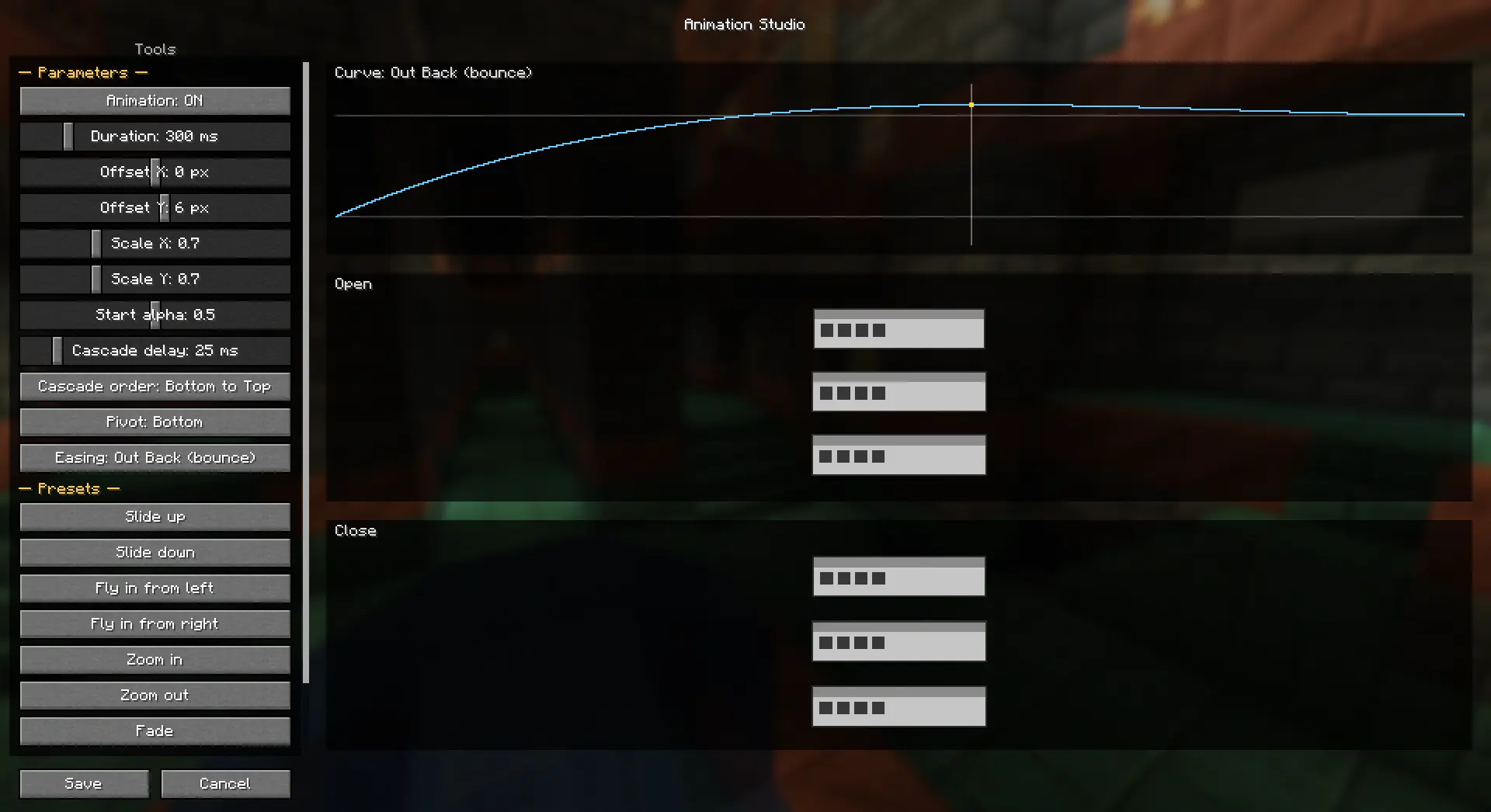
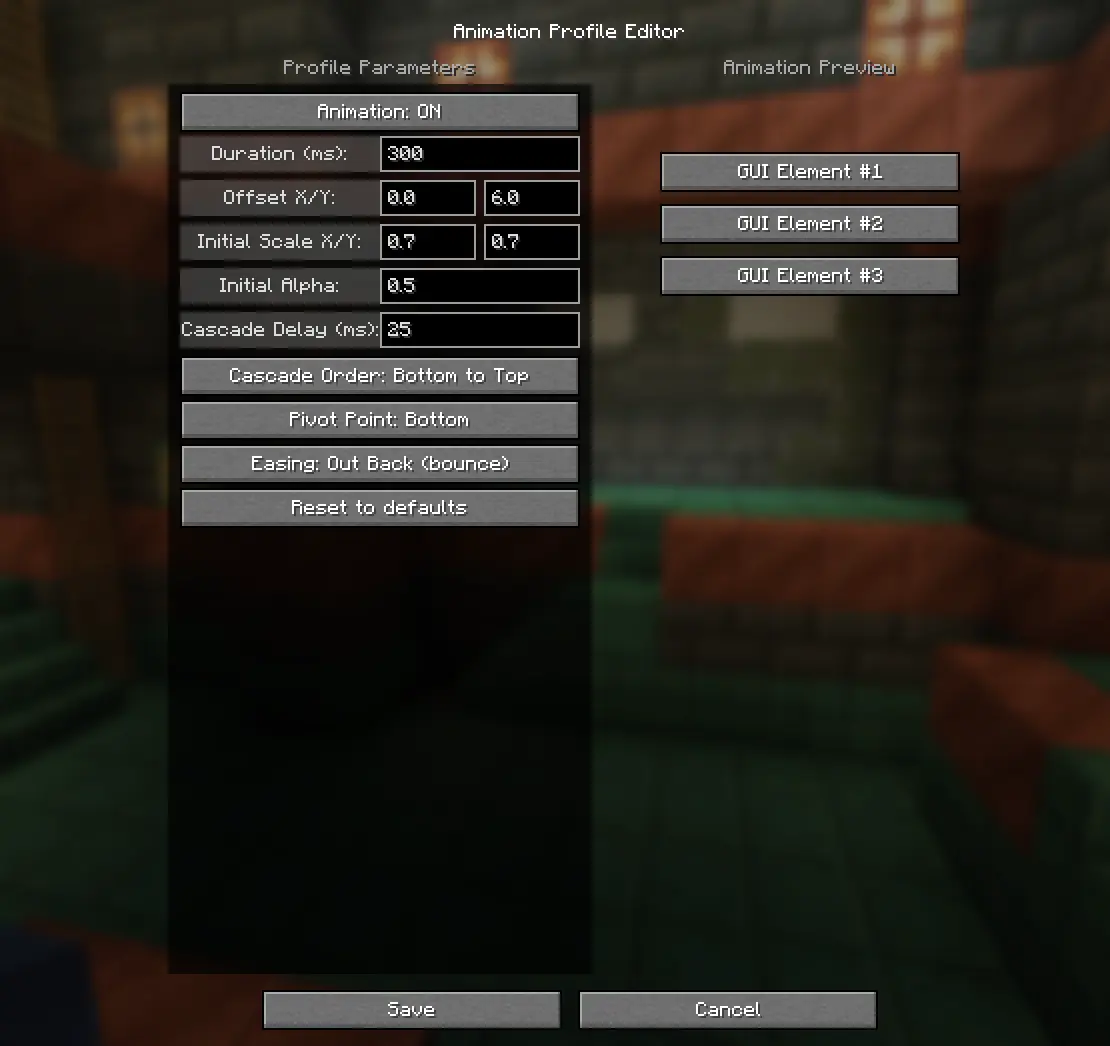
- **Live sliders** instead of typing numbers — grab one and the preview reacts instantly.
- **Ready-made presets**, one click each: Slide up / Slide down, Fly in from left / right, Zoom in / Zoom out, Fade, Pop. Good starting points you then tweak.
- **A visual easing curve** — a graph of the selected curve with a marker running along it, so you can *see* the timing instead of guessing from its name.
- **Two previews at once** — one shows how the UI **opens**, the other how it **closes**, both looping side by side. The preview elements are little UI panels, so they read like actual windows.
### 🎛 Profile Editor
The other editor is still here: every parameter on the left, a live preview on the right. Both editors drive the same animation, so use whichever you prefer.
What you can dial in: duration, offset X/Y, initial scale X/Y, initial alpha, cascade delay, cascade order (bottom-to-top / top-to-bottom / simultaneous), pivot point and easing. Nothing is written to your config until you hit **Save** — Cancel and Escape throw the edits away.
### 🧩 Presets and the editor work together
Previously, switching the editor **ON** took over completely and the preset picker stopped doing anything. Now they're two separate layers that **stack**:
- **Presets** animate the **whole screen** — the panel slides or scales in as one piece. This is your "UI animation".
- **The Studio / profile** animates the **buttons** on top — the per-button fade and cascade. This is your "button animation".
So you can slide the whole menu in *and* have the buttons cascade over it, at the same time. Changing a preset while the editor is on now works as you'd expect.
### ✅ Button text stays glued to its button
The headline fix. When buttons animated — cascaded in, faded, scaled on hover — the **text used to stay solid or lag behind** while the frame moved and faded without it. It turned out Minecraft draws button text in a way that quietly ignored the fade. ReAnimated now fades the text the same way it fades the frame, so **text and frame animate as one**.
### 📏 Long labels and the inventory character stay in place
A related sync fix. Anything Minecraft clips while drawing — a **long button label** that scrolls, or the **player model in your inventory** — used to be cut off by a clip box that stayed put while the content animated, so it looked like it was lagging. The clip now follows the animation.
### 🖼 List frames are left alone
The server list, world list, resource packs, the options list — those frames don't move, fade or cascade, and they don't take a step in the stagger either. Their scrolling and clipping are computed in screen coordinates, so animating them made the frame come apart from itself. Everything around them animates as usual.
### Known limitations
- Screen **titles and text fields** don't fade — the mod can't fade a screen as a whole without taking the blurred background down with it.
- The text fix covers real buttons. **Sliders** draw their label through a different path; if you spot one that doesn't fade in step, tell me and I'll cover it.
- Presets animate the screen, the profile animates buttons — so containers (chests and the like), which have no button widgets, animate via the **preset**.
- The separator lines above and below a list still move with the screen; only the frame itself is frozen.
---
## 🇷🇺 Русский
### 🎬 Студия анимаций
В настройках ReAnimated появилась кнопка **«Студия анимаций...»** — редактор, заточенный под возню:
- **Живые ползунки** вместо ввода чисел: тянешь — превью откликается сразу.
- **Готовые пресеты** в один клик: Выезд снизу / сверху, Влёт слева / справа, Приближение / Отдаление, Проявление, Хлопок. Хорошая отправная точка, дальше подкручиваешь.
- **Визуальная кривая easing** — график выбранной кривой с бегущим маркером: видно сам тайминг, а не только название.
- **Два превью сразу** — как UI **открывается** и как **закрывается**, рядом, оба зациклены. Элементы превью — мини UI-панели, читаются как настоящие окна.
### 🎛 Редактор профиля
Второй редактор на месте: слева все параметры, справа живое превью. Оба правят одну и ту же анимацию — пользуйся любым.
Что настраивается: длительность, смещение X/Y, начальный масштаб X/Y, начальная прозрачность, задержка каскада, порядок каскада (снизу вверх / сверху вниз / одновременно), точка масштаба и траектория. В конфиг ничего не пишется, пока не нажмёшь **Сохранить** — Отмена и Escape выбрасывают правки.
### 🧩 Пресеты и эдитор работают вместе
Раньше включение эдитора забирало всё себе, и селектор пресета переставал что-либо делать. Теперь это два отдельных слоя, которые **складываются**:
- **Пресеты** анимируют **весь экран** — панель выезжает или масштабируется единым куском. Это «анимация UI».
- **Студия / профиль** анимирует **кнопки** поверх — покнопочный фейд и каскад. Это «анимация кнопок».
Так можно выезжать всем меню *и* каскадить кнопки поверх — одновременно. Переключение пресета при включённом эдиторе теперь работает как ожидаешь.
### ✅ Текст кнопки держится за кнопку
Главный фикс. При анимации кнопок — каскад, фейд, увеличение под курсором — **текст оставался сплошным или отставал**, пока рамка ехала и гасла без него. Оказалось, Minecraft рисует текст кнопки так, что прозрачность тихо игнорировалась. Теперь мод гасит текст тем же путём, что и рамку, — **текст и рамка анимируются как одно целое**.
### 📏 Длинные лейблы и персонаж в инвентаре не разъезжаются
Смежный фикс синхрона. Всё, что Minecraft обрезает при отрисовке — **длинный прокручиваемый лейбл** кнопки или **модель игрока в инвентаре** — раньше резалось неподвижной областью обрезки, пока контент ехал, и выглядело как отставание. Теперь обрезка едет вместе с анимацией.
### 🖼 Фреймы списков не трогаются
Список серверов, миров, ресурспаков, список опций — эти фреймы не двигаются, не растворяются, не каскадируются и даже шага в каскаде не занимают. Их прокрутка и обрезка считаются в экранных координатах, поэтому при анимации фрейм разъезжался сам с собой. Всё вокруг анимируется как обычно.
### Известные ограничения
- **Заголовки экранов и текстовые поля** не растворяются — мод не может фейдить экран целиком, не утащив за собой размытый фон.
- Фикс текста покрывает настоящие кнопки. **Ползунки** рисуют лейбл иначе; если заметишь такой, что не гаснет в такт, скажи — добавлю.
- Пресеты анимируют экран, профиль — кнопки, поэтому контейнеры (сундуки и т.п.), где нет виджетов-кнопок, анимируются **пресетом**.
- Линии-разделители над и под списком всё ещё едут вместе с экраном; заморожен только сам фрейм.
---
### Загрузчики и версии / Loaders & versions
- **Fabric / Quilt**, Minecraft **1.21.1 – 1.21.11, 26.1, 26.2** (нужен Fabric API). / **Fabric / Quilt**, Minecraft **1.21.1 – 1.21.11, 26.1, 26.2** (requires Fabric API).
- Версия мода — `<версия Minecraft>+1.3.0`, например `1.21.1+1.3.0`. / Mod version is `<Minecraft version>+1.3.0`, e.g. `1.21.1+1.3.0`.
- Настройки в `config/reanimated.json`, профиль — в поле `profile`. Конфиг от 1.2 подхватывается как есть. / Settings live in `config/reanimated.json`, the profile in the `profile` field. Your 1.2 config carries over as-is.
*mod by @pycodder — https://modrinth.com/user/pycodder*
release
ReAnimated 1.3.0 (26.1.X)
1.3.020 июл. 2026 г.50Minecraft: 26.1, 26.1.1, 26.1.2fabric, quilt
Что нового
# ReAnimated 1.3.0 — Animation Studio, and everything animates together
The big one. Instead of only picking one of my presets, you can now **build the animation yourself** — with sliders, ready-made starting points and a live preview. And the thing that bugged people most is fixed: **button text no longer lags behind its button.**
---
## 🇬🇧 English
### 🎬 Animation Studio
A new **Animation Studio...** button in the ReAnimated settings. It's the editor made for tinkering:


- **Live sliders** instead of typing numbers — grab one and the preview reacts instantly.
- **Ready-made presets**, one click each: Slide up / Slide down, Fly in from left / right, Zoom in / Zoom out, Fade, Pop. Good starting points you then tweak.
- **A visual easing curve** — a graph of the selected curve with a marker running along it, so you can *see* the timing instead of guessing from its name.
- **Two previews at once** — one shows how the UI **opens**, the other how it **closes**, both looping side by side. The preview elements are little UI panels, so they read like actual windows.
### 🎛 Profile Editor
The other editor is still here: every parameter on the left, a live preview on the right. Both editors drive the same animation, so use whichever you prefer.
What you can dial in: duration, offset X/Y, initial scale X/Y, initial alpha, cascade delay, cascade order (bottom-to-top / top-to-bottom / simultaneous), pivot point and easing. Nothing is written to your config until you hit **Save** — Cancel and Escape throw the edits away.
### 🧩 Presets and the editor work together
Previously, switching the editor **ON** took over completely and the preset picker stopped doing anything. Now they're two separate layers that **stack**:
- **Presets** animate the **whole screen** — the panel slides or scales in as one piece. This is your "UI animation".
- **The Studio / profile** animates the **buttons** on top — the per-button fade and cascade. This is your "button animation".
So you can slide the whole menu in *and* have the buttons cascade over it, at the same time. Changing a preset while the editor is on now works as you'd expect.
### ✅ Button text stays glued to its button
The headline fix. When buttons animated — cascaded in, faded, scaled on hover — the **text used to stay solid or lag behind** while the frame moved and faded without it. It turned out Minecraft draws button text in a way that quietly ignored the fade. ReAnimated now fades the text the same way it fades the frame, so **text and frame animate as one**.
### 📏 Long labels and the inventory character stay in place
A related sync fix. Anything Minecraft clips while drawing — a **long button label** that scrolls, or the **player model in your inventory** — used to be cut off by a clip box that stayed put while the content animated, so it looked like it was lagging. The clip now follows the animation.
### 🖼 List frames are left alone
The server list, world list, resource packs, the options list — those frames don't move, fade or cascade, and they don't take a step in the stagger either. Their scrolling and clipping are computed in screen coordinates, so animating them made the frame come apart from itself. Everything around them animates as usual.
### Known limitations
- Screen **titles and text fields** don't fade — the mod can't fade a screen as a whole without taking the blurred background down with it.
- The text fix covers real buttons. **Sliders** draw their label through a different path; if you spot one that doesn't fade in step, tell me and I'll cover it.
- Presets animate the screen, the profile animates buttons — so containers (chests and the like), which have no button widgets, animate via the **preset**.
- The separator lines above and below a list still move with the screen; only the frame itself is frozen.
---
## 🇷🇺 Русский
### 🎬 Студия анимаций
В настройках ReAnimated появилась кнопка **«Студия анимаций...»** — редактор, заточенный под возню:
- **Живые ползунки** вместо ввода чисел: тянешь — превью откликается сразу.
- **Готовые пресеты** в один клик: Выезд снизу / сверху, Влёт слева / справа, Приближение / Отдаление, Проявление, Хлопок. Хорошая отправная точка, дальше подкручиваешь.
- **Визуальная кривая easing** — график выбранной кривой с бегущим маркером: видно сам тайминг, а не только название.
- **Два превью сразу** — как UI **открывается** и как **закрывается**, рядом, оба зациклены. Элементы превью — мини UI-панели, читаются как настоящие окна.
### 🎛 Редактор профиля
Второй редактор на месте: слева все параметры, справа живое превью. Оба правят одну и ту же анимацию — пользуйся любым.
Что настраивается: длительность, смещение X/Y, начальный масштаб X/Y, начальная прозрачность, задержка каскада, порядок каскада (снизу вверх / сверху вниз / одновременно), точка масштаба и траектория. В конфиг ничего не пишется, пока не нажмёшь **Сохранить** — Отмена и Escape выбрасывают правки.
### 🧩 Пресеты и эдитор работают вместе
Раньше включение эдитора забирало всё себе, и селектор пресета переставал что-либо делать. Теперь это два отдельных слоя, которые **складываются**:
- **Пресеты** анимируют **весь экран** — панель выезжает или масштабируется единым куском. Это «анимация UI».
- **Студия / профиль** анимирует **кнопки** поверх — покнопочный фейд и каскад. Это «анимация кнопок».
Так можно выезжать всем меню *и* каскадить кнопки поверх — одновременно. Переключение пресета при включённом эдиторе теперь работает как ожидаешь.
### ✅ Текст кнопки держится за кнопку
Главный фикс. При анимации кнопок — каскад, фейд, увеличение под курсором — **текст оставался сплошным или отставал**, пока рамка ехала и гасла без него. Оказалось, Minecraft рисует текст кнопки так, что прозрачность тихо игнорировалась. Теперь мод гасит текст тем же путём, что и рамку, — **текст и рамка анимируются как одно целое**.
### 📏 Длинные лейблы и персонаж в инвентаре не разъезжаются
Смежный фикс синхрона. Всё, что Minecraft обрезает при отрисовке — **длинный прокручиваемый лейбл** кнопки или **модель игрока в инвентаре** — раньше резалось неподвижной областью обрезки, пока контент ехал, и выглядело как отставание. Теперь обрезка едет вместе с анимацией.
### 🖼 Фреймы списков не трогаются
Список серверов, миров, ресурспаков, список опций — эти фреймы не двигаются, не растворяются, не каскадируются и даже шага в каскаде не занимают. Их прокрутка и обрезка считаются в экранных координатах, поэтому при анимации фрейм разъезжался сам с собой. Всё вокруг анимируется как обычно.
### Известные ограничения
- **Заголовки экранов и текстовые поля** не растворяются — мод не может фейдить экран целиком, не утащив за собой размытый фон.
- Фикс текста покрывает настоящие кнопки. **Ползунки** рисуют лейбл иначе; если заметишь такой, что не гаснет в такт, скажи — добавлю.
- Пресеты анимируют экран, профиль — кнопки, поэтому контейнеры (сундуки и т.п.), где нет виджетов-кнопок, анимируются **пресетом**.
- Линии-разделители над и под списком всё ещё едут вместе с экраном; заморожен только сам фрейм.
---
### Загрузчики и версии / Loaders & versions
- **Fabric / Quilt**, Minecraft **1.21.1 – 1.21.11, 26.1, 26.2** (нужен Fabric API). / **Fabric / Quilt**, Minecraft **1.21.1 – 1.21.11, 26.1, 26.2** (requires Fabric API).
- Версия мода — `<версия Minecraft>+1.3.0`, например `1.21.1+1.3.0`. / Mod version is `<Minecraft version>+1.3.0`, e.g. `1.21.1+1.3.0`.
- Настройки в `config/reanimated.json`, профиль — в поле `profile`. Конфиг от 1.2 подхватывается как есть. / Settings live in `config/reanimated.json`, the profile in the `profile` field. Your 1.2 config carries over as-is.
*mod by @pycodder — https://modrinth.com/user/pycodder*
release
ReAnimated 1.3.0 (1.21.11)
1.3.020 июл. 2026 г.77Minecraft: 1.21.11fabric, quilt
Что нового
# ReAnimated 1.3.0 — Animation Studio, and everything animates together
The big one. Instead of only picking one of my presets, you can now **build the animation yourself** — with sliders, ready-made starting points and a live preview. And the thing that bugged people most is fixed: **button text no longer lags behind its button.**
---
## 🇬🇧 English
### 🎬 Animation Studio
A new **Animation Studio...** button in the ReAnimated settings. It's the editor made for tinkering:


- **Live sliders** instead of typing numbers — grab one and the preview reacts instantly.
- **Ready-made presets**, one click each: Slide up / Slide down, Fly in from left / right, Zoom in / Zoom out, Fade, Pop. Good starting points you then tweak.
- **A visual easing curve** — a graph of the selected curve with a marker running along it, so you can *see* the timing instead of guessing from its name.
- **Two previews at once** — one shows how the UI **opens**, the other how it **closes**, both looping side by side. The preview elements are little UI panels, so they read like actual windows.
### 🎛 Profile Editor
The other editor is still here: every parameter on the left, a live preview on the right. Both editors drive the same animation, so use whichever you prefer.
What you can dial in: duration, offset X/Y, initial scale X/Y, initial alpha, cascade delay, cascade order (bottom-to-top / top-to-bottom / simultaneous), pivot point and easing. Nothing is written to your config until you hit **Save** — Cancel and Escape throw the edits away.
### 🧩 Presets and the editor work together
Previously, switching the editor **ON** took over completely and the preset picker stopped doing anything. Now they're two separate layers that **stack**:
- **Presets** animate the **whole screen** — the panel slides or scales in as one piece. This is your "UI animation".
- **The Studio / profile** animates the **buttons** on top — the per-button fade and cascade. This is your "button animation".
So you can slide the whole menu in *and* have the buttons cascade over it, at the same time. Changing a preset while the editor is on now works as you'd expect.
### ✅ Button text stays glued to its button
The headline fix. When buttons animated — cascaded in, faded, scaled on hover — the **text used to stay solid or lag behind** while the frame moved and faded without it. It turned out Minecraft draws button text in a way that quietly ignored the fade. ReAnimated now fades the text the same way it fades the frame, so **text and frame animate as one**.
### 📏 Long labels and the inventory character stay in place
A related sync fix. Anything Minecraft clips while drawing — a **long button label** that scrolls, or the **player model in your inventory** — used to be cut off by a clip box that stayed put while the content animated, so it looked like it was lagging. The clip now follows the animation.
### 🖼 List frames are left alone
The server list, world list, resource packs, the options list — those frames don't move, fade or cascade, and they don't take a step in the stagger either. Their scrolling and clipping are computed in screen coordinates, so animating them made the frame come apart from itself. Everything around them animates as usual.
### Known limitations
- Screen **titles and text fields** don't fade — the mod can't fade a screen as a whole without taking the blurred background down with it.
- The text fix covers real buttons. **Sliders** draw their label through a different path; if you spot one that doesn't fade in step, tell me and I'll cover it.
- Presets animate the screen, the profile animates buttons — so containers (chests and the like), which have no button widgets, animate via the **preset**.
- The separator lines above and below a list still move with the screen; only the frame itself is frozen.
---
## 🇷🇺 Русский
### 🎬 Студия анимаций
В настройках ReAnimated появилась кнопка **«Студия анимаций...»** — редактор, заточенный под возню:
- **Живые ползунки** вместо ввода чисел: тянешь — превью откликается сразу.
- **Готовые пресеты** в один клик: Выезд снизу / сверху, Влёт слева / справа, Приближение / Отдаление, Проявление, Хлопок. Хорошая отправная точка, дальше подкручиваешь.
- **Визуальная кривая easing** — график выбранной кривой с бегущим маркером: видно сам тайминг, а не только название.
- **Два превью сразу** — как UI **открывается** и как **закрывается**, рядом, оба зациклены. Элементы превью — мини UI-панели, читаются как настоящие окна.
### 🎛 Редактор профиля
Второй редактор на месте: слева все параметры, справа живое превью. Оба правят одну и ту же анимацию — пользуйся любым.
Что настраивается: длительность, смещение X/Y, начальный масштаб X/Y, начальная прозрачность, задержка каскада, порядок каскада (снизу вверх / сверху вниз / одновременно), точка масштаба и траектория. В конфиг ничего не пишется, пока не нажмёшь **Сохранить** — Отмена и Escape выбрасывают правки.
### 🧩 Пресеты и эдитор работают вместе
Раньше включение эдитора забирало всё себе, и селектор пресета переставал что-либо делать. Теперь это два отдельных слоя, которые **складываются**:
- **Пресеты** анимируют **весь экран** — панель выезжает или масштабируется единым куском. Это «анимация UI».
- **Студия / профиль** анимирует **кнопки** поверх — покнопочный фейд и каскад. Это «анимация кнопок».
Так можно выезжать всем меню *и* каскадить кнопки поверх — одновременно. Переключение пресета при включённом эдиторе теперь работает как ожидаешь.
### ✅ Текст кнопки держится за кнопку
Главный фикс. При анимации кнопок — каскад, фейд, увеличение под курсором — **текст оставался сплошным или отставал**, пока рамка ехала и гасла без него. Оказалось, Minecraft рисует текст кнопки так, что прозрачность тихо игнорировалась. Теперь мод гасит текст тем же путём, что и рамку, — **текст и рамка анимируются как одно целое**.
### 📏 Длинные лейблы и персонаж в инвентаре не разъезжаются
Смежный фикс синхрона. Всё, что Minecraft обрезает при отрисовке — **длинный прокручиваемый лейбл** кнопки или **модель игрока в инвентаре** — раньше резалось неподвижной областью обрезки, пока контент ехал, и выглядело как отставание. Теперь обрезка едет вместе с анимацией.
### 🖼 Фреймы списков не трогаются
Список серверов, миров, ресурспаков, список опций — эти фреймы не двигаются, не растворяются, не каскадируются и даже шага в каскаде не занимают. Их прокрутка и обрезка считаются в экранных координатах, поэтому при анимации фрейм разъезжался сам с собой. Всё вокруг анимируется как обычно.
### Известные ограничения
- **Заголовки экранов и текстовые поля** не растворяются — мод не может фейдить экран целиком, не утащив за собой размытый фон.
- Фикс текста покрывает настоящие кнопки. **Ползунки** рисуют лейбл иначе; если заметишь такой, что не гаснет в такт, скажи — добавлю.
- Пресеты анимируют экран, профиль — кнопки, поэтому контейнеры (сундуки и т.п.), где нет виджетов-кнопок, анимируются **пресетом**.
- Линии-разделители над и под списком всё ещё едут вместе с экраном; заморожен только сам фрейм.
---
### Загрузчики и версии / Loaders & versions
- **Fabric / Quilt**, Minecraft **1.21.1 – 1.21.11, 26.1, 26.2** (нужен Fabric API). / **Fabric / Quilt**, Minecraft **1.21.1 – 1.21.11, 26.1, 26.2** (requires Fabric API).
- Версия мода — `<версия Minecraft>+1.3.0`, например `1.21.1+1.3.0`. / Mod version is `<Minecraft version>+1.3.0`, e.g. `1.21.1+1.3.0`.
- Настройки в `config/reanimated.json`, профиль — в поле `profile`. Конфиг от 1.2 подхватывается как есть. / Settings live in `config/reanimated.json`, the profile in the `profile` field. Your 1.2 config carries over as-is.
*mod by @pycodder — https://modrinth.com/user/pycodder*
release
ReAnimated 1.3.0 (1.21.10)
1.3.020 июл. 2026 г.12Minecraft: 1.21.10fabric, quilt
Что нового
# ReAnimated 1.3.0 — Animation Studio, and everything animates together
The big one. Instead of only picking one of my presets, you can now **build the animation yourself** — with sliders, ready-made starting points and a live preview. And the thing that bugged people most is fixed: **button text no longer lags behind its button.**
---
## 🇬🇧 English
### 🎬 Animation Studio
A new **Animation Studio...** button in the ReAnimated settings. It's the editor made for tinkering:


- **Live sliders** instead of typing numbers — grab one and the preview reacts instantly.
- **Ready-made presets**, one click each: Slide up / Slide down, Fly in from left / right, Zoom in / Zoom out, Fade, Pop. Good starting points you then tweak.
- **A visual easing curve** — a graph of the selected curve with a marker running along it, so you can *see* the timing instead of guessing from its name.
- **Two previews at once** — one shows how the UI **opens**, the other how it **closes**, both looping side by side. The preview elements are little UI panels, so they read like actual windows.
### 🎛 Profile Editor
The other editor is still here: every parameter on the left, a live preview on the right. Both editors drive the same animation, so use whichever you prefer.
What you can dial in: duration, offset X/Y, initial scale X/Y, initial alpha, cascade delay, cascade order (bottom-to-top / top-to-bottom / simultaneous), pivot point and easing. Nothing is written to your config until you hit **Save** — Cancel and Escape throw the edits away.
### 🧩 Presets and the editor work together
Previously, switching the editor **ON** took over completely and the preset picker stopped doing anything. Now they're two separate layers that **stack**:
- **Presets** animate the **whole screen** — the panel slides or scales in as one piece. This is your "UI animation".
- **The Studio / profile** animates the **buttons** on top — the per-button fade and cascade. This is your "button animation".
So you can slide the whole menu in *and* have the buttons cascade over it, at the same time. Changing a preset while the editor is on now works as you'd expect.
### ✅ Button text stays glued to its button
The headline fix. When buttons animated — cascaded in, faded, scaled on hover — the **text used to stay solid or lag behind** while the frame moved and faded without it. It turned out Minecraft draws button text in a way that quietly ignored the fade. ReAnimated now fades the text the same way it fades the frame, so **text and frame animate as one**.
### 📏 Long labels and the inventory character stay in place
A related sync fix. Anything Minecraft clips while drawing — a **long button label** that scrolls, or the **player model in your inventory** — used to be cut off by a clip box that stayed put while the content animated, so it looked like it was lagging. The clip now follows the animation.
### 🖼 List frames are left alone
The server list, world list, resource packs, the options list — those frames don't move, fade or cascade, and they don't take a step in the stagger either. Their scrolling and clipping are computed in screen coordinates, so animating them made the frame come apart from itself. Everything around them animates as usual.
### Known limitations
- Screen **titles and text fields** don't fade — the mod can't fade a screen as a whole without taking the blurred background down with it.
- The text fix covers real buttons. **Sliders** draw their label through a different path; if you spot one that doesn't fade in step, tell me and I'll cover it.
- Presets animate the screen, the profile animates buttons — so containers (chests and the like), which have no button widgets, animate via the **preset**.
- The separator lines above and below a list still move with the screen; only the frame itself is frozen.
---
## 🇷🇺 Русский
### 🎬 Студия анимаций
В настройках ReAnimated появилась кнопка **«Студия анимаций...»** — редактор, заточенный под возню:
- **Живые ползунки** вместо ввода чисел: тянешь — превью откликается сразу.
- **Готовые пресеты** в один клик: Выезд снизу / сверху, Влёт слева / справа, Приближение / Отдаление, Проявление, Хлопок. Хорошая отправная точка, дальше подкручиваешь.
- **Визуальная кривая easing** — график выбранной кривой с бегущим маркером: видно сам тайминг, а не только название.
- **Два превью сразу** — как UI **открывается** и как **закрывается**, рядом, оба зациклены. Элементы превью — мини UI-панели, читаются как настоящие окна.
### 🎛 Редактор профиля
Второй редактор на месте: слева все параметры, справа живое превью. Оба правят одну и ту же анимацию — пользуйся любым.
Что настраивается: длительность, смещение X/Y, начальный масштаб X/Y, начальная прозрачность, задержка каскада, порядок каскада (снизу вверх / сверху вниз / одновременно), точка масштаба и траектория. В конфиг ничего не пишется, пока не нажмёшь **Сохранить** — Отмена и Escape выбрасывают правки.
### 🧩 Пресеты и эдитор работают вместе
Раньше включение эдитора забирало всё себе, и селектор пресета переставал что-либо делать. Теперь это два отдельных слоя, которые **складываются**:
- **Пресеты** анимируют **весь экран** — панель выезжает или масштабируется единым куском. Это «анимация UI».
- **Студия / профиль** анимирует **кнопки** поверх — покнопочный фейд и каскад. Это «анимация кнопок».
Так можно выезжать всем меню *и* каскадить кнопки поверх — одновременно. Переключение пресета при включённом эдиторе теперь работает как ожидаешь.
### ✅ Текст кнопки держится за кнопку
Главный фикс. При анимации кнопок — каскад, фейд, увеличение под курсором — **текст оставался сплошным или отставал**, пока рамка ехала и гасла без него. Оказалось, Minecraft рисует текст кнопки так, что прозрачность тихо игнорировалась. Теперь мод гасит текст тем же путём, что и рамку, — **текст и рамка анимируются как одно целое**.
### 📏 Длинные лейблы и персонаж в инвентаре не разъезжаются
Смежный фикс синхрона. Всё, что Minecraft обрезает при отрисовке — **длинный прокручиваемый лейбл** кнопки или **модель игрока в инвентаре** — раньше резалось неподвижной областью обрезки, пока контент ехал, и выглядело как отставание. Теперь обрезка едет вместе с анимацией.
### 🖼 Фреймы списков не трогаются
Список серверов, миров, ресурспаков, список опций — эти фреймы не двигаются, не растворяются, не каскадируются и даже шага в каскаде не занимают. Их прокрутка и обрезка считаются в экранных координатах, поэтому при анимации фрейм разъезжался сам с собой. Всё вокруг анимируется как обычно.
### Известные ограничения
- **Заголовки экранов и текстовые поля** не растворяются — мод не может фейдить экран целиком, не утащив за собой размытый фон.
- Фикс текста покрывает настоящие кнопки. **Ползунки** рисуют лейбл иначе; если заметишь такой, что не гаснет в такт, скажи — добавлю.
- Пресеты анимируют экран, профиль — кнопки, поэтому контейнеры (сундуки и т.п.), где нет виджетов-кнопок, анимируются **пресетом**.
- Линии-разделители над и под списком всё ещё едут вместе с экраном; заморожен только сам фрейм.
---
### Загрузчики и версии / Loaders & versions
- **Fabric / Quilt**, Minecraft **1.21.1 – 1.21.11, 26.1, 26.2** (нужен Fabric API). / **Fabric / Quilt**, Minecraft **1.21.1 – 1.21.11, 26.1, 26.2** (requires Fabric API).
- Версия мода — `<версия Minecraft>+1.3.0`, например `1.21.1+1.3.0`. / Mod version is `<Minecraft version>+1.3.0`, e.g. `1.21.1+1.3.0`.
- Настройки в `config/reanimated.json`, профиль — в поле `profile`. Конфиг от 1.2 подхватывается как есть. / Settings live in `config/reanimated.json`, the profile in the `profile` field. Your 1.2 config carries over as-is.
*mod by @pycodder — https://modrinth.com/user/pycodder*
release
ReAnimated 1.3.0 (1.21.9)
1.3.020 июл. 2026 г.3Minecraft: 1.21.9fabric, quilt
Что нового
# ReAnimated 1.3.0 — Animation Studio, and everything animates together
The big one. Instead of only picking one of my presets, you can now **build the animation yourself** — with sliders, ready-made starting points and a live preview. And the thing that bugged people most is fixed: **button text no longer lags behind its button.**
---
## 🇬🇧 English
### 🎬 Animation Studio
A new **Animation Studio...** button in the ReAnimated settings. It's the editor made for tinkering:


- **Live sliders** instead of typing numbers — grab one and the preview reacts instantly.
- **Ready-made presets**, one click each: Slide up / Slide down, Fly in from left / right, Zoom in / Zoom out, Fade, Pop. Good starting points you then tweak.
- **A visual easing curve** — a graph of the selected curve with a marker running along it, so you can *see* the timing instead of guessing from its name.
- **Two previews at once** — one shows how the UI **opens**, the other how it **closes**, both looping side by side. The preview elements are little UI panels, so they read like actual windows.
### 🎛 Profile Editor
The other editor is still here: every parameter on the left, a live preview on the right. Both editors drive the same animation, so use whichever you prefer.
What you can dial in: duration, offset X/Y, initial scale X/Y, initial alpha, cascade delay, cascade order (bottom-to-top / top-to-bottom / simultaneous), pivot point and easing. Nothing is written to your config until you hit **Save** — Cancel and Escape throw the edits away.
### 🧩 Presets and the editor work together
Previously, switching the editor **ON** took over completely and the preset picker stopped doing anything. Now they're two separate layers that **stack**:
- **Presets** animate the **whole screen** — the panel slides or scales in as one piece. This is your "UI animation".
- **The Studio / profile** animates the **buttons** on top — the per-button fade and cascade. This is your "button animation".
So you can slide the whole menu in *and* have the buttons cascade over it, at the same time. Changing a preset while the editor is on now works as you'd expect.
### ✅ Button text stays glued to its button
The headline fix. When buttons animated — cascaded in, faded, scaled on hover — the **text used to stay solid or lag behind** while the frame moved and faded without it. It turned out Minecraft draws button text in a way that quietly ignored the fade. ReAnimated now fades the text the same way it fades the frame, so **text and frame animate as one**.
### 📏 Long labels and the inventory character stay in place
A related sync fix. Anything Minecraft clips while drawing — a **long button label** that scrolls, or the **player model in your inventory** — used to be cut off by a clip box that stayed put while the content animated, so it looked like it was lagging. The clip now follows the animation.
### 🖼 List frames are left alone
The server list, world list, resource packs, the options list — those frames don't move, fade or cascade, and they don't take a step in the stagger either. Their scrolling and clipping are computed in screen coordinates, so animating them made the frame come apart from itself. Everything around them animates as usual.
### Known limitations
- Screen **titles and text fields** don't fade — the mod can't fade a screen as a whole without taking the blurred background down with it.
- The text fix covers real buttons. **Sliders** draw their label through a different path; if you spot one that doesn't fade in step, tell me and I'll cover it.
- Presets animate the screen, the profile animates buttons — so containers (chests and the like), which have no button widgets, animate via the **preset**.
- The separator lines above and below a list still move with the screen; only the frame itself is frozen.
---
## 🇷🇺 Русский
### 🎬 Студия анимаций
В настройках ReAnimated появилась кнопка **«Студия анимаций...»** — редактор, заточенный под возню:
- **Живые ползунки** вместо ввода чисел: тянешь — превью откликается сразу.
- **Готовые пресеты** в один клик: Выезд снизу / сверху, Влёт слева / справа, Приближение / Отдаление, Проявление, Хлопок. Хорошая отправная точка, дальше подкручиваешь.
- **Визуальная кривая easing** — график выбранной кривой с бегущим маркером: видно сам тайминг, а не только название.
- **Два превью сразу** — как UI **открывается** и как **закрывается**, рядом, оба зациклены. Элементы превью — мини UI-панели, читаются как настоящие окна.
### 🎛 Редактор профиля
Второй редактор на месте: слева все параметры, справа живое превью. Оба правят одну и ту же анимацию — пользуйся любым.
Что настраивается: длительность, смещение X/Y, начальный масштаб X/Y, начальная прозрачность, задержка каскада, порядок каскада (снизу вверх / сверху вниз / одновременно), точка масштаба и траектория. В конфиг ничего не пишется, пока не нажмёшь **Сохранить** — Отмена и Escape выбрасывают правки.
### 🧩 Пресеты и эдитор работают вместе
Раньше включение эдитора забирало всё себе, и селектор пресета переставал что-либо делать. Теперь это два отдельных слоя, которые **складываются**:
- **Пресеты** анимируют **весь экран** — панель выезжает или масштабируется единым куском. Это «анимация UI».
- **Студия / профиль** анимирует **кнопки** поверх — покнопочный фейд и каскад. Это «анимация кнопок».
Так можно выезжать всем меню *и* каскадить кнопки поверх — одновременно. Переключение пресета при включённом эдиторе теперь работает как ожидаешь.
### ✅ Текст кнопки держится за кнопку
Главный фикс. При анимации кнопок — каскад, фейд, увеличение под курсором — **текст оставался сплошным или отставал**, пока рамка ехала и гасла без него. Оказалось, Minecraft рисует текст кнопки так, что прозрачность тихо игнорировалась. Теперь мод гасит текст тем же путём, что и рамку, — **текст и рамка анимируются как одно целое**.
### 📏 Длинные лейблы и персонаж в инвентаре не разъезжаются
Смежный фикс синхрона. Всё, что Minecraft обрезает при отрисовке — **длинный прокручиваемый лейбл** кнопки или **модель игрока в инвентаре** — раньше резалось неподвижной областью обрезки, пока контент ехал, и выглядело как отставание. Теперь обрезка едет вместе с анимацией.
### 🖼 Фреймы списков не трогаются
Список серверов, миров, ресурспаков, список опций — эти фреймы не двигаются, не растворяются, не каскадируются и даже шага в каскаде не занимают. Их прокрутка и обрезка считаются в экранных координатах, поэтому при анимации фрейм разъезжался сам с собой. Всё вокруг анимируется как обычно.
### Известные ограничения
- **Заголовки экранов и текстовые поля** не растворяются — мод не может фейдить экран целиком, не утащив за собой размытый фон.
- Фикс текста покрывает настоящие кнопки. **Ползунки** рисуют лейбл иначе; если заметишь такой, что не гаснет в такт, скажи — добавлю.
- Пресеты анимируют экран, профиль — кнопки, поэтому контейнеры (сундуки и т.п.), где нет виджетов-кнопок, анимируются **пресетом**.
- Линии-разделители над и под списком всё ещё едут вместе с экраном; заморожен только сам фрейм.
---
### Загрузчики и версии / Loaders & versions
- **Fabric / Quilt**, Minecraft **1.21.1 – 1.21.11, 26.1, 26.2** (нужен Fabric API). / **Fabric / Quilt**, Minecraft **1.21.1 – 1.21.11, 26.1, 26.2** (requires Fabric API).
- Версия мода — `<версия Minecraft>+1.3.0`, например `1.21.1+1.3.0`. / Mod version is `<Minecraft version>+1.3.0`, e.g. `1.21.1+1.3.0`.
- Настройки в `config/reanimated.json`, профиль — в поле `profile`. Конфиг от 1.2 подхватывается как есть. / Settings live in `config/reanimated.json`, the profile in the `profile` field. Your 1.2 config carries over as-is.
*mod by @pycodder — https://modrinth.com/user/pycodder*
release
ReAnimated 1.3.0 (1.21.8)
1.3.020 июл. 2026 г.6Minecraft: 1.21.8fabric, quilt
Что нового
# ReAnimated 1.3.0 — Animation Studio, and everything animates together
The big one. Instead of only picking one of my presets, you can now **build the animation yourself** — with sliders, ready-made starting points and a live preview. And the thing that bugged people most is fixed: **button text no longer lags behind its button.**
---
## 🇬🇧 English
### 🎬 Animation Studio
A new **Animation Studio...** button in the ReAnimated settings. It's the editor made for tinkering:


- **Live sliders** instead of typing numbers — grab one and the preview reacts instantly.
- **Ready-made presets**, one click each: Slide up / Slide down, Fly in from left / right, Zoom in / Zoom out, Fade, Pop. Good starting points you then tweak.
- **A visual easing curve** — a graph of the selected curve with a marker running along it, so you can *see* the timing instead of guessing from its name.
- **Two previews at once** — one shows how the UI **opens**, the other how it **closes**, both looping side by side. The preview elements are little UI panels, so they read like actual windows.
### 🎛 Profile Editor
The other editor is still here: every parameter on the left, a live preview on the right. Both editors drive the same animation, so use whichever you prefer.
What you can dial in: duration, offset X/Y, initial scale X/Y, initial alpha, cascade delay, cascade order (bottom-to-top / top-to-bottom / simultaneous), pivot point and easing. Nothing is written to your config until you hit **Save** — Cancel and Escape throw the edits away.
### 🧩 Presets and the editor work together
Previously, switching the editor **ON** took over completely and the preset picker stopped doing anything. Now they're two separate layers that **stack**:
- **Presets** animate the **whole screen** — the panel slides or scales in as one piece. This is your "UI animation".
- **The Studio / profile** animates the **buttons** on top — the per-button fade and cascade. This is your "button animation".
So you can slide the whole menu in *and* have the buttons cascade over it, at the same time. Changing a preset while the editor is on now works as you'd expect.
### ✅ Button text stays glued to its button
The headline fix. When buttons animated — cascaded in, faded, scaled on hover — the **text used to stay solid or lag behind** while the frame moved and faded without it. It turned out Minecraft draws button text in a way that quietly ignored the fade. ReAnimated now fades the text the same way it fades the frame, so **text and frame animate as one**.
### 📏 Long labels and the inventory character stay in place
A related sync fix. Anything Minecraft clips while drawing — a **long button label** that scrolls, or the **player model in your inventory** — used to be cut off by a clip box that stayed put while the content animated, so it looked like it was lagging. The clip now follows the animation.
### 🖼 List frames are left alone
The server list, world list, resource packs, the options list — those frames don't move, fade or cascade, and they don't take a step in the stagger either. Their scrolling and clipping are computed in screen coordinates, so animating them made the frame come apart from itself. Everything around them animates as usual.
### Known limitations
- Screen **titles and text fields** don't fade — the mod can't fade a screen as a whole without taking the blurred background down with it.
- The text fix covers real buttons. **Sliders** draw their label through a different path; if you spot one that doesn't fade in step, tell me and I'll cover it.
- Presets animate the screen, the profile animates buttons — so containers (chests and the like), which have no button widgets, animate via the **preset**.
- The separator lines above and below a list still move with the screen; only the frame itself is frozen.
---
## 🇷🇺 Русский
### 🎬 Студия анимаций
В настройках ReAnimated появилась кнопка **«Студия анимаций...»** — редактор, заточенный под возню:
- **Живые ползунки** вместо ввода чисел: тянешь — превью откликается сразу.
- **Готовые пресеты** в один клик: Выезд снизу / сверху, Влёт слева / справа, Приближение / Отдаление, Проявление, Хлопок. Хорошая отправная точка, дальше подкручиваешь.
- **Визуальная кривая easing** — график выбранной кривой с бегущим маркером: видно сам тайминг, а не только название.
- **Два превью сразу** — как UI **открывается** и как **закрывается**, рядом, оба зациклены. Элементы превью — мини UI-панели, читаются как настоящие окна.
### 🎛 Редактор профиля
Второй редактор на месте: слева все параметры, справа живое превью. Оба правят одну и ту же анимацию — пользуйся любым.
Что настраивается: длительность, смещение X/Y, начальный масштаб X/Y, начальная прозрачность, задержка каскада, порядок каскада (снизу вверх / сверху вниз / одновременно), точка масштаба и траектория. В конфиг ничего не пишется, пока не нажмёшь **Сохранить** — Отмена и Escape выбрасывают правки.
### 🧩 Пресеты и эдитор работают вместе
Раньше включение эдитора забирало всё себе, и селектор пресета переставал что-либо делать. Теперь это два отдельных слоя, которые **складываются**:
- **Пресеты** анимируют **весь экран** — панель выезжает или масштабируется единым куском. Это «анимация UI».
- **Студия / профиль** анимирует **кнопки** поверх — покнопочный фейд и каскад. Это «анимация кнопок».
Так можно выезжать всем меню *и* каскадить кнопки поверх — одновременно. Переключение пресета при включённом эдиторе теперь работает как ожидаешь.
### ✅ Текст кнопки держится за кнопку
Главный фикс. При анимации кнопок — каскад, фейд, увеличение под курсором — **текст оставался сплошным или отставал**, пока рамка ехала и гасла без него. Оказалось, Minecraft рисует текст кнопки так, что прозрачность тихо игнорировалась. Теперь мод гасит текст тем же путём, что и рамку, — **текст и рамка анимируются как одно целое**.
### 📏 Длинные лейблы и персонаж в инвентаре не разъезжаются
Смежный фикс синхрона. Всё, что Minecraft обрезает при отрисовке — **длинный прокручиваемый лейбл** кнопки или **модель игрока в инвентаре** — раньше резалось неподвижной областью обрезки, пока контент ехал, и выглядело как отставание. Теперь обрезка едет вместе с анимацией.
### 🖼 Фреймы списков не трогаются
Список серверов, миров, ресурспаков, список опций — эти фреймы не двигаются, не растворяются, не каскадируются и даже шага в каскаде не занимают. Их прокрутка и обрезка считаются в экранных координатах, поэтому при анимации фрейм разъезжался сам с собой. Всё вокруг анимируется как обычно.
### Известные ограничения
- **Заголовки экранов и текстовые поля** не растворяются — мод не может фейдить экран целиком, не утащив за собой размытый фон.
- Фикс текста покрывает настоящие кнопки. **Ползунки** рисуют лейбл иначе; если заметишь такой, что не гаснет в такт, скажи — добавлю.
- Пресеты анимируют экран, профиль — кнопки, поэтому контейнеры (сундуки и т.п.), где нет виджетов-кнопок, анимируются **пресетом**.
- Линии-разделители над и под списком всё ещё едут вместе с экраном; заморожен только сам фрейм.
---
### Загрузчики и версии / Loaders & versions
- **Fabric / Quilt**, Minecraft **1.21.1 – 1.21.11, 26.1, 26.2** (нужен Fabric API). / **Fabric / Quilt**, Minecraft **1.21.1 – 1.21.11, 26.1, 26.2** (requires Fabric API).
- Версия мода — `<версия Minecraft>+1.3.0`, например `1.21.1+1.3.0`. / Mod version is `<Minecraft version>+1.3.0`, e.g. `1.21.1+1.3.0`.
- Настройки в `config/reanimated.json`, профиль — в поле `profile`. Конфиг от 1.2 подхватывается как есть. / Settings live in `config/reanimated.json`, the profile in the `profile` field. Your 1.2 config carries over as-is.
*mod by @pycodder — https://modrinth.com/user/pycodder*
release
ReAnimated 1.3.0 (1.21.7)
1.3.020 июл. 2026 г.7Minecraft: 1.21.7fabric, quilt
Что нового
# ReAnimated 1.3.0 — Animation Studio, and everything animates together
The big one. Instead of only picking one of my presets, you can now **build the animation yourself** — with sliders, ready-made starting points and a live preview. And the thing that bugged people most is fixed: **button text no longer lags behind its button.**
---
## 🇬🇧 English
### 🎬 Animation Studio
A new **Animation Studio...** button in the ReAnimated settings. It's the editor made for tinkering:


- **Live sliders** instead of typing numbers — grab one and the preview reacts instantly.
- **Ready-made presets**, one click each: Slide up / Slide down, Fly in from left / right, Zoom in / Zoom out, Fade, Pop. Good starting points you then tweak.
- **A visual easing curve** — a graph of the selected curve with a marker running along it, so you can *see* the timing instead of guessing from its name.
- **Two previews at once** — one shows how the UI **opens**, the other how it **closes**, both looping side by side. The preview elements are little UI panels, so they read like actual windows.
### 🎛 Profile Editor
The other editor is still here: every parameter on the left, a live preview on the right. Both editors drive the same animation, so use whichever you prefer.
What you can dial in: duration, offset X/Y, initial scale X/Y, initial alpha, cascade delay, cascade order (bottom-to-top / top-to-bottom / simultaneous), pivot point and easing. Nothing is written to your config until you hit **Save** — Cancel and Escape throw the edits away.
### 🧩 Presets and the editor work together
Previously, switching the editor **ON** took over completely and the preset picker stopped doing anything. Now they're two separate layers that **stack**:
- **Presets** animate the **whole screen** — the panel slides or scales in as one piece. This is your "UI animation".
- **The Studio / profile** animates the **buttons** on top — the per-button fade and cascade. This is your "button animation".
So you can slide the whole menu in *and* have the buttons cascade over it, at the same time. Changing a preset while the editor is on now works as you'd expect.
### ✅ Button text stays glued to its button
The headline fix. When buttons animated — cascaded in, faded, scaled on hover — the **text used to stay solid or lag behind** while the frame moved and faded without it. It turned out Minecraft draws button text in a way that quietly ignored the fade. ReAnimated now fades the text the same way it fades the frame, so **text and frame animate as one**.
### 📏 Long labels and the inventory character stay in place
A related sync fix. Anything Minecraft clips while drawing — a **long button label** that scrolls, or the **player model in your inventory** — used to be cut off by a clip box that stayed put while the content animated, so it looked like it was lagging. The clip now follows the animation.
### 🖼 List frames are left alone
The server list, world list, resource packs, the options list — those frames don't move, fade or cascade, and they don't take a step in the stagger either. Their scrolling and clipping are computed in screen coordinates, so animating them made the frame come apart from itself. Everything around them animates as usual.
### Known limitations
- Screen **titles and text fields** don't fade — the mod can't fade a screen as a whole without taking the blurred background down with it.
- The text fix covers real buttons. **Sliders** draw their label through a different path; if you spot one that doesn't fade in step, tell me and I'll cover it.
- Presets animate the screen, the profile animates buttons — so containers (chests and the like), which have no button widgets, animate via the **preset**.
- The separator lines above and below a list still move with the screen; only the frame itself is frozen.
---
## 🇷🇺 Русский
### 🎬 Студия анимаций
В настройках ReAnimated появилась кнопка **«Студия анимаций...»** — редактор, заточенный под возню:
- **Живые ползунки** вместо ввода чисел: тянешь — превью откликается сразу.
- **Готовые пресеты** в один клик: Выезд снизу / сверху, Влёт слева / справа, Приближение / Отдаление, Проявление, Хлопок. Хорошая отправная точка, дальше подкручиваешь.
- **Визуальная кривая easing** — график выбранной кривой с бегущим маркером: видно сам тайминг, а не только название.
- **Два превью сразу** — как UI **открывается** и как **закрывается**, рядом, оба зациклены. Элементы превью — мини UI-панели, читаются как настоящие окна.
### 🎛 Редактор профиля
Второй редактор на месте: слева все параметры, справа живое превью. Оба правят одну и ту же анимацию — пользуйся любым.
Что настраивается: длительность, смещение X/Y, начальный масштаб X/Y, начальная прозрачность, задержка каскада, порядок каскада (снизу вверх / сверху вниз / одновременно), точка масштаба и траектория. В конфиг ничего не пишется, пока не нажмёшь **Сохранить** — Отмена и Escape выбрасывают правки.
### 🧩 Пресеты и эдитор работают вместе
Раньше включение эдитора забирало всё себе, и селектор пресета переставал что-либо делать. Теперь это два отдельных слоя, которые **складываются**:
- **Пресеты** анимируют **весь экран** — панель выезжает или масштабируется единым куском. Это «анимация UI».
- **Студия / профиль** анимирует **кнопки** поверх — покнопочный фейд и каскад. Это «анимация кнопок».
Так можно выезжать всем меню *и* каскадить кнопки поверх — одновременно. Переключение пресета при включённом эдиторе теперь работает как ожидаешь.
### ✅ Текст кнопки держится за кнопку
Главный фикс. При анимации кнопок — каскад, фейд, увеличение под курсором — **текст оставался сплошным или отставал**, пока рамка ехала и гасла без него. Оказалось, Minecraft рисует текст кнопки так, что прозрачность тихо игнорировалась. Теперь мод гасит текст тем же путём, что и рамку, — **текст и рамка анимируются как одно целое**.
### 📏 Длинные лейблы и персонаж в инвентаре не разъезжаются
Смежный фикс синхрона. Всё, что Minecraft обрезает при отрисовке — **длинный прокручиваемый лейбл** кнопки или **модель игрока в инвентаре** — раньше резалось неподвижной областью обрезки, пока контент ехал, и выглядело как отставание. Теперь обрезка едет вместе с анимацией.
### 🖼 Фреймы списков не трогаются
Список серверов, миров, ресурспаков, список опций — эти фреймы не двигаются, не растворяются, не каскадируются и даже шага в каскаде не занимают. Их прокрутка и обрезка считаются в экранных координатах, поэтому при анимации фрейм разъезжался сам с собой. Всё вокруг анимируется как обычно.
### Известные ограничения
- **Заголовки экранов и текстовые поля** не растворяются — мод не может фейдить экран целиком, не утащив за собой размытый фон.
- Фикс текста покрывает настоящие кнопки. **Ползунки** рисуют лейбл иначе; если заметишь такой, что не гаснет в такт, скажи — добавлю.
- Пресеты анимируют экран, профиль — кнопки, поэтому контейнеры (сундуки и т.п.), где нет виджетов-кнопок, анимируются **пресетом**.
- Линии-разделители над и под списком всё ещё едут вместе с экраном; заморожен только сам фрейм.
---
### Загрузчики и версии / Loaders & versions
- **Fabric / Quilt**, Minecraft **1.21.1 – 1.21.11, 26.1, 26.2** (нужен Fabric API). / **Fabric / Quilt**, Minecraft **1.21.1 – 1.21.11, 26.1, 26.2** (requires Fabric API).
- Версия мода — `<версия Minecraft>+1.3.0`, например `1.21.1+1.3.0`. / Mod version is `<Minecraft version>+1.3.0`, e.g. `1.21.1+1.3.0`.
- Настройки в `config/reanimated.json`, профиль — в поле `profile`. Конфиг от 1.2 подхватывается как есть. / Settings live in `config/reanimated.json`, the profile in the `profile` field. Your 1.2 config carries over as-is.
*mod by @pycodder — https://modrinth.com/user/pycodder*
release
ReAnimated 1.3.0 (1.21.6)
1.3.020 июл. 2026 г.3Minecraft: 1.21.6fabric, quilt
Что нового
# ReAnimated 1.3.0 — Animation Studio, and everything animates together
The big one. Instead of only picking one of my presets, you can now **build the animation yourself** — with sliders, ready-made starting points and a live preview. And the thing that bugged people most is fixed: **button text no longer lags behind its button.**
---
## 🇬🇧 English
### 🎬 Animation Studio
A new **Animation Studio...** button in the ReAnimated settings. It's the editor made for tinkering:


- **Live sliders** instead of typing numbers — grab one and the preview reacts instantly.
- **Ready-made presets**, one click each: Slide up / Slide down, Fly in from left / right, Zoom in / Zoom out, Fade, Pop. Good starting points you then tweak.
- **A visual easing curve** — a graph of the selected curve with a marker running along it, so you can *see* the timing instead of guessing from its name.
- **Two previews at once** — one shows how the UI **opens**, the other how it **closes**, both looping side by side. The preview elements are little UI panels, so they read like actual windows.
### 🎛 Profile Editor
The other editor is still here: every parameter on the left, a live preview on the right. Both editors drive the same animation, so use whichever you prefer.
What you can dial in: duration, offset X/Y, initial scale X/Y, initial alpha, cascade delay, cascade order (bottom-to-top / top-to-bottom / simultaneous), pivot point and easing. Nothing is written to your config until you hit **Save** — Cancel and Escape throw the edits away.
### 🧩 Presets and the editor work together
Previously, switching the editor **ON** took over completely and the preset picker stopped doing anything. Now they're two separate layers that **stack**:
- **Presets** animate the **whole screen** — the panel slides or scales in as one piece. This is your "UI animation".
- **The Studio / profile** animates the **buttons** on top — the per-button fade and cascade. This is your "button animation".
So you can slide the whole menu in *and* have the buttons cascade over it, at the same time. Changing a preset while the editor is on now works as you'd expect.
### ✅ Button text stays glued to its button
The headline fix. When buttons animated — cascaded in, faded, scaled on hover — the **text used to stay solid or lag behind** while the frame moved and faded without it. It turned out Minecraft draws button text in a way that quietly ignored the fade. ReAnimated now fades the text the same way it fades the frame, so **text and frame animate as one**.
### 📏 Long labels and the inventory character stay in place
A related sync fix. Anything Minecraft clips while drawing — a **long button label** that scrolls, or the **player model in your inventory** — used to be cut off by a clip box that stayed put while the content animated, so it looked like it was lagging. The clip now follows the animation.
### 🖼 List frames are left alone
The server list, world list, resource packs, the options list — those frames don't move, fade or cascade, and they don't take a step in the stagger either. Their scrolling and clipping are computed in screen coordinates, so animating them made the frame come apart from itself. Everything around them animates as usual.
### Known limitations
- Screen **titles and text fields** don't fade — the mod can't fade a screen as a whole without taking the blurred background down with it.
- The text fix covers real buttons. **Sliders** draw their label through a different path; if you spot one that doesn't fade in step, tell me and I'll cover it.
- Presets animate the screen, the profile animates buttons — so containers (chests and the like), which have no button widgets, animate via the **preset**.
- The separator lines above and below a list still move with the screen; only the frame itself is frozen.
---
## 🇷🇺 Русский
### 🎬 Студия анимаций
В настройках ReAnimated появилась кнопка **«Студия анимаций...»** — редактор, заточенный под возню:
- **Живые ползунки** вместо ввода чисел: тянешь — превью откликается сразу.
- **Готовые пресеты** в один клик: Выезд снизу / сверху, Влёт слева / справа, Приближение / Отдаление, Проявление, Хлопок. Хорошая отправная точка, дальше подкручиваешь.
- **Визуальная кривая easing** — график выбранной кривой с бегущим маркером: видно сам тайминг, а не только название.
- **Два превью сразу** — как UI **открывается** и как **закрывается**, рядом, оба зациклены. Элементы превью — мини UI-панели, читаются как настоящие окна.
### 🎛 Редактор профиля
Второй редактор на месте: слева все параметры, справа живое превью. Оба правят одну и ту же анимацию — пользуйся любым.
Что настраивается: длительность, смещение X/Y, начальный масштаб X/Y, начальная прозрачность, задержка каскада, порядок каскада (снизу вверх / сверху вниз / одновременно), точка масштаба и траектория. В конфиг ничего не пишется, пока не нажмёшь **Сохранить** — Отмена и Escape выбрасывают правки.
### 🧩 Пресеты и эдитор работают вместе
Раньше включение эдитора забирало всё себе, и селектор пресета переставал что-либо делать. Теперь это два отдельных слоя, которые **складываются**:
- **Пресеты** анимируют **весь экран** — панель выезжает или масштабируется единым куском. Это «анимация UI».
- **Студия / профиль** анимирует **кнопки** поверх — покнопочный фейд и каскад. Это «анимация кнопок».
Так можно выезжать всем меню *и* каскадить кнопки поверх — одновременно. Переключение пресета при включённом эдиторе теперь работает как ожидаешь.
### ✅ Текст кнопки держится за кнопку
Главный фикс. При анимации кнопок — каскад, фейд, увеличение под курсором — **текст оставался сплошным или отставал**, пока рамка ехала и гасла без него. Оказалось, Minecraft рисует текст кнопки так, что прозрачность тихо игнорировалась. Теперь мод гасит текст тем же путём, что и рамку, — **текст и рамка анимируются как одно целое**.
### 📏 Длинные лейблы и персонаж в инвентаре не разъезжаются
Смежный фикс синхрона. Всё, что Minecraft обрезает при отрисовке — **длинный прокручиваемый лейбл** кнопки или **модель игрока в инвентаре** — раньше резалось неподвижной областью обрезки, пока контент ехал, и выглядело как отставание. Теперь обрезка едет вместе с анимацией.
### 🖼 Фреймы списков не трогаются
Список серверов, миров, ресурспаков, список опций — эти фреймы не двигаются, не растворяются, не каскадируются и даже шага в каскаде не занимают. Их прокрутка и обрезка считаются в экранных координатах, поэтому при анимации фрейм разъезжался сам с собой. Всё вокруг анимируется как обычно.
### Известные ограничения
- **Заголовки экранов и текстовые поля** не растворяются — мод не может фейдить экран целиком, не утащив за собой размытый фон.
- Фикс текста покрывает настоящие кнопки. **Ползунки** рисуют лейбл иначе; если заметишь такой, что не гаснет в такт, скажи — добавлю.
- Пресеты анимируют экран, профиль — кнопки, поэтому контейнеры (сундуки и т.п.), где нет виджетов-кнопок, анимируются **пресетом**.
- Линии-разделители над и под списком всё ещё едут вместе с экраном; заморожен только сам фрейм.
---
### Загрузчики и версии / Loaders & versions
- **Fabric / Quilt**, Minecraft **1.21.1 – 1.21.11, 26.1, 26.2** (нужен Fabric API). / **Fabric / Quilt**, Minecraft **1.21.1 – 1.21.11, 26.1, 26.2** (requires Fabric API).
- Версия мода — `<версия Minecraft>+1.3.0`, например `1.21.1+1.3.0`. / Mod version is `<Minecraft version>+1.3.0`, e.g. `1.21.1+1.3.0`.
- Настройки в `config/reanimated.json`, профиль — в поле `profile`. Конфиг от 1.2 подхватывается как есть. / Settings live in `config/reanimated.json`, the profile in the `profile` field. Your 1.2 config carries over as-is.
*mod by @pycodder — https://modrinth.com/user/pycodder*
release
ReAnimated 1.3.0 (1.21.5)
1.3.020 июл. 2026 г.5Minecraft: 1.21.5fabric, quilt
Что нового
# ReAnimated 1.3.0 — Animation Studio, and everything animates together
The big one. Instead of only picking one of my presets, you can now **build the animation yourself** — with sliders, ready-made starting points and a live preview. And the thing that bugged people most is fixed: **button text no longer lags behind its button.**
---
## 🇬🇧 English
### 🎬 Animation Studio
A new **Animation Studio...** button in the ReAnimated settings. It's the editor made for tinkering:


- **Live sliders** instead of typing numbers — grab one and the preview reacts instantly.
- **Ready-made presets**, one click each: Slide up / Slide down, Fly in from left / right, Zoom in / Zoom out, Fade, Pop. Good starting points you then tweak.
- **A visual easing curve** — a graph of the selected curve with a marker running along it, so you can *see* the timing instead of guessing from its name.
- **Two previews at once** — one shows how the UI **opens**, the other how it **closes**, both looping side by side. The preview elements are little UI panels, so they read like actual windows.
### 🎛 Profile Editor
The other editor is still here: every parameter on the left, a live preview on the right. Both editors drive the same animation, so use whichever you prefer.
What you can dial in: duration, offset X/Y, initial scale X/Y, initial alpha, cascade delay, cascade order (bottom-to-top / top-to-bottom / simultaneous), pivot point and easing. Nothing is written to your config until you hit **Save** — Cancel and Escape throw the edits away.
### 🧩 Presets and the editor work together
Previously, switching the editor **ON** took over completely and the preset picker stopped doing anything. Now they're two separate layers that **stack**:
- **Presets** animate the **whole screen** — the panel slides or scales in as one piece. This is your "UI animation".
- **The Studio / profile** animates the **buttons** on top — the per-button fade and cascade. This is your "button animation".
So you can slide the whole menu in *and* have the buttons cascade over it, at the same time. Changing a preset while the editor is on now works as you'd expect.
### ✅ Button text stays glued to its button
The headline fix. When buttons animated — cascaded in, faded, scaled on hover — the **text used to stay solid or lag behind** while the frame moved and faded without it. It turned out Minecraft draws button text in a way that quietly ignored the fade. ReAnimated now fades the text the same way it fades the frame, so **text and frame animate as one**.
### 📏 Long labels and the inventory character stay in place
A related sync fix. Anything Minecraft clips while drawing — a **long button label** that scrolls, or the **player model in your inventory** — used to be cut off by a clip box that stayed put while the content animated, so it looked like it was lagging. The clip now follows the animation.
### 🖼 List frames are left alone
The server list, world list, resource packs, the options list — those frames don't move, fade or cascade, and they don't take a step in the stagger either. Their scrolling and clipping are computed in screen coordinates, so animating them made the frame come apart from itself. Everything around them animates as usual.
### Known limitations
- Screen **titles and text fields** don't fade — the mod can't fade a screen as a whole without taking the blurred background down with it.
- The text fix covers real buttons. **Sliders** draw their label through a different path; if you spot one that doesn't fade in step, tell me and I'll cover it.
- Presets animate the screen, the profile animates buttons — so containers (chests and the like), which have no button widgets, animate via the **preset**.
- The separator lines above and below a list still move with the screen; only the frame itself is frozen.
---
## 🇷🇺 Русский
### 🎬 Студия анимаций
В настройках ReAnimated появилась кнопка **«Студия анимаций...»** — редактор, заточенный под возню:
- **Живые ползунки** вместо ввода чисел: тянешь — превью откликается сразу.
- **Готовые пресеты** в один клик: Выезд снизу / сверху, Влёт слева / справа, Приближение / Отдаление, Проявление, Хлопок. Хорошая отправная точка, дальше подкручиваешь.
- **Визуальная кривая easing** — график выбранной кривой с бегущим маркером: видно сам тайминг, а не только название.
- **Два превью сразу** — как UI **открывается** и как **закрывается**, рядом, оба зациклены. Элементы превью — мини UI-панели, читаются как настоящие окна.
### 🎛 Редактор профиля
Второй редактор на месте: слева все параметры, справа живое превью. Оба правят одну и ту же анимацию — пользуйся любым.
Что настраивается: длительность, смещение X/Y, начальный масштаб X/Y, начальная прозрачность, задержка каскада, порядок каскада (снизу вверх / сверху вниз / одновременно), точка масштаба и траектория. В конфиг ничего не пишется, пока не нажмёшь **Сохранить** — Отмена и Escape выбрасывают правки.
### 🧩 Пресеты и эдитор работают вместе
Раньше включение эдитора забирало всё себе, и селектор пресета переставал что-либо делать. Теперь это два отдельных слоя, которые **складываются**:
- **Пресеты** анимируют **весь экран** — панель выезжает или масштабируется единым куском. Это «анимация UI».
- **Студия / профиль** анимирует **кнопки** поверх — покнопочный фейд и каскад. Это «анимация кнопок».
Так можно выезжать всем меню *и* каскадить кнопки поверх — одновременно. Переключение пресета при включённом эдиторе теперь работает как ожидаешь.
### ✅ Текст кнопки держится за кнопку
Главный фикс. При анимации кнопок — каскад, фейд, увеличение под курсором — **текст оставался сплошным или отставал**, пока рамка ехала и гасла без него. Оказалось, Minecraft рисует текст кнопки так, что прозрачность тихо игнорировалась. Теперь мод гасит текст тем же путём, что и рамку, — **текст и рамка анимируются как одно целое**.
### 📏 Длинные лейблы и персонаж в инвентаре не разъезжаются
Смежный фикс синхрона. Всё, что Minecraft обрезает при отрисовке — **длинный прокручиваемый лейбл** кнопки или **модель игрока в инвентаре** — раньше резалось неподвижной областью обрезки, пока контент ехал, и выглядело как отставание. Теперь обрезка едет вместе с анимацией.
### 🖼 Фреймы списков не трогаются
Список серверов, миров, ресурспаков, список опций — эти фреймы не двигаются, не растворяются, не каскадируются и даже шага в каскаде не занимают. Их прокрутка и обрезка считаются в экранных координатах, поэтому при анимации фрейм разъезжался сам с собой. Всё вокруг анимируется как обычно.
### Известные ограничения
- **Заголовки экранов и текстовые поля** не растворяются — мод не может фейдить экран целиком, не утащив за собой размытый фон.
- Фикс текста покрывает настоящие кнопки. **Ползунки** рисуют лейбл иначе; если заметишь такой, что не гаснет в такт, скажи — добавлю.
- Пресеты анимируют экран, профиль — кнопки, поэтому контейнеры (сундуки и т.п.), где нет виджетов-кнопок, анимируются **пресетом**.
- Линии-разделители над и под списком всё ещё едут вместе с экраном; заморожен только сам фрейм.
---
### Загрузчики и версии / Loaders & versions
- **Fabric / Quilt**, Minecraft **1.21.1 – 1.21.11, 26.1, 26.2** (нужен Fabric API). / **Fabric / Quilt**, Minecraft **1.21.1 – 1.21.11, 26.1, 26.2** (requires Fabric API).
- Версия мода — `<версия Minecraft>+1.3.0`, например `1.21.1+1.3.0`. / Mod version is `<Minecraft version>+1.3.0`, e.g. `1.21.1+1.3.0`.
- Настройки в `config/reanimated.json`, профиль — в поле `profile`. Конфиг от 1.2 подхватывается как есть. / Settings live in `config/reanimated.json`, the profile in the `profile` field. Your 1.2 config carries over as-is.
*mod by @pycodder — https://modrinth.com/user/pycodder*
release
ReAnimated 1.3.0 (1.21.4)
1.3.020 июл. 2026 г.9Minecraft: 1.21.4fabric, quilt
Что нового
# ReAnimated 1.3.0 — Animation Studio, and everything animates together
The big one. Instead of only picking one of my presets, you can now **build the animation yourself** — with sliders, ready-made starting points and a live preview. And the thing that bugged people most is fixed: **button text no longer lags behind its button.**
---
## 🇬🇧 English
### 🎬 Animation Studio
A new **Animation Studio...** button in the ReAnimated settings. It's the editor made for tinkering:


- **Live sliders** instead of typing numbers — grab one and the preview reacts instantly.
- **Ready-made presets**, one click each: Slide up / Slide down, Fly in from left / right, Zoom in / Zoom out, Fade, Pop. Good starting points you then tweak.
- **A visual easing curve** — a graph of the selected curve with a marker running along it, so you can *see* the timing instead of guessing from its name.
- **Two previews at once** — one shows how the UI **opens**, the other how it **closes**, both looping side by side. The preview elements are little UI panels, so they read like actual windows.
### 🎛 Profile Editor
The other editor is still here: every parameter on the left, a live preview on the right. Both editors drive the same animation, so use whichever you prefer.
What you can dial in: duration, offset X/Y, initial scale X/Y, initial alpha, cascade delay, cascade order (bottom-to-top / top-to-bottom / simultaneous), pivot point and easing. Nothing is written to your config until you hit **Save** — Cancel and Escape throw the edits away.
### 🧩 Presets and the editor work together
Previously, switching the editor **ON** took over completely and the preset picker stopped doing anything. Now they're two separate layers that **stack**:
- **Presets** animate the **whole screen** — the panel slides or scales in as one piece. This is your "UI animation".
- **The Studio / profile** animates the **buttons** on top — the per-button fade and cascade. This is your "button animation".
So you can slide the whole menu in *and* have the buttons cascade over it, at the same time. Changing a preset while the editor is on now works as you'd expect.
### ✅ Button text stays glued to its button
The headline fix. When buttons animated — cascaded in, faded, scaled on hover — the **text used to stay solid or lag behind** while the frame moved and faded without it. It turned out Minecraft draws button text in a way that quietly ignored the fade. ReAnimated now fades the text the same way it fades the frame, so **text and frame animate as one**.
### 📏 Long labels and the inventory character stay in place
A related sync fix. Anything Minecraft clips while drawing — a **long button label** that scrolls, or the **player model in your inventory** — used to be cut off by a clip box that stayed put while the content animated, so it looked like it was lagging. The clip now follows the animation.
### 🖼 List frames are left alone
The server list, world list, resource packs, the options list — those frames don't move, fade or cascade, and they don't take a step in the stagger either. Their scrolling and clipping are computed in screen coordinates, so animating them made the frame come apart from itself. Everything around them animates as usual.
### Known limitations
- Screen **titles and text fields** don't fade — the mod can't fade a screen as a whole without taking the blurred background down with it.
- The text fix covers real buttons. **Sliders** draw their label through a different path; if you spot one that doesn't fade in step, tell me and I'll cover it.
- Presets animate the screen, the profile animates buttons — so containers (chests and the like), which have no button widgets, animate via the **preset**.
- The separator lines above and below a list still move with the screen; only the frame itself is frozen.
---
## 🇷🇺 Русский
### 🎬 Студия анимаций
В настройках ReAnimated появилась кнопка **«Студия анимаций...»** — редактор, заточенный под возню:
- **Живые ползунки** вместо ввода чисел: тянешь — превью откликается сразу.
- **Готовые пресеты** в один клик: Выезд снизу / сверху, Влёт слева / справа, Приближение / Отдаление, Проявление, Хлопок. Хорошая отправная точка, дальше подкручиваешь.
- **Визуальная кривая easing** — график выбранной кривой с бегущим маркером: видно сам тайминг, а не только название.
- **Два превью сразу** — как UI **открывается** и как **закрывается**, рядом, оба зациклены. Элементы превью — мини UI-панели, читаются как настоящие окна.
### 🎛 Редактор профиля
Второй редактор на месте: слева все параметры, справа живое превью. Оба правят одну и ту же анимацию — пользуйся любым.
Что настраивается: длительность, смещение X/Y, начальный масштаб X/Y, начальная прозрачность, задержка каскада, порядок каскада (снизу вверх / сверху вниз / одновременно), точка масштаба и траектория. В конфиг ничего не пишется, пока не нажмёшь **Сохранить** — Отмена и Escape выбрасывают правки.
### 🧩 Пресеты и эдитор работают вместе
Раньше включение эдитора забирало всё себе, и селектор пресета переставал что-либо делать. Теперь это два отдельных слоя, которые **складываются**:
- **Пресеты** анимируют **весь экран** — панель выезжает или масштабируется единым куском. Это «анимация UI».
- **Студия / профиль** анимирует **кнопки** поверх — покнопочный фейд и каскад. Это «анимация кнопок».
Так можно выезжать всем меню *и* каскадить кнопки поверх — одновременно. Переключение пресета при включённом эдиторе теперь работает как ожидаешь.
### ✅ Текст кнопки держится за кнопку
Главный фикс. При анимации кнопок — каскад, фейд, увеличение под курсором — **текст оставался сплошным или отставал**, пока рамка ехала и гасла без него. Оказалось, Minecraft рисует текст кнопки так, что прозрачность тихо игнорировалась. Теперь мод гасит текст тем же путём, что и рамку, — **текст и рамка анимируются как одно целое**.
### 📏 Длинные лейблы и персонаж в инвентаре не разъезжаются
Смежный фикс синхрона. Всё, что Minecraft обрезает при отрисовке — **длинный прокручиваемый лейбл** кнопки или **модель игрока в инвентаре** — раньше резалось неподвижной областью обрезки, пока контент ехал, и выглядело как отставание. Теперь обрезка едет вместе с анимацией.
### 🖼 Фреймы списков не трогаются
Список серверов, миров, ресурспаков, список опций — эти фреймы не двигаются, не растворяются, не каскадируются и даже шага в каскаде не занимают. Их прокрутка и обрезка считаются в экранных координатах, поэтому при анимации фрейм разъезжался сам с собой. Всё вокруг анимируется как обычно.
### Известные ограничения
- **Заголовки экранов и текстовые поля** не растворяются — мод не может фейдить экран целиком, не утащив за собой размытый фон.
- Фикс текста покрывает настоящие кнопки. **Ползунки** рисуют лейбл иначе; если заметишь такой, что не гаснет в такт, скажи — добавлю.
- Пресеты анимируют экран, профиль — кнопки, поэтому контейнеры (сундуки и т.п.), где нет виджетов-кнопок, анимируются **пресетом**.
- Линии-разделители над и под списком всё ещё едут вместе с экраном; заморожен только сам фрейм.
---
### Загрузчики и версии / Loaders & versions
- **Fabric / Quilt**, Minecraft **1.21.1 – 1.21.11, 26.1, 26.2** (нужен Fabric API). / **Fabric / Quilt**, Minecraft **1.21.1 – 1.21.11, 26.1, 26.2** (requires Fabric API).
- Версия мода — `<версия Minecraft>+1.3.0`, например `1.21.1+1.3.0`. / Mod version is `<Minecraft version>+1.3.0`, e.g. `1.21.1+1.3.0`.
- Настройки в `config/reanimated.json`, профиль — в поле `profile`. Конфиг от 1.2 подхватывается как есть. / Settings live in `config/reanimated.json`, the profile in the `profile` field. Your 1.2 config carries over as-is.
*mod by @pycodder — https://modrinth.com/user/pycodder*
release
ReAnimated 1.3.0 (1.21.3)
1.3.020 июл. 2026 г.1Minecraft: 1.21.3fabric, quilt
Что нового
# ReAnimated 1.3.0 — Animation Studio, and everything animates together
The big one. Instead of only picking one of my presets, you can now **build the animation yourself** — with sliders, ready-made starting points and a live preview. And the thing that bugged people most is fixed: **button text no longer lags behind its button.**
---
## 🇬🇧 English
### 🎬 Animation Studio
A new **Animation Studio...** button in the ReAnimated settings. It's the editor made for tinkering:


- **Live sliders** instead of typing numbers — grab one and the preview reacts instantly.
- **Ready-made presets**, one click each: Slide up / Slide down, Fly in from left / right, Zoom in / Zoom out, Fade, Pop. Good starting points you then tweak.
- **A visual easing curve** — a graph of the selected curve with a marker running along it, so you can *see* the timing instead of guessing from its name.
- **Two previews at once** — one shows how the UI **opens**, the other how it **closes**, both looping side by side. The preview elements are little UI panels, so they read like actual windows.
### 🎛 Profile Editor
The other editor is still here: every parameter on the left, a live preview on the right. Both editors drive the same animation, so use whichever you prefer.
What you can dial in: duration, offset X/Y, initial scale X/Y, initial alpha, cascade delay, cascade order (bottom-to-top / top-to-bottom / simultaneous), pivot point and easing. Nothing is written to your config until you hit **Save** — Cancel and Escape throw the edits away.
### 🧩 Presets and the editor work together
Previously, switching the editor **ON** took over completely and the preset picker stopped doing anything. Now they're two separate layers that **stack**:
- **Presets** animate the **whole screen** — the panel slides or scales in as one piece. This is your "UI animation".
- **The Studio / profile** animates the **buttons** on top — the per-button fade and cascade. This is your "button animation".
So you can slide the whole menu in *and* have the buttons cascade over it, at the same time. Changing a preset while the editor is on now works as you'd expect.
### ✅ Button text stays glued to its button
The headline fix. When buttons animated — cascaded in, faded, scaled on hover — the **text used to stay solid or lag behind** while the frame moved and faded without it. It turned out Minecraft draws button text in a way that quietly ignored the fade. ReAnimated now fades the text the same way it fades the frame, so **text and frame animate as one**.
### 📏 Long labels and the inventory character stay in place
A related sync fix. Anything Minecraft clips while drawing — a **long button label** that scrolls, or the **player model in your inventory** — used to be cut off by a clip box that stayed put while the content animated, so it looked like it was lagging. The clip now follows the animation.
### 🖼 List frames are left alone
The server list, world list, resource packs, the options list — those frames don't move, fade or cascade, and they don't take a step in the stagger either. Their scrolling and clipping are computed in screen coordinates, so animating them made the frame come apart from itself. Everything around them animates as usual.
### Known limitations
- Screen **titles and text fields** don't fade — the mod can't fade a screen as a whole without taking the blurred background down with it.
- The text fix covers real buttons. **Sliders** draw their label through a different path; if you spot one that doesn't fade in step, tell me and I'll cover it.
- Presets animate the screen, the profile animates buttons — so containers (chests and the like), which have no button widgets, animate via the **preset**.
- The separator lines above and below a list still move with the screen; only the frame itself is frozen.
---
## 🇷🇺 Русский
### 🎬 Студия анимаций
В настройках ReAnimated появилась кнопка **«Студия анимаций...»** — редактор, заточенный под возню:
- **Живые ползунки** вместо ввода чисел: тянешь — превью откликается сразу.
- **Готовые пресеты** в один клик: Выезд снизу / сверху, Влёт слева / справа, Приближение / Отдаление, Проявление, Хлопок. Хорошая отправная точка, дальше подкручиваешь.
- **Визуальная кривая easing** — график выбранной кривой с бегущим маркером: видно сам тайминг, а не только название.
- **Два превью сразу** — как UI **открывается** и как **закрывается**, рядом, оба зациклены. Элементы превью — мини UI-панели, читаются как настоящие окна.
### 🎛 Редактор профиля
Второй редактор на месте: слева все параметры, справа живое превью. Оба правят одну и ту же анимацию — пользуйся любым.
Что настраивается: длительность, смещение X/Y, начальный масштаб X/Y, начальная прозрачность, задержка каскада, порядок каскада (снизу вверх / сверху вниз / одновременно), точка масштаба и траектория. В конфиг ничего не пишется, пока не нажмёшь **Сохранить** — Отмена и Escape выбрасывают правки.
### 🧩 Пресеты и эдитор работают вместе
Раньше включение эдитора забирало всё себе, и селектор пресета переставал что-либо делать. Теперь это два отдельных слоя, которые **складываются**:
- **Пресеты** анимируют **весь экран** — панель выезжает или масштабируется единым куском. Это «анимация UI».
- **Студия / профиль** анимирует **кнопки** поверх — покнопочный фейд и каскад. Это «анимация кнопок».
Так можно выезжать всем меню *и* каскадить кнопки поверх — одновременно. Переключение пресета при включённом эдиторе теперь работает как ожидаешь.
### ✅ Текст кнопки держится за кнопку
Главный фикс. При анимации кнопок — каскад, фейд, увеличение под курсором — **текст оставался сплошным или отставал**, пока рамка ехала и гасла без него. Оказалось, Minecraft рисует текст кнопки так, что прозрачность тихо игнорировалась. Теперь мод гасит текст тем же путём, что и рамку, — **текст и рамка анимируются как одно целое**.
### 📏 Длинные лейблы и персонаж в инвентаре не разъезжаются
Смежный фикс синхрона. Всё, что Minecraft обрезает при отрисовке — **длинный прокручиваемый лейбл** кнопки или **модель игрока в инвентаре** — раньше резалось неподвижной областью обрезки, пока контент ехал, и выглядело как отставание. Теперь обрезка едет вместе с анимацией.
### 🖼 Фреймы списков не трогаются
Список серверов, миров, ресурспаков, список опций — эти фреймы не двигаются, не растворяются, не каскадируются и даже шага в каскаде не занимают. Их прокрутка и обрезка считаются в экранных координатах, поэтому при анимации фрейм разъезжался сам с собой. Всё вокруг анимируется как обычно.
### Известные ограничения
- **Заголовки экранов и текстовые поля** не растворяются — мод не может фейдить экран целиком, не утащив за собой размытый фон.
- Фикс текста покрывает настоящие кнопки. **Ползунки** рисуют лейбл иначе; если заметишь такой, что не гаснет в такт, скажи — добавлю.
- Пресеты анимируют экран, профиль — кнопки, поэтому контейнеры (сундуки и т.п.), где нет виджетов-кнопок, анимируются **пресетом**.
- Линии-разделители над и под списком всё ещё едут вместе с экраном; заморожен только сам фрейм.
---
### Загрузчики и версии / Loaders & versions
- **Fabric / Quilt**, Minecraft **1.21.1 – 1.21.11, 26.1, 26.2** (нужен Fabric API). / **Fabric / Quilt**, Minecraft **1.21.1 – 1.21.11, 26.1, 26.2** (requires Fabric API).
- Версия мода — `<версия Minecraft>+1.3.0`, например `1.21.1+1.3.0`. / Mod version is `<Minecraft version>+1.3.0`, e.g. `1.21.1+1.3.0`.
- Настройки в `config/reanimated.json`, профиль — в поле `profile`. Конфиг от 1.2 подхватывается как есть. / Settings live in `config/reanimated.json`, the profile in the `profile` field. Your 1.2 config carries over as-is.
*mod by @pycodder — https://modrinth.com/user/pycodder*
release
ReAnimated 1.3.0 (1.21.2)
1.3.020 июл. 2026 г.3Minecraft: 1.21.2fabric, quilt
Что нового
# ReAnimated 1.3.0 — Animation Studio, and everything animates together
The big one. Instead of only picking one of my presets, you can now **build the animation yourself** — with sliders, ready-made starting points and a live preview. And the thing that bugged people most is fixed: **button text no longer lags behind its button.**
---
## 🇬🇧 English
### 🎬 Animation Studio
A new **Animation Studio...** button in the ReAnimated settings. It's the editor made for tinkering:


- **Live sliders** instead of typing numbers — grab one and the preview reacts instantly.
- **Ready-made presets**, one click each: Slide up / Slide down, Fly in from left / right, Zoom in / Zoom out, Fade, Pop. Good starting points you then tweak.
- **A visual easing curve** — a graph of the selected curve with a marker running along it, so you can *see* the timing instead of guessing from its name.
- **Two previews at once** — one shows how the UI **opens**, the other how it **closes**, both looping side by side. The preview elements are little UI panels, so they read like actual windows.
### 🎛 Profile Editor
The other editor is still here: every parameter on the left, a live preview on the right. Both editors drive the same animation, so use whichever you prefer.
What you can dial in: duration, offset X/Y, initial scale X/Y, initial alpha, cascade delay, cascade order (bottom-to-top / top-to-bottom / simultaneous), pivot point and easing. Nothing is written to your config until you hit **Save** — Cancel and Escape throw the edits away.
### 🧩 Presets and the editor work together
Previously, switching the editor **ON** took over completely and the preset picker stopped doing anything. Now they're two separate layers that **stack**:
- **Presets** animate the **whole screen** — the panel slides or scales in as one piece. This is your "UI animation".
- **The Studio / profile** animates the **buttons** on top — the per-button fade and cascade. This is your "button animation".
So you can slide the whole menu in *and* have the buttons cascade over it, at the same time. Changing a preset while the editor is on now works as you'd expect.
### ✅ Button text stays glued to its button
The headline fix. When buttons animated — cascaded in, faded, scaled on hover — the **text used to stay solid or lag behind** while the frame moved and faded without it. It turned out Minecraft draws button text in a way that quietly ignored the fade. ReAnimated now fades the text the same way it fades the frame, so **text and frame animate as one**.
### 📏 Long labels and the inventory character stay in place
A related sync fix. Anything Minecraft clips while drawing — a **long button label** that scrolls, or the **player model in your inventory** — used to be cut off by a clip box that stayed put while the content animated, so it looked like it was lagging. The clip now follows the animation.
### 🖼 List frames are left alone
The server list, world list, resource packs, the options list — those frames don't move, fade or cascade, and they don't take a step in the stagger either. Their scrolling and clipping are computed in screen coordinates, so animating them made the frame come apart from itself. Everything around them animates as usual.
### Known limitations
- Screen **titles and text fields** don't fade — the mod can't fade a screen as a whole without taking the blurred background down with it.
- The text fix covers real buttons. **Sliders** draw their label through a different path; if you spot one that doesn't fade in step, tell me and I'll cover it.
- Presets animate the screen, the profile animates buttons — so containers (chests and the like), which have no button widgets, animate via the **preset**.
- The separator lines above and below a list still move with the screen; only the frame itself is frozen.
---
## 🇷🇺 Русский
### 🎬 Студия анимаций
В настройках ReAnimated появилась кнопка **«Студия анимаций...»** — редактор, заточенный под возню:
- **Живые ползунки** вместо ввода чисел: тянешь — превью откликается сразу.
- **Готовые пресеты** в один клик: Выезд снизу / сверху, Влёт слева / справа, Приближение / Отдаление, Проявление, Хлопок. Хорошая отправная точка, дальше подкручиваешь.
- **Визуальная кривая easing** — график выбранной кривой с бегущим маркером: видно сам тайминг, а не только название.
- **Два превью сразу** — как UI **открывается** и как **закрывается**, рядом, оба зациклены. Элементы превью — мини UI-панели, читаются как настоящие окна.
### 🎛 Редактор профиля
Второй редактор на месте: слева все параметры, справа живое превью. Оба правят одну и ту же анимацию — пользуйся любым.
Что настраивается: длительность, смещение X/Y, начальный масштаб X/Y, начальная прозрачность, задержка каскада, порядок каскада (снизу вверх / сверху вниз / одновременно), точка масштаба и траектория. В конфиг ничего не пишется, пока не нажмёшь **Сохранить** — Отмена и Escape выбрасывают правки.
### 🧩 Пресеты и эдитор работают вместе
Раньше включение эдитора забирало всё себе, и селектор пресета переставал что-либо делать. Теперь это два отдельных слоя, которые **складываются**:
- **Пресеты** анимируют **весь экран** — панель выезжает или масштабируется единым куском. Это «анимация UI».
- **Студия / профиль** анимирует **кнопки** поверх — покнопочный фейд и каскад. Это «анимация кнопок».
Так можно выезжать всем меню *и* каскадить кнопки поверх — одновременно. Переключение пресета при включённом эдиторе теперь работает как ожидаешь.
### ✅ Текст кнопки держится за кнопку
Главный фикс. При анимации кнопок — каскад, фейд, увеличение под курсором — **текст оставался сплошным или отставал**, пока рамка ехала и гасла без него. Оказалось, Minecraft рисует текст кнопки так, что прозрачность тихо игнорировалась. Теперь мод гасит текст тем же путём, что и рамку, — **текст и рамка анимируются как одно целое**.
### 📏 Длинные лейблы и персонаж в инвентаре не разъезжаются
Смежный фикс синхрона. Всё, что Minecraft обрезает при отрисовке — **длинный прокручиваемый лейбл** кнопки или **модель игрока в инвентаре** — раньше резалось неподвижной областью обрезки, пока контент ехал, и выглядело как отставание. Теперь обрезка едет вместе с анимацией.
### 🖼 Фреймы списков не трогаются
Список серверов, миров, ресурспаков, список опций — эти фреймы не двигаются, не растворяются, не каскадируются и даже шага в каскаде не занимают. Их прокрутка и обрезка считаются в экранных координатах, поэтому при анимации фрейм разъезжался сам с собой. Всё вокруг анимируется как обычно.
### Известные ограничения
- **Заголовки экранов и текстовые поля** не растворяются — мод не может фейдить экран целиком, не утащив за собой размытый фон.
- Фикс текста покрывает настоящие кнопки. **Ползунки** рисуют лейбл иначе; если заметишь такой, что не гаснет в такт, скажи — добавлю.
- Пресеты анимируют экран, профиль — кнопки, поэтому контейнеры (сундуки и т.п.), где нет виджетов-кнопок, анимируются **пресетом**.
- Линии-разделители над и под списком всё ещё едут вместе с экраном; заморожен только сам фрейм.
---
### Загрузчики и версии / Loaders & versions
- **Fabric / Quilt**, Minecraft **1.21.1 – 1.21.11, 26.1, 26.2** (нужен Fabric API). / **Fabric / Quilt**, Minecraft **1.21.1 – 1.21.11, 26.1, 26.2** (requires Fabric API).
- Версия мода — `<версия Minecraft>+1.3.0`, например `1.21.1+1.3.0`. / Mod version is `<Minecraft version>+1.3.0`, e.g. `1.21.1+1.3.0`.
- Настройки в `config/reanimated.json`, профиль — в поле `profile`. Конфиг от 1.2 подхватывается как есть. / Settings live in `config/reanimated.json`, the profile in the `profile` field. Your 1.2 config carries over as-is.
*mod by @pycodder — https://modrinth.com/user/pycodder*
release
ReAnimated 1.3.0 (1.21.1)
1.3.020 июл. 2026 г.13Minecraft: 1.21.1fabric, quilt
Что нового
# ReAnimated 1.3.0 — Animation Studio, and everything animates together
The big one. Instead of only picking one of my presets, you can now **build the animation yourself** — with sliders, ready-made starting points and a live preview. And the thing that bugged people most is fixed: **button text no longer lags behind its button.**
---
## 🇬🇧 English
### 🎬 Animation Studio
A new **Animation Studio...** button in the ReAnimated settings. It's the editor made for tinkering:


- **Live sliders** instead of typing numbers — grab one and the preview reacts instantly.
- **Ready-made presets**, one click each: Slide up / Slide down, Fly in from left / right, Zoom in / Zoom out, Fade, Pop. Good starting points you then tweak.
- **A visual easing curve** — a graph of the selected curve with a marker running along it, so you can *see* the timing instead of guessing from its name.
- **Two previews at once** — one shows how the UI **opens**, the other how it **closes**, both looping side by side. The preview elements are little UI panels, so they read like actual windows.
### 🎛 Profile Editor
The other editor is still here: every parameter on the left, a live preview on the right. Both editors drive the same animation, so use whichever you prefer.
What you can dial in: duration, offset X/Y, initial scale X/Y, initial alpha, cascade delay, cascade order (bottom-to-top / top-to-bottom / simultaneous), pivot point and easing. Nothing is written to your config until you hit **Save** — Cancel and Escape throw the edits away.
### 🧩 Presets and the editor work together
Previously, switching the editor **ON** took over completely and the preset picker stopped doing anything. Now they're two separate layers that **stack**:
- **Presets** animate the **whole screen** — the panel slides or scales in as one piece. This is your "UI animation".
- **The Studio / profile** animates the **buttons** on top — the per-button fade and cascade. This is your "button animation".
So you can slide the whole menu in *and* have the buttons cascade over it, at the same time. Changing a preset while the editor is on now works as you'd expect.
### ✅ Button text stays glued to its button
The headline fix. When buttons animated — cascaded in, faded, scaled on hover — the **text used to stay solid or lag behind** while the frame moved and faded without it. It turned out Minecraft draws button text in a way that quietly ignored the fade. ReAnimated now fades the text the same way it fades the frame, so **text and frame animate as one**.
### 📏 Long labels and the inventory character stay in place
A related sync fix. Anything Minecraft clips while drawing — a **long button label** that scrolls, or the **player model in your inventory** — used to be cut off by a clip box that stayed put while the content animated, so it looked like it was lagging. The clip now follows the animation.
### 🖼 List frames are left alone
The server list, world list, resource packs, the options list — those frames don't move, fade or cascade, and they don't take a step in the stagger either. Their scrolling and clipping are computed in screen coordinates, so animating them made the frame come apart from itself. Everything around them animates as usual.
### Known limitations
- Screen **titles and text fields** don't fade — the mod can't fade a screen as a whole without taking the blurred background down with it.
- The text fix covers real buttons. **Sliders** draw their label through a different path; if you spot one that doesn't fade in step, tell me and I'll cover it.
- Presets animate the screen, the profile animates buttons — so containers (chests and the like), which have no button widgets, animate via the **preset**.
- The separator lines above and below a list still move with the screen; only the frame itself is frozen.
---
## 🇷🇺 Русский
### 🎬 Студия анимаций
В настройках ReAnimated появилась кнопка **«Студия анимаций...»** — редактор, заточенный под возню:
- **Живые ползунки** вместо ввода чисел: тянешь — превью откликается сразу.
- **Готовые пресеты** в один клик: Выезд снизу / сверху, Влёт слева / справа, Приближение / Отдаление, Проявление, Хлопок. Хорошая отправная точка, дальше подкручиваешь.
- **Визуальная кривая easing** — график выбранной кривой с бегущим маркером: видно сам тайминг, а не только название.
- **Два превью сразу** — как UI **открывается** и как **закрывается**, рядом, оба зациклены. Элементы превью — мини UI-панели, читаются как настоящие окна.
### 🎛 Редактор профиля
Второй редактор на месте: слева все параметры, справа живое превью. Оба правят одну и ту же анимацию — пользуйся любым.
Что настраивается: длительность, смещение X/Y, начальный масштаб X/Y, начальная прозрачность, задержка каскада, порядок каскада (снизу вверх / сверху вниз / одновременно), точка масштаба и траектория. В конфиг ничего не пишется, пока не нажмёшь **Сохранить** — Отмена и Escape выбрасывают правки.
### 🧩 Пресеты и эдитор работают вместе
Раньше включение эдитора забирало всё себе, и селектор пресета переставал что-либо делать. Теперь это два отдельных слоя, которые **складываются**:
- **Пресеты** анимируют **весь экран** — панель выезжает или масштабируется единым куском. Это «анимация UI».
- **Студия / профиль** анимирует **кнопки** поверх — покнопочный фейд и каскад. Это «анимация кнопок».
Так можно выезжать всем меню *и* каскадить кнопки поверх — одновременно. Переключение пресета при включённом эдиторе теперь работает как ожидаешь.
### ✅ Текст кнопки держится за кнопку
Главный фикс. При анимации кнопок — каскад, фейд, увеличение под курсором — **текст оставался сплошным или отставал**, пока рамка ехала и гасла без него. Оказалось, Minecraft рисует текст кнопки так, что прозрачность тихо игнорировалась. Теперь мод гасит текст тем же путём, что и рамку, — **текст и рамка анимируются как одно целое**.
### 📏 Длинные лейблы и персонаж в инвентаре не разъезжаются
Смежный фикс синхрона. Всё, что Minecraft обрезает при отрисовке — **длинный прокручиваемый лейбл** кнопки или **модель игрока в инвентаре** — раньше резалось неподвижной областью обрезки, пока контент ехал, и выглядело как отставание. Теперь обрезка едет вместе с анимацией.
### 🖼 Фреймы списков не трогаются
Список серверов, миров, ресурспаков, список опций — эти фреймы не двигаются, не растворяются, не каскадируются и даже шага в каскаде не занимают. Их прокрутка и обрезка считаются в экранных координатах, поэтому при анимации фрейм разъезжался сам с собой. Всё вокруг анимируется как обычно.
### Известные ограничения
- **Заголовки экранов и текстовые поля** не растворяются — мод не может фейдить экран целиком, не утащив за собой размытый фон.
- Фикс текста покрывает настоящие кнопки. **Ползунки** рисуют лейбл иначе; если заметишь такой, что не гаснет в такт, скажи — добавлю.
- Пресеты анимируют экран, профиль — кнопки, поэтому контейнеры (сундуки и т.п.), где нет виджетов-кнопок, анимируются **пресетом**.
- Линии-разделители над и под списком всё ещё едут вместе с экраном; заморожен только сам фрейм.
---
### Загрузчики и версии / Loaders & versions
- **Fabric / Quilt**, Minecraft **1.21.1 – 1.21.11, 26.1, 26.2** (нужен Fabric API). / **Fabric / Quilt**, Minecraft **1.21.1 – 1.21.11, 26.1, 26.2** (requires Fabric API).
- Версия мода — `<версия Minecraft>+1.3.0`, например `1.21.1+1.3.0`. / Mod version is `<Minecraft version>+1.3.0`, e.g. `1.21.1+1.3.0`.
- Настройки в `config/reanimated.json`, профиль — в поле `profile`. Конфиг от 1.2 подхватывается как есть. / Settings live in `config/reanimated.json`, the profile in the `profile` field. Your 1.2 config carries over as-is.
*mod by @pycodder — https://modrinth.com/user/pycodder*
beta
ReAnimated 1.3 BETA2
1.3+1.21.1BETA219 июл. 2026 г.17Minecraft: 1.21.1fabric, quilt
Что нового
# ReAnimated 1.3 BETA — Animation Studio & the sync fixes
**Still beta, still Fabric 1.21.1 only.** This drop builds on the Profile Editor beta: there's now a second, friendlier editor (the **Animation Studio**), presets and the editor finally work *together* instead of cancelling each other, and — the big one — the bug where button **text lagged behind its frame** is gone. Break it and tell me what's wrong. Other versions and NeoForge come once this settles.
---
## 🇬🇧 English
### 🎬 Animation Studio — build your animation with sliders
There's a new **Animation Studio...** button in the ReAnimated settings, next to the Profile Editor. It edits the same animation, but it's made for tinkering:


- **Live sliders** instead of typing numbers — grab a slider and the preview reacts instantly.
- **Ready-made presets** — one click each: Slide up / Slide down, Fly in from left / right, Zoom in / Zoom out, Fade, Pop. Great starting points you then tweak.
- **A visual easing curve** — a little graph of the selected curve, with a marker running along it so you can *see* the timing, not just its name.
- **Two previews at once** — one shows how the UI **opens**, the other how it **closes**, side by side, both looping. The preview elements are little UI panels now (not buttons), so they read like actual windows.
### 🧩 Presets and the editor finally play together
Before, turning the editor **ON** took over completely and the preset picker in the main settings stopped doing anything. That's fixed. The two are now separate layers that **stack**:
- **Presets** animate the **whole screen** — the panel slides/scales in as one piece. This is your "UI animation".
- **The Studio / profile** animates the **buttons** on top — the per-button fade and cascade. This is your "button animation".
So you can slide the whole menu in *and* have the buttons cascade over it, at the same time. Switch a preset while the editor is on — it works now.
### ✅ Button text stays glued to the button
The headline fix. When buttons animated — cascaded in, faded, scaled on hover — the **text used to lag behind or stay solid** while the frame moved and faded without it. Turns out Minecraft draws button text in a way that quietly ignored the fade in 1.21.1. ReAnimated now fades the text the same way it fades the frame, so **text and frame animate as one**. This also covers the player model in the inventory and long button labels (see below).
### 📏 Long labels and the inventory character stay in place
A related sync fix. Anything Minecraft clips while drawing — a **long button label** that scrolls, or the **player model in your inventory** — used to get cut off by a clip box that stayed put while the content animated, so it looked like it was lagging. The clip now follows the animation, so scrolling labels and the inventory character move with the panel instead of being sliced.
### The Profile Editor is still here
The original **Profile Editor...** (parameters on the left, live 3-element preview on the right) is untouched and edits the same profile. Use whichever you like.
### Known limits of this beta
- Screen **titles and text fields** still don't fade — the mod can't fade a whole screen without taking the blurred background with it.
- The text fix covers real buttons (`PressableWidget`). **Sliders** draw their label through a different path — if you spot a slider whose text doesn't fade in step, tell me and I'll cover it too.
- Presets animate the screen; the profile animates buttons — so containers (chests, etc.), which have no button widgets, animate via the **preset**, not the Studio.
---
## 🇷🇺 Русский
### 🎬 Студия анимаций — соберите анимацию ползунками
В настройках ReAnimated, рядом с Редактором профиля, появилась кнопка **«Студия анимаций...»**. Она правит ту же анимацию, но заточена под возню:
- **Живые ползунки** вместо ввода чисел — тянешь ползунок, превью откликается сразу.
- **Готовые пресеты** в один клик: Выезд снизу / сверху, Влёт слева / справа, Приближение / Отдаление, Проявление, Хлопок. Хорошая отправная точка, дальше подкручиваешь.
- **Визуальная кривая easing** — маленький график выбранной кривой с бегущим маркером: видно сам тайминг, а не только название.
- **Два превью сразу** — одно показывает, как UI **открывается**, второе — как **закрывается**, рядом, оба зациклены. Элементы превью теперь мини UI-панели (а не кнопки), читаются как настоящие окна.
### 🧩 Пресеты и эдитор наконец работают вместе
Раньше включение эдитора **забирало всё себе**, и селектор пресета в настройках переставал что-либо делать. Исправлено. Теперь это два отдельных слоя, которые **складываются**:
- **Пресеты** анимируют **весь экран** — панель выезжает/масштабируется единым куском. Это «анимация UI».
- **Студия / профиль** анимирует **кнопки** поверх — покнопочный фейд и каскад. Это «анимация кнопок».
Так можно выезжать всем меню *и* каскадить кнопки поверх — одновременно. Переключаешь пресет при включённом эдиторе — теперь работает.
### ✅ Текст кнопки держится за кнопку
Главный фикс. При анимации кнопок — каскад, фейд, увеличение под курсором — **текст отставал или оставался сплошным**, пока рамка ехала и гасла без него. Оказалось, Minecraft в 1.21.1 рисует текст кнопки так, что прозрачность тихо игнорировалась. Теперь ReAnimated гасит текст тем же путём, что и рамку, — **текст и рамка анимируются как одно целое**. Это же чинит модель игрока в инвентаре и длинные лейблы (ниже).
### 📏 Длинные лейблы и персонаж в инвентаре не разъезжаются
Смежный фикс синхрона. Всё, что Minecraft обрезает при отрисовке — **длинный прокручиваемый лейбл** кнопки или **модель игрока в инвентаре** — раньше резалось неподвижной областью обрезки, пока контент ехал, и выглядело как отставание. Теперь обрезка едет вместе с анимацией: и прокручиваемый текст, и персонаж двигаются с панелью, а не срезаются.
### Редактор профиля на месте
Изначальный **«Редактор профиля...»** (параметры слева, живое превью из трёх элементов справа) не тронут и правит тот же профиль. Пользуйтесь любым.
### Что эта бета пока не умеет
- **Заголовки экранов и текстовые поля** по-прежнему не растворяются — мод не может фейдить экран целиком, не утащив размытый фон.
- Фикс текста покрывает настоящие кнопки (`PressableWidget`). **Ползунки** рисуют лейбл иначе — если заметишь ползунок, чей текст не гаснет в такт, скажи, добавлю и туда.
- Пресеты анимируют экран, профиль — кнопки, поэтому контейнеры (сундуки и т.п.), где нет виджетов-кнопок, анимируются **пресетом**, а не Студией.
---
### Загрузчики и версии / Loaders & versions
- **Только Fabric / Quilt 1.21.1** (нужен Fabric API). Бета — остальные версии и NeoForge позже. / **Fabric / Quilt 1.21.1 only** (requires Fabric API). Beta — other versions and NeoForge later.
- Настройки в `config/reanimated.json`, профиль — в поле `profile`. Конфиг от 1.2 и от прошлой беты подхватывается как есть. / Settings live in `config/reanimated.json`, the profile in the `profile` field. Your 1.2 and earlier-beta config carry over as-is.
*mod by @pycodder — https://modrinth.com/user/pycodder*
beta
ReAnimated 1.3 BETA 1
1.3+1.21.1BETA116 июл. 2026 г.21Minecraft: 1.21.1fabric, quilt
Что нового
# ReAnimated 1.3 BETA 1 — Animation Profile Editor
# ⚠️ WARNING: This is a beta build! Bugs and crashes are possible. Please report any issues in the GitHub repository [here](https://github.com/RBXLU/ReAnimated/issues).
**Beta, Fabric 1.21.1 only.** This is the big one: instead of picking one of my presets, you now build the animation yourself — and watch it play while you do it. It's out early so you can break it and tell me what's wrong. Other versions and NeoForge come once the design settles.
---
## 🇬🇧 English
### The Animation Profile Editor
There's a new **Profile Editor...** button in the top-right corner of the ReAnimated settings. Inside: every parameter of the open animation on the left, and a live preview of three GUI elements on the right that plays exactly what your settings do — same code as the real screens, so it doesn't lie to you. It loops on its own, restarts the moment you change anything, and you can click it to replay.
What you can dial in:
- **Duration (ms)** — how long one element takes.
- **Offset X/Y** — where elements fly in from. Y only is the classic slide-up; add X and they come in from the side.
- **Initial Scale X/Y** — the size they start at. Below 1 they grow into place, above 1 they shrink into place, and X and Y are separate, so you can stretch on the way in.
- **Initial Alpha** — 0 means they fade in from nothing.
- **Cascade Delay (ms)** — the stagger. This is the fun one: with a small delay the elements come in one after another instead of as a block.
- **Cascade Order** — Bottom to Top, Top to Bottom, or Simultaneous (no stagger at all).
- **Pivot Point** — what the scaling is anchored to: center, top, bottom, left or right of the screen.
- **Easing** — the trajectory, same four curves as before.
- **Reset to defaults**, and **Save / Cancel** — nothing is written to your config until you hit Save. Cancel and Escape throw the edits away.
**Animation: ON** is the master switch. While it's OFF everything works exactly as it did in 1.2 — your presets and sliders are untouched, and the old settings screen is still right there. Turn it ON and the profile takes over the open animation completely, presets included. Closing still plays your animation in reverse, cascade and all — the elements leave in the opposite order they arrived.
### The list frame is no longer touched
The server list, world list, resource packs, the options list — those frames used to ride along with the screen while their own scissor and scrolling stayed put, so the frame effectively came apart from itself while animating. ReAnimated now leaves those frames completely alone: they don't move, don't fade, don't cascade, and don't take up a step in the stagger. Everything around them — title, buttons, panels — animates as usual.
### Known limits of this beta
- Fading applies to buttons and sliders. Screen titles and text fields don't fade — the mod can't fade a screen as a whole without taking the blurred background down with it.
- The separator lines above and below a list still move with the screen; only the frame itself is frozen.
- The profile drives the open/close animation. Hover scaling, the slot highlight and the logo are still their own settings on the old screen.
---
## 🇷🇺 Русский
# ⚠️ ВНИМАНИЕ: Это бета сборка! Могут быть баги или краши. Обо всех ошибках сообщайте [здесь](https://github.com/RBXLU/ReAnimated/issues).
### Редактор профиля анимации
В настройках ReAnimated, в правом верхнем углу, появилась кнопка **«Редактор профиля...»**. Внутри — слева все параметры анимации открытия, справа живое превью из трёх элементов, которое проигрывает ровно то, что ты настроил: считается тем же кодом, что и настоящие экраны, так что оно не врёт. Крутится само по кругу, перезапускается при изменении любого поля, и по нему можно кликнуть, чтобы повторить.
Что можно накрутить:
- **Длительность (мс)** — сколько играет один элемент.
- **Смещение X/Y** — откуда элементы прилетают. Только Y — это классический выезд снизу; добавь X — полетят сбоку.
- **Нач. масштаб X/Y** — с какого размера начинают. Меньше 1 — вырастают, больше 1 — влетают, уменьшаясь. X и Y раздельные, так что можно растягивать на лету.
- **Нач. прозрачность** — 0 значит появляются из ничего.
- **Задержка каскада (мс)** — вот это самое интересное: с небольшой задержкой элементы выезжают друг за другом, а не одним куском.
- **Порядок каскада** — снизу вверх, сверху вниз или все одновременно.
- **Точка масштаба** — к чему привязан масштаб: центр, верх, низ, левый или правый край экрана.
- **Траектория** — те же четыре кривые, что и раньше.
- **Сброс по умолчанию** и **Сохранить / Отмена** — в конфиг ничего не пишется, пока не нажмёшь «Сохранить». Отмена и Escape выбрасывают правки.
**Анимация: ВКЛ** — главный рубильник. Пока ВЫКЛ, всё работает ровно как в 1.2: пресеты и ползунки нетронуты, старый экран настроек на месте. Включаешь — и профиль полностью забирает себе анимацию открытия, вместе с пресетами. Закрытие по-прежнему проигрывает твою анимацию задом наперёд, вместе с каскадом: элементы уходят в обратном порядке.
### Фрейм списка больше не трогается
Список серверов, список миров, ресурспаки, список опций — раньше эти фреймы ехали вместе с экраном, а их собственная обрезка и прокрутка оставались на месте, и фрейм на ходу разъезжался сам с собой. Теперь ReAnimated их не трогает вообще: не двигает, не растворяет, не каскадирует и даже шага в каскаде им не отдаёт. Всё вокруг — заголовок, кнопки, панели — анимируется как обычно.
### Что эта бета пока не умеет
- Прозрачность применяется к кнопкам и ползункам. Заголовки экранов и текстовые поля не растворяются — мод не может фейдить экран целиком, не утащив за собой размытый фон.
- Линии-разделители над и под списком всё ещё едут вместе с экраном; заморожен только сам фрейм.
- Профиль управляет анимацией открытия и закрытия. Увеличение под курсором, подсветка слота и логотип остались отдельными настройками на старом экране.
---
### Загрузчики и версии / Loaders & versions
- **Только Fabric / Quilt 1.21.1** (нужен Fabric API). Бета — остальные версии и NeoForge позже. / **Fabric / Quilt 1.21.1 only** (requires Fabric API). Beta — other versions and NeoForge later.
- Настройки лежат в `config/reanimated.json`, профиль — в поле `profile`. Конфиг от 1.2 подхватывается как есть. / Settings live in `config/reanimated.json`, the profile in the `profile` field. Your 1.2 config carries over as-is.
*mod by @pycodder — https://modrinth.com/user/pycodder*
release
ReAnimated 1.2.0
1.2.012 июл. 2026 г.18Minecraft: 1.21.11neoforge
Что нового
# ReAnimated 1.2 — NeoForge
This is the big one for NeoForge: the port finally catches up with the Fabric build and then some. You get the brand-new **close animation**, all the **UI appearance presets**, a pile of new config options, a couple of fixes, and — finally — real performance work.
---
## 🇬🇧 English
### UI presets (new on NeoForge)
The whole appearance system from the Fabric build is here now. Pick how screens come in from the settings:
- **Default** — slides up from the bottom.
- **From background** — grows out of the center with a little bounce.
- **From foreground** — flies in shrinking down to size.
- **No animation** — instant, if you want it off.
The blurred background always stays put no matter which preset you pick — only the panel and its contents move.
### Close animation
Whatever a screen does when it opens, it now does in reverse when you close it. Slide it up on open, it slides back down on close; grow it from the center, it shrinks back. Works everywhere — inventory, furnace, crafting table, chests, the pause menu, all of it — and for every way you can close a screen (Escape, the close button, the inventory key). If you close something before it finished opening, the reverse just picks up from where it was instead of snapping. There's a toggle for it in the settings if you'd rather keep instant closing.
### New settings
- **Animation speed, in ticks.** One slider that controls how fast everything plays (20 ticks = 1 second). If the inventory animation felt like too much when you're opening it constantly, turn this down — the default is quick.
- **Animate: All UI / Vanilla only.** "Vanilla only" leaves modded screens alone and only animates the game's own menus. Handy if a mod's GUI doesn't play nice with the movement.
- **Tested mods** button in the settings — opens the list of mods that are confirmed to work well with ReAnimated.
### Fixes
- The blurred background no longer drifts along with the panel when you open a container. It stays put like it should now, on every version.
- Chat is left alone completely, so it won't fight with chat-animation mods anymore.
### And finally: THE MOD IS OPTIMIZED! 🚀
This is the one I'm most happy about. Up until now the mod did its rendering work every single frame a screen was open — pushing and popping matrices constantly, even when absolutely nothing was moving. And a screen sits open, doing nothing, most of the time.
Now it doesn't. When there's no animation actually playing, ReAnimated does **zero** extra rendering work — it steps out of the way entirely and only kicks in for the fraction of a second something is actually sliding or scaling. So a menu just sitting there open costs you nothing now. Lighter, cleaner, and it should be completely invisible in your frame times.
---
## 🇷🇺 Русский
### Пресеты появления UI (новое на NeoForge)
Вся система внешнего вида из Fabric-сборки теперь здесь. Выбери в настройках, как экраны появляются:
- **Default** — выезжает снизу.
- **From background** — вырастает из центра с лёгким отскоком.
- **From foreground** — влетает, уменьшаясь до нормального размера.
- **No animation** — мгновенно, если хочется выключить.
Размытый фон при любом пресете стоит на месте — двигается только панель и её содержимое.
### Анимация закрытия
Теперь экран закрывается тем же движением, что и открывался, только в обратную сторону. Выехал снизу — уезжает вниз; вырос из центра — сжимается обратно. Работает везде — инвентарь, печка, верстак, сундуки, меню паузы — и при любом способе закрытия (Escape, кнопка, клавиша инвентаря). Если закрыть до конца открытия, обратный ход начнётся с текущего места, без рывка. В настройках есть переключатель, если хочется оставить мгновенное закрытие.
### Новые настройки
- **Скорость анимации в тиках.** Один ползунок на скорость всего (20 тиков = 1 секунда). Если анимация инвентаря казалась чрезмерной — просто убавь; по умолчанию она и так быстрая.
- **Анимировать: Весь интерфейс / Только ванильные.** «Только ванильные» не трогает экраны из модов и анимирует лишь ванильные меню. Пригодится, если GUI какого-то мода плохо дружит с движением.
- Кнопка **«Протестированные моды»** в настройках — открывает список модов, которые точно хорошо работают с ReAnimated.
### Исправления
- Размытый фон больше не уезжает вместе с панелью при открытии контейнера — стоит на месте, как и должен, на всех версиях.
- Чат полностью не трогается, так что конфликта с модами на анимацию чата больше нет.
### И наконец: ОПТИМИЗАЦИЯ МОДА! 🚀
Вот чем я доволен больше всего. Раньше мод выполнял свою работу с отрисовкой каждый кадр, пока экран открыт — постоянно дёргал матрицы туда-сюда, даже когда вообще ничего не двигалось. А экран висит открытым, ничего не делая, большую часть времени.
Теперь — нет. Когда никакая анимация не проигрывается, ReAnimated не делает **ни одной** лишней операции отрисовки: он просто отходит в сторону и включается только на те доли секунды, пока что-то реально едет или масштабируется. То есть просто открытое меню теперь не стоит тебе вообще ничего. Легче, чище и совершенно незаметно по фризам и FPS.
---
### Загрузчики и версии / Loader & versions
- **NeoForge:** 1.21.1, 1.21.3, 1.21.4, 1.21.5, 1.21.8, 1.21.10, 1.21.11.
- NeoForge не выпускался для 1.21.2 / 1.21.6 / 1.21.7 / 1.21.9 и для снапшотов 26.x. / NeoForge was never released for 1.21.2 / 1.21.6 / 1.21.7 / 1.21.9 or the 26.x snapshots.
- Настройки лежат в `config/reanimated.json`. / One file per version — grab the one matching your game. Settings live in `config/reanimated.json`.
*mod by @pycodder — https://modrinth.com/user/pycodder*
release
ReAnimated 1.2.0
1.2.012 июл. 2026 г.7Minecraft: 1.21.10neoforge
Что нового
# ReAnimated 1.2 — NeoForge
This is the big one for NeoForge: the port finally catches up with the Fabric build and then some. You get the brand-new **close animation**, all the **UI appearance presets**, a pile of new config options, a couple of fixes, and — finally — real performance work.
---
## 🇬🇧 English
### UI presets (new on NeoForge)
The whole appearance system from the Fabric build is here now. Pick how screens come in from the settings:
- **Default** — slides up from the bottom.
- **From background** — grows out of the center with a little bounce.
- **From foreground** — flies in shrinking down to size.
- **No animation** — instant, if you want it off.
The blurred background always stays put no matter which preset you pick — only the panel and its contents move.
### Close animation
Whatever a screen does when it opens, it now does in reverse when you close it. Slide it up on open, it slides back down on close; grow it from the center, it shrinks back. Works everywhere — inventory, furnace, crafting table, chests, the pause menu, all of it — and for every way you can close a screen (Escape, the close button, the inventory key). If you close something before it finished opening, the reverse just picks up from where it was instead of snapping. There's a toggle for it in the settings if you'd rather keep instant closing.
### New settings
- **Animation speed, in ticks.** One slider that controls how fast everything plays (20 ticks = 1 second). If the inventory animation felt like too much when you're opening it constantly, turn this down — the default is quick.
- **Animate: All UI / Vanilla only.** "Vanilla only" leaves modded screens alone and only animates the game's own menus. Handy if a mod's GUI doesn't play nice with the movement.
- **Tested mods** button in the settings — opens the list of mods that are confirmed to work well with ReAnimated.
### Fixes
- The blurred background no longer drifts along with the panel when you open a container. It stays put like it should now, on every version.
- Chat is left alone completely, so it won't fight with chat-animation mods anymore.
### And finally: THE MOD IS OPTIMIZED! 🚀
This is the one I'm most happy about. Up until now the mod did its rendering work every single frame a screen was open — pushing and popping matrices constantly, even when absolutely nothing was moving. And a screen sits open, doing nothing, most of the time.
Now it doesn't. When there's no animation actually playing, ReAnimated does **zero** extra rendering work — it steps out of the way entirely and only kicks in for the fraction of a second something is actually sliding or scaling. So a menu just sitting there open costs you nothing now. Lighter, cleaner, and it should be completely invisible in your frame times.
---
## 🇷🇺 Русский
### Пресеты появления UI (новое на NeoForge)
Вся система внешнего вида из Fabric-сборки теперь здесь. Выбери в настройках, как экраны появляются:
- **Default** — выезжает снизу.
- **From background** — вырастает из центра с лёгким отскоком.
- **From foreground** — влетает, уменьшаясь до нормального размера.
- **No animation** — мгновенно, если хочется выключить.
Размытый фон при любом пресете стоит на месте — двигается только панель и её содержимое.
### Анимация закрытия
Теперь экран закрывается тем же движением, что и открывался, только в обратную сторону. Выехал снизу — уезжает вниз; вырос из центра — сжимается обратно. Работает везде — инвентарь, печка, верстак, сундуки, меню паузы — и при любом способе закрытия (Escape, кнопка, клавиша инвентаря). Если закрыть до конца открытия, обратный ход начнётся с текущего места, без рывка. В настройках есть переключатель, если хочется оставить мгновенное закрытие.
### Новые настройки
- **Скорость анимации в тиках.** Один ползунок на скорость всего (20 тиков = 1 секунда). Если анимация инвентаря казалась чрезмерной — просто убавь; по умолчанию она и так быстрая.
- **Анимировать: Весь интерфейс / Только ванильные.** «Только ванильные» не трогает экраны из модов и анимирует лишь ванильные меню. Пригодится, если GUI какого-то мода плохо дружит с движением.
- Кнопка **«Протестированные моды»** в настройках — открывает список модов, которые точно хорошо работают с ReAnimated.
### Исправления
- Размытый фон больше не уезжает вместе с панелью при открытии контейнера — стоит на месте, как и должен, на всех версиях.
- Чат полностью не трогается, так что конфликта с модами на анимацию чата больше нет.
### И наконец: ОПТИМИЗАЦИЯ МОДА! 🚀
Вот чем я доволен больше всего. Раньше мод выполнял свою работу с отрисовкой каждый кадр, пока экран открыт — постоянно дёргал матрицы туда-сюда, даже когда вообще ничего не двигалось. А экран висит открытым, ничего не делая, большую часть времени.
Теперь — нет. Когда никакая анимация не проигрывается, ReAnimated не делает **ни одной** лишней операции отрисовки: он просто отходит в сторону и включается только на те доли секунды, пока что-то реально едет или масштабируется. То есть просто открытое меню теперь не стоит тебе вообще ничего. Легче, чище и совершенно незаметно по фризам и FPS.
---
### Загрузчики и версии / Loader & versions
- **NeoForge:** 1.21.1, 1.21.3, 1.21.4, 1.21.5, 1.21.8, 1.21.10, 1.21.11.
- NeoForge не выпускался для 1.21.2 / 1.21.6 / 1.21.7 / 1.21.9 и для снапшотов 26.x. / NeoForge was never released for 1.21.2 / 1.21.6 / 1.21.7 / 1.21.9 or the 26.x snapshots.
- Настройки лежат в `config/reanimated.json`. / One file per version — grab the one matching your game. Settings live in `config/reanimated.json`.
*mod by @pycodder — https://modrinth.com/user/pycodder*
release
ReAnimated 1.2.0
1.2.012 июл. 2026 г.8Minecraft: 1.21.8neoforge
Что нового
# ReAnimated 1.2 — NeoForge
This is the big one for NeoForge: the port finally catches up with the Fabric build and then some. You get the brand-new **close animation**, all the **UI appearance presets**, a pile of new config options, a couple of fixes, and — finally — real performance work.
---
## 🇬🇧 English
### UI presets (new on NeoForge)
The whole appearance system from the Fabric build is here now. Pick how screens come in from the settings:
- **Default** — slides up from the bottom.
- **From background** — grows out of the center with a little bounce.
- **From foreground** — flies in shrinking down to size.
- **No animation** — instant, if you want it off.
The blurred background always stays put no matter which preset you pick — only the panel and its contents move.
### Close animation
Whatever a screen does when it opens, it now does in reverse when you close it. Slide it up on open, it slides back down on close; grow it from the center, it shrinks back. Works everywhere — inventory, furnace, crafting table, chests, the pause menu, all of it — and for every way you can close a screen (Escape, the close button, the inventory key). If you close something before it finished opening, the reverse just picks up from where it was instead of snapping. There's a toggle for it in the settings if you'd rather keep instant closing.
### New settings
- **Animation speed, in ticks.** One slider that controls how fast everything plays (20 ticks = 1 second). If the inventory animation felt like too much when you're opening it constantly, turn this down — the default is quick.
- **Animate: All UI / Vanilla only.** "Vanilla only" leaves modded screens alone and only animates the game's own menus. Handy if a mod's GUI doesn't play nice with the movement.
- **Tested mods** button in the settings — opens the list of mods that are confirmed to work well with ReAnimated.
### Fixes
- The blurred background no longer drifts along with the panel when you open a container. It stays put like it should now, on every version.
- Chat is left alone completely, so it won't fight with chat-animation mods anymore.
### And finally: THE MOD IS OPTIMIZED! 🚀
This is the one I'm most happy about. Up until now the mod did its rendering work every single frame a screen was open — pushing and popping matrices constantly, even when absolutely nothing was moving. And a screen sits open, doing nothing, most of the time.
Now it doesn't. When there's no animation actually playing, ReAnimated does **zero** extra rendering work — it steps out of the way entirely and only kicks in for the fraction of a second something is actually sliding or scaling. So a menu just sitting there open costs you nothing now. Lighter, cleaner, and it should be completely invisible in your frame times.
---
## 🇷🇺 Русский
### Пресеты появления UI (новое на NeoForge)
Вся система внешнего вида из Fabric-сборки теперь здесь. Выбери в настройках, как экраны появляются:
- **Default** — выезжает снизу.
- **From background** — вырастает из центра с лёгким отскоком.
- **From foreground** — влетает, уменьшаясь до нормального размера.
- **No animation** — мгновенно, если хочется выключить.
Размытый фон при любом пресете стоит на месте — двигается только панель и её содержимое.
### Анимация закрытия
Теперь экран закрывается тем же движением, что и открывался, только в обратную сторону. Выехал снизу — уезжает вниз; вырос из центра — сжимается обратно. Работает везде — инвентарь, печка, верстак, сундуки, меню паузы — и при любом способе закрытия (Escape, кнопка, клавиша инвентаря). Если закрыть до конца открытия, обратный ход начнётся с текущего места, без рывка. В настройках есть переключатель, если хочется оставить мгновенное закрытие.
### Новые настройки
- **Скорость анимации в тиках.** Один ползунок на скорость всего (20 тиков = 1 секунда). Если анимация инвентаря казалась чрезмерной — просто убавь; по умолчанию она и так быстрая.
- **Анимировать: Весь интерфейс / Только ванильные.** «Только ванильные» не трогает экраны из модов и анимирует лишь ванильные меню. Пригодится, если GUI какого-то мода плохо дружит с движением.
- Кнопка **«Протестированные моды»** в настройках — открывает список модов, которые точно хорошо работают с ReAnimated.
### Исправления
- Размытый фон больше не уезжает вместе с панелью при открытии контейнера — стоит на месте, как и должен, на всех версиях.
- Чат полностью не трогается, так что конфликта с модами на анимацию чата больше нет.
### И наконец: ОПТИМИЗАЦИЯ МОДА! 🚀
Вот чем я доволен больше всего. Раньше мод выполнял свою работу с отрисовкой каждый кадр, пока экран открыт — постоянно дёргал матрицы туда-сюда, даже когда вообще ничего не двигалось. А экран висит открытым, ничего не делая, большую часть времени.
Теперь — нет. Когда никакая анимация не проигрывается, ReAnimated не делает **ни одной** лишней операции отрисовки: он просто отходит в сторону и включается только на те доли секунды, пока что-то реально едет или масштабируется. То есть просто открытое меню теперь не стоит тебе вообще ничего. Легче, чище и совершенно незаметно по фризам и FPS.
---
### Загрузчики и версии / Loader & versions
- **NeoForge:** 1.21.1, 1.21.3, 1.21.4, 1.21.5, 1.21.8, 1.21.10, 1.21.11.
- NeoForge не выпускался для 1.21.2 / 1.21.6 / 1.21.7 / 1.21.9 и для снапшотов 26.x. / NeoForge was never released for 1.21.2 / 1.21.6 / 1.21.7 / 1.21.9 or the 26.x snapshots.
- Настройки лежат в `config/reanimated.json`. / One file per version — grab the one matching your game. Settings live in `config/reanimated.json`.
*mod by @pycodder — https://modrinth.com/user/pycodder*
release
ReAnimated 1.2.0
1.2.012 июл. 2026 г.3Minecraft: 1.21.5neoforge
Что нового
# ReAnimated 1.2 — NeoForge
This is the big one for NeoForge: the port finally catches up with the Fabric build and then some. You get the brand-new **close animation**, all the **UI appearance presets**, a pile of new config options, a couple of fixes, and — finally — real performance work.
---
## 🇬🇧 English
### UI presets (new on NeoForge)
The whole appearance system from the Fabric build is here now. Pick how screens come in from the settings:
- **Default** — slides up from the bottom.
- **From background** — grows out of the center with a little bounce.
- **From foreground** — flies in shrinking down to size.
- **No animation** — instant, if you want it off.
The blurred background always stays put no matter which preset you pick — only the panel and its contents move.
### Close animation
Whatever a screen does when it opens, it now does in reverse when you close it. Slide it up on open, it slides back down on close; grow it from the center, it shrinks back. Works everywhere — inventory, furnace, crafting table, chests, the pause menu, all of it — and for every way you can close a screen (Escape, the close button, the inventory key). If you close something before it finished opening, the reverse just picks up from where it was instead of snapping. There's a toggle for it in the settings if you'd rather keep instant closing.
### New settings
- **Animation speed, in ticks.** One slider that controls how fast everything plays (20 ticks = 1 second). If the inventory animation felt like too much when you're opening it constantly, turn this down — the default is quick.
- **Animate: All UI / Vanilla only.** "Vanilla only" leaves modded screens alone and only animates the game's own menus. Handy if a mod's GUI doesn't play nice with the movement.
- **Tested mods** button in the settings — opens the list of mods that are confirmed to work well with ReAnimated.
### Fixes
- The blurred background no longer drifts along with the panel when you open a container. It stays put like it should now, on every version.
- Chat is left alone completely, so it won't fight with chat-animation mods anymore.
### And finally: THE MOD IS OPTIMIZED! 🚀
This is the one I'm most happy about. Up until now the mod did its rendering work every single frame a screen was open — pushing and popping matrices constantly, even when absolutely nothing was moving. And a screen sits open, doing nothing, most of the time.
Now it doesn't. When there's no animation actually playing, ReAnimated does **zero** extra rendering work — it steps out of the way entirely and only kicks in for the fraction of a second something is actually sliding or scaling. So a menu just sitting there open costs you nothing now. Lighter, cleaner, and it should be completely invisible in your frame times.
---
## 🇷🇺 Русский
### Пресеты появления UI (новое на NeoForge)
Вся система внешнего вида из Fabric-сборки теперь здесь. Выбери в настройках, как экраны появляются:
- **Default** — выезжает снизу.
- **From background** — вырастает из центра с лёгким отскоком.
- **From foreground** — влетает, уменьшаясь до нормального размера.
- **No animation** — мгновенно, если хочется выключить.
Размытый фон при любом пресете стоит на месте — двигается только панель и её содержимое.
### Анимация закрытия
Теперь экран закрывается тем же движением, что и открывался, только в обратную сторону. Выехал снизу — уезжает вниз; вырос из центра — сжимается обратно. Работает везде — инвентарь, печка, верстак, сундуки, меню паузы — и при любом способе закрытия (Escape, кнопка, клавиша инвентаря). Если закрыть до конца открытия, обратный ход начнётся с текущего места, без рывка. В настройках есть переключатель, если хочется оставить мгновенное закрытие.
### Новые настройки
- **Скорость анимации в тиках.** Один ползунок на скорость всего (20 тиков = 1 секунда). Если анимация инвентаря казалась чрезмерной — просто убавь; по умолчанию она и так быстрая.
- **Анимировать: Весь интерфейс / Только ванильные.** «Только ванильные» не трогает экраны из модов и анимирует лишь ванильные меню. Пригодится, если GUI какого-то мода плохо дружит с движением.
- Кнопка **«Протестированные моды»** в настройках — открывает список модов, которые точно хорошо работают с ReAnimated.
### Исправления
- Размытый фон больше не уезжает вместе с панелью при открытии контейнера — стоит на месте, как и должен, на всех версиях.
- Чат полностью не трогается, так что конфликта с модами на анимацию чата больше нет.
### И наконец: ОПТИМИЗАЦИЯ МОДА! 🚀
Вот чем я доволен больше всего. Раньше мод выполнял свою работу с отрисовкой каждый кадр, пока экран открыт — постоянно дёргал матрицы туда-сюда, даже когда вообще ничего не двигалось. А экран висит открытым, ничего не делая, большую часть времени.
Теперь — нет. Когда никакая анимация не проигрывается, ReAnimated не делает **ни одной** лишней операции отрисовки: он просто отходит в сторону и включается только на те доли секунды, пока что-то реально едет или масштабируется. То есть просто открытое меню теперь не стоит тебе вообще ничего. Легче, чище и совершенно незаметно по фризам и FPS.
---
### Загрузчики и версии / Loader & versions
- **NeoForge:** 1.21.1, 1.21.3, 1.21.4, 1.21.5, 1.21.8, 1.21.10, 1.21.11.
- NeoForge не выпускался для 1.21.2 / 1.21.6 / 1.21.7 / 1.21.9 и для снапшотов 26.x. / NeoForge was never released for 1.21.2 / 1.21.6 / 1.21.7 / 1.21.9 or the 26.x snapshots.
- Настройки лежат в `config/reanimated.json`. / One file per version — grab the one matching your game. Settings live in `config/reanimated.json`.
*mod by @pycodder — https://modrinth.com/user/pycodder*
release
ReAnimated 1.2.0
1.2.012 июл. 2026 г.7Minecraft: 1.21.4neoforge
Что нового
# ReAnimated 1.2 — NeoForge
This is the big one for NeoForge: the port finally catches up with the Fabric build and then some. You get the brand-new **close animation**, all the **UI appearance presets**, a pile of new config options, a couple of fixes, and — finally — real performance work.
---
## 🇬🇧 English
### UI presets (new on NeoForge)
The whole appearance system from the Fabric build is here now. Pick how screens come in from the settings:
- **Default** — slides up from the bottom.
- **From background** — grows out of the center with a little bounce.
- **From foreground** — flies in shrinking down to size.
- **No animation** — instant, if you want it off.
The blurred background always stays put no matter which preset you pick — only the panel and its contents move.
### Close animation
Whatever a screen does when it opens, it now does in reverse when you close it. Slide it up on open, it slides back down on close; grow it from the center, it shrinks back. Works everywhere — inventory, furnace, crafting table, chests, the pause menu, all of it — and for every way you can close a screen (Escape, the close button, the inventory key). If you close something before it finished opening, the reverse just picks up from where it was instead of snapping. There's a toggle for it in the settings if you'd rather keep instant closing.
### New settings
- **Animation speed, in ticks.** One slider that controls how fast everything plays (20 ticks = 1 second). If the inventory animation felt like too much when you're opening it constantly, turn this down — the default is quick.
- **Animate: All UI / Vanilla only.** "Vanilla only" leaves modded screens alone and only animates the game's own menus. Handy if a mod's GUI doesn't play nice with the movement.
- **Tested mods** button in the settings — opens the list of mods that are confirmed to work well with ReAnimated.
### Fixes
- The blurred background no longer drifts along with the panel when you open a container. It stays put like it should now, on every version.
- Chat is left alone completely, so it won't fight with chat-animation mods anymore.
### And finally: THE MOD IS OPTIMIZED! 🚀
This is the one I'm most happy about. Up until now the mod did its rendering work every single frame a screen was open — pushing and popping matrices constantly, even when absolutely nothing was moving. And a screen sits open, doing nothing, most of the time.
Now it doesn't. When there's no animation actually playing, ReAnimated does **zero** extra rendering work — it steps out of the way entirely and only kicks in for the fraction of a second something is actually sliding or scaling. So a menu just sitting there open costs you nothing now. Lighter, cleaner, and it should be completely invisible in your frame times.
---
## 🇷🇺 Русский
### Пресеты появления UI (новое на NeoForge)
Вся система внешнего вида из Fabric-сборки теперь здесь. Выбери в настройках, как экраны появляются:
- **Default** — выезжает снизу.
- **From background** — вырастает из центра с лёгким отскоком.
- **From foreground** — влетает, уменьшаясь до нормального размера.
- **No animation** — мгновенно, если хочется выключить.
Размытый фон при любом пресете стоит на месте — двигается только панель и её содержимое.
### Анимация закрытия
Теперь экран закрывается тем же движением, что и открывался, только в обратную сторону. Выехал снизу — уезжает вниз; вырос из центра — сжимается обратно. Работает везде — инвентарь, печка, верстак, сундуки, меню паузы — и при любом способе закрытия (Escape, кнопка, клавиша инвентаря). Если закрыть до конца открытия, обратный ход начнётся с текущего места, без рывка. В настройках есть переключатель, если хочется оставить мгновенное закрытие.
### Новые настройки
- **Скорость анимации в тиках.** Один ползунок на скорость всего (20 тиков = 1 секунда). Если анимация инвентаря казалась чрезмерной — просто убавь; по умолчанию она и так быстрая.
- **Анимировать: Весь интерфейс / Только ванильные.** «Только ванильные» не трогает экраны из модов и анимирует лишь ванильные меню. Пригодится, если GUI какого-то мода плохо дружит с движением.
- Кнопка **«Протестированные моды»** в настройках — открывает список модов, которые точно хорошо работают с ReAnimated.
### Исправления
- Размытый фон больше не уезжает вместе с панелью при открытии контейнера — стоит на месте, как и должен, на всех версиях.
- Чат полностью не трогается, так что конфликта с модами на анимацию чата больше нет.
### И наконец: ОПТИМИЗАЦИЯ МОДА! 🚀
Вот чем я доволен больше всего. Раньше мод выполнял свою работу с отрисовкой каждый кадр, пока экран открыт — постоянно дёргал матрицы туда-сюда, даже когда вообще ничего не двигалось. А экран висит открытым, ничего не делая, большую часть времени.
Теперь — нет. Когда никакая анимация не проигрывается, ReAnimated не делает **ни одной** лишней операции отрисовки: он просто отходит в сторону и включается только на те доли секунды, пока что-то реально едет или масштабируется. То есть просто открытое меню теперь не стоит тебе вообще ничего. Легче, чище и совершенно незаметно по фризам и FPS.
---
### Загрузчики и версии / Loader & versions
- **NeoForge:** 1.21.1, 1.21.3, 1.21.4, 1.21.5, 1.21.8, 1.21.10, 1.21.11.
- NeoForge не выпускался для 1.21.2 / 1.21.6 / 1.21.7 / 1.21.9 и для снапшотов 26.x. / NeoForge was never released for 1.21.2 / 1.21.6 / 1.21.7 / 1.21.9 or the 26.x snapshots.
- Настройки лежат в `config/reanimated.json`. / One file per version — grab the one matching your game. Settings live in `config/reanimated.json`.
*mod by @pycodder — https://modrinth.com/user/pycodder*
release
ReAnimated 1.2.0
1.2.012 июл. 2026 г.9Minecraft: 1.21.3neoforge
Что нового
# ReAnimated 1.2 — NeoForge
This is the big one for NeoForge: the port finally catches up with the Fabric build and then some. You get the brand-new **close animation**, all the **UI appearance presets**, a pile of new config options, a couple of fixes, and — finally — real performance work.
---
## 🇬🇧 English
### UI presets (new on NeoForge)
The whole appearance system from the Fabric build is here now. Pick how screens come in from the settings:
- **Default** — slides up from the bottom.
- **From background** — grows out of the center with a little bounce.
- **From foreground** — flies in shrinking down to size.
- **No animation** — instant, if you want it off.
The blurred background always stays put no matter which preset you pick — only the panel and its contents move.
### Close animation
Whatever a screen does when it opens, it now does in reverse when you close it. Slide it up on open, it slides back down on close; grow it from the center, it shrinks back. Works everywhere — inventory, furnace, crafting table, chests, the pause menu, all of it — and for every way you can close a screen (Escape, the close button, the inventory key). If you close something before it finished opening, the reverse just picks up from where it was instead of snapping. There's a toggle for it in the settings if you'd rather keep instant closing.
### New settings
- **Animation speed, in ticks.** One slider that controls how fast everything plays (20 ticks = 1 second). If the inventory animation felt like too much when you're opening it constantly, turn this down — the default is quick.
- **Animate: All UI / Vanilla only.** "Vanilla only" leaves modded screens alone and only animates the game's own menus. Handy if a mod's GUI doesn't play nice with the movement.
- **Tested mods** button in the settings — opens the list of mods that are confirmed to work well with ReAnimated.
### Fixes
- The blurred background no longer drifts along with the panel when you open a container. It stays put like it should now, on every version.
- Chat is left alone completely, so it won't fight with chat-animation mods anymore.
### And finally: THE MOD IS OPTIMIZED! 🚀
This is the one I'm most happy about. Up until now the mod did its rendering work every single frame a screen was open — pushing and popping matrices constantly, even when absolutely nothing was moving. And a screen sits open, doing nothing, most of the time.
Now it doesn't. When there's no animation actually playing, ReAnimated does **zero** extra rendering work — it steps out of the way entirely and only kicks in for the fraction of a second something is actually sliding or scaling. So a menu just sitting there open costs you nothing now. Lighter, cleaner, and it should be completely invisible in your frame times.
---
## 🇷🇺 Русский
### Пресеты появления UI (новое на NeoForge)
Вся система внешнего вида из Fabric-сборки теперь здесь. Выбери в настройках, как экраны появляются:
- **Default** — выезжает снизу.
- **From background** — вырастает из центра с лёгким отскоком.
- **From foreground** — влетает, уменьшаясь до нормального размера.
- **No animation** — мгновенно, если хочется выключить.
Размытый фон при любом пресете стоит на месте — двигается только панель и её содержимое.
### Анимация закрытия
Теперь экран закрывается тем же движением, что и открывался, только в обратную сторону. Выехал снизу — уезжает вниз; вырос из центра — сжимается обратно. Работает везде — инвентарь, печка, верстак, сундуки, меню паузы — и при любом способе закрытия (Escape, кнопка, клавиша инвентаря). Если закрыть до конца открытия, обратный ход начнётся с текущего места, без рывка. В настройках есть переключатель, если хочется оставить мгновенное закрытие.
### Новые настройки
- **Скорость анимации в тиках.** Один ползунок на скорость всего (20 тиков = 1 секунда). Если анимация инвентаря казалась чрезмерной — просто убавь; по умолчанию она и так быстрая.
- **Анимировать: Весь интерфейс / Только ванильные.** «Только ванильные» не трогает экраны из модов и анимирует лишь ванильные меню. Пригодится, если GUI какого-то мода плохо дружит с движением.
- Кнопка **«Протестированные моды»** в настройках — открывает список модов, которые точно хорошо работают с ReAnimated.
### Исправления
- Размытый фон больше не уезжает вместе с панелью при открытии контейнера — стоит на месте, как и должен, на всех версиях.
- Чат полностью не трогается, так что конфликта с модами на анимацию чата больше нет.
### И наконец: ОПТИМИЗАЦИЯ МОДА! 🚀
Вот чем я доволен больше всего. Раньше мод выполнял свою работу с отрисовкой каждый кадр, пока экран открыт — постоянно дёргал матрицы туда-сюда, даже когда вообще ничего не двигалось. А экран висит открытым, ничего не делая, большую часть времени.
Теперь — нет. Когда никакая анимация не проигрывается, ReAnimated не делает **ни одной** лишней операции отрисовки: он просто отходит в сторону и включается только на те доли секунды, пока что-то реально едет или масштабируется. То есть просто открытое меню теперь не стоит тебе вообще ничего. Легче, чище и совершенно незаметно по фризам и FPS.
---
### Загрузчики и версии / Loader & versions
- **NeoForge:** 1.21.1, 1.21.3, 1.21.4, 1.21.5, 1.21.8, 1.21.10, 1.21.11.
- NeoForge не выпускался для 1.21.2 / 1.21.6 / 1.21.7 / 1.21.9 и для снапшотов 26.x. / NeoForge was never released for 1.21.2 / 1.21.6 / 1.21.7 / 1.21.9 or the 26.x snapshots.
- Настройки лежат в `config/reanimated.json`. / One file per version — grab the one matching your game. Settings live in `config/reanimated.json`.
*mod by @pycodder — https://modrinth.com/user/pycodder*
release
ReAnimated 1.2.0
1.2.012 июл. 2026 г.151Minecraft: 1.21.1neoforge
Что нового
# ReAnimated 1.2 — NeoForge
This is the big one for NeoForge: the port finally catches up with the Fabric build and then some. You get the brand-new **close animation**, all the **UI appearance presets**, a pile of new config options, a couple of fixes, and — finally — real performance work.
---
## 🇬🇧 English
### UI presets (new on NeoForge)
The whole appearance system from the Fabric build is here now. Pick how screens come in from the settings:
- **Default** — slides up from the bottom.
- **From background** — grows out of the center with a little bounce.
- **From foreground** — flies in shrinking down to size.
- **No animation** — instant, if you want it off.
The blurred background always stays put no matter which preset you pick — only the panel and its contents move.
### Close animation
Whatever a screen does when it opens, it now does in reverse when you close it. Slide it up on open, it slides back down on close; grow it from the center, it shrinks back. Works everywhere — inventory, furnace, crafting table, chests, the pause menu, all of it — and for every way you can close a screen (Escape, the close button, the inventory key). If you close something before it finished opening, the reverse just picks up from where it was instead of snapping. There's a toggle for it in the settings if you'd rather keep instant closing.
### New settings
- **Animation speed, in ticks.** One slider that controls how fast everything plays (20 ticks = 1 second). If the inventory animation felt like too much when you're opening it constantly, turn this down — the default is quick.
- **Animate: All UI / Vanilla only.** "Vanilla only" leaves modded screens alone and only animates the game's own menus. Handy if a mod's GUI doesn't play nice with the movement.
- **Tested mods** button in the settings — opens the list of mods that are confirmed to work well with ReAnimated.
### Fixes
- The blurred background no longer drifts along with the panel when you open a container. It stays put like it should now, on every version.
- Chat is left alone completely, so it won't fight with chat-animation mods anymore.
### And finally: THE MOD IS OPTIMIZED! 🚀
This is the one I'm most happy about. Up until now the mod did its rendering work every single frame a screen was open — pushing and popping matrices constantly, even when absolutely nothing was moving. And a screen sits open, doing nothing, most of the time.
Now it doesn't. When there's no animation actually playing, ReAnimated does **zero** extra rendering work — it steps out of the way entirely and only kicks in for the fraction of a second something is actually sliding or scaling. So a menu just sitting there open costs you nothing now. Lighter, cleaner, and it should be completely invisible in your frame times.
---
## 🇷🇺 Русский
### Пресеты появления UI (новое на NeoForge)
Вся система внешнего вида из Fabric-сборки теперь здесь. Выбери в настройках, как экраны появляются:
- **Default** — выезжает снизу.
- **From background** — вырастает из центра с лёгким отскоком.
- **From foreground** — влетает, уменьшаясь до нормального размера.
- **No animation** — мгновенно, если хочется выключить.
Размытый фон при любом пресете стоит на месте — двигается только панель и её содержимое.
### Анимация закрытия
Теперь экран закрывается тем же движением, что и открывался, только в обратную сторону. Выехал снизу — уезжает вниз; вырос из центра — сжимается обратно. Работает везде — инвентарь, печка, верстак, сундуки, меню паузы — и при любом способе закрытия (Escape, кнопка, клавиша инвентаря). Если закрыть до конца открытия, обратный ход начнётся с текущего места, без рывка. В настройках есть переключатель, если хочется оставить мгновенное закрытие.
### Новые настройки
- **Скорость анимации в тиках.** Один ползунок на скорость всего (20 тиков = 1 секунда). Если анимация инвентаря казалась чрезмерной — просто убавь; по умолчанию она и так быстрая.
- **Анимировать: Весь интерфейс / Только ванильные.** «Только ванильные» не трогает экраны из модов и анимирует лишь ванильные меню. Пригодится, если GUI какого-то мода плохо дружит с движением.
- Кнопка **«Протестированные моды»** в настройках — открывает список модов, которые точно хорошо работают с ReAnimated.
### Исправления
- Размытый фон больше не уезжает вместе с панелью при открытии контейнера — стоит на месте, как и должен, на всех версиях.
- Чат полностью не трогается, так что конфликта с модами на анимацию чата больше нет.
### И наконец: ОПТИМИЗАЦИЯ МОДА! 🚀
Вот чем я доволен больше всего. Раньше мод выполнял свою работу с отрисовкой каждый кадр, пока экран открыт — постоянно дёргал матрицы туда-сюда, даже когда вообще ничего не двигалось. А экран висит открытым, ничего не делая, большую часть времени.
Теперь — нет. Когда никакая анимация не проигрывается, ReAnimated не делает **ни одной** лишней операции отрисовки: он просто отходит в сторону и включается только на те доли секунды, пока что-то реально едет или масштабируется. То есть просто открытое меню теперь не стоит тебе вообще ничего. Легче, чище и совершенно незаметно по фризам и FPS.
---
### Загрузчики и версии / Loader & versions
- **NeoForge:** 1.21.1, 1.21.3, 1.21.4, 1.21.5, 1.21.8, 1.21.10, 1.21.11.
- NeoForge не выпускался для 1.21.2 / 1.21.6 / 1.21.7 / 1.21.9 и для снапшотов 26.x. / NeoForge was never released for 1.21.2 / 1.21.6 / 1.21.7 / 1.21.9 or the 26.x snapshots.
- Настройки лежат в `config/reanimated.json`. / One file per version — grab the one matching your game. Settings live in `config/reanimated.json`.
*mod by @pycodder — https://modrinth.com/user/pycodder*
release
ReAnimated 1.2.0
1.2.09 июл. 2026 г.157Minecraft: 26.2fabric, quilt
Что нового
# ReAnimated 1.2
The big one this update is the **close animation** — menus and containers finally animate out instead of just blinking away. On top of that there's a bunch of new config options, a couple of fixes, and — finally — some real performance work.
---
## 🇬🇧 English
### Close animation
Whatever a screen does when it opens, it now does in reverse when you close it. Slide it up on open, it slides back down on close; grow it from the center, it shrinks back. Works everywhere — inventory, furnace, crafting table, chests, the pause menu, all of it — and for every way you can close a screen (Escape, the close button, the inventory key). If you close something before it finished opening, the reverse just picks up from where it was instead of snapping. There's a toggle for it in the settings if you'd rather keep instant closing.
### New settings
- **Animation speed, in ticks.** One slider that controls how fast everything plays (20 ticks = 1 second). If the inventory animation felt like too much when you're opening it constantly, turn this down — the default is quicker now too.
- **Animate: All UI / Vanilla only.** "Vanilla only" leaves modded screens alone and only animates the game's own menus. Handy if a mod's GUI doesn't play nice with the movement.
- **Tested mods** button in the settings — opens the list of mods that are confirmed to work well with ReAnimated.
### Fixes
- The blurred background no longer drifts along with the panel when you open a container. It stays put like it should now, on every version.
- Chat is left alone completely, so it won't fight with chat-animation mods anymore.
### And finally: THE MOD IS OPTIMIZED! 🚀
This is the one I'm most happy about. Up until now the mod did its rendering work every single frame a screen was open — pushing and popping matrices constantly, even when absolutely nothing was moving. And a screen sits open, doing nothing, most of the time.
Now it doesn't. When there's no animation actually playing, ReAnimated does **zero** extra rendering work — it steps out of the way entirely and only kicks in for the fraction of a second something is actually sliding or scaling. So a menu just sitting there open costs you nothing now. Lighter, cleaner, and it should be completely invisible in your frame times.
---
## 🇷🇺 Русский
### Анимация закрытия
Теперь экран закрывается тем же движением, что и открывался, только в обратную сторону. Выехал снизу — уезжает вниз; вырос из центра — сжимается обратно. Работает везде — инвентарь, печка, верстак, сундуки, меню паузы — и при любом способе закрытия (Escape, кнопка, клавиша инвентаря). Если закрыть до конца открытия, обратный ход начнётся с текущего места, без рывка. В настройках есть переключатель, если хочется оставить мгновенное закрытие.
### Новые настройки
- **Скорость анимации в тиках.** Один ползунок на скорость всего (20 тиков = 1 секунда). Если анимация инвентаря казалась чрезмерной — просто убавь; по умолчанию она теперь и так быстрее.
- **Анимировать: Весь интерфейс / Только ванильные.** «Только ванильные» не трогает экраны из модов и анимирует лишь ванильные меню. Пригодится, если GUI какого-то мода плохо дружит с движением.
- Кнопка **«Протестированные моды»** в настройках — открывает список модов, которые точно хорошо работают с ReAnimated.
### Исправления
- Размытый фон больше не уезжает вместе с панелью при открытии контейнера — стоит на месте, как и должен, на всех версиях.
- Чат полностью не трогается, так что конфликта с модами на анимацию чата больше нет.
### И наконец: ОПТИМИЗАЦИЯ МОДА! 🚀
Вот чем я доволен больше всего. Раньше мод выполнял свою работу с отрисовкой каждый кадр, пока экран открыт — постоянно дёргал матрицы туда-сюда, даже когда вообще ничего не двигалось. А экран висит открытым, ничего не делая, большую часть времени.
Теперь — нет. Когда никакая анимация не проигрывается, ReAnimated не делает **ни одной** лишней операции отрисовки: он просто отходит в сторону и включается только на те доли секунды, пока что-то реально едет или масштабируется. То есть просто открытое меню теперь не стоит тебе вообще ничего. Легче, чище и совершенно незаметно по фризам и FPS.
---
### Загрузчики и версии / Loaders & versions
- Fabric / Quilt: 1.21.1 – 1.21.11, 26.1, 26.2 (нужен Fabric API / requires Fabric API).
- Отдельный файл под каждую версию — бери подходящий к своей игре. Настройки лежат в `config/reanimated.json`.
- **NeoForge:** версия 1.2 для 1.21.1 – 26.2 выйдет на этой неделе. / **NeoForge:** the 1.2 build for 1.21.1 – 26.2 lands this week.
*mod by @pycodder — https://modrinth.com/user/pycodder*
release
ReAnimated 1.2.0
1.2.09 июл. 2026 г.97Minecraft: 26.1, 26.1.1, 26.1.2fabric, quilt
Что нового
# ReAnimated 1.2
The big one this update is the **close animation** — menus and containers finally animate out instead of just blinking away. On top of that there's a bunch of new config options, a couple of fixes, and — finally — some real performance work.
---
## 🇬🇧 English
### Close animation
Whatever a screen does when it opens, it now does in reverse when you close it. Slide it up on open, it slides back down on close; grow it from the center, it shrinks back. Works everywhere — inventory, furnace, crafting table, chests, the pause menu, all of it — and for every way you can close a screen (Escape, the close button, the inventory key). If you close something before it finished opening, the reverse just picks up from where it was instead of snapping. There's a toggle for it in the settings if you'd rather keep instant closing.
### New settings
- **Animation speed, in ticks.** One slider that controls how fast everything plays (20 ticks = 1 second). If the inventory animation felt like too much when you're opening it constantly, turn this down — the default is quicker now too.
- **Animate: All UI / Vanilla only.** "Vanilla only" leaves modded screens alone and only animates the game's own menus. Handy if a mod's GUI doesn't play nice with the movement.
- **Tested mods** button in the settings — opens the list of mods that are confirmed to work well with ReAnimated.
### Fixes
- The blurred background no longer drifts along with the panel when you open a container. It stays put like it should now, on every version.
- Chat is left alone completely, so it won't fight with chat-animation mods anymore.
### And finally: THE MOD IS OPTIMIZED! 🚀
This is the one I'm most happy about. Up until now the mod did its rendering work every single frame a screen was open — pushing and popping matrices constantly, even when absolutely nothing was moving. And a screen sits open, doing nothing, most of the time.
Now it doesn't. When there's no animation actually playing, ReAnimated does **zero** extra rendering work — it steps out of the way entirely and only kicks in for the fraction of a second something is actually sliding or scaling. So a menu just sitting there open costs you nothing now. Lighter, cleaner, and it should be completely invisible in your frame times.
---
## 🇷🇺 Русский
### Анимация закрытия
Теперь экран закрывается тем же движением, что и открывался, только в обратную сторону. Выехал снизу — уезжает вниз; вырос из центра — сжимается обратно. Работает везде — инвентарь, печка, верстак, сундуки, меню паузы — и при любом способе закрытия (Escape, кнопка, клавиша инвентаря). Если закрыть до конца открытия, обратный ход начнётся с текущего места, без рывка. В настройках есть переключатель, если хочется оставить мгновенное закрытие.
### Новые настройки
- **Скорость анимации в тиках.** Один ползунок на скорость всего (20 тиков = 1 секунда). Если анимация инвентаря казалась чрезмерной — просто убавь; по умолчанию она теперь и так быстрее.
- **Анимировать: Весь интерфейс / Только ванильные.** «Только ванильные» не трогает экраны из модов и анимирует лишь ванильные меню. Пригодится, если GUI какого-то мода плохо дружит с движением.
- Кнопка **«Протестированные моды»** в настройках — открывает список модов, которые точно хорошо работают с ReAnimated.
### Исправления
- Размытый фон больше не уезжает вместе с панелью при открытии контейнера — стоит на месте, как и должен, на всех версиях.
- Чат полностью не трогается, так что конфликта с модами на анимацию чата больше нет.
### И наконец: ОПТИМИЗАЦИЯ МОДА! 🚀
Вот чем я доволен больше всего. Раньше мод выполнял свою работу с отрисовкой каждый кадр, пока экран открыт — постоянно дёргал матрицы туда-сюда, даже когда вообще ничего не двигалось. А экран висит открытым, ничего не делая, большую часть времени.
Теперь — нет. Когда никакая анимация не проигрывается, ReAnimated не делает **ни одной** лишней операции отрисовки: он просто отходит в сторону и включается только на те доли секунды, пока что-то реально едет или масштабируется. То есть просто открытое меню теперь не стоит тебе вообще ничего. Легче, чище и совершенно незаметно по фризам и FPS.
---
### Загрузчики и версии / Loaders & versions
- Fabric / Quilt: 1.21.1 – 1.21.11, 26.1, 26.2 (нужен Fabric API / requires Fabric API).
- Отдельный файл под каждую версию — бери подходящий к своей игре. Настройки лежат в `config/reanimated.json`.
- **NeoForge:** версия 1.2 для 1.21.1 – 26.2 выйдет на этой неделе. / **NeoForge:** the 1.2 build for 1.21.1 – 26.2 lands this week.
*mod by @pycodder — https://modrinth.com/user/pycodder*
release
ReAnimated 1.2.0
1.2.09 июл. 2026 г.182Minecraft: 1.21.11fabric, quilt
Что нового
# ReAnimated 1.2
The big one this update is the **close animation** — menus and containers finally animate out instead of just blinking away. On top of that there's a bunch of new config options, a couple of fixes, and — finally — some real performance work.
---
## 🇬🇧 English
### Close animation
Whatever a screen does when it opens, it now does in reverse when you close it. Slide it up on open, it slides back down on close; grow it from the center, it shrinks back. Works everywhere — inventory, furnace, crafting table, chests, the pause menu, all of it — and for every way you can close a screen (Escape, the close button, the inventory key). If you close something before it finished opening, the reverse just picks up from where it was instead of snapping. There's a toggle for it in the settings if you'd rather keep instant closing.
### New settings
- **Animation speed, in ticks.** One slider that controls how fast everything plays (20 ticks = 1 second). If the inventory animation felt like too much when you're opening it constantly, turn this down — the default is quicker now too.
- **Animate: All UI / Vanilla only.** "Vanilla only" leaves modded screens alone and only animates the game's own menus. Handy if a mod's GUI doesn't play nice with the movement.
- **Tested mods** button in the settings — opens the list of mods that are confirmed to work well with ReAnimated.
### Fixes
- The blurred background no longer drifts along with the panel when you open a container. It stays put like it should now, on every version.
- Chat is left alone completely, so it won't fight with chat-animation mods anymore.
### And finally: THE MOD IS OPTIMIZED! 🚀
This is the one I'm most happy about. Up until now the mod did its rendering work every single frame a screen was open — pushing and popping matrices constantly, even when absolutely nothing was moving. And a screen sits open, doing nothing, most of the time.
Now it doesn't. When there's no animation actually playing, ReAnimated does **zero** extra rendering work — it steps out of the way entirely and only kicks in for the fraction of a second something is actually sliding or scaling. So a menu just sitting there open costs you nothing now. Lighter, cleaner, and it should be completely invisible in your frame times.
---
## 🇷🇺 Русский
### Анимация закрытия
Теперь экран закрывается тем же движением, что и открывался, только в обратную сторону. Выехал снизу — уезжает вниз; вырос из центра — сжимается обратно. Работает везде — инвентарь, печка, верстак, сундуки, меню паузы — и при любом способе закрытия (Escape, кнопка, клавиша инвентаря). Если закрыть до конца открытия, обратный ход начнётся с текущего места, без рывка. В настройках есть переключатель, если хочется оставить мгновенное закрытие.
### Новые настройки
- **Скорость анимации в тиках.** Один ползунок на скорость всего (20 тиков = 1 секунда). Если анимация инвентаря казалась чрезмерной — просто убавь; по умолчанию она теперь и так быстрее.
- **Анимировать: Весь интерфейс / Только ванильные.** «Только ванильные» не трогает экраны из модов и анимирует лишь ванильные меню. Пригодится, если GUI какого-то мода плохо дружит с движением.
- Кнопка **«Протестированные моды»** в настройках — открывает список модов, которые точно хорошо работают с ReAnimated.
### Исправления
- Размытый фон больше не уезжает вместе с панелью при открытии контейнера — стоит на месте, как и должен, на всех версиях.
- Чат полностью не трогается, так что конфликта с модами на анимацию чата больше нет.
### И наконец: ОПТИМИЗАЦИЯ МОДА! 🚀
Вот чем я доволен больше всего. Раньше мод выполнял свою работу с отрисовкой каждый кадр, пока экран открыт — постоянно дёргал матрицы туда-сюда, даже когда вообще ничего не двигалось. А экран висит открытым, ничего не делая, большую часть времени.
Теперь — нет. Когда никакая анимация не проигрывается, ReAnimated не делает **ни одной** лишней операции отрисовки: он просто отходит в сторону и включается только на те доли секунды, пока что-то реально едет или масштабируется. То есть просто открытое меню теперь не стоит тебе вообще ничего. Легче, чище и совершенно незаметно по фризам и FPS.
---
### Загрузчики и версии / Loaders & versions
- Fabric / Quilt: 1.21.1 – 1.21.11, 26.1, 26.2 (нужен Fabric API / requires Fabric API).
- Отдельный файл под каждую версию — бери подходящий к своей игре. Настройки лежат в `config/reanimated.json`.
- **NeoForge:** версия 1.2 для 1.21.1 – 26.2 выйдет на этой неделе. / **NeoForge:** the 1.2 build for 1.21.1 – 26.2 lands this week.
*mod by @pycodder — https://modrinth.com/user/pycodder*
release
ReAnimated 1.2.0
1.2.09 июл. 2026 г.10Minecraft: 1.21.10fabric, quilt
Что нового
# ReAnimated 1.2
The big one this update is the **close animation** — menus and containers finally animate out instead of just blinking away. On top of that there's a bunch of new config options, a couple of fixes, and — finally — some real performance work.
---
## 🇬🇧 English
### Close animation
Whatever a screen does when it opens, it now does in reverse when you close it. Slide it up on open, it slides back down on close; grow it from the center, it shrinks back. Works everywhere — inventory, furnace, crafting table, chests, the pause menu, all of it — and for every way you can close a screen (Escape, the close button, the inventory key). If you close something before it finished opening, the reverse just picks up from where it was instead of snapping. There's a toggle for it in the settings if you'd rather keep instant closing.
### New settings
- **Animation speed, in ticks.** One slider that controls how fast everything plays (20 ticks = 1 second). If the inventory animation felt like too much when you're opening it constantly, turn this down — the default is quicker now too.
- **Animate: All UI / Vanilla only.** "Vanilla only" leaves modded screens alone and only animates the game's own menus. Handy if a mod's GUI doesn't play nice with the movement.
- **Tested mods** button in the settings — opens the list of mods that are confirmed to work well with ReAnimated.
### Fixes
- The blurred background no longer drifts along with the panel when you open a container. It stays put like it should now, on every version.
- Chat is left alone completely, so it won't fight with chat-animation mods anymore.
### And finally: THE MOD IS OPTIMIZED! 🚀
This is the one I'm most happy about. Up until now the mod did its rendering work every single frame a screen was open — pushing and popping matrices constantly, even when absolutely nothing was moving. And a screen sits open, doing nothing, most of the time.
Now it doesn't. When there's no animation actually playing, ReAnimated does **zero** extra rendering work — it steps out of the way entirely and only kicks in for the fraction of a second something is actually sliding or scaling. So a menu just sitting there open costs you nothing now. Lighter, cleaner, and it should be completely invisible in your frame times.
---
## 🇷🇺 Русский
### Анимация закрытия
Теперь экран закрывается тем же движением, что и открывался, только в обратную сторону. Выехал снизу — уезжает вниз; вырос из центра — сжимается обратно. Работает везде — инвентарь, печка, верстак, сундуки, меню паузы — и при любом способе закрытия (Escape, кнопка, клавиша инвентаря). Если закрыть до конца открытия, обратный ход начнётся с текущего места, без рывка. В настройках есть переключатель, если хочется оставить мгновенное закрытие.
### Новые настройки
- **Скорость анимации в тиках.** Один ползунок на скорость всего (20 тиков = 1 секунда). Если анимация инвентаря казалась чрезмерной — просто убавь; по умолчанию она теперь и так быстрее.
- **Анимировать: Весь интерфейс / Только ванильные.** «Только ванильные» не трогает экраны из модов и анимирует лишь ванильные меню. Пригодится, если GUI какого-то мода плохо дружит с движением.
- Кнопка **«Протестированные моды»** в настройках — открывает список модов, которые точно хорошо работают с ReAnimated.
### Исправления
- Размытый фон больше не уезжает вместе с панелью при открытии контейнера — стоит на месте, как и должен, на всех версиях.
- Чат полностью не трогается, так что конфликта с модами на анимацию чата больше нет.
### И наконец: ОПТИМИЗАЦИЯ МОДА! 🚀
Вот чем я доволен больше всего. Раньше мод выполнял свою работу с отрисовкой каждый кадр, пока экран открыт — постоянно дёргал матрицы туда-сюда, даже когда вообще ничего не двигалось. А экран висит открытым, ничего не делая, большую часть времени.
Теперь — нет. Когда никакая анимация не проигрывается, ReAnimated не делает **ни одной** лишней операции отрисовки: он просто отходит в сторону и включается только на те доли секунды, пока что-то реально едет или масштабируется. То есть просто открытое меню теперь не стоит тебе вообще ничего. Легче, чище и совершенно незаметно по фризам и FPS.
---
### Загрузчики и версии / Loaders & versions
- Fabric / Quilt: 1.21.1 – 1.21.11, 26.1, 26.2 (нужен Fabric API / requires Fabric API).
- Отдельный файл под каждую версию — бери подходящий к своей игре. Настройки лежат в `config/reanimated.json`.
- **NeoForge:** версия 1.2 для 1.21.1 – 26.2 выйдет на этой неделе. / **NeoForge:** the 1.2 build for 1.21.1 – 26.2 lands this week.
*mod by @pycodder — https://modrinth.com/user/pycodder*
release
ReAnimated 1.2.0
1.2.09 июл. 2026 г.4Minecraft: 1.21.9fabric, quilt
Что нового
# ReAnimated 1.2
The big one this update is the **close animation** — menus and containers finally animate out instead of just blinking away. On top of that there's a bunch of new config options, a couple of fixes, and — finally — some real performance work.
---
## 🇬🇧 English
### Close animation
Whatever a screen does when it opens, it now does in reverse when you close it. Slide it up on open, it slides back down on close; grow it from the center, it shrinks back. Works everywhere — inventory, furnace, crafting table, chests, the pause menu, all of it — and for every way you can close a screen (Escape, the close button, the inventory key). If you close something before it finished opening, the reverse just picks up from where it was instead of snapping. There's a toggle for it in the settings if you'd rather keep instant closing.
### New settings
- **Animation speed, in ticks.** One slider that controls how fast everything plays (20 ticks = 1 second). If the inventory animation felt like too much when you're opening it constantly, turn this down — the default is quicker now too.
- **Animate: All UI / Vanilla only.** "Vanilla only" leaves modded screens alone and only animates the game's own menus. Handy if a mod's GUI doesn't play nice with the movement.
- **Tested mods** button in the settings — opens the list of mods that are confirmed to work well with ReAnimated.
### Fixes
- The blurred background no longer drifts along with the panel when you open a container. It stays put like it should now, on every version.
- Chat is left alone completely, so it won't fight with chat-animation mods anymore.
### And finally: THE MOD IS OPTIMIZED! 🚀
This is the one I'm most happy about. Up until now the mod did its rendering work every single frame a screen was open — pushing and popping matrices constantly, even when absolutely nothing was moving. And a screen sits open, doing nothing, most of the time.
Now it doesn't. When there's no animation actually playing, ReAnimated does **zero** extra rendering work — it steps out of the way entirely and only kicks in for the fraction of a second something is actually sliding or scaling. So a menu just sitting there open costs you nothing now. Lighter, cleaner, and it should be completely invisible in your frame times.
---
## 🇷🇺 Русский
### Анимация закрытия
Теперь экран закрывается тем же движением, что и открывался, только в обратную сторону. Выехал снизу — уезжает вниз; вырос из центра — сжимается обратно. Работает везде — инвентарь, печка, верстак, сундуки, меню паузы — и при любом способе закрытия (Escape, кнопка, клавиша инвентаря). Если закрыть до конца открытия, обратный ход начнётся с текущего места, без рывка. В настройках есть переключатель, если хочется оставить мгновенное закрытие.
### Новые настройки
- **Скорость анимации в тиках.** Один ползунок на скорость всего (20 тиков = 1 секунда). Если анимация инвентаря казалась чрезмерной — просто убавь; по умолчанию она теперь и так быстрее.
- **Анимировать: Весь интерфейс / Только ванильные.** «Только ванильные» не трогает экраны из модов и анимирует лишь ванильные меню. Пригодится, если GUI какого-то мода плохо дружит с движением.
- Кнопка **«Протестированные моды»** в настройках — открывает список модов, которые точно хорошо работают с ReAnimated.
### Исправления
- Размытый фон больше не уезжает вместе с панелью при открытии контейнера — стоит на месте, как и должен, на всех версиях.
- Чат полностью не трогается, так что конфликта с модами на анимацию чата больше нет.
### И наконец: ОПТИМИЗАЦИЯ МОДА! 🚀
Вот чем я доволен больше всего. Раньше мод выполнял свою работу с отрисовкой каждый кадр, пока экран открыт — постоянно дёргал матрицы туда-сюда, даже когда вообще ничего не двигалось. А экран висит открытым, ничего не делая, большую часть времени.
Теперь — нет. Когда никакая анимация не проигрывается, ReAnimated не делает **ни одной** лишней операции отрисовки: он просто отходит в сторону и включается только на те доли секунды, пока что-то реально едет или масштабируется. То есть просто открытое меню теперь не стоит тебе вообще ничего. Легче, чище и совершенно незаметно по фризам и FPS.
---
### Загрузчики и версии / Loaders & versions
- Fabric / Quilt: 1.21.1 – 1.21.11, 26.1, 26.2 (нужен Fabric API / requires Fabric API).
- Отдельный файл под каждую версию — бери подходящий к своей игре. Настройки лежат в `config/reanimated.json`.
- **NeoForge:** версия 1.2 для 1.21.1 – 26.2 выйдет на этой неделе. / **NeoForge:** the 1.2 build for 1.21.1 – 26.2 lands this week.
*mod by @pycodder — https://modrinth.com/user/pycodder*
release
ReAnimated 1.2.0
1.2.09 июл. 2026 г.19Minecraft: 1.21.8fabric, quilt
Что нового
# ReAnimated 1.2
The big one this update is the **close animation** — menus and containers finally animate out instead of just blinking away. On top of that there's a bunch of new config options, a couple of fixes, and — finally — some real performance work.
---
## 🇬🇧 English
### Close animation
Whatever a screen does when it opens, it now does in reverse when you close it. Slide it up on open, it slides back down on close; grow it from the center, it shrinks back. Works everywhere — inventory, furnace, crafting table, chests, the pause menu, all of it — and for every way you can close a screen (Escape, the close button, the inventory key). If you close something before it finished opening, the reverse just picks up from where it was instead of snapping. There's a toggle for it in the settings if you'd rather keep instant closing.
### New settings
- **Animation speed, in ticks.** One slider that controls how fast everything plays (20 ticks = 1 second). If the inventory animation felt like too much when you're opening it constantly, turn this down — the default is quicker now too.
- **Animate: All UI / Vanilla only.** "Vanilla only" leaves modded screens alone and only animates the game's own menus. Handy if a mod's GUI doesn't play nice with the movement.
- **Tested mods** button in the settings — opens the list of mods that are confirmed to work well with ReAnimated.
### Fixes
- The blurred background no longer drifts along with the panel when you open a container. It stays put like it should now, on every version.
- Chat is left alone completely, so it won't fight with chat-animation mods anymore.
### And finally: THE MOD IS OPTIMIZED! 🚀
This is the one I'm most happy about. Up until now the mod did its rendering work every single frame a screen was open — pushing and popping matrices constantly, even when absolutely nothing was moving. And a screen sits open, doing nothing, most of the time.
Now it doesn't. When there's no animation actually playing, ReAnimated does **zero** extra rendering work — it steps out of the way entirely and only kicks in for the fraction of a second something is actually sliding or scaling. So a menu just sitting there open costs you nothing now. Lighter, cleaner, and it should be completely invisible in your frame times.
---
## 🇷🇺 Русский
### Анимация закрытия
Теперь экран закрывается тем же движением, что и открывался, только в обратную сторону. Выехал снизу — уезжает вниз; вырос из центра — сжимается обратно. Работает везде — инвентарь, печка, верстак, сундуки, меню паузы — и при любом способе закрытия (Escape, кнопка, клавиша инвентаря). Если закрыть до конца открытия, обратный ход начнётся с текущего места, без рывка. В настройках есть переключатель, если хочется оставить мгновенное закрытие.
### Новые настройки
- **Скорость анимации в тиках.** Один ползунок на скорость всего (20 тиков = 1 секунда). Если анимация инвентаря казалась чрезмерной — просто убавь; по умолчанию она теперь и так быстрее.
- **Анимировать: Весь интерфейс / Только ванильные.** «Только ванильные» не трогает экраны из модов и анимирует лишь ванильные меню. Пригодится, если GUI какого-то мода плохо дружит с движением.
- Кнопка **«Протестированные моды»** в настройках — открывает список модов, которые точно хорошо работают с ReAnimated.
### Исправления
- Размытый фон больше не уезжает вместе с панелью при открытии контейнера — стоит на месте, как и должен, на всех версиях.
- Чат полностью не трогается, так что конфликта с модами на анимацию чата больше нет.
### И наконец: ОПТИМИЗАЦИЯ МОДА! 🚀
Вот чем я доволен больше всего. Раньше мод выполнял свою работу с отрисовкой каждый кадр, пока экран открыт — постоянно дёргал матрицы туда-сюда, даже когда вообще ничего не двигалось. А экран висит открытым, ничего не делая, большую часть времени.
Теперь — нет. Когда никакая анимация не проигрывается, ReAnimated не делает **ни одной** лишней операции отрисовки: он просто отходит в сторону и включается только на те доли секунды, пока что-то реально едет или масштабируется. То есть просто открытое меню теперь не стоит тебе вообще ничего. Легче, чище и совершенно незаметно по фризам и FPS.
---
### Загрузчики и версии / Loaders & versions
- Fabric / Quilt: 1.21.1 – 1.21.11, 26.1, 26.2 (нужен Fabric API / requires Fabric API).
- Отдельный файл под каждую версию — бери подходящий к своей игре. Настройки лежат в `config/reanimated.json`.
- **NeoForge:** версия 1.2 для 1.21.1 – 26.2 выйдет на этой неделе. / **NeoForge:** the 1.2 build for 1.21.1 – 26.2 lands this week.
*mod by @pycodder — https://modrinth.com/user/pycodder*
release
ReAnimated 1.2.0
1.2.09 июл. 2026 г.3Minecraft: 1.21.7fabric, quilt
Что нового
# ReAnimated 1.2
The big one this update is the **close animation** — menus and containers finally animate out instead of just blinking away. On top of that there's a bunch of new config options, a couple of fixes, and — finally — some real performance work.
---
## 🇬🇧 English
### Close animation
Whatever a screen does when it opens, it now does in reverse when you close it. Slide it up on open, it slides back down on close; grow it from the center, it shrinks back. Works everywhere — inventory, furnace, crafting table, chests, the pause menu, all of it — and for every way you can close a screen (Escape, the close button, the inventory key). If you close something before it finished opening, the reverse just picks up from where it was instead of snapping. There's a toggle for it in the settings if you'd rather keep instant closing.
### New settings
- **Animation speed, in ticks.** One slider that controls how fast everything plays (20 ticks = 1 second). If the inventory animation felt like too much when you're opening it constantly, turn this down — the default is quicker now too.
- **Animate: All UI / Vanilla only.** "Vanilla only" leaves modded screens alone and only animates the game's own menus. Handy if a mod's GUI doesn't play nice with the movement.
- **Tested mods** button in the settings — opens the list of mods that are confirmed to work well with ReAnimated.
### Fixes
- The blurred background no longer drifts along with the panel when you open a container. It stays put like it should now, on every version.
- Chat is left alone completely, so it won't fight with chat-animation mods anymore.
### And finally: THE MOD IS OPTIMIZED! 🚀
This is the one I'm most happy about. Up until now the mod did its rendering work every single frame a screen was open — pushing and popping matrices constantly, even when absolutely nothing was moving. And a screen sits open, doing nothing, most of the time.
Now it doesn't. When there's no animation actually playing, ReAnimated does **zero** extra rendering work — it steps out of the way entirely and only kicks in for the fraction of a second something is actually sliding or scaling. So a menu just sitting there open costs you nothing now. Lighter, cleaner, and it should be completely invisible in your frame times.
---
## 🇷🇺 Русский
### Анимация закрытия
Теперь экран закрывается тем же движением, что и открывался, только в обратную сторону. Выехал снизу — уезжает вниз; вырос из центра — сжимается обратно. Работает везде — инвентарь, печка, верстак, сундуки, меню паузы — и при любом способе закрытия (Escape, кнопка, клавиша инвентаря). Если закрыть до конца открытия, обратный ход начнётся с текущего места, без рывка. В настройках есть переключатель, если хочется оставить мгновенное закрытие.
### Новые настройки
- **Скорость анимации в тиках.** Один ползунок на скорость всего (20 тиков = 1 секунда). Если анимация инвентаря казалась чрезмерной — просто убавь; по умолчанию она теперь и так быстрее.
- **Анимировать: Весь интерфейс / Только ванильные.** «Только ванильные» не трогает экраны из модов и анимирует лишь ванильные меню. Пригодится, если GUI какого-то мода плохо дружит с движением.
- Кнопка **«Протестированные моды»** в настройках — открывает список модов, которые точно хорошо работают с ReAnimated.
### Исправления
- Размытый фон больше не уезжает вместе с панелью при открытии контейнера — стоит на месте, как и должен, на всех версиях.
- Чат полностью не трогается, так что конфликта с модами на анимацию чата больше нет.
### И наконец: ОПТИМИЗАЦИЯ МОДА! 🚀
Вот чем я доволен больше всего. Раньше мод выполнял свою работу с отрисовкой каждый кадр, пока экран открыт — постоянно дёргал матрицы туда-сюда, даже когда вообще ничего не двигалось. А экран висит открытым, ничего не делая, большую часть времени.
Теперь — нет. Когда никакая анимация не проигрывается, ReAnimated не делает **ни одной** лишней операции отрисовки: он просто отходит в сторону и включается только на те доли секунды, пока что-то реально едет или масштабируется. То есть просто открытое меню теперь не стоит тебе вообще ничего. Легче, чище и совершенно незаметно по фризам и FPS.
---
### Загрузчики и версии / Loaders & versions
- Fabric / Quilt: 1.21.1 – 1.21.11, 26.1, 26.2 (нужен Fabric API / requires Fabric API).
- Отдельный файл под каждую версию — бери подходящий к своей игре. Настройки лежат в `config/reanimated.json`.
- **NeoForge:** версия 1.2 для 1.21.1 – 26.2 выйдет на этой неделе. / **NeoForge:** the 1.2 build for 1.21.1 – 26.2 lands this week.
*mod by @pycodder — https://modrinth.com/user/pycodder*
release
ReAnimated 1.2.0
1.2.09 июл. 2026 г.12Minecraft: 1.21.6fabric, quilt
Что нового
# ReAnimated 1.2
The big one this update is the **close animation** — menus and containers finally animate out instead of just blinking away. On top of that there's a bunch of new config options, a couple of fixes, and — finally — some real performance work.
---
## 🇬🇧 English
### Close animation
Whatever a screen does when it opens, it now does in reverse when you close it. Slide it up on open, it slides back down on close; grow it from the center, it shrinks back. Works everywhere — inventory, furnace, crafting table, chests, the pause menu, all of it — and for every way you can close a screen (Escape, the close button, the inventory key). If you close something before it finished opening, the reverse just picks up from where it was instead of snapping. There's a toggle for it in the settings if you'd rather keep instant closing.
### New settings
- **Animation speed, in ticks.** One slider that controls how fast everything plays (20 ticks = 1 second). If the inventory animation felt like too much when you're opening it constantly, turn this down — the default is quicker now too.
- **Animate: All UI / Vanilla only.** "Vanilla only" leaves modded screens alone and only animates the game's own menus. Handy if a mod's GUI doesn't play nice with the movement.
- **Tested mods** button in the settings — opens the list of mods that are confirmed to work well with ReAnimated.
### Fixes
- The blurred background no longer drifts along with the panel when you open a container. It stays put like it should now, on every version.
- Chat is left alone completely, so it won't fight with chat-animation mods anymore.
### And finally: THE MOD IS OPTIMIZED! 🚀
This is the one I'm most happy about. Up until now the mod did its rendering work every single frame a screen was open — pushing and popping matrices constantly, even when absolutely nothing was moving. And a screen sits open, doing nothing, most of the time.
Now it doesn't. When there's no animation actually playing, ReAnimated does **zero** extra rendering work — it steps out of the way entirely and only kicks in for the fraction of a second something is actually sliding or scaling. So a menu just sitting there open costs you nothing now. Lighter, cleaner, and it should be completely invisible in your frame times.
---
## 🇷🇺 Русский
### Анимация закрытия
Теперь экран закрывается тем же движением, что и открывался, только в обратную сторону. Выехал снизу — уезжает вниз; вырос из центра — сжимается обратно. Работает везде — инвентарь, печка, верстак, сундуки, меню паузы — и при любом способе закрытия (Escape, кнопка, клавиша инвентаря). Если закрыть до конца открытия, обратный ход начнётся с текущего места, без рывка. В настройках есть переключатель, если хочется оставить мгновенное закрытие.
### Новые настройки
- **Скорость анимации в тиках.** Один ползунок на скорость всего (20 тиков = 1 секунда). Если анимация инвентаря казалась чрезмерной — просто убавь; по умолчанию она теперь и так быстрее.
- **Анимировать: Весь интерфейс / Только ванильные.** «Только ванильные» не трогает экраны из модов и анимирует лишь ванильные меню. Пригодится, если GUI какого-то мода плохо дружит с движением.
- Кнопка **«Протестированные моды»** в настройках — открывает список модов, которые точно хорошо работают с ReAnimated.
### Исправления
- Размытый фон больше не уезжает вместе с панелью при открытии контейнера — стоит на месте, как и должен, на всех версиях.
- Чат полностью не трогается, так что конфликта с модами на анимацию чата больше нет.
### И наконец: ОПТИМИЗАЦИЯ МОДА! 🚀
Вот чем я доволен больше всего. Раньше мод выполнял свою работу с отрисовкой каждый кадр, пока экран открыт — постоянно дёргал матрицы туда-сюда, даже когда вообще ничего не двигалось. А экран висит открытым, ничего не делая, большую часть времени.
Теперь — нет. Когда никакая анимация не проигрывается, ReAnimated не делает **ни одной** лишней операции отрисовки: он просто отходит в сторону и включается только на те доли секунды, пока что-то реально едет или масштабируется. То есть просто открытое меню теперь не стоит тебе вообще ничего. Легче, чище и совершенно незаметно по фризам и FPS.
---
### Загрузчики и версии / Loaders & versions
- Fabric / Quilt: 1.21.1 – 1.21.11, 26.1, 26.2 (нужен Fabric API / requires Fabric API).
- Отдельный файл под каждую версию — бери подходящий к своей игре. Настройки лежат в `config/reanimated.json`.
- **NeoForge:** версия 1.2 для 1.21.1 – 26.2 выйдет на этой неделе. / **NeoForge:** the 1.2 build for 1.21.1 – 26.2 lands this week.
*mod by @pycodder — https://modrinth.com/user/pycodder*
release
ReAnimated 1.2.0
1.2.09 июл. 2026 г.9Minecraft: 1.21.5fabric, quilt
Что нового
# ReAnimated 1.2
The big one this update is the **close animation** — menus and containers finally animate out instead of just blinking away. On top of that there's a bunch of new config options, a couple of fixes, and — finally — some real performance work.
---
## 🇬🇧 English
### Close animation
Whatever a screen does when it opens, it now does in reverse when you close it. Slide it up on open, it slides back down on close; grow it from the center, it shrinks back. Works everywhere — inventory, furnace, crafting table, chests, the pause menu, all of it — and for every way you can close a screen (Escape, the close button, the inventory key). If you close something before it finished opening, the reverse just picks up from where it was instead of snapping. There's a toggle for it in the settings if you'd rather keep instant closing.
### New settings
- **Animation speed, in ticks.** One slider that controls how fast everything plays (20 ticks = 1 second). If the inventory animation felt like too much when you're opening it constantly, turn this down — the default is quicker now too.
- **Animate: All UI / Vanilla only.** "Vanilla only" leaves modded screens alone and only animates the game's own menus. Handy if a mod's GUI doesn't play nice with the movement.
- **Tested mods** button in the settings — opens the list of mods that are confirmed to work well with ReAnimated.
### Fixes
- The blurred background no longer drifts along with the panel when you open a container. It stays put like it should now, on every version.
- Chat is left alone completely, so it won't fight with chat-animation mods anymore.
### And finally: THE MOD IS OPTIMIZED! 🚀
This is the one I'm most happy about. Up until now the mod did its rendering work every single frame a screen was open — pushing and popping matrices constantly, even when absolutely nothing was moving. And a screen sits open, doing nothing, most of the time.
Now it doesn't. When there's no animation actually playing, ReAnimated does **zero** extra rendering work — it steps out of the way entirely and only kicks in for the fraction of a second something is actually sliding or scaling. So a menu just sitting there open costs you nothing now. Lighter, cleaner, and it should be completely invisible in your frame times.
---
## 🇷🇺 Русский
### Анимация закрытия
Теперь экран закрывается тем же движением, что и открывался, только в обратную сторону. Выехал снизу — уезжает вниз; вырос из центра — сжимается обратно. Работает везде — инвентарь, печка, верстак, сундуки, меню паузы — и при любом способе закрытия (Escape, кнопка, клавиша инвентаря). Если закрыть до конца открытия, обратный ход начнётся с текущего места, без рывка. В настройках есть переключатель, если хочется оставить мгновенное закрытие.
### Новые настройки
- **Скорость анимации в тиках.** Один ползунок на скорость всего (20 тиков = 1 секунда). Если анимация инвентаря казалась чрезмерной — просто убавь; по умолчанию она теперь и так быстрее.
- **Анимировать: Весь интерфейс / Только ванильные.** «Только ванильные» не трогает экраны из модов и анимирует лишь ванильные меню. Пригодится, если GUI какого-то мода плохо дружит с движением.
- Кнопка **«Протестированные моды»** в настройках — открывает список модов, которые точно хорошо работают с ReAnimated.
### Исправления
- Размытый фон больше не уезжает вместе с панелью при открытии контейнера — стоит на месте, как и должен, на всех версиях.
- Чат полностью не трогается, так что конфликта с модами на анимацию чата больше нет.
### И наконец: ОПТИМИЗАЦИЯ МОДА! 🚀
Вот чем я доволен больше всего. Раньше мод выполнял свою работу с отрисовкой каждый кадр, пока экран открыт — постоянно дёргал матрицы туда-сюда, даже когда вообще ничего не двигалось. А экран висит открытым, ничего не делая, большую часть времени.
Теперь — нет. Когда никакая анимация не проигрывается, ReAnimated не делает **ни одной** лишней операции отрисовки: он просто отходит в сторону и включается только на те доли секунды, пока что-то реально едет или масштабируется. То есть просто открытое меню теперь не стоит тебе вообще ничего. Легче, чище и совершенно незаметно по фризам и FPS.
---
### Загрузчики и версии / Loaders & versions
- Fabric / Quilt: 1.21.1 – 1.21.11, 26.1, 26.2 (нужен Fabric API / requires Fabric API).
- Отдельный файл под каждую версию — бери подходящий к своей игре. Настройки лежат в `config/reanimated.json`.
- **NeoForge:** версия 1.2 для 1.21.1 – 26.2 выйдет на этой неделе. / **NeoForge:** the 1.2 build for 1.21.1 – 26.2 lands this week.
*mod by @pycodder — https://modrinth.com/user/pycodder*
release
ReAnimated 1.2.0
1.2.09 июл. 2026 г.20Minecraft: 1.21.4fabric, quilt
Что нового
# ReAnimated 1.2
The big one this update is the **close animation** — menus and containers finally animate out instead of just blinking away. On top of that there's a bunch of new config options, a couple of fixes, and — finally — some real performance work.
---
## 🇬🇧 English
### Close animation
Whatever a screen does when it opens, it now does in reverse when you close it. Slide it up on open, it slides back down on close; grow it from the center, it shrinks back. Works everywhere — inventory, furnace, crafting table, chests, the pause menu, all of it — and for every way you can close a screen (Escape, the close button, the inventory key). If you close something before it finished opening, the reverse just picks up from where it was instead of snapping. There's a toggle for it in the settings if you'd rather keep instant closing.
### New settings
- **Animation speed, in ticks.** One slider that controls how fast everything plays (20 ticks = 1 second). If the inventory animation felt like too much when you're opening it constantly, turn this down — the default is quicker now too.
- **Animate: All UI / Vanilla only.** "Vanilla only" leaves modded screens alone and only animates the game's own menus. Handy if a mod's GUI doesn't play nice with the movement.
- **Tested mods** button in the settings — opens the list of mods that are confirmed to work well with ReAnimated.
### Fixes
- The blurred background no longer drifts along with the panel when you open a container. It stays put like it should now, on every version.
- Chat is left alone completely, so it won't fight with chat-animation mods anymore.
### And finally: THE MOD IS OPTIMIZED! 🚀
This is the one I'm most happy about. Up until now the mod did its rendering work every single frame a screen was open — pushing and popping matrices constantly, even when absolutely nothing was moving. And a screen sits open, doing nothing, most of the time.
Now it doesn't. When there's no animation actually playing, ReAnimated does **zero** extra rendering work — it steps out of the way entirely and only kicks in for the fraction of a second something is actually sliding or scaling. So a menu just sitting there open costs you nothing now. Lighter, cleaner, and it should be completely invisible in your frame times.
---
## 🇷🇺 Русский
### Анимация закрытия
Теперь экран закрывается тем же движением, что и открывался, только в обратную сторону. Выехал снизу — уезжает вниз; вырос из центра — сжимается обратно. Работает везде — инвентарь, печка, верстак, сундуки, меню паузы — и при любом способе закрытия (Escape, кнопка, клавиша инвентаря). Если закрыть до конца открытия, обратный ход начнётся с текущего места, без рывка. В настройках есть переключатель, если хочется оставить мгновенное закрытие.
### Новые настройки
- **Скорость анимации в тиках.** Один ползунок на скорость всего (20 тиков = 1 секунда). Если анимация инвентаря казалась чрезмерной — просто убавь; по умолчанию она теперь и так быстрее.
- **Анимировать: Весь интерфейс / Только ванильные.** «Только ванильные» не трогает экраны из модов и анимирует лишь ванильные меню. Пригодится, если GUI какого-то мода плохо дружит с движением.
- Кнопка **«Протестированные моды»** в настройках — открывает список модов, которые точно хорошо работают с ReAnimated.
### Исправления
- Размытый фон больше не уезжает вместе с панелью при открытии контейнера — стоит на месте, как и должен, на всех версиях.
- Чат полностью не трогается, так что конфликта с модами на анимацию чата больше нет.
### И наконец: ОПТИМИЗАЦИЯ МОДА! 🚀
Вот чем я доволен больше всего. Раньше мод выполнял свою работу с отрисовкой каждый кадр, пока экран открыт — постоянно дёргал матрицы туда-сюда, даже когда вообще ничего не двигалось. А экран висит открытым, ничего не делая, большую часть времени.
Теперь — нет. Когда никакая анимация не проигрывается, ReAnimated не делает **ни одной** лишней операции отрисовки: он просто отходит в сторону и включается только на те доли секунды, пока что-то реально едет или масштабируется. То есть просто открытое меню теперь не стоит тебе вообще ничего. Легче, чище и совершенно незаметно по фризам и FPS.
---
### Загрузчики и версии / Loaders & versions
- Fabric / Quilt: 1.21.1 – 1.21.11, 26.1, 26.2 (нужен Fabric API / requires Fabric API).
- Отдельный файл под каждую версию — бери подходящий к своей игре. Настройки лежат в `config/reanimated.json`.
- **NeoForge:** версия 1.2 для 1.21.1 – 26.2 выйдет на этой неделе. / **NeoForge:** the 1.2 build for 1.21.1 – 26.2 lands this week.
*mod by @pycodder — https://modrinth.com/user/pycodder*
release
ReAnimated 1.2.0
1.2.09 июл. 2026 г.5Minecraft: 1.21.3fabric, quilt
Что нового
# ReAnimated 1.2
The big one this update is the **close animation** — menus and containers finally animate out instead of just blinking away. On top of that there's a bunch of new config options, a couple of fixes, and — finally — some real performance work.
---
## 🇬🇧 English
### Close animation
Whatever a screen does when it opens, it now does in reverse when you close it. Slide it up on open, it slides back down on close; grow it from the center, it shrinks back. Works everywhere — inventory, furnace, crafting table, chests, the pause menu, all of it — and for every way you can close a screen (Escape, the close button, the inventory key). If you close something before it finished opening, the reverse just picks up from where it was instead of snapping. There's a toggle for it in the settings if you'd rather keep instant closing.
### New settings
- **Animation speed, in ticks.** One slider that controls how fast everything plays (20 ticks = 1 second). If the inventory animation felt like too much when you're opening it constantly, turn this down — the default is quicker now too.
- **Animate: All UI / Vanilla only.** "Vanilla only" leaves modded screens alone and only animates the game's own menus. Handy if a mod's GUI doesn't play nice with the movement.
- **Tested mods** button in the settings — opens the list of mods that are confirmed to work well with ReAnimated.
### Fixes
- The blurred background no longer drifts along with the panel when you open a container. It stays put like it should now, on every version.
- Chat is left alone completely, so it won't fight with chat-animation mods anymore.
### And finally: THE MOD IS OPTIMIZED! 🚀
This is the one I'm most happy about. Up until now the mod did its rendering work every single frame a screen was open — pushing and popping matrices constantly, even when absolutely nothing was moving. And a screen sits open, doing nothing, most of the time.
Now it doesn't. When there's no animation actually playing, ReAnimated does **zero** extra rendering work — it steps out of the way entirely and only kicks in for the fraction of a second something is actually sliding or scaling. So a menu just sitting there open costs you nothing now. Lighter, cleaner, and it should be completely invisible in your frame times.
---
## 🇷🇺 Русский
### Анимация закрытия
Теперь экран закрывается тем же движением, что и открывался, только в обратную сторону. Выехал снизу — уезжает вниз; вырос из центра — сжимается обратно. Работает везде — инвентарь, печка, верстак, сундуки, меню паузы — и при любом способе закрытия (Escape, кнопка, клавиша инвентаря). Если закрыть до конца открытия, обратный ход начнётся с текущего места, без рывка. В настройках есть переключатель, если хочется оставить мгновенное закрытие.
### Новые настройки
- **Скорость анимации в тиках.** Один ползунок на скорость всего (20 тиков = 1 секунда). Если анимация инвентаря казалась чрезмерной — просто убавь; по умолчанию она теперь и так быстрее.
- **Анимировать: Весь интерфейс / Только ванильные.** «Только ванильные» не трогает экраны из модов и анимирует лишь ванильные меню. Пригодится, если GUI какого-то мода плохо дружит с движением.
- Кнопка **«Протестированные моды»** в настройках — открывает список модов, которые точно хорошо работают с ReAnimated.
### Исправления
- Размытый фон больше не уезжает вместе с панелью при открытии контейнера — стоит на месте, как и должен, на всех версиях.
- Чат полностью не трогается, так что конфликта с модами на анимацию чата больше нет.
### И наконец: ОПТИМИЗАЦИЯ МОДА! 🚀
Вот чем я доволен больше всего. Раньше мод выполнял свою работу с отрисовкой каждый кадр, пока экран открыт — постоянно дёргал матрицы туда-сюда, даже когда вообще ничего не двигалось. А экран висит открытым, ничего не делая, большую часть времени.
Теперь — нет. Когда никакая анимация не проигрывается, ReAnimated не делает **ни одной** лишней операции отрисовки: он просто отходит в сторону и включается только на те доли секунды, пока что-то реально едет или масштабируется. То есть просто открытое меню теперь не стоит тебе вообще ничего. Легче, чище и совершенно незаметно по фризам и FPS.
---
### Загрузчики и версии / Loaders & versions
- Fabric / Quilt: 1.21.1 – 1.21.11, 26.1, 26.2 (нужен Fabric API / requires Fabric API).
- Отдельный файл под каждую версию — бери подходящий к своей игре. Настройки лежат в `config/reanimated.json`.
- **NeoForge:** версия 1.2 для 1.21.1 – 26.2 выйдет на этой неделе. / **NeoForge:** the 1.2 build for 1.21.1 – 26.2 lands this week.
*mod by @pycodder — https://modrinth.com/user/pycodder*
release
ReAnimated 1.2.0
1.2.09 июл. 2026 г.4Minecraft: 1.21.2fabric, quilt
Что нового
# ReAnimated 1.2
The big one this update is the **close animation** — menus and containers finally animate out instead of just blinking away. On top of that there's a bunch of new config options, a couple of fixes, and — finally — some real performance work.
---
## 🇬🇧 English
### Close animation
Whatever a screen does when it opens, it now does in reverse when you close it. Slide it up on open, it slides back down on close; grow it from the center, it shrinks back. Works everywhere — inventory, furnace, crafting table, chests, the pause menu, all of it — and for every way you can close a screen (Escape, the close button, the inventory key). If you close something before it finished opening, the reverse just picks up from where it was instead of snapping. There's a toggle for it in the settings if you'd rather keep instant closing.
### New settings
- **Animation speed, in ticks.** One slider that controls how fast everything plays (20 ticks = 1 second). If the inventory animation felt like too much when you're opening it constantly, turn this down — the default is quicker now too.
- **Animate: All UI / Vanilla only.** "Vanilla only" leaves modded screens alone and only animates the game's own menus. Handy if a mod's GUI doesn't play nice with the movement.
- **Tested mods** button in the settings — opens the list of mods that are confirmed to work well with ReAnimated.
### Fixes
- The blurred background no longer drifts along with the panel when you open a container. It stays put like it should now, on every version.
- Chat is left alone completely, so it won't fight with chat-animation mods anymore.
### And finally: THE MOD IS OPTIMIZED! 🚀
This is the one I'm most happy about. Up until now the mod did its rendering work every single frame a screen was open — pushing and popping matrices constantly, even when absolutely nothing was moving. And a screen sits open, doing nothing, most of the time.
Now it doesn't. When there's no animation actually playing, ReAnimated does **zero** extra rendering work — it steps out of the way entirely and only kicks in for the fraction of a second something is actually sliding or scaling. So a menu just sitting there open costs you nothing now. Lighter, cleaner, and it should be completely invisible in your frame times.
---
## 🇷🇺 Русский
### Анимация закрытия
Теперь экран закрывается тем же движением, что и открывался, только в обратную сторону. Выехал снизу — уезжает вниз; вырос из центра — сжимается обратно. Работает везде — инвентарь, печка, верстак, сундуки, меню паузы — и при любом способе закрытия (Escape, кнопка, клавиша инвентаря). Если закрыть до конца открытия, обратный ход начнётся с текущего места, без рывка. В настройках есть переключатель, если хочется оставить мгновенное закрытие.
### Новые настройки
- **Скорость анимации в тиках.** Один ползунок на скорость всего (20 тиков = 1 секунда). Если анимация инвентаря казалась чрезмерной — просто убавь; по умолчанию она теперь и так быстрее.
- **Анимировать: Весь интерфейс / Только ванильные.** «Только ванильные» не трогает экраны из модов и анимирует лишь ванильные меню. Пригодится, если GUI какого-то мода плохо дружит с движением.
- Кнопка **«Протестированные моды»** в настройках — открывает список модов, которые точно хорошо работают с ReAnimated.
### Исправления
- Размытый фон больше не уезжает вместе с панелью при открытии контейнера — стоит на месте, как и должен, на всех версиях.
- Чат полностью не трогается, так что конфликта с модами на анимацию чата больше нет.
### И наконец: ОПТИМИЗАЦИЯ МОДА! 🚀
Вот чем я доволен больше всего. Раньше мод выполнял свою работу с отрисовкой каждый кадр, пока экран открыт — постоянно дёргал матрицы туда-сюда, даже когда вообще ничего не двигалось. А экран висит открытым, ничего не делая, большую часть времени.
Теперь — нет. Когда никакая анимация не проигрывается, ReAnimated не делает **ни одной** лишней операции отрисовки: он просто отходит в сторону и включается только на те доли секунды, пока что-то реально едет или масштабируется. То есть просто открытое меню теперь не стоит тебе вообще ничего. Легче, чище и совершенно незаметно по фризам и FPS.
---
### Загрузчики и версии / Loaders & versions
- Fabric / Quilt: 1.21.1 – 1.21.11, 26.1, 26.2 (нужен Fabric API / requires Fabric API).
- Отдельный файл под каждую версию — бери подходящий к своей игре. Настройки лежат в `config/reanimated.json`.
- **NeoForge:** версия 1.2 для 1.21.1 – 26.2 выйдет на этой неделе. / **NeoForge:** the 1.2 build for 1.21.1 – 26.2 lands this week.
*mod by @pycodder — https://modrinth.com/user/pycodder*
release
ReAnimated 1.2.0
1.2.09 июл. 2026 г.24Minecraft: 1.21.1fabric, quilt
Что нового
# ReAnimated 1.2
The big one this update is the **close animation** — menus and containers finally animate out instead of just blinking away. On top of that there's a bunch of new config options, a couple of fixes, and — finally — some real performance work.
---
## 🇬🇧 English
### Close animation
Whatever a screen does when it opens, it now does in reverse when you close it. Slide it up on open, it slides back down on close; grow it from the center, it shrinks back. Works everywhere — inventory, furnace, crafting table, chests, the pause menu, all of it — and for every way you can close a screen (Escape, the close button, the inventory key). If you close something before it finished opening, the reverse just picks up from where it was instead of snapping. There's a toggle for it in the settings if you'd rather keep instant closing.
### New settings
- **Animation speed, in ticks.** One slider that controls how fast everything plays (20 ticks = 1 second). If the inventory animation felt like too much when you're opening it constantly, turn this down — the default is quicker now too.
- **Animate: All UI / Vanilla only.** "Vanilla only" leaves modded screens alone and only animates the game's own menus. Handy if a mod's GUI doesn't play nice with the movement.
- **Tested mods** button in the settings — opens the list of mods that are confirmed to work well with ReAnimated.
### Fixes
- The blurred background no longer drifts along with the panel when you open a container. It stays put like it should now, on every version.
- Chat is left alone completely, so it won't fight with chat-animation mods anymore.
### And finally: THE MOD IS OPTIMIZED! 🚀
This is the one I'm most happy about. Up until now the mod did its rendering work every single frame a screen was open — pushing and popping matrices constantly, even when absolutely nothing was moving. And a screen sits open, doing nothing, most of the time.
Now it doesn't. When there's no animation actually playing, ReAnimated does **zero** extra rendering work — it steps out of the way entirely and only kicks in for the fraction of a second something is actually sliding or scaling. So a menu just sitting there open costs you nothing now. Lighter, cleaner, and it should be completely invisible in your frame times.
---
## 🇷🇺 Русский
### Анимация закрытия
Теперь экран закрывается тем же движением, что и открывался, только в обратную сторону. Выехал снизу — уезжает вниз; вырос из центра — сжимается обратно. Работает везде — инвентарь, печка, верстак, сундуки, меню паузы — и при любом способе закрытия (Escape, кнопка, клавиша инвентаря). Если закрыть до конца открытия, обратный ход начнётся с текущего места, без рывка. В настройках есть переключатель, если хочется оставить мгновенное закрытие.
### Новые настройки
- **Скорость анимации в тиках.** Один ползунок на скорость всего (20 тиков = 1 секунда). Если анимация инвентаря казалась чрезмерной — просто убавь; по умолчанию она теперь и так быстрее.
- **Анимировать: Весь интерфейс / Только ванильные.** «Только ванильные» не трогает экраны из модов и анимирует лишь ванильные меню. Пригодится, если GUI какого-то мода плохо дружит с движением.
- Кнопка **«Протестированные моды»** в настройках — открывает список модов, которые точно хорошо работают с ReAnimated.
### Исправления
- Размытый фон больше не уезжает вместе с панелью при открытии контейнера — стоит на месте, как и должен, на всех версиях.
- Чат полностью не трогается, так что конфликта с модами на анимацию чата больше нет.
### И наконец: ОПТИМИЗАЦИЯ МОДА! 🚀
Вот чем я доволен больше всего. Раньше мод выполнял свою работу с отрисовкой каждый кадр, пока экран открыт — постоянно дёргал матрицы туда-сюда, даже когда вообще ничего не двигалось. А экран висит открытым, ничего не делая, большую часть времени.
Теперь — нет. Когда никакая анимация не проигрывается, ReAnimated не делает **ни одной** лишней операции отрисовки: он просто отходит в сторону и включается только на те доли секунды, пока что-то реально едет или масштабируется. То есть просто открытое меню теперь не стоит тебе вообще ничего. Легче, чище и совершенно незаметно по фризам и FPS.
---
### Загрузчики и версии / Loaders & versions
- Fabric / Quilt: 1.21.1 – 1.21.11, 26.1, 26.2 (нужен Fabric API / requires Fabric API).
- Отдельный файл под каждую версию — бери подходящий к своей игре. Настройки лежат в `config/reanimated.json`.
- **NeoForge:** версия 1.2 для 1.21.1 – 26.2 выйдет на этой неделе. / **NeoForge:** the 1.2 build for 1.21.1 – 26.2 lands this week.
*mod by @pycodder — https://modrinth.com/user/pycodder*
release
ReAnimated 1.1.0
1.1.02 июл. 2026 г.31Minecraft: 26.1, 26.1.1, 26.1.2fabric, quilt
Что нового
# ReAnimated v1.1
## 🇷🇺 Русский
### ✨ Что нового
**Пресеты анимации UI.** В настройках мода появился выбор пресета появления интерфейса (единый на весь UI):
- **Default** — выезд снизу (как раньше, с настройками длительности/дистанции).
- **From background** — панель вырастает из центра с лёгким отскоком.
- **No animation** — обычное мгновенное открытие.
- **From foreground** — панель влетает, уменьшаясь до нормального размера.
**Плавные переходы между вкладками.** При смене вкладки в творческом инвентаре и вкладок книги рецептов в выживании предметы плавно «въезжают» на место (обрезано по области, панель и фон стоят).
**Инвентарь.** Модель игрока теперь появляется вместе с панелью, а размытый фон остаётся неподвижным при любом пресете.
**Совместимость с Sodium / VulkanMod и другими.** Кнопка «ReAnimated settings» теперь появляется прямо в экранах видео-настроек Sodium, VulkanMod, Embeddium, Iris и подобных модов (экран определяется по классу), поэтому настройки мода доступны прямо там. Дополнительно настройки открываются через **ModMenu** — при любом моде, заменяющем стандартный экран.
### 📦 Загрузчики и версии
| Загрузчик | Версии | Пресеты + вкладки |
|---|---|---|
| Fabric / Quilt | 1.21.1 – 1.21.11, 26.1, 26.2 | ✅ (1.21.x) |
| NeoForge | 1.21.1, 1.21.3, 1.21.4, 1.21.5, 1.21.8, 1.21.10, 1.21.11 | экран настроек |
- Quilt: те же Fabric-jar'ы.
- Настройки также в `config/reanimated.json`.
- NeoForge для 1.21.2/1.21.6/1.21.7/1.21.9 не выпускался — там только Fabric.
---
## 🇬🇧 English
### ✨ What's new
**UI animation presets.** A new preset selector in the mod settings (one global choice for all UI):
- **Default** — slide up from the bottom (with duration/distance sliders, as before).
- **From background** — the panel grows from the center with a slight bounce.
- **No animation** — plain instant open.
- **From foreground** — the panel flies in, shrinking to its normal size.
**Smooth tab transitions.** Switching tabs in the creative inventory and recipe-book categories in survival now smoothly slides the items into place (clipped to the area; the panel and background stay put).
**Inventory.** The player model now appears together with the panel, and the blurred background stays still under any preset.
**Sodium / VulkanMod and other compatibility.** The "ReAnimated settings" button now shows up directly inside the video-settings screens of Sodium, VulkanMod, Embeddium, Iris and similar mods (the screen is detected by its class), so the mod settings are available right there. The settings are also reachable via **ModMenu** with any mod that replaces the vanilla screen.
### 📦 Loaders & versions
| Loader | Versions | Presets + tabs |
|---|---|---|
| Fabric / Quilt | 1.21.1 – 1.21.11, 26.1, 26.2 | ✅ (1.21.x) |
| NeoForge | 1.21.1, 1.21.3, 1.21.4, 1.21.5, 1.21.8, 1.21.10, 1.21.11 | settings screen |
- Quilt: the same Fabric jars.
- Settings are also stored in `config/reanimated.json`.
- NeoForge was never released for 1.21.2 / 1.21.6 / 1.21.7 / 1.21.9 — those are Fabric-only.
---
*mod by @pycodder — https://modrinth.com/user/pycodder*
release
ReAnimated 1.1.0
1.1.02 июл. 2026 г.20Minecraft: 1.21.11fabric, quilt
Что нового
# ReAnimated v1.1
## 🇷🇺 Русский
### ✨ Что нового
**Пресеты анимации UI.** В настройках мода появился выбор пресета появления интерфейса (единый на весь UI):
- **Default** — выезд снизу (как раньше, с настройками длительности/дистанции).
- **From background** — панель вырастает из центра с лёгким отскоком.
- **No animation** — обычное мгновенное открытие.
- **From foreground** — панель влетает, уменьшаясь до нормального размера.
**Плавные переходы между вкладками.** При смене вкладки в творческом инвентаре и вкладок книги рецептов в выживании предметы плавно «въезжают» на место (обрезано по области, панель и фон стоят).
**Инвентарь.** Модель игрока теперь появляется вместе с панелью, а размытый фон остаётся неподвижным при любом пресете.
**Совместимость с Sodium / VulkanMod и другими.** Кнопка «ReAnimated settings» теперь появляется прямо в экранах видео-настроек Sodium, VulkanMod, Embeddium, Iris и подобных модов (экран определяется по классу), поэтому настройки мода доступны прямо там. Дополнительно настройки открываются через **ModMenu** — при любом моде, заменяющем стандартный экран.
### 📦 Загрузчики и версии
| Загрузчик | Версии | Пресеты + вкладки |
|---|---|---|
| Fabric / Quilt | 1.21.1 – 1.21.11, 26.1, 26.2 | ✅ (1.21.x) |
| NeoForge | 1.21.1, 1.21.3, 1.21.4, 1.21.5, 1.21.8, 1.21.10, 1.21.11 | экран настроек |
- Quilt: те же Fabric-jar'ы.
- Настройки также в `config/reanimated.json`.
- NeoForge для 1.21.2/1.21.6/1.21.7/1.21.9 не выпускался — там только Fabric.
---
## 🇬🇧 English
### ✨ What's new
**UI animation presets.** A new preset selector in the mod settings (one global choice for all UI):
- **Default** — slide up from the bottom (with duration/distance sliders, as before).
- **From background** — the panel grows from the center with a slight bounce.
- **No animation** — plain instant open.
- **From foreground** — the panel flies in, shrinking to its normal size.
**Smooth tab transitions.** Switching tabs in the creative inventory and recipe-book categories in survival now smoothly slides the items into place (clipped to the area; the panel and background stay put).
**Inventory.** The player model now appears together with the panel, and the blurred background stays still under any preset.
**Sodium / VulkanMod and other compatibility.** The "ReAnimated settings" button now shows up directly inside the video-settings screens of Sodium, VulkanMod, Embeddium, Iris and similar mods (the screen is detected by its class), so the mod settings are available right there. The settings are also reachable via **ModMenu** with any mod that replaces the vanilla screen.
### 📦 Loaders & versions
| Loader | Versions | Presets + tabs |
|---|---|---|
| Fabric / Quilt | 1.21.1 – 1.21.11, 26.1, 26.2 | ✅ (1.21.x) |
| NeoForge | 1.21.1, 1.21.3, 1.21.4, 1.21.5, 1.21.8, 1.21.10, 1.21.11 | settings screen |
- Quilt: the same Fabric jars.
- Settings are also stored in `config/reanimated.json`.
- NeoForge was never released for 1.21.2 / 1.21.6 / 1.21.7 / 1.21.9 — those are Fabric-only.
---
*mod by @pycodder — https://modrinth.com/user/pycodder*
release
ReAnimated 1.1.0
1.1.02 июл. 2026 г.9Minecraft: 1.21.10fabric, quilt
Что нового
# ReAnimated v1.1
## 🇷🇺 Русский
### ✨ Что нового
**Пресеты анимации UI.** В настройках мода появился выбор пресета появления интерфейса (единый на весь UI):
- **Default** — выезд снизу (как раньше, с настройками длительности/дистанции).
- **From background** — панель вырастает из центра с лёгким отскоком.
- **No animation** — обычное мгновенное открытие.
- **From foreground** — панель влетает, уменьшаясь до нормального размера.
**Плавные переходы между вкладками.** При смене вкладки в творческом инвентаре и вкладок книги рецептов в выживании предметы плавно «въезжают» на место (обрезано по области, панель и фон стоят).
**Инвентарь.** Модель игрока теперь появляется вместе с панелью, а размытый фон остаётся неподвижным при любом пресете.
**Совместимость с Sodium / VulkanMod и другими.** Кнопка «ReAnimated settings» теперь появляется прямо в экранах видео-настроек Sodium, VulkanMod, Embeddium, Iris и подобных модов (экран определяется по классу), поэтому настройки мода доступны прямо там. Дополнительно настройки открываются через **ModMenu** — при любом моде, заменяющем стандартный экран.
### 📦 Загрузчики и версии
| Загрузчик | Версии | Пресеты + вкладки |
|---|---|---|
| Fabric / Quilt | 1.21.1 – 1.21.11, 26.1, 26.2 | ✅ (1.21.x) |
| NeoForge | 1.21.1, 1.21.3, 1.21.4, 1.21.5, 1.21.8, 1.21.10, 1.21.11 | экран настроек |
- Quilt: те же Fabric-jar'ы.
- Настройки также в `config/reanimated.json`.
- NeoForge для 1.21.2/1.21.6/1.21.7/1.21.9 не выпускался — там только Fabric.
---
## 🇬🇧 English
### ✨ What's new
**UI animation presets.** A new preset selector in the mod settings (one global choice for all UI):
- **Default** — slide up from the bottom (with duration/distance sliders, as before).
- **From background** — the panel grows from the center with a slight bounce.
- **No animation** — plain instant open.
- **From foreground** — the panel flies in, shrinking to its normal size.
**Smooth tab transitions.** Switching tabs in the creative inventory and recipe-book categories in survival now smoothly slides the items into place (clipped to the area; the panel and background stay put).
**Inventory.** The player model now appears together with the panel, and the blurred background stays still under any preset.
**Sodium / VulkanMod and other compatibility.** The "ReAnimated settings" button now shows up directly inside the video-settings screens of Sodium, VulkanMod, Embeddium, Iris and similar mods (the screen is detected by its class), so the mod settings are available right there. The settings are also reachable via **ModMenu** with any mod that replaces the vanilla screen.
### 📦 Loaders & versions
| Loader | Versions | Presets + tabs |
|---|---|---|
| Fabric / Quilt | 1.21.1 – 1.21.11, 26.1, 26.2 | ✅ (1.21.x) |
| NeoForge | 1.21.1, 1.21.3, 1.21.4, 1.21.5, 1.21.8, 1.21.10, 1.21.11 | settings screen |
- Quilt: the same Fabric jars.
- Settings are also stored in `config/reanimated.json`.
- NeoForge was never released for 1.21.2 / 1.21.6 / 1.21.7 / 1.21.9 — those are Fabric-only.
---
*mod by @pycodder — https://modrinth.com/user/pycodder*
release
ReAnimated 1.1.0
1.1.02 июл. 2026 г.9Minecraft: 1.21.9fabric, quilt
Что нового
# ReAnimated v1.1
## 🇷🇺 Русский
### ✨ Что нового
**Пресеты анимации UI.** В настройках мода появился выбор пресета появления интерфейса (единый на весь UI):
- **Default** — выезд снизу (как раньше, с настройками длительности/дистанции).
- **From background** — панель вырастает из центра с лёгким отскоком.
- **No animation** — обычное мгновенное открытие.
- **From foreground** — панель влетает, уменьшаясь до нормального размера.
**Плавные переходы между вкладками.** При смене вкладки в творческом инвентаре и вкладок книги рецептов в выживании предметы плавно «въезжают» на место (обрезано по области, панель и фон стоят).
**Инвентарь.** Модель игрока теперь появляется вместе с панелью, а размытый фон остаётся неподвижным при любом пресете.
**Совместимость с Sodium / VulkanMod и другими.** Кнопка «ReAnimated settings» теперь появляется прямо в экранах видео-настроек Sodium, VulkanMod, Embeddium, Iris и подобных модов (экран определяется по классу), поэтому настройки мода доступны прямо там. Дополнительно настройки открываются через **ModMenu** — при любом моде, заменяющем стандартный экран.
### 📦 Загрузчики и версии
| Загрузчик | Версии | Пресеты + вкладки |
|---|---|---|
| Fabric / Quilt | 1.21.1 – 1.21.11, 26.1, 26.2 | ✅ (1.21.x) |
| NeoForge | 1.21.1, 1.21.3, 1.21.4, 1.21.5, 1.21.8, 1.21.10, 1.21.11 | экран настроек |
- Quilt: те же Fabric-jar'ы.
- Настройки также в `config/reanimated.json`.
- NeoForge для 1.21.2/1.21.6/1.21.7/1.21.9 не выпускался — там только Fabric.
---
## 🇬🇧 English
### ✨ What's new
**UI animation presets.** A new preset selector in the mod settings (one global choice for all UI):
- **Default** — slide up from the bottom (with duration/distance sliders, as before).
- **From background** — the panel grows from the center with a slight bounce.
- **No animation** — plain instant open.
- **From foreground** — the panel flies in, shrinking to its normal size.
**Smooth tab transitions.** Switching tabs in the creative inventory and recipe-book categories in survival now smoothly slides the items into place (clipped to the area; the panel and background stay put).
**Inventory.** The player model now appears together with the panel, and the blurred background stays still under any preset.
**Sodium / VulkanMod and other compatibility.** The "ReAnimated settings" button now shows up directly inside the video-settings screens of Sodium, VulkanMod, Embeddium, Iris and similar mods (the screen is detected by its class), so the mod settings are available right there. The settings are also reachable via **ModMenu** with any mod that replaces the vanilla screen.
### 📦 Loaders & versions
| Loader | Versions | Presets + tabs |
|---|---|---|
| Fabric / Quilt | 1.21.1 – 1.21.11, 26.1, 26.2 | ✅ (1.21.x) |
| NeoForge | 1.21.1, 1.21.3, 1.21.4, 1.21.5, 1.21.8, 1.21.10, 1.21.11 | settings screen |
- Quilt: the same Fabric jars.
- Settings are also stored in `config/reanimated.json`.
- NeoForge was never released for 1.21.2 / 1.21.6 / 1.21.7 / 1.21.9 — those are Fabric-only.
---
*mod by @pycodder — https://modrinth.com/user/pycodder*
release
ReAnimated 1.1.0
1.1.02 июл. 2026 г.5Minecraft: 1.21.8fabric, quilt
Что нового
# ReAnimated v1.1
## 🇷🇺 Русский
### ✨ Что нового
**Пресеты анимации UI.** В настройках мода появился выбор пресета появления интерфейса (единый на весь UI):
- **Default** — выезд снизу (как раньше, с настройками длительности/дистанции).
- **From background** — панель вырастает из центра с лёгким отскоком.
- **No animation** — обычное мгновенное открытие.
- **From foreground** — панель влетает, уменьшаясь до нормального размера.
**Плавные переходы между вкладками.** При смене вкладки в творческом инвентаре и вкладок книги рецептов в выживании предметы плавно «въезжают» на место (обрезано по области, панель и фон стоят).
**Инвентарь.** Модель игрока теперь появляется вместе с панелью, а размытый фон остаётся неподвижным при любом пресете.
**Совместимость с Sodium / VulkanMod и другими.** Кнопка «ReAnimated settings» теперь появляется прямо в экранах видео-настроек Sodium, VulkanMod, Embeddium, Iris и подобных модов (экран определяется по классу), поэтому настройки мода доступны прямо там. Дополнительно настройки открываются через **ModMenu** — при любом моде, заменяющем стандартный экран.
### 📦 Загрузчики и версии
| Загрузчик | Версии | Пресеты + вкладки |
|---|---|---|
| Fabric / Quilt | 1.21.1 – 1.21.11, 26.1, 26.2 | ✅ (1.21.x) |
| NeoForge | 1.21.1, 1.21.3, 1.21.4, 1.21.5, 1.21.8, 1.21.10, 1.21.11 | экран настроек |
- Quilt: те же Fabric-jar'ы.
- Настройки также в `config/reanimated.json`.
- NeoForge для 1.21.2/1.21.6/1.21.7/1.21.9 не выпускался — там только Fabric.
---
## 🇬🇧 English
### ✨ What's new
**UI animation presets.** A new preset selector in the mod settings (one global choice for all UI):
- **Default** — slide up from the bottom (with duration/distance sliders, as before).
- **From background** — the panel grows from the center with a slight bounce.
- **No animation** — plain instant open.
- **From foreground** — the panel flies in, shrinking to its normal size.
**Smooth tab transitions.** Switching tabs in the creative inventory and recipe-book categories in survival now smoothly slides the items into place (clipped to the area; the panel and background stay put).
**Inventory.** The player model now appears together with the panel, and the blurred background stays still under any preset.
**Sodium / VulkanMod and other compatibility.** The "ReAnimated settings" button now shows up directly inside the video-settings screens of Sodium, VulkanMod, Embeddium, Iris and similar mods (the screen is detected by its class), so the mod settings are available right there. The settings are also reachable via **ModMenu** with any mod that replaces the vanilla screen.
### 📦 Loaders & versions
| Loader | Versions | Presets + tabs |
|---|---|---|
| Fabric / Quilt | 1.21.1 – 1.21.11, 26.1, 26.2 | ✅ (1.21.x) |
| NeoForge | 1.21.1, 1.21.3, 1.21.4, 1.21.5, 1.21.8, 1.21.10, 1.21.11 | settings screen |
- Quilt: the same Fabric jars.
- Settings are also stored in `config/reanimated.json`.
- NeoForge was never released for 1.21.2 / 1.21.6 / 1.21.7 / 1.21.9 — those are Fabric-only.
---
*mod by @pycodder — https://modrinth.com/user/pycodder*
release
ReAnimated 1.1.0
1.1.02 июл. 2026 г.7Minecraft: 1.21.7fabric, quilt
Что нового
# ReAnimated v1.1
## 🇷🇺 Русский
### ✨ Что нового
**Пресеты анимации UI.** В настройках мода появился выбор пресета появления интерфейса (единый на весь UI):
- **Default** — выезд снизу (как раньше, с настройками длительности/дистанции).
- **From background** — панель вырастает из центра с лёгким отскоком.
- **No animation** — обычное мгновенное открытие.
- **From foreground** — панель влетает, уменьшаясь до нормального размера.
**Плавные переходы между вкладками.** При смене вкладки в творческом инвентаре и вкладок книги рецептов в выживании предметы плавно «въезжают» на место (обрезано по области, панель и фон стоят).
**Инвентарь.** Модель игрока теперь появляется вместе с панелью, а размытый фон остаётся неподвижным при любом пресете.
**Совместимость с Sodium / VulkanMod и другими.** Кнопка «ReAnimated settings» теперь появляется прямо в экранах видео-настроек Sodium, VulkanMod, Embeddium, Iris и подобных модов (экран определяется по классу), поэтому настройки мода доступны прямо там. Дополнительно настройки открываются через **ModMenu** — при любом моде, заменяющем стандартный экран.
### 📦 Загрузчики и версии
| Загрузчик | Версии | Пресеты + вкладки |
|---|---|---|
| Fabric / Quilt | 1.21.1 – 1.21.11, 26.1, 26.2 | ✅ (1.21.x) |
| NeoForge | 1.21.1, 1.21.3, 1.21.4, 1.21.5, 1.21.8, 1.21.10, 1.21.11 | экран настроек |
- Quilt: те же Fabric-jar'ы.
- Настройки также в `config/reanimated.json`.
- NeoForge для 1.21.2/1.21.6/1.21.7/1.21.9 не выпускался — там только Fabric.
---
## 🇬🇧 English
### ✨ What's new
**UI animation presets.** A new preset selector in the mod settings (one global choice for all UI):
- **Default** — slide up from the bottom (with duration/distance sliders, as before).
- **From background** — the panel grows from the center with a slight bounce.
- **No animation** — plain instant open.
- **From foreground** — the panel flies in, shrinking to its normal size.
**Smooth tab transitions.** Switching tabs in the creative inventory and recipe-book categories in survival now smoothly slides the items into place (clipped to the area; the panel and background stay put).
**Inventory.** The player model now appears together with the panel, and the blurred background stays still under any preset.
**Sodium / VulkanMod and other compatibility.** The "ReAnimated settings" button now shows up directly inside the video-settings screens of Sodium, VulkanMod, Embeddium, Iris and similar mods (the screen is detected by its class), so the mod settings are available right there. The settings are also reachable via **ModMenu** with any mod that replaces the vanilla screen.
### 📦 Loaders & versions
| Loader | Versions | Presets + tabs |
|---|---|---|
| Fabric / Quilt | 1.21.1 – 1.21.11, 26.1, 26.2 | ✅ (1.21.x) |
| NeoForge | 1.21.1, 1.21.3, 1.21.4, 1.21.5, 1.21.8, 1.21.10, 1.21.11 | settings screen |
- Quilt: the same Fabric jars.
- Settings are also stored in `config/reanimated.json`.
- NeoForge was never released for 1.21.2 / 1.21.6 / 1.21.7 / 1.21.9 — those are Fabric-only.
---
*mod by @pycodder — https://modrinth.com/user/pycodder*
release
ReAnimated 1.1.0
1.1.02 июл. 2026 г.1Minecraft: 1.21.6fabric, quilt
Что нового
# ReAnimated v1.1
## 🇷🇺 Русский
### ✨ Что нового
**Пресеты анимации UI.** В настройках мода появился выбор пресета появления интерфейса (единый на весь UI):
- **Default** — выезд снизу (как раньше, с настройками длительности/дистанции).
- **From background** — панель вырастает из центра с лёгким отскоком.
- **No animation** — обычное мгновенное открытие.
- **From foreground** — панель влетает, уменьшаясь до нормального размера.
**Плавные переходы между вкладками.** При смене вкладки в творческом инвентаре и вкладок книги рецептов в выживании предметы плавно «въезжают» на место (обрезано по области, панель и фон стоят).
**Инвентарь.** Модель игрока теперь появляется вместе с панелью, а размытый фон остаётся неподвижным при любом пресете.
**Совместимость с Sodium / VulkanMod и другими.** Кнопка «ReAnimated settings» теперь появляется прямо в экранах видео-настроек Sodium, VulkanMod, Embeddium, Iris и подобных модов (экран определяется по классу), поэтому настройки мода доступны прямо там. Дополнительно настройки открываются через **ModMenu** — при любом моде, заменяющем стандартный экран.
### 📦 Загрузчики и версии
| Загрузчик | Версии | Пресеты + вкладки |
|---|---|---|
| Fabric / Quilt | 1.21.1 – 1.21.11, 26.1, 26.2 | ✅ (1.21.x) |
| NeoForge | 1.21.1, 1.21.3, 1.21.4, 1.21.5, 1.21.8, 1.21.10, 1.21.11 | экран настроек |
- Quilt: те же Fabric-jar'ы.
- Настройки также в `config/reanimated.json`.
- NeoForge для 1.21.2/1.21.6/1.21.7/1.21.9 не выпускался — там только Fabric.
---
## 🇬🇧 English
### ✨ What's new
**UI animation presets.** A new preset selector in the mod settings (one global choice for all UI):
- **Default** — slide up from the bottom (with duration/distance sliders, as before).
- **From background** — the panel grows from the center with a slight bounce.
- **No animation** — plain instant open.
- **From foreground** — the panel flies in, shrinking to its normal size.
**Smooth tab transitions.** Switching tabs in the creative inventory and recipe-book categories in survival now smoothly slides the items into place (clipped to the area; the panel and background stay put).
**Inventory.** The player model now appears together with the panel, and the blurred background stays still under any preset.
**Sodium / VulkanMod and other compatibility.** The "ReAnimated settings" button now shows up directly inside the video-settings screens of Sodium, VulkanMod, Embeddium, Iris and similar mods (the screen is detected by its class), so the mod settings are available right there. The settings are also reachable via **ModMenu** with any mod that replaces the vanilla screen.
### 📦 Loaders & versions
| Loader | Versions | Presets + tabs |
|---|---|---|
| Fabric / Quilt | 1.21.1 – 1.21.11, 26.1, 26.2 | ✅ (1.21.x) |
| NeoForge | 1.21.1, 1.21.3, 1.21.4, 1.21.5, 1.21.8, 1.21.10, 1.21.11 | settings screen |
- Quilt: the same Fabric jars.
- Settings are also stored in `config/reanimated.json`.
- NeoForge was never released for 1.21.2 / 1.21.6 / 1.21.7 / 1.21.9 — those are Fabric-only.
---
*mod by @pycodder — https://modrinth.com/user/pycodder*
release
ReAnimated 1.1.0
1.1.02 июл. 2026 г.3Minecraft: 1.21.5fabric, quilt
Что нового
# ReAnimated v1.1
## 🇷🇺 Русский
### ✨ Что нового
**Пресеты анимации UI.** В настройках мода появился выбор пресета появления интерфейса (единый на весь UI):
- **Default** — выезд снизу (как раньше, с настройками длительности/дистанции).
- **From background** — панель вырастает из центра с лёгким отскоком.
- **No animation** — обычное мгновенное открытие.
- **From foreground** — панель влетает, уменьшаясь до нормального размера.
**Плавные переходы между вкладками.** При смене вкладки в творческом инвентаре и вкладок книги рецептов в выживании предметы плавно «въезжают» на место (обрезано по области, панель и фон стоят).
**Инвентарь.** Модель игрока теперь появляется вместе с панелью, а размытый фон остаётся неподвижным при любом пресете.
**Совместимость с Sodium / VulkanMod и другими.** Кнопка «ReAnimated settings» теперь появляется прямо в экранах видео-настроек Sodium, VulkanMod, Embeddium, Iris и подобных модов (экран определяется по классу), поэтому настройки мода доступны прямо там. Дополнительно настройки открываются через **ModMenu** — при любом моде, заменяющем стандартный экран.
### 📦 Загрузчики и версии
| Загрузчик | Версии | Пресеты + вкладки |
|---|---|---|
| Fabric / Quilt | 1.21.1 – 1.21.11, 26.1, 26.2 | ✅ (1.21.x) |
| NeoForge | 1.21.1, 1.21.3, 1.21.4, 1.21.5, 1.21.8, 1.21.10, 1.21.11 | экран настроек |
- Quilt: те же Fabric-jar'ы.
- Настройки также в `config/reanimated.json`.
- NeoForge для 1.21.2/1.21.6/1.21.7/1.21.9 не выпускался — там только Fabric.
---
## 🇬🇧 English
### ✨ What's new
**UI animation presets.** A new preset selector in the mod settings (one global choice for all UI):
- **Default** — slide up from the bottom (with duration/distance sliders, as before).
- **From background** — the panel grows from the center with a slight bounce.
- **No animation** — plain instant open.
- **From foreground** — the panel flies in, shrinking to its normal size.
**Smooth tab transitions.** Switching tabs in the creative inventory and recipe-book categories in survival now smoothly slides the items into place (clipped to the area; the panel and background stay put).
**Inventory.** The player model now appears together with the panel, and the blurred background stays still under any preset.
**Sodium / VulkanMod and other compatibility.** The "ReAnimated settings" button now shows up directly inside the video-settings screens of Sodium, VulkanMod, Embeddium, Iris and similar mods (the screen is detected by its class), so the mod settings are available right there. The settings are also reachable via **ModMenu** with any mod that replaces the vanilla screen.
### 📦 Loaders & versions
| Loader | Versions | Presets + tabs |
|---|---|---|
| Fabric / Quilt | 1.21.1 – 1.21.11, 26.1, 26.2 | ✅ (1.21.x) |
| NeoForge | 1.21.1, 1.21.3, 1.21.4, 1.21.5, 1.21.8, 1.21.10, 1.21.11 | settings screen |
- Quilt: the same Fabric jars.
- Settings are also stored in `config/reanimated.json`.
- NeoForge was never released for 1.21.2 / 1.21.6 / 1.21.7 / 1.21.9 — those are Fabric-only.
---
*mod by @pycodder — https://modrinth.com/user/pycodder*
release
ReAnimated 1.1.0
1.1.02 июл. 2026 г.8Minecraft: 1.21.4fabric, quilt
Что нового
# ReAnimated v1.1
## 🇷🇺 Русский
### ✨ Что нового
**Пресеты анимации UI.** В настройках мода появился выбор пресета появления интерфейса (единый на весь UI):
- **Default** — выезд снизу (как раньше, с настройками длительности/дистанции).
- **From background** — панель вырастает из центра с лёгким отскоком.
- **No animation** — обычное мгновенное открытие.
- **From foreground** — панель влетает, уменьшаясь до нормального размера.
**Плавные переходы между вкладками.** При смене вкладки в творческом инвентаре и вкладок книги рецептов в выживании предметы плавно «въезжают» на место (обрезано по области, панель и фон стоят).
**Инвентарь.** Модель игрока теперь появляется вместе с панелью, а размытый фон остаётся неподвижным при любом пресете.
**Совместимость с Sodium / VulkanMod и другими.** Кнопка «ReAnimated settings» теперь появляется прямо в экранах видео-настроек Sodium, VulkanMod, Embeddium, Iris и подобных модов (экран определяется по классу), поэтому настройки мода доступны прямо там. Дополнительно настройки открываются через **ModMenu** — при любом моде, заменяющем стандартный экран.
### 📦 Загрузчики и версии
| Загрузчик | Версии | Пресеты + вкладки |
|---|---|---|
| Fabric / Quilt | 1.21.1 – 1.21.11, 26.1, 26.2 | ✅ (1.21.x) |
| NeoForge | 1.21.1, 1.21.3, 1.21.4, 1.21.5, 1.21.8, 1.21.10, 1.21.11 | экран настроек |
- Quilt: те же Fabric-jar'ы.
- Настройки также в `config/reanimated.json`.
- NeoForge для 1.21.2/1.21.6/1.21.7/1.21.9 не выпускался — там только Fabric.
---
## 🇬🇧 English
### ✨ What's new
**UI animation presets.** A new preset selector in the mod settings (one global choice for all UI):
- **Default** — slide up from the bottom (with duration/distance sliders, as before).
- **From background** — the panel grows from the center with a slight bounce.
- **No animation** — plain instant open.
- **From foreground** — the panel flies in, shrinking to its normal size.
**Smooth tab transitions.** Switching tabs in the creative inventory and recipe-book categories in survival now smoothly slides the items into place (clipped to the area; the panel and background stay put).
**Inventory.** The player model now appears together with the panel, and the blurred background stays still under any preset.
**Sodium / VulkanMod and other compatibility.** The "ReAnimated settings" button now shows up directly inside the video-settings screens of Sodium, VulkanMod, Embeddium, Iris and similar mods (the screen is detected by its class), so the mod settings are available right there. The settings are also reachable via **ModMenu** with any mod that replaces the vanilla screen.
### 📦 Loaders & versions
| Loader | Versions | Presets + tabs |
|---|---|---|
| Fabric / Quilt | 1.21.1 – 1.21.11, 26.1, 26.2 | ✅ (1.21.x) |
| NeoForge | 1.21.1, 1.21.3, 1.21.4, 1.21.5, 1.21.8, 1.21.10, 1.21.11 | settings screen |
- Quilt: the same Fabric jars.
- Settings are also stored in `config/reanimated.json`.
- NeoForge was never released for 1.21.2 / 1.21.6 / 1.21.7 / 1.21.9 — those are Fabric-only.
---
*mod by @pycodder — https://modrinth.com/user/pycodder*
release
ReAnimated 1.1.0
1.1.02 июл. 2026 г.3Minecraft: 1.21.3fabric, quilt
Что нового
# ReAnimated v1.1
## 🇷🇺 Русский
### ✨ Что нового
**Пресеты анимации UI.** В настройках мода появился выбор пресета появления интерфейса (единый на весь UI):
- **Default** — выезд снизу (как раньше, с настройками длительности/дистанции).
- **From background** — панель вырастает из центра с лёгким отскоком.
- **No animation** — обычное мгновенное открытие.
- **From foreground** — панель влетает, уменьшаясь до нормального размера.
**Плавные переходы между вкладками.** При смене вкладки в творческом инвентаре и вкладок книги рецептов в выживании предметы плавно «въезжают» на место (обрезано по области, панель и фон стоят).
**Инвентарь.** Модель игрока теперь появляется вместе с панелью, а размытый фон остаётся неподвижным при любом пресете.
**Совместимость с Sodium / VulkanMod и другими.** Кнопка «ReAnimated settings» теперь появляется прямо в экранах видео-настроек Sodium, VulkanMod, Embeddium, Iris и подобных модов (экран определяется по классу), поэтому настройки мода доступны прямо там. Дополнительно настройки открываются через **ModMenu** — при любом моде, заменяющем стандартный экран.
### 📦 Загрузчики и версии
| Загрузчик | Версии | Пресеты + вкладки |
|---|---|---|
| Fabric / Quilt | 1.21.1 – 1.21.11, 26.1, 26.2 | ✅ (1.21.x) |
| NeoForge | 1.21.1, 1.21.3, 1.21.4, 1.21.5, 1.21.8, 1.21.10, 1.21.11 | экран настроек |
- Quilt: те же Fabric-jar'ы.
- Настройки также в `config/reanimated.json`.
- NeoForge для 1.21.2/1.21.6/1.21.7/1.21.9 не выпускался — там только Fabric.
---
## 🇬🇧 English
### ✨ What's new
**UI animation presets.** A new preset selector in the mod settings (one global choice for all UI):
- **Default** — slide up from the bottom (with duration/distance sliders, as before).
- **From background** — the panel grows from the center with a slight bounce.
- **No animation** — plain instant open.
- **From foreground** — the panel flies in, shrinking to its normal size.
**Smooth tab transitions.** Switching tabs in the creative inventory and recipe-book categories in survival now smoothly slides the items into place (clipped to the area; the panel and background stay put).
**Inventory.** The player model now appears together with the panel, and the blurred background stays still under any preset.
**Sodium / VulkanMod and other compatibility.** The "ReAnimated settings" button now shows up directly inside the video-settings screens of Sodium, VulkanMod, Embeddium, Iris and similar mods (the screen is detected by its class), so the mod settings are available right there. The settings are also reachable via **ModMenu** with any mod that replaces the vanilla screen.
### 📦 Loaders & versions
| Loader | Versions | Presets + tabs |
|---|---|---|
| Fabric / Quilt | 1.21.1 – 1.21.11, 26.1, 26.2 | ✅ (1.21.x) |
| NeoForge | 1.21.1, 1.21.3, 1.21.4, 1.21.5, 1.21.8, 1.21.10, 1.21.11 | settings screen |
- Quilt: the same Fabric jars.
- Settings are also stored in `config/reanimated.json`.
- NeoForge was never released for 1.21.2 / 1.21.6 / 1.21.7 / 1.21.9 — those are Fabric-only.
---
*mod by @pycodder — https://modrinth.com/user/pycodder*
release
ReAnimated 1.1.0
1.1.02 июл. 2026 г.6Minecraft: 1.21.2fabric, quilt
Что нового
# ReAnimated v1.1
## 🇷🇺 Русский
### ✨ Что нового
**Пресеты анимации UI.** В настройках мода появился выбор пресета появления интерфейса (единый на весь UI):
- **Default** — выезд снизу (как раньше, с настройками длительности/дистанции).
- **From background** — панель вырастает из центра с лёгким отскоком.
- **No animation** — обычное мгновенное открытие.
- **From foreground** — панель влетает, уменьшаясь до нормального размера.
**Плавные переходы между вкладками.** При смене вкладки в творческом инвентаре и вкладок книги рецептов в выживании предметы плавно «въезжают» на место (обрезано по области, панель и фон стоят).
**Инвентарь.** Модель игрока теперь появляется вместе с панелью, а размытый фон остаётся неподвижным при любом пресете.
**Совместимость с Sodium / VulkanMod и другими.** Кнопка «ReAnimated settings» теперь появляется прямо в экранах видео-настроек Sodium, VulkanMod, Embeddium, Iris и подобных модов (экран определяется по классу), поэтому настройки мода доступны прямо там. Дополнительно настройки открываются через **ModMenu** — при любом моде, заменяющем стандартный экран.
### 📦 Загрузчики и версии
| Загрузчик | Версии | Пресеты + вкладки |
|---|---|---|
| Fabric / Quilt | 1.21.1 – 1.21.11, 26.1, 26.2 | ✅ (1.21.x) |
| NeoForge | 1.21.1, 1.21.3, 1.21.4, 1.21.5, 1.21.8, 1.21.10, 1.21.11 | экран настроек |
- Quilt: те же Fabric-jar'ы.
- Настройки также в `config/reanimated.json`.
- NeoForge для 1.21.2/1.21.6/1.21.7/1.21.9 не выпускался — там только Fabric.
---
## 🇬🇧 English
### ✨ What's new
**UI animation presets.** A new preset selector in the mod settings (one global choice for all UI):
- **Default** — slide up from the bottom (with duration/distance sliders, as before).
- **From background** — the panel grows from the center with a slight bounce.
- **No animation** — plain instant open.
- **From foreground** — the panel flies in, shrinking to its normal size.
**Smooth tab transitions.** Switching tabs in the creative inventory and recipe-book categories in survival now smoothly slides the items into place (clipped to the area; the panel and background stay put).
**Inventory.** The player model now appears together with the panel, and the blurred background stays still under any preset.
**Sodium / VulkanMod and other compatibility.** The "ReAnimated settings" button now shows up directly inside the video-settings screens of Sodium, VulkanMod, Embeddium, Iris and similar mods (the screen is detected by its class), so the mod settings are available right there. The settings are also reachable via **ModMenu** with any mod that replaces the vanilla screen.
### 📦 Loaders & versions
| Loader | Versions | Presets + tabs |
|---|---|---|
| Fabric / Quilt | 1.21.1 – 1.21.11, 26.1, 26.2 | ✅ (1.21.x) |
| NeoForge | 1.21.1, 1.21.3, 1.21.4, 1.21.5, 1.21.8, 1.21.10, 1.21.11 | settings screen |
- Quilt: the same Fabric jars.
- Settings are also stored in `config/reanimated.json`.
- NeoForge was never released for 1.21.2 / 1.21.6 / 1.21.7 / 1.21.9 — those are Fabric-only.
---
*mod by @pycodder — https://modrinth.com/user/pycodder*
release
ReAnimated 1.1.0
1.1.02 июл. 2026 г.11Minecraft: 1.21.1fabric, quilt
Что нового
# ReAnimated v1.1
## 🇷🇺 Русский
### ✨ Что нового
**Пресеты анимации UI.** В настройках мода появился выбор пресета появления интерфейса (единый на весь UI):
- **Default** — выезд снизу (как раньше, с настройками длительности/дистанции).
- **From background** — панель вырастает из центра с лёгким отскоком.
- **No animation** — обычное мгновенное открытие.
- **From foreground** — панель влетает, уменьшаясь до нормального размера.
**Плавные переходы между вкладками.** При смене вкладки в творческом инвентаре и вкладок книги рецептов в выживании предметы плавно «въезжают» на место (обрезано по области, панель и фон стоят).
**Инвентарь.** Модель игрока теперь появляется вместе с панелью, а размытый фон остаётся неподвижным при любом пресете.
**Совместимость с Sodium / VulkanMod и другими.** Кнопка «ReAnimated settings» теперь появляется прямо в экранах видео-настроек Sodium, VulkanMod, Embeddium, Iris и подобных модов (экран определяется по классу), поэтому настройки мода доступны прямо там. Дополнительно настройки открываются через **ModMenu** — при любом моде, заменяющем стандартный экран.
### 📦 Загрузчики и версии
| Загрузчик | Версии | Пресеты + вкладки |
|---|---|---|
| Fabric / Quilt | 1.21.1 – 1.21.11, 26.1, 26.2 | ✅ (1.21.x) |
| NeoForge | 1.21.1, 1.21.3, 1.21.4, 1.21.5, 1.21.8, 1.21.10, 1.21.11 | экран настроек |
- Quilt: те же Fabric-jar'ы.
- Настройки также в `config/reanimated.json`.
- NeoForge для 1.21.2/1.21.6/1.21.7/1.21.9 не выпускался — там только Fabric.
---
## 🇬🇧 English
### ✨ What's new
**UI animation presets.** A new preset selector in the mod settings (one global choice for all UI):
- **Default** — slide up from the bottom (with duration/distance sliders, as before).
- **From background** — the panel grows from the center with a slight bounce.
- **No animation** — plain instant open.
- **From foreground** — the panel flies in, shrinking to its normal size.
**Smooth tab transitions.** Switching tabs in the creative inventory and recipe-book categories in survival now smoothly slides the items into place (clipped to the area; the panel and background stay put).
**Inventory.** The player model now appears together with the panel, and the blurred background stays still under any preset.
**Sodium / VulkanMod and other compatibility.** The "ReAnimated settings" button now shows up directly inside the video-settings screens of Sodium, VulkanMod, Embeddium, Iris and similar mods (the screen is detected by its class), so the mod settings are available right there. The settings are also reachable via **ModMenu** with any mod that replaces the vanilla screen.
### 📦 Loaders & versions
| Loader | Versions | Presets + tabs |
|---|---|---|
| Fabric / Quilt | 1.21.1 – 1.21.11, 26.1, 26.2 | ✅ (1.21.x) |
| NeoForge | 1.21.1, 1.21.3, 1.21.4, 1.21.5, 1.21.8, 1.21.10, 1.21.11 | settings screen |
- Quilt: the same Fabric jars.
- Settings are also stored in `config/reanimated.json`.
- NeoForge was never released for 1.21.2 / 1.21.6 / 1.21.7 / 1.21.9 — those are Fabric-only.
---
*mod by @pycodder — https://modrinth.com/user/pycodder*
release
ReAnimated 1.1.0
1.1.029 июн. 2026 г.7Minecraft: 1.21.11neoforge
Что нового
# ReAnimated v1.1
## 🇷🇺 Русский
### Что нового
- ✨ **Поддержка NeoForge!** Мод теперь работает на NeoForge для версий **1.21.1, 1.21.3, 1.21.4, 1.21.5, 1.21.8, 1.21.10, 1.21.11** — со всем набором анимаций (заставка, кнопки, меню, контейнеры, подсветка слота).
- ⚙️ **Экран настроек в игре теперь и на NeoForge, и на Minecraft 26.1 / 26.2.** Заходишь в **Настройки → Настройки графики**, жмёшь **«ReAnimated settings»** — ползунки длительности/дистанции/траектории и переключатели для каждой анимации, плюс ссылка на автора.
### Заметки
- На всех загрузчиках настройки также хранятся в `config/reanimated.json` — можно править вручную.
- На Minecraft 26.x экран настроек без заголовка сверху (особенность новой системы рендера), функционально полный.
- NeoForge выпущен не для всех версий: для 1.21.2 / 1.21.6 / 1.21.7 / 1.21.9 NeoForge не существует — там доступен только Fabric.
- Fabric-сборки совместимы и с **Quilt** (нужен Quilted Fabric API). На 26.2 Quilt пока отстаёт по версии загрузчика.
### Совместимость
| Загрузчик | Версии |
|---|---|
| Fabric / Quilt | 1.21.1 – 1.21.11, 26.1, 26.2 |
| NeoForge | 1.21.1, 1.21.3, 1.21.4, 1.21.5, 1.21.8, 1.21.10, 1.21.11 |
---
## 🇬🇧 English
### What's new
- ✨ **NeoForge support!** ReAnimated now runs on NeoForge for **1.21.1, 1.21.3, 1.21.4, 1.21.5, 1.21.8, 1.21.10, 1.21.11** — with the full set of animations (logo, buttons, menus, containers, slot highlight).
- ⚙️ **In-game settings screen now on NeoForge and Minecraft 26.1 / 26.2 too.** Go to **Options → Video Settings**, click **"ReAnimated settings"** — sliders for duration/distance/easing and toggles for every animation, plus a link to the author.
### Notes
- On every loader, settings are also stored in `config/reanimated.json` for manual editing.
- On Minecraft 26.x the settings screen has no top title (a quirk of the new render system); it is fully functional.
- NeoForge was never released for 1.21.2 / 1.21.6 / 1.21.7 / 1.21.9 — those are Fabric-only.
- Fabric builds also work on **Quilt** (requires Quilted Fabric API). On 26.2 Quilt's loader is currently behind.
### Compatibility
| Loader | Versions |
|---|---|
| Fabric / Quilt | 1.21.1 – 1.21.11, 26.1, 26.2 |
| NeoForge | 1.21.1, 1.21.3, 1.21.4, 1.21.5, 1.21.8, 1.21.10, 1.21.11 |
---
*mod by @pycodder — https://modrinth.com/user/pycodder*
release
ReAnimated 1.1.0
1.1.029 июн. 2026 г.6Minecraft: 1.21.10neoforge
Что нового
# ReAnimated v1.1
## 🇷🇺 Русский
### Что нового
- ✨ **Поддержка NeoForge!** Мод теперь работает на NeoForge для версий **1.21.1, 1.21.3, 1.21.4, 1.21.5, 1.21.8, 1.21.10, 1.21.11** — со всем набором анимаций (заставка, кнопки, меню, контейнеры, подсветка слота).
- ⚙️ **Экран настроек в игре теперь и на NeoForge, и на Minecraft 26.1 / 26.2.** Заходишь в **Настройки → Настройки графики**, жмёшь **«ReAnimated settings»** — ползунки длительности/дистанции/траектории и переключатели для каждой анимации, плюс ссылка на автора.
### Заметки
- На всех загрузчиках настройки также хранятся в `config/reanimated.json` — можно править вручную.
- На Minecraft 26.x экран настроек без заголовка сверху (особенность новой системы рендера), функционально полный.
- NeoForge выпущен не для всех версий: для 1.21.2 / 1.21.6 / 1.21.7 / 1.21.9 NeoForge не существует — там доступен только Fabric.
- Fabric-сборки совместимы и с **Quilt** (нужен Quilted Fabric API). На 26.2 Quilt пока отстаёт по версии загрузчика.
### Совместимость
| Загрузчик | Версии |
|---|---|
| Fabric / Quilt | 1.21.1 – 1.21.11, 26.1, 26.2 |
| NeoForge | 1.21.1, 1.21.3, 1.21.4, 1.21.5, 1.21.8, 1.21.10, 1.21.11 |
---
## 🇬🇧 English
### What's new
- ✨ **NeoForge support!** ReAnimated now runs on NeoForge for **1.21.1, 1.21.3, 1.21.4, 1.21.5, 1.21.8, 1.21.10, 1.21.11** — with the full set of animations (logo, buttons, menus, containers, slot highlight).
- ⚙️ **In-game settings screen now on NeoForge and Minecraft 26.1 / 26.2 too.** Go to **Options → Video Settings**, click **"ReAnimated settings"** — sliders for duration/distance/easing and toggles for every animation, plus a link to the author.
### Notes
- On every loader, settings are also stored in `config/reanimated.json` for manual editing.
- On Minecraft 26.x the settings screen has no top title (a quirk of the new render system); it is fully functional.
- NeoForge was never released for 1.21.2 / 1.21.6 / 1.21.7 / 1.21.9 — those are Fabric-only.
- Fabric builds also work on **Quilt** (requires Quilted Fabric API). On 26.2 Quilt's loader is currently behind.
### Compatibility
| Loader | Versions |
|---|---|
| Fabric / Quilt | 1.21.1 – 1.21.11, 26.1, 26.2 |
| NeoForge | 1.21.1, 1.21.3, 1.21.4, 1.21.5, 1.21.8, 1.21.10, 1.21.11 |
---
*mod by @pycodder — https://modrinth.com/user/pycodder*
release
ReAnimated 1.1.0
1.1.029 июн. 2026 г.3Minecraft: 1.21.8neoforge
Что нового
# ReAnimated v1.1
## 🇷🇺 Русский
### Что нового
- ✨ **Поддержка NeoForge!** Мод теперь работает на NeoForge для версий **1.21.1, 1.21.3, 1.21.4, 1.21.5, 1.21.8, 1.21.10, 1.21.11** — со всем набором анимаций (заставка, кнопки, меню, контейнеры, подсветка слота).
- ⚙️ **Экран настроек в игре теперь и на NeoForge, и на Minecraft 26.1 / 26.2.** Заходишь в **Настройки → Настройки графики**, жмёшь **«ReAnimated settings»** — ползунки длительности/дистанции/траектории и переключатели для каждой анимации, плюс ссылка на автора.
### Заметки
- На всех загрузчиках настройки также хранятся в `config/reanimated.json` — можно править вручную.
- На Minecraft 26.x экран настроек без заголовка сверху (особенность новой системы рендера), функционально полный.
- NeoForge выпущен не для всех версий: для 1.21.2 / 1.21.6 / 1.21.7 / 1.21.9 NeoForge не существует — там доступен только Fabric.
- Fabric-сборки совместимы и с **Quilt** (нужен Quilted Fabric API). На 26.2 Quilt пока отстаёт по версии загрузчика.
### Совместимость
| Загрузчик | Версии |
|---|---|
| Fabric / Quilt | 1.21.1 – 1.21.11, 26.1, 26.2 |
| NeoForge | 1.21.1, 1.21.3, 1.21.4, 1.21.5, 1.21.8, 1.21.10, 1.21.11 |
---
## 🇬🇧 English
### What's new
- ✨ **NeoForge support!** ReAnimated now runs on NeoForge for **1.21.1, 1.21.3, 1.21.4, 1.21.5, 1.21.8, 1.21.10, 1.21.11** — with the full set of animations (logo, buttons, menus, containers, slot highlight).
- ⚙️ **In-game settings screen now on NeoForge and Minecraft 26.1 / 26.2 too.** Go to **Options → Video Settings**, click **"ReAnimated settings"** — sliders for duration/distance/easing and toggles for every animation, plus a link to the author.
### Notes
- On every loader, settings are also stored in `config/reanimated.json` for manual editing.
- On Minecraft 26.x the settings screen has no top title (a quirk of the new render system); it is fully functional.
- NeoForge was never released for 1.21.2 / 1.21.6 / 1.21.7 / 1.21.9 — those are Fabric-only.
- Fabric builds also work on **Quilt** (requires Quilted Fabric API). On 26.2 Quilt's loader is currently behind.
### Compatibility
| Loader | Versions |
|---|---|
| Fabric / Quilt | 1.21.1 – 1.21.11, 26.1, 26.2 |
| NeoForge | 1.21.1, 1.21.3, 1.21.4, 1.21.5, 1.21.8, 1.21.10, 1.21.11 |
---
*mod by @pycodder — https://modrinth.com/user/pycodder*
release
ReAnimated 1.1.0
1.1.029 июн. 2026 г.5Minecraft: 1.21.5neoforge
Что нового
# ReAnimated v1.1
## 🇷🇺 Русский
### Что нового
- ✨ **Поддержка NeoForge!** Мод теперь работает на NeoForge для версий **1.21.1, 1.21.3, 1.21.4, 1.21.5, 1.21.8, 1.21.10, 1.21.11** — со всем набором анимаций (заставка, кнопки, меню, контейнеры, подсветка слота).
- ⚙️ **Экран настроек в игре теперь и на NeoForge, и на Minecraft 26.1 / 26.2.** Заходишь в **Настройки → Настройки графики**, жмёшь **«ReAnimated settings»** — ползунки длительности/дистанции/траектории и переключатели для каждой анимации, плюс ссылка на автора.
### Заметки
- На всех загрузчиках настройки также хранятся в `config/reanimated.json` — можно править вручную.
- На Minecraft 26.x экран настроек без заголовка сверху (особенность новой системы рендера), функционально полный.
- NeoForge выпущен не для всех версий: для 1.21.2 / 1.21.6 / 1.21.7 / 1.21.9 NeoForge не существует — там доступен только Fabric.
- Fabric-сборки совместимы и с **Quilt** (нужен Quilted Fabric API). На 26.2 Quilt пока отстаёт по версии загрузчика.
### Совместимость
| Загрузчик | Версии |
|---|---|
| Fabric / Quilt | 1.21.1 – 1.21.11, 26.1, 26.2 |
| NeoForge | 1.21.1, 1.21.3, 1.21.4, 1.21.5, 1.21.8, 1.21.10, 1.21.11 |
---
## 🇬🇧 English
### What's new
- ✨ **NeoForge support!** ReAnimated now runs on NeoForge for **1.21.1, 1.21.3, 1.21.4, 1.21.5, 1.21.8, 1.21.10, 1.21.11** — with the full set of animations (logo, buttons, menus, containers, slot highlight).
- ⚙️ **In-game settings screen now on NeoForge and Minecraft 26.1 / 26.2 too.** Go to **Options → Video Settings**, click **"ReAnimated settings"** — sliders for duration/distance/easing and toggles for every animation, plus a link to the author.
### Notes
- On every loader, settings are also stored in `config/reanimated.json` for manual editing.
- On Minecraft 26.x the settings screen has no top title (a quirk of the new render system); it is fully functional.
- NeoForge was never released for 1.21.2 / 1.21.6 / 1.21.7 / 1.21.9 — those are Fabric-only.
- Fabric builds also work on **Quilt** (requires Quilted Fabric API). On 26.2 Quilt's loader is currently behind.
### Compatibility
| Loader | Versions |
|---|---|
| Fabric / Quilt | 1.21.1 – 1.21.11, 26.1, 26.2 |
| NeoForge | 1.21.1, 1.21.3, 1.21.4, 1.21.5, 1.21.8, 1.21.10, 1.21.11 |
---
*mod by @pycodder — https://modrinth.com/user/pycodder*
release
ReAnimated 1.1.0
1.1.029 июн. 2026 г.2Minecraft: 1.21.4neoforge
Что нового
# ReAnimated v1.1
## 🇷🇺 Русский
### Что нового
- ✨ **Поддержка NeoForge!** Мод теперь работает на NeoForge для версий **1.21.1, 1.21.3, 1.21.4, 1.21.5, 1.21.8, 1.21.10, 1.21.11** — со всем набором анимаций (заставка, кнопки, меню, контейнеры, подсветка слота).
- ⚙️ **Экран настроек в игре теперь и на NeoForge, и на Minecraft 26.1 / 26.2.** Заходишь в **Настройки → Настройки графики**, жмёшь **«ReAnimated settings»** — ползунки длительности/дистанции/траектории и переключатели для каждой анимации, плюс ссылка на автора.
### Заметки
- На всех загрузчиках настройки также хранятся в `config/reanimated.json` — можно править вручную.
- На Minecraft 26.x экран настроек без заголовка сверху (особенность новой системы рендера), функционально полный.
- NeoForge выпущен не для всех версий: для 1.21.2 / 1.21.6 / 1.21.7 / 1.21.9 NeoForge не существует — там доступен только Fabric.
- Fabric-сборки совместимы и с **Quilt** (нужен Quilted Fabric API). На 26.2 Quilt пока отстаёт по версии загрузчика.
### Совместимость
| Загрузчик | Версии |
|---|---|
| Fabric / Quilt | 1.21.1 – 1.21.11, 26.1, 26.2 |
| NeoForge | 1.21.1, 1.21.3, 1.21.4, 1.21.5, 1.21.8, 1.21.10, 1.21.11 |
---
## 🇬🇧 English
### What's new
- ✨ **NeoForge support!** ReAnimated now runs on NeoForge for **1.21.1, 1.21.3, 1.21.4, 1.21.5, 1.21.8, 1.21.10, 1.21.11** — with the full set of animations (logo, buttons, menus, containers, slot highlight).
- ⚙️ **In-game settings screen now on NeoForge and Minecraft 26.1 / 26.2 too.** Go to **Options → Video Settings**, click **"ReAnimated settings"** — sliders for duration/distance/easing and toggles for every animation, plus a link to the author.
### Notes
- On every loader, settings are also stored in `config/reanimated.json` for manual editing.
- On Minecraft 26.x the settings screen has no top title (a quirk of the new render system); it is fully functional.
- NeoForge was never released for 1.21.2 / 1.21.6 / 1.21.7 / 1.21.9 — those are Fabric-only.
- Fabric builds also work on **Quilt** (requires Quilted Fabric API). On 26.2 Quilt's loader is currently behind.
### Compatibility
| Loader | Versions |
|---|---|
| Fabric / Quilt | 1.21.1 – 1.21.11, 26.1, 26.2 |
| NeoForge | 1.21.1, 1.21.3, 1.21.4, 1.21.5, 1.21.8, 1.21.10, 1.21.11 |
---
*mod by @pycodder — https://modrinth.com/user/pycodder*
release
ReAnimated 1.1.0
1.1.029 июн. 2026 г.8Minecraft: 1.21.3neoforge
Что нового
# ReAnimated v1.1
## 🇷🇺 Русский
### Что нового
- ✨ **Поддержка NeoForge!** Мод теперь работает на NeoForge для версий **1.21.1, 1.21.3, 1.21.4, 1.21.5, 1.21.8, 1.21.10, 1.21.11** — со всем набором анимаций (заставка, кнопки, меню, контейнеры, подсветка слота).
- ⚙️ **Экран настроек в игре теперь и на NeoForge, и на Minecraft 26.1 / 26.2.** Заходишь в **Настройки → Настройки графики**, жмёшь **«ReAnimated settings»** — ползунки длительности/дистанции/траектории и переключатели для каждой анимации, плюс ссылка на автора.
### Заметки
- На всех загрузчиках настройки также хранятся в `config/reanimated.json` — можно править вручную.
- На Minecraft 26.x экран настроек без заголовка сверху (особенность новой системы рендера), функционально полный.
- NeoForge выпущен не для всех версий: для 1.21.2 / 1.21.6 / 1.21.7 / 1.21.9 NeoForge не существует — там доступен только Fabric.
- Fabric-сборки совместимы и с **Quilt** (нужен Quilted Fabric API). На 26.2 Quilt пока отстаёт по версии загрузчика.
### Совместимость
| Загрузчик | Версии |
|---|---|
| Fabric / Quilt | 1.21.1 – 1.21.11, 26.1, 26.2 |
| NeoForge | 1.21.1, 1.21.3, 1.21.4, 1.21.5, 1.21.8, 1.21.10, 1.21.11 |
---
## 🇬🇧 English
### What's new
- ✨ **NeoForge support!** ReAnimated now runs on NeoForge for **1.21.1, 1.21.3, 1.21.4, 1.21.5, 1.21.8, 1.21.10, 1.21.11** — with the full set of animations (logo, buttons, menus, containers, slot highlight).
- ⚙️ **In-game settings screen now on NeoForge and Minecraft 26.1 / 26.2 too.** Go to **Options → Video Settings**, click **"ReAnimated settings"** — sliders for duration/distance/easing and toggles for every animation, plus a link to the author.
### Notes
- On every loader, settings are also stored in `config/reanimated.json` for manual editing.
- On Minecraft 26.x the settings screen has no top title (a quirk of the new render system); it is fully functional.
- NeoForge was never released for 1.21.2 / 1.21.6 / 1.21.7 / 1.21.9 — those are Fabric-only.
- Fabric builds also work on **Quilt** (requires Quilted Fabric API). On 26.2 Quilt's loader is currently behind.
### Compatibility
| Loader | Versions |
|---|---|
| Fabric / Quilt | 1.21.1 – 1.21.11, 26.1, 26.2 |
| NeoForge | 1.21.1, 1.21.3, 1.21.4, 1.21.5, 1.21.8, 1.21.10, 1.21.11 |
---
*mod by @pycodder — https://modrinth.com/user/pycodder*
release
ReAnimated 1.1.0
1.1.029 июн. 2026 г.36Minecraft: 1.21.1neoforge
Что нового
# ReAnimated v1.1
## 🇷🇺 Русский
### Что нового
- ✨ **Поддержка NeoForge!** Мод теперь работает на NeoForge для версий **1.21.1, 1.21.3, 1.21.4, 1.21.5, 1.21.8, 1.21.10, 1.21.11** — со всем набором анимаций (заставка, кнопки, меню, контейнеры, подсветка слота).
- ⚙️ **Экран настроек в игре теперь и на NeoForge, и на Minecraft 26.1 / 26.2.** Заходишь в **Настройки → Настройки графики**, жмёшь **«ReAnimated settings»** — ползунки длительности/дистанции/траектории и переключатели для каждой анимации, плюс ссылка на автора.
### Заметки
- На всех загрузчиках настройки также хранятся в `config/reanimated.json` — можно править вручную.
- На Minecraft 26.x экран настроек без заголовка сверху (особенность новой системы рендера), функционально полный.
- NeoForge выпущен не для всех версий: для 1.21.2 / 1.21.6 / 1.21.7 / 1.21.9 NeoForge не существует — там доступен только Fabric.
- Fabric-сборки совместимы и с **Quilt** (нужен Quilted Fabric API). На 26.2 Quilt пока отстаёт по версии загрузчика.
### Совместимость
| Загрузчик | Версии |
|---|---|
| Fabric / Quilt | 1.21.1 – 1.21.11, 26.1, 26.2 |
| NeoForge | 1.21.1, 1.21.3, 1.21.4, 1.21.5, 1.21.8, 1.21.10, 1.21.11 |
---
## 🇬🇧 English
### What's new
- ✨ **NeoForge support!** ReAnimated now runs on NeoForge for **1.21.1, 1.21.3, 1.21.4, 1.21.5, 1.21.8, 1.21.10, 1.21.11** — with the full set of animations (logo, buttons, menus, containers, slot highlight).
- ⚙️ **In-game settings screen now on NeoForge and Minecraft 26.1 / 26.2 too.** Go to **Options → Video Settings**, click **"ReAnimated settings"** — sliders for duration/distance/easing and toggles for every animation, plus a link to the author.
### Notes
- On every loader, settings are also stored in `config/reanimated.json` for manual editing.
- On Minecraft 26.x the settings screen has no top title (a quirk of the new render system); it is fully functional.
- NeoForge was never released for 1.21.2 / 1.21.6 / 1.21.7 / 1.21.9 — those are Fabric-only.
- Fabric builds also work on **Quilt** (requires Quilted Fabric API). On 26.2 Quilt's loader is currently behind.
### Compatibility
| Loader | Versions |
|---|---|
| Fabric / Quilt | 1.21.1 – 1.21.11, 26.1, 26.2 |
| NeoForge | 1.21.1, 1.21.3, 1.21.4, 1.21.5, 1.21.8, 1.21.10, 1.21.11 |
---
*mod by @pycodder — https://modrinth.com/user/pycodder*
beta
ReAnimated 1.0.0
1.0.028 июн. 2026 г.1Minecraft: 1.21.11neoforge
beta
ReAnimated 1.0.0
1.0.028 июн. 2026 г.3Minecraft: 1.21.10neoforge
beta
ReAnimated 1.0.0
1.0.028 июн. 2026 г.4Minecraft: 1.21.8neoforge
beta
ReAnimated 1.0.0
1.0.028 июн. 2026 г.2Minecraft: 1.21.5neoforge
beta
ReAnimated 1.0.0
1.0.028 июн. 2026 г.1Minecraft: 1.21.4neoforge
beta
ReAnimated 1.0.0
1.0.028 июн. 2026 г.1Minecraft: 1.21.3neoforge
beta
ReAnimated 1.0.0
1.0.028 июн. 2026 г.4Minecraft: 1.21.1neoforge
beta
ReAnimated 1.0.0
1.0.028 июн. 2026 г.3Minecraft: 1.21.1fabric, quilt
beta
ReAnimated 1.0.0
1.0.028 июн. 2026 г.7Minecraft: 26.1, 26.1.1, 26.1.2fabric, quilt
beta
ReAnimated 1.0.0
1.0.027 июн. 2026 г.5Minecraft: 1.21.11fabric, quilt
Что нового
# First version for MC 1.21.11
beta
ReAnimated 1.0.0
1.0.027 июн. 2026 г.1Minecraft: 1.21.10fabric, quilt
Что нового
# First version for MC 1.21.10
beta
ReAnimated 1.0.0
1.0.027 июн. 2026 г.1Minecraft: 1.21.9fabric, quilt
Что нового
# First version for MC 1.21.9
beta
ReAnimated 1.0.0
1.0.027 июн. 2026 г.0Minecraft: 1.21.8fabric, quilt
Что нового
# First version for MC 1.21.8
beta
ReAnimated 1.0.0
1.0.026 июн. 2026 г.3Minecraft: 1.21.7fabric, quilt
Что нового
# First version for MC 1.21.7
beta
ReAnimated 1.0.0
1.0.026 июн. 2026 г.2Minecraft: 1.21.6fabric, quilt
Что нового
# First version for MC 1.21.6
beta
ReAnimated 1.0.0
1.0.026 июн. 2026 г.2Minecraft: 1.21.5fabric, quilt
Что нового
# First version for MC 1.21.5
beta
ReAnimated 1.0.0
1.0.026 июн. 2026 г.1Minecraft: 1.21.4fabric, quilt
Что нового
# First verion for MC 1.21.4
beta
ReAnimated 1.0.0
1.0.026 июн. 2026 г.4Minecraft: 1.21.3fabric, quilt
Что нового
# First version for MC 1.21.3
beta
ReAnimated 1.0.0
1.0.026 июн. 2026 г.6Minecraft: 1.21.2fabric, quilt
Что нового
# First version for MC 1.21.2