COWMODSКаталог модов

Radiation Zones

Radiation Zones adds configurable radiation zones to Minecraft. Players outside safe areas receive harmful effects unless protected by Lugol's iodine.

Автор: FuzjaJadrowa5055обновлён 22 апр. 2026 г.
Механики игры

Описание

Radiation Zones


Radiation Zones adds configurable radiation zones to Minecraft. Players outside safe areas receive harmful effects unless protected by Lugol's iodine. Customizable with admin commands and advanced config available on Paper, Fabric, and NeoForge.

Fabric-Neoforge build Bukkit build


How to install?

  1. Ensure you are using correct version of the mod loader or plugin loader.
  2. Drop the downloaded mod/plugin into your mods/plugins folder.
  3. Launch the game. The config should create in config/ folder.

Features

  • Radiation zones defined per dimension.
  • Admin commands to set and clear safe zones.
  • Harmful effects applied to players outside safe zones.
  • Lugol's iodine (custom effect + potion) as radiation protection.
  • Configurable boss bar warning inside radiation zones.
  • Configurable broadcast messages (zone entry / Lugol consumption).
  • Shared gameplay concept across: paper, fabric, neoforge.

Commands (mod/plugin)

  • /radiation safe <radius> - sets a safe zone in the current dimension around the command source position.
  • /radiation clear - removes the safe zone in the current dimension.

Note: commands can be disabled in configuration (enableCommands).

Configuration

  • Fabric/NeoForge: radiationzones-server.json in the instance config directory.
  • Paper: YAML configuration in the paper module (config.yml, zones.yml).

Configurable areas include:

  • radiation check interval,
  • radiation effect list,
  • Lugol settings (color, duration, recipe),
  • boss bar settings,
  • broadcast toggles and message templates.

Credits

  • This project is a fork of CraftserveRadiation.
  • The original project was released under the Apache-2.0 license.
  • The original developer is Aleksander Jagiello.

License

This project is distributed under the GPL-3.0 license.

Галерея
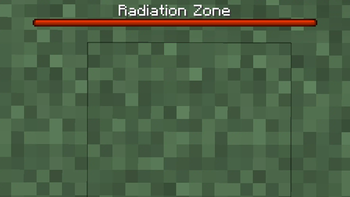
Radiation Zone bar

Последние версии

Все версии →
release

1.0.1-fabric-neoforge

1.0.1
22 апр. 2026 г.356Minecraft: 1.21.1fabric, neoforge
Скачать
Что нового
# 1.0.1 ## Added - Added exit radiation zone bar animation for the mod version. - Added the visual flags of radiation zone in the mod version. ## Changed - Merged neoforge and fabric version with common module without Architectury API requirement. ## Fixed - Fixed radiation bar color on the mod version. - Fixed unnecessary radiation effects after death.
release

1.0.1-bukkit

1.0.1
22 апр. 2026 г.73Minecraft: 1.21.1bukkit, paper, purpur, spigot
Скачать
Что нового
# 1.0.1 ## Changed - Deleted legacy code from Craftserve versions of the plugin. - Changed compatibility level of plugin, it is now supported by Spigot and Bukkit. ## Fixed - Fixed exit radiation zone bar animation that stops too early on the plugin version. - Fixed unnecessary radiation effects after death.
release

1.0.0-fabric

1.0.0
19 апр. 2026 г.27Minecraft: 1.21.1fabric
Скачать
Что нового
# 1.0.0 ## Added - Initial release on Paper, Fabric and Neoforge. - Forked CraftserveRadiation repo and migrated from Maven to Gradle DSL and added support for Fabric and Neoforge. - This is the first release, and it may contain bugs. Report everything on Github Issues.
release

1.0.0-neoforge

1.0.0
19 апр. 2026 г.21Minecraft: 1.21.1neoforge
Скачать
Что нового
# 1.0.0 ## Added - Initial release on Paper, Fabric and Neoforge. - Forked CraftserveRadiation repo and migrated from Maven to Gradle DSL and added support for Fabric and Neoforge. - This is the first release, and it may contain bugs. Report everything on Github Issues.
release

1.0.0-paper

1.0.0
19 апр. 2026 г.27Minecraft: 1.21.1paper, purpur
Скачать
Что нового
# 1.0.0 ## Added - Initial release on Paper, Fabric and Neoforge. - Forked CraftserveRadiation repo and migrated from Maven to Gradle DSL and added support for Fabric and Neoforge. - This is the first release, and it may contain bugs. Report everything on Github Issues.
