

Quacky's Whacky Inven
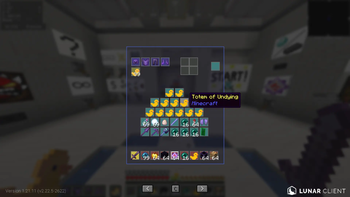
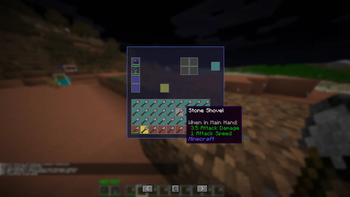
Want a weird inventory UI? Just use this, you can customise each slot of your inventory to be wherever. Most likely allowed on PVP servers as its only a UI change :)
1452обновлён 1 июн. 2026 г.
ПроклятыеУправлениеУтилиты
Описание
Quacky's Whacky Inven
Customize Minecraft inventory layout with drag-and-drop editing.
Features
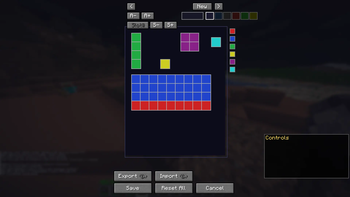
- Custom Layout - Drag slots anywhere, arrange inventory your way
- Multiple Profiles - Save different layouts for different playstyles
- Profile Switching - Quick swap with keybinds ([ and ])
- Slot Categories - Color-code by type (hotbar, armor, crafting, offhand)
- Slot Numbers - Display slot IDs, toggle in inventory
- Layout Editor - Multi-select with Ctrl+click, snap groups with S
- Vanilla Actions - Right-click, shift-click, double-click, middle-click all work
- Keybinds - 1-9 swap, F offhand, Q drop, I to open/close, configurable in Keybinds
Controls
- I - Open/close custom inventory
- [ / ] - Previous/next profile
- Left/Right arrows - Switch profiles in inventory
- C button - Toggle slot colors
- Unbound keybinds - Set Cursor Start, Open Editor
Settings
Configure in Mod Menu:
- Panel color & transparency
- Slot number display & alpha
- Grid snap
- Active profile
Requirements
- Minecraft 1.21.11+
- Fabric API
Other Mods
Make sure to check out my organisation to find other mods! Helps a lot and lets me make more mods and maybe a common library in the future :)
Галерея
Последние версии
Все версии →release
Quacky's Whacky Inven 1.0.0
1.0.01 июн. 2026 г.145Minecraft: 1.21.11fabric
Что нового
# Quacky's Whacky Inven - Changelog
## [Beta 1.0.0] - 2026-06-01
### Features
- Custom inventory layout with drag-and-drop editing
- Multiple saved profiles with JSON persistence
- Category-based slot coloring (togglable: Hotbar, Armor, Crafting, Offhand)
- Slot number display with configurable alpha (togglable in inventory)
- Keybindings for quick access:
- **I** - Open/close custom inventory
- **[** / **]** - Previous/next profile
- **F** - Swap item with offhand (vanilla hotkey)
- **1-9** - Swap hovered slot with hotbar slots (vanilla hotkeys)
- **Q** - Drop hovered item (vanilla hotkey)
- **Ctrl+Q** - Drop full stack
- Layout editor with multi-select (Ctrl+click) and group snap (S then click)
- Auto-wrapping panel with customizable color & transparency (Mod Menu)
- Mod Menu config interface for preferences
- Slot borders with gaps between slots
- Cursor position memory (click "Set Cursor Start" keybind)
- Profile switcher buttons in inventory (< and > arrows)
- Vanilla inventory interactions preserved (right-click, shift-click, double-click, middle-click clone)
### Known Issues (Finicky - Beta Status)
- **Keybinds** - Hotbar swap (1-9), offhand (F), and drop (Q) work but may have latency/reliability issues with rapid presses
- **Editor** - Slot drag behavior can be jittery; multi-select sometimes doesn't highlight correctly
- **Performance** - Large custom layouts may stutter on first render
- **Profile switching** - Switching profiles mid-interaction may cause brief visual glitches
### Fixed in This Version
- Hotbar slots 6-9 now appear correctly (position-based slot mapping)
- Armor slots in correct order (helmet to boots)
- Crafting slots all accessible, no duplicate output slots
- Slot borders render in custom inventory
- Offhand keybind uses vanilla F key detection
- Keybind detection via raw GLFW polling (most reliable approach for vanilla keys)
---
## [Release 1.0.0] - Planned
### Planned Fixes
- **Keybind reliability** - Debounce/throttle rapid key presses to prevent double-triggers
- **Editor stability** - Smooth drag animations, consistent multi-select highlighting
- **Performance** - Cache slot render states, optimize panel bounds calculation
- **Profile transitions** - Atomic profile swaps with no visual artifacts
- **Input buffering** - Queue rapid keypresses instead of dropping them
### Planned Features
- Preset layouts (Grid, Radial, Compact)
- Import/export profiles as JSON files
- Slot size customization (beyond fixed 16px)
- Custom category colors in editor
- Hotkey to open editor from custom inventory
- Layout presets from community
### Quality
- Full feature parity with vanilla inventory behavior
- Zero item loss or duplication bugs
- Comprehensive testing across all Fabric launchers (Lunar, Feather, Modrinth, Prism)
- Documentation and tutorial video
---
## Installation
1. Download `quackys-whacky-inven-beta1.0.0.jar`
2. Place in `~/.minecraft/mods/` (or launcher's mods folder)
3. Load game with Fabric 1.21.11+
4. Configure in Mod Menu or via keybinds
## Feedback
Report bugs or suggest features via GitHub Issues at https://github.com/DeQuackDealer/Quacky-s-Whacky-Inventory-Issues