

Quacky's Better Keybinds
Want to double bind without trouble? Want to just have several keys mapped to 1 slot since why not? Heres the mod for you! Maybe banned from pvp servers.
3,8 тыс.0обновлён 1 окт. 2026 г.
Механики игрыУправлениеТехнологии
Описание
Quacky's Better Keybinds
Rebind any action to anything — multiple keys, mouse buttons, and combos. Client-side only. Works on Lunar, Modrinth App, Feather, and vanilla Fabric.
Features
- Bind anything — every action in the Controls menu, vanilla and modded, is bindable.
- Multiple binds per action — give one action as many key combos as you want.
- Combos — chain keys and mouse buttons together (
Shift + Left Click,Ctrl + Alt + P). - Order-sensitive option — per bind, require the exact press order, or allow any order.
- Smart conflict resolution — the most specific combo always wins.
- Multi-key capture — press your whole combo; it auto-finalizes after 3 seconds idle.
- Mouse support — all 8 mouse buttons, including side buttons.
- Live bind list — see every bind in one panel, remove any with one click.
- ModMenu config — everything lives in a clean in-game GUI.
Install
- Install Fabric Loader ≥ 0.19.2 for MC 1.21.11.
- Drop into
mods/:- Fabric API
0.141.4+1.21.11or newer - Mod Menu
17.0.0or newer quackys-better-keybinds-1.0.0.jar
- Fabric API
Client-only — no server-side install needed.
Usage
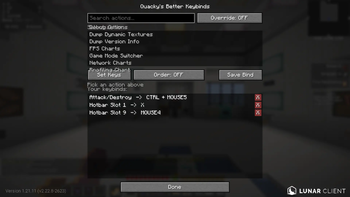
- Open Mod Menu → Quacky's Better Keybinds.
- Search for the action you want in the search bar.
- Click the action to select it.
- Click Set Keys, then press your combo (one key or many). It locks in after 3s.
- Toggle Order to choose whether press order matters for that combo.
- Click Save Bind — it appears under Your keybinds and saves instantly.
- Remove any bind with the red X. Close the screen to persist.
Compatibility
| Minecraft | 1.21.11 only (API drift means cross-version isn't a single jar) |
| Loaders | Fabric. Lunar / Modrinth / Feather work as long as they ship 1.21.11 |
| Conflicts | None known — binds drive the game's real KeyMappings, so modded actions work too |
Known limitations
- Binds never fire while a screen or menu is open, so they can't operate GUIs.
- Actions are read from the game's keybind list — an action with no registered KeyMapping can't be bound.
License
MIT. Quack responsibly.
Other Mods
Make sure to check out my organisation to find other mods! Helps a lot and lets me make more mods — and maybe a common library in the future :)
Галерея
Последние версии
Все версии →release
Quacky's Better Keybinds 1.2.0
1.2.01 окт. 2026 г.1,7 тыс.Minecraft: 1.21, 1.21.1, 1.21.2, 1.21.3, 1.21.4, 1.21.5, 1.21.6, 1.21.7, 1.21.8, 1.21.9, 1.21.10, 1.21.11, 26.1, 26.1.1, 26.1.2, 26.2, 26.3fabric
Что нового
# Changelog
## Quacky's Better Keybinds — Version 1.2.0
**Type:** Feature release
---
## Overview
Binds can now send chat messages and commands, run chains of actions with tick delays between them, repeat while held, and warn you when keys are already taken. Every control in the config screen has a tooltip.
---
## New Features
### Chat & command binds
Pick **Send Chat Message / Command** (pinned to the top of the action list), type the text in the message box, Set Keys, Save.
- Plain text is sent as chat; a leading `/` runs it as a command
- Sent lines go into chat history, so up-arrow in chat recalls them
- Works in every game mode; never fires while a menu, chat or container is open
- Each message is its own action, so it gets combos, groups, enable toggles and conflict resolution like any other bind
### Repeat mode
Per bind: **Once** (one activation per press) or **Repeat** (keep firing while held).
- Delay unit: **ms**, **ticks** or **s** — click the unit button to cycle
- Applies to chat binds and normal actions alike (each repeat is one discrete click, so Drop, Hotbar, Use etc. all repeat)
- Repeats run on the client tick, so the floor is one tick (50 ms); faster delays fire every tick
- Saving the same keys on the same action again updates its repeat settings
### Action sequences (chains)
Bind one combo to a chain of actions with tick delays between them — e.g. `Ctrl + Mouse 5` → hotbar 7, **+1 tick** hotbar 9, **+0** attack. Or a single delayed step: `Ctrl + Mouse 5` → **+1 tick** hotbar 9.
- Pick **Action Sequence (chain)** (top of the action list) to open the sequence editor
- Each step = an action + how many ticks to wait after the previous step (after the key press for the first step); `0` = same tick
- Any action works as a step, including chat messages and commands; each step taps the action once
- Reorder (`^` / `v`), remove (`X`) or click a step to load it back into the editor; up to 32 steps, 1200 ticks per wait
- Click a sequence bind in *Your keybinds* to edit its steps in place — keys, group and repeat settings are kept
- Timing is tick-exact and matches a vanilla press: a `+0` step lands on the same tick as the press, `+1` on the next
- Steps that land on the same tick run in the game's own order (hotbar before attack/use), so *hotbar 9, +0 attack* hits with slot 9
- Once started, a chain finishes even if you let go; opening a screen cancels it
- Works with repeat mode: a held repeating sequence restarts every delay
### Duplicate key detection
- When you capture keys, the status line warns if they already trigger another bind
- Single-key binds are also checked against vanilla controls bound to that key (skipped while **Override** is ON, since the vanilla action is muted anyway)
- Binds in the list that share keys are shown in orange; hover to see what else they trigger
### Tooltips
Every button and field has help text on hover, as do the action list, group chips and each cell of the bind list.
---
## Other changes
- Status line moved next to *Select action:* so it no longer draws over the Save Bind button; long messages are truncated with the full text in a tooltip
- Set Keys / Save Bind now say why nothing happened (no action picked, no keys captured, empty message)
---
## Compatibility
| | |
|---|---|
| **Minecraft** | 1.21.11 |
| **Loaders** | Fabric 0.19.2+ |
| **Dependencies** | Fabric API, ModMenu |
| **Config** | 1.0.0 / 1.1.0 configs load as-is; new fields default to *Once* |
---
## License
**MIT.** Quack responsibly.
## Author
**DeQuackDealer**
release
Quacky's Better Keybinds 1.1.0
1.1.015 авг. 2026 г.1 тыс.Minecraft: 1.21.11, 26.1, 26.1.1, 26.1.2, 26.2fabric
Что нового
# Changelog
## Quacky's Better Keybinds — Version 1.1.0
**Release Date:** August 15, 2026
**Type:** Bug fix release
---
## Overview
Two fixes: binds now fire on the same tick you press them (no more losing attribute/weapon swaps to a tick of lag), and binds work inside the inventory and every other container screen.
---
## Fixes
### Input no longer runs a tick behind
**Symptom:** every bind fired one tick (50 ms) after the key went down. Anything timing-sensitive — attribute swapping, weapon swap into an attack, hotbar juggling mid-combo — landed a tick late and often missed the window.
**Cause:** input was polled at `END_CLIENT_TICK`. The game reads keybinds part-way *through* `Minecraft.tick()`, which had already happened by then, so everything the mod set was picked up on the *next* tick.
**Fix:** input is now driven from the game's own GLFW callbacks (`KeyboardHandler.keyPress`, `MouseHandler.onButton`), the exact place vanilla registers its own presses. Bound actions are resolved and applied the moment the key event arrives, before the game reads keybinds on that same tick — identical timing to a vanilla keybind, zero added latency.
- `HEAD` of the callback updates held-key state, so combos are current before anything else sees the event
- `RETURN` runs the binds after vanilla applied its own state, so **Override Vanilla** can still mute the original action
- Per-tick polling is kept, moved to `START_CLIENT_TICK`, and demoted to a re-sync for what callbacks can't see (window focus loss, events eaten by a screen)
- Releases propagate immediately too — held actions stop on the tick you let go
### Keybinds work in the inventory again
**Symptom:** binds did nothing in the inventory, chests, furnaces or any other container — items could not be swapped to a hotbar slot, moved to the offhand, or dropped with a custom bind.
**Cause:** two separate blocks. The mod skipped all bind processing whenever a screen was open, and vanilla container screens only ever compare the raw key against *their own* KeyMappings (`checkHotbarKeyPressed`), which a remapped or combo bind never matches.
**Fix:** a new `AbstractContainerScreen` mixin resolves mod binds itself and performs the matching slot operation before vanilla's check, then cancels so nothing happens twice.
Supported in containers:
| Bound action | Effect on the hovered slot |
|---|---|
| Hotbar 1–9 | Swap with that hotbar slot |
| Swap Offhand | Swap with the offhand |
| Drop | Throw the stack (hold `Ctrl` for the whole stack) |
| Pick Item | Clone the stack (creative) |
| Inventory | Close the screen |
Details:
- Combo and mouse-button binds work, not just single keys — `mouseClicked` is handled alongside `keyPressed`
- A bind only fires if the key that was *just pressed* is part of that combo, so a held modifier can't set an action off on an unrelated keystroke
- Typing is untouched: input aimed at a focused text field (anvil rename, creative search) is left to vanilla
- Vanilla's own preconditions are respected — a slot must be hovered, and the cursor must be empty for a swap
---
## Other changes
- **Override Vanilla is now complete.** It cleared the suppressed key's held state but not its pending click, so a discrete vanilla action (drop, inventory, hotbar) could still slip through once. Both are cleared now, before mod mappings are driven.
- **Actions no longer stick when a screen opens.** Anything held is released once on screen open, and re-armed on close without counting as a fresh press.
---
## Technical
**New mixins**
| Mixin | Target | Purpose |
|---|---|---|
| `KeyboardHandlerMixin` | `KeyboardHandler.keyPress` | Same-tick key edges |
| `MouseHandlerMixin` | `MouseHandler.onButton` | Same-tick mouse edges |
| `AbstractContainerScreenMixin` | `keyPressed`, `mouseClicked` | Binds inside containers |
`KeyMappingAccessor` additionally exposes the bound `key` field, used to find and mute the vanilla action behind a suppressed key.
**New class**
- `ContainerBindings` — maps an active bind to its container slot operation, matching the game's KeyMappings by identity rather than by name
**Changed**
- `InputManager.applyEvent(name, pressed)` — single edge from a callback; `update()` is now a re-sync that reports whether anything moved
- `BindingManager.getActiveBindings()` / `getMatchingTrigger()` — read-only resolution, callable from screens
- `BindingManager.resyncAfterScreen()` — re-arm held binds with no press edge
- `QuackysKeyBinds` — tick moved to `START_CLIENT_TICK`; `onInputEvent()` is the callback path
---
## Compatibility
| | |
|---|---|
| **Minecraft** | 1.21.11 (exact; API drift) |
| **Loaders** | Fabric 0.19.2+ required |
| **Dependencies** | Fabric API, ModMenu |
| **Config** | Unchanged — 1.0.0 configs load as-is, no migration |
---
## Installation
Replace `quackys-better-keybinds-1.0.0.jar` in `mods/` with `quackys-better-keybinds-1.1.0.jar`. Nothing else changes.
---
## Known Limitations
- Binds still don't fire in non-container screens (chat, pause, options) — that guard is deliberate
- Container support covers slot actions; there is no bind for shift-click quick-move, which vanilla has no keybind for either
- Actions with no registered KeyMapping cannot be bound (nothing to drive)
---
## License
**MIT.** Quack responsibly.
## Author
**DeQuackDealer**
---
### Build Info
| | |
|---|---|
| **Gradle** | 9.4.0 |
| **Loom** | 1.16.2 |
| **Java** | 21 |
release
Quacky's Better Keybinds 1.0.0
1.0.013 июн. 2026 г.1 тыс.Minecraft: 1.21.11, 26.1, 26.1.1, 26.1.2fabric
Что нового
# Changes
- Added Groups for easier management
release
Quacky's Better Keybinds 1.0.0
1.0.03 июн. 2026 г.118Minecraft: 1.21.11, 26.1, 26.1.1, 26.1.2fabric
Что нового
# Changelog
## Quacky's Better Keybinds — Version 1.0.0
**Release Date:** June 3, 2026
---
## Overview
Quacky's Better Keybinds lets you rebind any action in the game to any key, mouse button, or combo. Multiple binds per action, optional order-sensitive combos, and smart conflict resolution. In-game ModMenu UI. **Client-side only.**
---
## Features
### Binding
- **Bind Anything** — every action in the Controls menu is bindable, vanilla and modded
- **Multiple Binds** — assign as many separate combos to one action as you want
- **Combos** — chain keyboard keys and mouse buttons (`Shift + Left Click`, `Ctrl + Alt + P`)
- **Mouse Support** — all 8 mouse buttons including side buttons (`MOUSE4`–`MOUSE8`)
- **Order-Sensitive Option** — per bind, require the exact press order or allow any order
- **Smart Conflict Resolution** — most specific combo wins (`Shift + Click` beats `Click`)
- **Edge Detection** — actions fire on press, held state tracked per combo
### Capture
- **Multi-Key Capture** — press your whole combo; it records every key in order
- **Auto-Finalize** — capture locks in 3 seconds after the last key, no confirm needed
- **Cancel** — press `ESC` mid-capture to discard
- **Live Feedback** — countdown timer and the running combo shown while recording
### Action List
- **Live From Game** — actions read straight from the game's KeyMapping registry
- **Search** — filter the full action list by name or id
- **Categories** — actions carry their in-game category label
### Management
- **Bind List** — every saved bind shown in one scrollable panel
- **One-Click Remove** — red **X** on each row deletes that bind
- **Persistence** — all binds auto-save to JSON on every change and on close
### User Interface
- **ModMenu Integration** — entire GUI in-game, no manual config files
- **Scrollable Panels** — action list and bind list scroll independently
- **Order Toggle** — one button flips order sensitivity for the next bind
---
## Technical Highlights
### Performance
- **Zero-Allocation Polling** — input state reuses collections each tick
- **Screen Guard** — bind processing skips entirely while any screen is open
- **Direct KeyMapping Drive** — no event spoofing; sets the real mapping state
### Architecture
**Input System**
- `InputManager` — polls GLFW for 70+ keys and 8 mouse buttons each tick
- `InputState` — current/previous frame tracking for edge detection
- Press-order tracking — held keys recorded in press order for order-sensitive binds
**Binding System**
- `BindTrigger` — immutable combo, ordered or unordered, with match logic
- `ActionBinding` — one action to many triggers, most-specific match
- `BindingManager` — per-tick resolve and drive
- `ConflictResolver` — specificity-based winner selection
**Action System**
- `ActionRegistry` — built from `Minecraft.options.keyMappings`, refreshed on GUI open
- `ActionDefinition` — id, display name, category, target KeyMapping
**Trigger Mechanism**
- `KeyMapping.setDown` held while the combo is held (continuous actions)
- `clickCount` bumped via `KeyMappingAccessor` mixin on the press edge (discrete actions)
**Mixin Injection Points**
- `KeyMappingAccessor` — exposes private `clickCount` for discrete-action simulation
### Compatibility
| | |
|---|---|
| **Minecraft** | 1.21.11 (exact; API drift) |
| **Loaders** | Fabric 0.19.2+ required |
| **Dependencies** | Fabric API, ModMenu (no optional mods) |
| **Launchers** | Lunar Client, Modrinth App, Feather, vanilla Fabric |
| **Conflicts** | None — drives the game's real KeyMappings, so modded actions bind too |
---
## File Structure
```
config/
└── quackys-better-keybinds.json # action id -> list of triggers (keys + ordered flag)
```
---
## Installation
1. Install **Fabric Loader ≥ 0.19.2** for MC **1.21.11**
2. Add to `mods/`:
- **Fabric API** `0.141.4+1.21.11` or newer
- **ModMenu** `17.0.0` or newer
- `quackys-better-keybinds-1.0.0.jar`
3. Launch game via Fabric
---
## Usage
1. Open **Mod Menu → Quacky's Better Keybinds**
2. Search and select an action
3. Click **Set Keys**, press your combo (auto-finalizes after 3s)
4. Toggle **Order** for press-order sensitivity
5. **Save Bind** to add it; red **X** to remove
6. Close screen to persist
---
## Known Limitations
- Binds do not fire while a screen or menu is open, so they cannot operate GUIs
- Actions with no registered KeyMapping cannot be bound (nothing to drive)
---
## License
**MIT.** Quack responsibly.
## Author
**DeQuackDealer**
---
### Build Info
| | |
|---|---|
| **JAR** | 35 KB |
| **Gradle** | 9.4.0 |
| **Loom** | 1.16.2 |
| **Java** | 21 |