

Pigmentum API
Painter is a mod build on neoforge 1.21.1, allows player to paint on almost every block.
Автор: lys.20264859071,1 тыс.7обновлён 12 окт. 2026 г.
Декор
Описание
🎨 Pigmentum - Minecraft Canvas API
Turn every block surface into your personal canvas. Paint pixel by pixel on any surface in Minecraft.
Pigmentum is a low-level canvas API for NeoForge mod developers. Out-of-the-box painting features (brushes, GUI, blend modes) will be developed separately at Fresco. Pigmentum focuses on providing the core canvas infrastructure and extension API.
✨ Features
🖌️ Canvas System
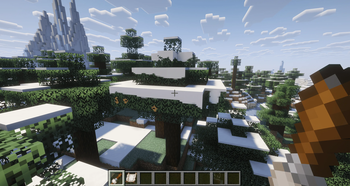
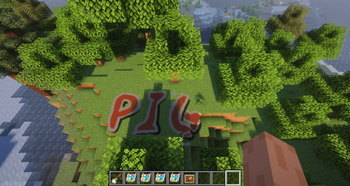
- Any Block as Canvas: Right-click any block surface with a paintbrush to turn it into a canvas that blends seamlessly with the block.
- Pixel-Level Drawing: Hold right-click and drag to draw smooth, continuous lines—no gaps even at high speed.
- Multi-Face Canvases: Paint independently on each face of a block—top, bottom, and all four sides.
- Irregular Block Support: Stairs, slabs, fences, and other shaped blocks can be painted with pixel-perfect precision.
- Brush Configuration Menu: Right-click the air with a paintbrush to adjust brush size, feathering, blend mode, and drawing interval.
🎯 Paintbrush System
- Color Picker: Press the
Rkey to sample the color of the pixel under your crosshair. - Multiple Blend Modes: Choose from Overwrite, Additive, Multiply, and Erase.
📦 Canvas Extraction & Display
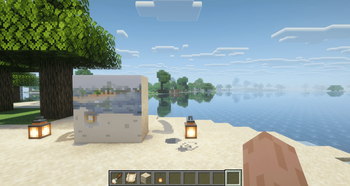
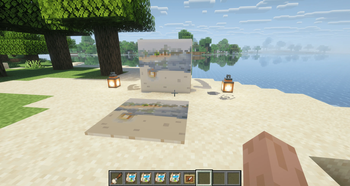
- Canvas Sheet Item: Sneak-right-click a painted block to copy one face onto a Canvas Sheet without removing the original.
- Item Frame Display: Place a Canvas Sheet in an item frame to display your artwork like a map.
🧩 Extension API
- Custom Image Providers (
CanvasImageProvider) — register custom texture generation from pixel data - Custom Renderers (
CanvasPixelRenderer) — control how canvas faces are rendered - Per-Pixel Effect Layers — attach arbitrary byte data per pixel (e.g. glow intensity, roughness)
- Custom Blend Functions (
BlendFunction) — full control over pixel color and effect compositing - Custom Paint Brushes (
IPaintProvider) — register any item as a brush with custom behavior
🎮 Getting Started
- Obtain a paintbrush from the creative inventory.
- Right-click any block surface to create a canvas.
- Hold right-click and drag to paint pixels.
- Press the
Rkey to pick a color from the world. - Right-click the air to adjust your brush settings.
- Use a Canvas Sheet to extract and display your artwork in item frames.
Pigmentum - Every face is a canvas.
Галерея
Последние версии
Все версии →beta
0.6.1-3beta
0.6.1-3beta12 окт. 2026 г.142Minecraft: 1.21.1neoforge
Что нового
No changelog was specified.
beta
0.6.1-2beta
0.6.1-2beta2 окт. 2026 г.55Minecraft: 1.21.1neoforge
Что нового
No changelog was specified.
beta
0.6.1-1beta
0.6.1-1beta18 авг. 2026 г.156Minecraft: 1.21.1neoforge
Что нового
No changelog was specified.
beta
0.6.1beta
0.6.1beta5 авг. 2026 г.79Minecraft: 1.21.1neoforge
Что нового
No changelog was specified.
beta
0.6.0beta
0.6.0beta3 авг. 2026 г.58Minecraft: 1.21.1neoforge
Что нового
No changelog was specified.
beta
0.5.8beta
0.5.8beta27 июн. 2026 г.172Minecraft: 1.21.1neoforge
Что нового
No changelog was specified.
beta
0.5.7-1beta
0.5.7-1beta18 июн. 2026 г.59Minecraft: 1.21.1neoforge
Что нового
No changelog was specified.
beta
0.5.7beta
0.5.7beta16 июн. 2026 г.35Minecraft: 1.21.1neoforge
Что нового
No changelog was specified.
beta
0.5.6.11beta
0.5.6.11beta14 июн. 2026 г.50Minecraft: 1.21.1neoforge
Что нового
No changelog was specified.
beta
0.5.6.10beta
0.5.6.10beta10 июн. 2026 г.54Minecraft: 1.21.1neoforge
Что нового
No changelog was specified.