COWMODSКаталог модов

PictureLogin-R2

Display the ASCII characters of the player's avatar when logging in

Автор: Lythrilla3113обновлён 7 апр. 2025 г.
УправлениеОбщениеУтилиты

Описание

PictureLogin

📝 Introduction

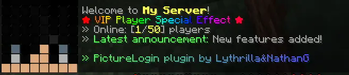
PictureLogin is a Spigot/Bukkit plugin that displays player skin ASCII art in the chat when players log into the server, along with customizable welcome messages.

Original Author: Nathan Glover (NathanG/ItsNathanG)
Fork Author: Lythrilla

✨ Core Features

  • Display player skin ASCII art in the chat bar
  • Customizable welcome messages and first-join messages
  • Leave server messages
  • PlaceholderAPI integration
  • AuthMe integration
  • Multi-language support (English and Chinese included by default)
  • Permission-based custom messages
  • Player-specific custom messages
  • MiniMessage format support
  • SkinRestorer integration
  • Text and color customization options

📋 Requirements

  • Java 17 or higher
  • Spigot/Paper 1.20 or higher
  • (Optional) PlaceholderAPI - For using variables from other plugins
  • (Optional) AuthMe - For login integration
  • (Optional) SkinRestorer - For custom skin support
  • (Optional) PremiumVanish - For player invisibility compatibility

📥 Installation

  1. Download the latest JAR file
  2. Place the JAR file in your server's plugins folder
  3. Restart the server or reload the plugin
  4. Configure the plugin in plugins/PictureLogin/config.yml

🔑 Permissions

PermissionDescription
picturelogin.useAllows using PictureLogin commands
picturelogin.showAllows players to see login messages
picturelogin.reloadAllows reloading plugin configuration
picturelogin.languageAllows changing plugin language
picturelogin.debugAllows using debug commands
picturelogin.group.vipCustom message permission for VIP players
picturelogin.group.adminCustom message permission for admins

🖥️ Commands

CommandDescription
/picturelogin reloadReload configuration
/picturelogin language [lang]View or change language
/picturelogin versionDisplay version information
/picturelogin helpDisplay help information
/picturelogin debug <login|leave|firstjoin|all> [global|user|perm] [name]Debug different message types

Aliases: /piclogin, /plogin, /pl

🌐 Multi-language Support

The plugin supports multiple languages, with English (en_US.yml) and Chinese (zh_CN.yml) included by default. You can create your own translations by copying these files.

🎨 Message Formatting

This plugin supports multiple text formatting methods, including MiniMessage format and traditional color codes.

⚙️ Configuration

The configuration file is located at plugins/PictureLogin/config.yml, where you can customize message formats, avatar appearance, permission group messages, and more.

📄 License

This project is licensed under the MIT License - see the LICENSE file for details.

🙏 Acknowledgements

Special thanks to Nathan Glover for creating the original plugin.


Галерея
welcome

Последние версии

Все версии →
release

PictureLogin-R2 R2-1.0.0

R2-1.0.0
7 апр. 2025 г.311Minecraft: 1.18, 1.18.1, 1.18.2, 1.19, 1.19.1, 1.19.2, 1.19.3, 1.19.4, 1.20, 1.20.1, 1.20.2, 1.20.3, 1.20.4, 1.20.5, 1.20.6, 1.21, 1.21.1, 1.21.2, 1.21.3, 1.21.4, 1.21.5bukkit, paper, purpur, spigot
Скачать
Что нового
# PictureLogin <div align="center"> <div align="center"> <img src="https://i.imgur.com/kNW94py.png"> </div> </div> ## 📝 Introduction PictureLogin is an enhanced Spigot/Bukkit plugin that displays custom messages with player skin images when players log into the server. This fork extends the original plugin with numerous additional features and improved performance. > **Original Author**: Nathan Glover (NathanG/ItsNathanG) > **Fork Author**: Lythrilla ## ✨ Features ### 🚀 Core Features * Display player skin ASCII art in the chat bar * Customizable welcome messages * Special messages for first-time joiners * Leave server messages * PlaceholderAPI integration * AuthMe integration ### 🔥 Enhanced Features * **Multi-language Support** - Built-in support for multiple languages (English and Chinese included by default) * **Online Preview** - Preview login messages in-game without reconnecting * **Permission-based Messages** - Assign different login messages based on permission groups * **Player-specific Messages** - Set unique messages for specific players * **Command Control** - Enable/disable features through commands * **MiniMessage Support** - Use Adventure API's MiniMessage format for modern text formatting * **SkinRestorer Integration** - Correctly display custom skins from SkinRestorer * **Account Type Detection** - Automatically detect and handle premium/offline Minecraft accounts * **PAPI Variables** - Support for avatar PlaceholderAPI variables * **Legacy Color Support** - Backward compatibility with traditional color codes ## 📋 Requirements * Java 17 or higher * Spigot/Paper 1.20 or higher * (Optional) PlaceholderAPI - For using variables from other plugins * (Optional) AuthMe - For login integration * (Optional) SkinRestorer - For custom skin support * (Optional) PremiumVanish - For player invisibility compatibility ## 📥 Installation 1. Download the latest JAR file from [Releases](https://github.com/Lythrilla/PictureLogin/releases) 2. Place the JAR file in your server's `plugins` folder 3. Restart the server or reload the plugin 4. Configure the plugin in `plugins/PictureLogin/config.yml` ## 🔑 Permissions Permission | Description --- | --- `picturelogin.use` | Allows using PictureLogin commands (Default: Everyone) `picturelogin.show` | Allows players to see login messages (Default: Everyone) `picturelogin.reload` | Allows reloading PictureLogin plugin configuration (Default: OP) `picturelogin.language` | Allows changing plugin language (Default: OP) `picturelogin.debug` | Allows using debug commands (Default: OP) `picturelogin.group.vip` | Custom message permission for VIP players (Default: No) `picturelogin.group.admin` | Custom message permission for admins (Default: OP) `picturelogin.effect.rainbow` | Rainbow effect permission (Default: No) `picturelogin.effect.gradient` | Gradient effect permission (Default: No) ## 🖥️ Commands Command | Description --- | --- `/picturelogin reload` | Reload configuration `/picturelogin language [lang]` | View or change language `/picturelogin version` | Display version information `/picturelogin help` | Display help information `/picturelogin debug <login\|leave\|firstjoin\|all> [global\|user\|perm] [name]` | Debug different types of messages **Aliases**: `/piclogin`, `/plogin`, `/pl` ## 🌐 Multi-language Support This plugin supports a multi-language system, with language files located in the `plugins/PictureLogin/lang/` directory. The following languages are provided by default: * English (en_US.yml) * Chinese (zh_CN.yml) You can copy these files and create your own translations. ## 🔌 PlaceholderAPI Variables This plugin provides the following PlaceholderAPI variables for displaying player avatars in other plugins: ### Current Player Avatar Variables ``` %picturelogin_avatar_1% - Current player avatar line 1 %picturelogin_avatar_2% - Current player avatar line 2 %picturelogin_avatar_3% - Current player avatar line 3 %picturelogin_avatar_4% - Current player avatar line 4 ``` ### Other Player Avatar Variables ``` %picturelogin_avatar_1_<player>% - Avatar line 1 of specified player %picturelogin_avatar_2_<player>% - Avatar line 2 of specified player %picturelogin_avatar_3_<player>% - Avatar line 3 of specified player %picturelogin_avatar_4_<player>% - Avatar line 4 of specified player ``` ## 🎨 Message Formatting This plugin supports multiple text formatting methods: ### MiniMessage Format ``` <gradient:red:blue>This is a gradient text</gradient> <rainbow>This is a rainbow text</rainbow> <color:gold>This is a gold text</color> ``` ### Legacy Color Codes ``` &6This is a gold text &bThis is a aqua text ``` ## ⚙️ Configuration The plugin configuration is located at `plugins/PictureLogin/config.yml`. You can customize: * Message formats * Avatar appearance * Effect settings * Permission group messages * Player-specific messages ## 🤝 Contributing Contributions are welcome! Please feel free to submit a Pull Request. ## 📄 License This project is licensed under the MIT License - see the [LICENSE](LICENSE) file for details. <div align="center"> [GitHub](https://github.com/Lythrilla/PictureLogin) | [issue](https://github.com/Lythrilla/PictureLogin/issues) | [oldest](https://github.com/ItsNathanG/PictureLogin) </div>