COWMODSКаталог модов

OneConfig

Access all your mod settings in one place, with a sleek and intuitive interface. By Polyfrost, best with OneClient.

Автор: Wyvest1,3 млн154обновлён 24 окт. 2026 г.
БиблиотекиУтилиты

Описание

OneConfig_banner_wide

OneConfig

Build status Modrinth downloads CurseForge downloads

OneConfig is a free, open source configuration library by Polyfrost. It gives developers a config API, and it gives players one screen where they change the settings of every mod that uses it.

❔ General information

Is it a client?

OneConfig may look like a client, but it is a standalone mod. You can see for yourself. It ships no mods of its own, so you decide which mods you use with it.

What do players get?

  • A settings screen with one card per mod, search, and a keybinds page. Right Shift opens it.
  • A HUD editor for moving, scaling and restyling the HUD elements of your mods.
  • Profiles, which each keep a separate copy of your mod settings.

Which versions does it support?

  • Minecraft 1.8.9 on Ornithe.
  • Minecraft 1.21.1-26.3 on Fabric.

OneConfig needs Compose Multiplatform and Fabric Language Kotlin. It also needs Fabric API on Fabric and OSL on Ornithe.

⚡️ Getting started

Almost everything you need to start using OneConfig is in our documentation. For further questions, make a developer ticket in our Discord.

To build OneConfig yourself, run the command below with JDK 25 installed. Replace 26.3-fabric with any supported version, such as 1.8.9-ornithe.

./gradlew ":bootstrap:26.3-fabric:build"

ℹ️ Example mod

Please check out our example mod.

📄 Licenses and Supporting Projects

License OneConfig is free and open-source. Except where noted otherwise (below and/or in individual files), all code is licensed under BOTH - version 3 of the GNU Lesser General Public License, **AND** - the Additional Terms Applicable to OneConfig, version 1.0 of the Additional Terms or (at your option) any later version.

Copies of version 3 of the GNU Lesser General Public License, version 1.0 of the Additional Terms Applicable to OneConfig, and version 3 of the GNU General Public License (which the GNU LGPLv3 supplements) can be found in the LICENSE file.

Polyfrost acts as the specified proxy when deciding whether future versions of the GNU Lesser General Public License shall apply. If Polyfrost publicly states the acceptance of a later version of the GNU Lesser General Public License, this is permanent authorization for you to choose that version for OneConfig. However, you must still be compliant with the Additional Terms Applicable to OneConfig.

Supporting Projects

YourKitLogo|50

YourKit supports open source projects with innovative and intelligent tools for monitoring and profiling Java and .NET applications.
YourKit is the creator of YourKit Java Profiler, YourKit .NET Profiler, and YourKit YouMonitor.

Галерея
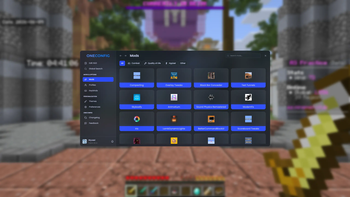
OneConfig in-game

Последние версии

Все версии →
release

1.5.0

v1.5.0
24 окт. 2026 г.15,2 тыс.Minecraft: 26.3fabric
Скачать
Что нового
## 1.5.0 - Add community translations for OneConfig and many other mods - Sodium is now translated too, using the Translations for Sodium resource pack - Translators are now credited in the credits screen - The accent color can now be a gradient. Turn on "Gradient" in the accent color picker and pick a second color - Add keybinds for switching profiles. Set one on any profile card on the Profiles page. A notification confirms the switch, and you can turn it off in Preferences - Add a sort control to the Mods page. Keep your own drag order, or sort mods A to Z - Add a "Full Shadow" option for text HUDs, which outlines the text on every side instead of using a drop shadow - Add a guided tour of the HUD editor. Replay it any time by right-clicking an empty spot and choosing "Editor Tour" - Add a Search keybind that jumps to the search bar in the OneConfig menu and HUD editor. In the HUD editor it searches the selected HUD's settings, or the HUD library when nothing is selected - Move the "Instant search" setting into the Search category - Add "Select all" and "Deselect all" to dropdowns where you can pick several options - Better Screens, Render Tweaks and Shake Tweaks now provide their own OneConfig on/off toggle, so OneConfig no longer adds one for them - Fix the on/off toggle not turning off some mods - Fix one broken line in your Minecraft options resetting all of your settings - Fix copy and paste not working on 1.8.9 on Apple Silicon Macs, and copying images on Linux with Wayland - Fix 1.8.9 settings such as clouds changing after playing a newer version - Fix the theme and accent color not changing when you switch profiles - Fix colored text showing without colors in HUDs and in Chat Patches and YACL config screens - Fix YACL options not updating when another option changes them - Fix the "HUD is locked" notice appearing on every key press while editing a locked HUD - Fix a warning being logged for every chat message with transparent colors on newer versions - Fix notification icons, the HUD editor search bar, item pickers and the mod card on/off indicator not following your theme - Fix OneConfig's menus failing to show text on Windows when the game is installed in a deeply nested folder ### For mod developers - Add an experimental public UI API (`api.ui.v1`) for pages, themes, components, search and keybinds, so mods no longer need OneConfig's internals - Add an API for adding your own sort modes to the Mods page - Add `SliderBounds` so sliders can change their minimum and maximum at runtime - Add opt-in gradient colors with `@Color(gradient = true)` - Add an `@EffectList` option for picking status effects - Add item stack icons for item list options, for item variants such as potions - Add a full width option for options that need the whole row - Fix nested annotated commands and handler aliases not being registered
release

1.5.0

v1.5.0
24 окт. 2026 г.11,3 тыс.Minecraft: 26.2fabric
Скачать
Что нового
## 1.5.0 - Add community translations for OneConfig and many other mods - Sodium is now translated too, using the Translations for Sodium resource pack - Translators are now credited in the credits screen - The accent color can now be a gradient. Turn on "Gradient" in the accent color picker and pick a second color - Add keybinds for switching profiles. Set one on any profile card on the Profiles page. A notification confirms the switch, and you can turn it off in Preferences - Add a sort control to the Mods page. Keep your own drag order, or sort mods A to Z - Add a "Full Shadow" option for text HUDs, which outlines the text on every side instead of using a drop shadow - Add a guided tour of the HUD editor. Replay it any time by right-clicking an empty spot and choosing "Editor Tour" - Add a Search keybind that jumps to the search bar in the OneConfig menu and HUD editor. In the HUD editor it searches the selected HUD's settings, or the HUD library when nothing is selected - Move the "Instant search" setting into the Search category - Add "Select all" and "Deselect all" to dropdowns where you can pick several options - Better Screens, Render Tweaks and Shake Tweaks now provide their own OneConfig on/off toggle, so OneConfig no longer adds one for them - Fix the on/off toggle not turning off some mods - Fix one broken line in your Minecraft options resetting all of your settings - Fix copy and paste not working on 1.8.9 on Apple Silicon Macs, and copying images on Linux with Wayland - Fix 1.8.9 settings such as clouds changing after playing a newer version - Fix the theme and accent color not changing when you switch profiles - Fix colored text showing without colors in HUDs and in Chat Patches and YACL config screens - Fix YACL options not updating when another option changes them - Fix the "HUD is locked" notice appearing on every key press while editing a locked HUD - Fix a warning being logged for every chat message with transparent colors on newer versions - Fix notification icons, the HUD editor search bar, item pickers and the mod card on/off indicator not following your theme - Fix OneConfig's menus failing to show text on Windows when the game is installed in a deeply nested folder ### For mod developers - Add an experimental public UI API (`api.ui.v1`) for pages, themes, components, search and keybinds, so mods no longer need OneConfig's internals - Add an API for adding your own sort modes to the Mods page - Add `SliderBounds` so sliders can change their minimum and maximum at runtime - Add opt-in gradient colors with `@Color(gradient = true)` - Add an `@EffectList` option for picking status effects - Add item stack icons for item list options, for item variants such as potions - Add a full width option for options that need the whole row - Fix nested annotated commands and handler aliases not being registered
release

1.5.0

v1.5.0
24 окт. 2026 г.3,6 тыс.Minecraft: 26.1, 26.1.1, 26.1.2fabric
Скачать
Что нового
## 1.5.0 - Add community translations for OneConfig and many other mods - Sodium is now translated too, using the Translations for Sodium resource pack - Translators are now credited in the credits screen - The accent color can now be a gradient. Turn on "Gradient" in the accent color picker and pick a second color - Add keybinds for switching profiles. Set one on any profile card on the Profiles page. A notification confirms the switch, and you can turn it off in Preferences - Add a sort control to the Mods page. Keep your own drag order, or sort mods A to Z - Add a "Full Shadow" option for text HUDs, which outlines the text on every side instead of using a drop shadow - Add a guided tour of the HUD editor. Replay it any time by right-clicking an empty spot and choosing "Editor Tour" - Add a Search keybind that jumps to the search bar in the OneConfig menu and HUD editor. In the HUD editor it searches the selected HUD's settings, or the HUD library when nothing is selected - Move the "Instant search" setting into the Search category - Add "Select all" and "Deselect all" to dropdowns where you can pick several options - Better Screens, Render Tweaks and Shake Tweaks now provide their own OneConfig on/off toggle, so OneConfig no longer adds one for them - Fix the on/off toggle not turning off some mods - Fix one broken line in your Minecraft options resetting all of your settings - Fix copy and paste not working on 1.8.9 on Apple Silicon Macs, and copying images on Linux with Wayland - Fix 1.8.9 settings such as clouds changing after playing a newer version - Fix the theme and accent color not changing when you switch profiles - Fix colored text showing without colors in HUDs and in Chat Patches and YACL config screens - Fix YACL options not updating when another option changes them - Fix the "HUD is locked" notice appearing on every key press while editing a locked HUD - Fix a warning being logged for every chat message with transparent colors on newer versions - Fix notification icons, the HUD editor search bar, item pickers and the mod card on/off indicator not following your theme - Fix OneConfig's menus failing to show text on Windows when the game is installed in a deeply nested folder ### For mod developers - Add an experimental public UI API (`api.ui.v1`) for pages, themes, components, search and keybinds, so mods no longer need OneConfig's internals - Add an API for adding your own sort modes to the Mods page - Add `SliderBounds` so sliders can change their minimum and maximum at runtime - Add opt-in gradient colors with `@Color(gradient = true)` - Add an `@EffectList` option for picking status effects - Add item stack icons for item list options, for item variants such as potions - Add a full width option for options that need the whole row - Fix nested annotated commands and handler aliases not being registered
release

1.5.0

v1.5.0
24 окт. 2026 г.16,3 тыс.Minecraft: 1.21.11fabric
Скачать
Что нового
## 1.5.0 - Add community translations for OneConfig and many other mods - Sodium is now translated too, using the Translations for Sodium resource pack - Translators are now credited in the credits screen - The accent color can now be a gradient. Turn on "Gradient" in the accent color picker and pick a second color - Add keybinds for switching profiles. Set one on any profile card on the Profiles page. A notification confirms the switch, and you can turn it off in Preferences - Add a sort control to the Mods page. Keep your own drag order, or sort mods A to Z - Add a "Full Shadow" option for text HUDs, which outlines the text on every side instead of using a drop shadow - Add a guided tour of the HUD editor. Replay it any time by right-clicking an empty spot and choosing "Editor Tour" - Add a Search keybind that jumps to the search bar in the OneConfig menu and HUD editor. In the HUD editor it searches the selected HUD's settings, or the HUD library when nothing is selected - Move the "Instant search" setting into the Search category - Add "Select all" and "Deselect all" to dropdowns where you can pick several options - Better Screens, Render Tweaks and Shake Tweaks now provide their own OneConfig on/off toggle, so OneConfig no longer adds one for them - Fix the on/off toggle not turning off some mods - Fix one broken line in your Minecraft options resetting all of your settings - Fix copy and paste not working on 1.8.9 on Apple Silicon Macs, and copying images on Linux with Wayland - Fix 1.8.9 settings such as clouds changing after playing a newer version - Fix the theme and accent color not changing when you switch profiles - Fix colored text showing without colors in HUDs and in Chat Patches and YACL config screens - Fix YACL options not updating when another option changes them - Fix the "HUD is locked" notice appearing on every key press while editing a locked HUD - Fix a warning being logged for every chat message with transparent colors on newer versions - Fix notification icons, the HUD editor search bar, item pickers and the mod card on/off indicator not following your theme - Fix OneConfig's menus failing to show text on Windows when the game is installed in a deeply nested folder ### For mod developers - Add an experimental public UI API (`api.ui.v1`) for pages, themes, components, search and keybinds, so mods no longer need OneConfig's internals - Add an API for adding your own sort modes to the Mods page - Add `SliderBounds` so sliders can change their minimum and maximum at runtime - Add opt-in gradient colors with `@Color(gradient = true)` - Add an `@EffectList` option for picking status effects - Add item stack icons for item list options, for item variants such as potions - Add a full width option for options that need the whole row - Fix nested annotated commands and handler aliases not being registered
release

1.5.0

v1.5.0
24 окт. 2026 г.545Minecraft: 1.21.10fabric
Скачать
Что нового
## 1.5.0 - Add community translations for OneConfig and many other mods - Sodium is now translated too, using the Translations for Sodium resource pack - Translators are now credited in the credits screen - The accent color can now be a gradient. Turn on "Gradient" in the accent color picker and pick a second color - Add keybinds for switching profiles. Set one on any profile card on the Profiles page. A notification confirms the switch, and you can turn it off in Preferences - Add a sort control to the Mods page. Keep your own drag order, or sort mods A to Z - Add a "Full Shadow" option for text HUDs, which outlines the text on every side instead of using a drop shadow - Add a guided tour of the HUD editor. Replay it any time by right-clicking an empty spot and choosing "Editor Tour" - Add a Search keybind that jumps to the search bar in the OneConfig menu and HUD editor. In the HUD editor it searches the selected HUD's settings, or the HUD library when nothing is selected - Move the "Instant search" setting into the Search category - Add "Select all" and "Deselect all" to dropdowns where you can pick several options - Better Screens, Render Tweaks and Shake Tweaks now provide their own OneConfig on/off toggle, so OneConfig no longer adds one for them - Fix the on/off toggle not turning off some mods - Fix one broken line in your Minecraft options resetting all of your settings - Fix copy and paste not working on 1.8.9 on Apple Silicon Macs, and copying images on Linux with Wayland - Fix 1.8.9 settings such as clouds changing after playing a newer version - Fix the theme and accent color not changing when you switch profiles - Fix colored text showing without colors in HUDs and in Chat Patches and YACL config screens - Fix YACL options not updating when another option changes them - Fix the "HUD is locked" notice appearing on every key press while editing a locked HUD - Fix a warning being logged for every chat message with transparent colors on newer versions - Fix notification icons, the HUD editor search bar, item pickers and the mod card on/off indicator not following your theme - Fix OneConfig's menus failing to show text on Windows when the game is installed in a deeply nested folder ### For mod developers - Add an experimental public UI API (`api.ui.v1`) for pages, themes, components, search and keybinds, so mods no longer need OneConfig's internals - Add an API for adding your own sort modes to the Mods page - Add `SliderBounds` so sliders can change their minimum and maximum at runtime - Add opt-in gradient colors with `@Color(gradient = true)` - Add an `@EffectList` option for picking status effects - Add item stack icons for item list options, for item variants such as potions - Add a full width option for options that need the whole row - Fix nested annotated commands and handler aliases not being registered
release

1.5.0

v1.5.0
24 окт. 2026 г.172Minecraft: 1.21.8fabric
Скачать
Что нового
## 1.5.0 - Add community translations for OneConfig and many other mods - Sodium is now translated too, using the Translations for Sodium resource pack - Translators are now credited in the credits screen - The accent color can now be a gradient. Turn on "Gradient" in the accent color picker and pick a second color - Add keybinds for switching profiles. Set one on any profile card on the Profiles page. A notification confirms the switch, and you can turn it off in Preferences - Add a sort control to the Mods page. Keep your own drag order, or sort mods A to Z - Add a "Full Shadow" option for text HUDs, which outlines the text on every side instead of using a drop shadow - Add a guided tour of the HUD editor. Replay it any time by right-clicking an empty spot and choosing "Editor Tour" - Add a Search keybind that jumps to the search bar in the OneConfig menu and HUD editor. In the HUD editor it searches the selected HUD's settings, or the HUD library when nothing is selected - Move the "Instant search" setting into the Search category - Add "Select all" and "Deselect all" to dropdowns where you can pick several options - Better Screens, Render Tweaks and Shake Tweaks now provide their own OneConfig on/off toggle, so OneConfig no longer adds one for them - Fix the on/off toggle not turning off some mods - Fix one broken line in your Minecraft options resetting all of your settings - Fix copy and paste not working on 1.8.9 on Apple Silicon Macs, and copying images on Linux with Wayland - Fix 1.8.9 settings such as clouds changing after playing a newer version - Fix the theme and accent color not changing when you switch profiles - Fix colored text showing without colors in HUDs and in Chat Patches and YACL config screens - Fix YACL options not updating when another option changes them - Fix the "HUD is locked" notice appearing on every key press while editing a locked HUD - Fix a warning being logged for every chat message with transparent colors on newer versions - Fix notification icons, the HUD editor search bar, item pickers and the mod card on/off indicator not following your theme - Fix OneConfig's menus failing to show text on Windows when the game is installed in a deeply nested folder ### For mod developers - Add an experimental public UI API (`api.ui.v1`) for pages, themes, components, search and keybinds, so mods no longer need OneConfig's internals - Add an API for adding your own sort modes to the Mods page - Add `SliderBounds` so sliders can change their minimum and maximum at runtime - Add opt-in gradient colors with `@Color(gradient = true)` - Add an `@EffectList` option for picking status effects - Add item stack icons for item list options, for item variants such as potions - Add a full width option for options that need the whole row - Fix nested annotated commands and handler aliases not being registered
release

1.5.0

v1.5.0
24 окт. 2026 г.75Minecraft: 1.21.5fabric
Скачать
Что нового
## 1.5.0 - Add community translations for OneConfig and many other mods - Sodium is now translated too, using the Translations for Sodium resource pack - Translators are now credited in the credits screen - The accent color can now be a gradient. Turn on "Gradient" in the accent color picker and pick a second color - Add keybinds for switching profiles. Set one on any profile card on the Profiles page. A notification confirms the switch, and you can turn it off in Preferences - Add a sort control to the Mods page. Keep your own drag order, or sort mods A to Z - Add a "Full Shadow" option for text HUDs, which outlines the text on every side instead of using a drop shadow - Add a guided tour of the HUD editor. Replay it any time by right-clicking an empty spot and choosing "Editor Tour" - Add a Search keybind that jumps to the search bar in the OneConfig menu and HUD editor. In the HUD editor it searches the selected HUD's settings, or the HUD library when nothing is selected - Move the "Instant search" setting into the Search category - Add "Select all" and "Deselect all" to dropdowns where you can pick several options - Better Screens, Render Tweaks and Shake Tweaks now provide their own OneConfig on/off toggle, so OneConfig no longer adds one for them - Fix the on/off toggle not turning off some mods - Fix one broken line in your Minecraft options resetting all of your settings - Fix copy and paste not working on 1.8.9 on Apple Silicon Macs, and copying images on Linux with Wayland - Fix 1.8.9 settings such as clouds changing after playing a newer version - Fix the theme and accent color not changing when you switch profiles - Fix colored text showing without colors in HUDs and in Chat Patches and YACL config screens - Fix YACL options not updating when another option changes them - Fix the "HUD is locked" notice appearing on every key press while editing a locked HUD - Fix a warning being logged for every chat message with transparent colors on newer versions - Fix notification icons, the HUD editor search bar, item pickers and the mod card on/off indicator not following your theme - Fix OneConfig's menus failing to show text on Windows when the game is installed in a deeply nested folder ### For mod developers - Add an experimental public UI API (`api.ui.v1`) for pages, themes, components, search and keybinds, so mods no longer need OneConfig's internals - Add an API for adding your own sort modes to the Mods page - Add `SliderBounds` so sliders can change their minimum and maximum at runtime - Add opt-in gradient colors with `@Color(gradient = true)` - Add an `@EffectList` option for picking status effects - Add item stack icons for item list options, for item variants such as potions - Add a full width option for options that need the whole row - Fix nested annotated commands and handler aliases not being registered
release

1.5.0

v1.5.0
24 окт. 2026 г.602Minecraft: 1.21.4fabric
Скачать
Что нового
## 1.5.0 - Add community translations for OneConfig and many other mods - Sodium is now translated too, using the Translations for Sodium resource pack - Translators are now credited in the credits screen - The accent color can now be a gradient. Turn on "Gradient" in the accent color picker and pick a second color - Add keybinds for switching profiles. Set one on any profile card on the Profiles page. A notification confirms the switch, and you can turn it off in Preferences - Add a sort control to the Mods page. Keep your own drag order, or sort mods A to Z - Add a "Full Shadow" option for text HUDs, which outlines the text on every side instead of using a drop shadow - Add a guided tour of the HUD editor. Replay it any time by right-clicking an empty spot and choosing "Editor Tour" - Add a Search keybind that jumps to the search bar in the OneConfig menu and HUD editor. In the HUD editor it searches the selected HUD's settings, or the HUD library when nothing is selected - Move the "Instant search" setting into the Search category - Add "Select all" and "Deselect all" to dropdowns where you can pick several options - Better Screens, Render Tweaks and Shake Tweaks now provide their own OneConfig on/off toggle, so OneConfig no longer adds one for them - Fix the on/off toggle not turning off some mods - Fix one broken line in your Minecraft options resetting all of your settings - Fix copy and paste not working on 1.8.9 on Apple Silicon Macs, and copying images on Linux with Wayland - Fix 1.8.9 settings such as clouds changing after playing a newer version - Fix the theme and accent color not changing when you switch profiles - Fix colored text showing without colors in HUDs and in Chat Patches and YACL config screens - Fix YACL options not updating when another option changes them - Fix the "HUD is locked" notice appearing on every key press while editing a locked HUD - Fix a warning being logged for every chat message with transparent colors on newer versions - Fix notification icons, the HUD editor search bar, item pickers and the mod card on/off indicator not following your theme - Fix OneConfig's menus failing to show text on Windows when the game is installed in a deeply nested folder ### For mod developers - Add an experimental public UI API (`api.ui.v1`) for pages, themes, components, search and keybinds, so mods no longer need OneConfig's internals - Add an API for adding your own sort modes to the Mods page - Add `SliderBounds` so sliders can change their minimum and maximum at runtime - Add opt-in gradient colors with `@Color(gradient = true)` - Add an `@EffectList` option for picking status effects - Add item stack icons for item list options, for item variants such as potions - Add a full width option for options that need the whole row - Fix nested annotated commands and handler aliases not being registered
release

1.5.0

v1.5.0
24 окт. 2026 г.1,4 тыс.Minecraft: 1.21.1fabric
Скачать
Что нового
## 1.5.0 - Add community translations for OneConfig and many other mods - Sodium is now translated too, using the Translations for Sodium resource pack - Translators are now credited in the credits screen - The accent color can now be a gradient. Turn on "Gradient" in the accent color picker and pick a second color - Add keybinds for switching profiles. Set one on any profile card on the Profiles page. A notification confirms the switch, and you can turn it off in Preferences - Add a sort control to the Mods page. Keep your own drag order, or sort mods A to Z - Add a "Full Shadow" option for text HUDs, which outlines the text on every side instead of using a drop shadow - Add a guided tour of the HUD editor. Replay it any time by right-clicking an empty spot and choosing "Editor Tour" - Add a Search keybind that jumps to the search bar in the OneConfig menu and HUD editor. In the HUD editor it searches the selected HUD's settings, or the HUD library when nothing is selected - Move the "Instant search" setting into the Search category - Add "Select all" and "Deselect all" to dropdowns where you can pick several options - Better Screens, Render Tweaks and Shake Tweaks now provide their own OneConfig on/off toggle, so OneConfig no longer adds one for them - Fix the on/off toggle not turning off some mods - Fix one broken line in your Minecraft options resetting all of your settings - Fix copy and paste not working on 1.8.9 on Apple Silicon Macs, and copying images on Linux with Wayland - Fix 1.8.9 settings such as clouds changing after playing a newer version - Fix the theme and accent color not changing when you switch profiles - Fix colored text showing without colors in HUDs and in Chat Patches and YACL config screens - Fix YACL options not updating when another option changes them - Fix the "HUD is locked" notice appearing on every key press while editing a locked HUD - Fix a warning being logged for every chat message with transparent colors on newer versions - Fix notification icons, the HUD editor search bar, item pickers and the mod card on/off indicator not following your theme - Fix OneConfig's menus failing to show text on Windows when the game is installed in a deeply nested folder ### For mod developers - Add an experimental public UI API (`api.ui.v1`) for pages, themes, components, search and keybinds, so mods no longer need OneConfig's internals - Add an API for adding your own sort modes to the Mods page - Add `SliderBounds` so sliders can change their minimum and maximum at runtime - Add opt-in gradient colors with `@Color(gradient = true)` - Add an `@EffectList` option for picking status effects - Add item stack icons for item list options, for item variants such as potions - Add a full width option for options that need the whole row - Fix nested annotated commands and handler aliases not being registered
release

1.5.0

v1.5.0
24 окт. 2026 г.1,9 тыс.Minecraft: 1.8.9ornithe
Скачать
Что нового
## 1.5.0 - Add community translations for OneConfig and many other mods - Sodium is now translated too, using the Translations for Sodium resource pack - Translators are now credited in the credits screen - The accent color can now be a gradient. Turn on "Gradient" in the accent color picker and pick a second color - Add keybinds for switching profiles. Set one on any profile card on the Profiles page. A notification confirms the switch, and you can turn it off in Preferences - Add a sort control to the Mods page. Keep your own drag order, or sort mods A to Z - Add a "Full Shadow" option for text HUDs, which outlines the text on every side instead of using a drop shadow - Add a guided tour of the HUD editor. Replay it any time by right-clicking an empty spot and choosing "Editor Tour" - Add a Search keybind that jumps to the search bar in the OneConfig menu and HUD editor. In the HUD editor it searches the selected HUD's settings, or the HUD library when nothing is selected - Move the "Instant search" setting into the Search category - Add "Select all" and "Deselect all" to dropdowns where you can pick several options - Better Screens, Render Tweaks and Shake Tweaks now provide their own OneConfig on/off toggle, so OneConfig no longer adds one for them - Fix the on/off toggle not turning off some mods - Fix one broken line in your Minecraft options resetting all of your settings - Fix copy and paste not working on 1.8.9 on Apple Silicon Macs, and copying images on Linux with Wayland - Fix 1.8.9 settings such as clouds changing after playing a newer version - Fix the theme and accent color not changing when you switch profiles - Fix colored text showing without colors in HUDs and in Chat Patches and YACL config screens - Fix YACL options not updating when another option changes them - Fix the "HUD is locked" notice appearing on every key press while editing a locked HUD - Fix a warning being logged for every chat message with transparent colors on newer versions - Fix notification icons, the HUD editor search bar, item pickers and the mod card on/off indicator not following your theme - Fix OneConfig's menus failing to show text on Windows when the game is installed in a deeply nested folder ### For mod developers - Add an experimental public UI API (`api.ui.v1`) for pages, themes, components, search and keybinds, so mods no longer need OneConfig's internals - Add an API for adding your own sort modes to the Mods page - Add `SliderBounds` so sliders can change their minimum and maximum at runtime - Add opt-in gradient colors with `@Color(gradient = true)` - Add an `@EffectList` option for picking status effects - Add item stack icons for item list options, for item variants such as potions - Add a full width option for options that need the whole row - Fix nested annotated commands and handler aliases not being registered