COWMODSКаталог модов

Ollama Chat

A versatile Minecraft plugin that integrates Ollama and OpenAI-class APIs, providing multi-language support, real-time AI interactions, and advanced prompt and conversation management for immersive in-game experiences.

Автор: xwwsdd1,3 тыс.9обновлён 21 июл. 2026 г.
ОбщениеУтилиты

Описание

OllamaChat

Overview

OllamaChat is a cutting-edge Minecraft plugin that integrates Ollama and OpenAI-class APIs, enabling real-time AI interactions, multi-language support, and advanced prompt and conversation management for immersive in-game experiences.

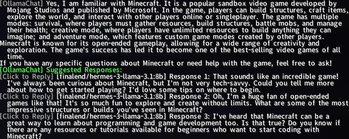
Example
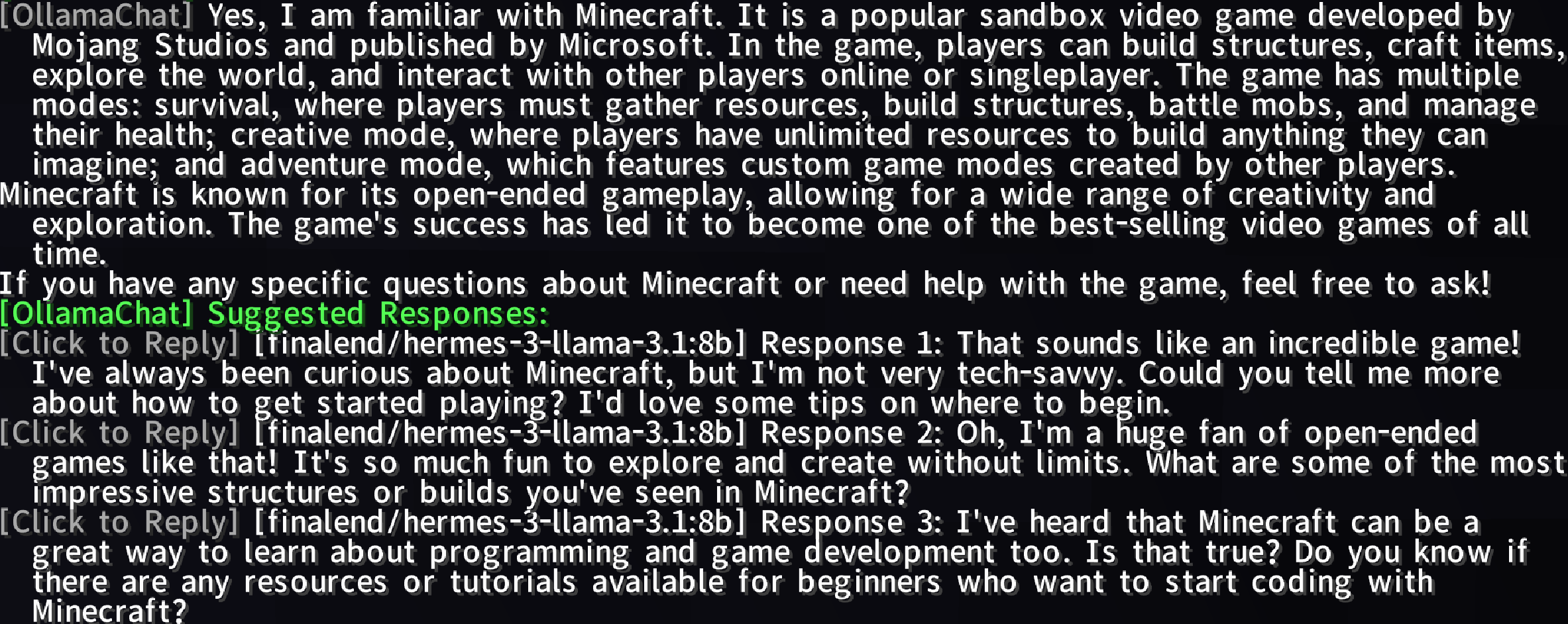
Response Suggestions

Features

  • AI-Powered Conversations: Chat with AI using @bot or @ai prefixes for dynamic, intelligent responses.
  • Ollama & OpenAI Integration: Leverage advanced AI models to enhance your Minecraft experience.
  • Multi-Language Support: Supports multiple languages (e.g., English, Simplified Chinese) via lang folder files.
  • Toggle AI Services: Enable/disable AI services with /ollamachat toggle <ai-name>.
  • Prompt Management: Create, delete, list, select, or clear custom prompts to tailor AI interactions.
  • Conversation Management: Start, switch, delete, or view player-specific conversations with AI entities.
  • Smart Response Suggestions: Generate configurable, clickable follow-up suggestions with hover text and rate limiting.
  • Progress Display: Visual status bar for prompt answer generation (0% to 100%).
  • Public API: OllamaChatAPI for plugin extensibility and AI query support.

Usage

Chatting with AI

Type @bot or @ai followed by your message in Minecraft chat to interact with the AI.

Example:

@bot What's the best way to build a castle?

Commands

CommandPermissionDescription
/ollamachat reloadollamachat.reloadReloads plugin configuration and language files.
/ollamachat helpShows general command list.
/ollamachat help <command>Shows detailed help for a specific command.
/ollamachat toggle <ai-name>ollamachat.toggleEnables/disables specified AI service.
/aichat <ai-name> <prompt>ollamachat.useInteracts with other AI services.
/ollamachat prompt set <promptName> <promptContent>ollamachat.prompt.setCreates a new prompt.
/ollamachat prompt delete <promptName>ollamachat.prompt.deleteDeletes a prompt.
/ollamachat prompt listollamachat.prompt.listLists all prompts.
/ollamachat prompt select <promptName>ollamachat.prompt.selectSets default prompt.
/ollamachat prompt clearollamachat.prompt.selectResets default prompt.
/ollamachat conversation new <aiName> <convName>ollamachat.conversation.newStarts a new conversation.
/ollamachat conversation select <aiName> <convName>ollamachat.conversation.selectSwitches conversations.
/ollamachat conversation delete <aiName> <convName>ollamachat.conversation.deleteDeletes a conversation.
/ollamachat conversation list <aiName>ollamachat.conversation.listLists conversations for an AI.
/ollamachat suggests toggleollamachat.suggests.toggleToggles suggested responses.
/ollamachat suggests-presets toggleollamachat.suggests-presets.toggleToggles preset suggested responses.
/ollamachat search toggleollamachat.search.toggleEnables/disables web search functionality.
/ollamachat search statusollamachat.search.statusDisplays current search configuration.
/ollamachat search query <text>ollamachat.search.queryPerforms a manual web search and gets AI response.
/ollamachat search engine [name]ollamachat.search.engineShows or changes the active search engine.
/ollamachat search setkey <engine> <key>ollamachat.search.setkeySets API key for specified search engine.
/ollamachat search setcount <number>ollamachat.search.setcountConfigures number of search results (1-50).
/ollamachat search addkeyword <word>ollamachat.search.keywordsAdds a trigger keyword for auto-search.
/ollamachat search removekeyword <word>ollamachat.search.keywordsRemoves a trigger keyword.
/ollamachat search listkeywordsollamachat.search.keywordsLists all configured trigger keywords.

Permissions

PermissionDescription
ollamachat.reloadAllows reloading plugin configuration and language files.
ollamachat.toggleAllows enabling/disabling AI services.
ollamachat.useAllows sending messages to AI services.
ollamachat.prompt.setAllows creating and saving new prompts.
ollamachat.prompt.deleteAllows deleting prompts.
ollamachat.prompt.listAllows listing all prompts.
ollamachat.prompt.selectAllows selecting or clearing default prompt.
ollamachat.conversation.newAllows starting new conversations.
ollamachat.conversation.selectAllows switching between conversations.
ollamachat.conversation.deleteAllows deleting conversations.
ollamachat.conversation.listAllows listing conversations for an AI.
ollamachat.suggests.toggleAllows toggling suggested responses.
ollamachat.suggests-presets.toggleAllows toggling preset suggested responses.
ollamachat.search.toggleAllows enabling/disabling web search.
ollamachat.search.statusAllows viewing search configuration.
ollamachat.search.queryAllows performing manual web searches.
ollamachat.search.engineAllows changing the search engine.
ollamachat.search.setkeyAllows setting API keys for search engines.
ollamachat.search.setcountAllows configuring search result count.
ollamachat.search.keywordsAllows managing trigger keywords.

Example:

/aichat ollama Tell me about Redstone
/ollamachat prompt set creativePrompt "Act as a creative Minecraft builder"
/ollamachat suggests toggle

Installation

  1. Download: Get the latest OllamaChat.
  2. Install: Place the .jar file in your server's plugins folder.
  3. Configure: Edit config.yml to customize AI settings, prompts, and suggestions.
  4. Reload: Use /ollamachat reload to apply changes.

Configuration

Customize AI interactions via config.yml:

# OllamaChat Configuration File

# ============================================================
# General Settings
# ============================================================

# Language file to use (en_us, zh_cn, etc.)
language: en_us

# Enable Ollama integration
ollama-enabled: true

# Ollama API URL
ollama-api-url: "http://localhost:11434/api/generate"

# Default Ollama model
model: "llama3"

# Maximum chat history to keep per conversation
max-history: 5

# Maximum response length (characters)
max-response-length: 500

# Chat trigger prefixes (messages starting with these will be sent to AI)
trigger-prefixes:
  - "@bot"
  - "@ai"

# ============================================================
# Streaming Settings
# ============================================================

stream-settings:
  # Enable streaming responses
  enabled: true

# ============================================================
# Prompt Settings
# ============================================================

# Default prompt name (empty for no default)
default-prompt: ""

# Custom prompts
# You can define custom prompts here that can be selected with /ollamachat prompt select
# Example:
# prompts:
#   expert: "You are an expert assistant. Provide detailed and professional answers."
#   friendly: "You are a friendly assistant. Keep responses casual and warm."
prompts: {}

# ============================================================
# Suggested Responses Settings
# ============================================================

# AI models to use for generating suggestions
suggested-response-models:
  - "llama3"

# Enable suggested responses feature
suggested-responses-enabled: true

# Number of suggestions to generate
suggested-response-count: 3

# Cooldown between suggestion generations (seconds, 0 to disable)
suggested-response-cooldown: 10

# Enable preset suggestions (used when AI is unavailable or as fallback)
suggested-response-presets-enabled: true

# Preset suggestions (used when AI is unavailable)
suggested-response-presets:
  - "I see what you mean."
  - "That's interesting!"
  - "Tell me more about that."

# Individual model toggles for suggestions
# You can enable/disable specific models for suggestion generation
# Example:
# suggested-response-model-toggles:
#   llama3: true
#   gpt-3.5-turbo: false
suggested-response-model-toggles: {}

# ============================================================
# Web Search Settings
# ============================================================

web-search:
  # Enable web search feature
  enabled: false

  # Auto-trigger search when message contains trigger keywords
  auto-trigger: true

  # Keywords that trigger automatic web search
  # When a user's message contains any of these words, a web search will be performed
  trigger-keywords:
    - "search"
    - "find"
    - "look up"
    - "google"
    - "what is"
    - "who is"
    - "when did"
    - "where is"

  # Number of search results to return (1-50)
  result-count: 5

  # ============================================================
  # Search Engine Configuration
  # ============================================================
  # Choose which search engine to use: bocha or brave
  # - bocha: Chinese-focused search engine (requires API key)
  # - brave: International search engine (requires API key)
  engine: "brave"

  # ---------- Bocha Search Engine (Chinese-focused) ----------
  # Website: https://www.bochaai.com/
  # API Documentation: https://api.bocha.cn/v1/web-search
  bocha:
    # Bocha API Key (required for Bocha engine)
    # Get it from: https://www.bochaai.com/ (Chinese website)
    api-key: ""

    # Include specific sites (only search within these domains)
    # Example: ["example.com", "sample.org"]
    include-sites: false
    include-sites-list: []

    # Exclude specific sites (exclude these domains from search)
    # Example: ["spam.com", "adsite.net"]
    exclude-sites: false
    exclude-sites-list: []

    # Time range in days (0 for unlimited)
    # Restrict search results to content published within this many days
    time-range: 0

    # Freshness: Day, Week, Month, Quarter, Year (empty for unlimited)
    # Restrict search results by how recent they are
    freshness: ""

  # ---------- Brave Search Engine (International) ----------
  # Website: https://brave.com/search/api/
  # API Documentation: https://api.search.brave.com/app/documentation
  brave:
    # Brave API Key (required for Brave engine)
    # Get it from: https://api.search.brave.com/app/keys
    api-key: ""

    # Country code (e.g., US, CN, GB, DE, FR, JP, etc.)
    # This affects search result relevance based on location
    country: "US"

    # Search language (e.g., en, zh, es, fr, de, etc.)
    # Results will be prioritized in this language
    search-lang: "en"

    # UI language (e.g., en, zh, es, fr, de, etc.)
    # Language for UI elements in search results
    ui-lang: "en"

    # Safe search level (off, moderate, strict)
    # Filters adult content based on strictness
    safe-search: "moderate"

  # ---------- Search Prompt Template ----------
  # Template for formatting search results for AI
  # Available placeholders:
  #   {search_results} - The formatted search results
  #   {prompt} - The user's original question
  prompt-template: "Based on the following search results, please answer the user's question:\n\n{search_results}\n\nUser question: {prompt}\n\nPlease provide an accurate and detailed answer based on the search results. If the search results are insufficient, please indicate that."

# ============================================================
# Database Settings
# ============================================================

database:
  # Database type: sqlite or mysql
  # - sqlite: Local file-based database (simpler, no setup required)
  # - mysql: Remote MySQL database (better for multiple servers)
  type: sqlite

  # MySQL settings (only used when type is mysql)
  mysql:
    host: "localhost"
    port: 3306
    database: "ollamachat"
    username: "root"
    password: ""

    # HikariCP connection pool settings
    # These control how the database connection pool behaves
    hikari:
      # Maximum number of connections in the pool
      maximum-pool-size: 10
      # Minimum number of idle connections to maintain
      minimum-idle: 2
      # Maximum time (in ms) to wait for a connection from the pool
      connection-timeout: 30000
      # Maximum time (in ms) a connection can stay idle in the pool
      idle-timeout: 600000
      # Maximum lifetime (in ms) of a connection in the pool
      max-lifetime: 1800000
      # Cache prepared statements for better performance
      cache-prep-stmts: true
      # Size of the prepared statement cache
      prep-stmt-cache-size: 250
      # Maximum SQL length for cached prepared statements
      prep-stmt-cache-sql-limit: 2048

# ============================================================
# Progress Display Settings
# ============================================================

progress-display:
  # Enable progress display while AI is generating responses
  enabled: true

  # Display type: bossbar or actionbar
  # - bossbar: Uses Minecraft's boss bar (more visible)
  # - actionbar: Uses the action bar above hotbar (less intrusive)
  type: "bossbar"

  # BossBar color (BLUE, GREEN, PINK, PURPLE, RED, WHITE, YELLOW)
  # Only applicable when type is "bossbar"
  color: "BLUE"

  # BossBar style (SOLID, SEGMENTED_6, SEGMENTED_10, SEGMENTED_12, SEGMENTED_20)
  # Only applicable when type is "bossbar"
  style: "SOLID"

  # Update interval in ticks (20 ticks = 1 second)
  # How often the progress display updates
  update-interval: 1

# ============================================================
# Other AI Integrations
# ============================================================

# Configure other AI models (OpenAI, Claude, etc.)
# You can add multiple AI providers here and use them with /aichat command
other-ai-configs: {}
  # Example OpenAI configuration:
  # openai:
  #   api-url: "https://api.openai.com/v1/chat/completions"
  #   api-key: "your-api-key-here"
  #   model: "gpt-3.5-turbo"
  #   enabled: true
  #   messages-format: true
  #
  # Example Claude configuration:
  # claude:
  #   api-url: "https://api.anthropic.com/v1/messages"
  #   api-key: "your-api-key-here"
  #   model: "claude-3-opus-20240229"
  #   enabled: true
  #   messages-format: true
  #
  # Example Custom API configuration:
  # custom-ai:
  #   api-url: "https://your-custom-api.com/generate"
  #   api-key: "your-api-key"
  #   model: "your-model-name"
#   enabled: true
#   messages-format: false

Contributing

We welcome contributions! Submit issues or pull requests on our GitHub repository.

License

Licensed under the MIT License. See LICENSE.

Support

For help, visit our GitHub repository or join our Community server.

Галерея
Example imageResponse Suggestions

Последние версии

Все версии →
release

Ollama Chat 1.2.2

1.2.2
21 июл. 2026 г.184Minecraft: 1.20, 1.20.1, 1.20.2, 1.20.3, 1.20.4, 1.20.5, 1.20.6, 1.21, 1.21.1, 1.21.2, 1.21.3, 1.21.4, 1.21.5, 1.21.6, 1.21.7, 1.21.8, 1.21.9, 1.21.10, 1.21.11, 26.1, 26.1.1, 26.1.2, 26.2, 26.3bukkit, folia, paper, purpur, spigot
Скачать
Что нового
# Version 1.2.2 ## Overview This release restores Bukkit compatibility, adapts to Minecraft 1.21.5+ SNBT text component format changes, and optimizes AI streaming output for natural sentence-level delivery. ## New Features - **Bukkit Compatibility**: Resolved `NoClassDefFoundError` caused by direct dependency on `net.md_5.bungee.api.chat.*` in `SuggestedResponseHandler`. Extracted clickable message sending into an abstraction layer with automatic platform detection. - **1.21.5+ SNBT Format Support**: `BukkitClickableSender` now auto-detects server version and generates the correct `tellraw` component format — JSON (*1.20–1.21.4*) or SNBT with `click_event`/`command` snake_case keys (*1.21.5+*). ## Changes - **SuggestedResponseHandler**: Removed `net.md_5.bungee` imports; delegates to `ClickableMessageSender` interface (`SpigotClickableSender` for Paper/Spigot/Folia, `BukkitClickableSender` for CraftBukkit). - **AIService Streaming**: Replaced the 50-character arbitrary flush threshold with intelligent sentence-boundary detection (`findFlushPoint`). Text is now flushed at paragraph breaks (`\n\n`), sentence endings (`.?!! `), or emergency word-boundaries (300 chars), producing natural multi-sentence delivery. ## Fixes - **Clickable suggestions on Bukkit**: Now works via `/tellraw` command with automatic version-adaptive JSON/SNBT format selection and dual-format fallback. - **Streaming text breaks**: No more mid-sentence cutoffs at the 50-character mark. Player receives logically complete sentences. ## Technical - **New classes**: `ClickableMessageSender`, `SpigotClickableSender`, `BukkitClickableSender` - **Modified classes**: `SuggestedResponseHandler`, `AIService` - **Version support**: Minecraft 1.20.x through 26.x | Bukkit / Spigot / Paper / Folia
release

Ollama Chat 1.2.1-hotfix

1.2.1-hotfix
16 июн. 2026 г.75Minecraft: 1.20, 1.20.1, 1.20.2, 1.20.3, 1.20.4, 1.20.5, 1.20.6, 1.21, 1.21.1, 1.21.2, 1.21.3, 1.21.4, 1.21.5, 1.21.6, 1.21.7, 1.21.8, 1.21.9, 1.21.10, 1.21.11, 26.1, 26.1.1, 26.1.2, 26.2folia, paper, purpur, spigot
Скачать
Что нового
# Version 1.2.1-hotfix ## Overview Hotfix for clickable suggestion components that stopped working in v1.2.1 ## Fixes - **Clickable Suggestions**: Partially reverted `SuggestedResponseHandler` to restore click-to-use functionality for suggested responses - **Component Compatibility**: Fixed text component rendering issue where `[Click to use]` was displayed as plain text instead of an interactive element ---
release

Ollama Chat 1.2.1

1.2.1
21 мая 2026 г.74Minecraft: 1.20, 1.20.1, 1.20.2, 1.20.3, 1.20.4, 1.20.5, 1.20.6, 1.21, 1.21.1, 1.21.2, 1.21.3, 1.21.4, 1.21.5, 1.21.6, 1.21.7, 1.21.8, 1.21.9, 1.21.10, 1.21.11, 26.1, 26.1.1, 26.1.2, 26.2bukkit, folia, paper, purpur, spigot
Скачать
Что нового
# Version 1.2.1 ## Overview This release introduces Markdown formatting support for AI responses. ## New Features - **Markdown Formatting**: AI responses are now automatically converted from Markdown to Minecraft-compatible formatting. ## Changes - **Formatter Integration**: `ConfigManager` now manages Markdown formatting settings with configurable options in `config.yml` ## Technical - Markdown conversion supports: headers, bold, italic, strikethrough, code blocks, lists, blockquotes, links, and horizontal rules
release

Ollama Chat 1.2.0

1.2.0
30 апр. 2026 г.53Minecraft: 1.20, 1.20.1, 1.20.2, 1.20.3, 1.20.4, 1.20.5, 1.20.6, 1.21, 1.21.1, 1.21.2, 1.21.3, 1.21.4, 1.21.5, 1.21.6, 1.21.7, 1.21.8, 1.21.9, 1.21.10, 1.21.11, 26.1, 26.1.1, 26.1.2, 26.2bukkit, folia, paper, purpur, spigot
Скачать
Что нового
# Version 1.2.0 ## Overview This release introduces Folia server compatibility and refactors the search module ## New Features - **Folia Compatibility**: New scheduler abstraction layer compatible with Bukkit, Spigot, Paper, and Folia ## Changes - **Web Search Module Restructured**: Moved `WebSearchService`, `BochaSearchService`, and `BraveSearchService` into dedicated `com.ollamachat.search` package for better code organization
release

Ollama Chat 1.1.9

1.1.9
10 апр. 2026 г.33Minecraft: 1.20, 1.20.1, 1.20.2, 1.20.3, 1.20.4, 1.20.5, 1.20.6, 1.21, 1.21.1, 1.21.2, 1.21.3, 1.21.4, 1.21.5, 1.21.6, 1.21.7, 1.21.8, 1.21.9, 1.21.10, 1.21.11, 26.1, 26.1.1, 26.1.2bukkit, paper, purpur, spigot
Скачать
Что нового
# Version 1.1.9 ## Overview This release focuses on improving the help system, enhancing the plugin API, and adding bStats metrics integration for better usage analytics. ## New Features - **Enhanced Help System**: Added `/ollamachat help` command with detailed subcommand documentation, providing clearer usage instructions for all commands - **API Improvements**: Refined the public API interface for better third-party plugin integration, with more consistent method naming and error handling - **bStats Integration**: Added anonymous usage statistics collection via bStats (https://bstats.org/). You can opt-out by modifying the `plugins/bStats/config.yml` file ## Changes - Improved command feedback messages with better formatting and color coding - Updated language files with comprehensive help entries ---
release

Ollama Chat 1.1.8

1.1.8
14 мар. 2026 г.41Minecraft: 1.20, 1.20.1, 1.20.2, 1.20.3, 1.20.4, 1.20.5, 1.20.6, 1.21, 1.21.1, 1.21.2, 1.21.3, 1.21.4, 1.21.5, 1.21.6, 1.21.7, 1.21.8, 1.21.9, 1.21.10, 1.21.11, 26.1, 26.1.1, 26.1.2bukkit, paper, purpur, spigot
Скачать
Что нового
# Version 1.1.8 ## Overview This major release introduces comprehensive web search capabilities with multi-engine support (Bocha and Brave), enhanced configuration management, and improved user experience with new commands and language switching. The update focuses on bringing real-time information retrieval to AI conversations while maintaining flexibility for international users. This version supports Minecraft 1.20.x through 1.21.x. ## New Features - **Web Search Integration**: - Added support for two search engines: Bocha (Chinese-focused) and Brave (International) - Automatic web search when messages contain trigger keywords (configurable) - Manual search command `/ollamachat search query <text>` for on-demand searches - Search results are formatted and fed to AI for informed responses - Configurable result count (1-50), site filtering, and time range restrictions - **Multi-Engine Support**: - **Bocha Search Engine**: Chinese-focused search with site inclusion/exclusion, time range, and freshness filters - **Brave Search Engine**: International search with country, language, and safe search settings - Easy switching between engines via `/ollamachat search engine <name>` - **New Search Management Commands**: - `/ollamachat search toggle` - Enable/disable web search - `/ollamachat search status` - View current search configuration - `/ollamachat search engine [name]` - Show/change search engine - `/ollamachat search setkey <engine> <key>` - Set API key for engines - `/ollamachat search setcount <number>` - Configure result count - `/ollamachat search addkeyword <word>` - Add trigger keywords - `/ollamachat search removekeyword <word>` - Remove trigger keywords - `/ollamachat search listkeywords` - List all trigger keywords - **Language System Improvements**: - Hot-reload language files with `/ollamachat reload` ## Enhancements - **Configuration**: - Added complete web-search configuration section with detailed comments - Engine-specific configuration blocks for Bocha and Brave - Configurable trigger keywords for automatic search - Customizable search prompt template for AI context - Removed config-version for simpler upgrades - **Performance**: - Asynchronous search operations to prevent server lag - Efficient result parsing and formatting - Connection pooling for search API requests ## Configuration Example ```yaml web-search: enabled: false auto-trigger: true trigger-keywords: - "search" - "find" - "what is" result-count: 5 engine: "brave" bocha: api-key: "" include-sites: false include-sites-list: [] exclude-sites: false exclude-sites-list: [] time-range: 0 freshness: "" brave: api-key: "" country: "US" search-lang: "en" ui-lang: "en" safe-search: "moderate" prompt-template: "Based on the following search results... {search_results} ... {prompt}" ``` ## **Permissions**: - New permissions added for search management: - `ollamachat.search.toggle` - Enable/disable search - `ollamachat.search.status` - View search status - `ollamachat.search.query` - Perform manual searches - `ollamachat.search.setkey` - Set API keys - `ollamachat.search.setcount` - Configure result count - `ollamachat.search.keywords` - Manage trigger keywords - `ollamachat.search.engine` - Change search engine ## Commands Usage Examples ```bash # Enable web search /ollamachat search toggle # Change search engine to Bocha /ollamachat search engine bocha # Set Brave API key /ollamachat search setkey brave your-api-key-here # Perform manual search /ollamachat search query latest Minecraft updates # Add trigger keyword /ollamachat search addkeyword research # Check search status /ollamachat search status # Reload configuration with new language /ollamachat reload ``` - **API Keys**: - Bocha API key: Get from https://www.bochaai.com/ - Brave API key: Get from https://api.search.brave.com/app/keys - Both engines require valid API keys to function - **Language Files**: - Update language files to include new search-related keys ---
release

Ollama Chat 1.1.7

1.1.7
27 февр. 2026 г.33Minecraft: 1.21, 1.21.1, 1.21.2, 1.21.3, 1.21.4, 1.21.5, 1.21.6, 1.21.7, 1.21.8, 1.21.9, 1.21.10, 1.21.11bukkit, paper, purpur, spigot
Скачать
Что нового
# Version 1.1.7 ## Overview This release introduces web search capabilities through Brave Search API integration, allowing AI responses to leverage real-time information from the internet. Players can now trigger web searches directly in chat to get up-to-date, informed answers from the AI. ## New Features - **Brave Search Integration**: - Added web search functionality using Brave Search API for real-time information retrieval. - Players can trigger searches with `@web <query>` in chat messages. - Search results are automatically fed into AI prompts for context-aware responses. - **Configurable Search Settings**: - Added `brave-search` section to `config.yml` with `enabled` and `api-key` options. - New language messages for search feedback: `search-searching`, `search-empty-query`, and `search-error`. - **Chat-based Search**: - Added `@web` prefix support for triggering web searches directly from chat.
release

Ollama Chat 1.1.6

1.1.6
18 окт. 2025 г.122Minecraft: 1.21, 1.21.1, 1.21.2, 1.21.3, 1.21.4, 1.21.5, 1.21.6, 1.21.7, 1.21.8, 1.21.9, 1.21.10, 1.21.11bukkit, paper, purpur, spigot
Скачать
Что нового
# Version 1.1.6 ## Bug Fixes - Fixed HikariCP dependency loading for MySQL connections
release

Ollama Chat 1.1.5

1.1.5
31 июл. 2025 г.91Minecraft: 1.21, 1.21.1, 1.21.2, 1.21.3, 1.21.4, 1.21.5, 1.21.6, 1.21.7, 1.21.8, 1.21.9, 1.21.10bukkit, paper, purpur, spigot
Скачать
Что нового
# Version 1.1.5 ## Overview This release reintroduces HikariCP for enhanced MySQL database performance and adds a public API for other plugins to interact with OllamaChat's AI chat functionality. It focuses on improving database efficiency, extensibility, and developer integration while maintaining compatibility with existing configurations. ## New Features - HikariCP Integration: - Added HikariCP connection pooling for MySQL databases to improve performance and resource management. - Configurable HikariCP settings in `config.yml` under `database.mysql.hikari` for tuning connection pool parameters (e.g., `maximum-pool-size`, `connection-timeout`). - Public API: - Introduced `OllamaChatAPI` interface (`com.ollamachat.api.OllamaChatAPI`) for other plugins. - Supports sending AI queries, managing conversations, and accessing chat history programmatically with methods like `sendAIQuery`, `createConversation`, and `listConversations`. - Added API documentation in `API.md` for developer integration. ## Enhancements - Database Management: - Updated `DatabaseManager` to leverage HikariCP for MySQL connections, while preserving SQLite functionality. - Dependency Management: - Updated `DependencyLoader` to include HikariCP (version 5.1.0) alongside MySQL and SQLite JDBC drivers, downloaded at runtime to `plugins/OllamaChat/libs`. - Maintained `compileOnly` in `build.gradle` for non-Paper dependencies to minimize JAR size. - Configuration: - Added `database.mysql.hikari` section to `config.yml` with default settings for connection pooling. - Improved `config.yml` comments for clarity and ease of use. ## Bug Fixes - No specific bug fixes in this release, as the focus was on new features and performance improvements. ## API Usage Example ```java Plugin ollamaPlugin = getServer().getPluginManager().getPlugin("OllamaChat"); if (ollamaPlugin != null && ollamaPlugin.isEnabled()) { OllamaChatAPI api = ((com.ollamachat.core.Ollamachat) ollamaPlugin).getAPI(); api.sendAIQuery(player, "ollama", "Hello, how are you?") .thenAccept(response -> player.sendMessage("AI Response: " + response)); } ``` ## Configuration Example ```yaml database: type: mysql mysql: host: localhost port: 3306 database: ollamachat username: root password: "" hikari: maximum-pool-size: 10 connection-timeout: 30000 ``` ## Notes for Upgrading - Configuration: - Update `config.yml` to include the `database.mysql.hikari` section if using MySQL. Default values are added automatically. - Backup existing `config.yml` before updating to avoid data loss. - Dependencies: - The plugin downloads HikariCP (version 5.1.0) automatically on first startup. Ensure server internet access or verify `HikariCP-5.1.0.jar` in `plugins/OllamaChat/libs`. - Delete the `libs` folder to force re-download if dependencies are corrupted. - API Integration: - Developers can hook into `OllamaChat` using `OllamaChatAPI`. Add `softdepend: [OllamaChat]` to `plugin.yml` and refer to `API.md`. - Compatibility: - This update is backward-compatible with existing configurations and databases. - Testing: - Test database operations (e.g., `/ollamachat conversation new`) to verify MySQL/SQLite functionality. - Check server logs for dependency loading or database errors. ## Known Issues - HikariCP settings may require manual tuning for optimal performance based on server load and MySQL configuration. # 版本 1.1.5 ## 概述 本次更新重新引入HikariCP以提升MySQL数据库性能,并新增公共API供其他插件与OllamaChat的AI聊天功能交互。重点改进数据库效率、可扩展性和开发者集成,同时保持与现有配置的兼容性。 ## 新特性 - HikariCP集成: - 为MySQL数据库添加HikariCP连接池,提升性能和资源管理 - 在`config.yml`的`database.mysql.hikari`下可配置连接池参数(如`maximum-pool-size`、`connection-timeout`) - 公共API: - 新增`OllamaChatAPI`接口(`com.ollamachat.api.OllamaChatAPI`) - 支持通过编程方式发送AI查询、管理会话和访问聊天记录(如`sendAIQuery`、`createConversation`、`listConversations`等方法) - 开发者文档见`API.md` ## 功能增强 - 数据库管理: - 更新`DatabaseManager`以使用HikariCP管理MySQL连接,同时保留SQLite功能 - 依赖管理: - 更新`DependencyLoader`包含HikariCP(5.1.0版)及MySQL/SQLite驱动,运行时下载至`plugins/OllamaChat/libs` - 保持`build.gradle`中非Paper依赖使用`compileOnly`以减小JAR体积 - 配置优化: - 在`config.yml`新增`database.mysql.hikari`配置段 - 改进配置注释的清晰度 ## 问题修复 - 本版本主要侧重新功能和性能提升,无特定问题修复 ## API使用示例 ```java Plugin ollamaPlugin = getServer().getPluginManager().getPlugin("OllamaChat"); if (ollamaPlugin != null && ollamaPlugin.isEnabled()) { OllamaChatAPI api = ((com.ollamachat.core.Ollamachat) ollamaPlugin).getAPI(); api.sendAIQuery(player, "ollama", "你好吗?") .thenAccept(response -> player.sendMessage("AI回复: " + response)); } ``` ## 配置示例 ```yaml database: type: mysql mysql: host: localhost port: 3306 database: ollamachat username: root password: "" hikari: maximum-pool-size: 10 connection-timeout: 30000 ``` ## 升级须知 - 配置: - 使用MySQL需更新`config.yml`添加`hikari`配置段(默认值会自动生成) - 升级前备份现有配置 - 依赖: - 首次启动自动下载HikariCP(5.1.0版),确保服务器联网或检查`plugins/OllamaChat/libs`目录 - 依赖损坏时可删除`libs`文件夹强制重新下载 - API集成: - 开发者可通过`OllamaChatAPI`集成,在`plugin.yml`添加`softdepend: [OllamaChat]`并参考`API.md` - 兼容性: - 保持与现有配置和数据库的向后兼容 - 测试建议: - 测试数据库操作(如`/ollamachat conversation new`命令) - 检查服务器日志中的依赖加载和数据库错误 ## 已知问题 - HikariCP参数可能需要根据服务器负载手动调优
release

Ollama Chat 1.1.4

1.1.4
14 июл. 2025 г.61Minecraft: 1.21, 1.21.1, 1.21.2, 1.21.3, 1.21.4, 1.21.5, 1.21.6, 1.21.7, 1.21.8, 1.21.9, 1.21.10bukkit, paper, purpur, spigot
Скачать
Что нового
# Version 1.1.4 ## Changes in this Update: --- #### Bug Fixes 🐛 - **Spigot and Bukkit Compatibility** #### Architectural 🧱 - **Database Manager Refactoring**: - Removed HikariCP dependency and replaced connection pooling with direct `DriverManager` connections for MySQL and SQLite. #### Dependency Management 📦 - **Runtime Dependency Loading**: - Added `DependencyLoader` class to download and load dependencies (`mysql-connector-java:8.0.33`, `sqlite-jdbc:3.46.0.0`) at runtime from Maven Central to `plugins/OllamaChat/libs`. - Updated `build.gradle` to use `compileOnly` for non-Paper dependencies, reducing JAR size. - Modified `Ollamachat` main class to initialize `DependencyLoader` before other components. #### Configuration Updates 🌐 - **Database Configuration**: - Supports both MySQL and SQLite with fallback to SQLite if MySQL initialization fails. - Configuration example for `config.yml`: ```yaml database: type: mysql mysql: host: localhost port: 3306 database: ollamachat username: root password: "" ``` --- **Important Notes:** 1. ⚠️ **Configuration Requirement**: - Ensure `config.yml` includes valid MySQL or SQLite settings. Missing or incorrect settings may cause fallback to SQLite. - Backup existing `config.yml` before updating to avoid data loss. 2. 🔄 **Dependency Download**: - On first startup, the plugin downloads dependencies to `plugins/OllamaChat/libs`. Ensure the server has internet access. - Delete the `libs` folder to force re-download if dependencies are corrupted. --- # 版本 1.1.4 ## 本次更新的主要变更: --- #### 错误修复 🐛 - **Spigot 和 Bukkit 兼容性** #### 架构 🧱 - **数据库管理器重构**: - 移除 HikariCP 依赖,改用直接 `DriverManager` 连接支持 MySQL 和 SQLite。 #### 依赖管理 📦 - **运行时依赖加载**: - 新增 `DependencyLoader` 类,从 Maven Central 下载并加载依赖(`mysql-connector-java:8.0.33`, `sqlite-jdbc:3.46.0.0`)到 `plugins/OllamaChat/libs`。 - 更新 `build.gradle`,对非 Paper 依赖使用 `compileOnly`,减少 JAR 大小。 - 修改 `Ollamachat` 主类,在其他组件初始化前加载 `DependencyLoader`。 #### 配置更新 🌐 - **数据库配置**: - 支持 MySQL 和 SQLite,若 MySQL 初始化失败则回退到 SQLite。 - `config.yml` 配置示例: ```yaml database: type: mysql mysql: host: localhost port: 3306 database: ollamachat username: root password: "" ``` --- **注意事项:** 1. ⚠️ **配置要求**: - 确保 `config.yml` 包含有效的 MySQL 或 SQLite 配置,错误配置可能导致回退到 SQLite。 - 建议备份现有 `config.yml` 以防数据丢失。 2. 🔄 **依赖下载**: - 首次启动时,插件会将依赖下载到 `plugins/OllamaChat/libs`,确保服务器具备网络连接。 - 如依赖损坏,可删除 `libs` 文件夹以重新下载。