COWMODSКаталог модов

Nice Mob Manager

Probably the most advanced mob customizing data pack out there - tweak individual mobs, equipment, behavior and more easily via in-game menus.

8,5 тыс.52обновлён 22 окт. 2026 г.
УправлениеМобыУтилиты

Описание

📖 Description

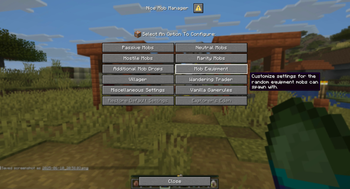
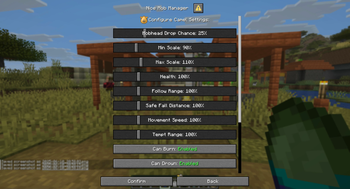
Nice Mob Manager is a super versatile tool that lets you control pretty much everything about mobs. Built on Mojang's Dialog system, it gives you easy, menu-based access to tons of features with just one command: /function mob_manager. Tweak individual mobs or whole mob groups, add rare mobs with better loot, randomize their gear and even adjust vanilla game rules. If you've thought about it, chances are you can do it!


🔎 Content Overview (Wiki)

Want to know what every menu option does? It's all in our Wiki:

  • 🐄 Mob Settings & Rarity Mobs: size, health, damage and head drops per mob or group, plus rare mobs with better loot
  • 🛡️ Mob Equipment & Drops: randomized gear and extra drops like a chance for the Ender Dragon to drop a Dragon Egg
  • 🧑‍🌾 Villagers & Wandering Traders: custom names, meeting points, announcements and fun new trades
  • 📜 Game Rules & Miscellaneous: mob-related game rules and everything else you can tweak

🛠️ Technical Gibberish

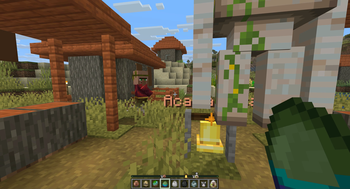
This data pack also works as an optional resource pack for the spawn egg icons on the Locator Bar. Just put the same file into your resourcepacks folder and enable it in game.

(Not needed for the auto-converted mod versions in Single-Player.)

Custom dialogs/menus were introduced in Minecraft 1.21.6, so a backport to older versions isn't possible.

PaperMC users: set the paper.maxChatCommandInputSize property to a value between 512 and 1024 (see the PaperMC Docs) and enable allow-non-player-entities-on-scoreboards in your Paper config.


📝 Translations

Want to play in your own language? Help us out by contributing on our Website!


✍️ Feedback, Questions & Suggestions

We're here to help! If you have questions or suggestions, or you've run into a bug, hop on our Discord server and ask in the Data Pack Section. Click to join the server


🎮 Explorer's Eden SMP

Join A Realm Recrafted, our Minecraft SMP! Enjoy a world featuring all of our actively maintained data packs, plus some exclusive ones. It's completely free, with no microtransactions. Come build, explore and craft with us today!

Explorer's Eden

Галерея

Feature ImageLocator Bar IconsMenu Example 1Menu Example 2

Последние версии

Все версии →
release

Update v4.4 - Universal Mod

4.4-mod
22 окт. 2026 г.70Minecraft: 26.3fabric, forge, neoforge, quilt
Скачать
Что нового
# Minecraft Version(s): 26.3 ## Changes: - "Mobs on locator bar" now also reaches mobs that weren't loaded when the setting was changed: every 15 seconds, loaded mobs whose locator bar range doesn't match the setting yet get it once (each mob is only touched once per setting, so this stays cheap) ## Fixes: - Mobs from chunks that were unloaded while "Mobs on locator bar" was switched off kept showing on the locator bar, which also made every player's movement more expensive for the server
release

Update v4.4

4.4
22 окт. 2026 г.61Minecraft: 26.3datapack
Скачать
Что нового
# Minecraft Version(s): 26.3 ## Changes: - "Mobs on locator bar" now also reaches mobs that weren't loaded when the setting was changed: every 15 seconds, loaded mobs whose locator bar range doesn't match the setting yet get it once (each mob is only touched once per setting, so this stays cheap) ## Fixes: - Mobs from chunks that were unloaded while "Mobs on locator bar" was switched off kept showing on the locator bar, which also made every player's movement more expensive for the server
release

Update v4.3 - Universal Mod

4.3-mod
19 окт. 2026 г.68Minecraft: 26.3fabric, forge, neoforge, quilt
Скачать
Что нового
# Minecraft Version(s): 26.3 ## Changes: - Wandering Traders can sell mini blocks of the new cinnabar, sulfur and poplar blocks (14 new trades) ## Fixes:
release

Update v4.3

4.3
19 окт. 2026 г.36Minecraft: 26.3datapack
Скачать
Что нового
# Minecraft Version(s): 26.3 ## Changes: - Wandering Traders can sell mini blocks of the new cinnabar, sulfur and poplar blocks (14 new trades) ## Fixes:
release

Update v4.2 - Universal Mod

4.2-mod
10 окт. 2026 г.82Minecraft: 26.3fabric, forge, neoforge, quilt
Скачать
Что нового
# Minecraft Version(s): 26.3 ## Changes: - Converted mobs (e.g. Pigs struck by lightning, grown-up Tadpoles) now get their new locator bar icon only once, when near a player, instead of all mobs being updated every 15 seconds (performance) - Locator bar settings are now applied to all loaded mobs and village names when saving the misc settings ## Fixes: - Rarity mobs losing their rarity locator bar icon
release

Update v4.2

4.2
10 окт. 2026 г.105Minecraft: 26.3datapack
Скачать
Что нового
# Minecraft Version(s): 26.3 ## Changes: - Converted mobs (e.g. Pigs struck by lightning, grown-up Tadpoles) now get their new locator bar icon only once, when near a player, instead of all mobs being updated every 15 seconds (performance) - Locator bar settings are now applied to all loaded mobs and village names when saving the misc settings ## Fixes: - Rarity mobs losing their rarity locator bar icon
release

Update v4.1 - Universal Mod

4.1-mod
8 окт. 2026 г.46Minecraft: 26.3fabric, forge, neoforge, quilt
Скачать
Что нового
# Minecraft Version(s): 26.3 ## Changes: ## Fixes: - Zombie Horse and Sulfur Cube exceptions when saving all of their mob type
release

Update v4.1

4.1
8 окт. 2026 г.38Minecraft: 26.3datapack
Скачать
Что нового
# Minecraft Version(s): 26.3 ## Changes: ## Fixes: - Zombie Horse and Sulfur Cube exceptions when saving all of their mob type
release

Update v4.0 - Universal Mod

4.0-mod
3 окт. 2026 г.65Minecraft: 26.3fabric, forge, neoforge, quilt
Скачать
Что нового
# Minecraft Version(s): 26.3 ## Changes: - Repeating background tasks now start a few ticks apart after loading instead of all on the same tick, spreading out server load ## Fixes:
release

Update v4.0

4.0
3 окт. 2026 г.34Minecraft: 26.3datapack
Скачать
Что нового
# Minecraft Version(s): 26.3 ## Changes: - Repeating background tasks now start a few ticks apart after loading instead of all on the same tick, spreading out server load ## Fixes: