COWMODSКаталог модов

NeoLux

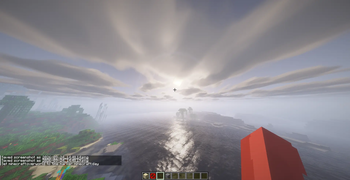
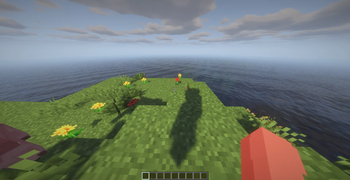
Warm, low sunlight against quiet shade, soft volumetric clouds and dark water that mirrors the shore. A deferred shaderpack for Iris with a calm, cinematic look.

1,4 тыс.1обновлён 15 окт. 2026 г.
atmospheresemi-realisticshadows

Описание

Discord Release Downloads License

Iris GLSL Source

Chat with us on Discord Watch us on Youtube

NeoLux

Warm, low sunlight against quiet shade, soft volumetric clouds and dark water that mirrors the shore. A deferred shaderpack for Iris that goes for a calm, cinematic look rather than a long list of effects.


What makes a shaderpack look good is mostly the light, not the effect list. NeoLux runs the overworld on a palette of its own that follows the height of the sun. At noon the dome is a deep blue over a pale horizon. Towards evening the light turns warm and low, spreads out around the sun, and the rest of the sky goes grey and still.

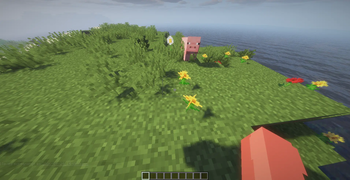
The sun is strong and the shade is weak, and the shade loses part of its color. A sunlit wall and its shaded side read as two different things instead of the same surface in a bluer tint, and a field of flowers keeps its color where the sun actually hits it.

The vanilla sky colors cannot carry that. The fog color Minecraft reports even turns with the direction the camera faces, so the whole sky changes tint whenever you turn around. The Nether and the End keep the vanilla driven colors, since a sun palette means nothing there.


Installation

  1. Install Iris.
  2. Drop the NeoLux zip into .minecraft/shaderpacks/.
  3. In game: Options -> Video Settings -> Shader Packs -> NeoLux.

No resource pack, no mod, no config file to edit. Everything is in the shader options screen.


What is in it

AreaImplementation
LightSun and sky light follow the height of the sun, warm at golden hour, block faces shaded by orientation
SkyDeep blue dome, pale horizon, warm scattering around a low sun, procedural stars
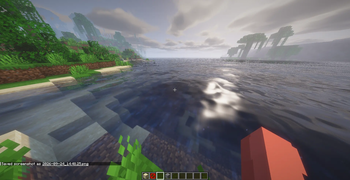
CloudsProcedural volumetric layer lit towards the sun, bright at the rim and darker in the core, mirrored by water
ShadowsDistorted shadow map, hardware filtered samples on a rotated ring, tinted by stained glass and water
PlantsLit like the ground they grow out of, light wraps around them and shines through against the sun, wind moves them
WaterDark and mirroring, screen space reflections with sky and clouds behind them, ripples, refraction, caustics
Ambient occlusionScreen space, golden angle sampling, 4 to 24 taps
Light shaftsVolumetric light marched through the shadow map, 6 to 40 steps
FogAerial haze that barely touches the first hundred blocks on a clear day, thicker at night and in rain
WeatherRain darkens open ground and gives it a sun glint and a mirrored sky
PostSoft glow bloom, five tonemap curves, lens flare, grading, vignette, grain

Quality profiles

The profile button sits at the top of the options screen. Six steps, from a machine that should not be running shaders at all to one that has cycles to burn.

ProfileShadow mapFilterAO tapsLight shaftsReflection stepsWave octavesCloud steps
Potatooff-offoffoffoff4
Low1024 / 96 blocks14offoff16
Medium2048 / 128 blocks28101628
High2048 / 160 blocks2121422310
Ultra3072 / 224 blocks3162030414
Extreme4096 / 320 blocks4244056420

Each profile writes the complete set of performance relevant options, not just the ones it changes. Switching from Extreme down to Low leaves nothing expensive behind, which is the usual way profile buttons quietly lie to you.

Color, fog and exposure are deliberately left out of the profiles. Those are taste, not performance, and a profile switch should not undo an evening of grading.


Options

81 of them, across nine pages, in English and German.

Shadows: resolution, distance, filter rings, softness, bias, tint strength, sun path rotation.

Lighting: sunlight, ambient, block light and night brightness scale separately, so you can have dark nights without dark caves. Plus torch warmth, minimum ambient, sky light falloff, how much color the shade loses, occlusion strength, radius and sample count, and light shaft strength and quality.

Sky: brightness, sun and moon brightness, the glow around the sun, and stars with their own brightness and density.

Clouds: NeoLux, vanilla or none. Cover, height, thickness, quality, speed, brightness, and whether water reflects them.

Fog: density, an onset distance that keeps the near field clear, haze strength and height, and underwater visibility.

Water: reflection range and sharpness as separate controls, refraction, blur and caustics, wave height and detail, opacity, absorption, and the sun glint.

World and geometry: waving plants and leaves, wind speed, wet surfaces in rain, alpha cutout, and the width and strength of the block selection outline.

Post processing: five tonemap curves (none, ACES, Reinhard, Uncharted 2, Soft), exposure, bloom with strength, threshold, radius and level count, sharpening, vignette, and lens flare.

Color and style: saturation, vibrance, contrast, color temperature, film grain, chromatic aberration.


Requirements

  • Iris on Minecraft 1.17 or newer. Developed and tested on Minecraft 26.3 with Iris 1.11.
  • A GPU that can do GLSL 1.20 with framebuffer objects, which in practice means anything from the last decade.

OptiFine is no longer supported from 1.1.0 on. The sky and the light tell the overworld apart from the other dimensions through a uniform only Iris provides, and without it everything falls back to the vanilla colors.

1.17 is the floor because the block selection outline is drawn as widened line quads, a technique that only exists from that version on.


A note on the source

The shader is plain GLSL 1.20 with no external includes and no textures of its own: the clouds and the water surface are procedural. If you want to read how something works, the passes are named after what they do and the buffer layout is documented at the top of lib/common.glsl. The source is on Codeberg.

Licensed GPL-3.0. Fork it, take the parts you like, keep it open.

Галерея
Shoreline in the morningMorning sun over the waterIsland at middayMeadow

Последние версии

Все версии →
release

NeoLux 1.3.0

1.3.0
15 окт. 2026 г.496Minecraft: 1.17, 1.17.1, 1.18, 1.18.1, 1.18.2, 1.19, 1.19.1, 1.19.2, 1.19.3, 1.19.4, 1.20, 1.20.1, 1.20.2, 1.20.3, 1.20.4, 1.20.5, 1.20.6, 1.21, 1.21.1, 1.21.2, 1.21.3, 1.21.4, 1.21.5, 1.21.6, 1.21.7, 1.21.8, 1.21.9, 1.21.10, 1.21.11, 26.1, 26.1.1, 26.1.2, 26.2, 26.3iris
Скачать
Что нового
New water and wet weather: a sea without a visible pattern, puddles and raindrop rings when it rains, clouds you can fly into and over, and enchanted items that shimmer instead of turning into a purple sheet. ### Added - Puddles: while it rains, water gathers in patches on open ground that faces the sky and mirrors its surroundings like a lake. They fill slowly as the rain goes on and dry up after it. `PUDDLES` and `PUDDLE_AMOUNT` on the World page. - Raindrops ring standing water and puddles while it rains, `RAIN_RIPPLES` on the World page. Both are off in the Potato profile. - Clouds sit at a fixed height in the world now, from Y=192 by default, and can be flown into and above. From inside they close in like fog, from above they cover the ground below. `CLOUD_HEIGHT` is a world height now rather than the distance above the player. - Enchanted items, armor and dropped items have a program of their own for the glint and shimmer in the vanilla purple, by day and by night. - `WATER_ROUGHNESS` on the Water page sets how choppy the surface is. ### Changed - The water surface is built from three layers of noise instead of sine waves, so there is no regular pattern across a lake. The fine chop fades out with distance, and the far sea turns into a calm mirror. - New water defaults: a calmer surface (roughness 0.25), higher waves, a stronger sun glint, more refraction and caustics, less underwater blur. The sliders reach further than these defaults in both directions. - Underwater the view stays clear up close and turns deep blue with distance instead of grey. Red fades first, as it does in real water, and the blur starts six blocks away instead of at arm's length. - Surfaces only get wet in biomes where it rains, not where it snows or stays dry. - Cloud tops are brighter, so a cloud deck seen from above is white in the sun rather than beige. ### Fixed - Black holes in the troughs of the waves. A steep wave mirrored the ground instead of the sky, and the screen space reflection followed that ray down to the sea bed. - Speckled reflections on open water further than a few dozen blocks away, where the finest waves are smaller than a pixel. - Enchanted items were covered by a flat purple sheet and lost their own color and lighting.
release

NeoLux 1.2.1

1.2.1
14 окт. 2026 г.118Minecraft: 1.17, 1.17.1, 1.18, 1.18.1, 1.18.2, 1.19, 1.19.1, 1.19.2, 1.19.3, 1.19.4, 1.20, 1.20.1, 1.20.2, 1.20.3, 1.20.4, 1.20.5, 1.20.6, 1.21, 1.21.1, 1.21.2, 1.21.3, 1.21.4, 1.21.5, 1.21.6, 1.21.7, 1.21.8, 1.21.9, 1.21.10, 1.21.11, 26.1, 26.1.1, 26.1.2, 26.2, 26.3iris
Скачать
Что нового
Text on signs and the cracks on a block being mined show again. ### Fixed - Sign text was invisible. Iris draws it with `gbuffers_block_translucent`, which the pack did not have, and the program it fell back to only fills the geometry buffers, after the lighting had already run. The pack ships that program now and lights the text itself. - The cracks on a block being mined did not show. They were multiplied into the albedo after the deferred pass had lit the block, and go onto the finished color as well now. - Dropped stained glass and translucent items in the hand found themselves in the colored shadow map and took their own color a second time, in blotches. They take shadow from opaque blocks only.
release

NeoLux 1.2.0

1.2.0
10 окт. 2026 г.224Minecraft: 1.17, 1.17.1, 1.18, 1.18.1, 1.18.2, 1.19, 1.19.1, 1.19.2, 1.19.3, 1.19.4, 1.20, 1.20.1, 1.20.2, 1.20.3, 1.20.4, 1.20.5, 1.20.6, 1.21, 1.21.1, 1.21.2, 1.21.3, 1.21.4, 1.21.5, 1.21.6, 1.21.7, 1.21.8, 1.21.9, 1.21.10, 1.21.11, 26.1, 26.1.1, 26.1.2, 26.2, 26.3iris
Скачать
Что нового
Faster and cleaner: clouds at a quarter of their cost, cheaper shadows, FXAA, light from a torch in the hand, and an end to the black rims that ran along every edge against the sky. ### Added - Light from the hand: a torch, lantern or any other light source held in either hand lights the surroundings and falls off one level per block, like the same block placed there. Faces turned away from the player get less of it. `HAND_LIGHT` on the Lighting page; turn it off when a dynamic lights mod does the same. - FXAA on the tonemapped image, `FXAA` on the Post Processing page. On in every profile except Potato. - Lightning has a program of its own and glows. It used to fall back to the entity program and was either never shaded or lit like a grey mob. - The darkness a warden spreads dims every light and closes the view in to about fifteen blocks, as it does in vanilla. ### Changed - Clouds read their value noise from the noise texture instead of hashing it, about four times faster: on a GTX 1070 Ti a screen full of sky at 8 steps takes 0.8 instead of 3.4 ms. The shapes are the same kind, in other places. - The shadow filter looks at the centre and the outermost ring first and stops there when all of them agree, and reads the second shadow map and the tint only where they can matter. With colored shadows that is 1.8 to 2.4 times faster for filter 2 to 4. The light shafts skip the same lookups. - Shadows keep their full strength over most of the shadow distance and fade out over the last part of the map. The fade used to start at the player, which left a shadow 80 blocks away at half strength. - Water looks its shadow up once for the diffuse light and the sun glint. - Tonemapping and grading moved from `final` to `composite3`. `final` sharpens the display ready image and keeps every pixel inside the range of its neighbours. - Particles take the same block light falloff as the surfaces around them. - With shadows and light shafts both off, the shadow pass is not rendered. ### Fixed - Sharpening put a black rim on the dark side of every edge against the bright sky, and those rims crawled along leaves and fences as the camera moved. - The star field was under twenty horizontal dashes near the horizon and nothing overhead. Stars are points about a pixel across now, several hundred of them, and they turn with the sky. - Sugar cane, kelp, vines and the other stacked or hanging plants tore apart at every block seam in the wind. Each of their blocks moves as a whole now, and vines on a wall sway along it instead of into it. The upper half of a tall plant starts with the swing its lower half ends with. - The lens flare shone through clouds. - Powder snow fog was olive green. - Entity faces jumped from lit to dark as they turned past the light. - Banding in the dark night sky and in dusk gradients: the output is dithered. - Twelve options showed their raw names in the menu: the whole cloud page, lens flare, moon brightness and shade desaturation, and the soft tonemap showed as "4". The English file also has the comments the German one already had.
release

NeoLux 1.1.0

1.1.0
24 сент. 2026 г.495Minecraft: 1.17, 1.17.1, 1.18, 1.18.1, 1.18.2, 1.19, 1.19.1, 1.19.2, 1.19.3, 1.19.4, 1.20, 1.20.1, 1.20.2, 1.20.3, 1.20.4, 1.20.5, 1.20.6, 1.21, 1.21.1, 1.21.2, 1.21.3, 1.21.4, 1.21.5, 1.21.6, 1.21.7, 1.21.8, 1.21.9, 1.21.10, 1.21.11, 26.1, 26.1.1, 26.1.2, 26.2, 26.3iris
Скачать
Что нового
A new look for the overworld: strong, warm sunlight against quiet shade, a sky with a palette of its own, soft volumetric clouds and dark, mirroring water. ### Added - Procedural volumetric clouds in place of the vanilla ones: a layer above the player, marched from base to top, lit towards the sun and shaded inside, so the puffs have a bright rim and a darker core. They show in water reflections too. `CLOUD_STYLE` switches between NeoLux, vanilla and none; the new Clouds page has cover, height, thickness, quality, speed and brightness. - A soft tonemap (`TONEMAP` 4, the new default): linear through the midtones with a long shoulder, no toe, so shade keeps its detail. - Lens flare along the line from the sun through the middle of the screen. `LENS_FLARE` on the Post Processing page. - `SHADE_DESATURATION`: surfaces lit only by the sky lose part of their color and read grey next to the sunlit side. - `MOON_BRIGHTNESS`, separate from the sun. - Water gets fine ripples on top of the swell, which breaks up the reflection the way a real surface does. ### Changed - The overworld sky, sunlight and ambient light run on their own palette that follows the height of the sun instead of the vanilla sky and fog colors. The vanilla fog color turns with the direction the camera faces, which tinted the whole sky differently whenever the player turned. The Nether and the End keep the vanilla driven colors. - Sunlight is stronger and ambient light weaker, and block faces are shaded by their orientation, so shade has contrast and depth again. - Fog is an aerial haze now: barely any on a clear day within the first hundred blocks, thicker at night and in rain, and brightest towards a low sun. - Bloom trades part of each pixel for its blurred copy instead of being added on top, and with the threshold at zero every pixel takes part. That is the soft glow around bright surfaces; it no longer brightens the whole frame. - Water is darker, drops the vanilla texture pattern and takes only the biome color, and reflects the full sky. - The sun is bright enough to burn out and feed the bloom, tinted warm when it stands low. - Shadow lookups are compared and filtered in hardware, so shadow edges ramp over the texels instead of stepping from one to the next. - Defaults: `EXPOSURE` 1.00, `SATURATION` 1.00, `CONTRAST` 1.00, `VIGNETTE_STRENGTH` 0.35, `SKY_BRIGHTNESS` 1.00, `SUN_BRIGHTNESS` 8.00. ### Fixed - The sun lit caves beyond the shadow distance: past the shadow map the lookup reports "lit", so direct light now also needs sky light to reach a surface. - Half of every flower and grass tuft went black. A plant is two crossed quads and one of them always faces away from the sun; the shadow lookup was pushed along that back facing normal, away from the light and into the shade of the plant itself. Plants are now lit as if they faced straight up, like the ground they grow out of, take no normal offset in the shadow lookup but a depth bias and a softer filter, and let light wrap around and shine through them against the sun. Leaves have a material of their own and let more light through than grass does. - Flowers threw square shadows. The shadow map sees a plant quad at a slant and the texture lookup picked a coarse mip level for it, where the cutout of the flower had averaged out into a solid square. The shadow pass reads the base level now and drops texels below the same cutout as the main pass. - Newer plants were lit like stone blocks: bushes, firefly bushes, dry grass, wildflowers, eyeblossoms, cactus flowers, dead bushes and saplings wave with the wind now, mushrooms, fungi and azaleas are lit as foliage. - Menu names were missing for `WATER_REFRACTION`, `WATER_BLUR`, `CAUSTICS` and `WETNESS`.
release

NeoLux 1.0.0

1.0.0
2 сент. 2026 г.41Minecraft: 1.17, 1.17.1, 1.18, 1.18.1, 1.18.2, 1.19, 1.19.1, 1.19.2, 1.19.3, 1.19.4, 1.20, 1.20.1, 1.20.2, 1.20.3, 1.20.4, 1.20.5, 1.20.6, 1.21, 1.21.1, 1.21.2, 1.21.3, 1.21.4, 1.21.5, 1.21.6, 1.21.7, 1.21.8, 1.21.9, 1.21.10, 1.21.11, 26.1, 26.1.1, 26.1.2, 26.2iris, optifine
Скачать
Что нового
First release. **Added** - Six quality profiles from Potato to Extreme, each writing the complete set of performance relevant options so nothing is carried over from the previous one. - 63 options across eight pages, localised in English and German: shadows, lighting, sky, fog, water, world and geometry, post processing, and color grading. - Four tonemap curves (none, ACES, Reinhard, Uncharted 2), vibrance, color temperature, film grain and chromatic aberration. - Dedicated programs for entities, hand, block entities, block damage and selection outlines. **Notes** - Requires Minecraft 1.17 or newer. The block selection outline is drawn as widened line quads, which only exists from that version on.