COWMODSКаталог модов

Nature Workshop!

Terrariums, Aquariums, Tree Blueprint, Trait Editor, and a whole collection of more tools designed to help you shape your world and the creatures in it!

Автор: ItsFadedMaybe1,3 тыс.33обновлён 28 окт. 2026 г.
ДекорУтилиты

Описание

This is my all-in-one mod for zoo builders!

This mod includes Terrariums and Aquariums, Biome Palette, and Zoo Signs while adding a host of new and exciting features!
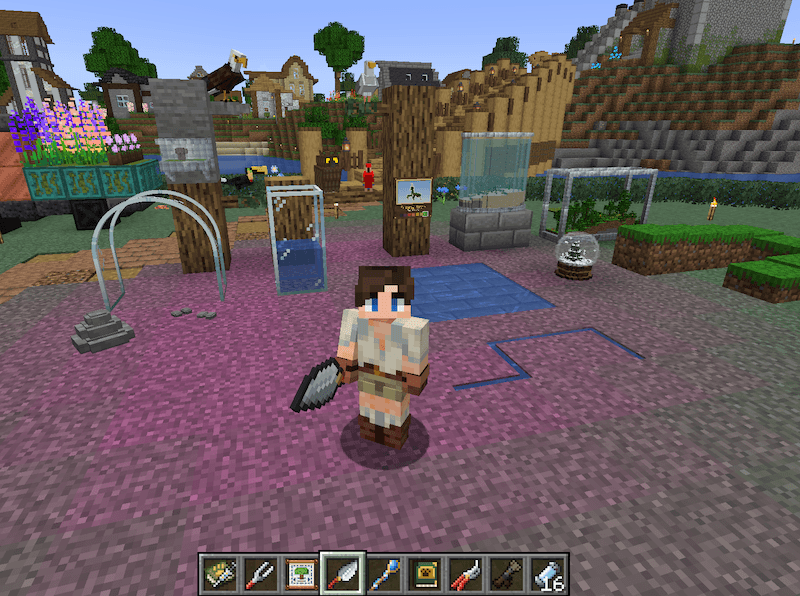

Nature Workshop


Terrariums and Aquariums!   |   Biome Palette!   |   Zoo Signs!
Terrariums and Aquariums logo Biome Palette logo Zoo Signs logo


New items! (Not included in the original 3)

Trait Editor icon

Trait Editor

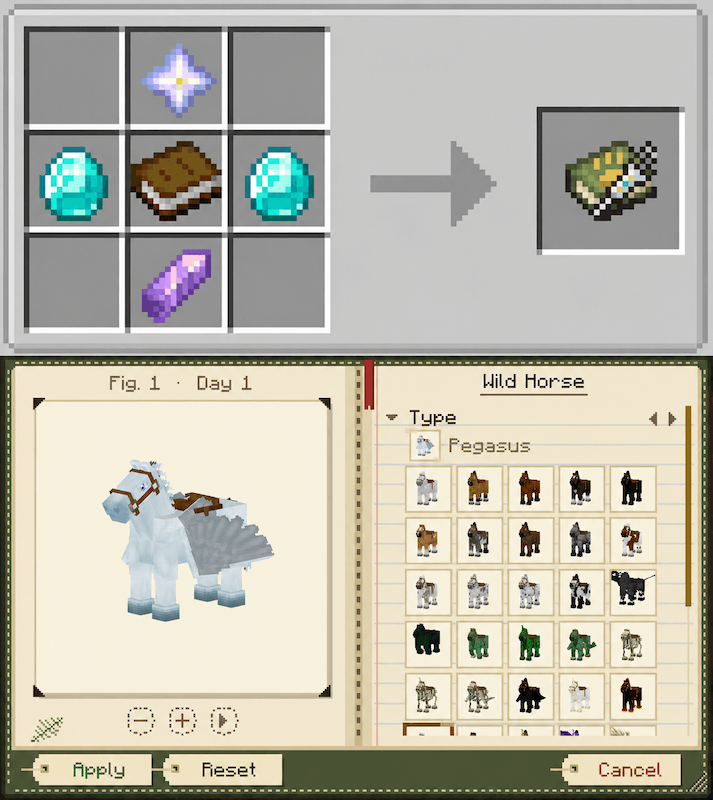
Use the trait editor on any mob to change their appearance!

Trait Editor in gameTrait Editor recipe

Works with any modded mobs, personally tested with Mo'Creatures, Alex's Mobs, Untamed Wilds, Hybrid Aquatic, Exotic Birds, F&A Revival, More Mob Variants, Vanilla Backport, Spawn, MCA. When encountering a new mob, the trait editor studies it for a few seconds, then it will always remember that mob's variants.

Tree Blueprint icon

Tree Blueprint

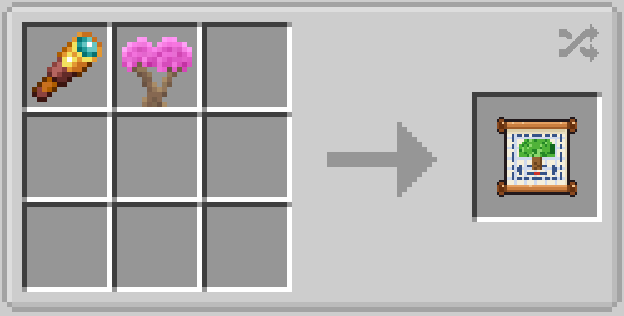
See exactly what a sapling will grow into before it grows, and choose its shape.

Tree Blueprint in gameTree Blueprint choosing a tree shape

Tree Blueprint recipe

Works on modded trees! Personally tested with Pam's HarvestCraft 2 Trees, Oh The Biomes We've Gone, Biomes O' Plenty, Tropicraft, F&A Revival, Cluttered, The Undergarden, The Aether, Better End, Spawn, Mo'Creatures.


Cryo Cell iconFull Cryo Cell icon

Cryo Cell

Works on any mob from any mod, tamed or wild, any size. It catches before the animal reacts, so clicking a horse won't mount it and clicking a villager won't open its trades.

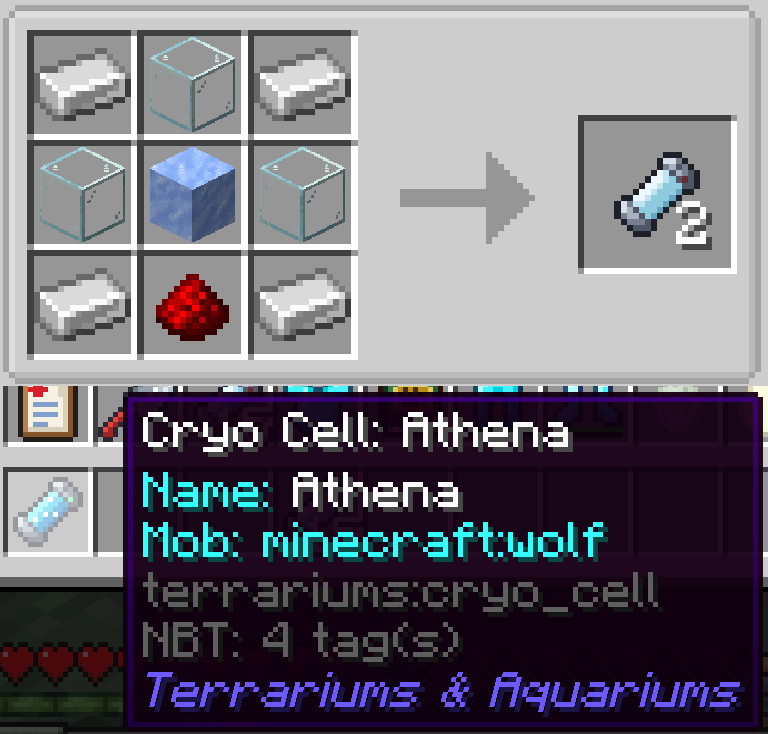
Cryo Cell in gameCryo Cell recipe

Stackable up to 16. Stores and preserves relevant NBT data (trust me I tested)

Wavecaster icon

Wavecaster

Set water height to the pixel, or up to a full block, make it look still or flowing any of 8 ways, and change how fast it moves.
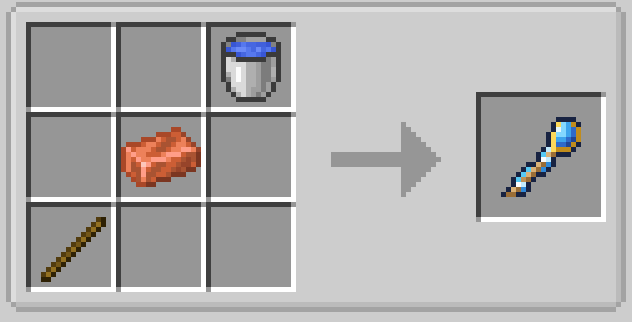
Wavecaster recipe

Wavecaster shaping waterWavecaster flowing water

Shape one block, a patch, or a whole pond at once. Sneak + right-click to open the UI and change the settings.

Trowel icon

Trowel

Shave blocks down a pixel at a time, for paths, ponds, steps and dips in the ground.
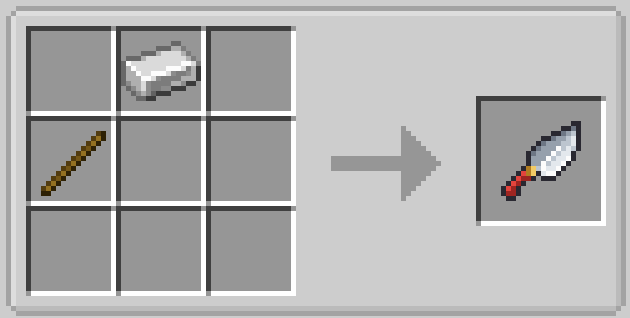
Trowel recipe

Trowel shaving blocksTrowel making a path

Compatible with the wave caster, for making shallow flowing rivers, mud piles, your creativity is the limit!

Right click to shave a block, shift-right click to unshave. Works on any full block.

Plant Clippers icon

Plant Clippers

Stop a plant from growing, so your garden stays exactly as you planted it. Use again to let it grow.
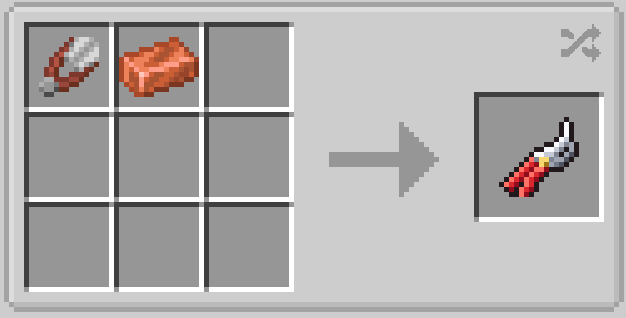
Plant Clippers recipe

Plant Clippers in game

Invisible Fence icon

Invisible Fence

Paint the ground into a fenced area, and the animals you tie to it stay inside. No fence needed!
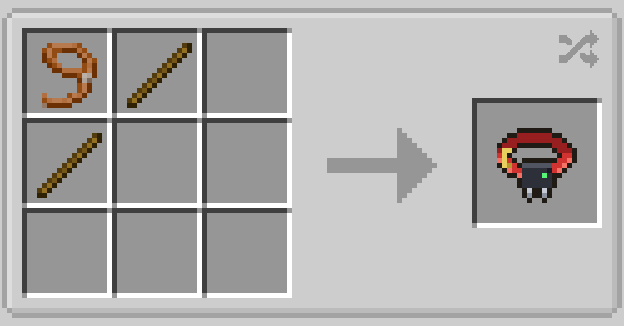
Invisible Fence recipe

Painting a fenced areaAn animal kept inside the invisible fence

The invisible fence control box

Right-click the ground to paint it into an area (hold and sweep to paint fast), sneak + right-click to wipe it off. Brush sizes: 1 block, 3x3 or 5x5. Right-click an animal standing in an area to fence it in, right-click again to let it go. Works on any mob!

The UI has some fun features too, check it out!
Bird Perch iconBat Crevice icon

Bird Perch & Bat Crevice

A branch that parrots and modded birds land on and sit for a while, and a rocky crack for ceilings where bats roost: they hang there, fly off, then come back.
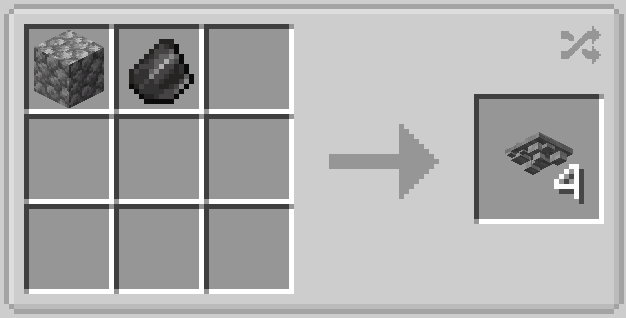
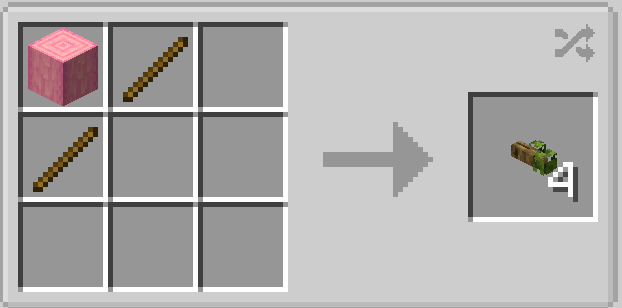
Bird Perch recipe Bat Crevice recipe

Birds landing on a perchBirds sitting on a perchBats roosting in a creviceBats flying from a crevice

For the bird perch, choose which animals use it, how far away they notice it, and how long they stay. The Bat Crevice has no UI or settings.

Wing Clippers icon

Wing Clippers

Keep a flying animal below a height you choose, so your eagle stays in its aviary. Works on any flying mob!
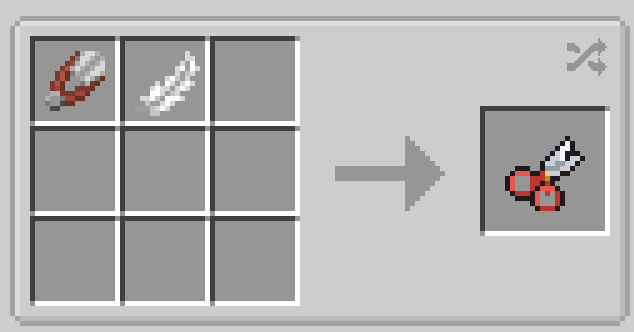
Wing Clippers recipe

Wing Clippers in game

You can set custom Y levels as well, but be careful not to set one below the ground you're on!

Vet Clipboard icon

Vet Clipboard

Stop an animal from being able to breed or lay eggs
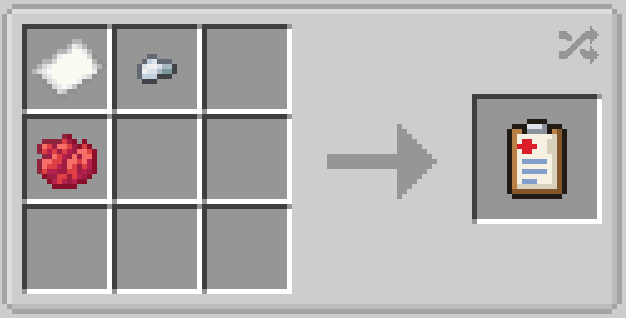
Vet Clipboard recipe

Vet Clipboard in game

Net Gun icon

Net Gun

Catch an animal from a distance and hold it still for half a minute.
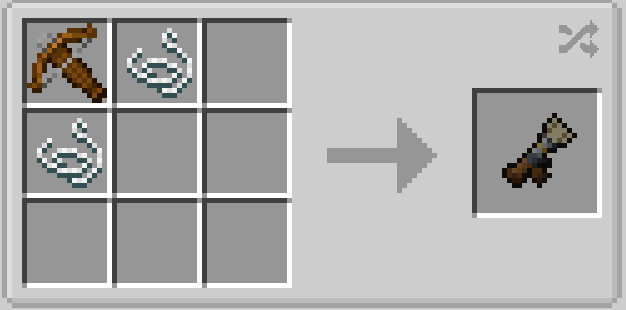
Net Gun recipe

Net Gun in game

Net removes itself in 30 seconds, right-click with an empty hand or the net gun to release the mob.

Soundboard icon

Soundboard

A speaker block that plays any mob's sound: a lion's roar by the big cat house, frogs by the pond.
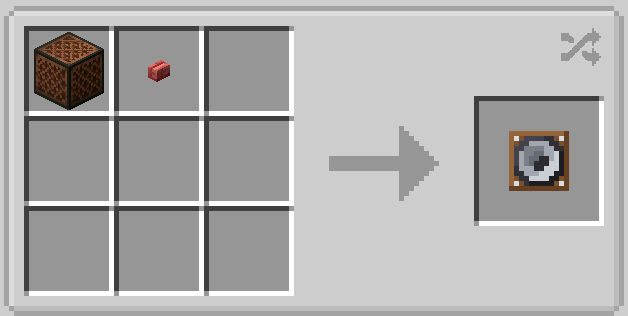
Soundboard recipe

Soundboard in game

Sneak right-click to open up the menu, choose a mob and a sound, then exit and right-click to play! Works with redstone. Tune the pitch up and down, choose from different sounds, works with any mob from any mod!

Zoo Catalogue icon

Zoo Catalogue

A field guide to every animal in your game, modded ones included, with a checklist to tick off.
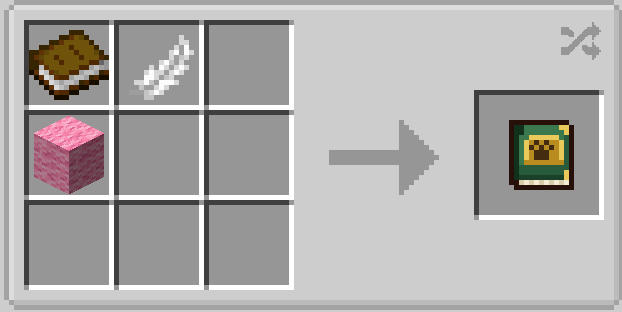
Zoo Catalogue recipe

Zoo Catalogue in game

Each animal shows its health, size, what it does, and the biomes it lives in.

Rockwork icon

Rockwork

Small stones, cairns and boulders for paths, riverbeds and rock gardens, in any block texture you like!
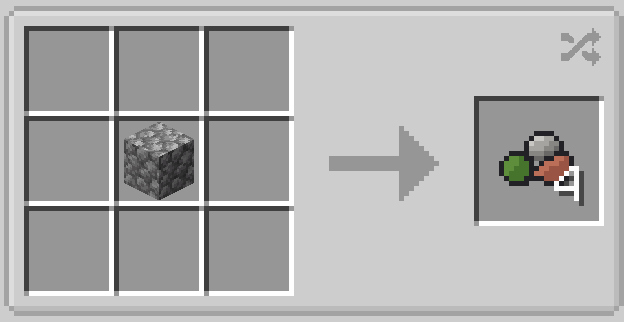
Rockwork recipe

Rockwork in game

Mob Muter icon

Mob Muter

A tuning fork that silences a noisy mob.
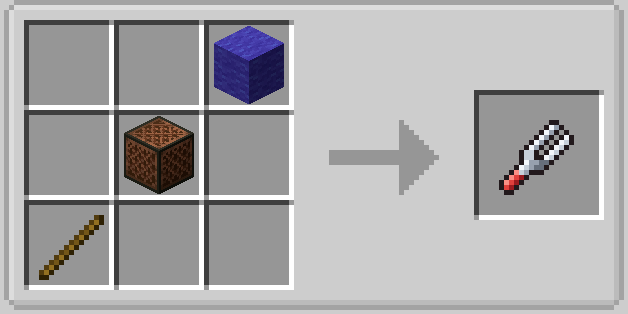
Mob Muter recipe

Mob Muter in game

Right-click a mob to mute it, right-click again to let it be heard again. Sneak + right-click to mute (or unmute) every mob of that kind within 16 blocks at once. Perfect for a full chicken coop! Muted mobs stay muted, even after you leave and come back. Works on any mob from any mod, and catches the sounds mods play in their own ways too.

While you're holding it, muted mobs show a little mark over their heads so you can see who's quiet.

The Original Three


Terrariums and Aquariums!

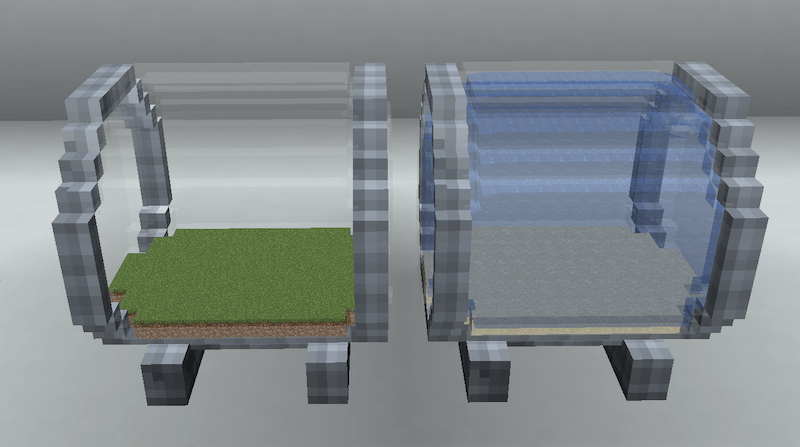
Terrariums and Aquariums adds fully customizable, interactive habitats for nearly any mob in Minecraft.
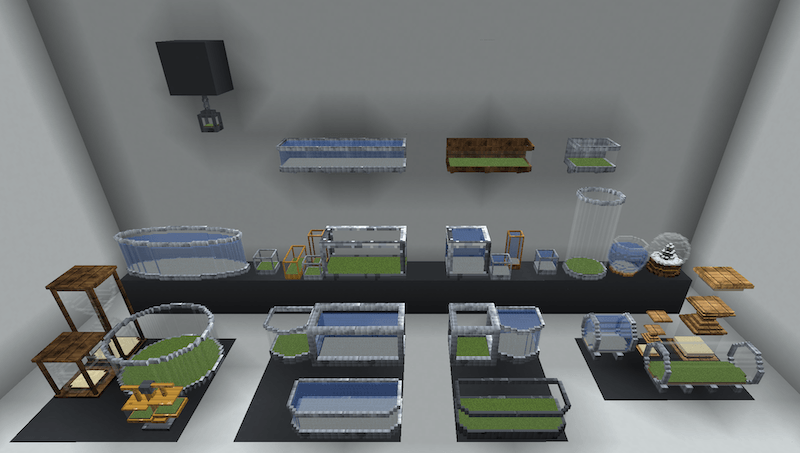

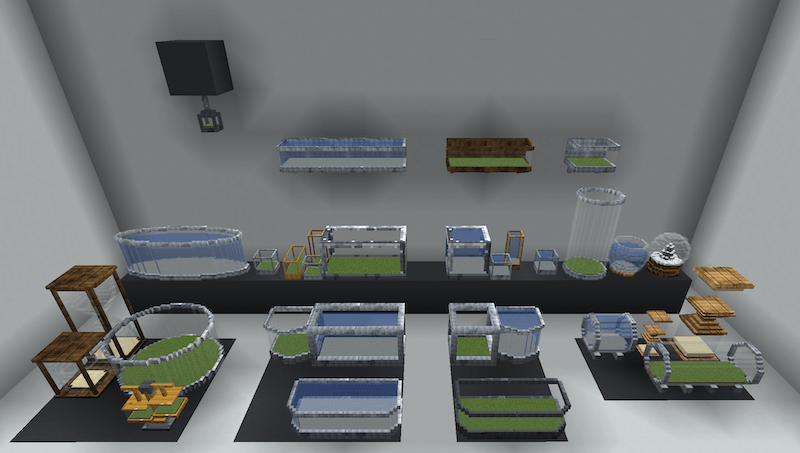
Terrariums and Aquariums tanks


Display Your Favorite Mobs, Resize/scale them to your liking!
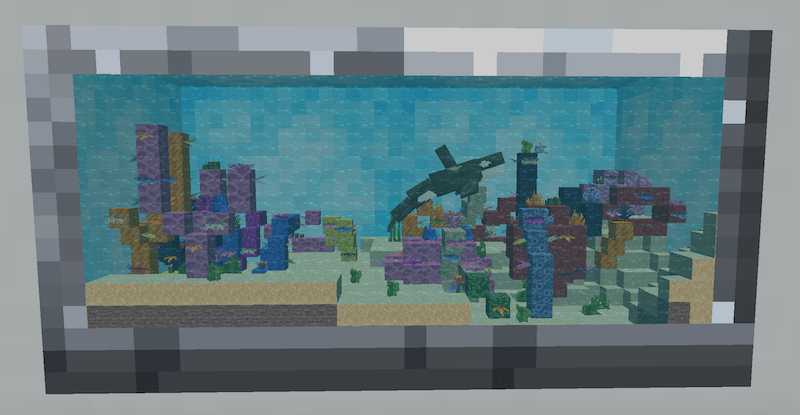
Mobs displayed in tanks Mobs resized in tanks

Resizing a mob in a tank


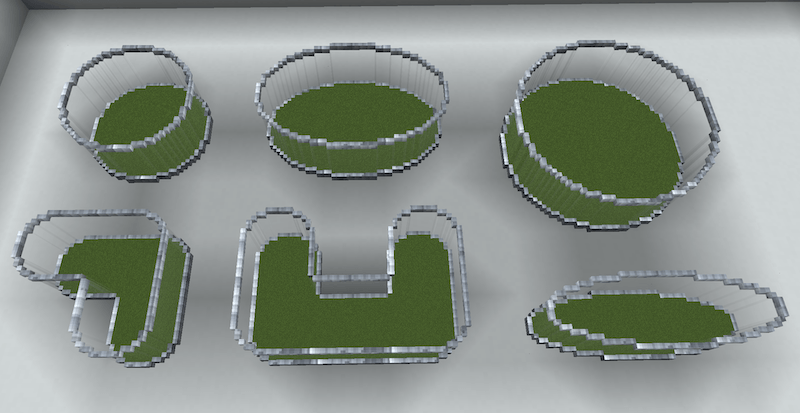
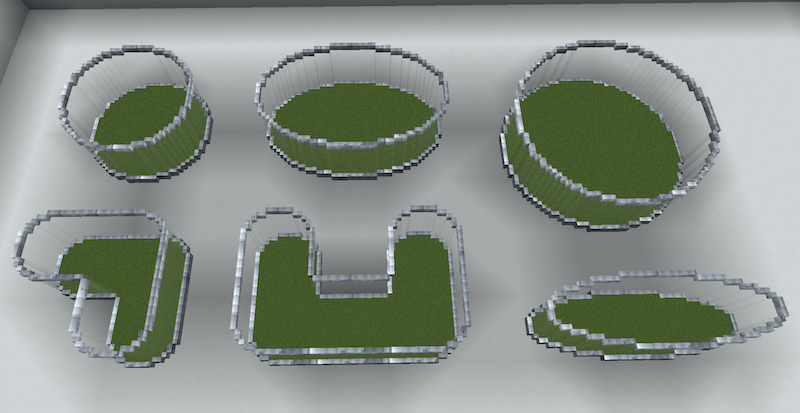
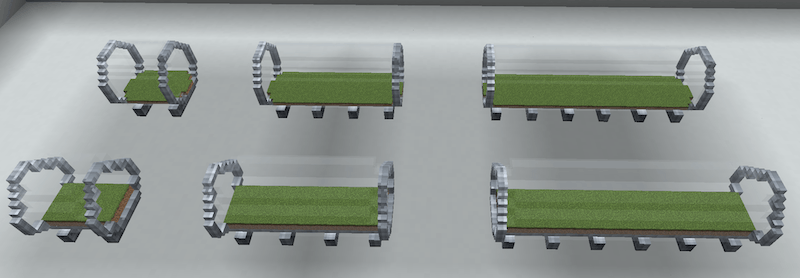
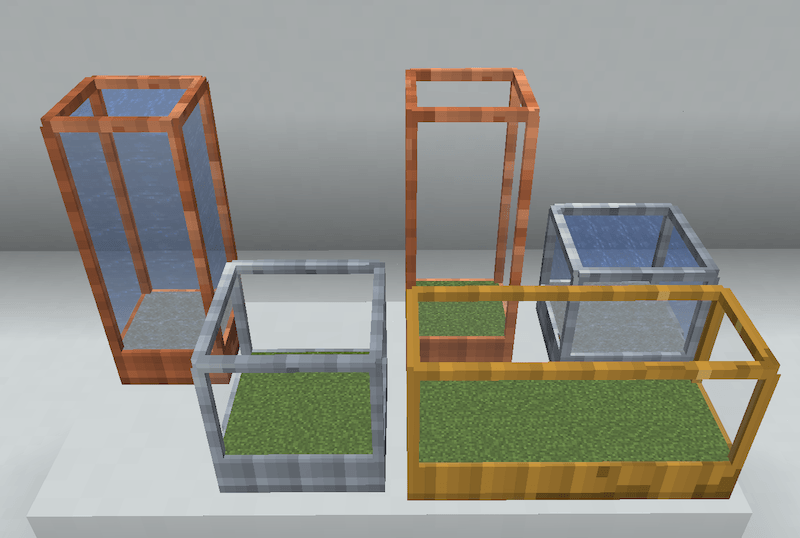
Build Any Shape

Building a tank shape Tanks in different shapes


Capture & Add Mobs

Capturing a mob and adding it to a tank


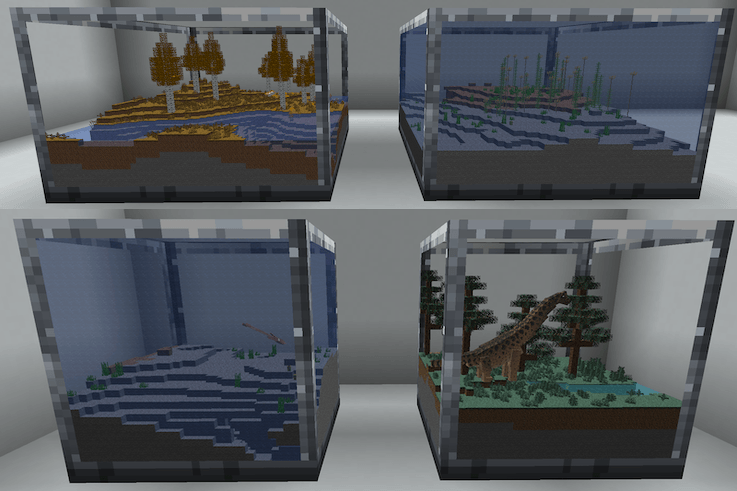
Miniature Worlds

A miniature biome in a tank Another miniature biome in a tank

Generate beautiful vanilla and modded biomes inside your habitats.


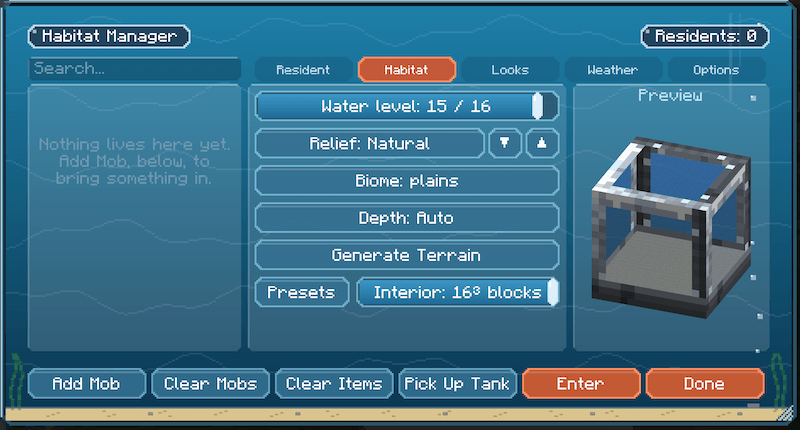
Customize through the Habitat Manager, or enter to build inside!
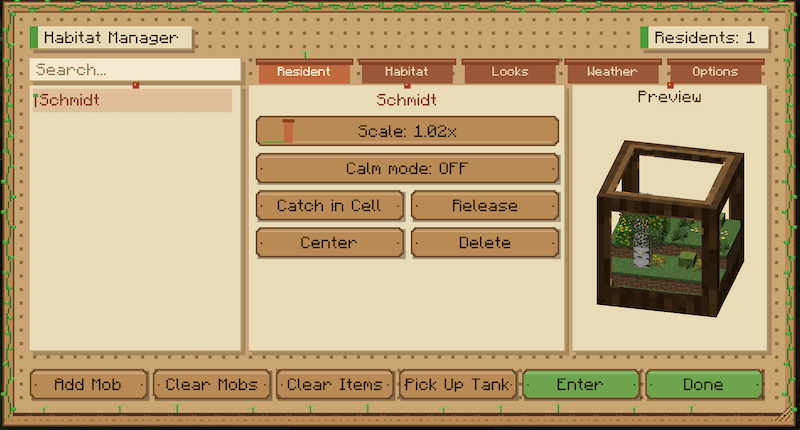
The Habitat Manager Building inside a habitat

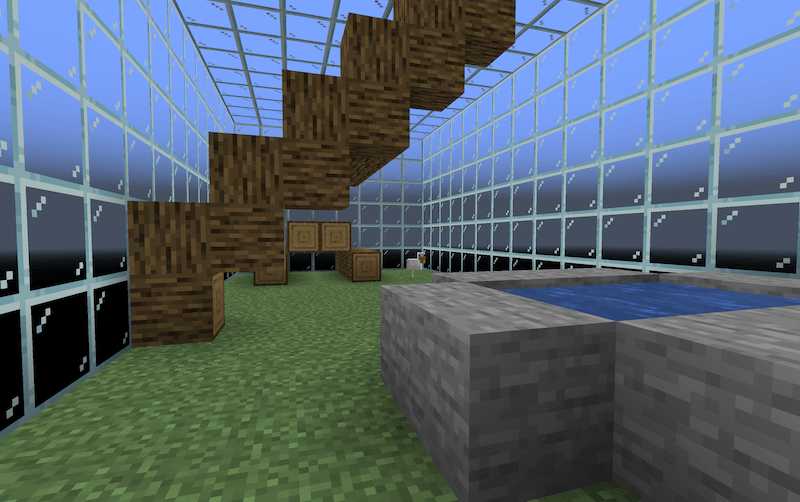
Inside a habitat

Enter your habitat (right click or press enter in GUI), decorate it however you like, then step back out and enjoy your creation!


Tank types

Note!: All tanks have customization options, if you don't like the colors you can change them!


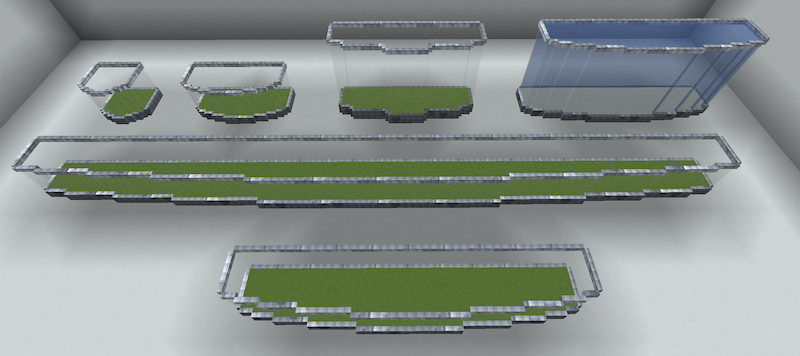
All tank types
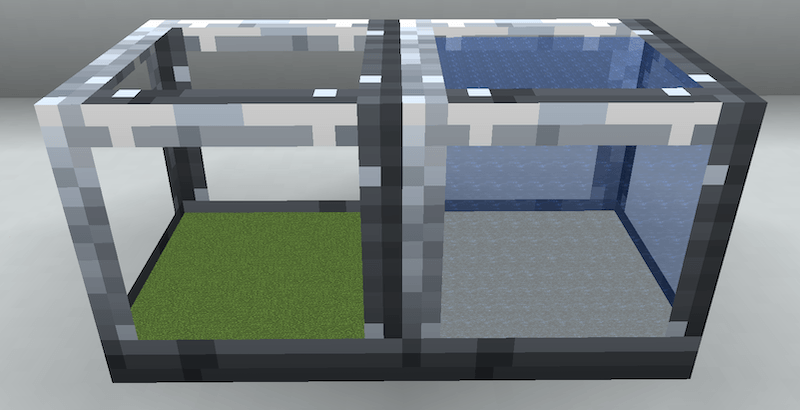
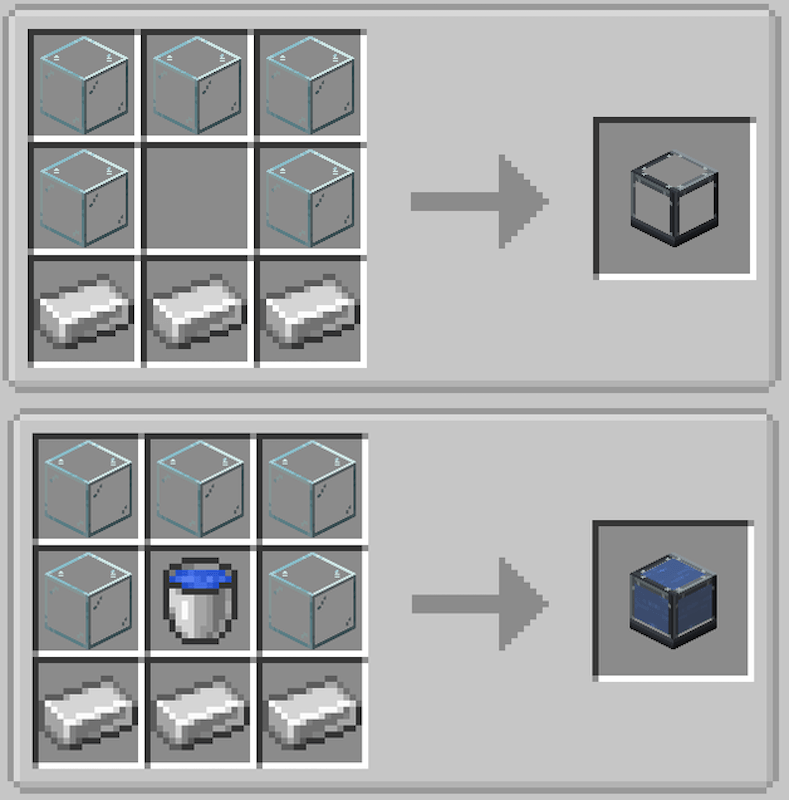
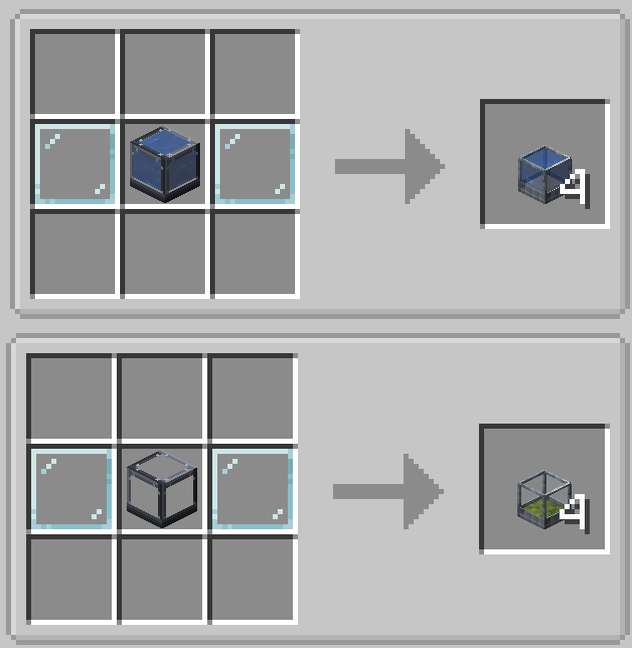
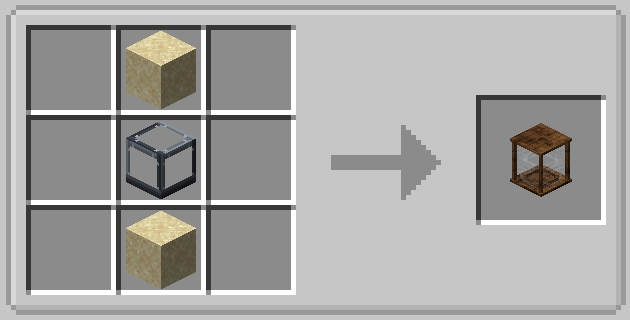
  • Classic (Terrarium and Aquarium)

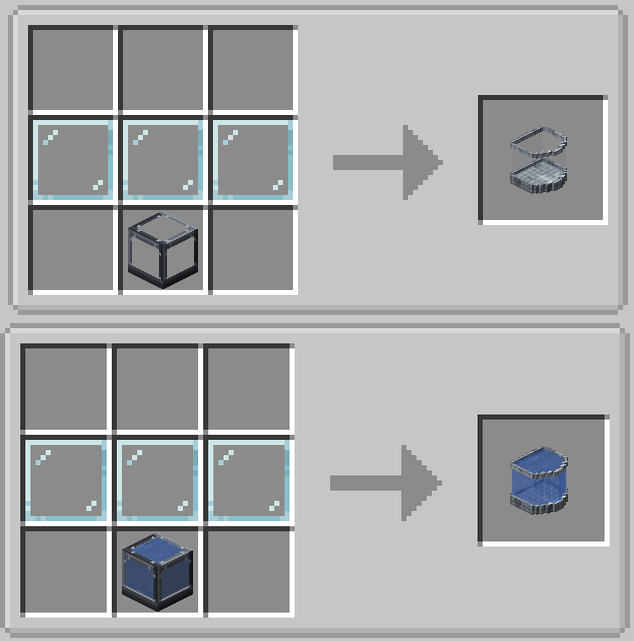
    Classic tanks Classic tank recipe

    The classic, fully modular, all features.

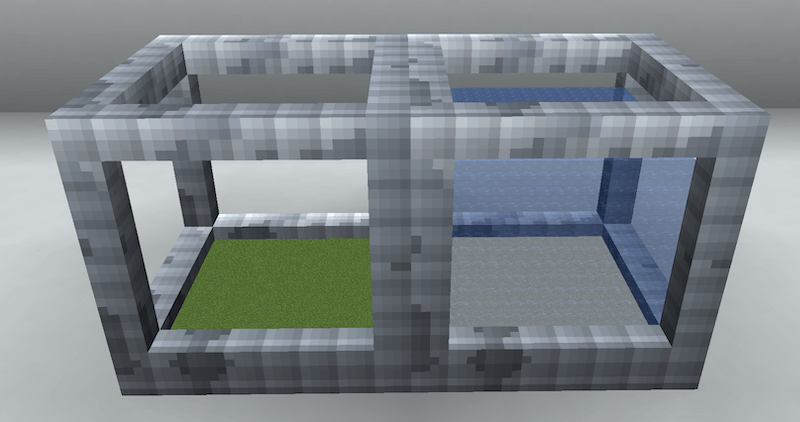
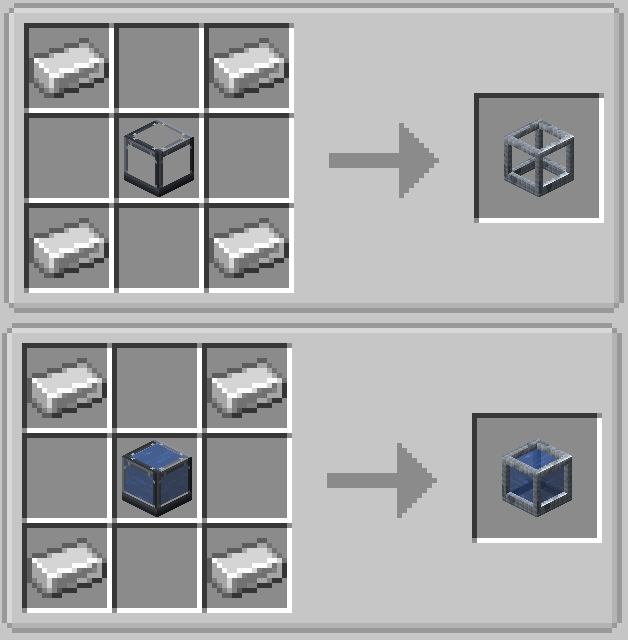
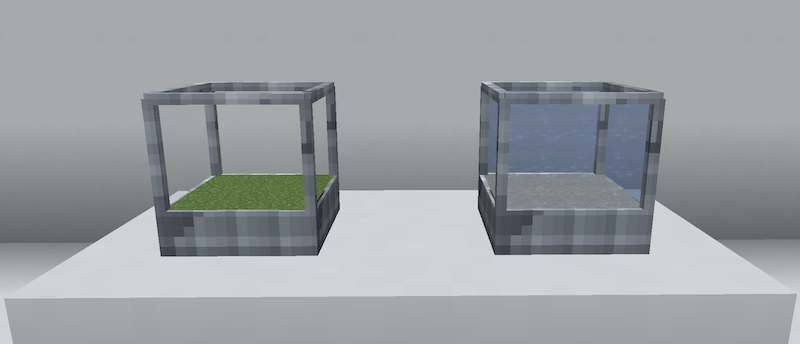
  • Steel Beam (Terrarium and Aquarium)

    Steel Beam tanks Steel Beam tank recipe

    Same as the classic, but with thick beams instead of thin sides.

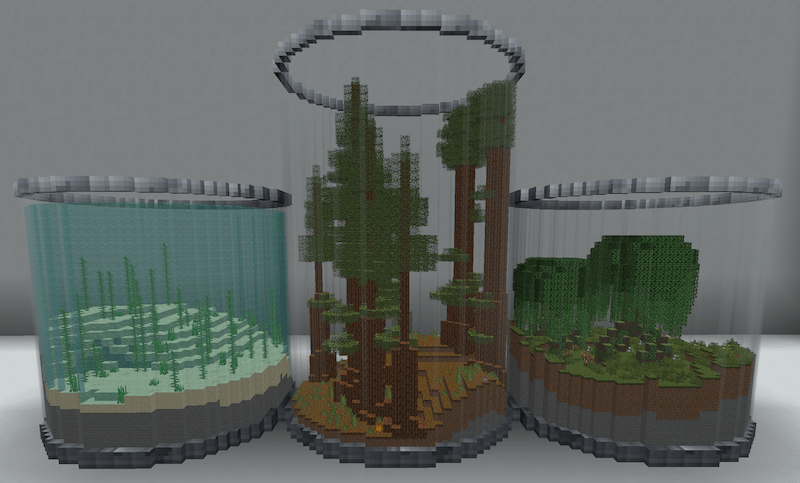
  • Cylinder (Terrarium and Aquarium)

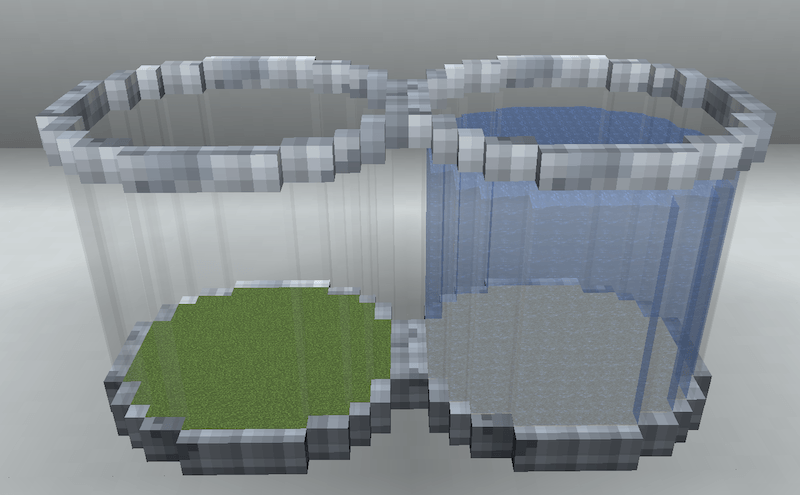
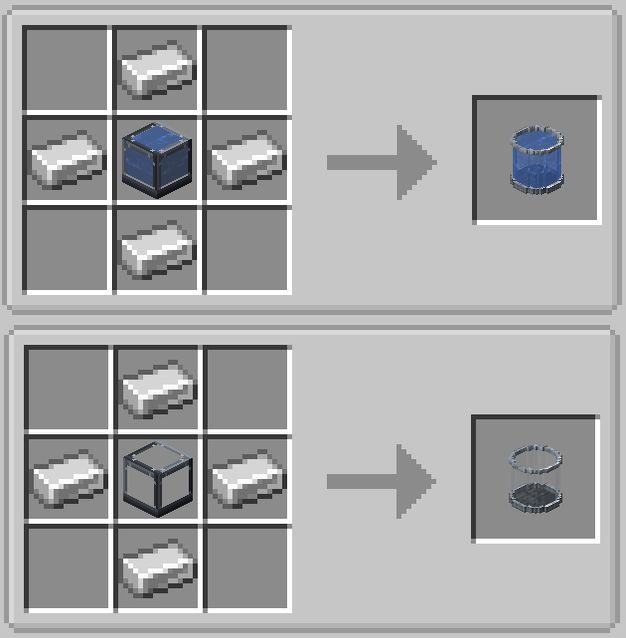
    Cylinder tank Connected cylinder tanks Cylinder tank recipe

    Added in 3.0 along with the steel beam tanks, this one might be my favorite. Fully connectable, you can really make some fun shapes with this one. :)

  • Bowfront (Terrarium and Aquarium)

    Bowfront tank Connected bowfront tanks Bowfront tank recipe

    This one's fun! Curved on the front, flat on the back, also modular, the back will always be flat.

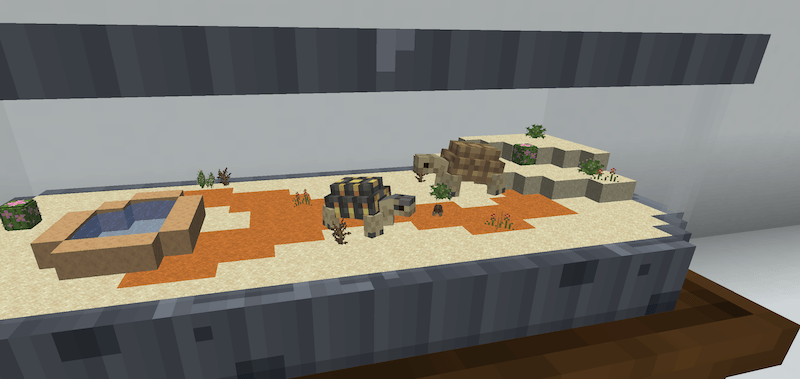
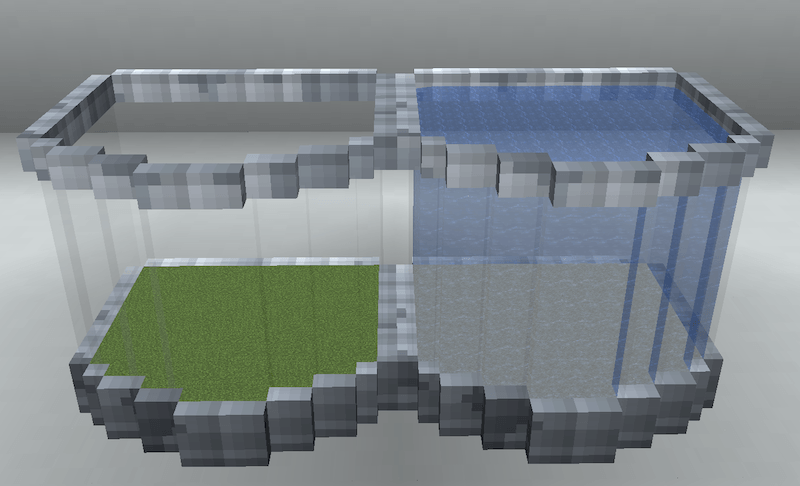
  • Short (Terrarium and Aquarium)

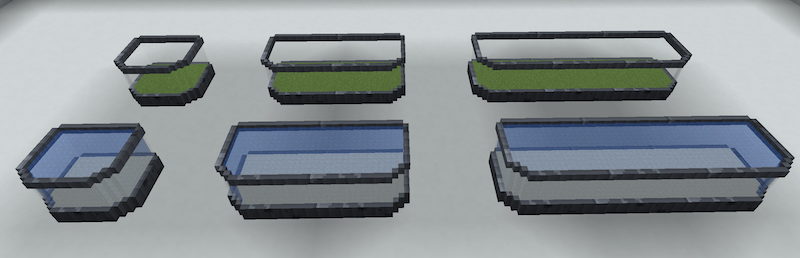
    Short tank Connected short tanks Short tank recipe

    Designed with tortoises in mind. Definitely for terrestrial animals, don't neglect your arboreal species!

  • Capsule (Terrarium and Aquarium)

    Capsule tankConnected capsule tanksCapsule tank recipe

  • Nano (Terrarium and Aquarium)

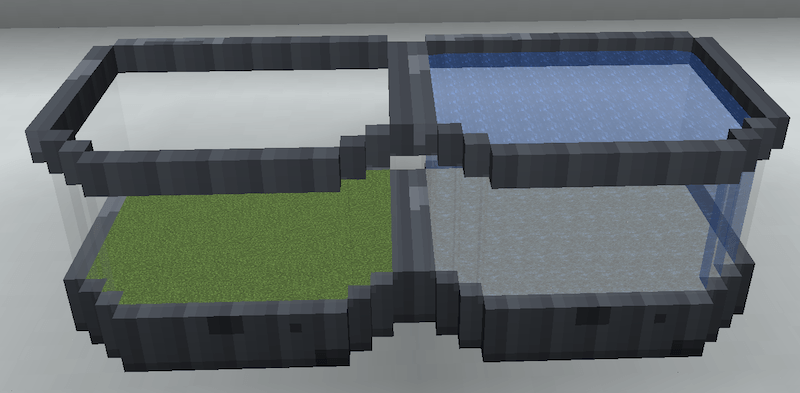
    Nano tanks Several nano tanks on one block Nano tank recipe

    Nano tanks! These are awesome. Place them like sea pickles, mix and match terrariums or aquariums. All are separately customizable, so if you don't like the colors or biome or whatever, change it!

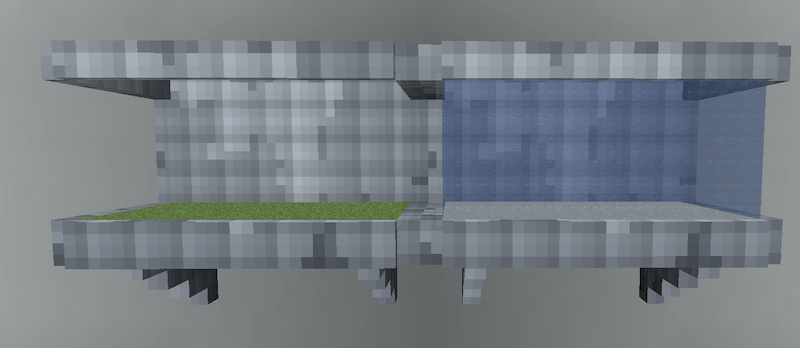
  • Shelf (Terrarium and Aquarium)

    Shelf tanks Shelf tank recipe

    These are connectable sideways.

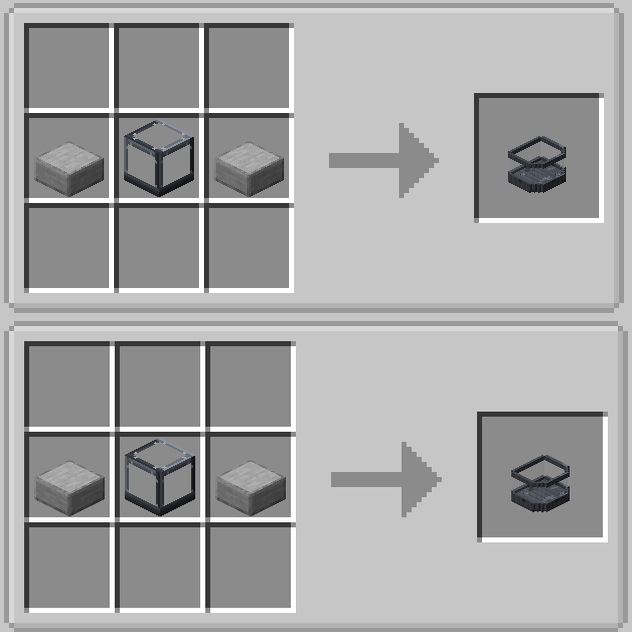
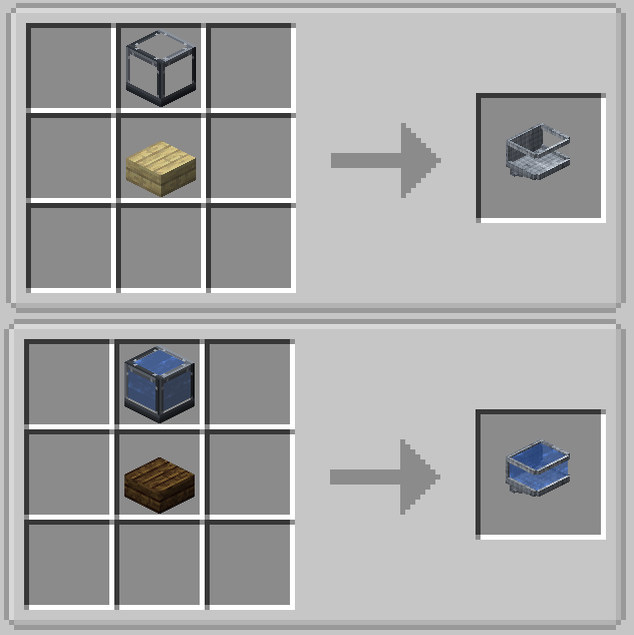
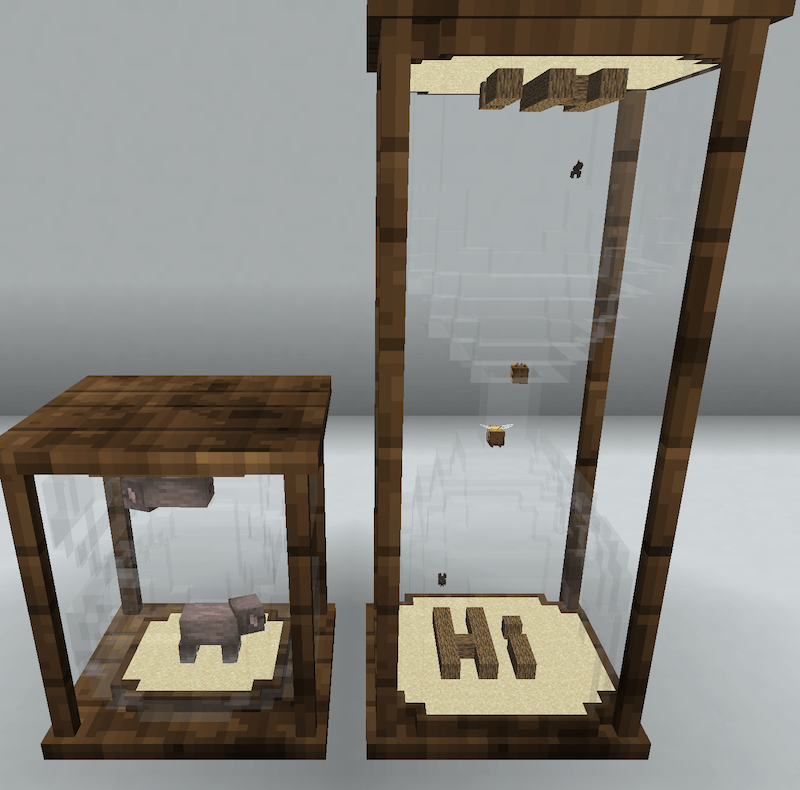
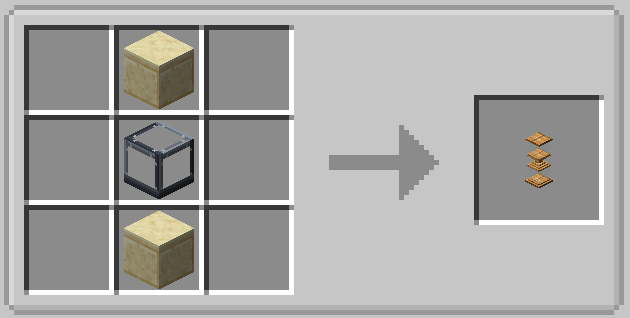
  • Hourglass Terrarium

    Hourglass terrarium Hourglass terrarium recipe

    I thought this was neat. Mirrors the bottom on to the top.

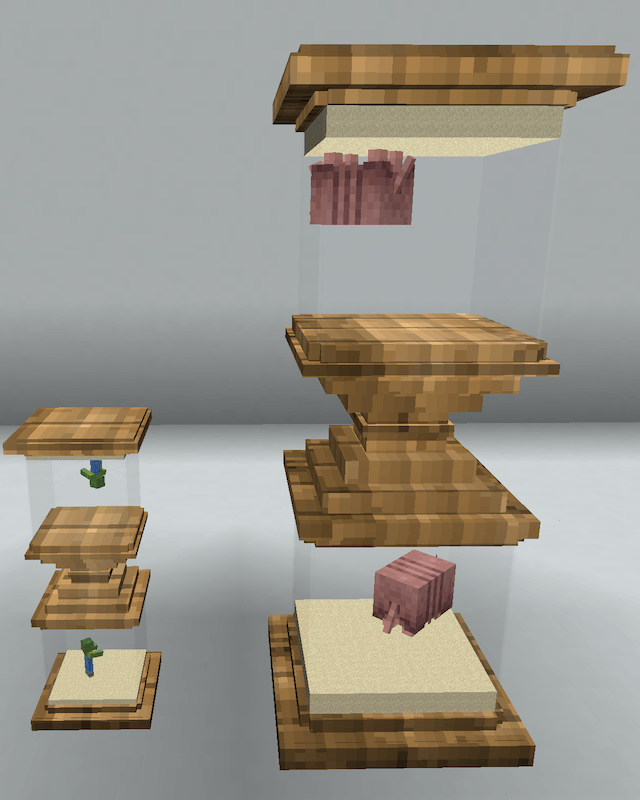
  • Square Hourglass Terrarium

    Square hourglass terrarium Square hourglass terrarium recipe

    Same as the other, only square!

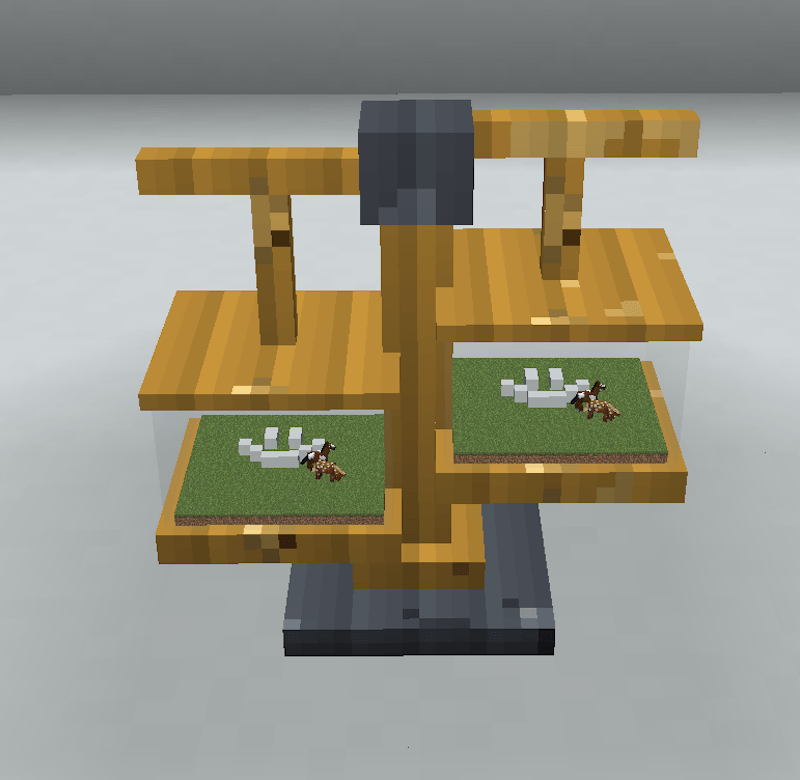
  • Scale Terrarium

    Scale terrarium Scale terrarium recipe

    Another silly one, the scales of justice will judge your animal husbandry! (Mirrors one side to the other)

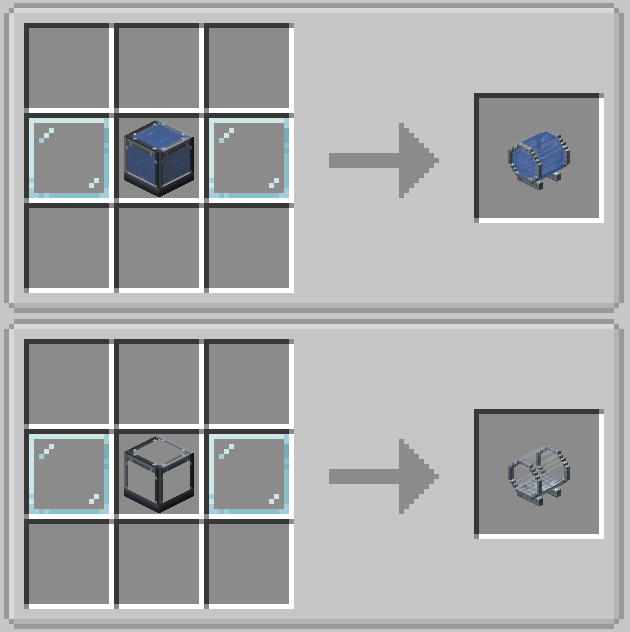
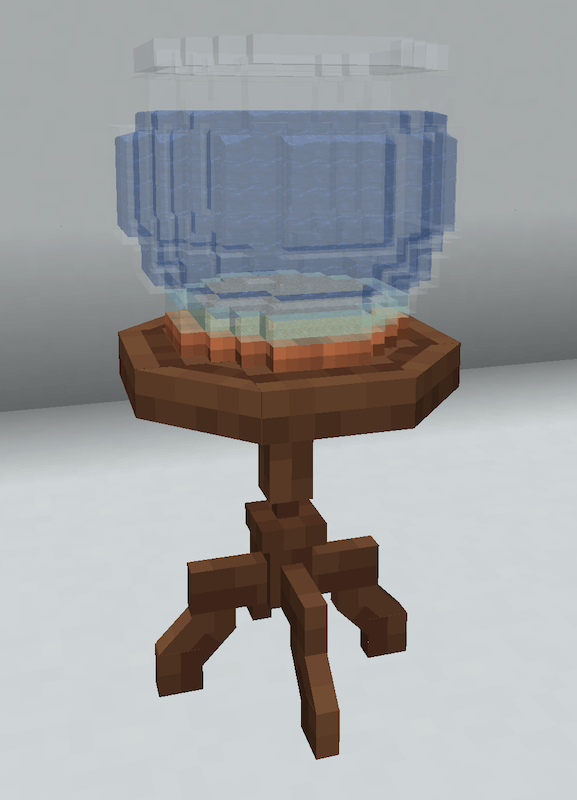
  • Fish Bowl

    Fish bowl Fish bowl recipe

    Gotta have a fishbowl.

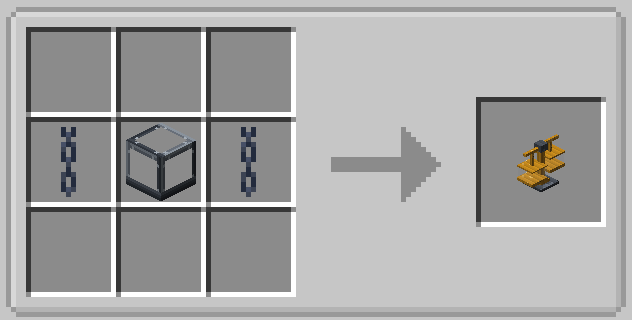
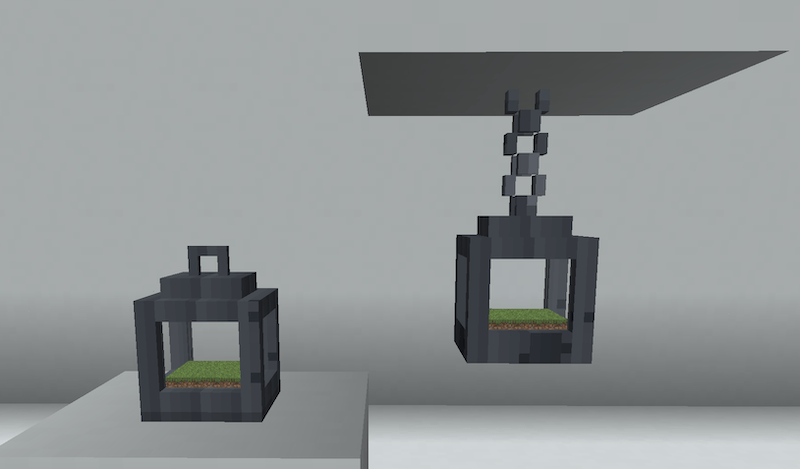
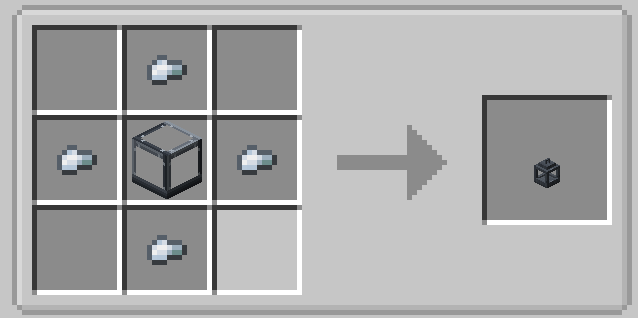
  • Lantern Terrarium

    Lantern terrarium Lantern terrarium recipe

    Hangs like a normal lantern!

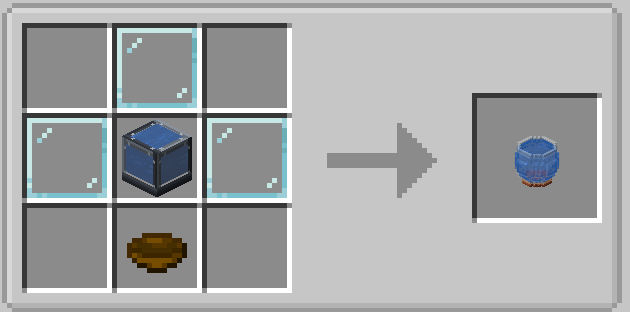
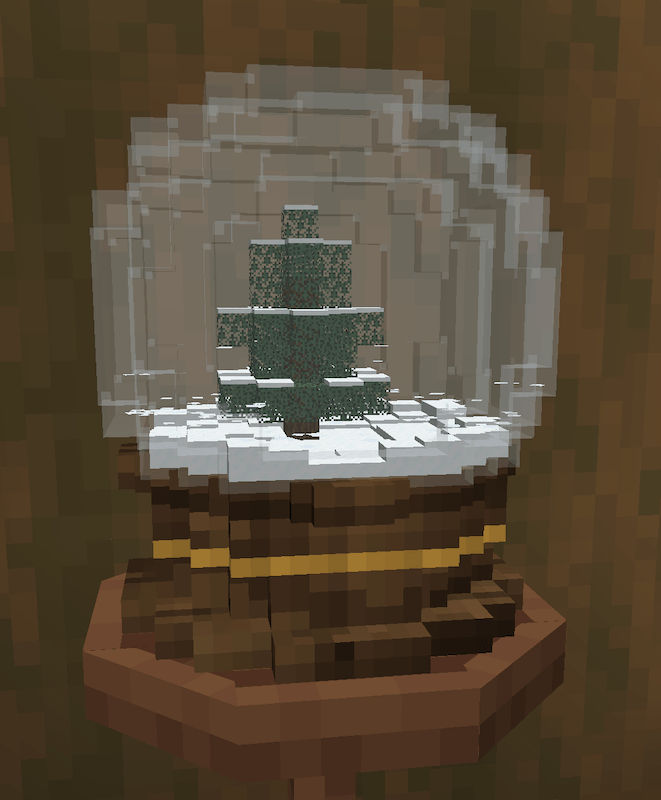
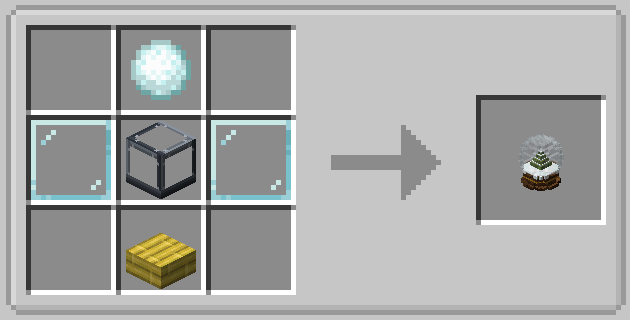
  • Snowglobe

    Snow globe Snow globe recipe Shaking a snow globe

    Right click to shake!

Name Plates!
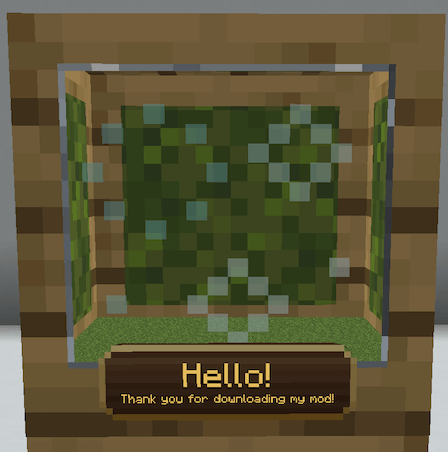
Name plate on a tank

Other Features

  • Adjustable water level in aquariums
  • Custom weather
  • Backdrops for tanks
  • Pick up and move your creations!
  • Save and load presets
  • Magnifying glass
  • Tank Lights
  • Works with any mod (that I know of) and shaders
  • Glass styles, frame styles, block picker for both.
  • Interior brightness slider
  • Turn off connectability so you can have separate tanks next to each other
  • Block scalability, 4x4, 8x8, and 16x16
  • So much more!

Thanks to the creators Hybrid Aquatic, Alex's Mobs, Untamed Wilds, Biomes o' Plenty, and Fossils and Archeology for the animals and biomes!

Biome Palette!

Welcome to Biome Palette! (Included in Nature Workshop!)

Have you ever wanted to build with specific grass blocks and water from other biomes? What about change the way the grass and water around your home looks? This mod allows you to do exactly that! Place biome-specific grass blocks, water, vines, even sugar cane! "Paint" existing blocks to match your style!

WORKS WITH ANY MOD! :)
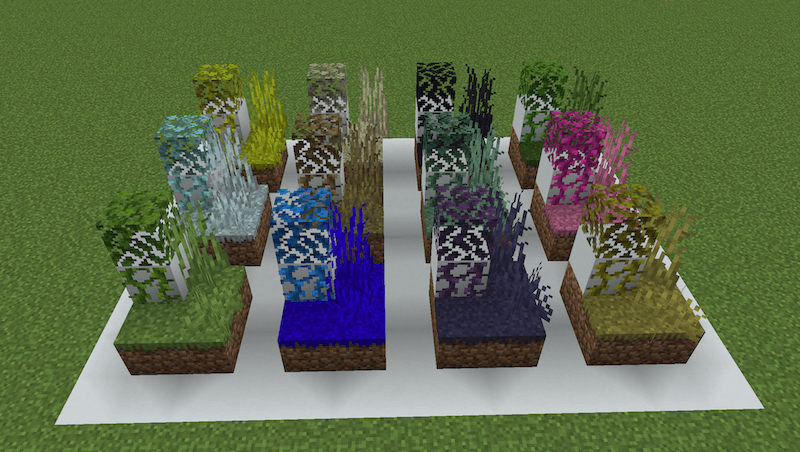
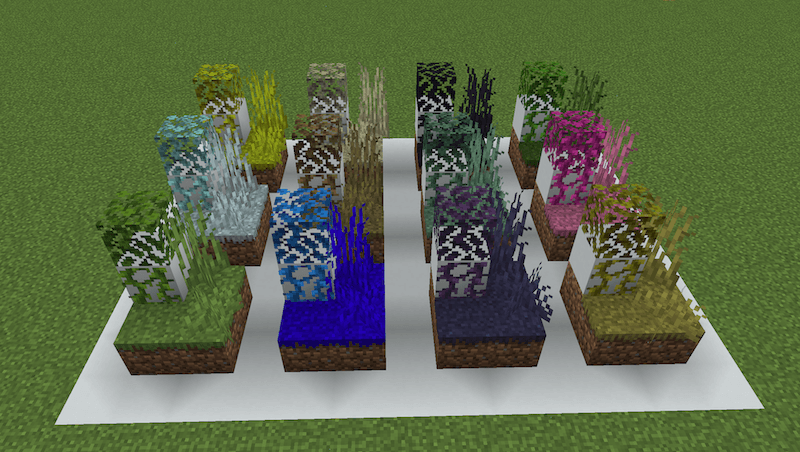
Biome-coloured grass and waterThe Tinting Table

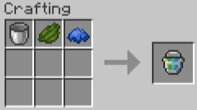
Using the Tinting Table, you can easily turn any normal grass block, water bucket etc, into any biome-colored version you choose! (Use any dye or any planks)
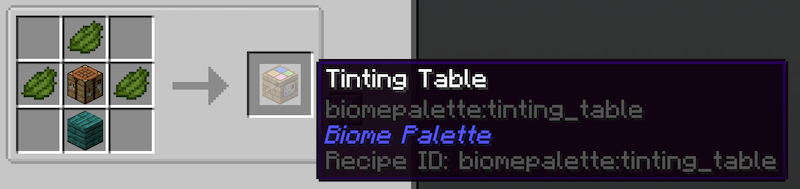

Tinting Table recipe

Placing tinted blocks Placing a tinted water bucket Placing tinted plants

Place blocks, water buckets etc.

Use the Biome Brush or the Biome Paint Bucket to change existing blocks to whatever color you like!


Biome Brush
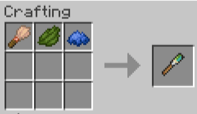
Biome Brush recipe

Painting with the Biome BrushChoosing a biome on the Biome Brush


Biome Paint Bucket

Biome Paint Bucket recipe

Painting with the Biome Paint BucketChoosing a biome on the Biome Paint Bucket

Biome waters and grass blocks are fully operational, so you can farm, make aquariums, even bonemeal! All this without having to worry about your crops going dry, your fish suffocating, or vanilla grass being grown!

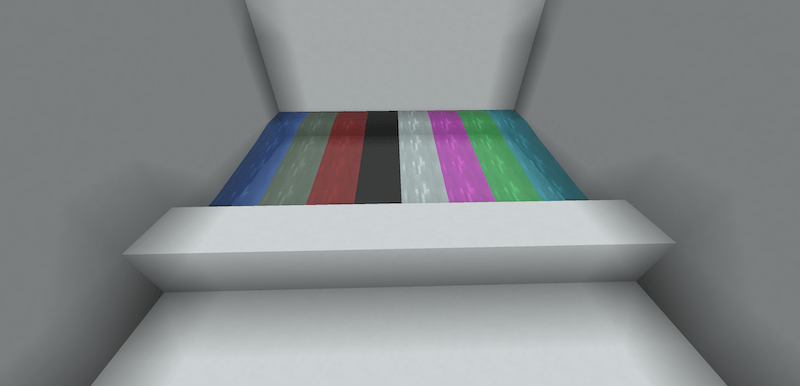
You can choose to use biome blending to make color transitions smoother, or just have clear color borders!

With Biome Blending (left)   |   Without Biome Blending (right)

With biome blending Without biome blending

Built in World Edit support!

//set grass_block@swamp
//replace grass_block #tint[jungle]
//set #untint
  • Place tinted blocks with block@biome.
  • Recolor existing blocks with #tint[biome], and restore them with #untint.
  • Set blending with #blend[off], #blend[painted] or #blend[natural].
  • Filter selections with #tinted, #tinted[biome], #flat or #blended.
  • Colors survive copy, paste, schematics, undo and redo.
Zoo Signs!

Compatible with all modded mobs and other camera mods!

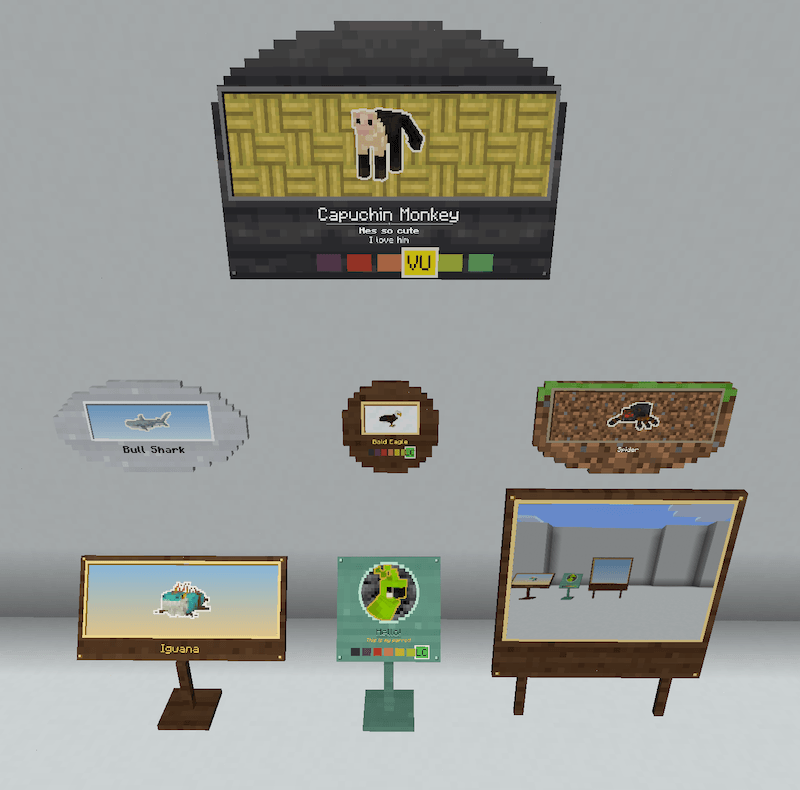
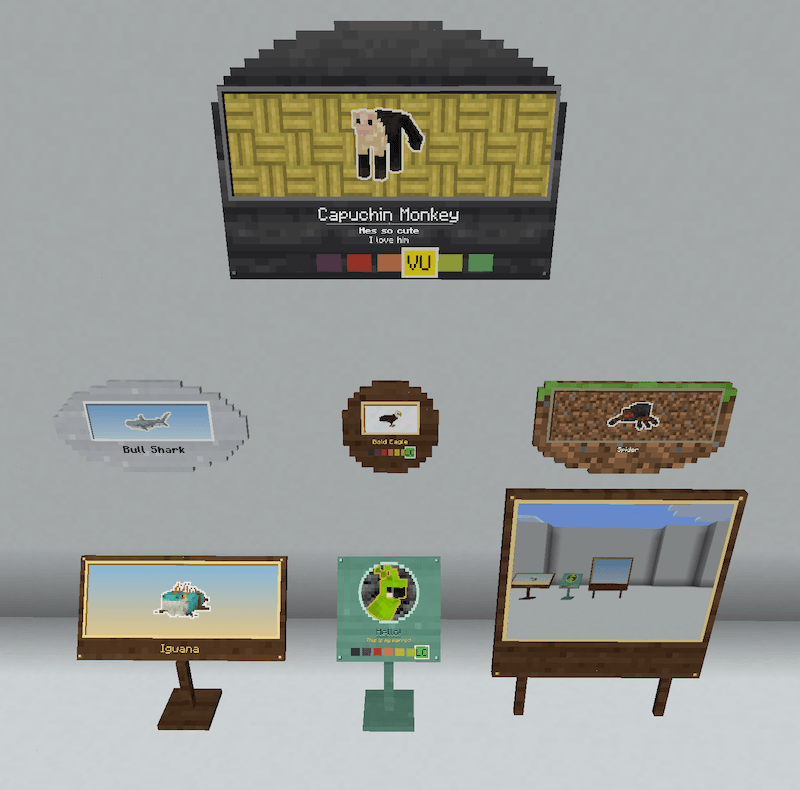
A proper sign (and camera) for every animal in your zoo!
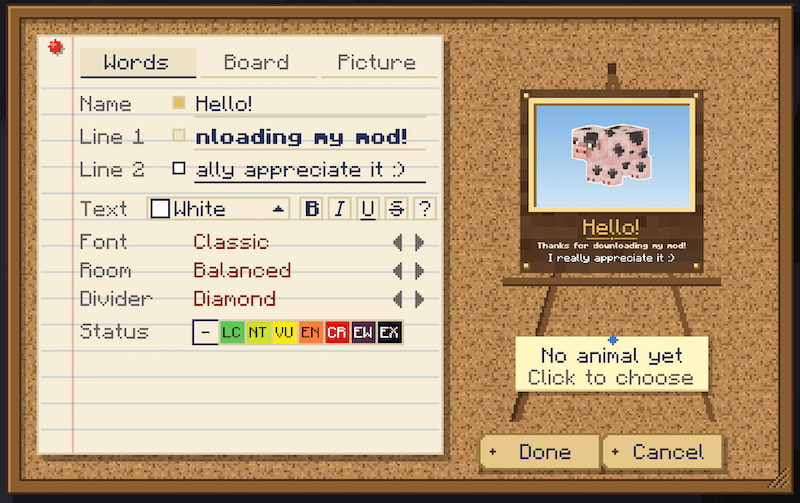
Exhibit signs at a zoo An exhibit sign The zoo camera


Exhibit signs!

Craft with any sign and a painting!
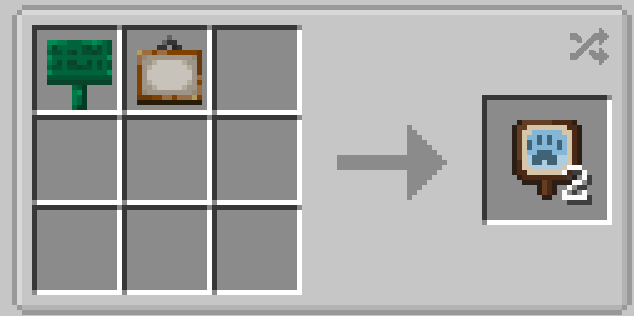
Exhibit sign recipe

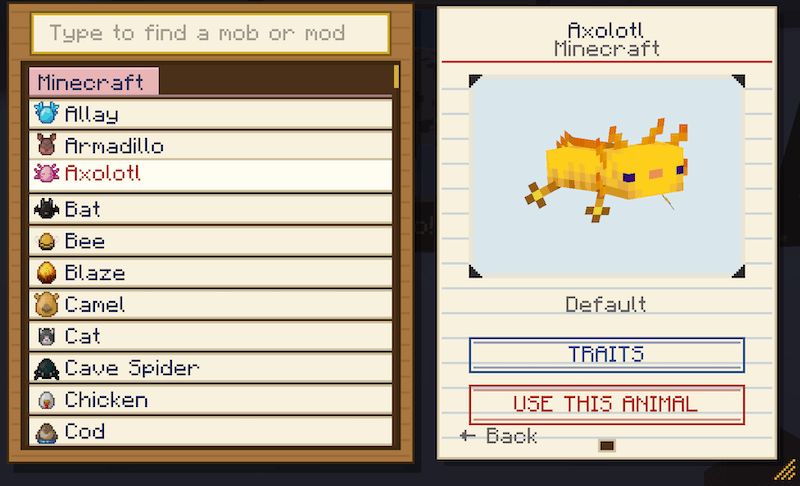
Copy any animal. Right-click an animal with an exhibit sign, then put the sign up. It shows that animal: its colour, its pattern, its markings.

Or pick one! Right-click a placed sign and choose from the Animal Catalogue, every animal in your game sorted by mod and searchable by name.

Copying an animal onto an exhibit sign

The Trait Editor works out for itself what can change about an animal, so modded animals work without any setup.

Picking an animal from the Animal Catalogue Exhibit sign showing an animal

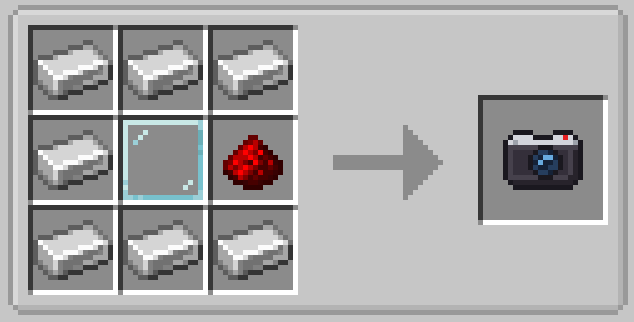
Camera recipe

Hold right-click to raise the camera to your eye. The viewfinder shows exactly what will be in the shot, and the scroll wheel zooms. Let go to take the picture. Each one is printed on a sheet of paper from your inventory

Sneak + right-click switches the camera between:

  • Photos: whatever's in the frame, with your hand and HUD left out.
  • Portraits: just the animal you're pointing at, cut out on a clean background.

Right-click a photo to look at it. Right-click a sign with it to put it up in place of the animal, or hang it in an item frame, where it shows as a printed photo.

Compatible with Exposure, Camerapture, and Camera Mod!!

Thanks for reading this far!

If you enjoy this mod, leave a comment! Any bug reports, suggestions, or support? Join the discord! https://discord.gg/98m79jUD2E

Галерея
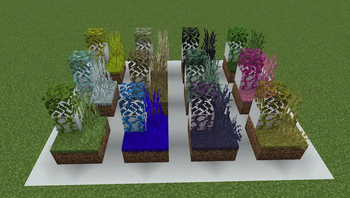
Some different biomes grasses/leavesSome different watersAll the tanks!Biome generation in tanks

Последние версии

Все версии →
release

Nature Workshop! 1.0.1

1.0.1
28 окт. 2026 г.99Minecraft: 26.3neoforge
Скачать
Что нового
Nature Workshop 1.0.1 Fixes Fixed a crash that could happen while new land was generating. The catalogue’s “seen living in” record was being written by the game’s world-generation threads, several at once; it is now written only by the server itself, once a tick. Nature Workshop no longer refuses to start next to an older Zoo Signs (“needs Zoo Signs 1.0.1 or above”). Any Zoo Signs from 1.0.0 and any Biome Palette from 2.1.0 work. The Tree Blueprint now works with saplings from mods that grow their trees their own way, such as Better End (and other mods built on BCLib), and with azaleas. Those trees preview on the block the sapling stands on. The Trait Editor now notices when a mob’s mod changes, even without a new version number: it studies the mob again, so new variants show up. Studies saved by 1.0.0 are redone once. Changes The Trait Editor’s journal looks more like a real open book The Nature Workshop creative tab’s icon is now the Trait Editor. New Server setting disabledItems (config/natureworkshop-common.toml): turn off any item by id. Turned-off items can’t be used or placed, leave the Nature Workshop tab, and can’t be crafted. Players already holding one keep it, unusable. It works for Nature Workshop’s, Terrariums’, Zoo Signs’ and Biome Palette’s items, and any other mod’s. Translations Added Chinese (Simplified), Russian, German, French, Spanish (Spain and Latin America), Portuguese (Brazil), Japanese and Korean. Terrariums! Performance Tanks are much better on performance now! Tank water is worked out once and reused, hidden water faces are skipped, and on 1.20.1 and 1.21.1 the water goes straight to the graphics card. The manager and the other tank screens draw in one pass instead of hundreds. No more hitch the first time you open the creative tab. On 1.20.1 and 1.21.1 the game holds about 1.7 GB less memory: the tank blocks’ models were kept once for every look a tank can have, and are now kept once per tank. Changing the language or a resource pack no longer freezes a game with 4 GB. (26.x already shared them.) New server settings: largest tank interior (4, 8 or 16 blocks across) and the size new tanks start at. Both are also on the in-game config screen. Translations Added Chinese (Simplified), Russian, German, French, Spanish (Spain and Latin America), Portuguese (Brazil), Japanese and Korean. Bug Fixes Fixed Crash related to fabric versions fixed glass panels texture meshing issues
release

Nature Workshop! 1.0.1

1.0.1
27 окт. 2026 г.56Minecraft: 26.3fabric
Скачать
Что нового
Nature Workshop 1.0.1 Fixes Fixed a crash that could happen while new land was generating. The catalogue’s “seen living in” record was being written by the game’s world-generation threads, several at once; it is now written only by the server itself, once a tick. Nature Workshop no longer refuses to start next to an older Zoo Signs (“needs Zoo Signs 1.0.1 or above”). Any Zoo Signs from 1.0.0 and any Biome Palette from 2.1.0 work. The Tree Blueprint now works with saplings from mods that grow their trees their own way, such as Better End (and other mods built on BCLib), and with azaleas. Those trees preview on the block the sapling stands on. The Trait Editor now notices when a mob’s mod changes, even without a new version number: it studies the mob again, so new variants show up. Studies saved by 1.0.0 are redone once. Changes The Trait Editor’s journal looks more like a real open book The Nature Workshop creative tab’s icon is now the Trait Editor. New Server setting disabledItems (config/natureworkshop-common.toml): turn off any item by id. Turned-off items can’t be used or placed, leave the Nature Workshop tab, and can’t be crafted. Players already holding one keep it, unusable. It works for Nature Workshop’s, Terrariums’, Zoo Signs’ and Biome Palette’s items, and any other mod’s. Translations Added Chinese (Simplified), Russian, German, French, Spanish (Spain and Latin America), Portuguese (Brazil), Japanese and Korean. Terrariums! Performance Tanks are much better on performance now! Tank water is worked out once and reused, hidden water faces are skipped, and on 1.20.1 and 1.21.1 the water goes straight to the graphics card. The manager and the other tank screens draw in one pass instead of hundreds. No more hitch the first time you open the creative tab. On 1.20.1 and 1.21.1 the game holds about 1.7 GB less memory: the tank blocks’ models were kept once for every look a tank can have, and are now kept once per tank. Changing the language or a resource pack no longer freezes a game with 4 GB. (26.x already shared them.) New server settings: largest tank interior (4, 8 or 16 blocks across) and the size new tanks start at. Both are also on the in-game config screen. Translations Added Chinese (Simplified), Russian, German, French, Spanish (Spain and Latin America), Portuguese (Brazil), Japanese and Korean. Bug Fixes Fixed Crash related to fabric versions fixed glass panels texture meshing issues
release

Nature Workshop! 1.0.1

1.0.1
27 окт. 2026 г.6Minecraft: 26.2neoforge
Скачать
Что нового
Nature Workshop 1.0.1 Fixes Fixed a crash that could happen while new land was generating. The catalogue’s “seen living in” record was being written by the game’s world-generation threads, several at once; it is now written only by the server itself, once a tick. Nature Workshop no longer refuses to start next to an older Zoo Signs (“needs Zoo Signs 1.0.1 or above”). Any Zoo Signs from 1.0.0 and any Biome Palette from 2.1.0 work. The Tree Blueprint now works with saplings from mods that grow their trees their own way, such as Better End (and other mods built on BCLib), and with azaleas. Those trees preview on the block the sapling stands on. The Trait Editor now notices when a mob’s mod changes, even without a new version number: it studies the mob again, so new variants show up. Studies saved by 1.0.0 are redone once. Changes The Trait Editor’s journal looks more like a real open book The Nature Workshop creative tab’s icon is now the Trait Editor. New Server setting disabledItems (config/natureworkshop-common.toml): turn off any item by id. Turned-off items can’t be used or placed, leave the Nature Workshop tab, and can’t be crafted. Players already holding one keep it, unusable. It works for Nature Workshop’s, Terrariums’, Zoo Signs’ and Biome Palette’s items, and any other mod’s. Translations Added Chinese (Simplified), Russian, German, French, Spanish (Spain and Latin America), Portuguese (Brazil), Japanese and Korean. Terrariums! Performance Tanks are much better on performance now! Tank water is worked out once and reused, hidden water faces are skipped, and on 1.20.1 and 1.21.1 the water goes straight to the graphics card. The manager and the other tank screens draw in one pass instead of hundreds. No more hitch the first time you open the creative tab. On 1.20.1 and 1.21.1 the game holds about 1.7 GB less memory: the tank blocks’ models were kept once for every look a tank can have, and are now kept once per tank. Changing the language or a resource pack no longer freezes a game with 4 GB. (26.x already shared them.) New server settings: largest tank interior (4, 8 or 16 blocks across) and the size new tanks start at. Both are also on the in-game config screen. Translations Added Chinese (Simplified), Russian, German, French, Spanish (Spain and Latin America), Portuguese (Brazil), Japanese and Korean. Bug Fixes Fixed Crash related to fabric versions fixed glass panels texture meshing issues
release

Nature Workshop! 1.0.1

1.0.1
27 окт. 2026 г.18Minecraft: 26.2fabric
Скачать
Что нового
Nature Workshop 1.0.1 Fixes Fixed a crash that could happen while new land was generating. The catalogue’s “seen living in” record was being written by the game’s world-generation threads, several at once; it is now written only by the server itself, once a tick. Nature Workshop no longer refuses to start next to an older Zoo Signs (“needs Zoo Signs 1.0.1 or above”). Any Zoo Signs from 1.0.0 and any Biome Palette from 2.1.0 work. The Tree Blueprint now works with saplings from mods that grow their trees their own way, such as Better End (and other mods built on BCLib), and with azaleas. Those trees preview on the block the sapling stands on. The Trait Editor now notices when a mob’s mod changes, even without a new version number: it studies the mob again, so new variants show up. Studies saved by 1.0.0 are redone once. Changes The Trait Editor’s journal looks more like a real open book The Nature Workshop creative tab’s icon is now the Trait Editor. New Server setting disabledItems (config/natureworkshop-common.toml): turn off any item by id. Turned-off items can’t be used or placed, leave the Nature Workshop tab, and can’t be crafted. Players already holding one keep it, unusable. It works for Nature Workshop’s, Terrariums’, Zoo Signs’ and Biome Palette’s items, and any other mod’s. Translations Added Chinese (Simplified), Russian, German, French, Spanish (Spain and Latin America), Portuguese (Brazil), Japanese and Korean. Terrariums! Performance Tanks are much better on performance now! Tank water is worked out once and reused, hidden water faces are skipped, and on 1.20.1 and 1.21.1 the water goes straight to the graphics card. The manager and the other tank screens draw in one pass instead of hundreds. No more hitch the first time you open the creative tab. On 1.20.1 and 1.21.1 the game holds about 1.7 GB less memory: the tank blocks’ models were kept once for every look a tank can have, and are now kept once per tank. Changing the language or a resource pack no longer freezes a game with 4 GB. (26.x already shared them.) New server settings: largest tank interior (4, 8 or 16 blocks across) and the size new tanks start at. Both are also on the in-game config screen. Translations Added Chinese (Simplified), Russian, German, French, Spanish (Spain and Latin America), Portuguese (Brazil), Japanese and Korean. Bug Fixes Fixed Crash related to fabric versions fixed glass panels texture meshing issues
release

Nature Workshop! 1.0.1

1.0.1
27 окт. 2026 г.13Minecraft: 26.1.2neoforge
Скачать
Что нового
Nature Workshop 1.0.1 Fixes Fixed a crash that could happen while new land was generating. The catalogue’s “seen living in” record was being written by the game’s world-generation threads, several at once; it is now written only by the server itself, once a tick. Nature Workshop no longer refuses to start next to an older Zoo Signs (“needs Zoo Signs 1.0.1 or above”). Any Zoo Signs from 1.0.0 and any Biome Palette from 2.1.0 work. The Tree Blueprint now works with saplings from mods that grow their trees their own way, such as Better End (and other mods built on BCLib), and with azaleas. Those trees preview on the block the sapling stands on. The Trait Editor now notices when a mob’s mod changes, even without a new version number: it studies the mob again, so new variants show up. Studies saved by 1.0.0 are redone once. Changes The Trait Editor’s journal looks more like a real open book The Nature Workshop creative tab’s icon is now the Trait Editor. New Server setting disabledItems (config/natureworkshop-common.toml): turn off any item by id. Turned-off items can’t be used or placed, leave the Nature Workshop tab, and can’t be crafted. Players already holding one keep it, unusable. It works for Nature Workshop’s, Terrariums’, Zoo Signs’ and Biome Palette’s items, and any other mod’s. Translations Added Chinese (Simplified), Russian, German, French, Spanish (Spain and Latin America), Portuguese (Brazil), Japanese and Korean. Terrariums! Performance Tanks are much better on performance now! Tank water is worked out once and reused, hidden water faces are skipped, and on 1.20.1 and 1.21.1 the water goes straight to the graphics card. The manager and the other tank screens draw in one pass instead of hundreds. No more hitch the first time you open the creative tab. On 1.20.1 and 1.21.1 the game holds about 1.7 GB less memory: the tank blocks’ models were kept once for every look a tank can have, and are now kept once per tank. Changing the language or a resource pack no longer freezes a game with 4 GB. (26.x already shared them.) New server settings: largest tank interior (4, 8 or 16 blocks across) and the size new tanks start at. Both are also on the in-game config screen. Translations Added Chinese (Simplified), Russian, German, French, Spanish (Spain and Latin America), Portuguese (Brazil), Japanese and Korean. Bug Fixes Fixed Crash related to fabric versions fixed glass panels texture meshing issues
release

Nature Workshop! 1.0.1

1.0.1
27 окт. 2026 г.11Minecraft: 26.1.2fabric
Скачать
Что нового
Nature Workshop 1.0.1 Fixes Fixed a crash that could happen while new land was generating. The catalogue’s “seen living in” record was being written by the game’s world-generation threads, several at once; it is now written only by the server itself, once a tick. Nature Workshop no longer refuses to start next to an older Zoo Signs (“needs Zoo Signs 1.0.1 or above”). Any Zoo Signs from 1.0.0 and any Biome Palette from 2.1.0 work. The Tree Blueprint now works with saplings from mods that grow their trees their own way, such as Better End (and other mods built on BCLib), and with azaleas. Those trees preview on the block the sapling stands on. The Trait Editor now notices when a mob’s mod changes, even without a new version number: it studies the mob again, so new variants show up. Studies saved by 1.0.0 are redone once. Changes The Trait Editor’s journal looks more like a real open book The Nature Workshop creative tab’s icon is now the Trait Editor. New Server setting disabledItems (config/natureworkshop-common.toml): turn off any item by id. Turned-off items can’t be used or placed, leave the Nature Workshop tab, and can’t be crafted. Players already holding one keep it, unusable. It works for Nature Workshop’s, Terrariums’, Zoo Signs’ and Biome Palette’s items, and any other mod’s. Translations Added Chinese (Simplified), Russian, German, French, Spanish (Spain and Latin America), Portuguese (Brazil), Japanese and Korean. Terrariums! Performance Tanks are much better on performance now! Tank water is worked out once and reused, hidden water faces are skipped, and on 1.20.1 and 1.21.1 the water goes straight to the graphics card. The manager and the other tank screens draw in one pass instead of hundreds. No more hitch the first time you open the creative tab. On 1.20.1 and 1.21.1 the game holds about 1.7 GB less memory: the tank blocks’ models were kept once for every look a tank can have, and are now kept once per tank. Changing the language or a resource pack no longer freezes a game with 4 GB. (26.x already shared them.) New server settings: largest tank interior (4, 8 or 16 blocks across) and the size new tanks start at. Both are also on the in-game config screen. Translations Added Chinese (Simplified), Russian, German, French, Spanish (Spain and Latin America), Portuguese (Brazil), Japanese and Korean. Bug Fixes Fixed Crash related to fabric versions fixed glass panels texture meshing issues
release

Nature Workshop! 1.0.1

1.0.1
27 окт. 2026 г.46Minecraft: 1.21.1neoforge
Скачать
Что нового
Nature Workshop 1.0.1 Fixes Fixed a crash that could happen while new land was generating. The catalogue’s “seen living in” record was being written by the game’s world-generation threads, several at once; it is now written only by the server itself, once a tick. Nature Workshop no longer refuses to start next to an older Zoo Signs (“needs Zoo Signs 1.0.1 or above”). Any Zoo Signs from 1.0.0 and any Biome Palette from 2.1.0 work. The Tree Blueprint now works with saplings from mods that grow their trees their own way, such as Better End (and other mods built on BCLib), and with azaleas. Those trees preview on the block the sapling stands on. The Trait Editor now notices when a mob’s mod changes, even without a new version number: it studies the mob again, so new variants show up. Studies saved by 1.0.0 are redone once. Changes The Trait Editor’s journal looks more like a real open book The Nature Workshop creative tab’s icon is now the Trait Editor. New Server setting disabledItems (config/natureworkshop-common.toml): turn off any item by id. Turned-off items can’t be used or placed, leave the Nature Workshop tab, and can’t be crafted. Players already holding one keep it, unusable. It works for Nature Workshop’s, Terrariums’, Zoo Signs’ and Biome Palette’s items, and any other mod’s. Translations Added Chinese (Simplified), Russian, German, French, Spanish (Spain and Latin America), Portuguese (Brazil), Japanese and Korean. Terrariums! Performance Tanks are much better on performance now! Tank water is worked out once and reused, hidden water faces are skipped, and on 1.20.1 and 1.21.1 the water goes straight to the graphics card. The manager and the other tank screens draw in one pass instead of hundreds. No more hitch the first time you open the creative tab. On 1.20.1 and 1.21.1 the game holds about 1.7 GB less memory: the tank blocks’ models were kept once for every look a tank can have, and are now kept once per tank. Changing the language or a resource pack no longer freezes a game with 4 GB. (26.x already shared them.) New server settings: largest tank interior (4, 8 or 16 blocks across) and the size new tanks start at. Both are also on the in-game config screen. Translations Added Chinese (Simplified), Russian, German, French, Spanish (Spain and Latin America), Portuguese (Brazil), Japanese and Korean. Bug Fixes Fixed Crash related to fabric versions fixed glass panels texture meshing issues
release

Nature Workshop! 1.0.1

1.0.1
27 окт. 2026 г.13Minecraft: 1.21.1fabric
Скачать
Что нового
Nature Workshop 1.0.1 Fixes Fixed a crash that could happen while new land was generating. The catalogue’s “seen living in” record was being written by the game’s world-generation threads, several at once; it is now written only by the server itself, once a tick. Nature Workshop no longer refuses to start next to an older Zoo Signs (“needs Zoo Signs 1.0.1 or above”). Any Zoo Signs from 1.0.0 and any Biome Palette from 2.1.0 work. The Tree Blueprint now works with saplings from mods that grow their trees their own way, such as Better End (and other mods built on BCLib), and with azaleas. Those trees preview on the block the sapling stands on. The Trait Editor now notices when a mob’s mod changes, even without a new version number: it studies the mob again, so new variants show up. Studies saved by 1.0.0 are redone once. Changes The Trait Editor’s journal looks more like a real open book The Nature Workshop creative tab’s icon is now the Trait Editor. New Server setting disabledItems (config/natureworkshop-common.toml): turn off any item by id. Turned-off items can’t be used or placed, leave the Nature Workshop tab, and can’t be crafted. Players already holding one keep it, unusable. It works for Nature Workshop’s, Terrariums’, Zoo Signs’ and Biome Palette’s items, and any other mod’s. Translations Added Chinese (Simplified), Russian, German, French, Spanish (Spain and Latin America), Portuguese (Brazil), Japanese and Korean. Terrariums! Performance Tanks are much better on performance now! Tank water is worked out once and reused, hidden water faces are skipped, and on 1.20.1 and 1.21.1 the water goes straight to the graphics card. The manager and the other tank screens draw in one pass instead of hundreds. No more hitch the first time you open the creative tab. On 1.20.1 and 1.21.1 the game holds about 1.7 GB less memory: the tank blocks’ models were kept once for every look a tank can have, and are now kept once per tank. Changing the language or a resource pack no longer freezes a game with 4 GB. (26.x already shared them.) New server settings: largest tank interior (4, 8 or 16 blocks across) and the size new tanks start at. Both are also on the in-game config screen. Translations Added Chinese (Simplified), Russian, German, French, Spanish (Spain and Latin America), Portuguese (Brazil), Japanese and Korean. Bug Fixes Fixed Crash related to fabric versions fixed glass panels texture meshing issues
release

Nature Workshop! 1.0.1

1.0.1
27 окт. 2026 г.37Minecraft: 1.20.1forge, neoforge
Скачать
Что нового
Nature Workshop 1.0.1 Fixes Fixed a crash that could happen while new land was generating. The catalogue’s “seen living in” record was being written by the game’s world-generation threads, several at once; it is now written only by the server itself, once a tick. Nature Workshop no longer refuses to start next to an older Zoo Signs (“needs Zoo Signs 1.0.1 or above”). Any Zoo Signs from 1.0.0 and any Biome Palette from 2.1.0 work. The Tree Blueprint now works with saplings from mods that grow their trees their own way, such as Better End (and other mods built on BCLib), and with azaleas. Those trees preview on the block the sapling stands on. The Trait Editor now notices when a mob’s mod changes, even without a new version number: it studies the mob again, so new variants show up. Studies saved by 1.0.0 are redone once. Changes The Trait Editor’s journal looks more like a real open book The Nature Workshop creative tab’s icon is now the Trait Editor. New Server setting disabledItems (config/natureworkshop-common.toml): turn off any item by id. Turned-off items can’t be used or placed, leave the Nature Workshop tab, and can’t be crafted. Players already holding one keep it, unusable. It works for Nature Workshop’s, Terrariums’, Zoo Signs’ and Biome Palette’s items, and any other mod’s. Translations Added Chinese (Simplified), Russian, German, French, Spanish (Spain and Latin America), Portuguese (Brazil), Japanese and Korean. Terrariums! Performance Tanks are much better on performance now! Tank water is worked out once and reused, hidden water faces are skipped, and on 1.20.1 and 1.21.1 the water goes straight to the graphics card. The manager and the other tank screens draw in one pass instead of hundreds. No more hitch the first time you open the creative tab. On 1.20.1 and 1.21.1 the game holds about 1.7 GB less memory: the tank blocks’ models were kept once for every look a tank can have, and are now kept once per tank. Changing the language or a resource pack no longer freezes a game with 4 GB. (26.x already shared them.) New server settings: largest tank interior (4, 8 or 16 blocks across) and the size new tanks start at. Both are also on the in-game config screen. Translations Added Chinese (Simplified), Russian, German, French, Spanish (Spain and Latin America), Portuguese (Brazil), Japanese and Korean. Bug Fixes Fixed Crash related to fabric versions fixed glass panels texture meshing issues
release

Nature Workshop! 1.0.1

1.0.1
27 окт. 2026 г.11Minecraft: 1.20.1fabric
Скачать
Что нового
Nature Workshop 1.0.1 Fixes Fixed a crash that could happen while new land was generating. The catalogue’s “seen living in” record was being written by the game’s world-generation threads, several at once; it is now written only by the server itself, once a tick. Nature Workshop no longer refuses to start next to an older Zoo Signs (“needs Zoo Signs 1.0.1 or above”). Any Zoo Signs from 1.0.0 and any Biome Palette from 2.1.0 work. The Tree Blueprint now works with saplings from mods that grow their trees their own way, such as Better End (and other mods built on BCLib), and with azaleas. Those trees preview on the block the sapling stands on. The Trait Editor now notices when a mob’s mod changes, even without a new version number: it studies the mob again, so new variants show up. Studies saved by 1.0.0 are redone once. Changes The Trait Editor’s journal looks more like a real open book The Nature Workshop creative tab’s icon is now the Trait Editor. New Server setting disabledItems (config/natureworkshop-common.toml): turn off any item by id. Turned-off items can’t be used or placed, leave the Nature Workshop tab, and can’t be crafted. Players already holding one keep it, unusable. It works for Nature Workshop’s, Terrariums’, Zoo Signs’ and Biome Palette’s items, and any other mod’s. Translations Added Chinese (Simplified), Russian, German, French, Spanish (Spain and Latin America), Portuguese (Brazil), Japanese and Korean. Terrariums! Performance Tanks are much better on performance now! Tank water is worked out once and reused, hidden water faces are skipped, and on 1.20.1 and 1.21.1 the water goes straight to the graphics card. The manager and the other tank screens draw in one pass instead of hundreds. No more hitch the first time you open the creative tab. On 1.20.1 and 1.21.1 the game holds about 1.7 GB less memory: the tank blocks’ models were kept once for every look a tank can have, and are now kept once per tank. Changing the language or a resource pack no longer freezes a game with 4 GB. (26.x already shared them.) New server settings: largest tank interior (4, 8 or 16 blocks across) and the size new tanks start at. Both are also on the in-game config screen. Translations Added Chinese (Simplified), Russian, German, French, Spanish (Spain and Latin America), Portuguese (Brazil), Japanese and Korean. Bug Fixes Fixed Crash related to fabric versions fixed glass panels texture meshing issues