COWMODSКаталог модов

My Action Bar

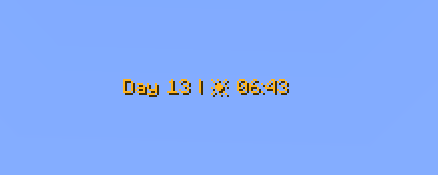
My Action Bar is a datapack that lets you customize the information displayed in your action bar. Choose which elements are visible and which are hidden, so you only see the information that matters most while playing.

Автор: MrKazanek3845обновлён 27 авг. 2026 г.
Механики игрыУтилиты

Описание

Banner

My Action Bar

A fully customizable action bar datapack - display world info your way.

Transform your action bar into a personal HUD with real-time stats, a stunning dynamic color system, and per-player customization - no mods required.

Home Page: Visit

Online Configurator: Visit


Features

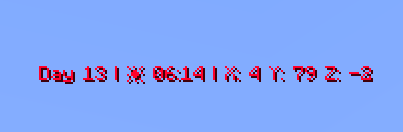
Day Counter

Shows the current in-game day number. Toggle the Day prefix on or off to suit your style.

Weather Indicator

Displays the current weather in one of two modes:

Icon mode (default) — uses intuitive icons:

  • ☀️ Clear sky
  • 🌧️ Rain
  • ⚡ Thunderstorm
  • ❄️ Snow
  • ❄️⚡ Blizzard (snow + thunder simultaneously)

Text mode — displays weather as plain text:

  • Clear → Sun
  • Rain → Rain
  • Thunderstorm → Thunder
  • Snow → Snow
  • Blizzard → Snow Thunder

Hidden automatically in the Nether and End, where weather doesn't apply.

Clock

Displays the current in-game time in two available formats:

  • 24-hour (default) — e.g. 14:30
  • 12-hour — e.g. 2:30 PM

Coordinates (hidden by default)

Shows your current X, Y, Z position. Toggle the coordinate prefix on or off independently.

Facing Direction (hidden by default)

Shows which direction you're currently looking. Supports full names (e.g. West), abbreviated names (e.g. W), and optional intercardinal directions (e.g. North-East / NE).

Player Head (hidden by default)

Displays your player head icon inside the action bar for a personalized touch.


Dynamic Gradient Color System

The action bar text color smoothly transitions based on the in-game time shown on the clock. The chart below shows the full 24-hour color cycle:

Action bar dynamic gradient text color adjustment chart.

00:00 → 04:00 — Deep purple/indigo (late night) 04:00 → 08:00 — Warm golden yellow (sunrise) 08:00 → 12:00 — Fading into bright white (morning) 12:00 — Pure white (noon peak) 12:00 → 16:00 — Shifting into warm orange (afternoon) 16:00 → 20:00 — Deep orange-red (sunset) 20:00 → 23:59 — Fading back to cool blue/purple (night)

Fun fact: Every single hour and minute has its own individually defined color — that's 1,440 unique color values declared in total!


Full Per-Player Customization

Every player can personalize their own action bar using /trigger commands — no operator permissions needed.
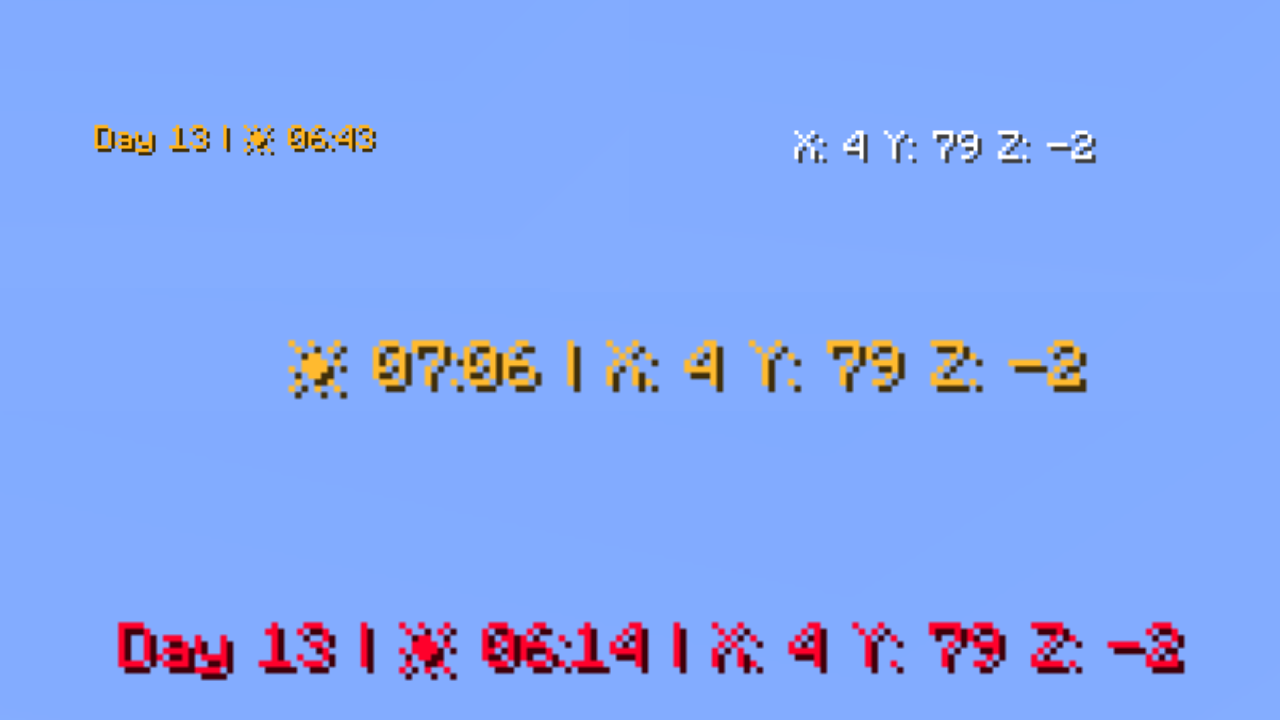
Sample settings

Available Commands

CommandDescriptionDefault
/trigger versionDisplay the current datapack version-
/trigger defaultReset all settings to default-
/trigger randomRandomize all action bar settings-
/trigger showToggle the action bar on/offShown
/trigger languageChanges the language of the information displayed in the Action Bar.English
/trigger show_daysToggle the day counterShown
/trigger show_weather_infoToggle the weather indicatorShown
/trigger weather_info_typeSwitch weather display modeIcon mode
/trigger show_clockToggle the clockShown
/trigger time_formatSwitch clock between 24h and 12h24-hour
/trigger show_cordinatesToggle coordinatesHidden
/trigger show_days_prefixToggle the "Day X" prefix textShown
/trigger show_cordinates_prefixToggle the coordinate prefix labelsShown
/trigger show_facing_directionToggle the facing direction indicatorHidden
/trigger facing_direction_typeSwitch between full and abbreviated direction namesFull
/trigger facing_direction_advancedToggle intercardinal directions (e.g. North-East)Disabled
/trigger show_player_headToggle the player head iconHidden
/trigger dynamic_clock_colorToggle the dynamic gradient colorEnabled
/trigger set_colorSet a static solid color (requires dynamic color OFF)Default color
/trigger text_styleSet the text formatting styleDefault
/trigger separatorsChange the separator character between elements•
/trigger external_separatorsChange or enable outer separators at start/end of barDisabled
/trigger display_orderChange the display order of elementsDefault

Language (/trigger language)

Change the language of the information displayed in the Action Bar.

  • /trigger language set 0 — English (default)
  • /trigger language set 1 — Polish

Weather Display Mode (/trigger weather_info_type)

  • set 0 — icon mode (default)
  • set 1 — text mode

Clock Format (/trigger time_format)

  • set 0 — 24-hour format (default)
  • set 1 — 12-hour format

Facing Direction Type (/trigger facing_direction_type)

  • set 0 — full names, e.g. West (default)
  • set 1 — abbreviated names, e.g. W

Intercardinal Directions (/trigger facing_direction_advanced)

  • set 0 — cardinal directions only (default)
  • set 1 — include intercardinal directions, e.g. North-East / NE

Text Style (/trigger text_style)

Choose from 13 formatting styles for the action bar text:

  • set 0 — default formatting (default)
  • set 1 — underline
  • set 2 — bold
  • set 3 — bold + underline
  • set 4 — italic
  • set 5 — italic + bold
  • set 6 — italic + underline
  • set 7 — italic + bold + underline
  • set 8 — strikethrough
  • set 9 — strikethrough + bold
  • set 10 — strikethrough + underline
  • set 11 — strikethrough + italic
  • set 12 — strikethrough + underline + italic + bold

Separator Picker (/trigger separators)

Change the character that separates elements in the action bar.

  • /trigger separators set 0 — use the default • character
  • /trigger separators set <1–64> — pick a specific separator
  • /trigger separators add <value> — offset from your current separator

See the full separator palette on the website

Outer Separator Picker (/trigger external_separators)

Add decorative separators at the very beginning and end of the action bar.

  • /trigger external_separators set 0 — disable outer separators (default)
  • /trigger external_separators set <1–64> — pick a specific outer separator style
  • /trigger external_separators add <value> — offset from your current selection

Display Order (/trigger display_order)

Rearrange the order in which elements appear in the action bar.

  • /trigger display_order set 0 — restore default order (default)
  • /trigger display_order set <1–719> — choose one of the available orderings
  • /trigger display_order add <value> — offset from your current order

Static Color Picker (/trigger set_color)

When dynamic color is disabled, choose from 64 handpicked colors organized by palette:

White (1–6) → Red (7–11) → Orange (12–15) → Yellow (16–21) → Green (22–28) → Cyan (29–32) → Blue (33–42) → Purple (43–47) → Pink (48–52) → Brown (53–56) → Other (57–64)

  • /trigger set_color set <1–64> — pick a specific color
  • /trigger set_color add <value> — offset from your current color
  • /trigger set_color (alone) — cycle to the next color
  • /trigger set_color set 0 — revert to default color

See the full color palette on the website


Quick Command Reference

All commands follow the same toggle/set pattern:

  • set 1 → enable/show
  • set 0 → disable/hide or reset to default
  • Bare trigger (e.g. /trigger show) → toggles between states

Credits

Creator: MrKazanek

Thank you to everyone who supported this project! ❤️

Галерея
Datapack BannerDatapack IconDefaultExample setting

Последние версии

Все версии →
alpha

Snapshot 1.4

Snapshot-1.4
27 авг. 2026 г.43Minecraft: 26.3-snapshot-10, 26.3-snapshot-4, 26.3-snapshot-5, 26.3-snapshot-6, 26.3-snapshot-7, 26.3-snapshot-8, 26.3-snapshot-9datapack
Скачать
Что нового
- World directions are no longer written in ALL CAPS.
release

Release 1.4

1.4
27 авг. 2026 г.46Minecraft: 26.1, 26.1.1, 26.1.2, 26.2datapack
Скачать
Что нового
- World directions are no longer written in ALL CAPS.
alpha

1.3 for Snapshots

Snapshot-1.3
24 авг. 2026 г.14Minecraft: 26.3-snapshot-10, 26.3-snapshot-4, 26.3-snapshot-5, 26.3-snapshot-6, 26.3-snapshot-7, 26.3-snapshot-8, 26.3-snapshot-9datapack
Скачать
Что нового
# Changelog 1.3 * Added the `/trigger language` setting, allowing you to choose the language used by the Action Bar: * `/trigger set 0` - English (Default) * `/trigger set 1` - Polish * Fixed several minor bugs. * The project is now licensed under **CC BY 4.0**.
release

Release 1.3

1.3
24 авг. 2026 г.17Minecraft: 26.1, 26.1.1, 26.1.2, 26.2datapack
Скачать
Что нового
# Changelog 1.3 * Added the `/trigger language` setting, allowing you to choose the language used by the Action Bar: * `/trigger set 0` - English (Default) * `/trigger set 1` - Polish * Fixed several minor bugs. * The project is now licensed under **CC BY 4.0**.
alpha

1.2 (Snapshot Version)

Snapshot-1.2
31 июл. 2026 г.43Minecraft: 26.3-snapshot-10, 26.3-snapshot-4, 26.3-snapshot-5, 26.3-snapshot-6, 26.3-snapshot-7, 26.3-snapshot-8, 26.3-snapshot-9datapack
Скачать
Что нового
### New Commands #### `/trigger version` Lets you check which version of the datapack you currently have installed — useful when you're not sure whether you're running the latest release. #### `/trigger random` Applies a completely random set of action bar settings in one go. Perfect if you want to quickly discover new combinations or just have fun experimenting without manually cycling through every option one by one. #### `/trigger show_player_head` Toggles the display of your player head icon directly inside the action bar. Hidden by default. A nice personal touch that makes the bar feel more like your own HUD. #### `/trigger show_facing_direction` Toggles the facing direction indicator in the action bar. Hidden by default. Useful during exploration, building, or navigation — you always know which way you're headed without having to open a map. #### `/trigger facing_direction_type` Controls how the facing direction is displayed: - `set 0` — full direction names, e.g. `North`, `West` *(default)* - `set 1` — abbreviated direction names, e.g. `N`, `W` #### `/trigger facing_direction_advanced` Toggles intercardinal directions. Disabled by default, showing only the four cardinal directions. When enabled, directions such as `North-East` — or `NE` in abbreviated mode — are also shown, giving you a much more precise read on where you're facing. - `set 0` — cardinal directions only *(default)* - `set 1` — cardinal and intercardinal directions #### `/trigger text_style` Sets the text formatting style for the entire action bar. There are 13 styles to choose from — ranging from clean default formatting, through bold and italic, all the way to combinations of underline, strikethrough, and italic at the same time. A great way to match the bar's look to your build aesthetic or simply your personal taste. Available styles: - `set 0` — default formatting *(default)* - `set 1` — underline - `set 2` — bold - `set 3` — bold + underline - `set 4` — italic - `set 5` — italic + bold - `set 6` — italic + underline - `set 7` — italic + bold + underline - `set 8` — strikethrough - `set 9` — strikethrough + bold - `set 10` — strikethrough + underline - `set 11` — strikethrough + italic - `set 12` — strikethrough + underline + italic + bold --- ### Changes #### `/trigger display_order` The number of available element ordering variants has been massively expanded — from the previous 12 all the way up to **720 unique layouts**. You can now arrange the action bar elements in virtually any configuration you can think of. - `set 0` — restore default order - `set 1–719` — choose one of the available layouts - `add <value>` — offset from your current layout
release

1.2

1.2
31 июл. 2026 г.41Minecraft: 26.1, 26.1.1, 26.1.2, 26.2datapack
Скачать
Что нового
### New Commands #### `/trigger version` Lets you check which version of the datapack you currently have installed — useful when you're not sure whether you're running the latest release. #### `/trigger random` Applies a completely random set of action bar settings in one go. Perfect if you want to quickly discover new combinations or just have fun experimenting without manually cycling through every option one by one. #### `/trigger show_player_head` Toggles the display of your player head icon directly inside the action bar. Hidden by default. A nice personal touch that makes the bar feel more like your own HUD. #### `/trigger show_facing_direction` Toggles the facing direction indicator in the action bar. Hidden by default. Useful during exploration, building, or navigation — you always know which way you're headed without having to open a map. #### `/trigger facing_direction_type` Controls how the facing direction is displayed: - `set 0` — full direction names, e.g. `North`, `West` *(default)* - `set 1` — abbreviated direction names, e.g. `N`, `W` #### `/trigger facing_direction_advanced` Toggles intercardinal directions. Disabled by default, showing only the four cardinal directions. When enabled, directions such as `North-East` — or `NE` in abbreviated mode — are also shown, giving you a much more precise read on where you're facing. - `set 0` — cardinal directions only *(default)* - `set 1` — cardinal and intercardinal directions #### `/trigger text_style` Sets the text formatting style for the entire action bar. There are 13 styles to choose from — ranging from clean default formatting, through bold and italic, all the way to combinations of underline, strikethrough, and italic at the same time. A great way to match the bar's look to your build aesthetic or simply your personal taste. Available styles: - `set 0` — default formatting *(default)* - `set 1` — underline - `set 2` — bold - `set 3` — bold + underline - `set 4` — italic - `set 5` — italic + bold - `set 6` — italic + underline - `set 7` — italic + bold + underline - `set 8` — strikethrough - `set 9` — strikethrough + bold - `set 10` — strikethrough + underline - `set 11` — strikethrough + italic - `set 12` — strikethrough + underline + italic + bold --- ### Changes #### `/trigger display_order` The number of available element ordering variants has been massively expanded — from the previous 12 all the way up to **720 unique layouts**. You can now arrange the action bar elements in virtually any configuration you can think of. - `set 0` — restore default order - `set 1–719` — choose one of the available layouts - `add <value>` — offset from your current layout
alpha

Snapshot-1.1 (Snapshot Version)

Snapshot-1.1
30 июл. 2026 г.17Minecraft: 26.3-snapshot-10, 26.3-snapshot-4, 26.3-snapshot-5, 26.3-snapshot-6, 26.3-snapshot-7, 26.3-snapshot-8, 26.3-snapshot-9datapack
Скачать
Что нового
### ✨ New Features #### Weather Indicator — Text Mode The weather indicator now supports two display modes: - **Icon mode** *(default, unchanged)* — shows a weather icon - **Text mode** *(new)* — displays weather as plain text: - Clear → `Sun` - Rain → `Rain` - Thunderstorm → `Thunder` - Snow → `Snow` - Blizzard → `Snow Thunder` **New command:** `/trigger weather_info_type` - `set 0` — icon mode *(default)* - `set 1` — text mode --- #### Clock — 12-Hour Format The clock can now display time in two formats: - **24-hour** *(default)* - **12-hour** *(new)* **New command:** `/trigger time_format` - `set 0` — 24-hour format *(default)* - `set 1` — 12-hour format --- #### Separator Picker Change the character that separates elements in the action bar. **New command:** `/trigger separators` - `set 0` — use the default `•` character - `set <1–64>` — pick a specific separator - `add <value>` — offset from your current separator --- #### Outer Separator Picker Add decorative separators at the very beginning and end of the action bar. **New command:** `/trigger external_separators` - `set 0` — disable outer separators *(default)* - `set <1–64>` — pick a specific outer separator style - `add <value>` — offset from your current selection --- #### Display Order Rearrange the order in which elements appear in the action bar. **New command:** `/trigger display_order` - `set 0` — restore default order *(default)* - `set <1–12>` — choose one of the available orderings - `add <value>` — offset from your current order --- > 🎨 [See the full separator & outer separator palette on the website](https://qozaworks.netlify.app/separators_pallete.html) --- ### 🔄 Changes - The separator between action bar elements has been changed from `|` to `•` --- ### 🐛 Bug Fixes - The `Day` and `X Y Z` prefixes are now correctly initialized on the first launch of a server with the datapack installed
release

1.1

1.1
30 июл. 2026 г.18Minecraft: 26.1, 26.1.1, 26.1.2, 26.2datapack
Скачать
Что нового
### ✨ New Features #### Weather Indicator — Text Mode The weather indicator now supports two display modes: - **Icon mode** *(default, unchanged)* — shows a weather icon - **Text mode** *(new)* — displays weather as plain text: - Clear → `Sun` - Rain → `Rain` - Thunderstorm → `Thunder` - Snow → `Snow` - Blizzard → `Snow Thunder` **New command:** `/trigger weather_info_type` - `set 0` — icon mode *(default)* - `set 1` — text mode --- #### Clock — 12-Hour Format The clock can now display time in two formats: - **24-hour** *(default)* - **12-hour** *(new)* **New command:** `/trigger time_format` - `set 0` — 24-hour format *(default)* - `set 1` — 12-hour format --- #### Separator Picker Change the character that separates elements in the action bar. **New command:** `/trigger separators` - `set 0` — use the default `•` character - `set <1–64>` — pick a specific separator - `add <value>` — offset from your current separator --- #### Outer Separator Picker Add decorative separators at the very beginning and end of the action bar. **New command:** `/trigger external_separators` - `set 0` — disable outer separators *(default)* - `set <1–64>` — pick a specific outer separator style - `add <value>` — offset from your current selection --- #### Display Order Rearrange the order in which elements appear in the action bar. **New command:** `/trigger display_order` - `set 0` — restore default order *(default)* - `set <1–12>` — choose one of the available orderings - `add <value>` — offset from your current order --- > 🎨 [See the full separator & outer separator palette on the website](https://qozaworks.netlify.app/separators_pallete.html) --- ### 🔄 Changes - The separator between action bar elements has been changed from `|` to `•` --- ### 🐛 Bug Fixes - The `Day` and `X Y Z` prefixes are now correctly initialized on the first launch of a server with the datapack installed
release

First Release

1.0
29 июл. 2026 г.14Minecraft: 26.1, 26.1.1, 26.1.2, 26.2datapack
Скачать
Что нового
Project Started