

MusicDisplay
This mod displays the currently playing music on Spotify. You can easily adjust the volume, pause the song, and more.
16,1 тыс.22обновлён 13 окт. 2026 г.
МагияУправлениеУтилиты
Описание
MusicDisplay
Version 2.5 is now available, supporting Minecraft version 26.1.x! Check the changelog here.
Take full control of your music without ever leaving the game! This mod seamlessly integrates Spotify into your Minecraft client, offering a sleek overlay and easy access to playback controls.
Features
- Full Playback Control: Pause, resume, skip, or rewind tracks directly from the game.
- Live Overlay: Displays the current song title, artist, album art, and a real-time progress bar.
- Search Spotify: You can search for your song or playlist directly from the GUI!
- Volume Management: Adjust Spotify volume instantly without Alt-Tabbing.
- Interactive Controls:
- Play/Pause
- Previous / Next Track
- Shuffle Toggle
- Loop Toggle
- Like/Save Songs
- State Synchronization: Automatically syncs with changes made on other devices (e.g., your phone).
- Custom API Keys: Use your own Spotify Client ID and Secret for full privacy and control.
How to Use
1. Initial Setup
To connect the mod to your Spotify account:
- Open the client GUI in the game (default key: Right Shift).
- Click the Setup Spotify button at the bottom of the panel. This will launch a local setup server and automatically open the setup page in your web browser (
http://127.0.0.1:8888/setup). - Follow the instructions on the web page:
- Log in to the Spotify Developer Dashboard.
- Create a new application.
- Edit the app settings and add
http://127.0.0.1:8888/callbackas a Redirect URI. - Copy your Client ID and Client Secret.
- Enter your Client ID and Client Secret in the web form and click Connect Spotify Account.
- Approve the authorization in your browser. Once completed, you can close the browser tab and return to the game!
2. State & Control
Enable the Spotify module in your client's GUI. Your music will start syncing instantly!
Configuration
Configuration files are stored locally at: .minecraft/config/spotify-config.json
Keybinds
- Right Shift - Opens the Client GUI
Requirements
- Spotify Account (Premium is required).
- Minecraft Java Edition (Fabric).
- Java 25 or higher.
Preview

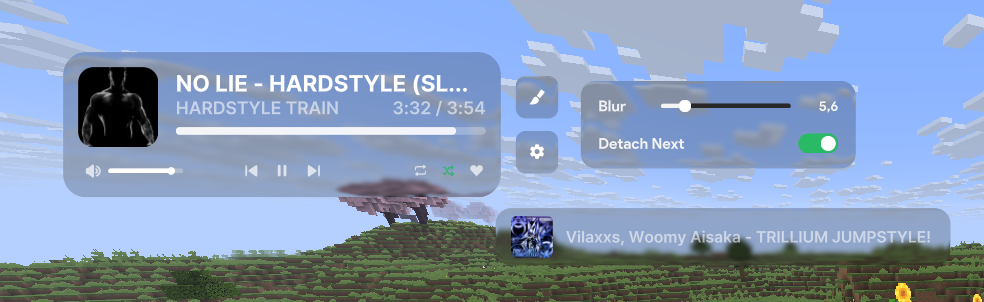
Showcase
Галерея

Последние версии
Все версии →release
MusicDisplay 2.6.1
2.6.113 окт. 2026 г.678Minecraft: 26.2fabric
Что нового
Port to 26.2 made by [Roland882](https://github.com/Roland882)
release
MusicDisplay 2.6.1
2.6.124 авг. 2026 г.1,6 тыс.Minecraft: 26.1, 26.1.1, 26.1.2fabric
Что нового
### v2.6.1 Update
**[/]** Fixed crashing with Iris mod
release
MusicDisplay 2.6
2.619 июл. 2026 г.1,6 тыс.Minecraft: 26.1, 26.1.1, 26.1.2fabric
Что нового
### Version 2.6 update [19.07.2026]
**[+]** Added support for music from Windows. In practice, music from services like SoundCloud or YouTube works, though it can sometimes be problematic. You can easily change the music source in gui.
**[+]** Added error notifications for spotify.
U can find changes in github [here](https://github.com/realmichaelstetson/musicdisplay)
release
MusicDisplay 2.5
2.513 июл. 2026 г.435Minecraft: 26.1, 26.1.1, 26.1.2fabric
Что нового
### Version 2.5 update
**[+]** Added the ability to move, resize, etc., the overlay on the ClickGUI screen as well. Previously, this was only possible while on the chat screen.
**[+]** A settings button has been added. Now, by right-clicking the overlay while in the ClickGUI or chat screen, you can adjust the blur and bloom, or detach the "next song" element to make it a separate overlay.

release
MusicDisplay 2.4
2.411 июл. 2026 г.546Minecraft: 1.21.5fabric
Что нового
### Port to 1.21.5
release
MusicDisplay 2.4
2.411 июл. 2026 г.1,7 тыс.Minecraft: 1.21.4fabric
Что нового
### Port to 1.21.4
release
MusicDisplay 2.4
2.48 июл. 2026 г.273Minecraft: 26.1.2fabric
Что нового
**[+]** Added filters to search! Avalible options: All, Song, Playlists, Library. U need to delete `spotify-config` from `.minecraft/config` to re-authenticate to it to work
**[/]** Changed logic of caching images. Now is more efficent.
**[-]** Removed ugly Idle/Now playing text in gui xd
release
MusicDisplay 2.4
2.48 июл. 2026 г.62Minecraft: 26.1fabric
Что нового
**[+]** Added filters to search! Avalible options: All, Song, Playlists, Library. U need to delete `spotify-config` from `.minecraft/config` to re-authenticate to it to work
**[/]** Changed logic of caching images. Now is more efficent.
**[-]** Removed ugly Idle/Now playing text in gui xd
release
MusicDisplay 2.4
2.48 июл. 2026 г.51Minecraft: 26.1.1fabric
Что нового
**[+]** Added filters to search! Avalible options: All, Song, Playlists, Library. U need to delete `spotify-config` from `.minecraft/config` to re-authenticate to it to work
**[/]** Changed logic of caching images. Now is more efficent.
**[-]** Removed ugly Idle/Now playing text in gui xd
release
MusicDisplay 2.3
2.38 июл. 2026 г.29Minecraft: 26.1fabric
Что нового
Port to 26.1 minecraft version