COWMODSКаталог модов

Music Events

An event-based dynamic music engine with an intuitive and easy to use in-game GUI that grants control over game, mod, and custom music.

Автор: xelotex1,1 тыс.10обновлён 25 окт. 2026 г.
ПриключенияУправлениеУтилиты

Описание

Music Events is a highly configurable mod that provides extensive control over both vanilla game and custom music. It allows for the creation of intricate, situational audio tracks such as ambient music, combat themes, or context-specific soundtracks. It features an intuitive and user friendly in-game GUI that vastly facilitates the mod's configuration and it's the primary way to setup the mod.

As a developer, YOUR FEEDBACK HELPS ME A LOT! If you have questions, need help, or want clarification about my mod, you are welcome to join my Discord and i'll give you a detailed explanation as soon as i'm able to:

Discord

NEW IN V1.2.0: Undead Army Event Showcase:

Spoiler

Watch a guide on how to setup Horror themed soundtracks:

Syntax used for the Horror themed sountracks
# ==========================================
# UNIVERSAL SETTINGS
# ==========================================
[universal]
server_nbt_sync = ["warden_spawn_tracker"]

# ==========================================
# EVENTS (TRIGGERS)
# ==========================================
[[events.mobs]]
event_name = "warden_undetected_4"
priority = 204
detection_range = 25.0
sync_group = "warden_proximity"
resource_name = ["minecraft:warden"]


[[events.player]]
event_name = "shrieker"
priority = 300
event_delay = 6.0
nbt_match = ["{warden_spawn_tracker:{warning_level:1}}"]


[[events.mobs]]
event_name = "warden_undetected_3"
priority = 203
detection_range = 50.0
sync_group = "warden_proximity"
resource_name = ["minecraft:warden"]


[[events.mobs]]
event_name = "warden_undetected_2"
priority = 202
detection_range = 75.0
sync_group = "warden_proximity"
resource_name = ["minecraft:warden"]


[[events.mobs]]
event_name = "warden_detected_4"
priority = 214
detection_range = 25.0
mob_targeting = true
sync_group = "warden_proximity_detected"
resource_name = ["minecraft:warden"]


[[events.mobs]]
event_name = "warden_detected_3"
priority = 213
detection_range = 50.0
mob_targeting = true
sync_group = "warden_proximity_detected"
resource_name = ["minecraft:warden"]


[[events.mobs]]
event_name = "warden_detected_2"
priority = 212
detection_range = 75.0
mob_targeting = true
sync_group = "warden_proximity_detected"
resource_name = ["minecraft:warden"]


[[events.mobs]]
event_name = "warden_detected_1"
priority = 211
detection_range = 100.0
mob_targeting = true
sync_group = "warden_proximity_detected"
resource_name = ["minecraft:warden"]


[[events.mobs]]
event_name = "angel"
priority = 100
detection_range = 50.0
mob_targeting = true
require_fov = 2
resource_name = ["weeping_angels:weeping_angel"]


[[events.mobs]]
event_name = "warden_undetected_1"
priority = 201
detection_range = 100.0
sync_group = "warden_proximity"
resource_name = ["minecraft:warden"]


[[events.mobs]]
event_name = "dweller"
priority = 101
mob_targeting = true
require_fov = 1
resource_name = ["cave_dweller:cave_dweller"]

The mod strictly supports audio files in the .ogg format.

Configuration is handled primarily through a dedicated in-game GUI.

GUI ACCESS: Press the F6 key to open the interface. MODIFYING VANILLA MUSIC:

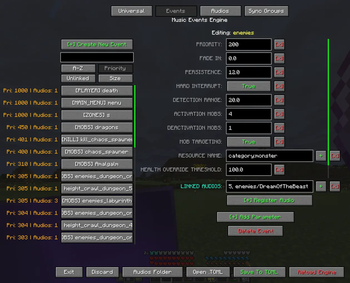
  1. Navigate to the Events tab.
  2. Create a new event (e.g., dimensions) and assign its priority.
  3. Define the required parameters (e.g., add resource_name and set to minecraft:overworld).
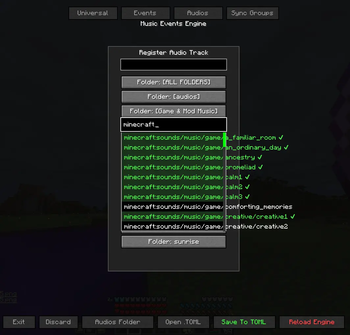
  4. Select Register Audio and search for the desired audio file.
    • Note: Searches use the internal file name (e.g., Haggstrom is stored as hal3).
    • Note: Hover over a file in the dropdown list to preview the audio.
  5. Click Save and then Reload to apply the configuration.

USING CUSTOM AUDIO FILES:

  1. Open the Audios folder using the GUI.
  2. Place custom .ogg files (and create subfolders if you want to keep it more organized) into the designated directory.
  3. Link the tracks to events using the standard Register Audio procedure.

GUI Panels Overview:

  • Universal: Manages default parameter values that apply globally across all newly created events. Event-specific parameters will override the Universal settings.
  • Events: Handles the creation of custom events and the configuration of their respective parameters.
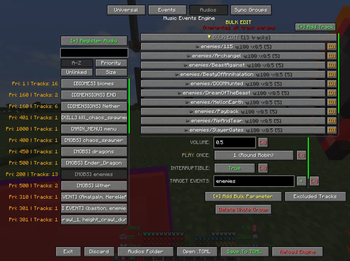
  • Audios: Manages configuration settings for individual audio tracks.
  • Sync Groups: Provides an overview and management interface for events bound together using the sync_group parameter.

Event Types, Modifiers, and Examples:

Each event evaluates contextual conditions before triggering audio playback.

Universal Parameters (Default event configuration pool):

Spoiler
  • play_when_paused = true/false: Determines if the audio track is allowed to play while the game menu is paused.

  • muffling_when_paused = 1.0: A muffling effect multiplier applied during game pauses. (Recommended: 1.0).

  • underwater_muffling = 1.0: A muffling effect multiplier applied when the player is submerged. (Recommended: 1.0).

  • gui_muffling = 1.0: A muffling effect multiplier applied when a GUI screen is active. (Recommended: 1.0).

  • gui_muffling_delay = 20: The delay (in seconds) before the GUI muffling effect takes place.

  • gui_muffling_blacklist = ["InventoryScreen"]: A list of GUI classes that bypass the muffling effect. Use the mod's debug screen to know the GUI you're currently looking at.

  • pause_volume_multiplier = 0.5: A volume control multiplier applied when the game is paused.

  • remember_track = true/false: If enabled, the event remembers the last track it played before going inactive and will replay it upon reactivation instead of picking a random new track.

  • resume_from_timestamp = true/false: If enabled, when an event reactivates, it resumes playback straight from the exact point (timestamp) it was paused at.

  • seamless_handoff = true/false: Enables smooth track transitions. If Event A transitions into Event B, and both share the currently playing track in their playlist, the track will seamlessly continue playing without restarting or fading out.

  • fade_in = 2.0 / fade_out = 2.0: Specifies the audio volume transition duration (in seconds) when an event activates or deactivates.

  • persistence = 10.0: Defines the duration (in seconds) the event will forcefully remain active and continue playing music after its activation requirements are no longer met (e.g., staying in combat for 10s after monsters are dead).

  • time_between_audio = 60.0: Specifies the cooldown duration (in seconds) before the event can trigger subsequent track playbacks after a track has finished.

  • jukebox_behavior = "ignore"/"pause"/"muffle": Determines how tracks react to nearby vanilla jukeboxes playing music discs.

  • cooldown_group_time = 120.0 / cooldown_group_events = ["eventA", "eventB"]: Links track cooldowns across multiple distinct events. If one event finishes a track, all events listed in cooldown_group_events will share the specified cooldown_group_time before they are permitted to play again.

  • mob_blacklist = ["minecraft:slime", "minecraft:vex"]: A list of entity IDs that are prevented from activating the mobs events globally.

  • priority = 50: Integer value determining the playback hierarchy when multiple events are active simultaneously. Higher values take precedence.

  • hard_interrupt = true/false: Enforces immediate termination of the current audio track, bypassing and ignoring standard persistance and fade-out parameters.

  • locked = true / unlocks_event = "phase_2" / relock_when_inactive = true: State management parameters allowing sequential event activations. An event can be locked by default and only become active when another event calls its unlocks_event.

  • sync_group = "battlefield_crescendo": Assigns events to a synchronized group. Sequential events within the same sync_group will inherit the exact playback timestamp of the previously active track. Useful for layered or multi-phase audio files that share the same tempo/layout.

  • server_nbt_sync = ["warden_spawn_tracker"]: A comma-separated list of root NBT keys that the server should actively sync for the nbt_match parameter.

Audio Track Parameters:

Spoiler
  • volume = 1.0: Multiplier for the audio track's volume level.

  • weight = 50: Determines the playback probability when an event has multiple registered audio tracks. Higher weights drastically increase the chance of selection.

  • require_all_events = true/false: If true, it requires all events strictly listed within the target_events array to be active simultaneously for the track to play.

  • target_events = ["overworld_day", "overworld_night"]: Defines a specific list of events to which the track belongs and checks for activation.

  • upgrade_delay = 5.0 / upgrade_fade_in = 3.0 / upgrade_fade_out = 3.0: Easing configurations for dynamic track upgrades. A track currently playing can seamlessly 'upgrade' to this track if the event conditions are met, utilizing these isolated crossfade timings specifically bypassing standard event fading.

  • start_time = 15.5: Dictates the timestamp (in seconds) where the track playback initiates. By setting it to 15.5, the track will always start playing 15 and a half seconds inwards, skipping the intro.

  • start_x = 2: Configures repetition. The track will repeat exactly 2 times before completing.

  • loop_start = 10.0 / loop_end = 60.0: Creates an isolated internal playback loop. The track starts normally, but when the playback reaches loop_end (e.g., 60.0 seconds), it will seamlessly teleport back to loop_start (e.g., 10.0 seconds) and repeat that sub-section endlessly based on the start_x value.

  • play_once = 1/2/3/4/5: Determines how frequently a track can be replayed. It accepts the following numerical values:

    • 1 (Round Robin): The track will not play again until all other available tracks for the active event have been played.
    • 2 (Event Lifetime): The track plays only once as long as the event remains continuously active.
    • 3 (Session): The track plays only once per world join. Resets when logging out and back in.
    • 4 (JVM Session): The track plays only once per game launch. Resets when Minecraft is completely restarted.
    • 5 (Persistent World): The track plays only once in a given world, ever. Stored persistently.
  • interruptible = true/false: Specifies whether the track can be forcefully interrupted by a higher-priority event. Tracks flagged as false act as a shield and will refuse to be paused, always playing from start to finish.

  • breakthrough_priority = 500: Overrides the track's uninterruptible state. Even if the track acts as a shield, any event with a priority equal to or higher than 500 can forcefully break through and interrupt it.

  • interrupt_whitelist = ["boss_phase_2"]: An exclusive list of event names permitted to bypass the interruptible flag and pause the track, regardless of priorities.

Specific Event Types and Constraints:

  • Mobs: Activates based on entity proximity.
Spoiler
  • resource_name = ["minecraft:zombie", "category:monster", "regex:.zombie.", "player:Name"]: Target entity IDs, tags, or wildcards to monitor.
  • nbt_match = "{IsBaby:1b}": Evaluates string-matched NBT properties the entity/player must possess. For server-side NBT properties, the root key must be added to server_nbt_sync in the Universal section.
  • detection_range = 16.0: Radius extending around the player evaluating entity presence.
  • activation_mobs = 5 / deactivation_mobs = 2: Strict numerical thresholds. The event activates only when 5 or more matching entities are present, and stops when the count drops to 2 or below.
  • max_health = 10.0: Event activates only if the targeted matching entities possess health beneath this designated threshold.
  • health_override_threshold = 100.0: Permits the event to instantly bypass the activation_mobs numeric threshold if even a single matching entity vastly exceeds this maximum health value (useful for boss variants).
  • mob_targeting = true/false: Restricts activation only to entities that are actively aggressive and targeting the player.
  • require_fov = "Spotted"/"Constant": Limits activation to entities currently within the player's line of sight.
  • Kill: Activates upon entity death.
Spoiler
  • resource_name = ["minecraft:ender_dragon"]: The specific entity type being killed.

    • attacker_name = ["minecraft:player"]: The entity type required to deliver the final blow.

    • nbt_match = "{...}", detection_range = 128.0, require_fov = "Spotted": Applies constraints similarly to Mob events.

  • Inventory: Activates when items reside in specific inventory locations.
Spoiler
  • resource_name = ["minecraft:diamond", "slot:head|regex:.*_helmet"]: Target item ID or regex pattern. Can be prefixed with slot:xxx| to evaluate that item exclusively in a specific slot.

  • target_slots = ["mainhand", "offhand", "head", "chest", "legs", "feet", "any"]: Array designating valid slots to check as a global fallback. If an item in resource_name lacks a slot: prefix, it will be evaluated across all slots defined here.

  • require_all_resources = true/false: If true, enforces possession of all sequentially listed items simultaneously rather than any single item.

  • Player: Evaluates player's exact internal condition.
Spoiler
  • is_dead = true/false: Strict requirement for the player to be dead.
  • max_health = 6.0: Event activates when the player's health strictly drops to or below this point.
  • min_y = -64.0 / max_y = 0.0: Vertical elevation constraint boundaries limiting where the event triggers.
  • min_light = 0 / max_light = 7 / light_type = "sky"/"block"/"total": Bounds checking maximum environmental light exposure based on the chosen emission source.
  • require_underwater = true/false: Forces a direct liquid submersion check.
  • nbt_match = "{...}": Player data NBT conditions.
  • Zones: Fixed coordinate-based volumetric trigger.
Spoiler
  • min_x = -50 / max_x = 50 / min_y = 64 / max_y = 120 / min_z = -50 / max_z = 50: Establishes a permanent 3D geographic bounding box strictly enforcing coordinate-based activation.
  • Raid: Evaluates pillager raid variables.
Spoiler
  • min_wave = 1 / max_wave = 5: Enforces upper and lower bounds on the active pillager raid wave levels.
  • status = "active"/"victory"/"loss"/"stopped"/"any": Verifies a specific raid progression state.
  • Statistic: Evaluates internal player statistics tracking.
Spoiler
  • resource_name = ["minecraft:mined:minecraft:diamond_ore=100"]: Defines the target metric tracking. The format explicitly requires a core category, mod ID, object, and value limitation (e.g., minecraft:used:minecraft:elytra=50 or minecraft:custom:minecraft:play_time=12000).
  • require_all_resources = true/false: Enforces fulfillment of every numerical statistic tracking requirement simultaneously.
  • Dimensions / Biomes / Time / Weather / Gamemode / Difficulty / Structure / Advancement / PvP / Riding / GUI / Effect: Evaluated through a unified resource_name parameter providing standard string matching arrays.
Spoiler
  • resource_name:

    • Dimensions defaults: ["minecraft:overworld", "minecraft:the_nether", "minecraft:the_end"]
    • Biomes defaults: ["minecraft:plains", "minecraft:desert", "minecraft:badlands"]
    • Time defaults: ["day", "night", "sunrise", "sunset"]
    • Weather defaults: ["clear", "rain", "thunder"]
    • Gamemode defaults: ["survival", "creative", "adventure", "spectator"]
    • Difficulty defaults: ["peaceful", "easy", "normal", "hard"]
    • Structure defaults: ["minecraft:bastion_remnant", "minecraft:village", "minecraft:stronghold"]
    • Advancement defaults: ["minecraft:story/enter_the_nether", "minecraft:end/kill_dragon"]
    • PvP defaults: ["player:Name", "any"]
    • Riding defaults: ["minecraft:horse", "minecraft:minecart"]
    • GUI defaults: ["InventoryScreen", "ChatScreen", "TitleScreen"] Use the mod's debug screen to know the GUI you're currently looking at.
    • Effect defaults: ["minecraft:poison", "minecraft:regeneration"]

Commands & Debugging:

The mod provides several commands under the base /musicevents command to manage the state machine and track audio directly from the chat:

Spoiler
  • /musicevents reload: Instructs the mod to perform a hard reset of the audio engine and reload all configurations and audio memory caches from the file system.
  • /musicevents skip: Immediately skips the currently playing audio track and evaluates the next best track or event priority.
  • /musicevents unlock <event_name>: Unlocks a locked state machine event, marking it as active/evaluable.
  • /musicevents relock <event_name>: Relocks a specific state machine event, preventing it from activating unless its unlock condition is met again. You can also use /musicevents relock all to reset the entire state progression.
  • /musicevents zone pos1 / /musicevents zone pos2: Sets the first and second corners of a dimensional bounding box around your exact player coordinates.
  • /musicevents zone save <event_name>: Writes the internal pos1 and pos2 bounding coordinates to a specific zone event permanently!

Additionally, a built-in debug screen can be toggled with the F4 key by default. The debug screen acts as an active overlay to help you configure parameters, understand how the mod calculates priorities, which audio track is playing, and what parameters are forcefully affecting track behavior during runtime.

Галерея
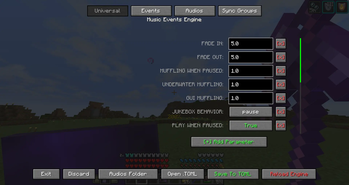
Universal Panel.Events Panel.Register Audio Panel.Audios Panel.

Последние версии

Все версии →
release

Music Events 1.2.0

1.2.0
25 окт. 2026 г.40Minecraft: 1.21.1fabric
Скачать
Что нового
MUSIC EVENTS V1.2.0 HIGHLIGHTS: Compatibility with Weather2 and Majrusz's Progressive Difficulty CONTINUED. Event Overlays showing custom images and text when an event starts on the HUD. Structure events can detect jigsaws (specific rooms within a structure, like a boss room). Loop, start/end, and volume parameters now give you an Audio Preview when you hover over them in the GUI. You can Right-click an event tab in the GUI to toggle it off without deleting it. Memory expiration system for remember\_track and resume\_from\_timestamp parameters. NEW EVENTS Undead Army Plays audio during Undead Army encounters from Majrusz's Progressive Difficulty Continued. * status: any, starting, preparing, ongoing, victory, defeat. * min\_wave / max\_wave: limit the event to a range of waves. * boss\_wave\_only: only while a boss of the current wave is still alive. * starting\_muffle / preparing\_muffle: muffle whichever event is playing (not just Undead Army events) during those phases. Also available in \[universal\]. Needs Music Events on the server in multiplayer (see MULTIPLAYER). Blocks Plays audio based on nearby blocks within detection\_range (default 32, max 512). Only chunks loaded on your client are checked, so render distance limits the effective range. * Works like the mobs event: activation\_blocks / deactivation\_blocks (one number, or a list with one number per resource), require\_all\_resources and require\_fov. * resource\_name accepts block IDs, #tags and block states, e.g. minecraft:furnace\[lit=true\]. nbt\_match filters block entities. * Performance depends on how many matching blocks are loaded around you. Avoid blocks that are very common in your world. * Blocks changed by other players are picked up with a delay of up to about 10 seconds. Moon Plays audio based on the current lunar phase: full\_moon, waning\_gibbous, last\_quarter, waning\_crescent, new\_moon, waxing\_crescent, first\_quarter, waxing\_gibbous. * The phase advances once per in-game day and is active for the whole day, including daytime. Combine it with a time event if you only want it at night. * Leaving resource\_name empty makes the event active on every phase. * Compatible with the Blood Moon from Majrusz's Progressive Difficulty Continued: add blood\_moon to resource\_name. A blood moon does not replace the normal phase. EVENT CHANGES Mobs * New parameter mob\_movement: tracks whether a mob is pathfinding, moving horizontally or vertically, rotating, or facing the player. Use it instead of mob\_targeting for mobs that constantly target the player but stay stationary until triggered, such as the Ferrous Wroughtnaut from Mowzie's Mobs. * mob\_movement\_mode: "moved" latches once movement is seen, "moving" requires continuous movement. * mob\_movement\_match: "any" or "all" signals must pass. * Each signal has its own threshold and operator (>, <, = or range). * In multiplayer, "navigation" is only accurate with Music Events on the server. * New parameter require\_all\_resources for mobs: every resource in resource\_name must be present (and meet its own threshold) instead of any one of them being enough. * activation\_mobs and deactivation\_mobs now accept a list for per-resource thresholds, positionally mapped to resource\_name. This needs require\_all\_resources = true. Example: with resource\_name = \["minecraft:zombie", "minecraft:skeleton"\], activation\_mobs = \[2, 1\] activates when 2 zombies and 1 skeleton are in range at once. Player * New parameters near\_spawn and spawn\_range (required, in blocks): the event only plays while the player is within that distance of their spawn point. near\_spawn accepts "world" (world spawn) and "bed" (bed or respawn anchor, only counted in the dimension it belongs to). "bed" needs Music Events on the server in multiplayer. Weather (1.20.1 forge and 1.21.1 neo forge only) Now compatible with Weather2's localized storms. Use w2: entries in resource\_name: rain, thunder, highwind, hail, tornado\_forming, tornado, tornado\_f1 to tornado\_f5, sandstorm, snowstorm, firenado, sharknado (e.g. w2:tornado\_f3). detection\_range and require\_fov become available when Weather2 is installed. Difficulty Now also detects Majrusz's Progressive Difficulty Continued game stages: majrusz:normal, majrusz:expert and majrusz:master, alongside the vanilla difficulties. Structure resource\_name now also accepts piece IDs: jigsaw template IDs, or piece types such as dungeoncrawl:room for structures that don't use jigsaw. This lets an event target specific rooms or sections inside a structure. Time resource\_name now accepts ranges on the in-game clock (6:00 = dawn): 6-18 (6 AM to 6 PM), 22-4 (10 PM to 4 AM) or 9:13-18:56 with minute precision. The end time is exclusive. Multiple entries are OR'd together, and the named phases (sunrise, day, sunset, night) still work. EVENT PARAMETERS (new and changed) New: toggle Set to "off" to skip the event entirely during evaluation, without deleting it. Right-click an event tab in the GUI to switch it. New: health\_muffling Muffles the music as the player's health drops. Written as a table: health\_muffling = { threshold = 40, muffle = 1.0, full\_at = 10 } * threshold: % of health at or below which muffling starts (0-100). * muffle: the amount reached (0.0-1.0). 0 turns it off, which is the default. * full\_at: % of health where the full muffle is reached; the muffling ramps up smoothly from threshold down to this value. Leave it out to apply the full muffle as soon as threshold is crossed. Combined with the other mufflers by taking the strongest, not by adding them. Also available in \[universal\]; an event's own table replaces all three values. A dead player counts as 0% health, so events that shouldn't muffle then (a death event for example) should set muffle = 0.0. New: activate\_from The event only activates if it becomes valid right after one of the listed events was valid. Useful for "only when a level rises": list the lower levels. Being true already when you join, or coming down from a higher level, keeps the event silent until its trigger ends and starts again. Supports regex: (matches the whole event name), e.g. regex:shrieker\_\[0-2\]. New: start\_window Seconds after the event activates (after event\_delay) during which it may still start playing. If nothing starts it in time, for example because a higher-priority event is playing, it stays silent until its trigger ends and starts again. A track that already started plays on. 0 = no limit. New: lock\_after Number of times this event starts playing before it locks itself again. Use together with locked. When the limit is reached the event stops, fires its unlocks\_event chain and relocks. The counter resets whenever the event is unlocked and is saved per world. New: unlock\_only\_while\_active For locked events: an unlock aimed at this event is ignored unless its own trigger is met at that moment, and a saved unlock is dropped on world join if the trigger isn't met. Stops a chain from arming the event outside the situation it belongs to. New: memory expiry for remember\_track and resume\_from\_timestamp These two parameters can now limit how long and how far they remember. In the GUI they are under the "Expiry" dropdown; in the config they are: * forget\_on\_death: forgets the remembered track when the player dies. * memory\_time: maximum time (M:SS) the memory is kept after the event deactivates. * memory\_gap: the memory is forgotten once this many other events have activated (a new track starting in another event counts too). * memory\_until: fraction (0.0-1.0) of the track's duration beyond which the memory is not saved. 0.8 means a track that has played past 80% won't be remembered. Mainly useful with resume\_from\_timestamp, since there's no point resuming a track in its outro, right?. It is the event-wide, percentage-based counterpart of the audio-level resume\_until, which wins if both are set. All four can also be set in \[universal\] and overridden per event. Changed: unlocks\_event Now accepts a list of events to unlock, not just one. Changed: join\_delay Now also offered in the GUI for biomes, weather, zones, time, player, inventory, gamemode, difficulty, advancement, statistic and moon events. AUDIO PARAMETERS (new and changed) New: interrupt\_add Events added to the list that can interrupt this track. Applied on top of the track's interrupt\_whitelist, or the universal one if it has none. Supports regex: (matches the whole event name). New: interrupt\_remove Events removed from that list, so you don't have to copy the whole universal list just to exclude one. Applied last, so it wins over interrupt\_add. Supports regex:. Both only matter for non-interruptible tracks. BEFORE: \[\[audios."thunder/crocodile\_tears"\]\] play\_once = 1 interrupt\_whitelist = \[ …the whole universal list except "rain"… \] target\_events = \["thunder"\] AFTER: \[\[audios."thunder/crocodile\_tears"\]\] play\_once = 1 interrupt\_remove = \["rain"\] target\_events = \["thunder"\] New: resume\_until Timestamp (M:SS) past which a track is not remembered when its event is interrupted. Requires remember\_track or resume\_from\_timestamp on the event, and takes priority over memory\_until. Changed: interrupt\_whitelist Entries can now be regex: (matching the whole event name), and the pinned "none" entry (stored as [@none](https://github.com/none)) lets no event interrupt the track. Also works in the universal list. Changed: volume Now available in the universal section. It sets the default volume for every audio that doesn't define its own. Changed: loop points Loop points are now checked every rendered frame instead of 20 times per second, so loop precision scales with your frame rate. If a check is late, playback lands the same amount past loop\_start, so loops stay seamless. The new loopCheckMode setting in the mod's client config switches back to the old per-tick check ("tick"). EVENT OVERLAYS ![alt text](https://i.imgur.com/P2PDZFC.png) Show custom images and text on the HUD when an event starts or ends, configured in the new Overlays panel (with a drag-to-position editor and an Images Folder button). * An event can have any number of overlays. Image and text are independent and can each trigger on activation or deactivation. * Position and size are fractions of the screen, so overlays scale with the window. Text supports formatting codes and an optional background. * Opacity, fade in/out, display time, draw order (z-index). * Spam control: delay, cooldown, play-once (per session, per game launch or saved per world) and repeat\_gap. GUI Overlays panel New panel for event overlays. Debug panel New tab to switch each line of the F4 debug screen on or off, filter them, and set the debug HUD scale. The same options exist in the mod's client config. Event tabs Right-click an event tab to toggle it on or off (disabled events show \[OFF\]). A new \[x\] button to the left of each tab deletes the event; hold Shift while clicking (this also works on the "Delete Event" button) to also remove all its linked audios. Deleting does not ask for confirmation! Scrollbars All scrollbars are now draggable: every panel, the dropdown lists and the bottom button bar. Add Parameter dropdown Event parameters are colored and sorted: priority and resource\_name first (magenta), parameters exclusive to the event type second (aqua), generic parameters third (white). Majrusz-only parameters are hidden when Majrusz isn't installed. Multi-select dropdowns Selected items are listed first, and the item you last toggled stays in a pinned row next to the search box while it is scrolled out of view, so you can undo it with one click. Parameter drag and drop Drag a parameter label onto another event tab, audio group or audio track to copy its value there. Ctrl+click to select several parameters and drag them together; Esc cancels. Audio preview Hover over the volume, loop\_start, loop\_end, start\_time and end\_time rows in the Audios panel to hear a preview. volume plays a random section at the volume you typed; the timestamp parameters start playing at the typed timestamp. The current music pauses while previewing and resumes when you move away. Other * Removing a parameter and adding it back restores its previous value. * Block ID autocomplete (including block states) for blocks events. * Editable thresholds and operators for mob\_movement. * New Scale button to override the GUI scale. * Option tooltips with moon phase icons, and warnings when something needs a mod that isn't installed. MULTIPLAYER Previously, this mod was client-only (clientSideOnly=true) because earlier versions were not yet optimized for multiplayer. While some features mentioned needing server-side implementation, running them on a dedicated server wasn't possible. As of version 1.2.0, the mod should be ready for multiplayer and now loads on servers. So now it works on servers, with or without the mod installed on the server. Players without the mod can join a server that has it, and players with the mod can join servers that do not. Most features only need the mod on your own game. These also need it on the server: * Undead Army events * Majrusz game stages in difficulty events * Structure events (including piece IDs) * Raid and kill events * "bed" in near\_spawn * Accurate "navigation" in mob\_movement * Exact block entity NBT in nbt\_match, and server\_nbt\_sync keys Everything else (including Blocks, Moon and Weather2 storms) works with the mod on the client only. Nothing needs configuring on the server: each player's game tells it what it needs when joining and whenever the config is saved or reloaded, and players without the mod cost the server nothing. SERVER OWNERS Optional settings are in config/music\_events-common.toml, created on first start: * serverFeaturesEnabled: master switch. * \[features\]: switch off structuresAndRaids, majruszData, killSparks, respawnPoint, playerNbtSync, blockNbtSync or mobMovement. * \[limits\] and \[intervals\]: cap mob detection range, mob\_movement events per player, block entities and scan radius, and how often each tracker runs. These apply without a restart (run /musicserver reload if your host doesn’t pick up file changes). * blockNbtDeniedKeys: NBT keys that are never sent to players. By default container contents (Items, Inventory, EnderItems…), so a modified client cannot read other players' chests. Add the keys of any modded storage you want protected. /musicserver reload (operators only): after changing the feature switches, run it so the change reaches every player at once. Features you switched off are cleared on players' games and features you switched on resync immediately. Requests from players are validated and capped, and regex patterns sent by players are step-limited so they cannot hang the server.
release

Music Events 1.2.0

1.2.0
25 окт. 2026 г.77Minecraft: 1.21.1neoforge
Скачать
Что нового
MUSIC EVENTS V1.2.0 HIGHLIGHTS: Compatibility with Weather2 and Majrusz's Progressive Difficulty CONTINUED. Event Overlays showing custom images and text when an event starts on the HUD. Structure events can detect jigsaws (specific rooms within a structure, like a boss room). Loop, start/end, and volume parameters now give you an Audio Preview when you hover over them in the GUI. You can Right-click an event tab in the GUI to toggle it off without deleting it. Memory expiration system for remember\_track and resume\_from\_timestamp parameters. NEW EVENTS Undead Army Plays audio during Undead Army encounters from Majrusz's Progressive Difficulty Continued. * status: any, starting, preparing, ongoing, victory, defeat. * min\_wave / max\_wave: limit the event to a range of waves. * boss\_wave\_only: only while a boss of the current wave is still alive. * starting\_muffle / preparing\_muffle: muffle whichever event is playing (not just Undead Army events) during those phases. Also available in \[universal\]. Needs Music Events on the server in multiplayer (see MULTIPLAYER). Blocks Plays audio based on nearby blocks within detection\_range (default 32, max 512). Only chunks loaded on your client are checked, so render distance limits the effective range. * Works like the mobs event: activation\_blocks / deactivation\_blocks (one number, or a list with one number per resource), require\_all\_resources and require\_fov. * resource\_name accepts block IDs, #tags and block states, e.g. minecraft:furnace\[lit=true\]. nbt\_match filters block entities. * Performance depends on how many matching blocks are loaded around you. Avoid blocks that are very common in your world. * Blocks changed by other players are picked up with a delay of up to about 10 seconds. Moon Plays audio based on the current lunar phase: full\_moon, waning\_gibbous, last\_quarter, waning\_crescent, new\_moon, waxing\_crescent, first\_quarter, waxing\_gibbous. * The phase advances once per in-game day and is active for the whole day, including daytime. Combine it with a time event if you only want it at night. * Leaving resource\_name empty makes the event active on every phase. * Compatible with the Blood Moon from Majrusz's Progressive Difficulty Continued: add blood\_moon to resource\_name. A blood moon does not replace the normal phase. EVENT CHANGES Mobs * New parameter mob\_movement: tracks whether a mob is pathfinding, moving horizontally or vertically, rotating, or facing the player. Use it instead of mob\_targeting for mobs that constantly target the player but stay stationary until triggered, such as the Ferrous Wroughtnaut from Mowzie's Mobs. * mob\_movement\_mode: "moved" latches once movement is seen, "moving" requires continuous movement. * mob\_movement\_match: "any" or "all" signals must pass. * Each signal has its own threshold and operator (>, <, = or range). * In multiplayer, "navigation" is only accurate with Music Events on the server. * New parameter require\_all\_resources for mobs: every resource in resource\_name must be present (and meet its own threshold) instead of any one of them being enough. * activation\_mobs and deactivation\_mobs now accept a list for per-resource thresholds, positionally mapped to resource\_name. This needs require\_all\_resources = true. Example: with resource\_name = \["minecraft:zombie", "minecraft:skeleton"\], activation\_mobs = \[2, 1\] activates when 2 zombies and 1 skeleton are in range at once. Player * New parameters near\_spawn and spawn\_range (required, in blocks): the event only plays while the player is within that distance of their spawn point. near\_spawn accepts "world" (world spawn) and "bed" (bed or respawn anchor, only counted in the dimension it belongs to). "bed" needs Music Events on the server in multiplayer. Weather (1.20.1 forge and 1.21.1 neo forge only) Now compatible with Weather2's localized storms. Use w2: entries in resource\_name: rain, thunder, highwind, hail, tornado\_forming, tornado, tornado\_f1 to tornado\_f5, sandstorm, snowstorm, firenado, sharknado (e.g. w2:tornado\_f3). detection\_range and require\_fov become available when Weather2 is installed. Difficulty Now also detects Majrusz's Progressive Difficulty Continued game stages: majrusz:normal, majrusz:expert and majrusz:master, alongside the vanilla difficulties. Structure resource\_name now also accepts piece IDs: jigsaw template IDs, or piece types such as dungeoncrawl:room for structures that don't use jigsaw. This lets an event target specific rooms or sections inside a structure. Time resource\_name now accepts ranges on the in-game clock (6:00 = dawn): 6-18 (6 AM to 6 PM), 22-4 (10 PM to 4 AM) or 9:13-18:56 with minute precision. The end time is exclusive. Multiple entries are OR'd together, and the named phases (sunrise, day, sunset, night) still work. EVENT PARAMETERS (new and changed) New: toggle Set to "off" to skip the event entirely during evaluation, without deleting it. Right-click an event tab in the GUI to switch it. New: health\_muffling Muffles the music as the player's health drops. Written as a table: health\_muffling = { threshold = 40, muffle = 1.0, full\_at = 10 } * threshold: % of health at or below which muffling starts (0-100). * muffle: the amount reached (0.0-1.0). 0 turns it off, which is the default. * full\_at: % of health where the full muffle is reached; the muffling ramps up smoothly from threshold down to this value. Leave it out to apply the full muffle as soon as threshold is crossed. Combined with the other mufflers by taking the strongest, not by adding them. Also available in \[universal\]; an event's own table replaces all three values. A dead player counts as 0% health, so events that shouldn't muffle then (a death event for example) should set muffle = 0.0. New: activate\_from The event only activates if it becomes valid right after one of the listed events was valid. Useful for "only when a level rises": list the lower levels. Being true already when you join, or coming down from a higher level, keeps the event silent until its trigger ends and starts again. Supports regex: (matches the whole event name), e.g. regex:shrieker\_\[0-2\]. New: start\_window Seconds after the event activates (after event\_delay) during which it may still start playing. If nothing starts it in time, for example because a higher-priority event is playing, it stays silent until its trigger ends and starts again. A track that already started plays on. 0 = no limit. New: lock\_after Number of times this event starts playing before it locks itself again. Use together with locked. When the limit is reached the event stops, fires its unlocks\_event chain and relocks. The counter resets whenever the event is unlocked and is saved per world. New: unlock\_only\_while\_active For locked events: an unlock aimed at this event is ignored unless its own trigger is met at that moment, and a saved unlock is dropped on world join if the trigger isn't met. Stops a chain from arming the event outside the situation it belongs to. New: memory expiry for remember\_track and resume\_from\_timestamp These two parameters can now limit how long and how far they remember. In the GUI they are under the "Expiry" dropdown; in the config they are: * forget\_on\_death: forgets the remembered track when the player dies. * memory\_time: maximum time (M:SS) the memory is kept after the event deactivates. * memory\_gap: the memory is forgotten once this many other events have activated (a new track starting in another event counts too). * memory\_until: fraction (0.0-1.0) of the track's duration beyond which the memory is not saved. 0.8 means a track that has played past 80% won't be remembered. Mainly useful with resume\_from\_timestamp, since there's no point resuming a track in its outro, right?. It is the event-wide, percentage-based counterpart of the audio-level resume\_until, which wins if both are set. All four can also be set in \[universal\] and overridden per event. Changed: unlocks\_event Now accepts a list of events to unlock, not just one. Changed: join\_delay Now also offered in the GUI for biomes, weather, zones, time, player, inventory, gamemode, difficulty, advancement, statistic and moon events. AUDIO PARAMETERS (new and changed) New: interrupt\_add Events added to the list that can interrupt this track. Applied on top of the track's interrupt\_whitelist, or the universal one if it has none. Supports regex: (matches the whole event name). New: interrupt\_remove Events removed from that list, so you don't have to copy the whole universal list just to exclude one. Applied last, so it wins over interrupt\_add. Supports regex:. Both only matter for non-interruptible tracks. BEFORE: \[\[audios."thunder/crocodile\_tears"\]\] play\_once = 1 interrupt\_whitelist = \[ …the whole universal list except "rain"… \] target\_events = \["thunder"\] AFTER: \[\[audios."thunder/crocodile\_tears"\]\] play\_once = 1 interrupt\_remove = \["rain"\] target\_events = \["thunder"\] New: resume\_until Timestamp (M:SS) past which a track is not remembered when its event is interrupted. Requires remember\_track or resume\_from\_timestamp on the event, and takes priority over memory\_until. Changed: interrupt\_whitelist Entries can now be regex: (matching the whole event name), and the pinned "none" entry (stored as [@none](https://github.com/none)) lets no event interrupt the track. Also works in the universal list. Changed: volume Now available in the universal section. It sets the default volume for every audio that doesn't define its own. Changed: loop points Loop points are now checked every rendered frame instead of 20 times per second, so loop precision scales with your frame rate. If a check is late, playback lands the same amount past loop\_start, so loops stay seamless. The new loopCheckMode setting in the mod's client config switches back to the old per-tick check ("tick"). EVENT OVERLAYS ![alt text](https://i.imgur.com/P2PDZFC.png) Show custom images and text on the HUD when an event starts or ends, configured in the new Overlays panel (with a drag-to-position editor and an Images Folder button). * An event can have any number of overlays. Image and text are independent and can each trigger on activation or deactivation. * Position and size are fractions of the screen, so overlays scale with the window. Text supports formatting codes and an optional background. * Opacity, fade in/out, display time, draw order (z-index). * Spam control: delay, cooldown, play-once (per session, per game launch or saved per world) and repeat\_gap. GUI Overlays panel New panel for event overlays. Debug panel New tab to switch each line of the F4 debug screen on or off, filter them, and set the debug HUD scale. The same options exist in the mod's client config. Event tabs Right-click an event tab to toggle it on or off (disabled events show \[OFF\]). A new \[x\] button to the left of each tab deletes the event; hold Shift while clicking (this also works on the "Delete Event" button) to also remove all its linked audios. Deleting does not ask for confirmation! Scrollbars All scrollbars are now draggable: every panel, the dropdown lists and the bottom button bar. Add Parameter dropdown Event parameters are colored and sorted: priority and resource\_name first (magenta), parameters exclusive to the event type second (aqua), generic parameters third (white). Majrusz-only parameters are hidden when Majrusz isn't installed. Multi-select dropdowns Selected items are listed first, and the item you last toggled stays in a pinned row next to the search box while it is scrolled out of view, so you can undo it with one click. Parameter drag and drop Drag a parameter label onto another event tab, audio group or audio track to copy its value there. Ctrl+click to select several parameters and drag them together; Esc cancels. Audio preview Hover over the volume, loop\_start, loop\_end, start\_time and end\_time rows in the Audios panel to hear a preview. volume plays a random section at the volume you typed; the timestamp parameters start playing at the typed timestamp. The current music pauses while previewing and resumes when you move away. Other * Removing a parameter and adding it back restores its previous value. * Block ID autocomplete (including block states) for blocks events. * Editable thresholds and operators for mob\_movement. * New Scale button to override the GUI scale. * Option tooltips with moon phase icons, and warnings when something needs a mod that isn't installed. MULTIPLAYER Previously, this mod was client-only (clientSideOnly=true) because earlier versions were not yet optimized for multiplayer. While some features mentioned needing server-side implementation, running them on a dedicated server wasn't possible. As of version 1.2.0, the mod should be ready for multiplayer and now loads on servers. So now it works on servers, with or without the mod installed on the server. Players without the mod can join a server that has it, and players with the mod can join servers that do not. Most features only need the mod on your own game. These also need it on the server: * Undead Army events * Majrusz game stages in difficulty events * Structure events (including piece IDs) * Raid and kill events * "bed" in near\_spawn * Accurate "navigation" in mob\_movement * Exact block entity NBT in nbt\_match, and server\_nbt\_sync keys Everything else (including Blocks, Moon and Weather2 storms) works with the mod on the client only. Nothing needs configuring on the server: each player's game tells it what it needs when joining and whenever the config is saved or reloaded, and players without the mod cost the server nothing. SERVER OWNERS Optional settings are in config/music\_events-common.toml, created on first start: * serverFeaturesEnabled: master switch. * \[features\]: switch off structuresAndRaids, majruszData, killSparks, respawnPoint, playerNbtSync, blockNbtSync or mobMovement. * \[limits\] and \[intervals\]: cap mob detection range, mob\_movement events per player, block entities and scan radius, and how often each tracker runs. These apply without a restart (run /musicserver reload if your host doesn’t pick up file changes). * blockNbtDeniedKeys: NBT keys that are never sent to players. By default container contents (Items, Inventory, EnderItems…), so a modified client cannot read other players' chests. Add the keys of any modded storage you want protected. /musicserver reload (operators only): after changing the feature switches, run it so the change reaches every player at once. Features you switched off are cleared on players' games and features you switched on resync immediately. Requests from players are validated and capped, and regex patterns sent by players are step-limited so they cannot hang the server.
release

Music Events 1.2.0

1.2.0
25 окт. 2026 г.18Minecraft: 1.20.1fabric
Скачать
Что нового
MUSIC EVENTS V1.2.0 HIGHLIGHTS: Compatibility with Weather2 and Majrusz's Progressive Difficulty CONTINUED. Event Overlays showing custom images and text when an event starts on the HUD. Structure events can detect jigsaws (specific rooms within a structure, like a boss room). Loop, start/end, and volume parameters now give you an Audio Preview when you hover over them in the GUI. You can Right-click an event tab in the GUI to toggle it off without deleting it. Memory expiration system for remember\_track and resume\_from\_timestamp parameters. NEW EVENTS Undead Army Plays audio during Undead Army encounters from Majrusz's Progressive Difficulty Continued. * status: any, starting, preparing, ongoing, victory, defeat. * min\_wave / max\_wave: limit the event to a range of waves. * boss\_wave\_only: only while a boss of the current wave is still alive. * starting\_muffle / preparing\_muffle: muffle whichever event is playing (not just Undead Army events) during those phases. Also available in \[universal\]. Needs Music Events on the server in multiplayer (see MULTIPLAYER). Blocks Plays audio based on nearby blocks within detection\_range (default 32, max 512). Only chunks loaded on your client are checked, so render distance limits the effective range. * Works like the mobs event: activation\_blocks / deactivation\_blocks (one number, or a list with one number per resource), require\_all\_resources and require\_fov. * resource\_name accepts block IDs, #tags and block states, e.g. minecraft:furnace\[lit=true\]. nbt\_match filters block entities. * Performance depends on how many matching blocks are loaded around you. Avoid blocks that are very common in your world. * Blocks changed by other players are picked up with a delay of up to about 10 seconds. Moon Plays audio based on the current lunar phase: full\_moon, waning\_gibbous, last\_quarter, waning\_crescent, new\_moon, waxing\_crescent, first\_quarter, waxing\_gibbous. * The phase advances once per in-game day and is active for the whole day, including daytime. Combine it with a time event if you only want it at night. * Leaving resource\_name empty makes the event active on every phase. * Compatible with the Blood Moon from Majrusz's Progressive Difficulty Continued: add blood\_moon to resource\_name. A blood moon does not replace the normal phase. EVENT CHANGES Mobs * New parameter mob\_movement: tracks whether a mob is pathfinding, moving horizontally or vertically, rotating, or facing the player. Use it instead of mob\_targeting for mobs that constantly target the player but stay stationary until triggered, such as the Ferrous Wroughtnaut from Mowzie's Mobs. * mob\_movement\_mode: "moved" latches once movement is seen, "moving" requires continuous movement. * mob\_movement\_match: "any" or "all" signals must pass. * Each signal has its own threshold and operator (>, <, = or range). * In multiplayer, "navigation" is only accurate with Music Events on the server. * New parameter require\_all\_resources for mobs: every resource in resource\_name must be present (and meet its own threshold) instead of any one of them being enough. * activation\_mobs and deactivation\_mobs now accept a list for per-resource thresholds, positionally mapped to resource\_name. This needs require\_all\_resources = true. Example: with resource\_name = \["minecraft:zombie", "minecraft:skeleton"\], activation\_mobs = \[2, 1\] activates when 2 zombies and 1 skeleton are in range at once. Player * New parameters near\_spawn and spawn\_range (required, in blocks): the event only plays while the player is within that distance of their spawn point. near\_spawn accepts "world" (world spawn) and "bed" (bed or respawn anchor, only counted in the dimension it belongs to). "bed" needs Music Events on the server in multiplayer. Weather (1.20.1 forge and 1.21.1 neo forge only) Now compatible with Weather2's localized storms. Use w2: entries in resource\_name: rain, thunder, highwind, hail, tornado\_forming, tornado, tornado\_f1 to tornado\_f5, sandstorm, snowstorm, firenado, sharknado (e.g. w2:tornado\_f3). detection\_range and require\_fov become available when Weather2 is installed. Difficulty Now also detects Majrusz's Progressive Difficulty Continued game stages: majrusz:normal, majrusz:expert and majrusz:master, alongside the vanilla difficulties. Structure resource\_name now also accepts piece IDs: jigsaw template IDs, or piece types such as dungeoncrawl:room for structures that don't use jigsaw. This lets an event target specific rooms or sections inside a structure. Time resource\_name now accepts ranges on the in-game clock (6:00 = dawn): 6-18 (6 AM to 6 PM), 22-4 (10 PM to 4 AM) or 9:13-18:56 with minute precision. The end time is exclusive. Multiple entries are OR'd together, and the named phases (sunrise, day, sunset, night) still work. EVENT PARAMETERS (new and changed) New: toggle Set to "off" to skip the event entirely during evaluation, without deleting it. Right-click an event tab in the GUI to switch it. New: health\_muffling Muffles the music as the player's health drops. Written as a table: health\_muffling = { threshold = 40, muffle = 1.0, full\_at = 10 } * threshold: % of health at or below which muffling starts (0-100). * muffle: the amount reached (0.0-1.0). 0 turns it off, which is the default. * full\_at: % of health where the full muffle is reached; the muffling ramps up smoothly from threshold down to this value. Leave it out to apply the full muffle as soon as threshold is crossed. Combined with the other mufflers by taking the strongest, not by adding them. Also available in \[universal\]; an event's own table replaces all three values. A dead player counts as 0% health, so events that shouldn't muffle then (a death event for example) should set muffle = 0.0. New: activate\_from The event only activates if it becomes valid right after one of the listed events was valid. Useful for "only when a level rises": list the lower levels. Being true already when you join, or coming down from a higher level, keeps the event silent until its trigger ends and starts again. Supports regex: (matches the whole event name), e.g. regex:shrieker\_\[0-2\]. New: start\_window Seconds after the event activates (after event\_delay) during which it may still start playing. If nothing starts it in time, for example because a higher-priority event is playing, it stays silent until its trigger ends and starts again. A track that already started plays on. 0 = no limit. New: lock\_after Number of times this event starts playing before it locks itself again. Use together with locked. When the limit is reached the event stops, fires its unlocks\_event chain and relocks. The counter resets whenever the event is unlocked and is saved per world. New: unlock\_only\_while\_active For locked events: an unlock aimed at this event is ignored unless its own trigger is met at that moment, and a saved unlock is dropped on world join if the trigger isn't met. Stops a chain from arming the event outside the situation it belongs to. New: memory expiry for remember\_track and resume\_from\_timestamp These two parameters can now limit how long and how far they remember. In the GUI they are under the "Expiry" dropdown; in the config they are: * forget\_on\_death: forgets the remembered track when the player dies. * memory\_time: maximum time (M:SS) the memory is kept after the event deactivates. * memory\_gap: the memory is forgotten once this many other events have activated (a new track starting in another event counts too). * memory\_until: fraction (0.0-1.0) of the track's duration beyond which the memory is not saved. 0.8 means a track that has played past 80% won't be remembered. Mainly useful with resume\_from\_timestamp, since there's no point resuming a track in its outro, right?. It is the event-wide, percentage-based counterpart of the audio-level resume\_until, which wins if both are set. All four can also be set in \[universal\] and overridden per event. Changed: unlocks\_event Now accepts a list of events to unlock, not just one. Changed: join\_delay Now also offered in the GUI for biomes, weather, zones, time, player, inventory, gamemode, difficulty, advancement, statistic and moon events. AUDIO PARAMETERS (new and changed) New: interrupt\_add Events added to the list that can interrupt this track. Applied on top of the track's interrupt\_whitelist, or the universal one if it has none. Supports regex: (matches the whole event name). New: interrupt\_remove Events removed from that list, so you don't have to copy the whole universal list just to exclude one. Applied last, so it wins over interrupt\_add. Supports regex:. Both only matter for non-interruptible tracks. BEFORE: \[\[audios."thunder/crocodile\_tears"\]\] play\_once = 1 interrupt\_whitelist = \[ …the whole universal list except "rain"… \] target\_events = \["thunder"\] AFTER: \[\[audios."thunder/crocodile\_tears"\]\] play\_once = 1 interrupt\_remove = \["rain"\] target\_events = \["thunder"\] New: resume\_until Timestamp (M:SS) past which a track is not remembered when its event is interrupted. Requires remember\_track or resume\_from\_timestamp on the event, and takes priority over memory\_until. Changed: interrupt\_whitelist Entries can now be regex: (matching the whole event name), and the pinned "none" entry (stored as [@none](https://github.com/none)) lets no event interrupt the track. Also works in the universal list. Changed: volume Now available in the universal section. It sets the default volume for every audio that doesn't define its own. Changed: loop points Loop points are now checked every rendered frame instead of 20 times per second, so loop precision scales with your frame rate. If a check is late, playback lands the same amount past loop\_start, so loops stay seamless. The new loopCheckMode setting in the mod's client config switches back to the old per-tick check ("tick"). EVENT OVERLAYS ![alt text](https://i.imgur.com/1dGXLEL.png) Show custom images and text on the HUD when an event starts or ends, configured in the new Overlays panel (with a drag-to-position editor and an Images Folder button). * An event can have any number of overlays. Image and text are independent and can each trigger on activation or deactivation. * Position and size are fractions of the screen, so overlays scale with the window. Text supports formatting codes and an optional background. * Opacity, fade in/out, display time, draw order (z-index). * Spam control: delay, cooldown, play-once (per session, per game launch or saved per world) and repeat\_gap. GUI Overlays panel New panel for event overlays. Debug panel New tab to switch each line of the F4 debug screen on or off, filter them, and set the debug HUD scale. The same options exist in the mod's client config. Event tabs Right-click an event tab to toggle it on or off (disabled events show \[OFF\]). A new \[x\] button to the left of each tab deletes the event; hold Shift while clicking (this also works on the "Delete Event" button) to also remove all its linked audios. Deleting does not ask for confirmation! Scrollbars All scrollbars are now draggable: every panel, the dropdown lists and the bottom button bar. Add Parameter dropdown Event parameters are colored and sorted: priority and resource\_name first (magenta), parameters exclusive to the event type second (aqua), generic parameters third (white). Majrusz-only parameters are hidden when Majrusz isn't installed. Multi-select dropdowns Selected items are listed first, and the item you last toggled stays in a pinned row next to the search box while it is scrolled out of view, so you can undo it with one click. Parameter drag and drop Drag a parameter label onto another event tab, audio group or audio track to copy its value there. Ctrl+click to select several parameters and drag them together; Esc cancels. Audio preview Hover over the volume, loop\_start, loop\_end, start\_time and end\_time rows in the Audios panel to hear a preview. volume plays a random section at the volume you typed; the timestamp parameters start playing at the typed timestamp. The current music pauses while previewing and resumes when you move away. Other * Removing a parameter and adding it back restores its previous value. * Block ID autocomplete (including block states) for blocks events. * Editable thresholds and operators for mob\_movement. * New Scale button to override the GUI scale. * Option tooltips with moon phase icons, and warnings when something needs a mod that isn't installed. MULTIPLAYER Previously, this mod was client-only (clientSideOnly=true) because earlier versions were not yet optimized for multiplayer. While some features mentioned needing server-side implementation, running them on a dedicated server wasn't possible. As of version 1.2.0, the mod should be ready for multiplayer and now loads on servers. So now it works on servers, with or without the mod installed on the server. Players without the mod can join a server that has it, and players with the mod can join servers that do not. Most features only need the mod on your own game. These also need it on the server: * Undead Army events * Majrusz game stages in difficulty events * Structure events (including piece IDs) * Raid and kill events * "bed" in near\_spawn * Accurate "navigation" in mob\_movement * Exact block entity NBT in nbt\_match, and server\_nbt\_sync keys Everything else (including Blocks, Moon and Weather2 storms) works with the mod on the client only. Nothing needs configuring on the server: each player's game tells it what it needs when joining and whenever the config is saved or reloaded, and players without the mod cost the server nothing. SERVER OWNERS Optional settings are in config/music\_events-common.toml, created on first start: * serverFeaturesEnabled: master switch. * \[features\]: switch off structuresAndRaids, majruszData, killSparks, respawnPoint, playerNbtSync, blockNbtSync or mobMovement. * \[limits\] and \[intervals\]: cap mob detection range, mob\_movement events per player, block entities and scan radius, and how often each tracker runs. These apply without a restart (run /musicserver reload if your host doesn’t pick up file changes). * blockNbtDeniedKeys: NBT keys that are never sent to players. By default container contents (Items, Inventory, EnderItems…), so a modified client cannot read other players' chests. Add the keys of any modded storage you want protected. /musicserver reload (operators only): after changing the feature switches, run it so the change reaches every player at once. Features you switched off are cleared on players' games and features you switched on resync immediately. Requests from players are validated and capped, and regex patterns sent by players are step-limited so they cannot hang the server.
release

Music Events 1.2.0

1.2.0
25 окт. 2026 г.38Minecraft: 1.20.1forge
Скачать
Что нового
MUSIC EVENTS V1.2.0 HIGHLIGHTS: Compatibility with Weather2 and Majrusz's Progressive Difficulty CONTINUED. Event Overlays showing custom images and text when an event starts on the HUD. Structure events can detect jigsaws (specific rooms within a structure, like a boss room). Loop, start/end, and volume parameters now give you an Audio Preview when you hover over them in the GUI. You can Right-click an event tab in the GUI to toggle it off without deleting it. Memory expiration system for remember\_track and resume\_from\_timestamp parameters. NEW EVENTS Undead Army Plays audio during Undead Army encounters from Majrusz's Progressive Difficulty Continued. * status: any, starting, preparing, ongoing, victory, defeat. * min\_wave / max\_wave: limit the event to a range of waves. * boss\_wave\_only: only while a boss of the current wave is still alive. * starting\_muffle / preparing\_muffle: muffle whichever event is playing (not just Undead Army events) during those phases. Also available in \[universal\]. Needs Music Events on the server in multiplayer (see MULTIPLAYER). Blocks Plays audio based on nearby blocks within detection\_range (default 32, max 512). Only chunks loaded on your client are checked, so render distance limits the effective range. * Works like the mobs event: activation\_blocks / deactivation\_blocks (one number, or a list with one number per resource), require\_all\_resources and require\_fov. * resource\_name accepts block IDs, #tags and block states, e.g. minecraft:furnace\[lit=true\]. nbt\_match filters block entities. * Performance depends on how many matching blocks are loaded around you. Avoid blocks that are very common in your world. * Blocks changed by other players are picked up with a delay of up to about 10 seconds. Moon Plays audio based on the current lunar phase: full\_moon, waning\_gibbous, last\_quarter, waning\_crescent, new\_moon, waxing\_crescent, first\_quarter, waxing\_gibbous. * The phase advances once per in-game day and is active for the whole day, including daytime. Combine it with a time event if you only want it at night. * Leaving resource\_name empty makes the event active on every phase. * Compatible with the Blood Moon from Majrusz's Progressive Difficulty Continued: add blood\_moon to resource\_name. A blood moon does not replace the normal phase. EVENT CHANGES Mobs * New parameter mob\_movement: tracks whether a mob is pathfinding, moving horizontally or vertically, rotating, or facing the player. Use it instead of mob\_targeting for mobs that constantly target the player but stay stationary until triggered, such as the Ferrous Wroughtnaut from Mowzie's Mobs. * mob\_movement\_mode: "moved" latches once movement is seen, "moving" requires continuous movement. * mob\_movement\_match: "any" or "all" signals must pass. * Each signal has its own threshold and operator (>, <, = or range). * In multiplayer, "navigation" is only accurate with Music Events on the server. * New parameter require\_all\_resources for mobs: every resource in resource\_name must be present (and meet its own threshold) instead of any one of them being enough. * activation\_mobs and deactivation\_mobs now accept a list for per-resource thresholds, positionally mapped to resource\_name. This needs require\_all\_resources = true. Example: with resource\_name = \["minecraft:zombie", "minecraft:skeleton"\], activation\_mobs = \[2, 1\] activates when 2 zombies and 1 skeleton are in range at once. Player * New parameters near\_spawn and spawn\_range (required, in blocks): the event only plays while the player is within that distance of their spawn point. near\_spawn accepts "world" (world spawn) and "bed" (bed or respawn anchor, only counted in the dimension it belongs to). "bed" needs Music Events on the server in multiplayer. Weather (1.20.1 forge and 1.21.1 neo forge only) Now compatible with Weather2's localized storms. Use w2: entries in resource\_name: rain, thunder, highwind, hail, tornado\_forming, tornado, tornado\_f1 to tornado\_f5, sandstorm, snowstorm, firenado, sharknado (e.g. w2:tornado\_f3). detection\_range and require\_fov become available when Weather2 is installed. Difficulty Now also detects Majrusz's Progressive Difficulty Continued game stages: majrusz:normal, majrusz:expert and majrusz:master, alongside the vanilla difficulties. Structure resource\_name now also accepts piece IDs: jigsaw template IDs, or piece types such as dungeoncrawl:room for structures that don't use jigsaw. This lets an event target specific rooms or sections inside a structure. Time resource\_name now accepts ranges on the in-game clock (6:00 = dawn): 6-18 (6 AM to 6 PM), 22-4 (10 PM to 4 AM) or 9:13-18:56 with minute precision. The end time is exclusive. Multiple entries are OR'd together, and the named phases (sunrise, day, sunset, night) still work. EVENT PARAMETERS (new and changed) New: toggle Set to "off" to skip the event entirely during evaluation, without deleting it. Right-click an event tab in the GUI to switch it. New: health\_muffling Muffles the music as the player's health drops. Written as a table: health\_muffling = { threshold = 40, muffle = 1.0, full\_at = 10 } * threshold: % of health at or below which muffling starts (0-100). * muffle: the amount reached (0.0-1.0). 0 turns it off, which is the default. * full\_at: % of health where the full muffle is reached; the muffling ramps up smoothly from threshold down to this value. Leave it out to apply the full muffle as soon as threshold is crossed. Combined with the other mufflers by taking the strongest, not by adding them. Also available in \[universal\]; an event's own table replaces all three values. A dead player counts as 0% health, so events that shouldn't muffle then (a death event for example) should set muffle = 0.0. New: activate\_from The event only activates if it becomes valid right after one of the listed events was valid. Useful for "only when a level rises": list the lower levels. Being true already when you join, or coming down from a higher level, keeps the event silent until its trigger ends and starts again. Supports regex: (matches the whole event name), e.g. regex:shrieker\_\[0-2\]. New: start\_window Seconds after the event activates (after event\_delay) during which it may still start playing. If nothing starts it in time, for example because a higher-priority event is playing, it stays silent until its trigger ends and starts again. A track that already started plays on. 0 = no limit. New: lock\_after Number of times this event starts playing before it locks itself again. Use together with locked. When the limit is reached the event stops, fires its unlocks\_event chain and relocks. The counter resets whenever the event is unlocked and is saved per world. New: unlock\_only\_while\_active For locked events: an unlock aimed at this event is ignored unless its own trigger is met at that moment, and a saved unlock is dropped on world join if the trigger isn't met. Stops a chain from arming the event outside the situation it belongs to. New: memory expiry for remember\_track and resume\_from\_timestamp These two parameters can now limit how long and how far they remember. In the GUI they are under the "Expiry" dropdown; in the config they are: * forget\_on\_death: forgets the remembered track when the player dies. * memory\_time: maximum time (M:SS) the memory is kept after the event deactivates. * memory\_gap: the memory is forgotten once this many other events have activated (a new track starting in another event counts too). * memory\_until: fraction (0.0-1.0) of the track's duration beyond which the memory is not saved. 0.8 means a track that has played past 80% won't be remembered. Mainly useful with resume\_from\_timestamp, since there's no point resuming a track in its outro, right?. It is the event-wide, percentage-based counterpart of the audio-level resume\_until, which wins if both are set. All four can also be set in \[universal\] and overridden per event. Changed: unlocks\_event Now accepts a list of events to unlock, not just one. Changed: join\_delay Now also offered in the GUI for biomes, weather, zones, time, player, inventory, gamemode, difficulty, advancement, statistic and moon events. AUDIO PARAMETERS (new and changed) New: interrupt\_add Events added to the list that can interrupt this track. Applied on top of the track's interrupt\_whitelist, or the universal one if it has none. Supports regex: (matches the whole event name). New: interrupt\_remove Events removed from that list, so you don't have to copy the whole universal list just to exclude one. Applied last, so it wins over interrupt\_add. Supports regex:. Both only matter for non-interruptible tracks. BEFORE: \[\[audios."thunder/crocodile\_tears"\]\] play\_once = 1 interrupt\_whitelist = \[ …the whole universal list except "rain"… \] target\_events = \["thunder"\] AFTER: \[\[audios."thunder/crocodile\_tears"\]\] play\_once = 1 interrupt\_remove = \["rain"\] target\_events = \["thunder"\] New: resume\_until Timestamp (M:SS) past which a track is not remembered when its event is interrupted. Requires remember\_track or resume\_from\_timestamp on the event, and takes priority over memory\_until. Changed: interrupt\_whitelist Entries can now be regex: (matching the whole event name), and the pinned "none" entry (stored as [@none](https://github.com/none)) lets no event interrupt the track. Also works in the universal list. Changed: volume Now available in the universal section. It sets the default volume for every audio that doesn't define its own. Changed: loop points Loop points are now checked every rendered frame instead of 20 times per second, so loop precision scales with your frame rate. If a check is late, playback lands the same amount past loop\_start, so loops stay seamless. The new loopCheckMode setting in the mod's client config switches back to the old per-tick check ("tick"). EVENT OVERLAYS ![alt text](https://i.imgur.com/vZWLY4C.png) Show custom images and text on the HUD when an event starts or ends, configured in the new Overlays panel (with a drag-to-position editor and an Images Folder button). * An event can have any number of overlays. Image and text are independent and can each trigger on activation or deactivation. * Position and size are fractions of the screen, so overlays scale with the window. Text supports formatting codes and an optional background. * Opacity, fade in/out, display time, draw order (z-index). * Spam control: delay, cooldown, play-once (per session, per game launch or saved per world) and repeat\_gap. GUI Overlays panel New panel for event overlays. Debug panel New tab to switch each line of the F4 debug screen on or off, filter them, and set the debug HUD scale. The same options exist in the mod's client config. Event tabs Right-click an event tab to toggle it on or off (disabled events show \[OFF\]). A new \[x\] button to the left of each tab deletes the event; hold Shift while clicking (this also works on the "Delete Event" button) to also remove all its linked audios. Deleting does not ask for confirmation! Scrollbars All scrollbars are now draggable: every panel, the dropdown lists and the bottom button bar. Add Parameter dropdown Event parameters are colored and sorted: priority and resource\_name first (magenta), parameters exclusive to the event type second (aqua), generic parameters third (white). Majrusz-only parameters are hidden when Majrusz isn't installed. Multi-select dropdowns Selected items are listed first, and the item you last toggled stays in a pinned row next to the search box while it is scrolled out of view, so you can undo it with one click. Parameter drag and drop Drag a parameter label onto another event tab, audio group or audio track to copy its value there. Ctrl+click to select several parameters and drag them together; Esc cancels. Audio preview Hover over the volume, loop\_start, loop\_end, start\_time and end\_time rows in the Audios panel to hear a preview. volume plays a random section at the volume you typed; the timestamp parameters start playing at the typed timestamp. The current music pauses while previewing and resumes when you move away. Other * Removing a parameter and adding it back restores its previous value. * Block ID autocomplete (including block states) for blocks events. * Editable thresholds and operators for mob\_movement. * New Scale button to override the GUI scale. * Option tooltips with moon phase icons, and warnings when something needs a mod that isn't installed. MULTIPLAYER Previously, this mod was client-only (clientSideOnly=true) because earlier versions were not yet optimized for multiplayer. While some features mentioned needing server-side implementation, running them on a dedicated server wasn't possible. As of version 1.2.0, the mod should be ready for multiplayer and now loads on servers. So now it works on servers, with or without the mod installed on the server. Players without the mod can join a server that has it, and players with the mod can join servers that do not. Most features only need the mod on your own game. These also need it on the server: * Undead Army events * Majrusz game stages in difficulty events * Structure events (including piece IDs) * Raid and kill events * "bed" in near\_spawn * Accurate "navigation" in mob\_movement * Exact block entity NBT in nbt\_match, and server\_nbt\_sync keys Everything else (including Blocks, Moon and Weather2 storms) works with the mod on the client only. Nothing needs configuring on the server: each player's game tells it what it needs when joining and whenever the config is saved or reloaded, and players without the mod cost the server nothing. SERVER OWNERS Optional settings are in config/music\_events-common.toml, created on first start: * serverFeaturesEnabled: master switch. * \[features\]: switch off structuresAndRaids, majruszData, killSparks, respawnPoint, playerNbtSync, blockNbtSync or mobMovement. * \[limits\] and \[intervals\]: cap mob detection range, mob\_movement events per player, block entities and scan radius, and how often each tracker runs. These apply without a restart (run /musicserver reload if your host doesn’t pick up file changes). * blockNbtDeniedKeys: NBT keys that are never sent to players. By default container contents (Items, Inventory, EnderItems…), so a modified client cannot read other players' chests. Add the keys of any modded storage you want protected. /musicserver reload (operators only): after changing the feature switches, run it so the change reaches every player at once. Features you switched off are cleared on players' games and features you switched on resync immediately. Requests from players are validated and capped, and regex patterns sent by players are step-limited so they cannot hang the server.
release

Music Events 1.2.0

1.2.0
25 окт. 2026 г.16Minecraft: 1.16.5forge
Скачать
Что нового
MUSIC EVENTS V1.2.0 HIGHLIGHTS: Compatibility with Majrusz's Progressive Difficulty. Event Overlays showing custom images and text when an event starts on the HUD. Structure events can detect jigsaws (specific rooms within a structure, like a boss room). Loop, start/end, and volume parameters now give you an Audio Preview when you hover over them in the GUI. You can Right-click an event tab in the GUI to toggle it off without deleting it. Memory expiration system for remember_track and resume_from_timestamp parameters. NEW EVENTS Undead Army Plays audio during Undead Army encounters from Majrusz's Progressive Difficulty Continued. - status: any, starting, preparing, ongoing, victory, defeat. - min_wave / max_wave: limit the event to a range of waves. - starting_muffle / preparing_muffle: muffle whichever event is playing (not just Undead Army events) during those phases. Also available in [universal]. Needs Music Events on the server in multiplayer (see MULTIPLAYER). Blocks Plays audio based on nearby blocks within detection_range (default 32, max 512). Only chunks loaded on your client are checked, so render distance limits the effective range. - Works like the mobs event: activation_blocks / deactivation_blocks (one number, or a list with one number per resource), require_all_resources and require_fov. - resource_name accepts block IDs, #tags and block states, e.g. minecraft:furnace[lit=true]. nbt_match filters block entities. - Performance depends on how many matching blocks are loaded around you. Avoid blocks that are very common in your world. - Blocks changed by other players are picked up with a delay of up to about 10 seconds. Moon Plays audio based on the current lunar phase: full_moon, waning_gibbous, last_quarter, waning_crescent, new_moon, waxing_crescent, first_quarter, waxing_gibbous. - The phase advances once per in-game day and is active for the whole day, including daytime. Combine it with a time event if you only want it at night. - Leaving resource_name empty makes the event active on every phase. - (1.20.1 and above only) Compatible with the Blood Moon from Majrusz's Progressive Difficulty Continued: add blood_moon to resource_name (only offered when that mod is installed). A blood moon does not replace the normal phase. EVENT CHANGES Mobs - New parameter mob_movement: tracks whether a mob is pathfinding, moving horizontally or vertically, rotating, or facing the player. Use it instead of mob_targeting for mobs that constantly target the player but stay stationary until triggered, such as the Ferrous Wroughtnaut from Mowzie's Mobs. - mob_movement_mode: "moved" latches once movement is seen, "moving" requires continuous movement. - mob_movement_match: "any" or "all" signals must pass. - Each signal has its own threshold and operator (>, <, = or range). - In multiplayer, "navigation" is only accurate with Music Events on the server. - New parameter require_all_resources for mobs: every resource in resource_name must be present (and meet its own threshold) instead of any one of them being enough. - activation_mobs and deactivation_mobs now accept a list for per-resource thresholds, positionally mapped to resource_name. This needs require_all_resources = true. Example: with resource_name = ["minecraft:zombie", "minecraft:skeleton"], activation_mobs = [2, 1] activates when 2 zombies and 1 skeleton are in range at once. Player - New parameters near_spawn and spawn_range (required, in blocks): the event only plays while the player is within that distance of their spawn point. near_spawn accepts "world" (world spawn) and "bed" (bed or respawn anchor, only counted in the dimension it belongs to). "bed" needs Music Events on the server in multiplayer. Weather (1.20.1 forge and 1.21.1 neo forge only) Now compatible with Weather2's localized storms. Use w2: entries in resource_name: rain, thunder, highwind, hail, tornado_forming, tornado, tornado_f1 to tornado_f5, sandstorm, snowstorm, firenado, sharknado (e.g. w2:tornado_f3). detection_range and require_fov become available when Weather2 is installed. Difficulty Now also detects Majrusz's Progressive Difficulty Continued game stages: majrusz:normal, majrusz:expert and majrusz:master, alongside the vanilla difficulties. Structure resource_name now also accepts piece IDs: jigsaw template IDs, or piece types such as dungeoncrawl:room for structures that don't use jigsaw. This lets an event target specific rooms or sections inside a structure. Time resource_name now accepts ranges on the in-game clock (6:00 = dawn): 6-18 (6 AM to 6 PM), 22-4 (10 PM to 4 AM) or 9:13-18:56 with minute precision. The end time is exclusive. Multiple entries are OR'd together, and the named phases (sunrise, day, sunset, night) still work. EVENT PARAMETERS (new and changed) New: toggle Set to "off" to skip the event entirely during evaluation, without deleting it. Right-click an event tab in the GUI to switch it. New: health_muffling Muffles the music as the player's health drops. Written as a table: health_muffling = { threshold = 40, muffle = 1.0, full_at = 10 } - threshold: % of health at or below which muffling starts (0-100). - muffle: the amount reached (0.0-1.0). 0 turns it off, which is the default. - full_at: % of health where the full muffle is reached; the muffling ramps up smoothly from threshold down to this value. Leave it out to apply the full muffle as soon as threshold is crossed. Combined with the other mufflers by taking the strongest, not by adding them. Also available in [universal]; an event's own table replaces all three values. A dead player counts as 0% health, so events that shouldn't muffle then (a death event for example) should set muffle = 0.0. New: activate_from The event only activates if it becomes valid right after one of the listed events was valid. Useful for "only when a level rises": list the lower levels. Being true already when you join, or coming down from a higher level, keeps the event silent until its trigger ends and starts again. Supports regex:<pattern> (matches the whole event name), e.g. regex:shrieker_[0-2]. New: start_window Seconds after the event activates (after event_delay) during which it may still start playing. If nothing starts it in time, for example because a higher-priority event is playing, it stays silent until its trigger ends and starts again. A track that already started plays on. 0 = no limit. New: lock_after Number of times this event starts playing before it locks itself again. Use together with locked. When the limit is reached the event stops, fires its unlocks_event chain and relocks. The counter resets whenever the event is unlocked and is saved per world. New: unlock_only_while_active For locked events: an unlock aimed at this event is ignored unless its own trigger is met at that moment, and a saved unlock is dropped on world join if the trigger isn't met. Stops a chain from arming the event outside the situation it belongs to. New: memory expiry for remember_track and resume_from_timestamp These two parameters can now limit how long and how far they remember. In the GUI they are under the "Expiry" dropdown; in the config they are: - forget_on_death: forgets the remembered track when the player dies. - memory_time: maximum time (M:SS) the memory is kept after the event deactivates. - memory_gap: the memory is forgotten once this many other events have activated (a new track starting in another event counts too). - memory_until: fraction (0.0-1.0) of the track's duration beyond which the memory is not saved. 0.8 means a track that has played past 80% won't be remembered. Mainly useful with resume_from_timestamp, since there's no point resuming a track in its outro, right?. It is the event-wide, percentage-based counterpart of the audio-level resume_until, which wins if both are set. All four can also be set in [universal] and overridden per event. Changed: unlocks_event Now accepts a list of events to unlock, not just one. Changed: join_delay Now also offered in the GUI for biomes, weather, zones, time, player, inventory, gamemode, difficulty, advancement, statistic and moon events. AUDIO PARAMETERS (new and changed) New: interrupt_add Events added to the list that can interrupt this track. Applied on top of the track's interrupt_whitelist, or the universal one if it has none. Supports regex:<pattern> (matches the whole event name). New: interrupt_remove Events removed from that list, so you don't have to copy the whole universal list just to exclude one. Applied last, so it wins over interrupt_add. Supports regex:<pattern>. Both only matter for non-interruptible tracks. BEFORE: [[audios."thunder/crocodile_tears"]] play_once = 1 interrupt_whitelist = [ ...the whole universal list except "rain"... ] target_events = ["thunder"] AFTER: [[audios."thunder/crocodile_tears"]] play_once = 1 interrupt_remove = ["rain"] target_events = ["thunder"] New: resume_until Timestamp (M:SS) past which a track is not remembered when its event is interrupted. Requires remember_track or resume_from_timestamp on the event, and takes priority over memory_until. Changed: interrupt_whitelist Entries can now be regex:<pattern> (matching the whole event name), and the pinned "none" entry (stored as @none) lets no event interrupt the track. Also works in the universal list. Changed: volume Now available in the universal section. It sets the default volume for every audio that doesn't define its own. Changed: loop points Loop points are now checked every rendered frame instead of 20 times per second, so loop precision scales with your frame rate. If a check is late, playback lands the same amount past loop_start, so loops stay seamless. The new loopCheckMode setting in the mod's client config switches back to the old per-tick check ("tick"). EVENT OVERLAYS ![alt text](https://i.imgur.com/9jFzq9D.png) Show custom images and text on the HUD when an event starts or ends, configured in the new Overlays panel (with a drag-to-position editor and an Images Folder button). - An event can have any number of overlays. Image and text are independent and can each trigger on activation or deactivation. - Position and size are fractions of the screen, so overlays scale with the window. Text supports formatting codes and an optional background. - Opacity, fade in/out, display time, draw order (z-index). - Spam control: delay, cooldown, play-once (per session, per game launch or saved per world) and repeat_gap. GUI Overlays panel New panel for event overlays (see EVENT OVERLAYS above). Debug panel New tab to switch each line of the F4 debug screen on or off, filter them, and set the debug HUD scale. The same options exist in the mod's client config. Event tabs Right-click an event tab to toggle it on or off (disabled events show [OFF]). A new [x] button to the left of each tab deletes the event; hold Shift while clicking (this also works on the "Delete Event" button) to also remove all its linked audios. Deleting does not ask for confirmation! Scrollbars All scrollbars are now draggable: every panel, the dropdown lists and the bottom button bar. Add Parameter dropdown Event parameters are colored and sorted: priority and resource_name first (magenta), parameters exclusive to the event type second (aqua), generic parameters third (white). Majrusz-only parameters are hidden when Majrusz isn't installed. Multi-select dropdowns Selected items are listed first, and the item you last toggled stays in a pinned row next to the search box while it is scrolled out of view, so you can undo it with one click. Parameter drag and drop Drag a parameter label onto another event tab, audio group or audio track to copy its value there. Ctrl+click to select several parameters and drag them together; Esc cancels. Audio preview Hover over the volume, loop_start, loop_end, start_time and end_time rows in the Audios panel to hear a preview. volume plays a random section at the volume you typed; the timestamp parameters start playing at the typed timestamp. The current music pauses while previewing and resumes when you move away. Other - Removing a parameter and adding it back restores its previous value. - Block ID autocomplete (including block states) for blocks events. - Editable thresholds and operators for mob_movement. - New Scale button to override the GUI scale. - Option tooltips with moon phase icons, and warnings when something needs a mod that isn't installed. MULTIPLAYER Previously, this mod was client-only (clientSideOnly=true) because earlier versions were not yet optimized for multiplayer. While some features mentioned needing server-side implementation, running them on a dedicated server wasn't possible. As of version 1.2.0, the mod should be ready for multiplayer and now loads on servers. So now it works on servers, with or without the mod installed on the server. Players without the mod can join a server that has it, and players with the mod can join servers that do not. Most features only need the mod on your own game. These also need it on the server: - Undead Army events - Majrusz game stages in difficulty events - Structure events (including piece IDs) - Raid and kill events - "bed" in near_spawn - Accurate "navigation" in mob_movement - Exact block entity NBT in nbt_match, and server_nbt_sync keys Everything else (including Blocks, and Moon) works with the mod on the client only. Nothing needs configuring on the server: each player's game tells it what it needs when joining and whenever the config is saved or reloaded, and players without the mod cost the server nothing. SERVER OWNERS Optional settings are in config/music_events-common.toml, created on first start: - serverFeaturesEnabled: master switch. - [features]: switch off structuresAndRaids, majruszData, killSparks, respawnPoint, playerNbtSync, blockNbtSync or mobMovement. - [limits] and [intervals]: cap mob detection range, mob_movement events per player, block entities and scan radius, and how often each tracker runs. These apply without a restart (run /musicserver reload if your host doesn’t pick up file changes). - blockNbtDeniedKeys: NBT keys that are never sent to players. By default container contents (Items, Inventory, EnderItems...), so a modified client cannot read other players' chests. Add the keys of any modded storage you want protected. /musicserver reload (operators only): after changing the feature switches, run it so the change reaches every player at once. Features you switched off are cleared on players' games and features you switched on resync immediately.
release

Music Events 1.1.4

1.1.4
14 авг. 2026 г.144Minecraft: 1.21.1neoforge
Скачать
Что нового
Fixed alGenSources error caused by reloading resources and when the mod attempted to play the next song of a playlist while the game was paused (with play_when_paused = true of course). Optimized the mob events entity detection system to prevent it from drastically increasing the CPU time on high render distances and removing the CPU time spikes of 25.0ms or beyond that caused stuttering. Fixed mob events not working correctly with peaceful and neutral mobs. Fixed min_hitbox_width being generated along with newly created events.
release

Music Events 1.1.4

1.1.4
14 авг. 2026 г.98Minecraft: 1.21.1fabric
Скачать
Что нового
Fixed alGenSources error caused by reloading resources and when the mod attempted to play the next song of a playlist while the game was paused (with play_when_paused = true of course). Optimized the mob events entity detection system to prevent it from drastically increasing the CPU time on high render distances and removing the CPU time spikes of 25.0ms or beyond that caused stuttering. Fixed mob events not working correctly with peaceful and neutral mobs. Fixed min_hitbox_width being generated along with newly created events.
release

Music Events 1.1.4

1.1.4
14 авг. 2026 г.46Minecraft: 1.20.1fabric
Скачать
Что нового
Fixed alGenSources error caused by reloading resources and when the mod attempted to play the next song of a playlist while the game was paused (with play_when_paused = true of course). Optimized the mob events entity detection system to prevent it from drastically increasing the CPU time on high render distances and removing the CPU time spikes of 25.0ms or beyond that caused stuttering. Fixed mob events not working correctly with peaceful and neutral mobs. Fixed min_hitbox_width being generated along with newly created events.
release

Music Events 1.1.4

1.1.4
9 авг. 2026 г.161Minecraft: 1.20.1forge
Скачать
Что нового
Fixed mob events not working correctly with peaceful and neutral mobs. Fixed min_hitbox_width being generated along with newly created events.
release

Music Events 1.1.3

1.1.3
2 авг. 2026 г.32Minecraft: 1.20.1forge
Скачать
Что нового
Fixed alGenSources error caused by reloading resources and when the mod attempted to play the next song of a playlist while the game was paused (with play_when_paused = true of course). Optimized the hell out of the mob events and the mod's entity detection system, no longer drastically increasing the CPU time on high render distances. You should notice about 70% to 80% less CPU time on the mod's debug screen, very rarely going beyond 0.6ms and completely removing the CPU time spikes of 25.0ms to 75.0ms that caused stuttering. In my case i run 13 different mob events, along other 28 non mob events and i haven't gotten any major CPU time increases in the few hours that i've tested it.