ModereX
All-in-one Moderation Plugin for your Minecraft Server! Also includes a customizable AutoMod!
Описание
This plugin is archived until further notice. Do not worry, we are not abandoning this plugin!
This plugin provides an all-in-one moderation system for your Minecraft server. It includes:
-
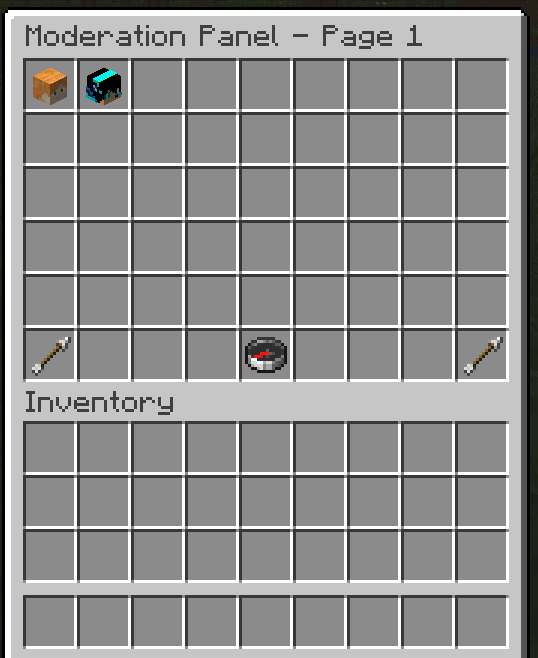
Open a visual moderation panel (/mx panel) to browse online/offline players, search by name, and launch per‑player actions.
-
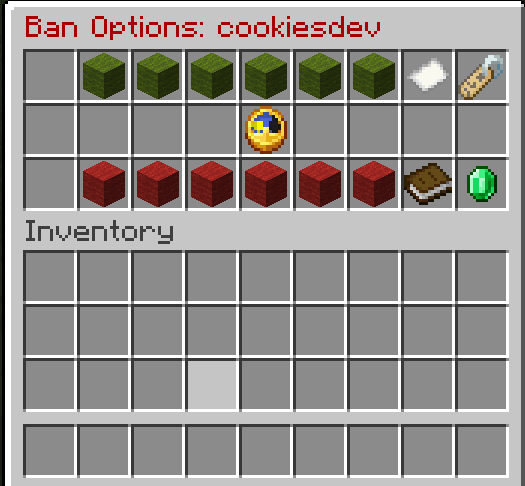
Warn, Mute, Kick, and Ban via intuitive inventory GUIs—including time adjustments, reason prompts, and confirmation screens.
-
View a live Analytics overview of each player’s total warns/mutes/kicks/bans, with one‑click full history.
-
Configure an AutoMod system, creating rules for link blocking, profanity filters, alt‑account detection, and custom chat filters—complete with per‑rule enable/disable, whitelists, blacklists, and automated actions.
-
Manage a command blacklist/whitelist for any plugin command on a per‑player (or global) basis.
-
Enforce global chat slowmode and clearchat, with bypass permissions.
-
Toggle staff‑only chat and vanish mode.
-
Automatically logs every moderation action!
Commands List
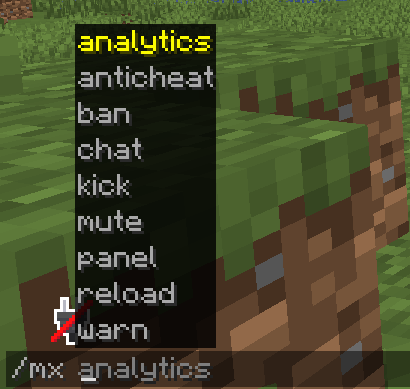
/mx panel               # main moderation panel
/mx chat <enable|disable>
/x reload
/mx warn <player>
/mx mute <player>
/mx kick <player>
/mx ban <player>
/mx analytics
/mx anticheat <enable|disable> | <alert> <enable|disable>
/mx command <whitelist|blacklist|reset> <player|*> <plugin> <cmd>
/mx slowmode <time>      # e.g. 5s, 1m
/mx clearchat
/mx automod              # open Automod GUI
Permissions
Node | Description | Default
moderex.panel | Access /mx panel
moderex.chatsettings | Toggle chat (enable/disable)
moderex.reload | /mx reload
moderex.warn | /mx warn & GUI
moderex.ban | /mx ban & GUI
moderex.mute | /mx mute & GUI
moderex.kick | /mx kick & GUI
moderex.analytics | Access Analytics Panel
moderex.automod | Edit AutoMod rules & GUI
moderex.bypassautomod | Bypass all AutoMod checks
moderex.cmdmanager | Use /mx command
moderex.slowmode | /mx slowmode
moderex.slowmodebypass | Bypass chat slowmode
moderex.chatclear | /mx clearchat
moderex.staffchat | Use /staffchat / see staff messages
moderex.vanish | /vanish
moderex.anticheat | /mx anticheat
moderex.messages | See join/leave messages
Install the Plugin
Put the JAR in your server’s plugins folder and start/restart the server. Ensure you have the correct permissions assigned (LuckPerms recommended).
Open the Panel
Type /mx panel to see all players. Navigate pages, search for specific players, or click a head to see “Options.”
GUI's
- Ban GUI: Add or subtract time intervals, set reason, choose IP ban. Confirm to ban or unban.
- Mute GUI: Add or subtract durations, set reason, confirm to mute, or unmute.
- Kick GUI: Set reason, confirm to kick.
- Warn GUI: Add or subtract warn duration, set reason, confirm.
AutoMod Configuration
Layout (per row = one rule): Name | Enable | Disable | Triggers | Whitelist | Action | Blacklist | Rename | Delete
-
Navigation: Next/Prev pages + Create Rule
-
Chat Filtering:
-
LINK rules block any http:// or https:// (unless whitelisted).
-
CHAT rules block terms (unless any whitelist phrase matches).
-
ALT_ACCOUNT kicks same IP duplicates (unless username whitelisted).
-
Editing via chat: click slot -> type in chat -> GUI reopens with saved changes.
Configuration
# Chat settings
spamMuteEnabled: true
spamMuteDuration: 180000    # in ms
appeal-message: "Appeal bans at https://example.com/appeal"

# Disconnect messages
banHeading: "&cYou have been Banned!"
bannedBy: "&eBanned By: {moderator}"
reason: "&eReason: &r{reason}"
timeRemaining: "&eTime Remaining: &r{timeRemaining}"
extra: "&bAppeal bans at changeme!"

kickHeading: "&cYou have been Kicked!"
kickBy: "&eKicked By: {moderator}"![AutoMod Configuration GUI]
Галерея