

Item Model Browser
Adds a widget to the anvil GUI showing every model currently loaded by any resource packs. Clicking an item automatically sets its name in the anvil, making it easy to apply models using the Model Applier datapack.
Автор: deborn70,3 тыс.78обновлён 29 сент. 2026 г.
УправлениеОбщениеУтилиты
Описание
Model Browser
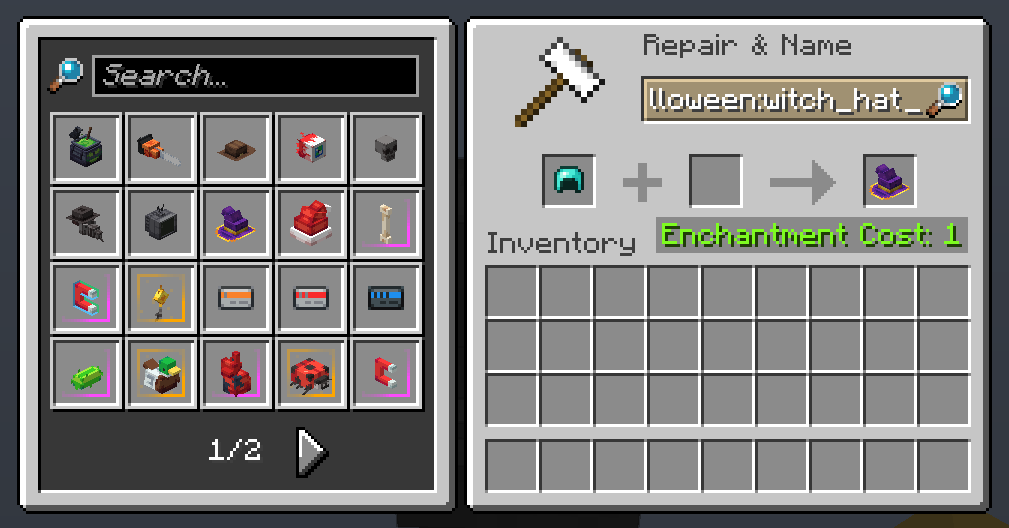 Get any resource pack-loaded item model in survival or creative with ease!
Usage
The mod adds a widget to the anvil GUI displaying every model currently loaded by any resource packs. If installed on the server-side, clicking an item automatically sets its item model and makes the item equippable on the player's head.
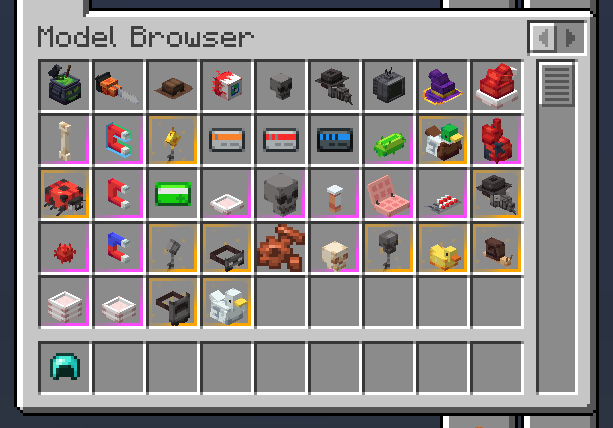
The mod also adds a tab in the Creative inventory for convenient access to every loaded model in Creative Mode.
Made with ❤️ by deborn

Галерея
Последние версии
Все версии →release
Item Model Browser 1.5.1
1.5.129 сент. 2026 г.46,9 тыс.Minecraft: 26.3fabric
Что нового
- Update to 26.3
- Optional `-a` flag to set equipment model instead of item model
- Adds command to enable/disable use of "minecraft" namespace when setting a model
release
Item Model Browser 1.5.0
1.5.030 авг. 2026 г.1,5 тыс.Minecraft: 26.2fabric
Что нового
- Added server-side config to change default enchantment glint override and equipment override settings. Use `/modelbrowser` to see the list of options.
- Always adds `HEAD` equipment to helmets
- Adds ability for users to add flags, e.g.: `model:id -e` -e makes the item equippable on head, `-g` removes the glint, `-G` forces a glint.
- Bug Fixes
beta
Item Model Browser 1.4.1-beta
1.4.1-beta18 июн. 2026 г.3,9 тыс.Minecraft: 26.2fabric
Что нового
- Updated to 26.2
- Fixed Creative Menu not refreshing when reloading resources for the first time after the game is launched
- Fixed unnecessary loading of models and subsequent error messages when launching the game or editing mod settings while not inside a world
beta
Item Model Browser 1.4.0-beta
1.4.0-beta20 апр. 2026 г.3,8 тыс.Minecraft: 26.1, 26.1.1, 26.1.2fabric
Что нового
- Updated to 26.1
- Adds vanilla CIT support (beta feature, currently disabled by default)
- Bug fixes
release
Item Model Browser 1.3.2
1.3.22 мар. 2026 г.3,8 тыс.Minecraft: 1.21.11fabric
Что нового
- Fixes issue where the game would crash upon opening the anvil screen when Cloth Config was not installed
- Cloth Config is no longer a required dependency
release
Item Model Browser 1.3.1
1.3.18 янв. 2026 г.1,2 тыс.Minecraft: 1.21.11fabric
Что нового
- Fixes issue where anvil screen widget buttons would skip a page
release
Model Browser 1.3.0
1.3.030 нояб. 2025 г.2,2 тыс.Minecraft: 1.21.10fabric
Что нового
- Adds config options to toggle mod options in the Mod Menu
- Added option to make a model unlisted by adding `"unlisted": true` to the item definition file
- Fixed creative inventory operator tab always being visible regardless of the user's setting
release
Model Browser 1.2.2
1.2.226 нояб. 2025 г.204Minecraft: 1.21.10fabric
Что нового
- Leaving the name field empty on an item with a custom item model will now reset the item model
release
Model Browser 1.2.1
1.2.125 нояб. 2025 г.113Minecraft: 1.21.10fabric
Что нового
- Fixed already equippable items no longer being equippable in their correct slot after being set to an item model
release
Model Browser 1.2.0
1.2.023 нояб. 2025 г.174Minecraft: 1.21.10fabric
Что нового
- Renaming an item to namespace:item_model will now set the model directly (required on server-side to work)
- Added dynamic Creative Mode tab for loaded models
- Removed old Model Browser screen and keybinding