

Minescript HUD Addon
This mod adds the ability to draw custom HUD elements in Minescript.
Автор: maksymiblue122,7 тыс.4обновлён 14 авг. 2026 г.
Механики игрыТехнологииУтилиты
Описание
Minescript HUD Addon
This mod adds the ability to draw custom HUD elements in Minescript.
For rendering objects in the world, I will be making a seperate mod.
Documentation can be found in the wiki.
Bugs/Features
If you have any suggestions, or found any bugs, please fill out this google form.
currently working on adding in world drawing.
Features
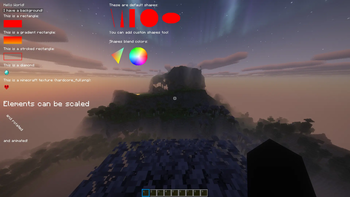
- Draw text on the HUD
- Draw rectangles and gradient rectangles
- Render items
- Render textures
- Render custom shapes
- Animate all element properties
- Detect mouse hover and click events
- Control display duration and render layers
Installation
- Install Minescript.
- Place this addon in your
modsfolder. - Launch the game.
Example
from hud_renderer import *

add_text("Hello World",x=10,y=10,color=argb(255,255,255,255),shadow=True,display_duration=5)
Animations
All HUD elements can be animated using animation functions.
from hud_renderer import *

def move(text:TextObject):
    text.x+=1

_id=add_text("I can MOVE!",x=10,y=10,color=Colors.WHITE,shadow=True,display_duration=5)

animate_text(_id,move)
Mouse Events
All objects can detect mouse hover and click events.
from minescript import echo
from hud_renderer import *

def hover(text:TextObject,mouse:MouseObject,exited:bool):
    if (exited):
        text.color=Colors.WHITE
    else:
        text.color=Colors.GREEN

def click(text:TextObject,mouse:MouseObject):
    echo("Clicked!")

_id=add_text("Click me!",x=10,y=10,color=Colors.WHITE,shadow=True,display_duration=10)

add_mouse_callbacks_and_wait(_id,on_hover=hover,on_click=click)
Layer System
Elements are rendered in layers.
Elements with higher layer values render above elements with lower layers.
API Overview
A more detailed API can be found on the wiki.
Text
add_text(...)add_text_with_background(...)add_advanced_text(...)add_advanced_text_with_background(...)animate_text(...)animate_text_with_background(...)
Rectangles
add_rectangle(...)add_rectangle_from_corners(...)add_gradient_rectangle(...)add_stroked_rectangle(...)animate_rectangle(...)
Items
add_item(...)add_advanced_item(...)animate_item(...)
Textures
Note: Custom textures must be added by a resource pack in the
assets/minescripthud/textures/gui/sprites/folder.
add_texture(...)add_advanced_texture(...)animate_texture(...)
Shapes
add_shape(...)add_advanced_shape(...)animate_shape(...)add_line(...)add_multiline(...)add_triangle(...)add_quad(...)add_circle(...)add_ellipse(...)
Anti-Aliased Shapes (with smooth edges)
add_anti_aliased_shape(...)add_advanced_anti_aliased_shape(...)animate_anti_aliased_shape(...)add_line_with_thickness(...)add_anti_aliased_quad(...)add_anti_aliased_rectangle(...)add_anti_aliased_rectangle_with_round_corners(...)get_points_for_circle(...)add_anti_aliased_circle(...)get_points_for_ellipse(...)add_anti_aliased_ellipse(...)
Utility functions
argb(...)argb_to_int(...)alpha_from_int(...)add_async_mouse_callbacks(...)add_mouse_callbacks_and_wait(...)wait_until_removed(...)remove_element(...)clear()suppress_done_message()
Галерея
Последние версии
Все версии →release
Minescript HUD Addon 1.3.0
1.3.014 авг. 2026 г.279Minecraft: 1.21.10, 1.21.11fabric
Что нового
# Elements
Added a new Anti-Aliased Shape (with smooth edges).
# Functions
11 new functions:
- `add_anti_aliased_shape`
- `add_advanced_anti_aliased_shape`
- `animate_anti_aliased_shape`
- `add_line_with_thickness`
- `add_anti_aliased_quad`
- `add_anti_aliased_rectangle`
- `add_anti_aliased_rectangle_with_round_corners`
- `get_points_for_circle`
- `add_anti_aliased_circle`
- `get_points_for_ellipse`
- `add_anti_aliased_ellipse`
release
Minescript HUD Addon 1.2.1
1.2.122 июн. 2026 г.83Minecraft: 1.21.7, 1.21.8fabric
Что нового
Fixed bug where game would crash when display_duration ran out.
release
Minescript HUD Addon 1.2.1
1.2.122 июн. 2026 г.309Minecraft: 1.21.10, 1.21.11fabric
Что нового
Fixed bug where game would crash when display_duration ran out.
release
Minescript HUD Addon 1.2.1
1.2.122 июн. 2026 г.516Minecraft: 26.1, 26.1.1, 26.1.2fabric
Что нового
Fixed bug where game would crash when display_duration ran out.
release
Minescript HUD Addon 1.2.0
1.2.016 июн. 2026 г.59Minecraft: 26.1, 26.1.1, 26.1.2fabric
Что нового
# THIS VERSION HAS A SEVERE BUG! PLEASE USE NEWER VERSIONS
# Functions
3 new functions:
- `add_async_mouse_callbacks`
- `add_mouse_callbacks_and_wait`
- `wait_until_removed`
# Hover and Click
You can now add callback functions that run whenever the mouse hovers over an object or clicks an object.
release
Minescript HUD Addon 1.2.0
1.2.013 июн. 2026 г.11Minecraft: 1.21.7, 1.21.8fabric
Что нового
# THIS VERSION HAS A SEVERE BUG! PLEASE USE NEWER VERSIONS
# Functions
5 new functions:
- `get_screen_width()`
- `get_screen_height()`
- `add_async_mouse_callbacks`
- `add_mouse_callbacks_and_wait`
- `wait_until_removed`
# Hover and Click
You can now add callback functions that run whenever the mouse hovers over an object or clicks an object.
# Bugs
Fixed bug where scaling would move text.
Fixed bug where update_item would throw an error.
Made BatchAnimator **a lot** faster.
release
Minescript HUD Addon 1.2.0
1.2.012 июн. 2026 г.130Minecraft: 1.21.10, 1.21.11fabric
Что нового
# THIS VERSION HAS A SEVERE BUG! PLEASE USE NEWER VERSIONS
# Functions
3 new functions:
- `add_async_mouse_callbacks`
- `add_mouse_callbacks_and_wait`
- `wait_until_removed`
# Hover and Click
You can now add callback functions that run whenever the mouse hovers over an object or clicks an object.
release
Minescript HUD Addon 1.1.6
1.1.629 апр. 2026 г.396Minecraft: 1.21.10, 1.21.11fabric
Что нового
Fixed tiny bug where layer for TextWithBackgroundObject wouldn't update
release
Minescript HUD Addon 1.1.0
1.1.029 апр. 2026 г.175Minecraft: 26.1, 26.1.2fabric
Что нового
Added support for versions 26.1 and 26.1.2
release
Minescript HUD Addon 1.1.5
1.1.517 апр. 2026 г.124Minecraft: 1.21.10, 1.21.11fabric
Что нового
Made BatchAnimator **a lot** faster.
Added 2 new functions:
- get_screen_width()
- get_screen_height()
Fixed bug where scaling would move text.
Created this cool hud based on [RPG-Hud](https://modrinth.com/mod/rpg-hud) using my mod. Code can be found on [GitHub](https://github.com/maksymiblue12/modern-hud-python).