
MCRGBСкачатьСкачатьСкачатьСкачатьСкачатьСкачатьСкачатьСкачатьСкачатьСкачатьСкачатьСкачатьСкачатьСкачатьСкачатьСкачатьСкачатьСкачатьСкачатьСкачатьСкачатьСкачатьСкачатьСкачатьСкачатьСкачатьСкачатьСкачатьСкачатьСкачатьСкачать
ВЕРСИИ (31)
release
MCRGB 0.4+26.3
0.4+26.320 сент. 2026 г.294Minecraft: 26.3fabric
Что нового
Updated to 26.3
release
MCRGB 0.4+26.2
0.4+26.223 авг. 2026 г.265Minecraft: 26.2fabric
Что нового
# MCRGB 0.4
## Features:
**Added two new colour averaging algorithms:**
- Mean : Calculates the mean average colour of the entire texture. Best for when the block is being viewed from a distance.
- Median : Calculates the median colour, which is an approximation of the dominant colour of the texture. Ignores any other colours present in the texture.
- The legacy MCRGB algorithm remains as the default option. Calculates and displays each distinct colour in the texture. Shows a percentage of how dominant each colour is, in the texture.
- Added a framework for adding more algorithms in future updates.
- Colour Averaging Method can be selected in the configuration settings.
**Added creative mode dragging functionality:**
- In Creative Mode, you can now drag items from the MCRGB UI straight into your hotbar.
- Left-click to pick up one item.
- Middle-click to pick up a full stack.
- Right-clicking still opens the Block Info GUI
- This works on vanilla servers and no longer requires Operator Permissions, as it simply emulates the Creative Inventory. In theory, it should work on any server, regardless of server side plugins/permissions, so long as you have access to Creative Mode.
- You can revert to the old command-based functionality in the configuration settings.
- You can also switch to "View Only" mode, which disallows spawning in items. Item Spawning Mode is locked to "View Only" when in Survival, Adventure or Spectator Mode.
**Added clipboard functionality:**
- Added a new keybind "Quick Search from Clipboard" which is set to "U" by default.
- Pressing this key will automatically search for a colour, if a valid HEX code is found in your device clipboard. This works regardless of if the UI is already open.
- With a Block Info GUI open, you can also copy a hex code to your device clipboard.
- Middle-click on any pixel in the displayed texture, or on any hex code displayed in the side window.
**Toasts:**
- System messages from MCRGB, such as "Reloaded colours" or "Copied Hex code to clipboard" no longer appear in the game chat.
- These now appear as toast notifications in the top right corner of the screen.
**Porting:**
- Migrated to Mojang's official deobfuscated code.
- Ported to Minecraft 26.2
- Minecraft 26.1 has been skipped, but a port can be made if there is enough demand.
release
MCRGB 0.4+1.21.11
0.4+1.21.1123 авг. 2026 г.220Minecraft: 1.21.11fabric
Что нового
# MCRGB 0.4
## Features:
**Added two new colour averaging algorithms:**
- Mean : Calculates the mean average colour of the entire texture. Best for when the block is being viewed from a distance.
- Median : Calculates the median colour, which is an approximation of the dominant colour of the texture. Ignores any other colours present in the texture.
- The legacy MCRGB algorithm remains as the default option. Calculates and displays each distinct colour in the texture. Shows a percentage of how dominant each colour is, in the texture.
- Added a framework for adding more algorithms in future updates.
- Colour Averaging Method can be selected in the configuration settings.
**Added creative mode dragging functionality:**
- In Creative Mode, you can now drag items from the MCRGB UI straight into your hotbar.
- Left-click to pick up one item.
- Middle-click to pick up a full stack.
- Right-clicking still opens the Block Info GUI
- This works on vanilla servers and no longer requires Operator Permissions, as it simply emulates the Creative Inventory. In theory, it should work on any server, regardless of server side plugins/permissions, so long as you have access to Creative Mode.
- You can revert to the old command-based functionality in the configuration settings.
- You can also switch to "View Only" mode, which disallows spawning in items. Item Spawning Mode is locked to "View Only" when in Survival, Adventure or Spectator Mode.
**Added clipboard functionality:**
- Added a new keybind "Quick Search from Clipboard" which is set to "U" by default.
- Pressing this key will automatically search for a colour, if a valid HEX code is found in your device clipboard. This works regardless of if the UI is already open.
- With a Block Info GUI open, you can also copy a hex code to your device clipboard.
- Middle-click on any pixel in the displayed texture, or on any hex code displayed in the side window.
**Toasts:**
- System messages from MCRGB, such as "Reloaded colours" or "Copied Hex code to clipboard" no longer appear in the game chat.
- These now appear as toast notifications in the top right corner of the screen.
release
MCRGB 0.4+1.21.1
0.4+1.21.123 авг. 2026 г.125Minecraft: 1.21.1fabric
Что нового
# MCRGB 0.4
## Features:
**Added two new colour averaging algorithms:**
- Mean : Calculates the mean average colour of the entire texture. Best for when the block is being viewed from a distance.
- Median : Calculates the median colour, which is an approximation of the dominant colour of the texture. Ignores any other colours present in the texture.
- The legacy MCRGB algorithm remains as the default option. Calculates and displays each distinct colour in the texture. Shows a percentage of how dominant each colour is, in the texture.
- Added a framework for adding more algorithms in future updates.
- Colour Averaging Method can be selected in the configuration settings.
**Added creative mode dragging functionality:**
- In Creative Mode, you can now drag items from the MCRGB UI straight into your hotbar.
- Left-click to pick up one item.
- Middle-click to pick up a full stack.
- Right-clicking still opens the Block Info GUI
- This works on vanilla servers and no longer requires Operator Permissions, as it simply emulates the Creative Inventory. In theory, it should work on any server, regardless of server side plugins/permissions, so long as you have access to Creative Mode.
- You can revert to the old command-based functionality in the configuration settings.
- You can also switch to "View Only" mode, which disallows spawning in items. Item Spawning Mode is locked to "View Only" when in Survival, Adventure or Spectator Mode.
**Added clipboard functionality:**
- Added a new keybind "Quick Search from Clipboard" which is set to "U" by default.
- Pressing this key will automatically search for a colour, if a valid HEX code is found in your device clipboard. This works regardless of if the UI is already open.
- With a Block Info GUI open, you can also copy a hex code to your device clipboard.
- Middle-click on any pixel in the displayed texture, or on any hex code displayed in the side window.
**Toasts:**
- System messages from MCRGB, such as "Reloaded colours" or "Copied Hex code to clipboard" no longer appear in the game chat.
- These now appear as toast notifications in the top right corner of the screen.
release
MCRGB 0.4+1.20.1
0.4+1.20.123 авг. 2026 г.102Minecraft: 1.20.1fabric
Что нового
# MCRGB 0.4
## Features:
**Added two new colour averaging algorithms:**
- Mean : Calculates the mean average colour of the entire texture. Best for when the block is being viewed from a distance.
- Median : Calculates the median colour, which is an approximation of the dominant colour of the texture. Ignores any other colours present in the texture.
- The legacy MCRGB algorithm remains as the default option. Calculates and displays each distinct colour in the texture. Shows a percentage of how dominant each colour is, in the texture.
- Added a framework for adding more algorithms in future updates.
- Colour Averaging Method can be selected in the configuration settings.
**Added creative mode dragging functionality:**
- In Creative Mode, you can now drag items from the MCRGB UI straight into your hotbar.
- Left-click to pick up one item.
- Middle-click to pick up a full stack.
- Right-clicking still opens the Block Info GUI
- This works on vanilla servers and no longer requires Operator Permissions, as it simply emulates the Creative Inventory. In theory, it should work on any server, regardless of server side plugins/permissions, so long as you have access to Creative Mode.
- You can revert to the old command-based functionality in the configuration settings.
- You can also switch to "View Only" mode, which disallows spawning in items. Item Spawning Mode is locked to "View Only" when in Survival, Adventure or Spectator Mode.
**Added clipboard functionality:**
- Added a new keybind "Quick Search from Clipboard" which is set to "U" by default.
- Pressing this key will automatically search for a colour, if a valid HEX code is found in your device clipboard. This works regardless of if the UI is already open.
- With a Block Info GUI open, you can also copy a hex code to your device clipboard.
- Middle-click on any pixel in the displayed texture, or on any hex code displayed in the side window.
**Toasts:**
- System messages from MCRGB, such as "Reloaded colours" or "Copied Hex code to clipboard" no longer appear in the game chat.
- These now appear as toast notifications in the top right corner of the screen.
release
MCRGB 0.3.3+1.20.1
0.3.3+1.20.13 янв. 2026 г.446Minecraft: 1.20.1fabric
Что нового
### Changes in v0.3.3:
- Further improved load times since v0.3.2. Reading and writing colour info to a JSON file is now entirely optional, and off by default.
With the "**Read Colour Info from JSON File**" option set to "**No**", MCRGB will always get it's information directly from the game's textures, significantly improving load times, especially on large modpacks.
- Added a scrollbar to the texture thumbnails in the Block Info GUI. This only affects blocks with a large number of textures which would previously spill into other parts of the GUI, such as the Monitor block from CC: Tweaked.
- Added a config option "**Maximum Tooltip Lines**", which now defaults to **15**. This is to avoid overly large tooltips when hovering over items in the MCRGB GUI, or in the inventory with "**Show Block Colours in Tooltips**" set to "**All Contexts**"
- When scanning textures, or reading/writing JSON, MCRGB now records the time taken and writes it to the Minecraft Log for debugging purposes.
- Also includes changes from v0.3.2 which were previously unavailable for Minecraft 1.20.1
release
MCRGB 0.3.3+1.21.1
0.3.3+1.21.13 янв. 2026 г.714Minecraft: 1.21, 1.21.1fabric
Что нового
### Changes in v0.3.3:
- Further improved load times since v0.3.2. Reading and writing colour info to a JSON file is now entirely optional, and off by default.
With the "**Read Colour Info from JSON File**" option set to "**No**", MCRGB will always get it's information directly from the game's textures, significantly improving load times, especially on large modpacks.
- Added a scrollbar to the texture thumbnails in the Block Info GUI. This only affects blocks with a large number of textures which would previously spill into other parts of the GUI, such as the Monitor block from CC: Tweaked.
- Added a config option "**Maximum Tooltip Lines**", which now defaults to **15**. This is to avoid overly large tooltips when hovering over items in the MCRGB GUI, or in the inventory with "**Show Block Colours in Tooltips**" set to "**All Contexts**"
- When scanning textures, or reading/writing JSON, MCRGB now records the time taken and writes it to the Minecraft Log for debugging purposes.
- Also includes changes from v0.3.1 and v0.3.2 which were previously unavailable for Minecraft 1.21.1
release
MCRGB 0.3.3+1.21.11
0.3.3+1.21.113 янв. 2026 г.1,1 тыс.Minecraft: 1.21.11fabric
Что нового
### Changes in v0.3.3:
- Further improved load times since v0.3.2. Reading and writing colour info to a JSON file is now entirely optional, and off by default.
With the "**Read Colour Info from JSON File**" option set to "**No**", MCRGB will always get it's information directly from the game's textures, significantly improving load times, especially on large modpacks.
- Added a scrollbar to the texture thumbnails in the Block Info GUI. This only affects blocks with a large number of textures which would previously spill into other parts of the GUI, such as the Monitor block from CC: Tweaked.
- Added a config option "**Maximum Tooltip Lines**", which now defaults to **15**. This is to avoid overly large tooltips when hovering over items in the MCRGB GUI, or in the inventory with "**Show Block Colours in Tooltips**" set to "**All Contexts**"
- When scanning textures, or reading/writing JSON, MCRGB now records the time taken and writes it to the Minecraft Log for debugging purposes.
release
MCRGB 0.3.2+1.21.11
0.3.2+1.21.1124 дек. 2025 г.142Minecraft: 1.21.11fabric
Что нового
### This is a port of MCRGB to Minecraft 1.21.11
In addition to porting to 1.21.1, there is also one bug fix.
### Changes in v0.3.2:
This version includes a temporary workaround to load-time issues.
MCRGB now by default re-calculates block colours on every launch instead of reading from a JSON file.
This should speed up load times for people with a large number of mods.
The new config option "Read Colour Info from JSON File" allows players to revert to previous behavior.
A more permanent fix will be in a future release.
release
MCRGB 0.3.1+1.20.1
0.3.1+1.20.16 дек. 2025 г.63Minecraft: 1.20.1fabric
Что нового
### Changes:
- Fixed a bug: MCRGB for 1.20.1 requires Java 21 on version 1.20.1 which is a Java 17 version?
- Fixed a bug: MCRGB was ignoring non-directional quads on block models.
This was a bug that has gone unnoticed since the mod's creation, causing MCRGB to exclude many partial blocks such as Iron/Copper Bars, Flowers, some Redstone components, Chains, Lanterns, etc. These blocks will now have their colours analysed and will show up correctly with all other blocks.
release
MCRGB 0.3.1+1.21.9-1.21.10
0.3.1+1.21.1023 окт. 2025 г.895Minecraft: 1.21.9, 1.21.10fabric
Что нового
### Changes:
- Compatible with 1.21.9 and 1.21.10
- Fixed a bug: MCRGB was ignoring non-directional quads on block models.
This was a bug that has gone unnoticed since the mod's creation, causing MCRGB to exclude many partial blocks such as Iron/Copper Bars, Flowers, some Redstone components, Chains, Lanterns, etc. These blocks will now have their colours analysed and will show up correctly with all other blocks.
release
MCRGB 0.3+1.21.6-1.21.8
0.3+1.21.620 июл. 2025 г.614Minecraft: 1.21.6, 1.21.7, 1.21.8fabric
Что нового
This is a port of v0.3 for 1.21.6, 1.21.7 and 1.21.8
release
MCRGB 0.3+1.21.5
0.3+1.21.520 июл. 2025 г.126Minecraft: 1.21.5fabric
Что нового
This is a port of v0.3 for Minecraft 1.21.5
release
MCRGB 0.3+1.20.1
0.3+1.20.120 июл. 2025 г.174Minecraft: 1.20.1fabric
Что нового
This is a backport of v0.3 for Minecraft 1.20.1
release
MCRGB 0.3+1.20.2-1.20.4
0.3+1.20.48 февр. 2025 г.128Minecraft: 1.20.2, 1.20.3, 1.20.4fabric
Что нового
## New Logo!
MCRGB has an awesome new logo made by [Whirdle](https://linktr.ee/whirdlel)!

Huge thanks to Whirdle for creating the logo and allowing me to use it!
They make really amazing Minecraft builds so please check them out: https://linktr.ee/whirdle
## New Features
Version 3.0 is the biggest update to MCRGB since launch! I've been working on some of these features for aaaages and happy to finally share them!

### Saved Palettes
- Easily create colour palettes which you can reference later.
- Left-click any of the slots to set it to the currently selected colour.
- Reset a slot to white by right-clicking.
- Middle-click any slot to select it and search for blocks of that colour.
**Creating a Palette**

**Picking Colours from Saved Palettes**

**Use the buttons on the side to edit or delete existing palettes**

### Colour Wheel
- Click the colour wheel button to switch between RGB sliders and a colour wheel.
- The colour wheel can be used instead of sliders when searching for blocks or creating palettes.
**Note: The colour wheel looks bad in the gif below due to video compression. It's a lot clearer in game!**

### Block Info Screen
- Right-click any block in the MCRGB menu to open that block's Block Info Screen.
- Here you can view the colour details for that block. Click on any colour in the list to select that colour.
- You can also pick individual pixel colours from the texture.
- Select from any of the block's alternate states, side textures, etc.

### Refine Search
- Refine your results with text-based search

release
MCRGB 0.3+1.20.6
0.3+1.20.68 февр. 2025 г.68Minecraft: 1.20.6fabric
Что нового
## New Logo!
MCRGB has an awesome new logo made by [Whirdle](https://linktr.ee/whirdlel)!

Huge thanks to Whirdle for creating the logo and allowing me to use it!
They make really amazing Minecraft builds so please check them out: https://linktr.ee/whirdle
## New Features
Version 3.0 is the biggest update to MCRGB since launch! I've been working on some of these features for aaaages and happy to finally share them!

### Saved Palettes
- Easily create colour palettes which you can reference later.
- Left-click any of the slots to set it to the currently selected colour.
- Reset a slot to white by right-clicking.
- Middle-click any slot to select it and search for blocks of that colour.
**Creating a Palette**

**Picking Colours from Saved Palettes**

**Use the buttons on the side to edit or delete existing palettes**

### Colour Wheel
- Click the colour wheel button to switch between RGB sliders and a colour wheel.
- The colour wheel can be used instead of sliders when searching for blocks or creating palettes.
**Note: The colour wheel looks bad in the gif below due to video compression. It's a lot clearer in game!**

### Block Info Screen
- Right-click any block in the MCRGB menu to open that block's Block Info Screen.
- Here you can view the colour details for that block. Click on any colour in the list to select that colour.
- You can also pick individual pixel colours from the texture.
- Select from any of the block's alternate states, side textures, etc.

### Refine Search
- Refine your results with text-based search

release
MCRGB 0.3+1.21-1.21.1
0.3+1.21.18 февр. 2025 г.480Minecraft: 1.21, 1.21.1fabric
Что нового
## New Logo!
MCRGB has an awesome new logo made by [Whirdle](https://linktr.ee/whirdlel)!

Huge thanks to Whirdle for creating the logo and allowing me to use it!
They make really amazing Minecraft builds so please check them out: https://linktr.ee/whirdle
## New Features
Version 3.0 is the biggest update to MCRGB since launch! I've been working on some of these features for aaaages and happy to finally share them!

### Saved Palettes
- Easily create colour palettes which you can reference later.
- Left-click any of the slots to set it to the currently selected colour.
- Reset a slot to white by right-clicking.
- Middle-click any slot to select it and search for blocks of that colour.
**Creating a Palette**

**Picking Colours from Saved Palettes**

**Use the buttons on the side to edit or delete existing palettes**

### Colour Wheel
- Click the colour wheel button to switch between RGB sliders and a colour wheel.
- The colour wheel can be used instead of sliders when searching for blocks or creating palettes.
**Note: The colour wheel looks bad in the gif below due to video compression. It's a lot clearer in game!**

### Block Info Screen
- Right-click any block in the MCRGB menu to open that block's Block Info Screen.
- Here you can view the colour details for that block. Click on any colour in the list to select that colour.
- You can also pick individual pixel colours from the texture.
- Select from any of the block's alternate states, side textures, etc.

### Refine Search
- Refine your results with text-based search

release
MCRGB 0.3+1.21.4
0.3+1.21.48 февр. 2025 г.515Minecraft: 1.21.4fabric
Что нового
## New Logo!
MCRGB has an awesome new logo made by [Whirdle](https://linktr.ee/whirdlel)!

Huge thanks to Whirdle for creating the logo and allowing me to use it!
They make really amazing Minecraft builds so please check them out: https://linktr.ee/whirdle
## New Features
Version 3.0 is the biggest update to MCRGB since launch! I've been working on some of these features for aaaages and happy to finally share them!

### Saved Palettes
- Easily create colour palettes which you can reference later.
- Left-click any of the slots to set it to the currently selected colour.
- Reset a slot to white by right-clicking.
- Middle-click any slot to select it and search for blocks of that colour.
**Creating a Palette**

**Picking Colours from Saved Palettes**

**Use the buttons on the side to edit or delete existing palettes**

### Colour Wheel
- Click the colour wheel button to switch between RGB sliders and a colour wheel.
- The colour wheel can be used instead of sliders when searching for blocks or creating palettes.
**Note: The colour wheel looks bad in the gif below due to video compression. It's a lot clearer in game!**

### Block Info Screen
- Right-click any block in the MCRGB menu to open that block's Block Info Screen.
- Here you can view the colour details for that block. Click on any colour in the list to select that colour.
- You can also pick individual pixel colours from the texture.
- Select from any of the block's alternate states, side textures, etc.

### Refine Search
- Refine your results with text-based search

release
MCRGB 0.2.7+1.20.2-1.20.4
0.2.7+1.20.417 дек. 2024 г.77Minecraft: 1.20.2, 1.20.3, 1.20.4fabric
Что нового
This is a backport of v0.2.7 for compatibility with Minecraft 1.20.2, 1.20.3 and 1.20.4
Feature equivalent to v0.2.7 for Minecraft 1.21.2 - 1.21.4
release
MCRGB 0.2.7+1.20.6
0.2.7+1.20.617 дек. 2024 г.57Minecraft: 1.20.6fabric
Что нового
This is a backport of v0.2.7 for compatibility with Minecraft 1.20.6
Feature equivalent to v0.2.7 for Minecraft 1.21.2 - 1.21.4
release
MCRGB 0.2.7+1.21-1.21.1
0.2.7+1.21.117 дек. 2024 г.148Minecraft: 1.21, 1.21.1fabric
Что нового
This is a backport of v0.2.7 for compatibility with Minecraft 1.21 and 1.21.1
Feature equivalent to v0.2.7 for Minecraft 1.21.2 - 1.21.4
release
MCRGB 0.2.7+1.21.2-1.21.4
0.2.7+1.21.416 дек. 2024 г.348Minecraft: 1.21.2, 1.21.3, 1.21.4fabric
Что нового
### Updated to 1.21.4
- With this release, MCRGB is now available for 1.21.4!
- This version is also compatible with 1.21.2 and 1.21.3.
- There's plans to backport this version to 1.20.1 and 1.20.6 if there is enough demand.
### Added two new config options:
- Give Command:
Allows you to set a custom command which MCRGB will try to use when selecting items from the menu. Use this option if you are on a custom server that doesn't use the vanilla /give command syntax.
Uses the following Delimters.
- %p - Gets replaced by the player's name
- %i - Gets replaced by the ID of the selected item
- %c - Gets replaced by the item's components. This is only used for leather armour and wolf armour for specifying the dyed colour.
- %q - Gets replaced by the quantity of items to give.
The default syntax is `give %p %i[%c] %q`, to correspond with vanilla Minecraft.
An example of how this command syntax may look in action: `/give BaccoBacco minecraft:iron_block[] 64`
- Bypass Operator Check
Allows you to give yourself items using the MCRGB menu, even if you are not an operator or in creative mode. This is useful for servers with custom permissions where you might have access to /give but not be a server operator. Note: This won't allow you to spawn in items without the required server permissions.
### Feedback
If you play on a server with a custom give command, please let me know if the new config options work for you!
Let me know in the MCRGB discord: https://discord.gg/G86QP9Pp
release
MCRGB 0.2.6+1.21
0.2.6+1.2125 июн. 2024 г.654Minecraft: 1.21fabric
Что нового
Updated to Minecraft 1.21
Otherwise identical to v0.2.6 for Minecraft 1.20.6
release
MCRGB 0.2.6+1.20.6
0.2.6+1.20.65 мая 2024 г.208Minecraft: 1.20.6fabric
Что нового
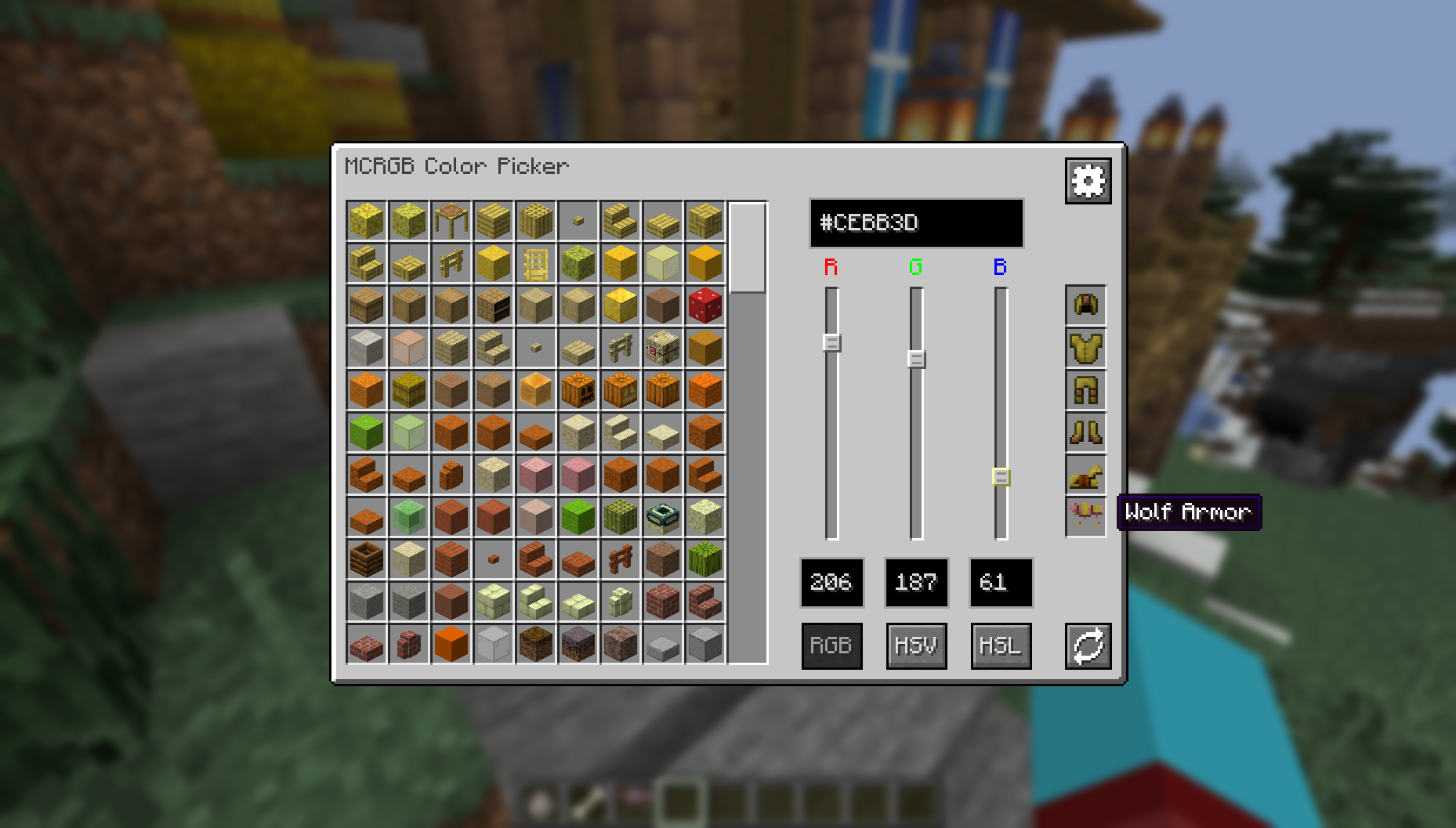
# Coloured Paws
- Updated to 1.20.6
- The colour picker now supports dye-able Wolf Armour
- This works just like how it does with Leather Armour.
- You can only give youself the dyed armour if you are in Creative mode and have OP/Cheats.
### Join the [discord server ](https://discord.gg/883ybFjSEf) if you have any questions or suggestions, or if you just want to chat about the mod!

release
MCRGB 0.2.5+1.20.4
0.2.5+1.20.47 апр. 2024 г.229Minecraft: 1.20.4fabric
Что нового
# v0.2.5 Patchnotes
- Added Support for HSV and HSL colour spaces!
- Repositioned some of the GUI components.
# More Announcements:
- Development has started for the next major update: v0.3.0
- v0.3.0 will contain a palette tool.
- Allows you to save a set of blocks and/or colours in a palette.
- I'm looking for suggestions on how to implement this, so all feedback is greatly appreciated!
- MCRGB Discord Server
- If you have any suggestions, feedback or questions about the MCRGB, join the official discord server!
- Feedback is greatly appreciated as I want to make this mod the best it can be!
- https://discord.gg/883ybFjSEf
- New Trailer
- Check out the new trailer for MCRGB on YouTube!
- I plan to use this channel for trailers, tutorials and explanation videos for MCRGB and my future projects, so go subscribe!!
- https://www.youtube.com/watch?v=MNBBPMVZp5g
release
MCRGB 0.2.3+1.19.2
0.2.3+1.19.230 дек. 2023 г.160Minecraft: 1.19.2fabric
Что нового
This is a backport to 1.19.2.
It is otherwise feature equivalent to: v0.2.3 for Minecraft 1.20.2
release
MCRGB 0.2.4-1.20.4
0.2.3-1.20.29 дек. 2023 г.325Minecraft: 1.20.2, 1.20.3, 1.20.4fabric
Что нового
Bugfix: Blocks from the Experimental Datapacks no longer appear in the menu when the respective datapack is disabled.
release
MCRGB 0.2.3-1.20.2
0.2.3-1.20.215 окт. 2023 г.173Minecraft: 1.20.2fabric
Что нового
Update to 1.20.2
alpha
MCRGB 0.2.2-1.20.1
0.2.2-1.20.117 сент. 2023 г.1,3 тыс.Minecraft: 1.20.1fabric
Что нового
Features:
- Textures which are recoloured in-game now take this recolouring into account.
- Blocks such as leaves use the colour that they appear in the inventory.
- The grass block top texture uses the colour that it appears in the inventory.
- The grass block side texture is currently unsupported.
- (I'm still open to feedback on how to better handle blocks which change colour depending on biome or other factors)
- Added ModMenu integration
- Added ClothConfig integration
- Added config option to enable/disable colour info in tooltips outside of the colour picker UI.
- Added config option for functionality of RGB sliders in the colour picker. Can now choose if the list of blocks updates while scrolling, or after scrolling has finished.
Changes:
- Changed colour of tooltip text from aqua to grey and light grey.
- Texture names now display in dark grey and hex codes display in light grey.
Bugfixes:
- Fixed blocks getting duplicate entries when rejoining a server or world multiple times in the same session.
alpha
MCRGB 0.1.1-1.20.1
0.1.1-1.20.16 сент. 2023 г.153Minecraft: 1.20.1fabric
Что нового
Features:
- New icon for the "refresh" button
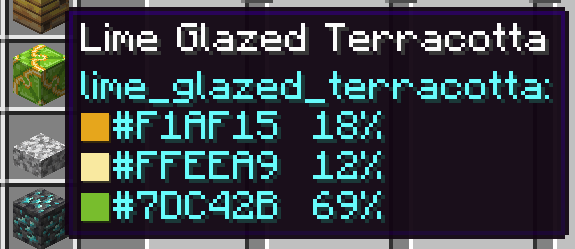
- Added a coloured square in item tooltips to indicate colour.
Bugfixes
- Colour Picker UI no longer spills outside of the screen on GUI scale 4
alpha
MCRGB v0.1.0-1.20.1
0.1.0-1.20.131 авг. 2023 г.149Minecraft: 1.20.1fabric
Что нового
Initial Public Release