COWMODSКаталог модов

Microphone Text Input

This mod uses speech recognition technology to enable you to enter text using a microphone and send player messages. Press the key v to perform voice recognition and automatically send a message.

Автор: Jaffe271831,7 тыс.71обновлён 14 мая 2026 г.
Общение

Описание

Microphone Text Input Mod User Documention

Architectury 2.x

icon

Introduction

The Microphone Text Input Mod is a Fabric mod designed for Minecraft clients. It provides speech recognition input functionality and automatically converts spoken words into text chat messages, enhancing the in - game communication experience.

Features

  • Multiple Modes: Supports different operation modes, including AUTO_SEND, RELEASE_KEY_TO_SEND, and RELEASE_KEY_TO_INPUT.
  • Advanced Configuration: Allows users to adjust advanced parameters related to the Whisper library, such as the number of threads, audio context size, and sampling strategy.

Dependencies

Dependency NameFabricNeoForge
Java2121
Fabric APIsee fabric.mod.json❌
Architectury API❌see neoforge.mods.toml
MidnightLibsee fabric.mod.jsonsee neoforge.mods.toml

Configuration

Keybinding

Keybinding NameRecognize
Categorykey.category.minecraft.mcmti
Translation Keykey.mcmti.recognize
Default KeyV

General Settings

SettingTranslation KeyFieldTypeDefault ValueDescription
GGML Whisper Modelmcmti.midnightconfig.modelme.jaffe2718.mcmti.config.McmtiConfig.modelString""Path to the GGML Whisper model.
Languagemcmti.midnightconfig.languageme.jaffe2718.mcmti.config.McmtiConfig.languageString"en"Language for speech recognition.
Modemcmti.midnightconfig.modeme.jaffe2718.mcmti.config.McmtiConfig.modeme.jaffe2718.mcmti.config.McmtiConfig.Mode"RELEASE_KEY_TO_SEND"Mod's work mode.
Record Cycle (ms)mcmti.midnightconfig.recordCycleMsme.jaffe2718.mcmti.config.McmtiConfig.recordCycleMsint5000Record cycle in milliseconds.
Record Buffer Size (byte)mcmti.midnightconfig.recordBufferSizeme.jaffe2718.mcmti.config.McmtiConfig.recordBufferSizeint1024Record buffer size in bytes.
Prefixmcmti.midnightconfig.prefixme.jaffe2718.mcmti.config.McmtiConfig.prefixString"⌈Speech Input⌋"Prefix added to the recognized text.
Draft Inputmcmti.midnightconfig.draftInputme.jaffe2718.mcmti.config.McmtiConfig.draftInputbooleanfalseEnable draft input. If enabled, the recognized text will be shown in the entry as a draft.
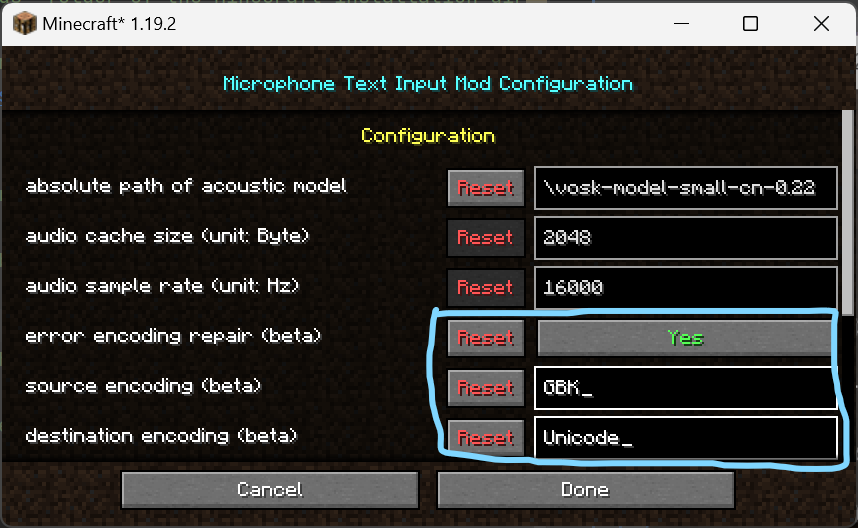
Encoding Repairmcmti.midnightconfig.encodingRepairme.jaffe2718.mcmti.config.McmtiConfig.encodingRepairbooleanfalseEnable encoding repair.
Source Encodingmcmti.midnightconfig.srcEncodingme.jaffe2718.mcmti.config.McmtiConfig.srcEncodingStringCharset.defaultCharset().displayName()Source encoding for text. Applies only if encoding repair is enabled.
Destination Encodingmcmti.midnightconfig.dstEncodingme.jaffe2718.mcmti.config.McmtiConfig.dstEncodingStringCharset.defaultCharset().displayName()Destination encoding for text. Applies only if encoding repair is enabled.

Advanced Settings

SettingTranslation KeyFieldTypeDefault ValueDescription
Enable Advanced Configmcmti.midnightconfig.advancedConfigme.jaffe2718.mcmti.config.McmtiConfig.advancedConfigbooleanfalseEnable advanced configuration.
nThreadsmcmti.midnightconfig.nThreadsme.jaffe2718.mcmti.config.McmtiConfig.nThreadsint0Number of threads to use for the operation of the Whisper model. 0 for max cores.
audioCtxmcmti.midnightconfig.audioCtxme.jaffe2718.mcmti.config.McmtiConfig.audioCtxint0Audio context size for the Whisper model. 0 means use default.
nMaxTextCtxmcmti.midnightconfig.nMaxTextCtxme.jaffe2718.mcmti.config.McmtiConfig.nMaxTextCtxint16384Max tokens to use from past text as prompt for the decoder.
offsetMsmcmti.midnightconfig.offsetMsme.jaffe2718.mcmti.config.McmtiConfig.offsetMsint0Offset in ms to start recording from.
durationMsmcmti.midnightconfig.durationMsme.jaffe2718.mcmti.config.McmtiConfig.durationMsint0Audio duration to process in ms. 0 means use default.
translatemcmti.midnightconfig.translateme.jaffe2718.mcmti.config.McmtiConfig.translatebooleanfalseTranslate the text to the default language.
noTimestampsmcmti.midnightconfig.noTimestampsme.jaffe2718.mcmti.config.McmtiConfig.noTimestampsbooleanfalseDo not generate timestamps.
initialPromptmcmti.midnightconfig.initialPromptme.jaffe2718.mcmti.config.McmtiConfig.initialPromptString""Initial text to use as a prompt for the whisper.
noContextmcmti.midnightconfig.noContextme.jaffe2718.mcmti.config.McmtiConfig.noContextbooleantrueDo not use past transcription (if any) as initial prompt for the decoder.
singleSegmentmcmti.midnightconfig.singleSegmentme.jaffe2718.mcmti.config.McmtiConfig.singleSegmentbooleanfalseForce single segment output (useful for streaming).
printSpecialmcmti.midnightconfig.printSpecialme.jaffe2718.mcmti.config.McmtiConfig.printSpecialbooleanfalsePrint special tokens.
printProgressmcmti.midnightconfig.printProgressme.jaffe2718.mcmti.config.McmtiConfig.printProgressbooleantruePrint progress information.
printRealtimemcmti.midnightconfig.printRealtimeme.jaffe2718.mcmti.config.McmtiConfig.printRealtimebooleanfalsePrint results from within whisper.cpp (avoid it, use callback instead).
printTimestampsmcmti.midnightconfig.printTimestampsme.jaffe2718.mcmti.config.McmtiConfig.printTimestampsbooleantruePrint timestamps for each text segment when printing realtime.
suppressBlankmcmti.midnightconfig.suppressBlankme.jaffe2718.mcmti.config.McmtiConfig.suppressBlankbooleantrueDecoder option.
suppressNonSpeechTokensmcmti.midnightconfig.suppressNonSpeechTokensme.jaffe2718.mcmti.config.McmtiConfig.suppressNonSpeechTokensbooleantrueTokenizer option.
temperaturemcmti.midnightconfig.temperatureme.jaffe2718.mcmti.config.McmtiConfig.temperaturefloat0.0fInitial decoding temperature.
maxInitialTsmcmti.midnightconfig.maxInitialTsme.jaffe2718.mcmti.config.McmtiConfig.maxInitialTsfloat1.0fMaximum initial timestamp.
lengthPenaltymcmti.midnightconfig.lengthPenaltyme.jaffe2718.mcmti.config.McmtiConfig.lengthPenaltyfloat-1.0fLength penalty.
temperatureIncmcmti.midnightconfig.temperatureIncme.jaffe2718.mcmti.config.McmtiConfig.temperatureIncfloat0.4fTemperature increment.
entropyTholdmcmti.midnightconfig.entropyTholdme.jaffe2718.mcmti.config.McmtiConfig.entropyTholdfloat2.4fEntropy threshold (similar to OpenAI's "compression_ratio_threshold").
logprobTholdmcmti.midnightconfig.logprobTholdme.jaffe2718.mcmti.config.McmtiConfig.logprobTholdfloat-1.0fLog probability threshold.
noSpeechTholdmcmti.midnightconfig.noSpeechTholdme.jaffe2718.mcmti.config.McmtiConfig.noSpeechTholdfloat0.6fNo speech threshold.
greedyBestOfmcmti.midnightconfig.greedyBestOfme.jaffe2718.mcmti.config.McmtiConfig.greedyBestOfint-1Specific to greedy sampling strategy.
beamSearchBeamSizemcmti.midnightconfig.beamSearchBeamSizeme.jaffe2718.mcmti.config.McmtiConfig.beamSearchBeamSizeint2Specific to bean search sampling strategy.
beamSearchPatiencemcmti.midnightconfig.beamSearchPatienceme.jaffe2718.mcmti.config.McmtiConfig.beamSearchPatiencefloat-1.0fSpecific to bean search sampling strategy.
grammarmcmti.midnightconfig.grammarme.jaffe2718.mcmti.config.McmtiConfig.grammarString""Grammar file path. Empty means no grammar.
grammarPenaltymcmti.midnightconfig.grammarPenaltyme.jaffe2718.mcmti.config.McmtiConfig.grammarPenaltyfloat100.0fPenalty for non grammar tokens.
whisperSamplingStrategymcmti.midnightconfig.whisperSamplingStrategyme.jaffe2718.mcmti.config.McmtiConfig.whisperSamplingStrategyio.github.freshsupasulley.whisperjni.WhisperSamplingStrategyBEAM_SEARCHThe WhisperContext enum to configure whisper's sampling strategy.
vadmcmti.midnightconfig.vadme.jaffe2718.mcmti.config.McmtiConfig.vadbooleanfalseEnable VAD (Voice Activity Detection).
vad__max_speech_duration_smcmti.midnightconfig.vad__max_speech_duration_sme.jaffe2718.mcmti.config.McmtiConfig.vad__max_speech_duration_sfloat0fMax duration of a speech segment before forcing a new segment.
vad__min_silence_duration_msmcmti.midnightconfig.vad__min_silence_duration_msme.jaffe2718.mcmti.config.McmtiConfig.vad__min_silence_duration_msint0Min silence duration to consider speech as ended.
vad__min_speech_duration_msmcmti.midnightconfig.vad__min_speech_duration_msme.jaffe2718.mcmti.config.McmtiConfig.vad__min_speech_duration_msint0Min duration for a valid speech segment.
vad__samples_overlapmcmti.midnightconfig.vad__samples_overlapme.jaffe2718.mcmti.config.McmtiConfig.vad__samples_overlapfloat0fOverlap in seconds when copying audio samples from speech segment.
vad__speech_pad_msmcmti.midnightconfig.vad__speech_pad_msme.jaffe2718.mcmti.config.McmtiConfig.vad__speech_pad_msint0Padding added before and after speech segments.
vad__thresholdmcmti.midnightconfig.vad__thresholdme.jaffe2718.mcmti.config.McmtiConfig.vad__thresholdfloat0fProbability threshold to consider as speech.
vad_model_pathmcmti.midnightconfig.vad_model_pathme.jaffe2718.mcmti.config.McmtiConfig.vad_model_pathString""Path to the VAD model. Empty means use default.
useCustomDynamicLibmcmti.midnightconfig.useCustomDynamicLibme.jaffe2718.mcmti.config.McmtiConfig.useCustomDynamicLibbooleanfalseEnable using custom dynamic library for Whisper.
customDynamicLibDirmcmti.midnightconfig.customDynamicLibDirme.jaffe2718.mcmti.config.McmtiConfig.customDynamicLibDirString""Custom dynamic link library directory for Whisper.

WARNING: Activating the advanced configuration will change the default parameters of the Whisper model configuration, which will have a critical impact on the speech recognition results. Inappropriate configuration of advanced parameters can lead to problems such as speech recognition failure, high computer resource usage, and program crashes. Please use with caution.

Usage

  1. Install the mod and download the GGML Whisper model.
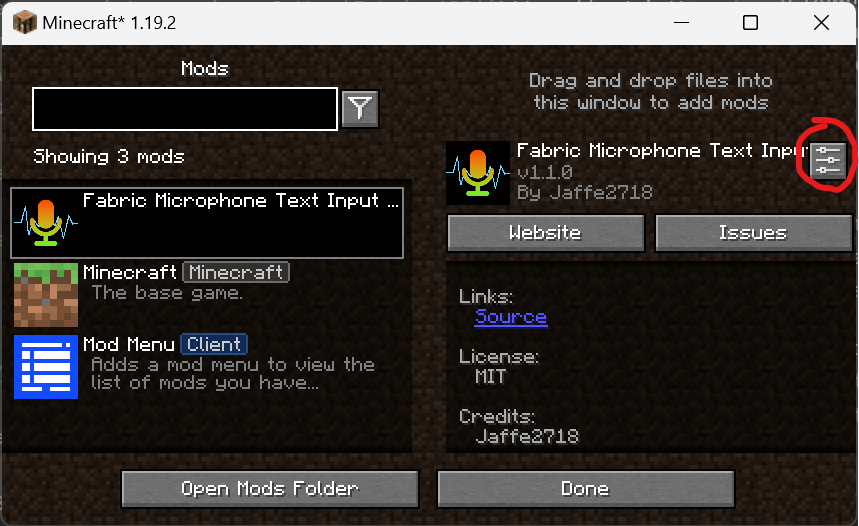
  2. Configure the mod according to your needs in the configuration menu.
  3. Use the keybinding you set (default is V) to start recording and speech recognition.
  4. If the mode is set to AUTO_SEND, the recognized text will be automatically sent as a chat message. If set to RELEASE_KEY_TO_SEND or RELEASE_KEY_TO_INPUT, follow the corresponding key - release actions.

Use VAD

If you want to use VAD (Voice Activity Detection), you need to download VAD model, enable the advanced configuration and set the vad_model_path to the path of the VAD model in the configuration menu.

Custom Dynamic Library

  1. Download the custom dynamic library from Jaffe2718/whisper-jni and extract the files.
  2. Enable the advanced configuration and set the useCustomDynamicLib to true in the configuration menu.
  3. Set the customDynamicLibDir to the directory where the custom dynamic library is located in the configuration menu.
  4. If you want to use the dynamic library which is supported vulkan, check your check that your computer has drivers and libraries running Vulkan installed.
    vulkaninfo
    
  5. If you want to use CUDA, check that your computer has drivers and libraries running CUDA installed.
    nvidia-smi
    
    For Linux, you need to install CUDA Toolkit >= 12.4.0 and configure the environment variables. For Windows, if the game crashes, you have to force the game to use the Java >= 25, see Jaffe2718/whisper-jni/v0.5.6

Troubleshooting

  • Crash on Startup: Please check the compatibility and version of your use of the dynamic link library. You can disable the advanced configuration and set the useCustomDynamicLib to false to use the default dynamic library (CPU version).
  • Audio Input Device Load Failed: Please check if Java has access to the audio input device.
  • Whisper Model Load Failed: Make sure the path to the GGML Whisper model is correct.

Contributing

If you'd like to contribute to this project, please feel free to submit issues or pull requests on GitHub.

Галерея

1.1.0 icon

Последние версии

Все версии →
release

3.0.1+26.1.2-neoforge

3.0.1+26.1.2-neoforge
14 мая 2026 г.538Minecraft: 26.1, 26.1.1, 26.1.2neoforge
Скачать
Что нового
## Changelog 1. adjust: use comment format for recognizer; ## Download Whisper Model - [Official Whisper GGML Model](https://huggingface.co/ggerganov/whisper.cpp/tree/main) - [Unofficial Whisper GGML Model](https://huggingface.co/Jaffe2718/ggml-whisper-unofficial/tree/main) - [VAD Model](https://huggingface.co/ggml-org/whisper-vad) ## Dependencies | Minecraft | Fabric | NeoForge | |-----------|-----------------------------------------------------------------------------------------------------------------------------------------------------------------------------------------|------------------------------------------------------------------------------------------------| | 26.1 | [fabric-api 0.148.2+26.1.2](https://modrinth.com/mod/fabric-api/version/0.148.2+26.1.2) <br> [midnightlib 1.9.3-fabric](https://modrinth.com/mod/midnightlib/version/1.9.3+26.1-fabric) | [midnightlib 1.9.3-neoforge](https://modrinth.com/mod/midnightlib/version/1.9.3+26.1-neoforge) | | 26.1.1 | [fabric-api 0.148.2+26.1.2](https://modrinth.com/mod/fabric-api/version/0.148.2+26.1.2) <br> [midnightlib 1.9.3-fabric](https://modrinth.com/mod/midnightlib/version/1.9.3+26.1-fabric) | [midnightlib 1.9.3-neoforge](https://modrinth.com/mod/midnightlib/version/1.9.3+26.1-neoforge) | | 26.1.2 | [fabric-api 0.148.2+26.1.2](https://modrinth.com/mod/fabric-api/version/0.148.2+26.1.2) <br> [midnightlib 1.9.3-fabric](https://modrinth.com/mod/midnightlib/version/1.9.3+26.1-fabric) | [midnightlib 1.9.3-neoforge](https://modrinth.com/mod/midnightlib/version/1.9.3+26.1-neoforge) | ## Compatibility | | Windows | Linux | MacOS | |-------------------|---------------------------------|---------------------------------|---------------------------------| | x86_64 | Compatible | Compatible | Compatible | | arm64 | Not compatible | Compatible | Compatible | | x86_64 + Vulkan | External dynamic library needed | External dynamic library needed | External dynamic library needed | | arm64 + Vulkan | Not compatible | External dynamic library needed | External dynamic library needed | | x86_64 + openBLAS | External dynamic library needed | Not compatible | Not compatible | | x86_64 + CUDA | External dynamic library needed | External dynamic library needed | Not compatible | ### NOTE The provided dynamic link libraries of `Vulkan` and `CUDA` in [GitHub Releases](https://github.com/Jaffe2718/whisper-jni/releases/tag/v1.0.1) are compiled on `ubuntu-22.04` with `GLIBC 2.35`, and may not be compatible with all Linux distributions. There are some solutions that may work, if your game crashes and it is confirmed in the crash log that it is incompatible between GLIBC versions, you can try any of the following: 1. Use a different version of GLIBC (recommended) 1. Check the environment variables for `Vulkan` or `CUDA Toolkit 12.4` 2. Download [glibc-2.35.tar.gz](https://ftp.gnu.org/pub/gnu/glibc/glibc-2.35.tar.gz) 3. Compile & install at `/path/to/your/glibc-2.35`, **DO NOT** replace the system `glibc` and **DO NOT** set up any global environment variables for it 4. Use some launcher that supports custom environment variables, such as [Prism Launcher](https://prismlauncher.org/wiki/help-pages/environment-variables/), set `LD_LIBRARY_PATH` to `/path/to/your/glibc-2.35/lib64` 2. Compile the dynamic link library yourself and edit the config file of the mod 1. Clone the [Jaffe2718/whisper-jni](https://github.com/Jaffe2718/whisper-jni) repository: `git clone https://github.com/Jaffe2718/whisper-jni.git` 2. Switch to the tag `v1.0.1`: `cd whisper-jni && git checkout v1.0.1` 3. Install `Vulkan SDK` and `ShaderC` for building `Vulkan` dynamic link library, or `CUDA Toolkit 12.4` for building `CUDA` dynamic link library 4. Build ## Custom Dynamic Library 1. Download the custom dynamic library from [Jaffe2718/whisper-jni](https://github.com/Jaffe2718/whisper-jni/releases/tag/v1.0.1) and extract the files, * *DO NOT USE OTHER VERSIONS** 2. Enable the advanced configuration and set the `useCustomDynamicLib` to `true` in the configuration menu. 3. Set the `customDynamicLibDir` to the directory where the custom dynamic library is located in the configuration menu. 4. If you want to use the dynamic library which is supported vulkan, check your check that your computer has drivers and libraries running Vulkan installed. ```shell vulkaninfo ``` 5. If you want to use CUDA, check that your computer has drivers and libraries running CUDA installed. ```shell nvidia-smi ``` For Linux, you need to install `CUDA Toolkit >= 12.4.0` and configure the environment variables. For Windows, if the game crashes, you have to force the game to use the `Java >= 25`, see [Jaffe2718/whisper-jni/v1.0.1](https://github.com/Jaffe2718/whisper-jni/releases/tag/v1.0.1)
release

3.0.1+26.1.2-fabric

3.0.1+26.1.2-fabric
14 мая 2026 г.1,2 тыс.Minecraft: 26.1, 26.1.1, 26.1.2fabric, quilt
Скачать
Что нового
## Changelog 1. adjust: use comment format for recognizer; ## Download Whisper Model - [Official Whisper GGML Model](https://huggingface.co/ggerganov/whisper.cpp/tree/main) - [Unofficial Whisper GGML Model](https://huggingface.co/Jaffe2718/ggml-whisper-unofficial/tree/main) - [VAD Model](https://huggingface.co/ggml-org/whisper-vad) ## Dependencies | Minecraft | Fabric | NeoForge | |-----------|-----------------------------------------------------------------------------------------------------------------------------------------------------------------------------------------|------------------------------------------------------------------------------------------------| | 26.1 | [fabric-api 0.148.2+26.1.2](https://modrinth.com/mod/fabric-api/version/0.148.2+26.1.2) <br> [midnightlib 1.9.3-fabric](https://modrinth.com/mod/midnightlib/version/1.9.3+26.1-fabric) | [midnightlib 1.9.3-neoforge](https://modrinth.com/mod/midnightlib/version/1.9.3+26.1-neoforge) | | 26.1.1 | [fabric-api 0.148.2+26.1.2](https://modrinth.com/mod/fabric-api/version/0.148.2+26.1.2) <br> [midnightlib 1.9.3-fabric](https://modrinth.com/mod/midnightlib/version/1.9.3+26.1-fabric) | [midnightlib 1.9.3-neoforge](https://modrinth.com/mod/midnightlib/version/1.9.3+26.1-neoforge) | | 26.1.2 | [fabric-api 0.148.2+26.1.2](https://modrinth.com/mod/fabric-api/version/0.148.2+26.1.2) <br> [midnightlib 1.9.3-fabric](https://modrinth.com/mod/midnightlib/version/1.9.3+26.1-fabric) | [midnightlib 1.9.3-neoforge](https://modrinth.com/mod/midnightlib/version/1.9.3+26.1-neoforge) | ## Compatibility | | Windows | Linux | MacOS | |-------------------|---------------------------------|---------------------------------|---------------------------------| | x86_64 | Compatible | Compatible | Compatible | | arm64 | Not compatible | Compatible | Compatible | | x86_64 + Vulkan | External dynamic library needed | External dynamic library needed | External dynamic library needed | | arm64 + Vulkan | Not compatible | External dynamic library needed | External dynamic library needed | | x86_64 + openBLAS | External dynamic library needed | Not compatible | Not compatible | | x86_64 + CUDA | External dynamic library needed | External dynamic library needed | Not compatible | ### NOTE The provided dynamic link libraries of `Vulkan` and `CUDA` in [GitHub Releases](https://github.com/Jaffe2718/whisper-jni/releases/tag/v1.0.1) are compiled on `ubuntu-22.04` with `GLIBC 2.35`, and may not be compatible with all Linux distributions. There are some solutions that may work, if your game crashes and it is confirmed in the crash log that it is incompatible between GLIBC versions, you can try any of the following: 1. Use a different version of GLIBC (recommended) 1. Check the environment variables for `Vulkan` or `CUDA Toolkit 12.4` 2. Download [glibc-2.35.tar.gz](https://ftp.gnu.org/pub/gnu/glibc/glibc-2.35.tar.gz) 3. Compile & install at `/path/to/your/glibc-2.35`, **DO NOT** replace the system `glibc` and **DO NOT** set up any global environment variables for it 4. Use some launcher that supports custom environment variables, such as [Prism Launcher](https://prismlauncher.org/wiki/help-pages/environment-variables/), set `LD_LIBRARY_PATH` to `/path/to/your/glibc-2.35/lib64` 2. Compile the dynamic link library yourself and edit the config file of the mod 1. Clone the [Jaffe2718/whisper-jni](https://github.com/Jaffe2718/whisper-jni) repository: `git clone https://github.com/Jaffe2718/whisper-jni.git` 2. Switch to the tag `v1.0.1`: `cd whisper-jni && git checkout v1.0.1` 3. Install `Vulkan SDK` and `ShaderC` for building `Vulkan` dynamic link library, or `CUDA Toolkit 12.4` for building `CUDA` dynamic link library 4. Build ## Custom Dynamic Library 1. Download the custom dynamic library from [Jaffe2718/whisper-jni](https://github.com/Jaffe2718/whisper-jni/releases/tag/v1.0.1) and extract the files, * *DO NOT USE OTHER VERSIONS** 2. Enable the advanced configuration and set the `useCustomDynamicLib` to `true` in the configuration menu. 3. Set the `customDynamicLibDir` to the directory where the custom dynamic library is located in the configuration menu. 4. If you want to use the dynamic library which is supported vulkan, check your check that your computer has drivers and libraries running Vulkan installed. ```shell vulkaninfo ``` 5. If you want to use CUDA, check that your computer has drivers and libraries running CUDA installed. ```shell nvidia-smi ``` For Linux, you need to install `CUDA Toolkit >= 12.4.0` and configure the environment variables. For Windows, if the game crashes, you have to force the game to use the `Java >= 25`, see [Jaffe2718/whisper-jni/v1.0.1](https://github.com/Jaffe2718/whisper-jni/releases/tag/v1.0.1)
release

3.0.0+26.1.1-neoforge

3.0.0+26.1.1-neoforge
11 апр. 2026 г.82Minecraft: 26.1, 26.1.1, 26.1.2neoforge
Скачать
Что нового
## Changelog 1. feature: support developers to extend custom speech recognition mod (need to refer to this mod as a dependency to develop new mod); 2. feature: support event listeners for developers; 3. adjust: optimize lifecycle of the recognizers; 4. adjust: remove architectury dependency; 5. fix: resolved an issue where there was no warning when advanced config were turned on; ## Download Whisper Model - [Official Whisper GGML Model](https://huggingface.co/ggerganov/whisper.cpp/tree/main) - [Unofficial Whisper GGML Model](https://huggingface.co/Jaffe2718/ggml-whisper-unofficial/tree/main) - [VAD Model](https://huggingface.co/ggml-org/whisper-vad) ## Dependencies | Minecraft | Fabric | NeoForge | |-----------|-----------------------------------------------------------------------------------------------------------------------------------------------------------------------------------------|------------------------------------------------------------------------------------------------| | 26.1 | [fabric-api 0.145.3+26.1.1](https://modrinth.com/mod/fabric-api/version/0.145.3+26.1.1) <br> [midnightlib 1.9.2-fabric](https://modrinth.com/mod/midnightlib/version/1.9.2+26.1-fabric) | [midnightlib 1.9.2-neoforge](https://modrinth.com/mod/midnightlib/version/1.9.2+26.1-neoforge) | | 26.1.1 | [fabric-api 0.145.3+26.1.1](https://modrinth.com/mod/fabric-api/version/0.145.3+26.1.1) <br> [midnightlib 1.9.2-fabric](https://modrinth.com/mod/midnightlib/version/1.9.2+26.1-fabric) | [midnightlib 1.9.2-neoforge](https://modrinth.com/mod/midnightlib/version/1.9.2+26.1-neoforge) | ## Compatibility | | Windows | Linux | MacOS | |-------------------|---------------------------------|---------------------------------|---------------------------------| | x86_64 | Compatible | Compatible | Compatible | | arm64 | Not compatible | Compatible | Compatible | | x86_64 + Vulkan | External dynamic library needed | External dynamic library needed | External dynamic library needed | | arm64 + Vulkan | Not compatible | External dynamic library needed | External dynamic library needed | | x86_64 + openBLAS | External dynamic library needed | Not compatible | Not compatible | | x86_64 + CUDA | External dynamic library needed | External dynamic library needed | Not compatible | ### NOTE The provided dynamic link libraries of `Vulkan` and `CUDA` in [GitHub Releases](https://github.com/Jaffe2718/whisper-jni/releases/tag/v1.0.1) are compiled on `ubuntu-22.04` with `GLIBC 2.35`, and may not be compatible with all Linux distributions. There are some solutions that may work, if your game crashes and it is confirmed in the crash log that it is incompatible between GLIBC versions, you can try any of the following: 1. Use a different version of GLIBC (recommended) 1. Check the environment variables for `Vulkan` or `CUDA Toolkit 12.4` 2. Download [glibc-2.35.tar.gz](https://ftp.gnu.org/pub/gnu/glibc/glibc-2.35.tar.gz) 3. Compile & install at `/path/to/your/glibc-2.35`, **DO NOT** replace the system `glibc` and **DO NOT** set up any global environment variables for it 4. Use some launcher that supports custom environment variables, such as [Prism Launcher](https://prismlauncher.org/wiki/help-pages/environment-variables/), set `LD_LIBRARY_PATH` to `/path/to/your/glibc-2.35/lib64` 2. Compile the dynamic link library yourself and edit the config file of the mod 1. Clone the [Jaffe2718/whisper-jni](https://github.com/Jaffe2718/whisper-jni) repository: `git clone https://github.com/Jaffe2718/whisper-jni.git` 2. Switch to the tag `v1.0.1`: `cd whisper-jni && git checkout v1.0.1` 3. Install `Vulkan SDK` and `ShaderC` for building `Vulkan` dynamic link library, or `CUDA Toolkit 12.4` for building `CUDA` dynamic link library 4. Build ## Custom Dynamic Library 1. Download the custom dynamic library from [Jaffe2718/whisper-jni](https://github.com/Jaffe2718/whisper-jni/releases/tag/v1.0.1) and extract the files, * *DO NOT USE OTHER VERSIONS** 2. Enable the advanced configuration and set the `useCustomDynamicLib` to `true` in the configuration menu. 3. Set the `customDynamicLibDir` to the directory where the custom dynamic library is located in the configuration menu. 4. If you want to use the dynamic library which is supported vulkan, check your check that your computer has drivers and libraries running Vulkan installed. ```shell vulkaninfo ``` 5. If you want to use CUDA, check that your computer has drivers and libraries running CUDA installed. ```shell nvidia-smi ``` For Linux, you need to install `CUDA Toolkit >= 12.4.0` and configure the environment variables. For Windows, if the game crashes, you have to force the game to use the `Java >= 25`, see [Jaffe2718/whisper-jni/v1.0.1](https://github.com/Jaffe2718/whisper-jni/releases/tag/v1.0.1)
release

3.0.0+26.1.1-fabric

3.0.0+26.1.1-fabric
11 апр. 2026 г.236Minecraft: 26.1, 26.1.1, 26.1.2fabric, quilt
Скачать
Что нового
## Changelog 1. feature: support developers to extend custom speech recognition mod (need to refer to this mod as a dependency to develop new mod); 2. feature: support event listeners for developers; 3. adjust: optimize lifecycle of the recognizers; 4. adjust: remove architectury dependency; 5. fix: resolved an issue where there was no warning when advanced config were turned on; ## Download Whisper Model - [Official Whisper GGML Model](https://huggingface.co/ggerganov/whisper.cpp/tree/main) - [Unofficial Whisper GGML Model](https://huggingface.co/Jaffe2718/ggml-whisper-unofficial/tree/main) - [VAD Model](https://huggingface.co/ggml-org/whisper-vad) ## Dependencies | Minecraft | Fabric | NeoForge | |-----------|-----------------------------------------------------------------------------------------------------------------------------------------------------------------------------------------|------------------------------------------------------------------------------------------------| | 26.1 | [fabric-api 0.145.3+26.1.1](https://modrinth.com/mod/fabric-api/version/0.145.3+26.1.1) <br> [midnightlib 1.9.2-fabric](https://modrinth.com/mod/midnightlib/version/1.9.2+26.1-fabric) | [midnightlib 1.9.2-neoforge](https://modrinth.com/mod/midnightlib/version/1.9.2+26.1-neoforge) | | 26.1.1 | [fabric-api 0.145.3+26.1.1](https://modrinth.com/mod/fabric-api/version/0.145.3+26.1.1) <br> [midnightlib 1.9.2-fabric](https://modrinth.com/mod/midnightlib/version/1.9.2+26.1-fabric) | [midnightlib 1.9.2-neoforge](https://modrinth.com/mod/midnightlib/version/1.9.2+26.1-neoforge) | ## Compatibility | | Windows | Linux | MacOS | |-------------------|---------------------------------|---------------------------------|---------------------------------| | x86_64 | Compatible | Compatible | Compatible | | arm64 | Not compatible | Compatible | Compatible | | x86_64 + Vulkan | External dynamic library needed | External dynamic library needed | External dynamic library needed | | arm64 + Vulkan | Not compatible | External dynamic library needed | External dynamic library needed | | x86_64 + openBLAS | External dynamic library needed | Not compatible | Not compatible | | x86_64 + CUDA | External dynamic library needed | External dynamic library needed | Not compatible | ### NOTE The provided dynamic link libraries of `Vulkan` and `CUDA` in [GitHub Releases](https://github.com/Jaffe2718/whisper-jni/releases/tag/v1.0.1) are compiled on `ubuntu-22.04` with `GLIBC 2.35`, and may not be compatible with all Linux distributions. There are some solutions that may work, if your game crashes and it is confirmed in the crash log that it is incompatible between GLIBC versions, you can try any of the following: 1. Use a different version of GLIBC (recommended) 1. Check the environment variables for `Vulkan` or `CUDA Toolkit 12.4` 2. Download [glibc-2.35.tar.gz](https://ftp.gnu.org/pub/gnu/glibc/glibc-2.35.tar.gz) 3. Compile & install at `/path/to/your/glibc-2.35`, **DO NOT** replace the system `glibc` and **DO NOT** set up any global environment variables for it 4. Use some launcher that supports custom environment variables, such as [Prism Launcher](https://prismlauncher.org/wiki/help-pages/environment-variables/), set `LD_LIBRARY_PATH` to `/path/to/your/glibc-2.35/lib64` 2. Compile the dynamic link library yourself and edit the config file of the mod 1. Clone the [Jaffe2718/whisper-jni](https://github.com/Jaffe2718/whisper-jni) repository: `git clone https://github.com/Jaffe2718/whisper-jni.git` 2. Switch to the tag `v1.0.1`: `cd whisper-jni && git checkout v1.0.1` 3. Install `Vulkan SDK` and `ShaderC` for building `Vulkan` dynamic link library, or `CUDA Toolkit 12.4` for building `CUDA` dynamic link library 4. Build ## Custom Dynamic Library 1. Download the custom dynamic library from [Jaffe2718/whisper-jni](https://github.com/Jaffe2718/whisper-jni/releases/tag/v1.0.1) and extract the files, * *DO NOT USE OTHER VERSIONS** 2. Enable the advanced configuration and set the `useCustomDynamicLib` to `true` in the configuration menu. 3. Set the `customDynamicLibDir` to the directory where the custom dynamic library is located in the configuration menu. 4. If you want to use the dynamic library which is supported vulkan, check your check that your computer has drivers and libraries running Vulkan installed. ```shell vulkaninfo ``` 5. If you want to use CUDA, check that your computer has drivers and libraries running CUDA installed. ```shell nvidia-smi ``` For Linux, you need to install `CUDA Toolkit >= 12.4.0` and configure the environment variables. For Windows, if the game crashes, you have to force the game to use the `Java >= 25`, see [Jaffe2718/whisper-jni/v1.0.1](https://github.com/Jaffe2718/whisper-jni/releases/tag/v1.0.1)
release

2.2.1-neoforge

2.2.1-neoforge
11 февр. 2026 г.471Minecraft: 1.21.11neoforge
Скачать
Что нового
## Changelog 1. adjust: optimize toast messages ## Download Whisper Model - [Official Whisper GGML Model](https://huggingface.co/ggerganov/whisper.cpp/tree/main) - [Unofficial Whisper GGML Model](https://huggingface.co/Jaffe2718/ggml-whisper-unofficial/tree/main) - [VAD Model](https://huggingface.co/ggml-org/whisper-vad) ## Dependencies | Minecraft | Fabric | NeoForge | |-----------|----------------------------------------------------------------------------------------------------------------------------------------------------------------------------------------------|--------------------------------------------------------------------------------------------------------------------------------------------------------------------------------------------------------------| | 1.21.11 | [fabric-api 0.141.3+1.21.11](https://modrinth.com/mod/fabric-api/version/0.141.3+1.21.11) <br> [midnightlib 1.9.2-fabric](https://modrinth.com/mod/midnightlib/version/1.9.2+1.21.11-fabric) | [architechury-api 19.0.1+neoforge](https://modrinth.com/mod/architectury-api/version/19.0.1+neoforge) <br> [midnightlib 1.9.2-neoforge](https://modrinth.com/mod/midnightlib/version/1.9.2+1.21.11-neoforge) | ## Compatibility | | Windows | Linux | MacOS | |-------------------|---------------------------------|---------------------------------|---------------------------------| | x86_64 | Compatible | Compatible | Compatible | | arm64 | Not compatible | Compatible | Compatible | | x86_64 + Vulkan | External dynamic library needed | External dynamic library needed | External dynamic library needed | | arm64 + Vulkan | Not compatible | External dynamic library needed | External dynamic library needed | | x86_64 + openBLAS | External dynamic library needed | Not compatible | Not compatible | | x86_64 + CUDA | External dynamic library needed | External dynamic library needed | Not compatible | ### NOTE The provided dynamic link libraries of `Vulkan` and `CUDA` in [GitHub Releases](https://github.com/Jaffe2718/whisper-jni/releases/tag/v1.0.1) are compiled on `ubuntu-22.04` with `GLIBC 2.35`, and may not be compatible with all Linux distributions. There are some solutions that may work, if your game crashes and it is confirmed in the crash log that it is incompatible between GLIBC versions, you can try any of the following: 1. Use a different version of GLIBC (recommended) 1. Check the environment variables for `Vulkan` or `CUDA Toolkit 12.4` 2. Download [glibc-2.35.tar.gz](https://ftp.gnu.org/pub/gnu/glibc/glibc-2.35.tar.gz) 3. Compile & install at `/path/to/your/glibc-2.35`, **DO NOT** replace the system `glibc` and **DO NOT** set up any global environment variables for it 4. Use some launcher that supports custom environment variables, such as [Prism Launcher](https://prismlauncher.org/wiki/help-pages/environment-variables/), set `LD_LIBRARY_PATH` to `/path/to/your/glibc-2.35/lib64` 2. Compile the dynamic link library yourself and edit the config file of the mod 1. Clone the [Jaffe2718/whisper-jni](https://github.com/Jaffe2718/whisper-jni) repository: `git clone https://github.com/Jaffe2718/whisper-jni.git` 2. Switch to the tag `v1.0.1`: `cd whisper-jni && git checkout v1.0.1` 3. Install `Vulkan SDK` and `ShaderC` for building `Vulkan` dynamic link library, or `CUDA Toolkit 12.4` for building `CUDA` dynamic link library 4. Build ## Custom Dynamic Library 1. Download the custom dynamic library from [Jaffe2718/whisper-jni](https://github.com/Jaffe2718/whisper-jni/releases/tag/v1.0.1) and extract the files, * *DO NOT USE OTHER VERSIONS** 2. Enable the advanced configuration and set the `useCustomDynamicLib` to `true` in the configuration menu. 3. Set the `customDynamicLibDir` to the directory where the custom dynamic library is located in the configuration menu. 4. If you want to use the dynamic library which is supported vulkan, check your check that your computer has drivers and libraries running Vulkan installed. ```shell vulkaninfo ``` 5. If you want to use CUDA, check that your computer has drivers and libraries running CUDA installed. ```shell nvidia-smi ``` For Linux, you need to install `CUDA Toolkit >= 12.4.0` and configure the environment variables. For Windows, if the game crashes, you have to force the game to use the `Java >= 25`, see [Jaffe2718/whisper-jni/v1.0.1](https://github.com/Jaffe2718/whisper-jni/releases/tag/v1.0.1)
release

2.2.1-fabric

2.2.1-fabric
11 февр. 2026 г.2,1 тыс.Minecraft: 1.21.11fabric, quilt
Скачать
Что нового
## Changelog 1. adjust: optimize toast messages ## Download Whisper Model - [Official Whisper GGML Model](https://huggingface.co/ggerganov/whisper.cpp/tree/main) - [Unofficial Whisper GGML Model](https://huggingface.co/Jaffe2718/ggml-whisper-unofficial/tree/main) - [VAD Model](https://huggingface.co/ggml-org/whisper-vad) ## Dependencies | Minecraft | Fabric | NeoForge | |-----------|----------------------------------------------------------------------------------------------------------------------------------------------------------------------------------------------|--------------------------------------------------------------------------------------------------------------------------------------------------------------------------------------------------------------| | 1.21.11 | [fabric-api 0.141.3+1.21.11](https://modrinth.com/mod/fabric-api/version/0.141.3+1.21.11) <br> [midnightlib 1.9.2-fabric](https://modrinth.com/mod/midnightlib/version/1.9.2+1.21.11-fabric) | [architechury-api 19.0.1+neoforge](https://modrinth.com/mod/architectury-api/version/19.0.1+neoforge) <br> [midnightlib 1.9.2-neoforge](https://modrinth.com/mod/midnightlib/version/1.9.2+1.21.11-neoforge) | ## Compatibility | | Windows | Linux | MacOS | |-------------------|---------------------------------|---------------------------------|---------------------------------| | x86_64 | Compatible | Compatible | Compatible | | arm64 | Not compatible | Compatible | Compatible | | x86_64 + Vulkan | External dynamic library needed | External dynamic library needed | External dynamic library needed | | arm64 + Vulkan | Not compatible | External dynamic library needed | External dynamic library needed | | x86_64 + openBLAS | External dynamic library needed | Not compatible | Not compatible | | x86_64 + CUDA | External dynamic library needed | External dynamic library needed | Not compatible | ### NOTE The provided dynamic link libraries of `Vulkan` and `CUDA` in [GitHub Releases](https://github.com/Jaffe2718/whisper-jni/releases/tag/v1.0.1) are compiled on `ubuntu-22.04` with `GLIBC 2.35`, and may not be compatible with all Linux distributions. There are some solutions that may work, if your game crashes and it is confirmed in the crash log that it is incompatible between GLIBC versions, you can try any of the following: 1. Use a different version of GLIBC (recommended) 1. Check the environment variables for `Vulkan` or `CUDA Toolkit 12.4` 2. Download [glibc-2.35.tar.gz](https://ftp.gnu.org/pub/gnu/glibc/glibc-2.35.tar.gz) 3. Compile & install at `/path/to/your/glibc-2.35`, **DO NOT** replace the system `glibc` and **DO NOT** set up any global environment variables for it 4. Use some launcher that supports custom environment variables, such as [Prism Launcher](https://prismlauncher.org/wiki/help-pages/environment-variables/), set `LD_LIBRARY_PATH` to `/path/to/your/glibc-2.35/lib64` 2. Compile the dynamic link library yourself and edit the config file of the mod 1. Clone the [Jaffe2718/whisper-jni](https://github.com/Jaffe2718/whisper-jni) repository: `git clone https://github.com/Jaffe2718/whisper-jni.git` 2. Switch to the tag `v1.0.1`: `cd whisper-jni && git checkout v1.0.1` 3. Install `Vulkan SDK` and `ShaderC` for building `Vulkan` dynamic link library, or `CUDA Toolkit 12.4` for building `CUDA` dynamic link library 4. Build ## Custom Dynamic Library 1. Download the custom dynamic library from [Jaffe2718/whisper-jni](https://github.com/Jaffe2718/whisper-jni/releases/tag/v1.0.1) and extract the files, * *DO NOT USE OTHER VERSIONS** 2. Enable the advanced configuration and set the `useCustomDynamicLib` to `true` in the configuration menu. 3. Set the `customDynamicLibDir` to the directory where the custom dynamic library is located in the configuration menu. 4. If you want to use the dynamic library which is supported vulkan, check your check that your computer has drivers and libraries running Vulkan installed. ```shell vulkaninfo ``` 5. If you want to use CUDA, check that your computer has drivers and libraries running CUDA installed. ```shell nvidia-smi ``` For Linux, you need to install `CUDA Toolkit >= 12.4.0` and configure the environment variables. For Windows, if the game crashes, you have to force the game to use the `Java >= 25`, see [Jaffe2718/whisper-jni/v1.0.1](https://github.com/Jaffe2718/whisper-jni/releases/tag/v1.0.1)
release

2.2.1-neoforge

2.2.1-neoforge
11 февр. 2026 г.90Minecraft: 1.21.9, 1.21.10neoforge
Скачать
Что нового
## Changelog 1. adjust: optimize toast messages ## Download Whisper Model - [Official Whisper GGML Model](https://huggingface.co/ggerganov/whisper.cpp/tree/main) - [Unofficial Whisper GGML Model](https://huggingface.co/Jaffe2718/ggml-whisper-unofficial/tree/main) - [VAD Model](https://huggingface.co/ggml-org/whisper-vad) ## Dependencies | Minecraft | Fabric | NeoForge | |-----------|----------------------------------------------------------------------------------------------------------------------------------------------------------------------------------------------|--------------------------------------------------------------------------------------------------------------------------------------------------------------------------------------------------------------| | 1.21.9 | [fabric-api 0.134.1+1.21.9](https://modrinth.com/mod/fabric-api/version/0.134.1+1.21.9) <br> [midnightlib 1.9.2-fabric](https://modrinth.com/mod/midnightlib/version/1.9.2+1.21.10-fabric) | [architechury-api 18.0.5+neoforge](https://modrinth.com/mod/architectury-api/version/18.0.5+neoforge) <br> [midnightlib 1.9.2-neoforge](https://modrinth.com/mod/midnightlib/version/1.9.2+1.21.10-neoforge) | | 1.21.10 | [fabric-api 0.138.4+1.21.10](https://modrinth.com/mod/fabric-api/version/0.138.4+1.21.10) <br> [midnightlib 1.9.2-fabric](https://modrinth.com/mod/midnightlib/version/1.9.2+1.21.10-fabric) | [architechury-api 18.0.8+neoforge](https://modrinth.com/mod/architectury-api/version/18.0.8+neoforge) <br> [midnightlib 1.9.2-neoforge](https://modrinth.com/mod/midnightlib/version/1.9.2+1.21.10-neoforge) | ## Compatibility | | Windows | Linux | MacOS | |-------------------|---------------------------------|---------------------------------|---------------------------------| | x86_64 | Compatible | Compatible | Compatible | | arm64 | Not compatible | Compatible | Compatible | | x86_64 + Vulkan | External dynamic library needed | External dynamic library needed | External dynamic library needed | | arm64 + Vulkan | Not compatible | External dynamic library needed | External dynamic library needed | | x86_64 + openBLAS | External dynamic library needed | Not compatible | Not compatible | | x86_64 + CUDA | External dynamic library needed | External dynamic library needed | Not compatible | ### NOTE The provided dynamic link libraries of `Vulkan` and `CUDA` in [GitHub Releases](https://github.com/Jaffe2718/whisper-jni/releases/tag/v1.0.1) are compiled on `ubuntu-22.04` with `GLIBC 2.35`, and may not be compatible with all Linux distributions. There are some solutions that may work, if your game crashes and it is confirmed in the crash log that it is incompatible between GLIBC versions, you can try any of the following: 1. Use a different version of GLIBC (recommended) 1. Check the environment variables for `Vulkan` or `CUDA Toolkit 12.4` 2. Download [glibc-2.35.tar.gz](https://ftp.gnu.org/pub/gnu/glibc/glibc-2.35.tar.gz) 3. Compile & install at `/path/to/your/glibc-2.35`, **DO NOT** replace the system `glibc` and **DO NOT** set up any global environment variables for it 4. Use some launcher that supports custom environment variables, such as [Prism Launcher](https://prismlauncher.org/wiki/help-pages/environment-variables/), set `LD_LIBRARY_PATH` to `/path/to/your/glibc-2.35/lib64` 2. Compile the dynamic link library yourself and edit the config file of the mod 1. Clone the [Jaffe2718/whisper-jni](https://github.com/Jaffe2718/whisper-jni) repository: `git clone https://github.com/Jaffe2718/whisper-jni.git` 2. Switch to the tag `v1.0.1`: `cd whisper-jni && git checkout v1.0.1` 3. Install `Vulkan SDK` and `ShaderC` for building `Vulkan` dynamic link library, or `CUDA Toolkit 12.4` for building `CUDA` dynamic link library 4. Build ## Custom Dynamic Library 1. Download the custom dynamic library from [Jaffe2718/whisper-jni](https://github.com/Jaffe2718/whisper-jni/releases/tag/v1.0.1) and extract the files, * *DO NOT USE OTHER VERSIONS** 2. Enable the advanced configuration and set the `useCustomDynamicLib` to `true` in the configuration menu. 3. Set the `customDynamicLibDir` to the directory where the custom dynamic library is located in the configuration menu. 4. If you want to use the dynamic library which is supported vulkan, check your check that your computer has drivers and libraries running Vulkan installed. ```shell vulkaninfo ``` 5. If you want to use CUDA, check that your computer has drivers and libraries running CUDA installed. ```shell nvidia-smi ``` For Linux, you need to install `CUDA Toolkit >= 12.4.0` and configure the environment variables. For Windows, if the game crashes, you have to force the game to use the `Java >= 25`, see [Jaffe2718/whisper-jni/v1.0.1](https://github.com/Jaffe2718/whisper-jni/releases/tag/v1.0.1)
release

2.2.1-fabric

2.2.1-fabric
11 февр. 2026 г.226Minecraft: 1.21.9, 1.21.10fabric, quilt
Скачать
Что нового
## Changelog 1. adjust: optimize toast messages ## Download Whisper Model - [Official Whisper GGML Model](https://huggingface.co/ggerganov/whisper.cpp/tree/main) - [Unofficial Whisper GGML Model](https://huggingface.co/Jaffe2718/ggml-whisper-unofficial/tree/main) - [VAD Model](https://huggingface.co/ggml-org/whisper-vad) ## Dependencies | Minecraft | Fabric | NeoForge | |-----------|----------------------------------------------------------------------------------------------------------------------------------------------------------------------------------------------|--------------------------------------------------------------------------------------------------------------------------------------------------------------------------------------------------------------| | 1.21.9 | [fabric-api 0.134.1+1.21.9](https://modrinth.com/mod/fabric-api/version/0.134.1+1.21.9) <br> [midnightlib 1.9.2-fabric](https://modrinth.com/mod/midnightlib/version/1.9.2+1.21.10-fabric) | [architechury-api 18.0.5+neoforge](https://modrinth.com/mod/architectury-api/version/18.0.5+neoforge) <br> [midnightlib 1.9.2-neoforge](https://modrinth.com/mod/midnightlib/version/1.9.2+1.21.10-neoforge) | | 1.21.10 | [fabric-api 0.138.4+1.21.10](https://modrinth.com/mod/fabric-api/version/0.138.4+1.21.10) <br> [midnightlib 1.9.2-fabric](https://modrinth.com/mod/midnightlib/version/1.9.2+1.21.10-fabric) | [architechury-api 18.0.8+neoforge](https://modrinth.com/mod/architectury-api/version/18.0.8+neoforge) <br> [midnightlib 1.9.2-neoforge](https://modrinth.com/mod/midnightlib/version/1.9.2+1.21.10-neoforge) | ## Compatibility | | Windows | Linux | MacOS | |-------------------|---------------------------------|---------------------------------|---------------------------------| | x86_64 | Compatible | Compatible | Compatible | | arm64 | Not compatible | Compatible | Compatible | | x86_64 + Vulkan | External dynamic library needed | External dynamic library needed | External dynamic library needed | | arm64 + Vulkan | Not compatible | External dynamic library needed | External dynamic library needed | | x86_64 + openBLAS | External dynamic library needed | Not compatible | Not compatible | | x86_64 + CUDA | External dynamic library needed | External dynamic library needed | Not compatible | ### NOTE The provided dynamic link libraries of `Vulkan` and `CUDA` in [GitHub Releases](https://github.com/Jaffe2718/whisper-jni/releases/tag/v1.0.1) are compiled on `ubuntu-22.04` with `GLIBC 2.35`, and may not be compatible with all Linux distributions. There are some solutions that may work, if your game crashes and it is confirmed in the crash log that it is incompatible between GLIBC versions, you can try any of the following: 1. Use a different version of GLIBC (recommended) 1. Check the environment variables for `Vulkan` or `CUDA Toolkit 12.4` 2. Download [glibc-2.35.tar.gz](https://ftp.gnu.org/pub/gnu/glibc/glibc-2.35.tar.gz) 3. Compile & install at `/path/to/your/glibc-2.35`, **DO NOT** replace the system `glibc` and **DO NOT** set up any global environment variables for it 4. Use some launcher that supports custom environment variables, such as [Prism Launcher](https://prismlauncher.org/wiki/help-pages/environment-variables/), set `LD_LIBRARY_PATH` to `/path/to/your/glibc-2.35/lib64` 2. Compile the dynamic link library yourself and edit the config file of the mod 1. Clone the [Jaffe2718/whisper-jni](https://github.com/Jaffe2718/whisper-jni) repository: `git clone https://github.com/Jaffe2718/whisper-jni.git` 2. Switch to the tag `v1.0.1`: `cd whisper-jni && git checkout v1.0.1` 3. Install `Vulkan SDK` and `ShaderC` for building `Vulkan` dynamic link library, or `CUDA Toolkit 12.4` for building `CUDA` dynamic link library 4. Build ## Custom Dynamic Library 1. Download the custom dynamic library from [Jaffe2718/whisper-jni](https://github.com/Jaffe2718/whisper-jni/releases/tag/v1.0.1) and extract the files, * *DO NOT USE OTHER VERSIONS** 2. Enable the advanced configuration and set the `useCustomDynamicLib` to `true` in the configuration menu. 3. Set the `customDynamicLibDir` to the directory where the custom dynamic library is located in the configuration menu. 4. If you want to use the dynamic library which is supported vulkan, check your check that your computer has drivers and libraries running Vulkan installed. ```shell vulkaninfo ``` 5. If you want to use CUDA, check that your computer has drivers and libraries running CUDA installed. ```shell nvidia-smi ``` For Linux, you need to install `CUDA Toolkit >= 12.4.0` and configure the environment variables. For Windows, if the game crashes, you have to force the game to use the `Java >= 25`, see [Jaffe2718/whisper-jni/v1.0.1](https://github.com/Jaffe2718/whisper-jni/releases/tag/v1.0.1)
release

2.2.1-neoforge

2.2.1-neoforge
11 февр. 2026 г.2 тыс.Minecraft: 1.21, 1.21.1, 1.21.4, 1.21.5, 1.21.6, 1.21.7, 1.21.8neoforge
Скачать
Что нового
## Changelog 1. adjust: optimize toast messages ## Download Whisper Model - [Official Whisper GGML Model](https://huggingface.co/ggerganov/whisper.cpp/tree/main) - [Unofficial Whisper GGML Model](https://huggingface.co/Jaffe2718/ggml-whisper-unofficial/tree/main) - [VAD Model](https://huggingface.co/ggml-org/whisper-vad) ## Dependencies | Minecraft | Fabric | NeoForge | |-----------|-------------------------------------------------------------------------------------------------------------------------------------------------------------------------------------------|-------------------------------------------------------------------------------------------------------------------------------------------------------------------------------------------------------------| | 1.21 | [fabric-api 0.102.0+1.21](https://modrinth.com/mod/fabric-api/version/0.102.0+1.21) <br> [midnightlib 1.9.2-fabric](https://modrinth.com/mod/midnightlib/version/1.9.2+1.21.1-fabric) | [architechury-api 13.0.8+neoforge](https://modrinth.com/mod/architectury-api/version/13.0.8+neoforge) <br> [midnightlib 1.9.2-neoforge](https://modrinth.com/mod/midnightlib/version/1.9.2+1.21.1-neoforge) | | 1.21.1 | [fabric-api 0.116.8+1.21.1](https://modrinth.com/mod/fabric-api/version/0.116.8+1.21.1) <br> [midnightlib 1.9.2-fabric](https://modrinth.com/mod/midnightlib/version/1.9.2+1.21.1-fabric) | [architechury-api 13.0.8+neoforge](https://modrinth.com/mod/architectury-api/version/13.0.8+neoforge) <br> [midnightlib 1.9.2-neoforge](https://modrinth.com/mod/midnightlib/version/1.9.2+1.21.1-neoforge) | | 1.21.4 | [fabric-api 0.119.4+1.21.4](https://modrinth.com/mod/fabric-api/version/0.119.4+1.21.4) <br> [midnightlib 1.9.2-fabric](https://modrinth.com/mod/midnightlib/version/1.9.2+1.21.5-fabric) | [architechury-api 15.0.3+neoforge](https://modrinth.com/mod/architectury-api/version/15.0.3+neoforge) <br> [midnightlib 1.9.2-neoforge](https://modrinth.com/mod/midnightlib/version/1.9.2+1.21.5-neoforge) | | 1.21.5 | [fabric-api 0.128.2+1.21.5](https://modrinth.com/mod/fabric-api/version/0.128.2+1.21.5) <br> [midnightlib 1.9.2-fabric](https://modrinth.com/mod/midnightlib/version/1.9.2+1.21.5-fabric) | [architechury-api 16.1.4+neoforge](https://modrinth.com/mod/architectury-api/version/16.1.4+neoforge) <br> [midnightlib 1.9.2-neoforge](https://modrinth.com/mod/midnightlib/version/1.9.2+1.21.5-neoforge) | | 1.21.6 | [fabric-api 0.128.2+1.21.6](https://modrinth.com/mod/fabric-api/version/0.128.2+1.21.6) <br> [midnightlib 1.9.2-fabric](https://modrinth.com/mod/midnightlib/version/1.9.2+1.21.8-fabric) | [architechury-api 17.0.6+neoforge](https://modrinth.com/mod/architectury-api/version/17.0.6+neoforge) <br> [midnightlib 1.9.2-neoforge](https://modrinth.com/mod/midnightlib/version/1.9.2+1.21.8-neoforge) | | 1.21.7 | [fabric-api 0.129.0+1.21.7](https://modrinth.com/mod/fabric-api/version/0.129.0+1.21.7) <br> [midnightlib 1.9.2-fabric](https://modrinth.com/mod/midnightlib/version/1.9.2+1.21.8-fabric) | [architechury-api 17.0.8+neoforge](https://modrinth.com/mod/architectury-api/version/17.0.8+neoforge) <br> [midnightlib 1.9.2-neoforge](https://modrinth.com/mod/midnightlib/version/1.9.2+1.21.8-neoforge) | | 1.21.8 | [fabric-api 0.136.1+1.21.8](https://modrinth.com/mod/fabric-api/version/0.136.1+1.21.8) <br> [midnightlib 1.9.2-fabric](https://modrinth.com/mod/midnightlib/version/1.9.2+1.21.8-fabric) | [architechury-api 17.0.8+neoforge](https://modrinth.com/mod/architectury-api/version/17.0.8+neoforge) <br> [midnightlib 1.9.2-neoforge](https://modrinth.com/mod/midnightlib/version/1.9.2+1.21.8-neoforge) | ## Compatibility | | Windows | Linux | MacOS | |-------------------|---------------------------------|---------------------------------|---------------------------------| | x86_64 | Compatible | Compatible | Compatible | | arm64 | Not compatible | Compatible | Compatible | | x86_64 + Vulkan | External dynamic library needed | External dynamic library needed | External dynamic library needed | | arm64 + Vulkan | Not compatible | External dynamic library needed | External dynamic library needed | | x86_64 + openBLAS | External dynamic library needed | Not compatible | Not compatible | | x86_64 + CUDA | External dynamic library needed | External dynamic library needed | Not compatible | ### NOTE The provided dynamic link libraries of `Vulkan` and `CUDA` in [GitHub Releases](https://github.com/Jaffe2718/whisper-jni/releases/tag/v1.0.1) are compiled on `ubuntu-22.04` with `GLIBC 2.35`, and may not be compatible with all Linux distributions. There are some solutions that may work, if your game crashes and it is confirmed in the crash log that it is incompatible between GLIBC versions, you can try any of the following: 1. Use a different version of GLIBC (recommended) 1. Check the environment variables for `Vulkan` or `CUDA Toolkit 12.4` 2. Download [glibc-2.35.tar.gz](https://ftp.gnu.org/pub/gnu/glibc/glibc-2.35.tar.gz) 3. Compile & install at `/path/to/your/glibc-2.35`, **DO NOT** replace the system `glibc` and **DO NOT** set up any global environment variables for it 4. Use some launcher that supports custom environment variables, such as [Prism Launcher](https://prismlauncher.org/wiki/help-pages/environment-variables/), set `LD_LIBRARY_PATH` to `/path/to/your/glibc-2.35/lib64` 2. Compile the dynamic link library yourself and edit the config file of the mod 1. Clone the [Jaffe2718/whisper-jni](https://github.com/Jaffe2718/whisper-jni) repository: `git clone https://github.com/Jaffe2718/whisper-jni.git` 2. Switch to the tag `v1.0.1`: `cd whisper-jni && git checkout v1.0.1` 3. Install `Vulkan SDK` and `ShaderC` for building `Vulkan` dynamic link library, or `CUDA Toolkit 12.4` for building `CUDA` dynamic link library 4. Build ## Custom Dynamic Library 1. Download the custom dynamic library from [Jaffe2718/whisper-jni](https://github.com/Jaffe2718/whisper-jni/releases/tag/v1.0.1) and extract the files, * *DO NOT USE OTHER VERSIONS** 2. Enable the advanced configuration and set the `useCustomDynamicLib` to `true` in the configuration menu. 3. Set the `customDynamicLibDir` to the directory where the custom dynamic library is located in the configuration menu. 4. If you want to use the dynamic library which is supported vulkan, check your check that your computer has drivers and libraries running Vulkan installed. ```shell vulkaninfo ``` 5. If you want to use CUDA, check that your computer has drivers and libraries running CUDA installed. ```shell nvidia-smi ``` For Linux, you need to install `CUDA Toolkit >= 12.4.0` and configure the environment variables. For Windows, if the game crashes, you have to force the game to use the `Java >= 25`, see [Jaffe2718/whisper-jni/v1.0.1](https://github.com/Jaffe2718/whisper-jni/releases/tag/v1.0.1)
release

2.2.1-fabric

2.2.1-fabric
11 февр. 2026 г.1,8 тыс.Minecraft: 1.21, 1.21.1, 1.21.4, 1.21.5, 1.21.6, 1.21.7, 1.21.8fabric, quilt
Скачать
Что нового
## Changelog 1. adjust: optimize toast messages ## Download Whisper Model - [Official Whisper GGML Model](https://huggingface.co/ggerganov/whisper.cpp/tree/main) - [Unofficial Whisper GGML Model](https://huggingface.co/Jaffe2718/ggml-whisper-unofficial/tree/main) - [VAD Model](https://huggingface.co/ggml-org/whisper-vad) ## Dependencies | Minecraft | Fabric | NeoForge | |-----------|-------------------------------------------------------------------------------------------------------------------------------------------------------------------------------------------|-------------------------------------------------------------------------------------------------------------------------------------------------------------------------------------------------------------| | 1.21 | [fabric-api 0.102.0+1.21](https://modrinth.com/mod/fabric-api/version/0.102.0+1.21) <br> [midnightlib 1.9.2-fabric](https://modrinth.com/mod/midnightlib/version/1.9.2+1.21.1-fabric) | [architechury-api 13.0.8+neoforge](https://modrinth.com/mod/architectury-api/version/13.0.8+neoforge) <br> [midnightlib 1.9.2-neoforge](https://modrinth.com/mod/midnightlib/version/1.9.2+1.21.1-neoforge) | | 1.21.1 | [fabric-api 0.116.8+1.21.1](https://modrinth.com/mod/fabric-api/version/0.116.8+1.21.1) <br> [midnightlib 1.9.2-fabric](https://modrinth.com/mod/midnightlib/version/1.9.2+1.21.1-fabric) | [architechury-api 13.0.8+neoforge](https://modrinth.com/mod/architectury-api/version/13.0.8+neoforge) <br> [midnightlib 1.9.2-neoforge](https://modrinth.com/mod/midnightlib/version/1.9.2+1.21.1-neoforge) | | 1.21.4 | [fabric-api 0.119.4+1.21.4](https://modrinth.com/mod/fabric-api/version/0.119.4+1.21.4) <br> [midnightlib 1.9.2-fabric](https://modrinth.com/mod/midnightlib/version/1.9.2+1.21.5-fabric) | [architechury-api 15.0.3+neoforge](https://modrinth.com/mod/architectury-api/version/15.0.3+neoforge) <br> [midnightlib 1.9.2-neoforge](https://modrinth.com/mod/midnightlib/version/1.9.2+1.21.5-neoforge) | | 1.21.5 | [fabric-api 0.128.2+1.21.5](https://modrinth.com/mod/fabric-api/version/0.128.2+1.21.5) <br> [midnightlib 1.9.2-fabric](https://modrinth.com/mod/midnightlib/version/1.9.2+1.21.5-fabric) | [architechury-api 16.1.4+neoforge](https://modrinth.com/mod/architectury-api/version/16.1.4+neoforge) <br> [midnightlib 1.9.2-neoforge](https://modrinth.com/mod/midnightlib/version/1.9.2+1.21.5-neoforge) | | 1.21.6 | [fabric-api 0.128.2+1.21.6](https://modrinth.com/mod/fabric-api/version/0.128.2+1.21.6) <br> [midnightlib 1.9.2-fabric](https://modrinth.com/mod/midnightlib/version/1.9.2+1.21.8-fabric) | [architechury-api 17.0.6+neoforge](https://modrinth.com/mod/architectury-api/version/17.0.6+neoforge) <br> [midnightlib 1.9.2-neoforge](https://modrinth.com/mod/midnightlib/version/1.9.2+1.21.8-neoforge) | | 1.21.7 | [fabric-api 0.129.0+1.21.7](https://modrinth.com/mod/fabric-api/version/0.129.0+1.21.7) <br> [midnightlib 1.9.2-fabric](https://modrinth.com/mod/midnightlib/version/1.9.2+1.21.8-fabric) | [architechury-api 17.0.8+neoforge](https://modrinth.com/mod/architectury-api/version/17.0.8+neoforge) <br> [midnightlib 1.9.2-neoforge](https://modrinth.com/mod/midnightlib/version/1.9.2+1.21.8-neoforge) | | 1.21.8 | [fabric-api 0.136.1+1.21.8](https://modrinth.com/mod/fabric-api/version/0.136.1+1.21.8) <br> [midnightlib 1.9.2-fabric](https://modrinth.com/mod/midnightlib/version/1.9.2+1.21.8-fabric) | [architechury-api 17.0.8+neoforge](https://modrinth.com/mod/architectury-api/version/17.0.8+neoforge) <br> [midnightlib 1.9.2-neoforge](https://modrinth.com/mod/midnightlib/version/1.9.2+1.21.8-neoforge) | ## Compatibility | | Windows | Linux | MacOS | |-------------------|---------------------------------|---------------------------------|---------------------------------| | x86_64 | Compatible | Compatible | Compatible | | arm64 | Not compatible | Compatible | Compatible | | x86_64 + Vulkan | External dynamic library needed | External dynamic library needed | External dynamic library needed | | arm64 + Vulkan | Not compatible | External dynamic library needed | External dynamic library needed | | x86_64 + openBLAS | External dynamic library needed | Not compatible | Not compatible | | x86_64 + CUDA | External dynamic library needed | External dynamic library needed | Not compatible | ### NOTE The provided dynamic link libraries of `Vulkan` and `CUDA` in [GitHub Releases](https://github.com/Jaffe2718/whisper-jni/releases/tag/v1.0.1) are compiled on `ubuntu-22.04` with `GLIBC 2.35`, and may not be compatible with all Linux distributions. There are some solutions that may work, if your game crashes and it is confirmed in the crash log that it is incompatible between GLIBC versions, you can try any of the following: 1. Use a different version of GLIBC (recommended) 1. Check the environment variables for `Vulkan` or `CUDA Toolkit 12.4` 2. Download [glibc-2.35.tar.gz](https://ftp.gnu.org/pub/gnu/glibc/glibc-2.35.tar.gz) 3. Compile & install at `/path/to/your/glibc-2.35`, **DO NOT** replace the system `glibc` and **DO NOT** set up any global environment variables for it 4. Use some launcher that supports custom environment variables, such as [Prism Launcher](https://prismlauncher.org/wiki/help-pages/environment-variables/), set `LD_LIBRARY_PATH` to `/path/to/your/glibc-2.35/lib64` 2. Compile the dynamic link library yourself and edit the config file of the mod 1. Clone the [Jaffe2718/whisper-jni](https://github.com/Jaffe2718/whisper-jni) repository: `git clone https://github.com/Jaffe2718/whisper-jni.git` 2. Switch to the tag `v1.0.1`: `cd whisper-jni && git checkout v1.0.1` 3. Install `Vulkan SDK` and `ShaderC` for building `Vulkan` dynamic link library, or `CUDA Toolkit 12.4` for building `CUDA` dynamic link library 4. Build ## Custom Dynamic Library 1. Download the custom dynamic library from [Jaffe2718/whisper-jni](https://github.com/Jaffe2718/whisper-jni/releases/tag/v1.0.1) and extract the files, * *DO NOT USE OTHER VERSIONS** 2. Enable the advanced configuration and set the `useCustomDynamicLib` to `true` in the configuration menu. 3. Set the `customDynamicLibDir` to the directory where the custom dynamic library is located in the configuration menu. 4. If you want to use the dynamic library which is supported vulkan, check your check that your computer has drivers and libraries running Vulkan installed. ```shell vulkaninfo ``` 5. If you want to use CUDA, check that your computer has drivers and libraries running CUDA installed. ```shell nvidia-smi ``` For Linux, you need to install `CUDA Toolkit >= 12.4.0` and configure the environment variables. For Windows, if the game crashes, you have to force the game to use the `Java >= 25`, see [Jaffe2718/whisper-jni/v1.0.1](https://github.com/Jaffe2718/whisper-jni/releases/tag/v1.0.1)