COWMODSКаталог модов

MalisisSwitchesReborn

Simple wireless redstone switches.

Автор: M0stlyHarmless1 тыс.1обновлён 21 июн. 2026 г.
ТехнологииУтилиты

Описание

MalisisSwitchesReborn is an unofficial modern-day re-imagination of the classic MalisisSwitches mod by Ordinastie from the Minecraft 1.12 era, bringing its simple and flexible redstone control blocks to newer Minecraft versions.

MalisisSwitchesReborn focuses on preserving the original spirit, look, and feel as much as possible while rebuilding the experience around modern Minecraft systems. No external core libraries are required.

Note: The Player Sensor is inspired by similar functionality from the original MalisisBlocks mod.

Latest Update - Version 1.0.3

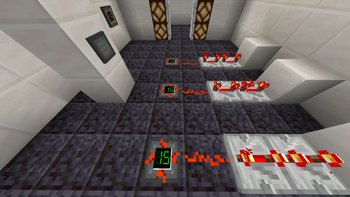
MalisisSwitchesReborn 1.0.3 includes refreshed textures and an updated relay that now displays the current redstone power level on its screen.

Features

  • Switch — A compact wall-mounted switch that can also control the redstone current from a distance
  • Light Switch — Another simple switch that can also control the redstone current from a distance
  • Player Sensor — A simple sensor that activates based on player proximity and can also control the redstone current from a distance
  • Relay — Receives power from linked switches and outputs standard redstone
  • Power Linker — Connect switches and relays to compatible blocks wirelessly
  • Greenstone — Green dust that comes from redstone with a bit of emerald. Makes the redstone wireless

How It Works

Switches and sensors work like vanilla levers, and can be linked to other blocks using the Power Linker tool. Firstly, equip the Power Linker, right-click a switch/sensor, and then right-click blocks you want the redstone current to be applied to. You can also unlink by sneak right-clicking a previously linked block.

Right-clicking another switch/sensor will set that switch/sensor as the source and unequipping the Power Linker clears the current source also.

Relays can be linked to switches, sensors, and other relays in the same way. Relays output a standard redstone signal and can be used with:

  • Redstone dust
  • Repeaters & Comparators
  • Pistons
  • Doors
  • Any vanilla or modded block that accepts a redstone signal

By equipping the Power Linker a player is also able to see the links (powered = green; unpowered = red) between switches/sensors/relays and linked locations.

Videos

The following videos demonstrate the original Malisis Switches mod by Ordinastie. Malisis Switches (Reborn) maintains the same core functionality for modern Minecraft versions.

Switches
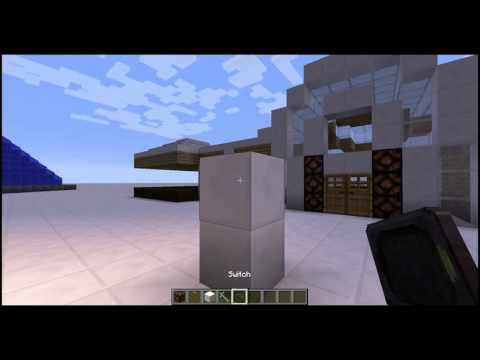
Malisis Switches Demonstration

Relays

Malisis Relay Demonstration

Credits

Reporting Issues

If you encounter a compatibility issue with another mod, or find a machine setup that behaves incorrectly, please report it via the project issue tracker so it can be investigated.

Галерея
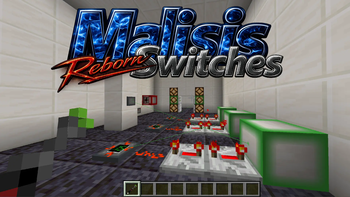
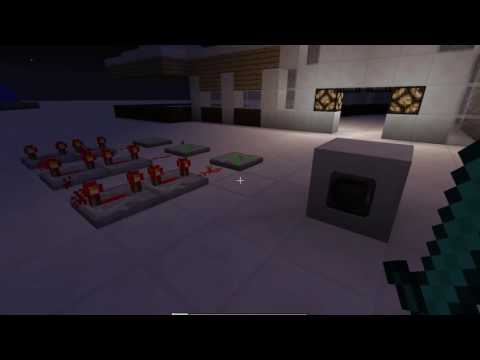
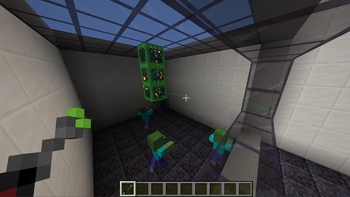
Linking switches and relays using the visual connection systemControl redstone devices from anywhere within rangeRelay display panel showing redstone strength

Последние версии

Все версии →
release

[NeoForge] 26.1.2-v1.0.3

1.0.3
21 июн. 2026 г.139Minecraft: 26.1.2neoforge
Скачать
Что нового
## [1.0.3] - 2026-05-29 ### Added - Texture update - Added a relay specific item texture ### Changed - Increased the range of the player sensor to 3 blocks - Added a visual screen to the relay so you can see current redstone signal strength - Added channel 0 as the default for the basic switch - Relay now shows "claw" brightness based on current redstone level - Relay behaviour tidy-up - Relay redstone logic now matches vanilla behaviour more closely and prevents relay link feedback loops ### Fixed - Added missing mixin minVersion to JSON
release

[NeoForge] 1.21.11-v1.0.3

1.0.3
21 июн. 2026 г.50Minecraft: 1.21.11neoforge
Скачать
Что нового
## [1.0.3] - 2026-05-29 ### Added - Texture update - Added a relay specific item texture ### Changed - Increased the range of the player sensor to 3 blocks - Added a visual screen to the relay so you can see current redstone signal strength - Added channel 0 as the default for the basic switch - Relay now shows "claw" brightness based on current redstone level - Relay behaviour tidy-up - Relay redstone logic now matches vanilla behaviour more closely and prevents relay link feedback loops ### Fixed - Added missing mixin minVersion to JSON
release

[NeoForge] 1.21.1-v1.0.3

1.0.3
21 июн. 2026 г.350Minecraft: 1.21.1neoforge
Скачать
Что нового
## [1.0.3] - 2026-05-29 ### Added - Texture update - Added a relay specific item texture ### Changed - Increased the range of the player sensor to 3 blocks - Added a visual screen to the relay so you can see current redstone signal strength - Added channel 0 as the default for the basic switch - Relay now shows "claw" brightness based on current redstone level - Relay behaviour tidy-up - Relay redstone logic now matches vanilla behaviour more closely and prevents relay link feedback loops ### Fixed - Added missing mixin minVersion to JSON
release

[Forge] 1.20.1-v1.0.3

1.0.3
21 июн. 2026 г.393Minecraft: 1.20.1forge
Скачать
Что нового
## [1.0.3] - 2026-05-29 ### Added - Texture update - Added a relay specific item texture ### Changed - Increased the range of the player sensor to 3 blocks - Added a visual screen to the relay so you can see current redstone signal strength - Added channel 0 as the default for the basic switch - Relay now shows "claw" brightness based on current redstone level - Relay behaviour tidy-up - Relay redstone logic now matches vanilla behaviour more closely and prevents relay link feedback loops ### Fixed - Added missing mixin minVersion to JSON
release

[Forge] 1.20.1-v1.0.0

1.0.0
28 апр. 2026 г.102Minecraft: 1.20.1forge
Скачать
Что нового
## [1.0.0] - 2026-04-28 ### Added - Initial release ### Changed ### Fixed