COWMODSКаталог модов

Lumière Play

A cinema inside Minecraft. Watch YouTube, Twitch and local videos on a virtual screen in your world.

Автор: jrxmod1,3 тыс.6обновлён 4 сент. 2026 г.
ДекорОбщениеУтилиты

Описание

Lumière Play — in-game cinema mod for Minecraft

🎬 Lumière Play

You build a theatre. Place a projector. Paste a YouTube link — and a screen appears on your wall, playing the video. With sound. In real time. Everyone nearby sees and hears the same thing.

That is the whole mod.


🍿 Getting started

Craft the projector, place it facing a wall, right-click — and you are in. Pick quality, screen size, hit Play.

📦 Crafting recipe
Glass PaneGlass PaneGlass Pane
Iron IngotDiamondIron Ingot
Iron IngotRedstoneIron Ingot

🌐 What you can watch

YouTube · Twitch · Vimeo · VK · Rutube · Dailymotion · SoundCloud · local files

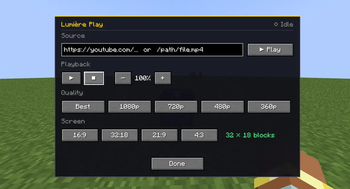
Quality: Best / 1080p / 720p / 480p / 360p

Screen ratios: 16:9 — 32:18 — 21:9 — 4:3


🖥️ Multiplayer

Works on servers out of the box. The server needs nothing extra — all playback is client-side. Everyone in range watches together.


⚙️ Requirements

Just VLC Media Player — the mod uses it for video decoding.

How to install VLC

Linux
sudo pacman -S vlc or sudo apt install vlc

Windows
Download at https://www.videolan.org/vlc/

macOS
brew install vlc

yt-dlp downloads itself automatically if it is not on your system. Nothing to do.


🌍 Languages

English and Russian built in.


Source code · Apache 2.0 · by jrxmod

Галерея
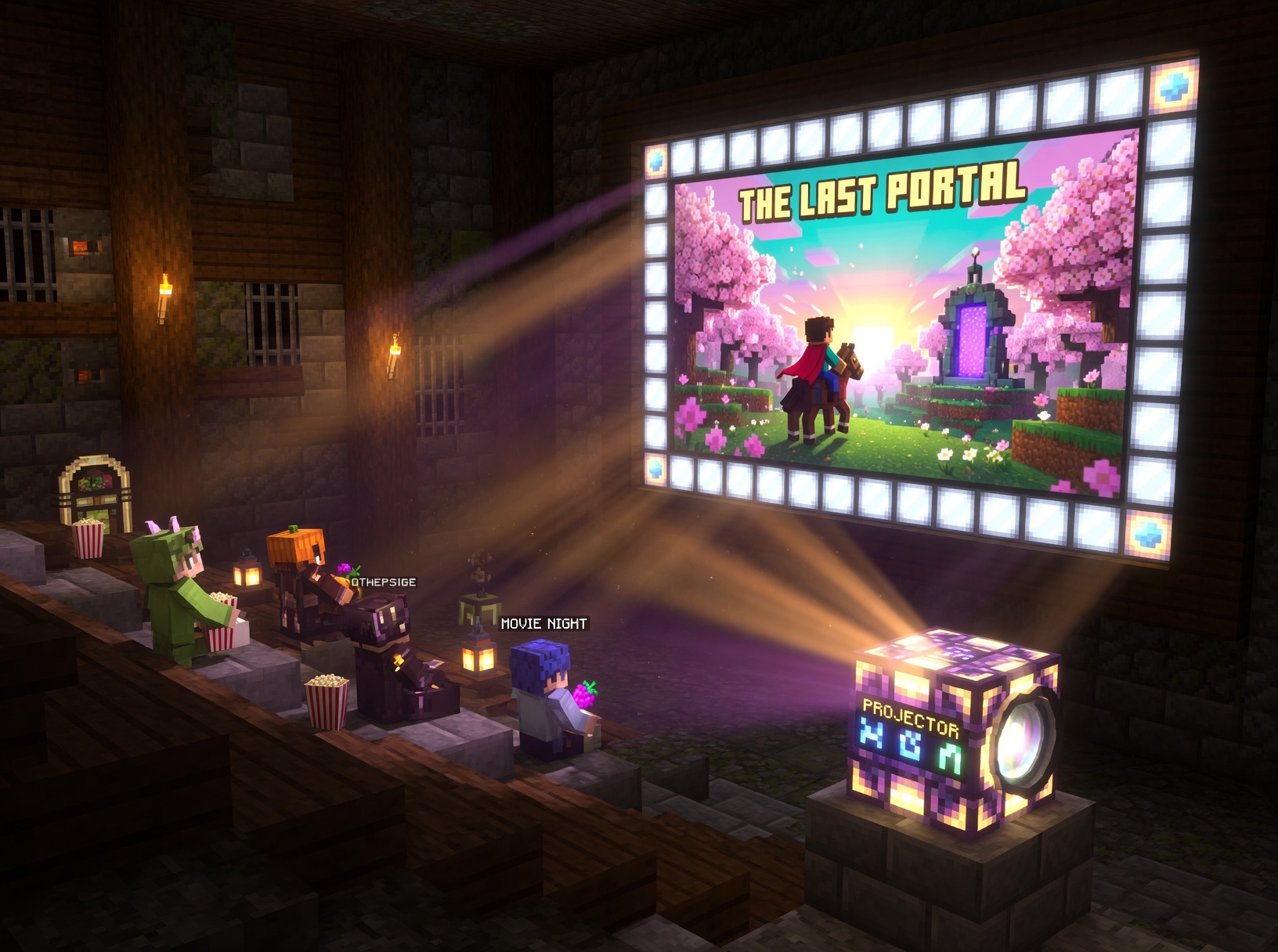
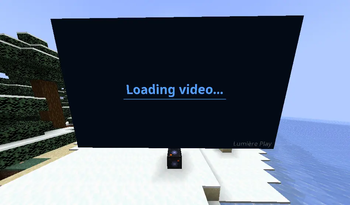
Lumière Play | Cinema in MinecraftProjector GUI - controls and settingsVirtual screen - in-world video playback

Последние версии

Все версии →
beta

Lumière Play 0.7.1

0.7.1
4 сент. 2026 г.423Minecraft: 1.21.1fabric
Скачать
Что нового
### 🛠️ Fixes - **YouTube works on more networks** — videos now play where they used to fail 🌐 - **No more "can't find this format"** when a source only serves an MP4 🎞️ - **Downloads aren't blocked** by the default cookie and IPv4 settings 🔓 - **Much lower memory use** for big downloads 💾 - **No leftover files** when you leave the world 🧹 ### ✨ Added - **Auto-cleanup of temp files** on disconnect 🧹
beta

Lumière Play 0.7.0

0.7.0
30 авг. 2026 г.77Minecraft: 1.21.1fabric
Скачать
Что нового
**v0.7.0 - Seeking Together, Light and an Honest Screen** ⏱ **Seeking Is Shared Now** - ← → step the video by 5 seconds for everyone watching, not just for you - The clock button pushes your current moment to the whole group — handy when someone started the film without you - ↻ moves the shared timeline back to the start - If a source has no known length (live streams and some others), seeking is refused with a clear message instead of a silent jump somewhere - A small badge tells you where you stand: "In sync" or "Sync +3s" 🪢 **No More Rubberbanding** - Falling behind now closes in several short steps instead of one huge jump - How big a single step may be is your call: sync.max_step_ms in the config, 30 seconds by default - Long films keep following the shared clock properly — the timeline used to stop tracking after a while 💡 **The Projector Lights the Room** - While a video plays, the block gives off light, so a dark hall no longer needs a trail of torches - Pause, an error or a broken block turns the light back off - A soft glow around the frame takes the average colour of what is on screen: night scenes spill blue, fire spills orange - Too much for someone? "glow_tint": false in config/lumiereplay.json hides it for that player only, everyone else keeps the light 🖥 **Quality That Doesn't Lie** - The panel now shows the picture you actually get, for example "Source 1280x720" or "Source 640x368" - YouTube on Linux and macOS still tops out at 360p — that is how the streams arrive through the pipe, not a rendering bug - On Windows the same link can be muxed to full quality today: network.ytdlp_args lets you pass your own format selection to yt-dlp ⛏️ **Blocks Behave Like Blocks** - Breaking a projector with a pickaxe returns the block — before this release it simply vanished - Correct mining speed and the usual "wrong tool, no drop" behaviour ⚙️ **Config That Actually Does Something** - These were saved to the file and ignored. Now they work: audio.volume, audio.max_distance, lazy.pause_distance, screen.bezel_size, network.proxy, network.vlc_args - New: sync.max_step_ms, screen.glow_tint, network.ytdlp_args 🤝 **Compatibility** - 0.7.0 works next to 0.6.x on both sides - Players on an older version keep everything they had, they just miss the shared timeline - No world reset, no config rewrite 🐛 **Also** - Seeking, the sync badge and the reset button behave the same on a local file and on a stream - Restarting a stream link re-resolves it instead of reusing a dead address
beta

Lumière Play 0.6.0

0.6.0
9 авг. 2026 г.122Minecraft: 1.21.1fabric
Скачать
Что нового
# v0.6.0 🖥️ **New Projector Interface** - The panel is now larger — everything fits, nothing overlaps - Sections: Source → Controls → Screen → Quality - Dark theme with gold accents - The world behind the panel dims, just like in the regular inventory - A green dot pulses next to the status when a video is playing 🔗 **Link History** - The last 5 links are saved — no need to paste them again - The ◀ ▶ buttons navigate through history - The copy button ⧉ copies a link with a single click 🎛️ **Controls** - Volume slider instead of + and − buttons — smooth adjustment - Hotkeys in the menu: - Space — pause / resume - ← → — rewind / fast-forward by 5 seconds - Buttons now have click sounds 📊 **Loading Indicator** - When loading a video, you'll see "Loading..." or "Loading 43%" - Updates every frame — always up to date 🐛 **Fixes** - The ← → arrows now correctly rewind and fast-forward - If the projector is broken, the video instantly stops for all players - Players without access see a warning instead of the full menu - Playback now automatically resumes after an error - The screen texture is now fully freed from memory when closed
beta

Lumière Play 0.5.5

0.5.5
19 июл. 2026 г.102Minecraft: 1.21.1fabric
Скачать
Что нового
# v0.5.5 > Note: 0.4.0 → 0.5.4 were internal dev builds. 0.5.5 is the first stable after 0.3.0. 🎨 **Block Redesign** - New Design 🎬 **New Playback Controls** - ⟲ Restart button — restarts video from the beginning, works on YouTube live, Twitch, all streams - Seek slider — drag to jump anywhere, shows time like 1:23 / 5:40 - On live streams the slider shows "live" and disables seeking automatically ⚙️ **Configuration File** - New JSON config at config/lumiereplay.json - Change volume, pause distance, proxy and more - No game restart needed 🪟 **Windows File Paths** - C:\Users\You\Videos\movie.mp4 - D:\Media\clips\video.webm - \\server\share\media\file.mkv - file:///C:/path/to/video.mp4 🛡️ **Clash / V2RayN / Trojan Auto-Detect** - Detected ports: 7890, 7891, 7892, 8080, 8888, 3128, 1080 - Routes yt-dlp and ffmpeg through your system proxy 🐛 **Fixes (since 0.5.4)** - No more black flash before the video starts — the projector now waits for the first real frame before switching from "Loading" to "Playing" - No more stuck "Loading…" forever — if a source is broken, you'll see a clear error screen after 20 seconds and can retry with the ⟲ button - yt-dlp and ffmpeg are now properly stopped when the video ends or fails, so no orphaned processes in the background 📦 **Upgrade Notes** - Worlds from 0.3.0 fully compatible - No new items or blocks - Just drop the new jar in mods/
beta

Lumière Play 0.3.0

0.3.0
5 июл. 2026 г.104Minecraft: 1.21.1fabric
Скачать
Что нового
## v0.3.0 — Stability, Access Control & Redstone ### 🔴 Redstone Support - Projector now responds to redstone signals - Rising edge (signal on) → starts playback if a URL is set - Falling edge (signal off) → pauses playback - Works with buttons, levers, pressure plates, comparators — any redstone source - Does not interfere with manual GUI control - ⚡ indicator shown in GUI when block is powered ### 🔒 Access Control - New **Access** setting in the projector GUI (owner only) - Three modes: **All** (default) / **Owner** / **Ops** - **All** — any player can control the projector (backward compatible with v0.2.x worlds) - **Owner** — only the player who placed the block - **Ops** — owner or any operator (permission level 2+) - Server-side validation — unauthorized packets are silently rejected - Pre-v0.3.0 blocks without an owner automatically use **All** mode ### 🔁 Auto-Retry - Stream drops are now automatically recovered - 3 retry attempts with exponential backoff: 2s → 5s → 15s - Applies to platform streams (YouTube, Twitch, VK, etc.) — not local files - After 3 failed attempts the projector shows an error screen until manually replayed ### 🖥️ Status Screens - Projector screen now shows colored status before and during load - 🟣 **Resolving** — yt-dlp is fetching the stream URL - 🔵 **Loading** — ffmpeg/VLC pipeline is buffering - 🔴 **Error** — playback failed - Status screens no longer interrupt live video during HLS segment buffering ### ⚡ Performance - **Frustum culling** — projector quad is skipped when off-screen - **Lazy VLC pause** — projectors beyond 96 blocks are automatically paused, resumed on approach --- <details> <summary>🇷🇺 На русском</summary> ### 🔴 Поддержка редстоуна - Проектор теперь реагирует на редстоун сигнал - Передний фронт (сигнал подан) → запускает воспроизведение если задан URL - Задний фронт (сигнал снят) → ставит на паузу - Работает с кнопками, рычагами, нажимными плитами, компараторами — любыми источниками - Не мешает ручному управлению через GUI - Индикатор ⚡ в GUI когда блок запитан ### 🔒 Права доступа - Новая настройка **Доступ** в GUI проектора (только для владельца) - Три режима: **All** (по умолчанию) / **Owner** / **Ops** - **All** — любой игрок может управлять проектором (обратная совместимость с мирами v0.2.x) - **Owner** — только игрок установивший блок - **Ops** — владелец или любой оператор (уровень прав 2+) - Валидация на сервере — неавторизованные пакеты отклоняются - Блоки без владельца (созданные до v0.3.0) автоматически получают режим **All** ### 🔁 Авто-восстановление - Обрывы стрима теперь восстанавливаются автоматически - 3 попытки с нарастающей задержкой: 2с → 5с → 15с - Только для платформенных стримов (YouTube, Twitch, VK и др.) — локальные файлы не затронуты - После 3 неудач проектор показывает экран ошибки до ручного нажатия Play ### 🖥️ Экраны статуса - Проектор теперь показывает цветной статус до и во время загрузки - 🟣 **Resolving** — yt-dlp получает ссылку на стрим - 🔵 **Loading** — pipeline ffmpeg/VLC буферизирует - 🔴 **Error** — воспроизведение завершилось ошибкой - Экраны статуса больше не перекрывают живое видео во время буферизации HLS сегментов ### ⚡ Производительность - **Frustum culling** — quad проектора не рендерится когда вне поля зрения - **Lazy VLC pause** — проекторы дальше 96 блоков автоматически ставятся на паузу, возобновляются при приближении </details>
beta

Lumière Play 0.2.1

0.2.1
14 июн. 2026 г.92Minecraft: 1.21.1fabric
Скачать
Что нового
## 🔧 v0.2.1 — Hotfix: Platform Streaming If you experienced YouTube, Twitch, VK or other platforms not working since late May 2026 — this was **not a bug in the mod**. YouTube and other platforms significantly tightened their anti-bot policies, breaking direct URL playback for all third-party players worldwide. This update introduces a completely new streaming pipeline that bypasses these restrictions. Video is now piped through `yt-dlp → ffmpeg → VLC` locally on your machine — platforms never see VLC, only yt-dlp. > ⚠️ Minor video stuttering may occur during the first ~10 seconds while the stream initializes. This is caused by YouTube's mandatory rate-limit delay and cannot be avoided. ### What changed - **New pipeline** — all platforms now stream through a local pipe proxy instead of direct URLs - **ffmpeg integration** — fixes HLS segment boundary freezes (video froze while audio continued) - **Auto-download** — ffmpeg is downloaded automatically if not found on your system - **Quality switching** — now correctly restarts the stream instead of silently failing - **All platforms fixed** — YouTube, Twitch, Vimeo, VK, Rutube, Dailymotion, ok.ru, SoundCloud ### Requirements - **VLC Media Player** — still the only manual requirement, same as before - **ffmpeg** — auto-downloaded on first launch if missing. No action needed. <details> <summary>🇷🇺 На русском</summary> Если YouTube, Twitch, VK или другие платформы перестали работать с конца мая 2026 — это **не баг мода**. YouTube и другие платформы резко ужесточили антибот-политику, сломав воспроизведение для всех сторонних плееров. В этом обновлении полностью новый пайплайн: видео идёт через `yt-dlp → ffmpeg → VLC` локально на вашем компьютере — платформы никогда не видят VLC. > ⚠️ Возможны небольшие подвисания картинки в первые ~10 секунд — это обязательная задержка YouTube, обойти её невозможно. **Что изменилось:** - Новый пайплайн через локальный пайп-прокси - ffmpeg исправляет зависания на границах HLS сегментов - ffmpeg скачивается автоматически если не найден в системе - Смена качества теперь корректно перезапускает поток - Все платформы восстановлены **Требования:** - **VLC Media Player** — единственная ручная зависимость, как и раньше - **ffmpeg** — скачивается автоматически при первом запуске </details>
beta

Lumière Play 0.1.0

0.1.0
29 мая 2026 г.340Minecraft: 1.21.1fabric
Скачать
Что нового
# 🎬 Welcome to Lumière Play The first ever release. A cinema inside Minecraft — finally. ## ✨ What's in this release **The projector block** — place it, right-click, paste a link. A virtual screen appears in your world and starts playing. That simple. **Plays almost anything** — YouTube, Twitch, Vimeo, VK, Rutube, Dailymotion, SoundCloud, and local files on your machine. **Multiplayer ready** — everyone nearby watches together. The server needs no extra setup. **Looks and feels right** — four screen ratios, five quality levels, spatial audio that fades as you walk away, and the projector faces whichever direction you place it. **Works on Linux, Windows and macOS** — VLC and yt-dlp handle the heavy lifting on all three. ## 🔔 Beta notice This is a first public release. Things work, but edges may be rough. If something breaks — open an issue on GitHub and we will fix it fast. --- *Grab some cake. Find a wall. Enjoy the show. 🍰*