

Keyboard Place Fix
Fixes inventory right-click behavior for external Keyboard Place setups without changing core KBP functionality.
Автор: zymery_dria1,6 тыс.1обновлён 17 авг. 2026 г.
Механики игрыОптимизацияУтилиты
Описание
Keyboard Place Fix
is a client-side Fabric mod for players who already use Keyboard Place (KBP) with external mouse/software remapping.
It restores vanilla right-click behavior in inventories while keeping your normal KBP gameplay flow.
What this mod fixes
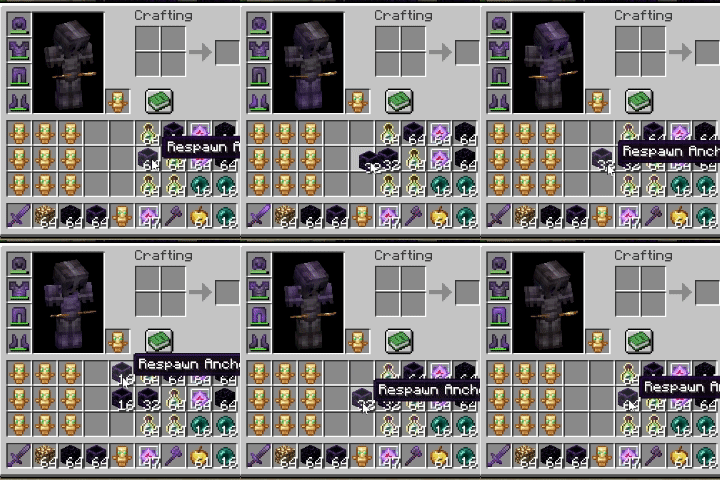
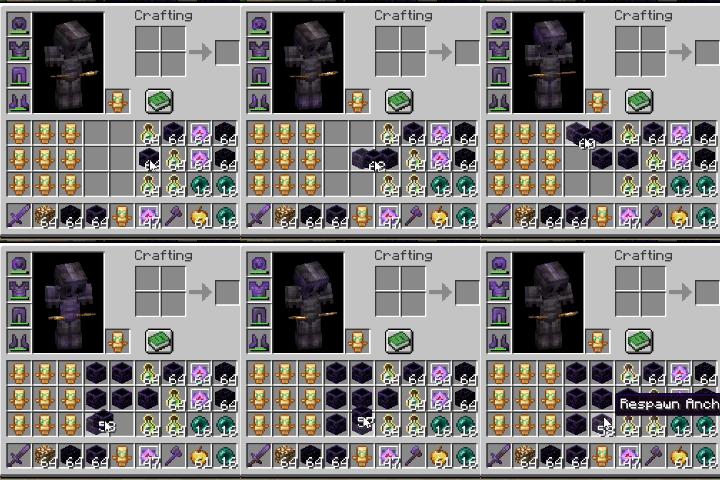
When KBP is used via external remap, inventory right-click actions can fail (or feel inconsistent), such as:
- Splitting stacks (64 -> 32)
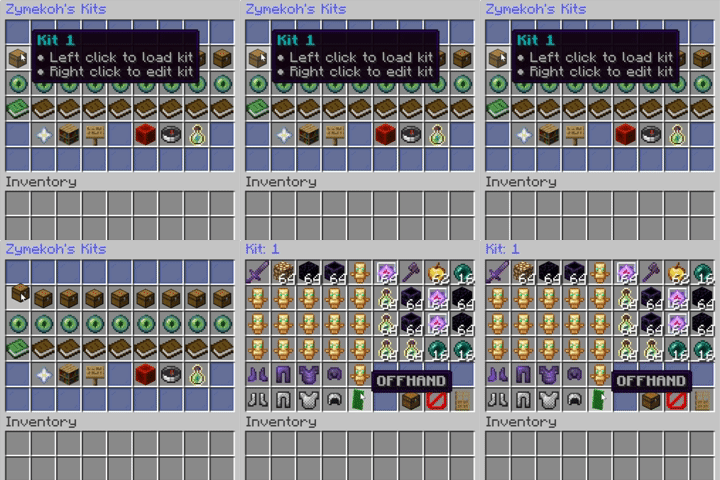
- Right-click interactions in chests and other containers
This mod fixes those inventory/container interactions.
 -
- -
-
What this mod does not change
- It does not change core KBP functionality
- It does not generate KBP by itself
Features
- Virtual right-click keybind (default:
.) - Works in inventory, chests, and storage containers
- Optional Mod Menu config screen
- Lightweight, client-side only
Requirements
- KBP enabled externally (mouse software/remapper)

Usage
- Install the mod in your
modsfolder. - Bind
Virtual Right Clickto your preferred key (or keep default). - Use your KBP setup normally.
Important warning
This mod only works as intended if Keyboard Place is already enabled externally with your mouse/software remapper.
Последние версии
Все версии →release
Keyboard Place Fix 1.2.2+mc26.2
1.2.2+mc26.217 авг. 2026 г.149Minecraft: 26.2fabric
Что нового
### Keyboard Place Fix 1.2.2
- Added support for Minecraft 26.2.
- Added a responsive Mod Menu configuration screen with a transparent background and independently scrollable panels.
- Added the original Modrinth GIF previews to the left gallery.
- Fixed preview rendering so each full 240×240 animation is shown at original quality.
- Keeps normal Keyboard Place world behavior unchanged and restores vanilla right-click only inside inventories and containers.
- Client-side Fabric mod.
release
Keyboard Place Fix 1.2.2+mc26.1.2
1.2.2+mc26.1.217 авг. 2026 г.47Minecraft: 26.1.2fabric
Что нового
### Keyboard Place Fix 1.2.2
- Added support for Minecraft 26.1.2.
- Added a responsive Mod Menu configuration screen with a transparent background and independently scrollable panels.
- Added the original Modrinth GIF previews to the left gallery.
- Fixed preview rendering so each full 240×240 animation is shown at original quality.
- Keeps normal Keyboard Place world behavior unchanged and restores vanilla right-click only inside inventories and containers.
- Client-side Fabric mod.
release
Keyboard Place Fix 1.2.2+mc26.1.1
1.2.2+mc26.1.117 авг. 2026 г.19Minecraft: 26.1.1fabric
Что нового
### Keyboard Place Fix 1.2.2
- Added support for Minecraft 26.1.1.
- Added a responsive Mod Menu configuration screen with a transparent background and independently scrollable panels.
- Added the original Modrinth GIF previews to the left gallery.
- Fixed preview rendering so each full 240×240 animation is shown at original quality.
- Keeps normal Keyboard Place world behavior unchanged and restores vanilla right-click only inside inventories and containers.
- Client-side Fabric mod.
release
Keyboard Place Fix 1.2.2+mc26.1
1.2.2+mc26.117 авг. 2026 г.36Minecraft: 26.1fabric
Что нового
### Keyboard Place Fix 1.2.2
- Added support for Minecraft 26.1.
- Added a responsive Mod Menu configuration screen with a transparent background and independently scrollable panels.
- Added the original Modrinth GIF previews to the left gallery.
- Fixed preview rendering so each full 240×240 animation is shown at original quality.
- Keeps normal Keyboard Place world behavior unchanged and restores vanilla right-click only inside inventories and containers.
- Client-side Fabric mod.
release
Keyboard Place Fix 1.1.0+mc1.21.9
1.1.0+mc1.21.911 мар. 2026 г.941Minecraft: 1.21.9, 1.21.10, 1.21.11fabric
Что нового
## KoHs KBP Fix — mc1.21.9 (1.1.0+mc1.21.9)
**Supported Minecraft versions:** 1.21.9 to 1.21.11
### Changed
- Added a dedicated **modern compatibility build** for 1.21.9+ API changes.
- Unified support for 1.21.9, 1.21.10, and 1.21.11 in one artifact.
- Updated loader/dependency targets for modern Fabric stack.
### Fixed
- Resolved startup crash (`NoSuchMethodError`) caused by old KeyBinding constructor usage on 1.21.9+.
release
Keyboard Place Fix 1.1.0+mc1.21.6
1.1.0+mc1.21.611 мар. 2026 г.68Minecraft: 1.21.6, 1.21.7, 1.21.8fabric
Что нового
## KoHs KBP Fix — mc1.21.6 (1.1.0+mc1.21.6)
**Supported Minecraft versions:** 1.21.6 to 1.21.8
### Changed
- Split into a dedicated **legacy compatibility build** for 1.21.6–1.21.8 API behavior.
- Kept the same gameplay behavior and config workflow as previous versions.
- Artifact naming updated to the new KoHs format.
### Fixed
- Prevented cross-version API conflicts by isolating legacy support into its own build.
release
Keyboard Place Fix 1.1.0+mc1.21
1.1.0+mc1.2111 мар. 2026 г.272Minecraft: 1.21, 1.21.1, 1.21.2, 1.21.3, 1.21.4, 1.21.5fabric
Что нового
## KoHs KBP Fix — mc1.21 (1.1.0+mc1.21)
**Supported Minecraft versions:** 1.21 to 1.21.5
### Added
- Virtual right-click support for Keyboard Place usage in inventories and storage GUIs.
- Mod Menu config screen with keybind setup.
- In-screen KBP usage guide with scroll support.
### Changed
- Default keybind is now `.` (period).
- Mod branding updated to **KoHs KBP Fix**.
### Fixed
- Inventory right-click behavior with KBP (stack splitting, single-item movement, container interactions).
- Config UI readability and layout issues.
release
Keyboard Place Fix 1.1.0
1.1.010 мар. 2026 г.30Minecraft: 1.21.10, 1.21.11fabric
Что нового
## Keyboard Place Fix v1.1.0
- Updated to Minecraft 1.21.10 (Fabric).
- Added a virtual right-click keybind (default: `.`).
- Fixed inventory/container right-click behavior for external KBP setups:
- Stack splitting (64 -> 32)
- Single-item right-click moves
- Chest/storage right-click interactions
- Added Mod Menu configuration screen:
- Single keybind button