COWMODSКаталог модов

KeybindsGalore (HVB007)

Resolves Minecraft keybind conflicts: when two actions share a key, choose the one you meant.

Автор: HVB00724,5 тыс.94обновлён 23 окт. 2026 г.
УправлениеТехнологииУтилиты

Описание

KeybindsGalore

Opens a selection menu when multiple actions are bound to the same key, so you choose which action actually runs.

Minecraft's default behaviour is to pick one binding and silently ignore the rest. Usually you find out by walking into a wall because a mod stole Space. KeybindsGalore intercepts the conflict instead of guessing.

Available for both Fabric and NeoForge.

Features

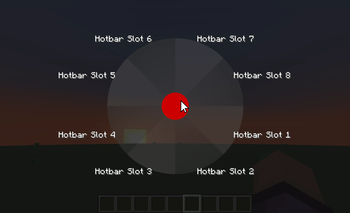
Conflict selection - Press a contested key and a menu opens listing every action bound to it. Point at the one you meant, and the others are released for that press.

Pie menu and list menu - The pie is the default. A plain list menu is also available if you prefer something conventional, switchable in the config.

GPU-rendered pie - Wedges are drawn through Minecraft's deferred GUI render pipeline using a custom RingRenderer, so the pie composites correctly with the rest of the interface. No external rendering library is bundled or needed.

Priority system - For keys you never want to be asked about. Set Space to always jump and it jumps, even when something else is bound to it.

K-key priority capture - Press K, press the key you want to lock down, pick the action. No file editing.

Live conflict detection - Conflicts are re-scanned on startup, on joining a world, when you close the vanilla Controls screen, when you save your config, and when priorities change.

Category filters - Exclude entire categories from detection if you never want to be asked about them.

Mouse support - Works with conflicting mouse button bindings, not just keyboard.

In-game configuration - A full settings screen through Cloth Config, with sliders, colour fields with alpha, and tooltips on every entry.

Public API - A small versioned API lets other mods register their actions so their bindings take part in conflict detection.

What's New in 1.8.0

Now available on NeoForge as well as Fabric. The 26.2 NeoForge build is the same mod on the NeoForge loader: same menus, same priority system, same config screen. It needs no Fabric Loader, no Fabric API, and no ModMenu.

Minecraft 26.3 support on Fabric. The 26.3 build ports the mod to 26.3, where the client moved from GLFW to SDL3 and rendering moved to the newer RenderPipeline API.

The config screen works on 26.2. The previous 26.2 build shipped with a known issue where the config screen failed, because the Cloth Config version available at the time referenced a Minecraft class that no longer exists. That is resolved.

Beyond that, this release rebuilds how conflicts are detected and how the pie is drawn:

  • Sector gradation - each wedge shades from a lighter inner edge to its outer colour, with an intensity slider. Free to draw, since the renderer already accepted separate inner and outer colours.
  • Open animation - a short eased animation when the pie appears, with a duration slider. Set it to 0 for an instant menu. Labels appear once it finishes.
  • Pie geometry actually works - scale, margin, and cancel-zone size are now wired up. They were exposed in the config screen but silently ignored.
  • Selected sector expansion now applies when you hover a wedge.
  • Darken strength slider for the pie background.
  • Label text shadow follows its setting instead of being permanently on.
  • Fixed label placement - labels are positioned radially and clamped to the screen. Previously a label on a bottom wedge was pushed upward into the pie.
  • Fixed pie smoothness - lowering the vertex count now degrades the whole pie evenly instead of only making the cancel circle faceted.
  • Reliable K-key capture - a direct edge-triggered path runs alongside the previous poll-based one, so the first press is no longer sometimes swallowed.
  • A separate list menu settings tab - the list menu's colours and opacity were in the pie tab, where they had no effect and looked broken.
  • Typed configuration - config is read and written through a validated snapshot with atomic file replacement, instead of reflection over static fields.
  • Retired options are cleaned up automatically - nine settings that were unread, redundant, or left over from 1.21.x are stripped from your config file on load, with the replacement noted in the file. Upgrading no longer produces error messages about unknown keys.

Requirements

Pick the row that matches your loader.

Fabric

  • Minecraft 26.2 or 26.3
  • Fabric Loader >= 0.19.3
  • Fabric API >= 0.152.1+26.2
  • Cloth Config >= 26.2.155
  • ModMenu (optional, only for the settings screen)

NeoForge

  • Minecraft 26.2
  • NeoForge >= 26.2.0.88
  • Cloth Config >= 26.2.155

Java 25 or newer on both. Client-side only: not for dedicated servers.

Configuration

The in-game settings screen is the recommended way to configure the mod, and it edits the same config/keybindsgalore.properties file you can edit by hand, so you can use either. On Fabric the screen appears in ModMenu; on NeoForge it appears in the mod list.

Four tabs:

  • General - debug logging, pulse duration, attack workaround, background dimming.
  • Behaviour - pie or list menu, conflict warnings, category filters, priority actions.
  • Visual (Pie Menu) - geometry, colours, gradient, animation, labels.
  • Visual (List Menu) - list colours and opacity. These affect the list menu only.

Colours are entered as ARGB hex values such as C0606060. The Cloth Config release this mod uses provides a hex field rather than an RGB slider widget.

Setting a priority by hand looks like this:

PRIORITY_KEYBINDS=[key.jump:key.keyboard.space]
PRIORITY_CATEGORIES=[Movement]

An action priority always beats a category priority.

Known limitations

  • The pie menu is mouse-only. There is no keyboard navigation yet, which is the largest accessibility gap.
  • Long action names on neighbouring wedges can overlap. Labels are clamped so they are never cut off by the screen edge, but they cannot reflow.
  • The pie menu does not pause the game, intentionally, so you can see the world behind it.
  • Colour inputs are hex text fields, not pickers.
  • Bindings changed by another mod at runtime are not detected. Only the listed triggers cause a rescan.

History and Credits

  • Original project and original author: Cael
  • KeybindsGalore Plus: AV306
  • 1.20.x, 1.21.x, and 26.x updates and re-writes: HVB007
  • Contributors listed in the mod metadata and the GitHub repository

AI Declaration

Portions of this mod's code were written with the assistance of AI tools. All AI-generated code has been reviewed, tested, and verified for functionality by the developer.

Links

Галерея

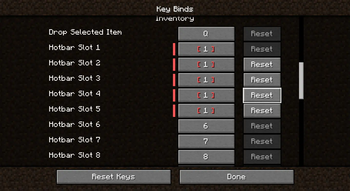
Conflict Resolution MenuCancel Keypress (<1.21.1)Conflicted KeysVisual Settings (Pie Menu)

Последние версии

Все версии →
alpha

1.9.1+26.3 (alpha)

1.9.1
23 окт. 2026 г.146Minecraft: 26.3fabric
Скачать
Что нового
Alpha build of 1.9.1. Built and unit-tested; not yet human-played on all loaders. Adds focus-loss cancellation and resize handling to both selectors.
alpha

1.9.1+26.3-neoforge (alpha)

1.9.1
23 окт. 2026 г.30Minecraft: 26.3neoforge
Скачать
Что нового
Alpha build of 1.9.1. Built and unit-tested; not yet human-played on all loaders. Adds focus-loss cancellation and resize handling to both selectors.
alpha

1.9.0+26.3-neoforge (alpha)

1.9.0
22 окт. 2026 г.26Minecraft: 26.3neoforge
Скачать
Что нового
Alpha build of 1.9.0. Built and unit-tested; not yet human-played on all loaders. Changes since 1.8.0: - Config and custom-data files are now read as UTF-8, fixing garbled category names on non-UTF-8 system locales. - Added a conflict report in the log, optional keyboard control for both menus, and screen-reader narration. - Default priority for key.pickItem:key.mouse.middle so middle mouse no longer opens a menu every click. - Keyboard navigation gated on KEYBOARD_CONTROL_MODE; contested-key release handling fixed. Known: not human-verified on 26.2 or NeoForge builds; Tab binding and narration timing lack automated coverage.
alpha

1.9.0+26.3 (alpha)

1.9.0
22 окт. 2026 г.40Minecraft: 26.3fabric
Скачать
Что нового
Alpha build of 1.9.0. Built and unit-tested; not yet human-played on all loaders. Changes since 1.8.0: - Config and custom-data files are now read as UTF-8, fixing garbled category names on non-UTF-8 system locales. - Added a conflict report in the log, optional keyboard control for both menus, and screen-reader narration. - Default priority for key.pickItem:key.mouse.middle so middle mouse no longer opens a menu every click. - Keyboard navigation gated on KEYBOARD_CONTROL_MODE; contested-key release handling fixed. Known: not human-verified on 26.2 or NeoForge builds; Tab binding and narration timing lack automated coverage.
release

Minecraft 26.3 support

1.8.0
28 сент. 2026 г.626Minecraft: 26.3fabric
Скачать
Что нового
First published build for Minecraft 26.3 on Fabric. This is the same mod as 1.8.0, ported forward to 26.3. Behaviour is unchanged: the pie menu, the list menu, the priority system, K-key priority capture, live conflict re-scanning, per-category filters, and the in-game config screen all work the same way. ## Porting notes Minecraft 26.3 moved the client from GLFW to SDL3, so the port covers: - The capture key and key handling now use `InputConstants.Type.KEYBOARD` instead of the removed `KEYSYM` - Unbound keys are detected by their negative key value rather than by scanning GLFW state - Rendering moved to the 26.3 `RenderPipeline` API in the `com.mojang.renderpearl` package; the pie menu is drawn through the GPU-batched ring renderer - The `org.lwjgl.glfw` classes no longer exist, so GLFW references were replaced with the SDL3 equivalents ## Requirements - Minecraft 26.3 - Fabric Loader 0.19.3 or newer - Fabric API 0.161.0+26.3 or newer - Java 25 or newer - Cloth Config 26.3.159 or newer - ModMenu 21.0.0 or newer (optional, only for the settings screen) ## Known limitations - The pie menu has no keyboard navigation, which is the largest accessibility gap - Neighbouring wedge labels can overlap when action names are long; they are clamped so they are never cut off by the screen edge, but they cannot reflow - The pie menu does not pause the game, intentionally - Colour inputs are hex text fields rather than RGB pickers, because the Cloth Config release in use provides no picker widget - Bindings changed by another mod at runtime are not detected; only the listed refresh triggers cause a rescan
release

NeoForge build for Minecraft 26.3

1.8.0
28 сент. 2026 г.59Minecraft: 26.3neoforge
Скачать
Что нового
KeybindsGalore 1.8.0 for Minecraft 26.3 on NeoForge The NeoForge build for Minecraft 26.3. Same mod as the Fabric 26.3 build, on the NeoForge loader. Nothing about the mod's behaviour changed. The pie menu, the list menu, the priority system, K-key priority capture, live conflict re-scanning, per-category filters, and the config screen all work exactly as they do on the Fabric build. The version number is unchanged, because this adds a loader rather than features. ## Requirements - Minecraft 26.3 - NeoForge 26.3.0.26-beta or newer - Java 25 or newer - Cloth Config 26.3.159 or newer No Fabric Loader, no Fabric API, and no ModMenu. The config screen is contributed through NeoForge's own settings extension point and appears in the mod list. Note that NeoForge publishes 26.3 only as a beta at the time of writing, so this build tracks a moving target. ## What this port needed Less than a port from an older Minecraft version, because the 26.3 Fabric build had already done the hard part. The engine work was already done and carried over unchanged: - the client is on SDL3, so key handling uses `InputConstants.Type.KEYBOARD` with SDL scancodes - rendering uses the `com.mojang.renderpearl` pipeline API - `RingRenderer` needed no changes at all Only the loader surface changed: - the mod entrypoint is a NeoForge `@Mod(dist = CLIENT)` class - key registration uses `RegisterKeyMappingsEvent` - tick and connection events use the NeoForge equivalents - the config directory uses `FMLPaths.CONFIGDIR` - the ModMenu settings entrypoint became a `ModContainer` extension point, and `ModMenuIntegration` was removed, since NeoForge allows one `@Mod` class per mod id - configuration loading moved to the first client tick, because `Minecraft.options` is still null during NeoForge mod construction - `fabric.mod.json` is replaced by `META-INF/neoforge.mods.toml` ## Known issue One harmless deprecation warning appears at startup. It comes from Cloth Config 26.3.159 itself, is upstream, and will disappear when Cloth ships a patch. Nothing in this mod causes it. The limitations of the Fabric 1.8.0 build still apply, notably: no keyboard navigation in the pie menu, overlapping labels for long action names, and no detection of bindings another mod changes at runtime. ## Credits Original project and original author: Cael. KeybindsGalore Plus: AV306. 1.20.x, 1.21.x and 26.x updates and re-writes: HVB007, plus the contributors listed in the mod metadata.
release

NeoForge port for Minecraft 26.2

1.8.0
27 сент. 2026 г.43Minecraft: 26.2neoforge
Скачать
Что нового
NeoForge port. This is the same mod as the Fabric 1.8.0 build, ported to NeoForge for Minecraft 26.2. Behaviour is unchanged: the pie menu, the list menu, the priority system, K-key priority capture, live conflict re-scanning, per-category filters, and the in-game config screen all work the same way. ## Requirements - Minecraft 26.2 - NeoForge 26.2.0.88 or newer - Java 25+ - Cloth Config 26.2.155+ No Fabric Loader, no Fabric API, and no ModMenu. The config screen is contributed through NeoForge's own settings extension point and appears in the Mods list. ## What changed from the Fabric build Only the loader-facing surface. The conflict engine, configuration model, and both selector screens are untouched, because nearly all of the mod is plain Minecraft or plain Java. - The mod entrypoint is now a NeoForge `@Mod` client class - Key registration uses `RegisterKeyMappingsEvent` - Tick and connection events use the NeoForge equivalents - The config directory uses `FMLPaths.CONFIGDIR` - The ModMenu settings entrypoint became a `ModContainer` extension point - Configuration loading moved to the first client tick, since `Minecraft.options` is still null during NeoForge mod construction - The deprecated `logoFile` metadata key is now `iconFile`, clearing the startup warning - The mod now reports its version correctly in-game ## Known issue One harmless deprecation warning appears at startup. It comes from Cloth Config 26.2.155 itself, is already fixed in Cloth Config 26.3.159, and will disappear when Cloth ships a 26.2 patch. Nothing in this mod causes it. The limitations of the Fabric 1.8.0 build still apply, notably: no keyboard navigation in the pie menu, overlapping labels for long action names, and no detection of bindings another mod changes at runtime.
release

Config screen fixed, pie menu reworked

1.8.0
26 сент. 2026 г.106Minecraft: 26.2fabric
Скачать
Что нового
**The config screen now works on 26.2.** The previous 26.2 build shipped with a known issue where the ModMenu config screen failed. If you were told to edit `keybindsgalore.properties` by hand, you no longer need to — the in-game screen works now. ### Fixed - **Conflict detection rebuilt** around a single canonical index, instead of being assembled by scattered parts of the mod. - **Conflicts re-scan** on startup, on joining a world, when you close the vanilla Controls screen, when you save config, and when priorities change. A rebind done outside those moments could previously go unnoticed. - **K-key priority capture** now opens reliably. A direct edge-triggered path runs alongside the old poll-based one, so the first press is no longer sometimes swallowed. - **Pie menu labels** are positioned radially and clamped to the screen. A label on a bottom wedge was previously pushed upward into the pie. - **Pie smoothness** now spreads across the whole pie, so lowering the vertex count no longer only makes the cancel circle faceted. - **Pie geometry actually works.** Scale, margin, and cancel-zone size were visible in the config screen but silently ignored. - **Selected sector expansion** now applies when you hover a wedge. - **Label text shadow** follows its setting instead of being permanently on. ### Added - **Sector gradation**, with an intensity slider. Each wedge shades from a lighter inner edge to its outer colour. - **Open animation**, with a duration slider from 0 to 1000 ms. Set it to 0 for an instant menu. Labels appear when it finishes; closing stays instant so input is never delayed. - **Darken strength** slider for the pie background. - **A separate Visual (List Menu) tab.** The list menu's colours and opacity were in the pie tab, where they had no effect and looked broken. - **A public API** so other mods can register their actions and take part in conflict detection. ### Changed - Configuration is read and written through a validated snapshot with atomic file replacement, rather than reflection over static fields. - Colours use a colour field with an alpha channel; bounded numbers use sliders. - **Retired settings are cleaned up automatically.** Nine options that were unread, redundant, or left over from 1.21.x are stripped from your config file on load, with the replacement noted in the file. Upgrading no longer produces unknown-key errors: `PIE_MENU_COLOR_LIGHTEN_FACTOR`, `PIE_MENU_SELECT_COLOR`, `PIE_MENU_BLEND`, `LABEL_TEXT_INSET`, `IGNORED_KEYS`, `INVERT_IGNORED_KEYS_LIST`, `USE_SOFTWARE_RENDERING`, `LAZY_CONFLICT_CHECK`, `USE_KEYBIND_FIX`. - `FILTERED_CATEGORY_KEYS` now defaults to empty. The old default was `Debug`, which does not match any category in 26.2 and therefore did nothing. ### Known limitations - The pie menu is mouse-only; there is no keyboard navigation yet. - Neighbouring wedge labels can overlap when action names are long. - Colour inputs are hex fields, not RGB pickers. - Bindings changed by another mod at runtime are not detected.
release

KeybindsGalore (HVB007) 1.7.2+26.2

1.7.2+26.2
19 июн. 2026 г.506Minecraft: 26.2fabric
Скачать
Что нового
## 1.7.2+26.2 — Fabric 26.2 Upgrade - **Minecraft 26.2** — Fabric Loader 0.19.3, Loom 1.17, Gradle 9.5.1 - **Fabric API 0.152.1+26.2** — Vulkan backend support, renderer API ported - **ModMenu 20.0.0-beta.2** - **Removed owo-lib dependency** — replaced with custom `RingRenderer` using `GuiElementRenderState` and `RenderPipelines.GUI` - **Fixed RenderPipelines.GUI topology** — emits `QUADS` matching GUI_SNIPPET (fixes swiss-cheese rendering) - **Fixed coordinate signs** — uses `cx + cos * r` to match atan2 mouse angle convention (fixes 180° flipped sector highlight) - **Known issue:** Config screen unavailable from ModMenu — Cloth Config references `net/minecraft/util/Tuple` which was removed in 26.2. Edit `keybindsgalore.properties` manually in the config folder.
release

KeybindsGalore (HVB007) 1.7.2+26.1

1.7.2+26.1
18 июн. 2026 г.307Minecraft: 26.1, 26.1.1, 26.1.2fabric
Скачать
Что нового
## 1.7.2+26.1 — Fabric 26.1 Upgrade - **Minecraft 26.1** (first unobfuscated version) — Fabric Loader 0.18.6 - **Fabric API 0.145.1+26.1** — API renames (`KeyBindingHelper`→`KeyMappingHelper`, etc.) - **owo-lib 0.13.0+26.1** — `OwoUIDrawContext`→`OwoUIGraphics` - **Cloth Config 26.1.154**, **ModMenu 18.0.0-alpha.8** - Switched to `net.fabricmc.fabric-loom`, no mappings, `modImplementation`→`implementation`, Java 25 - All prior features: pie menu, K-key capture flow, priority system, conflict detection