

Keybind
⌨️ Bind keys to server-side commands. Press a key, the server runs a command.
Автор: iM5LB13,1 тыс.5обновлён 18 окт. 2026 г.
Механики игрыТехнологииУтилиты
Описание
⌨️ Keybind
Bind keys to server-side commands. Press a key, the server runs a command.


Client Mod (Fabric) • Server Plugin (Paper)
| Environment | Loader | MC Version | Status |
|---|---|---|---|
| Client | Fabric | 1.21.x, 26.x | Released |
| Server | Paper | 1.18.2+ | Released |
| Client | NeoForge | 1.21.x, 26.x | Released |
| Client | Forge | 1.21.x, 26.x | Released |
Note: Both the Server Plugin and the matching Client Mod must be installed for keybinds to function. On servers without the plugin, no keybinds will be registered or available.
✨ Features
- 🔗 Server-Driven: Actions are defined entirely on the server and synced to the client on join.
- 📁 Per-Server Storage: Key assignments are saved per server IP in
.minecraft/config/keybind-servers/and never overwritten on rejoin. - 🛠️ Dynamic Registration: New server actions appear in your Settings → Controls menu without restarting the game.
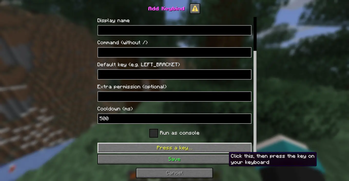
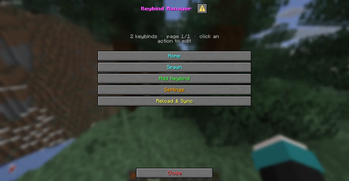
- 💬 In-game Manager: On Paper 1.21.7+,
/kbind manageopens a Minecraft dialog to add, edit, or delete keybinds without touchingconfig.yml. Click Press a key…, then press the key (client mod required). - 🖥️ Fallback Chest GUI: Interactive 54-slot Chest GUI fallback for servers without Paper Dialog API.
- 🔄 Automatic Update Notifications: Checks GitHub releases and automatically alerts administrators on join when updates are available.
- 📊 bStats Metrics: Fully anonymous server telemetry to help track plugin usage and adoption.
- 🏷️ Custom Display Names: Server owners set friendly names (e.g.,
"Teleport to Spawn"instead ofspawn). - ⏱️ Dual Cooldowns: Both a global cooldown (between any actions) and per-action cooldowns prevent spam.
- 🔐 Permission Support: Each action supports an optional extra permission node on top of
keybind.use. - 📡 Plugin Messaging: Uses
keybind:main/keybind:syncplugin message channels. Falls back to/kbind <action>if the packet channel is unavailable. - 🧹 Stale Action Cleanup: Obsolete actions from previous sessions are automatically removed from the Controls menu and saved config.
- 🌍 Multi-loader Client: Fabric, Forge, and NeoForge builds available for Minecraft 1.21.x and 26.x.
🚀 How It Works
- Sync: 1 second after a player joins, the plugin sends all configured actions (name, display name, default key) over the
keybind:syncchannel. - Registration: The mod registers each action as a native Minecraft keybind under the Keybind category in Settings → Controls.
- Trigger: When a key is pressed (and no screen is open), the mod sends the action name over the
keybind:mainchannel. - Execution: The plugin validates the action name (alphanumeric + underscores only), checks permissions and cooldowns, then runs the command.
🛠️ Installation
Server Side
- Place
Keybind-Plugin-1.0.4.jarinto yourplugins/folder. - Restart the server —
plugins/Keybind/config.ymlis generated automatically. - Edit
config.ymlto define your actions, then run/kbind reload.
Client Side
- Install the client jar matching your Minecraft version and loader into
.minecraft/mods/ - Install the required loader and API for the selected platform. Use Java 21 for Minecraft 1.21.x, and Java 25 for Minecraft 26.x.
- Do not install multiple Keybind client jars at the same time. Launch the game and connect to a server running the Keybind plugin.
⚙️ Configuration
plugins/Keybind/config.yml
# Update Checker (checks GitHub releases and notifies admins on join)
update-checker: true

# Global cooldown between any keybind actions (milliseconds)
global-cooldown: 500

actions:
  spawn:
    command: "spawn"              # Command to run (without /)
    display-name: "Spawn"        # Label shown in Controls menu
    default-key: "LEFT_BRACKET"  # Suggested key for first-time players
    permission: ""               # Optional extra permission node (leave empty for none)
    cooldown: 1000               # Per-action cooldown (ms); defaults to global-cooldown
    console: false               # true = run as console with {player} replaced by player name

  home:
    command: "home"
    display-name: "Home"
    default-key: "RIGHT_BRACKET"
    permission: ""
    cooldown: 1000
    console: false

# Enable anonymous metrics reporting (bStats)
metrics: true
Notes:
- Action names must be alphanumeric + underscores only (e.g.
my_action). console: trueruns the command as the console sender. Use{player}as a placeholder for the player's name (e.g.command: "tp {player} spawn").default-keyis only applied the first time a player connects. Their saved binding is used on subsequent joins.
⌨️ Supported Keys
Keyboard
| Category | Values |
|---|---|
| Letters | A–Z |
| Numbers | 0–9 |
| Function | F1–F25 |
| Arrows | UP, DOWN, LEFT, RIGHT |
| Navigation | PAGE_UP, PAGE_DOWN, HOME, END, INSERT, DELETE |
| Special | SPACE, ENTER, TAB, BACKSPACE, ESCAPE, PAUSE |
| Lock keys | CAPS_LOCK, SCROLL_LOCK, NUM_LOCK |
| Other | PRINT_SCREEN, MENU |
| Modifiers | LEFT_SHIFT, LEFT_CONTROL (or LEFT_CTRL), LEFT_ALT, LEFT_SUPER, RIGHT_SHIFT, RIGHT_CONTROL (or RIGHT_CTRL), RIGHT_ALT, RIGHT_SUPER |
| Numpad | KP_0–KP_9, KP_ADD, KP_SUBTRACT, KP_MULTIPLY, KP_DIVIDE, KP_DECIMAL, KP_ENTER, KP_EQUAL |
| Symbols | LEFT_BRACKET, RIGHT_BRACKET, BACKSLASH, SEMICOLON, APOSTROPHE, COMMA, PERIOD, SLASH, GRAVE_ACCENT, MINUS, EQUAL — or the character directly: [, ], \, ;, ', ,, ., /, `, -, = |
| World keys | WORLD_1, WORLD_2 (locale-specific keys on some keyboards) |
Mouse
| Value | Aliases | Button |
|---|---|---|
MOUSE_LEFT | MOUSE_1 | Left click |
MOUSE_RIGHT | MOUSE_2 | Right click |
MOUSE_MIDDLE | MOUSE_3 | Middle click |
MOUSE_4–MOUSE_8 | — | Side/extra buttons |
📜 Commands & Permissions
| Command | Description | Permission |
|---|---|---|
/kbind <action> | Manually trigger an action | keybind.use |
/kbind list | List all configured action names | (any) |
/kbind manage | Open the Minecraft dialog manager (Paper 1.21.7+) | keybind.admin |
/kbind add <name> <command...> | Create a keybind | keybind.admin |
/kbind set <name> <field> <value> | Edit command, display, key, permission, cooldown, or console | keybind.admin |
/kbind remove <name> | Delete a keybind | keybind.admin |
/kbind reload | Reload config and re-sync all online players | keybind.admin |
| Permission | Description | Default |
|---|---|---|
keybind.use | Required to trigger any action | true (everyone) |
keybind.admin | Access to /kbind manage, add/set/remove, and reload | op |
keybind.bypass.cooldown | Ignore all cooldowns | op |
Галерея
Последние версии
Все версии →release
Keybind 1.0.4
1.0.418 окт. 2026 г.128Minecraft: 1.18, 1.18.1, 1.18.2, 1.19, 1.19.1, 1.19.2, 1.19.3, 1.19.4, 1.20, 1.20.1, 1.20.2, 1.20.3, 1.20.4, 1.20.5, 1.20.6, 1.21, 1.21.1, 1.21.2, 1.21.3, 1.21.4, 1.21.5, 1.21.6, 1.21.7, 1.21.8, 1.21.9, 1.21.10, 1.21.11, 26.1, 26.1.1, 26.1.2, 26.2, 26.3bukkit, paper, purpur, spigot
Что нового
### Fixes & Reliability
- **Controls Menu Duplication**: Resolved issue where keybinds appeared twice in **Settings → Controls → Key Binds** and were duplicated in `options.txt`. Replaced redundant static registration with name-based deduplication and in-place mapping updates in `KeybindManager`.
- **Automatic Settings Deduplication**: Client options mappings are automatically scanned and pruned of duplicate entries on initialization.
- **Forge Event Listener Cleanup**: Removed redundant `RegisterKeyMappingsEvent` registration in Forge 26 to rely on unified dynamic injection without duplicates.
- **Chat Formatting & Encoding**: Replaced legacy `\u00a7` formatting codes in chat sync and key capture overlay messages with native `ChatFormatting` text components, preventing `A a[Keybind]` Mojibake on Windows systems.
- **Forge 26.1 Runtime Bootstrap**: Resolved launcher issue on Forge 26.1 where vanilla unpatched jar was selected instead of patched client binaries.
### NeoForge (Released)
- **NeoForge 1.21.11**: Official support added targeting NeoForge 21.11.48 (Minecraft 1.21.11).
- **NeoForge 26.1 / 26.2**: Full support for Minecraft 26.x with custom Category sorting, payload networking, and client tick handling.
- **NeoForge 1.21**: Stable build targeting NeoForge 21.0.167.
### Plugin
- **Chest GUI Fallback**: Added interactive 54-slot Chest GUI with pagination and click sounds for servers without Paper Dialog API.
- **Update Checker**: Automatic GitHub release check that notifies administrators when joining.
- **Metrics**: Anonymous telemetry via bStats.
release
Keybind 1.0.4
1.0.418 окт. 2026 г.24Minecraft: 26.1, 26.1.1, 26.1.2, 26.2, 26.3neoforge
release
Keybind 1.0.4
1.0.418 окт. 2026 г.24Minecraft: 1.21.11neoforge
release
Keybind 1.0.4
1.0.418 окт. 2026 г.15Minecraft: 1.21, 1.21.1, 1.21.2, 1.21.3, 1.21.4, 1.21.5, 1.21.6, 1.21.7, 1.21.8, 1.21.9, 1.21.10neoforge
release
Keybind 1.0.4
1.0.418 окт. 2026 г.38Minecraft: 26.1, 26.1.1, 26.1.2, 26.2, 26.3forge
release
Keybind 1.0.4
1.0.418 окт. 2026 г.37Minecraft: 1.21.11forge
release
1.0.4
1.0.418 окт. 2026 г.24Minecraft: 1.21, 1.21.1, 1.21.2, 1.21.3, 1.21.4, 1.21.5, 1.21.6, 1.21.7, 1.21.8, 1.21.9, 1.21.10forge
release
Keybind 1.0.4
1.0.418 окт. 2026 г.238Minecraft: 26.1, 26.1.1, 26.1.2, 26.2, 26.3fabric
release
Keybind 1.0.4
1.0.418 окт. 2026 г.270Minecraft: 1.21, 1.21.1, 1.21.2, 1.21.3, 1.21.4, 1.21.5, 1.21.6, 1.21.7, 1.21.8, 1.21.9, 1.21.10, 1.21.11fabric
release
Keybind 1.0.3
1.0.313 сент. 2026 г.203Minecraft: 1.18, 1.18.1, 1.18.2, 1.19, 1.19.1, 1.19.2, 1.19.3, 1.19.4, 1.20, 1.20.1, 1.20.2, 1.20.3, 1.20.4, 1.20.5, 1.20.6, 1.21, 1.21.1, 1.21.2, 1.21.3, 1.21.4, 1.21.5, 1.21.6, 1.21.7, 1.21.8, 1.21.9, 1.21.10, 1.21.11, 26.1, 26.1.1, 26.1.2, 26.2bukkit, paper, purpur, spigot
Что нового
### Plugin
- Minecraft dialog manager on Paper 1.21.7+ via `/kbind manage`
- Add, edit, delete keybinds and change the global cooldown in-game
- **Press a key…** captures the next key from the updated client mod
- Admin commands: `/kbind add`, `/kbind set`, `/kbind remove` (works on older Paper too)
### Fabric / Forge / NeoForge
- New `keybind:capture` channel so the client can send a pressed key back to the plugin
- Action bar prompt while capturing; ESC cancels
### Forge (released)
- Forge client builds for Minecraft 1.21, 1.21.11, and 26.1.
- Forge 1.21.11 build targets Forge 61.2.1 and accepts Forge 61.1.5+.
- Forge 26 build targets Minecraft 26.1 and Forge 62.0.9.
- Fix Forge mod entrypoint construction and cross-version event-bus registration.
- Fix Minecraft 1.21 resource-pack metadata and Forge loader version metadata.