COWMODSКаталог модов

Keep Illegal Blocks

Prevent illegal blocks from breaking/updating when a player right-clicks on an adjacent block — KIB scans and restores blocks to avoid destroying your build

Автор: Atrimilan3085обновлён 11 окт. 2026 г.
ДекорМеханики игрыУтилиты

Описание

Keep Illegal Blocks

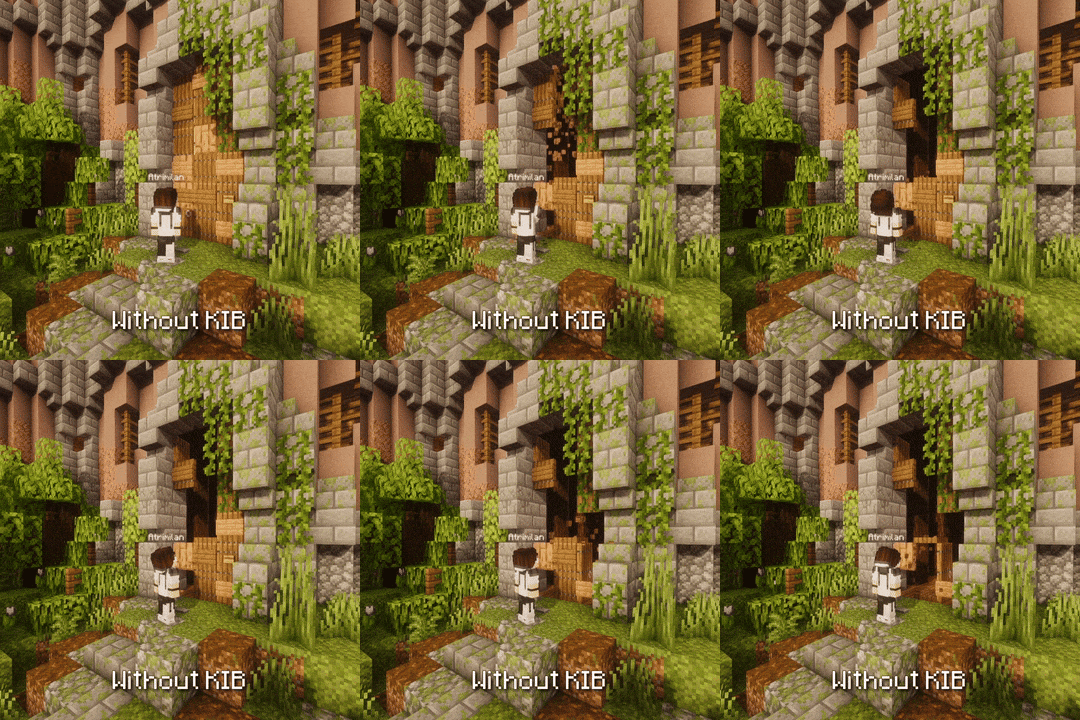
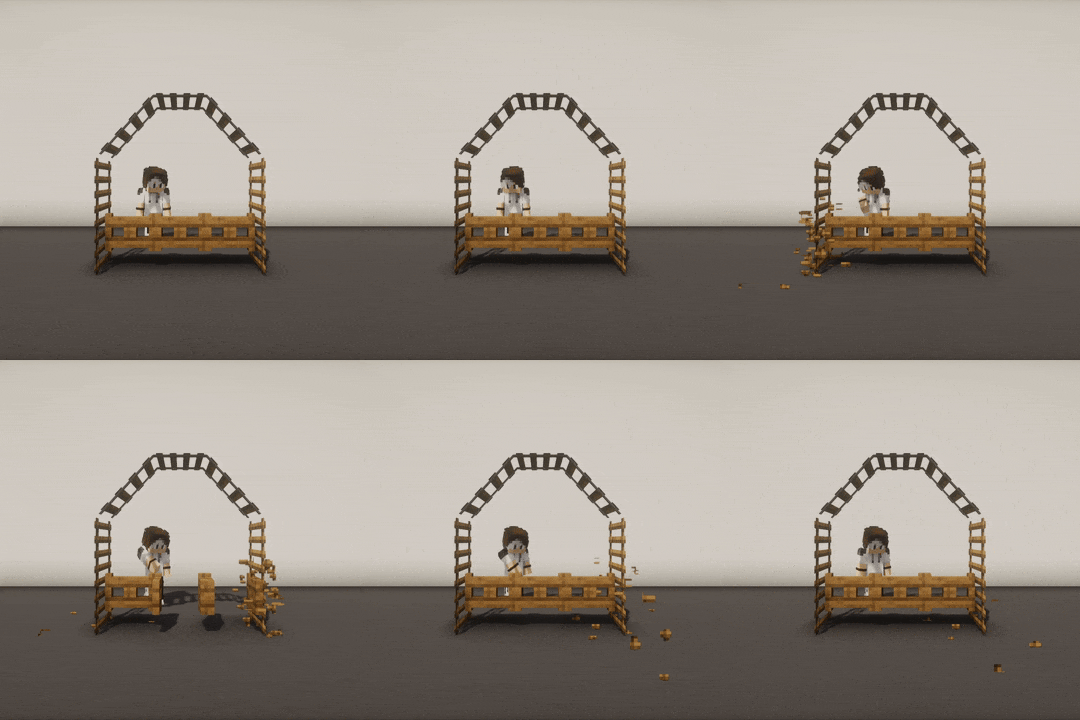
KIB is a Paper plugin that prevents illegal blocks from breaking when a player interacts with an adjacent block.
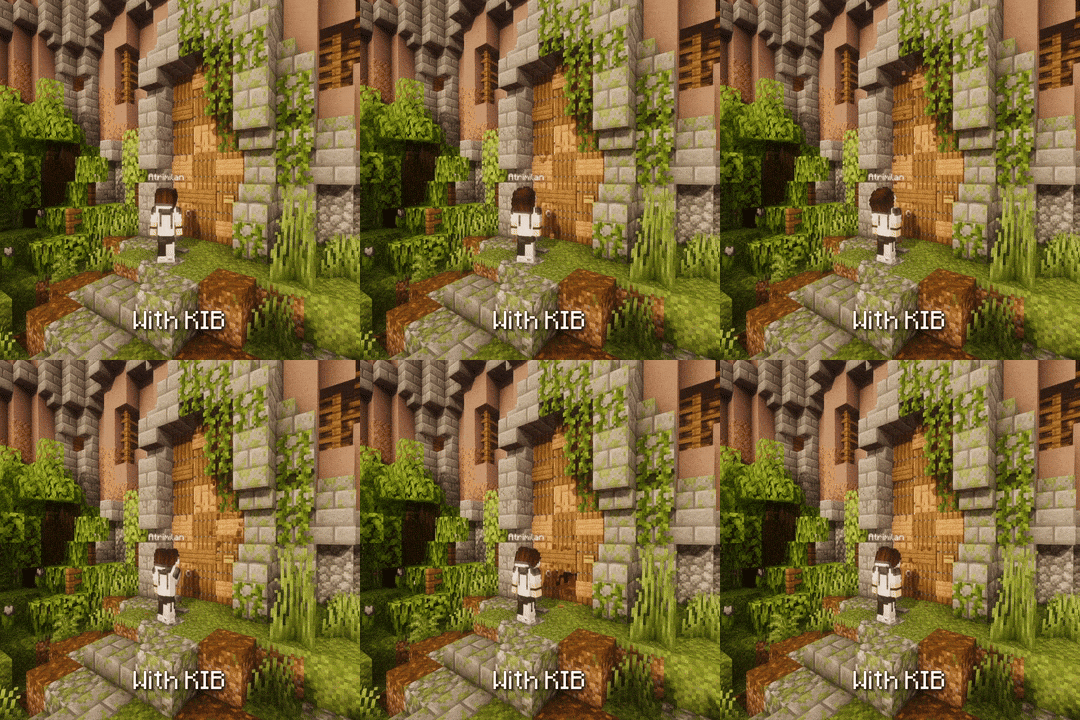
with_kibwithout_kib
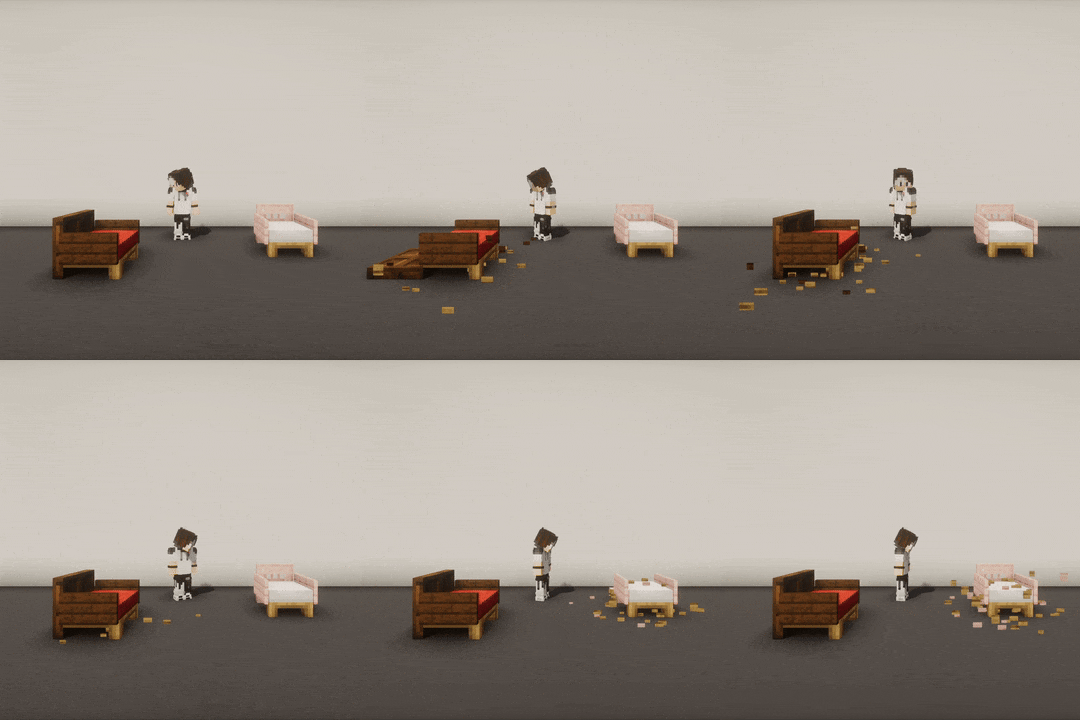
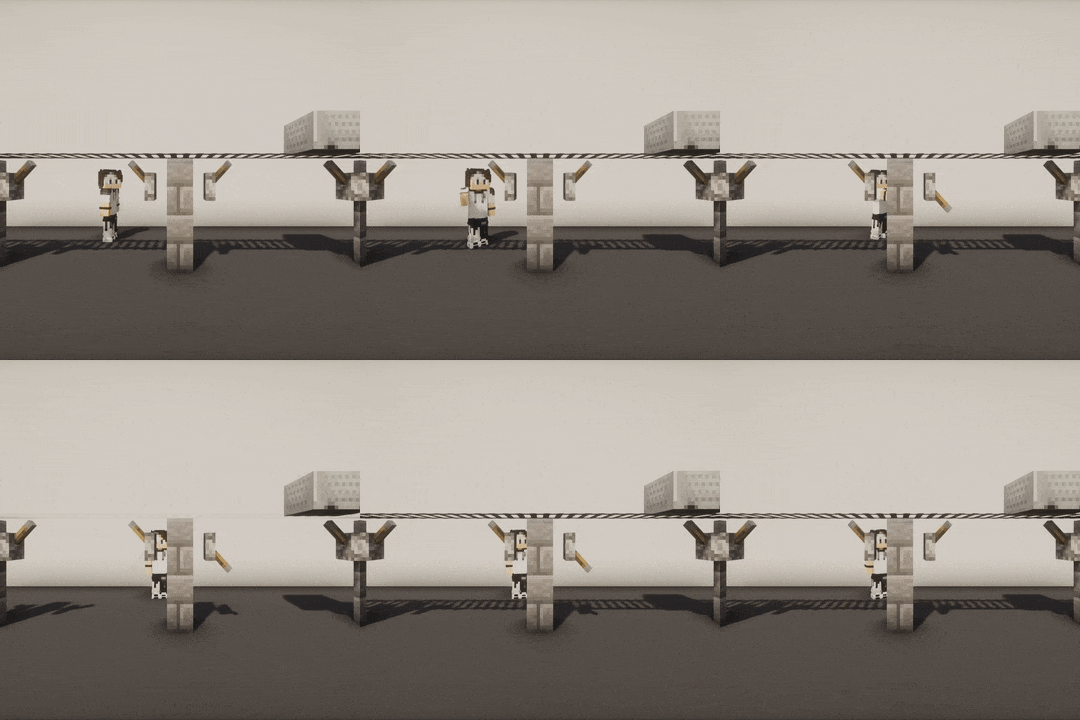
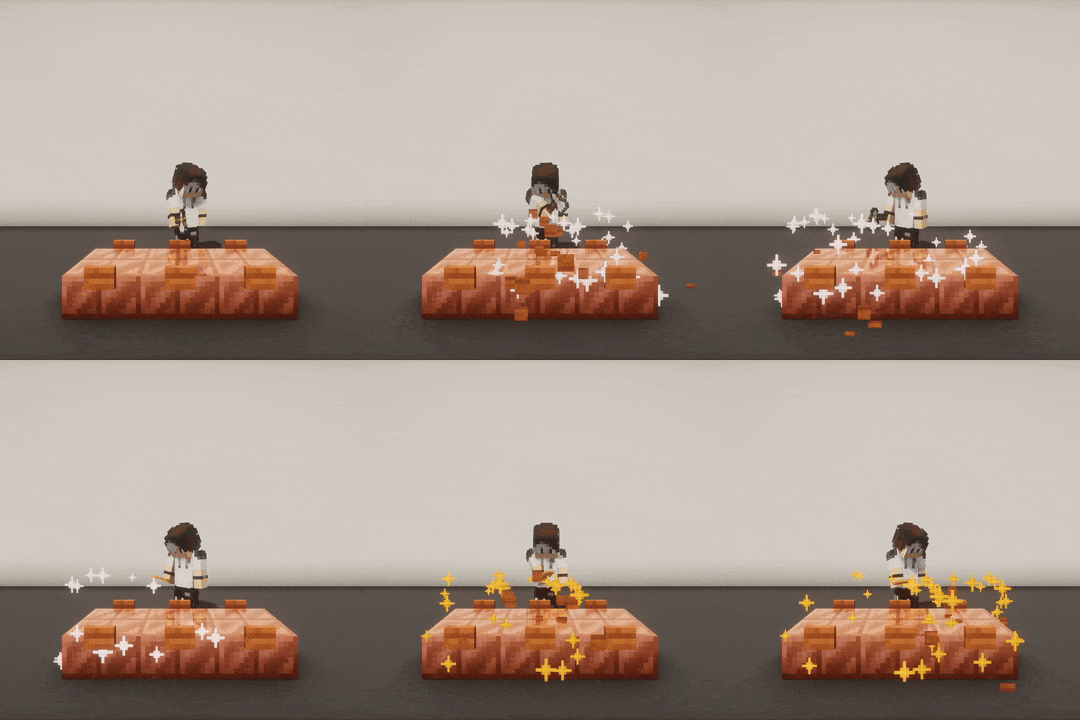
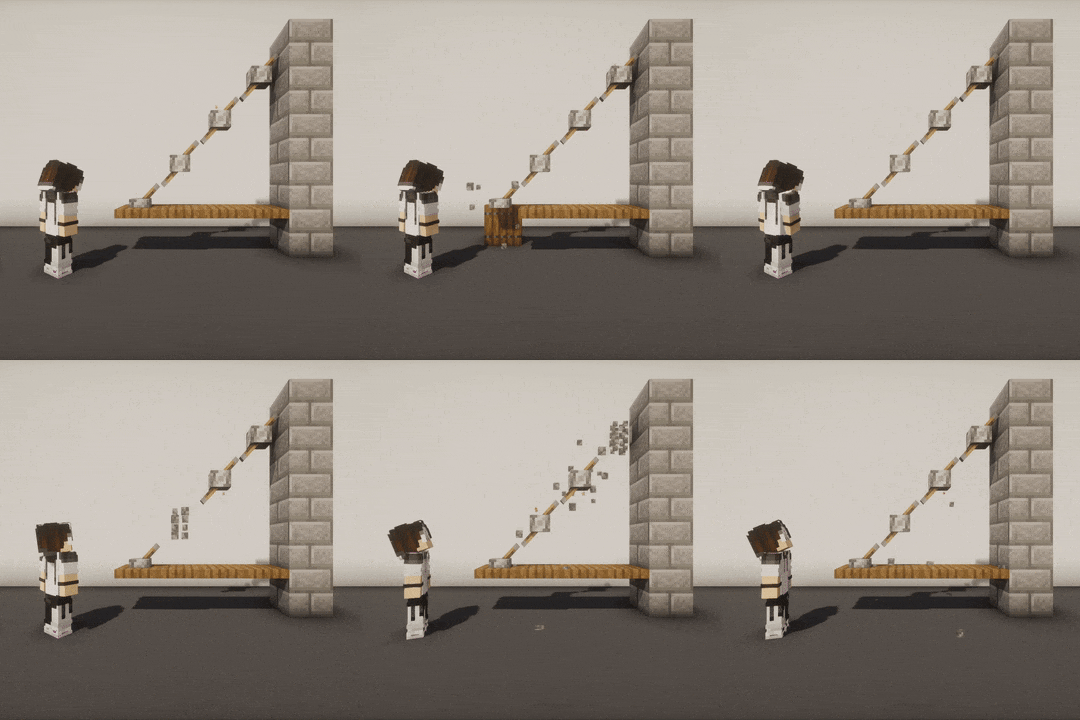
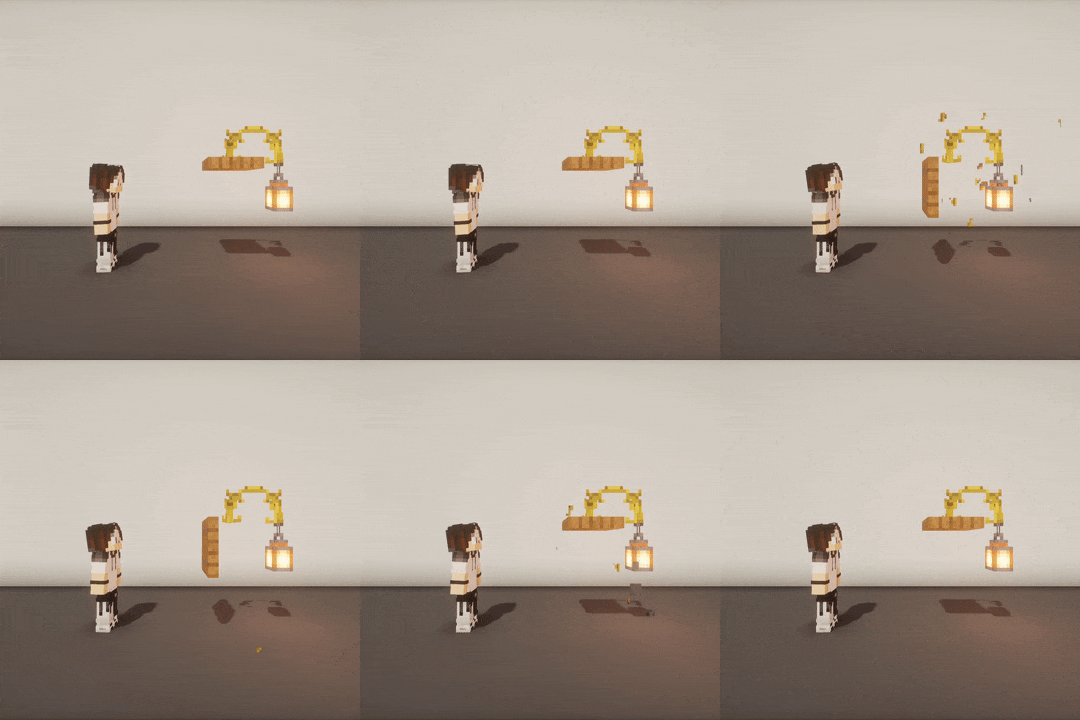
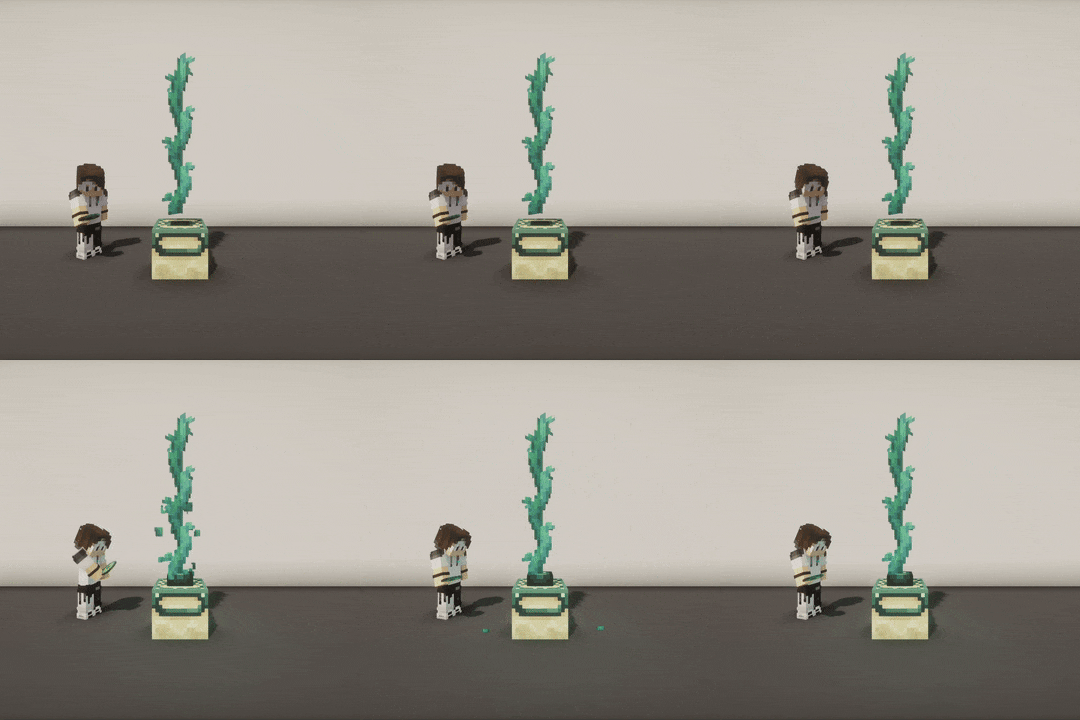
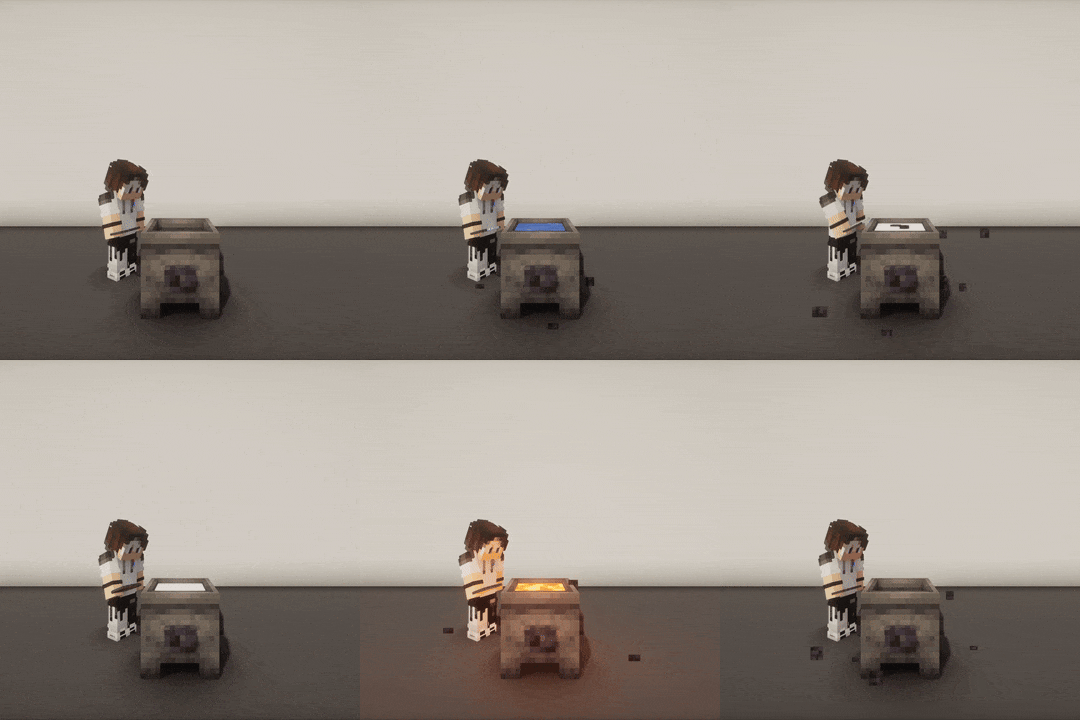
🖼️ More GIF examples

There you go 😎:

chairs_ezgifrail_ezgifcopper_slabs_ezgif
drawbridge_ezgiflantern_ezgifend_portal_frame_ezgif
grave_ezgifcauldron_ezgifgate_ezgif

What's the point?

When you place a block in a way that the game's physics normally wouldn't allow, they may break or update once you interact with an adjacent block.

When an illegally placed block breaks or updates, its own adjacent blocks can be affected too, causing a chain reaction.

For example, these illegal blocks can be placed in the following ways:

  • Force-placed with Axiom and its "No update" feature
  • Force-placed with WorldEdit with //perf off
  • Force-placed with the /setblock Minecraft command in strict mode (that prevents triggering block updates)
  • Updated with a Debug Stick

→ This plugin fixes this behavior by restoring your illegally placed blocks.


In KIB, illegal blocks are called "reactives", and the blocks that can be interacted with are called "interactables" (if they can trigger adjacent block updates).

🤔 I don't get it, give me some examples
  • Place a torch on a door. When you open the door, the torch breaks.
    → The torch is "reactive", the door is "interactable".

  • Stack multiple doors vertically and open the bottom one. All doors above break.
    → All doors are "reactive", the bottom door is the "interactable" one.

  • Place a row of walls, then use a Debug Stick to create crenels, and use Axiom to add a button on each. When you press one button, all buttons break and all wall connections reset to their normal state.
    → Walls and buttons are "reactive", the pressed button is also "interactable".


Why would I need it?

This may seem niche, but it can be very useful for specific builds made using plugins like WorldEdit or Axiom, especially when using custom resource packs that significantly change block textures and models.

This may also interest you if other players come onto your map and are likely to interact with your builds and break everything accidentally... 😅


Which blocks are involved?

🔵 List of reactive material categories

List of reactive material categories that are automatically restored by KIB when broken or updated:

  • amethyst_clusters
  • bamboos
  • banners
  • beds
  • bells
  • bushes
  • cactus
  • cakes
  • carpets
  • cave_vines - Cave vines + Cave vine plants
  • chorus_plants - Chorus plants only (chorus flowers are in the "flowers" category)
  • cocoa
  • crops
  • comparators
  • corals - Does not apply to waterlogged corals
  • dead_bushes
  • doors
  • dripleaves
  • fences - Fences + Iron bars + Copper bars
  • ferns - Ferns + Large ferns
  • flowers
  • frogspawn
  • fungus
  • glass_panes
  • glow_lichens
  • grass
  • hanging_roots
  • hanging_signs
  • ladders
  • lanterns
  • leaf_litters
  • lily_pads
  • mangrove_propagules
  • mushrooms
  • nether_roots
  • nether_sprouts
  • nether_warts
  • pressure_plates
  • rails
  • red_shrubs
  • redstone_wires
  • repeaters
  • saplings
  • scaffolding
  • sculk_veins
  • sea_pickles
  • signs
  • snow
  • speleothems - Pointed dripstones + Sulfur spikes
  • sugar_canes
  • sweet_berry_bushes
  • switches - Levers + Stone buttons + Wooden buttons
  • torches
  • tripwire_hooks
  • twisting_vines - Twisting vines + Twisting vine plants
  • vines
  • walls
  • weeping_vines - Weeping vines + Weeping vine plants
🔴 List of interactable material categories

List of interactable material categories recorded by KIB:

  • campfires
  • candles
  • cauldrons
  • cave_vines - Taking vine berries (Cave vines + Cave vine plants)
  • chiseled_bookshelves - Putting or taking a book from a chiseled bookshelf
  • comparators
  • composters
  • copper_blocks - Non-plain copper blocks that can be waxed or scraped
  • daylight_detectors
  • doors
  • end_portal_frames
  • gates
  • lecterns - Putting a book on a lectern
  • levers
  • repeaters
  • stone_buttons
  • sweet_berry_bushes - Taking bush berries
  • trap_doors
  • wooden_buttons

How do I configure?

👉 Configure KIB using commands

The config.yml file can be edited in-game with the /kib rule and /kib blacklist commands.


To see the current value of a rule, use /kib rule <ruleName>, and if you want to edit a rule, specify a proper value at the end (based on the rule type). Here are some examples:

  • /kib rule max_blocks → Displays the current value of the max_blocks rule
  • /kib rule max_blocks 100 → Sets max_blocks to 100 in config.yml
  • /kib rule only_use_kib_in_creative_mode false → Sets only_use_kib_in_creative_mode to false in config.yml

The /kib rule command requires the kib.rule permission.


To blacklist a reactive or interactable material, use /kib blacklist <interactable|reactive> <add|remove> <material>. This is useful if you want to prevent certain blocks from being restored, or stop specific block interactions from triggering restoration. Here are some examples:

  • /kib blacklist interactable add minecraft:oak_button → Adds OAK_BUTTON to the interactable blacklist
  • /kib blacklist reactive remove minecraft:oak_door → Removes OAK_DOOR from the reactive blacklist (assuming it was previously added)

The /kib blacklist command requires the kib.blacklist permission.


If you have edited config.yml manually, you can reload the plugin with /kib reload. Note that you don't need to reload the plugin after executing commands; this is only necessary if you edit the config.yml file manually.

The /kib reload command requires the kib.reload permission.


If you need help with commands, you can use /kib help. It will show you all available commands, with a short description and usage example.

Any kib.* permission automatically grants access to the /kib help command.


You can use the kib.admin permission to easily grant access to all commands (this is equivalent to kib.*).

📄 Configure KIB in config.yml

In your server directory, you can edit ./plugins/KeepIllegalBlocks/config.yml to:

  • Blacklist some reactive or interactable materials (everything is enabled by default)
  • Change the maximum number of reactive blocks to restore (default: 500)
  • Only allow KIB in creative mode (default: true)
  • Use PacketEvents if it is detected (default: true)

To reload your configuration, use the /kib reload command (it requires the kib.reload permission for a non-op player).


Can the restoration be any smoother?

Yes, PacketEvents is highly recommended to improve client-side rendering and performance.

It is automatically detected by KIB, and it is used to tweak network packets and make restorations completely transparent by canceling reactive block break sounds and particles, as well as hiding flickering during restoration.

To find out which version of PacketEvents is recommended, check the “Dependencies” section for the version of KIB you want to install.


FAQ

Why doesn't KIB restore my blocks when I break an adjacent block?

KIB does not trigger when you break blocks manually (left-click); it only restores blocks that were accidentally broken as a result of an interaction (right-click). This could be an improvement area, but I don't have time to work on it at the moment. However, Axiom has a "No update" feature for this use case.

Does it work underwater?

KIB does not support underwater restorations. That's why seagrass and kelp are not included in the list of reactive materials. For now, I have only focused on protecting illegal structures in the air; making this work underwater might not be easy, since the water flow would trigger multiple updates.

Does KIB prevent natural updates?

Even after being restored by KIB, some reactive blocks will still update naturally, such as cactus breaking as they grow, or coral dying when not waterlogged. This is the default behavior of the game, KIB will NOT prevent this, even if they were initially placed using plugins like WorldEdit or Axiom (which rely on advanced chunk management systems).

Галерея

KIB

Последние версии

Все версии →
release

1.5.1-mc1.20.6

1.5.1-mc1.20.6
11 окт. 2026 г.52Minecraft: 1.20.6, 1.21, 1.21.1, 1.21.2, 1.21.3, 1.21.4, 1.21.5, 1.21.6, 1.21.7, 1.21.8, 1.21.9, 1.21.10, 1.21.11, 26.1, 26.1.1, 26.1.2, 26.2, 26.3paper, purpur
Скачать
Что нового
#### Overview * Added `bushes` reactive material category, which includes `BUSH` and `FIREFLY_BUSH`. * Added `red_shrubs` reactive material category, which only includes `RED_SHRUB`. * Reactivated the restoration of `CHORUS_FLOWER` in the `flowers` reactive category (not in `chorus_plants`). * Disabled `STICK` drops when a reactive `DEAD_BUSH` breaks (to prevent item duplication). * Updated README file to simplify the documentation and include the recently added commands that were missing. > Pull request: https://github.com/Atrimilan/KeepIllegalBlocks/pull/6
release

1.5.0-mc1.20.6

1.5.0-mc1.20.6
4 окт. 2026 г.9Minecraft: 1.20.6, 1.21, 1.21.1, 1.21.2, 1.21.3, 1.21.4, 1.21.5, 1.21.6, 1.21.7, 1.21.8, 1.21.9, 1.21.10, 1.21.11, 26.1, 26.1.1, 26.1.2, 26.2, 26.3paper, purpur
Скачать
Что нового
#### 1. Overview * Added support for Minecraft `26.3`. * New commands: * `/kib rule <ruleName> [<value>]` * `/kib blacklist <interactable|reactive> <add|remove> <material>` * `/kib help` * New permissions: * `kib.rule` * `kib.blacklist` * `kib.admin` * Changed config.yml to use snake_case keys instead of kebab-case. * Updated the PacketEvents optional dependency to `2.14.0+spigot`. #### 2. Commands and permissions The config.yml file can now be edited in-game with the `/kib rule` and `/kib blacklist` commands. > You don't need to reload the plugin after executing commands; this is only necessary if you edit the config.yml file > manually. To see the current value of a rule, use `/kib rule <ruleName>`, and if you want to edit a rule, specify a proper value at the end (based on the rule type). Here are some examples: * `/kib rule max_blocks` → Displays the current value of the `max_blocks` rule * `/kib rule max_blocks 100` → Sets `max_blocks` to `100` in config.yml * `/kib rule only_use_kib_in_creative_mode false` → Sets `only_use_kib_in_creative_mode` to `false` in config.yml > The `/kib rule` command requires the `kib.rule` permission. To blacklist a reactive or interactable material, use `/kib blacklist <interactable|reactive> <add|remove> <material>`. This is useful if you want to prevent certain blocks from being restored, or stop specific block interactions from triggering restoration. Here are some examples: * `/kib blacklist interactable add minecraft:oak_button` → Adds `OAK_BUTTON` to the interactable blacklist * `/kib blacklist reactive remove minecraft:oak_door` → Removes `OAK_DOOR` from the reactive blacklist (assuming it was previously added) > The `/kib blacklist` command requires the `kib.blacklist` permission. If you need help with commands, you can use `/kib help`. It will show you all available commands, with a short description and usage example. > Any `kib.*` permission automatically grants access to the `/kib help` command. The `/kib reload` command and the `kib.reload` permission haven't changed and still work the same way. You can use the `kib.admin` permission to easily grant access to all commands (this is equivalent to `kib.*`). > Pull request: https://github.com/Atrimilan/KeepIllegalBlocks/pull/5
release

1.4.3-mc1.20.6

1.4.3-mc1.20.6
1 авг. 2026 г.51Minecraft: 1.20.6, 1.21, 1.21.1, 1.21.2, 1.21.3, 1.21.4, 1.21.5, 1.21.6, 1.21.7, 1.21.8, 1.21.9, 1.21.10, 1.21.11, 26.1, 26.1.1, 26.1.2, 26.2paper, purpur
Скачать
Что нового
#### Overview * Added `chiseled-booshelves` interactable block category (putting and taking books can break adjacent reactive blocks). > Pull request: https://github.com/Atrimilan/KeepIllegalBlocks/pull/4
release

1.4.2-mc1.20.6

1.4.2-mc1.20.6
26 июл. 2026 г.22Minecraft: 1.20.6, 1.21, 1.21.1, 1.21.2, 1.21.3, 1.21.4, 1.21.5, 1.21.6, 1.21.7, 1.21.8, 1.21.9, 1.21.10, 1.21.11, 26.1, 26.1.1, 26.1.2, 26.2paper, purpur
Скачать
Что нового
#### Overview * Added the [ConfigUpdater](https://github.com/tchristofferson/Config-Updater) library to improve the auto-updating of the config.yml file when KIB is updated. Compared to the previous approach, this allows old section values to be removed and new comments to be added, while preserving all user changes. > Pull request: https://github.com/Atrimilan/KeepIllegalBlocks/pull/3
release

1.4.1-mc1.20.6

1.4.1-mc1.20.6
13 июл. 2026 г.15Minecraft: 1.20.6, 1.21, 1.21.1, 1.21.2, 1.21.3, 1.21.4, 1.21.5, 1.21.6, 1.21.7, 1.21.8, 1.21.9, 1.21.10, 1.21.11, 26.1, 26.1.1, 26.1.2, 26.2paper, purpur
Скачать
Что нового
#### Overview * Added support for Minecraft `26.2`. * Added `speleothems` reactive block category, which includes `POINTED_DRIPSTONE` and the new `SULFUR_SPIKE`. * Removed `pointed-dripstones` category. * Updated the PacketEvents optional dependency to `2.13.0+spigot`. * Added FAQ section to the README.
release

1.4.0-mc1.20.6

1.4.0-mc1.20.6
5 июн. 2026 г.29Minecraft: 1.20.6, 1.21, 1.21.1, 1.21.2, 1.21.3, 1.21.4, 1.21.5, 1.21.6, 1.21.7, 1.21.8, 1.21.9, 1.21.10, 1.21.11, 26.1, 26.1.1, 26.1.2paper, purpur
Скачать
Что нового
#### Overview * Added support for Minecraft `26.1.x` (`1.20.6` to `1.21.11` are still supported). * Consolidated "fragile" and "connectable" into the new "reactive" type. "Connectable" is now a property of reactive blocks. Documentation is updated accordingly. * Reworked the restoration service to fix issues where connectable reactive blocks were not always properly restored. _Some edge cases may still (rarely) occur in very specific situations, as the restoration system implemented is still fairly lightweight. Advanced chunk management would have been overkill for what the plugin does._ * Added `leaf-litters` as a reactive block. * Added propagation of material classifications to their placement materials, to prevent duplication when items and blocks have different materials. For example, `Material.REDSTONE` becomes `Material.REDSTONE_WIRE` once placed. * Added `Material.AMETHYST_SHARD` to the `amethyst-clusters` category (to prevent item duplication). * Added `Material.CHORUS_FRUIT` to the `chorus-plants` category (to prevent item duplication). > Pull request: https://github.com/Atrimilan/KeepIllegalBlocks/pull/1
beta

1.3.0-mc1.20.6

1.3.0-mc1.20.6
17 мая 2026 г.23Minecraft: 1.20.6, 1.21, 1.21.1, 1.21.2, 1.21.3, 1.21.4, 1.21.5, 1.21.6, 1.21.7, 1.21.8, 1.21.9, 1.21.10, 1.21.11paper, purpur
Скачать
Что нового
#### 1. Overview * Updated the restoration system to support **connectable blocks**, preventing unwanted block updates for `glass-panes`, `walls` and `fences` (fences, iron bars and copper bars). * Fixed blacklisted fragile blocks items not being dropped when they are broken (only blacklisted ones, not blocks being broken due to getting over the max-blocks limit). * Added `redstone-wires` as fragile blocks. * Removed support for `CHORUS_FLOWER` as fragile blocks because their restoration doesn't work properly. Note that `CHORUS_PLANT` is still supported. * Completely reworked material loading process on server start (or plugin reload), to improve performance and allow non-block materials to be loaded (such as `redstone-wires`). * Split and heavily refactored the main configuration class. * Updated the PacketEvents optional dependency to `2.12.1+spigot`. #### 2. Connectable blocks A connectable block is a block that automatically connects to its adjacent blocks. This includes the following categories: * `fences` (fences, iron bars and copper bars) * `glass-panes` * `walls` Connectable blocks behave in a similar way to fragile blocks: * Their connections can be modified illegally with a Debug Stick, or plugins like Axiom or WorldEdit. * A connectable block will revert to its normal state when a physics update is triggered on one of its adjacent blocks. This is why the restoration system has been made compatible with connectable blocks. Connectable block updates are removed from network packets when they are restored (if the PacketEvents plugin is present). However, in most cases, they are still rendered by the client before the related network packet is received, which causes flickering for a fraction of a second.
release

1.2.0-mc1.20.6

1.2.0-mc1.20.6
23 февр. 2026 г.23Minecraft: 1.20.6, 1.21, 1.21.1, 1.21.2, 1.21.3, 1.21.4, 1.21.5, 1.21.6, 1.21.7, 1.21.8, 1.21.9, 1.21.10, 1.21.11paper, purpur
Скачать
Что нового
#### 1. Overview * Improved cancellation of item spawning events when fragile blocks are broken and restored. * Improved the second restoration triggered by buttons due to their second physical update. * Fixed interactable blocks breaking is specific cases. * Replaced interactable block categories `switches` with `stone-buttons`, `wooden-buttons` and `levers`. * Added `cave-vines` (`CAVE_VINES` + `CAVE_VINES_PLANT`) and `sweet-berry-bushes` as interactable block categories. #### 2. Overhaul of the restoration system The restoration system has been reworked to fix all known issues: * Interactable blocks no longer break when they are also fragile. For example, a lever on a trapdoor could break because a lever is also fragile. * When the interactable block is a button, a second update occurs a few ticks later (the delay is 20 ticks for `stone-buttons` and 30 ticks for `wooden-buttons`). A second restoration is therefore automatically performed at that moment. This is why the `switches` interactable block category had to be separated into `stone-buttons`, `wooden-buttons` and `levers` categories. * KIB no longer waits for items to spawn before deleting them. Their spawning event is now intercepted and immediately canceled. In addition, the `SPAWN_ENTITY` network packet is no longer canceled by the [PacketEvents](https://modrinth.com/plugin/packetevents) plugin (if present), as this packet is no longer sent when fragile blocks break.
beta

1.1.2-mc1.20.6

1.1.2-mc1.20.6
10 февр. 2026 г.18Minecraft: 1.20.6, 1.21, 1.21.1, 1.21.2, 1.21.3, 1.21.4, 1.21.5, 1.21.6, 1.21.7, 1.21.8, 1.21.9, 1.21.10, 1.21.11paper, purpur
Скачать
Что нового
#### Overview * Fix some `MULTI_BLOCK_CHANGE` packets that were not being sent correctly. They are now tweaked to only disable packets that replace fragile blocks with air. * This fixes redstone and rails _(and probably other fragile blocks)_ that weren't updating on client sides. * This also fixes fragile doors from flickering. * Change the Modrinth publishing system. * The [mc-publish](https://github.com/marketplace/actions/mc-publish) GitHub action has been replaced by the Modrinth's [Minotaur](https://github.com/modrinth/minotaur) Gradle task.
beta

1.1.1-mc1.20.6

1.1.1-mc1.20.6
3 февр. 2026 г.19Minecraft: 1.20.6, 1.21, 1.21.1, 1.21.2, 1.21.3, 1.21.4, 1.21.5, 1.21.6, 1.21.7, 1.21.8, 1.21.9, 1.21.10, 1.21.11paper, purpur
Скачать
Что нового
#### Overview * Add support for versions **1.21 → 1.21.11** * Replace `MaterialTags.SIGNS` (deprecated since 1.21.8) with `Tag.ALL_SIGNS` * Fix `version` in plugin.yml * Fix error message about `org.bukkit.entity.Player.getWorld()` failure when `com.github.retrooper.packetevents.event.PacketSendEvent.getPlayer()` is null