

JustAFK
A lightweight, configurable, server-side AFK plugin with activity-aware detection and a public API for Paper, Purpur, Folia, Spigot, and Bukkit.
Описание
JustAFK
JustAFK is a lightweight, server-side AFK plugin for Bukkit-compatible Minecraft servers.
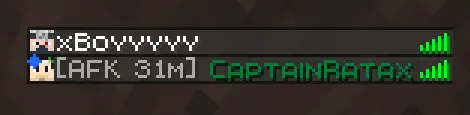
It marks players as AFK after a configurable period without recognized activity, provides manual and administrative AFK controls, announces AFK state changes, and can display the current AFK duration directly in the TAB player list.
JustAFK focuses on being simple, configurable, and easy to run. It does not use NMS, databases, client mods, or external runtime libraries.
JustAFK is completely server-side. Players do not need to install anything on their clients.
Compatibility notice: JustAFK 1.3.0 targets Minecraft 1.21.3–26.3 with the same JAR and requires Java 21 or newer for the plugin. The server may require a newer Java runtime; Paper 26.1 and newer require Java 25.
Servers below Minecraft 1.21.3 can continue using JustAFK 1.0.1, within the compatibility listed for that release. It uses the previous position-based AFK detection.
Documentation: For installation, configuration, commands, permissions, AFK behavior, API usage, and troubleshooting, visit the JustAFK documentation.
Why use JustAFK?
- Lightweight, activity-aware AFK detection
- Movement-input detection instead of position-based detection
- Chat messages recognized as player activity
- Block breaking and placement recognized as activity
- Player-driven fishing recognized as activity
- Block, item, and entity interactions recognized as activity
- Recognized activity still counts when another plugin cancels its event
- Global plugin enable/disable control
- Independently configurable automatic AFK detection
- Manual AFK command for every player
- Administrative control over other online players
- Configurable inactivity timeout
- Configurable AFK announcements
- Optional TAB player-list prefix
- AFK duration shown in minutes or hours
- AFK state preserved during knockback and external movement
- AFK state and duration preserved through death and respawn
- Player-list name preservation for compatibility with formatting plugins
- Public AFK API through Bukkit's
ServicesManager - Public Bukkit event for AFK state changes
- Immediate configuration saving through commands
- Command tab completion
- Folia-aware scheduling
- No NMS, databases, or external runtime dependencies
- Compatible with permission managers such as LuckPerms
- Completely server-side
JustAFK only marks players as AFK. It does not kick, freeze, teleport, punish, or restrict them.
Preview
| Player list | Chat announcements |
|---|---|
 |  |
Compatibility
JustAFK 1.3.0
JustAFK 1.3.0 uses the player-input API introduced in modern Minecraft server versions together with standard Bukkit activity events.
| Platform | API compatibility range | Status |
|---|---|---|
| Paper | 1.21.3–26.3 | API-compatible; Paper 26.3 is the primary build target |
| Purpur | 1.21.3–26.3 | Expected compatibility as a Paper fork, where compatible builds exist |
| Folia | 1.21.3–26.3 | Uses native Folia schedulers where server builds preserve the required APIs and scheduler contracts |
| Spigot | 1.21.3–26.3 | Compatibility-compiled against Spigot 1.21.3 |
| CraftBukkit | 1.21.3–26.3 | Compatibility based on the shared Bukkit API |
| Sponge | Not supported | Uses a different plugin API and lifecycle |
| BungeeCord, Velocity, Waterfall | Not supported | Proxy platforms; install JustAFK on the backend server instead |
Version 1.3.0 is built against the fixed stable Paper API 26.3.build.230-stable and compatibility-compiled against Spigot 1.21.3.
Both compilations must produce identical class files before the project build passes.
The JAR uses Java 21 bytecode. The server may require a newer Java version depending on its Minecraft version. Paper 26.1 and newer require Java 25, including Paper 26.3. Building JustAFK from source requires JDK 25 and emits Java 21 bytecode.
The api-version is set to 1.21.3, causing unsupported older servers to refuse to load the plugin instead of failing later when the movement-input API is used.
These checks establish compilation and bytecode compatibility at the API endpoints. No real-server runtime tests were performed for this update. The range does not imply that every platform publishes every Minecraft version within it, or that every intermediate version and fork was individually tested. Purpur and Folia compatibility remains conditional on available builds preserving the required APIs and scheduler contracts.
Older Minecraft versions
Servers below Minecraft 1.21.3 should continue using JustAFK 1.0.1, within the compatibility declared for that release.
The following are the legacy compatibility ranges listed for JustAFK 1.0.1; this update does not extend or revalidate them:
| Platform | JustAFK 1.0.1 declared compatibility |
|---|---|
| Paper | 1.8.8–26.2 |
| Purpur | 1.14.1–26.2 |
| Folia | 1.19.4–26.2 |
| Spigot / CraftBukkit | 1.8.8–26.2, best-effort |
The published 1.0.1 changelog records smoke tests on Paper 1.8.8 and 26.2, Purpur 26.2, and Folia 26.1.2. These results do not establish runtime testing for every version in the declared ranges.
JustAFK 1.0.1 uses Java 8-compatible bytecode and remains available for servers that cannot upgrade to Minecraft 1.21.3.
However, version 1.0.1 does not include:
- Input-aware activity detection
- Protection against AFK removal caused by knockback or external movement
- Recognition of chat, fishing, block, item, and entity activity
- The public AFK API
- The public AFK state-change event
- The global
enabledoption - The independent
automatic-afk-enabledoption
Version 1.0.1 detects activity through position changes. A slime, mob, arrow, explosion, water current, or another external force may therefore reset the inactivity timer or remove AFK.
The supported version ranges do not mean that every intermediate server release has been individually runtime-tested.
How AFK detection works
By default, a player is marked as AFK after 300 seconds, or five minutes, without recognized activity.
Movement input
JustAFK recognizes the following movement inputs:
- Forward
- Backward
- Left
- Right
- Jump
- Sneak
- Sprint
JustAFK combines two movement-input detection methods:
PlayerInputEventdetects immediate input changes and short key pressesPlayer#getCurrentInput()polling keeps the player active while a movement input remains held
Timeout checks and held-input polling run once per second. Other recognized activities are processed when their corresponding Bukkit event occurs.
A held key or client-side movement toggle continues to count as activity while the server reports that input as active.
Other recognized activity
JustAFK 1.3.0 also recognizes:
- Submitting a chat message
- Breaking a block
- Placing a block
- Player-driven fishing actions
- Interacting with blocks
- Interacting with or using items
- Interacting with entities
- Interacting with a precise point on an entity
When recognized activity is detected:
- The inactivity timer is restarted
- An AFK player immediately becomes active
- The AFK TAB prefix is removed
- The configured active announcement is sent
- A public AFK state-change event is published when the state actually changes
Cancelled actions
Recognized activity still counts when another plugin cancels the corresponding event.
For example:
- Attempting to break or place a block in a protected area
- Interacting with a protected block or entity
- Attempting to use an item when another plugin blocks its use
- Submitting a chat message that is later cancelled by a moderation plugin
The result of the action may be prevented, but the action still demonstrates that the player is present and active.
Fishing behavior
Player-driven fishing actions count as activity. Casting, reeling, and other actions initiated by the player restart the inactivity timer.
A server-generated fishing bite alone does not count because it can occur without new input from the player.
This prevents players who remain stationary while actively fishing from being incorrectly marked as AFK.
Chat behavior
Submitting a chat message removes AFK and restarts the inactivity timer.
This also applies when another plugin later cancels the chat event. Chat activity is transferred safely from the asynchronous chat event to the appropriate Bukkit or Folia player scheduler.
Physical interactions
Physical block interactions such as pressure-plate activation are not independently counted as activity.
These interactions can happen because of knockback, entity pushes, water, or another external source and do not always represent a deliberate player action.
External movement
Position changes do not count as activity unless the player is also sending movement input.
An AFK player therefore remains AFK when moved by:
- Entity collisions
- Pets or mobs pushing the player
- Slimes
- Zombie attacks
- Skeleton arrows
- Knockback
- Explosions
- Flowing water
- Bubble columns
- Pistons
- Shulkers
- Gravity or falling
- Passive vehicle movement
- Server or plugin teleports
- Death
- Respawn
These events do not restart the inactivity timer or reset the displayed AFK duration.
If the player sends movement input while receiving knockback or another external force, the player is considered active because movement input is being received from the client.
Looking around with the mouse does not reset the timer.
AFK sessions
AFK states are session-based:
- Death does not reset the AFK state
- Respawn does not reset the AFK state
- External movement does not reset the AFK state
- Recognized player activity removes the AFK state
- Manually turning AFK off starts a fresh inactivity period
- Disconnecting removes the tracked session
- Reconnecting starts a new session and resets the AFK state
Plugin operating modes
Plugin enabled
The default global state is:
enabled: true
When enabled, JustAFK operates normally according to the remaining configuration.
The setting can be changed at runtime:
/justafk set enabled on
/justafk set enabled off
Plugin disabled
When enabled is set to false:
- Player activity is no longer tracked
- Automatic AFK detection stops
/afkno longer changes AFK states- Administrative AFK changes are disabled
- Existing plugin-managed AFK states are cleared
- Player-list prefixes managed by JustAFK are restored
- AFK announcements stop
- AFK duration updates stop
The configuration commands remain available:
/justafk/justafk help/justafk status/justafk reload/justafk set ...
This allows administrators to inspect, configure, reload, and enable the plugin again without restarting the server.
Re-enabling JustAFK starts a fresh activity-tracking session for online players.
Automatic AFK enabled
Automatic AFK detection is enabled by default:
automatic-afk-enabled: true
Players are automatically marked as AFK after the configured inactivity timeout.
Automatic AFK disabled
Automatic AFK detection can be disabled independently:
automatic-afk-enabled: false
It can also be changed at runtime:
/justafk set automatic-afk off
When automatic AFK detection is disabled:
- Inactivity does not place players into AFK automatically
- Players can still use
/afk - Administrators can still control another player's AFK state
- Recognized activity still removes a manually applied AFK state
- Announcements continue to work for manual AFK changes
- The player-list prefix continues to work for manual AFK states
This allows JustAFK to operate exclusively as a manual AFK plugin.
AFK duration
The optional TAB prefix displays how long the player has been marked as AFK.
Examples:
- A newly AFK player displays
0m - Five minutes displays
5m - Fifty-nine minutes displays
59m - One hour displays
1h - Two hours displays
2h
Minutes are shown below 60 minutes. From 60 minutes onwards, the duration is shown in whole hours.
The default format is:
&7[AFK {duration}]&r
This produces a grey prefix before the player's existing player-list name.
JustAFK preserves the existing player-list name instead of replacing it with the account name.
If another plugin updates the TAB name while the player is AFK, JustAFK adopts the new value as its base. It also avoids overwriting newer changes made by other formatting plugins when removing the AFK prefix.
Public API
JustAFK 1.3.0 provides an official read-only API for other plugins:
pt.captainratax.justafk.api.JustAfkApi
The provider is registered through Bukkit's ServicesManager when JustAFK is enabled.
Example:
import org.bukkit.Bukkit;
import pt.captainratax.justafk.api.JustAfkApi;

JustAfkApi api = Bukkit.getServicesManager().load(JustAfkApi.class);
boolean playerIsAfk = api != null && api.isAfk(player);
Available methods:
boolean isAfk(Player player);
boolean isAfk(UUID playerId);
Both methods read the same AFK state maintained internally by JustAFK.
An unknown or offline UUID that is not currently tracked returns false. Querying it does not create a new tracking session.
The service is unregistered when the plugin itself is disabled or unloaded by the server. Consumer plugins should always handle the provider being unavailable.
Integration notice
The API creates an official integration surface, but other plugins do not discover it automatically.
A plugin that wants to recognize JustAFK players must explicitly retrieve and use JustAfkApi. JustAFK does not include direct integrations with Sleeper, Essentials, or other third-party AFK consumers.
AFK state-change event
Other plugins can listen for:
pt.captainratax.justafk.api.event.PlayerAfkStateChangeEvent
The event provides:
Player getPlayer();
boolean isAfk();
boolean isAutomatic();
The event is a notification of a completed state change and is not cancellable.
It is published only when the AFK state actually changes:
- Active to AFK
- AFK to active
Repeated commands, activity calls, or internal checks that leave the player in the same state do not publish duplicate events.
isAutomatic() is true only when an inactivity timeout moves the player into AFK.
It is false for:
- Manual AFK changes
- Manual returns to active
- Activity-driven returns to active
- Active transitions produced when the plugin is disabled through its runtime configuration
Disabling JustAFK through the enabled configuration clears tracked AFK states and publishes the corresponding active events.
Player disconnection and plugin shutdown remove tracking without publishing an artificial active-player transition.
Commands
| Command | Default access | Permission | Description |
|---|---|---|---|
/afk | All players | justafk.use | Toggle your own AFK state. |
/afk <player> | Operators | justafk.use and justafk.others | Toggle an online player's AFK state. |
/afk <player> on | Operators | justafk.use and justafk.others | Mark an online player as AFK. |
/afk <player> off | Operators | justafk.use and justafk.others | Remove an online player's AFK state. |
/afk <player> toggle | Operators | justafk.use and justafk.others | Toggle an online player's AFK state explicitly. |
/justafk | Operators | justafk.config | Show the command help. |
/justafk help | Operators | justafk.config | Show the command help. |
/justafk status | Operators | justafk.config | Display the active configuration. |
/justafk reload | Operators | justafk.config | Reload config.yml. |
/justafk set enabled <on|off> | Operators | justafk.config | Enable or disable JustAFK globally. |
/justafk set automatic-afk <on|off> | Operators | justafk.config | Enable or disable automatic AFK detection. |
/justafk set timeout <seconds> | Operators | justafk.config | Change the automatic AFK timeout. |
/justafk set announcements <all|ops|none> | Operators | justafk.config | Change the announcement audience. |
/justafk set playerlist <on|off> | Operators | justafk.config | Enable or disable the TAB prefix. |
The /jafk alias can be used instead of /justafk.
Running /afk <player> without on, off, or toggle defaults to toggle.
The target player must be online. Player names are matched exactly without case sensitivity.
When another person changes a player's AFK state, the target receives a private notification identifying who made the change.
Both /afk and /justafk include tab completion.
When JustAFK is globally disabled, only the help, status, reload, and configuration commands remain operational.
Permissions
| Permission | Default | Description |
|---|---|---|
justafk.use | Everyone | Allows players to use /afk on themselves. |
justafk.others | Operators | Allows changing another online player's AFK state. |
justafk.config | Operators | Allows access to all /justafk administrative commands. |
justafk.admin | Operators | Grants all JustAFK permissions. |
justafk.admin includes:
justafk.usejustafk.othersjustafk.config
Because the root /afk command requires justafk.use, a moderator who should manage other players needs both justafk.use and justafk.others.
LuckPerms examples
LuckPerms is optional. JustAFK uses the standard Bukkit permission system and works with permission plugins that manage Bukkit permissions.
Allow the default group to toggle its own AFK state:
/lp group default permission set justafk.use true
Allow a moderator group to manage other players:
/lp group moderator permission set justafk.use true
/lp group moderator permission set justafk.others true
Give an administrator group every JustAFK permission:
/lp group admin permission set justafk.admin true
Allow a staff group to manage the configuration without granting every permission:
/lp group staff permission set justafk.config true
Remove self-service AFK access from the default group:
/lp group default permission set justafk.use false
Replace default, moderator, admin, or staff with the group names used by your server.
The ops announcement audience refers to players who are actual Minecraft server operators. It does not include players merely because they have justafk.admin through LuckPerms.
Configuration
The default config.yml is:
# Enables or disables JustAFK as a whole.
# When disabled, only the help, status, reload, and configuration commands work.
enabled: true

# Marks inactive players as AFK automatically after the configured timeout.
# Manual AFK commands remain available when this is disabled.
automatic-afk-enabled: true

# Time without recognized player activity before a player is marked as AFK.
# Activity includes movement input, chat messages, breaking or placing blocks,
# player-driven fishing actions, block, item, and entity interactions, and item use.
# The default is 300 seconds (5 minutes).
inactivity-timeout-seconds: 300

announcements:
  # Available values: all, ops, none
  audience: all

player-list:
  # Adds a grey AFK duration before the player's existing tab-list name.
  enabled: true
  format: "&7[AFK {duration}]&r "

messages:
  # Legacy colour codes using '&' are supported.
  command-prefix: "&8[&7JustAFK&8]&r "
  became-afk: "&8[&7JustAFK&8]&r &7{player} is now AFK."
  became-active: "&8[&7JustAFK&8]&r &7{player} is no longer AFK."
Configuration options
| Option | Default | Accepted values | Description |
|---|---|---|---|
enabled | true | true or false | Enables or disables JustAFK globally. |
automatic-afk-enabled | true | true or false | Enables or disables automatic AFK detection independently. |
inactivity-timeout-seconds | 300 | A whole number of at least 1 | Time without recognized activity before automatic AFK. |
announcements.audience | all | all, ops, none | Controls who receives AFK entry and exit announcements. |
player-list.enabled | true | true or false | Enables the TAB player-list prefix. |
player-list.format | &7[AFK {duration}]&r | Text containing {duration} | Controls the prefix displayed before the existing player-list name. |
messages.command-prefix | JustAFK prefix | Any text | Prefix used for command responses. |
messages.became-afk | Default AFK message | Any text | Message sent when a player enters AFK. |
messages.became-active | Default active message | Any text | Message sent when a player leaves AFK. |
Configurations created by earlier JustAFK releases remain compatible.
JustAFK 1.3.0 does not add, remove, or rename any configuration key.
The enabled and automatic-afk-enabled options introduced in 1.1.0 still default to true when absent from an older configuration. Existing configuration files do not need to be deleted or regenerated.
Announcement audiences
all— sends announcements to every online playerops— sends announcements only to online server operatorsnone— disables AFK announcements
The same audience is used for both entering and leaving AFK.
Placeholders
{duration}is required inplayer-list.format{player}can be used in the AFK entry and exit messages
Legacy colour codes using & are supported.
Configuration commands validate and save their changes to config.yml immediately.
On server APIs that support YAML comment parsing, comments are preserved when configuration commands save the file.
When editing config.yml manually, run:
/justafk reload
Requirements
JustAFK 1.3.0
- Minecraft 1.21.3–26.3
- A supported Bukkit-compatible Java Edition server, within the compatibility limits above
- Java 21 or newer
- No client mod
- No runtime dependencies
The server may require a newer Java version depending on its Minecraft version. Paper 26.1 and newer, including Paper 26.3, require Java 25.
JustAFK 1.0.1
Use version 1.0.1 for supported servers below Minecraft 1.21.3.
- Java 8-compatible plugin bytecode
- Position-based activity detection
- No input-aware AFK protection
- No expanded activity events
- No public AFK API or state-change event
- No global or automatic-AFK toggles
LuckPerms is supported through standard Bukkit permissions but is not required.
Installation
Minecraft 1.21.3–26.3
- Download
JustAFK-1.3.0.jar. - Stop the server. When updating, back up the current configuration and remove the previous JustAFK JAR.
- Place the JAR inside the server's
pluginsdirectory, keeping only one JustAFK JAR. - Start the server and check the JustAFK enable message.
- Open
plugins/JustAFK/config.ymlto review the configuration. - Run
/justafk reloadafter making manual configuration changes. - Configure additional permissions with LuckPerms if needed.
Minecraft versions below 1.21.3
- Download JustAFK 1.0.1.
- Place
JustAFK-1.0.1.jarinside the server'spluginsdirectory. - Start or restart the server.
- Configure the plugin normally.
Do not install JustAFK 1.3.0 on a server below Minecraft 1.21.3.
When using BungeeCord, Velocity, or Waterfall, install JustAFK on each backend Bukkit-compatible server where AFK detection is required. Do not place it in the proxy's plugin directory.
Validation
JustAFK 1.3.0 has been validated through:
- 43 automated tests
- Individual tests for all seven movement-input flags
- Short input tap tests
- Held input polling tests
- Block breaking and placement activity tests
- Player-driven fishing activity tests
- Server-generated fishing bite exclusion tests
- Block, item, and entity interaction tests
- Asynchronous chat activity tests
- Cancelled chat and interaction event tests
- AFK-to-active activity transition tests
- Public API tests for
PlayerandUUIDlookups - Unknown UUID queries verified not to create tracking state
- Automatic and manual AFK event metadata tests
- Duplicate AFK state-change event prevention tests
- Inactivity timeout tests
- External movement regression tests
- Global plugin disable tests
- Automatic-AFK disable tests
- Paper 26.3 build 230 stable primary compilation
- Spigot 1.21.3 compatibility compilation
- Paper and Spigot bytecode parity validation
- Java 21 bytecode validation
- Runtime dependency validation
- Plugin version, API baseline, and JAR manifest metadata checks
./gradlew clean build passed with JDK 25.0.5. All 43 automated tests pass with zero failures, errors, or skipped tests.
The supported version range does not mean that every intermediate Minecraft or server-platform release has been individually runtime-tested. No real-server runtime tests were performed for this update. Before deployment, validate activity detection, automatic and manual AFK transitions, commands, permissions, announcements, tab-list integration, configuration reload, and shutdown on your intended server build. On Folia, also validate scheduling across region changes and player disconnects.
Frequently asked questions
Does JustAFK kick inactive players?
No. JustAFK only marks players as AFK, announces state changes, and optionally displays a TAB prefix.
Do players need to install anything?
No. JustAFK is completely server-side.
Does fishing count as activity?
Yes. Player-driven fishing actions restart the timer and immediately remove AFK.
A server-generated fishing bite alone does not count because it is not new player input.
Does writing in chat remove AFK?
Yes. Submitting a chat message removes AFK and restarts the inactivity timer.
This still applies when another plugin later cancels the message.
Do cancelled interactions count as activity?
Yes. A recognized action from the player counts even when another plugin cancels its result.
Does looking around reset the timer?
No. Camera movement, yaw, and pitch do not count as movement input.
Does knockback remove AFK?
No. JustAFK 1.1.0 and newer use movement input instead of position changes.
Knockback, entity pushes, arrows, explosions, water, and other external position changes do not remove AFK unless the player is also sending movement input.
JustAFK 1.0.1 uses position-based activity detection, so external movement may remove AFK on that version.
Does death reset AFK?
No. Death and respawn preserve the AFK state and its displayed duration.
Disconnecting and reconnecting starts a new session and resets the AFK state.
Does holding a movement key count as activity?
Yes. JustAFK periodically checks the current input, so an input that remains held continues to count as activity.
Can automatic AFK detection be disabled?
Yes. Set:
automatic-afk-enabled: false
Or run:
/justafk set automatic-afk off
Players can continue using manual AFK while automatic detection is disabled. Recognized activity still removes a manually applied AFK state.
Can JustAFK be disabled without removing the JAR?
Yes. Set:
enabled: false
Or run:
/justafk set enabled off
Help, status, reload, and configuration commands remain available.
Can announcements be disabled?
Yes. Set announcements.audience to none or run:
/justafk set announcements none
Can the TAB prefix be disabled?
Yes. Run:
/justafk set playerlist off
Can messages and colours be customized?
Yes. Edit the message and player-list settings in config.yml. Legacy & colour codes are supported.
Can another plugin check whether a player is AFK?
Yes. JustAFK 1.3.0 provides JustAfkApi through Bukkit's ServicesManager and publishes PlayerAfkStateChangeEvent.
The other plugin must explicitly support and consume this API. Installing JustAFK alone does not automatically add compatibility to unrelated AFK consumers.
Which version should I use?
Use JustAFK 1.3.0 on Minecraft 1.21.3–26.3, within the platform compatibility limits above.
Use JustAFK 1.0.1 on supported Minecraft versions below 1.21.3.
Which Java version do I need?
JustAFK 1.3.0 requires Java 21 or newer.
Your Minecraft server may require a newer version. Paper 26.1 and newer, including Paper 26.3, require Java 25.
JustAFK 1.0.1 uses Java 8-compatible bytecode for compatibility with older servers.
Is every supported Minecraft version individually tested?
No.
JustAFK 1.3.0 is built against Paper 26.3 and compatibility-compiled against Spigot 1.21.3.
Compatibility with intermediate releases is based on the shared Bukkit API and build-time compatibility validation. No real-server runtime tests were performed for this update, and Purpur/Folia compatibility depends on available builds preserving the required APIs and scheduler contracts.
Does JustAFK require ProtocolLib, Vault, PlaceholderAPI, or another plugin?
No. JustAFK has no external runtime dependencies.
Can JustAFK run on a proxy?
No. BungeeCord, Velocity, and Waterfall are proxy platforms.
Install JustAFK on the backend Paper, Purpur, Spigot, CraftBukkit, or Folia server instead.
Source and support
JustAFK is open source and licensed under the MIT License.
Галерея

