

Itematic
A mod that adds data-driven items to the game, and much more!
Автор: ErrorCraft1,9 тыс.40обновлён 20 окт. 2026 г.
БиблиотекиТехнологииУтилиты
Описание
Itematic
The mod that adds data-driven items. You can easily add your own items to your world! Just define an item in your data pack and resource pack and you're all set! Features include:
- Custom items
- Customisable Creative inventory item stacks
- Item events
- Actions to use in various contexts
Tools and Examples
These are tools to help create your own items and more:
This is a repository with examples: https://github.com/ErrorCraft/Itematic-Examples
Галерея
Последние версии
Все версии →beta
Itematic 0.9.0 Preview 3 for 26.3
0.9.0-preview.3+26.320 окт. 2026 г.48Minecraft: 26.3fabric
Что нового
## Itematic 0.9.0 Preview 3 for 26.3
### 20th of October 2026
This preview is all about data components, as it adds context number providers for them and moves a bunch of item behaviour to data components!
# Changes
## Item Behaviour Components
- Removed `minecraft:cooldown`.
- Its value has been moved to the `cooldown` field in `minecraft:useable`.
- Note that the duration is now specified in seconds rather than ticks, matching vanilla, so you will have to divide your number by 20 accordingly.
So if you had this:
```json
{
"minecraft:cooldown": {
"ticks": 20
}
}
```
You now have to use this instead:
```json
{
"minecraft:useable": {
"cooldown": {
"seconds": 1.0
}
}
}
```
### `minecraft:block`
- Moved all of its behaviour to the new `minecraft:block_placer` data component.
- Now provides the `minecraft:block_placer` data component.
### `minecraft:bucket`
- Moved all of its behaviour to the new `minecraft:bucket` data component.
- Now provides the `minecraft:bucket` data component.
### `minecraft:consumable`
- Made it so the `minecraft:consumable` data component this behaviour component provides determines the behaviour rather than the behaviour component itself, matching vanilla again.
- However, the `has_consume_particles` and `sound` fields have been moved to the `has_use_particles` and `sound` fields in `minecraft:useable` respectively.
- Their defaults have also changed, where `has_use_particles` now defaults to `false` and `sound` is entirely optional instead of defaulting to `"minecraft:entity.generic.eat"`.
- Added the `amount` field.
- Its value is a positive integer and defaults to 1.
- Is the amount of items that get consumed when finishing using an item.
- The `minecraft:consumable` data component received the same changes.
So if you had this:
```json
{
"minecraft:consumable": {
"has_consume_particles": false,
"sound": "minecraft:item.honey_bottle.drink"
},
"minecraft:useable": {
"animation": "drink",
"remainder": {
"id": "minecraft:glass_bottle"
},
"ticks": 40
}
}
```
You now have to use this instead:
```json
{
"minecraft:consumable": {},
"minecraft:useable": {
"animation": "drink",
"remainder": {
"id": "minecraft:glass_bottle"
},
"sound": "minecraft:item.honey_bottle.drink",
"ticks": 40
}
}
```
### `minecraft:enchantable`
- Made it so the `minecraft:enchantable` data component this behaviour component provides determines the behaviour rather than the behaviour component itself, matching vanilla again.
### `minecraft:entity`
- Moved all of its behaviour to the new `minecraft:entity_placer` data component.
- Now provides the `minecraft:entity_placer` data component.
### `minecraft:equipment`
- Made it so the `minecraft:equippable` data component this behaviour component provides determines the behaviour rather than the behaviour component itself, matching vanilla again.
### `minecraft:projectile`
- Moved all of its behaviour to the new `minecraft:projectile` data component.
- Now provides the `minecraft:projectile` data component.
### `minecraft:tool`
- Made it so the `minecraft:tool` data component this behaviour component provides determines the behaviour rather than the behaviour component itself, matching vanilla again.
### `minecraft:useable`
- Made it so all data components this behaviour component provides determine the behaviour rather than the behaviour component itself, matching vanilla.
- The `ticks` field now always has a value and defaults to `{"type": "minecraft:instant"}`
- This means that the `minecraft:use_duration` data component is now always added and also handles instantaneous uses.
- Added an optional `has_use_particles` field.
- Defaults to `false`.
- Whether to display particles when using the item.
- When set to `true`, provides the `minecraft:has_use_particles` data component.
- Added an optional `sound` field.
- The sound to play when using the item.
- Provides the `minecraft:use_sound` data component.
- Added an optional `cooldown` field.
- The cooldown to apply when finishing using the item.
- Provides the `minecraft:use_cooldown` data component.
- Now provides the `minecraft:use_passes` data component from the `passes` field.
Example:
```json
{
"minecraft:useable": {
"animation": "eat",
"has_use_particles": true,
"sound": "minecraft:entity.generic.eat",
"ticks": 32
}
}
```
### `minecraft:weapon`
- Made it so all data components this behaviour component provides determine the behaviour rather than the behaviour component itself, matching vanilla.
### `minecraft:zoom`
- Made it so all data components this behaviour component provides determine the behaviour rather than the behaviour component itself, matching vanilla.
- Now provides the `minecraft:zoom_field_of_view_multiplier` and `minecraft:zoom_sounds` data components.
## Data Components
- Added the following data components:
- `minecraft:block_placer`
- `minecraft:bucket`
- `minecraft:dispense_behavior`
- `minecraft:entity_placer`
- `minecraft:has_use_particles`
- `minecraft:item_holder_sounds`
- `minecraft:projectile`
- `minecraft:use_sound`
- `minecraft:zoom_field_of_view_multiplier`
- `minecraft:zoom_sounds`
### `minecraft:block_placer`
- Places a block in the world when used in specific conditions.
- Format: A map with fields:
- `block`: A block picker. The actual block to place.
- `operator_only`: An optional boolean. Defaults to `false`. Determines whether only operators can place this block.
- `passes`: An optional set of block passes. Defaults to `["block"]`. Determines where its user can place the entity on.
- `block`: Allows this block to be placed on a block.
- `fluid`: Allows this block to be placed on a fluid.
Example:
```json
{
"block": "minecraft:cobblestone"
}
```
### `minecraft:bucket`
- Places a bucket's contents in the world.
- Format: A map with fields:
- `entity`: An optional entity spawner. The entity to place.
- `modification`: A world modification. Modifies the world in a specific way.
Example:
```json
{
"entity": {
"entity": "minecraft:pufferfish"
},
"modification": {
"type": "minecraft:place_fluid",
"fluid": "minecraft:water",
"place_sound": "minecraft:item.bucket.empty_fish",
"transforms_into": "minecraft:bucket"
}
}
```
### `minecraft:consumable`
- Removed the `has_consume_particles` field.
- This has been replaced by the `minecraft:has_use_particles` data component.
- Removed the `sound` field.
- This has been replaced by the `minecraft:use_sound` data component.
So if you had this:
```json
{
"minecraft:consumable": {}
}
```
### `minecraft:dispense_behavior`
- Determines how the item stack behaves when dispensed from a Dispenser.
- Format: A dispense behaviour.
- When absent, dispenses the item itself.
Example:
```json
{
"minecraft:dispense_behavior": "minecraft:shoot_projectile"
}
```
### `minecraft:enchantable`
- Now works without needing the `minecraft:equipment` item behaviour, matching vanilla again.
- Added an optional `transforms_into` field.
- Its value is an item.
- Is the item to transform into when enchanted.
Example:
```json
{
"value": 1,
"transforms_into": "minecraft:enchanted_book"
}
```
You now have to use this instead:
```json
{
"minecraft:consumable": {},
"minecraft:has_use_particles": {},
"minecraft:use_sound": "minecraft:entity.generic.eat"
}
```
- Added the `amount` field.
- Its value is a positive integer and defaults to 1.
- Is the amount of items that get consumed when finishing using an item.
Examples:
```json
{
"minecraft:consumable": {}
}
```
```json
{
"minecraft:consumable": {
"amount": 2
}
}
```
### `minecraft:entity_placer`
- Places an entity in the world when used in specific conditions.
- Format: A map with fields:
- `entity`: An entity spawner. The actual entity to place.
- `uses_collision_shape`: An optional block, list of blocks or hash-prefixed block tag. Determines the blocks that use the block's collision shape instead of the interaction shape for the entity's placement.
- `allow_spawner_modification`: An optional boolean. Defaults to `false`. Determines whether this entity placer is allowed to modify Spawners.
- `passes`: An optional set of entity passes. Defaults to `["block"]`. Determines where its user can place the entity on.
- `block`: Allows this entity to be placed on a block.
- `fluid`: Allows this entity to be placed on a fluid.
Example:
```json
{
"allow_spawner_modification": true,
"entity": {
"allow_item_data": true,
"entity": "minecraft:pig"
},
"passes": [
"block",
"fluid"
]
}
```
### `minecraft:equippable`
- Now works without needing the `minecraft:equipment` item behaviour, matching vanilla again.
### `minecraft:has_use_particles`
- When specified, displays particles when using the item.
- Its value is always `{}`.
### `minecraft:item_holder_sounds`
- The sounds an item holder plays when interacting with it.
- Format: A map with fields:
- `insert_item`: A sound event or inline sound event. The sound to play when inserting an item stack in the item holder.
- `insert_item_fail`: A sound event or inline sound event. The sound to play when inserting an item stack in the item holder fails.
- `remove_item`: A sound event or inline sound event. The sound to play when removing an item stack from the item holder.
- `empty`: A sound event or inline sound event. The sound to play when using the item holder to drop the item stacks inside.
- When absent, does not play any sounds when the item stack is interacted with.
Example:
```json
{
"minecraft:item_holder_sounds": {
"empty": "minecraft:item.bundle.drop_contents",
"insert_item": "minecraft:item.bundle.insert",
"insert_item_fail": "minecraft:item.bundle.insert_fail",
"remove_item": "minecraft:item.bundle.remove_one"
}
}
```
### `minecraft:kinetic_weapon`
- Now works without needing the `minecraft:weapon` item behaviour, matching vanilla again.
### `minecraft:piercing_weapon`
- Now works without needing the `minecraft:weapon` item behaviour, matching vanilla again.
### `minecraft:projectile`
- Spawns an entity when used as a projectile, such as when throwing it or shooting it with a shooter.
- Format: An entity spawner.
Example:
```json
{
"components": {
"minecraft:chicken/variant": "minecraft:temperate"
},
"entity": "minecraft:egg"
}
```
### `minecraft:smashing_weapon`
- Now works without needing the `minecraft:weapon` item behaviour.
- This matches vanilla's `minecraft:weapon`, `minecraft:piercing_weapon` and `minecraft:kinetic_weapon` data components.
### `minecraft:tool`
- Now works without needing the `minecraft:tool` item behaviour, matching vanilla again.
### `minecraft:use_sound`
- Plays a sound when using the item.
- Its value is a sound event or inline sound event.
Example:
```json
{
"minecraft:use_sound": "minecraft:entity.generic.eat"
}
```
### `minecraft:weapon`
- Now works without needing the `minecraft:weapon` item behaviour, matching vanilla again.
### `minecraft:zoom_field_of_view_multiplier`
- Determines how much the user zooms in when the item is being used.
- Format: A positive float that is at most 1.0.
### `minecraft:zoom_sounds`
- Plays sounds when zooming in and out.
- Format: A map with fields:
- `start`: A sound event or inline sound event. The sound to play when zooming in.
- `stop`: A sound event or inline sound event. The sound to play when zooming out.
Example:
```json
{
"start": "minecraft:item.spyglass.use",
"stop": "minecraft:item.spyglass.stop_using"
}
```
## Use Duration Providers
- Added the `minecraft:instant` type.
### `minecraft:instant`
- Uses the item instantaneously.
- Has no additional fields.
Example:
```json
{
"type": "minecraft:instant"
}
```
## Context Int Providers
- Added the `minecraft:data_component` context int provider type.
### `minecraft:data_component`
- Gets an integer from a data component.
- Format: A map with fields:
- `component`: A data component context int provider type. The data component to retrieve an integer from. Not all data components provide integers. See the Data Component Context Int Providers section below for more information.
- `source`: An item stack target, entity target or block entity target. The data component source.
- `fallback`: An optional context int provider. The fallback context int provider to use when the component fails to calculate an integer. If not specified, the entire context int provider will fail.
- Component-specific fields determined by `component`.
- If the data component source or data component is not present, the int provider will fail to calculate an integer.
- The individual data component integer providers may also fail based on other conditions, such as when another expected data component is not present or when an index is mismatched.
- To convert between types, you can use `minecraft:from_float` and `minecraft:from_int`.
Example:
```json
{
"type": "minecraft:data_component",
"component": "minecraft:ominous_bottle_amplifier",
"source": "tool"
}
```
## Context Float Providers
- Added the `minecraft:data_component` context float provider type.
### `minecraft:data_component`
- Gets a float from a data component.
- Format: A map with fields:
- `component`: A data component context float provider type. The data component to retrieve a float from. Not all data components provide floats. See the Data Component Context Float Providers section below for more information.
- `source`: An item stack target, entity target or block entity target. The data component source.
- `fallback`: An optional context float provider. The fallback context float provider to use when the component fails to calculate a float. If not specified, the entire context float provider will fail.
- Component-specific fields determined by `component`.
- If the data component source or data component is not present, the float provider will fail to calculate a float.
- The individual data component float providers may also fail based on other conditions, such as when another expected data component is not present or when an index is mismatched.
- To convert between types, you can use `minecraft:from_float` and `minecraft:from_int`.
Example:
```json
{
"type": "minecraft:data_component",
"component": "minecraft:food",
"provider": "saturation",
"source": "tool"
}
```
## Data Component Context Int Providers
- Provide an integer from a specific data component.
### `minecraft:custom_data`
- Provides an integer from the `minecraft:custom_data` data component.
- Fields:
- `path`: An NBT path. The path to retrieve the integer from.
- Fails to provide an integer when no NBT elements matched, multiple NBT elements matched or when the found NBT element is not a number.
- Numbers of different types are automatically converted to ints.
Example:
```json
{
"type": "minecraft:data_component",
"component": "minecraft:custom_data",
"path": "example_map.integer_value",
"source": "tool"
}
```
### `minecraft:damage`
- Provides an integer from the `minecraft:damage` data component using a specific sub-provider.
- Fields:
- `provider`: A damage sub-provider.
- Damage sub-provider-specific fields.
#### `damage`
- Provides the damage as-is.
- Has no additional fields.
Example:
```json
{
"type": "minecraft:data_component",
"component": "minecraft:damage",
"provider": "damage",
"source": "tool"
}
```
#### `durability`
- Calculates the durability using the `minecraft:max_damage` data component.
- Has no additional fields.
- Fails when the `minecraft:max_damage` data component is not present.
Example:
```json
{
"type": "minecraft:data_component",
"component": "minecraft:damage",
"provider": "durability",
"source": "tool"
}
```
### `minecraft:enchantments`
- Provides an integer from the `minecraft:enchantments` data component.
- Fields:
- `enchantment`: An enchantment. The enchantment to get the level from.
Example:
```json
{
"type": "minecraft:data_component",
"component": "minecraft:enchantments",
"enchantment": "minecraft:sharpness",
"source": "tool"
}
```
### `minecraft:food`
- Provides an integer from the `minecraft:food` data component using a specific sub-provider.
- Fields:
- `provider`: A food sub-provider.
- Food sub-provider-specific fields.
#### `nutrition`
- Provides the nutrition from the food data component.
- Has no additional fields.
Example:
```json
{
"type": "minecraft:data_component",
"component": "minecraft:food",
"provider": "nutrition",
"source": "tool"
}
```
### `minecraft:max_damage`
- Provides the value from the `minecraft:max_damage` data component.
- Has no additional fields.
Example:
```json
{
"type": "minecraft:data_component",
"component": "minecraft:max_damage",
"source": "tool"
}
```
### `minecraft:max_stack_size`
- Provides the value from the `minecraft:max_stack_size` data component.
- Has no additional fields.
Example:
```json
{
"type": "minecraft:data_component",
"component": "minecraft:max_stack_size",
"source": "tool"
}
```
### `minecraft:ominous_bottle_amplifier`
- Provides the value from the `minecraft:ominous_bottle_amplifier` data component.
- Has no additional fields.
Example:
```json
{
"type": "minecraft:data_component",
"component": "minecraft:ominous_bottle_amplifier",
"source": "tool"
}
```
### `minecraft:stored_enchantments`
- Provides an integer from the `minecraft:stored_enchantments` data component.
- Fields:
- `enchantment`: An enchantment. The enchantment to get the level from.
Example:
```json
{
"type": "minecraft:data_component",
"component": "minecraft:stored_enchantments",
"enchantment": "minecraft:sharpness",
"source": "tool"
}
```
## Data Component Context Float Providers
- Provide a float from a specific data component.
### `minecraft:custom_data`
- Provides a float from the `minecraft:custom_data` data component.
- Fields:
- `path`: An NBT path. The path to retrieve the float from.
- Fails to provide a float when no NBT elements matched, multiple NBT elements matched or when the found NBT element is not a number.
- Numbers of different types are automatically converted to floats.
Example:
```json
{
"type": "minecraft:data_component",
"component": "minecraft:custom_data",
"path": "example_map.float_value",
"source": "tool"
}
```
### `minecraft:custom_model_data`
- Provides a float from the `minecraft:custom_model_data` data component.
- Fields:
- `index`: A non-negative integer. The index to retrieve the custom model data's stored float from.
- Fails to provide a float when no float is present at the specified index.
Example:
```json
{
"type": "minecraft:data_component",
"component": "minecraft:custom_model_data",
"index": 0,
"source": "tool"
}
```
### `minecraft:damage`
- Provides a float from the `minecraft:damage` data component using a specific sub-provider.
- Fields:
- `provider`: A damage sub-provider.
- Damage sub-provider-specific fields.
#### `damage_percentage`
- Calculates the damage percentage using the `minecraft:max_damage` data component, resulting in a value between 0.0 and 1.0 inclusive.
- Has no additional fields.
- Fails when the `minecraft:max_damage` data component is not present.
Example:
```json
{
"type": "minecraft:data_component",
"component": "minecraft:damage",
"provider": "damage_percentage",
"source": "tool"
}
```
### `minecraft:food`
- Provides a float from the `minecraft:food` data component using a specific sub-provider.
- Fields:
- `provider`: A food sub-provider.
- Food sub-provider-specific fields.
#### `saturation`
- Provides the saturation from the food data component.
- Has no additional fields.
Example:
```json
{
"type": "minecraft:data_component",
"component": "minecraft:food",
"provider": "saturation",
"source": "tool"
}
```
# Fixes
- Entity placer items that use multiple passes, such as Spawn Eggs, now no longer place multiple entities.
beta
Itematic 0.9.0 Preview 2 for 26.3
0.9.0-preview.2+26.313 окт. 2026 г.66Minecraft: 26.3fabric
Что нового
## Itematic 0.9.0 Preview 2 for 26.3
### 13th of October 2026
This preview adds a new data-driven registry for item groups!
<br />

# Changes
- Added data-driven item groups under the `item_group` directory in a data pack.
## Item Groups
- A new registry for providing items for the Creative inventory.
- Format: A map with fields:
- `name`: A text component. The name displayed when hovering over the group, as well as a title in all but the Survival Inventory group.
- `icon`: An item stack. The icon to display for the group.
- `entries`: An item group entry provider, list of item group entry providers, or hash-prefixed item group entry provider tag. The items to display in the group.
Example:
```json
{
"entries": "#minecraft:building_blocks",
"icon": {
"id": "minecraft:bricks"
},
"name": {
"translate": "itemGroup.buildingBlocks"
}
}
```
- You can add your own item groups to the `#minecraft:creative_mode_groups` tag to display them in the Creative inventory.
- Any additional groups will be displayed on a separate page, and only ten groups from the tag will be displayed at once.
- If no item stacks are available in an item group, it won't display the group and later groups will be moved earlier in the list.
- The following groups are always in the same place:
- Operator Utilities (`minecraft:op_blocks`)
- Search Items (`minecraft:search`)
- Saved Hotbars (`minecraft:hotbar`)
- Survival Inventory (`minecraft:inventory`)
- If any of these are removed with a data pack filter, they will no longer display in the Creative inventory.
beta
Itematic 0.9.0 Preview 1 for 26.3
0.9.0-preview.1+26.34 окт. 2026 г.57Minecraft: 26.3fabric
Что нового
The first preview that is actually up-to-date with the game...
This preview adds a new registry for entity spawn rules, expands various item behaviour with a new data component and comes with a few new block state provider types!
# Changes
- Removed brewing recipes.
- This has been replaced by a new system in vanilla.
- The brewing recipe book has been removed alongside it due to excessive duplication of recipes in the recipe book otherwise.
- Added the `entity_spawn_rule_set` registry.
- Entity spawners must refer to an element in this registry.
- See the Entity Spawn Rule Sets section for more information.
## Items
- Added an optional `interact_animation` field.
- Its default value is `{"type": "whack", "duration": 6}`.
- Provides the `minecraft:interact_animation` data component.
Example:
```json
{
"behavior": {
"minecraft:cooking_fuel": {
"burn_time": "minecraft:cooking/time_dry_plants",
"speed_multiplier": "minecraft:cooking/speed_default"
},
"minecraft:stackable": 64
},
"display": {
"model": "minecraft:stick",
"translation_key": "item.minecraft.stick"
},
"interact_animation": {
"type": "whack",
"duration": 6
}
}
```
## Item Behaviour Components
- Renamed `minecraft:fuel` to `minecraft:cooking_fuel` and expanded it.
- Added `minecraft:brewing_fuel`.
- Expanded the following item behaviour components:
- `minecraft:bucket`
- `minecraft:compostable`
- `minecraft:entity`
- `minecraft:equipment`
- `minecraft:projectile`
- `minecraft:weapon`
### `minecraft:bucket`
- The `entity.spawn_rules` field must now point to an entity spawn rule set.
- See the `minecraft:entity` item behaviour changes for more information.
### `minecraft:brewing_fuel`
- Allows this item to be used as fuel for a Brewing Stand.
- Format:
- `uses`: A fixed integer or a context int provider. The amount of times this fuel will brew potions.
- `speed_multiplier`: A fixed float or a context float provider. How fast the Brewing Stand will brew the potions.
- Provides the `minecraft:brewing_fuel` data component.
### `minecraft:compostable`
- Renamed the `level_increase_chance` field to `layers` and made its value a fixed integer or a context int provider.
- Provides the `minecraft:compostable` data component.
So if you had this:
```json
{
"minecraft:compostable": {
"level_increase_chance": 0.65
}
}
```
You now have to use this instead:
```json
{
"minecraft:compostable": {
"layers": "minecraft:compostable/medium"
}
}
```
If you used the same values as vanilla before, you can use this table to find the new values for the new field.
| `level_increase_chance` | `layers` |
|-------------------------|------------------------------------------|
| `0.3` | `"minecraft:compostable/low"` |
| `0.5` | `"minecraft:compostable/low_medium"` |
| `0.65` | `"minecraft:compostable/medium"` |
| `0.85` | `"minecraft:compostable/medium_high"` |
| `1.0` | `"minecraft:compostable/always_add_one"` |
### `minecraft:cooking_fuel`
- Renamed the `ticks` field to `burn_time` and made its value a fixed integer or a context int provider.
- Added the `speed_multiplier` field.
- Its value is a fixed float or a context float provider.
- Provides the `minecraft:cooking_fuel` and `minecraft:cooking_fuel_remainder` data components.
So if you had this:
```json
{
"minecraft:fuel": {
"remainder": {
"id": "minecraft:bucket"
},
"ticks": 20000
}
}
```
You now have to use this instead:
```json
{
"minecraft:cooking_fuel": {
"burn_time": "minecraft:cooking/time_lava_bucket",
"remainder": {
"id": "minecraft:bucket"
},
"speed_multiplier": "minecraft:cooking/speed_default"
}
}
```
If you used the same values as vanilla before, you can use this table to find the new values for the new field depending on the context of the item, as well as `"minecraft:cooking/speed_default"` for the `speed_multiplier` field.
| `ticks` | `burn_time` |
|---------|-----------------------------------------------------------------------------------------------------------------------------|
| `50` | `"minecraft:cooking/time_wool_slabs"` or `"minecraft:cooking/time_bamboo"` |
| `67` | `"minecraft:cooking/time_wool_carpets"` |
| `100` | `"minecraft:cooking/time_wool"`, `"minecraft:cooking/time_dry_plants"` or `"minecraft:cooking/time_wood_items_extra_small"` |
| `150` | `"minecraft:cooking/time_wood_slabs"` |
| `200` | `"minecraft:cooking/time_wood_items_large"` |
| `300` | `"minecraft:cooking/time_wood_blocks"`, `"minecraft:cooking/time_roots"` or `"minecraft:cooking/time_wood_items_small"` |
| `800` | `"minecraft:cooking/time_hanging_signs"` |
| `1200` | `"minecraft:cooking/time_boats"` |
| `1600` | `"minecraft:cooking/time_coal"` |
| `2400` | `"minecraft:cooking/time_blaze_rod"` |
| `4001` | `"minecraft:cooking/time_dried_kelp_block"` |
| `16000` | `"minecraft:cooking/time_coal_block"` |
| `20000` | `"minecraft:cooking/time_lava_bucket"` |
### `minecraft:entity`
- Added optional field `uses_collision_shape`.
- Its value is a block, list of blocks or hash-prefixed block tag.
- Determines the blocks that use the block's collision shape instead of the interaction shape for the entity's placement.
Example:
```json
{
"minecraft:entity": {
"entity": {
"allow_item_data": true,
"components": {
"minecraft:cushion/color": "white"
},
"entity": "minecraft:cushion",
"spawn_rules": "minecraft:cushion"
},
"uses_collision_shape": "#minecraft:cushion_uses_collision_shape"
}
}
```
- The `entity.spawn_rules` field must now point to an entity spawn rule set.
So if you had this:
```json
{
"minecraft:entity": {
"entity": {
"allow_item_data": true,
"entity": "minecraft:painting",
"spawn_rules": [
{
"type": "minecraft:discard",
"condition": {
"type": "minecraft:side_check",
"sides": [
"down",
"up"
]
}
}
]
}
}
}
```
You now have to use this instead:
```json
{
"minecraft:entity": {
"entity": {
"allow_item_data": true,
"entity": "minecraft:painting",
"spawn_rules": "minecraft:painting"
}
}
}
```
With the following entity spawn rule set named `minecraft:painting`:
```json
[
{
"type": "minecraft:discard",
"condition": {
"type": "minecraft:side_check",
"sides": [
"down",
"up"
]
}
}
]
```
### `minecraft:equipment`
- Added optional field `mob_visibility`.
- Its value is the same as the `minecraft:mob_visibility` data component.
- Provides the `minecraft:mob_visibility` data component.
### `minecraft:projectile`
- The `entity.spawn_rules` field must now point to an entity spawn rule set.
- See the `minecraft:entity` item behaviour changes for more information.
### `minecraft:weapon`
- Renamed the `swing_animation` field to `attack_animation`.
- This now also provides the `minecraft:attack_animation` data component instead.
## Data Components
- Added `minecraft:cooking_fuel_remainder`.
### `minecraft:cooking_fuel_remainder`
- Represents the item to leave behind when this item is used as cooking fuel.
- Format: An item stack.
Example:
```json
{
"id": "minecraft:bucket"
}
```
## Item Group Entry Providers
- Expanded `minecraft:painting_variant`.
### `minecraft:painting_variant`
- The `painting_variants.id` field now accepts a painting variant, list of painting variants or hash-prefixed painting variant tag.
- This means that existing providers must now be prefixed with a hash.
So if you had this:
```json
{
"type": "minecraft:painting_variant",
"item": "minecraft:painting",
"painting_variants": {
"id": "minecraft:placeable",
"expected": true
}
}
```
You now have to use this instead:
```json
{
"type": "minecraft:painting_variant",
"item": "minecraft:painting",
"painting_variants": {
"id": "#minecraft:placeable",
"expected": true
}
}
```
## Entity Spawn Rule Sets
- A new registry containing collections of entity spawn rules so they can be reused across different contexts.
- Format: A list of entity spawn rules.
Example:
```json
[
{
"type": "minecraft:discard",
"condition": {
"type": "minecraft:side_check",
"sides": [
"down"
]
}
},
{
"type": "minecraft:fits_in_volume",
"blocks": true,
"entities": true
},
{
"type": "minecraft:align_yaw",
"face_away_from_player": true,
"steps": 8
}
]
```
## Entity Spawn Rules
- Added the following entity spawn rules:
- `minecraft:offset_spawn_position_to_exact_y`
- `minecraft:rests_on_top_of_face`
- Expanded the following entity spawn rules:
- `minecraft:align_yaw`
- `minecraft:fits_in_volume`
### `minecraft:align_yaw`
- Added an optional `face_away_from_player` field.
- Its value is a boolean and defaults to `false`.
- This default behaviour is inverted from its previous form, so if you used `minecraft:align_yaw` before you must set `face_away_from_player` to `true`.
So if you had this:
```json
{
"type": "minecraft:align_yaw",
"steps": 8
}
```
You now have to use this instead:
```json
{
"type": "minecraft:align_yaw",
"face_away_from_player": true,
"steps": 8
}
```
### `minecraft:fits_in_volume`
- Made the default values of the `blocks` and `entities` fields `false` instead of `true`.
So if you had this:
```json
{
"type": "minecraft:fits_in_volume"
}
```
You now have to use this instead:
```json
{
"type": "minecraft:fits_in_volume",
"blocks": true,
"entities": true
}
```
- The `entities` field now has an additional option that can check for a specific set of entities.
- `false`: Do not check for entities.
- `true`: Check for any entity type.
- An entity type, list of entity types or hash-prefixed entity type tag: Check for the specified entity types.
Example:
```json
{
"type": "minecraft:fits_in_volume",
"entities": "#minecraft:cannot_intersect_with_cushion"
}
```
### `minecraft:offset_spawn_position_to_exact_y`
- Spawns the entity on the exact interacted y level.
- This may be the same in some contexts, in which case the position will not be modified.
- Has no additional fields.
### `minecraft:rests_on_top_of_face`
- Checks whether the specified hitbox rests on a top face of a block.
- The hitbox to check for is centred around the entity spawner's current spawn position.
- Fields:
- `volume`: An optional list of three doubles. The volume to use instead of the entity's hitbox.
## Block State Providers
- Added the following block state providers:
- `minecraft:apply_properties`
- `minecraft:map_block`
### `minecraft:apply_properties`
- Sets the block state properties on the current block state without modifying the block itself.
- If the property or property value is not valid for the block, it will not set the defined property value.
- Format:
- `properties`: A map of block state properties to block state property values.
Example:
```json
{
"type": "minecraft:apply_properties",
"properties": {
"eye": "true"
}
}
```
### `minecraft:map_block`
- Maps a block to another block, keeping the properties present on both blocks intact.
- If the block is not defined as a key in the map, no changes are made.
- Format:
- `blocks`: A map of blocks to blocks.
Example:
```json
{
"type": "minecraft:map_block",
"blocks": {
"minecraft:acacia_log": "minecraft:stripped_acacia_log",
"minecraft:acacia_wood": "minecraft:stripped_acacia_wood",
"minecraft:bamboo_block": "minecraft:stripped_bamboo_block",
"minecraft:birch_log": "minecraft:stripped_birch_log",
"minecraft:birch_wood": "minecraft:stripped_birch_wood",
"minecraft:cherry_log": "minecraft:stripped_cherry_log",
"minecraft:cherry_wood": "minecraft:stripped_cherry_wood",
"minecraft:crimson_hyphae": "minecraft:stripped_crimson_hyphae",
"minecraft:crimson_stem": "minecraft:stripped_crimson_stem",
"minecraft:dark_oak_log": "minecraft:stripped_dark_oak_log",
"minecraft:dark_oak_wood": "minecraft:stripped_dark_oak_wood",
"minecraft:jungle_log": "minecraft:stripped_jungle_log",
"minecraft:jungle_wood": "minecraft:stripped_jungle_wood",
"minecraft:mangrove_log": "minecraft:stripped_mangrove_log",
"minecraft:mangrove_wood": "minecraft:stripped_mangrove_wood",
"minecraft:oak_log": "minecraft:stripped_oak_log",
"minecraft:oak_wood": "minecraft:stripped_oak_wood",
"minecraft:pale_oak_log": "minecraft:stripped_pale_oak_log",
"minecraft:pale_oak_wood": "minecraft:stripped_pale_oak_wood",
"minecraft:poplar_log": "minecraft:stripped_poplar_log",
"minecraft:poplar_wood": "minecraft:stripped_poplar_wood",
"minecraft:spruce_log": "minecraft:stripped_spruce_log",
"minecraft:spruce_wood": "minecraft:stripped_spruce_wood",
"minecraft:warped_hyphae": "minecraft:stripped_warped_hyphae",
"minecraft:warped_stem": "minecraft:stripped_warped_stem"
}
}
```
## Actions
- Added the `#minecraft:use_axe_on_block` action tag, which allows you to add your own custom actions to axes.
- Vanilla uses it to strip wood, scrape copper off blocks and unwax blocks.
- Note that this is not the same as vanilla's `minecraft:block_transformer` data component, which is not used in item behaviour (but still available for item stacks!), as the action system is more versatile.
- The `minecraft:till_rooted_dirt` action now drops the `minecraft:till/rooted_dirt` loot table instead of dropping an item directly.
- Added `minecraft:drop_loot`.
- Expanded the following action types:
- `minecraft:drop_item_from_block`
- `minecraft:swing_hand`
- `minecraft:spawn_entity`
- `minecraft:teleport`
- Renamed `minecraft:modify_block_state` to `minecraft:transform_block_state` and expanded it.
So if you had this:
```json
{
"type": "minecraft:modify_block_state",
"position": "interacted",
"properties": {
"eye": "true"
},
"push_entities_upwards": true
}
```
You now have to use this instead:
```json
{
"type": "minecraft:transform_block_state",
"position": "interacted",
"provider": {
"type": "minecraft:apply_properties",
"properties": {
"eye": "true"
}
},
"push_entities_upwards": true
}
```
### `minecraft:drop_item_from_block`
- Added an optional `drop_strategy` field, which determines where in the block to spawn the item.
- Its value can be either `from_middle` or `clicked_face`.
- Defaults to `clicked_face` for backwards compatibility.
### `minecraft:drop_loot`
- Drops item stacks from the provided loot table.
- Fails if the is targeted position is not part of the context.
- If the `minecraft:side` context parameter is not part of the context, a default value of `up` will be used instead.
- Format:
- `position`: A position target. The position to spawn the items at.
- `loot_table`: A loot table id. The loot table to call.
- `drop_strategy`: An optional drop strategy. Where in the block to spawn the items from the loot table. Defaults to `from_middle`.
Example:
```json
{
"type": "minecraft:drop_loot",
"drop_strategy": "clicked_face",
"loot_table": "minecraft:till/rooted_dirt",
"position": "interacted"
}
```
### `minecraft:spawn_entity`
- The `entity.spawn_rules` field must now point to an entity spawn rule set.
- See the `minecraft:entity` item behaviour changes for more information.
### `minecraft:swing_hand`
- Added an optional `animation` field.
- Determines the hand swing animation to play.
- Its value is a swing animation with a default value of `{"type": whack, "duration": 6}`.
### `minecraft:teleport`
- Added an optional `unsafe_blocks` field.
- Determines what blocks are unsafe to be teleported on.
- If not present, all blocks are considered safe.
- Its value is a block, list of blocks or hash-prefixed block tag.
- Added an optional `directional_particles` field.
- Determines whether to display specific teleportation particles.
- Its value is a boolean with a default value of `true`.
Example:
```json
{
"type": "minecraft:teleport",
"distance": 16,
"entity": "this",
"unsafe_blocks": "#minecraft:consumable_does_not_teleport_to"
}
```
### `minecraft:transform_block_state`
- Transforms a block state using a block state provider.
- Format:
- `position`: A position target. The position of the block to transform.
- `provider`: A block state provider or inline block state provider. Determines how to transform the block state.
- `transform_type`: An optional block transformer transform type. How nearby blocks should be affected by the transformation. Defaults to `single_block`.
- Its value can be either `single_block` or `copper_chest`.
- `particle`: An optional block transformer transform particle. The particle to display after modifying the block state. Defaults to `none`.
- Its value can be either `none`, `scrape`, `wax_on` or `wax_off`.
- `push_entities_upwards`: An optional boolean. Whether to push entities that would be clipping inside the modified block state upwards. Defaults to `false`.
Example:
```json
{
"type": "minecraft:transform_block_state",
"position": "interacted",
"provider": {
"type": "minecraft:apply_properties",
"properties": {
"eye": "true"
}
},
"push_entities_upwards": true
}
```
## World Modifications
- Added the `minecraft:none` world modification type.
### `minecraft:none`
- Doesn't modify the world in any way.
- Format:
- `transforms_into`: An item. The item to leave.
Example:
```json
{
"type": "minecraft:none",
"transforms_into": "minecraft:bucket"
}
```
## Item Modifiers
- Expanded `minecraft:split`.
### `minecraft:split`
- The `count` field now uses a context int provider.
## Predicates
- Moved custom entity predicate fields to ids.
- Existing entity predicates are still valid, just like vanilla.
So if you had this:
```json
{
"in_water_or_rain": true,
"used_item_ticks": {
"min": 10
}
}
```
You now have to use this instead:
```json
{
"minecraft:in_water_or_rain": true,
"minecraft:used_item_ticks": {
"min": 10
}
}
```
release
Itematic 0.8.0 for 26.1
0.8.0+26.122 сент. 2026 г.50Minecraft: 26.1, 26.1.1, 26.1.2fabric
Что нового
## Itematic 0.8.0 for 26.1
### 22nd of September 2026
The first release part of the new versioning system for Minecraft!
With Minecraft 26.3 out, I am getting closer and closer to being up-to-date with the game...
This version keeps unknown items from being deleted, adds cancellable item events and moves a few hardcoded items to tags!
For a few more details regarding the new future you can look at the [roadmap to 26.x](https://itematic.errorcraft.net/articles/roadmap-to-26-x)!
# Changes
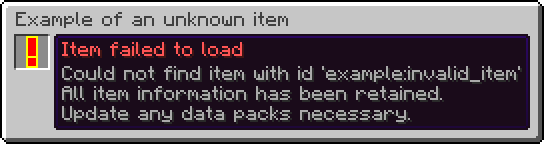
- Unknown items are now retained instead of being deleted.
- An item stack with an unknown item:
- Renders as a red exclamation mark with a yellow outline.
- Has a name and tooltip mentioning that it could not load the item.
- Displays its stack size, just like normal item stacks.
- Can stack up to their current stack size.
- For example, a stack of 30 will use 30 as its max stack size until the count is modified, such as by splitting the stack in half, in which case it will be 15 for both item stacks.
- This means that the item stack can still be moved around without snapping to a single item, while at the same time it prevents a player from accidentally overflowing item stack sizes.
- Cannot be interacted with.
- Cannot interact with other items, such as inserting it into a Bundle.
- Cannot be used to interact with blocks.
- Cannot be used to destroy blocks. (This includes Creative mode!)
- Cannot be used to interact with entities.
- Cannot be used to hit entities.
- Does not have any animations.
- Can be moved around between inventories as to not forcefully take up a slot.
- Can be dropped on the ground as to not forcefully take up a slot.
- Is not treated as an empty item stack.
- Is never considered to be equal to another item stack, even if the item id, count and data components match.
- Is treated as a disabled item stack.
- Cannot be picked up from saved hotbars.
- Cannot be modified via item modifiers.
- Removed trades.
- This has been replaced by a new system in vanilla.
## Items
- The items in `#minecraft:beacon_payment_items` are now rendered in the Beacon screen instead of using a set of hardcoded items.
- They are displayed in an automatically moving carousel going forwards and backwards.
- Each movement has a delay of 1.5 seconds.
- It only displays five items at once, just like vanilla.
- This in turn fixes [MC-235757](https://mojira.dev/MC-235757).
<br/>

## Blocks
- Added the `#minecraft:has_marker_particle` tag.
- Represents blocks that render a block marker particle at their position when holding an item that places said block.
<br/>

## Item Behaviour Components
- Expanded `minecraft:attack_blocking`.
- The `bypassed_by` field now also accepts a damage type or list of damage types in addition to a damage type tag.
- Expanded `minecraft:banner_pattern`.
- The `patterns` field now also accepts a banner pattern or list of banner patterns in addition to a banner pattern tag.
- This also means that existing entries must be changed to have a `#` in front of them.
So if you had this:
```json
{
"minecraft:banner_pattern": {
"patterns": "minecraft:pattern_item/flower"
}
}
```
You now have to use this instead:
```json
{
"minecraft:banner_pattern": {
"patterns": "#minecraft:pattern_item/flower"
}
}
```
- Removed `minecraft:dyeable`.
- Adding dye has been replaced by the new `minecraft:crafting_dye` recipe type.
- Removing dye via a Cauldron is now controlled by the `#minecraft:cauldron_can_remove_dye` tag.
- Removed `minecraft:firework_shape_modifier`.
- This has been replaced by the `shapes` field in the `minecraft:crafting_special_firework_star` recipe for direct usage.
- Expanded `minecraft:immune_to_damage`.
- The `damage` field now also accepts a damage type or list of damage types in addition to a damage type tag.
- This also means that existing entries must be changed to have a `#` in front of them.
So if you had this:
```json
{
"minecraft:immune_to_damage": {
"damage": "minecraft:is_explosion"
}
}
```
You now have to use this instead:
```json
{
"minecraft:immune_to_damage": {
"damage": "#minecraft:is_explosion"
}
}
```
- Expanded `minecraft:item_holder`.
- Added the `insert_fail_item_sound` field, which is a sound event that plays whenever a Player fails to add an item to the item holder.
## Item Events
- Adds two cancellable item events:
- `minecraft:before_use_on_block`, which is called before running the item behaviour when used on a block.
- `minecraft:before_use_on_entity`, which is called before running the item behaviour when used on an entity.
## Actions
- Action event entries gain a new format, one that allows you to cancel the original call when successful.
- Fields:
- `entry`: An action or inlined action. The actual action to run.
- `cancel_original_call_on_success`: A boolean. Indicates whether to cancel the original event call. Does not work for all events.
- The original format is equivalent to setting `cancel_original_call_on_success` to `false`.
- Note that not every event is cancellable as it is based on outside conditions.
Example:
```json
{
"minecraft:before_use_on_block": {
"cancel_original_call_on_success": true,
"entry": {
"action": {
"type": "minecraft:sequence",
"handler": "minecraft:passing",
"entries": [
{
"action": {
"type": "minecraft:set_block_state",
"position": "interacted",
"state": {
"Name": "minecraft:potted_dandelion"
}
}
},
{
"action": {
"type": "minecraft:invoke_game_event",
"event": "minecraft:block_change",
"entity": "this",
"position": "interacted"
}
},
{
"action": {
"type": "minecraft:increment_stat",
"entity": "this",
"stat": {
"type": "minecraft:custom",
"entry": "minecraft:pot_flower"
}
}
},
{
"action": {
"type": "minecraft:decrement_item",
"amount": 1
}
},
{
"action": {
"type": "minecraft:swing_hand",
"entity": "this"
}
}
]
},
"requirements": {
"condition": "minecraft:location_check",
"position": "interacted",
"predicate": {
"block": {
"blocks": "minecraft:flower_pot"
}
}
}
}
}
}
```
## Item Group Entry Providers
- Replaced the keys of item group entry types with identifiers.
- Replaced `minecraft:stack` and `minecraft:tag` with a single `minecraft:item` item group entry.
- This simplifies creating simple item stacks as they are now part of the same type.
- This means that lists of items and item tags can now be inlined as well alongside single items.
- This also means that the same data components can be applied to multiple items at once.
So if you had this:
```json
{
"id": "minecraft:firework_rocket",
"type": "minecraft:stack",
"components": {
"minecraft:fireworks": {
"flight_duration": 1
}
}
}
```
You now have to use this instead:
```json
{
"type": "minecraft:item",
"components": {
"minecraft:fireworks": {
"flight_duration": 1
}
},
"items": "minecraft:firework_rocket"
}
```
Additionally, if you had this:
```json
{
"type": "minecraft:tag",
"tag": "minecraft:item_group/wooden_building_blocks"
}
```
You now have to use this instead:
```json
"#minecraft:item_group/wooden_building_blocks"
```
Or this in case you also want to add data components to all items in the tag:
```json
{
"type": "minecraft:item",
"items": "#minecraft:item_group/wooden_building_blocks"
}
```
## `minecraft:item`
- Adds items in the specified order with an optional set of data components.
- Format:
- `items`: An item, list of items or hash-prefixed item tag. The items to add.
- `components`: An optional set of data components. The data components to add to each item.
Example:
```json
{
"type": "minecraft:item",
"components": {
"minecraft:fireworks": {
"flight_duration": 1
}
},
"items": "minecraft:firework_rocket"
}
```
## `minecraft:instrument`
- Now allows you to define an instrument or list of instruments to use, rather than just a tag.
- This means that tags require an additional `#` prefix to use them.
- Renamed the `tag` field to `instruments`.
- New format:
- `item`: An item. The item to use.
- `instruments`: An instrument, list of instruments or hash-prefixed instrument tag. The instruments to add.
So if you had this:
```json
{
"type": "minecraft:instrument",
"item": "minecraft:goat_horn",
"tag": "minecraft:goat_horns"
}
```
You now have to use this instead:
```json
{
"type": "minecraft:instrument",
"instruments": "#minecraft:goat_horns",
"item": "minecraft:goat_horn"
}
```
## `minecraft:painting_variant`
- Renamed the `tag` field to `painting_variants`.
- New format:
- `item`: An item. The item to use.
- `painting_variants`: A painting variant tag predicate. The painting variants to match and use.
So if you had this:
```json
{
"type": "minecraft:painting_variant",
"item": "minecraft:painting",
"tag": {
"id": "minecraft:placeable",
"expected": true
}
}
```
You now have to use this instead:
```json
{
"type": "minecraft:painting_variant",
"item": "minecraft:painting",
"painting_variants": {
"id": "minecraft:placeable",
"expected": true
}
}
```
## Item Modifiers
- Removed the `minecraft:dye` item modifier.
- This has been replaced by the new `minecraft:set_random_dyes` in vanilla.
- Note that this implementation is different and thus requires a different approach to achieve the same result.
So if you had this:
```json
{
"chances": [
1.0,
0.3,
0.2
],
"function": "minecraft:dye"
}
```
You now have to use this instead:
```json
{
"function": "minecraft:set_random_dyes",
"number_of_dyes": {
"type": "minecraft:sum",
"summands": [
1.0,
{
"type": "minecraft:binomial",
"n": 2.0,
"p": 0.75
}
]
}
}
```
## Predicates
### Entity Predicates
- Removed the `minecraft:villager` entity sub-predicate.
- The new data component check should be used instead.
So if you had this:
```json
{
"type_specific": {
"type": "minecraft:villager",
"variant": "minecraft:swamp"
}
}
```
You now have to use this instead:
```json
{
"predicates": {
"minecraft:villager/variant": "minecraft:swamp"
}
}
```
## Recipes
- Allowed remainders for the ingredients in the following recipe types:
- `minecraft:crafting_decorated_pot`
- `minecraft:crafting_dye`
- `minecraft:crafting_imbue`
- `minecraft:crafting_special_bannerduplicate`
- `minecraft:crafting_special_bookcloning`
- `minecraft:crafting_special_firework_rocket`
- `minecraft:crafting_special_firework_star`
- `minecraft:crafting_special_firework_star_fade`
- `minecraft:crafting_special_mapextending`
- `minecraft:crafting_special_shielddecoration`
# Fixes
- Items that are supposed to be pottable can now be potted again.
- Picking container blocks with unloadable items now creates an item stack correctly.
- Unloadable item stacks now no longer incorrectly match with empty stacks in certain places.
- Unloadable item stacks now no longer snap to a single item when moved around in an inventory.
- Placing blocks that are attached to sides now always target the appropriate side it's used on.
- Blocks with collision shapes that depend on the held item now use the correct shape.
- Item holders now render the correct occupancy in their tooltip bar when a different capacity is used.
- Item holders now no longer delete an item stack from their contents when one is already present in a Player's inventory who is in Creative mode.
beta
Itematic 0.8.0 Preview 3 for 26.1
0.8.0-preview.3+26.120 сент. 2026 г.50Minecraft: 26.1, 26.1.1, 26.1.2fabric
Что нового
## Itematic 0.8.0 Preview 3 for 26.1
### 20th of September 2026
This preview moves a few hardcoded items to tags and comes with a couple of bug fixes.
For a few more details regarding the new future you can look at the [roadmap to 26.x](https://itematic.errorcraft.net/articles/roadmap-to-26-x)!
# Changes
## Items
- The items in `#minecraft:beacon_payment_items` are now rendered in the Beacon screen instead of using a set of hardcoded items.
- They are displayed in an automatically moving carousel going forwards and backwards.
- Each movement has a delay of 1.5 seconds.
- It only displays five items at once, just like vanilla.
- This in turn fixes [MC-235757](https://mojira.dev/MC-235757).
<br/>

## Blocks
- Added the `#minecraft:has_marker_particle` tag.
- Represents blocks that render a block marker particle at their position when holding an item that places said block.
<br/>

# Fixes
- Placing blocks that are attached to sides now always target the appropriate side it's used on.
- Blocks with collision shapes that depend on the held item now use the correct shape.
- Item holders now render the correct occupancy in their tooltip bar when a different capacity is used.
- Item holders now no longer delete an item stack from their contents when one is already present in a Player's inventory who is in Creative mode.
beta
Itematic 0.8.0 Preview 2 for 26.1
0.8.0-preview.2+26.115 сент. 2026 г.31Minecraft: 26.1, 26.1.1, 26.1.2fabric
Что нового
## Itematic 0.8.0 Preview 2 for 26.1
### 15th of September 2026
This preview improves unloadable items and fixes related bugs.
For a few more details regarding the new future you can look at the [roadmap to 26.x](https://itematic.errorcraft.net/articles/roadmap-to-26-x)!
# Changes
## Items
- Unknown items now use a model instead of being rendered as-is.
- This model is built-in and thus cannot be overridden.
- This makes them more consistent with the way they are rendered and with other models and also makes them work automatically instead of needing special overrides.
- This means that they no longer face the camera in certain places.
- Item stacks with unloadable items can now properly stack up to their current stack size.
- For example, a stack of 30 will use 30 as its max stack size until the count is modified, such as by splitting the stack in half, in which case it will be 15 for both item stacks.
- This prevents them from being accidentally destroyed.
- This also means that the item stack can still be moved around without snapping to a single item, while at the same time it prevents a player from accidentally overflowing item stack counts.
- This is the case because the game cannot be certain about the actual max stack size; The item doesn't exist after all!
- Unloadable item stacks now display their count where appropriate, just like normal item stacks.

# Fixes
- Picking container blocks with unloadable items now creates an item stack correctly.
- Unloadable item stacks now no longer incorrectly match with empty stacks in certain places.
- Unloadable item stacks now no longer snap to a single item when moved around in an inventory.
beta
Itematic 0.8.0 Preview 1 for 26.1
0.8.0-preview.1+26.18 сент. 2026 г.36Minecraft: 26.1, 26.1.1, 26.1.2fabric
Что нового
## Itematic 0.8.0 Preview 1 for 26.1
### 8th of September 2026
The first preview that is part of the new versioning system for Minecraft! 🎉
I am getting closer and closer to being up-to-date with the game...
In any way, this preview keeps unknown items from being deleted and adds cancellable item events!
For a few more details regarding the new future you can look at the [roadmap to 26.x](https://itematic.errorcraft.net/articles/roadmap-to-26-x)!
# Changes
- Unknown items are now retained instead of being deleted.
- There are still bugs in this system and parts of it may change.
- An item stack with an unknown item:
- Renders as a red exclamation mark with a yellow outline.
- Has a name and tooltip mentioning that it could not load the item.
- Cannot be interacted with.
- Cannot interact with other items (such as inserting it into a Bundle).
- Cannot be used to interact with blocks.
- Cannot be used to destroy blocks (this includes Creative mode!).
- Cannot be used to interact with entities.
- Cannot be used to hit entities.
- Does not have any animations.
- Can be moved around between inventories as to not forcefully take up a slot.
- Can be dropped on the ground as to not forcefully take up a slot.
- Is not treated as an empty item stack.
- Is never considered to be equal to another item stack, even if the item id, count and data components match.
- Is treated as a disabled item stack.
- Cannot be picked up from saved hotbars.
- Cannot be modified via item modifiers.

- Removed trades.
- This has been replaced by a new system in vanilla.
## Item Behaviour Components
- Expanded `minecraft:attack_blocking`.
- The `bypassed_by` field now also accepts a damage type or list of damage types in addition to a damage type tag.
- Expanded `minecraft:banner_pattern`.
- The `patterns` field now also accepts a banner pattern or list of banner patterns in addition to a banner pattern tag.
- This also means that existing entries must be changed to have a `#` in front of them.
So if you had this:
```json
{
"minecraft:banner_pattern": {
"patterns": "minecraft:pattern_item/flower"
}
}
```
You now have to use this instead:
```json
{
"minecraft:banner_pattern": {
"patterns": "#minecraft:pattern_item/flower"
}
}
```
- Removed `minecraft:dyeable`.
- Adding dye has been replaced by the new `minecraft:crafting_dye` recipe type.
- Removing dye via a Cauldron is now controlled by the `#minecraft:cauldron_can_remove_dye` tag.
- Removed `minecraft:firework_shape_modifier`.
- This has been replaced by the `shapes` field in the `minecraft:crafting_special_firework_star` recipe for direct usage.
- Expanded `minecraft:immune_to_damage`.
- The `damage` field now also accepts a damage type or list of damage types in addition to a damage type tag.
- This also means that existing entries must be changed to have a `#` in front of them.
So if you had this:
```json
{
"minecraft:immune_to_damage": {
"damage": "minecraft:is_explosion"
}
}
```
You now have to use this instead:
```json
{
"minecraft:immune_to_damage": {
"damage": "#minecraft:is_explosion"
}
}
```
- Expanded `minecraft:item_holder`.
- Added the `insert_fail_item_sound` field, which is a sound event that plays whenever a Player fails to add an item to the item holder.
## Item Events
- Adds two cancellable item events:
- `minecraft:before_use_on_block`, which is called before running the item behaviour when used on a block.
- `minecraft:before_use_on_entity`, which is called before running the item behaviour when used on an entity.
## Actions
- Action event entries gain a new format, one that allows you to cancel the original call when successful.
- Fields:
- `entry`: An action or inlined action. The actual action to run.
- `cancel_original_call_on_success`: A boolean. Indicates whether to cancel the original event call. Does not work for all events.
- The original format is equivalent to setting `cancel_original_call_on_success` to `false`.
- Note that not every event is cancellable as it is based on outside conditions.
Example:
```json
{
"minecraft:before_use_on_block": {
"cancel_original_call_on_success": true,
"entry": {
"action": {
"type": "minecraft:sequence",
"handler": "minecraft:passing",
"entries": [
{
"action": {
"type": "minecraft:set_block_state",
"position": "interacted",
"state": {
"Name": "minecraft:potted_dandelion"
}
}
},
{
"action": {
"type": "minecraft:invoke_game_event",
"event": "minecraft:block_change",
"entity": "this",
"position": "interacted"
}
},
{
"action": {
"type": "minecraft:increment_stat",
"entity": "this",
"stat": {
"type": "minecraft:custom",
"entry": "minecraft:pot_flower"
}
}
},
{
"action": {
"type": "minecraft:decrement_item",
"amount": 1
}
},
{
"action": {
"type": "minecraft:swing_hand",
"entity": "this"
}
}
]
},
"requirements": {
"condition": "minecraft:location_check",
"position": "interacted",
"predicate": {
"block": {
"blocks": "minecraft:flower_pot"
}
}
}
}
}
}
```
## Item Group Entry Providers
- Replaced the keys of item group entry types with identifiers.
- Replaced `minecraft:stack` and `minecraft:tag` with a single `minecraft:item` item group entry.
- This simplifies creating simple item stacks as they are now part of the same type.
- This means that lists of items and item tags can now be inlined as well alongside single items.
- This also means that the same data components can be applied to multiple items at once.
So if you had this:
```json
{
"id": "minecraft:firework_rocket",
"type": "minecraft:stack",
"components": {
"minecraft:fireworks": {
"flight_duration": 1
}
}
}
```
You now have to use this instead:
```json
{
"type": "minecraft:item",
"components": {
"minecraft:fireworks": {
"flight_duration": 1
}
},
"items": "minecraft:firework_rocket"
}
```
Additionally, if you had this:
```json
{
"type": "minecraft:tag",
"tag": "minecraft:item_group/wooden_building_blocks"
}
```
You now have to use this instead:
```json
"#minecraft:item_group/wooden_building_blocks"
```
Or this in case you also want to add data components to all items in the tag:
```json
{
"type": "minecraft:item",
"items": "#minecraft:item_group/wooden_building_blocks"
}
```
## `minecraft:item`
- Adds items in the specified order with an optional set of data components.
- Format:
- `items`: An item, list of items or hash-prefixed item tag. The items to add.
- `components`: An optional set of data components. The data components to add to each item.
Example:
```json
{
"type": "minecraft:item",
"components": {
"minecraft:fireworks": {
"flight_duration": 1
}
},
"items": "minecraft:firework_rocket"
}
```
## `minecraft:instrument`
- Now allows you to define an instrument or list of instruments to use, rather than just a tag.
- This means that tags require an additional `#` prefix to use them.
- Renamed the `tag` field to `instruments`.
- New format:
- `item`: An item. The item to use.
- `instruments`: An instrument, list of instruments or hash-prefixed instrument tag. The instruments to add.
So if you had this:
```json
{
"type": "minecraft:instrument",
"item": "minecraft:goat_horn",
"tag": "minecraft:goat_horns"
}
```
You now have to use this instead:
```json
{
"type": "minecraft:instrument",
"instruments": "#minecraft:goat_horns",
"item": "minecraft:goat_horn"
}
```
## `minecraft:painting_variant`
- Renamed the `tag` field to `painting_variants`.
- New format:
- `item`: An item. The item to use.
- `painting_variants`: A painting variant tag predicate. The painting variants to match and use.
So if you had this:
```json
{
"type": "minecraft:painting_variant",
"item": "minecraft:painting",
"tag": {
"id": "minecraft:placeable",
"expected": true
}
}
```
You now have to use this instead:
```json
{
"type": "minecraft:painting_variant",
"item": "minecraft:painting",
"painting_variants": {
"id": "minecraft:placeable",
"expected": true
}
}
```
## Item Modifiers
- Removed the `minecraft:dye` item modifier.
- This has been replaced by the new `minecraft:set_random_dyes` in vanilla.
- Note that this implementation is different and thus requires a different approach to achieve the same result.
So if you had this:
```json
{
"chances": [
1.0,
0.3,
0.2
],
"function": "minecraft:dye"
}
```
You now have to use this instead:
```json
{
"function": "minecraft:set_random_dyes",
"number_of_dyes": {
"type": "minecraft:sum",
"summands": [
1.0,
{
"type": "minecraft:binomial",
"n": 2.0,
"p": 0.75
}
]
}
}
```
## Predicates
### Item Predicates
- Removed the `behavior` field.
- Appropriate data components should be used instead.
- Note that not everything can be replicated yet.
So if you had this:
```json
{
"behavior": [
"minecraft:item_holder"
]
}
```
You now have to use this instead:
```json
{
"predicates": {
"minecraft:bundle_contents": {}
}
}
```
### Entity Predicates
- Removed the `minecraft:villager` entity sub-predicate.
- The new data component check should be used instead.
So if you had this:
```json
{
"type_specific": {
"type": "minecraft:villager",
"variant": "minecraft:swamp"
}
}
```
You now have to use this instead:
```json
{
"predicates": {
"minecraft:villager/variant": "minecraft:swamp"
}
}
```
## Recipes
- Allowed remainders for the ingredients in the following recipe types:
- `minecraft:crafting_decorated_pot`
- `minecraft:crafting_dye`
- `minecraft:crafting_imbue`
- `minecraft:crafting_special_bannerduplicate`
- `minecraft:crafting_special_bookcloning`
- `minecraft:crafting_special_firework_rocket`
- `minecraft:crafting_special_firework_star`
- `minecraft:crafting_special_firework_star_fade`
- `minecraft:crafting_special_mapextending`
- `minecraft:crafting_special_shielddecoration`
# Fixes
- Items that are supposed to be pottable can now be potted again.
release
Itematic 0.7.0 for 1.21.11
0.7.0+1.21.113 авг. 2026 г.155Minecraft: 1.21.11fabric
Что нового
The final version for 1.21! This means I can finally move to 26.x and leave this mess of a versioning system and much more behind! 🎉🎉🎉
This version expands melee weapon items significantly.
A new roadmap has been made alongside this version showing what to expect and how I will migrate to 26.x as quickly as possible.
For a few more details regarding the new future you can look at the [roadmap to 26.x](https://itematic.errorcraft.net/articles/roadmap-to-26-x)!
# Changes
## Item Behaviour Components
### `minecraft:useable`
- Added an optional `effects` field.
- Its format is the same as the `minecraft:use_effects` data component.
- Provides the `minecraft:use_effects` data component.
### `minecraft:weapon`
- Added the `types` field, which is a map of melee weapon components.
- See the Melee Weapons section for more information.
- Replaced the `may_smash` field with more possibilities in the new `minecraft:smashing` melee weapon component.
- Moved the `disable_blocking_for_seconds` field to the new `minecraft:disables_blocking` melee weapon component.
So if you had this:
```json
{
"minecraft:weapon": {
"attack_damage": {
"default_damage": 5.0,
"rules": []
},
"attack_speed": 0.15,
"may_smash": true
}
}
```
You now have to use this instead:
```json
{
"minecraft:weapon": {
"attack_damage": {
"default_damage": 5.0,
"rules": []
},
"attack_speed": 0.15,
"types": {
"minecraft:smashing": {
"heavy_smash_attack_fall_distance": 5.0,
"hit_sounds": {
"in_air": "minecraft:item.mace.smash_air",
"on_ground_large_fall_distance": "minecraft:item.mace.smash_ground_heavy",
"on_ground_small_fall_distance": "minecraft:item.mace.smash_ground"
},
"knockback_power": 0.699999988079071,
"smash_attack_fall_distance": 1.5
}
}
}
}
```
Example from the Iron Spear:
```json
{
"minecraft:weapon": {
"attack_damage": {
"default_damage": 2.0,
"rules": []
},
"attack_range": {
"hitbox_margin": 0.125,
"max_creative_reach": 6.5,
"max_reach": 4.5,
"min_creative_reach": 2.0,
"min_reach": 2.0,
"mob_factor": 0.5
},
"attack_speed": 0.2631579041481018,
"damage_type": "minecraft:spear",
"minimum_attack_charge": 1.0,
"swing_animation": {
"type": "stab",
"duration": 19
},
"types": {
"minecraft:kinetic": {
"damage_conditions": {
"max_duration_ticks": 225,
"min_relative_speed": 4.6
},
"damage_multiplier": 0.95,
"delay_ticks": 12,
"dismount_conditions": {
"max_duration_ticks": 50,
"min_speed": 8.0
},
"forward_movement": 0.38,
"hit_sound": "minecraft:item.spear.hit",
"knockback_conditions": {
"max_duration_ticks": 135,
"min_speed": 5.1
},
"sound": "minecraft:item.spear.use"
},
"minecraft:piercing": {
"hit_sound": "minecraft:item.spear.hit",
"sound": "minecraft:item.spear.attack"
}
}
}
}
```
- Added an optional `attack_range` field.
- Determines the attack range and hitbox margin when trying to attack entities.
- Its format is the same as the `minecraft:attack_range` data component.
- Provides the `minecraft:attack_range` data component.
- Added an optional `damage_type` field.
- Specifies the damage type the weapon deals.
- Its format is an id pointing to a damage type.
- Provides the `minecraft:damage_type` data component.
- Added an optional `minimum_attack_charge` field.
- Specifies the minimum attack charge on the attack indicator required to attack with the weapon.
- Its format is a float ranging from 0 to 1 inclusive.
- Provides the `minecraft:minimum_attack_charge` data component.
- Added an optional `swing_animation` field.
- Allows a different animation to be used when attacking.
- Its format is the same as the `minecraft:swing_animation` data component.
- Provides the `minecraft:swing_animation` data component.
## Melee Weapons
Allows a melee weapon to be used in a specific way. Its value is a component map with melee weapon components.
### `minecraft:disables_blocking`
- Provides a way to disable an attack blocking item that is being used.
- Fields:
- `seconds`: A non-negative float. The amount of seconds to disable the attack blocking item for.
- The `disable_blocking_for_seconds` in the `minecraft:weapon` data component is still present and used to keep compatibility with existing data components.
Example:
```json
{
"minecraft:disables_blocking": {
"seconds": 5.0
}
}
```
### `minecraft:kinetic`
- Allows this weapon to have a charging attack when using the item.
- Its format is the same as the `minecraft:kinetic_weapon` data component.
Example:
```json
{
"minecraft:kinetic": {
"damage_conditions": {
"max_duration_ticks": 225,
"min_relative_speed": 4.6
},
"damage_multiplier": 0.95,
"delay_ticks": 12,
"dismount_conditions": {
"max_duration_ticks": 50,
"min_speed": 8.0
},
"forward_movement": 0.38,
"hit_sound": "minecraft:item.spear.hit",
"knockback_conditions": {
"max_duration_ticks": 135,
"min_speed": 5.1
},
"sound": "minecraft:item.spear.use"
}
}
```
### `minecraft:piercing`
- Allows this weapon to damage multiple entities along a ray instead of a single entity.
- Its format is the same as the `minecraft:piercing_weapon` data component.
Example:
```json
{
"minecraft:piercing": {
"hit_sound": "minecraft:item.spear.hit",
"sound": "minecraft:item.spear.attack"
}
}
```
### `minecraft:smashing`
- Allows this weapon to attack entities by falling on them.
- Fields:
- `hit_sounds`: A map with sounds. The sounds to play when hitting entities with a smashing attack.
- `in_air`: A sound event. The sound to play when airborne.
- `on_ground_small_fall_distance`: A sound event. The sound to play when dealing a regular smashing attack.
- `on_ground_large_fall_distance`: A sound event. The sound to play when dealing a heavy smashing attack.
- `smash_attack_fall_distance`: A positive double. The minimum distance required to fall to deal a smashing attack.
- `heavy_smash_attack_fall_distance`: A positive double. The minimum distance required to fall to deal a heavy smashing attack.
- `knockback_power`: A positive double. The maximum knockback power to deal to nearby entities when dealing a smashing attack.
Example:
```json
{
"minecraft:smashing": {
"heavy_smash_attack_fall_distance": 5.0,
"hit_sounds": {
"in_air": "minecraft:item.mace.smash_air",
"on_ground_large_fall_distance": "minecraft:item.mace.smash_ground_heavy",
"on_ground_small_fall_distance": "minecraft:item.mace.smash_ground"
},
"knockback_power": 0.699999988079071,
"smash_attack_fall_distance": 1.5
}
}
```
## Data Components
- Added the following data components:
- `minecraft:smashing_weapon`
### `minecraft:smashing_weapon`
- Specified and used by the `minecraft:smashing` melee weapon component in the `minecraft:weapon` behaviour component.
- If removed, no smash attack will be applied.
- Its value is the same as the one specified in the `minecraft:smashing` melee weapon component.
Example:
```json
{
"heavy_smash_attack_fall_distance": 5.0,
"hit_sounds": {
"in_air": "minecraft:item.mace.smash_air",
"on_ground_large_fall_distance": "minecraft:item.mace.smash_ground_heavy",
"on_ground_small_fall_distance": "minecraft:item.mace.smash_ground"
},
"knockback_power": 0.699999988079071,
"smash_attack_fall_distance": 1.5
}
```
## Predicates
### Item Predicates
- Removed the `data_components` field in favour of vanilla's component predicates.
So if you had this:
```json
{
"data_components": [
"minecraft:bees"
]
}
```
You now have to use this instead:
```json
{
"predicates": {
"minecraft:bees": {}
}
}
```
# Fixes
- Skeleton-like entities can now use any direct shooter instead of just Bows.
- Piglins and Pillagers can now use any chargeable shooter instead of just Crossbows.
- Melee weapons now correctly do not apply item damage when attacking an entity in creative mode.
- The correct sounds are now played when using a smashing weapon.
beta
Itematic 0.7.0 Preview 3 for 1.21.11
0.7.0-preview.3+1.21.112 авг. 2026 г.31Minecraft: 1.21.11fabric
Что нового
This preview version comes with a new melee weapon component and a fix for smashing weapons.
For a few more details regarding the new future you can look at the [roadmap to 26.x](https://itematic.errorcraft.net/articles/roadmap-to-26-x)!
# Changes
## Item Behaviour Components
### `minecraft:weapon`
- Moved the `disable_blocking_for_seconds` field to the new `minecraft:disables_blocking` melee weapon component.
So if you had this:
```json
{
"attack_damage": {
"default_damage": 9.0,
"rules": []
},
"attack_speed": 0.225,
"disable_blocking_for_seconds": 5.0,
"item_damage_per_attack": 2
}
```
You now have to use this instead:
```json
{
"attack_damage": {
"default_damage": 9.0,
"rules": []
},
"attack_speed": 0.225,
"item_damage_per_attack": 2,
"types": {
"minecraft:disables_blocking": {
"seconds": 5.0
}
}
}
```
## Melee Weapons
### `minecraft:disables_blocking`
- Provides a way to disable an attack blocking item that is being used.
- Fields:
- `seconds`: A non-negative float. The amount of seconds to disable the attack blocking item for.
- The `disable_blocking_for_seconds` in the `minecraft:weapon` data component is still present and used to keep compatibility with existing data components.
Example:
```json
{
"minecraft:disables_blocking": {
"seconds": 5.0
}
}
```
# Fixes
- The correct sounds are now played when using a smashing weapon.
beta
Itematic 0.7.0 Preview 2 for 1.21.11
0.7.0-preview.2+1.21.1124 июл. 2026 г.44Minecraft: 1.21.11fabric
Что нового
This preview version comes with some extensions to smashing weapons!
For a few more details regarding the new future you can look at the [roadmap to 26.x](https://itematic.errorcraft.net/articles/roadmap-to-26-x)!
# Changes
## Item Behaviour Components
### `minecraft:weapon`
- Added fields to the `minecraft:smashing` melee weapon component.
- See the Melee Weapons section for more information.
## Melee Weapons
### `minecraft:smashing`
- Now has fields that configure the way the smash attack behaves.
- Fields:
- `hit_sounds`: A map with sounds. The sounds to play when hitting entities with a smashing attack.
- `in_air`: A sound event. The sound to play when airborne.
- `on_ground_small_fall_distance`: A sound event. The sound to play when dealing a regular smashing attack.
- `on_ground_large_fall_distance`: A sound event. The sound to play when dealing a heavy smashing attack.
- `smash_attack_fall_distance`: A positive double. The minimum distance required to fall to deal a smashing attack.
- `heavy_smash_attack_fall_distance`: A positive double. The minimum distance required to fall to deal a heavy smashing attack.
- `knockback_power`: A positive double. The maximum knockback power to deal to nearby entities when dealing a smashing attack.
Example:
```json
{
"minecraft:smashing": {
"heavy_smash_attack_fall_distance": 5.0,
"hit_sounds": {
"in_air": "minecraft:item.mace.smash_air",
"on_ground_large_fall_distance": "minecraft:item.mace.smash_ground_heavy",
"on_ground_small_fall_distance": "minecraft:item.mace.smash_ground"
},
"knockback_power": 0.699999988079071,
"smash_attack_fall_distance": 1.5
}
}
```
## Data Components
- Added the following data components:
- `minecraft:smashing_weapon`
### `minecraft:smashing_weapon`
- Specified and used by the `minecraft:smashing` melee weapon component in the `minecraft:weapon` behaviour component.
- If removed, no smash attack will be applied.
- Its value is the same as the one specified in the `minecraft:smashing` melee weapon component.
Example:
```json
{
"heavy_smash_attack_fall_distance": 5.0,
"hit_sounds": {
"in_air": "minecraft:item.mace.smash_air",
"on_ground_large_fall_distance": "minecraft:item.mace.smash_ground_heavy",
"on_ground_small_fall_distance": "minecraft:item.mace.smash_ground"
},
"knockback_power": 0.699999988079071,
"smash_attack_fall_distance": 1.5
}
```
# Fixes
- Melee weapons now correctly do not apply item damage when attacking an entity in creative mode.