

InfoPanel
Customizable HUD for NeoForge 1.21.1 coordinates, FPS, compass, WAILA, light & slime overlays, structures, effect timers.
Автор: PerfLite1,3 тыс.1обновлён 10 мая 2026 г.
ДекорУтилиты
Описание
InfoPanelMod
A feature-rich HUD mod for NeoForge 1.21.1. Inspired by MiniHUD by masady.
🌟 Features
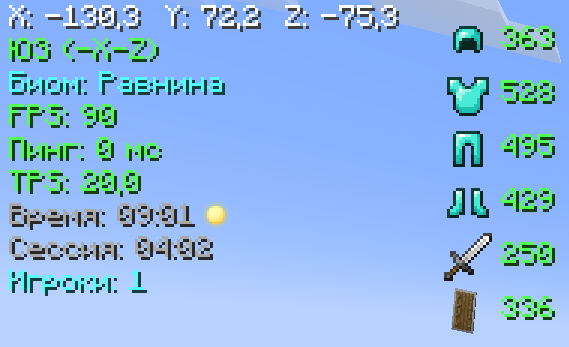
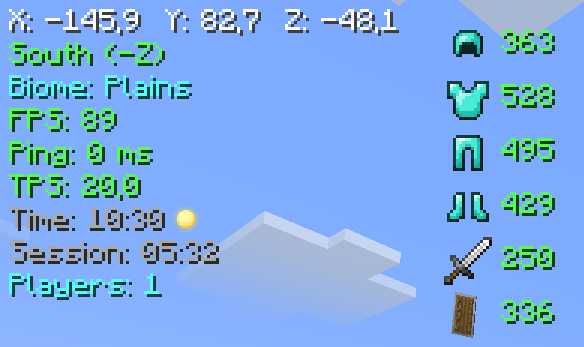
📊 Main Panel
- Coordinates (XYZ)
- Direction (compass)
- Biome
- FPS
- Ping (ms)
- TPS
- In-game time (day/night)
- Session time
- Online players count
🛡️ Item Durability
- Armor (helmet, chestplate, leggings, boots)
- Main hand weapon
- Offhand items
🧭 Compass Bar
An animated bar with 8 directions (N, NE, E, SE, S, SW, W, NW)
🧪 Effect Timers
Shows remaining duration of potion effects on their icons
🔍 WAILA (What Am I Looking At)
- Block / entity name
- Entity health (❤)
💡 Light Overlay (F7)
Highlights blocks where light level ≤ 7 (mobs can spawn)
🟢 Slime Chunks (F9)
Displays chunk boundaries where slimes can spawn
🏗️ Structure Overlay
Shows structure boundaries for:
- Villages
- Pillager Outposts
- Ocean Monuments
- Strongholds
- Desert Temples
- Nether Fortresses
- Bastions
🔧 Compatibility
- Terralith — biome name translations (Russian)
⚙️ Configuration (press Y)
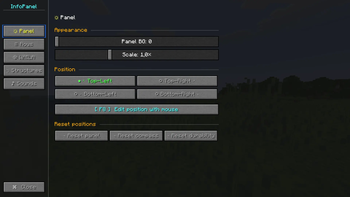
Panel Tab
- Background opacity
- Scale (0.5× – 2.0×)
- Position (4 corners)
- Drag & drop layout editor (F8)
- Reset position
Lines Tab
- Toggle any line on/off
- Custom colors for each line (13 colors)
WAILA Tab
- Background opacity
- Position (4 options)
- Block name color
Structures Tab
- Master toggle for all structures
- Individual toggles for each structure
⌨️ Key Bindings
- H — toggle HUD
- Y — open settings
- F7 — light overlay
- F8 — layout editor (drag & drop)
- F9 — slime chunks
🖱️ Layout Editor (F8)
- Drag main panel, compass bar, and durability bar
- Pulsing borders (blue — panel, yellow — compass, green — durability)
- Shows current coordinates
- Labels below each element
- Esc — save and exit
🎨 Color Palette
White, light gray, gray, red, orange, yellow, green, dark green, cyan, blue, dark blue, pink, purple.
📜 License
MIT License — free to use in any modpack.
Галерея
Последние версии
Все версии →release
InfoPanel 1.2
1.210 мая 2026 г.1,2 тыс.Minecraft: 1.21.1neoforge
Что нового
# InfoPanel Mod — Changelog
### Loot/Item Pickup Log
- Displays picked up items in a corner of the screen: `+3 🪨`
- **Fade-out animation** — smoothly fades away at the end of its lifetime
- Custom background: **sharp left corner**, **rounded right corner**
- Position adjustable via **F8** (purple bounding box in the editor)
- Configurable settings (under the "Lines" tab):
- Enable/Disable
- Background opacity (0–255)
- Max number of entries (1–20)
- Display duration (2–20 seconds)
- Scale (0.5×–2.0×)
- Reset position
release
InfoPanel 1.1
1.110 мая 2026 г.39Minecraft: 1.21.1neoforge
Что нового
# InfoPanel Mod — Changelog
## Localization and Language
- Entire mod UI translated to **Russian and English** languages
- Language is automatically detected based on Minecraft settings
- All strings moved to `assets/infopanel/lang/en_us.json` and `ru_ru.json`
- Removed hardcoded strings from Java code — now uses `I18n.get("key")`
---
## HUD Panel
### Direction
- Replaced letter designations `(S)`, `(N)`, `(E)`, `(W)` with **coordinate axes**:
- North → `+Z`, South → `-Z`, East → `+X`, West → `-X`
- Diagonals: `NE (+X+Z)`, `SW (-X-Z)`, etc.
### Game Time
- Added **sun and moon icons** (`icon_sun.png`, `icon_moon.png`) from `assets/infopanel/textures/`
- Day (ticks 0–12999) → sun icon
- Night (ticks 13000–23999) → moon icon
- Icon rendered after time text
---
## WAILA (What Am I Looking At)
### Blocks
#### Plants
- Shows **growth level**: `Growth: 4 : 7 ✔ Ripe`
- Works for any block with `age` property (wheat, carrots, potatoes, beetroot, etc.)
#### Redstone
- **Wire:** `Signal: 11 : 15`
- **Repeater:** `Delay: 2 ticks [ON]`
- **Comparator:** mode (Comparison/Subtraction) + state + signal
#### Furnaces / Smokers / Blast Furnaces *(singleplayer only)*
- Shows **block icon** + name
- Item line: `[input item] → [result]` with progress bar
- Fuel icon + item count in fuel slot (`x64`)
- Data read from server `BlockEntity` via server thread
#### Beehives / Bee Nests
- **Honey level:** `Honey: §e3/5`
- **Bee count:** `Bees: §b2/3` (green if hive is full)
- Data read from server `BeehiveBlockEntity`
#### Cauldrons
- Empty cauldron: `Empty`
- Water/snow: `Water: 2 : 3`
- Lava: `Lava (full)`
#### Portal Coordinates
- When pointing at a portal block, shows coordinates in **another dimension**:
- In Overworld → `Nether: X: 125 Z: -64`
- In Nether → `Overworld: X: 1000 Z: -512`
- Conversion: Overworld ↔ Nether × 8
### Mobs
#### All Living Creatures
- Shows **mob portrait** (3D render via `InventoryScreen`)
- HP: `❤ 18 : 20`
#### Villagers
- Name = **profession** with color by level:
- Level 1 (Novice) — §7 gray
- Level 2 (Apprentice) — §f white
- Level 3 (Journeyman) — §a green
- Level 4 (Expert) — §b light blue
- Level 5 (Master) — §6 gold
- Level shown in parentheses: `(Journeyman)`
- Level read from server entity — always up to date after trading
---
## Portal Sounds
New **"Sounds"** tab in mod settings:
| Setting | Description |
|---------|--------------|
| Portal hum (on/off) | `block.portal.ambient` |
| Hum volume (0–100%) | Slider |
| Teleport sound (on/off) | `block.portal.trigger` + `block.portal.travel` |
| Teleport volume (0–100%) | Slider |
Implemented via `PlaySoundEvent` (NeoForge) with `VolumeScaledSound` delegate.
---
## Settings Screen (GUI)
Completely redesigned:
### New Design
- **Left navigation panel** (~88px) with category icons: `⚙ ☰ ◎ ⬡ ♪`
- **Right content area** with active tab header
- Dark background without standard MC texture
- Buttons **fit text width** (not stretched to full width)
- Position buttons with indicator `●`/`○`
### Keys
- **Y** — open/close settings (repress closes)
- **Esc** — close settings
### Tabs
1. **Panel** — background, scale, position, reset positions (panel/compass/durability)
2. **Lines** — two columns, toggles + color buttons for each HUD line
3. **WAILA** — background, position, block name color
4. **Structures** — master toggle + structure list
5. **Sounds** — portal sound settings
## Position Editor (F8)
- Removed **screen blur** when opening
- Translated hints and labels to both languages
---
release
InfoPanelMod 1.0
1.08 апр. 2026 г.60Minecraft: 1.21.1neoforge