

iCraft
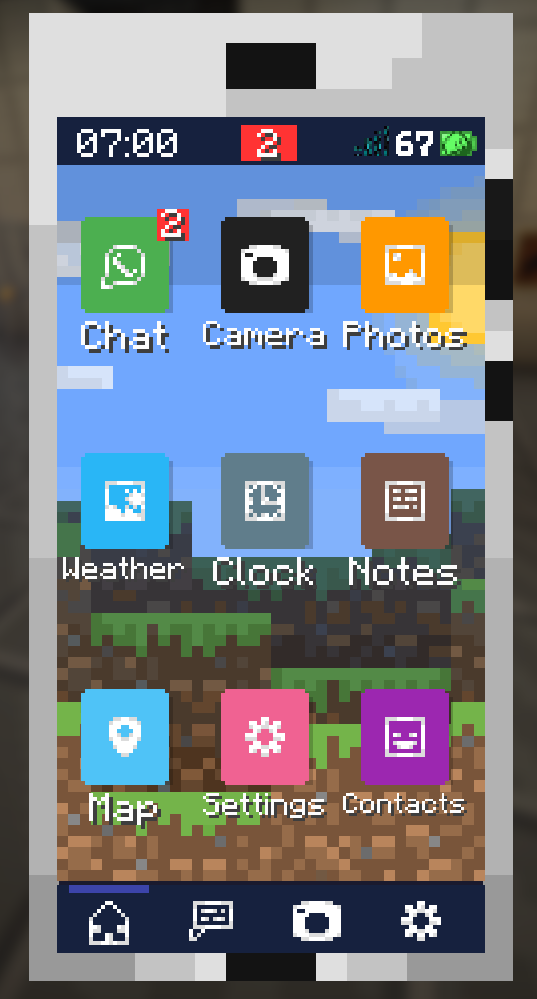
A functional smartphone inside Minecraft. Take photos, chat with players, check the weather, use a map, manage contacts, and more — all from your in-game phone.
Автор: Los_Tomobri1,5 тыс.7обновлён 27 июл. 2026 г.
Механики игрыОбщениеУтилиты
Описание
📱 iCraft — A Smartphone Inside Minecraft
iCraft adds a fully functional smartphone to your Minecraft world.
Chat with players, take photos, check the weather, make calls, and much more — all from your in-game phone.
✨ Features
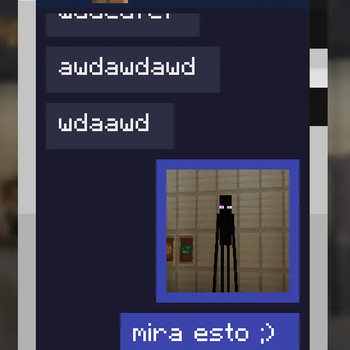
- 💬 Chat — Send and receive messages with other players on the server in real time.
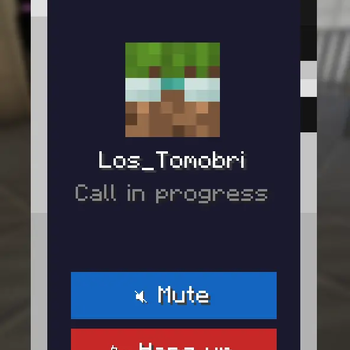
- 📞 Calls — Make voice calls to other players directly from Contacts (requires Simple Voice Chat).
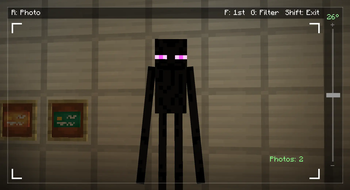
- 📷 Camera — Take photos of your world with filters and save them to your gallery.
- 🖼️ Gallery — Browse your saved photos, share them in chat, send them to the printer, or delete them.
- 🖨️ Printer — Print your photos using the printer block. Requires printed paper as a material. The printed photo can then be hung on the wall as a painting.
- 🌤️ Weather — Check current and upcoming weather conditions.
- 🕐 Clock — See the Overworld time, day count, and your real local time.
- 🗺️ Map — View your world map with your current position (requires Xaero's Minimap).
- 📝 Notes — Write and save personal notes that persist between sessions.
- 👥 Contacts — See which players are on the server and their connection status, and message or call them directly.
- 🔔 Sounds — Configure notification, call, and click sounds from a single Sounds tab, with instant preview. Includes Do Not Disturb.
- 🎨 Themes & Cases — Customize your phone's color, browse wallpapers from a thumbnail gallery, and change your phone's physical case from your inventory.
- 🔒 Lock Screen — A lock screen greets you every time you open the phone.
- ⚙️ Settings — Customize your phone: theme, wallpaper, sounds, icon editor, and more.
🛠️ Server Commands
| Command | Description |
|---|---|
/icraft chat <on|off> | Enable or disable vanilla Minecraft chat alongside iCraft's chat. |
/icraft images <on|off> | Enable or disable sharing photos to the global chat. |
/icraft adminmessage <text> | Send a system message to the global chat (supports color codes with &). |
/icraft sendphoto <file> | Send an admin photo to the global chat. |
/icraft clearchats | Clear the chat on all connected clients. |
To use /icraft sendphoto, first drop your .png image into the iCraft/admin_photos/ folder inside your world save. Once it's there, the command will auto-suggest the filename and broadcast it to the global chat. Max image size: 512 KB.
🚀 How to get the phone
Currently in Beta, the phone is obtained via command: /give @s icraft:smartphone
🔧 Dependencies
| Mod | Required | Notes |
|---|---|---|
| Fabric API | ✅ Yes | Required |
| Architectury API | ✅ Yes | Core library after the Architectury migration |
| SkinRestorer | ✅ Yes | Client & server mod |
| Xaero's World Map | ⚠️ Optional | Required for the Map app |
| Simple Voice Chat | ⚠️ Optional | Required for the Call feature |
iCraft is designed to be compatible with economy and payment mods — let players create their own in-game transactions.
Галерея
Последние версии
Все версии →beta
iCraft - Fabric - 1.21.1 - V0.3.2
1.21.1-V0.3.227 июл. 2026 г.741Minecraft: 1.21.1fabric
Что нового
# iCraft V1.21.1-0.3.2
## Fixed
- ...
## Added
- Lock screen shown when opening the phone (Decorative)
- Incoming calls now ring with a real, positional sound that nearby players can hear too
- Notification when the timer finishes
## Changed
- The "muted" call notice is now shorter and more direct
- Incoming calls no longer force-open the phone screen; opening the phone during a call now takes you straight to the incoming call screen
- Removed the white color in the icon editor
- Improved weather app
- Code migrated to Architectury API (A very big change)
beta
iCraft - Neoforge - 1.21.1 - V0.3.2
1.21.1-V0.3.227 июл. 2026 г.563Minecraft: 1.21.1neoforge
Что нового
# iCraft V1.21.1-0.3.2
## Fixed
- ...
## Added
- Lock screen shown when opening the phone (Decorative)
- Incoming calls now ring with a real, positional sound that nearby players can hear too
- Notification when the timer finishes
## Changed
- The "muted" call notice is now shorter and more direct
- Incoming calls no longer force-open the phone screen; opening the phone during a call now takes you straight to the incoming call screen
- Removed the white color in the icon editor
- Improved weather app
- Code migrated to Architectury API (A very big change)
beta
iCraft 1.21.1-V0.2.1
0.2.124 июл. 2026 г.45Minecraft: 1.21.1neoforge
Что нового
# iCraft V1.21.1-0.2.1
## Fixed
- Toast/notifications repeating old messages on world join
- Notification sound setting didn't actually play any sound — it only changed a label, no audio ever existed behind it
- Chat messages overlapping the header when scrolling
- Global chat showing up as a share destination in the photo gallery's send menu, even though sending to it was never actually allowed
- Printed photos showing mirrored
- Last row of photo gallery hidden behind nav bar
- Removed black vignette border shown when zooming in with the camera
- Icon Editor buttons with long labels overlapping each other instead of shrinking to fit
- Wallpaper backgrounds appearing stretched or distorted in some situations
- Managed margin improvement
- Stray black line showing on the edge of the phone screen at some UI scales
- "Share to..." menu looking cramped, with the Cancel button overlapping the contact list
## Added
- `/icraft chat <on|off>` command to enable/disable vanilla Minecraft chat
- Real notification sounds
- New sounds (notification, call, and clicks)
- Sounds section redesigned: now managed from a single tab, with 3 configurable sounds (notification, call, and clicks)
- "None" option for notification sound, to keep notifications completely silent
- Notification sound now plays a short preview right when you change it in Settings
- Cases
- Integration with voice chat, enabling calls to be made
- Dedicated weather icons for each condition (clear/rain/storm) and time of day (morning/afternoon/night/dusk), replacing the single icon used everywhere before
- Option to delete photos directly from the phone, which also removes the actual photo files from your local PC
- `/icraft globalphotos <on|off>` command to enable or disable sharing photos to the global chat
## Changed
- Phone UI buttons now use a custom texture, instead of the vanilla Minecraft button and are tinted with the phone's active theme color blue/green/purple/pink/red/orange
- Extended color palette for themes and app icon colors
- Color picker in themes
- Buttons improved
- Removed unnecessary text
- New screen with thumbnails of all backgrounds
- The redundant preview that remained in Settings was removed
- "Forest" background renamed to "Troll"
- Cases are changed from the inventory, not on the phone anymore
- Changing the casing is now a physical process; it can no longer be done via the settings
- "Do Not Disturb" moved in Sounds section
- Icon Editor's preview now shows the app's actual icon instead of repeating its name as text
- Default icon colors changed for Map (now light blue) and Settings (now pink)
- The option to edit app names was removed
- Photo viewer now shows a readable date/time parsed from the filename (filename itself unchanged)
- Notes app improved
- In Contacts, there are two options when selecting a user (send message or call)
- Modified preview animation for camera filters (Bat and Enderman)
- Space optimization (code, images, etc.)
beta
iCraft 1.6.23
0.1.126 июн. 2026 г.116Minecraft: 1.21.1neoforge
Что нового
**First beta**